
FL-300R - External Flash OLYMPUS - Free user manual and instructions
Find the device manual for free FL-300R OLYMPUS in PDF.



| Product type | External flash |
| Brand | OLYMPUS |
| Model | FL-300R |
| Power supply | 2 AAA batteries (alkaline or NiMH) |
| Guide number (ISO 100) | 20 |
| Guide number with wide-angle diffuser (ISO 100) | 12 |
| Illumination angle | Covering 14mm lens (equiv. 28mm in 135); with diffuser: 9mm (equiv. 18mm) |
| Flash modes | TTL-AUTO, MANUAL, RC |
| Flash duration | Approx. 1/20000 to 1/500 s |
| Number of flashes (alkaline batteries) | Approx. 80 |
| Number of flashes (NiMH batteries) | Approx. 130 |
| Recycle time (alkaline batteries) | Approx. 5.5 s |
| Recycle time (NiMH batteries) | Approx. 4.5 s |
| Dimensions (W × H × D) | 56.4 × 89.2 × 26.9 mm |
| Weight (without batteries) | 97 g |
| Operating environment (temperature) | -10 to 42 °C |
| Operating environment (humidity) | 20 to 90% RH |
| Main functions | TTL-AUTO, MANUAL, wireless RC, tilt forward/backward, built-in wide-angle diffuser |
| Cleaning | Wipe with a soft, dry cloth. Do not use solvents. |
| Safety | Do not use in explosive atmosphere; do not disassemble; avoid contact with eyes; do not use inappropriate batteries. |
Frequently Asked Questions - FL-300R OLYMPUS
User questions about FL-300R OLYMPUS
0 question about this device. Answer the ones you know or ask your own.
Ask a new question about this device
Download the instructions for your External Flash in PDF format for free! Find your manual FL-300R - OLYMPUS and take your electronic device back in hand. On this page are published all the documents necessary for the use of your device. FL-300R by OLYMPUS.
USER MANUAL FL-300R OLYMPUS
IMPORTANT SAFETY INSTRUCTIONS
When using your photographic equipment, basic safety precautions should always be followed, including the following:
- Read and understand all instructions before using
- Head and understand all instructions before using.
- Close supervision is necessary when any flash is used by or near children. Do not leave flash unattended while in use.
-
Care must be taken as burns can occur from touching hot parts.
-
Do not operate if the flash has been dropped or damaged - until it has been examined by qualified service personnel.
- Let flash cool completely before putting away.
- To reduce the risk of electric shock, do not immerse this flash in water or other liquids.
- To reduce the risk of electric shock, do not disassemble this flash, but take it to qualified service personnel when service or repair work is required. Incorrect reassembly can cause electric shock when the flash is used subsequently.
- The use of an accessory attachment not recommended by the manufacturer may cause a risk of fire, electric shock, or injury to persons.
SAVE THESE INSTRUCTIONS
Thank you for purchasing this Olympus product. To ensure your safety, please read this instruction manual before use, and keep it handy for future reference.
Names of parts (Fig. 1 p. 3)
① Light-emitting area
② Lock release button
③ Lock pin
④ TEST button/CHARGE lamp
⑤ AUTO CHECK lamp
⑥ ON/OFF button
⑦ W knob
⑧ RC switch
Remote sensor
Continuous firing
The flash may become hot when fired many times in succession, resulting in damage or malfunction. The flash should be fired no more than 10 times in succession at intervals of 6 seconds, after which it should be left unused for at least 10 minutes.
Preparing a battery (sold separately)
Choose from the below batteries:
- AAA (R03) alkaline batteries (x 2)
- AAA (R03) NiMH batteries (x 2)
Notes
AAA (R03) manganese batteries cannot be used.
Loading batteries
1 Open the battery compartment cover.
2 Insert the batteries with correct +/- polarity.
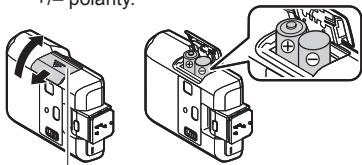
Battery compartment cover
3 Close the battery compartment cover.
Notes
Confirm that both the camera and electronic flash are off. Attaching or removing the electronic flash while either the flash or the camera is on may result in malfunction.
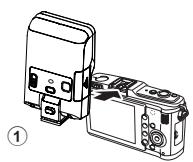
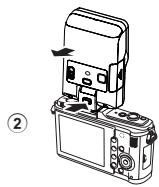
1 Remove the camera hot shoe cover and slide the flash securely into the hot shoe until it clicks into place (①).
Do not attach this flash with the built-in flash raised, or the built-in flash may get broken.
- Remove the flash while pressing the lock release button (②).
If the camera has an external flash connector, a flash bracket and bracket cable (sold separately) can be attached.
Turning on the electronic flash
Attach an electronic flash to the camera, and then turn the camera on.
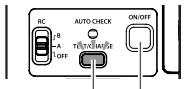
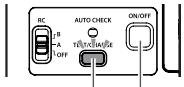
TEST button/ CHARGE lamp
ON/OFF button
1 Press and hold the ON/OFF button until any lamp lights.
- Press the ON/OFF button again to turn the power off.
-
Press the TEST button to fire a test flash when the CHARGE lamp lights.
-
Replace the batteries if the CHARGE lamp does not light after: 30 seconds (Alkaline batteries) 10 seconds (NiMH batteries)
- If the CHARGE lamp and AUTO CHECK lamp blink simultaneously, batteries are running low. Replace the batteries.
- If no operations are performed for about 15 minutes, the flash will enter sleep mode to save power. The flash will also enter sleep mode whenever the camera enters sleep mode. If no operations are performed for approximately 60 minutes more, the flash will turn off automatically. Press the ON/OFF button to turn it on.
Shooting
According to the flash mode setting of the camera, shooting in TTL-AUTO mode or MANUAL mode is available with this flash.
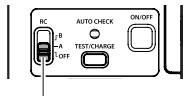
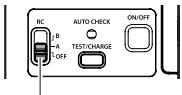
RC switch
1 Set the RC switch to "OFF".
2 In accordance with the intended use, set the flash mode of the camera.
For details, refer to the instruction manual of the camera.
MANUAL mode is not available for some cameras.
- In TTL-AUTO mode: When flash activation has been performed correctly, the AUTO CHECK lamp blinks for about 5 seconds after the shooting.
- In MANUAL mode: Adjust camera settings (ISO sensitivity and aperture value) based on the distance to subject and then shoot.
Shooting distance (m) = Guide No. (ISO100) x ISO sensitivity coefficient ÷ Aperture value Available shooting range (Table 2 P.4)
ISO sensitivity coefficient
| ISO sensitivity | 25 | 50 | 100 | 200 | 400 | 800 | 1600 | 3200 | 6400 |
| Coefficient | 0.5 | 0.71 | 1.0 | 1.4 | 2.0 | 2.8 | 4.0 | 5.6 | 8.0 |
- When using a flash, flash light may be blocked by the lens body, lens hood, etc.
- When the shooting distance is closer to 1m, using the wide panel is recommended not to control the flash volume too much.
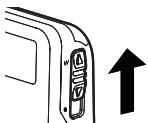
Wide angle
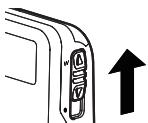
Use the wide panel for shooting when the lens focal length is wider than 9mm to 14mm .
1 Slide the W knob to the W side.
Folding
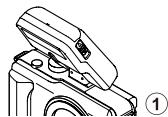
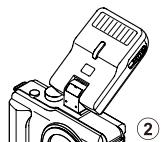
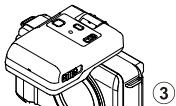
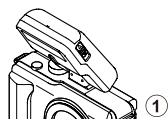
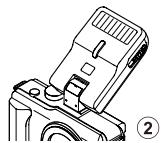
This flash can be bent approx. 30 degrees in front (①) and 60 degrees in rear (②).
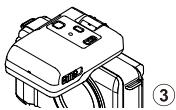
It also can be folded in front to make it easier to carry the camera with the flash attached (3).
The flash does not fire when folded in front.
Approx. 30 degrees in front: Used for macro shooting.
Approx. 60 degrees in rear: Used for bounce shooting.
1 Set the RC switch to A or B.
- A and B are the group settings. Set the flash control mode, etc. to each groups and control them wirelessly.
2 Set [RC Mode] to [On] in the menu of the camera to make the flash on the camera ready to fire.
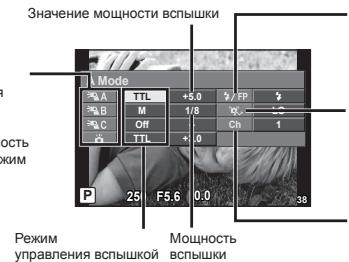
3 Set the flash control mode, etc. in each of the groups A and B on the camera.
Group
- Select the flash control mode and adjust the flash intensity individually. For MANUAL, select the flash intensity.
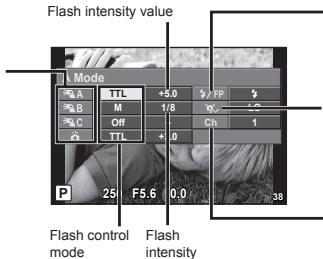
Normal flash/Super FP flash
Super FP flash is not compliant.
Communication light level
- Set the communication light level to [H], [MID], or [LO].
Channel
- Be sure to set the channel to [1].
Since the communication is performed with the flash emission of the camera, the flash positioning range varies with camera.
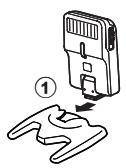
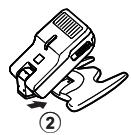
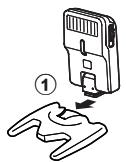
1 Attach the stand provided.
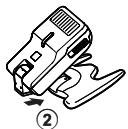
- Slide the flash securely into the stand until it clicks into place (①). Press the shoe lock release button to remove the flash.
When using it for bounce, be careful not to drop off the stand (2).
2 Position the flash facing the desired direction.
Instead of using the stand, you can also shoot simply holding the flash.
Notes
- The built-in flash can not be used as a light source in RC mode.
- We recommend using a single group of up to three remote flash units.
- Flash may not fire due to the angle or distance between the camera and the object. Take a test shot after positioning.
Safety precautions
Read WARNINGS and CAUTIONS thoroughly to ensure safe usage. These safety precautions protect the users and others and prevent property damage.

WARNING
Failure to observe the precautions indicated by this symbol may result in injury or death.
- Do not use product or flash or just omit in places where it may be exposed to flammable or explosive gas. Otherwise, fire ignition or explosion may result.
- Do not directly solder the product or modify, remodel, or disassemble.
- Do not cover the light emitting area of the flash with your hand, and do not touch the light emitting area after continuous firing. It may burn your skin.
- Water and foreign matter inside of the device may cause fire or electric shock. If the device is immersed in or exposed to water or foreign matter is found inside of the device, turn off the power immediately and remove batteries with care. Contact your dealer or consult an Olympus Authorized Service Station.
- To prevent a traffic accident, do not direct the flash at a person operating a motor vehicle.
- Do not use a flash close to the subject's eyes; particular care should be observed when photographing infants. Do not leave the flash within the reach of children. The flash light may cause vision disability.
- Do not use batteries that are not specified for use.
- Do not mix old and new batteries, or batteries made by different manufacturers.
- Do not connect substances such as metal to the (+) or (-) of batteries.

CAUTION
Failure to observe the precautions indicated by this symbol may result in injury or property damage.
- If you notice any abnormalities such as odor, noise, or smoke, stop using this device. Otherwise a fire or burn may result. Remove the batteries carefully to avoid burning yourself, and contact your dealer or consult an Olympus Authorized Service Station.
- Do not operate with wet hands. This may cause malfunction or electric shock.
European technical Customer Support
Please visit our homepage http://www.olympus-europa.com
or call: Tel. 00800 - 67 10 83 00 (Toll-free)
+49 180 5 - 67 10 83 or +49 40 - 237 73 4899 (Charged)
For customers in Europe

The "CE" mark indicates that this product complies with the European requirements for safety, health, environment and customer protection. CE-mark products are for sale in Europe.

This symbol [crossed-out wheeled bin WEEE Annex IV] indicates separate collection of waste electrical and electronic equipment in the EU countries.
Please do not throw the equipment into the domestic refuse.
Please use the return and collection systems available in your country for the disposal of this product.
Specifications
| MODEL NO. | : FL-300R |
| Product type | : External electronic flash for digital still camera |
| Guide number | : 20 (ISO 100), 12 (ISO100, using the wide panel) |
| Firing angle | : Covering the field angle of 14mm lens (equivalent to 28mm on a 135mm) Covering the field angle of 9mm lens (equivalent to 18mm on a 135mm): Using the wide panel |
| Flash modes | : TTL-AUTO, MANUAL, RC |
| Flash emission period | : Approx. 1/20000 to 1/500 seconds |
| Flash emission count (at full activation)* | : Approx. 80 times (using AAA (R03) alkaline batteries) Approx. 130 times (using AAA (R03) NiMH batteries) |
| Recharge time | : Approx. 5.5 seconds (using AAA (R03) alkaline batteries) Approx. 4.5 seconds (using AAA (R03) NiMH batteries) (from full activation to CHARGE lamp lighting)* |
| Operating environment | : Temperature: -10 to 42°C (14 to 108°F) Humidity: 20 to 90% |
| Dimensions | : 56.4 (W) × 89.2 (H) × 26.9 (D) mm (2.2 × 3.5 × 1.1 in.) (excluding protrusions) |
| Weight | : 97 g (3.4 oz.) (excluding batteries) |
- Measurements obtained from in-house tests at Olympus. Actual figures may vary depending on shooting conditions.
Specifications are subject to change without any notice or obligation on the part of the manufacturer.
Normal flash/super FP-flash
Super FP-flash er/DDE kompatibel.
Super FP-flits is not compatible.
of bel: Tel. 00800 - 67 10 83 00 (gratis)
+49 180 5 - 67 10 83 of +49 40 - 237 73 48 99 (volgens tarief)
HaMeHOBaHnO CoCTaBbIX YacteI (PMc.1 ctp.3)
① OCHOBHOI
I3nyuaoiun 3JemeHT
② KhoNka pa36bokmpoBKN
③ ΦHKCaTop
④ KhoIIKA TECTOBOKA KTHBAUIM
1 CHIMITE KpbIiKy "Topyero Baumaka" FOToaIInapaTn 3aJbINbTe 3NEKTOHHU BCbIiKy BHe3do "Topyim Baumak" Do ueNka npEe yCTAHOBKe Ha MeCtO (①).
He npinkpenpIe 3Ty BCbIuKpy npn NOpHraTOn BCTPOEHHO BcIIuKe-3TO MOKeT pINBecTn K ee NOBpeXdHIO.
- CCHMITE BCbIbIcK, HnXaB Ha KHNkY pa36bnokpOBKn (2).
EcnI pOToaannapat O6pyDobAH THe3Dom Iy BHeuHcN BcblIKN, 3JKeTPOHHyO BCbIbIKY MOxHO NpDKJIIOHTb C NOMoubI KoPHoTMeHa n KaBeIa KPOHtMeHa (npOdaIOTcA OTdIbHo).
IqKIOHHTe 3NEKTPOHOHY BCbIbIKY K FOToaIINpAry, 3aTEM BKNIOHTe ERO IINTAHNE C yuctAHOBENHOr BCbIbIKYo
KHONKA TECTOBOI AKTINBAUMI
KhONKa ON/OFF
TEST/NTMdkatop 3aqrkch CHARGE
1 Haxmnte u yedeKnBaIte HaxaToH KhONky ON/OFF, noka He 3aTOpNTcOIMN UIN INdikatopOB.
- TtO6bl BykIKNOHb 3NeKtPOHHYBO CBNBIIHKy, NOBTOPH KANMITE KHONIK ON/OFF.
KoIa 3arOpITcH INdMkATOp 3apAckn CHARGE, HAKMNTE KONKY TEST dIe TECTOBO akTbuaCIN BCbluKN.
Ecnns Bcblklnnndnkatop CHARGE He 3arogntc ChOBa, cneyet 3ameHnB 3meMeHbI nHTAHN: 30 ckynd (lneonohhe 6atapen) 10 ckynd (NiMH 6atapen)
ECNI OJHOBPEMEHNO MIAOT lamblb INHINKATOPA 3aapdIKI CHARGE IN HINIDIKATOPA npOBEPKI AUTO CHECK, 3TO kyaBtaibra HnNkHn yOpyeBb 3apda 3nEMEHTOB nITNAHNA. 3aMHeJIte Bataepae.
- EcnB TceHHe 15 MHyT He BbONPiHReTCa HNKaXx DeIcTBn, BCbIaKa nepeXoNDt B "CpAun" pEXmD nJ4 KIOHOMM3eRPMn. BCbIaKa TAKKe BxOaNt B "CpAun" pEXmP npn nepExode foaoannapaba T3OT pEXm. EcnB CpaIeM pEXmBe TceHHe 60 MHyT He BbONPiHReTCa HNKaXx DeIcTBn, BCbIaKa ABTOmatNueCKn BbIKIOaTeC. YTObbl BKIOHTb 3JIeKTPoHnyo BCbIaKy, HaxMMte KHOKNy ON/OFF.
B 3ABCINMOCTO NT yctahOBHNEHORO HA KAMEPE PEXKIMA BCblHKI, CbEMKA MOKET BblIOHNrTcB R PEKIME TTL- AUTO INN MANUAL.
Ipeekliouatelb RC
1IpebeeTe nepekIIOuATEb RC B noJooKeHne "OFF".
2B 3aBcIMoCTn OT ycNOB n CbeMKn BblOpTe pexIM BCblIKK kamepbI.
Дл поунения подособи Инормалци CMOTPITE pyKOBIDCTBO NO ekCnIpyatauani KAMEbpI.
PekIM MANUAL MOKET 6bItb HeoCTyHbIM Ha HEkToOpBix KaMepax.
B-PeximheTTL-AUTO: Ecsn AkthBaunia BcblbIcko bbla BblnoHHe npaIbnHo, naMaHnDnKdKatop AUTO CHECK 6ydt MerIbTaPnEHP0 5 cekHynOne cncyKa 3aTbOpA.
B-Pekimche MANUAL: YctahOBHe napeAMetpy kamepeby (YbCtBtEnbHcO7 ISO n DnAcbpaMy) Na OCHOBAHIN PACCOTNAAO Do EkeBaTc eDcnai TchIMOK.
PacCTOHNE DO 6bEkaT (M) =37aTOHOHHE 3HAeHHe (ISO100) x Ko3ΦHmEHT YCbETBNTeBHOCHT ISO + 3HAeHNe DnAqpaMbI
IocTyHbIe Dnana30HbI CbEMKn (Tabnua 2C.4) YBCTBNTeJIbHOCTb ISO n ee Ko3oФdNueHeTb
| ЧьвICTВИЕЛБностб ISO | 25 | 50 | 100 | 200 | 400 | 800 | 1600 | 3200 | 6400 |
| КоэффиNWENT | 0,5 | 0,71 | 1,0 | 1,4 | 2,0 | 2,8 | 4,0 | 5,6 | 8,0 |
- Pnp nCnObl3OBaHm BCblIckn B03MOXHO NOBJIeHne TeHeN OT ObbektBa, bJeHdbI ObbektBa n T.I.
PcIbCMeKHe na cactoTHHn MEHee 1 M pekOMeHdyETc IcNpOJIbOBAHme 6beOnI naHEnI BO n36ExAHmE IaBbTOrTOHO OCBSeHJeHn.
Unpokn yron
ПгпсБЕМСКВОТКОФСКИЗМИЗБКИТВОМ(DПИНА ДФКСА OR 9 MM DO 14 MM)ICNTOBAYE PACINHURSOYU NOBJIAE.
1 PepemecHTe nepekIIOuateBb W bnoJooKeHne W.
CknabBaHne
3Ta BCbIbka MOKET KaHIOJIbTcR pNIMePHO Ha 30 rpaDycoB BpePeD (①) H Na 60 rpaDycoB haaad (②).
Oha TAKCe MOKET cKnIbIbBaTcR BpePeD IaR oBleNeHEnHa nepeHoCKn KAMepbC pNkPepIeHHoB BCbluKo.
B CNOKeHOM COCTOaHm BCblIbka He paOtaet (③).
PpIM. 30 rpaDycoB BpePeD IcNpOlb3yETcR pN MaKpOcBEmke.
PpIM. 60 rpaDycoB Haaad: IcNpOlb3yETcR pN CbEmke C OtpaKeHHbIM CBETOM.
1IpebeTe nepeKJIOuateIb RC b noLoKeHne A nIIN B.
A n B -3to rpynnobblte hactpoKn. UctanohBite pexm m npabneHnBcblko, n np. Jnla kaxdoi rpynnbI c bcenpoBdHm ynpabneHnEeM.
2ДяpoIROTOBKN BCbIuKHa KaMepe K CbeMKe yCTaHOBnTe IЯpyHKTa [PexIM Dy] 3haueHne [BKn.] B MeHIO KaMepbl.
3 UctahOBInTe pexkIM ynpabHeHnBcblskoN, n np. dIy rpynn A u B ha KaMepe.
Pynna
- BvBop pexMHJ
ynpAbeHHa
BCbIbIKoH
INHIDIBuayJIbHa
hACTpOka
INTHECMBOHCT.
BvBepTeMoUHOCTb
BCbIbIKoIJIpeKPMANUAL.
ObHHaB BCbIbIka/BcblbIka Super FP
- BCnbIkwA Super FP He coBmectnMa.
CoobueHne ypoBn oCbeueHHocTn
• YCTAHOBITE 对藻YHCHUO cooBSeHHy OyoBBH OCBeueHHOCTH 3aHHeHE [HI], [MID] iIN [LO].
Kahan
- YctahOBInTe KaHaN - [1].
Tak KaC BcBb. OCUyCTBnTETC T pyTEM pNMe IaIyUeHnE BCbnBkKamebp, To DnaIa3OH paONOJOEHn BCbnBkU 6bETD 3ABcETB ON kAMEbp.
1ПикpeniteштавИЗКOMплкета noctabKIM.
- PtoyHO BCTABBe BCbluKy B USTATIN Do ⅢeNtKa
(1). HaxMITE Ha KHONky pa3bOknOpBOKn
baUMAKA, YTO6BI ChTBy BCbluKy.
① Пи Исплььзовандлг Оразженио Овсяшений福建省 Будтесорожимь - He урочи шатчВ (②).
2 HanpaBbTe BCnblkUy B Tepeyemom HanpaBneHm.
BmecTo nCIOJIb3OBAHnIaTnBa, Bbl MoKTe npocTo dpKaTb BCnbIiKy By pyKaX.
Ппмочань
BpeKIMe RC BCTpOeHHa BCbIiKa He MOKeT INCIOJIb3OBaTc KaK ICTOHTHcCBeTa.
- Mbl pekomehnyem nCnoJb3OBaTb eDHyu rpynny, B KOTopoM MoKcTe 6bIb Do Tpex BHeHnx BCnBleK.
BcBbIshka KoMeT h cpeOaTbe 3Ba3HcIMOnTe Oy TpyIa IIN paccctOHHM EMeKdy Kamepo I OsbektOM. Peped baMeseHEnHc BnBbIshka CndaneIe np6Ohn Kdpd.
MepbI npedoctopoxhoctn
BHMMATEBHO PNOHTBE YCE KAAHNA, 063bAHENHc BmCBOAMANI PPEJYPTEKEJDEHIE N OCTOPOXHO, dIa ocepeHEne 6bONACOH 3KcNpAtaunu n3denn. MepI pneIOCTOPKOHNt peDycmOTpeI da 3aHTNI TOJIbOBATEEN i NOCTOPONHn IIN, a TAKOE JIpeDIOETBPAUENHn POBEXEPHENOBOPUDBOHn.

PDEyPEXDEHNE
Heco6nIOHeHE MeP IpeOcTOPOXOBtN, 0603eAHENbIaDHANbIM CMBOLONM, MOKET CTb PnUIHOH TPAOM INI MCEPTN.
3AnpeiaeTcA nCIOJIb 3OBaIIH eMCTAE, rIy cUe CYCTEYER OANCHOTc BconPiKIOCHOBENHc YOrthoneACBHMI INN BpBbIOONAHCbHM RAa3AMi. B pOtBIHOM COnyAe B03MOXHO B03rOpAHIE INN b3Bpy.
Zanpelaetae BbIIOHnTb paOToBc I pRIMHeHHeHm naKm, a TAKKE C8aAHHbc I cM3MeHHHc KOHCTpyKmU, modNfKaHKn mI npBa6OpkM 34EINm.
He 3aikbIyIe pyKu nI3yauOIOU 3nEMeHIT N pRkACAUETCB K nI3yauOIOU 3nEMeHTY NOC HMOKOPATHO AKTHBUACNI BCbluN. 3TOK MOTEP NTPBECTN KOXORAM
PONADAHME BOIy IIN NOCTOPOHHHX INpeDMTOB BHYtpb MEDIMMOKET pNBECTN K BOITOPAHIO IIN ydAPy 3NEKTPNUECKHM TOKOM. PnC LyayHOM NOTpyKhenm HDEmN B BOYu IIN PONADAHM B Hero BOISI INN NOCTOPOHHHX BEUcTB, HEMDeHNHO BbIKNOHTeNTNAH N OCTOPOXH O ydaTne 6aTaepen.CBrJxHtEc b CInEPOM IIN pIeDCTABHTENEM cepBICHOH CTAnzUM Olympus.
-Bo n36exahne abTomobnIbHbIX abapni, He hampabnIte BCnbIwky Ha BODnteJr.
He Donnyckai tke AHTBauin BCbIuHK B HENOPCDETBHNO BNI3OCTK N FTAAM YNBOEKA; OOCBe Mepl npedctopoxhoCTN cneyet cobniadp npi fOToTporpaipboaMa ManeHkXeTe. He octabnnae TNeKPOHHY BCbIuHK BY MCTAX, DocTHyNHJd PaeTei INTHcEBHNCB EOT BCbIuHK MOKET pPiBcNTK HAPUWEHMRM ORPAHOB 3PENHA.
He nCnoJIb3yIte 3nemeHtbl nHTaHn, He peKOMeHdyEMbIe IJra daHHoro yCTpOiCTBa.
He nCnoB3yIe COBmecTHO CTapbIe IHOBIIe 3JemeHTbI INI 3JemeHTbI NITaHn pa3hIx npON3BOIDTeJIe.
He coeHnIte MeTaNlueckmnpEaMeTAMn ININ DpytMn npOBOHnKamn nIOca (+) n (-) 6atapei.

OCTOPOXHO
HecoNboDHeMeHE MpeIPOeTOcPOxHOCTNo, O63BOHeAHbNb DAHNbIM CMBONOM, MOKET CTaB pRnHNOI TRaBP NIN NOBPExDEHnO BOPyDOHnA.
PPI BO3NHOHBeHN HANIOHNI 0T HOpMBy, HApIMpe, 3Anaxa, UyMa IIN DbMa, HEmeJIeHNO ppeKATIte MOCIOB3OBAHnY cTOPTCbA. B nptOBHM CNYae BO3MOXbI BO3rOAPHe IN OKOrn. YdaJIeNTbOcIOJAD MEpBa 3auIHTb OT XOKOB, C BxRKTIEcC dUpiePOM IN pReCTABITENEM cepBCHON CTsAHUN OLYMPus.
BépaTàoté 3cIeKTHPOHON BCBtIbIKoBnAaKBHbIMy PkayM. 3To MOKET pINBECTN K HENCPaBHOCTR IADENIA INYdAPy eIeKTPrHECKHM TOKOM.
Texnueckan noDpekka nonb3ObaTeNeB Ebpone
Ioxaynycta, nocetnte hauy cTpaHnuy B INHTepHete: http://www.olympus.com
nIINo3BOHInTe:TeI.:00800-67108300(6ecnnatHO)
+49 1805-67 10 83 nn
+49 40 -237 73 4899 (nnaTHO)
ДяnoskynataleBEBPone

3haOK“CE”yka3bIbaeHT Ha TO, YTO daHHbI npOdyKT COOTBeTCTByET EBponeNCKIM
Tpe6oBAnHnMo 6eO3oNaoCTOnO, Oxaphe 3doOpBa, Okpykaouei cpeDy 3aazntre npab Notp6eBnIe. PtoydkyTo co 3aHKnOM CE pRndHaNeHbI ne I prdoaKaBv B Eopne.

3TOT CMBON [nephepeKHTbIy MycOpHbI BaKa H KOeNCiKax, JIpeKTHBa EC 6tOxDax "WEEE", pnpIoXoHeNe I yka3bBaHaT ha paadEnbIbI c6Op myCopa dIa 3neKTPnuEcko n 3neKTPoHnOBO o6oDyabOna B cTpaHAX EC.
IoxanyiCTa, He BbIbpaCbIBaIte 3TO yCTpOINCTBO BmecTe C bIToOBIM OTXoAMN.
KoAnyajcIa, dny nyni3auzdn daHnoro npOdykaTnoNb3uyTeCb deIe7Bkyoumm B aueBte ctrahe ciCTemAmPi 0B3pTa iNcbopa dnyn1n3auzdn.
Texnueckne xapaKTepeNCTnKn
Olympus Service Department
Olympus Imaging & Audio
KeyMed House, Stock Road
Southend-on-Sea, Essex, SS2 5QH, United Kingdom
Sales: 0800 111 4777, Service: 0800 111 4888
Facsimile: +44 (0)1702 445134
E-Mail: consumer@olympus.co.uk
www.olympus.co.uk
BULGARIA REP. OFFICE OLYMPUS C&S
blvd. Bulgaria 88,entr.2,fl.1,ap.3,1680 Sofia,Bulgaria
www.olympus.bg
Rep.office Olympus, tel.: +359 2 854 84 14
OLYMPUS C&S,SPOL.S.R.O.
Consumer Product Division
Wendenstr. 14-18, D-20097 Hamburg, Tel.: (040) 237720
Versandadresse Reparaturen: Olympus Deutschland GMBH
Bredowstrasse 20, 22113 Hamburg, Tel.: (040) 23773 4121
OLYMPUS DANMARK A/S
Tempovej 48-50,2750 Ballerup,TIf.:+4544734700
OLYMPUS ESTONIA OÜ
Jarvevana tee 9,11314 Tallinn
www.olympus.ee
Tel.: +372 65 49 541
OLYMPUS ESPANA S.A.U.
Domenico Scarlatti, 11, 28003 Madrid
Tel.: +34 902 444 104, Fax: +34 191 343 1917
e-mail: st-consumo@olympus.es
OLYMPUS FINLAND OY
Ayditie 12 B,01510 VANTAA
Puh. (09) 875 810
OLYMPUS FRANCE CENTRE TECHNIQUE
OLYMPUS HUNGARY KFT.
1382 Budapest 62, Pf. 838, Tel.: +36 1 250 9377
POLYPHOTO S.P.A.
Via C. Pavese 11/13, 20090 Opera/Milano, Tel.: (02) - 530021
Olympus Serviso Centras
Kareiviu g.19,LT-09133,Vilnius Lietuva,Tel.:+37061459773
email: info@olympus.tt
OLYMPUS LATVIA SIA
Vienibas gatte 87 b, LV-1004 Riga, Talar.: +371 67623334
OLYMPUS NEDERLAND B.V.
Industriebeg 44,2382 NW Zoeterwoude
Tel.: 0031 (0)71-5821888, www.olympus.nl
OLYMPUS NORGE AS
Postboks 119 Kjelsas,0411 OSLO,Tel.:23 005050
Olympus Belgium N.V.
Boomsteenweg 77, 2630 Aartselaar, Tel.: (03) 870 99 99
Olympus Polska Sp. z o.o. - biuro
OLYMPUS SK SPOL. S R.O.
Slovnaftska 102,821 07 Bratislava, Tel.: +421 2 4920 9411
e-mail: info@olympus.sk, servis@olympus.sk
OLYMPUS D.O.O. BEOGRAD
Dorda Stanojevića 12 (Office Park)
11070 Beograd, Srbija
Tel.: (011) 2222 914, Fax: (011) 2222 910
www.olympus.rs