BT650S - Bluetooth Headset JABRA - Free user manual and instructions
Find the device manual for free BT650S JABRA in PDF.



| Product type | Bluetooth stereo headset |
| Brand | JABRA |
| Model | BT650S (Jabra HALO) |
| Dimensions (unfolded) | H 165 mm x W 136 mm x D 45 mm |
| Dimensions (folded) | H 78 mm x W 132 mm x D 45 mm |
| Weight | 80 g |
| Bluetooth version | Bluetooth 2.0 + EDR |
| Bluetooth profiles | HFP, HSP, A2DP, AVRCP |
| Range | Up to 10 m |
| Music play time | Up to 8 hours |
| Talk time | Up to 8 hours |
| Standby time | Up to 13 days |
| Charging time | Approximately 2 hours |
| Battery type | Built-in rechargeable battery, charges via micro-USB |
| Noise reduction | Dual microphone Noise Blackout™ |
| Microphone | Built-in microphone with noise reduction |
| Controls | Answer/End button, touch button for volume/track |
| Wired audio input | 3.5 mm jack via audio cable (uses micro-USB port) |
| Warranty | 1 year |
| Maintenance | Wipe with a soft cloth; avoid immersion; store powered off |
| Safety | Do not use at high volume for a long time; follow safety instructions |
Frequently Asked Questions - BT650S JABRA
User questions about BT650S JABRA
0 question about this device. Answer the ones you know or ask your own.
Ask a new question about this device
Download the instructions for your Bluetooth Headset in PDF format for free! Find your manual BT650S - JABRA and take your electronic device back in hand. On this page are published all the documents necessary for the use of your device. BT650S by JABRA.
USER MANUAL BT650S JABRA
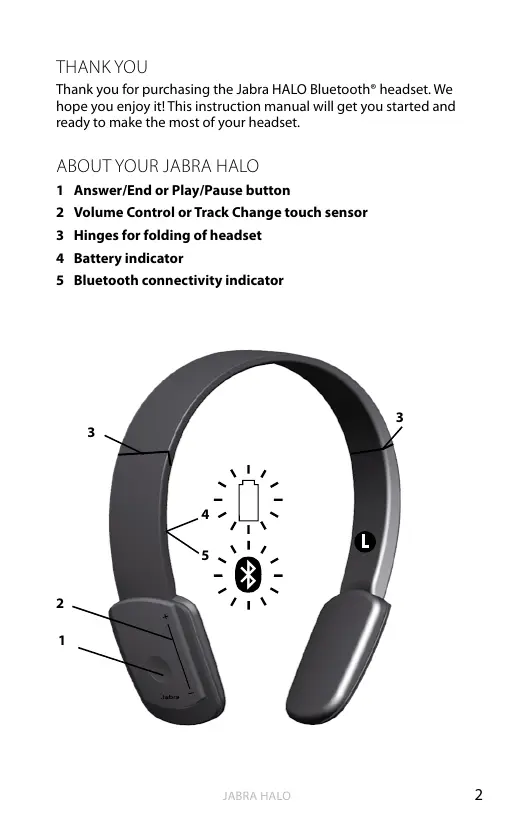
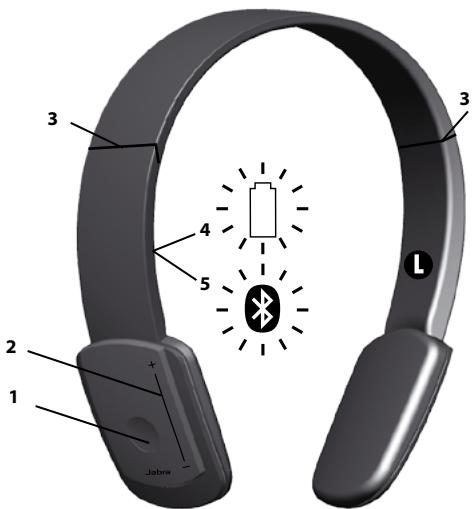
Thank you for purchasing the Jabra HALO Bluetooth® headset. We hope you enjoy it! This instruction manual will get you started and ready to make the most of your headset.
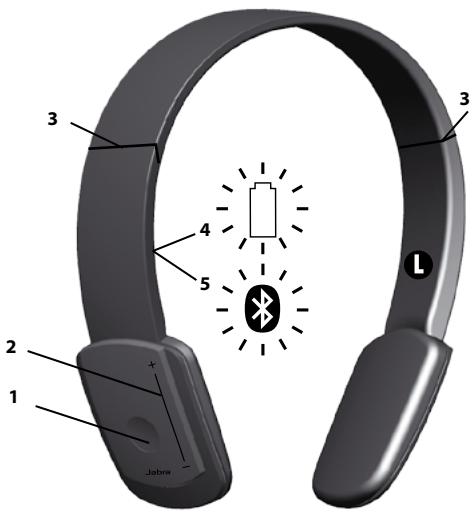
ABOUT YOUR JABRA HALO
1 Answer/End or Play/Pause button
2 Volume Control or Track Change touch sensor
3 Hinges for folding of headset
4 Battery indicator
5 Bluetooth connectivity indicator
WHAT YOUR HEADSET DOES
The Jabra HALO lets you listen to stereo music through your Bluetooth enabled mobile phone or music player, while ensuring that you never miss a call.
- Play your music wirelessly
- Answer or end phone calls
Reject incoming calls - Last number redialing
MultiUseTM - be connected to two Bluetooth devices at the same time (for instance your PC and mobile) - Use 3.5mm music cable for wired music listening from e.g. your mp3 player or PC
Specifications
Music:
Music time up to 8 hours, standby time up to 13 days
- Track changes (next or previous track) on touch control (AVRCP)
- A2DP (Advanced Audio Distribution Profile) for streaming music
Call:
- Talk time up to 8 hours
- Dual Microphone solution for Noise Blackout™
- Digital sound enhancement via DSP technology
- Noise reduction on transmitted and received audio
- Noise dependent volume control*
Automatic volume adjustment on received audio - Acoustic shock protection
- Qualified for Bluetooth Specification version 2.0 + EDR (enhanced data rate), supporting Headset and Hands-free Profiles for phone conversations and Advanced Audio Distribution Profile (A2DP) for streaming music
- e-SCO for enhanced audio quality
- 128-bit encryption
The device:
- Rechargeable battery with Micro-USB charging option from AC power supply, PC via USB cable or car charger (not included)
- Colored LED-lights for Bluetooth status and battery indicator
- Size Unfolded: H 165mm - 190mm x W 136mm x D 45mm
Size Folded: H 78mm x W 132mm x D 45mm
Weight: 80 grams - Operating range up to 10 meters (approximately 33 feet)
Please note that your Jabra HALO can withstand a short rain shower but is not waterproof and cannot be submerged. If your device gets wet, it should be wiped clean of any traces of water in order to protect it from potential damage.
GETTING STARTED
Follow these three steps before using your headset:
- Charge your headset (approximately 2 hours)
- Activate Bluetooth on your mobile phone (refer to the manual for your mobile phone)
- Pair your headset to your mobile phone
CHARGING YOUR JABRA HALO
Make sure that your Jabra HALO is fully charged before you start using it for the first time. While charging, the battery indicator changes from red to green, when fully charged. Charging time is approximately 2h. You can use the Jabra HALO during recharge.
Please note: The lifetime of the battery will be significantly reduced if your device is left uncharged for a long period. Jabra therefore recommends that you recharge your device at least once a month.
TURNING YOUR JABRA HALO ON AND OFF
Unfolding the headset will turn it on.
Folding the headset will turn it off.
- To fold: Carefully extend the headset at the hinges (3) and fold. The headset will now conveniently fold into a compact size.
- To unfold: Carefully unfold the headset and lock the hinges into place.
The headset will automatically turn off after 10 minutes if not connected to a device.
PAIRING YOUR JABRA HALO TO A PHONE OR OTHER DEVICE
Headsets are connected to phones or other Bluetooth devices using a procedure called 'pairing'. By following a few simple steps, pairing can be done in a matter of seconds.
1. Put the headset in pairing mode
1.a. First time pairing
- Fold and Unfold the headset and the Jabra HALO will automatically enter pairing mode (indicator light (5) is solid blue) and start searching for a device.
1.b. Later pairing
- Press and hold the Answer/End button (1) until the indicator light (5) is solid blue (approximately 4 seconds).
2. Set your Bluetooth phone or device to search for the Jabra HALO
- Follow your phone's instruction guide. First make sure that Bluetooth is activated on your mobile phone. Then set your phone to search for the headset. This usually involves going to a 'setup,' connect' or 'Bluetooth' menu on your phone and selecting the option to search for or 'add' a Bluetooth device.*
3. Your phone will find the Jabra HALO
- The phone will find the headset under name "Jabra HALO".
- Your phone then asks if you want to pair with the headset.
- Accept by pressing 'Yes' or 'OK' on the phone and confirm with the passkey or PIN = 0000 (4 zeros). Your phone will confirm when pairing is complete.
WEARING STYLE
Please note the left/right wearing indicators inside the headband. Alternatively always wear the Jabra HALO with the Answer/end button on you right.
Adapt the size of your Jabra HALO by extending the length of the headband by the speakers.
HOW TO
The Jabra HALO is easy to operate. The Answer/End button performs different functions depending on how long you press them:
| Instruction | Duration of press |
| Tap | Press briefly |
| Double tap | Touch briefly two times within 0,5 seconds |
| Press | Approximately: 1 second |
| Press and hold | Approximately: 4 seconds |
Play music (Some phones may require you to start a media player first)*
- Tap the Answer/End button (1)
Pause music
- Tap the Answer/End button - tap again to resume playing
Stop music
- Press the Answer/End button
Answer a call when playing music
- When listening to music and receiving a call, the music will pause and you will hear your ringtone
- Tap the Answer/End button and the music will be paused and the call will be connected
End a call
- Tap the Answer/End button to end an active call - when you end the call, your music will start again**
Skip one track forward
- Double Tap on the + end of the touch control (2) - continue tapping to skip several tracks forward
Skip one track back
- Double Tap on the - end of the touch control (2) - continue tapping to skip several tracks backward
Answer a call
- Tap the Answer/End button (1) to answer a call
End a call
- Tap the Answer/End button (1) to end an active call
Reject a call**
- Press and hold the Answer/End button when the phone rings to reject an incoming call. Depending on your phone settings, the person who called you will either be forwarded to voice mail or hear the busy signal.
Make a call**
- When your Jabra HALO is connected to your phone, all calls made from your phone will automatically be transferred to your headset. (subject to phone settings)
Redial last number**
Double tap the Answer/End button
Adjust sound and volume*
- Touch and slide your finger along the touch control (2) to turn volume up or down
Mute microphone when on a phone call
- Double Tap on or on the touch control (2). Tap the touch control to un-mute
Using your Jabra HALO with the 3.5mm music cable (not Bluetooth)
- Insert the 3.5mm music cable into the micro-USB socket and connect the 3.5mm jack to the device. Please note that the Bluetooth features (including receiving calls and touch control) are disabled when using the Jabra HALO with the cable.
Using your Jabra HALO with the 3.5mm music cable is not possible if the battery is completely discharged, so make sure that it is at least partly charged
WHAT THE DISPLAY MEANS
On the right inside of Jabra HALO two display icons indicate different states of the product:
| Bluetooth Icon (only Blue) | |
| Solid | In pairing mode – see “Pair Jabra HALO to a phone or other device” |
| Slow Single Flash | Connected to phone and in standby mode(A) |
| Single Flash | Connected to phone and active on call(A) |
| Quick Double Flash | Incoming call |
| Three slow flashes | Not connected to phone and standby mode(A) |
| Solid (+ Battery Indicator Solid Orange) | In alternative pairing mode – see “Troubleshooting & FAQ” |
| Battery Indicator Icon: | |
| Solid Red | Charging |
| Solid Green | Fully charged |
| Single Red Flash | Low Battery |
| Solid Orange (+ Bluetooth Icon Solid Blue) | In Special Pairing mode – see “Troubleshooting & FAQ” |
(A)Jabra HALO Display icons turn off after 30 seconds of nonactivity. Headset is still active, and light will flash again after a tap on the Answer/end button or any call activity.
Communication by sound alerts
Your Jabra HALO employs sound alerts to communicate dif- rent actions or information. One important alert is "Low Battery", which is two short beeps, and indicates 5 minutes of battery time remains.
USING YOUR JABRA HALO WITH TWO MOBILE DEVICES
The Jabra HALO is capable of having two mobile phones (or Bluetooth devices) connected to the headset at the same time. This will give you the freedom of having only one headset to operate both of your mobile phones. Please note that Last Number Redial will dial the number from the last outgoing call, independent of the mobile phone.
If the headset is connected to two phones please note that Play / Pause and Next / Previous track will be sent to the phone that was the last connected phone (Last connected AVRC profile).
TROUBLESHOOTING & FAQ
I hear crackling noises
- Bluetooth is a radio technology which means it is sensitive to objects between the headset and the device it is connected to. You should be able to have up to 10 meters (33 feet) of distance between the headset and the connected device when there are no major objects in the way (walls, etc.).
I cannot hear the phone call in the headset
- Increase the volume on the Jabra HALO.
- Make sure your phone is connected to the headset by i.e. tapping the Answer/End button, or viewing the Bluetooth icon in the Display.
I have pairing problems
- You may have deleted the pairing connection in your mobile phone - follow the pairing instructions in 'Pair Your Headset to a Phone or other Device'.
I cannot use Reject call, Call on hold or Redial
- These features are dependent on your phone supporting them; please consult your phone's manual for details.
I cannot hear music in the headset
- Ensure that the headset is connected to your Bluetooth enabled device.
-
You may have been out-of-range (10 meters) to your Bluetooth enabled device or the headset might have experienced an ESD (Electrostatic discharge) incidence. Press the Multi Function Button to re-establish the Bluetooth audio link
-
Increase the volume on your device.
- Make sure that the Jabra HALO is charged.
The music I hear sounds very poor
Make sure the other device supports Bluetooth 1.1 or higher including the Advanced Audio Distribution Profile (A2DP) for music streaming.
If the above procedure did not help then it is possible that your phone is using the stereo audio connection in a different way. You can enable this mode on Jabra HALO by performing pairing in the following way:
- Remove the Bluetooth connection to Jabra HALO on your phone
- Make sure the headset is on (un-folded)
- Press and hold the answer / end button for more than 5 seconds until the both Display icons are solid Blue and solid Orange
- Go through the regular steps in pairing the headset to a Bluetooth device.
Be aware that standby time of the Jabra HALO can be lower when using this pairing.
NEED MORE HELP?
1 Web: www.jabra.com (for the latest support info and online User Manuals)
2 E-mail: support.uk@jabra.com Information: info@jabra.com
3 Phone: 0800 0327026
TAKING CARE OF YOUR HEADSET
Always store the Jabra HALO with the power off and safely protected
- Avoid storage at extreme temperatures (above 45^ / 113^ including direct sunlight - or below -10^ / 14^ ). This can shorten battery life and may affect operation. High temperatures may also degrade performance.
- Do not expose the Jabra HALO to rain or other liquids.
WARNING!
EXCESSIVE VOLUME LEVELS CAN CAUSE PERMANENT HEARING DAMAGE. USE AS LOW A VOLUME AS POSSIBLE.
Headsets are capable of delivering sounds at loud volumes and high pitched tones which under certain circumstances can result in permanent hearing loss damage. Avoid prolonged use of the headset at excessive sound pressure levels. Please read the safety guidelines below prior to using this headset.
You can reduce the risk of hearing damage by following these safety guidelines
1. Prior to using this product follow these steps
- Before putting on the headset, turn the volume control to its lowest level,
Put the headset on, and then - Slowly adjust the volume control to a comfortable level.
2. During the use of this product
- Keep the volume at the lowest level possible and avoid using the headset in noisy environments where you may be inclined to turn up the volume;
If increased volume is necessary, adjust the volume control slowly; - If you experience discomfort or ringing in your ears, immediately discontinue using the headset and consult a physician.
With continued use at high volume, your ears may become accustomed to the sound level, which may result in permanent damage to your hearing without any noticeable discomfort.
SAFETY INFORMATION!
Use of a headset will impair your ability to hear other sounds. Use caution while using your headset when you are engaging in any activity that requires your full attention.
- If you have a pace maker or other electrical medical devices, you should consult your physician before using this device.
- This package contains small parts that may be hazardous to children and should be kept out of reach from children. The bags themselves or the many small parts they contain may cause choking if ingested.
- Never try to dismantle the product yourself. None of the components can be replaced or repaired by users. Only authorized dealers or service centers may open the product. If any parts of your product require replacement for any reason, including normal wear and tear or breakage, contact your dealer.
- Avoid exposing your product to rain, moisture or other liquids to protect against damage to the product or injury to you.
- Observe all signs and instructions that require an electrical device or RF radio product to be switched off in designated areas such as hospitals or aircrafts.
Remember: Always drive safely, avoid distractions and follow local laws!
Using the headset while operating a motor vehicle, motorcycle, watercraft or bicycle may be dangerous, and is illegal in some jurisdictions, just as use of this headset with both ears covered while driving is not permitted in certain jurisdictions. Check your local laws. Use caution while using your headset when you are engaging in any activity that requires your full attention. Also, try to keep conversations short and do not take notes or read documents.
BUILT-IN BATTERY CARE:
- Your device is powered by a rechargeable battery.
- The full performance of a new battery is achieved only after two or tree complete charge and discharge cycles.
- The battery can be charged and discharged hundreds of times, but will eventually wear out. Recharge your battery only with the provided approved chargers designated for this device.
- Unplug the charger from the electrical plug and the device when not in use. Do not leave a fully charged battery connected to a charger, since overcharging may shorten its lifetime.
-
If left unused, a fully charged battery will lose its charge over time.
Leaving the device in hot or cold places, such as in a closed car in the summer and winter conditions, will reduce the capacity and lifetime of the battery.
Always try to keep the battery between 15^ and 25^ (59°F and 77°F). A device with a hot or cold battery may not work temporary, even when the battery is fully charged. Battery performance is particularly limited in temperatures well below freezing. -
Do not dispose of batteries in a fire as they may explode.
- Batteries may also explode if damaged.
Battery warning!
- "Caution" - The battery used in this device may present a risk of fire or chemical burn if mistreated.
- Do not attempt to open the product or replace the battery. It is built-in and not changeable.
Use of other batteries may present a risk of fire or explosion and the warranty will be terminated. - Recharge your battery only with the provided approved chargers designated for this device.
- Dispose of batteries according to local regulations. Please recycle when possible. Do not dispose as household waste.
Always store product out of the reach of children.
CHARGER CARE:
- Do not attempt to charge your headset with anything other than the AC adaptor provided. The use of any other types may damage or destroy the headset and may invalidate any approval or warranty, and may be dangerous. For availability of approved enhancements, please check with your dealer.
Important: The headset cannot be used while charging.
Charger warning!
- When you disconnect the power cord or any enhancement, grasp and pull the plug, not the cord, never use a charger that is damaged.
- Do not attempt to disassemble the charger as it may expose you to dangerous electric shock. Incorrect reassembly can cause electric shock or fire when the product is subsequently used.
- Avoid charging your headset in extremely high or low temperatures and do not use the charger outdoors or in damp areas.
WARRANTY
Limited One (1) -year Warranty
GN Netcom A/S ("GN") warrants this Product to be free from defects in materials and workmanship (subject to the terms set forth below) for a period of one (1) year from the date of purchase ("Warranty Period"). During the Warranty Period, GN will repair
or replace (at GN's discretion) this Product or any defective parts ("Warranty Service"). If repair or replacement is not commercially practicable or cannot be timely made, GN may choose to refund to you the purchase price paid for the affected Product. Repair or replacement under the terms of this Warranty does not give right to any extension or a new beginning of the period of Warranty.
Claims under the Warranty
To obtain Warranty Service, please contact the GN dealer from which you purchased this product or visit www.jabra.com for further information about customer support. You will need to return this Product to the dealer or ship it to the dealer or to GN (if so indicated on www.jabra.com) in either its original packaging or packaging affording an equal degree of protection. You will bear the cost of shipping the product to GN. If the Product is covered by the warranty, GN will bear the cost of shipping product back to you after the completion of service under this warranty. Return shipping will be charged to you for products not covered by the warranty or requiring no warranty repair.
The Following information must be presented to obtain Warranty Service: (a) the product, and (b) proof of purchase, which clearly indicates the name and address of the seller, the date of purchase and the product type, which is evidence that this product is within the Warranty Period. Please further include (c) your return address. (d) daytime telephone number, and (e) reason for return. As part of GN Netcom's efforts to reduce environmental waste you understand that the product may consist of reconditioned equipment that contains used components, some of which have been reworked. The used components all live up to GN's high quality standards and comply with the GN product performance and reliability specifications. You understand that replaced parts or components will become the property of GN.
Limitation of Warranty
This Warranty is only valid for the original purchaser and will automatically terminate prior to expiration, if this Product is sold or otherwise transferred to another party. The Warranty provided by GN in this statement applies only to Products purchased for use, and not for resale. It does not apply to open box purchases, which are sold "as is" and without any warranty. Specifically exempt from Warranty are limited-life consumable components subject to normal wear and tear, such as microphone windscreens, ear cushions, modular plugs, ear tips, decorative finishes, batteries
and other accessories. This Warranty is invalid if the factory-applied serial number, date code label, or product label has been altered or removed from this Product. This Warranty does not cover defects or damages that result from: (a) improper storage, misuse or abuse, accident or neglect, such as physical damage (cracks, scratches, etc.) to the surface of the Product resulting from misuse; (b) contact with water, extreme humidity, sand, dirt or the like or extreme heat; (c) use of the Product or accessories for commercial purposes or subjecting the Product or accessories to abnormal usage or conditions; or (d) other acts which are not the fault of GN. This Warranty does not cover damage due to improper operation, maintenance or installation, or attempted repair by anyone other than GN or a GN dealer which is authorized to do GN warranty work. Any unauthorized repairs will void this Warranty. This Warranty does not cover defects or damages that result from the use of non-GN branded or certified products, accessories, or other peripheral equipment.
REPAIRS OR REPLACEMENTS AS PROVIDED UNDER THIS WARRANTY ARE THE EXCLUSIVE REMEDY OF THE CONSUMER. GNSHELL NOT BE LIABLE FOR ANY INCIDENTAL OR CONSEQUENTIAL DAMAGES FOR BREACH OF ANY EXPRESS OR IMPLIED WARRANTY ON THIS PRODUCT. EXCEPT TO THE EXTENT PROHIBITED BY LAW, THIS WARRANTY IS EXCLUSIVE AND IN LIEU OF ALL OTHER EXPRESS AND IMPLIED WARRANTYES WHAT SO EVER, INCLUDING BUT NOT LIMITED TO THE WARRANTY OF MERCHANTABILITY AND FITNESS FOR A PRACTICAL PURPOSE.
NOTE! This warranty gives you specific legal rights. You may have other rights which vary from location to location. Some jurisdictions do not allow the exclusion or limitation of incidental or consequential damages or implied warranties, so the above exclusions may not apply to you. This warranty does not affect your legal (statutory) rights under your applicable national or local laws.
CERTIFICATION
CE
This product is CE marked according to the provisions of the R & TTE Directive (99/5/EC). Hereby, GN Netcom A/S, declares that this product is in compliance with the essential requirements and other relevant provisions of Directive 1999/5/EC. For further information please consult http://www.jabra.com.
Bluetooth
The Bluetooth® word mark and logos are owned by the Bluetooth SIG, Inc. and any use of such marks by GN Netcom A/S is under license. Other trademarks and trade names are those of their respective owners.
Dispose of the product according to local standards and regulations. www.jabra.com/wee.
GLOSSARY
1 Bluetooth is a radio technology that connects devices, such as mobile phones and headsets, without wires or cords over a short distance (approx. 10 meters/33 feet). Bluetooth is safe to use. It is secure too, so once a connection has been made no-one can listen in and there is no interference from other Bluetooth devices either. Get more information at www.bluetooth.com.
2 Bluetooth profiles are the different ways that Bluetooth devices communicate with other devices. Bluetooth phones support the headset profile, the hands-free profile or both. In order to support a certain profile, a phone manufacturer must implement certain mandatory features within the phone's software.
3 Pairing creates a unique and encrypted link between two Bluetooth devices and lets them communicate with each other. Bluetooth devices will not work if the devices have not been paired.
4 Passkey or PIN is a code that you enter on your Bluetooth enabled device (e.g. a mobile phone) to pair it with your Jabra HALO. This makes your device and the Jabra HALO recognize each other and automatically work together.
5 Standby mode is when the Jabra HALO is passively waiting for a call. When you end a call on your mobile phone, the headset goes into standby mode.
CONTENTS
THANK YOU. 2
ABOUT YOUR JABRA HALO 2
WHAT YOUR HEADSET DOES 3
GETTING STARTED 4
CHARGING YOUR JABRA HALO 4
TURING YOUR JABRA HALO ON AND OFF. 5
PAIRING YOUR JABRA HALO TO A PHONE OR OTHER DEVICE . . .5
WEARING STYLE 6
HOW TO 6
WHAT THE DISPLAY MEANS 8
USING YOUR JABRA HALO WITH TWO MOBILE DEVICES 9
TROUBLESHOOTING & FAQ 9
NEED MORE HELP? 10
TAKING CARE OF YOUR HEADSET 10
WARNING! 11
SAFETY INFORMATION! 12
BUILT-IN BATTERY CARE: 13
CHARGER CARE: 14
WARRANTY 14
CERTIFICATION AND SAFETY APPROVALS. 16
GLOSSARY 18
THANK YOU
Thank you for purchasing the Jabra HALO Bluetooth® headset. We hope you enjoy it! This instruction manual will get you started and ready to make the most of your headset.
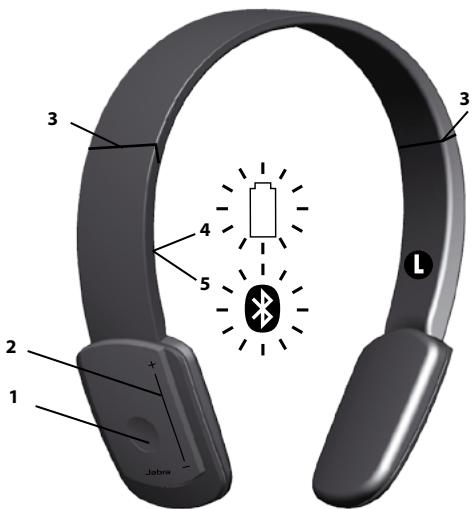
ABOUT YOUR JABRA HALO
1 Answer/End or Play/Pause button
2 Volume Control or Track Change touch sensor
3 Hinges for folding of headset
4 Battery indicator
5 Bluetooth connectivity indicator
WHAT YOUR HEADSET DOES
The Jabra HALO lets you listen to stereo music through your Bluetooth enabled mobile phone or music player, while ensuring that you never miss a call.
- Play your music wirelessly
- Answer or end phone calls
Reject incoming calls - Last number redialing
MultiUseTM - be connected to two Bluetooth devices at the same time (for instance your PC and mobile) - Use 3.5mm music cable for wired music listening from e.g. your mp3 player or PC
Specifications
Music:
Music time up to 8 hours, standby time up to 13 days
- Track changes (next or previous track) on touch control (AVRCP)
- A2DP (Advanced Audio Distribution Profile) for streaming music
Call:
- Talk time up to 8 hours
- Dual Microphone solution for Noise Blackout™
- Digital sound enhancement via DSP technology
- Noise reduction on transmitted and received audio
- Noise dependent volume control*
Automatic volume adjustment on received audio - Acoustic shock protection
- Qualified for Bluetooth Specification version 2.0 + EDR (enhanced data rate), supporting Headset and Hands-free Profiles for phone conversations and Advanced Audio Distribution Profile (A2DP) for streaming music
- e-SCO for enhanced audio quality
- 128-bit encryption
The device:
- Rechargeable battery with Micro-USB charging option from AC power supply, PC via USB cable or car charger (not included)
- Colored LED-lights for Bluetooth status and battery indicator
Size Unfolded: H 165mm - 190mm x W 136mm x D 45mm
Size Folded: H 78mm x W 132mm x D 45mm
Weight: 80 grams - Operating range up to 10 meters (approximately 33 feet)
Please note that your Jabra HALO can withstand a short rain shower but is not waterproof and cannot be submerged. If your device gets wet, it should be wiped clean of any traces of water in order to protect it from potential damage.
GETTING STARTED
Follow these three steps before using your headset:
- Charge your headset (approximately 2 hours)
- Activate Bluetooth on your mobile phone (refer to the manual for your mobile phone)
- Pair your headset to your mobile phone
CHARGING YOUR JABRA HALO
Make sure that your Jabra HALO is fully charged before you start using it for the first time. While charging, the battery indicator changes from red to green, when fully charged. Charging time is approximately 2h. You can use the Jabra HALO during recharge.
Please note: The lifetime of the battery will be significantly reduced if your device is left uncharged for a long period. Jabra therefore recommends that you recharge your device at least once a month.
TURNING YOUR JABRA HALO ON AND OFF
Unfolding the headset will turn it on.
Folding the headset will turn it off.
- To fold: Carefully extend the headset at the hinges (3) and fold. The headset will now conveniently fold into a compact size.
- To unfold: Carefully unfold the headset and lock the hinges into place.
The headset will automatically turn off after 10 minutes if not connected to a device.
PAIRING YOUR JABRA HALO TO A PHONE OR OTHER DEVICE
Headsets are connected to phones or other Bluetooth devices using a procedure called 'pairing'. By following a few simple steps, pairing can be done in a matter of seconds.
1. Put the headset in pairing mode
1.a. First time pairing
- Fold and Unfold the headset and the Jabra HALO will automatically enter pairing mode (indicator light (5) is solid blue) and start searching for a device.
1.b. Later pairing
- Press and hold the Answer/End button (1) until the indicator light (5) is solid blue (approximately 4 seconds).
2. Set your Bluetooth phone or device to search for the Jabra HALO
- Follow your phone's instruction guide. First make sure that Bluetooth is activated on your mobile phone. Then set your phone to search for the headset. This usually involves going to a 'setup,' connect' or 'Bluetooth' menu on your phone and selecting the option to search for or 'add' a Bluetooth device.*
3. Your phone will find the Jabra HALO
- The phone will find the headset under name "Jabra HALO".
- Your phone then asks if you want to pair with the headset.
- Accept by pressing 'Yes' or 'OK' on the phone and confirm with the passkey or PIN = 0000 (4 zeros). Your phone will confirm when pairing is complete.
WEARING STYLE
Please note the left/right wearing indicators inside the headband. Alternatively always wear the Jabra HALO with the Answer/end button on you right.
Adapt the size of your Jabra HALO by extending the length of the headband by the speakers.
HOW TO
The Jabra HALO is easy to operate. The Answer/End button performs different functions depending on how long you press them:
| Instruction | Duration of press |
| Tap | Press briefly |
| Double tap | Touch briefly two times within 0,5 seconds |
| Press | Approximately: 1 second |
| Press and hold | Approximately: 4 seconds |
Play music (Some phones may require you to start a media player first)*
- Tap the Answer/End button (1)
Pause music
- Tap the Answer/End button - tap again to resume playing
Stop music
- Press the Answer/End button
Answer a call when playing music
- When listening to music and receiving a call, the music will pause and you will hear your ringtone
- Tap the Answer/End button and the music will be paused and the call will be connected
End a call
- Tap the Answer/End button to end an active call - when you end the call, your music will start again**
Skip one track forward
- Double Tap on the + end of the touch control (2) - continue tapping to skip several tracks forward
Skip one track back
- Double Tap on the - end of the touch control (2) - continue tapping to skip several tracks backward
Answer a call
- Tap the Answer/End button (1) to answer a call
End a call
- Tap the Answer/End button (1) to end an active call
Reject a call**
- Press and hold the Answer/End button when the phone rings to reject an incoming call. Depending on your phone settings, the person who called you will either be forwarded to voice mail or hear the busy signal.
Make a call**
- When your Jabra HALO is connected to your phone, all calls made from your phone will automatically be transferred to your headset. (subject to phone settings)
Redial last number**
Double tap the Answer/End button
Adjust sound and volume*
- Touch and slide your finger along the touch control (2) to turn volume up or down
Mute microphone when on a phone call
- Double Tap on or on the touch control (2). Tap the touch control to un-mute
Using your Jabra HALO with the 3.5mm music cable (not Bluetooth)
- Insert the 3.5mm music cable into the micro-USB socket and connect the 3.5mm jack to the device. Please note that the Bluetooth features (including receiving calls and touch control) are disabled when using the Jabra HALO with the cable.
Using your Jabra HALO with the 3.5mm music cable is not possible if the battery is completely discharged, so make sure that it is at least partly charged
WHAT THE DISPLAY MEANS
On the right inside of Jabra HALO two display icons indicate different states of the product:
| Bluetooth Icon (only Blue) | |
| Solid | In pairing mode – see “Pair Jabra HALO to a phone or other device” |
| Slow Single Flash | Connected to phone and in standby mode(A) |
| Single Flash | Connected to phone and active on call(A) |
| Quick Double Flash | Incoming call |
| Three slow flashes | Not connected to phone and standby mode(A) |
| Solid (+ Battery Indicator Solid Orange) | In alternative pairing mode – see “Troubleshooting & FAQ” |
| Battery Indicator Icon: | |
| Solid Red | Charging |
| Solid Green | Fully charged |
| Single Red Flash | Low Battery |
| Solid Orange (+ Bluetooth Icon Solid Blue) | In Special Pairing mode – see “Troubleshooting & FAQ” |
(A)Jabra HALO Display icons turn off after 30 seconds of nonactivity. Headset is still active, and light will flash again after a tap on the Answer/end button or any call activity.
Communication by sound alerts
Your Jabra HALO employs sound alerts to communicate dif- rent actions or information. One important alert is "Low Battery", which is two short beeps, and indicates 5 minutes of battery time remains.
USING YOUR JABRA HALO WITH TWO MOBILE DEVICES
The Jabra HALO is capable of having two mobile phones (or Bluetooth devices) connected to the headset at the same time. This will give you the freedom of having only one headset to operate both of your mobile phones. Please note that Last Number Redial will dial the number from the last outgoing call, independent of the mobile phone.
If the headset is connected to two phones please note that Play/Pause and Next/Previous track will be sent to the phone that was the last connected phone (Last connected AVRC profile).
TROUBLESHOOTING & FAQ
I hear crackling noises
- Bluetooth is a radio technology which means it is sensitive to objects between the headset and the device it is connected to. You should be able to have up to 10 meters (33 feet) of distance between the headset and the connected device when there are no major objects in the way (walls, etc.).
I cannot hear the phone call in the headset
- Increase the volume on the Jabra HALO.
- Make sure your phone is connected to the headset by i.e. tapping the Answer/End button, or viewing the Bluetooth icon in the Display.
I have pairing problems
- You may have deleted the pairing connection in your mobile phone - follow the pairing instructions in 'Pair Your Headset to a Phone or other Device'.
I cannot use Reject call, Call on hold or Redial
- These features are dependent on your phone supporting them; please consult your phone's manual for details.
I cannot hear music in the headset
- Ensure that the headset is connected to your Bluetooth enabled device.
-
You may have been out-of-range (10 meters) to your Bluetooth enabled device or the headset might have experienced an ESD (Electrostatic discharge) incidence. Press the Multi Function Button to re-establish the Bluetooth audio link.
-
Increase the volume on your device.
- Make sure that the Jabra HALO is charged.
The music I hear sounds very poor
Make sure the other device supports Bluetooth 1.1 or higher including the Advanced Audio Distribution Profile (A2DP) for music streaming.
If the above procedure did not help then it is possible that your phone is using the stereo audio connection in a different way. You can enable this mode on Jabra HALO by performing pairing in the following way:
- Remove the Bluetooth connection to Jabra HALO on your phone
- Make sure the headset is on (un-folded)
- Press and hold the answer / end button for more than 5 seconds until the both Display icons are solid Blue and solid Orange
- Go through the regular steps in pairing the headset to a Bluetooth device.
Be aware that standby time of the Jabra HALO can be lower when using this pairing.
NEED MORE HELP?
- Web: www.jabra.com/nasupport
- Phone: 1 (800) 489-4199 (Canada)
TAKING CARE OF YOUR HEADSET
Always store the Jabra HALO with the power off and safely protected
- Avoid storage at extreme temperatures (above 45^ / 113^ - including direct sunlight - or below -10^ / 14^ ). This can shorten battery life and may affect operation. High temperatures may also degrade performance.
- Do not expose the Jabra HALO to rain or other liquids.
WARNING!
PERMANENT HEARING LOSS MAY RESULT FROM LONG-TERM EXPOSURE TO SOUND AT HIGH VOLUMES. USE AS LOW A VOLUME AS POSSIBLE.
Headsets are capable of delivering sounds at loud volumes and high pitched tones. Under certain circumstances, exposure to such sounds can result in permanent hearing loss damage. The volume level may vary based on conditions such as the phone you are using, its reception and volume settings, and the environment. Avoid prolonged use of the headset at excessive sound pressure levels. Please read the Safety Guidelines below prior to using this headset.
You Can Reduce the Risk of Hearing Damage by Following These Safety Guidelines
1. Prior to using this product follow these steps
- Before putting on the headset, turn the volume control to its lowest level;
Put the headset on; and then - Slowly adjust the volume control to a comfortable level.
2. During the use of this product
- Keep the volume at the lowest level possible and avoid using the headset in noisy environments where you may be inclined to turn up the volume;
If increased volume is necessary, adjust the volume control slowly; - Ringing in the ears may indicate that the sound levels are too high;
- If you experience discomfort or ringing in your ears, immediately discontinue using the headset and consult a physician; and
- Stop using the headset if it causes great discomfort.
With continued use at high volume, your ears may become accustomed to the sound level, which may result in permanent damage to your hearing without any noticeable discomfort.
SAFETY INFORMATION!
Use of a headset will impair your ability to hear other sounds. Use caution while using your headset when you are engaging in any activity that requires your full attention.
If you have a pacemaker or other electrical medical devices, you should consult your physician before using this product.
- This package contains small parts that may be hazardous to children and should be kept out of reach from children. This product is not a toy – never allow children to play with this product. Always store the product out of reach from children. The bags themselves or the many small parts they contain may cause choking if ingested.
- Never try to dismantle the product yourself, or push objects of any kind into the products, as this may cause short circuits which could result in a fire or electric shock.
- None of the components can be replaced or repaired by users. Only authorized dealers or service centers may open the product. If any parts of your product require replacement for any reason, including normal wear and tear or breakage, contact your dealer.
- Avoid exposing your product to rain, moisture or other liquids to protect against damage to the product or injury to you.
- If the product has ear tips, the ear tips should rest against, but not enter the ear canal.
- Keep all products, cords, and cables away from operating machinery.
- Observe all signs and instructions that require an electrical device or RF radio product to be switched off in designated areas such as hospitals, blasting areas, potentially explosive atmospheres, or aircrafts.
- If the product overheats, if the product has been dropped or damaged, if the product has a damaged cord or plug, or if the product has been dropped in a liquid, discontinue use and contact GN Netcom, Inc.
- Never mount or store the product over any airbag deployment area, as serious injury may result when an airbag deploys.
- Dispose of the product according to local standards and regulations.
Remember: Always drive safely, avoid distractions and follow local laws!
Using the headset while operating a motor vehicle, motorcycle, watercraft or bicycle may be dangerous, and is illegal in some jurisdictions, just as use of this headset with both ears covered while driving is not permitted in certain jurisdictions. Check your local laws. Use caution while using your headset when you are engaging in any activity that requires your full attention. While engaging in any such activity, removing the headset from your ear or turning off your headset will keep you from being distracted, so as to avoid accident or injury. Do not take notes or read documents while driving.
BUILT-IN BATTERY CARE:
- Your product is powered by a rechargeable battery.
- The full performance of a new battery is achieved only after two or three complete charge and discharge cycles.
- The battery can be charged and discharged hundreds of times, but will eventually wear out.
- Unplug the charger from the electrical plug and the product when not in use. Do not leave a fully charged battery connected to a charger, since overcharging may shorten its lifetime.
- If left unused, a fully charged battery will lose its charge over time.
Leaving the product in hot or cold places, such as in a closed car in the summer and winter conditions, will reduce the capacity and lifetime of the battery. - Always try to keep the battery between 15^ C and 25^ C ( 59^ F and 77^ F ). A product with a hot or cold battery may not work temporarily, even when the battery is fully charged. Battery performance is particularly limited in temperatures well below freezing.
Battery warning!
- "Caution" - The battery used in this product may present a risk of fire or chemical burn if mistreated.
- Do not attempt to open the product or replace the battery. It is built-in and not changeable. Use of other batteries may present a risk of fire or explosion and the warranty will be terminated.
Only recharge your battery with the provided approved chargers designated for this product.
- Dispose of batteries according to local regulations. Please recycle when possible. Do not dispose as household waste or in a fire as they may explode.
- Batteries may explode if damaged.
CHARGER CARE:
- Do not attempt to charge your headset with anything other than the AC adapter provided. The use of any other types may damage or destroy the headset and could be dangerous. Use of other chargers may invalidate any approval or warranty. For availability of approved enhancements, please check with your dealer.
- Charge the product according to the instructions supplied with the product.
Important: Please refer to the user manual for a description of the charging status indicator lights. Some headsets cannot be used while charging.
Charger warning!
- When you disconnect the power cord or any enhancement, grasp and pull the plug, not the cord. Never use a charger that is damaged.
- Do not attempt to disassemble the charger as it may expose you to dangerous electric shock. Incorrect reassembly can cause electric shock or fire when the product is subsequently used.
- Avoid charging your headset in extremely high or low temperatures and do not use the charger outdoors or in damp areas.
WARRANTY
Limited One (1)-year Warranty:
GN Netcom, Inc. warrants this product to be free from defects in materials and workmanship (subject to the terms set forth below) for a period of one (1) year from the date of purchase ("Warranty Period"). During the Warranty Period, GN will repair or replace (at GN's discretion) this product or any defective parts ("Warranty Service"). If repair or replacement is not commercially practicable
or cannot be timely made, GN may choose to refund to you the purchase price paid for the affected product. Repair or replacement under the terms of this warranty does not give right to any extension or a new beginning of the period of warranty.
Claims under the Warranty:
To obtain Warranty Service, please contact the GN dealer from which you purchased this product or visit www.jabra.com for further information about customer support. You will need to return this Product to the dealer or ship it to the dealer or to GN (if so indicated on www.jabra.com) in either its original packaging or packaging affording an equal degree of protection. You will bear the cost of shipping the product to GN. If the Product is covered by the warranty, GN will bear the cost of shipping product back to you after the completion of service under this warranty. Return shipping will be charged to you for products not covered by the warranty or requiring no warranty repair. The Following information must be presented to obtain Warranty Service:
(a) the product, and (b) proof of purchase, which clearly indicates the name and address of the seller, the date of purchase and the product type, which is evidence that this product is within the Warranty Period. Please further include (c) your return address, (d) daytime telephone number, and (e) a detailed reason for return. As part of GN/Jabra's efforts to reduce environmental waste you understand that the product may consist of reconditioned equipment that contains used components, some of which have been reworked. The used components all live up to GN/Jabra's high quality standards and comply with the GN product performance and reliability specifications. You understand that replaced parts or components will become the property of GN.
Limitation of Warranty:
This warranty is only valid for the original purchaser and will automatically terminate prior to expiration if this product is sold or otherwise transferred to another party. The warranty provided by GN in this statement applies only to products purchased for use, and not for resale. It does not apply to open box purchases, which are sold "as is" and without any warranty. Specifically exempt from warranty are limited-life consumable components subject to normal wear and tear, such as microphone windowscreens, ear cushions, modular plugs, ear tips, decorative finishes, batteries, and other accessories. This warranty is invalid if the factory-applied serial number, date code label, or product label has been altered
or removed from this product. This Warranty does not cover defects or damages that result from: (a) improper storage, misuse or abuse, accident or neglect, such as physical damage (cracks, scratches, etc.) to the surface of the product resulting from misuse; (b) contact with liquid, water, rain, extreme humidity or heavy perspiration, sand, dirt or the like, extreme heat, or food; (c) use of the products or accessories for commercial purposes or subjecting the product or accessories to abnormal usage or conditions; or (d) other acts which are not the fault of GN.
This Warranty does not cover damage due to improper operation, maintenance or installation, or attempted repair by anyone other than GN or a GN dealer which is authorized to do GN warranty work. Any unauthorized repairs will void this Warranty. This Warranty does not cover defects or damages that result from the use of non-GN branded or certified products, accessories, or other peripheral equipment.
REPAIRS OR REPLACEMENTS AS PROVIDED UNDER THIS WARRANTY ARE THE EXCLUSIVE REMEDY OF THE CONSUMER. GN SHALL NOT BE LIABLE FOR ANY INCIDENTAL OR CONSEQUENTIAL DAMAGES FOR BREACH OF ANY EXPRESS OR IMPLIED WARRANTY ON THIS PRODUCT. EXCEPT TO THE EXTENT PROHIBITED BY LAW, THIS WARRANTY IS EXCLUSIVE AND IN LIEU OF ALL OTHER EXPRESS AND IMPLIED WARRANTYES WHATSOEVER, INCLUDING BUT NOT LIMITED TO THE WARRANTY OF MERCHANTABILITY AND FITNESS FOR A PRACTICAL PURPOSE.
NOTE! This warranty gives you specific legal rights. You may have other rights which vary from location to location. Some jurisdictions do not allow the exclusion or limitation of incidental or consequential damages or implied warranties, so the above exclusions may not apply to you. This warranty does not affect your legal (statutory) rights under your applicable national or local laws.
CERTIFICATION AND SAFETY APPROVALS
FCC:
This device complies with part 15 of the FCC Rules. Operation is subject to the following two conditions: (1) This device may not cause harmful interference, and (2) this device must accept any interference received, including interference that may cause undesired operation. Users are not permitted to make changes or modify the device in any way. Changes or modifications not expressly approved by Jabra (GN Netcom, Inc.) will void the user's
authority to operate the equipment. See 47 CFR Sec. 15.21. This equipment has been tested and found to comply with the limits for a Class B digital device, pursuant to part 15 of the FCC Rules. These limits are designed to provide reasonable protection against harmful interference in a residential installation. This equipment generates, uses and can radiate radio frequency energy and, if not installed and used in accordance with the instructions, may cause harmful interference to radio communications. However, there is no guarantee that interference will not occur in a particular installation. If this equipment does cause harmful interference to radio or television reception, which can be determined by turning the equipment of and on, the user is encouraged to try to correct the interference by one or more of the following measures:
- Reorient or relocate the receiving antenna.
- Increase the separation between the equipment and receiver.
- Connect the equipment into an outlet on a circuit different from that to which the receiver is connected.
- Consult the dealer or an experienced radio/TV technician for help.
The device and its antenna must not be co-loaded or operating in conjunction with any other antenna or transmitter.
Industry Canada Operation is subject to the following two conditions: (1) This device may not cause interference and (2) This device must accept any interference, including interference that may cause undesired operation of the device. See RSS-GEN 7.1.5. The term "IC:" before the certification/registration number only signifies that registration was performed based on a Declaration of Conformity indicating that Industry Canada technical specifications were met. It does not imply that Industry Canada approved the equipment.
CE:
This product is CE marked according to the provisions of the R & TTE Directive (99/5/EC). Hereby, GN Netcom A/S, declares that this product is in compliance with the essential requirements and other relevant provisions of Directive 1999/5/EC. For further information please consult http://www.jabra.com
Bluetooth:
The Bluetooth® word mark and logos are owned by the Bluetooth SIG, Inc. and any use of such marks by Jabra is under license. Other trademarks and trade names are those of their respective owners.
GLOSSARY
- Bluetooth is a radio technology that connects devices, such as mobile phones and headsets, without wires or cords over a short distance approx. 33 feet (10 meters). Get more information at www.bluetooth.com
- Bluetooth profiles are the different ways that Bluetooth devices communicate with other devices. Bluetooth phones support either the headset profile, the hands-free profile or both. In order to support a certain profile, a phone manufacturer must implement certain mandatory features within the phone's software.
- Pairing creates a unique and encrypted link between two Bluetooth devices and lets them communicate with each other. Bluetooth devices will not work if the devices have not been paired.
- Passkey or PIN is a code that you enter on your mobile phone to pair it with your Jabra HALO. This makes your phone and the Jabra HALO recognize each other and automatically work together.
- Standby mode is when the Jabra HALO is passively waiting for a call. When you 'end' a call on your mobile phone, the headset goes into standby mode.

Dispose of the product according to local standards and regulations.
www.jabra.com/week
CONTENTS
THANK YOU. 2
ABOUT YOUR JABRA HALO 2
WHAT YOUR HEADSET DOES 3
GETTING STARTED 4
CHARGING YOUR JABRA HALO 4
TURING YOUR JABRA HALO ON AND OFF. 5
PAIRING YOUR JABRA HALO TO A PHONE OR OTHER DEVICE .... 5
WEARING STYLE 6
HOW TO 6
WHAT THE DISPLAY MEANS 8
USING YOUR JABRA HALO WITH TWO MOBILE DEVICES 9
TROUBLESHOOTING & FAQ 9
NEED MORE HELP? 10
TAKING CARE OF YOUR HEADSET 11
WARNING! 11
SAFETY INFORMATION! 12
BUILT-IN BATTERY CARE: 12
CHARGER CARE: 13
WARRANTY 14
CERTIFICATION 16
GLOSSARY 17
THANK YOU
Thank you for purchasing the Jabra HALO Bluetooth® headset. We hope you enjoy it! This instruction manual will get you started and ready to make the most of your headset.
ABOUT YOUR JABRA HALO
1 Answer/End or Play/Pause button
2 Volume Control or Track Change touch sensor
3 Hinges for folding of headset
4 Battery indicator
5 Bluetooth connectivity indicator
WHAT YOUR HEADSET DOES
The Jabra HALO lets you listen to stereo music through your Bluetooth enabled mobile phone or music player, while ensuring that you never miss a call.
- Play your music wirelessly
- Answer or end phone calls
Reject incoming calls - Last number redialing
MultiUseTM - be connected to two Bluetooth devices at the same time (for instance your PC and mobile) - Use 3.5mm music cable for wired music listening from e.g. your mp3 player or PC
Specifications
Music:
Music time up to 8 hours, standby time up to 13 days
- Track changes (next or previous track) on touch control (AVRCP)
- A2DP (Advanced Audio Distribution Profile) for streaming music
Call:
Talk time up to 8 hours
- Dual Microphone solution for Noise Blackout™
- Digital sound enhancement via DSP technology
- Noise reduction on transmitted and received audio
- Noise dependent volume control*
Automatic volume adjustment on received audio
- Acoustic shock protection
- Qualified for Bluetooth Specification version 2.0 + EDR (enhanced data rate), supporting Headset and Hands-free Profiles for phone conversations and Advanced Audio Distribution Profile (A2DP) for streaming music
- e-SCO for enhanced audio quality
- 128-bit encryption
The device:
- Rechargeable battery with Micro-USB charging option from AC power supply, PC via USB cable or car charger (not included)
- Colored LED-lights for Bluetooth status and battery indicator
- Size Unfolded: H 165mm - 190mm x W 136mm x D 45mm
Size Folded: H 78mm x W 132mm x D 45mm
Weight: 80 grams - Operating range up to 10 meters (approximately 33 feet)
Please note that your Jabra HALO can withstand a short rain shower but is not waterproof and cannot be submerged. If your device gets wet, it should be wiped clean of any traces of water in order to protect it from potential damage.
GETTING STARTED
Follow these three steps before using your headset:
- Charge your headset (approximately 2 hours)
- Activate Bluetooth on your mobile phone (refer to the manual for your mobile phone)
- Pair your headset to your mobile phone
CHARGING YOUR JABRA HALO
Make sure that your Jabra HALO is fully charged before you start using it for the first time. While charging, the battery indicator changes from red to green, when fully charged. Charging time is approximately 2h. You can use the Jabra HALO during recharge.
Please note: The lifetime of the battery will be significantly reduced if your device is left uncharged for a long period. Jabra therefore recommends that you recharge your device at least once a month.
TURNING YOUR JABRA HALO ON AND OFF
Unfolding the headset will turn it on.
Folding the headset will turn it off.
- To fold: Carefully extend the headset at the hinges (3) and fold. The headset will now conveniently fold into a compact size.
- To unfold: Carefully unfold the headset and lock the hinges into place.
The headset will automatically turn off after 10 minutes if not connected to a device.
PAIRING YOUR JABRA HALO TO A PHONE OR OTHER DEVICE
Headsets are connected to phones or other Bluetooth devices using a procedure called 'pairing'. By following a few simple steps, pairing can be done in a matter of seconds.
1. Put the headset in pairing mode
1.a. First time pairing
- Fold and Unfold the headset and the Jabra HALO will automatically enter pairing mode (indicator light (5) is solid blue) and start searching for a device.
1.b. Later pairing
- Press and hold the Answer/End button (1) until the indicator light (5) is solid blue (approximately 4 seconds).
2. Set your Bluetooth phone or device to search for the Jabra HALO
- Follow your phone's instruction guide. First make sure that Bluetooth is activated on your mobile phone. Then set your phone to search for the headset. This usually involves going to a 'setup,' connect' or 'Bluetooth' menu on your phone and selecting the option to search for or 'add' a Bluetooth device.*
3. Your phone will find the Jabra HALO
- The phone will find the headset under name "Jabra HALO".
- Your phone then asks if you want to pair with the headset.
- Accept by pressing 'Yes' or 'OK' on the phone and confirm with the passkey or PIN = 0000 (4 zeros). Your phone will confirm when pairing is complete.
WEARING STYLE
Please note the left/right wearing indicators inside the headband. Alternatively always wear the Jabra HALO with the Answer/end button on you right.
Adapt the size of your Jabra HALO by extending the length of the headband by the speakers.
HOW TO
The Jabra HALO is easy to operate. The Answer/End button performs different functions depending on how long you press them:
| Instruction | Duration of press |
| Tap | Press briefly |
| Double tap | Touch briefly two times within 0,5 seconds |
| Press | Approximately: 1 second |
| Press and hold | Approximately: 4 seconds |
Play music (Some phones may require you to start a media player first)*
- Tap the Answer/End button (1)
Pause music
- Tap the Answer/End button - tap again to resume playing
Stop music
- Press the Answer/End button
Answer a call when playing music
- When listening to music and receiving a call, the music will pause and you will hear your ringtone
- Tap the Answer/End button and the music will be paused and the call will be connected
End a call
- Tap the Answer/End button to end an active call - when you end the call, your music will start again**
Skip one track forward
- Double Tap on the + end of the touch control (2) - continue tapping to skip several tracks forward
Skip one track back
- Double Tap on the - end of the touch control (2) - continue tapping to skip several tracks backward
Answer a call
- Tap the Answer/End button (1) to answer a call
End a call
- Tap the Answer/End button (1) to end an active call
Reject a call**
- Press and hold the Answer/End button when the phone rings to reject an incoming call. Depending on your phone settings, the person who called you will either be forwarded to voice mail or hear the busy signal.
Make a call**
- When your Jabra HALO is connected to your phone, all calls made from your phone will automatically be transferred to your headset. (subject to phone settings)
Redial last number**
Double tap the Answer/End button
Adjust sound and volume*
- Touch and slide your finger along the touch control (2) to turn volume up or down
Mute microphone when on a phone call
- Double Tap on or on the touch control (2). Tap the touch control to un-mute
Using your Jabra HALO with the 3.5mm music cable (not Bluetooth)
- Insert the 3.5mm music cable into the micro-USB socket and connect the 3.5mm jack to the device. Please note that the Bluetooth features (including receiving calls and touch control) are disabled when using the Jabra HALO with the cable.
Using your Jabra HALO with the 3.5mm music cable is not possible if the battery is completely discharged, so make sure that it is at least partly charged
WHAT THE DISPLAY MEANS
On the right inside of Jabra HALO two display icons indicate different states of the product:
| Bluetooth Icon (only Blue) | |
| Solid | In pairing mode – see “Pair Jabra HALO to a phone or other device” |
| Slow Single Flash | Connected to phone and in standby mode(A) |
| Single Flash | Connected to phone and active on call(A) |
| Quick Double Flash | Incoming call |
| Three slow flashes | Not connected to phone and standby mode(A) |
| Solid (+ Battery Indicator Solid Orange) | In alternative pairing mode – see “Troubleshooting & FAQ” |
| Battery Indicator Icon: | |
| Solid Red | Charging |
| Solid Green | Fully charged |
| Single Red Flash | Low Battery |
| Solid Orange (+ Bluetooth Icon Solid Blue) | In Special Pairing mode – see “Troubleshooting & FAQ” |
(A)Jabra HALO Display icons turn off after 30 seconds of nonactivity. Headset is still active, and light will flash again after a tap on the Answer/end button or any call activity.
Communication by sound alerts
Your Jabra HALO employs sound alerts to communicate dif- rent actions or information. One important alert is "Low Battery", which is two short beeps, and indicates 5 minutes of battery time remains.
USING YOUR JABRA HALO WITH TWO MOBILE DEVICES
The Jabra HALO is capable of having two mobile phones (or Bluetooth devices) connected to the headset at the same time. This will give you the freedom of having only one headset to operate both of your mobile phones. Please note that Last Number Redial will dial the number from the last outgoing call, independent of the mobile phone.
If the headset is connected to two phones please note that Play / Pause and Next / Previous track will be sent to the phone that was the last connected phone (Last connected AVRC profile).
TROUBLESHOOTING & FAQ
I hear crackling noises
- Bluetooth is a radio technology which means it is sensitive to objects between the headset and the device it is connected to. You should be able to have up to 10 meters (33 feet) of distance between the headset and the connected device when there are no major objects in the way (walls, etc.).
I cannot hear the phone call in the headset
- Increase the volume on the Jabra HALO.
- Make sure your phone is connected to the headset by i.e. tapping the Answer/End button, or viewing the Bluetooth icon in the Display.
I have pairing problems
- You may have deleted the pairing connection in your mobile phone - follow the pairing instructions in 'Pair Your Headset to a Phone or other Device'.
I cannot use Reject call, Call on hold or Redial
- These features are dependent on your phone supporting them; please consult your phone's manual for details.
I cannot hear music in the headset
- Ensure that the headset is connected to your Bluetooth enabled device.
- You may have been out-of-range (10 meters) to your Bluetooth enabled device or the headset might have experienced an ESD
(Electrostatic discharge) incidence. Press the Multi Function Button to re-establish the Bluetooth audio link.
- Increase the volume on your device.
- Make sure that the Jabra HALO is charged.
The music I hear sounds very poor
Make sure the other device supports Bluetooth 1.1 or higher including the Advanced Audio Distribution Profile (A2DP) for music streaming.
If the above procedure did not help then it is possible that your phone is using the stereo audio connection in a different way. You can enable this mode on Jabra HALO by performing pairing in the following way:
- Remove the Bluetooth connection to Jabra HALO on your phone
- Make sure the headset is on (un-folded)
- Press and hold the answer / end button for more than 5 seconds until the both Display icons are solid Blue and solid Orange
- Go through the regular steps in pairing the headset to a Bluetooth device.
Be aware that standby time of the Jabra HALO can be lower when using this pairing.
NEED MORE HELP?
- Web: http://www.jabra.com/support (for the latest support info and online User Manuals)
- E-mail: support.uk@jabra.com Information: info@jabra.com
- Phone:
Australia 1-800-738-521
China 800-858-0789
Hong Kong 800-968-265
Indonesia 001-803-852-7664
Japan 0034-800-400-594
Malaysia 1800-812-160
New Zealand 0800-447-982
Singapore 800-101-2329
Taiwan 0080-186-3013
India 000-800-852-1185
Philippines 18007658068
TAKING CARE OF YOUR HEADSET
Always store the Jabra HALO with the power off and safely protected
- Avoid storage at extreme temperatures (above 45^ / 113^ - including direct sunlight - or below -10^ / 14^ ). This can shorten battery life and may affect operation.
- High temperatures may also degrade performance. Do not expose the Jabra HALO to rain or other liquids.
WARNING!
EXCESSIVE VOLUME LEVELS CAN CAUSE PERMANENT HEARING DAMAGE. USE AS LOW A VOLUME AS POSSIBLE.
Headsets are capable of delivering sounds at loud volumes and high pitched tones which under certain circumstances can result in permanent hearing loss damage. Avoid prolonged use of the headset at excessive sound pressure levels. Please read the safety guidelines below prior to using this headset.
You can reduce the risk of hearing damage by following these safety guidelines
1. Prior to using this product follow these steps
- Before putting on the headset, turn the volume control to its lowest level,
Put the headset on, and then - Slowly adjust the volume control to a comfortable level.
2. During the use of this product
- Keep the volume at the lowest level possible and avoid using the headset in noisy environments where you may be inclined to turn up the volume;
- If increased volume is necessary, adjust the volume control slowly;
- If you experience discomfort or ringing in your ears, immediately discontinue using the headset and consult a physician.
With continued use at high volume, your ears may become
accustomed to the sound level, which may result in permanent damage to your hearing without any noticeable discomfort.
ACA TS028 - Ignition of flammable atmospheres
Do not use the headset in environments where there is a danger of ignition of flammable gases.
SAFETY INFORMATION!
Use of a headset will impair your ability to hear other sounds. Use caution while using your headset when you are engaging in any activity that requires your full attention.
If you have a pace maker or other electrical medical devices, you should consult your physician before using this device.
- This package contains small parts that may be hazardous to children and should be kept out of reach from children. The bags themselves or the many small parts they contain may cause choking if ingested.
- Never try to dismantle the product yourself. None of the components can be replaced or repaired by users. Only authorized dealers or service centers may open the product. If any parts of your product require replacement for any reason, including normal wear and tear or breakage, contact your dealer.
- Avoid exposing your product to rain, moisture or other liquids to protect against damage to the product or injury to you.
- Observe all signs and instructions that require an electrical device or RF radio product to be switched off in designated areas such as hospitals or aircrafts.
Remember: Always drive safely, avoid distractions and follow local laws!
Using the headset while operating a motor vehicle, motorcycle, watercraft or bicycle may be dangerous, and is illegal in some jurisdictions, just as use of this headset with both ears covered while driving is not permitted in certain jurisdictions. Check your local laws. Use caution while using your headset when you are engaging in any activity that requires your full attention. Also, do not take notes or read documents.
BUILT-IN BATTERY CARE:
- Your device is powered by a rechargeable battery.
- The full performance of a new battery is achieved only after two or tree complete charge and discharge cycles.
- The battery can be charged and discharged hundreds of times, but will eventually wear out. Recharge your battery only with the provided approved chargers designated for this device.
- Unplug the charger from the electrical plug and the device when not in use. Do not leave a fully charged battery connected to a charger, since overcharging may shorten its lifetime.
If left unused, a fully charged battery will lose its charge over time.
Leaving the device in hot or cold places, such as in a closed car in the summer and winter conditions, will reduce the capacity and lifetime of the battery.
Always try to keep the battery between 15^ and 25^ (59°F and 77°F). A device with a hot or cold battery may not work temporary, even when the battery is fully charged. Battery performance is particularly limited in temperatures well below freezing. - Do not dispose of batteries in a fire as they may explode.
- Batteries may also explode if damaged.
Battery warning!
- "Caution" - The battery used in this device may present a risk of fire or chemical burn if mistreated.
- Do not attempt to open the product or replace the battery. It is built-in and not changeable.
Use of other batteries may present a risk of fire or explosion and the warranty will be terminated. - Recharge your battery only with the provided approved chargers designated for this device.
- Dispose of batteries according to local regulations. Please recycle when possible. Do not dispose as household waste.
Always store product out of the reach of children.
CHARGER CARE:
- Do not attempt to charge your headset with anything other than the AC adaptor provided. The use of any other types may damage or destroy the headset and may invalidate any approval or warranty, and may be dangerous. For availability of approved enhancements, please check with your dealer.
Important: The headset cannot be used while charging
Charger warning!
- When you disconnect the power cord or any enhancement, grasp and pull the plug, not the cord, never use a charger that is damaged.
- Do not attempt to disassemble the charger as it may expose you to dangerous electric shock. Incorrect reassembly can cause electric shock or fire when the product is subsequently used.
- Avoid charging your headset in extremely high or low temperatures and do not use the charger outdoors or in damp areas.
WARRANTY
Limited One (1) -year Warranty
GN Netcom A/S ("GN") warrants this Product to be free from defects in materials and workmanship (subject to the terms set forth below) for a period of one (1) year from the date of purchase ("Warranty Period"). During the Warranty Period, GN will repair or replace (at GN's discretion) this Product or any defective parts ("Warranty Service"). If repair or replacement is not commercially practicable or cannot be timely made, GN may choose to refund to you the purchase price paid for the affected Product. Repair or replacement under the terms of this Warranty does not give right to any extension or a new beginning of the period of Warranty.
Claims under the Warranty
To obtain Warranty Service, please contact the GN dealer from which you purchased this product or visit www.jabra.com for further information about customer support. You will need to return this Product to the dealer or ship it to the dealer or to GN (if so indicated on www.jabra.com) in either its original packaging or packaging affording an equal degree of protection. You will bear the cost of shipping the product to GN. If the Product is covered by the warranty, GN will bear the cost of shipping product back to you after the completion of service under this warranty. Return
shipping will be charged to you for products not covered by the warranty or requiring no warranty repair.
The Following information must be presented to obtain Warranty Service: (a) the product, and (b) proof of purchase, which clearly indicates the name and address of the seller, the date of purchase and the product type, which is evidence that this product is within the Warranty Period. Please further include (c) your return address. (d) daytime telephone number, and (e) reason for return. As part of GN Netcom's efforts to reduce environmental waste you understand that the product may consist of reconditioned equipment that contains used components, some of which have been reworked. The used components all live up to GN's high quality standards and comply with the GN product performance and reliability specifications. You understand that replaced parts or components will become the property of GN.
Limitation of Warranty
This Warranty is only valid for the original purchaser and will automatically terminate prior to expiration, if this Product is sold or otherwise transferred to another party. The Warranty provided by GN in this statement applies only to Products purchased for use, and not for resale. It does not apply to open box purchases, which are sold "as is" and without any warranty. Specifically exempt from Warranty are limited-life consumable components subject to normal wear and tear, such as microphone windscreens, ear cushions, modular plugs, ear tips, decorative finishes, batteries and other accessories. This Warranty is invalid if the factory-applied serial number, date code label, or product label has been altered or removed from this Product. This Warranty does not cover defects or damages that result from: (a) improper storage, misuse or abuse, accident or neglect, such as physical damage (cracks, scratches, etc.) to the surface of the Product resulting from misuse; (b) contact with water, extreme humidity, sand, dirt or the like or extreme heat; (c) use of the Product or accessories for commercial purposes or subjecting the Product or accessories to abnormal usage or conditions; or (d) other acts which are not the fault of GN. This Warranty does not cover damage due to improper operation, maintenance or installation, or attempted repair by anyone other than GN or a GN dealer which is authorized to do GN warranty work. Any unauthorized repairs will void this Warranty. This Warranty does not cover defects or damages that result from the use of non-GN branded or certified products, accessories, or other peripheral equipment.
REPAIRS OR REPLACEMENTS AS PROVIDED UNDER THIS WARRANTY ARE THE EXCLUSIVE REMEDY OF THE CONSUMER. GNSHELL NOT BE LIABLE FOR ANY INCIDENTAL OR CONSEQUENTIAL DAMAGES FOR BREACH OF ANY EXPRESS OR IMPLIED WARRANTY ON THIS PRODUCT. EXCEPT TO THE EXTENT PROHIBITED BY LAW, THIS WARRANTY IS EXCLUSIVE AND IN LIEU OF ALL OTHER EXPRESS AND IMPLIED WARRANTY WHAT SO EVER, INCLUDING BUT NOT LIMITED TO THE WARRANTY OF MERCHANTABILITY AND FITNESS FOR A PRACTICAL PURPOSE.
NOTE! This warranty gives you specific legal rights. You may have other rights which vary from location to location. Some jurisdictions do not allow the exclusion or limitation of incidental or consequential damages or implied warranties, so the above exclusions may not apply to you. This warranty does not affect your legal (statutory) rights under your applicable national or local laws.
CERTIFICATION
CE
This product is CE marked according to the provisions of the R & TTE Directive (99/5/EC). Hereby, GN Netcom A/S, declares that this product is in compliance with the essential requirements and other relevant provisions of Directive 1999/5/EC. For further information please consult http://www.jabra.com.
Bluetooth
The Bluetooth® word mark and logos are owned by the Bluetooth SIG, Inc. and any use of such marks by GN Netcom A/S is under license. Other trademarks and trade names are those of their respective owners.
Dispose of the product according to local standards and regulations. www.jabra.com/wee
GLOSSARY
- Bluetooth is a radio technology that connects devices, such as mobile phones and headsets, without wires or cords over a short distance (approx. 10 meters/33 feet). Bluetooth is safe to use. It is secure too, so once a connection has been made no-one can listen in and there is no interference from other Bluetooth devices either. Get more information at wwwBluetooth.com.
- Bluetooth profiles are the different ways that Bluetooth devices communicate with other devices. Bluetooth phones support the headset profile, the hands-free profile or both. In order to support a certain profile, a phone manufacturer must implement certain mandatory features within the phone's software.
- Pairing creates a unique and encrypted link between two Bluetooth devices and lets them communicate with each other. Bluetooth devices will not work if the devices have not been paired.
- Passkey or PIN is a code that you enter on your Bluetooth enabled device (e.g. a mobile phone) to pair it with your Jabra HALO. This makes your device and the Jabra HALO recognize each other and automatically work together.
- Standby mode is when the Jabra HALO is passively waiting for a call. When you 'end' a call on your mobile phone, the headset goes into standby mode.

Dispose of the product according to local standards and regulations.
www.jabra.com/week
INDHOLDSFORTEGNELSE
TAK. 2
OM JABRA HALO. 2
HEADSETTETS FUNKTIONER 3
KOM GODT I GANG. 4
OPLADNING AF DIT JABRA HALO 4
TAEND/SLUK FOR DIT JABRA HALO. 4
SADAN PARRES DIT JABRA HALO MED EN TELEFON
ELLER EN ANDEN ENHED 5
BÄEREMÄDE 5
SADAN GOR DU 6
HVAD BETYDER DISPLAYET 8
SADAN BRUGES DIT JABRA HALO MED TO MOBILENHEDER .......9
FEJL FINDING OG OFTE STILLDE SPORGSMAL 9
BRUG FOR MERE HJELP? 10
PLEJE AF HEADSETTET. 10
ADVARSELI 11
SIKKERHEDSINFORMATION! 11
PLEJE AF INDBYGGET BATTERI 12
PLEJE AF OPLADER 13
GARANI 14
CERTIFICERING OG SIKKERHEDSGODKENDELSER 16
ORDLISTE 16
TAK
DISPOSITIFS MOBILES. 9
- Site Web: www.jabra.com/nasupport
- Telephone: 1 (800) 489-4199 (Canada)
ENTRETIEN DE VOTRE OREILLETTE
PFLEGE IHRES HEADSETS 11
WARNING! 11
PFLEGE IHRES HEADSETS
BO3MOXKHOCTI TAPHNTYPbI
TapnHtypa Jabra HALO no3Bolnae Tnyaubt ctepeomy3bky C m6bnbIhX TeIe foHOBN IIN pOnirpBbIaTeNe, OshaueHHbIX Moynm Ebleoth, No npr 3OM he npOnyCTNB HNoOHOr BOHcA.
- Bocnpon3BeHeHne My3bIKn 6e3 npoBOIOB.
- OTrBt Ha BxOJaIe N3BOHKn 3aBepSeHne pa3roBopa.
- OTKLOHeHne BXOJaUNX 3BOHKOB.
- NOBTOPNHbI Ha6Op nOcneJeHero Homepa.
MultiUse™ - yctaHOBnHe CBA3n C DByM yCTpOiCTBAMn Bluetooth (Haipmep, c PK n MO6nIbHbIM TenefoHOM).
-Посушьане музбию Кабию сандартныm 3,5-MM coeindinhtelem, habnipмерс MP3-nрогрьавateя пп.K.
Texnueckx xapaKtepncn
Bocnpoun3BeDHeNe My3bIK:
- 08acobpa60tbypeximeBOCPpon3BedeHnMy3bIKN, 1013dneBpexime roTOBHOCTn;
- CmeHa KOMNo3nHn (Ha CneDyOu7y Unn npeBdyU7y) npn NMOoN cencorpHoro peryIaTopa (AVRCP);
- npoФиь ycoBepseHcTBoBAHHOu TpaHcIaIuA2DPdIy nToKOBoi TpaHcJIaIu My3bIKN.
TeJIefoHHbIe 3BOHKn:
- do 8 yacob pa60tby B pexkme pa3roBopa;
- Noise BlackoutTM -Дыхкагальншуmonдадяюй МКрфон;
- BbICOKOkaueCTBeHHbI 3ByK 6bnrOdaapr cHpOBoI o6pa6oTke CnHaJa;
- shymonodabHeHne npn nepedaue n npneMe aydnocnHa;
- perynipobka rpoMKoCTn B3aBcIMMOCTn OT ypoBHa UyMa*;
- ABMATOnuCeKanrpeynIpOBKa rPOMKOCTn npINHMaEMO r3yKBoBOrCnIHana;
- 3aunTa oT akyctnueckoro ydapa;
coTBeCTBnE cIeUΦnKaunu Bluetooth 2.0,pabota no npToKoNy EDR (yBEnHcHnA KcOpOcTB nepeDaun DaHNbX),npoΦnInn Headset (FapHntypa) n Hands-free (Cbo6oNbIe pyKn) npn pa3roBope no TepeOHy npoΦnHy yocOBepenCTBOBaHNOH TpaHcJIaun A2DP npn pocLyuINBaHNm My3bKi; - TexHOLIgNIA yIyUyHeHNA KauEcTbA 3Byka e-SCO;
- 128-pa3pIHoe uHΦpoBaHne.
TapHNTypa:
- akymytaTopnab 6atapera, 3apraKaemar chepe3 pa3bE micro-USB adaIepera oT hOCTOnHnKna nHTaHnRA nepeMeHnHO tora, nePCoHaNbHORO KOMbIbTePera NIN ABTOMOBnBuHORO 3apAHorO ycTroHOB (B KOMJIeK THe BXOuNT)
- CBeTbIe CBeToIDIOHbIe INdKaTOpbl COCTOHNr CoeINHeHn BluTooth n AkkymyTATopa;
ra6apntbBpa3noxehHom BnJe:B165-190 MMX 136 MM X 45 MM;
ra6apntb BCnoxehnHOM BIne:B 78 MM×I132 MM×Γ45 MM; - Bec: 80 r;
paDmyc DeiCTBnI Do 10 metPoB (npu6bn3ntelbHo 33 yTa).
Ogbamume bHmAHue, ymo kpmKoepemHeoe npe6bHaue nod doxem He npedcmaIeon anochocmu dna zapHumpyb Jabra HALO, hOna He naIe mce BODoHepoHuaeou u e Hel38 nozpykamb 8 body. Ecnu zapHumypa HAMOKna, BO 3U6ExaHue bIxOda u3 cmpor e heo6xoDUM npomepmb Hacyxo.
ПОДГOTOBKA K PАБOTE
IoprotoBka Ka6oTe coCTOnT B cIeDyUOiE.
- 3apaIte rapHnTpy (npu6n3ntelbHo 2 yaca).
- BkIoUHTe MoIyNb Bluetooth Mo6uNbHoro TenefoHa (cm.pykoBOCTBO nonb30aTeNa Mo6uNbHorO TenefoHa)
- BbIIOHHTe cOnpJKeHHe raphHTypbIC Mo6JIbHbIM TeNoHOM.
3APJDKA TAPHNTyPbI
Ipeid nepBbIM BkJIIOUeHMe CnJeYet YbEaNTbCBy, YTO aKKyMylTOp RapHNtypbl NIOHCTbO 3apRzHeN. KOrJa aKKyMylTOp 3apRzKeTa TNOHcTbO, EIO hNdkaTOp MeHReT c KpaChoro Ha 3eJeHbI. BpMa 3apRdKn CoocTBeT np6bn3nteBHO 2 yaca. RapHnTpY Jabra HALO MoKHO nCNoJb3oBaTb BO BpMa 3apRdKn.
PumueaHue: dnumebHoe omycmmbue no3ap8kcu yuueembeHHO cokpaamaedccky6bakymymaopnoh6bamepuKekomedycm nohoemtbo zapjarmzaphmuype nepeo dozo0pasa 6 meue.
BKJIIOUOHEHNEI BbIKJIIOUOHEHNEI TAPHNTYPbI
TapHtypa aBTOMaTHueCKN BkJIIOuaeTcR npn paKJIaIbIBAHIN.
B CLOXeHHOM COCTOHN OHa aBTOMaTnueeCKN BbIKIIOuaeTcR.
- Tóobéi cNoxKbIr páHnITypy, aKKyPatoTHo pactaHInte KaJkDoe n3 shapHnRbIX coeMHEnHe (3) iCnoxNITE hayShnHK. B cNoxKeHOM cOCTOHNIR páHnITypa KOMnPakTHa yUd6Ha bXpAHenHE.
- YTO6bI pa3IOJNITb rapHnTpy, aKKypaTHo nepeBedeNTe HauHNKIN B pa6Ooee nolOKeHne N 3aФNKcUpyTe wapHnpi.
Пи OTCYCTBIM COeINHeHc CdpyHMn yCTpoIcTBaMn rapHITypa aBTOMATUeCKN OTKIOUHTCЯpe3 10 MInHT.
COINPRAJXEHNE TAPHNTYPBCTELEFOHOMIJI INDPUYIMUCTPOIUCTBOM
TTo6blrnapHTypaMOrnaabTOMaTnueCKNIOdkIIOuATbCRAKMOnbHOMyTeNEΦOHy NnnIpyROMYUCPTPOICTBY CMOJYEMBluetooth,Heo6XoIMNOpOBeCTN pOceUpy,Ha3bBAeMyoCONpRjKeHMe.ETOTPiOeCCHeNpePdCTBnAetOCO6oBcNoxHOctnI 3aHIMaET COCBEmHEMHORO BPEMeHNi
1. IpebeDenTe raphNtpy B pexkM cnpjxehn
1a. ConpaxeHne ocuIeCTbIeTcBnepBbIe
CnOxNte n cHOBa pa3nOxNte raphNtpy.PnI 3TOM oHa abTOMATUeCKn nepeiDET B pexIM COpRKeHN (O npEPOXeB 3OTPekIMTOBOPNT HepepebIBHOe CHee CBeueHEne INHdNKAtopa5) N HAHT PONCK yCTPOJCTB, C KOToPbIM BO3MOXHO yCTaHOBITb COeINHEnHe.
16. Iocneyuüne npoceypb coŋpækènna
HaxMMte IydepKbAitke KhoNky O'TBET/3aBepuHHe (1)do NOBAHENHe HnpepbHBOr cHnero UHnHa nHnDkAtoPa (5) — HA 30o b6UHO Tpe6yTc oKOlo 4 cekyHd.
2.ПepeBéDnTe TelenoH mIu dpyroE yctpoiCTBO C moDyIeM Bluetooth B pexm noncka dpyrx yctpoiCTB
- BbINONHInTe DeIeCTBnA, OINcAHhBe B NOnb3ObATENbckOM pyKOBoDCTBe TenefoHa. Y6eNtHeCb, yTO moylb Bluetooth TenefoHa AKTNBupoAH. NocSe 3TOrO nepeBeDeNTe TenefoH B pexmN noncKa. ObiHNo dIg 3TOrO cIeNyET peeytn B MeHIO HAcTPOka), (CoEiHNHeNe) nII IiB [LBooth] Ha TenefoHe, n daJe e Bb6paTb NykT (TOnCK) nI IN (Do6aBntb).*
3. TelenoH o6hApyKnT rapHnTypy Jabra HALO
- Tenefoon onpeedienr terpHntypy kak yctpoicTBO Jabra HALO
- 3aTeM Ha Diucnlee TelefoHa NoBHTcraIpoc Ha cOpJxHeHec raphHtypoi.
IoTbepnTe cBoe cornae haxaTneM EJa mN INKv N BVEHnTe KIOU dOcTu na nINHKoD (0000)4 HJy).Pocne tTORE TeneoHOn DoJIKeH coo6uHTb 06 yCpeuHOM 3aBepuHnnpouepyb CoopraKeHH.
HOLJEHNE TAPHTyPbI
OBpatITE BHNMAHNE HA METKN BHYTRN FOLOBOH NJyKNN, KOTOPBIMN O6O3aHuENI bLebN IN pRaBbN HauYNHK. NaHeBaNTe rapHnTpy TAKIM O6pa3OM, T0b6b KONKNA OFTBeT/3abePueHNHe" 6bnJa cnpBA.
OtperynipyTe pa3mep roIobHoi duJxKu, cIerka cDvIRaHa Hei HayuHnKi.
IcPOnJIb3OBAHnE TAPHNTyPbI
Повьетаьс rapнотуpoи jabra HALO ochenb npocTo. Khonka «ОТвET/3aBepшени» bInoJHnErt pa3nIuHbteФyHKcIMN B 3aBcIUMCOTN OT dIJIENTbHOCTN hAkatIN.
PpnoctaHOBKa Bocnpoun3BeDHeHn
- 5bICTPO hAXMITE KHOKNY «OTBet/3aBepueHHeN», YTO6bI pNOJOKNTb BOCIPON3BVEHNE, 5bICTPO hAXMITE 3Ty KHOKNY eUe pa3.
OctaHOBKa Bocnpoun3BedeHnA
- Haxmnte KhoNky «OTbet/3aBepseHne».
OTBet Ha 3BOHOK BO BpemBocIpon3BeDeHnA
- ECINBovBpemnpoCnyuBAHmMy3bKnNocTyHNTBXOJruiy Bb3OB,BOcPON3BeHeHne6yIETnpIOCTaHOBLeHoNBycblShTe CgHnA.
-БьICTpo HaxMNTe KONKy《OTbet/3aBepiEHeNc》—BOCpOIN3BeJeHnE My3bIKN 6ydtI pInOCTaHOBNeH0,N Bbl CMOKeTe HaayTb pa3roBOp.
OTBET Ha BXOJn Bbl3OB
Ppna pa3roBope He cblshno co6eecdnka
- YBENuIbTe rPOMKoCTb B HayuHnKaX.
- Y6dnteScb,чTo TeIeФОн РОДКЛЮЧЕН K rapHnTуpe,БьICTpo Haxkab KhoNky «OTBet/3aBepseHne» Илп NOcMOTpeВ Ha nHdNakatop Bluetooth.
OczytCTByET CBA3b co cnapenHbIM ycTpoiCTBOM
Bo3MOxHo,HaMo6NbHOMTepeOHe6bIyo ydaJIeHa INHOpMaJnB O copraKeHN. NIOBTOPIne IpoueDpyc copraKeHN, ONICAHHyO Bpa3dene «CopraKeHne rapHTypbl c TepeOHOM NIN dpyrHM YCTPOICTBOM
He nolnyaetc OTKLOHmTb Bbl3OB, BKIOHTb peKIM OxuandaHn OTBeta NIN NOBTOPO Hn 6paTb NocneHn Homep
- Tn onepaun BO3MOxHbI, eCNI X6OecneuBaET TeNEFOH. TaN n 3TO, cNeyet CMOTpeB pyKOBoDCTBE NO 3Kcnnyataun 3TOrTO tenefoHa.
TapHnTypa He BOCnpOn3BOoNt My3bIKy
- Поверьт, бILA п rapнтура copяжна с усточьом, ochaшеньм мodyлениBluetooth.
Bo3MOxHNO, yCtpoCTBO Bluetooth hXoDnTcB HBe paDnyca npMeA (10 MeTPOB), nni npIeMy npEnrTCTbyOT 3JeKTOpOCTaTNueCeNKne NmOexN. IOnpOByTe BOCCTaHObNTb CB83b HaxatnEM MHOrOfoYHKIOHJbHO KNOHKn. - YBENuYTe rPOMKoCTb BOCnPOn3BeDeHnIa.
-Поберът,Зарженил rapнTuypa.
Ouehb Hn3Koe KauecTBO Bocnpun3BepeHHa
Y6detae,TOIOKJIOUeHoeyCTPOIcTBcOo6HOIcIOb3OBaTb npotokon Bluetooth 1.1nn er oBolee cTapSyuBercu, aTaKce npodyn ycoberpehcnCTBOBAHOn TaHcnauiA2DP.
Ecnn Teneooh COOTBeTCTBye3TtM Tpe6ObaHnAM, BO3MOxHo, nepeaDa CTpeo3Byka OcUyecTbIaETcKaK-TO nHaue. MoxHo NOnPiTaTcBc BbTInN1N0NoXeHHa, BbINONHb ONiCaHHYIO HnHex Oco6yio npOceDpy cOpJxEHHa.
- YdaIne Ha Tepefohe HOpMaUIO o cnpaKeHn C rapHtypoi Jabra HALO.
- Y6eHntecb, yTO raphHnTpy BkIIOueHa (pa3IOXKeHa).
- HaxMMTte u yedpeBauTe KhoNkY «OTbet/3aBePseHnE» CbIIe 5 ceKHy, noka oba uHaDkaTopoHe NaHyt NDaBaT coOBtETCBHeHNO HenpeBbHHbNmHnO npAohKeBBu cRHaN.
- BbInonHnIte cTaNdapTHyIO npOeDpy COnpJaeHnRApHNtypblc yCtpoiCTBOM Bluetooth.
YUHTTE, UTO TOT CNO6O BOPJXENH MOKET PIPNECTN K HEKOTOPOMY COKpaueHIO npoDJIKKTeIbHOCTn pa60Tb rapHNTpyB bepKIMTOBOTOBHCTN.
ПРИ HEOБХОДИМОCTN ДОПОЛНITEьHOI POMOUI
- Web: http://www.jabra.com/support (noslendra INHΦopmaζιa cnjxóbl texnuecko noidepkki n INTHepaKtNbHbIe pykoBodCTBa noIb3ObaTeIa)
- E-mail: support.ru@jabra.com Information: info@jabra.com
3.TeneΦoH:0080072252272
YXOД 3A ΓAPHNTYPOI
Bcerda xpaHnITE raphNtpy Jabra HALOBbYkIIOueHHom coCTOAHIN 3aunuaiTe ee O TBHeuHx BO3deJCTBNI.
- I36eaiTe xpaHEnnI npn KpaHnIX TempePatax (BbIwe 45°C, B TOM UcNTE NOI pRbIM COJIHeHbIM NyUAMi, INN HJXe -10°C). 3To MoKET npINBeCTN K COKpaUeHNIO peCypca AKKymyTATopa IN OTPuATelbHO cKa3aTbCRA Na FyHKUOHNUPOBAHNI rAPHTybl. BbICOKMe TEmpePAtpyb TaKxE MOrYT cHNIb KaueCTBO pa6oTbI n3dennr.
- Henb3a noDBepraTb raphNtpy Jabra HALO Bo3eJCTBnIO doxJa nn dpynx xndkocTe.
OCTOPOXHOI!
BbICOKNE YPOBHNI POMKOCCTN MOYT IPNBECTN K OJIOIOBPMEHNOYMUYXUdEHNIO CJNYXA. IIO MEPE BO3MOXHOCTN NCIIOJIb3yIe CAMbl Hn3KmYPOBEHNI POMKOCCTN.
TarpHnTypa MoKet BOCnPOn3BODInTB 3ByKn BbICOKoI rPOMKOCTN u KaCTOTbl, KOTOpblte PnI ONpeJENEHbIX yCNOBINX MOrYT pINIBeCTN KdoJIrOBpemEHOMO yxUdSeHmIO cIyxa. CTapaiTeCb He nCnOJIb3OBA Tb rapHnTypy Ha ouChE bBcOKoI rPOMKoCTN B TeueHne dINITeBHOro BpemHe. IpeRe IcNoIb3OBAHmE daHHoR napHnTypbI he06XoIMO O3HaKOMITcBc I npAbuAMn TEXnIKI 6e3OpaCHOCTN, INIOJKeHHbIM Daane.
Bo n36eXaHne yxduWeHn cnyxa BbInONHnTe cIeDyUoJe npabuHa texHmK 6e3OnaChOCTn
INHOPMALI INO TEXHNIKE BE3ONACHOCTN!
- PnINcNoIb3OBAHmI raphNtpybl CHNJaAeTc BO3MOxHOCTb p3aHHaTb DpyrNe 3ByKn. Heo6XoJIMo IpoRbAHTb Oco6yIO octOpOxHocTb PnINcNoIb3OBAHmI raphNtpybl BO Bpemr BbInONHeHnKaKnx-Jn60 DeiCTBn, Tpe6yUxnx NOnHOB KOHcHTpaHn BHmAHnA.
- Пи Испоньзовани Kapдиocтимултopa Лбунх Экгтуческхи Мдциннckхи риборob nepeД НалиOM кв行政处罚.
B 3TOM nakeTe HaxoJrTaC MeKnKe DeTaN, KOtOpBle MoryT CTaTb MCTOuHnKOM ONaCHoCTn DnA DeTeN, NToTOMy NaKet CNeDyET XpaHnTB B HeOCTynHom DnA DeTeN MecTe. Camn NaKeTbI N 60bnwoe KOnUcTBo CoepXaunxCB HNX MeKnX DeTaNLeMoryT B peZyIbTaTe POrpTaBIBaHnRc TcTa B pNHyHOy yDuBa.
HnKoIa He nblTaIeTcB camOToTeNbHO pa3o6paTb N3dJIeNHe. BHyTpri Hero OTCYCTCBYOT DetaniN, KOtOpBie NOIb3OBaTeNI MOryt 3aMeHITb NIIOn OTpeMOHTnPOBaTb camOToTeNbHO.N3dJIeNHe BCKpbIaBeTcR ToJIbKO OFIIaIaNbHbIMn DInepaMn NII cepBnCbIMn CEHTpAMn.EcNnNo KaKoi-NIO npUHne,BKIIouy HopMaIbHbI N3HOC NII NIOBpExKeHNe, Tpe8ETcZ aMeHa detaneJn3dJIeNHe, 06paTInTeCb K CBOeMy dInepy. - Bo m36eXaHne MIOpePexdEHN I3dEINIA NIO BO pOlyeHn TpAmbI He OdoNyckaTe NpOAnDAHN I3dEINIA PNO DOKJb INM erO KOtAKTa C dpyTmIMN JNDKOCTAMN.
- BbIOnHnIe BCE npabina u kka3aHIny OTHOcHTelbO OTKIOUChENHaJETKPTPueCkOFO YcTOPOCTBA INI N3dEINN, IN3nyAOuOero paADNoCToTb, BMeCTax, Ige DeIECTByET NOdo6Hoe Tpe6OBaHne, HAnpIMep 60blHnuaX INI camLoNTex.
Bcerda npndepkwnbaiTecb6eONaCHOro CTNIA BOXKeHnI, n36eraTBeCBO, YTO MOKETOblYeBaue BHMaHne, nCoBNoDaTBe MeCThOE 3AKOHDoTeNbCTBO!
IcnoIb3ObaHne rapHnTypbI npIN BoXdEHHN ABTOmOBnI, MOTOUmKnA, BODHOrO CyDHa IINBENOCInPeDA MOxET CTAb NCTOCHNKOM OAnChOCT; 6Oone ToR, 3aKHOdaTeNbCTBO HEKOtOPbIX CTpaH 3aPpeAeT cNoIb3OBAHne rapHnTypbI bDaHbIX CnyAay, PAbHO KaN yCTaHOBky 3oTJr napHnTypbI Ha oBa yxa BOvRM BAxoJIbEHNA. CNeDyET O3hAKOMITCbA CTrpeOBoAHmM MeCTHO rAOKHOdaTeNbCTBA. Heo6xOIMIO ppoBnMbTb OC6yUO OCTopoJXHOCTb PpIN cNoIb3OBAHnn
rapHTNtpyBbO BVPBMeBbIPOHNEHnKAKIX-Ni6oDeJCTBN, Tpe6yIOxH NpONHOKCHUETPaCmBHNMaHn. KpOME TOrO, He DeJaTe 3aMetOK n He YUtaTne DOKUMETOB.
YXOД 3A BCTPOEHHOI BATAPEEi:
-Питане устюйства осушесьгаяется OT nepeзаржамо 6атарен.
-3ΦΦeKTHBnApa6oTa HOBHbTaIeBn BO3MOxHa TOnbKO uepe3 DBA NIN TpN ZKNa PONHOZaPraKn Ipa3PaKn.
- 5aTapaere paccunetaHa Na COTHNI cIKNOB 3aprKn i pa3prKn, Ondako Co BVPemeho EmaHnSAHnBaTeC. Inyd3aprKn 6bapaen CnObnB3yIte TOnbKO npInaraeMaebie 3aprAhnBe yCTpoCTBa, KOTOpBcO Odo6peBHy nIpeDna3auHeHbI dy daHHoro YCTpoCTBa.
Korda 3aparHoe yctpoIcTBO He nCnOlb3yeTc8,OTKJIouaIteeroOTnEKTPOCETNIyCTPOINCTBA.PoNce nOIIHOI 3apARKn6bApen O63aTeBNO OTKJIouaIte 3apARHoe yctpoIcTBO,POCKJbky I36bIToUHAr 3apJaMoKET COKPaTNTb CpOK cNyX6bl 6bAtpen.
- Ecnn noIIOHocbIbO 3apJxKeHHa 6aTapeN He nCnoJIb3yETc, co BpeMeHem yPoBeHb ee 3apJa 6ydt EmhBaTaBc.
Длптелhoe HaxoJdeHne yctpoICTBa B MeCTaC bIbCOKoi nHn3Koi TemNepaTPOi, HanpIMeB 3akbItoM MaunHe nTeOM nIIMOi, NobJIeET 3a cOoi yEmbJheHne EMKOTcN cOKpaASeHne cPoka Cnyj6bl 6atapei.
Bcerda xpaHnTe 6bataeOp npn TemnepaType 15 - 25^ (59-77F).PnpncnIb3oBaHm6batae, Temnepatypa KOTopoR otIinaeTcO tYka3aHnHO BbIe, yCTpoIcTBMO MOKET He KOTopoE Bpema He paboTaTb, daJee cEnIb6batae 3apagKeNaONHObTo. TemnPepatpybHnKe HnJa OOC6eHHo CINbHO BNIAIOHT Ha paOtoy 6batae.
- He BbIbIpaIbIaIte 6aTapeN B OOrH. Ohn MOrY T B3OpBaTbcra.
-Kpome toro,6atapen moyr B3OpBaTbc npn NobpeKdeHm.
PpeynpexkdeHne OTHocntelbNo 6atapen!
BNHMaHHe!PnI HennpaBnBbOM6bauehenN6batape, INcONb3yEmaB NHTOMYCTpOeTBe,MOKET CTaTb pInuHNOB B03rOpAaHNNXHMnueCKTOOgKa.
- He nbtaTecb BCKpbTb N3dene Ne 3aMeHnTB 6aTapeo. 3Ta 6aTapea YBnTeCBACTPOeHNo Hne POnDNeKNT 3aMeHe.
- IcnoIb3ObaHne DpyrIX6Batape MoJTeP nPiBeCTN K Bo3OrpaHIno INn B3pByB, 4TO B CBOU OuepeB nobLeuET aHHynIpOBaHne rapaHTM.
ДлзардкбатарсинрьзугтόлъкпрILAЯembl 止эдныустба,КOTOBьодбpeньИп徳нэнчehьдлданногуctpoiCTBA. - Bb6paBbAaTe 6aTapeN B COOTBCTBm C MeCTbIMN HOpMaTtBbMn Tpe6ObaHmN. IIO Mepe BO3MOxHOCTyUIN3npye 6aTapeIO.He Bb6paBbAaTe ee BmCeTe C 6bTOBbIMn OTXoAMn.
Bcerda xpaHnTe n3dene B MeCTe, HeIOCTynHom dJeTei.
YXOД 3A 3APДнБIM YCTPOIÇTBOM:
3apjaxaIte raphnHTpy ToIbKO C nOMOUbIO npunlaeraMoro aadantrepa nepemehHOro ToKA. McNoB3ObaHne aadantpeob AyrNx TnOB MoKET npVBecTI K nobPexDeHIO nn yHnTuTOXeHIO raphNtpy, aHnyuINPOBaHnIO pOITBePxDeHnE 6eONaCHOCTm INa rapaHTm, a TAKKE ABLIETc NcTOChNKOM onaCHOCTm. Ira NpUeyHnC BSeHn O HauNHyn O Odo6peHbIX npncnoc6bJeHn O6paTntEc b K cBOemy dInepy.
BaxHo:rapHHTpy HeBO3MOXHO NcIOJIb3OBAb BO BpeMa 3apJdKn
IpeynpekdeHne OTHocntelbHO 3apAnHoro yctpoCTBa!
- PmO tKJIOUeHN uHpya nIITAHyN uIIO6oPnIcNO6eHnna I depKeINCeB 3a THeTcENb, A He 3a Hyp. HnKOrDa He nCnObl3yTe NOBpeXdHHe a3rAIDHOe yCTPOCTBO.
- He bTaTaeTcB pa3o6paTb 3ap4nHoe yCtpoiCTBO, nockOblky 3TO MOJET pINBECTN K ONACHMOY PONAKEHIO 3eKTPnueCKIM TOKOM. Ecn NOBTPNAH C60pKa BbIOnHeHa HnpePabInbHO, npn DaJIbHneIeM IcNtNBo3OBAHm N3dJIeN MOJET PON3OI TnOPaKeHne 3JeKTPnueCKMm TOKOM nII IN BO3rOpAHne.
- StapaiTeB He zapXaKbTb RaphHtpy PnI ONeHb BbCOKNx IIN N3KHX TemnepaTypax N He IcNoJIbIOBaT bapAdHoe YcPoiCTBO HBE NOMEUeHN IIN B NOMEUEHN C NOBIUeHN BOJIAKHOCTBO.
TAPAHTIN
OrpaHnueHHa rapaHTnca pOKom oDn (1) ro
KOMnAHHa GN Netcom A/S (GNG) rapaHTnpyeT, YTO B TeueHne OJHOrO (1) roda C MOMeHa TnpoBpeTeHHa (TAPaHTnHbI npepNO) H3dEINB H EME He 6yEt BbYBHeNo Ipon3BODCTBeHHORO 6paka Nm DEFekTOB MATEpMAIOB (CorgAchoN yka3aHbIM NHXe ycNOBnM). B TeueHne FapaHTnHoro nepnoJA kOMnAHNAgn GN 0b3EyETcA TPOEMOHNTPOBaTb Nm ZAMehNTb (NO yCMOTPENHO GN) 3TO N3dJIe Nm NIObIe HeNCnPabHBle DzAIITs (TAPaHTnHoe 06CbNyKBaHMe). EcnI pEmoHT Nm ZAMehNe HeueNEcoOBpa3HbI NO fHAnhCOBbIM CO6paxeHnM Nm He MOyT 6bTy BbIOJIeHbI cBOeBpeMeHHO, KOMnAHNA GN MOkET Bo3MeCTNb CTOnMOCTb, BblNaueHny 3a HeNCnPabHOe N3dJIe. PEmoHT Nm ZAMehN oYcNOBnM HAcTioe JapAHTnHE npOJaNt FOAPaHTnHO repnoJA n He npedlonarAOTero NOBtOPHO HauJa.
IpeTeH3n no rapaHTn
BidiobiHa Bnknk niq yac BiTbOpenhMy3nKn
Y pata OTRPMAHNA BIKNVIK Np iad n pacOJNYOBVAHHa MY3KNI BIDTBOPEGHH Pn3y3NHNTBcB I BN NOUYETe CIRHAI BUNNIK
KoPOTKO HATiNCHITb KHONKy «BiDnOBIb/3aBepWeHHRA» BiTbOpeHHa My3mKn PnI3yUnHInHbC Ta BiD6yDeHc3 3'EdHaHHa BVKNIky.
3aBepeHHBaKnky
B raphitypi He yTu TneleoHnn BnKlnk
36inbwiTb ruyHicTb rapHitpyn Jabra HALO.
- PēnekoKaHáTecs, 10o Mo6iIbHn TEpeΦo nPiJKnIOeHo Do raphiTypn, KOpOtro NaTHcHyBwɪn KhONky «BiŋpOjIb/3aBepuENHRA a6o nopIyHBywɪn ha IInkAkatop Bluetooth.
Pid qac 3'eDHaHHB HnHkaIb npo6neM
- MoknIbO, Bv BuaIaIIIN 3eJdHaHNN 3 Mo6InBHO TeneDohy. BkOnKaHae Te IHCTpyKUii 3i 3eHaHNN 3 po3diy «3eHaHNN raphITpyr 3 Mo6InBHM TeneDohom a60 i HmN pIcTpoEM
He npaioToB cyHKuii BiXnIeHn BnKInKy, yTpMaHHBa BnKInKy a6o NobTohoro Ha6opy
Li fyHKu3 3aJekatb bId 3daTOcSt Baworo TenefoHy niTIPTMByaBt iN; 3eBnHtbcNo cOnciHnka 3eknpyataci MOiNbHorO TenefoHy, uo6 OTPMAtu DoaTKOi BiDOMct.
B raphitypi he ytu my3ny
- YneBhitc, iO nparHtpy niKIOueHO do npictpoo 3 nIqTmMKoO Bluetooth.
-Можлino,Виpepe6byaII no3a 3oHoi di (10 MetpiB) npicrpo3 nIptmPnIO Bluetooth a6o rapHitypa 3aHaHa neEeKTOCTATNUHOrO pO3p4y. HauNCHiB 6aratofoynuHaNbHy KhONkY,io6 BiIDHOBTIN 3bYkoBE 3'EDHaHH BLeothOD.
36inbwiT bryHicb Ha npucstpoi. - IpekeonaiTeca, zo akymyIaTOp raphiTyPi Jabra HALO 3apJdxKeHo.
BiTbOpObaHa My3nka 3ByuHb dyKe noraHO
IpekoohaiTec, 0io nkiKoueHn pniCtpi NITPMUye CTaNDAPr Bluetooth bcepii 1.1 a6o Bnse Ta npOphiInb BdockoHaenoro poNOBcKnEeHna ayio (A2DP) aan notokobor3 bzyk.
Kkuo Bka3aHbVIpuOeDpyNe HDoMOnGmI,MOxJIbNO,Mo6IbHnTelefoH no-iHsOMy BVKOpncTObYe NiKJIoueHn Da npepaui
cTepeo3Byky. YbIMKHyTu CEi peXIM Ha rapHitypI Jabra HALO MoxHa, BCTaHOBmBUn 3'EDHaHHa TAKUM YINOM:
Budanitb i3 MoibnHoro Tepeohy 3'EnHaHHa Bluetooth 3 raphitypoJ Jabra HALO.
-ПepekoHaItecra,цo rapHiTypy yBimKHyTo (po3KnadeHo).
HATNCHTbTaYTPMMye KHOJIyK《BIDNOiDb/3aBepWeHNRA'Noah5ckyHd,doKnOsbDiN03NaHckInIhNkaCII He NoCHytB6znepepBHO CBITITnca CHHm Ta opAnHexBeIMN KbOpamBa.
- B冈KaHaiTe StaHapTHi DiI Dria 3'EnHaHHraPHiTypn 3 npiCtpoEM Bluetooth.
PamraTae, 10 niadac taKoTo 3'EnHannHa cAc po60tn rapHiTyprn Jabra HALO y peXmIo oikyBaHH MoKe 6yTm MeHsIM.
ПОТПИБHA ДОПΙΟМОГА?
- Intephtet: www.jabra.com (octaHnI IHOpMaIgI IOIo NiIeTpIMKn Ta OHJaHOBi noc6HnK KOPcNTyBaA)
- EneKtpoHna nowa: support.uk@jabra.com InΦopMaúi: info@jabra.com
3.TeneoH:08000327026
ДОГЛД 3A TAPHITYPOI
36epiraiTe rapHitypy Jabra HALO BmKHyToIO Ta HadiiHO 3axuieHO.
He 36epirate npntcpi npn haMipHnx Temnepatypax (noHa4 45^ / 113^ BKNIOAouH pnpme OCHNHE npOMHH, A6O HxKue - 10^ / 14^. Lce moe cKOpOTn TepMH Cnyk6n akymyIaTopa Ta BnInHyTu npo6Ot npncTpo. BnCok Tnepepatyn Takox MOxytbpnp3BecNTdo norgipseHn npoTo npncTpo.
- He nidaaba te raphity Jabra HALO bnnv y dooy a6o bolorn.
YBA!
3BYK BUCOKOI YUHOCTMI OMOJE PIM3BECTN IO HEOBOPOTHOIO NIOKOJXEHH ORPANTIB CUYXY. BUKOPICTOBVITE MIHIMALBO MOXIMNB YFCHICTb 3BYK.
TapHITypa 3daHa BiD TBOpOBaTn 3Byk DyJx BE BVCOKOI rYHocTi Ta DyJx BEVCOKIX TOHIB, a 3e 3a NebHN XOBCTaBUN MOXe npN3BeCTn DO Heo6opOTHO BpTa n Cyxy. YHnaike To PnBaIBO rB NKOpIcTahnra TAPHITpya 3a HAdMIPORIO BPiB rYHocTI. IpnOuaIte IhtCyKuII 3TexHNI K63neKn HnKHe nepeid NoaATKom BNKOpIcTahnra TapHiTypr.
Dotpmyouncb qnx npabn texhikn 6e3nekn, moxha 3MeunTn pniNK nookdKeHn oprahib cnxy.
WAT U KUNT DOEN MET UW HEADSET
TARVITSETKO LISAAPUA? 10
KUULOKKEEN HOITAMINEN. 10
VAROITUS! 11
TURVALLISUUSTIEDOT. 11
SISÄÄNRAKENNETUSTA AKUSTA HUOLEHTIMINEN 12
MERKKIVALOJEN MERKITYS
TARVITSETKO LISAAPUA?
- Web: www.jabra.com/nasupport
- Telephone: 1 (800) 489-4199 (Canada)
CUIDADOS COM O FONE DE OUVIDO
INGRIJIRA BATERIEI INCORPORATE:
OE BC
gMP3Joo gawgolLswclwUp.o gwoosu
山
1
:
pL117 1s1 s2eW81 c8g. CcLw A J! aagll c8g Jau
Jai jll aagl plssw: (jLwJg Jll Jwll) Jwll
(AVRCP)
aassillgagwgl (aovailgaggajgA2DP
· = 0
LcLwAJI JIyduuuaaag
Noise BlackoutTM 1Jg0000000000000000
gaii jwaiiyuaiyui yiaaiy
glwgljlcIglaicglwgljgss
gaiill igall igall giall lalal
aowwllowww wail
.(jLJIJI J20)EDR+2.0JxIgJJIJI Lalgo Joo
aaiillll lallll gaii iilgaii
a aill aagwgl (A2DP) aolll gagg
aiuueo 0gds e-SCO
128
1,2,3
J 111111111111111111111111111
(j)
aJUuJ uagoggglJdJLcuaJgLoLEDg
20 × 19 × 18 = 108
gac 20x yoc 1rr xLaiz iv a: gall sll poal
pA·
(pzrrjg)Jia1 1. jia Jua Juei jiei jilai
Jb81 no Jalallogaw Jo3 lgiscu aolbl Jabra HALO j abssll slj
aennnnn nn nnnnnnnnnnnnnnnnnnnnnnnnnnnnnnnnnnnnnnnnnnnnnnnnnnnnnnnnnnnnnnnnnnnnnnnnnnnnnnnnnnnnnnnnnnnnnnnnnnnnnnnnnnnnnnnnnnnnn
Jauo 220 gol do aolal lall uol: gol o aai bili
pJ 1
i: i: aill wll aclw plaiwi Jd dill algbl oie
(yclawJg)cuiol1uJlAcLawjuaa
pssuue jgej) Jgcll cie gglal aas
S OBC = S COD + S_ BOC
JglcIaLgcoaIyawlaIaLwagjx
JABRA HALO
JgLgolaln JgJgLaSLJIyIgALHOLaJgAeJgAeJgAeJgAeJgAeJgAeJgAeJgAeJgAeJgAeJgAeJgAeJgAeJgAeJgAeJgAeJgAeJgAeJgAeJgAeJgAeJgAeJgAeJgAeJgAeJgAaeJgAeJgAeJgAeJgAeJgAeJgAeJgAeJgAeJgAeJgAeJgAeJgAeJgAeJgAeJgAeJgAeJgAeJgAeJgAeJgAeJgAeJgAeJgAeJgAeJgAee
Lgij Jabra HALO pIJI W CISc. jicI Lw Jg>JnJnJnJn
21150 ≤ a ≤ 99.
ab all S s 令 j : y( 1) slg: y/1 ,则 y
( \cdots {21}\left( {50} + 2\right) \dot{3}
aJla aJblll cIIS 1,0 JzSgO J5 GJabra HALO pss
JALIg LgjLgjj 1
aLJIg jbi jll
aLisio 12L J aJ LjU Jua Jaba HALO 0n
山
a + b = 3
111/ajgco a0 20 no Lcl) aodwll aoljdl cLjdo sic wJl aclaw jz
1/2g0 1-00g1g -a0wLlUu0wLlUu0wLlUu0w
jL jL jL jL jL jL jL jL jL jL jL jL jL jL jL jL jL jL jL jL jL jL jL jL jL jL jL jL jL jL jL
sIgssgssssssssssssssssssssssssssssssssssssssssssssssssssssssssssssssssssssssssssss
sJgJgJbIaLo Jj Jaba HALO wJJIacLwJy
1.22 =
gssuysususususususususususususususususususususususususususususususususususususususususususususususususususususus
gai jao jie gjiu wjj Jaiw
J 15e aLc ojui Lclgizg auiuugus gaiu
jai jll acaw Jue wu gauu jia aao ab
aLwJb aLJI bJJJI cLWgJgJgJgJgJgJgJgJgJgJgJgJgJgJgJgJgJgJgJgJgJgJgJgJgJgJgJgJgJgJgJgJgJgJgJgJg
oio wjll acIaw plsiwJ
aaii aaii iaii iaii iaii iaii iaii iaii
ciitll iis pssuii jia aaii jglgai
j 1 j 1 j 1 j 1 j 1 j 1 j 1
A
a. wJl aLcLw 1
gssssssssssssssssssssssssssssssssss
ciill lio plsiin sli
aaii g wlll aclw plsiwiwl iig al jse giniu lil sic igalll hiai
gagglgag gagagagagagagagagagagagagagagagagagagagagagagagagagagagagagagagagagagagagagagagagagagagagagagagagagagagag
gssssssssssssssssssssssssssssssssssssssssssssssssssssssssssssssssssssssssssssssssssssss
Jllactawp aaiiui 1gagagagagagagagagagagagagagagag
all w
jslcicl aeiyo cogu ouguo sic wlll acelw joiil plaiiwl j
aJg jglj gawll awlgeo Jg 1s2gA Lgagall g
!àO]LwJ CLoglo
j=5. jw81 elawle 1e wjwl aclawl J
JolS JjSj Cxj jLac gjgai Laiy jllclalomaiiia
111 111 111 111 111 111 111 111
jgl1iisplisiwlJaaalll
JlalaiX JlaIaJIc JbIaJcJcJcJcJcJcJcJcJcJcJcJcJcJcJcJc
gill 1234567890123456789012345678901234567890123456789012345678901234567890123456789012345678901234567890123456789
Lgcllalj gll 1
Jgllipnniuoll 5gljaiagj8.Liiai ciil lci ai Ialno JgI3
ciill ci 0d31 j5jogj uocell uieiull kaoa aaiu (g)
JcLiJIgIgIgLeIgSgSgSgSgSgSgSgSgSgSgSgSgSgSgSgSgSgSgSgSgSgSgSgSgSgSgSgSgSgSgSgSgSgSgSgSgSgSgSgSgSgSgSgSgSgSgSgSgSgSg
gJlJI JJIJIJIJIJIJIJIJIJIJIJIJIJIJIJIJIJIJIJIJIJIJIJIJIJIJIJIJIJIJIJIJIJIJIJIJIJIJIJIJIJIJIJIJIJIJIJIJIJIJIJIJIJIJIJIJIJIJIJIJIJIJIJIJIJIJIJIJIJIJIJIJIJIJIJIJIJIJIJIJIJIJIJIJIJIJIJIJIJIJIJIJIJIJIJIJIJIJIJIJIJ
Ljzgi jaii jaoaaiu, gai jgaiuui
L
gAulgSll 1jai 1ai 1ai gll aalglg 0aill
111111111111111111111
aalglgallglgclalglcagagaiagllalaglaaglgl aai 1 aai 1 aai 1 aai 1 aai 1 aai 1 aai 1 aai 1 aai 1 aai 1 aai 1 aai 1 aai 1 aai 1 aai 1 aai 1 aai 1 aai 1 aai 1 aai 1 aai 1 aai 1 aai 1 aai 1 aai 1 aai 2 aai 2 aai 2 aai 2 aai 2 aai 2 aai 2 aai 2
:aiolll aIbIyI ayieell
Jolal 10e 1000000000000000000000000000000000000000000000000000000000000000000000000000
gag aagaaa aaaa aaa aaa aaa aaa aaa aaa aaa aaa aaa aaa aaa aaa aaa aaa aaa aaa aaa aaa aaa aaa aaa aaa aaa aaa aaa aaa aaa aaa aaa aaa aaa aaa aaa aaa aaa aaa aaa aaa aaa aaa aaa aaa aaa aaa aaa aaa aaa aaa aaa aaa a aaagaaaagaaaagaaaagaaaagaaaagaaaagaaaagaaaagaaaagaaaagaaaagaaaagaaaagaaaagaaaagaaaagaaaagaaaagaaaagaaaagaaaagaaaagaaaagaaaagaaaagaaaagaaaagaaaagaaaagaaaagaaaagaaaagaaaagaaa
LgJlal 1 LgJy a JLiJ gJlJIa JIaJIbIaJn JALIaI 2 - 1gJz all JgJz JIaJIaJIuJIbIaJIbIaJIaJIaJIaJIaJIa
| - = 1p| < 1p .
0,la+2a+12a+5a+
(L L L L L L L L L L L L L L L L L L L L L L L L L L L L L L L L L L L L L L L L L L L L L L L L L L L L L L L L L L L L
$$ \begin{array}{l l} \text {s y l i c a l} & g \text {c i t o n} \ \text {s y l i c a l} & g \text {c i t o n} \ \text {s y l i c a l} & g \text {c i t o n} \ \text {s y l i c a l} & g \text {c i t o n} \ \text {s y l i c a l} & g \text {c i t o n} \ \text {s y l i e} & g \text {c i t o n} \ \text {s y l i e} & g \text {c i t o n} \ \text {s y l i e} & g \text {c i t o n} \ \text {s y l i e} & g \text {c i t o n} \ \text {s y l i e} & g \text {c i t o n} \ \text {\Delta s y l i e} & g \text {c i t o n} \ \text {\Delta s y l i e} & g \text {c i t o n} \ \text {\Delta s y l i e} & g \text {c i t o n} \ \text {\Delta s y l i e} & g \text {c i t o n} \ \text {\Delta s y l i e} & g \text {c 1 9 - - - - - - - - - - - - - - - - - - - - - - - - - - - - - - - - - - - - - - - - - - - - - - - - - - - - - - - - - - - - - - - - - - - - - - - - - - - - - - - - - - - - - - - - - - - - - } & \end{array} $$
$$ j i o l o p o $$
$$ j i a l o \neq 0 \quad j a c x j i a l o v 1 r f j a c x j i a l o v A E L a j; (o s \dot {a} \dot {w} g a) 2 L e 1 $$
$$ \rho_ {j} \leqslant \lambda \cdot \therefore j g - $$
$$ (L _ {1} \text {r r} L _ {2} \text {r r}) _ {i j} 2 0 1 \dots j s l a x _ {2} L i 2 s l s _ {2} $$
$$ \begin{array}{l} \text {c o n s t a n t i v e} \ \text {c o n s t a n t i v e} \ \text {c o n s t a n t i v e} \ \text {c o n s t a n t i v e} \ \text {c o n s t a n t i v e} \ \text {c o n s t a n t i v e} \ \text {c o n s t a n t i v e} \ \text {a l l o f c o m p u n e r} \ \text {a l l o f c o m p u n e r} \ \text {a l l o f c o m p u n e r} \ \text {a l l o f c o m p u n e r} \ \text {a l l o f c o m p u n e r} \ \text {a l l o f c o m p u n e r} \ \text {a l l o l o f c o m p u n e r} \ \text {a l l o l o f c o m p u n e r} \ \text {a l l o l o f c o m p u n e r} \ \text {a l l o l o f c o m p u n e r} \ \text {a l l o l o f c o m p u n e r} \ \text {a l l l o l o f c o m p u n e r} \ \text {a l l l o l o f c o m p u n e r} \ \text {a l l l o l o f c o m p u n e r} \ \text {a l l l o l o f c o m p u n e r} \ \text {a l l l o l o f c o m p u n e r} \end{array} $$
$$ \therefore \text {i d} = \text {c i b a l} \text {l} \text {l} \text {l} \text {l} \text {l} \text {l} \text {l} \text {l} \text {l} \text {l} \text {l} \text {l} \text {l} \text {l} \text {l} \text {l} \text {l} \text {l} \text {l} \text {l} \text {i n t e r n e r s o f} $$
$$ o l \in \left{0, 1, 2, 3, 4, \dots \right} $$
$$ \therefore \quad \text {J} _ {1} \text {J} _ {2} \text {J} _ {3} \text {J} _ {4} \text {J} _ {5} \text {J} _ {6} \text {J} _ {7} \text {J} _ {8} \text {J} _ {9} \text {J} _ {1 0} \text {J} _ {1 1} \text {J} _ {1 2} $$
$$ (\dot {c} c L \omega f \dot {L} \omega \ddot {\omega} \omega \omega \omega \omega) \dot {s} \dot {s} \dot {s} \dot {j} j \dot {L} \dot {L} 1, s g s \dot {c} c w w w. $$
$$ \left.\left(\dot {g} \dot {u} \dot {g} g \left(g l a o i d, 4 g, \dot {g}, \dot {g}, \dot {g}\right)\right.\right| \quad \left. \right.\left. \right.\left. \right.\left. \right.\left. \right.\left. \right.\left. \right.\left. \right.\left. \right.\left. \right.\left. \right.\left. \right.\left. \right.\left. \right.\left. \right.\left. \right.\left. \right.\left. \right.\left. \right.\left. \right.\left. \right.\left. \right.\left. \right.\left. \right.\left. \right.\left. \right.\left. \right.\left. \right.\left. \right.\left. \right.\left. \right.\left. \right.\left. \right.\left. \right. g g g g g g g g g g g g g g g g g g g g g g g g g g g g g g g g g g g g g g g g g g g g g g g g g g g g g g g g g g g g g g g g g g g g g g g g g g g g g g g g g g g g g g g g g g g g g g g g g g g gg g g g g g g g g g g gg gg gggggggggggggggggggggggggggggg $$
$$ (1) \leqslant E g > 2 g > J L g = 0 $$
$$ \therefore \text {i s} \quad \text {i s} \quad \text {i s} \quad \text {i s} \quad \text {i s} \quad \text {i s} \quad \text {i s} \quad \text {i s} \quad \text {i s} \quad \text {i s} \quad \text {i s} \quad \text {i s} \quad \text {i s} \quad \text {1}, \quad \text {i s} \quad \text {i s} \quad \text {i s} $$
$$ \downarrow \text {J A B R A H A L O} \leq \downarrow \text {J L} $$
$$ \text {S o l s L a w J a b r a H A L O c u t u d e s a s a s i s} \text {L o l o j l i z a b l a l y} \text {j l y} \text {l i g} \text {j l i g} \text {l i g} \text {l i g} $$
$$ 4 5 \text {g i g} g \text {c u l l} j o j j j j j j j j j j j j j j j j j j j j j j j j j j j j j j j j j j j j j j j j j j j j j j j j j j j j j j j j j j j j j j j j j j j j j j j j j j j j j j j j j j j j j j $$
$$ \left. \right.\left. \right.\left. \right.\left.\left.\left.\left.\left.\left.\left.\left.\left.\left.\left.\left.\left.\left.\left.\left.\left.\left.\left.\left.\left.\left.\left.\left.\left.\left.\left.\left.\left.\left.\left.\right.\right.\right.\right.\right.\right.\right.\right.\right.\right.\right.\right.\right.\right.\right.\right.\right.\right.\right.\right.\right.\right.\right.\right.\right.\right.\right.\right.\right.\right.\right. $$
$$ \therefore \lim _ {j \rightarrow \infty} \left. \omega_ {j} \omega_ {j} \omega_ {j} \omega_ {j} \omega_ {j} \omega_ {j} \omega_ {j} \omega_ {j} \omega_ {j} \omega_ {j} \omega_ {j} \omega_ {j} \omega_ {j} \omega_ {j} \omega_ {j} \omega_ {j} \omega_ {j} \omega_ {\cdot} \omega_ {j} \omega_ {j} \omega_ {j} \omega_ {j} \omega_ {j} \omega_ {j} \omega_ {j} \omega_ {j} \omega_ {j} \omega_ {j} \omega_ {j} \omega_ {j} \omega_ {j} \omega_ {j} \omega_ {j} \omega_ {j} \omega^ {\prime} \right}. $$
$$ j y b _ {i} j z a c. g s i l o w s i g l e j o u t s i g l e s i g l e s i g l e s i g l e s i g l e s i g l e s i g l e s i g l e s i g l e s i g l e s i g l e s i g l e s i g l e s i g l e s i g l e s i g l e s i g l e s i g l e s i g l e s i g l e s i g l a b $$
$$ 1, 2 g \cdot a l s i n s \cdot d s i s g a a a g j J a b r a j y l i i. c h l y a l g j j u d e l s w g w m $$
$$ \therefore \lim _ {y \to 0} y \sin {1 0} ^ {\prime} = 0, \lim _ {y \to 2} y \sin {2} $$
$$ \left. \omega_ {g} \cdot J A B R A H A L O \right. \leq \frac {\omega_ {g}}{\omega_ {g}} \cdot \omega_ {g} + \frac {\omega_ {g}}{\omega_ {g}} $$
$$ \therefore \Delta \leq \Delta \Delta \geq \Delta \Delta \geq \Delta \Delta \geq \Delta \Delta \geq \Delta \Delta \geq \Delta \Delta \geq \Delta \Delta \geq \Delta \Delta \geq \Delta \Delta \geq \Delta \Delta \geq \Delta \Delta \geq \Delta \Delta \geq \Delta \Delta \geq \Delta \Delta $$
$$ \therefore \Delta S \Delta G = \Delta G O L O S 1, j C u n d a r y $$
$$ \therefore \text {i s} g \geq 1, j \bar {j} \leq (r) L a l a l a l a l a l a l a l a l a l a l a l a l a l a l a l a l a l a l a l a l a l a l a l a l a l a l a l a l a l a l a l a l a l a l a l a l a l a l a l a l a l a l a l a l a l a l a l a l a l a l a $$
$$ \therefore \dot {a} \dot {b}, \dot {c} \dot {d} \dot {e} \dot {f} \dot {g} \dot {h} \dot {i} \dot {j} \dot {k} \dot {l} \dot {m} \dot {n} \dot {o} \dot {p} \dot {q} \dot {r} \dot {s} \dot {t} \dot {u} \dot {v} \dot {w} \dot {\mathrm {一}} \dot {w} \dot {x} \dot {y} \dot {z} $$
$$ \dots \dots \dots \dots \dots \dots \dots \dots \dots \dots \dots \dots \dots \dots \dots \dots \dots \dots \dots \dots \dots \dots \dots \dots \dots \dots \dots \dots \dots \dots \dots \dots \dots $$
$$ j \dot {a} g o l s \quad a \dot {a} \dot {b} \dot {s} 1 \cdot j 1 \quad u \dot {u} \quad L \dot {S} g \dot {g} \quad j g \dot {h} \quad o l \dot {c} \quad s \quad d \quad j g \dot {g} \quad i j u \quad i j u \quad i j u \quad i j u $$
$$ \therefore \dot {\dot {w}} \dot {\dot {w}} \dot {\dot {w}} g $$
LgS LgJABRA HALO
g oolc"oos y g oolg 4 "j05 c" pcl a o jolac jolalai w L o c uoo 1 "j05 c" cllac. oolaw o s i j05 jlai L . igilw
1pLg 1
1
1
j5g30yLg30g30g30g30g30g30g30g30g30g30g30g30g30g30g30g30g30g30g30g30g30g30g30g30g30g30g30g30g30g30g30g30g30g30
Juyo Juyu
Laiu 1, wU LwU/2wU a.s.
w0000 42
a aag gaaaggaaagaaagaaagaaagaaagaaagaaagaaagaaagaaagaaagaaagaaagaaagaaagaaagaaagaaagaaagaaagaaagaaagaaagaaagaaagaaagaaagaaagaaagaaagaaagaaagaaagaaagaa
aL aagg gaaagaaagaaagaaagaaagaaagaaagaaagaaagaaagaaagaaagaaagaaagaaagaaagaaagaaagaaagaaagaaagaaagaaagaaagaaagaaagaaagaaagaaagaaagaaagaaagaaagaaagaaagaaagaaagaaagaa
g
uL2u
- 4242424242424242424242424242424242424242424242424242424242424242424
**wolgfooLooLo wuwo. WcJ2JyLj
g 4
gJ 1j j j j j j j j j j j j j j j j j j j j j j j j j j j j j j j j j j j j j j j j j j j j j j j j j j j j j j j j j
15
a 4
jL. a c 451 j j j j j j j j j j j j j j j j j j j j j j j j j j j j j j j j j j j j j j j j j j j j j j j j j j j j j j j j
15 15
wLc 4000
(1)wLjLcWuSg. wLcA
uLjU
(1)wLjU/(2045gJ.
**wL2≤y≥y≤2
wLjJU/12a0s2g0g 00g45g0g0g0wL2232
LgJyWwJwJwJwJwJwJwJwJwJwJwJwJwJwJwJwJwJwJwJwJwJwJwJwJwJwJwJwJwJwJwJwJwJwJwJwJwJwJwJwJwJwJwJw
**
Lgol. Jao Lao Jai Jaba HALO 4
Lai li) Jia Lai
1
= - 12( x_1 - 3) ^2 + 54
a 100
100
J 1234567890
gaiLwL≤jnnnnggge 4 gggg
-
-
-
-
-
-
-
-
-
-
-
-
-
-
-
-
-
-
-
-
-
-
-
-
-
-
-
-
-
-
-
-
-
- 2
-
-
-
-
-
-
-
-
-
-
-
-
-
-
-
-
-
-
-
-
-
-
-
-
-
-
-
-
-
-
-
-
(gjgl:aj)gaiufo 1.0 gauwgo Jls Lggs Cwwdo josLaiwi
gaiLg 10 ggsu USB-giogw gaiLg 10 g
Jolw) gglg 4a aaiia aagj lal J Lg oL: waa
JLey. JLy Jabra HALO jolaiw pIe (gul Jjis g Lo wL cJy
.
3ol5gjL4s gjagjogj0JgJz Jabra HALO josLei
a
Jgauuolglgag 42jg jLg Jabra HALO c w, c w
:Li go aaiol
| (الله الحرفي) محيى بعبيا بعبيا | |
| الله الحرفी - جامع - رسمان - محيى بعبيا - محيى بعبيا - محيى بعبيا - محيى بعبيا - محيى بعبيا - محيى بعبيا - محيى بعبيا - محيى بعبيا - محيى بعبيا - محيى بعبيا - محيى بعبيا - محيى بعبيا - محيى بعبيا - محيerce - محيerce - محيerce - محيerce - محيerce - محيerce - محيerce - محيerce - محيerce - محيerce - محيerce - محيerce - محيerce - محيerce - محيerce - محيerce - محيerce - محيerce - محيerce - محيerce - محيerce - محيerce - محيerce - محيerce - محيerce - محي隗 - محي隗 - محي隗 - محي隗 - محي隗 - محي隗 - محي隗 - محي隗 - محي隗 - محي隗 - محي隗 - محي隗 - محي隗 - محي隗 - محي隗 - محي隗 - محي隗 - محي隗 - محي隗 - محي隗 - محي隗 - محي隗 - محي隗 - محي隗 - محي隗 - محيcea - محيcea - محيcea - محيcea - محيcea - محيcea - محيcea - محيcea - محيcea - محيcea - محيcea - محيcea - محيcea - محيcea - محيcea - محيcea - محيcea - محيcea - محيcea - محيcea - محيcea - محيcea - محيcea - محيcea - محيcea - محيcia - محيcia - محيcia - محيcia - محيcia - محيcia - محيcia - محيcia - محيcia - محيcia - محيcia - محيcia - محيcia - محيcia - محيcia - محيcia - محيcia - محيcia - محيcia - محيcia - محيcia - محيcia - محيcia - محيcia - محيcia - محيcea - محيcea - محيcea - محيcea - محيcea - محيcea - محيcea - محيcea - محيcea - محيcea - محيcea - محيcea - محيcea - محيcea - محيcea - محيcea - محيcea - محيcea - محيcea - محيcea - محيcea - محيcea - محيcea - محيcea - محيcaa - محيcaa - محيcaa - محيcaa - محيcaa - محيcaa - محيcaa - محيcaa - محيcaa - محيcaa - محيcaa - محيcaa - محيcaa - محيcaa - محيcaa - محيcaa - محيcaa - محيcaa - محيcaa - محيcaa - محيcaa - محيcaa - محيcaa - محيcaa - محيcaa - محيcea - محيcea - محيcea - محيcea - محيcea - محيcea - محيcea - محيcea - محيcea - محيcea - محيcea - محيcea - محيcea - محيcea - محيcea - محيcea - محيcea - محيcea - محيcea - محيcea - محيcea - محيcea - محيcea - محيcea - محيCAA - محيCAA - محيCAA - محيCAA - محيCAA - محيCAA - محيCAA - محيCAA - محيCAA - محيCAA - محيCAA - محيCAA - محيCAA - محيCAA - محيCAA - محيCAA - محيCAA - محيCAA - محيCAA - محيCAA - محيCAA - محيCAA - محيCAA - محيCAA - محيCAA - محيcaa - محيcaa - محيcaa - محيcaa - محيcaa - محيcaa - محيcaa - محيcaa - محيcaa - محيcaa - محيcaa - محيcaa - محيcaa - محيcaa - محيcaa - محيcaa - محيcaa - محيcaa - محيcaa - محيcaa - محيcaa - محيcaa - محيcaa - محيcaa - محيCAA - محيcaa - محيcaa - محيcaa - محيcaa - محيcaa - محيcaa - محيcaa - محيcaa - محيcaa - محيcaa - محيcaa - محيcaa - محيcaa - محيcaa - محيcaa - محيcaa - محيcaa - محيcaa - محيcaa - محيcaa - محيcaa - محيcaa - محيcaa - محيCAA - محيCAA - محيCAA - محيCAA - محيCAA - محيCAA - محيCAA - محيCAA - محيCAA - محيCAA - محيCAA - محيCAA - محيCAA - محيCAA - محيCAA - محيCAA - محيCAA - محيCAA - محيCAA - محيCAA - محيCAA - محيCAA - محيCAA - محيCAA - محيCA - محيCAA - محيCAA - محيCAA - محيCAA - محيCAA - محيCAA - محيCAA - محيCAA - محيCAA - محيCAA - محيCAA - محيCAA - محيCAA - محيCAA - محيCAA - محيCAA - محيCAA - محيCAA - محيCAA - محيCAA - محيCAA - محيCAA - محيCAA - محيCAA - محيcea - محيcea - محيcea - محيcea - محيcea - محيcea - محيcea - محيcea - محيcea - محيcea - محيcea - محيcea - محيcea - محيcea - محيcea - محيcea - محيcea - محيcea - محيcea - محيcea - محيcea - محيcea - محيcea - محيcea - محيCEE - محيCEE - محيCEE - محيCEE - محيCEE - محيCEE - محيCEE - محيCEE - محيCEE - محيCEE - محيCEE - محيCEE - محيCEE - محيCEE - محيCEE - محيCEE - محيCEE - محيCEE - محيCEE - محيCEE - محيCEE - محيCEE - محيCEE - محيCEE - محيCEE - محيCAA - محيCAA - محيCAA - محيCAA - محيCAA - محيCAA - محيCAA - محيCAA - محيCAA - محيCAA - محيCAA - محيCAA - محيCAA - محيCAA - محيCAA - محيCAA - محيCAA - محيCAA - محيCAA - محيCAA - محيCAA - محيCAA - محيCAA - محيCAA - محيCEE - محيCEE - محيCEE - محيCEE - محيCEE - محيCEE - محيCEE - محيCEE - محيCEE - محيCEE - محيCEE - محيCEE - محيCEE - محيCEE - محيCEE - محيCEE - محيCEE - محيCEE - محيCEE - محيCEE - محيCEE - محيCEE - محيCEE - محيCEE - محيcaa - محيcaa - محيcaa - محيcaa - محيcaa - محيcaa - محيcaa - محيcaa - محيcaa - محيcaa - محيcaa - محيcaa - محيcaa - محيcaa - محيcaa - محيcaa - محيcaa - محيcaa - محيcaa - محيcaa - محيcaa - محيcaa - محيcaa - محيcaa - محيCEE - محيCEE - محيCEE - محيCEE - محيCEE - محيCEE - محيCEE - محيCEE - محيCEE - محيCEE - محيCEE - محيCEE - محيCEE - محيCEE - محيCEE - محيCEE - محيCEE - محيCEE - محيCEE - محيCEE - محيCEE - محيCEE - محيCEE - محيCEE - محيcee - محيCEE - محيCEE - محيCEE - محيCEE - محيCEE - محيCEE - محيCEE - محيCEE - محيCEE - محيCEE - محيCEE - محيCEE - محيCEE - محيCEE - محيCEE - محيCEE - محيCEE - محيCEE - محيCEE - محيCEE - محيCEE - محيCEE - محيCEE - محيCEE - محيcea - محيcea - محيcea - محيcea - محيcea - محيcea - محيcea - محيcea - محيcea - محيcea - محيcea - محيcea - محيcea - محيcea - محيcea - محيcea - محيcea - محيcea - محيcea - محيcea - محيcea - محيcea - محيcea - محيcea - محيSEA - محيSEA - محيSEA - محيSEA - محيSEA - محيSEA - محيSEA - محيSEA - محيSEA - محيSEA - محيSEA - محيSEA - محيSEA - محيSEA - محيSEA - محيSEA - محيSEA - محيSEA - محيSEA - محيSEA - محيSEA - محيSEA - محيSEA - محيSEA - محيSEA - محي SEA - محيSEA - محيSEA - محيSEA - محيSEA - محيSEA - محيSEA - محيSEA - محيSEA - محيSEA - محيSEA - محيSEA - محيSEA - محيSEA - محيSEA - محيSEA - محيSEA - محيSEA - محيSEA - محيSEA - محيSEA - محيSEA - محيSEA - محيSEA - محيSEA - محيperia - محيperia - محيperia - محيperia - محيperia - محيperia - محيperia - محيperia - محيperia - محيperia - محيperia - محيperia - محيperia - محيperia - محيperia - محيperia - محيperia - محيperia - محيperia - محيperia - محيperia - محيperia - محيperia - محيperia - محيperia - محيSEA - محيSEA - محيSEA - محيSEA - محيSEA - محيSEA - محيSEA - محيSEA - محيSEA - محيSEA - محيSEA - محيSEA - محيSEA - محيSEA - محيSEA - محيSEA - محيSEA - محيSEA - محيSEA - محيSEA - محيSEA - محيSEA - محيSEA - محيSEA - محيREA - محيREA - محيREA - محيREA - محيREA - محيREA - محيREA - محيREA - محيREA - محيREA - محيREA - محيREA - محيREA - محيREA - محيREA - محيREA - محيREA - محيREA - محيREA - محيREA - محيREA - محيREA - محيREA - محيREA - محيREA - محيSEA - محيSEA - محيSEA - محيSEA - محيSEA - محيSEA - محيSEA - محيSEA - محيSEA - محيSEA - محيSEA - محيSEA - محيSEA - محيSEA - محيSEA - محيSEA - محيSEA - محيSEA - محيSEA - محيSEA - محيSEA - محيSEA - محيSEA - محيSEA - محيTRA - محيTRA - محيTRA - محيTRA - محيTRA - محيTRA - محيTRA - محيTRA - محيTRA - محيTRA - محيTRA - محيTRA - محيTRA - محيTRA - محيTRA - محيTRA - محيTRA - محيTRA - محيTRA - محيTRA - محيTRA - محيTRA - محيTRA - محيTRA - محيTRA - محيSEA - محيSEA - محيSEA - محيSEA - محيSEA - محيSEA - محيSEA - محيSEA - محيSEA - محيSEA - محيSEA - محيSEA - محيSEA - محيSEA - محيSEA - محيSEA - محيSEA - محيSEA - محيSEA - محيSEA - محيSEA - محيSEA - محيSEA - محيSEA - محيSTA - محيSTA - محيSTA - محيSTA - محيSTA - محيSTA - محيSTA - محيSTA - محيSTA - محيSTA - محيSTA - محيSTA - محيSTA - محيSTA - محيSTA - محيSTA - محيSTA - محيSTA - محيSTA - محيSTA - محيSTA - محيSTA - محيSTA - محيSTA - محيSTA - محيSEA - محيSEA - محيSEA - محيSEA - محيSEA - محيSEA - محيSEA - محيSEA - محيSEA - محيSEA - محيSEA - محيSEA - محيSEA - محيSEA - محيSEA - محيSEA - محيSEA - محيSEA - محيSEA - محيSEA - محيSEA - محيSEA - محيSEA - محيSEA - محيPHA - محيPHA - محيPHA - محيPHA - محيPHA - محيPHA - محيPHA - محيPHA - محيPHA - محيPHA - محيPHA - محيPHA - محيPHA - محيPHA - محيPHA - محيPHA - محيPHA - محيPHA - محيPHA - محيPHA - محيPHA - محيPHA - محيPHA - محيPHA - محيPHA - محيSEA - محيSEA - محيSEA - محيSEA - محيSEA - محيSEA - محيSEA - محيSEA - محيSEA - محيSEA - محيSEA - محيSEA - محيSEA - محيSEA - محيSEA - محيSEA - محيSEA - محيSEA - محيSEA - محيSEA - محيSEA - محيSEA - محيSEA - محيSEA - محيAEA - محيAEA - محيAEA - محيAEA - محيAEA - محيAEA - محيAEA - محيAEA - محيAEA - محيAEA - محيAEA - محيAEA - محيAEA - محيAEA - محيAEA - محيAEA - محيAEA - محيAEA - محيAEA - محيAEA - محيAEA - محيAEA - محيAEA - محيAEA - محيAEA - محيaea -محيcea -محيcea -محيcea -محيcea -محيcea -محيcea -محيcea -محيcea -محيcea -محيcea -محيcea -محيcea -محيcea -محيcea -محيcea -محيcea -محيcea -محيcea -محيcea -محيcea -محيcea -محيcea -مagnetic -مagnetic -مagnetic -مagnetic -مagnetic -مagnetic -مagnetic -مagnetic -مagnetic -مagnetic -مagnetic -مagnetic -مagnetic -مagnetic -مagnetic -مagnetic -مagnetic -مagnetic -مagnetic -مagnetic -مagnetic -مagnetic -مagnetic -مagnetic -مagnetic -مagnetic -مagnetic -مagnetic -مagnetic -مagnetic -مagnetic -مagnetic -مagnetic -مagnetic- magnetic- magnetic- magnetic- magnetic- magnetic- magnetic- magnetic- magnetic- magnetic- magnetic- magnetic- magnetic- magnetic- magnetic- magnetic- magnetic- magnetic- magnetic- magnetic- magnetic- magnetic- magnetic- magnetic- magnetic- magnetic- magnetic- magnetic- magnetic- magnetic- magnetic- magnetic- magnetic- magnetic- m magnetic- magnetic- magnetic- magnetic- magnetic- magnetic- magnetic- magnetic- magnetic- magnetic- magnetic- magnetic- magnetic- magnetic- magnetic- magnetic- magnetic- magnetic- magnetic- magnetic- magnetic- magnetic- magnetic- magnetic- magnetic- magnetic- magnetic- magnetic- magnetic- magnetic- magnetic- magnetic- magnetic- magnetic - magnetic- magnetic- magnetic- magnetic- magnetic- magnetic- magnetic- magnetic- magnetic- magnetic- magnetic- magnetic- magnetic- magnetic- magnetic- magnetic- magnetic- magnetic- magnetic- magnetic- magnetic- magnetic- magnetic- magnetic- magnetic- magnetic- magnetic- magnetic- magnetic- magnetic- magnetic- magnetic- magnetic- nagnetic- nagnetic- nagnetic- nagnetic- nagnetic- nagnetic- nagnetic- nagnetic- nagnetic- nagnetic- nagnetic- nagnetic- nagnetic- nagnetic- nagnetic- nagnetic- nagnetic- nagnetic- nagnetic- nagnetic- nagnetic- nagnetic- nagnetic- nagnetic- nagnetic- nagnetic- nagnetic- nagnetic- nagnetic- nagnetic- nagnetic- nagnetic- nagnetic- n magnetic- n magnetic- n magnetic- n magnetic- n magnetic- n magnetic- n magnetic- n magnetic- n magnetic- n magnetic- n magnetic- n magnetic- n magnetic- n magnetic- n magnetic- n magnetic- n magnetic- n magnetic- n magnetic- n magnetic- n magnetic- n magnetic- n magnetic- n magnetic- n magnetic- n magnetic- n magnetic- n magnetic- n magnetic- n magnetic- n magnetic- n magnetic- n magnetic- n magnetic - n magnetic- n magnetic- n magnetic- n magnetic- n magnetic- n magnetic- n magnetic- n magnetic- n magnetic- n magnetic- n magnetic- n magnetic- n magnetic- n magnetic- n magnetic- n magnetic- n magnetic- n magnetic- n magnetic- n magnetic- n magnetic- n magnetic- n magnetic- n magnetic- n magnetic- n magnetic- n magnetic- n magnetic- n magnetic- n magnetic- n magnetic- n magnetic- n magnetic- magnetic- magnetic- magnetic- magnetic- magnetic- magnetic- magnetic- magnetic- magnetic- magnetic- magnetic- magnetic- magnetic- magnetic- magnetic- magnetic- magnetic- magnetic- magnetic- magnetic- magnetic- magnetic- magnetic- magnetic- magnetic- magnetic- magnetic- magnetic- magnetic- magnetic- magnetic- magnetic- m magnetic - magnetic- magnetic- magnetic- magnetic- magnetic- magnetic- magnetic- magnetic- magnetic- magnetic- magnetic- magnetic- magnetic- magnetic- magnetic- magnetic- magnetic- magnetic- magnetic- magnetic- magnetic- magnetic- magnetic- magnetic- magnetic- magnetic- magnetic- magnetic- magnetic- magnetic- magnetic- magnetic- magnetic -magnetic- magnetic- magnetic- magnetic- magnetic- magnetic- magnetic- magnetic- magnetic- magnetic- magnetic- magnetic- magnetic- magnetic- magnetic- magnetic- magnetic- magnetic- magnetic- magnetic- magnetic- magnetic- magnetic- magnetic- magnetic- magnetic- magnetic- magnetic- magnetic- magnetic- magnetic- magnetic- magnetic- m Magnetic- magnetic- magnetic- magnetic- magnetic- magnetic- magnetic- magnetic- magnetic- magnetic- magnetic- magnetic- magnetic- magnetic- magnetic- magnetic- magnetic- magnetic- magnetic- magnetic- magnetic- magnetic- magnetic- magnetic- magnetic- magnetic- magnetic- magnetic- magnetic- magnetic- magnetic- magnetic- magnetic- magnetic- magnetic- magnetic- magnetic- magnetic- magnetic- magnetic- magnetic- magnetic- magnetic- magnetic- magnetic- magnetic- magnetic- magnetic- magnetic- magnetic- magnetic- magnetic- magnetic- magnetic- magnetic- magnetic- magnetic- magnetic- magnetic- magnetic- magnetic- magnetic- magnetic- magnetic- magnetic- magnetic- magnetic- magnetic- magnetic- magnetic- magnetic- magnetic- magnetic- magnetic- magnetic- magnetic- magnetic- magnetic- magnetic- magnetic- magnetic- magnetic- magnetic- magnetic- magnetic- magnetic- magnetic- magnetic- magnetic- magnetic- magnetic- magnetic- magnetic- magnetic- magnetic- magnetic- magnetic- magnetic- magnetic- magnetic- n magnetic- n magnetic- n magnetic- n magnetic- n magnetic- n magnetic- n magnetic- n magnetic- n magnetic- n magnetic- n magnetic- n magnetic- n magnetic- n magnetic- n magnetic- n magnetic- n magnetic- n magnetic- n magnetic- n magnetic- n magnetic- n magnetic- n magnetic- n magnetic- n magnetic- n magnetic- n magnetic- n magnetic- n magnetic- n magnetic- n magnetic- n magnetic- nagnetic- n magnetic- n magnetic- n magnetic- n magnetic- n magnetic- n magnetic- n magnetic- n magnetic- n magnetic- n magnetic- n magnetic- n magnetic- n magnetic- n magnetic- n magnetic- n magnetic- n magnetic- n magnetic- n magnetic- n magnetic- n magnetic- n magnetic- n magnetic- n magnetic- n magnetic- n magnetic- n magnetic- n magnetic- n magnetic- n magnetic- n magnetic- n magnetic- magnetic- magnetic- magnetic- magnetic- magnetic- magnetic- magnetic- magnetic- magnetic- magnetic- magnetic- magnetic- magnetic- magnetic- magnetic- magnetic- magnetic- magnetic- magnetic- magnetic- magnetic- magnetic- magnetic- magnetic- magnetic- magnetic- magnetic- magnetic- magnetic- magnetic- magnetic- magnetic- magnetic- magnetical - magnetical - magnetical - magnetical - magnetical - magnetical - magnetical - magnetical - magnetical - magnetical - magnetical - magnetical - magnetical - magnetical - magnetical - magnetical - magnetical - magnetical - magnetical - magnetical - magnetical - magnetical - magnetical - magnetical - magnetical - magnetical- magnetical - magnetical - magnetical - magnetical - magnetical - magnetical - magnetical - magnetical - magnetical - magnetical - magnetical - magnetical - magnetical - magnetical - magnetical - magnetical - magnetical - magnetical - magnetical - magnetical - magnetical - magnetical - magnetical - magnetical - magnetikal - magnetikal - magnetikal - magnetikal - magnetikal - magnetikal - magnetikal - magnetikal - magnetikal - magnetikal - magnetikal - magnetikal - magnetikal - magnetikal - magnetikal - magnetikal - magnetikal - magnetikal - magnetikal - magnetikal - magnetikal - magnetikal - magnetikal - magnetikal - magnetikal - magnetical - magnetical - magnetical - magnetical - magnetical - magnetical - magnetical - magnetical - magnetical - magnetical - magnetical - magnetical - magnetical - magnetical - magnetical - magnetical - magnetical - magnetical - magnetical - magnetical - magnetical - magnetical - magnetical - magnetical - magnetikal magnetical - magnetical - magnetical - magnetical - magnetical - magnetical - magnetical - magnetical - magnetical - magnetical - magnetical - magnetical - magnetical - magnetical - magnetical - magnetical - magnetical - magnetical - magnetical - magnetical - magnetical - magnetical - magnetical - magnetical - magnetical magnetical - magnetical - magnetical - magnetical - magnetical - magnetical - magnetical - magnetical - magnetical - magnetical - magnetical - magnetical - magnetical - magnetical - magnetical - magnetical - magnetical - magnetical - magnetical - magnetical - magnetical - magnetical - magnetical - magnetical - magnetikal- magnetikal - magnetikal - magnetikal - magnetikal - magnetikal - magnetikal - magnetikal - magnetikal - magnetikal - magnetikal - magnetikal - magnetikal - magnetikal - magnetikal - magnetikal - magnetikal - magnetikal - magnetikal - magnetikal - magnetikal - magnetikal - magnetikal - magnetikal - magnetikal - magnetikal- magnetikal - magnetikal - magnetikal - magnetikal - magnetikal - magnetikal - magnetikal - magnetikal - magnetikal - magnetikal - magnetikal - magnetikal - magnetikal - magnetikal - magnetikal - magnetikal - magnetikal - magnetikal - magnetikal - magnetikal - magnetikal - magnetikal - magnetikal - magnetical - magnetical magnetical - magnetical - magnetical - magnetical - magnetical - magnetical - magnetical - magnetical - magnetical - magnetical - magnetical - magnetical - magnetical - magnetical - magnetical - magnetical - magnetical - magnetical - magnetical - magnetical - magnetical - magnetical - magnetikal - magnetikal - magnetikal magnetical - magnetical - magnetical - magnetical - magnetical - magnetical - magnetical - magnetical - magnetical - magnetical - magnetical - magnetical - magnetical - magnetical - magnetical - magnetical - magnetical - magnetical - magnetical - magnetical - magnetical - magnetical - magnetical - magnetikal - magnetikal magnetical - magnetical - magnetical - magnetical - magnetical - magnetical - magnetical - magnetical - magnetical - magnetical - magnetical - magnetical - magnetical - magnetical - magnetical - magnetical - magnetical - magnetical - magnetical - magnetical - magnetical - magnetical - magnetikal - magnetikal - magnetical - magnetical - magnetical - magnetical - magnetical - magnetical - magnetical - magnetical - magnetical - magnetical - magnetical - magnetical - magnetical - magnetical - magnetical - magnetical - magnetical - magnetical - magnetical - magnetical - magnetical - magnetical - magnetikal - magnetikal - magnetical magnetical - magnetical - magnetical - magnetical - magnetical - magnetical - magnetical - magnetical - magnetical - magnetical - magnetical - magnetical - magnetical - magnetical - magnetical - magnetical - magnetical - magnetical - magnetical - magnetical - magnetical - magnetical - magnetical - magnetikal - magnetical - magnetical - magnetical - magnetical - magnetical - magnetical - magnetical - magnetical - magnetical - magnetical - magnetical - magnetical - magnetical - magnetical - magnetical - magnetical - magnetical - magnetical - magnetical - magnetical - magnetical - magnetical - magnetical - magnetikal - magnetical magnetical - magnetical - magnetical - magnetical - magnetical - magnetical - magnetical - magnetical - magnetical - magnetical - magnetical - magnetical - magnetical - magnetical - magnetical - magnetical - magnetical - magnetical - magnetical - magnetical - magnetical - magnetical - magnetikal - magnetical - magnetical magnetical - magnetical - magnetical - magnetical - magnetical - magnetical - magnetical - magnetical - magnetical - magnetical - magnetical - magnetical - magnetical - magnetical - magnetical - magnetical - magnetical - magnetical - magnetical - magnetical - magnetical - magnetikal - magnetical - magnetical - magnetical magnetical - magnetical - magnetical - magnetical - magnetical - magnetical - magnetical - magnetical - magnetical - magnetical - magnetical - magnetical - magnetical - magnetical - magnetical - magnetical - magnetical - magnetical - magnetical - magnetical - magnetical - magnetikal - magnetikal - magnetical - magnetical magnetical - magnetical - magnetical - magnetical - magnetical - magnetical - magnetical - magnetical - magnetical - magnetical - magnetical - magnetical - magnetical - magnetical - magnetical - magnetical - magnetical - magnetical - magnetical - magnetical - magnetikal magnetical magnetical magnetical magnetical magnetical magnetical magnetical magnetical magnetical magnetical magnetical magnetical magnetical magnetical magnetical magnetical magnetical magnetical magnetical magnetical magnetical magnetical magnetical magnetical magnetical magnetikal magnetical magnetical magnetical magnetical magnetical magnetical magnetical magnetical magnetical magnetical magnetical magnetical magnetical magnetical magnetical magnetical magnetical magnetical magnetical magnetical magnetical magnetical magnetical magnetical- magnetical magnetical magnetical magnetical magnetical magnetical magnetical magnetical magnetical magnetical magnetical magnetical magnetical magnetical magnetical magnetical magnetical magnetical magnetical magnetical magnetical magnetical magnetical magnetical magnetical- magnetikal magnetical magnetical magnetical magnetical magnetical magnetical magnetical magnetical magnetical magnetical magnetical magnetical magnetical magnetical magnetical magnetical magnetical magnetical magnetical magnetical magnetical magnetical magnetical magnetical | |
aagaae aee aee aee aee aee aee aee aee aee aee aee aee aee aee aee aee aee aee aee aee aee aee aee aee aee aee aee aee aee aee aee aee aee aee aee aee aee aee aee aee aee aee aee aee aee aee aee aee aee aee aae
g jglj1
jclalilclllglzldlaLaiLiJabraHALO 00000000000000000000000000000000000000000000000000000000000000
JLgog JABRA HALO jla
j j (gjgj) 150 LjLg o g 42 13 Jabra HALO c
ggyoJyLoai"4a aaiuia aaii1 aaijI Lalal 1, gao JLagoo yoo oog 4g 4g 4g 4g 4g 4g 4g 4g 4g 4g 4g 4g 4g 4g 4g 4g 4g 4g 4g 4g 4g
gj j 1 4 1 1 1 1 1 1 1 1 1 1 1 1 1 1 1 1
Jg()00000000000000000000000000000000000000000
JLwJ (w) 2g JAAAVRC
Jglaio 215w g c gLaio
pgs
1
JiaolgwsuWuJygoWLuwJ4aJiaolgwsuWu
g d 1j 00 Lai w g 2 j (jL) 1. Jd a J d
Laii jie 100000000000000000000000000000000000000000000000
pgiu cuaa jui gaii jiu jiu
Jabra HALO
Lgglj 0oLwL wLJ LgJ gJ j
auiuuii iiai iiaai iiaii
joo 1000000000000000
" 1000000000000000000000000000000000000000000
JLE Jabra HALO g,1 jLj 4"
iJabra HALO JJI
(aLjoooog-duJl)duuoyg 45 1uLjioab1
1g0g0Li d2d2e; 0j0j0000000000000000000000000000000000
pI 1, gIgIgIgIgIgIgIgIgIgIgIgIgIgIgIgIgIg
a oLoJ oJo j 1 1 1 1 1 1 1 1 1 1 1 1 1 1 1 1 1 1
Jabra HALO,
jJzjj jai jai Jai
www.jabra.com
15 J 1 J 1 J 1 J 1 J 1 J 1 J 1
J 1 J 1 1 1 1 1 1 1 1 1 1 1 1 1 1 1 1
w g 0212 jg2g jg5j
aaii iiaaii iiaaii
JgaaoojolaoLaiwJoo
1000000000000000000000000000000000000000
1 1
aies paaaiy aay yauu yuuu uus uus uus uus uus
1234567890
1a 1 a 1 a 1 a 1 a 1 a 1 a 1 a 1 a 1 a 1 a 1 a 1 a 1 a 1 a 1 a 1 a 1 a 1 a 1 a 1 a 1 a 1 a 1 a 1 a 1 a 1 a 1 a 1 a 1 a 1 a 1 a 1 a 1 a 1 a
JgLojgdo
1
j 102aolglal 1y jgglalaa ygi lai gilag cua aolai
oolaiw jyj yj sloalw ly jyaoa ola: j 1
a a a a a a a a a a a a a a a a a a a a a a a a a a a a a a a a a a a a a a a a a a a a a
S ACD = S COD + S_ DCE
aai jLai 5jLai bJau gai Lai oJui Jai yai - aai jgai Jals Jau wu u 9u Jau gai Jai Jau Jau 2Jau
a a a a a a a a a a a a a a a a a a a a a a a a a a a a a a a a a a a a a a a
g yu 15 aolw g yu jy j1 j1. wouol oalau Ijz j2 jLw as yu 15
aJy g o aJ y u Jy JU Lj y. kci Luy JJ Lj Auao 1 O ayu JLw Nls
yyg yu cag uas uas
12gjLwJLoj g04 2g0oLg0oLwUgUgOeLg0uLg0uLg0u
gJLaiuLi aaiuue ggyjg jy 1000 Lp 8e JLa 1000 oJL 1000 1000 1000
477 L59) jj j 25 Li 15 y gao j j j j j j j j j j j j j j j j j j j j j j j j j j j j j j j j j j j j j j j j j j j j j j j j j j j j j j j j j j j j j j j j j j j j j j j j j j j j j j j j j j j j j j j j j jj
aJbI,lgj.1Lc0al 1gss JlaIaI JdJdNnBnBnBnBnBnBnBnBnBnBnBnBnBnBnBnBnBnBnBnBnBnBnBnBnBnBnBnBnBnBnBnBnBnBnBnBnBnBnBnBnBnBnBnBnBnBnBnBnBnBn
aJdai jLgSgS Jgj0g 0g
它恰好 x,y 且 x^2 - y^2 ≥ 0
AICgjgljgagglagglgagglgagglgagglgagglgagglgagglgagglgagglgagglgagglgagglgagglgagglgagglgagglgagglgagglgagglgagglgagglgagglgagglgagglgagglgagglgagglgagglgagglgagglgagglgagglgagglgagglg
aLaiwJLJWJJPLc:
1jLJ,
aLgaiuai j1j 100 gai aaiuagai yaiyai iaiai uai ayai aaiuayai gai ayai gai ayai gai ayai gai ayai gai ayai gai ayai gai ayai gai ayai gai ayai gai ayai gai ayai gai ayai gai ayai gai ayai gai ayai gai ayai gai ayai gai ayai gai ayai gai ayai gai ayai gai ayai gai ayai gai ayai gai ayai gai
JgAJw(1)
gai jj gao jy jia j1 jia jao jy (GN Netcom A/S (GN 2000) 11) 1234567890123456789012345678901234567890123456789012345678901234567890123456789012345678901234567890123456789
25 10
GJLgJ1JgJgJgJgJgJgJgJgJgJgJgJgJgJgJgJgJgJgJgJgJgJgJgJgJgJgJgJgJgJgJgJgJgJgJgJgJgJgJgJgJgJgJgJgJgJgJgJgJgJgJ gN J gN J gN J gN J gN J gN J gN J gN J gN J gN J gN J gN J gN J gN J gN J gN J gN J gN J gN J gN J gN J gN J gN J gN J gN J gN J gN J gN J gN J gN J gN J gN J gN J gN J
Sjoo()gJgoo():a# aillao Loo Loo Loo
a a a a a a a a a a a a a a a a a a a a a a a a a a a a a a a a a a a a a a a a
0g 1234567890
JLac JLa 0g g0g0g0g0g0g0g0g0g0g0g0g
g g g g g g g g g g g g g g g g g g g g g g g g g g
1 1 1 1 1 1 1 1 1 1 1 1 1 1 1 1 1 1 1 1 1 1 1 1 1 1 1 1
gJw gSj jgLoLgJie JgSsJyJgJLQj
JLaaw aLaa 4
jLgdo gJgdo Jgdo Jgdo aJLgdo Jlao
doli ciilao jnl. dolgsj lci doli ciilao jnl. diy ooh jg
():
jbjcLcL2dJLwJlJaeWlLwlioloiolaiwlwiolgi
Lai Lai W Jg 0y g Lj.
j 1 j 1 j 1 j 1 j 1 j 1 j 1 j 1 j 1 j 1 j 1 j 1 j 1 j 1 j 1 j 1 j 1 j 1 j 1 j 1 j 1 j 1 j 1 j 1 j 1 j 1 j 1 j 1 j 1 j 1 j 1 j 1 j 1 j 1 j
jJgJ L Jgaa JgJgJgJgJgJgJgJgJgJgJgJgJgJgJgJgJgJgJgJgJgJgJgJgJgJgJgJgJgJgJgJgJgJgJgJgJgJgJgJgJgJgJgJgJgJgJgJgJgJgJg
Gg Gg Gg Gg Gg Gg Gg Gg Gg Gg Gg Gg Gg Gg Gg Gg Gg Gg Gg Gg Gg Gg Gg Gg Gg Gg Gg Gg Gg Gg Gg Gg Gg Gg Gg Gg Gg Gg Gg Gg Gg Gg Gg Gg Gg Gg Gg Gg Gg Gg Gg
liLi,siLi ciLi yjLac jyolciLus.oli ciLus
loggolpI 4jL0a5 GN aiaig GGN jGn
cIy jJooie aeg 1 y Jg GGN GLa
1 1
SLo g1g 1g g
iJn Jn Jn Jn Jn Jn Jn Jn Jn Jn Jn Jn Jn Jn Jn Jn Jn Jn Jn Jn Jn Jn Jn Jn Jn Jn Jn Jn Jn Jn Jn Jn Jn Jn Jn Jn Jn Jn Jn Jn Jn Jn Jn Jn Jn Jn Jn Jn Jn Jn Jn
JLg jyjGNO .siuLg oaiis 4a aalaii Lw
J 1
aoli ciiaio jol. cwi ooi gio gjgla 45 52 Jg0 jr jc .aiu algsi Jg
ai jg alaoj j gaoa gao aoli ciao aol jzgaoalai
10000000000000000000000000000000000000000000
J 1
0g> g 1
aoli ciilao ly g yj ly gdoLaucly Luae 1g yj yj y
JLcI JLe La 10000000000000000000000000000000000000000000
CE R & TTE (99/5/EC Jgllgjia GJg jg 100000000000000000000000000000000000000000000000000000000000000000
Bluetooth
Bluetooth SIG, Inc 1234567890 Bluetooth® 1234567890 g a1s b1c c1d d1e f1g g a1s h1c i a1s i a1s j a1s k a1s l a1s o a1s p a1s q a1s r a1s s a1s t a1s u a1s
www.jabra.com/wee
aLi ojlg
- la caww g o jyol g s lalai j yolj yas a wull y, yglia 1
-
-
-
-
-
-
-
-
-
-
-
-
-
-
-
-
-
-
-
-
-
-
-
-
-
-
-
-
-
-
-
-
-
- 1
-
-
-
-
-
-
-
-
-
-
-
-
-
-
-
-
-
-
-
-
-
-
-
-
-
-
-
-
-
-
-
-
Lgai Lggi glo oleas a s iuee glio slaggy, dgolglgolgny 1
Lgai Lggi j lglgi gla aiai g yjol baoj glo oleo u
Lgai Lggi k j gni gni gnnn g yoi g gio gno gni gni
Lgai oai gai jai pji j jwai goi jg jyai aiiis g
- Web: http://www.jabra.com/support
樂樂的樂樂樂樂樂樂樂樂樂樂樂樂樂樂樂樂樂樂樂樂樂樂樂樂樂樂樂樂樂樂樂樂樂樂樂樂樂樂樂樂樂樂樂樂
- Web: http://www.jabra.com/support
(唯信志国程必及云人
- E-mail: support.eu@jabra.com
Information: info@jabra.com
- 直播: 0080072252272
海三贝
Jabra HALO 3.5 mL. (Bluetooth)
A JABRAHANNA JABA HALO 30 27 WNTWNTWNTWNTWNTWNTWNTWNTWNTWNTWNTWNTWNTWNTWNTWNTWNTWNTWNTWNTWNTWNTWNTWNTWNTWNTWNTWNTWNTWNTWNTWNTWNTWNTWNTWNTWNTWNTWNTWNTWNTWNTWNTW
国
Jabra HALO 5
JABRA HALO
Jabra HALO mwnnnnnaa nnnnnnnae (waglnnbluteoh)
mnnnnnnnnn nn nnnnnnnnnn nn nnnnnnnnnn nn nnnnnnnnnn nn nnnnnnnnnn nn nnnnnnnnnn nn nnnnnnnnnn nn nnnnnnnnnn nn nnnnnnnnnn nn nnnnnnnnnn nn nnnnnnnnnn nn nnnnnnnnnn nn nnnnnnnn nn nnnnnnnn nn nnnnnnnn nn nannnnn nn nannnnn nn nannnnn nn nannnnn nn nannnnn nn nannnnn nn nannnnn nn nannnnn nn nannnnn nn nannnnn nn nannnnn nn nannnnn nn nannnnn nn nannnnn nn nannnnn nn nannnnn nn nannnnn nn nannnnn nn nannnnn nn nannnnn nn nennnnn nn nannnnn nn nannnnn nn nannnnn nn nannnnn nn nannnnn nn nannnnn nn nannnnn nn nannnnn nn nannnnn nn nannnnn nn nannnnn nn nannnnn nn nannnnn nn nannnnn nn nannnnn nn nannnnn nn nannnnn nn nannnnn nn nannnnn nn narnnr
mununuun & FAQ
Jnuaaun
Bluetooth umnulalauuunueanrnnnnaeannnnnneennnnnneaaa qunnnnnnnnnnneennnnnne nnuuunnnnnnnnnnne 10 mss (33 mss)
taaauuuaanennnnnng
Jabra HALO
- 05738171967000000000000000000000000000000000000000000000000
Jywnnnnns
nannnnnnnnnnnnnnnnnnnnnnnnnnnnnnnnnnnnnnnnnnnnnnnnnnnnnnnnnnnnnnnnnnnnnnnnnnnnnnnnnnnnnnnnnnnnnnnnnnnnnnnnnnnnnnnnnnnnnnnnnnnnnnnnnn
© 2009 GN Netcom A/S. All rights reserved. Jabra® is a registered trademark of GN Netcom A/S. All other trademarks included herein are the property of their respective owners. The Bluetooth® word mark and logos are owned by the Bluetooth SIG, Inc. and any use of such marks by GN Netcom A/S is under license. (Design and specifications subject to change without notice).
MADE IN CHINA
TYPE: OTES


Bluetooth
- ABOUT YOUR JABRA HALO
- WHAT YOUR HEADSET DOES
- Specifications
- Music:
- Call:
- The device:
- GETTING STARTED
- CHARGING YOUR JABRA HALO
- TURNING YOUR JABRA HALO ON AND OFF
- PAIRING YOUR JABRA HALO TO A PHONE OR OTHER DEVICE
- Put the headset in pairing mode
- Set your Bluetooth phone or device to search for the Jabra HALO
- Your phone will find the Jabra HALO
- WEARING STYLE
- HOW TO
- Play music (Some phones may require you to start a media player first)*
- Pause music
- Stop music
- Answer a call when playing music
- End a call
- Skip one track forward
- Skip one track back
- Answer a call
- Reject a call**
- Make a call**
- Redial last number**
- Adjust sound and volume*
- Mute microphone when on a phone call
- Using your Jabra HALO with the 3.5mm music cable (not Bluetooth)
- WHAT THE DISPLAY MEANS
- Communication by sound alerts
- USING YOUR JABRA HALO WITH TWO MOBILE DEVICES
- TROUBLESHOOTING & FAQ
- I hear crackling noises
- I cannot hear the phone call in the headset
- I have pairing problems
- I cannot use Reject call, Call on hold or Redial
- I cannot hear music in the headset
- The music I hear sounds very poor
- NEED MORE HELP?
- TAKING CARE OF YOUR HEADSET
- WARNING!
- EXCESSIVE VOLUME LEVELS CAN CAUSE PERMANENT HEARING DAMAGE. USE AS LOW A VOLUME AS POSSIBLE.
- You can reduce the risk of hearing damage by following these safety guidelines
- Prior to using this product follow these steps
- During the use of this product
- SAFETY INFORMATION!
- Remember: Always drive safely, avoid distractions and follow local laws!
- BUILT-IN BATTERY CARE:
- Battery warning!
- CHARGER CARE:
- Charger warning!
- WARRANTY
- Limited One (1) -year Warranty
- Claims under the Warranty
- Limitation of Warranty
- CERTIFICATION
- CE
- Bluetooth
- GLOSSARY
- CONTENTS
- THANK YOU
- PERMANENT HEARING LOSS MAY RESULT FROM LONG-TERM EXPOSURE TO SOUND AT HIGH VOLUMES. USE AS LOW A VOLUME AS POSSIBLE.
- Limited One (1)-year Warranty:
- Claims under the Warranty:
- Limitation of Warranty:
- CERTIFICATION AND SAFETY APPROVALS
- FCC:
- CE:
- Bluetooth:
- ACA TS028 - Ignition of flammable atmospheres
- INDHOLDSFORTEGNELSE
- TAK
- ENTRETIEN DE VOTRE OREILLETTE
- PFLEGE IHRES HEADSETS
- BO3MOXKHOCTI TAPHNTYPbI
- Texnueckx xapaKtepncn
- TapHNTypa:
- ПОДГOTOBKA K PАБOTE
- 3APJDKA TAPHNTyPbI
- BKJIIOUOHEHNEI BbIKJIIOUOHEHNEI TAPHNTYPbI
- COINPRAJXEHNE TAPHNTYPBCTELEFOHOMIJI INDPUYIMUCTPOIUCTBOM
- IpebeDenTe raphNtpy B pexkM cnpjxehn
- 2.ПepeBéDnTe TelenoH mIu dpyroE yctpoiCTBO C moDyIeM Bluetooth B pexm noncka dpyrx yctpoiCTB
- TelenoH o6hApyKnT rapHnTypy Jabra HALO
- HOLJEHNE TAPHTyPbI
- IcPOnJIb3OBAHnE TAPHNTyPbI
- PpnoctaHOBKa Bocnpoun3BeDHeHn
- OctaHOBKa Bocnpoun3BedeHnA
- OTBet Ha 3BOHOK BO BpemBocIpon3BeDeHnA
- OTBET Ha BXOJn Bbl3OB
- Ppna pa3roBope He cblshno co6eecdnka
- OczytCTByET CBA3b co cnapenHbIM ycTpoiCTBOM
- He nolnyaetc OTKLOHmTb Bbl3OB, BKIOHTb peKIM OxuandaHn OTBeta NIN NOBTOPO Hn 6paTb NocneHn Homep
- TapHnTypa He BOCnpOn3BOoNt My3bIKy
- Ouehb Hn3Koe KauecTBO Bocnpun3BepeHHa
- ПРИ HEOБХОДИМОCTN ДОПОЛНITEьHOI POMOUI
- YXOД 3A ΓAPHNTYPOI
- OCTOPOXHOI!
- BbICOKNE YPOBHNI POMKOCCTN MOYT IPNBECTN K OJIOIOBPMEHNOYMUYXUdEHNIO CJNYXA. IIO MEPE BO3MOXHOCTN NCIIOJIb3yIe CAMbl Hn3KmYPOBEHNI POMKOCCTN.
- Bo n36eXaHne yxduWeHn cnyxa BbInONHnTe cIeDyUoJe npabuHa texHmK 6e3OnaChOCTn
- INHOPMALI INO TEXHNIKE BE3ONACHOCTN!
- Bcerda npndepkwnbaiTecb6eONaCHOro CTNIA BOXKeHnI, n36eraTBeCBO, YTO MOKETOblYeBaue BHMaHne, nCoBNoDaTBe MeCThOE 3AKOHDoTeNbCTBO!
- YXOД 3A BCTPOEHHOI BATAPEEi:
- PpeynpexkdeHne OTHocntelbNo 6atapen!
- YXOД 3A 3APДнБIM YCTPOIÇTBOM:
- IpeynpekdeHne OTHocntelbHO 3apAnHoro yctpoCTBa!
- TAPAHTIN
- OrpaHnueHHa rapaHTnca pOKom oDn (1) ro
- IpeTeH3n no rapaHTn
- BidiobiHa Bnknk niq yac BiTbOpenhMy3nKn
- 3aBepeHHBaKnky
- B raphitypi He yTu TneleoHnn BnKlnk
- Pid qac 3'eDHaHHB HnHkaIb npo6neM
- He npaioToB cyHKuii BiXnIeHn BnKInKy, yTpMaHHBa BnKInKy a6o NobTohoro Ha6opy
- B raphitypi he ytu my3ny
- BiTbOpObaHa My3nka 3ByuHb dyKe noraHO
- ПОТПИБHA ДОПΙΟМОГА?
- ДОГЛД 3A TAPHITYPOI
- YBA!
- 3BYK BUCOKOI YUHOCTMI OMOJE PIM3BECTN IO HEOBOPOTHOIO NIOKOJXEHH ORPANTIB CUYXY. BUKOPICTOBVITE MIHIMALBO MOXIMNB YFCHICTb 3BYK.
- WAT U KUNT DOEN MET UW HEADSET
- MERKKIVALOJEN MERKITYS
- TARVITSETKO LISAAPUA?
- CUIDADOS COM O FONE DE OUVIDO
- INGRIJIRA BATERIEI INCORPORATE:
- JABRA HALO
- :aiolll aIbIyI ayieell
- 樂樂的樂樂樂樂樂樂樂樂樂樂樂樂樂樂樂樂樂樂樂樂樂樂樂樂樂樂樂樂樂樂樂樂樂樂樂樂樂樂樂樂樂樂樂樂
- 海三贝
- 国
- Jnuaaun
Brand : JABRA
Model : BT650S
Category : Bluetooth Headset