FW-55X8570C, FW-65X8570C - TV SONY - Free user manual and instructions
Find the device manual for free FW-55X8570C, FW-65X8570C SONY in PDF.


User questions about FW-55X8570C, FW-65X8570C SONY
0 question about this device. Answer the ones you know or ask your own.
Ask a new question about this device
Download the instructions for your TV in PDF format for free! Find your manual FW-55X8570C, FW-65X8570C - SONY and take your electronic device back in hand. On this page are published all the documents necessary for the use of your device. FW-55X8570C, FW-65X8570C by SONY.
USER MANUAL FW-55X8570C, FW-65X8570C SONY
Parts and Controls 7
Controls and Indicators 7
Inputs and Outputs 8
Using Remote Control 10
Remote Control Parts Description. 10
Using the Touchpad Remote Control . . . . . 12
Launching the Touchpad Remote Control Introduction/Tutorial 12
Connecting Other Devices. 12
Installing the TV to the Wall 16
Troubleshooting 18
Troubles and Solutions 18
Specifications 19
Introduction
Thank you for choosing this Sony product. Before operating the TV, please read this manual thoroughly and retain it for future reference.
Note
Before operating the TV, please read "Safety information" (page 3).
- Images and illustrations used in Startup Guide and this manual are for reference only and may differ from actual product appearance.
- The "x" that appears in the model name corresponds to a numeric digit, related to design, colour or TV system.
Location of the identification label
Labels for the Model No., Production Date (year/month) and Power Supply rating are located on the rear of the TV or package.
WARNING
TO PREVENT THE SPREAD OF FIRE, KEEP CANDLES OR OTHER OPEN FLAMES AWAY FROM THIS PRODUCT AT ALL TIMES.

NOTICE FOR CUSTOMERS IN THE UNITED KINGDOM
A moulded plug complying with BS1363 is fitted to this equipment for your safety and convenience.
Should the fuse in the plug supplied need to be replaced with the same rating of fuse approved by ASTA or BSI to BS 1362 (i.e., marked with 和 or 和 must be used.
If the plug supplied with this equipment has a detachable fuse cover, be sure to attach the fuse cover after you change the fuse. Never use the plug without the fuse cover. If you should lose the fuse cover, please contact your nearest Sony service station.
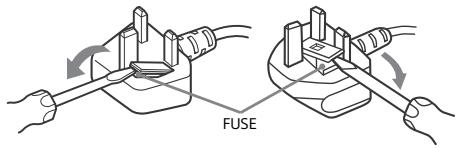
How to replace the fuse
Open the fuse compartment with a blade screwdriver, and replace the fuse.
Please refer to the illustration that actually equipped with the product.
IMPORTANT NOTICE
This product has been manufactured by or on behalf of Sony Corporation, 1-7-1 Konan Minato-ku Tokyo, 108-0075 Japan. Inquiries related to product compliance based on European Union legislation shall be addressed to the authorized representative, Sony Deutschland GmbH, Hedelfinger Strasse 61, 70327 Stuttgart, Germany. For any service or guarantee matters, please refer to the addresses provided in the separate service or guarantee documents.
Notice for Wireless Signal
Hereby, Sony Corporation declares that this unit is in compliance with the essential requirements and other relevant provisions of Directive 1999/5/EC.
For details, please access the following URL: http://www.compliance.sony.de/
Notice for customers: the following information is only applicable to equipment sold in countries applying EU directives.
TV wireless system may be operated in following countries:
AT, BE, HR, CY, CZ, DK, EE, FI, FR, DE, GR, HU, IE, IT, LV, LT, LU, MT, NL, PL, PT, SK, SI, ES, SE, GB, IS, LI, NO, CH, BG, RO, TR, AL, BA, MK, MD, RS, ME, Kosovo
This equipment can be operated in other non-European countries.
Safety information
WARNING
Batteries must not be exposed to excessive heat such as sunshine, fire or the like.
Installation/Set-up
Install and use the TV set in accordance with the instructions below in order to avoid any risk of fire, electrical shock or damage and/or injuries.
Installation
- The TV set should be installed near an easily accessible mains socket.
- Place the TV set on a stable, level surface to avoid it from falling down and cause personal injury or damage to the TV.
- Install the TV where it cannot be pulled, pushed, or knocked over.
- Only qualified service personnel should carry out wall installations.
- For safety reasons, it is strongly recommended that you use Sony accessories, including:
Wall-Mount Bracket
SU-WL450 (KD-65/55X850xC, KD-49/43X830xC)
- Be sure to use the screws supplied with the Wall-Mount Bracket when attaching the Wall-Mount Bracket to the TV set. The supplied screws are designed as indicated by illustration when measured from the attaching surface of the Wall-Mount Bracket. The diameter and length of the screws differ depending on the Wall-Mount Bracket model.
Use of screws other than those supplied may result in internal damage to the TV set or cause it to fall, etc.

8mm-12mm
Transporting
- Before transporting the TV set, disconnect all cables.
- Two or three people are needed to transport a large TV set.
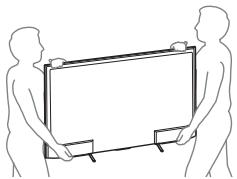
- When transporting the TV set by hand, hold it as shown below. Do not put stress on the LCD panel and the frame around the screen.
- When transporting the TV set, do not subject it to jolts or excessive vibration.
- When transporting the TV set for repairs or when moving, pack it using the original carton and packing material.
Ventilation
- Never cover the ventilation holes or insert anything in the cabinet.
- Leave space around the TV set as shown below.
- It is strongly recommended that you use a Sony Wall-Mount Bracket in order to provide adequate air circulation.
Installed on the wall
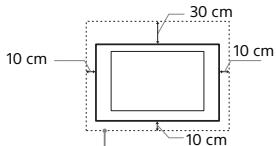
Leave at least this space around the set.
Installed with stand
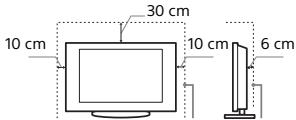
Leave at least this space around the set.
-
To ensure proper ventilation and prevent the collection of dirt or dust:
-
Do not lay the TV set flat, install upside down, backwards, or sideways.
- Do not place the TV set on a shelf, rug, bed or in a closet.
- Do not cover the TV set with a cloth, such as curtains, or items such as newspapers, etc.
- Do not install the TV set as shown below.
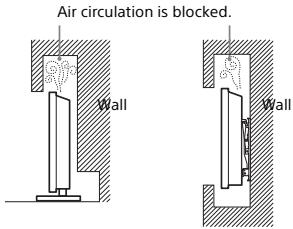
Mains lead
Handle the mains lead and socket as follows in order to avoid any risk of fire, electrical shock or damage and/or injuries:
- Use only mains leads supplied by Sony, not other suppliers.
- Insert the plug fully into the mains socket.
- Operate the TV set on a 220-240 V AC supply only.
-
When wiring cables, be sure to unplug the mains lead for your safety and take care not to catch your feet on the cables.
-
Disconnect the mains lead from the mains socket before working on or moving the TV set.
- Keep the mains lead away from heat sources.
- Unplug the mains plug and clean it regularly. If the plug is covered with dust and it picks up moisture, its insulation may deteriorate, which could result in a fire.
Note
- Do not use the supplied mains lead on any other equipment.
- Do not pinch, bend, or twist the mains lead excessively. The core conductors may be exposed or broken.
- Do not modify the mains lead.
- Do not put anything heavy on the mains lead.
- Do not pull on the mains lead itself when disconnecting the mains lead.
- Do not connect too many appliances to the same mains socket.
- Do not use a poor fitting mains socket.
Prohibited Usage
Do not install/use the TV set in locations, environments or situations such as those listed below, or the TV set may malfunction and cause a fire, electrical shock, damage and/or injuries.
Location:
- Outdoors (in direct sunlight), at the seashore, on a ship or other vessel, inside a vehicle, in medical institutions, unstable locations, near water, rain, moisture or smoke.
- If the TV is placed in the changing room of a public bath or hot spring, the TV may be damaged by airborne sulfur, etc.
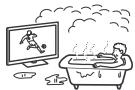
- For best picture quality, do not expose the screen to direct illumination or sunlight.
- Avoid moving the TV from a cold area to a warm area. Sudden room temperature changes may cause moisture condensation. This may cause the TV to show poor picture and/or poor colour. Should this occur, allow moisture to evaporate completely before powering the TV on.
Environment:
- Places that are hot, humid, or excessively dusty; where insects may enter; where it might be exposed to mechanical vibration, near flammable objects (candles, etc). The TV set shall not be exposed to dripping or splashing and no objects filled with liquids, such as vases, shall be placed on the TV.
- Do not place the TV in a humid or dusty space, or in a room with oily smoke or steam (near cooking tables or humidifiers). Fire, electric shock, or warping may result.

- Do not install the TV in places subject to extreme temperature such as in direct sunlight, near a radiator or a heating vent. The TV may overheat in such condition which can cause deformation of the enclosure and/or TV malfunction.

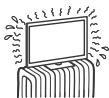
Situation:
- Do not use when your hands are wet, with the cabinet removed, or with attachments not recommended by the manufacturer. Disconnect the TV set from mains socket and aerial during lightning storms.
- Do not install the TV so that it sticks out into an open space. Injury or damage from a person or object bumping into the TV may result.
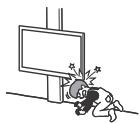
Broken pieces:
- Do not throw anything at the TV set. The screen glass may break by the impact and cause serious injury.
- If the surface of the TV set cracks, do not touch it until you have unplugged the mains lead. Otherwise electric shock may result.
When not in use
- If you will not be using the TV set for several days, the TV set should be disconnected from the mains for environmental and safety reasons.
- As the TV set is not disconnected from the mains when the TV set is just turned off, pull the plug from the mains to disconnect the TV set completely.
However, some TV sets may have features that require the TV set to be left in standby to work correctly.
For children
- Do not allow children to climb on the TV set.
- Keep small accessories out of the reach of children, so that they are not mistakenly swallowed.
If the following problems occur...
Turn off the TV set and unplug the mains lead immediately if any of the following problems occur. Ask your dealer or Sony service centre to have it checked by qualified service personnel.
When:
- Mains lead is damaged.
Poor fitting of mains socket. - TV set is damaged by being dropped, hit or having something thrown at it.
- Any liquid or solid object falls through openings in the cabinet.
About LCD Monitor Temperature
When the LCD Monitor is used for an extended period, the panel surrounds become warm. You may feel hot when touching there by the hand.
Precautions
Viewing the TV
View the TV in moderate light, as viewing the TV in poor light or during long period of time, strains your eyes.
- When using headphones, adjust the volume so as to avoid excessive levels, as hearing damage may result.
(3D compatible models only)
- Some people may experience discomfort (such as eye strain, fatigue, or nausea) while watching 3D video images or playing stereoscopic 3D games. Sony recommends that all viewers take regular breaks while watching 3D video images or playing stereoscopic 3D games. The length and frequency of necessary breaks will vary from person to person. You must decide what works best. If you experience any discomfort, you should stop watching the 3D video images or playing stereoscopic 3D games until the discomfort ends; consult a doctor if you believe necessary. You should also review (i) the instruction manual of any other device or media used with this television and (ii) our website (www.sony.eu/support) for the latest information. The vision of young children (especially those under six years old) is still under development. Consult your doctor (such as a pediatrician or eye doctor) before allowing young children to watch 3D video images or play stereoscopic 3D games. Adults should supervise young children to ensure they follow the recommendations listed above.
- Do not use, store, or leave the 3D Glasses or in places with a high temperature, e.g., in direct sunlight, or in sun-heated cars.
LCD Screen
Although the LCD screen is made with high-precision technology and 99.99% or more of the pixels are effective, black dots may appear or bright points of light (red, blue, or green) may appear constantly on the LCD screen. This is a structural property of the LCD screen and is not a malfunction.
- Do not push or scratch the front filter, or place objects on top of this TV set. The image may be uneven or the LCD screen may be damaged.
- If this TV set is used in a cold place, a smear may occur in the picture or the picture may become dark. This does not indicate a failure. These phenomena disappear as the temperature rises.
- Ghosting may occur when still pictures are displayed continuously. It may disappear after a few moments.
- The screen and cabinet get warm when this TV set is in use. This is not a malfunction.
- The LCD screen contains a small amount of liquid crystal. Follow your local ordinances and regulations for disposal.
Handling and cleaning the screen surface/ cabinet of the TV set
Be sure to unplug the mains lead connected to the TV set from mains socket before cleaning.
To avoid material degradation or screen coating degradation, observe the following precautions.
- To remove dust from the screen surface/cabinet, wipe gently with a soft cloth. If dust is persistent, wipe with a soft cloth slightly moistened with a diluted mild detergent solution.
- Never spray water or detergent directly on the TV set. It may drip to the bottom of the screen or exterior parts and enter the TV set, and may cause damage to the TV set.
- Never use any type of abrasive pad, alkaline/acid cleaner, scouring powder, or volatile solvent, such as alcohol, benzene, thinner or insecticide. Using such materials or maintaining prolonged contact with rubber or vinyl materials may result in damage to the screen surface and cabinet material.
Periodic vacuoming of the ventilation openings is recommended to ensure to proper ventilation. - When adjusting the angle of the TV set, move it slowly so as to prevent the TV set from moving or slipping off from its table stand.

Optional Equipment
- Keep optional components or any equipment emitting electromagnetic radiation away from the TV set. Otherwise picture distortion and/or noisy sound may occur.
- This equipment has been tested and found to comply with the limits set out in the EMC Directive using a connection signal cable shorter than 3 meters.
Recommendation of F-type plug
Projection of the inner wire from the connection part must be less than 1.5mm
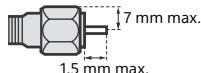
(Reference drawing of the F type plug)
Wireless Function of the unit
- Do not operate this unit near medical equipment (pacemaker, etc.), as malfunction of the medical equipment may result.
- Although this unit transmits/receives scrambled signals, be careful of unauthorized interception. We cannot be responsible for any trouble as a result.
Caution about handling the remote control
- Observe the correct polarity when inserting batteries.
- Do not use different types of batteries together or mix old and new batteries.
- Dispose of batteries in an environmentally friendly way. Certain regions may regulate the disposal of batteries. Please consult your local authority.
- Handle the remote control with care. Do not drop or step on it, or spill liquid of any kind onto it.
- Do not place the remote control in a location near a heat source, a place subject to direct sunlight, or a damp room.
Disposal of the TV set


Disposal of Old Electrical & Electronic Equipment (Applicable in the European Union and other European countries with separate collection systems)
This symbol on the product or on its packaging indicates that this product shall not be treated as household waste. Instead it shall be handed over to the applicable collection point for the
recycling of electrical and electronic equipment. By ensuring this product is disposed of correctly, you will help prevent potential negative consequences for the environment and human health, which could otherwise be caused by inappropriate waste handling of this product. The recycling of materials will help to conserve natural resources. For more detailed information about recycling of this product, please contact your local Civic Office, your household waste disposal service or the shop where you purchased the product.

Disposal of waste batteries (applicable in the European Union and other European countries with separate collection systems)
This symbol on the battery or on the packaging indicates that the battery provided with this
product shall not be treated as household waste. On certain batteries this symbol might be used in combination with a chemical symbol. The chemical symbols for mercury (Hg) or lead (Pb) are added if the battery contains more than 0.0005% mercury or 0.004% lead. By ensuring these batteries are disposed of correctly, you will help prevent potentially negative consequences for the environment and human health which could otherwise be caused by inappropriate waste handling of the battery. The recycling of the materials will help to conserve natural resources. In case of products that for safety, performance or data integrity reasons require a permanent connection with an incorporated battery, this battery should be replaced by qualified service staff only. To ensure that the battery will be treated properly, hand over the product at end-of-life to the applicable collection point for the recycling of electrical and electronic equipment. For all other batteries, please view the section on how to remove the battery from the product safely. Hand the battery over to the applicable collection point for the recycling of waste batteries. For more detailed information about recycling of this product or battery, please contact your local Civic Office, your household waste disposal service or the shop where you purchased the product.
Parts and Controls
Controls and Indicators
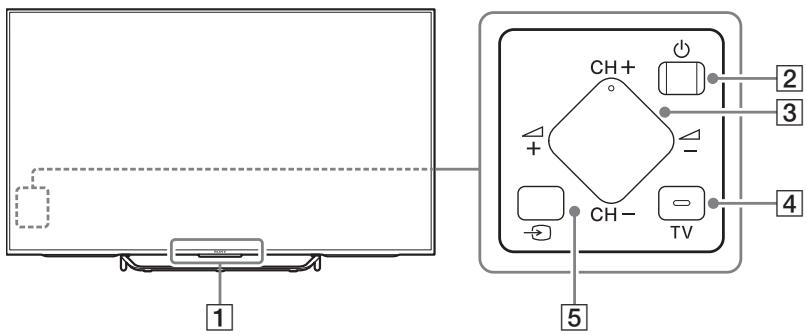
Remote Control sensor\*1 / Light sensor\*1 / Illumination LED / 3D Sync Transmitter\*1\*3
The illumination LED lights up or blinks according to the status of the TV.
- White When turning on the TV/picture off mode/software update, etc.
- Cyan When connecting with a mobile device wirelessly.
- Pink*2 Recording mode.
- Amber Timer is set.
2 (Power)
CH+/- (Channel) + / - (Volume)
4 TV Switch to a TV channel or input from other applications.
5 (Input select)
Display and select the input source.
1 Do not place anything near the sensor.
2 Only on limited region/country/TV model.
*3 3D compatible models only.
Inputs and Outputs
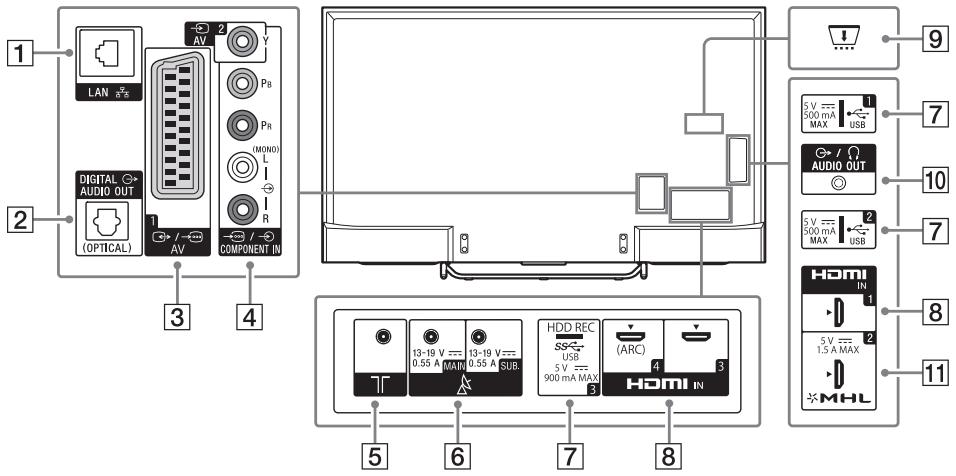
KD-75/65/55X850xC
KD-49/43X830xC
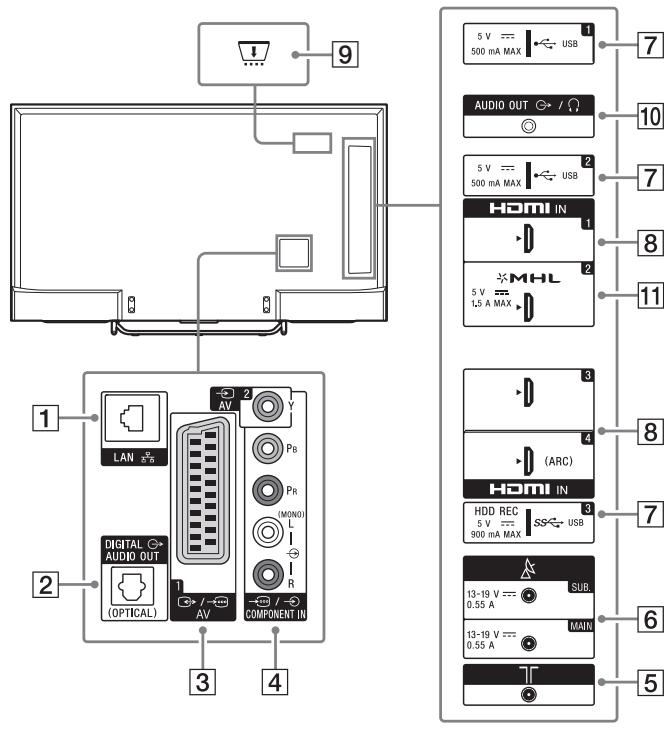
LAN
2 DIGITAL AUDIO OUT (OPTICAL)
3 / AV1
- Connect with a SCART cable. When you connect an analogue decoder, the TV tuner outputs scrambled signals to the decoder, and the decoder unscrambles the signals before outputting them.
4 AV2, /COMPONENT IN
- For a composite connection: Use AV 2, and (L/R) of /COMPONENT IN ^1 .
- For a component connection: Use Y, PB, PR, and (L/R).
[RF input]
Connect to your cable or antenna (aerial).
6 A (Satellite input)
Connect to your satellite antenna (aerial).
7 USB1/2,SSUSB3(HDDREC)*2
- Connecting a large USB device may interfere with other connected devices beside it.
- When connecting a large USB device, connect to the USB 1 jack.
8 HDMI IN 1/3/4
- If connecting a digital audio system that is compatible with Audio Return Channel (ARC) technology, use HDMI IN 4. If not, an additional connection with DIGITAL AUDIO OUT (OPTICAL) is necessary.
CAM (Conditional Access Module)
- Provides access to pay TV services. For details, refer to the instruction manual supplied with your CAM.
- Do not insert the smart card directly into the TV CAM slot. It must be fitted into the Conditional Access Module provided by your authorised dealer.
- CAM is not supported in some countries/ areas. Check with your authorised dealer.
- A CAM message may appear when you switch to a digital programme after using the Internet video.
10 AUDIO OUT 一 / 一
- To listen to the TV's sound through the connected equipment, press HOME. Select [Settings] [Sound] [Headphone/Audio out] and then select the desired item.
11HDMI IN 2/MHL
- You can connect your MHL (Mobile High-definition Link) device using an HD quality MHL cable.
1 When connecting mono equipment, connect to the L (MONO) audio jack (socket).
2 Only on limited region/country/TV model.
*3 HDD REC function will be available from mid 2015. You will receive HDD REC function automatically as a software upgrade. Make sure your TV is connected to the Internet. If you do not have a network connection, you will be able to download the software from the Sony support website using your PC. For details on how to upgrade, please visit the Sony support website. To stay informed about the exact release date, please subscribe at http://www.sony.eu/support/2015tvnetworkupdate
Using Remote Control
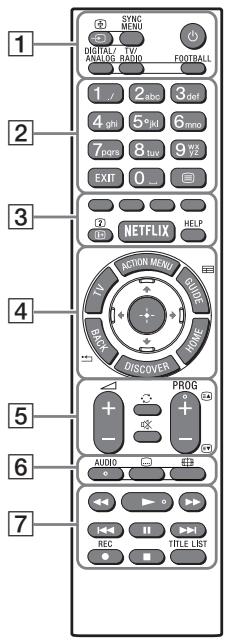
Remote Control Parts Description
IR (infrared) Remote Control
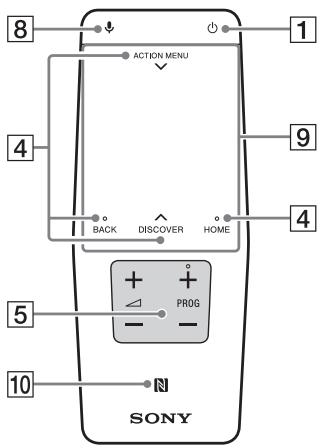
Touchpad Remote Control
For models with supplied Touchpad Remote Control.
1/ (Input select/Text hold)
In TV mode: Display and select the input source.
In Text mode: Hold the current page.
SYNC MENU*1
Display the BRAVIA Sync Menu.
(TV standby)
Turn on or turn off the TV (standby mode).
DIGITAL/ANALOG
Switch between digital and analogue mode.
TV/RADIO
Switch between TV or RADIO broadcasts.
FOOTBALL*1
Turn Live Football Mode on or off (when the feature is available).
2 Number buttons
EXIT
Return to the previous screen or exit from the menu. When an Interactive Application service is available, press to exit from the service.
(Text)
Display text information.
3 Colour buttons
Execute correspondent function at that time.
+//? (Info/Text reveal)\*1
Display information.
NETFLIX*1
Access the "NETFLIX" online service.
HELP
Display Help Menu.
4 ACTION MENU
Display a list of contextual functions.
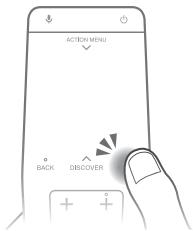
You can also display it by slide down your finger from ACTION MENU on the Touchpad Remote Control.
TV\*1
Switch to a TV channel or input from other applications.
GUIDE/目\*1
Display the digital programme guide.
BACK/
Return to previous screen.
HOME
Display the TV Home Menu.
DISCOVER
Bring up the Content Bar to search for content.
You can also launch Content Bar by slide up your finger from DISCOVER on the Touchpad Remote Control.
/ / / (Item select/Enter)
5 + / - (Volume)
Adjust the volume.
(Jump)
Jump back and forth between two channels or inputs. The TV alternates between the current channel or input and the last channel or input that was selected.
Muting)
Mute the sound. Press again to restore the sound.
PROG + / - / 巴 /
In TV mode: Select the channel.
In Text mode: Select the next (A) or previous (E) page.
6 AUDIO
Change the language for the programme currently being viewed.
(Subtitle setting)
Turn subtitles on or off (when the feature is available).

(Wide mode)
Change the screen format.

←/→/→/1←/11/→/
Operate media contents on TV and connected BRAVIA Sync-compatible device.
REC\*1\*2
Record the current programme with the USB HDD recording function.
TITLE LIST\*1
Display the Title list.
8 (Microphone)
Use Voice Function. (e.g., Search various content by voice.)
9 Touchpad
Operate the TV with the touchpad.
10 NFC
Touch the device (e.g. some models of Xperia) corresponding to the One-touch mirroring function, then its screen is displayed on the TV.
1 The location, availability and function of remote control button may vary depending on your country/region/TV model.
2 HDD REC function will be available from mid 2015. You will receive HDD REC function automatically as a software upgrade. Make sure your TV is connected to the Internet. If you do not have a network connection, you will be able to download the software from the Sony support website using your PC. For details on how to upgrade, please visit the Sony support website. To stay informed about the exact release date, please subscribe at http://www.sony.eu/support/2015tvnetworkupdate
Using the Touchpad Remote Control
Touchpad Remote Control can only be used after pairing with the TV.
To pair, follow the pairing screen instruction. Pairing screen can be displayed by pressing the button on the TV for 5 seconds, or select [Settings] - [Touchpad Remote Control settings] - [Pair Touchpad Remote Control].
Launching the Touchpad Remote Control Introduction/Tutorial
1 Press HOME.
2 Select [Settings] - [Touchpad Remote Control settings] - [Start Introduction/Tutorial].
Connecting Other Devices
For more information on connections, refer to the Help Guide.
Note
To select an input device connected to the TV, press
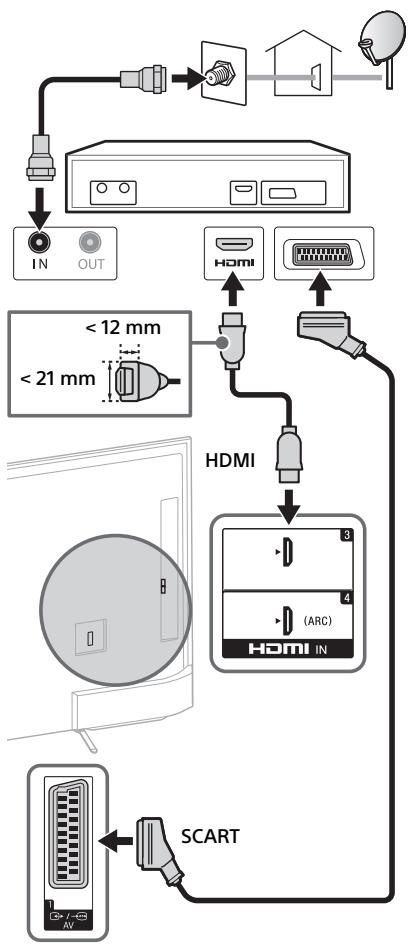
To connect Satellite
Connections for terrestrial/cable and satellite.
① ③ :connection steps
KD-75/65/55X850xC
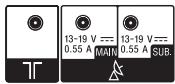
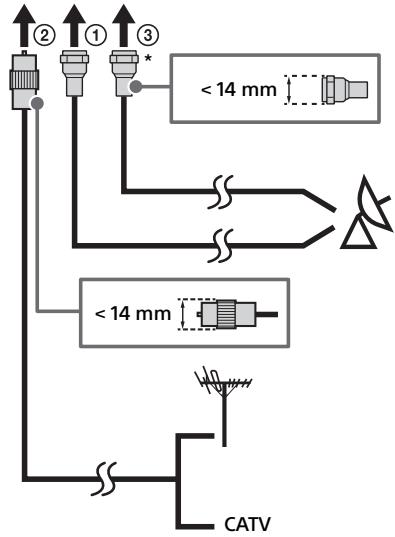
KD-49/43X830xC

* Connect only when you are using twin tuner mode.
To connect Satellite Box
Connect to the TV using either an HDMI or SCART cable.
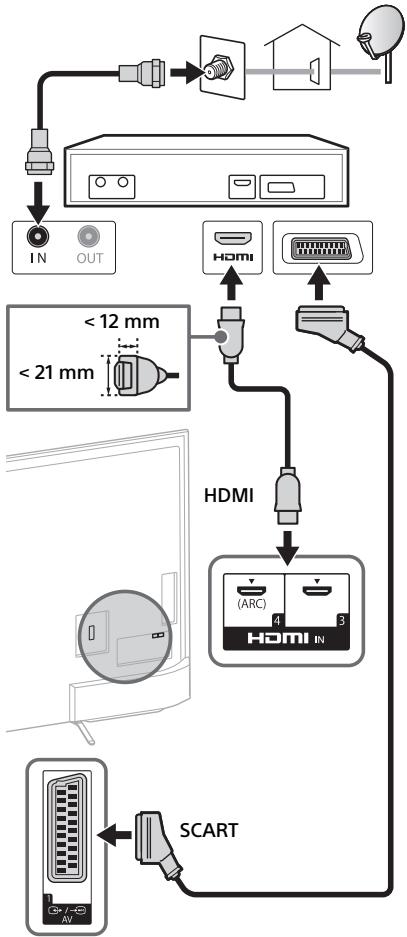
KD-75/65/55X850xC
To connect MHL Device
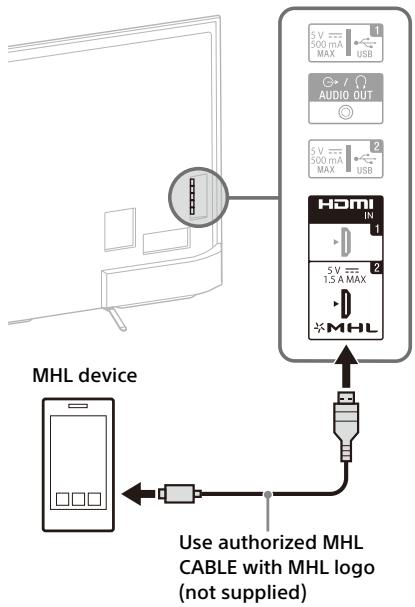
KD-75/65/55X850xC

The TV simultaneously charges the MHL-compatible connected device while playing photo/music/video files. You can use the TV remote control to control the connected MHL-compatible device.
Note
- If [MHL charging during standby] is set to [On], you can continue charging the MHL-compatible device even when the TV is in standby mode.
- Use authorized MHL 3 CABLE with MHL logo for 4K smartphone or mobile devices.
Installing the TV to the Wall
This TV's instruction manual only shows the steps on preparing the installation of the TV before installing to the wall.
To Customers:
For product protection and safety reasons, Sony strongly recommends that installation of your TV be performed by Sony dealers or licensed contractors. Do not attempt to install it yourself.
To Sony Dealers and Contractors:
Provide full attention to safety during the installation, periodic maintenance and examination of this product.
Sufficient expertise is required for installing this product, especially to determine the strength of the wall for withstanding the TV's weight. Be sure to entrust the attachment of this product to the wall to Sony dealers or licensed contractors and pay adequate attention to safety during the installation. Sony is not liable for any damage or injury caused by mishandling or improper installation.
Use the Wall-Mount Bracket SU-WL450 (not supplied) (KD-65/55X850xC, KD-49/43X830xC) to install the TV to the wall.
When installing the Wall-Mount Bracket, also refer to the Operating Instructions and Installation Guide supplied with the Wall-Mount Bracket.
Note
- Be sure to store the removed screws in a safe place, keeping them away from children.
To remove the screws from the rear of the TV (KD-75/65X850xC)

To change the cable management (KD-55X850xC, KD-49/43X830xC)


To detach the Table-Top Stand from the TV

For instructions on Wall-Mount Bracket installation of your TV model, refer to the following website: www.sony.eu/tv/wall-mount-bracket-manual
Troubleshooting
In order to keep your TV software up-to-date, it is necessary to download the latest software information via the digital broadcasting system or internet and to update the software. Select [Update Now] to start a software update. The illumination LED flashes white while the software is updating. Do not unplug the mains lead during the software update. If you do, the software update may not finish completely, and it may cause a software malfunction. Software updates can take up to 30 minutes. If you do not wish to update the software automatically, press HOME and select [Help] → [System software update] → [Automatic software download] → [Off].
When you unplug the TV and plug it in again, the TV may not be able to turn on for a while even if you press the power button on the remote control or the TV because it takes time to initialize the system. Wait for about 10 to 20 seconds, then operate it again.
When the illumination LED is flashing in red, count how many times it flashes (interval time is three seconds).
If the illumination LED flashes red, reset the TV by disconnecting the mains lead for two minutes, then turn on the TV.
If the problem persists, contact your dealer or Sony service centre with the number of times the illumination LED flashes red (interval time is three seconds). Disconnect the mains lead, and inform your dealer or Sony service centre.
When the illumination LED is not flashing, check the items as follows.
You can also refer to [Troubleshooting] in the Help Guide or perform self-diagnosis by selecting [Help] [Self diagnostics]. If the problem persists, have your TV serviced by qualified service personnel.
Troubles and Solutions
There is no picture (screen is dark) and no sound.
- Check the antenna (aerial)/cable connection.
- Connect the TV to mains lead, and press on the TV or the remote control.
Some programmes cannot be tuned.
- Check the antenna (aerial)/cable connection.
- The satellite cable might be short-circuited or there might be connection problems of the cable. Check the cable connection and then turn the TV off with the Mains power On/Off switch, and turn it on again.
- The frequency that you entered is out of range. Consult the received satellite broadcasting company.
There is no Cable TV services (programmes) found.
- Check the cable connection or tuning configuration.
- Attempt the [Digital Auto Tuning] by selecting [Antenna] instead of [Cable].
The remote control does not function.
- Replace the batteries.
The [Parental lock] password has been forgotten.
- Enter 9999 for the PIN code. (PIN code 9999 is always accepted.)
The TV surrounds become warm.
- When the TV is used for an extended period, the TV surrounds become warm. You may feel hot when touching there by the hand.
Frozen audio or video, a blank screen, or the TV does not respond to TV or remote control buttons.
- Perform a simple reset of the TV by unplugging the mains lead for two minutes, then plug it in again.
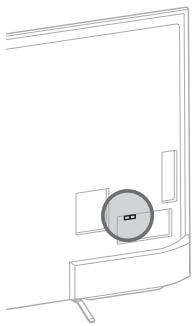
The , CH + / -, + / -, and TV buttons cannot be located on the TV.
See below illustration for location of the buttons on the TV.

Rear of TV
The illumination LED is turned on.
If you do not wish to light up the illumination LED, you can turn it off.
Press HOME, then select [Settings] [Illumination LED] [Off].

Cannot connect to a wireless router by WPS (Wi-Fi Protected Setup).
- If you use WEP security, select [Easy] [Wi-Fi] [Connect by scan list]. Then, select the network name (SSID) you want to connect.
Cannot find the required network name in network setup.
- Select [[Manual entry]] and press to enter network name.
Specifications
System
Panel system
LCD (Liquid Crystal Display) Panel, LED Backlight
TV system
Analogue: Depending on your country/area
selection: B/G, D/K, L, I
Digital: DVB-T/DVB-C
DVB-T2
Satellite: DVB-S/DVB-S2
Colour/video system
Analogue: PAL, SECAM, NTSC3.58 (Video only),
NTSC4.43 (Video only)
Digital: Refer to the Help Guide.
Channel coverage
Analogue: UHF/VHF/Cable, Depending on your country/area selection.
Digital: UHF/VHF/Cable, Depending on your country/area selection.
Satellite: IF Frequency 950-2,150 MHz
Sound output
10W+10W
Wireless technology
Protocol IEEE802.11ac/a/b/g/n
(IEEE802.11ac may not be available depending on countries/regions.)
Bluetooth Version 4.1
Input/Output jacks
Antenna (aerial) cable
75 ohm external terminal for VHF/UHF
Satellite antenna
Female F-Type Connector IEC169-24, 75 ohm.
DiSeqC 1.0, LNB 13 V/18 V & 22 kHz tone, Single Cable Distribution EN50494.
G→/AV1
21-pin scart connector (CENELEC standard)
including audio/video input, RGB input and TV audio/video output.
COMPONENT IN
YPBPR (Component Video): 1080p (50, 60 Hz), 1080i (50, 60 Hz), 720p (50, 60 Hz), 576p, 576i, 480p, 480i
Audio input (phono jacks)
AV2
Video input (common phono pin with Y input)
HDMI IN 1, 2, 3, 4 (support 4K resolution)
Video (2D):
4096 × 2160p (50, 60 Hz)12, 4096 × 2160p (24 Hz)2, 3840 × 2160p (50, 60 Hz)1, 3840 × 2160p
(24, 25, 30 Hz), 1080p (30, 50, 60 Hz), 1080/24p, 1080i (50, 60 Hz), 720p (30, 50, 60 Hz), 720/24p, 576p, 576i, 480p, 480i, PC Formats
*1 YCbCr 4:2:0 / 8bit only
*2 3840 × 2160p is displayed when 4096 × 2160p is input
Video (3D) (3D compatible models only):
Frame Packing: 1080p (30 Hz), 1080/24p, 1080i
(50, 60 Hz), 720p (30, 50, 60 Hz), 720/24p
Side-by-Side: 1080p (50, 60 Hz), 1080/24p, 1080i (50, 60 Hz), 720p (50, 60 Hz)
Over-Under: 1080p (30, 50, 60 Hz), 1080/24p, 1080i (50, 60 Hz), 720p (50, 60 Hz)
Audio: 5.1 channel linear PCM: 32, 44.1, 48, 88.2, 96, 176.4 and 192kHz , 16, 20 and 24 bits, Dolby Digital and DTS
ARC (Audio Return Channel) (HDMI IN 4 only)
MHL (HDMI IN 2)
Video (2D):
4096× 2160p (24Hz)^ 3840× 2160p (24, 25, 30
Hz), 1080p (30, 50, 60 Hz), 1080/24p, 1080i (50,
60 Hz), 720p (30, 50, 60 Hz), 720/24p, 576p, 576i, 480p, 480i
- 3840 × 2160p is displayed when 4096 × 2160p is input
Video (3D) (3D compatible models only):
Frame Packing: 1080p (30 Hz), 1080/24p, 1080i
(50, 60 Hz), 720p (30, 50, 60 Hz), 720/24p
Side-by-Side: 1080p (50, 60 Hz), 1080/24p, 1080i (50, 60 Hz), 720p (50, 60 Hz)
Over-Under: 1080p (50, 60 Hz), 1080p (30 Hz),
1080/24p, 1080i (50, 60 Hz), 720p (50, 60 Hz)
Audio: 5.1 channel linear PCM: 32, 44.1, 48, 88.2
96, 176.4 and 192 kHz, 16, 20 and 24 bits, Dolby Digital and DTS
DIGITAL AUDIO OUT (OPTICAL)
Digital optical jack (Two channel linear PCM, Dolby Digital, DTS)
AUDIO OUT, ^- / (Stereo mini jack)
Headphone, Audio Output, Subwoofer
1,2,SS3 (HDDREC)4
USB device port (SS3 3 USB HDD device for REC feature)
USB port 1 and 2 support High Speed USB (USB2.0).
USB port 3 supports Super Speed USB (USB3.0).

CAM (Conditional Access Module) slot
LAN
10BASE-T/100BASE-TX connector (Depending on the operating environment of the network, connection speed may differ. 10BASE-T/ 100BASE-TX communication rate and communication quality are not guaranteed for this TV.)
Others
Optional accessories
Touchpad Remote Control: RMF-TX100E (KD-49/ 43X830xC)
Wall-Mount Bracket: SU-WL450 (KD-65/
Active 3D Glasses: TDG-BT500A (3D compatible models only)

Operating temperature
0^ - 40^
Operating humidity
10% - 80% RH (non-condensing)
Power and others
Power requirements
Rating: Input 220 V - 240 V AC, 50 Hz
Energy Efficiency Class
KD-75X850xC / FW-75X8570C: B
KD-65X850xC / FW-65X8570C: A
KD-55X850xC / FW-55X8570C: A
KD-49X830xC / FW-49X8370C: A
KD-43X830xC / FW-43X8370C: A
Screen size (measured diagonally) (Approx.)
KD-75X850xC / FW-75X8570C:
75 inches / 189.3 cm
KD-65X850xC / FW-65X8570C:
65 inches / 163.9 cm
KD-55X850xC / FW-55X8570C:
55 inches / 138.8 cm
KD-49X830xC / FW-49X8370C:
49 inches / 123.2 cm
KD-43X830xC / FW-43X8370C:
43 inches / 108.0 cm
Power consumption
in [Standard] mode
KD-75X850xC / FW-75X8570C:230W
KD-65X850xC / FW-65X8570C: 149 W
KD-55X850xC / FW-55X8570C: 115 W
KD-49X830xC / FW-49X8370C: 84 W
KD-43X830xC / FW-43X8370C: 72 W
in [Vivid] mode
KD-75X850xC / FW-75X8570C: 425 W
KD-65X850xC / FW-65X8570C:288W
KD-55X850xC / FW-55X8570C:229W
KD-49X830xC / FW-49X8370C: 177 W
KD-43X830xC / FW-43X8370C: 162 W
Average annual energy consumption*1
KD-75X850xC / FW-75X8570C:319 kWh
KD-65X850xC / FW-65X8570C: 207 kWh
KD-55X850xC / FW-55X8570C: 160 kWh
KD-49X830xC / FW-49X8370C: 117 kWh
KD-43X830xC / FW-43X8370C: 100 kWh
Standby power consumption*2*3
0.5 W (27 W in software/EPG update mode)
Display resolution
3,840 dots (horizontal) × 2,160 lines (vertical)
Output Rating
USB 1/2:5V, = = = ,500mA MAX
USB3:5V, = = 900mA MAX
MHL (HDMI IN 2): 5 V, ---, 1.5 A MAX
Dimensions (Approx.) (w× h× d)
with Table-Top Stand
KD-75X850xC: 167.5× 101.9× 32.3cm
KD-65X850xC: 145.3 × 89.2 × 26.5 ~cm
KD-55X850xC: 123.6 × 75.9 × 22.2 cm
KD-49X830xC: 109.3× 67.9× 20.1cm
KD-43X830xC: 96.1 × 60.4 × 18.9 cm
without Table-Top Stand
KD-75X850xC: 167.5× 97.0× 7.9cm
KD-65X850xC: 145.3 × 84.4 × 7.8 cm
KD-55X850xC: 123.6 × 72.2 × 6.0 cm
KD-49X830xC: 109.3 × 64.3 × 6.0 cm
KD-43X830xC: 96.1 × 56.8 × 6.0 cm
Mass (Approx.)
with Table-Top Stand
KD-75X850xC: 36.3 kg
KD-65X850xC:25.5kg
KD-55X850xC:21.0kg
KD-49X830xC:15.4 kg
KD-43X830xC: 12.8 kg
without Table-Top Stand
KD-75X850xC: 34.8 kg
KD-65X850xC: 24.1 kg
KD-55X850xC: 19.9 kg
KD-49X830xC:14.4 kg
KD-43X830xC:11.8 kg
1 Energy consumption per year, based on the power consumption of the television operating 4 hours per day for 365 days. The actual energy consumption will depend on how the television is used.
^2 Specified standby power is reached after the TV finishes necessary internal processes.
*3 Standby power consumption will increase when your TV is connected to the network.
^ 4 Only on limited region/country/TV model.
Note
- The "x" that appears in the model name corresponds to a numeric digit, related to design, colour or TV system.
- Do not remove the dummy card from TV CAM (Conditional Access Module) slot other than to insert a smart card fitted in CAM.
- Optional accessories availability depends on countries/region/TV model/stock.
- Design and specifications are subject to change without notice.
This TV set incorporates MHL 3.
Notes on Digital TV function
- Any functions related to Digital TV (DV3) will only work in countries or areas where DVB-T/DVB-T2 (MPEG-2 and H.264/MPEG-4 AVC) digital terrestrial signals are broadcast or where you have access to a compatible DVB-C (MPEG-2 and H.264/MPEG-4 AVC) cable service. Please confirm with your local dealer if you can receive a DVB-T/ DVB-T2 signal where you live or ask your cable provider if their DVB-C cable service is suitable for integrated operation with this TV.
- Your cable provider may charge a fee for their services, or require you to agree to its terms and conditions of business.
- This TV set complies with DVB-T/DVB-T2 and DVB-C specifications, but compatibility with future DVB-T/DVB-T2 digital terrestrial and DVB-C digital cable broadcasts are not guaranteed.
- Some Digital TV functions may not be available in some countries/areas and DVB-C cable may not operate correctly with some providers.
Trademark information
- The terms HDMI and HDMI High-Definition Multimedia Interface, and the HDMI Logo are trademarks or registered trademarks of HDMI Licensing LLC in the United States and other countries.
- Manufactured under license from Dolby Laboratories. Dolby and the double-D symbol are trademarks of Dolby Laboratories.
- "BRAVIA" and BRAVIA are trademarks of Sony Corporation.
- Gracenote, Gracenote eyeQ, Gracenote VideolD, Gracenote Video Explore, the Gracenote logo and logotype, and the "Powered by Gracenote" logo are either registered trademarks or trademarks of Gracenote in the United States and/or other countries.
- Opera® Devices SDK from Opera Software ASA. Copyright 1995-2014 Opera Software ASA. All rights reserved.
- Wi-Fi, Wi-Fi Direct, Miracast and Wi-Fi Protected Setup are trademarks or registered trademarks of Wi-Fi Alliance.
- MHL, Mobile High-Definition Link and the MHL Logo are trademarks or registered trademarks of MHL Licensing, LLC.
- For DTS patents, see http://patents.dts.com. Manufactured under license from DTS, Inc.
DTS, the Symbol, & DTS and the Symbol together are registered trademarks, and DTS Digital Surround is a trademark of DTS, Inc. © DTS, Inc. All Rights Reserved. - Designed with UEI Technology™ Under License from Universal Electronics Inc. Portions © UEI 2000 - 2014
- The Bluetooth® word mark and logos are owned by the Bluetooth SIG, Inc. and any use of such marks by Sony Corporation is under license. Other trademarks and trade names are those of their respective owners.
- DiSEqCTM is a trademark of EUTELSAT. This TV supports DiSEqC 1.0. This TV is not intended for controlling motorized antennas.
-
TUXERA is a registered trademark of Tuxera Inc. in the US and other countries.
-
USB-IF SuperSpeed USB Trident logo is a registered trademark of USB Implementers Forum, Inc.
For models with supplied Touchpad Remote Control:
- The N Mark is a trademark or registered trademark of NFC Forum, Inc. in the United States and in other countries.
Table des matieres
AT, BE, HR, CY, CZ, DK, EE, FI, FR, DE, GR, HU, IE, IT, LV, LT, LU, MT, NL, PT, SK, SI, ES, SE, GB, IS, LI, NO, CH, BG, RO, TR, AL, BA, MK, MD, RS, ME, Kosovo
6 (Entree satellite)
2160p (24, 25, 30 Hz), 1080p (30, 50, 60 Hz),
1080/24p, 1080i (50, 60 Hz), 720p (30, 50,
60 Hz), 720/24p, 576p, 576i, 480p, 480i, Formats PC
*1 YCbCr 4:2:0 / 8 bits uniqueness
1080/24p, 1080i (50, 60 Hz), 720p (50, 60 Hz)
ARC (Audio Return Channel) (HDMI IN 4
uniquement)
MHL (HDMI IN 2)
Video (2D):
4096× 2160p (24Hz)^ 3840× 2160p (24, 25,
30 Hz), 1080p (30, 50, 60 Hz), 1080/24p, 1080i
(50, 60 Hz), 720p (30, 50, 60 Hz), 720/24p, 576p,
576i, 480p, 480i
DIGITAL AUDIO OUT (OPTICAL)
10% - 80% HR (sans condensation)
AT, BE, HR, CY, CZ, DK, EE, FI, FR, DE, GR, HU, IE, IT, LV, LT, LU, MT, NL, PT, SK, SI, ES, SE, GB, IS, LI, NO, CH, BG, RO, TR, AL, BA, MK, MD, RS, ME, Kosovo
Sistema de television
2160p (24, 25, 30 Hz), 1080p (30, 50, 60 Hz),
1080/24p, 1080i (50, 60 Hz), 720p (30, 50,
60 Hz), 720/24p, 576p, 576i, 480p, 480i,
Formatos de PC
*1 Solo YCbCr 4:2:0 / 8 bits
*2 Se muestra 3840 × 2160p al recibir 4096 × 2160p
Video (3D) (Solo modelos compatibles con 3D):
1080/24p, 1080i (50, 60 Hz), 720p (50, 60 Hz)
Audio: PCM lineal de 5,1 canales: 32, 44,1, 48
88,2,96,176,4 y 192 kHz, 16, 20 y 24 bits, Dolby
Digital y DTS
ARC (Audio Return Channel) (sólo HDMI IN 4)
MHL (HDMI IN 2)
Video (2D):
4096× 2160p (24Hz)^ 3840× 2160p (24, 25,
30 Hz), 1080p (30, 50, 60 Hz), 1080/24p, 1080i
(50, 60 Hz), 720p (30, 50, 60 Hz), 720/24p, 576p,
576i,480p,480i
1080/24p, 1080i (50, 60 Hz), 720p (30, 50,
60 Hz), 720/24p
Lado a lado: 1080p (50, 60 Hz), 1080/24p,
1080i (50, 60 Hz), 720p (50, 60 Hz)
Encima-debajo: 1080p (50, 60 Hz), 1080p
(30 Hz), 1080/24p, 1080i (50, 60 Hz), 720p (50, 60 Hz)
Audio: PCM lineal de 5,1 canales: 32, 44,1, 48
88,2,96,176,4 y 192 kHz, 16, 20 y 24 bits, Dolby
Digital y DTS
DIGITAL AUDIO OUT (OPTICAL)
Toma digital optica (PCM lineal de dos canales, Dolby Digital, DTS)
AUDIO OUT, -/Ω (minitoma estéreo)
Auriculares, saliva de audio, subwoofer
1, 2, SSC3 (HDD REC)*4
10% - 80% RH (sin condensacion)
KD-49X830xC / FW-49X8370C: A
KD-43X830xC / FW-43X8370C: A
KD-49X830xC / FW-49X8370C:
49ulgadas / 123,2 cm
KD-43X830xC / FW-43X8370C:
43 pulgadas / 108,0 cm
Consumo de energia
KD-49X830xC / FW-49X8370C: 84 W
KD-43X830xC / FW-43X8370C: 72 W
En el modo [Viva]
KD-75X850xC / FW-75X8570C: 425 W
KD-65X850xC / FW-65X8570C: 288 W
KD-55X850xC / FW-55X8570C:229W
KD-49X830xC / FW-49X8370C:177W
KD-43X830xC / FW-43X8370C: 162 W
KD-49X830xC / FW-49X8370C: 117 kWh
KD-43X830xC / FW-43X8370C: 100 kWh
KD-49X830xC:109,3×64,3×6,0 cm
KD-43X830xC:96,1×56,8×6,0 cm
Peso (Aprox.)
AT, BE, HR, CY, CZ, DK, EE, FI, FR, DE, GR, HU, IE, IT, LV, LT, LU, MT, NL, PT, SK, SI, ES, SE, GB, IS, LI, NO, CH, BG, RO, TR, AL, BA, MK, MD, RS, ME, Kosovo
2160p (24, 25, 30 Hz), 1080p (30, 50, 60 Hz),
1080/24p, 1080i (50, 60 Hz), 720p (30, 50,
60 Hz), 720/24p, 576p, 576i, 480p, 480i, Pc-formaten
*1 Alleen YCbCr 4:2:0 / 8 bit
DIGITAL AUDIO OUT (OPTICAL)
KD-49X830xC / FW-49X8370C: A
KD-43X830xC / FW-43X8370C: A
KD-75X850xC / FW-75X8570C:230W
KD-65X850xC / FW-65X8570C:149W
KD-55X850xC / FW-55X8570C: 115 W
KD-49X830xC / FW-49X8370C: 84 W
KD-43X830xC / FW-43X8370C: 72 W
in de stand [Levendig]
KD-75X850xC / FW-75X8570C: 425 W
KD-65X850xC / FW-65X8570C: 288 W
KD-55X850xC / FW-55X8570C: 229 W
KD-49X830xC / FW-49X8370C: 177 W
KD-43X830xC / FW-43X8370C: 162 W
KD-49X830xC / FW-49X8370C: 117 kWh
KD-43X830xC / FW-43X8370C: 100 kWh
Stand-by vermogensebruik*23
KD-75X850xC:167,5×97,0×7,9cm
KD-65X850xC:145,3×84,4×7,8cm
KD-55X850xC: 123,6 × 72,2 × 6,0 cm
KD-49X830xC: 109,3×64,3×6,0 cm
KD-43X830xC: 96,1 × 56,8 × 6,0 cm
Gewicht (Ong.)
met tafelstandaard
KD-75X850xC:36,3 kg
KD-65X850xC:25,5kg
KD-55X850xC: 21,0 kg
KD-49X830xC:15,4 kg
KD-43X830xC:12,8 kg
AT, BE, HR, CY, CZ, DK, EE, FI, FR, DE, GR, HU, IE, IT, LV, LT, LU, MT, NL, PL, PT, SK, SI, ES, SE, GB, IS, LI, NO, CH, BG, RO, TR, AL, BA, MK, MD, RS, ME, Kosovo
Satellite: IF Frequenz 950-2.150 MHz
Tonausgange
$$ 1 0 \mathrm {W} + 1 0 \mathrm {W} $$
Wireless-Technologie
Protokoll IEEE802.11ac/a/b/g/n
2160p (24, 25, 30 Hz), 1080p (30, 50, 60 Hz),
1080/24p, 1080i (50, 60 Hz), 720p (30, 50,
60 Hz), 720/24p, 576p, 576i, 480p, 480i,
Computerformate
*1 nur YCbCr 4:2:0/8 Bit
Frame Packing: 1080p (30 Hz), 1080/24p,
1080i (50, 60 Hz), 720p (30, 50, 60 Hz), 720/24p
Nebeneinander: 1080p (50, 60 Hz), 1080/24p,
1080i (50, 60 Hz), 720p (50, 60 Hz)
Untereinander: 1080p (30, 50, 60 Hz), 1080/24p,
1080i (50, 60 Hz), 720p (50, 60 Hz)
Audio: 5,1-Kanal linear PCM: 32, 44,1, 48, 88,2, 96
Frame Packing: 1080p (30 Hz), 1080/24p,
1080i (50, 60 Hz), 720p (30, 50, 60 Hz), 720/24p
Nebeneinander: 1080p (50, 60 Hz), 1080/24p,
1080i (50, 60 Hz), 720p (50, 60 Hz)
Untereinander: 1080p (50, 60 Hz), 1080p
(30 Hz), 1080/24p, 1080i (50, 60 Hz), 720p (50, 60 Hz)
Audio: 5,1-Kanal linear PCM: 32, 44,1, 48, 88,2, 96
DIGITAL AUDIO OUT (OPTICAL)
KD-49X830xC / FW-49X8370C: A
KD-43X830xC / FW-43X8370C: A
KD-75X850xC / FW-75X8570C:230W
KD-65X850xC / FW-65X8570C: 149 W
KD-55X850xC / FW-55X8570C: 115 W
KD-49X830xC / FW-49X8370C: 84 W
KD-43X830xC / FW-43X8370C: 72 W
im Modus [Brillant]
KD-75X850xC / FW-75X8570C: 425 W
KD-65X850xC / FW-65X8570C: 288 W
KD-55X850xC / FW-55X8570C:229 W
KD-49X830xC / FW-49X8370C: 177 W
KD-43X830xC / FW-43X8370C: 162 W
KD-49X830xC / FW-49X8370C: 117 kWh
KD-43X830xC / FW-43X8370C: 100 kWh
KD-49X830xC:109,3×64,3×6,0 cm
KD-43X830xC: 96,1× 56,8× 6,0cm
Gewicht (Ca.)
mit Tischständer
KD-75X850xC:36,3kg
KD-65X850xC:25,5kg
KD-55X850xC:21,0 kg
KD-49X830xC: 15,4 kg
KD-43X830xC:12,8kg
ohne Tischständer
KD-75X850xC:34,8kg
KD-65X850xC:24,1kg
KD-55X850xC:19,9kg
KD-49X830xC: 14,4 kg
KD-43X830xC: 11,8 kg
AT, BE, HR, CY, CZ, DK, EE, FI, FR, DE, GR, HU, IE, IT, LV, LT, LU, MT, NL, PL, PT, SK, SI, ES, SE, GB, IS, LI, NO, CH, BG, RO, TR, AL, BA, MK, MD, RS, ME, Kosovo
Este equipmentse podserutilizado noutrospaizesnno europes.


Instalar o television na parede
2160p (24, 25, 30 Hz), 1080p (30, 50, 60 Hz),
1080/24p, 1080i (50, 60 Hz), 720p (30, 50,
60 Hz), 720/24p, 576p, 576i, 480p, 480i,
Formatos PC
*1 Apenas YCbCr 4:2:0/8 bit
DIGITAL AUDIO OUT (OPTICAL)
Tomada digitaltica (PCM linear de dois canais, Dolby Digital, DTS)
AUDIO OUT, G- /G (Minitomada estétero)
KD-49X830xC / FW-49X8370C: A
KD-43X830xC / FW-43X8370C: A
KD-49X830xC / FW-49X8370C:
KD-55X850xC / FW-55X8570C:115W
KD-49X830xC / FW-49X8370C: 84 W
KD-43X830xC / FW-43X8370C: 72 W
no modo [Vivido]
KD-75X850xC / FW-75X8570C:425W
KD-65X850xC / FW-65X8570C: 288 W
KD-55X850xC / FW-55X8570C:229W
KD-49X830xC / FW-49X8370C:177W
KD-43X830xC / FW-43X8370C: 162 W
KD-49X830xC / FW-49X8370C: 117 kWh
KD-43X830xC / FW-43X8370C: 100 kWh
KD-49X830xC:109,3×64,3×6,0 cm
KD-43X830xC: 96,1× 56,8× 6,0cm
Peso (Aprox.)
AT, BE, HR, CY, CZ, DK, EE, FI, FR, DE, GR, HU, IE, IT, LV, LT, LU, MT, NL, PL, PT, SK, SI, ES, SE, GB, IS, LI, NO, CH, BG, RO, TR, AL, BA, MK, MD, RS, ME, Kosovo
Impossible connectersia un router wireless tramite WPS (Wi-Fi Protected Setup).
Satellite: Freqenza IF 950-2.150 MHz
Uscita audio
10 W + 10 W
Tecnologia wireless
Protocolo IEEE802.11ac/a/b/g/n
2160p (24, 25, 30 Hz), 1080p (30, 50, 60 Hz),
1080/24p, 1080i (50, 60 Hz), 720p (30, 50,
60 Hz), 720/24p, 576p, 576i, 480p, 480i,
Format PC
*1 Solo YCbCr 4:2:0 / 8bit
Frame Packing: 1080p (30 Hz), 1080/24p,
1080i (50, 60 Hz), 720p (30, 50, 60 Hz), 720/24p
Fianco a bianco: 1080p (50, 60 Hz),
1080/24p, 1080i (50, 60 Hz), 720p (50, 60 Hz)
Sotto-sopra: 1080p (30, 50, 60 Hz),
1080/24p, 1080i (50, 60 Hz), 720p (50, 60 Hz)
Audio: PCM lineare 5,1 canali: 32, 44,1, 48, 88,2
96, 176,4 e 192 kHz, 16, 20 e 24 bit, Dolby Digital e DTS
ARC (Audio Return Channel) (solo HDMI IN 4)
MHL (HDMI IN 2)
Video (2D):
4096× 2160p (24Hz)^ 3840× 2160p (24, 25,
30 Hz), 1080p (30, 50, 60 Hz), 1080/24p, 1080i
(50, 60 Hz), 720p (30, 50, 60 Hz), 720/24p, 576p, 576i, 480p, 480i
Frame Packing: 1080p (30 Hz), 1080/24p,
1080i (50, 60 Hz), 720p (30, 50, 60 Hz), 720/24p
Fianco a bianco: 1080p (50, 60 Hz),
1080/24p, 1080i (50, 60 Hz), 720p (50, 60 Hz)
Sotto-sopra: 1080p (50, 60 Hz), 1080p (30 Hz),
1080/24p, 1080i (50, 60 Hz), 720p (50, 60 Hz)
Audio: PCM lineare 5,1 canali: 32, 44,1, 48, 88,2
96, 176,4 e 192 kHz, 16, 20 e 24 bit, Dolby Digital e DTS
DIGITAL AUDIO OUT (OPTICAL)
KD-49X830xC / FW-49X8370C: A
KD-43X830xC / FW-43X8370C: A
KD-49X830xC/FW-49X8370C:
49 polici / 123,2 cm
KD-43X830xC / FW-43X8370C:
43 pollici / 108,0 cm
Potenza assorbita
KD-49X830xC / FW-49X8370C: 84 W
KD-43X830xC / FW-43X8370C: 72 W
KD-49X830xC / FW-49X8370C: 177 W
KD-43X830xC / FW-43X8370C: 162 W
Consumo energetico medio annuo*
KD-75X850xC / FW-75X8570C: 319 kWh
KD-65X850xC / FW-65X8570C: 207 kWh
KD-55X850xC / FW-55X8570C: 160 kWh
KD-49X830xC / FW-49X8370C: 117 kWh
KD-43X830xC / FW-43X8370C: 100 kWh
USB 1/2:5V, = = = ,500mA MAX
USB 3:5 V, ---, 900 mA MAX
MHL (HDMI IN 2): 5 V, ---, 1,5 A MAX
Dimensioni (Approssimativo) (l× a× p)
KD-49X830xC: 109,3×64,3×6,0 cm
KD-43X830xC: 96,1 × 56,8 × 6,0 cm
KD-55X850xC: 21,0 kg
KD-49X830xC:15,4 kg
KD-43X830xC: 12,8 kg
AT, BE, HR, CY, CZ, DK, EE, FI, FR, DE, GR, HU, IE, IT, LV, LT, LU, MT, NL, PL, PT, SK, SI, ES, SE, GB, IS, LI, NO, CH, BG, RO, TR, AL, BA, MK, MD, RS, ME, Kosovo
/ / / (Välj alternativ/Enter)
5 + / - (Volym)
Justera volymen.
(Hoppa)
Over-under: 1080p (50, 60 Hz), 1080p (30 Hz), 1080/24p, 1080i (50, 60 Hz), 720p (50, 60 Hz)
DIGITAL AUDIO OUT (OPTICAL)
KD-49X830xC / FW-49X8370C: A
KD-43X830xC / FW-43X8370C: A
KD-49X830xC / FW-49X8370C: 84 W
KD-43X830xC / FW-43X8370C: 72 W
i [Dagsljus]-läge
KD-75X850xC / FW-75X8570C: 425 W
KD-65X850xC / FW-65X8570C: 288 W
KD-55X850xC / FW-55X8570C: 229 W
KD-49X830xC / FW-49X8370C: 177 W
KD-43X830xC / FW-43X8370C: 162 W
KD-49X830xC / FW-49X8370C: 117 kWh
KD-43X830xC / FW-43X8370C: 100 kWh
Effektforbrukning i vilolage*2*3 (standby)
0,5 W (27 W i programupppateringslage/
EPG-uppateringslage)
Bildupplösning
3 840 punkter (horisontell) × 2 160 linjer (vertical)
Uteffekt
USB 1/2: max. 5 V, ---, 500 mA
USB 3: max. 5V , = = =,900mA
MHL (HDMI IN 2): max. 5 V, ==, 1,5 A
Dimension (Cirka) (b× h× d)
med bordstativ
KD-75X850xC: 167,5 × 101,9 × 32,3 cm
KD-65X850xC: 145,3 × 89,2 × 26,5 cm
KD-55X850xC: 123,6 × 75,9 × 22,2 cm
KD-49X830xC: 109,3× 67,9× 20,1cm
KD-43X830xC: 96,1 × 60,4 × 18,9 cm
utan bordstativ
KD-75X850xC: 167,5 × 97,0 × 7,9 cm
KD-65X850xC:145,3×84,4×7,8cm
KD-55X850xC: 123,6 × 72,2 × 6,0 cm
KD-49X830xC: 109,3 × 64,3 × 6,0 cm
KD-43X830xC: 96,1 × 56,8 × 6,0 cm
Vikt (Cirka)
med bordstativ
KD-75X850xC:36,3kg
KD-65X850xC:25,5kg
KD-55X850xC:21,0 kg
KD-49X830xC: 15,4 kg
KD-43X830xC: 12,8 kg
utan bordstativ
KD-75X850xC:34,8kg
KD-65X850xC:24,1kg
KD-55X850xC: 19,9 kg
KD-49X830xC:14,4 kg
KD-43X830xC:11,8kg
AT, BE, HR, CY, CZ, DK, EE, FI, FR, DE, GR, HU, IE, IT, LV, LT, LU, MT, NL, PL, PT, SK, SI, ES, SE, GB, IS, LI, NO, CH, BG, RO, TR, AL, BA, MK, MD, RS, ME, Kosovo
Hent indholdsbjelken for at soge after indhold.
Over-under: 1080p (30, 50, 60 Hz), 1080/24p, 1080i (50, 60 Hz), 720p (50, 60 Hz)
Lyd: 5,1-kanals lineaer PCM: 32, 44,1, 48, 88,2, 96, 176,4 og 192 kHz, 16, 20 og 24 bit, Dolby Digital og DTS
ARC (Audio Return Channel) (kun HDMI IN 4)
MHL (HDMI IN 2)
Video (2D):
4096× 2160p (24Hz)^ 3840× 2160p (24, 25,
30 Hz), 1080p (30, 50, 60 Hz), 1080/24p, 1080i
(50, 60 Hz), 720p (30, 50, 60 Hz), 720/24p, 576p, 576i, 480p, 480i
- Nár 4096 × 2160p er input, vises 3840 × 2160p
Video (3D) (Kun 3D-kompatible modeller):
Billedpakning: 1080p (30 Hz), 1080/24p, 1080i (50, 60 Hz), 720p (30, 50, 60 Hz), 720/24p
Side om side: 1080p (50, 60 Hz), 1080/24p, 1080i (50, 60 Hz), 720p (50, 60 Hz)
Over-under: 1080p (50, 60 Hz), 1080p (30 Hz),
1080/24p, 1080i (50, 60 Hz), 720p (50, 60 Hz)
Lyd: 5,1-kanals lineaer PCM: 32, 44,1, 48, 88,2, 96, 176,4 og 192 kHz, 16, 20 og 24 bit, Dolby Digital og DTS
DIGITAL AUDIO OUT (OPTICAL)
Digitalt optisk stik (to-kanals linear PCM, Dolby Digital, DTS)
AUDIO OUT, ^ (Mini-stereostik)
Hovedtelefon, lydudgang, subwoofer
1,2,SS3(HDDREC)*4
KD-49X830xC / FW-49X8370C: A
KD-43X830xC / FW-43X8370C: A
KD-49X830xC / FW-49X8370C: 84 W
KD-43X830xC / FW-43X8370C: 72 W
I [Kraftig] tilstand
KD-75X850xC / FW-75X8570C:425W
KD-65X850xC / FW-65X8570C: 288 W
KD-55X850xC / FW-55X8570C: 229 W
KD-49X830xC / FW-49X8370C: 177 W
KD-43X830xC / FW-43X8370C: 162 W
KD-49X830xC / FW-49X8370C: 117 kWh
KD-43X830xC / FW-43X8370C: 100 kWh
Strømforbrug i standby*23
0,5 W (27 W i software-/EPG-odpateringstilstand)
Skaermoplośnig
USB 1/2:5V, = = = ,500mA MAKS
USB3:5V, = = 900mAMAKS
MHL (HDMI IN 2): 5 V, ==, 1,5 A MAKS
Mäl (Ca.) (b × h × d)
Inkl. tv-fod
KD-75X850xC: 167,5 × 101,9 × 32,3 cm
KD-65X850xC: 145,3×89,2×26,5 cm
KD-55X850xC: 123,6 × 75,9 × 22,2 cm
KD-49X830xC: 109,3 × 67,9 × 20,1 cm
KD-43X830xC: 96,1 × 60,4 × 18,9 cm
Uden tv-fod
KD-75X850xC: 167,5 × 97,0 × 7,9 cm
KD-65X850xC: 145,3× 84,4× 7,8cm
KD-55X850xC: 123,6 × 72,2 × 6,0 cm
KD-49X830xC: 109,3×64,3×6,0 cm
KD-43X830xC: 96,1 × 56,8 × 6,0 cm
Vægt (Ca.)
Inkl. tv-fod
KD-75X850xC:36,3 kg
KD-65X850xC:25,5kg
KD-55X850xC: 21,0 kg
KD-49X830xC:15,4 kg
KD-43X830xC: 12,8 kg
Uden tv-fod
KD-75X850xC:34,8 kg
KD-65X850xC:24,1kg
KD-55X850xC: 19,9 kg
KD-49X830xC:14,4 kg
KD-43X830xC:11,8 kg
*1 Energiforbrug pr. ar baseret pa tv'ets strormforbrug ved brug 4 timer om dagen 365 om aret.Det eigentlige energiforbrug afhanger af, hvordan tv'et bruges.
^2 Den angivne standbypeffekt nás, nár tv'et har afluttlet novdendige interne processor.
3 Stromforbruget i standby öges, nar TV'et er tilssluttet netyæket.
^ 4 Kun ved begraenset region/land/TV-model.
Bemerk

m = 311 ;
4096×2160p(50,60Hz) ^ 1 2 ,4096×2160p
(24Hz)^2 3840× 2160p(50,60Hz)^1,
3840× 2160p (24, 25, 30 Hz), 1080p (30, 50,
60 Hz), 1080/24p, 1080i (50, 60 Hz), 720p (30,
50,60 Hz),720/24p,576p,576i,480p,480i,
PC-muodot
1080/24p, 1080i (50, 60 Hz), 720p (50, 60 Hz)
DIGITAL AUDIO OUT (OPTICAL)
KD-49X830xC / FW-49X8370C: A
KD-43X830xC / FW-43X8370C: A
KD-49X830xC / FW-49X8370C:
49 tuumaa / 123,2 cm
KD-43X830xC / FW-43X8370C:
43 tuumaa / 108,0 cm
Virrankulutus
[Vakio] -tilassa
KD-75X850xC / FW-75X8570C: 230 W
KD-65X850xC / FW-65X8570C: 149 W
KD-55X850xC / FW-55X8570C: 115 W
KD-49X830xC / FW-49X8370C: 84 W
KD-43X830xC / FW-43X8370C: 72 W
[Kirkas] -tilassa
KD-75X850xC / FW-75X8570C:425W
KD-65X850xC / FW-65X8570C: 288 W
KD-55X850xC / FW-55X8570C: 229 W
KD-49X830xC / FW-49X8370C: 177 W
KD-43X830xC / FW-43X8370C: 162 W
KD-49X830xC / FW-49X8370C: 117 kWh
KD-43X830xC / FW-43X8370C: 100 kWh
Virrankulutus valmiustilassa*23
0,5 W (27 Wohjelmiston/elektronisen
KD-55X850xC: 21,0 kg
KD-49X830xC: 15,4 kg
KD-43X830xC: 12,8 kg
ilman poytajalustaa
KD-75X850xC:34,8kg
KD-65X850xC:24,1kg
KD-55X850xC: 19,9 kg
KD-49X830xC:14,4 kg
KD-43X830xC:11,8kg
AT, BE, HR, CY, CZ, DK, EE, FI, FR, DE, GR, HU, IE, IT, LV, LT, LU, MT, NL, PL, PT, SK, SI, ES, SE, GB, IS, LI, NO, CH, BG, RO, TR, AL, BA, MK, MD, RS, ME, Kosovo
Vis TV-ens home-meny.
DISCOVER
/ / / (Velg element / enter)
5 + / - (Volum)
Juster lydstyrken.
(Hopp)
(Teksting-innstilling)
Lydinngang (phonoplugger)
AV2
Over-under: 1080p (30, 50, 60 Hz), 1080/24p, 1080i (50, 60 Hz), 720p (50, 60 Hz)
Lyd: 5,1 kanal lineær PCM: 32, 44,1, 48, 88,2, 96
Over-under: 1080p (50, 60 Hz), 1080p (30 Hz),
1080/24p, 1080i (50, 60 Hz), 720p (50, 60 Hz)
Lyd: 5,1 kanal line er PCM: 32, 44,1, 48, 88, 2, 96, 176,4 og 192 kHz, 16, 20 og 24 biter, Dolby Digita og DTS
DIGITAL AUDIO OUT (OPTICAL)
Digital optisk kontakt (tokenals lineær PCM, Dolby Digital, DTS)
AUDIO OUT, ^+ / (stereomini-kontakt)
Hodetelefon, lydutgang, subwoofer
1,2,SS3(HDDREC)*4
M-spor (Conditional Access Module)
LAN
10BASE-T/100BASE-TX-kontakt
KD-49X830xC / FW-49X8370C: A
KD-43X830xC / FW-43X8370C: A
KD-49X830xC / FW-49X8370C:
49 tommer / 123,2 cm
KD-43X830xC / FW-43X8370C:
43 tommer / 108,0 cm
Strømforbruk
i [Standard]-modus
KD-75X850xC / FW-75X8570C: 230 W
KD-65X850xC / FW-65X8570C: 149 W
KD-55X850xC / FW-55X8570C: 115 W
KD-49X830xC / FW-49X8370C: 84 W
KD-43X830xC / FW-43X8370C: 72 W
i [Dynamisk]-modus
KD-75X850xC / FW-75X8570C: 425 W
KD-65X850xC / FW-65X8570C:288 W
KD-55X850xC / FW-55X8570C: 229 W
KD-49X830xC / FW-49X8370C: 177 W
KD-43X830xC / FW-43X8370C: 162 W
KD-49X830xC / FW-49X8370C: 117 kWh
KD-43X830xC / FW-43X8370C: 100 kWh
KD-55X850xC: 21,0 kg
KD-49X830xC: 15,4 kg
KD-43X830xC: 12,8 kg
uten bordstativ
KD-75X850xC:34,8kg
KD-65X850xC: 24,1 kg
KD-55X850xC:19,9kg
KD-49X830xC:14,4kg
KD-43X830xC: 11,8 kg
The Heights, Brooklands
Weybridge, Surrey, KT 13 0XW
United Kingdom.
AT, BE, HR, CY, CZ, DK, EE, FI, FR, DE, GR, HU, IE, IT, LV, LT, LU, MT, NL, PT, SK, SI, ES, SE, GB, IS, LI, NO, CH, BG, RO, TR, AL, BA, MK, MD, RS, ME, Kosovo
1080/24p, 1080i (50, 60 Hz), 720p (50, 60 Hz)
DIGITAL AUDIO OUT (OPTICAL)
KD-49X830xC / FW-49X8370C: A
KD-43X830xC / FW-43X8370C: A
KD-75X850xC / FW-75X8570C:230W
KD-65X850xC / FW-65X8570C: 149 W
KD-55X850xC / FW-55X8570C: 115 W
KD-49X830xC / FW-49X8370C: 84 W
KD-43X830xC / FW-43X8370C: 72 W
w trybie [Zywy]
KD-75X850xC / FW-75X8570C: 425 W
KD-65X850xC / FW-65X8570C: 288 W
KD-55X850xC / FW-55X8570C:229 W
KD-49X830xC / FW-49X8370C: 177 W
KD-43X830xC / FW-43X8370C: 162 W
KD-49X830xC / FW-49X8370C: 117 kWh
KD-43X830xC / FW-43X8370C: 100 kWh
KD-75X850xC:167,5×97,0×7,9cm
KD-65X850xC:145,3×84,4×7,8cm
KD-55X850xC: 123,6× 72,2× 6,0cm
KD-49X830xC:109,3×64,3×6,0 cm
KD-43X830xC: 96,1× 56,8× 6,0cm
Waga (Ok.)
z podstawa
KD-75X850xC:36,3kg
KD-65X850xC:25,5kg
KD-55X850xC:21,0kg
KD-49X830xC:15,4 kg
KD-43X830xC:12,8kg
bez podstawy
KD-75X850xC:34,8kg
KD-65X850xC:24,1kg
KD-55X850xC: 19,9 kg
KD-49X830xC:14,4kg
KD-43X830xC:11,8 kg
AT, BE, HR, CY, CZ, DK, EE, FI, FR, DE, GR, HU, IE, IT, LV, LT, LU, MT, NL, PL, PT, SK, SI, ES, SE, GB, IS, LI, NO, CH, BG, RO, TR, AL, BA, MK, MD, RS, ME, Kosovo
Toto yvbaveni muze byt pouzito vostatnich neevropskych zemich.
4096×2160p(50,60Hz) ^ 1 2 ,4096×2160p
(24Hz)^2 3840× 2160p(50,60Hz)^1,
3840 × 2160p (24, 25, 30 Hz), 1080p (30, 50,
60 Hz), 1080/24p, 1080i (50, 60 Hz), 720p (30,
50, 60 Hz), 720/24p, 576p, 576i, 480p, 480i, PC formáty
Frame Packing: 1080p (30 Hz), 1080/24p,
1080i (50, 60 Hz), 720p (30, 50, 60 Hz), 720/24p
Vedle sebe: 1080p (50, 60 Hz), 1080/24p,
1080i (50, 60 Hz), 720p (50, 60 Hz)
Nad/pod: 1080p (30, 50, 60 Hz), 1080/24p,
1080i (50, 60 Hz), 720p (50, 60 Hz)
Frame Packing: 1080p (30 Hz), 1080/24p,
1080i (50, 60 Hz), 720p (30, 50, 60 Hz), 720/24p
Vedle sebe: 1080p (50, 60 Hz), 1080/24p,
1080i (50, 60 Hz), 720p (50, 60 Hz)
Nad/pod: 1080p (50, 60 Hz), 1080p (30 Hz),
1080/24p, 1080i (50, 60 Hz), 720p (50, 60 Hz)
DIGITAL AUDIO OUT (OPTICAL)
KD-49X830xC / FW-49X8370C: A
KD-43X830xC / FW-43X8370C: A
KD-49X830xC / FW-49X8370C:
49 palc/123,2cm
KD-43X830xC / FW-43X8370C:
43 palcu / 108,0 cm
Spotreba energia
v rezimu [Standardni]
KD-75X850xC / FW-75X8570C: 230 W
KD-65X850xC / FW-65X8570C: 149 W
KD-55X850xC / FW-55X8570C: 115 W
KD-49X830xC / FW-49X8370C: 84 W
KD-43X830xC / FW-43X8370C: 72 W
v rezimu [Zivy]
KD-75X850xC / FW-75X8570C:425W
KD-65X850xC / FW-65X8570C: 288 W
KD-55X850xC / FW-55X8570C:229W
KD-49X830xC / FW-49X8370C: 177 W
KD-43X830xC / FW-43X8370C: 162 W
KD-49X830xC / FW-49X8370C: 117 kWh
KD-43X830xC / FW-43X8370C: 100 kWh
Spotfeba energia v pohotovostnim rezimu*2*3 0,5 W (27 W v rezimuactualizace softwaru/EPG)
Rozlišeni obrazu
KD-55X850xC: 21,0 kg
KD-49X830xC: 15,4 kg
KD-43X830xC: 12,8 kg
bez stolniho stojanu
KD-75X850xC:34,8kg
KD-65X850xC:24,1kg
KD-55X850xC: 19,9 kg
KD-49X830xC:14,4 kg
KD-43X830xC:11,8 kg
AT, BE, HR, CY, CZ, DK, EE, FI, FR, DE, GR, HU, IE, IT, LV, LT, LU, MT, NL, PL, PT, SK, SI, ES, SE, GB, IS, LI, NO, CH, BG, RO, TR, AL, BA, MK, MD, RS, ME, Kosovo
region: B/G, D/K, L, I
4096×2160p(50,60Hz) ^ 1 2 ,4096×2160p
(24Hz)^2 3840× 2160p(50,60Hz)^1,
3840 × 2160p (24, 25, 30 Hz), 1080p (30, 50,
60 Hz), 1080/24p, 1080i (50, 60 Hz), 720p (30,
50, 60 Hz), 720/24p, 576p, 576i, 480p, 480i,
Formaty PC
1 YCbCr 4:2:0/iba 8 bitov
2 Ked'je vystup 4096 × 2160 pixelov, zobrazné je 3840 × 2160 pixelov
Video (3D) (Iba modely kompatibilné formátom 3D):
Zhustovanie rámcov: 1080p (30 Hz), 1080/24p, 1080i (50, 60 Hz), 720p (30, 50, 60 Hz), 720/24p
Vedla seba: 1080p (50, 60 Hz), 1080/24p, 1080i (50, 60 Hz), 720p (50, 60 Hz)
Nad sebou: 1080p (30, 50, 60 Hz), 1080/24p, 1080i (50, 60 Hz), 720p (50, 60 Hz)
Zvuk: 5,1 lineary kanal PCM: 32, 44,1, 48, 88,2, 96, 176,4 a 192 kHz, 16, 20 a 24 bitov, Dolby Digital a DTS
ARC (Audio Return Channel) (iba HDMI IN 4)
MHL (HDMI IN 2)
Video (2D):
4096× 2160p (24Hz)^ 3840× 2160p (24, 25, 30
Hz), 1080p (30, 50, 60 Hz), 1080/24p, 1080i (50, 60 Hz), 720p (30, 50, 60 Hz), 720/24p, 576p, 576i, 480p, 480i
- Ked' je vstup 4096 × 2160 pixelov, zobrażné je 3840 × 2160 pixelov
Video (3D) (Iba modely kompatibilné formátom 3D):
Zhustovanie rámcov: 1080p (30 Hz), 1080/24p, 1080i (50, 60 Hz), 720p (30, 50, 60 Hz), 720/24p
Vedla seba: 1080p (50, 60 Hz), 1080/24p, 1080i (50, 60 Hz), 720p (50, 60 Hz)
Nad sebou: 1080p (50, 60 Hz), 1080p (30 Hz), 1080/24p, 1080i (50, 60 Hz), 720p (50, 60 Hz)
Zvuk: 5,1 lineáry kanál PCM: 32, 44,1, 48, 88,2, 96, 176,4 a 192 kHz, 16, 20 a 24 bitov, Dolby Digital a DTS
DIGITAL AUDIO OUT (OPTICAL)
KD-49X830xC / FW-49X8370C: A
KD-43X830xC / FW-43X8370C: A
KD-49X830xC / FW-49X8370C:
49 palcov / 123,2 cm
KD-43X830xC / FW-43X8370C:
43 palcov / 108,0 cm
Prikon
v rezime [Standardny]
KD-75X850xC / FW-75X8570C: 230 W
KD-65X850xC / FW-65X8570C: 149 W
KD-55X850xC / FW-55X8570C: 115 W
KD-49X830xC / FW-49X8370C: 84 W
KD-43X830xC / FW-43X8370C: 72 W
v rezime [Zivy]
KD-75X850xC / FW-75X8570C: 425 W
KD-65X850xC / FW-65X8570C: 288 W
KD-55X850xC / FW-55X8570C: 229 W
KD-49X830xC / FW-49X8370C: 177 W
KD-43X830xC / FW-43X8370C: 162 W
Priemerna rocná spotreba energia*
KD-75X850xC / FW-75X8570C:319 kWh
KD-65X850xC / FW-65X8570C: 207 kWh
KD-55X850xC / FW-55X8570C: 160 kWh
KD-49X830xC / FW-49X8370C: 117 kWh
KD-43X830xC / FW-43X8370C: 100 kWh
KD-55X850xC: 21,0 kg
KD-49X830xC:15,4 kg
KD-43X830xC: 12,8 kg
bez stolového stojana
KD-75X850xC:34,8kg
KD-65X850xC:24,1kg
KD-55X850xC: 19,9 kg
KD-49X830xC:14,4kg
KD-43X830xC:11,8 kg
*1 Spotreba energia za rok; tato hodnota plati pre spotrebu energia v priada televizneho prijimaça, ktory bude pouzivany 4 hodiny dette pochas 365 dni. Skutočna spotreba energia bude závisiet na sposobe použivania televizneho prijimaça.
^*2 Uvedeny prikon v potohovostnom režime sa dosiahne, ke'de tlevizny prijimač dokonci nevyhnutné vnútorné procsey.
4096 × 2160p (24 Hz)*, 3840 × 2160p (24, 25, 30 Hz), 1080p (30, 50, 60 Hz), 1080/24p, 1080i
(50, 60 Hz), 720p (30, 50, 60 Hz), 720/24p, 576p, 576i, 480p, 480i
DIGITAL AUDIO OUT (OPTICAL)
KD-49X830xC / FW-49X8370C: A
KD-43X830xC / FW-43X8370C: A
KD-49X830xC / FW-49X8370C:
49 huvelyk / 123,2 cm
KD-43X830xC / FW-43X8370C:
43 húvelyk / 108,0 cm
KD-49X830xC / FW-49X8370C: 84 W
KD-43X830xC / FW-43X8370C: 72 W
[Elénk] uzemmodban
KD-75X850xC / FW-75X8570C: 425 W
KD-65X850xC / FW-65X8570C: 288 W
KD-55X850xC / FW-55X8570C: 229 W
KD-49X830xC / FW-49X8370C: 177 W
KD-43X830xC / FW-43X8370C: 162 W
KD-49X830xC / FW-49X8370C: 117 kWh
KD-43X830xC / FW-43X8370C: 100 kWh
KD-55X850xC: 21,0 kg
KD-49X830xC: 15,4 kg
KD-43X830xC:12,8 kg
AT, BE, HR, CY, CZ, DK, EE, FI, FR, DE, GR, HU, IE, IT, LV, LT, LU, MT, NL, PL, PT, SK, SI, ES, SE, GB, IS, LI, NO, CH, BG, RO, TR, AL, BA, MK, MD, RS, ME, Kosovo
/ / / (Selectarelement/ Introducere)
5 + / - (Volum)
Reglaža volumul.
(Salt)
4096×2160p(50,60 Hz)12,4096×2160p(24 Hz)2,3840×2160p(50,60 Hz)1,3840×2160p
(24, 25, 30 Hz), 1080p (30, 50, 60 Hz), 1080/24p, 1080i (50, 60 Hz), 720p (30, 50, 60 Hz), 720/24p, 576p, 576i, 480p, 480i, Formate PC
*1 Numai YCbCr 4:2:0 / 8 biti
*2 Se afisezaun semnal de 3840 x 2160p atleast 1500 p.
cand semnalul de intrare this 4096 x 2160p
Video (3D) (Numai modele compatible 3D):
Impachetare cadre: 1080p (30 Hz), 1080/24p, 1080i (50, 60 Hz), 720p (30, 50, 60 Hz), 720/24p
Alaturate: 1080p (50, 60 Hz), 1080/24p, 1080i (50, 60 Hz), 720p (50, 60 Hz)
Suprapuse: 1080p (30, 50, 60 Hz), 1080/24p, 1080i (50, 60 Hz), 720p (50, 60 Hz)
Audio: PCM liniar pe 5,1 canale: 32, 44,1, 48, 88,2, 96, 176,4 s i 192 kHz, 16, 20 s i 24 biti, Dolby Digital s i DTS
Alaturate: 1080p (50, 60 Hz), 1080/24p, 1080i (50, 60 Hz), 720p (50, 60 Hz)
Suprapuse: 1080p (50, 60 Hz), 1080p (30 Hz), 1080/24p, 1080i (50, 60 Hz), 720p (50, 60 Hz)
Audio: PCM liniar pe 5,1 canale: 32, 44,1, 48, 88,2, 96, 176,4 s i 192 kHz, 16, 20 s i 24 biti, Dolby Digital s i DTS
DIGITAL AUDIO OUT (OPTICAL)
Mufa optica digitala (PCM liniar pe doua canale, Dolby Digital, DTS)
AUDIO OUT, ^-/ (mini mufä stereo)
Càsti, iesire audio, subwoofer
1, 2, SSC 3 (HDD REC)*4
Port disposizitiv USB (SS 3 disposizitive HDD USB pentru caracteristica REC)
KD-49X830xC / FW-49X8370C: A
KD-43X830xC / FW-43X8370C: A
KD-49X830xC / FW-49X8370C: 84 W
KD-43X830xC / FW-43X8370C: 72 W
in modul [Stralucitor]
KD-75X850xC / FW-75X8570C:425W
KD-65X850xC / FW-65X8570C: 288 W
KD-55X850xC / FW-55X8570C: 229 W
KD-49X830xC / FW-49X8370C: 177 W
KD-43X830xC / FW-43X8370C: 162 W
Consum mediu anual de energia*
KD-75X850xC / FW-75X8570C:319 kWh
KD-65X850xC / FW-65X8570C: 207 kWh
KD-55X850xC / FW-55X8570C: 160 kWh
KD-49X830xC / FW-49X8370C: 117 kWh
KD-43X830xC / FW-43X8370C: 100 kWh
Consum de energia i n modul standby*2*3
0,5 W (27 W in modul software/actualizare program)
Rezoluţie ecran
3.840 puncte (horizontal) × 2.160 linii (vertical)
KD-55X850xC: 21,0 kg
KD-49X830xC: 15,4 kg
KD-43X830xC: 12,8 kg
fārā suport de masā
KD-75X850xC:34,8kg
KD-65X850xC:24,1kg
KD-55X850xC: 19,9 kg
KD-49X830xC:14,4kg
KD-43X830xC:11,8kg
Korato He n3nol3BaTe yctpoCTBOTO
- Popapi npuHnH, cBp3aHn C 6e0anacHocTt N OKoHata cpeA, Bn pnpOpBvAme Da nK3JIIOvBaTe TeneBn3Opa OT MpeXata, KOraTo He nIpaHnPaTe da rO nI3NoJ3BaTe HAKoKo dHn.
TeneBn3OpbT He e N3KIOUeH OT MPexaTa, KOrato e N3KIOUeH OT KOnHTo. 3a Da N3KIOUHte HAnbJHo YCTPOIcTBOT, N3KIOUeTe Ka6ena Ha 3axpaHbHeTo OT eNeKTpuCeKaTa MPExa.
HKOJI TENEBUNO pINPENKETABAKJФHKYKUN, KOTJO N3CKBAT OCTABREHO HAYCPTDBTO BPEKM FOTBOHOCT.
OTHOCHOeuaTa
- He no3BOLJaBte Ha deca da ce KaYBaT Bbpy TeNeBu3Opa.
- Patae Mankte naekcoaopn daJeCa, 3a Da He 6bDat nOphJHATN OT XK NO HEBHMMAHue.
Ako Bb3HnKHaT CneHnTe npo6IeMn...
Hes3a6b0n H3KIOHe Tete NteBnOpa n 3BaDeTe 3axPaHbAunu Ka6en B cnyau, ye BcHNeKHe NKoT O cIeNThI np6bEmn. KOcHytnpaIe ce C bawin Sony oTOCTABNk IMn C ytBhONMOoue cepBm3 h Na Sony dane I an HoxetntHo TeteBnOporbTa da 6bJe npOBepenOT KbAINfMnpanh cepBn3.
Korato:
-3axpaHbauT Ka6e n oBpehen.
-「He3dOTO Ha KOHTaTa He 3axBa7a Cta6nHIO uenceJa.
—TenebnOpBte nOBpEneH, noHOJEe e u3nychat, ydapeH nnHeu eo xbBpNeHo NO hero.
- TeuHn IIN TbprnpI pIeMTeNa cI nonaIaII N B OTBOPrTe Ha KOpNya.
OTHOCHO TEMNEPAtypaHa LCD MOHITOPA
Korato LCD MOHITOPbT Ce 3nOJN3Ba npOdbJnxHTeHNO Bpeme, OKONHnIa HEN CE 3aToJI. MoKe da YcETNe TOINHnA, aKO rdoKoCHete.
TpeHaHe Ha TeJeBn3na
IneaTe TeneBn3B CpeNHOOCBETeHa CTaT, TB KaTO rnaHAno THaNeBn3B CnAoo OCBEtHa CTa HatoBapBa DnblntHeNo OuHTBe N.
- Korato iHnObTaBSe CnyAnkH, NaCTpoTte CnIATA Na 3Byka, 3a da npedotBpntATE yBpeJdAne h CyNka.
(Cam03aMoJeIN,CbBMeCTnMnC3D)
- HNKO XOPA MOGRAT DA YCETAY HEYIDOCBTO (KATO HAPRAPHA Na OHYE, YMOPA INI RADENE) DOKATO rLEDAT 3D BVIEO hIO60PAHEN IINI rRPTARCTPEEOCKONMHN 3D IRPN. SONY npenopcUBa HA BCHNK pRITENI da PRAIBT PEOBDHN ONUBVKN KORATO TEAD 3D BVIEO hIO60PAHEN IINI rRPTARHT CEPOECKONMHN 3D IRPN. IPODBJXMTENHOCTTA N YEcOTATA Na HEO6XDMIMTE POVBUK e PAZHHNA 3A BCEKN VOBJEK.Bue TPRBA BA DE PEAWITE KOE e HAI DOBO 3A BAC.Ao HsIINITATE HAKAKBO HEYIDOCBTO, TPRBA BA d CnPete Da rLEDATe 3D BVIEO hIO60PAHEN IINI da IVRPTAE cTEPOCKONMHN 3D IRPN. DOKATO HEYIDOCBTO OTMINE; KOHCYNTPRIATE CE C NEKAP, ACO MCTHEA 3A HEO60MOHNO. CbUO TAKA TPRBA BA d PNERLNEATe (i) pKOBODCTBOTo 3A yNtROBE HA BCKQ DpyrO UCTPOCTBO N IML MEDINA, INIOLBANSA C TO3I TENEBUNO (II) naHua YE6CAATT (www.SONY.eu./support) 3A NaHOBATA INHOPMAUA. 3PENHETO HA MAKNITE DEA (OCOSEOHA Na TEIN NOD WEOTODINH Bb3PACT) BCE OUE c pa3BVA. OBpHETe CE KbM NEkap (peDAATbp INI OHNEKAP), NPEDI DA NOBOLNTe Ha MAKNI DA DEA TELDA 3D BVIEO hIO60PAHEN IINI da IVRPTAH Na tpeOLOCNMHN 3D IRPN. Bb3pACTNHTE TPRBA DA Na HApIOBADAT MANKITE DEA, 3A da rapanTHIPAT, Ye CE nS3BAT ONOHCAHNE NO-rope pnenopskn.
- He 3nOON3BaTite, CbXpaHraBbIte IINu octBaTite 3D OvAnlata Ha MeCTa CBVcOKA TEmpeMaIyTPa, HApImPeH aNKePHTHa CbJIbHeA CBETIIHnA H B HarpeTIOT cBbUHO To ABTomOboMnI.
LCD ekpan
BbIpeKNe I cLED ekpaHbTe m3pabOteH NO BWCOKo-npeZMaHa texHOIOrna nOBoe Tc99,99%OTnIKCeJIeTc My ca eEkeTBNHn, bByPxI LED ekpaHa Moxe TaipHO da ceNoBArT YepHNAI CBETNI TOCKI (YepBEHN, CINH NII INI ZENEHN).TOBA eCTpykTyPA Oco6eHOCT Ha LCD naHena H ne ppeDctABIABa Hne3npABHOCT.
He Hatackai Te He npackaTe npednna FmItbp n He nocstabrae Tpeimetn Bbpxy UcTPOINCTBO.To 3o6paKeHneTo MOxE da e HapabHomepHO nn LCD naheBt Moxe da ce nobpei.
- Ako n3no13BaTe yCTPOIeTBOTo Ha CTyDeHO MRCTO, KAPTHaTa MOKe Da ce 3AmbFln NmN da CTae No-TbMHa. ToBa He e HEn3npABHocT. ToN hΦeHOMeH N3ue3Ba, KORATO TEMepaTpyata Ce nobuShi.
KoraTo Ha ekpaHa npOdbNknteHNo BpeMe ca NOKa3AHn HneOdBxHHn I3O6paXHeHn, Bb3MOXHO e Da CE NOBRT OCTaYHN Ibpa3n. Te Morat da I3Ye3HaT CneI HeKoJKO CEyHdN.
EkpahtbIy nKopcyTbCe 3aToTnJr, KOrato HnOJIb3Ate yCTPOBCTOTO.ToBa He enHnPABHOCT.
LCD EPKaHbST CbIbPdKa MAnko KOJImUeCTBO TeYHN KpIcTaNl. CLeDbAte MeCHTNE npabuN a 3aKOnH 3a I3XbBpIYe Ha noDo6Hn OTnAbu.
Ioppbkka n nouchtbahe Ha nobbpxhocTtHa ekpaHa/kopnya Ha TeleBn3opa
YBepeTeCe,ce TcE n3KlIOUHnCbBp3aHnIe KbM TeLeEBnOpa 3axpaBaau Ka6en, npDeI da 3aONOpHTe NOuCTBAHe. 3a Da npDeOTBpArTne NOpeHa Na NOKPITNeTo Ha ekPaHa, CneBaNHe INCHPTyKUnITE,3N6OeHNoNo-DOny.
- 3a Да пемaxheп рраха OT nobьхонctа Ha ekрANA/kopnyca, почесайся с меко суху naphe nnat. Ако полелов ratpxе He може ду ce почеси, почесайся ekрANA c Меко naphe nnat, понавлархенецс сабб почесваш ратвор.
HnKora He npckaate BoDA anu pa3TbOp
IepekTHo Bbpyx TeleBnOpa. Moxe da
06p3ya KaKNIO nb bHOTo H ekpaHa nIi
BbHNi ChA, Da hABNe3e B TeleBnOpa H da ro NobPeIN.
He m3n0n3Baite rpanabai napeta nIaI, noNCTbauu npenapatni ha ankhanA/ KcENHHA OCHOBa, noNCTbauu npaxoBe IIN pa3TbOpn, Kato hnpImep AnkoXO, 6be3O, pazTePeI NINHcKETNIuD. INo3NbaHeta To TaKInBaBEceCTBa IIN npOdoJIyTeHINJHNA KONTAK C rMaY IIN BHNMOE Da NOBpeI NOBbXHOCTTA H ekpaHa IIN NobpXHOCTOA H KOnpCyA H acypTcBTO.
-Пренива се петондимноочиразе с прахомукая на OTBOPITE за поветрвае с сел OCSINYPRBAHа правлова BENTINALA.
-Korato perynipate bIbna ha TeneBnOpa, MeCTe 6abHO yCTPOCTBO, 3a da ppeoTBPaTIte N3MeCTBaHa ne TeneBnOpa ININ PAADHe OT MCAIn IIN CTOKaHa.
Доиьнгелнооборуданe
He dpjxte 6n3o do TeeneBn3opa oJbnHntenHnTe KOMNOHEHTN nIIN KAKBOTO n da e 6nIO o6pYBahe, nIbNbBaTO enEeKtPOMaTHn BnIN. B npOTBEH cnuyae Bb3MOXHO KAPrTHATA n/nn IBykct Da 6bDat Cc CMUyehna.
TOBA 6ObOpyBaHE e TcTBaHO N CbOTBcTcBa H a3NcKBaHnra Ha dIpuKTeBbA EMC, Kato h3n03Ba CbP3BaU cHnAHeN Ka6eN no-kcC ot 3 Metpa.
Ipenopbkn 3a KOHeKTop TnF
BbTreuHINr PNOBHNK TPRBa da e n3daen CNPRAO cbpBaauata QaT h AMLANKO 1.5 mm
1+/? (Mhfo/Noka3BaHe Ha TeKCT)*1
TokaBaHe Ha HOpMaZna.
NETFLIX*1
BJe3Te B OHNaH ycIyraT a "NETFLIX".
HELP
Ioka3BaHe Ha IOMOuHO MeHIO.
4 ACTION MENU
Toka3Ba CnncbK C KOHTeKCTyaJIHn FyHKUIM. MoXeTe Da ro n3BeTe N KaTo Nlb3HeTe npBcT HaIOJy OT ACTION MENU Ha TbUpaI DnCTaHcNHOHHOTO.
TV*1
IpeBkIIOUba KbM TeJIeBn3IOHeH KaHaJI NII BXoD OT dpyrN pnpIoXeHn.
GUIDE/目\*1
Ioka3BaHe Ha cnpaBouHnka Ha zuΦpOBuTe nporpaMn.
BACK/
Bpbuahe KbM npdeiuehen ekpaH.
HOME
Toka3BaHe Ha MeHIO Home Ha TeJeBn3Opa.
DISCOVER
I3BexJaHe IeHTaTa CbCbIbpxKaHneTo 3a TbpcHe Ha CbIbpxKaHne.
Moxete da CTaptnape Te HeTata cbc CbIbpxaHne KaTo PJIb3HeTe NpBCT HaIoJy OT DISCOVER Ha TbUnaD nDCtAnuOHHO.
/ / / / (N36op Ha eJemeHT/ BbBekdahe)
5 +/-(CnlaHa3Byka)
HaCToPoiBaHe Ha CnlaTa Ha 3Byka.
(Ппескауне)
Ipeckoyete Ha3aI nn HnpeI MekJy Dba KaHaJa IIN BxOJa. TeLeBn3OpbT Cmehra TeKyuIg KaHaJI NII IN BXoD C nocJeDNHn I36paH KaHaJI NII BXoJ.
※(3arnyuabahe)
U3KIIIOUeTe 3ByKa. HaTINCHeTe OTHOBO, 3a da Bb3CTaHOBInTe 3ByKa.
PROG+/-/EA/
B TB pexum: N36peTe KaHaJ.
B pexim TeKCT: IV36peTe cIeDbauata
3a CBbp3BaHe Ha caTeIIMT
Cbbp3BaHe 3a Ha3eMHa/Ka6eJHa n CaTeJnTHa TeJeBnIy. ① ③ :CTbPkN Ha Cbbp3BaHe
KD-75/65/55X850xC
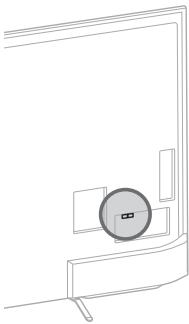
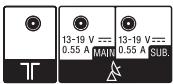
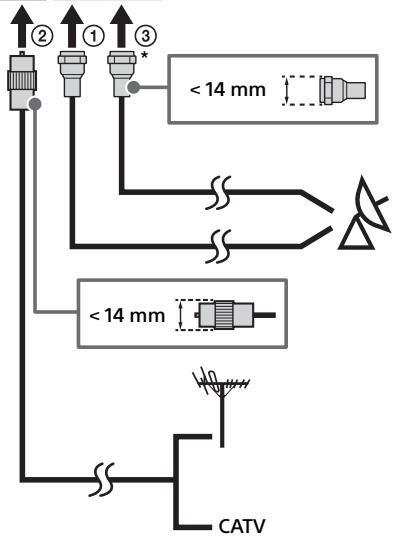
KD-49/43X830xC
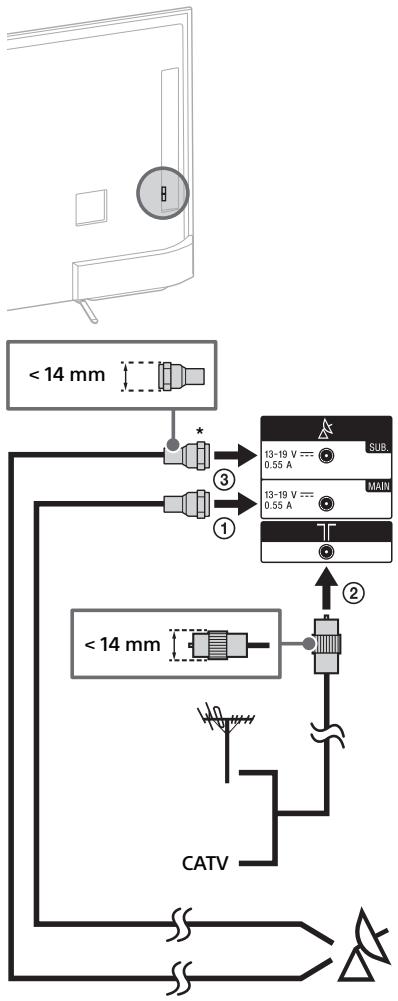
* Moxete Да Сьрхete само След Като Стев;
3адалп ржим на ДBOЕн ТУнер.
3a Cbbp3BaHe Ha caTeIHTHa KyTna
CbpxKeTe KbM TeIeBn3opa C nOMOuTa Ha HDMI uJN SCART ka6en.
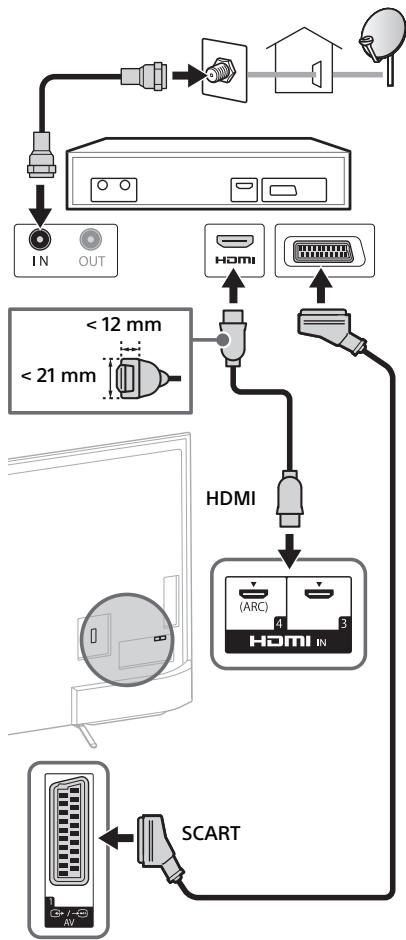
KD-75/65/55X850xC
BG
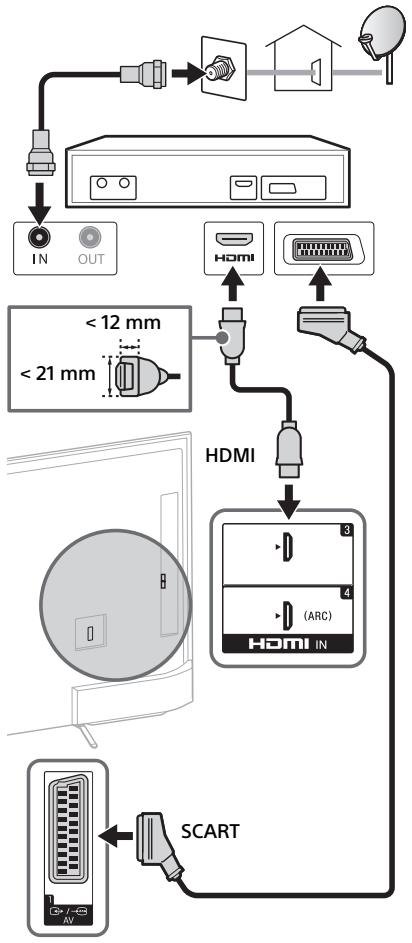
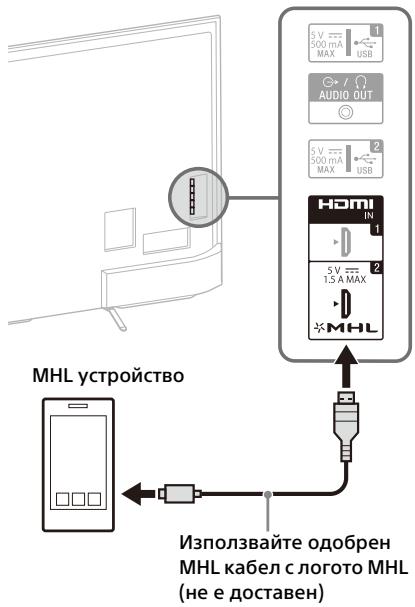

TeLeBn3OpbT eINOBpeMeHNO 3apeKda MHL-CbBMecTUMOTO YCTPOIcTBO,ДOKaTO Bb3PON3BeJda ChIMKn/My3Nka/BuJeO faiIObe. MoKeTe Da n3No13BaTe DInCTaHnOHHOTU ynpabJIeHne Ha TeLeBn3Opa, 3a Da ynpabJIaBaTe Cbbp3aHOTo MHL-CbBMecTMO YCTPOIcTBO.
3a6eJexka
Ako [MHL 3apekxdane no BpeMe Ha pexnIM TOTOBHOC] e hacTpoeHO Ha [BKn.], moKete da npOdbLnKte Da 3apeXdate MHL-cbBmecTmOTO yCTPOIcBO dopN KOraTe TeNeBn3OpbTe BPEKNHa TOTOBHOC.
ИзлалзайоюбениMHL3ka6eI cIlorOTOHaMHL 3a4KсмарфоиMuINMOBUNHустpoiCTBa.
MOHTAX Ha TeJIeBn3Opa Ha CTeHa
B ToBa pIbKOBoCTBO 3a TeJIeBu3Opa e Ioka3aHa cAmO IIOIroTOBkata 3a MOHTaK IpeiMoHTaKa Ha TeJIeBu3Opa Ha CTeHaTa.
Do notpe6nteJnte:
Ot cbo6paJekHn 3a 6e3onacHocT n 3a 3aunTa Ha npOdykTa, Sony npenopbUba MOHTaXbT Ha BaIINrTeJIeBn3Op Da 6bIe N3BbPseH OT dNCTpN6yTop Ha Sony IINr OT IINcH3nPan DOCTabYnK. He ce ONITBaIte Da rO MOHTnPaTe camn.
До диспбуторино на Sony и доставицито:
IpoXoJeTe C npOeptaHO BHIMaHne KbM 6e3OpaCHocTt a NO BpeMe Ha MOHTaJa, nepNoDnUHaTa POnDpBxKa I OrlJeDa Ha T03N npOdyKT.
3a MONTaja Ha To3n IpoDyKT Ce n3ncBka 3NaHTeJIeH ONIT, OCO6eHO 3a ONpeJEnIe Ha 3dpaBHaTa Ha CTehata, KOYTO Tp8bDa Ja n3Dbpxk TeXecTTa Ha TeLEBnOpa. Ha BCsKa cHe NaOBepTe 3akpeBaHeTo Ha To3n IpoDyKT KbM CTea Ha NDCTpBuTOpn Ha Sony IIn LiuNcH3npAHH NocTabuNi N IO BpeMe Ha MONTaja O6bpHeTe OOC6eHO BVImaHmE Ha MEPKITE 3a 6e3oNaChOCT. Sony He HocN OTROBOPHOCT 3a NOBpeIN IIn HapAHBaHnI, PnUHNHeH OT HENpaBUNH MaHInyNAuNIN IIn MoTAXK.
Излгьаite конета за окувае на стей Su-WL450 (нe сюстаяма) (KD-65/55X850xC, KD-49/43X830xC), за ѳ монтура teелевизора на стей.
Korato MOHTnPaTe KOH3OJaTa 3a 3aKpePbAHe KbM CTeHa, IpOuTeTe CbIoo INHCTpyKcIITe 3a pa60Ta n Yka3aHnraTa 3a MOHTaq Ha KOH3OJaTa 3a 3aKpePbAHe KbM CTeHa.
3a6eJexKka
- He nponyckaite da cbxpaHnte cBaJIeHnte BnHTObe Ha cnrypHo mAcTo, KaTo rI na3nte OT deua.
3a CBAJIaHe Na BnHTOBeTe OT 3aHaTa CTpaHa Na TeleBn3opa (KD-75/65X850xC)
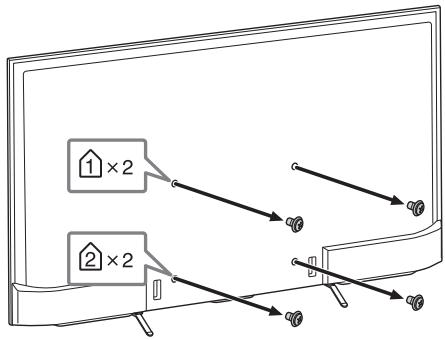
3a da npomehnte pa3noIooKeHHeTo ha Ka6eHnTe (KD-55X850xC, KD-49/43X830xC)

3a cBaJrHe Ha nOcTabkata 3a Maca ot TeJIeBn3opa
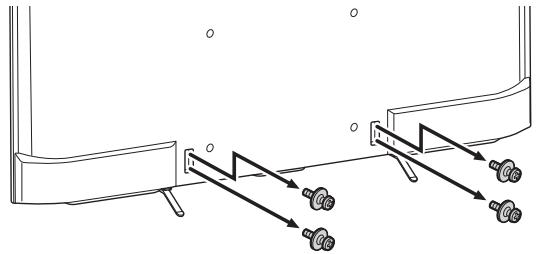

3a INHCTpyKUINOTHOCHO MOHTaHa HA KOHNOLaTa 3a 3akpenBaHe Ha CTeHa 3a BaUNI MoJeTneBnOp BNXTe CnejHATA ye6 cTpaHnca:
www.sony.eu/tv/wall-mount-bracket-manu
BG
Отстаяпаные на <|im_start|>assistant нензпразвост
3a da noDlbpkaTe aKtyaIIm3npaH coΦTyepa Ha TeLeBn3Opa, e Heo6xoJIMo Da n3TerJInte HauHOBaTa INHΦOpMaζra 3a Hero, NocpeIcTBOM CnCTeMaTa 3a ZnΦpOBo IpeDaBaHe nIn OT uHTerPHeT, CneI KoET Da aKtyaIIm3npaTe coΦTyepa. N36peTe [O6HOBu Cera], 3a Da cTaTpNaTe aKtyaIIm3aζraHa coΦTyepa. LED OCBeTJIeHNeTo Mna B 6yILO, DOKaTO Tpae aKtyaIIm3aζraHa coΦTyepa. He n3KlIOuBaIte 3axpaHbAζma Ka6el No BpeMe Ha aKtyaIIm3aζraHa coΦTyepa. Ako ro HnPaBtE, e Bb3MOxHO aKtyaIIm3aζra Ta Da He 3aBbpi NaBbJIHo, KoET Da IOBede Do HnPaBnHO ΦHyKcUOnHnpaHe Ha coΦTyepa. AkyaIIm3aζraHa coΦTyepa MoKe Da npOdbJXn Do 30 MNHTN. Ako He JxJelaete abTomatNuHa aKtyaIIm3aζra Ha coΦTyepa, HATNCHE,THOME n I36peTe [PiMooi] [O6HOBBaHe Ha cnCTeMnHr coΦTyep] [AbTomat. n3TerJIne Ha coΦTyep] [N3Kn].
Korato n3kIIOUHTe N BkIIOUHTe 3axpaHbauy Ka6eHa TeJIeBn3Opa, ToJ MOKe Da He Ce BkIIOU H BeDHa, DOpN aKO HaTNCHeTe 6yToHa 3a BkIIOUBaHe Ha NCTaHcNHOHOT OynPaBJeHne NIM TELeBn3Opa, 3aIoTO OTHEMa BpeMe Ha CNTeMaTa Da Ce INHuaNImura. U3yakaAte 3a Oko10 Do 20 cekyHdn u ONITaIte OTHOBO.
KoratoLEDocBeTneHnetoMraBuepBeHo, np6poTe npemrBaHnra(ntepBaIbTe e TprceKynn).
AkoLEDOCBETJIeHHeTOCBTeB UcePBeHo, pectapTnpaIte TeJeBn3Opa, KaTo r0 n3KJIIOUHTeOT KOHTaKTa 3aДBE MInHyTu, CNeD KOETO BKJIIOUHTe OTHOBO.
Ako npo6IembT npOdbIjXaba,CbbpKTe ce c BaWnI IOCTaBvNk IINu CEHTb3 aOBcLyXBaHe Ha Sony c 6pOHa NpEmrBaHnra T B cepBeHo HA LED OCBtIeHne (INTEPBAblT e TPN cekyni). IN3KlIOUeTe OT 3axpaHbUaTa MpeKa n yBEOMeTe BaWnI TBpROBeu IIN CepBn3HnI CEHTbp Ha Sony.
KoratoLEDocBtJeHneToHeMra, npOBepTe eIemEnTteBa7nnte,KaKTo cIeDbA.
BnKTe cBso n [OTcTpaHraBe Ha Heu3npaBHOCTn] B POMOuHOTo pBkoBOdCTBO Nn HApBaTe CaMOuaHcOHTka KaTO n36peTe [POMU] [CaMOuaHcOHTka].Ako npo6IeMbT npoDbJxKaBa, TeJeBn3OpbT BN Tp46Ba Da 6bJe npOBepen OT KbaNfNupaH cepBn3eH TexnK.
Ipo6lemn npewenra
HЯma KapTnHa (ekpaHbTe TbMeH) HЯMa 3ByK.
-Поверетe Врьзкata саHTeHata/ka6ena.
CbpxTe TeBnOpa Cb3xpaHbAunKa6en HnHaTNCHe Ha TeBnOpa NnHa nCTaHnOHHOTynpaBJeHne.
HЯков поррами не могат за бдат настpoehи.
-Поверетe Врьзка саHTeHata/ka6ena.
- CaTeJIHTHnIaT Ka6e MoKeJa e HaKbCo Nll Da
NMa npO6bEmn CbC CBp3BaHeto Ha Ka6ena.
IpoBepeTe Ka6eHnata Bpv3Ka i N3KlUoye
TeLeBn3Opa OT 6yToHa 3a BKlnOuBaHe
N3KlIOUvaBe, NOcNE FO BKlOuyete OTHOBO.
BbBeHeHa Ta YecToTa e N3BbN 06XbAT. CbbpKeTe ce C KOMnAHHa, pa3npocTpaHNTeJ Ha caTeJIHTHNe YCJyIi.
HЯma Hamepehi Ka6eHn TB yCnyr (nporpaMn).
-Пюверете Кабелна Врьзka Или
Конфигурацята на Настpoйкata.
- OniTaIe [UuΦpOBA aBOMaTnHa hAcToPoiKa], Kato n36epTe [AHTeHa] BMeCTo [Ka6eJ].

3aHa YacT Ha TeLeBn3opa
LEDOCBETeHHeToeBKJIouyeHo.
- Ako He nckate LED ocBetIeHneTo da cBETn, MoKTe Da ro u3KnIOuHTe. HaTncHeTe HOME, noCte u36epTe [HaCTpOuKn] [LED ocBetIeHne] [U3Kn].
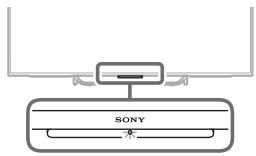
He moxe da ce cBbpxe c 6e3xuye npTepe3 WPS (Wi-Fi Protected Setup).
- Ako n3noI3BaTe WEP 3aunTa, n3bepeTe [JecHo] [Wi-Fi] [N3bOp ha MPexa ot cIncbK]. Pocne n3bepeTe MPexoBOTO nme (SSID), KbM Koeto nCKaTe da ce CbpxKeTe.
He MoKe Da HamepH Heo6xOuMoTO mpeXoBO NMe B HAcTpoiKaTa Ha MpeXaTa.
- ɪЗ₆ëpeTe [PbúHo BbBexJaHe]ɪ ḤaɪnchTe ò, 3a Ḍa BbBeTe ÜmE Ha MpeKa.
Cneunphikaun
CnCTema
CnCTema Ha nHaHeJa
LCD(TeuHOKpntaIeH dncnne)naHEn, LED noDCBETka
TeJIeBUNOHnCnCTema
AhaIorOba:B3aBcIMoCTOTBaIIINuI3bOpHa Ibpxkaba/perNoH:B/G,D/K,L,I
Ungpoba:DVB-T/DVB-C DVB-T2
CateJnt: DVB-S/DVB-S2
CnCTema Ha ZBeTOBete/BuJeO CnCTema
AHAIOrOBA: PAL, SECAM, NTSC3.58 (cAmo BnIeO), NTSC4.43 (cAmo BnIeO)
LHPOB:BnKTe B NOMOHTo pkoBOCTBO.
(IEEE802.11ac MoKeJa He e HauHOB
3aBUNMOCT O TcpaHaTa/perNoHa.)
Bluetooth Bercs4.1
BxOJHo/u3XoJHn JkaKOBe
AHTeHekaeI
75 Oma BbHsEn TepmHaJ 3a VHF/UHF
CateJIInTHa aHTeHa
KoheKTop TIN F, JxehcKn IEC169-24, 75 oMa.
DiSeqC 1.0, LNB 13 V/18 V & 22 kHz TOH,
Pa3npedeJnne no 1 ka6eN EN50494.
/ - AV1
21-ninob SCART KOHeKTop (CENELEC cTahapT)
BKNIOHTeJIHO ayIIO/BuJeO BxOJ, RGB BxOJ n TV ayIIO/BuJeO u3XoJ.
/ COMPONENT IN
YPBPR(KOMIPOHEHTHO BnJeO):1080p(50,60Hz), 1080i(50,60Hz),720p(50,60Hz),576p,576i, 480p,480i
AynIO BXoI (OHOJ KaKOBe)
AV2
BnDoe BxOa (o6u foHO nH cY BxoJa)
HDMI IN 1,2,3,4 (poIbpxa 4K pezoiuzna) Bndeo (2D):
4096×2160p (50, 60 Hz)12, 4096×2160p
(24Hz)^ 2 3840× 2160p (50, 60 Hz)*1, 3840 x
2160p (24, 25, 30 Hz), 1080p (30, 50, 60 Hz),
1080/24p, 1080i (50, 60 Hz), 720p (30, 50,
60 Hz), 720/24p, 576p, 576i, 480p, 480i, PC φορmaτι
1 YCbCr 4:2:0 / 8bit eMHCTBeHO
2 Показа ce 3840 × 2160р, когто вь沫енио 4096 × 2160р
Bndeo (3D) (Cama 3a moJeIn, cBMeCTmNc 3D):
Paketupahe Ha Kaipn: 1080p (30 Hz), 1080/
24p, 1080i (50, 60 Hz), 720p (30, 50, 60 Hz), 720/24p
Enda do npya: 1080p (50, 60 Hz), 1080/24p, 1080i (50, 60 Hz), 720p (50, 60 Hz)
EHa NaI npya: 1080p (30, 50, 60 Hz),
1080/24p, 1080i (50, 60 Hz), 720p (50, 60 Hz)
Ayno:5,1KaHaen HnHee PCM:32,44,1,48
88,2,96,176,4 n 192 kHz, 16, 20 n 24 Φιτα, Dolby
Digital n DTS
ARC (Audio Return Channel) (camo HDMI IN 4)
MHL (HDMI IN 2)
Bunceo (2D):
4096× 2160p (24Hz)^ 3840× 2160p (24, 25,
30 Hz), 1080p (30, 50, 60 Hz), 1080/24p, 1080i
(50, 60 Hz), 720p (30, 50, 60 Hz), 720/24p, 576p,
576i, 480p, 480i
- Пokedаьca 3840 × 2160p, korato BbveedoHO 4096 × 2160p
BnEo (3D) (Cama 3a moJeN, cBMeCTmNc 3D):
Paketupahe Na Kaipn: 1080p (30 Hz), 1080/
24p, 1080i (50, 60 Hz), 720p (30, 50, 60 Hz), 720/24p
Enda do npya: 1080p (50, 60 Hz), 1080/24p, 1080i (50, 60 Hz), 720p (50, 60 Hz)
Enda nla dpyra: 1080p (50, 60 Hz), 1080p
(30 Hz), 1080/24p, 1080i (50, 60 Hz), 720p (50, 60 Hz)
Aydno: 5,1 kanaen linheen PCM: 32, 44,1, 48
88,2,96,176,4 n 192 kHz, 16, 20 n 24 mbTa, Dolby Digital n DTS
DIGITAL AUDIO OUT (OPTICAL)
LHΦpOB ONTnueH JαK (ДуКанелен ЛипeeH PCM, Dolby Digital, DTS)
AUDIO OUT, 一 / 一 (Ctepeo MmHn Jxak)
cnyaikn,aydno n3xoD,cy6yep
1,2,SS3 (HDDREC)4
nopT 3a USB yctpoiCTBO (SS 3 USB HDD yctpoiCTBO 3aФункця REC)
USB noprt 1 n 2 noДьржat High Speed USB (USB2.0).
USB nopT 3 noДьрka Super Speed USB (USB3.0).

CAM (MOyI 3a yCIOBEN DOCTbI) rHe3do
品LAN
10BASE-T/100BASE-TX KOHeKToP (B 3aBcUmOcT ot YcIIOBnTa Ha pa6oTa Ha MPexKaTa, CKOpocTtHa npEHC Ha daHHnTe MoKe Da ce pa3NlUaBa.
10BASE-T/100BASE-TX 3a To3n TeIeBn3Op He rapaHTnpa ckopocT n KaueCTBO Ha KOMYHnKaCuaJraTa.)
Дугн
Akkecoapn no n360p
TbnpaD nIcTaHnOHHo: RMF-TX100E
(KD-49/43X830xC)
KoH3OJa 3a 3akpenBaHe KbM cTeHa: SU-WL450
KD-65/55X850xC, KD-49/43X830xC)
Be3xuehen cy6yep: SWF-BR100
MHL ka6en: DLC-MC10, DLC-MC20, DLC-MC30
AknBn3D Ounla: TDG-BT500A (Camo 3a
MOdeJIH,cbBMeCTnMnC3D)
Pa6oTHa TemnepaTypa
0^ - 40^
Pa60Tha BnaXHOCT
OThocntHaBnaXnOCT10%-80%(6e3 6pa3yBaHHe Ha KOHdeH3)
3axpaHbaHe n npyrn
U3nCKBaHna 3a3axpaHbaHe
HomHaNo BxOJHo HApEKeHne:
220 V - 240 V AC, 50 Hz
EheprnEn Klae
KD-75X850xC / FW-75X8570C: B
KD-65X850xC / FW-65X8570C: A
KD-55X850xC / FW-55X8570C: A
KD-49X830xC / FW-49X8370C: A
KD-43X830xC / FW-43X8370C: A
Pa3mep Ha ekpaHa (i3mepen no dnafoHana) (npn6n.)
KD-75X850xC / FW-75X8570C:
75 nHua / 189,3 cm
KD-65X850xC / FW-65X8570C:
65 mHa / 163,9 cm
KD-55X850xC / FW-55X8570C:
55 mHua / 138,8 cm
KD-49X830xC / FW-49X8370C :
49 nHua / 123,2 cm
KD-43X830xC / FW-43X8370C:
43 nHua / 108,0 cm
KohcymaциЯ ha eheprnja
B[CTaHdapTeH]peXMM
KD-75X850xC / FW-75X8570C: 230 W
KD-65X850xC / FW-65X8570C: 149 W
KD-55X850xC / FW-55X8570C: 115 W
KD-49X830xC / FW-49X8370C: 84 W
KD-43X830xC / FW-43X8370C: 72 W
B [Rpbk] pexnM
KD-75X850xC / FW-75X8570C: 425 W
KD-65X850xC / FW-65X8570C: 288 W
KD-55X850xC / FW-55X8570C: 229 W
KD-49X830xC / FW-49X8370C: 177 W
KD-43X830xC / FW-43X8370C: 162 W
CpeHNO roDnHNO nOte6bIeHne Ha eheprn*
KD-75X850xC / FW-75X8570C: 319 kWh
KD-65X850xC / FW-65X8570C: 207 kWh
KD-55X850xC / FW-55X8570C: 160 kWh
KD-49X830xC / FW-49X8370C:117 kWh
KD-43X830xC / FW-43X8370C: 100 kWh
KoHcymaZna Ha eHeprna BpeXmM
TOTOBHOCT*2*3
0,5 W (27 W в ржим на akтуалдаця на coфтуер/EPG)
Pe3oJIouznaHaDnCnIeR
U3XOJHIN HOMHaJIHN DaHHN
USB 1/2:5V, = = = 500mA(maKc.)
USB 3:5V, = = = 900mA(maKc.)
MHL (HDMI IN 2): 5 V, ---, 1,5 A (Macc.)
a6a p u t n ( p n 6 .) ( × × )
C NOCTaBka 3a Maca
KD-75X850xC: 167,5 × 101,9 × 32,3 cm
KD-65X850xC: 145,3 × 89,2 × 26,5 cm
KD-55X850xC: 123,6 × 75,9 × 22,2 cm
KD-49X830xC: 109,3 × 67,9 × 20,1 cm
KD-43X830xC: 96,1 × 60,4 × 18,9 cm
6e3 nocTabka 3a Maca
KD-75X850xC: 167,5 × 97,0 × 7,9 cm
KD-65X850xC: 145,3 × 84,4 × 7,8 cm
KD-55X850xC: 123,6 × 72,2 × 6,0 cm
KD-49X830xC: 109,3×64,3×6,0 cm
KD-43X830xC: 96,1× 56,8× 6,0cm
Terno (np6n.)
C NOCTABKa 3a MaCa
KD-75X850xC:36,3 kg
KD-65X850xC:25,5kg
KD-55X850xC: 21,0 kg
KD-49X830xC: 15,4 kg
KD-43X830xC: 12,8 kg
6e3 noctabka 3a Maca
KD-75X850xC:34,8kg
KD-65X850xC:24,1kg
KD-55X850xC: 19,9 kg
KD-49X830xC:14,4 kg
KD-43X830xC:11,8kg
^ 1 KOHCyMaunHa eHeprHa roDInHa, ba3npaHo Ha KOHCyMaunTa Ha TeBn3Op, KOTo pa60n4 caca Ha DeH, 365 dHn. DeiCTBnTeHnata KOHCyMaunHa eHeprHa 3aBnC nOT ToBA KaK ce N3POn3Ba TeteBn3Opa.
^2 Yka3aHaTa KOcCyMaZnHa eHeprYBaPexNIM TOTOBHocTe DCOCTra CNeLa Kato TELeBn3OpbT pNpKlNOu HEO6XoMnITE BvTpeHNnPOceCu
^3 KOHCymaunraTaHa eHepnB rPexm rTOBHOCT ce yBeNmuN, KoraTo BAunrT TeEnb3Op cCBp3Ah KbM MpeXa.
^*4 Camo 3a onpeJeHn pernoHn/ctpaHn/MoJeN TeJeBn3Opn.
3a6eJexka
3HaKbT“X”,KOTo CE NOBRABa B IMETO Ha MOdeJa, cBoTBetCTBa HA eHa nΦpa,Cbbp3aHa C dN3aH, UBtIuN TB cInCTema.
- He n3BaxJaIe NIMITaIooHHaTa kaTpA ot TV CAM (MOyU 3a YcLOBEN DoCTbN) cNoTa,OCBeH 3a da NoctabTte cMapr KaTpA c CAM.
- Hajiunyeho Na onuohnAHN akcecoapn 3abncm OT nbpxkabata/pernoHa/MoDeNa Ha TepeBnO3pa n HajiunHOCCTa.
ДиЗаиНБИСпeциФиКaциTe NOДлжАТ ha npOMЯнб6eпpeDунржДeнe.
To3n TeIeBn3Op BkIIOvBa MHL 3.
3a6eJekka 3a cHpObaTa aYHKcna Ha TeleBn3opa
BcyaФyHKUa, Cbbp3aHa c ZnΦpOBA tate Bn3n (Dv3), ige paobTu caMo BVdprkabnte n o6laCTnTe, B kOnTo ce npedlarat DVB-T/DVB-T2 (MPEG-2 n H.264/MPEG-4 AVC) ZnΦpOBu hazemHn cnHaJI, IIN TaM, KbJeTO Ima DoCTbI DO cbBMecTmAc DVB-C (MPEG-2 n H.264/MPEG-4 AVC) Ka6eHna ycLyra. PnpoBepe Te np Ba7n MaTeH NIOCTaBnK DaJI TaM, KbJeTO KInBeEte, MoKeTe Da pniemaTe DVB-T/DVB-T2 cnHaJI nn NiN noPiTaJte Ba7n DoCTaBnK Ha Ka6eHna TeLeBn3n daJI TExHATA DVB-C Ka6eHna ycLyra e eoXoJaMa 3a CbBMecTHa pa6oTa c To3n TeLeBn3Op.
Bb3MOxH e BaUHT Ka6eJEN IOCTaBvNk Da Bn NOnCKa TAKCa 3a CBOITe YCnyr INI Na IONCKa Da Ce CbTACuTe C npabUNlata N YCNOBnTA, KOITo TOH HAnra.
BbIpeKnYeTo3nTeLeBn3OpOTroBapHa DVB-T/DVB-T2 n DVB-C cneuΦkaunTe, CbBMecTmocCTTa My C sbJeu N DVB-T/ DVB-T2 uΦpOu Ha3eMn n DVB-C uΦpOu Ka6eJHn I3JIbUbaHna He e rapaHTnpaHa.
Bb3MOxH0 e onpeJeHEn uΦpOBN ΦyHKuN Ha TeJeBn3Opa Da He pa6oT B HЯKOn DbpxABy/perNoHn i DVB-C Ka6eHaTa YcIyra MoKe Da He pa6oTn IpaBnHO C HЯKOn DoCTaBvUHn.
HΦopMaζηa 3a TbpbroBcKn MapKn
- Tepminhte HDMI und HDMI High-Definition Multimedia Interface, Kansas to Norway to HDMI ca TBproBckn Mapkn JIN 3ana3eHN TBproBckn Mapkn Ha HDMI Licensing LLC B CALU n npyrn Dpbxabn.
- Понибendeно Лиценз на Dolby Laboratories. Dolby И симьовт Довино "D" capenstprupaи Тьровски Марки на Dolby Laboratories.
"BRAVIA"и BRAVIA ca TbproBcka Марka Na Sony Corporation. - Gracenote, Gracenote eyeQ, Gracenote VideoID, Gracenote Video Explore, noroto n noroto nbt Gracenote, kakto n noroto "Powered by Gracenote" ca perinctpupaHn TbproBcKn MapKn nIin TbproBcKn MapKn Ha Gracenote B CAU, n/nn dpyrn DbpxabN.
- Opera® Devices SDK from Opera Software ASA. Copyright 1995-2014 Opera Software ASA. All rights reserved.
- Wi-Fi, Wi-Fi Direct, Miracast u Wi-Fi Protected Setup ca TBpROBcN MapKn uIu pernctpupaHn TBpROBcN MapKn Ha Wi-Fi Alliance.
- MHL, Mobile High-Definition Link in noroto MHL ca TBproBcKn MapKn nnn perncrtpupaHn TBproBcKn MapKn Ha MHL Licensing, LLC.
-
3a DTS nateHTN, BIXKte http://patents.dts.com. ПюиЗБено по Лицен Ha DTS, Inc. DTS, сиMbOЛьТ, & DTS И сиMbОЛьТ 3аeДно ca perистрипани Тьр罗бСКИ МаркИ, a DTS Digital Surround e Tьр罗ВСКИ Марka Ha DTS, Inc. © DTS, Inc. BCИЧКИ права 3ana3eHи.
-
Designed with UEI Technology™ Under License from Universal Electronics Inc. Portions © UEI 2000 - 2014
3HaKbT Bluetooth® nIorata ca co6CTBeHocT ha Bluetooth SIG, Inc. nI3noJ3BaHeTo Ha Te3n 3HaaOn ot Sony Corporation e no IInueH3. OctaHaJIte TbpROBcN MapKn n TbpROBcN IMeHa npHaJaJIeKaT Ha CbOTBeTHIne IM co6CTBeHnU.
DiSEqC™ e TbproBcKa Mapka Ha EUTELSAT. To3n TeVeBn3Op nOaNbbpXa DiSEqC 1.0. To3n TeVeBn3Op He e npedHa3Naueh 3a ynpabLeHne Ha aHTeHn C MOTop.
TUXERA epernctpupaHa TbproBcKa MapkaHa Tuxera Inc. B CALU n npu rCtpaHn. - Jloroto USB-IF SuperSpeed USB Trident epernctpupaHa TbproBcKa Mapka Ha USB Implementers Forum, Inc. SS
3a MoDJIc CIOCTaBeHO TbUNaI DnCTaHcNHO:
N Mark e TbproBcKa Mapka nIin pernctpupaHa TbproBcKa Mapka Ha NFC Forum, Inc. B CAUu Ipyu Ibpxabu.
περιεχόμενα
\SHMANTIKH ΣHMEIΩΣH. 4
II npoopopiec oxetikα μe tnv ασφαλεια .4
PpOΦUαξεις 6
Eeapntmaata kai xelipotnpia. 8
Xeipotnpia kai evdeltaic 8
Eioooi kai eXooi 9
XpnoTou TnExeipoiotnpiou. 11
DIGITAL AUDIO OUT (OPTICAL)
KD-49X830xC / FW-49X8370C: A
KD-43X830xC / FW-43X8370C: A
Méyéθoc oθóvnc (δiaywvioc) (πεpiou)
KD-75X850xC / FW-75X8570C:
75 ivtəεc / 189,3 cm
KD-65X850xC / FW-65X8570C:
65 ivtoεc / 163,9 cm
KD-55X850xC / FW-55X8570C:
55ivtOeC/138,8cm
KD-49X830xC / FW-49X8370C :
49 ivtoεc / 123,2 cm
KD-43X830xC / FW-43X8370C:
43 ivtεc / 108,0 cm
Katavawon toxuoc
KD-49X830xC / FW-49X8370C: 84 W
KD-43X830xC / FW-43X8370C: 72 W
Aetoupyia [Zwnp]
KD-75X850xC / FW-75X8570C: 425 W
KD-65X850xC / FW-65X8570C:288W
KD-55X850xC / FW-55X8570C: 229 W
KD-49X830xC / FW-49X8370C: 177 W
KD-43X830xC / FW-43X8370C: 162 W
Meon etnioa katavalwon evpyeiac*
KD-75X850xC / FW-75X8570C: 319 kWh
KD-65X850xC / FW-65X8570C: 207 kWh
KD-55X850xC / FW-55X8570C: 160 kWh
KD-49X830xC / FW-49X8370C: 117 kWh
KD-43X830xC / FW-43X8370C: 100 kWh
KD-55X850xC: 21,0 kg
KD-49X830xC:15,4 kg
KD-43X830xC: 12,8 kg
Xwpiic aon EITpaeqac tonoetnonc
KD-75X850xC:34,8kg
KD-65X850xC: 24,1 kg
KD-55X850xC: 19,9 kg
KD-49X830xC:14,4kg
KD-43X830xC:11,8kg
Dijital: DVB-T/DVB-C
DVB-T2
Uydu: DVB-S/DVB-S2
Renk/video Sistemi
Analog: PAL, SECAM, NTSC3.58 (Sadece video),
NTSC4.43 (Sadece video)
Dijital: Yardim Kilavuzuna basvurun.
Kanal kapsami
Analog: Ülke/alan seçiminize®,®,®,®,®,®,®,®,®,®,®,®,®,®,®,®,®,®,®,®,®,®,®,®,®,®,®,®,®,®,®,®,®,®,®,®,®,®,®,®,®,®,®,®,®,®,®,®,®,®,®,®,®,®,®,®,®,®,®,®,®,®,®,®,®,®,®,®,®,®,®,®,®,®,®,®,®,®,®,®,®,®,®,®,®,®,®,®,®,®,®,®,®,®,®,®,®,®,®,®,®
VHF/Kablolu yayin.
Kare Paketleme: 1080p (30 Hz), 1080/24p,
1080i (50, 60 Hz), 720p (30, 50, 60 Hz), 720/24p
Yan Yana: 1080p (50, 60 Hz), 1080/24p,
1080i (50, 60 Hz), 720p (50, 60 Hz)
Alt Alta: 1080p (30, 50, 60 Hz), 1080/24p, 1080i
(50, 60 Hz), 720p (50, 60 Hz)
Ses: 5,1 kanal dogrusal PCM: 32, 44,1, 48, 88, 2, 96, 176,4 ve 192kHz 16, 20 ve 24 bit, Dolby Digital ve DTS
ARC (Audio Return Channel) (sadece HDMI IN 4)
MHL (HDMI IN 2)
Video (2D):
4096× 2160p (24Hz)^ 3840× 2160p (24, 25,
30 Hz), 1080p (30, 50, 60 Hz), 1080/24p, 1080i
(50, 60 Hz), 720p (30, 50, 60 Hz), 720/24p, 576p, 576i, 480p, 480i
- 4096 × 2160p girildiginde 3840 × 2160p görtunlenir
Kare Paketleme: 1080p (30 Hz), 1080/24p,
1080i (50, 60 Hz), 720p (30, 50, 60 Hz), 720/24p
Yan Yana: 1080p (50, 60 Hz), 1080/24p, 1080i (50, 60 Hz), 720p (50, 60 Hz)
Alt Alta: 1080p (50, 60 Hz), 1080p (30 Hz),
1080/24p, 1080i (50, 60 Hz), 720p (50, 60 Hz)
Ses: 5,1 kanalogrusal PCM: 32, 44,1, 48, 88, 2, 96, 176,4 ve 192 kHz, 16, 20 ve 24 bit, Dolby Digital ve DTS
DIGITAL AUDIO OUT (OPTICAL)
KD-49X830xC / FW-49X8370C: A
KD-43X830xC / FW-43X8370C: A
KD-75X850xC / FW-75X8570C:230W
KD-65X850xC / FW-65X8570C: 149 W
KD-55X850xC / FW-55X8570C: 115 W
KD-49X830xC / FW-49X8370C: 84 W
KD-43X830xC / FW-43X8370C: 72 W
[Canli] modunda
KD-75X850xC / FW-75X8570C: 425 W
KD-65X850xC / FW-65X8570C:288W
KD-55X850xC / FW-55X8570C:229 W
KD-49X830xC / FW-49X8370C:177W
KD-43X830xC / FW-43X8370C: 162 W
Ortalamayyllik enerji tuketimi*1
KD-75X850xC / FW-75X8570C:319 kWh
KD-65X850xC / FW-65X8570C: 207 kWh
KD-55X850xC / FW-55X8570C: 160 kWh
KD-49X830xC / FW-49X8370C: 117 kWh
KD-43X830xC / FW-43X8370C: 100 kWh
Bekleme modunda gütcuketimi*23
0,5 W (Yazilim/EPG guncelleme modunda 27 W)
Göruntüoczūnūrlügu
3.840 nokta (yatay) × 2.160 satir (dikey)
Nominal cikis
USB 1/2: 5 V, ==, 500 mA maks.
USB 3:5 V, = = ,900 mA maks.
MHL (HDMI IN 2): 5V, , 1,5A maks.
KD-55X850xC: 21,0 kg
KD-49X830xC:15,4 kg
KD-43X830xC: 12,8 kg
Mobile High-Definition Link

dtst
Digital Surround


Bluetooth
DiSEqC 1.0
TUXERA
Actual resolution: 3840 × 2160 pixels.
For useful information about Sony products
