
Sonicare for Kids Connected HX6352 - Toothbrush PHILIPS - Free user manual and instructions
Find the device manual for free Sonicare for Kids Connected HX6352 PHILIPS in PDF.

 FR
FR
 AZ
AZ
 BG
BG
 CS
CS
 DA
DA
 DE
DE
 EL
EL
 EN
EN
 ES
ES
 ET
ET
 FI
FI
 HE
HE
 HU
HU
 HY
HY
 IT
IT
 KA
KA
 KK
KK
 KY
KY
 LT
LT
 LV
LV
 MK
MK
 NL
NL
 NO
NO
 PL
PL
 PT
PT
 RO
RO
 RU
RU
 SK
SK
 SL
SL
 SQ
SQ
 SV
SV
 TG
TG
 TK
TK
 UK
UK
 UZ
UZ
| Product Type | Sonic electric toothbrush for kids |
| Brand | Philips |
| Model | Sonicare for Kids Connected HX6352 |
| Power source | Rechargeable lithium-ion battery, HX6100 charger |
| Battery life | Up to 28 two-minute brushes (14 days) |
| Charging time | Approximately 24 hours for a full charge |
| Brushing modes | Low mode (reduced power) and high mode (full power) |
| Functions | KidPacer (4-zone timer), KidTimer (end melody), EasyStart (gradual power increase) |
| Connectivity | Bluetooth (2.4 GHz, 3 dBm) and NFC (13.56 MHz, 30.16 dBm) depending on model |
| Mobile app | Sonicare for Kids (iOS and Android) |
| Brush heads | Sonicare For Kids, replace every 3 months |
| Safety | Use under adult supervision for children under 8; do not use if bleeding persists |
| Maintenance | Clean the handle with a damp cloth; rinse the brush head after each use |
| Warranty | International warranty (see leaflet) |
| Included accessories | Brush heads, charging base, sticker, travel case (depending on model) |
| Recycling | Built-in battery to be recycled; do not dispose of with household waste |
Frequently Asked Questions - Sonicare for Kids Connected HX6352 PHILIPS
User questions about Sonicare for Kids Connected HX6352 PHILIPS
0 question about this device. Answer the ones you know or ask your own.
Ask a new question about this device
Download the instructions for your Toothbrush in PDF format for free! Find your manual Sonicare for Kids Connected HX6352 - PHILIPS and take your electronic device back in hand. On this page are published all the documents necessary for the use of your device. Sonicare for Kids Connected HX6352 by PHILIPS.
USER MANUAL Sonicare for Kids Connected HX6352 PHILIPS
natural_image
Illustration of stacked open documents with a grid pattern and a curved arrow pointing to one (no text or symbols)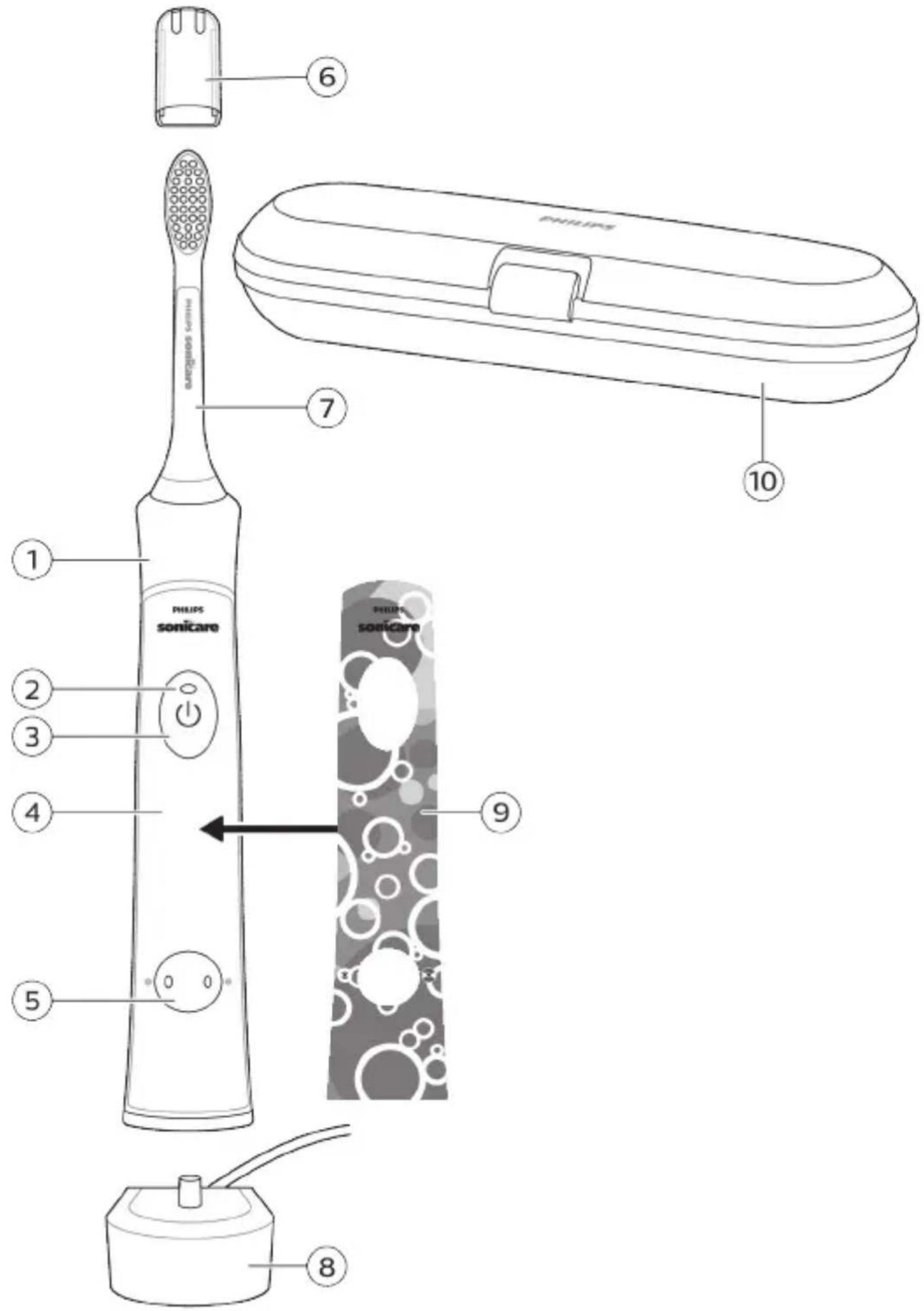
English 6
Azərbaycanca 20
Čeština 35
Dansk 50
Deutsch 65
Eesti 82
Español 97
Français 113
Hrvatski 129
Italiano 144
Latviešu 160
Lietuviškai 175
Magyar 190
Nederlands 206
Norsk 222
O'zbek 236
Polski 252
Português 269
Română 285
Shqip 300
Slovenščina 316
Slovensky 331
Srpski 346
Suomi 361
Svenska 376
Türkmençe 391
Ελληνικά 406
Български 424
Кыргызча 441
Македонски 457
Русский 474
Точикй 492
Українська 509
Қазақша 526
Ruijtntu 542
phosphorus 560
הכלה 578
Introduction
Congratulations on your purchase and welcome to Philips! To fully benefit from the support that Philips offers, register your product at www.philips.com/welcome.
Important safety information
Only use the product for its intended purpose. Read this important information carefully before you use the product and its batteries and accessories, and save it for future reference. Misuse can lead to hazards or serious injuries.
Warnings
- Keep the chargers away from water.
- After cleaning, make sure the charger is completely dry before you connect it to the wall socket.
- This appliance can be used by children and persons with reduced physical, sensory or mental capabilities or lack of experience and knowledge if they have been given supervision or instruction concerning use of the appliance in a safe way and understand the hazards involved. Cleaning and user maintenance shall not be made by children without supervision.
- Children shall not play with the appliance.
- Only use original Philips accessories or consumables. Only use charger provided with the product.
- This appliance contains no user-serviceable parts. If the appliance is damaged, stop using it and contact the Consumer Care Center in your country. If the cord is damaged, replace the charger with a new one.
- Do not use the chargers outdoors or near heated surfaces.
- Do not clean any part of the product in the dishwasher.
- This appliance has only been designed for cleaning teeth, gums and tongue.
-
Stop using a brush head with crushed or bent bristles. Replace the brush head every 3 months or sooner if signs of wear appear.
-
Avoid direct contact with products that contain essential oils or coconut oil. Contact may result in bristles dislodging.
- Stop using the appliance and consult your dentist/doctor if excessive bleeding occurs after use, if bleeding continues to occur after 1 week of use or if you experience discomfort or pain.
- If you have had oral or gum surgery in the previous 2 months, consult your dentist before you use this appliance.
- If you have a pacemaker or other implanted device, contact your doctor or the manufacturer of the implanted device prior to use.
- If you have medical concerns, consult your doctor before you use this appliance.
- This appliance is a personal care device and is not intended for use on multiple patients in a dental practice or institution.
Battery safety instructions
- This appliance contains batteries that are only removable by skilled persons.
- Only use the product for its intended purpose. Read this information carefully before you use the product and its batteries and accessories, and save it for future reference. Misuse can lead to hazards or serious injuries. Accessories supplied may vary for different products.
- Only use original Philips accessories and consumables. Only use detachable supply unit HX6100.
- Charge and use the product at a temperature between 0 °C and 40 °C (32°F and 104°F).
- Keep product and batteries away from fire and do not expose them to direct sunlight or high temperatures.
- If the product becomes abnormally hot or smelly, changes color or if charging takes longer than usual, stop using and charging the product and contact Philips.
-
Do not place products and their batteries in microwave ovens or on induction cookers.
-
Do not open, modify, pierce, damage or dismantle the product or battery to prevent batteries from heating up or releasing toxic or hazardous substances. Do not short-circuit, overcharge or reverse charge batteries.
- This appliance contains batteries that are non-replaceable. When the battery is at end of life, the appliance shall be properly disposed of, see section on recycling.
- If batteries are damaged or leaking, avoid contact with the skin or eyes. If this occurs, immediately rinse well with water and seek medical care.
Storage and transportation conditions
Temperature -10°C to 60°C (14 °F to 140 °F).
Radio Equipment Directive
Hereby, Philips declares that electric toothbrushes with radio equipment type (Bluetooth, NFC) are in compliance with Directive 2014/53/EU.
- The Bluetooth radio frequency interface in applicable products operates at 2.4 GHz.
- The maximum output power by the Bluetooth appliance is 3 dBm.
- The NFC radio frequency interface in applicable products operates at 13.56 MHz.
- The maximum RF power transmitted by the appliance is 30.16 dBm.
The full text of the EU declaration of conformity is available at the following internet address:
www.philips.com/support
Note: The Features of different models may vary. Some models may not be equipped with Bluetooth or NFC.
Intended Use
Sonicare for Kids toothbrushes are intended to remove adherent plaque and food debris from the teeth to reduce tooth decay and improve and maintain oral health. Sonicare for Kids power toothbrushes are intended for personal use. Use by children should be with adult supervision.
Your Philips Sonicare (Fig 1.)
1 Handle
2 Battery indicator
3 Power On/off button
4 Panel for sticker
5 Brushing mode button with mode lights
Accessories:
6 Brush head cap
7 Brush head(s)
8 Charging base
9 Sticker
10 Travel case
Note: The accessories and features of different models vary. For example some models come with a travel case or are equipped with Bluetooth.
Sonicare app - Getting started
Download the Sonicare For Kids App to support healthy habit building. The App is compatible with wide range of iOS and Android (TM) smart devices.
Note: If your device is not Bluetooth capable you can still use the Sonicare For Kids app on iOS and Android (TM) smart devices to enhance your brushing experience.
To start using the Sonicare app:
1 Download the Sonicare For Kids app to your mobile device.
2 Ensure that Bluetooth for your device is turned on.
3 Open the app and follow the steps.
4 To connect your toothbrush with the app, turn on the toothbrush by pressing either the power on/off button or the brushing mode button.
Note: Make sure the toothbrush is not on the charger when you turn it on.
5 Create a Philips account for the parent dashboard via the app. Complete firmware update, if prompted, to access the latest improvements and features.
6 The app automatically connects with the toothbrush. If the toothbrush does not connect, follow the troubleshooting steps provided in the app.
Note: Keep your mobile device close to your toothbrush when you use your toothbrush. Make sure your mobile device is safe in a dry place.
App features
The Sonicare For Kids App provides the following features:
- Ability to track brushing patterns of child
- Parent Dashboard
- Used to view brushing patterns of child.
- Used to provide rewards when child has brushed without the App.
- Used to provide credit to continue brushing streak or fix a brushing streak.
Getting started
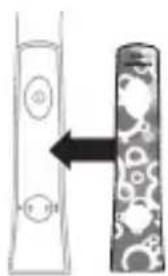
Applying your favorite sticker
natural_image
Diagram showing two vertical objects with circular elements, one with an arrow pointing to a textured pattern on the other (no text or symbols)The Sonicare For Kids comes with replaceable stickers.
1 Apply your favorite sticker on the handle.
Note: Make sure you line up the cut-out areas on the sticker with the buttons on the front of the handle. Make sure the handle is clean and stickers are fully pressed onto the handle with no air gaps to ensure full adhesion.
Attaching the brush head
natural_image
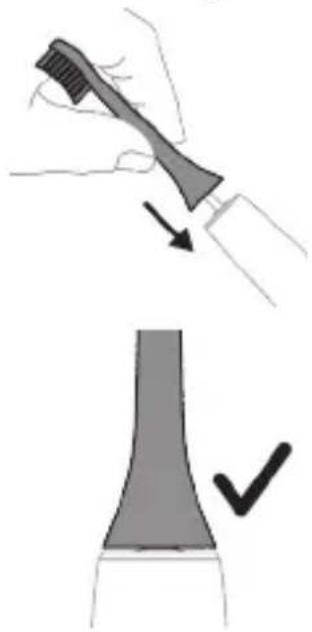
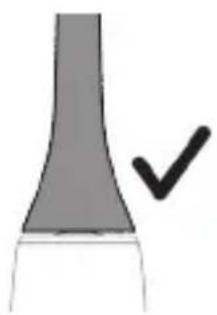
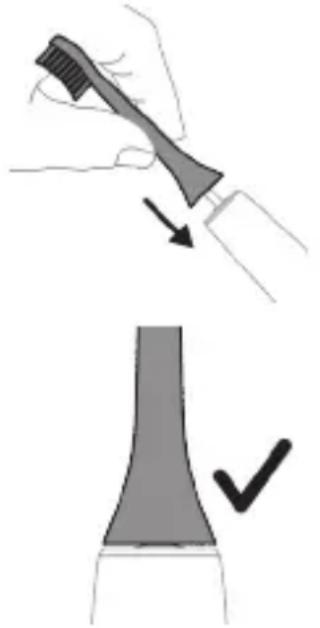
Illustration showing a hand brushing a tooth with a brush, and a close-up of the tooth being checked (no text or symbols present)1 Align the brush head so the bristles point in the same direction as the front of the handle.
2 Firmly press the brush head down onto the metal shaft until it will not go any further.
Note: It is normal to see a slight gap between the brush head and the handle.
Using your Philips Sonicare for Kids toothbrush
If you are using your Sonicare for Kids toothbrush for the first time, it is normal to feel more vibration than when using a non-electric toothbrush. It is common for first-time users to apply too much pressure. Only apply gentle pressure and let the toothbrush do the brushing for you. Please follow the brushing instructions below for the best experience. To help you transition to your new Sonicare for Kids power toothbrush, it comes with the EasyStart feature activated. This feature gently increases the power over the first 14 brushings to help you adapt to brushing with a Philips Sonicare for Kids toothbrush.
Note: For children under age 8, it is recommended that a parent or adult caregiver perform toothbrushing.
Brushing instructions
natural_image
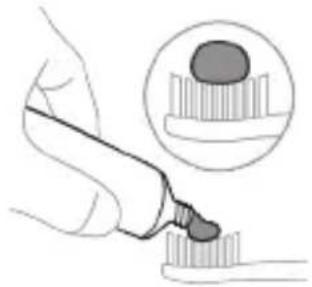
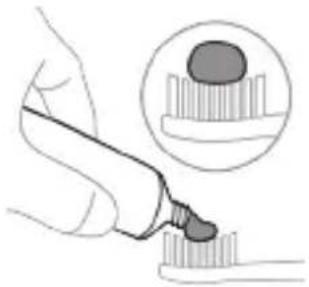
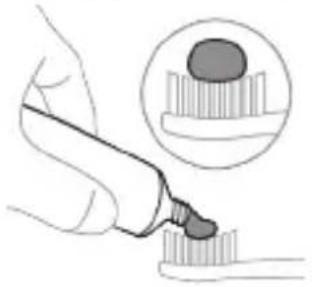
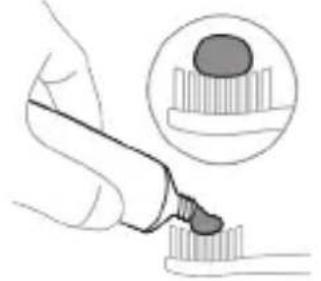
Illustration of a hand using a pen to apply a sample onto a surface, with an inset showing a magnified view of the sample (no text or symbols present)1 Wet the bristles and apply a small amount of toothpaste.
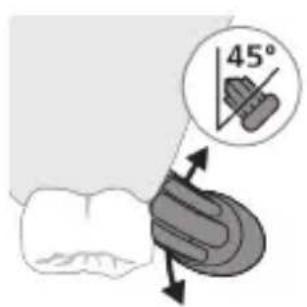
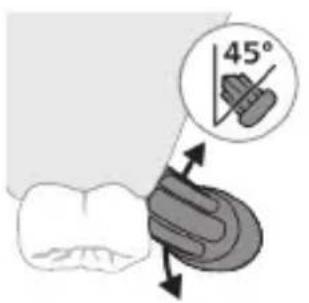
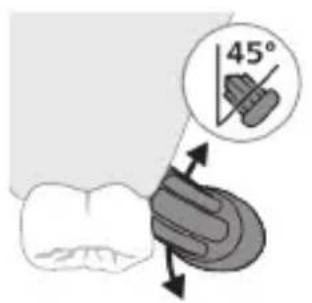
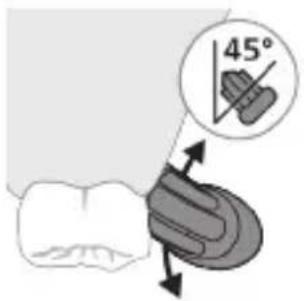
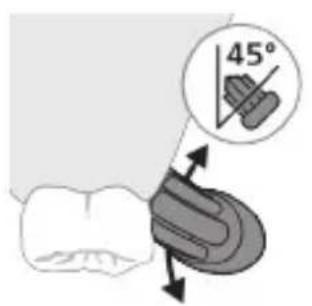
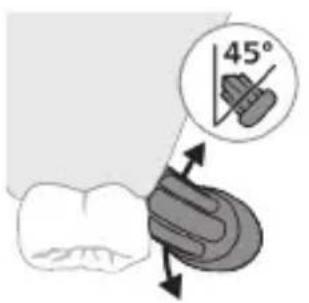
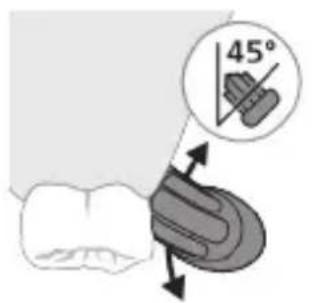
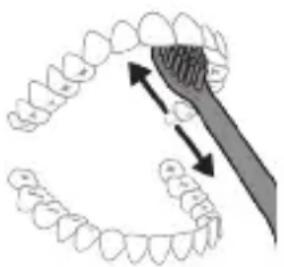
2 Place the toothbrush bristles against the teeth at a slight angle (45 degrees). Pressing firmly to make the bristles reach the gumline or slightly beneath the gumline.
Note: Keep the center of the brush in contact with the teeth at all times.
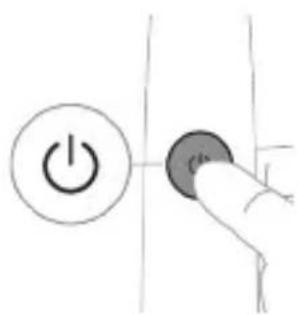
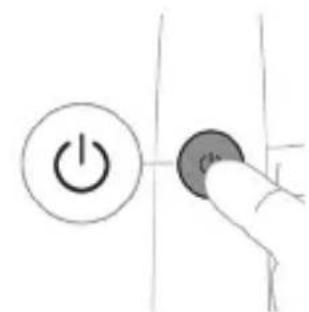
3 Press the power on/off button to switch on the Philips Sonicare.
natural_image
Illustration of a hand holding a segmented object with directional arrows indicating movement (no text or symbols)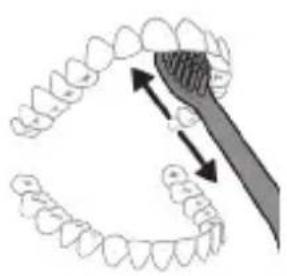
natural_image
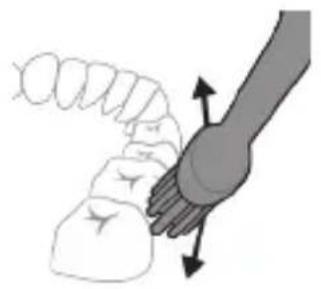
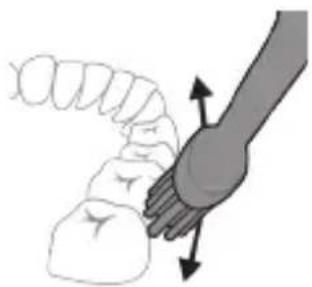
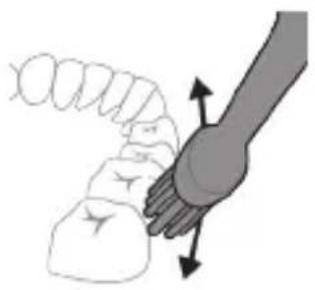
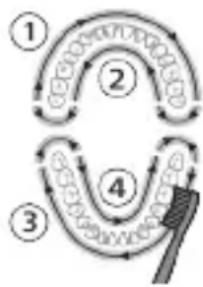
Diagram showing dental alignment with a tooth and toothbrush (no text or labels)4 Gently keep the bristles placed on the teeth and in the gumline. Brush your teeth with small back and forth motion so the bristles reach between the teeth. Continue this motion throughout your brushing cycle.
Note: The bristles should slightly flare. It is not recommended to scrub as you would with a manual toothbrush.
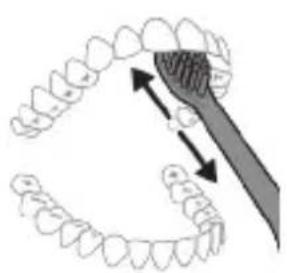
5 To clean the inside surfaces of the front teeth, tilt the brush handle semi-upright and make several vertical overlapping brushing strokes on each tooth.
6 After you have completed the brushing cycle, you can spend additional time brushing the chewing surfaces of your teeth and areas where extra attention is needed. You can also brush your tongue, with the toothbrush switched on or off, as you prefer.
Note: Your Philips Sonicare toothbrush is safe to use on braces (brush heads wear out sooner when used on braces) and dental restorations (fillings, crowns, veneers) if they are properly adhered and not compromised.
KidPacer
flowchart
graph TD
    A["Step 1"] --> B["Step 2"]
    B --> C["Step 3"]
    C --> D["Step 4"]
    D --> E["End"]
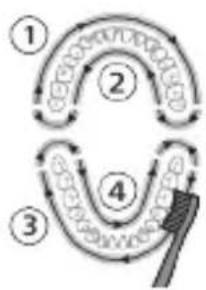
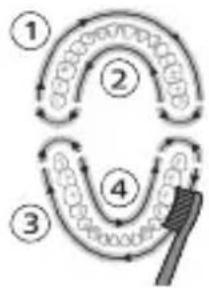
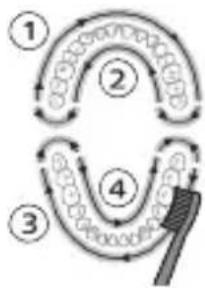
To make sure you brush evenly throughout the mouth, divide your mouth into 4 sections using the KidPacer feature. The KidPacer divides the brushing time into 4 equal segments and indicates when you should move to the next area. The segments are indicated with a short tune. The toothbrush automatically stops at the end of a brushing session with a congratulatory tune.
Note: Instruct your child to brush until they hear the congratulatory tune and the toothbrush switches off.
Modes
Low mode High mode
| Benefit Reduced power modeused for training and introducing younger children to the sonic experience. | Full-strength mode designed for older/independent brushes. |
| Recommended brush head | Sonicare for Kids Sonic Toothbrush Head | Sonicare for Kids Sonic Toothbrush Head |
| Total brushing time 2 minutes (see KidTimer) | 2 minutes | |
| How to brush | ||
 |  | |
Features
- KidPacer
- KidTimer
- EasyStart
KidPacer
The KidPacer is an interval timer that helps your child to brush evenly through the mouth by dividing your mouth into 4 sections.
KidTimer
- The KidTimer plays a congratulatory tune at the end of the pre-determined brushing time. Additionally, the KidTimer automatically switches off the handle when the brushing cycle is complete.
- When in high mode, the KidTimer is set at 2 minutes.
- When in low mode, the KidTimer is set at 1 minute and slowly increases over time. This slow increase in brushing time helps young children reach the dentist-recommended 2 minutes of brushing.
Note: Instruct your child to brush until they hear the congratulatory tune and the toothbrush switches off.
EasyStart
This Philips Sonicare model comes with the EasyStart feature activated. The EasyStart feature gently increases the power over the first 14 brushings to help you get used to brushing with the Philips Sonicare.
Note: Each of the first 14 brushings must be at least 1 minute in length to properly advance through the EasyStart ramp-up cycle.
To deactivate EasyStart (see 'Activating or deactivating features').
Activating or deactivating features
You can activate or deactivate the EasyStart feature:
Step 1: Place the handle on the charging stand.
natural_image
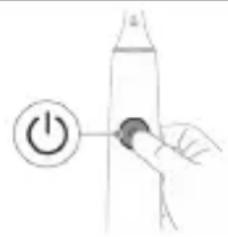
Simple line drawing of a hand pressing a button on a cylindrical object with an 'Power' icon (no text or symbols)Step 2: Press and hold power button for 2 seconds.
If you hear 1 beep, then the EasyStart feature has been deactivated.
OR
If you hear 2 beeps, then the EasyStart feature has been activated.
Step 3: Let go of the power button when you hear beep.
Note: Using the Easy-start feature beyond the initial ramp-up period is not recommended and reduces Sonicare's effectiveness in removing plaque.
Charging and battery status
This Philips Sonicare for Kids toothbrush is designed to provide at least 28 brushing sessions, each session lasting 2 minutes (14 days if used twice per day) on a fully charged battery. The battery indicator shows the battery status when you complete the 2-minute brushing session, when you pause the toothbrush, or while it is charging.
Note: It can take up to 24 hours to fully charge the battery before first use, but you can use the Philips Sonicare toothbrush before it is fully charged.
Charging on charger
1 Plug the charger into an electrical outlet.
2 Place the handle on the charger.
- The handle emits 2 short beeps to confirm that the handle is placed properly.
- The flashing light of the battery indicator shows that the toothbrush is charging.
- When the handle is fully charged on the charger, the battery indicator lights up green for 10 seconds and then switches off.
Battery status
Battery status (handle on plugged-in charger)
When the handle is placed on the charger, the battery indicator shows the battery level.
Battery status Battery indicator
| Charging Flashes green. | |
| Full Lights up in solid green for 10 seconds and then switches off. | |
| Battery status (when handle is not placed on charger)When the toothbrush is awake, the battery indicator light on the power buttons shows the battery level. | |
Battery status Battery indicator Sound
| Full Lights up in green - | |
| Low Flashes green The handle emits 3 | beeps after brushing |
| Empty Flashes green The handle emits 2 sets | of beeps after brushing |
| Note: To save energy, the battery indicator will switch off when not in use. | |
| Note: When the battery is completely empty, the toothbrush switches off. Place the toothbrush on the charger to charge it. | |
Note: To keep the battery fully charged at all times, you may keep your toothbrush on the charger when not in use.
Cleaning
Toothbrush handle
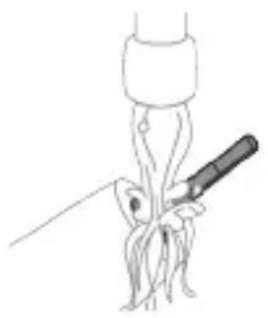
natural_image
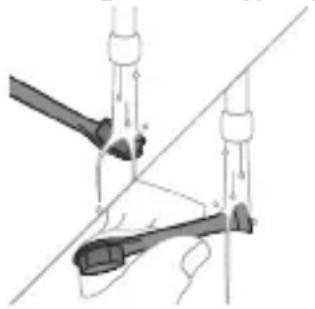
Line drawing of a person holding a tool near a plant stem (no text or symbols)1 Remove the brush head and rinse the metal shaft area with warm water. Make sure you remove any residual toothpaste.
Caution: Do not push on the rubber seal on the metal shaft with sharp objects, as this may cause damage.
2 Wipe the entire surface of the handle with a damp cloth.
Note: Do not tap the handle on the sink to remove excess water.
Brush head
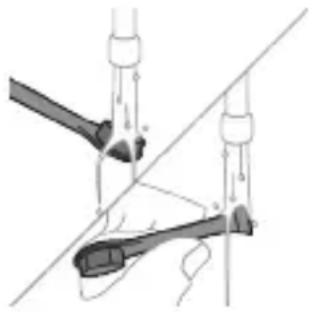
natural_image
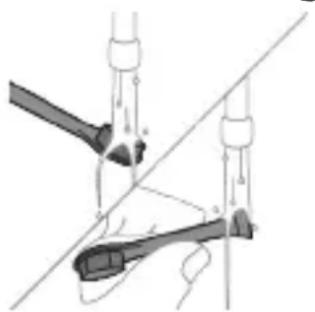
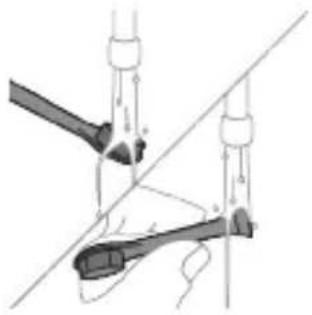
Diagram of two mechanical components with force arrows, no text or symbols present1 Rinse the brush head and bristles after each use.
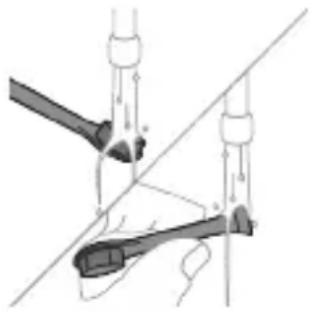
2 Remove the brush head from the handle and rinse the brush head connection with warm water at least once a week. Rinse the travel cap as often as needed.
Charger
Travel case
1 Unplug the charger before you clean it.
2 Wipe the surface of the charger with a damp cloth.
Rinse with warm water and use a damp cloth to clean inside of travel case.
Storage
If you are not going to use the product for an extended period of time, unplug it from the electrical outlet, clean it and store it in a cool and dry place away from direct sunlight.
Replacement
Replace Philips Sonicare brush heads every 3 months to achieve optimal results. Only use Sonicare for Kids replacement brush heads.
Locating the model number
Look on the bottom of the Philips Sonicare toothbrush handle for the model number (HX63XX).
Warranty and support
If you need information or support, please visit www.philips.com/support or read the international warranty leaflet.
WARRANTY EXCLUSIONS
What is not covered under warranty:
- In mouth attachments including brush heads and nozzles.
- Damage caused by use of unauthorized replacement parts or unauthorized brush heads.
- Damage caused by misuse, abuse, neglect, alterations or unauthorized repair.
- Normal wear and tear, including chips, scratches, abrasions, discoloration or fading.
Recycling
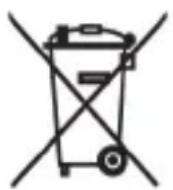
- This symbol means that electrical products and batteries shall not be disposed of with normal household waste.
- Follow your country's rules for the separate collection of electrical products and batteries.
The built-in rechargeable battery must only be removed by a qualified professional when the appliance is discarded. Before removing the battery, make sure that the battery is completely empty.
Removing the rechargeable battery
CONTAINS LITIHIUM-ION RECHARGEBALE CELL. MUST BE RECYCLED OR DISPOSED OF PROPERLY.
The built-in rechargeable battery must only be removed by a qualified professional when the appliance is discarded. Before removing the battery, make sure that the battery is completely empty.
Take any necessary safety precautions when you handle tools to open the appliance and when you dispose of the rechargeable battery. Be sure to protect your eyes, hands, fingers, and the surface on which you work.
When you handle batteries, make sure that your hands, the product and the batteries are dry.
To avoid accidental short-circuiting of batteries after removal, do not let battery terminals come into contact with metal objects (e.g. coins, hairpins, rings). Do not wrap batteries in aluminum foil. Tape battery terminals or put batteries in a plastic bag before you discard them.
To remove the rechargeable battery, you need a flat-head (standard) screwdriver. Observe basic safety precautions when you follow the procedure outlined below.
1 To deplete the rechargeable battery of any charge, remove the handle from the charger, turn on the Philips Sonicare for Kids and let it run until it stops. Repeat this step until you can no longer turn on the Philips Sonicare for Kids.
2 Remove and discard the brush head.
3 Insert a screwdriver into the slot located in the bottom of the handle and turn counterclockwise until you see a gap between the bottom cap and the handle.
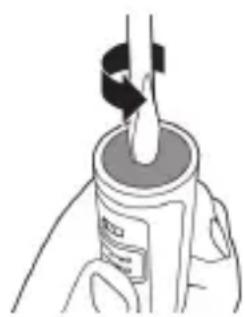
natural_image
Illustration of a hand holding a cylindrical object with a metallic rod inserted (no text or symbols visible)
4 Insert the screwdriver into the gap and pry the bottom cap out of the handle.
5 Hold the handle upside down and push down on the shaft to release the internal components of the handle.
6 Insert the screwdriver under the circuit board, next to the battery connections, and twist to break the connections. Remove the circuit board and pry the battery from the plastic carrier.
7 Grab the battery and pull it away from the internal components to break the second metal battery tab.
Caution: Be aware of the sharp edges of the battery tabs so as to avoid injury to your fingers.
8 Cover the battery contacts with tape to prevent any electrical short from residual battery charge.
The rechargeable battery can now be recycled and the rest of the product discarded appropriately.
Note: Do not throw away the appliance with the normal household waste at the end of its life, but hand it in at an official collection point for recycling. By doing this, you help to preserve the environment.
Giriş
www.philips.com/support
natural_image
Diagram showing two vertical panels with circular elements and an arrow pointing from the right panel (no text or symbols)natural_image
Illustration showing a hand brushing a tooth with a brush, and a close-up of a tooth being checked (no text or symbols present)natural_image
Illustration of a hand applying a toothbrush to a nail, with an inset showing a magnified view of the tooth (no text or symbols present)natural_image
Simple line drawing of a hand pressing a button on a vertical line, with a power button symbol nearby (no text or labels)natural_image
Illustration of a hand holding a small object with directional arrows indicating movement or force (no text or symbols)natural_image
Diagram showing dental tool interacting with teeth (no text or labels)natural_image
Hand holding a power button next to a cylindrical object (no text or symbols visible)natural_image
Line drawing of a medical procedure showing a needle inserted into tissue (no text or symbols)natural_image
Diagram of a mechanical assembly with two tools and a connecting rod (no text or labels)natural_image
Two-step illustration showing a hand holding a bottle with a brush and a small object inside, both without any text or symbols.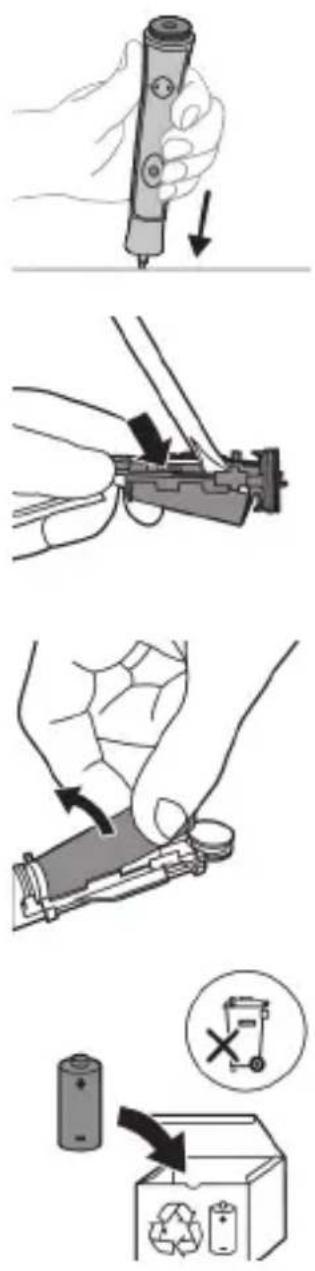
www.philips.com/support
natural_image
Diagram showing two vertical panels with circular elements and an arrow pointing from the right panel (no text or symbols)natural_image
Illustration of a hand using a pen to apply a sample onto a surface, with an inset showing a magnified view of the sample (no text or symbols present)natural_image
Illustration of a hand holding a curved object with directional arrows indicating movement or force (no text or symbols)natural_image
Diagram showing dental tool interacting with teeth (no text or labels)natural_image
Simple line drawing of a hand pressing a button on a bottle with a power symbol (no text or labels)natural_image
Line drawing of a medical procedure showing a tool interacting with an anatomical structure (no text or symbols)natural_image
Diagram of a mechanical linkage or tool assembly with no visible text or symbolswww.philips.com/support
natural_image
Diagram showing two connected devices with circular components, one with an arrow pointing to the other (no text or symbols)natural_image
Illustration showing a hand holding a toothbrush and a close-up of a tooth with a checkmark indicating a detail (no text or symbols present)natural_image
Illustration of a hand using a pipette to apply liquid onto a surface, with an inset showing a droplet on a surface (no text or symbols present)natural_image
Illustration of a hand interacting with a segmented object, showing motion direction (no text or symbols)natural_image
Diagram of dental arching technique showing tooth arrangement and tooth penetration (no text or labels)natural_image
Simple line drawing of a hand pressing a button on a bottle with a power button (no text or symbols)natural_image
Line drawing of a hand holding a tool interacting with a bundle of noodles (no text or symbols)natural_image
Diagram of a mechanical linkage or tool assembly with no visible text or symbolswww.philips.com/support
natural_image
Diagram showing two vertical panels with circular elements, one with an arrow pointing to a larger panel (no text or symbols present)natural_image
Illustration of a hand holding a toothbrush with a downward arrow indicating force or pressure (no text or symbols)natural_image
Simple diagram of a curved structure with a checkmark indicating a detail (no text or symbols present)natural_image
Illustration of a hand using a tool to apply a substance to a surface, with an inset showing a magnified view of the object (no text or symbols present)natural_image
Simple line drawing of a hand pressing a button on a bottle with a power button (no text or symbols)natural_image
Line drawing of a medical procedure showing a needle inserted into tissue (no text or symbols)natural_image
Diagram of a mechanical linkage or cable assembly with no visible text or symbolsnatural_image
Diagram showing a device with two circular buttons and an arrow pointing to a rectangular panel with patterned patterns (no text or symbols)natural_image
Illustration of a hand holding a toothbrush with an arrow indicating force or direction (no text or symbols)natural_image
Simple line drawing of a curved object with a checkmark indicating a detail (no text or symbols)natural_image
Illustration of a hand applying a toothbrush to a nail with an inset showing a magnified view of the tooth (no text or symbols present)natural_image
Simple line drawing of a hand pressing a button on a cylindrical object with an 'Power' icon (no text or symbols)Samm 2: Vajutage ja hoidke toitenuppu kaks sekundit.
natural_image
Line drawing of a hand holding a tool interacting with a bundle of noodles (no text or symbols)natural_image
Diagram of a mechanical linkage or tool assembly with no visible text or symbolsnatural_image
Illustration of a hand holding a small electronic device with a circular button, no text or symbols present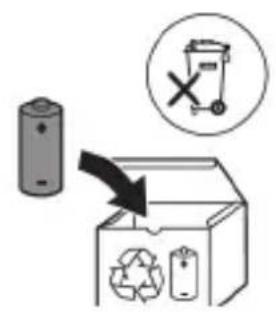
natural_image
Diagram showing a device with two circular buttons and an arrow pointing to a rectangular device with gear patterns (no text or symbols)natural_image
Illustration showing a hand brushing a tooth with a brush, and a close-up of a tooth being adjusted (no text or symbols)natural_image
Illustration of a hand using a pipette to apply liquid onto a surface, with an inset showing a droplet on a surface (no text or symbols present)natural_image
Illustration of a human hand holding a small object, with arrows indicating movement or force direction (no text or symbols)natural_image
Diagram showing dental alignment with a tool interacting with teeth (no text or labels)natural_image
Simple line drawing of a hand pressing a button on a bottle, with a power button icon nearby (no text or symbols)natural_image
Line drawing of a hand holding a tool interacting with a bundle of noodles (no text or symbols)natural_image
Diagram of two mechanical components with arrows indicating motion or force direction (no text or symbols)natural_image
Diagram showing two connected devices with circular components, one with an arrow pointing to the other (no text or symbols)natural_image
Illustration showing a hand brushing a tooth with a brush, and a close-up of a tooth being adjusted (no text or symbols present)natural_image
Illustration of a hand using a tool to apply a product to a textured surface, with an inset showing a magnified view of the product (no text or symbols present)natural_image
Simple line drawing of a hand pressing a button on a vertical line, with a power button symbol nearby (no text or labels)natural_image
Illustration of a hand holding a small object with directional arrows indicating movement or force (no text or symbols)natural_image
Diagram showing dental alignment with a tooth and toothbrush, no text or symbols presentnatural_image
Simple line drawing of a hand pressing a button on a bottle with a power button (no text or symbols)natural_image
Line drawing of a medical procedure showing a needle inserted into tissue (no text or symbols)natural_image
Diagram of a mechanical or electrical component with two arms and a diagonal line, no visible text or symbolsEXCLUSIONS DE GARANTIE
natural_image
Illustration of a hand holding a small electronic device with a circular button, no text or symbols present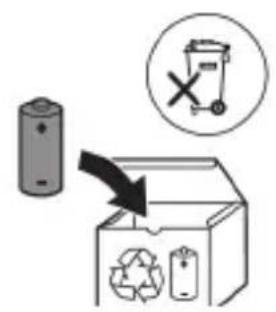
natural_image
Diagram showing a device with two buttons and a vertical arrow pointing to a textured panel (no text or symbols)natural_image
Illustration showing a hand brushing a tooth with a brush, and a checkmark indicating a detail (no text or symbols present)natural_image
Illustration of a hand using a pipette to apply liquid onto a surface, with an inset showing a droplet on a surface (no text or symbols present)1 Smočite čekinje i nanesite malu količinu paste za zube.
natural_image
Illustration of a hand holding a segmented object with directional arrows indicating movement (no text or symbols)natural_image
Diagram of dental arching with tooth structure and tool (no text or labels)Drugi korak: pritisnite i držite pritisnutim gumb za napajanje 2 sekunde.
Ako začujete jedan zvučni signal, tada je značajka EasyStart deaktivirana.
natural_image
Line drawing of a medical procedure showing a tool interacting with an anatomical structure (no text or symbols)1 Odvojite glavu četkice i isperite metalnu osovinu toplom vodom. Pobrinite se da uklonite svu preostalu zubnu pastu.
Oprez: Nemojte koristiti oštre predmete za guranje gumene brtve na metalnu osovinu jer to može prouzročiti oštećenja.
2 Cijelu površinu drške obrišite vlažnom tkaninom.
Napomena: Nemojte lupkati drškom po umivaoniku kako biste uklonili višak vode.
Glava četkice
natural_image
Diagram of a mechanical assembly with two tools and a diagonal line, no text or symbols presentnatural_image
Two-step diagram showing a mechanical device with a tool and a close-up of a component inside a container (no text or symbols)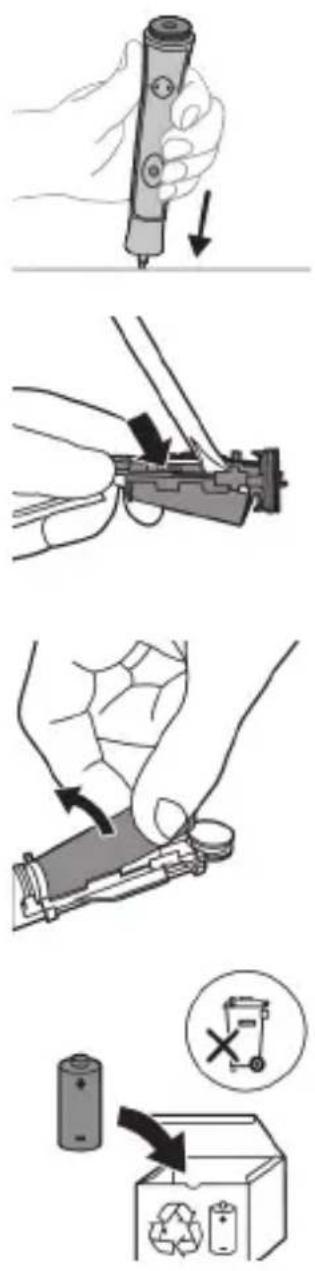
5 Držite dršku naopako i gurajte osovinu kako biste odvojili unutarnje komponente drške.
6 Umetnite odvijač ispod ploče sa sklopom, pokraj priključaka baterije, i zavrnite kako biste odvojili veze. Uklonite ploču sa sklopom i izvadite bateriju iz plastičnog nosača.
7 Primate bateriju i povucite je od unutarnjih dijelova da biste prelomili drugu metalnu pločicu baterije.
www.philips.com/support
natural_image
Diagram showing two vertical panels with circular elements and an arrow pointing from the right panel (no text or symbols)natural_image
Illustration showing a hand brushing a tooth with a brush, and a close-up of a tooth being adjusted (no text or symbols present)natural_image
Illustration of a hand using a pen to apply a sample onto a surface, with an inset showing a magnified view of the sample (no text or symbols present)natural_image
Illustration of a hand gripping a small object, with arrows indicating movement or force direction (no text or symbols)natural_image
Diagram of dental arching with tooth structure and forceps (no text or labels)natural_image
Simple line drawing of a hand pressing a button on a bottle with a power button (no text or symbols)natural_image
Line drawing of a fork being inserted into a tube (no text or symbols)natural_image
Diagram of a mechanical or electrical component with two arms and connecting rods, no visible text or symbolsnatural_image
Illustration of a hand holding a small electronic device with a circular button, no text or symbols present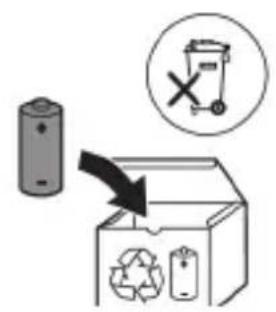
natural_image
Diagram showing a device with circular components on the left and a device with gear-like patterns on the right, both without any text or symbols.natural_image
Illustration showing a hand brushing a tooth with a brush, and a close-up of a tooth being adjusted (no text or symbols)natural_image
Illustration of a hand using a pipette to apply a sample onto a surface, with an inset showing a magnified view of the sample (no text or symbols present)1 Samitriniet sarus un uzklājiet mazliet zobu pastas.
natural_image
Illustration of a hand holding a curved object with directional arrows indicating movement or force (no text or symbols)natural_image
Diagram showing dental alignment with a tool interacting with teeth (no text or labels)natural_image
Simple line drawing of a hand pressing a button on a bottle with a power button (no text or symbols)natural_image
Line drawing of a medical procedure showing a needle inserted into tissue (no text or symbols)natural_image
Diagram of a mechanical device with lever and guide mechanism (no text or symbols)natural_image
Illustration of a mechanical device with a tool inserted into a cylindrical component, showing internal components and motion arrows (no text or symbols)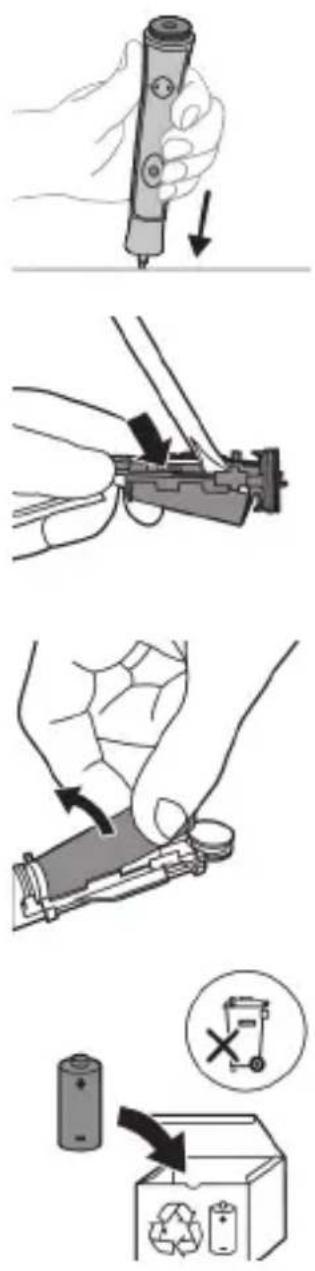
natural_image
Diagram showing a device with two buttons and an arrow pointing to a screen (no text or symbols present)natural_image
Illustration showing a hand holding a toothbrush and a close-up of a tooth with a checkmark indicating a detail (no text or symbols present)natural_image
Illustration of a hand using a pipette to apply liquid onto a surface, with an inset showing a droplet on a surface (no text or symbols present)natural_image
Illustration of a hand holding a segmented object with directional arrows indicating movement (no text or symbols)natural_image
Diagram of dental arching with tooth structure and tool (no text or labels)natural_image
Line drawing of a medical procedure showing a needle inserted into tissue (no text or symbols)natural_image
Diagram of a mechanical clamp or hook assembly with no visible text or symbolsnatural_image
Illustration of a hand holding a cylindrical object with a black-and-white tool inserted, no visible text or symbols.
www.philips.com/support
natural_image
Diagram showing two connected devices with circular components, one with a plus sign and the other with gear-like patterns (no text or symbols)natural_image
Illustration showing a hand brushing a tooth with a brush, and a close-up of a tooth being checked (no text or symbols present)natural_image
Illustration of a hand using a tool to apply a product to a textured surface, with an inset showing a magnified view of the product (no text or symbols present)natural_image
Illustration of a hand holding a curved object with directional arrows indicating movement or force (no text or symbols)natural_image
Diagram showing dental alignment with a toothbrush and tooth arrangement (no text or labels)natural_image
Simple line drawing of a hand pressing a button on a cylindrical object with an 'Power' icon (no text or symbols)natural_image
Line drawing of a medical procedure showing a tool interacting with tissue manipulation (no text or symbols)natural_image
Diagram of two mechanical components with connecting rods and force arrows, no text or symbols presentnatural_image
Diagram showing two vertical objects with circular elements, one with an arrow pointing to a textured rectangular object (no text or symbols)natural_image
Illustration showing a hand brushing a tooth with a brush, and a close-up of a tooth being checked (no text or symbols present)natural_image
Diagram of dental arching technique showing tooth arrangement and tool placement (no text or labels)natural_image
Simple line drawing of a hand pressing a button on a bottle with a power button (no text or symbols)natural_image
Line drawing of a medical procedure with a needle inserted into tissue (no text or symbols)natural_image
Diagram of a mechanical or electrical component with labeled parts (a, b, c) and directional arrows, no readable text or symbols present.natural_image
Illustration of a hand holding a small electronic device with a circular button, no text or symbols present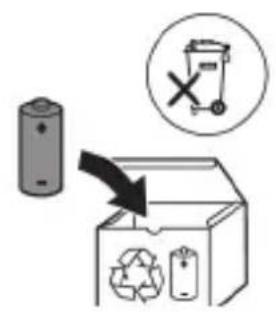
natural_image
Diagram showing two connected devices with circular components, one with an arrow pointing to the other (no text or symbols)Sonicare For Kids leveres med utbyttbare klistremerker.
natural_image
Illustration of a hand holding a toothbrush with an arrow indicating force or movement (no text or symbols)natural_image
Simple line drawing of a curved object with a checkmark (no text or symbols)natural_image
Line drawing of a medical procedure showing a tool interacting with an anatomical structure (no text or symbols)1 Ta av børstehodet, og skyll metallstangen i varmt vann. Pass på at du har fjernet alle tannkremrester.
Forsiktig: Ikke bruk skarpe gjenstander mot gummiforseglingen på metallstangen. Den kan bli ødelagt.
2 Tørk hele overflaten på håndtaket med en fuktig klut.
natural_image
Diagram of a mechanical or electrical component with no visible text, numbers, or symbolsnatural_image
Illustration of a hand holding a cylindrical object with a metallic rod inserted (no text or symbols visible)
natural_image
Diagram showing two connected devices with circular components, one with a plus sign and the other with gear-like patterns (no text or symbols)Sonicare For Kids almashtiriladigan stikerlar bilan birga taqdim etiladi.
1 Dastaga sevimli stikeringizni yopishtiring.
Izoh: Stikerning qirqib olingan hududlarini dastaning old tomonidagi tugmalarga moslang. Dasta tozaligini hamda stikerlar to'liq yopishtirilishi uchun dastaga havo bo'shliqlarisiz to'liq bosilganini tekshiring.
1 Cho'tka tuklari dastaning old qismi bilan bir xil yo'nalishda bo'lishi uchun cho'tka kallagini tekislang.
2 Cho'tka kallagini u boshqa kirmagunigacha metall valga qattiq bosing.
Izoh: Cho'tka kallagi va dasta orasida kichik tirqish ko'rinishi – normal holat.
Philips Sonicare for Kids tish cho'tkangizdan foydalanish
Agar Sonicare for Kids tish cho'tkasidan birinchi marta foydalanayotgan bo'lsangiz, elektr bo'Imagan tish cho'tkasidan foydalanishga qaraganda ko'proq tebranish sezish normal holat. Odatda birinchi marta foydalanayotgan foydalanuvchilar ortiqcha bosim beradi. Faqat yumshoq bosib bering va tish cho'tkasi siz uchun tozalashiga imkon bering. Eng yaxshi taassurot uchun tish tozalash ko'rsatmalariga amal qiling. Yangi Sonicare for Kids motorli tish cho'tkasiga o'tishingizga yordam berish uchun EasyStart funksiyasi faollashtirilgan holatda taqdim etiladi. Bu funksiya Philips Sonicare for Kids tish
cho'tkasi bilan tozalashingizga ko'nikishingiz uchun ilk 14 ta tozalash davomida dastaning quvvatini asta-sekin oshirib boradi.
Izoh: 8 yoshdan kichik bolalar uchun ota-ona yoki enaga tish cho'tkalashda yordam berishi tavsiya etiladi.
Tish tozalash ko'rsatmalari
natural_image
Illustration of a hand applying a toothed pencil to a tooth, with an inset showing a magnified view of the tooth (no text or symbols present)1 Cho'tkani namlang va unga kam miqdorda tish pastasi surting.
2 Tish cho'tkasini tishlar qarshisida kichik (45 daraja) burchak ostida tuting. Cho'tkalar milk chizig'iga yoki uning tagiga yetishi uchun uni qattiq bosing.
Izoh: Cho'tka markazini tishlarga doimi to'liq tekkizib turing.
natural_image
Simple line drawing of a hand pressing a button on a power button (no text or symbols)3 Philips Sonicare qurilmasini yoqish uchun yoqish/o'chirish tugmasini bosing.
natural_image
Illustration of a hand holding a curved object with directional arrows indicating movement or force (no text or symbols)4 Cho'tkani tishlar va milk chizig'iga yengil tutib turing. Cho'tkalar tishlar orasiga kirishi uchun cho'tka kallagini oldinga-orqaqa kichik harakatlar bilan tishlaringizni tozalang. Bu harakatlarni tish tozalash siklingiz yakunlangunga qadar bajaring.
natural_image
Diagram of dental arching technique showing tooth arrangement and tooth penetration (no text or labels)2-bosqich: Quvvat tugmasini 2 soniya bosib turing.
natural_image
Line drawing of a hand holding a pen inserted into a bundle of noodles (no text or symbols)1 Cho'tka kallagini chiqarib oling va metall val atrofini iliq suv bilan yuving. Har qanday tish pastasi qoldig'ini tozalaganingizni tekshiring.
Ogohlantirish: Metall valdagi rezina zichlagichni o'tkir narsalar bilan bosmang, bu shikastlanishga olib kelishi mumkin.
2 Dastaning butun yuzasini nam mato bilan artib oling.
Izoh: Ortiqcha suvni yo'qotish uchun dastani rakovinaga urmang.
Cho'tka kallagi
natural_image
Diagram of mechanical components with no visible text or symbols1 Cho'tka kallagi va cho'tkani har foydalanishdan keyin yuving.
2 Cho'tka kallagini dastadan chiqarib oling va cho'tka kallagi ulanish qismini kamida haftada bir marta iliq suv bilan yuving. Sayohat qopqog'ini zarur bo'lgancha tez-tez yuvib tashlang.
Quvvatlash moslamasi
1 Tozalashdan avval, quvvatlagichni tarmoqdan uzing.
2 Quvvatlash moslamasining butun yuzasini nam mato bilan artib oling.
Sayohat g'ilofi
Iliq suv bilan yuving va sayohat g'ilofi ichini tozalash uchun nam matodan foydalaning.
Xotira
www.philips.com/support
natural_image
Diagram showing two vertical bars with circular symbols and an arrow pointing from the right bar (no text or labels)natural_image
Illustration showing a hand brushing a tooth with a brush, and a close-up of a tooth being adjusted (no text or symbols)natural_image
Illustration of a hand applying a toothbrush to a tooth with a magnified inset showing a textured surface (no text or symbols)natural_image
Line drawing of a medical procedure showing a needle inserted into tissue (no text or symbols)natural_image
Diagram of a mechanical clamp or hook assembly with no visible text or symbolswww.philips.com/support
natural_image
Diagram showing two connected devices with circular components, one with a plus sign and the other with gear-like patterns (no text or symbols)natural_image
Illustration showing a hand brushing a tooth with a brush, and a close-up of the tooth being checked (no text or symbols present)natural_image
Diagram of dental arching with tooth structure and tool (no text or labels)natural_image
Simple line drawing of a hand pressing a button on a cylindrical object with an 'Power' icon (no text or symbols)natural_image
Line drawing of a medical procedure showing a needle inserted into tissue (no text or symbols)natural_image
Diagram of a mechanical or electrical component with two arms and a central shaft, connected by a diagonal line (no text or symbols)www.philips.com/support
natural_image
Diagram showing two vertical panels with circular elements and an arrow pointing from the right panel (no text or symbols)natural_image
Illustration showing a hand brushing a tooth with a brush, and a close-up of a tooth being checked (no text or symbols present)natural_image
Illustration of a hand using a pipette to apply liquid onto a surface, with an inset showing a droplet on a surface (no text or symbols present)natural_image
Illustration of a hand holding a tool interacting with a segmented object (no text or symbols present)natural_image
Diagram showing dental tool interacting with teeth (no text or labels)natural_image
Simple line drawing of a hand pressing a button on a bottle with a power button (no text or symbols)natural_image
Line drawing of a hand holding a pen over a bundle of filaments (no text or symbols)natural_image
Diagram of a mechanical or electrical component with two arms and connecting rods, no visible text or symbolsnatural_image
Illustration of a mechanical device with a tool inserted into a cylindrical component (no text or symbols visible)
www.philips.com/support
natural_image
Diagram showing two vertical panels with circular elements and an arrow pointing from the right panel (no text or symbols)natural_image
Illustration showing a hand brushing a tooth with a brush, and a checkmark indicating the correct removal (no text or symbols present)natural_image
Simple line drawing of a hand pressing a button on a bottle with a power symbol (no text or labels)natural_image
Line drawing of a medical procedure with a needle inserted into tissue (no text or symbols)natural_image
Diagram of a mechanical clamp or bracket assembly with labeled parts (no text or symbols present)natural_image
Diagram showing a device with two buttons and a vertical panel with patterned elements, no text or symbols present.natural_image
Illustration showing a hand using a tool to apply a brush to a cylindrical object, with a checkmark indicating the process (no text or symbols present)natural_image
Illustration of a hand using a tool to apply a product to a toothbrush, with an inset showing a textured surface (no text or symbols)Korak 2: Pritisnite in pridržite gumb 2 sekundi.
Če zaslišite 1 pisk, pomeni, da je bila funkcija EasyStart izklopljena.
ALI
natural_image
Line drawing of a person holding a tool near a plant stem (no text or symbols)natural_image
Diagram of a mechanical linkage or lifting mechanism with no visible text or symbols8 Stike baterije prekrijte z lepilnim trakom, da preprečite kratek stik zaradi preostale napetosti v bateriji.
natural_image
Diagram showing two vertical panels with circular elements and an arrow pointing from the right panel (no text or symbols)natural_image
Illustration showing a hand brushing a tooth with a brush, and a close-up of a tooth being adjusted (no text or symbols)natural_image
Simple line drawing of a hand pressing a button on a bottle with a power button (no text or symbols)natural_image
Line drawing of a medical procedure showing a needle inserted into tissue with a pen inserted (no text or symbols)natural_image
Diagram of a mechanical device with lever and guide mechanism (no text or symbols)natural_image
Illustration of a bottle being held by a neck-mounted device (no text or symbols visible)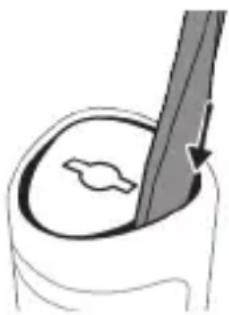
natural_image
Illustration of a medical or anatomical procedure showing a tool interacting with a circular object (no text or symbols present)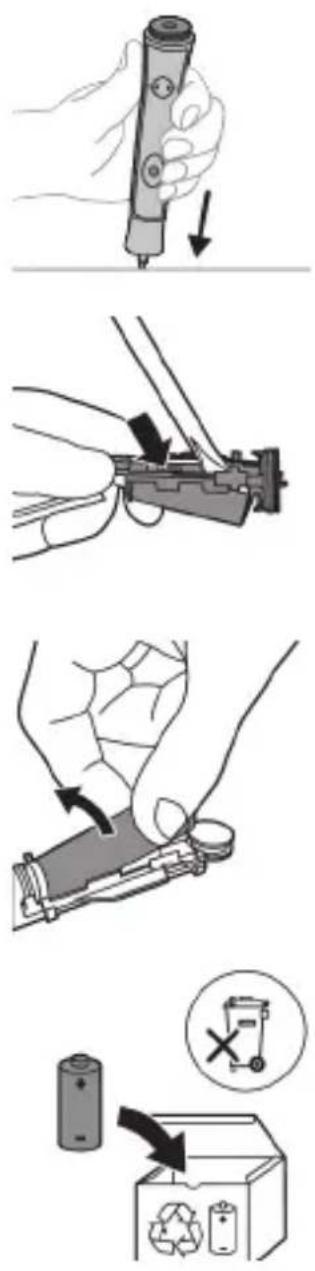
natural_image
Diagram showing a device with two circular buttons and an arrow pointing to a rectangular panel with patterned patterns (no text or symbols)Uz Sonicare For Kids dobijate zamenske nalepnice.
1 Postavite omiljenu nalepnicu na dršku.
natural_image
Illustration of a hand holding a toothbrush with an arrow indicating force or direction (no text or symbols)1 Poravnajte glavu četkice tako da su vlakna okrenuta u istom smeru kao i prednja strana drške.
natural_image
Simple line drawing of a curved object with a checkmark (no text or symbols)2 Čvrsto pritisnite glavu četkice na metalnu osovinu do kraja.
1 Pokvasite vlakna i nanesite malu količinu paste za zube.
2 Postavite vlakna četkice za zube na zube tako da budu pod blagim uglom (45 stepeni). Čvrsto pritisnite kako bi vlakna stigla do desni ili malo ispod desni.
natural_image
Simple line drawing of a hand pressing a button on a bottle with an 'Power' icon (no text or symbols)Korak 2: Pritisnite i zadržite dugme za napajanje 2 sekunde:
Ako čujete 1 zvučni signal, to znači da je funkcija Easy-Start deaktivirana.
ILI
Ako čujete 2 zvučna signala, to znači da je funkcija Easy-Start aktivirana.
natural_image
Line drawing of a medical procedure showing a needle inserted into tissue (no text or symbols)1 Uklonite glavu četkice i isperite oblast oko metalne osovine toplom vodom. Obavezno uklonite sve ostatke paste za zube.
Oprez: Nemojte da gurate gumenu zaptivku na metalnoj osovini oštrim predmetima pošto to može da dovede do oštećenja.
2 Čitavu površinu drške obrišite vlažnom krpom.
Napomena: Nemojte da udarate ručkom o sudoperu da biste uklonili višak vode.
Glava četkice
natural_image
Diagram of a mechanical linkage or tool assembly with no visible text or symbols1 Glavu sa četkicom i vlakna isperite nakon svake upotrebe.
2 Bar jednom nedeljno skinite glavu četkice sa drške i toplom vodom isperite njen priključak. Isperite poklopac za putovanja kad god je potrebno.
Punjač
1 Isključite punjač iz električne mreže pre čišćenja.
2 Obrišite površinu punjača vlažnom krpom.
Putna futrola
Isperite toplom vodom i izbrišite unutrašnjost putne futrole vlažnom krpom.
Skladištenje
Ako proizvod nećete koristiti duže vreme, isključite ga iz zidne utičnice, očistite ga i odložite na hladno i suvo mesto, dalje od direktne sunčeve svetlosti.
Zamena
Zamenite Philips Sonicare glave četkice na svaka 3 meseca kako biste postigli optimalne rezultate. Koristite isključivo rezervne glave četkica namenjene za Sonicare for Kids.
natural_image
Illustration of a hand holding a small electronic device with a circular button, no text or symbols present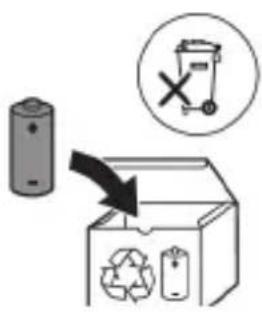
7 Uhvatite bateriju i odvojite je od unutrašnjih komponenti kako biste slomili drugi metalni jezičak baterije.
Oprez: pazite na oštre ivice jezičaka baterije da ne biste povredili prste.
8 Kontakte na bateriji zaštitite trakom kako preostali napon baterije ne bi prouzrokovao kratak spoj.
Punjivu bateriju sada je moguće reciklirati, a ostatak proizvoda odložiti na odgovarajući način.
Napomena: Aparat koji se više ne može upotrebljavati nemojte da odlažete u kućni otpad, već ga predajte na zvaničnom prikupljalištu za reciklažu. Na taj način pomažete očuvanju životne sredine.
Johdanto
www.philips.com/support
natural_image
Diagram showing a device with two circular buttons and an arrow pointing to a rectangular device with patterned patterns (no text or symbols)natural_image
Illustration showing a hand brushing a tooth with a brush, and a close-up of a tooth being adjusted (no text or symbols present)natural_image
Illustration of a hand using a pipette to apply liquid onto a surface, with an inset showing a droplet on a surface (no text or symbols present)natural_image
Illustration of a hand holding a segmented object with directional arrows indicating movement (no text or symbols)natural_image
Diagram of dental arching with tooth structure and tool (no text or labels)natural_image
Line drawing of a medical procedure showing a needle inserted into tissue (no text or symbols)natural_image
Diagram of a mechanical or electrical component with two arms and connecting rods, no visible text or symbolsnatural_image
Two-step diagram showing a tool interacting with a container and a mechanical component inside a container (no text or symbols)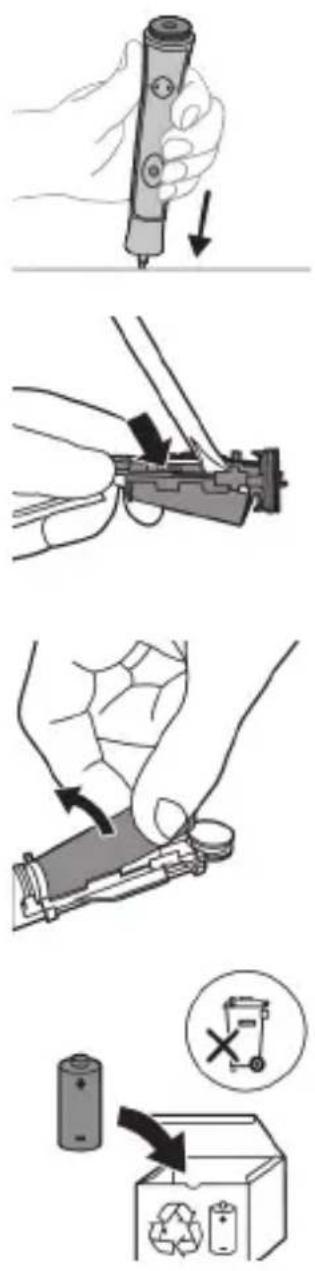
natural_image
Diagram showing a device with two circular buttons and an arrow pointing to a rectangular device with patterned patterns (no text or symbols)natural_image
Illustration showing a hand brushing a tooth with a brush, and a close-up of a tooth being adjusted (no text or symbols present)natural_image
Illustration of a hand using a pipette to apply liquid onto a surface, with an inset showing a droplet on a surface (no text or symbols present)natural_image
Illustration of a human hand holding a curved object, with arrows indicating movement or force direction (no text or symbols)natural_image
Diagram showing dental tool application on upper teeth with magnified detail (no text or labels)natural_image
Hand holding a power button next to a bottle (no text or symbols visible)natural_image
Line drawing of a hand holding a pen inserted into a bundle of noodles (no text or symbols)natural_image
Diagram of a mechanical or electrical component with two arms and connecting rods, no visible text or symbolsnatural_image
Illustration of a hand holding a cylindrical object with a metallic rod inserted (no text or symbols visible)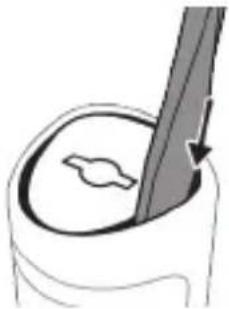
natural_image
Illustration of a hand holding a pen with a stylized leaf inside, no text or symbols present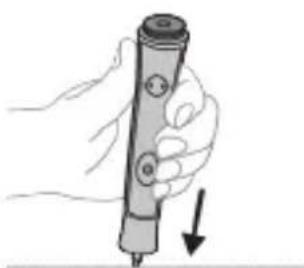
natural_image
Hand holding a pen with a downward arrow indicating compression or disassembly (no text or symbols)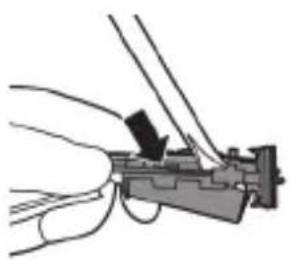
natural_image
Illustration of a hand holding a firearm with a black arrow pointing to the handle (no text or symbols present)natural_image
Illustration of a hand holding a small electronic component with a black arrow indicating rotation (no text or symbols)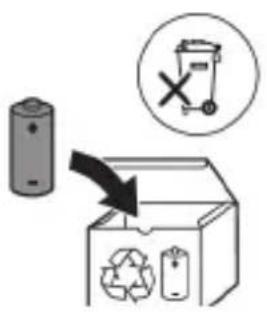
www.philips.com/support
Bellik: Dürli modelleriň aýratynlyklary dürlüçe bolup bilýär. Käbir modeller Bluetooth ýa-da NFC bilen enjamlaşdyrylmadyk bolup biler.
Niyetlenilýän ulanyş
Sonicare for Kids diş çotgalary dişiň çüyremegini azaltmak we agyz saglygyny saklamak maksady bilen, dişlerdäki daşy hem-de iýmit galyndylaryny ayyrmaklyga niyetlenilýär. Sonicare for Kids elektrikli diş çotgalary şahsy ulanmaklyga niyetlenilýär. Çagalaryň ulanmagy ulularyň gözegçiligi astynda bolmalydyr.
Philips Sonicare enjamyňyz (Şek. 1.)
natural_image
Diagram showing two vertical panels with circular elements and an arrow pointing from the right panel (no text or symbols)natural_image
Illustration of a hand using a tool to apply a product to a small object, with an inset showing a magnified view of the product (no text or symbols present)1 Gyllary öllään we üstüne azajyk diş pastasyny çalyň.
natural_image
Illustration of a hand holding a tool interacting with a segmented object (no text or symbols)natural_image
Diagram of dental arching technique showing tooth arrangement and tooth penetration (no text or labels)Ädim 2: Energiya düwmesini 2 sekunt basyp saklaň.
natural_image
Line drawing of a medical procedure showing a needle inserted into tissue (no text or symbols)natural_image
Diagram of a mechanical assembly with two tools and a diagonal line, no text or symbols present1 Her ulanyşdan soň nasadkany we gyllary ýuwup durlaň.
natural_image
Illustration of a hand holding a bottle with a pen inserted, no text or symbols present
www.philips.com/support
natural_image
Diagram showing a device with two circular buttons and an arrow pointing to a rectangular device with patterned patterns (no text or symbols)natural_image
Illustration showing a hand holding a toothbrush and a close-up of a tooth with a checkmark indicating a detail (no text or symbols present)natural_image
Illustration of a hand using a pipette to apply liquid onto a surface, with an inset showing a droplet on a surface (no text or symbols present)natural_image
Illustration of a hand gripping a small object, with arrows indicating movement or force direction (no text or symbols)natural_image
Diagram of dental arching technique showing tooth alignment and tooth width (no text or labels)natural_image
Line drawing of a plant stem being inserted into a bulb, with a pen inserted (no text or symbols)natural_image
Diagram of a mechanical or electrical component with two arms and a central shaft, connected by wires (no text or symbols visible)www.philips.com/support
natural_image
Diagram showing two vertical objects with circular elements, one with an arrow pointing to a textured pattern on the other (no text or symbols)natural_image
Illustration showing a hand brushing a tooth with a brush, and a close-up of a tooth being checked (no text or symbols present)natural_image
Illustration of a hand using a tool to apply a product to a textured surface, with an inset showing a magnified view of a small object (no text or symbols present)natural_image
Simple line drawing of a hand pressing a button on a power button (no text or symbols)natural_image
Illustration of a hand holding a segmented body with directional arrows indicating movement or force (no text or symbols)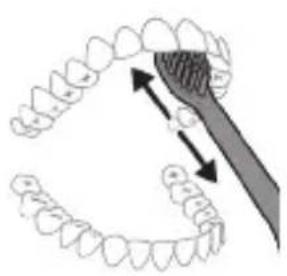
natural_image
Diagram showing dental alignment with a tooth and a tool, no text or symbols presentnatural_image
Simple line drawing of a hand pressing a button on a cylindrical object with an 'Power' icon (no text or symbols)natural_image
Line drawing of a medical procedure showing a tool interacting with an anatomical structure (no text or symbols)natural_image
Diagram of a mechanical clamp or hook assembly with no visible text or symbolswww.philips.com/support
natural_image
Diagram showing two vertical panels with circular elements and an arrow pointing from the middle panel (no text or symbols)natural_image
Illustration showing a hand brushing a tooth with a brush, and a close-up of a tooth being checked (no text or symbols present)natural_image
Illustration of a hand interacting with a segmented body, showing directional arrows (no text or symbols)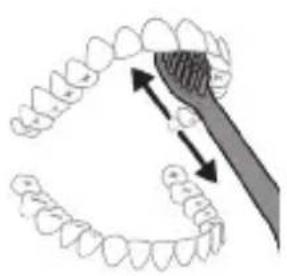
natural_image
Diagram showing dental alignment with a tooth and a tool, no text or symbols presentnatural_image
Simple line drawing of a hand pressing a button on a bottle, with a power button icon nearby (no text or symbols)natural_image
Line drawing of a fork being inserted into a tube (no text or symbols)natural_image
Diagram of a mechanical or electrical component with two arms and connecting rods, no visible text or symbolsnatural_image
Illustration of a hand holding a bottle with a brush, and a close-up of a mechanical component inside a container (no text or symbols)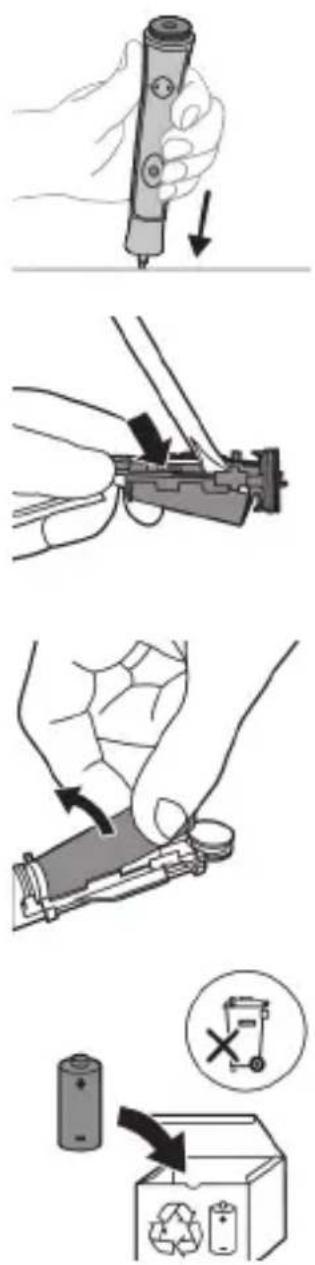
www.philips.com/support
natural_image
Diagram showing two vertical panels with circular elements and an arrow pointing from the middle panel (no text or symbols)natural_image
Illustration showing a hand brushing a tooth with a brush, and a close-up of a tooth being checked (no text or symbols present)natural_image
Illustration of a hand using a tool to apply a substance to a surface, with an inset showing a magnified view of the subject (no text or symbols present)natural_image
Illustration of a hand holding a segmented object with directional arrows indicating movement (no text or symbols)natural_image
Diagram showing dental tool interacting with teeth (no text or labels)natural_image
Simple line drawing of a hand pressing a button on a cylindrical object with an 'Power' icon (no text or symbols)natural_image
Line drawing of a medical procedure showing a needle inserted into tissue (no text or symbols)natural_image
Diagram of a mechanical clamp or lever mechanism with no visible text or symbolswww.philips.com/support
natural_image
Diagram showing two rectangular objects with circular elements, one pointing left and the other on the right (no text or symbols)natural_image
Illustration showing a hand brushing a tooth with a brush, and a close-up of a tooth being adjusted (no text or symbols)natural_image
Illustration of a hand using a pipette to apply a sample onto a surface, with an inset showing a droplet on a surface (no text or symbols present)natural_image
Illustration of a hand interacting with a segmented object, showing motion direction (no text or symbols)natural_image
Diagram of dental arching with tooth arrangement and tool tip (no text or labels)natural_image
Simple line drawing of a hand pressing a button on a cylindrical object with an 'Power' icon (no text or symbols)natural_image
Line drawing of a hand holding a pen over a bundle of tentacles (no text or symbols)natural_image
Diagram of two mechanical components with connecting rods and a diagonal line, no text or symbols presentwww.philips.com/support
natural_image
Diagram showing a device with two circular buttons and an arrow pointing to a rectangular device with patterned patterns (no text or symbols)natural_image
Illustration of a hand holding a toothbrush with a downward arrow indicating force or pressure (no text or symbols)natural_image
Simple line drawing of a curved object with a checkmark (no text or symbols)natural_image
Illustration of a hand applying a toothbrush to a nail, with an inset showing a magnified view of the nail (no text or symbols present)natural_image
Hand holding a power button next to a bottle (no text or symbols visible)Кадами 2: Тугмаи фајолро пахш карда, 2 сони нигох доред.
natural_image
Line drawing of a hand holding a pen over a bundle of noodles (no text or symbols)natural_image
Diagram of a mechanical linkage or cable assembly with no visible text or symbolsnatural_image
Illustration of a hand holding a cylindrical object with a metallic rod inserted (no text or symbols visible)
4 Мурваттобакро ба холигй ворид кунед ва сарпўши поёнро аз дастак берун кунед.
5 Дастакро чаппа нигох доред ва чохро зер кунед, то чузъхои дохилии дастаро озод кунед.
6 Мурваттобакро ба зери лавхаи чопй дар пахлўи пайвасткунандахои батарея гузоред ва барои кандани пайвастхо тоб дихед. Лавхаи чопиро чудо кунед ва батареяро аз дорандаи пластикй бароред.
7 Батареяро гиред ва онро аз чузъхои дохили кашед, то лавхаи дуюми батареяи металлиро бишканед.
Огохй: Аз кунчхои тези лавхахои батарея огох бошед, то ба ангуштони худ осеб нарасонед.
www.philips.com/support
natural_image
Diagram showing two devices with circular buttons and a device emitting gear-like patterns (no text or symbols)natural_image
Illustration of a hand holding a toothbrush with a downward arrow indicating force or pressure (no text or symbols)natural_image
Simple line drawing of a bulb-like shape with a checkmark indicating a detail (no text or symbols)natural_image
Illustration of a hand using a tool to apply a substance to a surface, with an inset showing a magnified view of the object (no text or symbols present)natural_image
Hand holding a power button next to a bottle, no text or symbols visiblenatural_image
Line drawing of a medical procedure showing a needle inserted into tissue (no text or symbols)natural_image
Diagram of a mechanical or electrical component with no visible text, numbers, or symbolswww.philips.com/support
natural_image
Diagram showing two connected devices with circular components, one with a plus sign and the other with a gear-like pattern (no text or symbols)natural_image
Illustration showing a hand brushing a tooth with a brush, and a close-up of the tooth being checked (no text or symbols present)natural_image
Diagram showing dental alignment with a toothbrush and tooth arrangement (no text or labels)natural_image
Simple line drawing of a hand pressing a button on a bottle with a power symbol (no text or labels)natural_image
Line drawing of a medical procedure showing a needle inserted into tissue (no text or symbols)natural_image
Diagram of a mechanical assembly with two tools and a diagonal line, no text or symbols presentnatural_image
Illustration of a hand holding a small electronic device with a circular button, no text or symbols present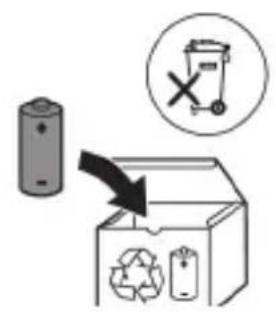
natural_image
Diagram showing a device with two circular components and an arrow pointing to a rectangular device with patterned panels (no text or symbols)Uünwgntp hunqwüwwlyh qlhuhyn
natural_image
Illustration showing a hand holding a toothbrush and a close-up of a tooth with a checkmark indicating a detail (no text or symbols present)1 lunqwùwlyh qìhuhyn hwiúwuwntgntp wjuówtu, nn úwqhúyutnú nǐnníluò jhùtǔ ünjiù nǐnnημαjωύρ, hùz pénǚwlyh nhúwgh ynnúŋ:
2 Uünin utnútp hunqwùwlyh qihuhyn utnpu utunwnwlywù lhuṭnh útg, uħușlu wju hywùq wnùh: L2niš` hunqwùwlyh qihuhyh u pnùwlyh úhqlu yhnpn wǔgph wnylwjnupjniùn ünnúwl 5:
2tn Philips Sonicare for Kids wunwuh hunqwuwuh oqunwqnpnniun
tpt wunwghù wùqwú tṛp oqunwqnδnú ðtṛn Sonicare for Kids wunwúh hunqwùwʊŋ, wʊltɪŋ 2wun jənpanŋ qquŋ ñnnúwɪl ʒ' hwiútuːwɪnud nʒ ʒltlynnwʊŋwù hunqwùwʊŋ hṭuːn: lnnúwɪl ʒ, tṛnp wunwghù wùqwú oqunwqnδnŋ ïtnŋ ʒwiuhg 2wun tǔ utnúniú qnpδwnpnniú: Uhwjù lyhnwntṛp ñnɪnp utnúniú u jəniŋ unultp, nnwtuqh wunwúh hunqwùwʊŋ ðtṛn yhnhuwntù úwpnh: hūŋpníú tṛp hānuti uunnpu ïtnlywwgʊŋwð hunqwùwʊŋg oqunultīni gniŋni ïtphù' ʒwiulwqnju wnnjniùpùtn uunwùwɪni hwiúwn: Sonicare for Kids ʒltlynnwʊŋwù hunqwùwʊŋhù wùgniú ï wʊltɪŋ ht₂un ηwnàûtlni hwiúwn, wjù wunwpʊniú ʒ wylnhʊwgʊŋwð EasyStart qnpδwnnjuənu: Uju qnpδwnnjuən ηwiùnwnnntù wʊltιwgüniú ʒ hnuwùpù wunwghù 14 úwpnni ïtph dwiúwùwʊ' oqutlni ðtq unylnntl Philips Sonicare for Kids wunwúh hunqwùwʊŋg oqunultīniú:
^12 niù ^1 nphnniŋ ^5 unnúniú, nn úhùzì 8 unwntýwù tnhúwùtgh wunwùtqn tnhúwjh ynhúwntǔ úwpnh hn ðunní ^4 wú úty wjl huìwúnn zwuhwhwu wùà:
Uwpnúwù hnwhwùqùtn
natural_image
Illustration of a hand using a pipette to apply liquid onto a surface, with an inset showing a droplet on a surface (no text or symbols present)1 陰ngtp hunqwùwlyh úwqhúutnn u útngntp wunwúh úwðnilyh phz pwiùwlníjniú:
2 Umwúh hunqwúwwlyh úwqhúutpn nptp wunwuúutph unw nnn2 wùljuwù unwly (45 wuunhǎwù): Uúnín utnútp, nnwtuqh úwqhúutpn hwuútu jùntph tqnwaqóhu yuwí nnuwúhg útnpu:
L2niù Uúpnnq dwúwùwly hunqwùwlyh ytāunpnùn wwhtp wunwùutph htún 2yhuìwù útg:
3 Utnútp hnuwúph úhwguúwú/wúgwùnúwú ynǎwúŋ Philips Sonicare-n úhwgútúní huuúwn:
natural_image
Illustration of a hand holding a segmented object with directional arrows indicating movement (no text or symbols)4 Urpntu wuhtp hunqwùwlyh úwqtnú winwuśutnh ynw intwnwnnluwó u lúntnh tqnwaðniú: Uwpntp winwuśuttn pārəuwlyh htun ni wnwg 2wndniuśutnnu, npwtuqh hunqwùwlyh úwqhúuttn hwuùtú winwuśutnhú: Čwnniówutp wju 2wndniún ótn úwpnuśwú yhnih wúpnng núpawgpniú:
L2niù hunqwùwlyh úwqhúuttnn wgtuŋp ʒ úh ʊhnpn lwijuwùwù: hunphnnnn zh unnuíniú winnwùuttnn úwpnti l wjuwytu, hùzwtu ünnip yúwpntbhp unluŋnwlywù winnwúh hunqwùwlynq:
natural_image
Diagram showing dental alignment with a tool interacting with teeth (no text or labels)5 Ungluh winnwutph utnuh uwwytnunypautpn uwpntini hwiwn pptp hunqwuwlyh pnuwyn yhuwninhn nhnpnu l u uh pwuh ninnwhwjwg uwpnnn 2wndniwutn ywnwntp jninwpwusjnin winwuh ynw:
6 Uwpntni uhniu wulwnntinig htunn lwwnn tpr inwgnighs dwuwuwly hwnlywgutl winnwutph dwunn uwltynttuuttn uwpntniu u wju hwnylwodtphu, npuntn 2wn ni2wnnniajniu twwhwuglniu: Uwwnn tpr uwu uwpntl taqniu hunqwuwyn wwhtinu shwgulwó lww wugwnwó, huswtu uwhunwnnniu tpr:
^1 2niú 2tn Philips Sonicare wunwúh hunqwùwʊŋ wùlúnwùq t wunwùutnh pntlytunutnh (hunqwùwʊŋ qìhʊhʊŋ 2niún t úw2ʊniú pntlytunutnh ynw) u wunwùutnh qīpnwlquùqūnn hwnúwnwùpùtnh (ignùniúutn, 2wwjhyutn, Ultùhnutn) oqunwqnndúwù ntwρniú, tṛat ānwùp wwwin2wǎ tǔ oqunwqnndúniú u sṭu huuhuunʊniú:
KidPacer
flowchart
graph TD
    A["Step 1"] --> B["Step 2"]
    B --> C["Step 3"]
    C --> D["Step 4"]
    D --> E["End"]
Зwinqutni hwn, nn hwnwnwzwh tp úwpnni wúpnq ptnw, ptnw 4 úwh pudwutp oqunwqnδtnu KidPacer qnpðwnnyn: KidPacer nthuünnqhwi hunqwùwlyüwi dwùwùwln pwdwuni 5 4 hwnwwwn úwh u wqnwi2wuni 5, pat tnp 5 hwnlwwln wúguti hwgnn hwnlwwh: Zwinlwwdtnh wqnwi2wuniun untnh 5 niutuniu ywná ðwjuwjh wqnwi2wuh uhngnu: Umwih hunqwùwlyu wjunnüwn ytwnnl wúgwnlni 5 hunqwùwltni utuhwj wjwnnhu u wqnwnwnniu wjn úwhu` uylwqnlytnl hwnlwwwnwhiwu utntnh:
L2niù 2tn tnthuujhu untnblywgntp, nn wunwuutn hwnlwwulnn t úwpnti úshúlu wjù wwhn, tnρ uwnpn uylwqwnyniu t hwiśwwwnwnuwuhuu útntgh l u wǔgwunyniu:
Ntduhutn
Pwjl 2. Utnútp u 2 ulwjnljwiù utnúwò wwwhtp uħwgúwù ynǎwln:
natural_image
Line drawing of a medical procedure involving a needle inserted into tissue (no text or symbols)1 3twngntp hunqwùwlyh qjhuhyn u luywgtp utunwnwlywù lhutrh hwnuwrðn unwp gnnu: 3wúnqultp, nn htnwgntl tp wunwúh úwðníyh utuwgnnnútnp:
2qn12wgniu' Uh hntp ntunhut luhpn unin wnwnlqwutpnu ntguh jhutnh utg, puuh nn wju luwnn t hwuqtgutl luwuulwoph:
2 Frzüwlyh wúpnnq úwlytntun úwpntp hùnùwú qnnóulwópnú:
^1 2ni ^1 Uh hwnlwaδtρ pnüwlnyl luygwwnwuhü' wultinnn gninn htnwgutjni hwwiwn:
hunquwuh qihuh
natural_image
Diagram of a mechanical device with lever and guide mechanism (no text or symbols)1 3nɪnʌpəwɪʒɪŋn oqʊnəqnɒdniʊhɡ hɪtunn lʊwɡtəp hunəwɪwʊlɪh qɪhʊhʊŋ lʊ uːwəqhʊtʃn:
2 3twnwgntp hunqwùwlyh qlnihn pnùwlyhg u wnùulwqù 2wpwpan úty luywgtp hunqwùwlyh qlhuhyn inwp qnnu: Luywgtp āwúyhnnnwlywù lwwihwnhsù wjùpwù hwǎwhu, nnpwù wùhnwdtizun 5:
Lhgpwwlnnhz
1 Uguwntp jhgpwwlnnhn` uwhupwu wju uwpntin:
2 Lhgpwulnnhhsh uwlytntun uwpntp hunuwwl qnndylwdrpnl:
www.philips.com/support
- odds305050505050505050505050505050505050505050505050505050505050505050505050505050505050505050505050505050
natural_image
Diagram showing a device with two circular ports and an arrow pointing to a rectangular device with patterned patterns (no text or symbols)Sonicare For Kids-lb d'm3y3gds d'gbs33mgnn bphzgmdo.
Philips Sonicare for Kids 3000000000000000000000000000000000
Son g ong3g6b Sonicare for Kids zongnn l suzmnl b sonm3gmssq ony6gdoa, 6mmdsmyfkn s yuzfm m dvgn sondmsgnn l dvgmd6gdoa, 3noqng smugmyfmm zongnn l suzmnl n suzmy6gdoa nls. sonm3gmssq dmabdsmydmydnywnzni b yozdyqn b y6mmn n suzmy6gdoa dvgdymzn s. oos6gjnn b58so qo ndybn n sonmnl tuzmnl u suzmyfdoa, hmdd zonmgon suznbgbmn. zombm3m, oosn2s3nm d3gdm n dm3gdymn suzdhy6qn l obu7mgydyn don lsyy3gmun suzmy7ommydnywnzni. ndnbsznl, hmdd oosybdsmmon Sonicare for Kids-nl sbsm gmoyfmm zongnn l suzmnl8g
Assays and the EasyStart Easy600. 14 Assays and the Philippines Sonicare for Kids-nb, jodnun, tozhenlun, assays and the Assays and the Philippines Sonicare for Kids-nb, jodnun, tozhenlun, assays and the Assays and the Philippines Sonicare for Kids-nb, jodnun, tozhenlun, assays and the Assays and the Philippines Sonicare for Kids-nb, jodnun, tozhenlun, assays and the Assays and the Philippines Sonicare for Kids-nb, jodnun, toizhenlun, assays and the Assays and the Philippines Sonicare for Kids-nb, jodnun, toizhenlun, assays and the Assays and the Philippines Sonicare for Kids-nb, jodnun, toizhenlun, assays and the Assays and the Philippines Sonicare for Kids-nb, jodnun, toizhenlun, assays and the Assays and the Philippines Sonicare for Kids-nbn, jodnun, toizhenlun, assays and the Assays and the Philippines sonicare for Kids-nbn, jodnun, toizhenlun, assays and the Assays and the Philippines sonicare for Kids-nbn, jodnun, toizhenlun, assays and the Assays and the Philippines sonicare for Kids-nbn, jodnun, toizhenlun, assays and the Assays and the Philippines sonicare for Kids-nbn, jodnun, toizhenlun, assayns, jodnun, toizhenlun, assays and the Assays and the Philippines sonicare for Kids-nbn, jodnun, toizhenlun, assays and the Assays and the Philippines sonicare for Kids-nbn, jodnun, toizhenlun, assays and the Assays and the Philippines sonicare for Kids-nbn, jodnun, toizhenlun, assays and the Assaysand the Assays and the Assays and the Assays and the Assays and the Assays and the Assays and the Assays and the Assays and the Assays and the Assays and the Assays and the Assays and the Assays and the Assays and the Assays and the Assays and the Assays and the Assays and the Assays and the Assays and the Assays and the Assays and the Assays and the Assays and the Assays and the Assays
bgb3n5 n6bΦmγρμσ
natural_image
Illustration of a hand using a pipette to apply liquid onto a surface, with an inset showing a droplet on a surface (no text or symbols present)1 _ _ _ _ _ _ _ _ _ _
natural_image
Illustration of a hand gripping a small object, with arrows indicating movement or force direction (no text or symbols)4 ghmbnmsq dmsszlgon tsgmyngd on zdnmgdls oos mndnml bs88j. gsnbdn6gom zdnmgd on dznmgi bnb oos y3s6 dmdmsdon nly, hmd tsgmyngd on b3gdom6g3 zdnmgd u dmml. gsbsgmdon slgon dmdmsd s bdgqnbl ynzmnl gsbdzmmdson. dybn36s: tsgsmn mqbs3 y6pss gsndsmmbl. bgmnl zdnmnl tsgmnbl ndzsuzw gsbdy6pss mgtmdy6g0y0mn sm smn.
natural_image
Diagram of dental arching technique showing tooth alignment and tooth removal (no text or labels)natural_image
Hand holding a power button next to a cylindrical object (no text or symbols visible)650792: 0559m0n 05 859m0n m0ms382 650792 650792mm0s3n.
odds funds funds funds funds funds funds funds funds funds funds funds funds funds funds funds funds funds funds funds funds funds funds funds funds funds funds funds funds funds funds funds funds funds funds funds funds funds funds funds funds funds funds funds funds funds funds funds funds funds funds funds funds funds funds funds funds funds funds funds funds funds funds funds funds funds funds funds funds funds funds funds funds funds funds funds funds funds funds funds funds funds funds funds funds funds funds funds funds funds funds funds funds funds funds funds funds funds funds funds funds Funds
odds funds funds funds funds funds funds funds funds funds funds funds funds funds funds funds funds funds funds funds funds funds funds funds funds funds funds funds funds funds funds funds funds funds funds funds funds funds funds funds funds funds funds funds funds funds funds funds funds funds funds funds funds funds funds funds funds funds funds funds funds funds funds funds funds funds funds funds funds funds funds funds funds funds funds funds funds funds funds funds funds funds funds funds funds funds funds funds funds funds funds funds funds funds funds funds funds funds funds funds funds Funds
natural_image
Line drawing of a hand holding a tool interacting with a bundle of noodles (no text or symbols)natural_image
Diagram of a mechanical or electrical component with two arms and connecting rods, no visible text or symbolsodds funds mgmt debt and debt management, fund debt debt management, fund debt management, fund management, fund management, fund management, fund management, fund management, fund management, fund management, fund management, fund management, fund management, fund management, fund management, fund management, fund management, fund management, fund management, fund management, fund management, fund management, fund management, fund management, fund management, fund management, fund management, fund management, fund management, fund management, fund management, fund management, fund management, fund management, fund management, fund management, fund manager
odds funds, funds, funds, funds, funds, funds, funds, funds, funds, funds, funds, funds, funds, funds, funds, funds, funds, funds, funds, funds, funds, funds, funds, funds, funds, funds, funds, funds, funds, funds, funds, funds, funds, funds, funds, funds, funds, funds, funds, funds, funds, funds, funds, funds, funds, funds, funds, funds, funds, funds, funds
natural_image
Diagram showing two rectangular objects with circular elements, one with an arrow pointing to a larger object (no text or symbols present)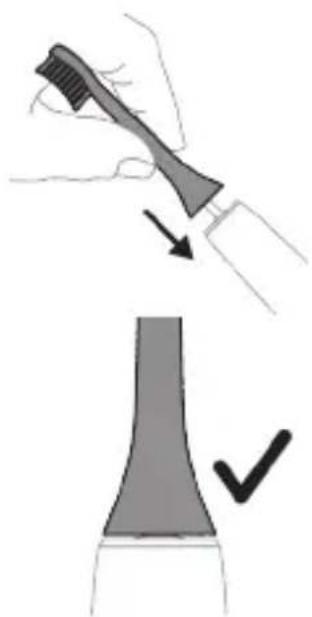
natural_image
Illustration showing a hand brushing a tooth with a brush, and a close-up of a tooth being adjusted (no text or symbols)תַלְרָה בְּרָה
natural_image
Hand holding a power button next to a bottle (no text or symbols visible)natural_image
Line drawing of a hand holding a tool interacting with a bundle of noodles (no text or symbols)1
natural_image
Diagram of a hand holding two tools with labeled parts, no text or symbols present.הכלההוּרָהוּרָהוּרָהוּרָהוּרָהוּרָהוּרָהוּרָהוּרָהוּרָהוּרָהוּרָהוּרָהוּרָהוּרָה
-הַרְאָר
.הַרְׁבָרִים
(الله) . ו recipients who will take into his
Philips Sonicare for Kids,
natural_image
Illustration of a hand holding a cylindrical container with a tool inserted, no visible text or symbols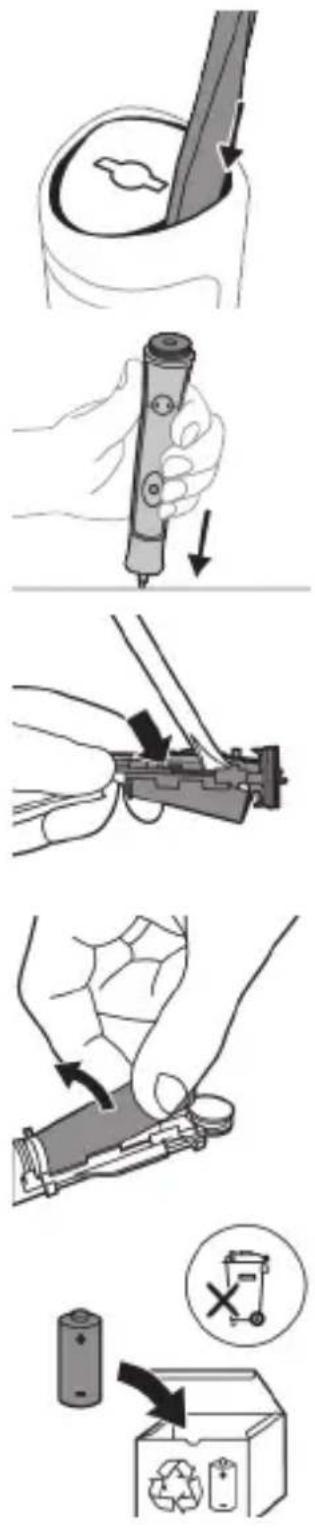
- 4
www.philips.com/Sonicare
©2022 Koninklijke Philips N.V. (KPNV). All rights reserved. Philips and the Philips shield are trademarks of KPNV. Sonicare and the Sonicare logo are trademarks of Philips Oral Healthcare, LLC and/or KPNV.
300008263791 (07/12/2022)
- Introduction
- Important safety information
- Warnings
- Battery safety instructions
- Storage and transportation conditions
- Radio Equipment Directive
- www.philips.com/support
- Intended Use
- Your Philips Sonicare (Fig 1.)
- Accessories:
- Sonicare app - Getting started
- App features
- Getting started
- Applying your favorite sticker
- Attaching the brush head
- Using your Philips Sonicare for Kids toothbrush
- Brushing instructions
- KidPacer
- Modes
- Low mode High mode
- Features
- KidTimer
- EasyStart
- Activating or deactivating features
- Charging and battery status
- Charging on charger
- Battery status
- Battery status (handle on plugged-in charger)
- Cleaning
- Toothbrush handle
- Brush head
- Charger
- Travel case
- Storage
- Replacement
- Locating the model number
- Warranty and support
- WARRANTY EXCLUSIONS
- Recycling
- Removing the rechargeable battery
- Giriş
- EXCLUSIONS DE GARANTIE
- Glava četkice
- Philips Sonicare for Kids tish cho'tkangizdan foydalanish
- Tish tozalash ko'rsatmalari
- Cho'tka kallagi
- Quvvatlash moslamasi
- Sayohat g'ilofi
- Xotira
- Punjač
- Putna futrola
- Skladištenje
- Zamena
- Johdanto
- Niyetlenilýän ulanyş
- Philips Sonicare enjamyňyz (Şek. 1.)
- Uünwgntp hunqwüwwlyh qlhuhyn
- 2tn Philips Sonicare for Kids wunwuh hunqwuwuh oqunwqnpnniun
- Uwpnúwù hnwhwùqùtn
- Ntduhutn
- hunquwuh qihuh
- Lhgpwwlnnhz
- Philips Sonicare for Kids 3000000000000000000000000000000000
- bgb3n5 n6bΦmγρμσ
- odds funds funds funds funds funds funds funds funds funds funds funds funds funds funds funds funds funds funds funds funds funds funds funds funds funds funds funds funds funds funds funds funds funds funds funds funds funds funds funds funds funds funds funds funds funds funds funds funds funds funds funds funds funds funds funds funds funds funds funds funds funds funds funds funds funds funds funds funds funds funds funds funds funds funds funds funds funds funds funds funds funds funds funds funds funds funds funds funds funds funds funds funds funds funds funds funds funds funds funds funds Funds
- תַלְרָה בְּרָה
Brand : PHILIPS
Model : Sonicare for Kids Connected HX6352
Category : Toothbrush