
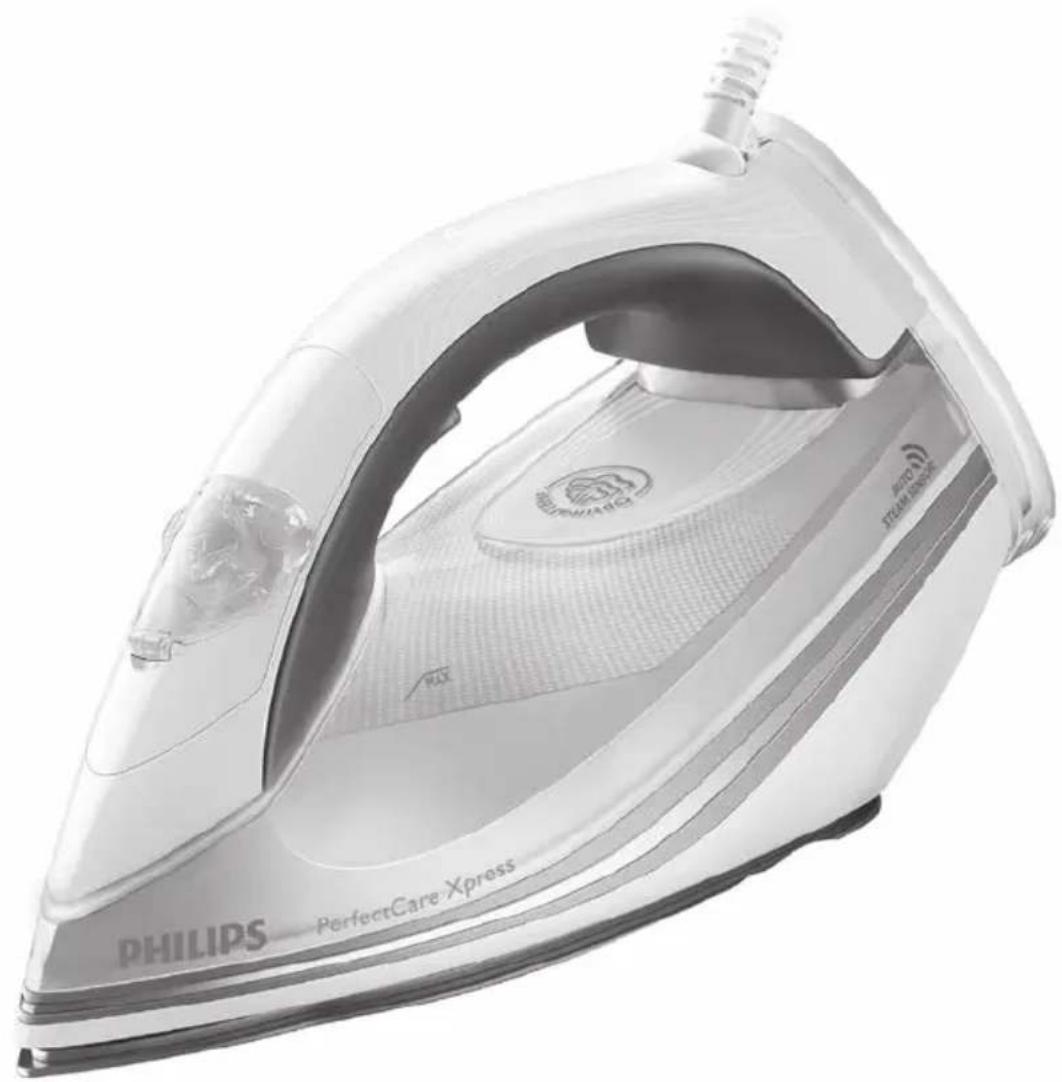
PerfectCare Xpress GC5020 - Iron PHILIPS - Free user manual and instructions
Find the device manual for free PerfectCare Xpress GC5020 PHILIPS in PDF.


| Product Type | Steam Iron |
| Model | PerfectCare Xpress GC5020 |
| Brand | Philips |
| OptimalTemp Technology | Yes - No temperature adjustment needed |
| Auto Steam Sensor | Yes - Automatic steam start on movement |
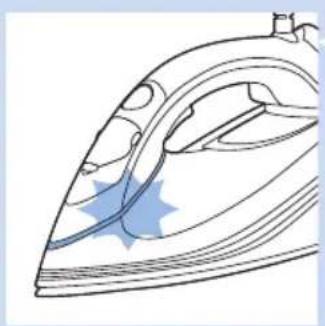
| Smart Light Indicator | Blue LED - Flashes while heating, steady when ready |
| Constant Steam Output | 50 g/min |
| Steam Boost Function | Yes - Press steam trigger twice for extra steam |
| Vertical Steaming | Yes - For garments on hangers |
| Water Tank Capacity | 320 ml |
| Anti-Drip System | Yes - Prevents water leakage at low temperature |
| Safety Auto-Off | Yes - After 3 min horizontal, 8 min vertical |
| Soleplate | SteamGlide - Smooth gliding |
| Cord Length | 2.5 m |
| 360° Swivel Cord | Yes - For easy maneuverability |
| Power Input | Not specified (typical 1500-2000 W) |
| Weight | Not specified (approx. 1.2 kg) |
| Dimensions | Not specified (approx. 30 x 15 x 20 cm) |
| Water Hardness Test Strips | Yes - Included for scale prevention |
| ECO Mode | No (not available on this model) |
Frequently Asked Questions - PerfectCare Xpress GC5020 PHILIPS
User questions about PerfectCare Xpress GC5020 PHILIPS
0 question about this device. Answer the ones you know or ask your own.
Ask a new question about this device
Download the instructions for your Iron in PDF format for free! Find your manual PerfectCare Xpress GC5020 - PHILIPS and take your electronic device back in hand. On this page are published all the documents necessary for the use of your device. PerfectCare Xpress GC5020 by PHILIPS.
USER MANUAL PerfectCare Xpress GC5020 PHILIPS
Always here to help you
Register your product and get support at www.philips.com/welcome

GC5000 series
natural_image
Exterior view of a Philips PerfectCare Xpress iron iron (no text or symbols on body)User manual
PHILIPS
natural_image
Illustration of an open book with a grid pattern and a curved arrow pointing to the right page (no text or symbols)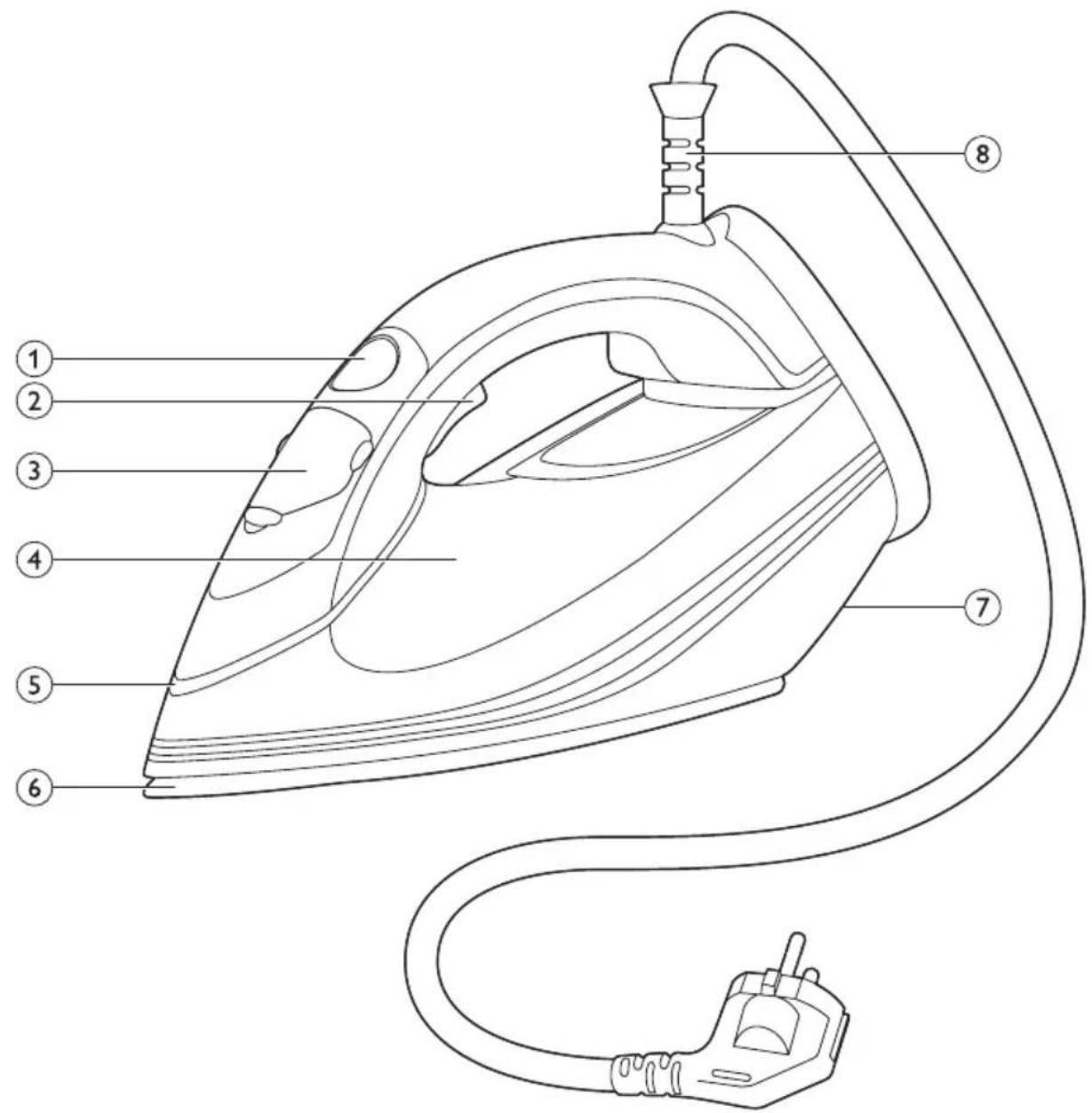
ENGLISH 6 БЪЛГАРСКИ 19 ČЕŠTINA 34 EESTI 47 HRVATSKI 60 MAGYAR 74 КАЗАҚША 88 LIETUVIŠKAI 102 LATVIEŠU 115 POLSKI 128 ROMÂNĂ 143 РУССКИЙ 157 SLOVENSKY 172 SLOVENŠČINA 186 SRPSKI 199 УКРАЇНСЬКА 213
Table of contents
Important 6
Introduction 10
Product overview 10
Before first use 11
Using the appliance 11
Checking the water hardness 11
Filling the water tank 12
Heating up 12
Temperature and steam setting 13
Ironing 13
Putting down the iron during ironing 14
ECO mode (specific types only) 15
Ironing tips 15
Safety Auto-off 15
Cleaning and maintenance 15
Storage 16
Troubleshooting 16
Overview of models 18
Important
Read this user manual carefully before you use the appliance and save it for future reference.
Danger
- Never immerse the appliance in water.
Warning
- Check if the voltage indicated on the type plate corresponds to the local mains voltage before you connect the appliance.
- Do not use the appliance if the plug, the mains cord or the appliance itself shows visible damage, or if the appliance has been dropped or leaks.
- If the mains cord is damaged, you must have it replaced by Philips, a service centre authorised by Philips or similarly qualified persons in order to avoid a hazard.
- Never leave the appliance unattended when it is connected to the mains.
- This appliance can be used by children aged 8 or above and by persons with reduced physical, sensory or mental capabilities or lack of experience and knowledge if they have been given instructions in safe use of the appliance or supervision to establish safe use and if they have been made aware of the hazards involved.
- Do not allow children to play with the appliance.
- Keep the appliance and its mains cord out of the reach of children aged 8 or under when the appliance is switched on or cooling down.
- Children are not allowed to clean the appliance without supervision.
- Do not let the mains cord come into contact with the hot soleplate of the iron.
Caution
- Only connect the appliance to an earthed wall socket.
- Always place and use the appliance on a stable, level and horizontal surface. If you prefer to place the iron on its heel, make sure that you place it on a stable surface.
- Check the mains cord regularly for possible damage.
- Fully unwind the mains cord before you plug it in the wall socket.
- The soleplate of the iron can become extremely hot and may cause burns if touched.
- When you have finished ironing, when you clean the appliance, when you leave the iron even for a short while and also during water filling: put the iron in horizontal position or on its heel on a stable surface and remove the mains plug from the wall socket.
- Do not put perfume, vinegar, starch, descaling agents, ironing aids or other chemicals in the water tank.
- This appliance is intended for indoor household use only.
natural_image
Symbol of a trash bin crossed with no text or numbers, representing waste sorting or disposal (no text present)Electromagnetic fields (EMF)
This Philips appliance complies with all standards regarding electromagnetic fields (EMF). If handled properly and according to the instructions in this user manual, the appliance is safe to use based on scientific evidence available today.
Disposal
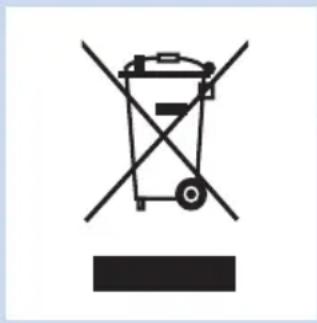
- Do not throw away the appliance with the normal household waste at the end of its life, but hand it in at an official collection point for recycling. By doing this, you help to preserve the environment.
- To make recycling possible, the plastic parts used for this appliance have been coded. The cardboard packaging is made of 90% recycled material and is fully recyclable.
Introduction

Thank you for buying this Philips appliance.
- The new Philips PerfectCare Xpress steam iron offers you an innovative way to iron your garments. We all know the fuss with traditional irons: choosing the right temperature for your tough and delicate fabrics, waiting for the iron to warm up and cool down to avoid the risk of damaging clothes with a too hot iron. Those hassles are things of the past with the new Philips PerfectCare Xpress steam iron.
-
In principle, wrinkle removal is done by transferring heat to fabric. Historically, this was done with a very hot soleplate. Then steam was added to enhance heat transfer, thus making ironing much faster. Our research confirmed that the best way to remove wrinkles effectively is a perfect combination of intense steam and optimal soleplate temperature. The key to effective wrinkle removal is the steam, not the soleplate temperature. The soleplate temperature needs to be just above the steam temperature to remove any moisture. This is the optimal temperature.
-
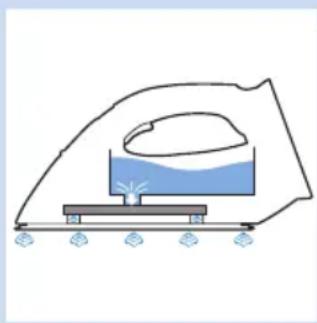
In the past, a high amount of steam at this optimal temperature would have led to water leakage. We developed a unique steam chamber that generates a consistent output of moisture-rich steam that penetrates deep into the fabric for fast ironing with no risk of water leakage.
- Ironing is now truly simple - no temperature adjustment, no scorching, no waiting for heating up and cooling down. Ironing takes less time, no matter who does the ironing. With this OptimalTemp technology, every single garment can be ironed effectively and safely.
- This iron has been approved by The Woolmark Company Pty Ltd for the ironing of wool-only products, provided that the garments are ironed according to the instructions on the garment label and those issued by the manufacturer of this iron. R1201. In the United Kingdom, Eire, Hong Kong and India, the Woolmark trademark is a certification trademark.
- Product images on schematic drawings and/or pictures on package and user manual are generic and may be different from your purchased product.
natural_image
Diagram of a steam iron heating setup with a curved roof and water bath (no text or labels)Product overview (Fig. 4)
1 ECO button (specific types only)
2 Steam trigger for vertical steaming and Steam Boost
3 Cap of filling opening
4 Water tank with water level indication
5 Smart light
6 Soleplate
7 Type plate
8 Mains cord with plug
Before first use
natural_image
Diagram of a mechanical component with blue arrows indicating direction (no text or symbols)This appliance is intended for ironing and refreshing fabrics only.
1 Remove all packaging material and stickers.
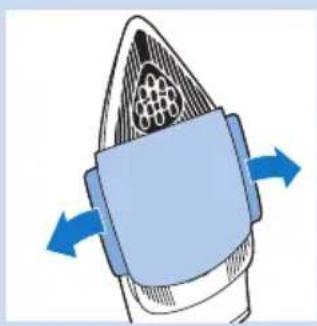
2 Remove the protective cover from the soleplate before you use the appliance.
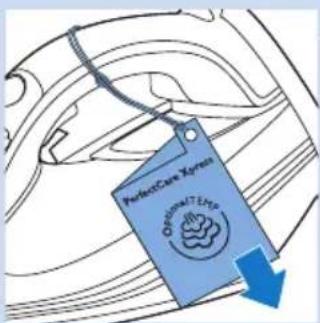
3 Remove the hangtag from the iron.
Using the appliance
Checking the water hardness
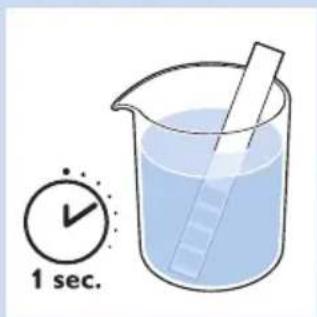
Your appliance has been designed to be used with tap water. If you live in an area with very hard water, fast scale build-up will occur. It is therefore recommended to check the water hardness first with the test strips provided.
1 Dip the test strip in tap water for 1 second.
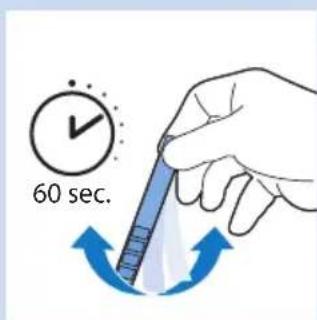
2 Shake the strip for 60 seconds.
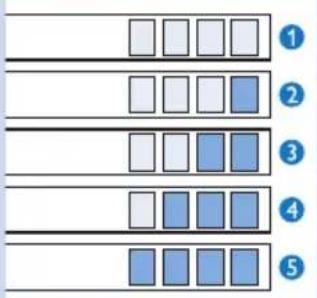
3 Check how many squares on the test strip have changed colour and compare with the details in the water hardness table below.
Water hardness table
| Squares with colour change | Water hardness Advice | |
| 1 | None Very soft water Use tap water | |
| 2 | One Soft water Use tap water | |
| 3 | Two Medium hard water | Use mixture of 50% tap water and 50% distilled water* |
| 4 | Three Hard water Use mixture of 50% tap water and 50% distilled water or filtered water from IronCare water descale filter. | |
| 5 | Four Very hard water | Use mixture of 30% tap water and 70% distilled water or filtered water from IronCare water descale filter. |
* For your convenience, we recommend that you use filtered water from IronCare water descale filter.
Note: Please visit www.philips.com/IronCare for more information on the IronCare water descale filter. You can buy an IronCare water descale filter in the online webshop at www.shop.philips.com/service. You can also contact the Philips Consumer Care Centre.
Filling the water tank
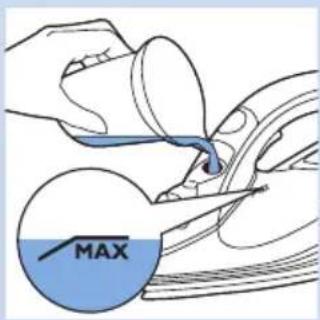
Caution: Do not put perfume, vinegar, starch, descaling agents, ironing aids or other chemicals in the water tank, as your appliance is not designed to work with these chemicals.
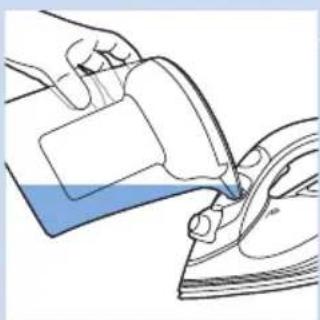
1 Fill the water tank up to the MAX indication with the filling cup supplied if your tap water is soft.
natural_image
Illustration of a hand pouring liquid into a steam iron (no text or symbols)Note: If you use the IronCare water descale filter, you can fill the water tank with filtered water straight from this filter.
Heating up
natural_image
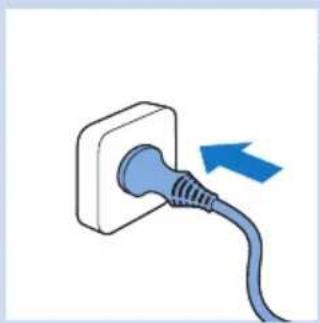
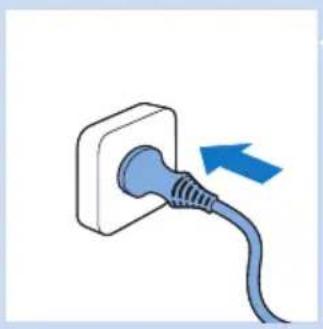
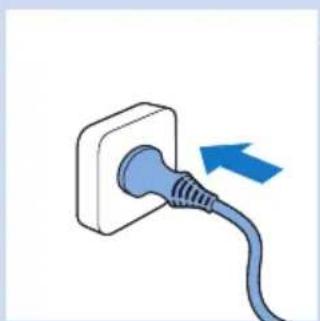
Illustration of a blue electrical plug with a blue cable, showing an arrow pointing to the plug (no text or symbols present)1 Put the plug in an earthed wall socket.
natural_image
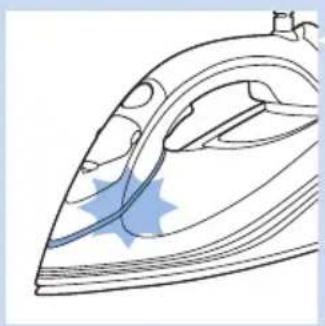
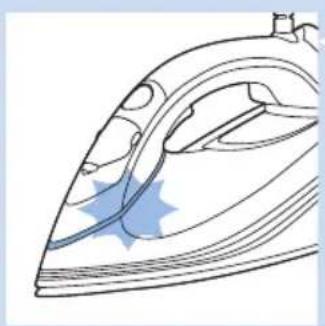
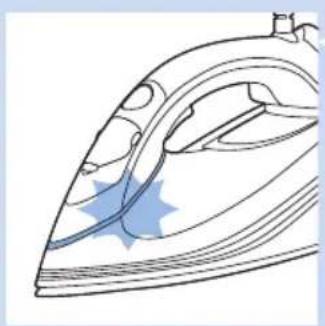
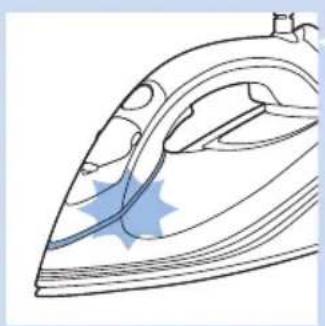
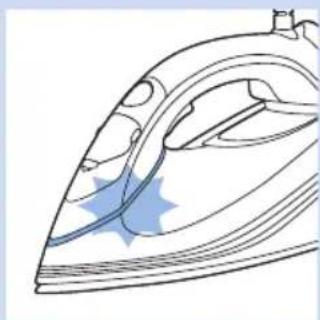
Line drawing of a steam iron with blue star-shaped marks indicating a specific part (no text or symbols present)2 The Smart light starts flashing blue to indicate that the iron is heating up.
natural_image
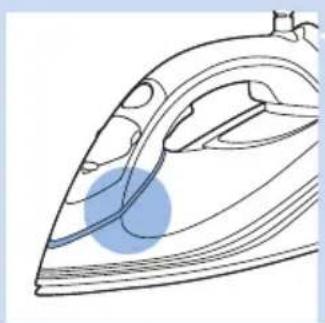
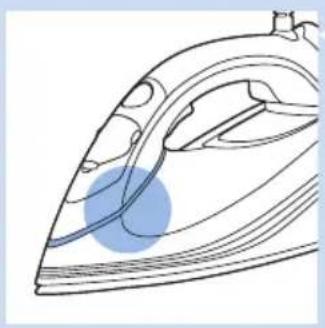
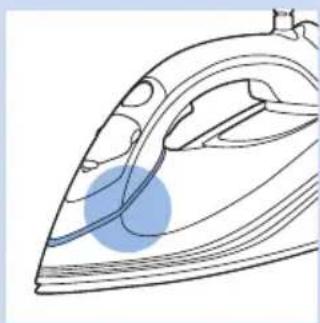
Line drawing of a steam iron with a blue circular highlight on its side (no text or symbols)3 When the iron is ready for use, the Smart light lights up blue continuously.
Temperature and steam setting
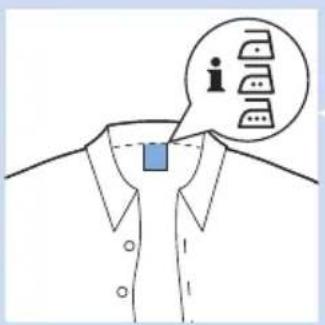
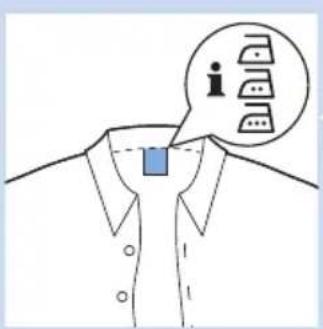
The OptimalTemp technology enables you to iron all types of ironable fabrics, in any order, without adjusting the iron temperature or steam setting.
- Fabrics with these symbols are ironable, for example linen, cotton, polyester, silk, wool, viscose, rayon.
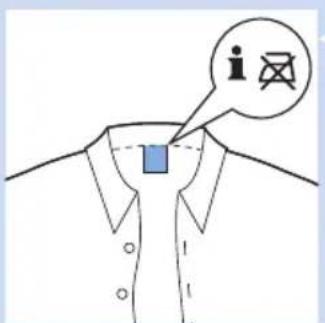
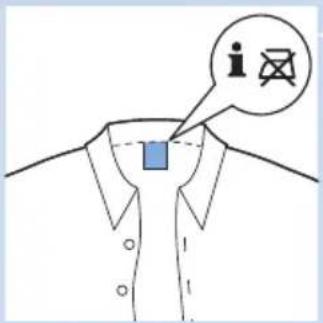
- Fabrics with this symbol are not ironable. These fabrics include synthetic fabrics such as Spandex or elastane, Spandex-mixed fabrics and polyolefins (e.g. polypropylene), but also prints on garments.
Ironing
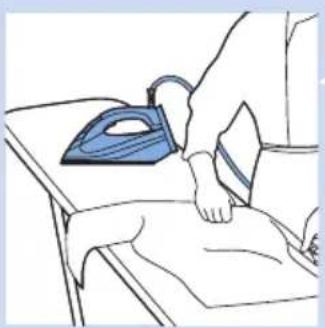
natural_image
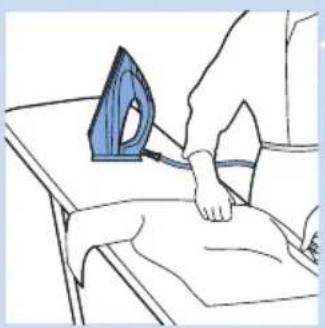
Illustration of a person using an iron on a bed, no text or symbols present1 Unfold your ironing board and set it to the appropriate height.
2 Place the garment you want to steam iron on the ironing board.
Note: With the OptimalTemp technology, every single garment can be ironed effectively and safely, even delicate fabrics like silk.
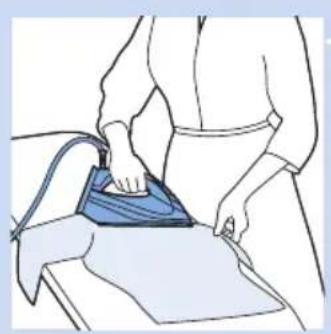
natural_image
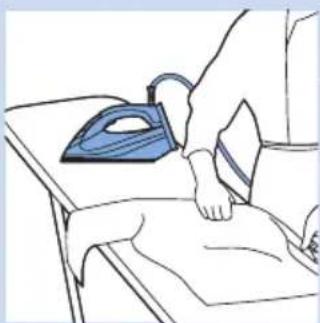
Line drawing of a person using a blue iron on a workbench (no text or symbols)3 You can start ironing when the Smart light stops flashing and lights up continuously.
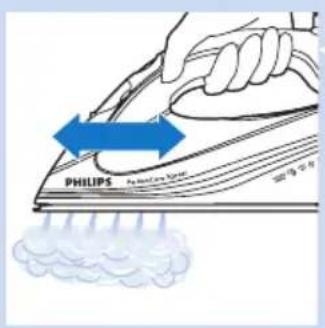
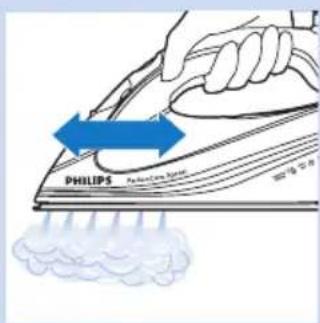
- Thanks to the Auto Steam Sensor technology, the iron starts steaming automatically when it is moved.
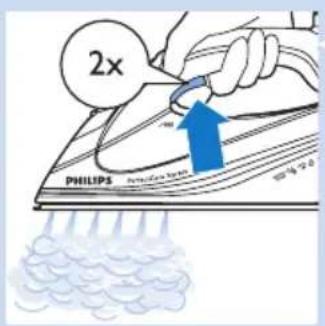
Steam Boost function (specific types only)
- Press the steam trigger twice. The iron delivers one single shot of high steam output to remove stubborn wrinkles.
- During delivery of the Steam Boost, the Smart light flashes quickly.
natural_image
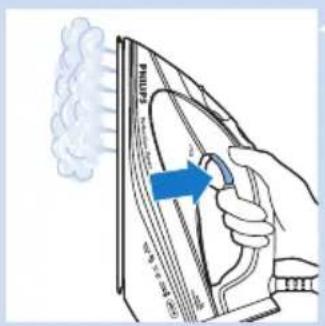
Illustration of a hand using a power iron to burn the air with steam rising (no text or symbols)Vertical steam ironing
- Hold the iron in vertical position. Then press and hold the steam trigger to steam the garment vertically.
Tip: Pull the garment with one hand to stretch it for more effective wrinkle removal.
Hot steam is emitted from the iron. Never attempt to remove wrinkles from a garment while someone is wearing it. Do not apply steam near your or someone else's body to prevent burns.
Note: Water is regularly pumped into the steam chamber, which causes the iron to produce a pumping sound. This is normal.
Putting down the iron during ironing
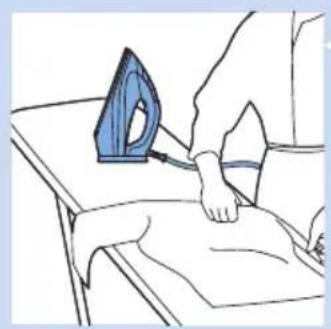
natural_image
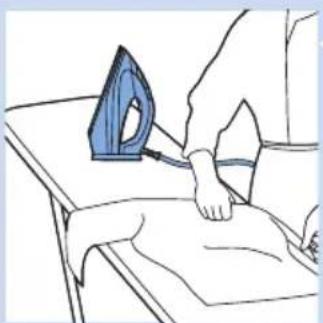
Line drawing of a person using an iron on a bed, no text or symbols present- Place the iron on its heel on the ironing board.
ECO mode (specific types only)
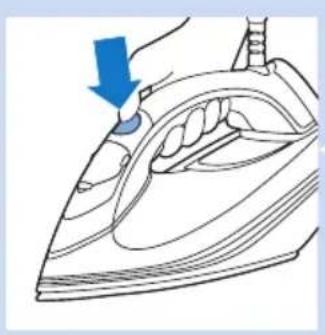
natural_image
Illustration of a hand using a blue tool to press down a steam iron (no text or symbols present)During ironing, you can use the ECO mode to save energy but still have sufficient steam to iron all your garments.
Note: For the best results, we advise you to use the 'OptimalTemp' mode.
1 Press the ECO button when the appliance is switched on. The Smart light starts flashing green. When the iron has reached the ECO mode and is ready for use, the Smart light stops flashing and lights up green continuously.
2 To go back to the 'OptimalTemp' mode, press the ECO button again.
Ironing tips
Minimising wrinkles while drying
Start wrinkle removal early in the drying process by spreading out your laundry properly after washing and by putting garments on hangers to make them dry naturally with fewer wrinkles.
Best practice shirt ironing
Start with the time-consuming parts like collar, cuff links and sleeves. Next, iron the bigger parts like front and back to prevent wrinkling the bigger parts when you are busy ironing the time-consuming parts.
Collar: When you iron a collar, start on its underside and work from the outside (the pointy end) inwards. Turn over and repeat. Fold down the collar and press the edge for a more crisp finish.
Buttons: Iron on the reverse side of the buttons for more effective and faster ironing.
Safety Auto-off
natural_image
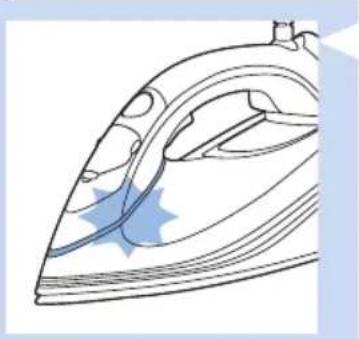
Line drawing of an iron (£) with blue star-shaped highlight on the side (no text or symbols)- To save energy, the appliance switches off automatically when it has not been moved for 3 minutes in horizontal position, or 8 minutes when left standing on its heel. The Smart light starts flashing slowly.
- To reactivate the iron, press the steam trigger. The iron starts heating up again.
Note: The steam iron is not switched off completely when it is in Safety Auto-off mode. Unplug the iron to switch it off.
Cleaning and maintenance
natural_image
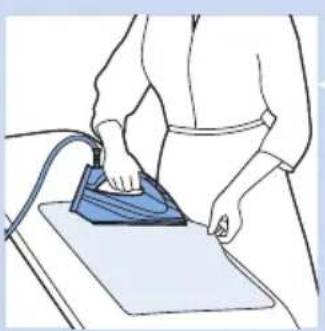
Line drawing of a person using a blue iron on a workbench (no text or symbols)1 Clean the appliance with a moist cloth after every use.
2 To easily and effectively remove stains, let the appliance heat up and move the soleplate over a moist cloth.
Tip: Clean the soleplate regularly to ensure smooth gliding.
Storage
natural_image
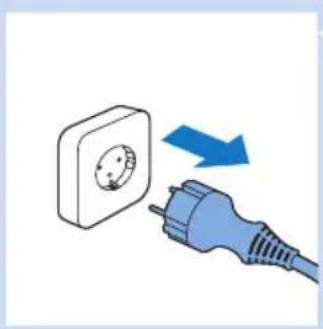
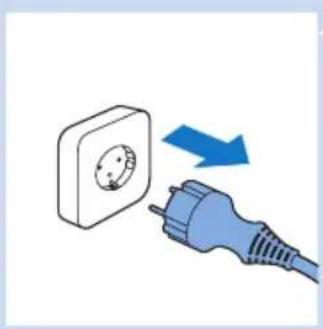
Illustration of a blue electrical plug connecting a wall socket to a plug, with an arrow indicating direction (no text or symbols)1 Remove the plug from the wall socket.
natural_image
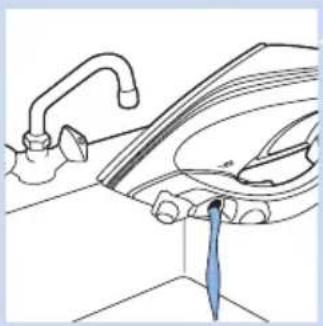
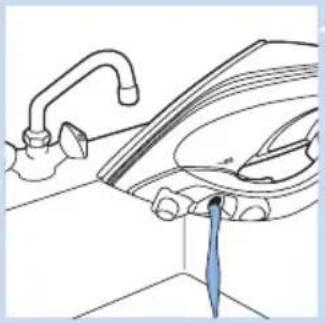
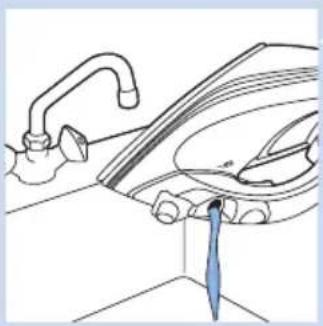
Line drawing of a kitchen sink with faucet and showerhead (no text or symbols)2 Empty the water tank and let the iron cool down in a safe place.
natural_image
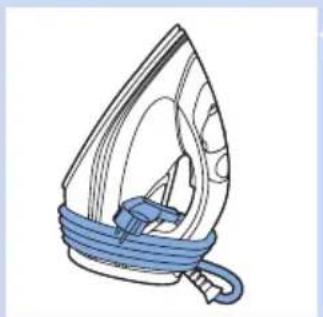
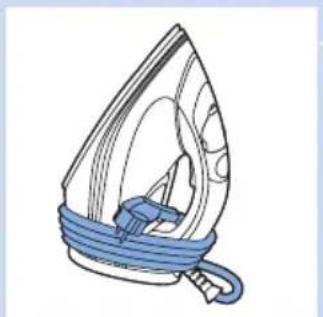
Illustration of a steam iron with blue cord and handle (no text or symbols)3 Wind the mains cord round the heel of the appliance and fix it with the cord clip. Store the iron on its heel in a safe and dry place.
Troubleshooting
This chapter summarises the most common problems you could encounter with the appliance. If you are unable to solve the problem with the information below, visit www.philips.com/support for a list of frequently asked questions or contact the Consumer Care Centre in your country.
| Problem Possible cause Solution | ||
| The iron is plugged in, but the soleplate is cold. | There is a connection problem. Check the mains cord, the plug and the wall socket. | |
| The iron does not produce any steam. | There is not enough water in the water tank. | Fill the water tank (see chapter ‘Using the appliance’, section ‘Filling the water tank’). |
| The iron is not hot enough to produce steam. | Wait until the Smart light has stopped flashing and lights up continuously. | |
| You did not move the iron. This iron is equipped with a motion sensor and starts producing steam as soon as it is moved. | ||
| The iron is not plugged in. Plug in the iron to switch it on. | ||
| The iron does not produce any steam when moved. | Although the Auto Steam Sensor technology covers a large number of ironing movements, there may still be some movements that do not activate the sensor. | Press the steam trigger to start steaming. |
| The iron continues to steam when it is not moved. | Because of the Auto Steam Sensor Technology, steam may continue to be produced for 1-4 seconds to ensure good wrinkle removal at the end of the ironing stroke. This is normal. | If you want to avoid this, place the iron on its heel. |
| The iron does not produce Steam Boost. | You have used the Steam Boost function too often within a very short period. | Continue ironing in horizontal position and wait a while before you use the Steam Boost function again. |
| The iron is not hot enough. Wait until the Smart light has stopped flashing and lights up continuously. | ||
| Water droplets drip onto the fabric during ironing. | You have not closed the cap of the filling opening properly. | Press the cap until you hear a click. |
| You have put a chemical in the water tank. | Rinse the water tank and do not put any perfume or any chemical in the water tank. | |
| The Smart light flashes slowly. | The Safety Auto-off mode is active. The iron has been switched to standby mode(see chapter ‘Safety Auto-off’). | To reactivate the iron, press the steam trigger. The iron starts heating up again. |
| Dirty water and impurities come out of the soleplate or the soleplate is dirty. | Impurities or chemicals present in the water have deposited in the steam vents or on the soleplate. | Clean the soleplate with a damp cloth. |
| The iron leaves a shine or an imprint on the garment. | The surface to be ironed was uneven, for instance because you ironed over a seam or a fold in the garment. | The iron is safe to use on all garments. The shine or imprint is not permanent and disappears when you wash the garment. Avoid ironing over seams or folds. You can also place a cotton cloth over the area to be ironed to avoid imprints. |
| The iron produces a pumping sound. | Water is being pumped into the steam chamber. This is normal. | If the pumping sound continues nonstop, unplug the iron and contact the Consumer Care Centre. |
| The iron produces a loud pumping noise. | There is no water in the water tank. | Fill the water tank (see chapter ‘Using the appliance’, section ‘Filling the water tank’). |
| The iron steams continuously when placed horizontally on the ironing board for 20-30 seconds. | The ironing board did not provide a good flat support and this activated the Auto Steam Sensor in the iron. | Place the iron on its heel when you are not ironing to prevent this problem. |
Overview of models
| Feature GC5060 GC5057 GC5055 GC5050 | |||||
| OptimalTemp technology ✓ ✓ ✓ ✓ | |||||
| Compact, powerful steam generation technology | ✓ ✓ ✓ ✓ | ||||
| Blue Smart light ✓ ✓ ✓ ✓ | |||||
| Constant steam output 65g/min 65g/min 65g/min 50g/min | |||||
| Auto Steam Sensor ✓ ✓ ✓ ✓ | |||||
| Soleplate | SteamGlide | SteamGlide | SteamGlide | anodilium | |
| ECO button | ✓ | - | - | - | |
| Steam Boost ✓ ✓ ✓ - | |||||
| Constant vertical steam | ✓ ✓ ✓ ✓ | ||||
| Soft-grip handle | ✓ ✓ ✓ ✓ | ||||
| Water tank capacity (ml) | 320 | 320 | 320 | 320 | |
| Anti-drip system | ✓ ✓ ✓ ✓ | ||||
| Safety Auto-off mode | ✓ ✓ ✓ ✓ | ||||
| 360° swivel cord | ✓ ✓ ✓ ✓ | ||||
| Cord length (m) | 2.5 | 2.5 | 2.5 | 2.5 | |
Съдържание
Важно 19
Въведение 24
natural_image
Diagram of a roof structure with a blue water tank and support structure (no text or symbols)natural_image
Diagram of a mechanical component with blue arrows indicating direction, no text or symbols presentnatural_image
Illustration of a hand pouring liquid into a shoe, with no visible text or symbolsnatural_image
Illustration of a blue electrical plug with a cable, showing an arrow pointing to the plug (no text or symbols present)1 Включете щепсела в заземен контакт.
natural_image
Line drawing of a steam iron with blue star-shaped marks on its side (no text or symbols)natural_image
Line drawing of a steam iron with a blue circular component, no text or symbols presentnatural_image
Line drawing of a person using an iron on a bed, no text or symbols presentnatural_image
Line drawing of a person ironing a table with a blue iron, no text or symbols presentnatural_image
Illustration of a hand ironing a sheet of paper with steam rising (no text or symbols)natural_image
Illustration of a person using an iron on a bed, no text or symbols presentnatural_image
Line drawing of a hand using a blue tool to press down a hair iron (no text or symbols present)natural_image
Line drawing of an iron (£) with blue star-shaped marks indicating cutting edge (no text or symbols)natural_image
Illustration of a person using a blue iron on a workbench (no text or symbols visible)natural_image
Illustration of a blue electrical plug with a circular socket connected to a wall socket, showing a blue arrow indicating direction (no text or symbols)natural_image
Line drawing of a kitchen sink with faucet and showerhead (no text or symbols)natural_image
Line drawing of a steam iron with blue cord and handle (no text or symbols)natural_image
Symbol of a trash bin crossed with no visible text or numbers, accompanied by a black rectangular block below (no text or symbols present)natural_image
Diagram of a scientific apparatus with a curved top and a central blue liquid, supported by a base with small water nearby (no text or symbols)natural_image
Diagram of a mechanical component with blue arrows indicating direction, no text or symbols presentnatural_image
Illustration of a blue electrical plug with a cable, showing an arrow pointing to the plug (no text or symbols present)natural_image
Line drawing of a steam iron with blue star-shaped marks on its side (no text or symbols)natural_image
Line drawing of an iron (£) with a blue circular mark indicating a specific point on its side (no text or symbols present)natural_image
Line drawing of a person using an iron on a bed, no text or symbols presentnatural_image
Line drawing of a person using a blue iron on a workbench (no text or symbols)natural_image
Illustration of a hand ironing a piece of paper with steam rising (no text or symbols)natural_image
Illustration of a person using an iron on a bed, no text or symbols presentnatural_image
Illustration of a hand using a tool to press down an iron on a surface (no text or symbols present)natural_image
Line drawing of an iron (£) with blue star patterns indicating steam flow (no text or symbols)natural_image
Illustration of a person using a blue iron on a workbench (no text or symbols visible)natural_image
Illustration of a blue electrical plug connecting a wall socket to a power outlet, with a blue arrow indicating direction (no text or symbols)natural_image
Line drawing of a washing machine with faucet and drain, showing water flow direction (no text or symbols)natural_image
Line drawing of a steam iron with blue cord and handle (no text or symbols)natural_image
Symbol of a trash bin crossed with a diagonal line, no text or numbers presentnatural_image
Diagram of a laboratory setup with a curved chamber, blue liquid, and a base with water displacement indicators (no text or labels)natural_image
Diagram of a mechanical component with blue arrows indicating rotational direction (no text or symbols)natural_image
Illustration of a hand pouring liquid into a machine (no text or symbols)natural_image
Illustration of a blue electrical plug with a cable, showing an arrow pointing to the plug (no text or symbols present)natural_image
Line drawing of a steam iron with blue star-shaped marks indicating material damage (no text or symbols)natural_image
Line drawing of a steam iron with a blue circular highlight on its side (no text or symbols)Temperatuuri- ja auruseaded
natural_image
Line drawing of a person using a blue iron on a bed, no text or symbols presentnatural_image
Line drawing of a person using a blue iron on a workbench (no text or symbols)natural_image
Illustration of a hand ironing a piece of paper with steam rising (no text or symbols)natural_image
Illustration of a person using an iron on a bed, no text or symbols presentnatural_image
Line drawing of a hand using a blue tool to press down a clothes iron (no text or symbols present)natural_image
Line drawing of an iron (£) with blue star-shaped mark on side (no text or symbols)natural_image
Line drawing of a person using a blue iron on a workbench (no text or symbols)natural_image
Illustration of a blue electrical plug connecting a wall socket to a plug, with a blue arrow indicating direction (no text or symbols)1 Eemaldage vörgupistik seinakontaktist.
natural_image
Line drawing of a kitchen sink with faucet and showerhead, showing a blue tool inserted into the drain (no text or symbols)natural_image
Line drawing of a steam iron with blue cord and handle (no text or symbols)natural_image
Symbol of a trash bin crossed with no visible text or numbers, accompanied by a black rectangular block below (no text or symbols present)Elektromagnetska polja (EMF)
Ovaj proizvod tvrtke Philips sukladan je svim standardima koji se tiču elektromagnetskih polja (EMF). Ako aparatom rukujete pravilno i u skladu s ovim uputama, prema dostupnim znanstvenim dokazima on će biti siguran za korištenje.
Odlaganje
- Aparat koji se više ne može koristiti nemojte odlagati s uobičajenim otpadom iz kućanstva, nego ga odnesite u predviđeno odlagalište na recikliranje. Time ćete pridonijeti očuvanju okoliša.
- Kako bi se omogućilo recikliranje, plastični dijelovi korišteni u aparatu su šifrirani. Kartonska ambalaža je napravljena od 90% recikliranog materijala i može se reciklirati.
Uvod

natural_image
Diagram of a scientific apparatus with a curved top and a central blue liquid, supported by a platform (no text or symbols)Pregled proizvoda (Sl. 4)
1 Gumb ECO (samo neki modeli)
2 Gumb za okomito parenje i dodatnu količinu pare
3 Poklopac otvora za punjenje
4 Spremnik za vodu s indikatorom razine vode
5 Pametno svjetlo
6 Površina za glačanje
7 Pločica s oznakom
8 Kabel za napajanje s utikačem
natural_image
Diagram of a mechanical component with blue arrows indicating direction, no text or symbols presentnatural_image
Illustration of a hand pouring liquid into a steam iron (no text or symbols)Napomena: Ako koristite IronCare filter za uklanjanje kamenca, možete izravno iz njega spremnik za vodu napuniti filtriranom vodom.
Zagrijavanje
natural_image
Illustration of a blue electrical plug with a cable, showing an arrow pointing to the plug (no text or symbols present)1 Umetnite mrežni kabel u uzemljenu zidnu utičnicu.
natural_image
Line drawing of a steam iron with blue star-shaped marks indicating wear (no text or symbols)natural_image
Line drawing of an iron (£) with a blue circular highlight on the side (no text or symbols)natural_image
Line drawing of a person using an iron on a bed, no text or symbols present1 Rasklopite dasku za glačanje i postavite je na odgovarajuću visinu.
2 Postavite odjevni predmet koji želite glačati na dasku za glačanje.
natural_image
Line drawing of a person using a blue iron on a workbench (no text or symbols)Funkcija za dodatnu količinu pare (samo neki modeli)
natural_image
Illustration of a person using an iron on a bed, no text or symbols presentnatural_image
Line drawing of a hand using a blue tool to press down a clothes iron (no text or symbols)Tijekom glačanja možete koristiti način rada ECO radi uštede energije, pri čemu ipak imate dovoljno pare za glačanje svih odjevnih predmeta.
Napomena: Za najbolje rezultate preporučujemo korištenje načina rada "OptimalTemp".
1 Pritisnite gumb ECO dok je aparat uključen. Pametno svjetlo počinje bljeskati zeleno. Kad glačalo uđe u način rada ECO i spremno je za uporabu, pametno svjetlo prestaje bljeskati i počinje postojano svijetliti zeleno.
2 Za vraćanje u način rada 'OptimalTemp' ponovo pritisnite gumb ECO.
Savjeti za glačanje
natural_image
Line drawing of an iron (£) with blue star-shaped marks indicating a specific part (no text or symbols present)- Kako bi se uštedjela energija aparat se automatski isključuje ako miruje 3 minute u vodoravnom položaju ili 8 minuta u okomitom položaju. Pametno svjetlo počinje sporo bljeskati.
- Za ponovno aktiviranje glačala pritisnite gumb za paru. Glačalo će se ponovo početi zagrijavati.
Napomena: Glačalo se kod sigurnosnog automatskog isključivanja ne isključuje do kraja. Za isključivanje iskopčajte glačalo iz utičnice.
natural_image
Line drawing of a person using a blue iron on a workbench (no text or symbols)1 Nakon svake uporabe očistite glačalo vlažnom krpom.
2 Mrlje ćete lako i učinkovito ukloniti brisanjem vlažnom krpom kad se površina za glačanje zagrije.
natural_image
Illustration of a blue electrical plug connecting a wall socket to a power outlet, with a blue arrow indicating direction (no text or symbols)natural_image
Line drawing of a washing machine with faucet and drain, showing water flow direction (no text or symbols)natural_image
Line drawing of a steam iron with blue cord and handle (no text or symbols)natural_image
Symbol of a trash bin crossed with no text or numbers, representing waste sorting or disposal (no text present)natural_image
Diagram of a water heating system with a curved roof, blue water tank, and support structure (no text or labels)natural_image
Diagram of a mechanical component with blue arrows indicating direction, no text or symbols presentnatural_image
Illustration of a hand pouring liquid into an iron, with no text or symbols presentnatural_image
Illustration of a blue electrical plug with a cable, showing an arrow pointing to the plug (no text or symbols present)natural_image
Line drawing of an iron iron with blue star-shaped marks on its side (no text or symbols)natural_image
Line drawing of a steam iron with a blue circular component on its side (no text or symbols)natural_image
Line drawing of a person using an iron on a bed, no text or symbols presentnatural_image
Line drawing of a person using a blue iron on a workbench (no text or symbols)natural_image
Illustration of a person using an iron on a bed, no text or symbols presentnatural_image
Illustration of a hand using a tool to press down an iron on a steam iron (no text or symbols present)natural_image
Line drawing of a steam iron with blue star-shaped marks indicating wear (no text or symbols)natural_image
Line drawing of a person using a blue iron on a flat surface (no text or symbols)natural_image
Illustration of a blue electrical plug connecting a wall socket to a power outlet, with a blue arrow indicating direction (no text or symbols)natural_image
Line drawing of a washing machine with faucet and drain, showing water flow direction (no text or symbols)natural_image
Line drawing of a steam iron with blue cord and handle (no text or symbols)natural_image
Symbol of a trash bin crossed with no text or numbers, representing waste sorting or disposal (no text present)natural_image
Diagram of a roof structure with a blue water tank and support structure (no text or symbols)natural_image
Diagram of a mechanical component with blue arrows indicating direction (no text or symbols)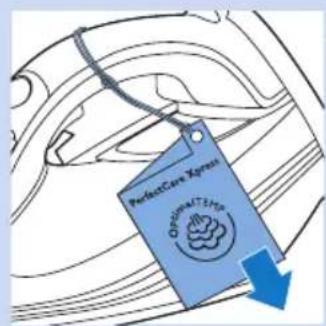
3 Уміктен ілу жапсырмасын алыңыз.
Куралды пайдалану
natural_image
Illustration of a hand pouring liquid into a blue liquid on an iron (no text or symbols)natural_image
Illustration of a blue electrical plug with a cable, showing an arrow pointing to the plug (no text or symbols present)natural_image
Line drawing of an iron iron with blue star-shaped mark on side (no text or symbols)natural_image
Line drawing of a steam iron with a blue circular highlight on its side (no text or symbols)natural_image
Line drawing of a person using an iron on a bed, no text or symbols presentnatural_image
Line drawing of a person using a blue iron on a workbench (no text or symbols)natural_image
Illustration of a person using an electric iron on a bed, no text or symbols presentnatural_image
Illustration of a hand using a blue tool to press down a clothes iron (no text or symbols present)natural_image
Line drawing of a steam iron with blue star-shaped cutting edge (no text or symbols)natural_image
Line drawing of a person using an iron on a workbench (no text or symbols)natural_image
Illustration of a hand inserting a plug into a socket (no text or symbols)natural_image
Line drawing of a kitchen sink with faucet and showerhead (no text or symbols)natural_image
Illustration of a steam iron with blue cord and handle (no text or symbols)natural_image
Symbol of a trash bin crossed with no visible text or numbers, accompanied by a black rectangular block below (no text or symbols present)natural_image
Diagram of a roof structure with a water tank and support structure (no text or symbols)Gaminio apžvalga (Pav. 4)
natural_image
Diagram of a mechanical component with blue arrows indicating direction, no text or symbols presentnatural_image
Illustration of a hand pouring liquid into a steam iron (no text or symbols)natural_image
Illustration of a blue electrical plug with a cable, showing an arrow pointing to the plug (no text or symbols present)natural_image
Line drawing of a steam iron with blue star-shaped marks indicating wear (no text or symbols)natural_image
Line drawing of an iron (£) with a blue circular highlight on the side (no text or symbols)natural_image
Line drawing of a person using an iron on a bed, no text or symbols presentnatural_image
Line drawing of a person using a blue iron on a workbench (no text or symbols)natural_image
Illustration of a hand ironing a piece of paper with steam rising (no text or symbols)Vertikalus lyginimas su garais
natural_image
Illustration of a person using an iron on a bed, no text or symbols presentnatural_image
Line drawing of a hand using a blue tool to press down a clothes iron (no text or symbols present)natural_image
Line drawing of a steam iron with blue star-shaped marks indicating wear (no text or symbols)natural_image
Line drawing of a person using a blue iron on a workbench (no text or symbols)natural_image
Illustration of a blue electrical plug connecting a wall socket to a power outlet, with a blue arrow indicating direction (no text or symbols)natural_image
Line drawing of a washing machine with faucet and drain, showing water flow direction (no text or symbols)natural_image
Line drawing of a steam iron with blue cord and handle (no text or symbols)natural_image
Symbol of a trash bin crossed with no text or symbols, representing waste sorting or disposal (no text present)Elektromagnētiskie lauki (EML)
Pateicamies par šīs Philips ierīces iegādi.
natural_image
Diagram of a heating setup with a curved roof, blue water bath, and a base (no text or symbols)natural_image
Diagram of a mechanical component with blue arrows indicating direction (no text or symbols)natural_image
Illustration of a hand pouring liquid into a steam iron (no text or symbols)natural_image
Illustration of a blue electrical plug with a cable, showing an arrow pointing to it (no text or symbols present)natural_image
Line drawing of an iron iron with blue star-shaped coating (no text or symbols)natural_image
Line drawing of an iron (£) with a blue circular mark on the side (no text or symbols)natural_image
Line drawing of a person using an iron on a bed, no text or symbols presentnatural_image
Line drawing of a person using a blue iron on a workbench (no text or symbols)natural_image
Illustration of a hand ironing a sheet of paper with steam rising (no text or symbols)natural_image
Line drawing of a person using an iron on a bed, no text or symbols presentnatural_image
Line drawing of a hand using a blue tool to press down an iron on a surface (no text or symbols)natural_image
Line drawing of a steam iron with blue star-shaped marks indicating parts of the handle (no text or symbols)natural_image
Line drawing of a person using a blue iron on a workbench (no text or symbols)natural_image
Illustration of a blue electrical plug connecting a wall socket to a power outlet, with a blue arrow indicating direction (no text or symbols)natural_image
Line drawing of a washing machine with faucet and drain, showing water flow direction (no text or symbols)natural_image
Line drawing of a steam iron with blue cord and handle (no text or symbols)natural_image
Symbol of a trash bin crossed with no text or numbers, representing waste sorting or restriction (no text present)natural_image
Diagram of a steam locomotive with water inside and support structure (no text or labels)natural_image
Diagram of a mechanical component with blue arrows indicating direction (no text or symbols)natural_image
Illustration of a hand pouring liquid into a shoe, with no visible text or symbolsnatural_image
Illustration of a blue electrical plug with a cable, showing an arrow pointing to the plug (no text or symbols present)natural_image
Line drawing of a steam iron with blue star-shaped marks indicating wear (no text or symbols)natural_image
Line drawing of an iron (£) with a blue circular highlight on the side (no text or symbols)natural_image
Line drawing of a person using an iron on a bed, no text or symbols presentnatural_image
Line drawing of a person using a blue iron on a workbench (no text or symbols)natural_image
Illustration of a person using an iron on a bed, no text or symbols presentnatural_image
Line drawing of a hand using a blue tool to press down an iron on a surface (no text or symbols)natural_image
Line drawing of a steam iron with blue star-shaped coating (no text or symbols)natural_image
Line drawing of a person using a blue iron on a flat surface (no text or symbols)natural_image
Illustration of a hand inserting a plug into a socket (no text or symbols)natural_image
Line drawing of a kitchen sink with faucet and showerhead (no text or symbols)natural_image
Line drawing of a steam iron with blue cord and handle (no text or symbols)natural_image
Symbol of a trash bin crossed with no text or numbers, representing waste sorting or disposal (no text present)natural_image
Diagram of a heating setup with a curved roof, blue water bath, and a base (no text or symbols)natural_image
Diagram of a mechanical component with blue arrows indicating direction (no text or symbols)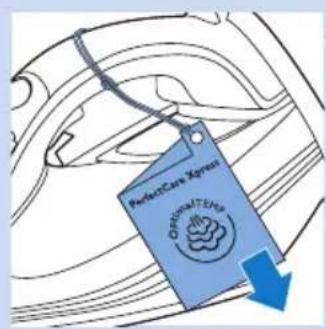
natural_image
Illustration of a hand pouring liquid into a steam iron (no text or symbols)natural_image
Illustration of a blue electrical plug with a cable, showing an arrow pointing to the plug (no text or symbols present)natural_image
Line drawing of an iron iron with blue star-shaped mark on side (no text or symbols)natural_image
Line drawing of a steam iron with a blue circular highlight on its side (no text or symbols)natural_image
Line drawing of a person using a blue iron on a bed, no text or symbols presentnatural_image
Line drawing of a person using a blue iron on a workbench (no text or symbols)natural_image
Illustration of a hand using an iron to burn the air with steam rising (no text or symbols)natural_image
Illustration of a person using an iron on a bed, no text or symbols presentMod ECO (numai anumite tipuri)
natural_image
Illustration of a hand using a blue tool to press down an iron on a steamer (no text or symbols present)natural_image
Line drawing of a steam iron with blue starburst pattern on side (no text or symbols)natural_image
Line drawing of a person using a blue iron on a workbench (no text or symbols)natural_image
Illustration of a blue electrical plug connecting a wall socket to a plug, with an arrow indicating direction (no text or symbols)natural_image
Line drawing of a faucet and showerhead pouring liquid into a sink (no text or symbols)natural_image
Line drawing of a steam iron with blue cord and handle (no text or symbols)natural_image
Symbol of a trash bin crossed with no visible text or labelsnatural_image
Diagram of a laboratory setup with a test tube and pressure monitor, no text or symbols presentnatural_image
Diagram of a mechanical component with blue arrows indicating direction, no text or symbols presentnatural_image
Illustration of a hand pouring liquid into a steam iron (no text or symbols)natural_image
Illustration of a blue electrical plug with a cable, showing an arrow pointing to the plug (no text or symbols present)natural_image
Line drawing of a steam iron with blue star-shaped marks indicating wear (no text or symbols)natural_image
Line drawing of an iron (£) with a blue circular mark indicating a specific point on its side (no text or symbols present)natural_image
Line drawing of a person using an iron on a bed, no text or symbols presentnatural_image
Line drawing of a person using a blue iron on a workbench (no text or symbols)natural_image
Line drawing of a person using an iron on a bed, no text or symbols presentnatural_image
Line drawing of a hand using a tool to press down an iron, showing the handle and blade (no text or symbols)natural_image
Line drawing of an iron (£) with blue star-shaped mark indicating a seam or defect (no text or symbols)natural_image
Line drawing of a person using a blue iron on a flat surface (no text or symbols)natural_image
Illustration of a plug with a socket connected to an electrical outlet (no text or symbols)natural_image
Line drawing of a washing machine with faucet and drain, showing water level (no text or symbols)natural_image
Line drawing of a steam iron with blue cord and handle (no text or symbols)natural_image
Symbol of a trash bin crossed with no text or numbers, representing waste sorting or disposal (no text present)natural_image
Diagram of a laboratory setup with a beaker and heating apparatus (no text or labels)Prehl'ad produktu (Obr. 4)
natural_image
Diagram of a mechanical component with blue arrows indicating direction, no text or symbols presentnatural_image
Illustration of a blue electrical plug with a cable, showing an arrow pointing to the plug (no text or symbols present)1 Zástrčku pripojte do uzemnenej zásuvky el. siete.
natural_image
Line drawing of a steam iron with blue star-shaped marks indicating wear (no text or symbols)natural_image
Line drawing of an iron (£) with a blue circular highlight on the side (no text or symbols)3 Ked' je žehlička pripravená na použitie, modré kontrolné svetlo Smart nepretržite svieti.
Nastavenie teploty a naparovania
natural_image
Line drawing of a person using an iron on a bed, no text or symbols presentnatural_image
Line drawing of a person using a blue iron on a workbench (no text or symbols)natural_image
Illustration of a hand ironing a sheet of paper with steam rising (no text or symbols)Odloženie žehličky počas žehlenia
natural_image
Illustration of a person using an electric iron on a bed, no text or symbols present- Žehličku postavte do vzpriamenej polohy na žehliacu dosku.
natural_image
Line drawing of a hand using a blue tool to press down a clothes iron (no text or symbols present)1 Ked' je zariadenie zapnuté, stlačte tlačidlo ECO. Kontrolné svetlo Smart začne blikat' nazeleno. Ked' žehlička dosiahne režim ECO a je pripravená na použitie, kontrolné svetlo Smart prestane blikat' a zostane nepretržite svietit' na zeleno.
natural_image
Line drawing of a steam iron with blue star-shaped mark indicating a specific point (no text or symbols)natural_image
Line drawing of a person using a blue iron on a flat surface (no text or symbols)natural_image
Illustration of a hand inserting a plug into a socket, with a blue arrow indicating direction (no text or symbols)natural_image
Line drawing of a kitchen sink with faucet and showerhead (no text or symbols)natural_image
Line drawing of a steam iron with blue cord and handle (no text or symbols)natural_image
Symbol of a waste bin with crossed lines indicating no waste, and a solid black rectangle below (no text or labels)Uvod

Hvala, ker ste se odločili za nakup tega aparata Philips.
natural_image
Diagram of a steam iron with a submerged blue liquid, showing water flow and support structure (no text or symbols)Pregled izdelka (Sl. 4)
natural_image
Diagram of a mechanical component with blue arrows indicating direction (no text or symbols)3 Preverite, koliko kvadratkov na testnem traku je spremenilo barvo, in to primerjajte s podatki v spodnji tabeli trdote vode.
Tabela trdote vode
| Kvadratki s spremenjeno barvo | Trdota vode Nasvet |
| 1 Brez Zelo mehka voda Uporabite vodo iz pipe | |
| 2 Eden Mehka voda Uporabite vodo iz pipe | |
| 3 Dva Srednje trda voda | Uporabite mešanico 50 % vode iz pipe in 50 % destilirane vode* |
| 4 Trije Trda voda | Uporabite mešanico s 50 % vode iz pipe in 50 % destilirane ali filtrirane vode iz filtra za vodni kamen IronCare. |
| 5 Štirje Zelo trda voda | Uporabite mešanico s 30 % vode iz pipe in 70 % destilirane ali filtrirane vode iz filtra za vodni kamen IronCare. |
* Priporočamo vam, da enostavno uporabite filtrirano vodo iz filtra za vodni kamen IronCare.
natural_image
Illustration of a hand pouring liquid into a steam iron (no text or symbols)natural_image
Illustration of a blue electrical plug with a cable, showing an arrow pointing to the plug (no text or symbols present)1 Vstavite omrežni vtič v ozemljeno omrežno vtičnico.
natural_image
Line drawing of an iron (£) with blue star-shaped marks indicating a seam or defect (no text or symbols)2 Pametni indikator začne utripati modro, kar označuje, da se likalnik segreva.
natural_image
Line drawing of a steam iron with a blue circular component on its side (no text or symbols)Tehnologija OptimalTemp omogoča likanje vseh vrst tkanin, primernih za likanje, brez prilagajanja temperature likalnika ali nastavitve pare.
- Tkanine s tem simbolom so primerne za likanje (lanene tkanine, bombaž, poliester, svila, volna, viskoza, umetna svila).
natural_image
Line drawing of a person using an iron on a bed, no text or symbols present1 Likalno desko raztegnite in jo postavite na pravilno višino.
2 Oblačilo, ki ga želite zlikati s paro, postavite na likalno desko.
natural_image
Illustration of a person using a blue iron on a bed (no text or symbols)natural_image
Illustration of a hand using an iron to clean a printed garment with steam rising (no text or symbols)Navpično likanje s paro
natural_image
Illustration of a person using an iron on a bed, no text or symbols present- Likalnik pokonci postavite na likalno desko.
natural_image
Line drawing of a hand using a blue tool to press down an iron, showing the handle and blade (no text or symbols)natural_image
Line drawing of a steam iron with blue star-shaped cutting edge (no text or symbols)natural_image
Line drawing of a person using a blue iron on a flat surface (no text or symbols)natural_image
Illustration of a blue electrical plug connecting a wall socket to a plug, with a blue arrow indicating direction (no text or symbols)natural_image
Line drawing of a kitchen sink with a faucet and a knife inserted into the drain (no text or symbols)2 Izpraznite zbiralnik za vodo in likalnik pustite na varnem, da se ohladi.
natural_image
Line drawing of a steam iron with blue rope and hook (no text or symbols)3 Kabel navijte okoli ohišja aparata in pritrdite s sponko. Pokonci postavljen likalnik shranite na varno in suho mesto.
Odpravljanje težav
natural_image
Symbol of a waste bin with no text or numbers present- U rezervoar za vodu nemojte da stavljate parfem, sirće, štirak, sredstva za čišćenje kamenca, additive za peglanje i druge hemikalije.
natural_image
Diagram of a roof structure with a blue water tank and support structures (no text or symbols)- U prošlosti bi velika količina pare na ovoj optimalnoj temperaturi dovela do curenja vode. Razvili smo jedinstvenu parnu komoru koja stvara ujednačenu jačinu pare bogate vlagom koja prodire duboko u tkaninu, što omogućava brzo peglanje bez rizika od curenja vode.
natural_image
Diagram of a mechanical device with blue arrows indicating direction, no text or symbols present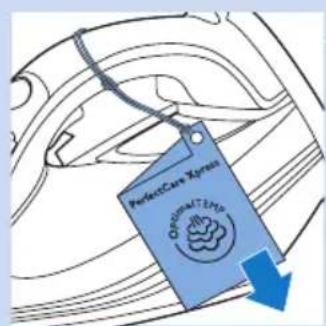
natural_image
Illustration of a hand pouring liquid into a steam iron (no text or symbols)Napomena: Ako koristite IronCare filter za uklanjanje kamenca, možete da napunite rezervoar za vodu filtriranom vodom direktno iz filtera.
Zagrevanje
natural_image
Illustration of a blue electrical plug with a blue cable, showing an arrow pointing to the plug (no text or symbols present)1 Uključite utikač u utičnicu sa uzemljenjem.
natural_image
Line drawing of an iron (£) with blue star patterns on the side (no text or symbols)2 Inteligentno svetlo će početi da treperi plavo kako bi označilo da se pegla zagreva.
natural_image
Line drawing of a steam iron with a blue circular highlight on its side (no text or symbols)3 Kada pegla bude spremna za upotrebu, inteligentno svetlo neprekidno svetli plavo.
Postavke temperature i pare
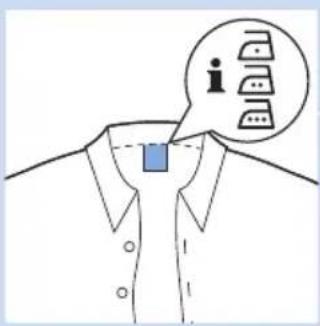
Tehnologija OptimalTemp omogućava peglanje svih vrsta tkanina koje mogu da se peglaju, bilo kojim redosledom, bez podešavanja temperature pegle ili postavke pare.
- Tkanine sa ovim simbolima se mogu peglati, na primer lan, pamuk, poliester, svila, vuna, viskoza, veštačka svila.
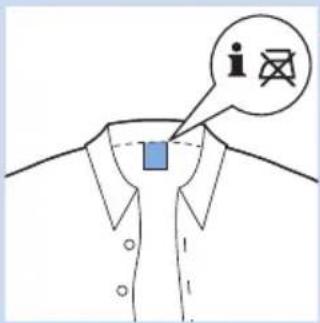
- Tkanine sa ovim simbolom se ne mogu peglati. U ove tkanine spadaju sintetičke tkanine, kao što je spandeks ili elastin, tkanine sa sadržajem spandeksa i poliolefina (npr. polipropilen), ali i odštampani motivi na odevnim predmetima.
Peglanje
natural_image
Line drawing of a person using an iron on a bed, no text or symbols presentnatural_image
Line drawing of a person using a blue iron on a workbench (no text or symbols)3 Možete da počnete da peglate kada inteligentno svetlo prestane da treperi i počne neprekidno da svetli.
natural_image
Line drawing of a person using an iron on a bed, no text or symbols presentFunkcija dodatne količine pare (samo određeni modeli)
- Dvaput pritisnite prekidač za ispuštanje pare. Pegla ispušta jedan jak mlaz pare kako biste uklonili veće nabore.
- Tokom ispuštanja dodatne količine pare, inteligentno svetlo brzo treperi.
Vertikalno peglanje sa parom
- Peglu držite u vertikalnom položaju. Zatim pritisnite i zadržite prekidač za ispuštanje pare da bi počelo vertikalno ispuštanje pare na odevni predmet.
natural_image
Line drawing of a hand using a blue tool to press down a steam iron (no text or symbols present)Saveti za peglanje
Smanjivanje količine nabora tokom sušenja
Počnite da uklanjate nabore rano u procesu sušenja tako što ćete dobro raširiti veš nakon pranja i tako što ćete staviti odeću na vešalice da bi se prirodno osušila sa manje nabora.
Najbolja praksa za peglanje košulja
natural_image
Line drawing of a steam iron with blue star-shaped mark on side (no text or symbols)natural_image
Illustration of a person using a blue iron on a flat surface (no text or symbols)1 Očistite aparat vlažnom tkaninom nakon svake upotrebe.
2 Da biste lako i efikasno uklonili fleke, pustite da se grejna ploča zagreje i pomerajte grejnu ploču preko vlažne krpe.
Savet: Redovno čistite grejnu ploču da biste obezbedili glatko kretanje.
Odlaganje
natural_image
Illustration of a blue electrical plug connecting a wall socket to a plug, with an arrow indicating direction (no text or symbols)1 Izvucite utikač iz zidne utičnice.
natural_image
Line drawing of a faucet and showerhead pouring liquid into a sink (no text or symbols)natural_image
Line drawing of a steam iron with blue cord and handle (no text or symbols)natural_image
Symbol of a trash bin crossed with no visible text or numbers, accompanied by a black rectangular block below (no text or symbols present)natural_image
Simple line drawing of a roof structure with a water tank and support structure (no text or symbols)natural_image
Diagram of a mechanical component with blue arrows indicating direction (no text or symbols)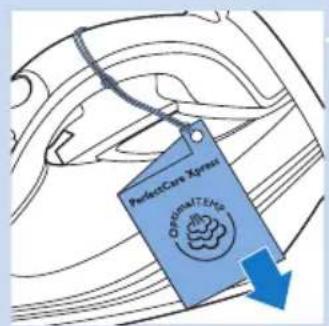
natural_image
Illustration of a hand pouring liquid into a steam iron (no text or symbols)natural_image
Illustration of a blue electrical plug with a cable, showing an arrow pointing to the plug (no text or symbols present)natural_image
Line drawing of a steam iron with blue star-shaped marks indicating wear (no text or symbols)natural_image
Line drawing of an iron (£) with a blue circular highlight on the side (no text or symbols)natural_image
Line drawing of a person using an electric iron on a bed, no text or symbols presentnatural_image
Line drawing of a person using a blue iron on a workbench (no text or symbols)natural_image
Line drawing of a person using an iron on a bed, no text or symbols presentnatural_image
Illustration of a hand using a blue tool to press down an iron on a surface (no text or symbols)natural_image
Line drawing of a steam iron with blue star-shaped mark indicating a specific part (no text or symbols)natural_image
Illustration of a person using a blue iron on a workbench (no text or symbols)natural_image
Illustration of a blue electrical plug inserting into a wall socket with a blue arrow indicating direction (no text or symbols)natural_image
Line drawing of a kitchen sink with faucet and drain handle (no text or symbols)natural_image
Line drawing of a steam iron with blue rope and clasp (no text or symbols)- Always here to help you
- User manual
- PHILIPS
- Table of contents
- Important
- Danger
- Warning
- Caution
- Electromagnetic fields (EMF)
- Disposal
- Introduction
- Product overview (Fig. 4)
- Before first use
- Using the appliance
- Checking the water hardness
- Water hardness table
- Filling the water tank
- Heating up
- Temperature and steam setting
- Ironing
- Steam Boost function (specific types only)
- Vertical steam ironing
- Putting down the iron during ironing
- ECO mode (specific types only)
- Ironing tips
- Minimising wrinkles while drying
- Best practice shirt ironing
- Safety Auto-off
- Cleaning and maintenance
- Storage
- Troubleshooting
- Съдържание
- Temperatuuri- ja auruseaded
- Elektromagnetska polja (EMF)
- Odlaganje
- Uvod
- Pregled proizvoda (Sl. 4)
- Zagrijavanje
- Funkcija za dodatnu količinu pare (samo neki modeli)
- Savjeti za glačanje
- Куралды пайдалану
- Gaminio apžvalga (Pav. 4)
- Vertikalus lyginimas su garais
- Elektromagnētiskie lauki (EML)
- Mod ECO (numai anumite tipuri)
- Prehl'ad produktu (Obr. 4)
- Nastavenie teploty a naparovania
- Odloženie žehličky počas žehlenia
- Pregled izdelka (Sl. 4)
- Navpično likanje s paro
- Odpravljanje težav
- Zagrevanje
- Postavke temperature i pare
- Peglanje
- Funkcija dodatne količine pare (samo određeni modeli)
- Vertikalno peglanje sa parom
- Saveti za peglanje
- Smanjivanje količine nabora tokom sušenja
- Najbolja praksa za peglanje košulja
Brand : PHILIPS
Model : PerfectCare Xpress GC5020
Category : Iron