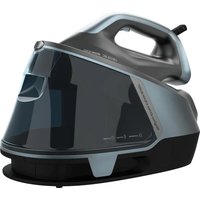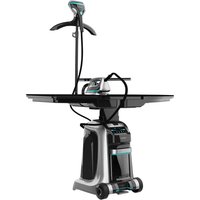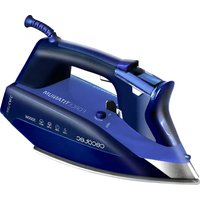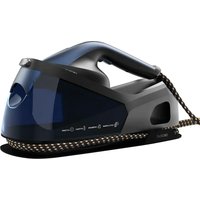
IronHero V-2400 Station - Iron CECOTEC - Free user manual and instructions
Find the device manual for free IronHero V-2400 Station CECOTEC in PDF.


| Product type | Steam iron with station |
| Brand | Cecotec |
| Model | IronHero V-2400 Station |
| Power | 2400 W |
| Supply voltage | 220-240 V ~ 50 Hz |
| Operating modes | ECO, SMART, TURBO |
| Water tank capacity | Approx. 1 L (not precisely specified) |
| Vertical steam function | Yes, for vertical ironing (curtains, hanging clothes) |
| Automatic safety shut-off | Yes, after 8 minutes of inactivity |
| Automatic descaling | Yes, via Maintenance button (3-minute cleaning cycle) |
| Replaceable descaling filter | Yes, with replacement indicator |
| Soleplate type | High-performance soleplate (material not specified) |
| Weight | Not specified |
| Dimensions | Not specified |
| Power cord length | Not specified |
| Care and cleaning | Clean with a soft, damp cloth; regular descaling; replace descaling filter |
| Safety | Automatic shut-off, overheat protection, hot surface indicator |
| Included accessories | Iron, base with tank, descaling filter, instruction manual |
| Warranty and after-sales service | Legal warranty; official Cecotec after-sales service at +34 9 63 21 07 28 |
| CE compliance | EU declaration of conformity available online |
Frequently Asked Questions - IronHero V-2400 Station CECOTEC
User questions about IronHero V-2400 Station CECOTEC
0 question about this device. Answer the ones you know or ask your own.
Ask a new question about this device
Download the instructions for your Iron in PDF format for free! Find your manual IronHero V-2400 Station - CECOTEC and take your electronic device back in hand. On this page are published all the documents necessary for the use of your device. IronHero V-2400 Station by CECOTEC.
USER MANUAL IronHero V-2400 Station CECOTEC
natural_image
Exterior view of a modern office building (no signage)Safety instructions 8
-
Parts and components 48
-
Before use 48
-
Operation 49
-
Cleaning and maintenance 53
-
Troubleshooting 54
-
Technical specifications 55
-
Disposal of old electrical and
electronic appliances 55
B. Technical support and warranty 55
-
Copyright 56
-
Simplified EU Declaration of Conformity 56
SOMMAIRE
EU01_102084_IronHero V-2400 Station
EN • The coding in this manual is generic and applies to all code variants of the appliance.
Read these instructions thoroughly before using the appliance. Keep this instruction manual for future reference or new users.
- Ensure that the mains voltage matches the voltage specified on the product rating label and that the plug is earthed.
- This appliance is designed for domestic use only and is not intended for bars, restaurants, farmhouses, hotels, motels, and offices. Do not use the appliance for industrial or commercial purposes.
- Do not use the iron if it has been dropped, shows visible damage, or is leaking.
- Do not immerse the cable, plug, or any other non-removable part of the appliance in water or any other liquid or expose electrical connections to water. Make sure your hands are dry before handling the plug or switching on the appliance.
- The power cable cannot be replaced. If damaged, discard the appliance.
- Do not leave the iron unattended while connected to the power supply.
- Keep the power cable away from the hot soleplate of the iron.
- The appliance will reach very high temperatures during and after use, especially the soleplate. Do not touch the soleplate to avoid burns.
- Unplug the appliance from the power supply as soon as you have finished using it, before cleaning it, or before leaving it unattended.
- Unplug the appliance before filling up the water tank.
- Keep all filling openings closed during use.
- Do not move the appliance during use.
-
Do not use the appliance to iron wet fabrics.
-
The iron must be used and placed on a stable, flat surface.
- When placing the iron on its base, make sure that the surface on which the base is placed is stable.
- Do not cover the appliance with any cloth or plastic immediately after use.
- Do not pull on the power cable to disconnect the appliance from the socket. Pull on the plug instead.
This symbol means: CAUTION, hot surface. The temperature of accessible surfaces may be high while the appliance is in use and could cause burns. Do not touch hot surfaces during operation or immediately after.
- This appliance can be used by children aged 8 years and above and people with reduced physical, sensory, or mental capabilities or lack of experience and knowledge if they have been given supervision or instruction concerning use of the appliance in a safe way and understand the hazards involved. Children must not play with the appliance. Cleaning and user maintenance should not be carried out by unsupervised children.
- Supervise children to prevent them from playing with the appliance. Close supervision is necessary when the appliance is being used by or near children.
- Keep the iron and its power cable out of reach of children under 8 years old when plugged in or cooling down.
- The iron must not be left unattended while connected to the mains.
- The iron should not be stored until it has cooled down.
- The plug must be removed from the socket before filling up the water tank.
- The appliance should not be used if it has fallen, shows any visible sign of damage, or if it leaks.
INSTRUCTIONS DE SÉCURITÉ
- Water tank
- Descaling filter
- Hose storage compartment
- Power cord storage compartment
- Power cord
- Maintenance button
- Power button
- Mode selection button
- Display
- Rest pad
- Iran lock/unlock button
- Iron fixing piece
- Soleplate
- Mode Indicator lights
- Power button - Mode selection button
- Steam release button
- Hose
NOTE:
The graphics in this manual are schematic representations and may not exactly match the product.
2. BEFORE USE
- This appliance is packaged in a way as to protect it during transport. Take the appliance out of its box and remove all packaging materials. You can keep the original box and other packaging elements in a safe place to prevent damage to the appliance if you need to transport it in the future. In case the original packaging is disposed of, make sure all packaging materials are recycled accordingly.
- Make sure all parts and components are included and in good conditions. If there is any piece missing or in bad conditions, contact the official Cecotec Technical Support Service immediately.
Box content
- Iron
- Instruction manual
3. OPERATION
Control panel
Fig. 2
- Cleaning reminder indicator light
- Filter change reminder indicator light
- Tank filling reminder indicator light
- ECO mode indicator light
- SMART mode indicator light
- Connection reminder indicator light
- TURBO mode indicator light
- Maintenance button
- Power button
- Mode selection button
Cleaning reminder indicator light: If this indicator light comes on, follow the descaling instructions and restart the appliance.
Filter change reminder indicator light: If this indicator light comes on, replace the descaling filter and restart the appliance.
Tank filling reminder indicator light: When the appliance is switched on, if its sensor detects that the water level in the tank is not enough, this indicator light will flash, and you will hear a beep. If you keep using the iron when the water level in the tank is too low, the appliance will switch off automatically.
Connection reminder Indicator light: If the appliance is switched on but has not been in use for more than 8 minutes, this indicator light will flash. In addition, there will be 6 beeps and then the appliance will go into standby mode.
Mode Indicator lights
1. ECO mode
This mode is designed to minimise power consumption without compromising basic performance. It is perfect for delicate fabrics or for those looking for a sustainable ironing experience.
Recommended for: Materials such as silk, fine linen and delicate garments.
2. SMART mode
This mode automatically adjusts the amount of steam and temperature depending on the fabric. It offers an optimal balance between efficiency and clothing care.
ENGLISHENGLISH
Recommended for: All types of garments, as the appliance adapts the settings depending on the material.
3. TURBO mode
This mode provides maximum steam power to remove deep creases and smooth out thick fabrics quickly and effectively.
Recommended for: Materials such as thick cotton, denim and garments with heavy creases.
Touch buttons
Mode selection button
Once the preheating process is completed, press this button briefly to switch between ECO, SMART and TURBO modes.
Power button
To switch on the appliance, press the power button briefly. The mode indicator lights will flash, indicating that the appliance has started preheating.
Once the preheating process is completed, these indicator lights will remain steadily on. When the appliance is switched on, it will operate in TURBO mode by default.
Maintenance button
This button is used to restart the appliance after maintenance. The maintenance operations are as follows:
- When the filter change reminder lights up, change the filter. Once you have done so, press the maintenance button and the mode selection button simultaneously for 3 seconds. Release them when you hear a beep. After that, the filter change reminder will turn off.
- When the cleaning reminder lights up, it means that you should descale the appliance. To do so, fill the water tank. Then, with the appliance running, press and hold the maintenance button for more than 5 seconds to start cleaning. When this happens, you will hear a beep, and the cleaning reminder will also flash. Cleaning takes approximately 3 minutes, during which time the soleplate releases steam continuously. Collect the discharged water in a heat-resistant container and dispose of it properly.
Iron controls
Fig. 3
1. Mode Indicator Lights
When the mode indicator lights flash, it means that the appliance is preheating. When they stop flashing and remain steady, it means that the preheating process has finished. If all three indicator lights are lit, it means that the appliance is operating in TURBO mode. If only one of them is lit, it means that the selected mode is ECO, and if there are two, SMART.
2. Steam release button
After preheating, the default mode is dry ironing.
Note: Steam will only be released if you press and hold the corresponding button. If you stop pressing the button, steam will no longer be released.
3. Power button
Press the power on button briefly to start preheating. The mode indicator lights of the iron will flash during the preheating process and will remain steadily on when it has finished. By default, the appliance will start in TURBO mode.
Note: This button works in the same way as the power button on the base.
4. Mode selection button
Once the preheating process is completed, press this button briefly to switch between ECO, SMART and TURBO modes.
Note: This button works in the same way as the mode selection button on the base.
Before using the appliance
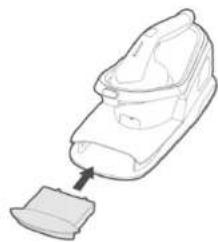
- Install the descaling filter and make sure that it is completely fixed in place. Fig. 4
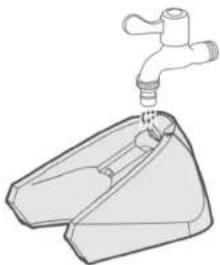
- Fill up the water tank. It is recommended to use distilled or demineralised water. Fig. 5
- Connect the appliance to the mains and then press the power button on the iron or the base. The mode indicator lights will flash, which means that the appliance is preheating.
- Once the preheating process is completed, you will hear a beep, and the mode indicator lights will remain steadily on. The default mode is TURBO. You can change the mode with the corresponding button or release steam with the steam release button.
Fig. 6
a. Preheating process completed: The mode indicator lights will stop flashing and remain steadily on.
b. You can change the mode by pressing the corresponding button
c. You can make the iron release steam by pressing the corresponding button
Using the appliance
1. Using the appliance for the first time or after changing the descaling filter
When the iron has finished preheating, you may have to wait an additional 30 seconds for steam to come out of the soleplate.
2. Automatic safety shutdown
If no operation is carried out for 8 minutes while the appliance is switched on, it will automatically enter standby mode to avoid any risks.
ENGLISHENGLISH
3. Switching between steam modes when the appliance is running
When switching modes (using the corresponding button), the mode indicator lights will flash to indicate that the appliance is preheating. Once the preheating process is completed, you can iron normally.
Filling up the water tank
- It is recommended to use purified or demineralised water to fill the water tank. - Do not add any other products to the tank.
The first time you use the appliance or when the tank filling reminder lights up, fill the water tank. This appliance can only operate normally when the tank is full of water. Steps to follow:
-
To fill the tank, remove it and add distilled or demineralised water. Fig. 7
-
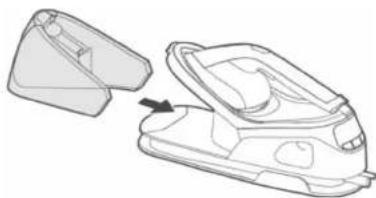
Then put the full water tank back into the appliance. Fig. 8
Replacing the descaling filter
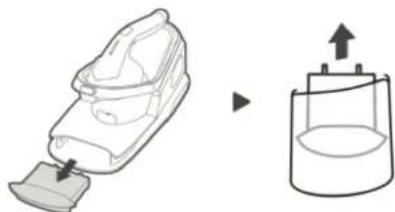
When the filter change reminder lights up, you should replace the descaling filter immediately to prevent limescale build-up.
If you decide not to replace the filter, you should use distilled water. In this case, leave the used filter in the compartment.
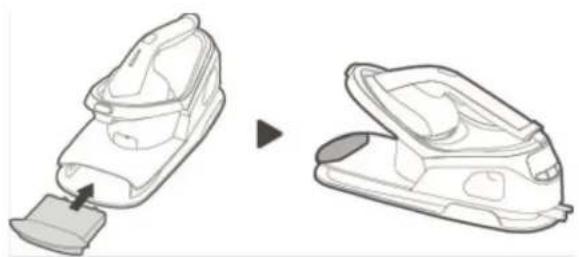
- If the filter is not fitted correctly, the appliance may not generate steam. - When the descaling filter is inserted into the compartment, some drops of water may fall out. This is normal, it is not a problem.
- The filter you have replaced can be discarded.
-
The iron will keep working until it detects that the filter needs to be replaced. At that time, the filter change reminder will light up.
-
Remove the descaling filter to be discarded from the appliance and install a new one. Fig. 9
Note: The corresponding reminder will light up and remain steadily on.
-
Insert the descaling filter into the appliance and push it firmly until it locks into place. Fig 10
-
After replacing the filter, press and hold the maintenance button and the mode selection button for 5 seconds. Release them when you hear a beep. At that time, the filter change reminder will turn off and the appliance will resume normal operation. Fig. 11
-
Press and hold both buttons simultaneously for 5 seconds.
Using the iron
Fabrics that can be ironed: linen, cotton, polyester, silk, wool, viscose, rayon.
Fabrics that cannot be ironed: synthetic fibres (such as spandex or elastane), blends of elastane and polyolefins (such as polypropylene).
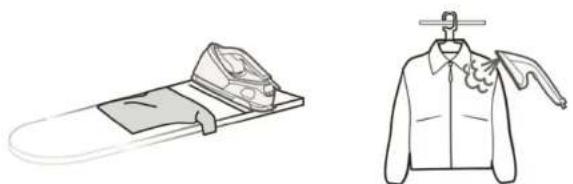
Ironing clothes (in horizontal and vertical position) Fig. 12
- Unfold the ironing board and place it at a suitable height. Place the garment to be ironed on the board.
- Place the garment on a hanger and hang it on a suitable support.
Ironing other fabrics
-
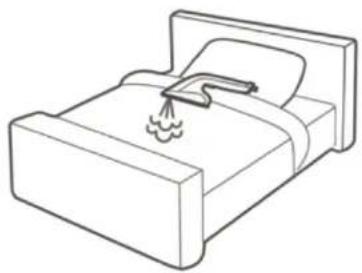
Bed linen. Fig. 13
-
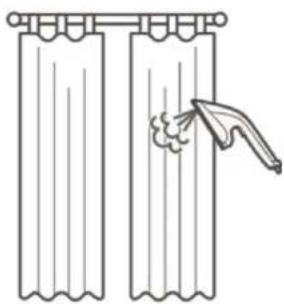
Curtains. Fig. 14
4. CLEANING AND MAINTENANCE
- If stains appear on the surface or on the soleplate of the appliance, you can use a soft damp cloth and a little neutral soap to clean them.
- If limescale appears in the holes of the base, clean it with a soft damp cloth and a little neutral soap.
- When the iron is fixed to the base, you can lift the appliance completely with one hand by holding it by the handle of the iron.
Note: Make sure that the iron has completely cooled down before cleaning it.
- Press the power button on the base or handle of the iron to switch it off. Then unplug it from the mains and wait for the soleplate to cool down completely.
- Remove the water tank and pour out the remaining water.
- Use a soft cloth to clean the soleplate and the base of the iron.
- Wind up the power cord and bend the hose and place each of these items in their respective storage compartments.
Fig. 15
-
Power cord storage compartment
-
Hose storage compartment
ENGLISHENGLISH
- TROUBLESHOOTING
| Problem | |
| The appliance does not produce steam. | |
| Causes Solutions | |
| There is not enough water in the tank. | Refill the water tank and then restart the appliance. |
| You are not pressing the steam release button. | Press and hold the steam release button. |
| The descaling filter has just been replaced. | Press and hold the steam release button and wait until steam comes out. |
| The descaling filter is not fitted correctly. | Push the descaling filter until it clicks into place completely. |
| Problem | |
| A pumping sound is heard when the appliance is running. | |
| Causes Solutions | |
| The descaling filter has just been replaced. | Press and hold the steam release button and wait until steam comes out. |
| The water tank is empty. | Add water to the tank and press and hold the steam release button until the pumping sound stops, and steam comes out of the soleplate. |
| The descaling filter is not fitted correctly. | Push the descaling filter until it clicks into place completely. |
| The descaling filter is damaged. | Check the filter; if you notice any damage, replace it with a new one. |
| Problem | |
| The filter change reminder is flashing. | |
| Causes Solutions | |
| Replace the filter with a new one. | If you prefer not to replace the filter, use only distilled water and keep the filter in the compartment. |
6. TECHNICAL SPECIFICATIONS
Product reference: EU01_102084
Product: IronHero V-2400 Station
Voltage: 220-240 V-
Frequency: 50 Hz
Power: 2400 W
Technical specifications may change without prior notification to improve product quality.
Made in China | Designed in Spain
7. DISPOSAL OF OLD ELECTRICAL AND ELECTRONIC APPLIANCES

This symbol indicates that, according to the applicable regulations, the appliance and/or batteries must be disposed of separately from household waste. When this product reaches the end of its shelf life, you should dispose of the cells/batteries/accumulators and take them to a collection point designated by the local authorities.
Consumers must contact their local authorities or retailer for information concerning the correct disposal of old appliances and/or their batteries.
Compliance with the above guidelines will help protecting the environment.
8. TECHNICAL SUPPORT AND WARRANTY
Cecotec shall be liable to the end user or consumer for any lack of conformity that exists at the time of delivery of the product under the terms, conditions and deadlines established by the applicable regulations.
Repairs should be carried out by qualified personnel.
If at any moment you detect any problem with your product or have any doubt, do not hesitate to contact the official Cecotec Technical Support Service at +34 96 321 07 28.
FRANÇAISENGLISH
9. COPYRIGHT
The intellectual property rights over the texts in this manual belong to CECOTEC INNOVACIONES, S.L. All rights reserved. The contents of this publication may not, in whole or in part, be reproduced, stored in a retrieval system, transmitted, or distributed by any means (electronic, mechanical, photocopying, recording or similar) without the prior authorization of CECOTEC INNOVACIONES, S.L.
10. SIMPLIFIED EU DECLARATION OF CONFORMITY
CE Cecotec Innovaciones hereby declares that this appliance complies with the essential requirements and other relevant provisions of the regulations applicable in the European Union. This appliance has been designed, manufactured and tested to meet the required safety and quality standards. The full text of the EU Declaration of Conformity can be found on the following website: https://cecotec.es/es/information/declaration-of-conformity
1. PIÈCES ET COMPOSANTS
Image 1
Product: IronHere V-2400 Station
Voltage: 220-240 V-
Frequentie: 50 Hz
Vermogen: 2400W
Ürün: IronHero V-2400 Station
Voltaj: 220-240 V
Frekans: 50Hz
Guc: 2400W
Producte: IronHero V-2400 Station
Volatge: 220-240 V-
Frequência: 50 Hz
Potência: 2400W
Fig./Img./Abb./Afb./Rys.1
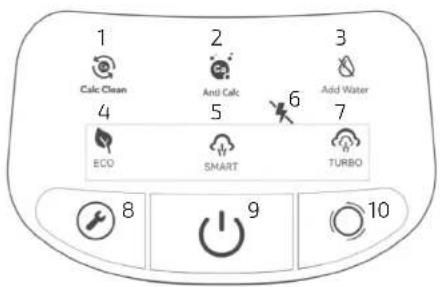
Fig./Img./Abb./Afb./Rys.2
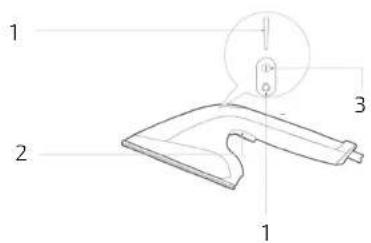
Fig./Img./Abb./Afb./Rys.3
natural_image
Line drawing of a shoe component with a small base, no text or symbols presentFig./Img./Abb./Afb./Rys.4
natural_image
Line drawing of a faucet with a handle inserted into a container (no text or symbols)Fig./Img./Abb./Afb./Rys.5
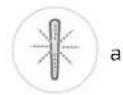
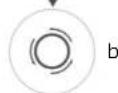
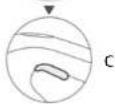
Fig./Img./Abb./Afb./Rys.6
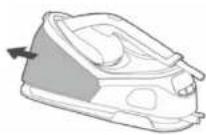
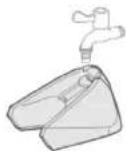
Fig./Img./Abb./Afb./Rys.7
natural_image
Line drawing of a steam iron shaker with an open lid and arrow indicating assembly (no text or symbols)Fig./Img./Abb./Afb./Rys.8
natural_image
Diagram showing a hand holding a small object and a container with an arrow indicating direction (no text or symbols)Fig./Img./Abb./Afo./Rys.9
natural_image
Illustration of a hairless vacuum cleaner with a close-up view of its side panel (no text or symbols)Fig./Img./Abb./Afb./Rys.10 Fig./Img./Abb./Afb./Rys.13
natural_image
Line drawing of a bed with a funnel and flame symbol (no text or labels)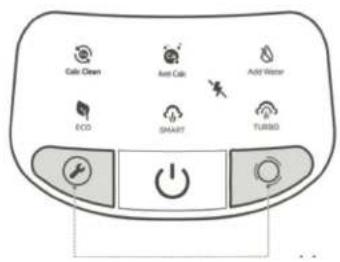
Fig./Img./Abb./Afb./Rys.11
natural_image
Simple line drawing of a pair of curtains with a hand touching one pair (no text or symbols)Fig./Img./Abb./Afb./Rys.14
natural_image
Illustration of two clothing items: a handbag on a tray and a jacket with a flower (no text or symbols)Fig./Img./Abb./Afb./Rys.12
www.cecotec.es