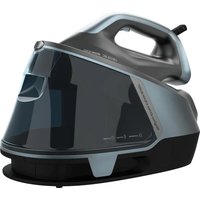
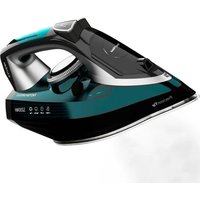
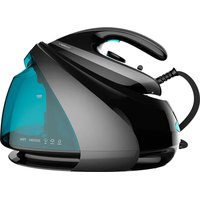
IronHero H-2800 Professional Station - Iron CECOTEC - Free user manual and instructions
Find the device manual for free IronHero H-2800 Professional Station CECOTEC in PDF.


| Product type | Steam station |
| Brand | Cecotec |
| Model | IronHero H-2800 Professional Station |
| Power supply | 220-240 V~, 50/60 Hz |
| Power | 2800 W |
| Main functions | Continuous steam, steam jet, automatic shut-off (8 min), water lack detection, mode selection (synthetics, wool, cotton) |
| Safety | Automatic shut-off, water lack detection, dry pump protection, hot surface indication |
| Maintenance and cleaning | Self-cleaning function Calc Clean, anti-limescale tank cleaning, wiping the soleplate |
| Water tank | Removable, with integrated anti-limescale tank |
| Soleplate type | Stainless steel (not specified, estimate) |
| Box contents | Steam station, instruction manual |
| Weight | Approximately 4.5 kg (estimate) |
| Dimensions (L × W × H) | Approximately 35 × 20 × 25 cm (estimate) |
Frequently Asked Questions - IronHero H-2800 Professional Station CECOTEC
User questions about IronHero H-2800 Professional Station CECOTEC
0 question about this device. Answer the ones you know or ask your own.
Ask a new question about this device
Download the instructions for your Iron in PDF format for free! Find your manual IronHero H-2800 Professional Station - CECOTEC and take your electronic device back in hand. On this page are published all the documents necessary for the use of your device. IronHero H-2800 Professional Station by CECOTEC.
USER MANUAL IronHero H-2800 Professional Station CECOTEC
Safety instructions 7
- Parts and components 41
2.Before use 42 - Operation 43
- Cleaning and maintenance 44
- Troubleshooting 45
- Disposal of old electrical and electronic appliances 46
- Copyright 46
- Simplified EU Declaration of Conformity 46
SOMMAIRE
EN · The coding in this manual is generic and applies to all code variants of the appliance.
Read the following instructions carefully before using the appliance. Keep this instruction manual for future reference or new users.
- Make sure that the mains voltage matches the voltage specified on the product's rating label and that the plug is earthed.
- This appliance is designed for domestic use only and is not intended for use in bars, restaurants, farmhouses, hotels, motels and offices.
- Do not use the appliance for industrial or commercial purposes.
- Do not use the iron if it has been dropped, shows visible damage, or is leaking.
- Do not immerse the cord, plug, or any other non-removable part of the appliance in water or any other liquid or expose electrical connections to water.
- Make sure your hands are dry before handling the plug or switching on the appliance.
- Check the power cord regularly for visible damage. If the power cord is damaged, it must be replaced by Cecotec's Official Technical Support Service or similar qualified
personnel to avoid risks.
- Do not leave the iron unattended while connected to the power supply.
- Keep the power cord away from the iron's hot soleplate.
- The appliance will reach very high temperatures during and after use, especially the soleplate. Do not touch the soleplate to avoid burns.
- Unplug the appliance from the power supply as soon as you have finished using it, before cleaning it, or before leaving it unattended.
- Unplug the appliance before filling up the water tank.
- Keep all filling openings closed during use.
- Do not move the appliance during use.
- Do not use the appliance to iron wet fabrics.
- The iron must be used and placed on a stable, flat surface.
- Make sure the support base of the iron is stable before placing it on top.
- Do not cover the appliance with any cloth or plastic immediately after use.
- Do not pull on the power cord to disconnect or move the appliance, use the power plug instead.
- This symbol means: CAUTION, hot surface. The temperature of accessible surfaces may be high while the appliance is in use and could cause burns. Do not touch hot surfaces during operation or immediately after.
- This appliance can be used by children aged 8 years and above and people with reduced physical, sensory, or mental capabilities or lack of experience and knowledge if they have been given supervision or instruction concerning the use of the appliance in a safe way and understand the hazards involved. Children must not play with the appliance. Cleaning and user maintenance must not be
carried out by children without supervision.
- Supervise children to ensure they do not play with the product.
- Close supervision is necessary when the appliance is being used by or near children.
- Keep the appliance and its power cable out of reach of children under 8 years old when plugged in or cooling down.
INSTRUCTIONS DE SECURITE
-ii1i1i1i1i1i1i1i1i1i1i1i1i
- jiuw yu li zhu w ic leiuyu gol all puiyui
-1000 10000000000000000000000000000000000000000
a a a a a a a a a a a a a a a a a a a a a a a a a a a
J 1
-iiieyipieepiee no sillil Jlal 1le
- Support feet
- Bottom cover
- Lower housing
- Upper housing
- Function buttons
- Heat insulation plate
- Control panel
- Water refill indicator light
- Securing clip
- Rear silicone support
- Rear cover
- Back cover
- Cable anti-twist protector
- Handle cover
- Steam button
- Handle
- Preheating indicator light
- Heat insulation cover
- Soleplate
- Front silicone support
- Lock
- Locking button
- Water tank
- Right decorative panel
- Left decorative panel
- Water tank base
- Side cover
- Sealing ring
- Anti-calc cartridge
- Anti-calc cartridge handle
Control panel
Fig. 2
- Anti Calc warning button
- MODE button for steam temperature and fabric type selection
ENGLISH
- Calc Clean self-cleaning indicator button
- Power button
- Empty-tank indicator light
Iron controls
Fig. 3
- Preheating indicator light
- Steam button
Note:
The graphics in this manual are schematic representations and may not exactly match the product.
2. BEFORE USE
- This appliance comes in a packaging designed to protect it during transport. Remove the appliance from its box. You can keep the original box and other packaging materials in a safe place to prevent damage to the appliance if you need to transport it in the future. If you wish to dispose of the original packaging, make sure all items are recycled properly.
- Check that all parts and components are included and in good condition. If any of them are missing or damaged, please contact Cecotec's Official Technical Support Service immediately.
- Do not remove the product's serial number in order to keep proper traceability if technical assistance is required.
- Before using the iron for the first time, remove all stickers and adhesive materials from the soleplate.
- Check that the product includes an anti-calc cartridge (factory-fitted). Remove the cartridge and check if the two sealing rings are damage or missing. If any issues arise, contact the after-sales service promptly and do not force usage. The following figure shows how to disassemble and assemble the anti-calc cartridge.
Fig. 4
- When using for the first time, let the iron release steam for a few minutes. This will eliminate any odours and residues that may remain from the manufacturing process.
Box content:
- Steam station
- Instruction manual
3. OPERATION
This product features a removable water tank. (As shown in the figure below) Remove the water tank following the steps and begin filling it with water. After adding water to the MAX position, reinstall the water tank into the product.
Fig. 5
- Connect the appliance to a mains socket and switch it on. After the base and iron preheating indicator light illuminates for 1 second, press the power button to turn on the appliance, and preheating will begin.
-
The appliance will automatically start in minimum steam mode (SYNTHETICS - no light); press the MODE button to select the desired steam level and fabric type. The button will change colour showing the selected setting according to the legend printed on the control panel:
-
SYNTHETICS - Off
- WOOL - Green light
- COTTON - Blue light
The iron's preheating indicator light will flash slowly while heating. (The appliance will not operate if the steam button on the iron is pressed during heating). When the indicator light remains steadily lit, the appliance is ready for use. Press the steam button twice on the iron to release a steam shot. Hold the steam button for continuous steam. When using the steam shot, the preheating indicator light flashes rapidly indicating the waiting time until the next steam shot can be used.
When finished, press the power button again to turn off the appliance.
- This appliance features an automatic shut-off function. When the user stops using the appliance for more than 8 minutes, the internal control circuit will cut off the power supply and enter auto-shut-off mode. The appliance stops heating to prevent accidents and save electricity. You will need to restart the appliance or press any button to activate it when using it again.
- This appliance features auto water detection. When the water in the tank falls below the minimum level, the level sensor detects this and activates the low-water protection mode. The empty-water tank indicator light will remain lit until water is added and detected by the level sensor. This effectively protects the water pump and prevents dry
ENGLISH
running, thus extending its service life.
Ironing clothes
Steam irons are very easy to use and can remove wrinkles/creases from garments, curtains and all types of fabrics.
- Make sure the reverse side of the fabric is breathable so that steam does not accumulate in the garment.
- Check garment pockets to ensure they are empty.
- Check the back of garments to ensure there are no objects that could be damaged by steam.
- It is recommended not to iron over metal accessories on clothing. High-temperature steam may discolour them.
- When pressing the steam button, the iron will vibrate slightly and make a noise, which is normal.
- When ironing, slide the soleplate from top to bottom on the garment to remove wrinkles.
- If you notice the iron is making a lot of noise and no steam is coming out, it means the water tank is empty. Check the water tank level and fill it to the "MAX" mark
After each use
- When not using the appliance, unplug the power cord from the mains socket.
- Open the water tank filling cap (over a sink or bucket) and turn the tank upside down to empty any remaining water from the tank.
- Place the iron in an upright position on a flat surface or secure it to its base and wait for the appliance to cool down.
4. CLEANING AND MAINTENANCE
- This appliance features a cleaning function button. When the water pump has operated for 8 hours, the Calc Clean button will remain illuminated. To activate the self-cleaning mode, press and hold the Calc Clean button for 3 seconds (ensure there is sufficient water in the tank before activating this function and place the iron over a container or sink with drainage to collect the water expelled during the process). The electromagnetic pump will automatically pump water at maximum frequency for 90 seconds. The iron's soleplate will heat during pumping, then stop and reheat for 30 seconds to complete the self-cleaning cycle.
- This appliance has a function that indicates when the anti-calc cartridge needs cleaning. When the water pump has operated for 10 hours, the Anti Calc button will remain lit.
Remove the cartridge and clean it with distilled water. Once cleaned, insert it fully and press the Anti Calc button to reset.
- Clean the soleplate with a damp cloth after it has cooled down.
- Do not use abrasive cleaners or harsh solvents.
- Do not immerse the iron in water or any other liquids.
5. TROUBLESHOOTING
| Problem Possible solutions | |
| The iron does not heat up Check if | the plug is properly inserted. Check the power supply. Check the power button. |
| The iron does not produce steam | Check the water level and ensure the tank is properly inserted. Press the steam button firmly. Keep the iron in a horizontal position. |
| Water leaks from the tank Make sure | sure water does not exceed the maximum water line. Make sure the water tank inlet is properly sealed. Follow the operating instructions provided and always keep the steam station level on a flat surface. |
| Loud buzzing or pumping sound when the steam iron is operating | Check water level; if there is no water or water level is low, add water to the tank. |
| Discolouration of metal accessories on clothing | Do not use steam iron directly on metal accessories. Use steam carefully when near metal accessories. |
ENGLISH
6. DISPOSAL OF OLD ELECTRICAL AND ELECTRONIC APPLIANCES
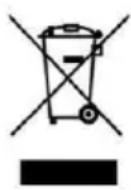
This symbol indicates that, according to the applicable regulations, the product and/or batteries must be disposed of separately from household waste. When this product reaches the end of its service life, you must remove the batteries/ accumulators and take it to a collection point designated by local authorities. For detailed information on how to properly dispose of electrical and electronic equipment and/or the corresponding batteries, consumers should contact their
local authorities.
Compliance with the above guidelines will help protecting the environment.
7. COPYRIGHT
The intellectual property rights over the texts in this manual belong to CECOTEC INNOVACIONES, S.L. All rights reserved. The content of this publication may not, either in part or in its entirety, be reproduced, stored in a retrieval system, transmitted or distributed by any means (electronic, mechanical, photocopying, recording or similar) without prior authorisation from CECOTEC INNOVACIONES, S.L.
8. SIMPLIFIED EU DECLARATION OF CONFORMITY
CE Cecotec Innovaciones hereby declares that this appliance complies with the essential requirements and other relevant provisions of the regulations applicable in the European Union. This appliance has been designed, manufactured and tested in compliance with required safety and quality standards. The full text of the EU Declaration of Conformity can be found on the following website: https://cecotec.es/es/information/ declaration-of-conformity
1. PIECES ET COMPOSANTS
Image 1
5. PROBLEEMOPLOSSING
https://cecotec.es/es/information/declaration-of-conformity
CATALA
1. PECESI COMPONENTS
Figura 1
m = 311
S OBC = S COD + S_ BOC
< 0, < 0, > 0
A
- 一山
1
d = 1
1
- jiu jiè
:abgalo
aal alal jas 5j MAX aag all alal alal
0.5.11
E
- -
Jy Ioc. (jssll jll jz jz biaal 1! jzlll Jz j) .nssll cll l aol gall qllll nssll y s
biul, 20 and 20 20 20 20 20 20 20 20 20 20 20 20 20 20 20 20 20 20 20 20 20 20 20 20 20 20 20 20 20 20 20 20 20 20
sill 8i jai i jai i jai i jai i jai i jai i jai i jai i jai i jai i jai i jai i jai i jai i jai i jai i jai i jai i jai i jai i jai i jai i jai i jai i jai i jai i jai i jai i jai i jai i jai i jai i jai i jai i
S
1
1
1
1
1
1
1
1
1 1
aillg 1
1 1
i 1234567890123456789012345678901234567890123456789012345678901234567890123456789012345678901234567890123456789
2
S 三边
| الإستعمال | الإستعمال |
| الإستعمال | الإستعمال |
| الإستعمال | الإستnzients |
| الإستnzients | الإستnzients |
| الإستnzients | الإستnzients |
| الإستnzients | الإستnzients |
| الإستnzients | ال,enzients |
| ال,enzients | ال,enzients |
| ال,enzients | ال,enzients |
| ال,enzients | ال,enzients |
| ال,enzients | ال,enzients |
| ال,enzients | ال,enzients |
| ال,enzients | ال,enzients |
| ال,enzients | ال,enzients |
| ال,enzients | ال,enzients |
| ال,enzients | ال-enzients |
| ال,enzients | ال-enzients |
| ال,enzients | ال-enzients |
| ال,enzients | ال-enzients |
| ال,enzients | ال-enzients |
| ال,enzients | ال-enzients |
| ال,enzients | ال-enzients |
| ال,enzients | ال-enzients |
| ال,enzients | ال-enzients |
yallge aiaeaal lal gssy jai. aiaeaal lalall ge yjil jg
aiee aee
- SOMMAIRE
- INSTRUCTIONS DE SECURITE
- Control panel
- Fig. 2
- ENGLISH
- Iron controls
- Fig. 3
- Note:
- BEFORE USE
- Fig. 4
- Box content:
- OPERATION
- Fig. 5
- Ironing clothes
- After each use
- CLEANING AND MAINTENANCE
- TROUBLESHOOTING
- DISPOSAL OF OLD ELECTRICAL AND ELECTRONIC APPLIANCES
- COPYRIGHT
- SIMPLIFIED EU DECLARATION OF CONFORMITY
- PIECES ET COMPOSANTS
- PROBLEEMOPLOSSING
- CATALA
- PECESI COMPONENTS
- Figura 1
- aillg 1
- 2
Brand : CECOTEC
Model : IronHero H-2800 Professional Station
Category : Iron