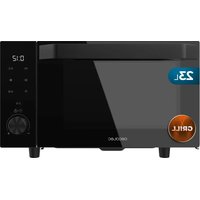
ProClean 6140 - Microwave Oven CECOTEC - Free user manual and instructions
Find the device manual for free ProClean 6140 CECOTEC in PDF.


| Brand | Cecotec |
| Model | ProClean 6140 |
| Product type | Microwave with grill |
| Capacity | Not specified (approximately 20-25 L estimated) |
| Microwave power | 5 levels: 100%, 80%, 50%, 30%, 10% |
| Main functions | Microwave, Grill, Combination, Defrost (weight/time), Reheat, Auto programs (8), 24h clock, Child lock |
| Auto programs | Potatoes, Pasta, Pizza, Popcorn, Vegetables, Drinks, Meat, Fish |
| Defrost types | dEF1 (by weight, 100-1500 g), dEF2 (by time, 0:10-60:00) |
| Reheat function | By weight: 200 g, 400 g, 600 g, 800 g, 1000 g |
| Turntable | Borosilicate glass |
| Grill | Grill element, modes: G, C-1 (30% microwave 70% grill), C-2 (55% microwave 45% grill) |
| Control panel | Touch screen and rotary selector |
| Clock | 24 hours, adjustable |
| Child lock | Control panel lock by long pressing the Stop icon |
| Compatible materials | Ceramic, glass, heat-resistant plastic (≥120 °C); no metal |
| Cleaning | Soft damp cloth; do not use abrasive products; clean door seals and mica plate regularly |
| Maintenance | Unplug before cleaning; do not immerse; remove odors with lemon or tea |
| Installation | Flat, stable, dry surface; do not build in; keep 5 m away from TVs/radios/antennas |
| Power supply | Grounded wall outlet |
| Box contents | Microwave, instruction manual |
Frequently Asked Questions - ProClean 6140 CECOTEC
User questions about ProClean 6140 CECOTEC
0 question about this device. Answer the ones you know or ask your own.
Ask a new question about this device
Download the instructions for your Microwave Oven in PDF format for free! Find your manual ProClean 6140 - CECOTEC and take your electronic device back in hand. On this page are published all the documents necessary for the use of your device. ProClean 6140 by CECOTEC.
USER MANUAL ProClean 6140 CECOTEC
natural_image
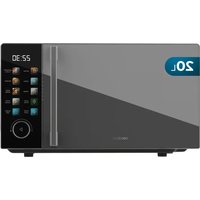
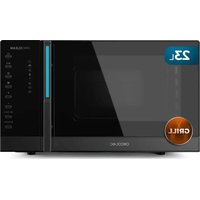
Exterior view of a modern microwave oven with digital display and control knobs (no readable text or symbols)-
Parts and components 16
-
Before use 16
-
Operation 17
-
TIPS 21
-
Cleaning and maintenance 23
-
Troubleshooting 24
-
Recycling of electrical
and electronic equipment 25
B. Copyright 25
- Simplified EU Declaration of Conformity 25
SOMMAIRE
EN • The coding in this manual is generic and applies to all code variants of the appliance.
- Door safety lock system
- Viewing window
- Borosilicate glass dish
- Interior cavity
- Control panel
- Grill rack
Note:
The graphics in this manual are schematic representations and may not exactly match the product.
2. BEFORE USE
- This appliance comes in a packaging designed to protect it during transport. Remove the appliance from its box. You can keep the original box and other packaging materials in a safe place to prevent damage to the appliance if you need to transport it in the future. If you wish to dispose of the original packaging, make sure all items are recycled properly.
- Check that all parts and components are included and in good condition. If any of them are missing or damaged, please contact Cecotec's Official Technical Support Service immediately.
Box content:
- Microwave oven
-
Instruction manual
-
Do not remove the product's serial number in order to keep proper traceability if technical assistance is required.
- Remove all packaging materials. If the microwave is protected with a protective film, remove it before use. Check if the microwave is damaged. If it is, please contact the official Cecotec Technical Support Service.
- Place the appliance on a flat, stable and dry place, away from any corrosive material, and avoid exposing it to heat or moisture.
- The appliance must be placed at least 5 m away from TVs, radios, or antennas.
- The appliance must be placed in such way that the plug is accessible and the socket must be properly earthed to avoid electric shocks.
-
Make sure to close the microwave door for proper operation.
-
In case there are any manufacturing remains in the microwave cavity or on the heating elements, leave the microwave open to ensure good ventilation. To eliminate this problem, it is advisable to heat a glass of water in the microwave several times at full power.
- Do not place the microwave inside a cabinet. This appliance is not designed for built-in installation.
3. OPERATION
Control panel
Fig. 2
- Display
- Defrost/Clock touch icon
- Grill touch icon
- Stop/Lock touch icon
- Start/+30s touch icon
- Knob
- Reheat touch icon
- Programme touch icon
- Power level touch icon
MAINS CONNECTION
When the microwave is connected to the mains, the display will turn on and then enter standby mode and show "1:00".
POWER SETTING
- There are five microwave power levels: 100P, 80P, 50P, 30P and 10P, respectively.
- Press the touch icon continuously and select the desired microwave power.
- Turn the knob to increase or decrease the cooking time. The selectable time range is 0:10 to 60:00.
- After selecting the time, press the button ▷ to start working. A buzzing sound will notify the completion of the operation.
| HIGH (high/ maximum power) | 100% power Suitable for fast and thorough cooking. |
| M, High (medium- high power) | 80% power Suitable for medium express cooking. |
| Med (medium-high power) | 50% power Applicable for steaming. |
ENGLISHENGLISH
| M. Low (medium-high power) | 30% power | Suitable for defrostling food. |
| LOW (medium-high power) | 10% power | Applicable for keeping warm. |
CAUTION
- The maximum time that can be set up is 60 minutes.
- Never use the grill during microwave cooking.
- Never operate the microwave oven empty.
- At full microwave power, the appliance will automatically reduce power after a certain cooking time to extend its service life.
- If the food is turned during operation, touch the icon ▷ once and the preset cooking procedure will continue.
- If you intend to remove the food before the preset time, you must touch the icon once to clear the preset procedure to avoid undesired operation at the next use.
DEFROST/CLOCK
Defrost
There are two defrost modes, dEF1 and dEF2, respectively.
- dEF1 for defrosting by weight.
- dEF 2 for defrosting by time.
- Touch this icon Ⓤ to select defrost by weight or by time, and the display will show "dEF1" or "dEF2".
- Turn the knob to select the food weight or defrost time.
- The optional weight range for dEF1 is 100 to 1500 g, and the optional time range for dEF2 is 0:10 to 60:00.
- After selecting the weight or defrost time, touch the icon to start.
- A buzzing sound will notify the completion of the operation.
- The dEFI defrost by weight mode will beep to indicate that the food should be turned during defrost.
Here is some advice on food defrosting time:
o dEF1: For thawing, the weight range is 100 to 1500 g
- dEF2: For defrosting, the time range is 0:10 to 60:00.
CAUTION
- It is necessary to rotate the food during the operation to obtain a uniform effect.
- Usually, defrosting will take longer than cooking the food.
-
If food can be cut by knife, the defrosting process is complete.
-
Microwaves penetrate about 4 cm into most food.
- Defrosted food should be consumed as soon as possible, refreezing is not recommended.
CLOCK (24 hour clock)
- In standby mode, press and hold the icon for more than 3 seconds to enter the clock setting interface.
- At the same time, the display flashes in hours.
- The time can be set by turning the knob. After setting the time, touch the icon ▷ or briefly to confirm and switch to minute setting mode.
- The minutes can be set by turning the dial. After setting the minutes, touch the icon again to confirm and exit the clock settings.
PRESET PROGRAMMES
This microwave features the following 8 preset programmes (A.1-A.B): Potatoes, Pasta, Pizza, Popcorn, Vegetables, Beverages, Meat and Fish.
- Press the icon ≡ to select the desired automatic menu; the display will show A.1 to A.B.
- Use the selector to choose the portion size of the food.
- After selecting the portion size, touch the icon to start.
- A buzzing sound will notify the completion of the operation.
| Display | Type Method | |
| A.1 Potato | Optional weights are 250 g, 500 g and 750 g. | |
| A.2 Posta | Optional weights are 50 g, 100 g and 150 g. | |
| A.3 Pizza | The optional weights are 200 g and 400 g. | |
| A.4 Popcorn | Optional weight is 100 g | |
| A.5 Vegetables | The optional weights are 200 g, 400 g and 600 g. | |
| A.6 Drinks | Optional servings are 1, 2 or 3 cups, each of approximately 250 mL | |
| A.7 | Meat | The optional weights are 200 g, 400 g and 600 g. |
| A.8 | Fish | The optional weights are 200 g, 400 g and 600 g. |
CAUTION
- Food should be at a temperature of 20-25°C before cooking. Higher or lower temperatures will require the cooking time to be increased or decreased accordingly.
- The temperature, weight and shape of the food will greatly influence the cooking result. If any deviation is detected in the factors indicated in the previous menu, the cooking time can be adjusted to obtain the best result.
ENGLISHENGLISH
GRILL FUNCTION
There are three grill modes: G, C-1 and C-2. They are grill, combination 1 of grill and microwave cooking, and combination 2 of grill and microwave cooking.
- To activate it, press the 100 continuously and select the desired mode.
- The display will show "G." "C-1" or "C-2".
- Turn the knob to select the cooking time. The adjustable time range is from 0:10 to 60:00.
- After selecting the cooking time, press the button to start cooking.
- A buzzing sound will notify the completion of the operation.
| G The grill heating element lights up during operation. It is ideal for cocking thin or rolled meats, such as pork, sausages and chicken wings, allowing to obtain a good golden color. |
| C-1 Combination of grill and microwave cooking: 30% microwave and 70% grill. |
| C-2 Combination of grill and microwave cooking: 55% microwave and 45% grill. |
CAUTION
In grill mode, all parts of the oven, including the rack and cooking vessels, can reach high temperatures. Be careful when removing any items from the microwave. Use thick grips or oven mitts to AVOID BURNS.
REHEAT
The reheat function makes it easy for users to heat food by weight.
- Touch the icon continuously and select the appropriate feed weight.
- The selectable weight range is 200 g, 400 g, 600 g, 800 g and 1000 g.
- After selecting the weight, touch the icon to start.
- A buzzing sound will notify the completion of the operation.
STOP/BLOQUED
During the cooking setup process, you can touch the icon to cancel the settings and return to standby mode.
During microwave operation, touch the icon to pause the microwave. If paused, touch the same icon again to cancel the function and return to standby mode.
INICIO/+30s
- After setting the cooking time or food weight, touch the icon to start the microwave immediately.
- In working status, you can touch the icon ▷ to increase the time, each touch increases 30 seconds, but the menu mode and defrost by weight mode cannot adjust the time.
- In pause state, you can touch the icon ▷ to continue with the microwave in the previous cooking mode.
EXPRESS FUNCTION
- In standby mode, after inserting the food and closing the door, touch the icon ▷ to quickly start the microwave. The default working time is 30 seconds.
- During operation, touch the icon > once for an additional 30 seconds.
- A buzzing sound will notify the completion of the operation.
CHILD LOCK FUNCTION
Use this function to lock the control panel when cleaning or to prevent children from using the microwave without supervision. All buttons are inoperative in this mode.
- Activating the lock: In standby mode, press and hold the icon for more than 3 seconds to activate the child lock. All buttons on the microwave are deactivated, except for the icon.
- Deactivating the lock: In child lock status, press and hold the icon for more than 3 seconds to cancel the child lock function.
All the buttons on the microwave recover their normal functionality.
4. TIPS
The following factors may affect the cooking result
Food distribution
Place the thicker areas towards the outside of the dish and the thinner areas towards the center, distributing them evenly. Do not overlap them if possible.
Setting the cooking time
Start cooking with a short time, evaluate later and adjust as necessary. Overcooking can cause smoke and burns.
Uniform cooking
Foods such as chicken, hamburgers or steak should be turned once during cooking. Depending on the type of food, if applicable, remove it from the outside to the center of the dish once or twice during cooking.
Allow idle time
After the cooking time is over, leave the food in the oven for an adequate time to complete its cooking cycle and cool gradually.
ENGLISHENGLISH
Check whether the food is ready
The colour and firmness of food help to determine whether it is properly cooked. This includes:
- Steam coming from all parts of the food, not only from the edges.
- Poultry joints move easily.
- Pigs or poultry show no signs of blood.
- Fish is opaque and can be easily cut with a fork.
Browning dish
When using a browning pan or self-heating pan, always place a heat-resistant insulator, such as a porcelain plate, underneath to prevent damage to the turntable and rotating ring.
Microwave-safe plastic film
When cooking foods with high fat content, do not allow plastic film to come into contact with the food, as it may melt.
Microwave-safe plastic utensils
Some microwave-safe plastic utensils may not be suitable for cooking foods with high fat and sugar content. Furthermore, the preheating time specified in the dish's instruction manual must not be exceeded.
MICROWAVE-SAFE CONTAINERS
It is strongly recommended to use suitable and safe containers for microwave cooking.
In general, heat-resistant ceramic, glass or plastic containers are suitable for microwave cooking. Never use metal containers for microwave or combination mode cooking, as they may produce sparks.
You can refer to the table below for reference.
| Food container material | Microwave oven | Grill rock | Combl | Notes |
| Heatproof ceramics | Yes | Yes | Yes | Never use ceramics decorated with metallic or glazed edges. It is recommended to use ceramic, heat-resistant glass and plastic containers that withstand temperatures above 120°C. |
| Heatproof plastic | Yes No No It cannot be used for microwave cooking for a long time. | ||
| Heat-resistant glass | Yes Yes Yes | ||
| Plastic film | Yes No No Do not use when cooking meat or chops, as high temperatures may damage the film. | ||
| Grill No Yes | Yes The grill can only be used in grill and combination mode. | ||
| Metal container | No No No Not to be used in the microwave. Microwaves cannot penetrate through metal. | ||
| Lacquer No | No No Poor heat resistance. It cannot be used for high temperature cooking. | ||
| Bamboo wood and paper | No No No Poor heat resistance. It cannot be used for high temperature cooking. | ||
5. CLEANING AND MAINTENANCE
Caution
The microwave should be cleaned regularly, removing any food residues.
WARNINGS
a. Disconnect the power cord from the mains socket before cleaning. After cooling the products. Do not immerse the microwave in water or other liquids when cleaning.
b. Failure to keep the microwave clean could lead to surface deterioration, negatively affecting the life of the microwave and possibly resulting in a hazardous situation.
c. Never use harsh detergents, gasoline, abrasive powders or metal brushes to clean any part of the microwave.
d. Do not remove the mica plate.
e. When the microwave oven has been used for a long time, strange odors may appear. The following methods can eliminate them:
- Place several lemon slices in a cup and heat on high power for 2-3 minutes.
- Place a cup of red tea in the microwave and heat on high power.
- Place orange peels in the microwave and heat on high power for 1 minute.
f. When the microwave is not in use, it should be placed in dry, well-ventilated areas whenever possible.
ENGLISHENGLISH
WARNING
Details on how to clean food contact surfaces:
After use, you should clean the mica plate cover with a damp cloth, followed by a dry cloth to remove any food splashes and grease. Accumulated grease can overheat and start to smoke or catch fire.
Details for cleaning door seals, cavity and adjacent parts
Exterior
- Clean the exterior with a soft damp cloth.
Door
- Use a soft damp cloth to clean the door and viewing window.
- Clean the door seals and adjacent parts to remove any spills or splashes.
- Clean the control panel with a soft, slightly damp cloth.
Interior walls
- clean the inner surfaces with a soft, damp cloth.
- Clean the mica plate to remove any food residue
6. TROUBLESHOOTING
If the appliance does not work (interior light does not switch on, turntable does not rotate, food does not heat up, etc.):
- Make sure the appliance is securely plugged to the socket. If not, unplug it, wait 10 seconds, and properly re-plug it.
- Check that no fuse has blown and that no short circuit occurred. If not, test the socket with another appliance.
- Check that the door is properly closed and that the door locking system is properly engaged.
If none of the above options solve the problem, please contact the official Cecotec Technical Support Service. Do not try to repair the appliance by yourself.
If the appliance causes interference with radio, television, or other electrical appliances:
- Clean the door and the sealing surface of the appliance.
- Reorient the receiving antenna of the radio or television.
- Move the microwave.
- Place the microwave away from the receiver.
- Plug the appliance into a different outlet so that it and the receiver are on different branch circuits.
7. RECYCLING OF ELECTRICAL AND ELECTRONIC EQUIPMENT

This symbol indicates that, according to the applicable regulations, the product and/or battery must be disposed of separately from household waste. When this product reaches the end of its shelf life, you should dispose of the batteries/accumulators and take them to a collection point designated by the local authorities.
For detailed information on how to properly dispose of electrical and electronic equipment and/or the corresponding batteries, consumers should
contact their local authorities.
Compliance with the above guidelines will help protecting the environment.
Information regarding national packaging recycling systems and their marking can be found on our website.
B. COPYRIGHT
The intellectual property rights over the texts in this manual belong to CECOTEC INNOVACIONES, S.L. All rights reserved. The content of this publication may not either in part or in its entirety, be reproduced, stored in a retrieval system, transmitted or distributed by any means (electronic, mechanical, photocopying, recording or similar) without prior authorisation from CECOTEC INNOVACIONES, S.L.
9. SIMPLIFIED EU DECLARATION OF CONFORMITY
Cecotec Innovaciones hereby declares that this appliance complies with the essential requirements and other relevant provisions of the regulations applicable in the European Union. This appliance has been designed, manufactured and tested in compliance with required safety and quality
standards. The full text of the EU Declaration of Conformity can be found on the following website: https://cecotec.es/es/information/declaration-of-conformity
FRANÇAISFRANÇAIS
1. PIÈCES ET COMPOSANTS
Image 1
link: https://storececotec.it/it/information/declaration-of-conformity
PORTUGUÊSITALIANO
ÍNDICE
1. PEÇAS E COMPONENTES
Figura 1
web: https://cecotec.es/es/information/declaration-of-conformity
NEDERLANDSNEDERLANDS
1. ONDERDELEN EN COMPONENTEN
Figuur 1
6. PROBLEEMOPLOSSING
WSTĘPNIE SKONFIGUROWANE PROGRAMY
declaration of conformity
TÜRKÇEČEŠTINA
1. PARÇALAR VE BILEŞENLER
Sekil 1
- Kapı kilitlerne sistemi
- Vitrin
- Borosilikat cam levha
- Bosluk
- kontrol Paneli
- Izgara
Not:
https://cecotec.es/es/information/declaration-of-conformity
https://cecotec.es/es/information/declaration-of-conformity
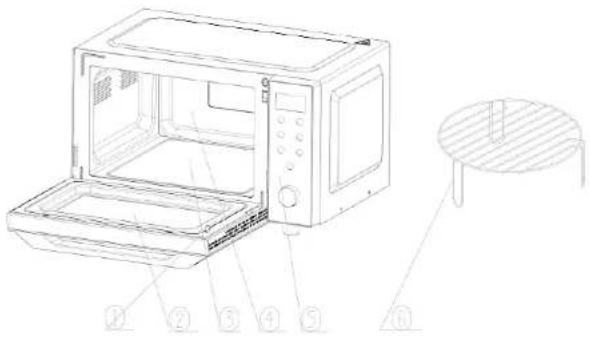
Fig./Img./Abb./Afb./Rys./Obr.1
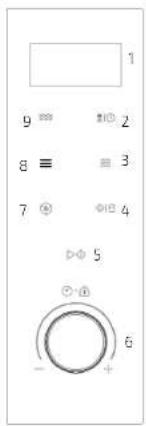
Fig./Img./Abb./Afo./Rys./Obr.2
www.cecotec.es
- SOMMAIRE
- Note:
- BEFORE USE
- Box content:
- OPERATION
- Control panel
- MAINS CONNECTION
- POWER SETTING
- CAUTION
- DEFROST/CLOCK
- Defrost
- CLOCK (24 hour clock)
- PRESET PROGRAMMES
- ENGLISHENGLISH
- GRILL FUNCTION
- REHEAT
- STOP/BLOQUED
- INICIO/+30s
- EXPRESS FUNCTION
- CHILD LOCK FUNCTION
- TIPS
- Food distribution
- Setting the cooking time
- Uniform cooking
- Allow idle time
- MICROWAVE-SAFE CONTAINERS
- CLEANING AND MAINTENANCE
- WARNING
- Details for cleaning door seals, cavity and adjacent parts
- Exterior
- Door
- Interior walls
- TROUBLESHOOTING
- RECYCLING OF ELECTRICAL AND ELECTRONIC EQUIPMENT
- COPYRIGHT
- SIMPLIFIED EU DECLARATION OF CONFORMITY
- FRANÇAISFRANÇAIS
- PIÈCES ET COMPOSANTS
- ÍNDICE
- PEÇAS E COMPONENTES
- NEDERLANDSNEDERLANDS
- ONDERDELEN EN COMPONENTEN
- Figuur 1
- PROBLEEMOPLOSSING
- WSTĘPNIE SKONFIGUROWANE PROGRAMY
- PARÇALAR VE BILEŞENLER
- Sekil 1
Brand : CECOTEC
Model : ProClean 6140
Category : Microwave Oven