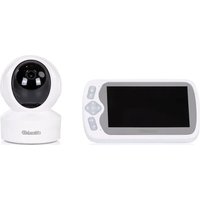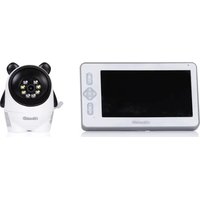
Titan - Baby monitors Chipolino - Free user manual and instructions
Find the device manual for free Titan Chipolino in PDF.


| Product Type | Digital Video Baby Monitor |
| Brand | Chipolino |
| Model | Titan |
| Display Resolution | 1920 x 1080 pixels (Full HD) |
| Screen Size | 7 inches |
| Camera Sensor | CMOS 3.0 megapixels |
| Night Vision | Yes, up to 5 m range |
| Outdoor Range (without obstacles) | Up to 300 m |
| Operating Frequency | 2.4 GHz |
| Transmission Power | 17 dBm |
| Power Supply | 2 power adapters (included) |
| Monitor Battery | Lithium-polymer 5000 mAh |
| VOX Function | Yes, automatic activation upon sound detection |
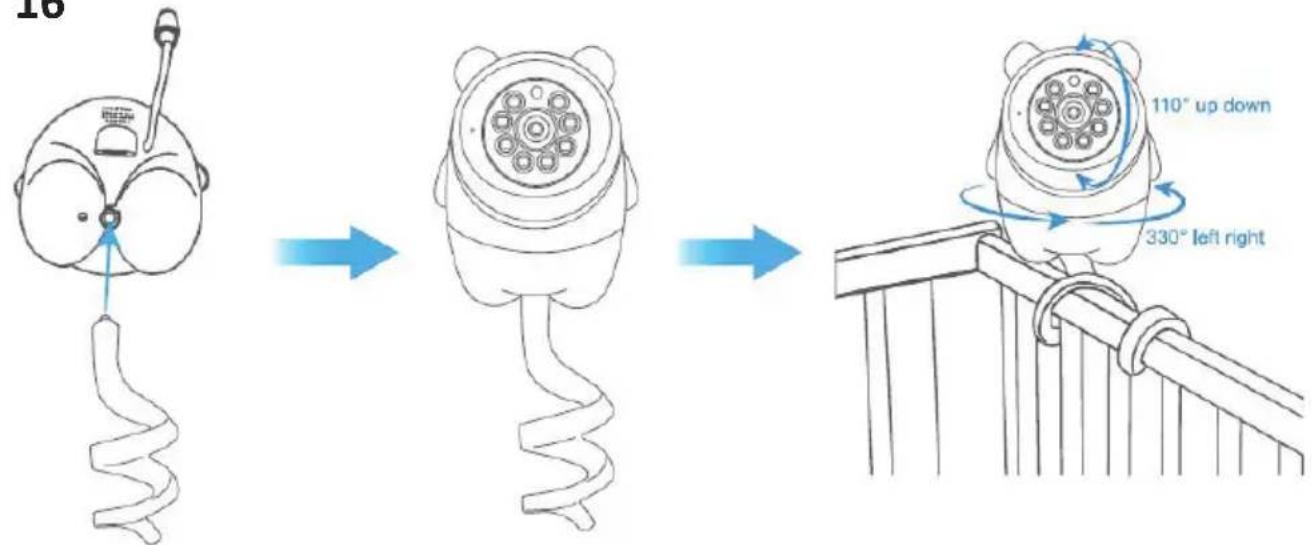
| Pan and Tilt Rotation | Pan 330°, tilt 110° |
| Two-way Communication | Yes |
| Temperature Sensor | Yes |
| Sound Alarm | Yes, 3 sensitivity levels |
| Temperature Alarm | Yes, adjustable range 18-30 °C |
| Lullaby Player | Yes, 8 lullabies |
| Video Recording | Yes, on TF card (not included) |
| Recording Format | .mp4, 1920x1080 |
| Number of Supported Cameras | Up to 4 |
| Maintenance | Clean with a dry cloth, do not immerse |
| Safety | Adult use only, keep out of reach of children |
Frequently Asked Questions - Titan Chipolino
User questions about Titan Chipolino
0 question about this device. Answer the ones you know or ask your own.
Ask a new question about this device
Download the instructions for your Baby monitors in PDF format for free! Find your manual Titan - Chipolino and take your electronic device back in hand. On this page are published all the documents necessary for the use of your device. Titan by Chipolino.
USER MANUAL Titan Chipolino
natural_image
Line drawing of a bear-shaped object with circular top and inner rings (no text or symbols)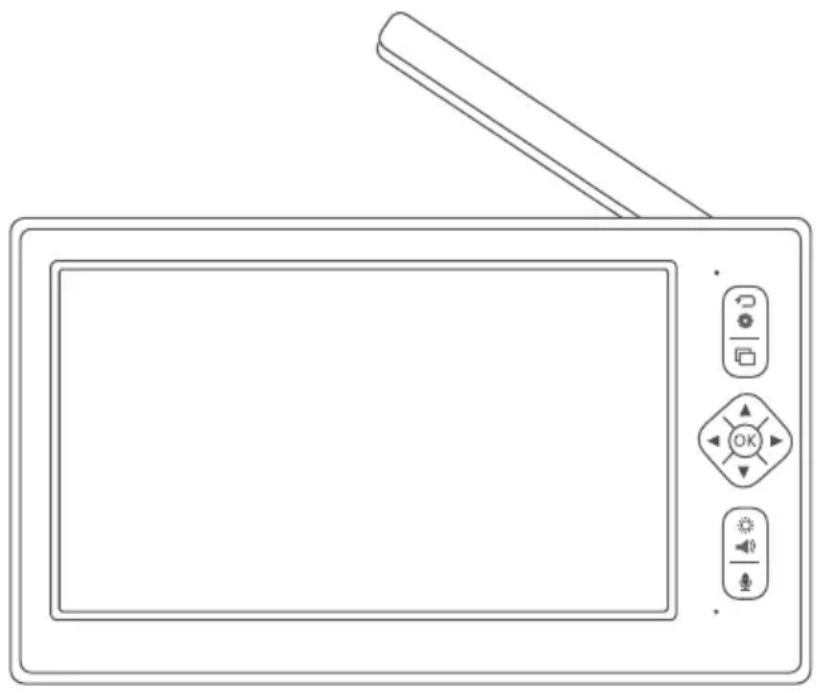
natural_image
Line drawing of a portable electronic device with control panel and buttons (no text or symbols)продуктов номер/ item number/ cikkszám/ número de artículo/ codice articolo/artikelnummer/ numéro d'article/ broj proizvoda/ број производа/ продуктов број/ numri i produktit/ αριθμός προϊόντος/ numărul produsului/ número de produto/productnummer/ číslo produktu/ ʒιθμέσευμήση διθμέση:
VIBEFTI02501WH/ JLT- D701
ФИГУРИ/ FIGURES/ ÁBRÁK/ CIFRAS/ FIGURE/ FIGUREN/ LES FIGURES/ ОБЛИЦИ/ ОБЛИЦИ/ FORMA/ FIGURE/ ФІГОΥΡΕΣ/ FIGURILE/ FIGURAS/ FIGUREN/ OBRÁZKY / ๑๒๐๓๕๖๖
1
natural_image
Line drawing of a portable electronic device with control buttons and a screen (no text or symbols)① x1 x1
natural_image
Line drawing of a bear-shaped object with circular components and central hub (no text or symbols)2
natural_image
Line drawing of a rectangular electronic component with two terminal pins (no text or symbols)3452 x2 x1
natural_image
Simple line drawing of a USB cable with two connectors (no text or symbols)○
[Non-Text]
2
9
ФИГУРИ/ FIGURES/ ÁBRÁK/ CIFRAS/ FIGURE/ FIGUREN/ LES FIGURES/ ОБЛИЦИ/ ОБЛИЦИ/ FORMA/ FIGURE/ ФІГОΥΡΕΣ/ FIGURILE/ FIGURAS/ FIGUREN/ OBRÁZKY / ๑๒๐๓๕๖๖
3

4
ФИГУРИ/ FIGURES/ ÁBRÁK/ CIFRAS/ FIGURE/ FIGUREN/ LES FIGURES/ ОБЛИЦИ/ ОБЛИЦИ/ FORMA/ FIGURE/ ФІГОΥΡΕΣ/ FIGURILE/ FIGURAS/ FIGUREN/ OBRÁZKY / ๑๒๐๓๕๖๖
flowchart
graph TD
    A["Camera"] --> B["Feeding"]
    B --> C["Sound Alarm"]
    C --> D["Temp. Alarm"]
    D --> E["Music"]
    F["Display"] --> G["Recording"]
    G --> H["Playback"]
    H --> I["System"]
    I --> J["Language"]

    K["Channel 1"] --> L["Channel 2"]
    L --> M["Channel 3"]
    M --> N["Channel 4"]

    O["Pairing, please wait..."]
    P["Pairing, please wait..."]
flowchart
graph LR
    A["Cameras"] --> B["Feeding"]
    B --> C["Sound Alarm"]
    C --> D["Temp. Alarm"]
    D --> E["Music"]
    F["Display"] --> G["Recording"]
    G --> H["Playback"]
    H --> I["System"]
    I --> J["Language"]

    K["Time Interval"] --> L["OFF 2.5H 3H 3.5H"]
    L --> M["4H 4.5H 3H 5.5H"]
    N["Cycle mode"] --> O["1 1"]
ФИГУРИ/ FIGURES/ ÁBRÁK/ CIFRAS/ FIGURE/ FIGUREN/ LES FIGURES/ ОБЛИЦИ/ ОБЛИЦИ/ FORMA/ FIGURE/ ФІГОΥΡΕΣ/ FIGURILE/ FIGURAS/ FIGUREN/ OBRÁZKY / ๑๒๐๓๔๕๖๖
flowchart
graph TD
    A["Camera"] --> B["Feeling"]
    B --> C["Sound Alarm"]
    C --> D["Tamp, Alarm"]
    D --> E["Music"]
    F["Display"] --> G["Recording"]
    G --> H["Playback"]
    H --> I["System"]
    I --> J["Language"]

    K["OFF"] --> L["LOW"] --> M["MEDIUM"] --> N["HIGH"]

    O["2024-10-17 19:58:36"] --> P["Photo"]
flowchart
graph LR
    A["Cameras"] --> B["Feeding"]
    B --> C["SoundAlarm"]
    C --> D["Temp, Alarm"]
    D --> E["Music"]
    F["Display"] --> G["Recording"]
    G --> H["Playback"]
    H --> I["System"]
    I --> J["Language"]

    K["ON"] --> L["OFF"]
    M["+/-"] --> N["+/-"]
    O["ON"] --> P["OFF"]
    Q["+/-"] --> R["+/-"]
    S["ON"] --> T["OFF"]
    U["+/-"] --> V["+/-"]
flowchart
graph LR
    A["Cameras"] --> D["Loftables"]
    B["Peeling"] --> D
    C["Sound Alarm"] --> D
    E["Temp. Alarm"] --> D
    F["Music"] --> D
    G["Display"] --> H["Soothing songs"]
    I["Recording"] --> H
    J["Playback"] --> H
    K["System"] --> H
    L["Language"] --> H
    D --> M["Loop Playback"]
    H --> M
flowchart
graph LR
    A["Camaries"] --> B["Feeding"]
    B --> C["Sound Alarm"]
    C --> D["Temp, Alarm"]
    D --> E["Music"]
    F["Display"] --> G["Recording"]
    G --> H["Playback"]
    H --> I["System"]
    I --> J["Language"]

    K["Dormancy"] --> L["1 Mix"]
    K --> M["10 Mix"]
    K --> N["30 Mix"]
    K --> O["OFF"]
ФИГУРИ/ FIGURES/ ÁBRÁK/ CIFRAS/ FIGURE/ FIGUREN/ LES FIGURES/ ОБЛИЦИ/ ОБЛИЦИ/ FORMA/ FIGURE/ ФІГОYPEΣ/ FIGURILE/ FIGURAS/ FIGUREN/ OBRÁZKY / ๑๒๐๓๔๕๖๖
12
flowchart
graph LR
    A["Camera"] --> B["Recording"]
    B --> C["Playback"]
    C --> D["System"]
    D --> E["Language"]
    F["Display"] --> G["Recording"]
    G --> H["Playback"]
    H --> I["System"]
    I --> J["Language"]

    K["Record by Camera Resolution Setup"] --> L["Camera 1 ON OFF"]
    K --> M["Camera 2 ON OFF"]
    K --> N["Camera 3 ON OFF"]
    K --> O["Camera 4 ON OFF"]
flowchart
graph LR
    A["Camera"] --> B["Feeling"]
    B --> C["Sound Alarm"]
    C --> D["Temp, Alarm"]
    D --> E["Music"]
    F["Display"] --> G["Recording"]
    G --> H["Playback"]
    H --> I["System"]
    I --> J["Language"]

    K["REC_20240101001710_720_F.ts"] --> L["REC_20240101001728_720_F.ts"]
    M["REC_20240101001827_720_F.ts"] --> N["REC_20240101001928_720_F.ts"]
    O["REC_20240101002028_720_F.ts"] --> P["REC_20240101002128_720_F.ts"]
    Q["REC_20240101002229_720_F.ts"] --> R["REC_20240101002229_720_F.ts"]

    S["Camera"] --> T["Tip"]
    U["Display"] --> T
    V["Recording"] --> T
    W["Playback"] --> T
    X["System"] --> T
    Y["Language"] --> T

    T --> Z["Please insert SD card"]
14- 1
ФИГУРИ/ FIGURES/ ÁBRÁK/ CIFRAS/ FIGURE/ FIGUREN/ LES FIGURES/ ОБЛИЦИ/ ОБЛИЦИ/ FORMA/ FIGURE/ ФІГОΥΡΕΣ/ FIGURILE/ FIGURAS/ FIGUREN/ OBRÁZKY / ๑๒๐๓๕๖๖
flowchart
graph LR
    A["Date/Time"] --> B["Reset"]
    B --> C["Advance Settings"]
    C --> D["Version"]
    D --> E["Time Format: 12 hour, 24 hour"]
    E --> F["Cancel"]
    E --> G["OK"]
flowchart
graph LR
    A["Date/Time"] --> B["Reset"]
    B --> C["Advance Settings"]
    C --> D["Version"]
    D --> E{Are you sure to restore factory setting?}
    E -->|Yes| F["OK"]
    E -->|No| G["Cancel"]
flowchart
graph LR
    A["Date/Time"] --> B["Reset"]
    B --> C["Advance Settings"]
    C --> D["Version"]
    D --> E["Picture Flip"]
    E --> F["Monitor: ✓ ✓"]
    F --> G["Camera 1: ✓ ✓ ON OFF"]
    F --> H["Camera 2: ✓ ✓ ON OFF"]
    F --> I["Camera 3: ✓ ✓ ON OFF"]
    F --> J["Camera 4: ✓ ✓ ON OFF"]
flowchart
graph LR
    A["Data/Time"] --> B["Reset"]
    B --> C["Advance Settings"]
    C --> D["Version"]
    D --> E["Release Date"]
    E --> F["Serial Number"]
ФИГУРИ/ FIGURES/ ÁBRÁK/ CIFRAS/ FIGURE/ FIGUREN/ LES FIGURES/ ОБЛИЦИ/ ОБЛИЦИ/ FORMA/ FIGURE/ ФІГОΥΡΕΣ/ FIGURILE/ FIGURAS/ FIGUREN/ OBRÁZKY / ๑๒๐๓๕๖๖๖
15
16
ВНИМАНИЕ! ПРЕДУПРЕЖДЕНИЯ!
ТОЗИ ПРОДУКТ Е ПРЕДНАЗНАЧЕН ДА ВИ ПОМАГА И НЕ МОЖЕ ДА БЪДЕ ЗАМЕСТИТЕЛ НА ИСТИНСКИ И ОТГОВОРЕН НАДЗОР ОТ ВЪЗРАСТЕН!
TO ASSURE SAFE USAGE OF THIS PRODUCT FOLLOW ALL WARNINGS, INSTRUCTIONS AND RECOMMENDATIONS GIVEN IN THIS USER MANUAL!
WARNING! SAFETY INSTRUCTIONS!
THIS PRODUCT IS INTENDED TO ASSIST YOU ANDCANNOT REPLACE PROPER AND RESPONSIBLE ADULT SUPERVISION!
USE THE PRODUCT ONLY AS INTENDED!
✿ WARNING! THIS PRODUCT MUST BE USED ONLY BY ADULTS!
WARNING! THIS DEVICE IS NOT A TOY AND MUST BE KEPT OUT OF CHILDREN'S REACH! Do not allow children to play with the camera!
✿ WARNING! NEVER PLACE THE CAMERA INSIDE THE CRIB OR CHILD'S BED!
WARNING! ALWAYS KEEP THE ADAPTERS, PARENT AND BABY UNITS (MONITOR AND CAMERA) OUT OF REACH OF CHILDREN TO AVOID INJURY OR SUFFOCATION!
✿ WARNING! NEVER USE THE BABY MONITOR IN HUMID ENVIRONMENTS, NEAR WATER, OR IMMERSED IN WATER!
✿ WARNING! USE THE CAMERA IN INDOOR ENVIRONMENTS ONLY! The camera is not waterproof and not suitable for outdoor use!
✿ WARNING! ALWAYS CHECK THE CONDITION OF ALL PARTS BEFORE USE. Do not use the product if any parts are missing or damaged!
✿ WARNING! KEEP AWAY FROM FIRE! To avoid overheating, keep the camera and adapters away from heat sources or appliances that emit heat.
✿ WARNING! DO NOT PLACE ADAPTERS WHERE A CHILD COULD STEP ON THEM. Impact to a plugged-in adapter can cause it to break and poses risk of serious injury!
Use only the adapters provided by the manufacturer.
✿ Mount the camera securely on load-resistant surfaces. Do not mount the camera above a crib or near water.
Do not cover or block the camera's ventilation openings.
If using a cordless phone, wireless video device, Wi-Fi network, microwave, or Bluetooth devices operating at 2.4 GHz, and interference occurs in the transmitter or receiver, move the baby unit (camera) further away until the interference disappears.
Do not use spare parts or components not provided by the manufacturer! The manufacturer is not responsible for safety if non-original or unapproved parts are used.
Do not make changes or modifications to the product! Do not alter the product's electrical system or add electrical components! If needed, contact the seller or authorized service center for support.
Before plugging in the adapters, check that the voltage listed on them matches your local mains voltage. Otherwise, the product may be damaged!
Do not use damaged adapters.
Do not remove the labels or warnings placed on the product! They are important for safe use.
Do not expose the camera to high temperatures, direct sunlight, or moisture.
When using a memory card: switch off the camera before inserting/removing the card.
- Keep plastic packaging away from children to avoid the risk of suffocation.
SAFETY WARNINGS FOR LITHIUM-POLYMER BATTERIES
The adapter must be connected ONLY by an adult!
Do not bend, puncture (especially with metal objects), or otherwise damage the battery.
◆ Charge the battery only using the adapters provided by the manufacturer!
Do not allow short-circuiting!
◆ Store at room temperature.
Do not expose to direct sunlight!
✿ Never leave a charging battery unattended!
NOTE: The battery compartment is located on the back of the parent unit.
TIP: Fully charge the battery before first use to preserve its condition and extend its lifespan.
IMPORTANT! To replace the battery, please contact the retailer or an authorized service center!
WARNING! Upon the end of this product's life cycle, do not dispose of it with regular household waste. Instead, take it to an official collection point for recycling. Waste generated from damaged electronic and video devices, batteries, and adapters must be collected separately.
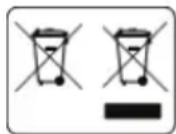
Do not dispose of them in containers for mixed household waste! Dispose of them only at designated collection points. This will be your significant contribution to protecting the environment and reducing the potential harmful effects of substances contained in batteries and adapters on the environment and human health.
PRODUCT SPECIFICATION
◆ Digital video baby monitor operating at 2.4 GHz;
◆ Transmission power: 17 dBm
◆ Resolution: 1920x1080P pixels
- Range (without obstacles): up to 300 m in open space;
Adapters: 2 pcs;
◆ Li-Pol battery: 5000 mAh
◆ 7" FULL HD video display;
◆ Camera: 3.0-megapixel CMOS sensor;
◆ Night vision: range of 5 m;
◆ Temperature sensor;
✿ VOX (automatic activation of the baby unit upon sound detection);
- Pan (330°) and tilt (110°) camera control (Pan & Tilt);
◆ Alarm function;
Music player;
◆ Recording functions;
◆ Two-way communication;
◆ 6 LED lights;
◆ Dormant mode (sleep mode);
◆ Multi-language menu
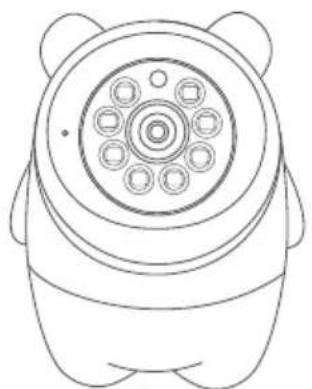
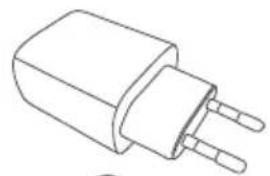
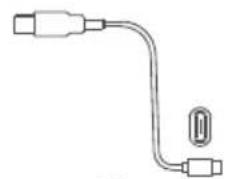
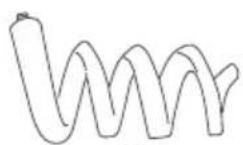
1. MAIN COMPONENTS
The package includes:
- Monitor (1 pc)
- Camera (1 pc)
- Power plug adapters (2 pcs)
- USB cable (2 pcs)
- Silicone camera holder (1 pc)
Note: Please ensure all components are present.
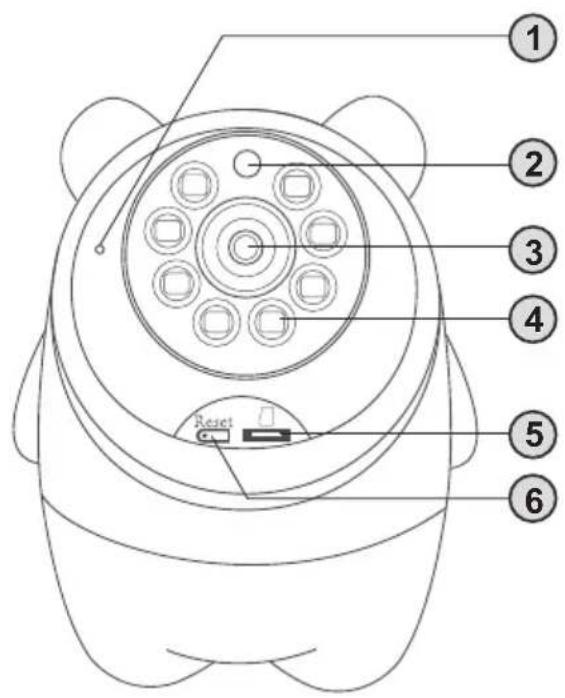
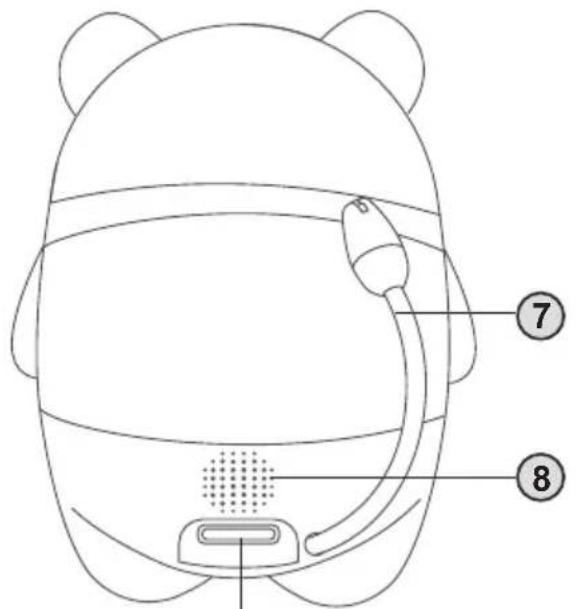
2. CAMERA BUTTONS AND INTERFACE
- Microphone
- Night vision sensor
- Lens
- LED night vision lights
- TF card slot (memory card)
- Reset button
- Temperature sensor
- Speaker
- Type-C charging port
Note: The reset button is used to clear the connection between the camera and the monitor.
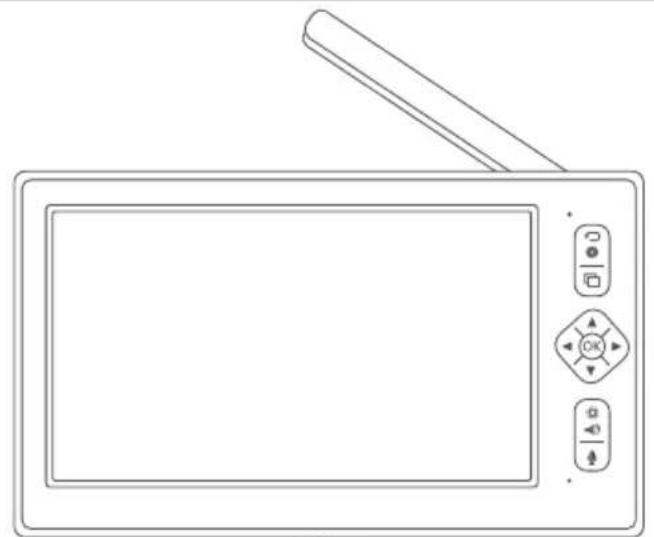
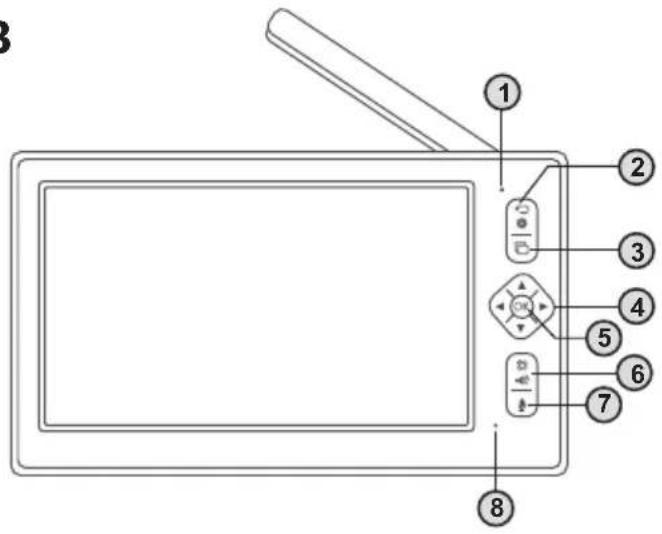
3. MONITOR BUTTONS AND INTERFACE
1) Indicator Light:
- The light glows green during normal operation and red while charging.
- Once the battery is fully charged, the light changes to green.
2) "Back" Button:
- In monitoring mode, press to enter the menu.
- In the main menu, press to return to the previous menu.
3) Camera Switch Button:
- Press to switch from one camera to the next.
- The active camera channel will be displayed on the status bar.
Note: If only one camera is connected, the button will have no effect.
4) Directional Control Button:
- In monitoring mode, press the arrows to pan or tilt the camera.
- In the main menu, use it to navigate.
5) "OK" Button:
- Press to enter the menu and confirm selections/settings.
6) Brightness and Volume Button:
- Press to display brightness and volume settings.
- Use the up/down arrows to adjust volume.
- Use the left/right arrows to adjust screen brightness.
7) Two-Way Talk Button:
- Press and hold the button to speak.
8) Microphone
9) External Antenna:
- Raise the antenna for a better signal.
10) Speaker
11) Power Button:
- Long press to turn the device on or off.
- Short press to activate standby mode.
12) Card Slot
13) Charging Port
14) Monitor Stand
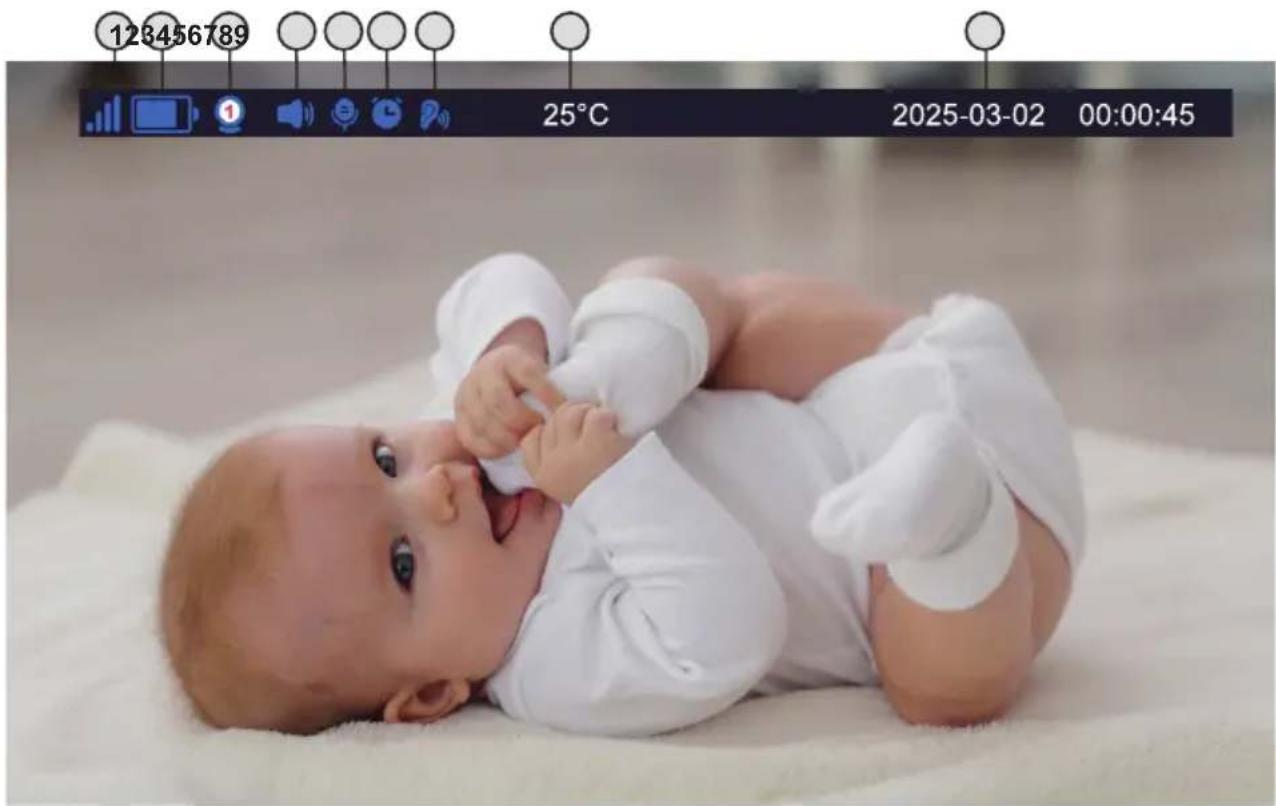
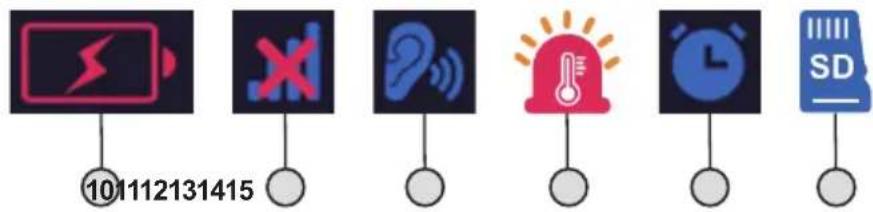
4. STATUS BAR
1) Signal strength
2) Battery status
3) Camera (selected channel)
4) Sound
5) Speaker – enabled
6) Feeding reminder activated
7) Sound detection - activates when VOX function is enabled
8) Room temperature
9) Date and time
10) Low battery warning
11) No signal
12) Sound alarm
13) Temperature alarm
14) Feeding reminder
15) SD card detected in the camera
5. CONNECTING THE CAMERA TO THE MONITOR
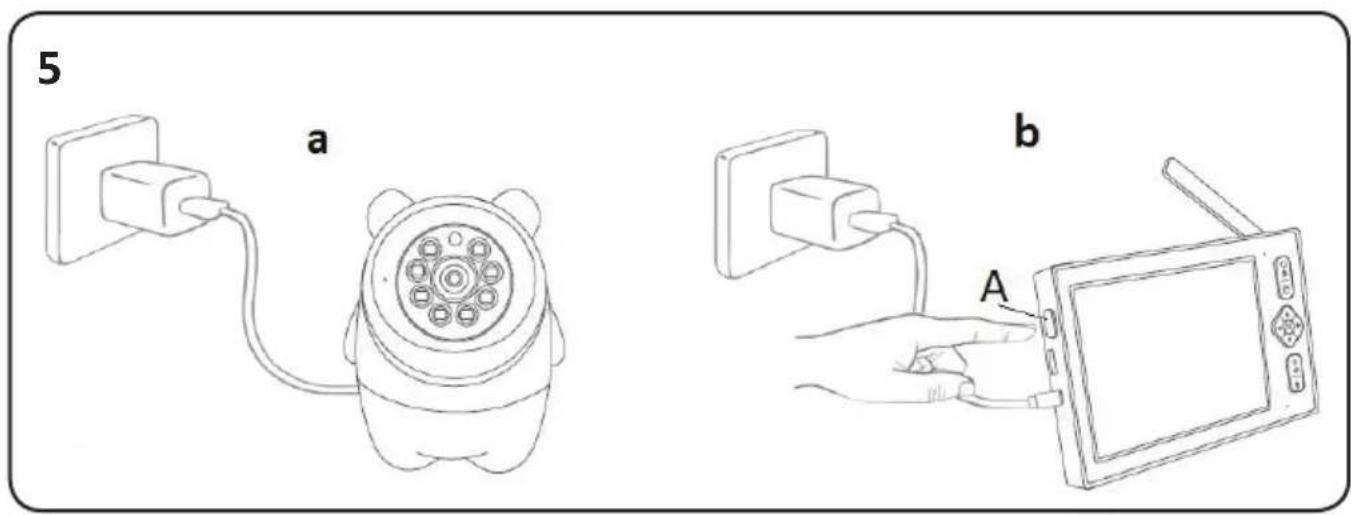
5a) Plug the camera into a power outlet. The camera will perform a self-check and begin moving up/down and left/right.
5b) Press and hold Button A to turn on the monitor.
IMPORTANT! Make sure the monitor is fully charged before connecting it to the camera for the first time.
Once the camera and monitor are connected, the video will appear on the screen. You can now start using the baby monitor.
6. ADDING A CAMERA
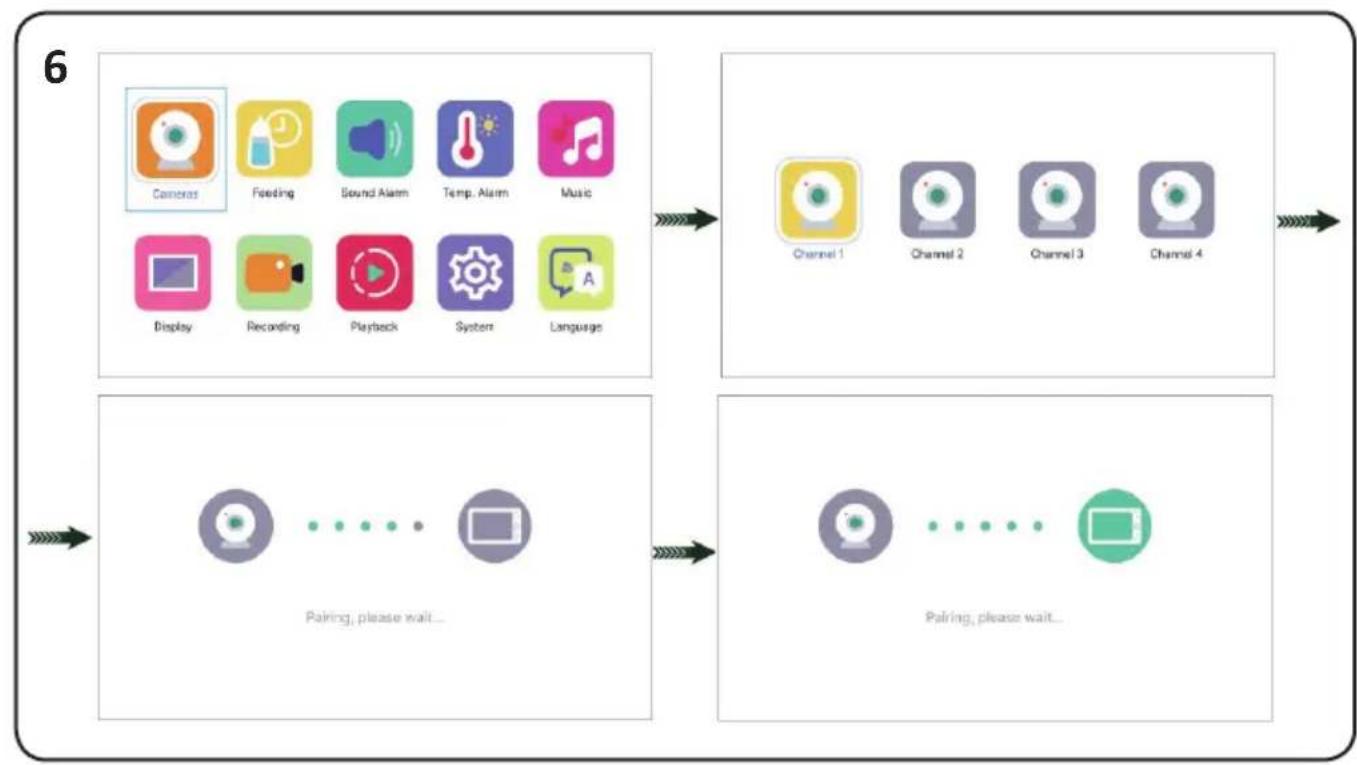
Go to the main menu and select Cameras → choose Channel 1 → press the OK button to start pairing (Pairing, please wait...) → turn on the camera → Connected.
IMPORTANT! If the camera does not connect successfully, check if it is turned on. If it is on, press the Reset button on the camera and make sure the distance between the monitor and the camera is within 2 meters. Then repeat the above steps to add the camera.
If you want to connect more than one camera, follow the same steps, selecting Channel 2, Channel 3, or Channel 4 accordingly.
7. SETTING THE FEEDING TIMER
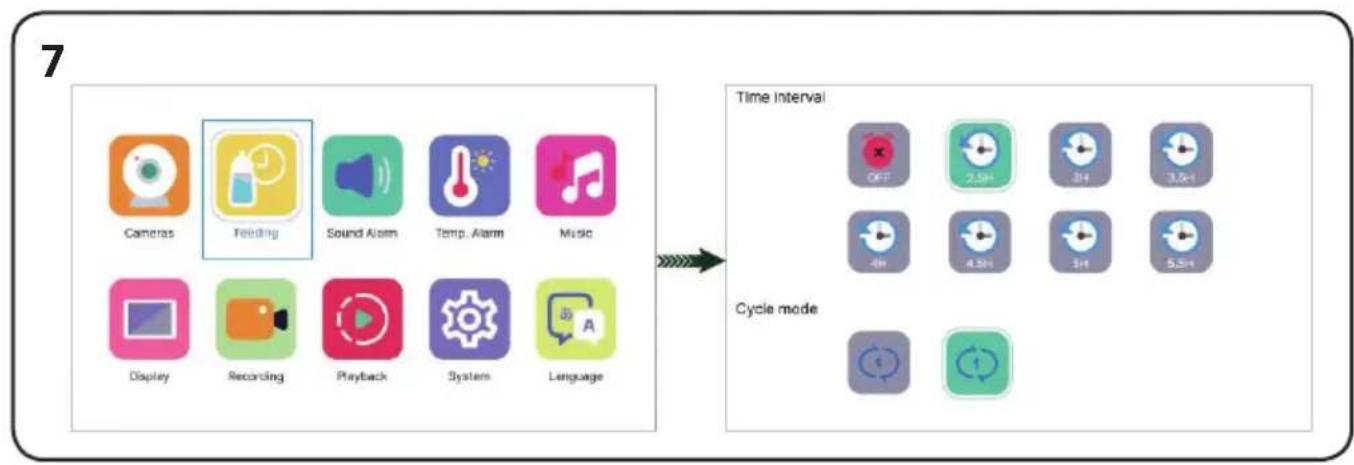
Enter the menu and select Feeding Timer → use the up/down arrows to set the time → use the left/right arrows to select: single timer / recurring timer / enable or disable clock.
Note: You can choose either a one-time timer or a repeating mode.
If you do not wish to use the feeding timer function, please turn it off.
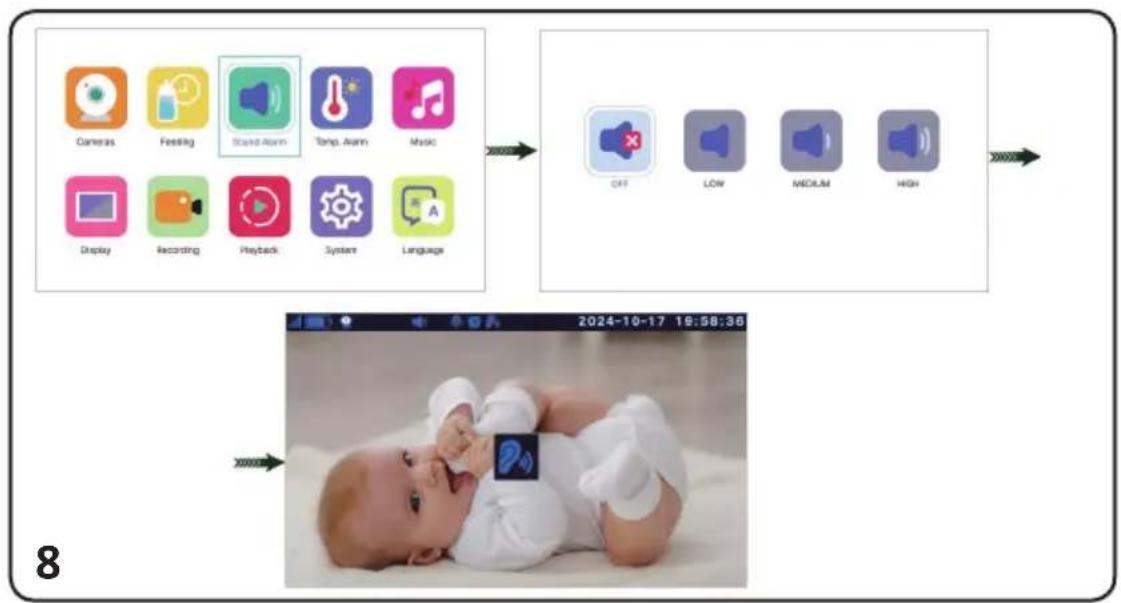
8. SOUND ALARM
Go to the main menu and select Sound Alarm, then choose one of the three sound detection levels:
- LOW – The alarm is triggered by loud crying.
- MEDIUM – The alarm is triggered by a raised voice.
- HIGH – The alarm is triggered by normal conversation.
When the camera detects a sound level (dB) that exceeds the selected threshold, the monitor's
LCD screen will light up and display an icon in the center of the screen.

An alarm sound (“beep-beep”) will play for about 30 seconds. If the camera continues to detect sound above the threshold, the alarm will repeat continuously.
Press any button on the monitor to stop the sound alarm. You can also go to the main menu → Sound Alarm to disable the feature.
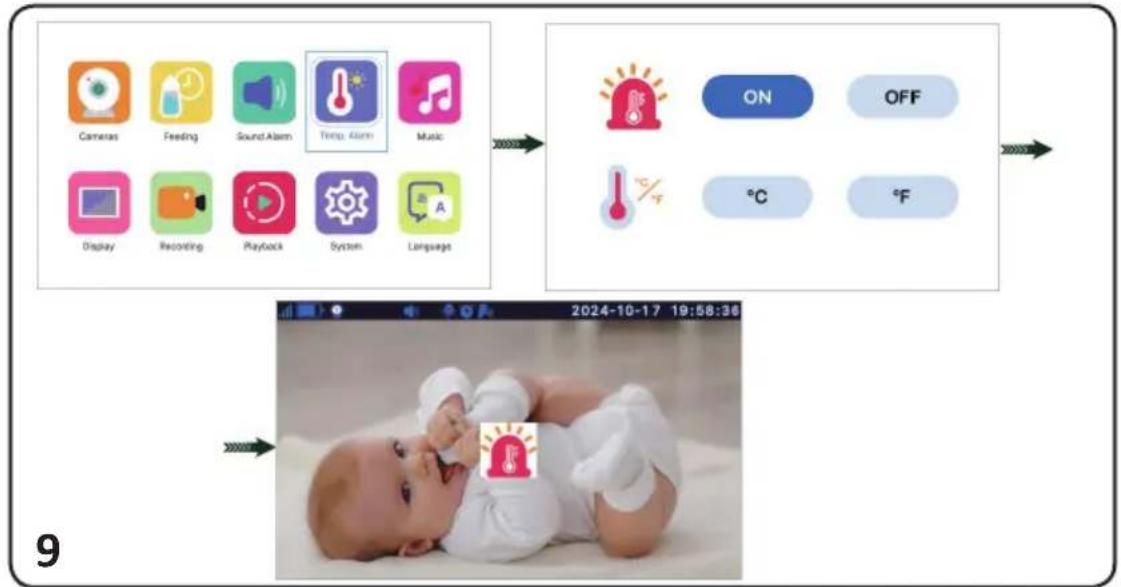
9. TEMPERATURE ALARM
Go to the main menu and select Temp. Alarm to enable or disable the temperature alarm. Use the arrow keys to set the temperature in degrees Celsius (°C) or Fahrenheit (°F).
The default allowable temperature range is between 18–30°C.
When the temperature falls below or rises above this range, an alarm will be triggered. The LCD screen will turn on and display the icon A "beep-beep" alarm sound will be heard for about 30 seconds.
If the temperature remains outside the acceptable range, the alarm will continue to sound.
Press any button to stop the alarm.
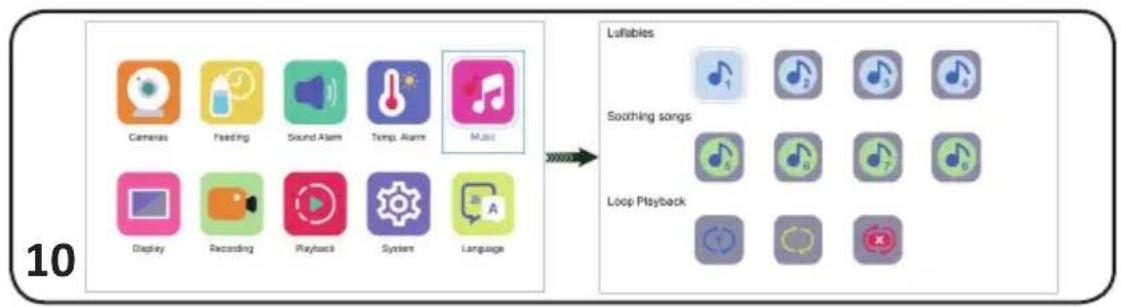
10. PLAYING A LULLABY
Go to the main menu and select Music. Choose a lullaby from #1 to #8.
You can select: Single play (icon with a blue arrow) or Sequential repeat (icon with a yellow arrow.
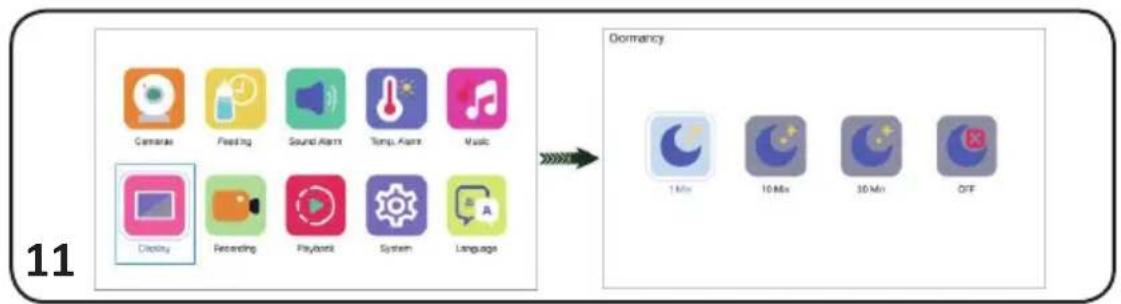
11. DISPLAY SETTINGS
Go to the main menu and select the Display settings icon. The default screen-off (sleep mode) time is 1 minute. Use the arrow keys to choose between 1, 10, or 30 minutes.
To disable this feature, select the OFF icon.
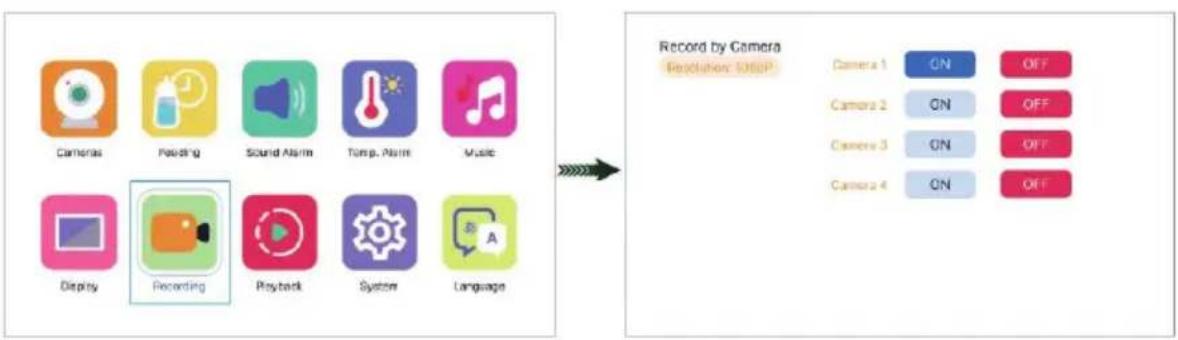
12. VIDEO RECORDING
Go to the main menu and select the Recording icon. Each video file will have a duration of 1 minute.
If you do not need this function, you can disable it.
Note: Before recording, set the monitor's date and time according to your local time.
When inserting a TF card for the first time, a prompt to format the card will appear. Please select OK.
A camera with a TF card can record in 1920×1080 resolution in .mp4 format.
WARNING! Recordings cannot be played on the monitor, but can be viewed on a computer.
WARNING! The SD card will only be recognized if it is inserted before turning on the camera.
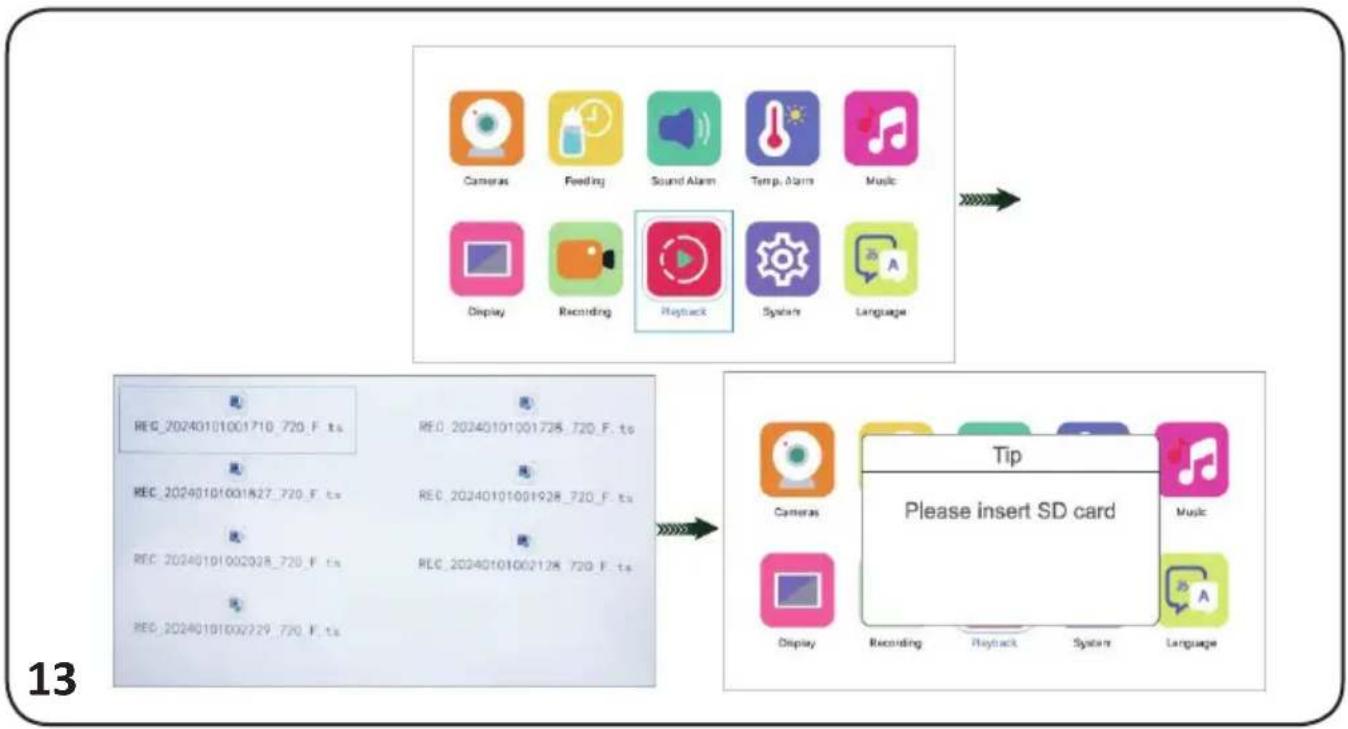
13. VIDEO PLAYBACK
Enter the menu and select the Playback icon. Locate the video you wish to play and press OK.
If there is no SD card inserted, you cannot access playback mode. A message will appear: "Please insert SD card".
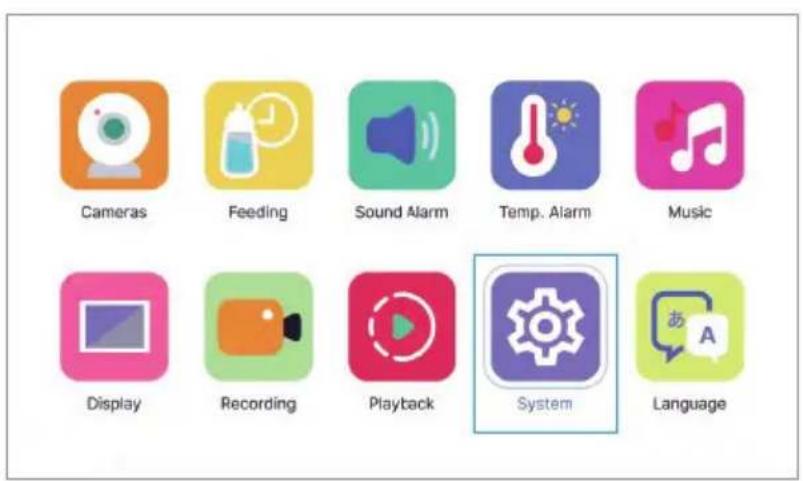
14. SYSTEM SETTINGS
14-1: Go to the main menu and select System Settings to access the configuration menu.
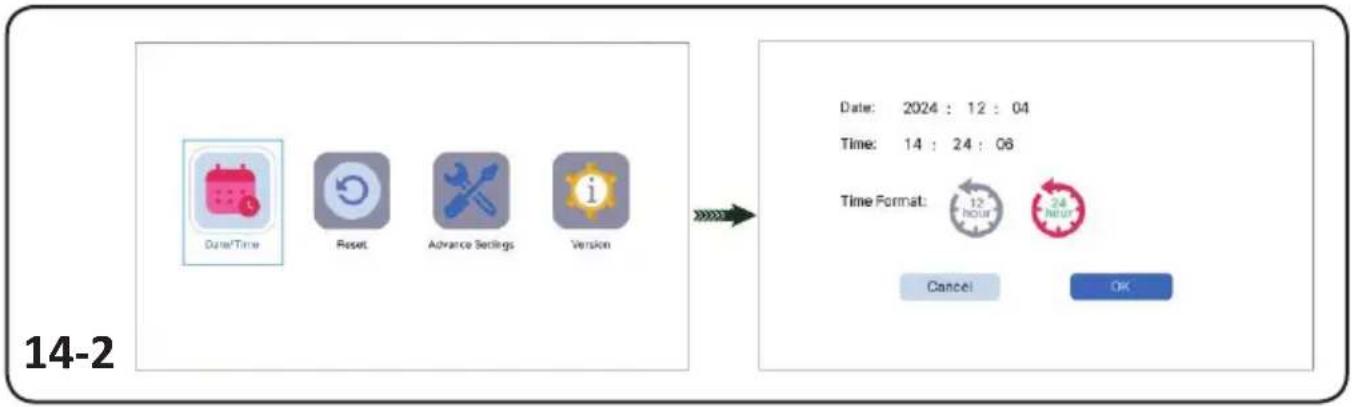
14-2: Date and Time Setup – Use the left/right arrows to select the date or time field and the up/down arrows to adjust the values.
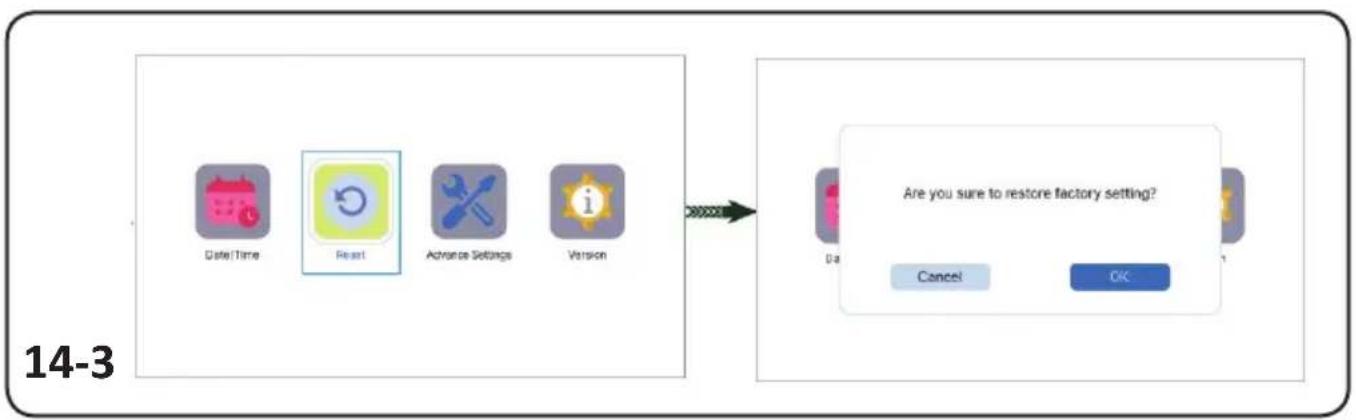
14-3: Restore Factory Settings – Select Reset.
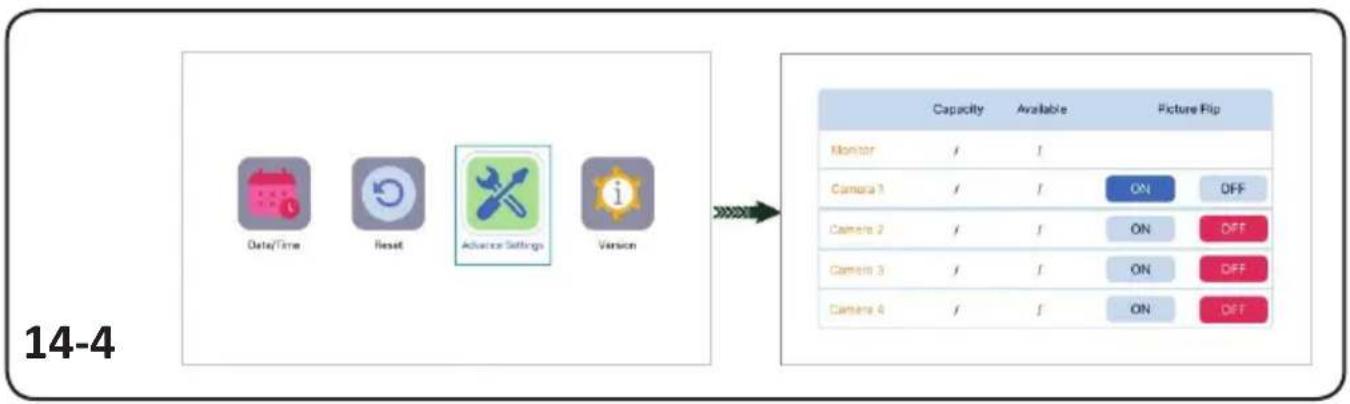
14-4: Advanced Settings:
• View the total and available capacity of the TF card.
- Picture Flip – You can enable or disable this option.
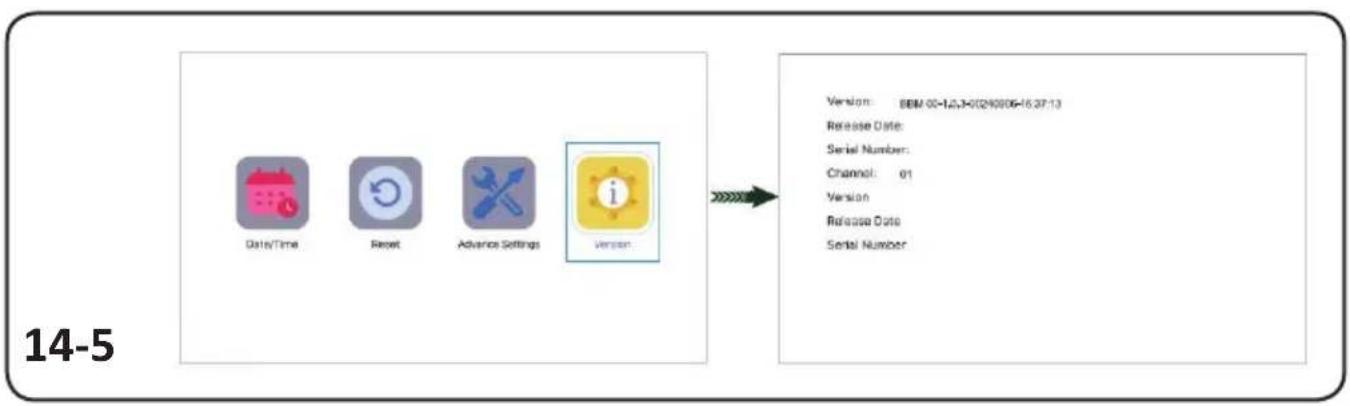
14-5: Version Information – Displays the current firmware version of the device.
15. LANGUAGE SETTINGS
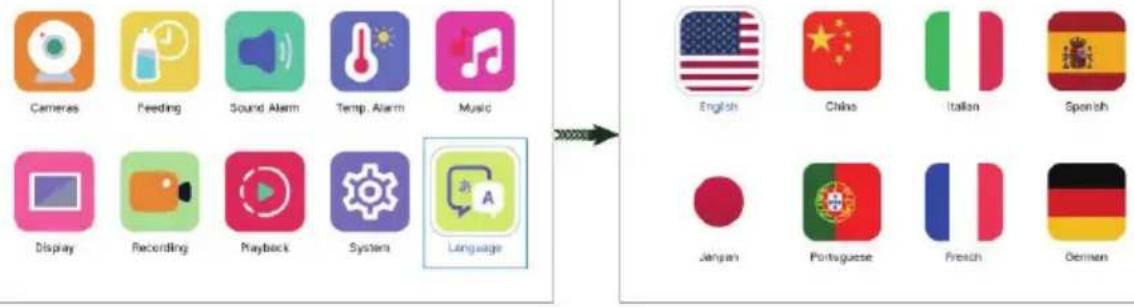
Go to the main menu and select Language to choose your preferred language.
Once confirmed, the monitor will restart automatically.
Note: Ensure the monitor has sufficient battery before changing the language.
Note: The voice prompts from the camera will synchronize with the monitor's language.
16. MOUNTING THE CAMERA WITH THE STAND
FREQUENTLY ASKED QUESTIONS
1. The LCD monitor does not display the camera.
- Check if the camera is turned on.
- If the camera is on, reset it to factory settings and re-add it as described in section 6 "ADDING A CAMERA."
2. There is an unpleasant sound during two-way communication.
Answer:
- If the camera and monitor are less than 2 meters apart, noise may occur — this is a normal physical phenomenon. Move the monitor at least 2 meters away from the camera.
- Reduce the monitor's volume.
3. The monitor's battery drains quickly.
- If the Dormant mode (sleep mode) is not activated, the monitor will stay on constantly, which causes the battery to drain faster. We recommend enabling Dormant mode with a timer set to 10 or 30 seconds to conserve battery life.
- The screen brightness may be too high – try reducing it.
4. The signal range between the camera and the monitor is too short.
- Outdoors, the camera and monitor can communicate over a distance of up to 300 meters.
- Indoors, the range may be reduced due to interference (e.g., multiple walls or wireless devices).
CARE AND MAINTENANCE INSTRUCTIONS
Do not step on the power cord or allow it to become pinched, especially at the plugs, power outlet, or the point where the cord exits the device.
✿ Position both the parent and baby units, as well as the power adapters, to allow adequate ventilation. Do not cover them with clothing, towels, blankets, or similar materials.
Always unplug the devices during thunderstorms or if they will not be used for an extended period.
Do not immerse the parent or baby units in water, and do not wash them under running water.
- Clean the baby monitor parts and adapters with a dry cloth after disconnecting the devices and unplugging the adapters from the power outlet.
❖ Fingerprints or dust on the baby unit's lens may affect camera performance. Avoid touching the lens with your fingers.
◆ Store the product in a cool and dry place.
A TERMÉK BIZTONSÁGOS HASZNÁLATÁNAK BIZTOSÍTÁSA ÉRDEKÉBEN KÖVESSE A FELHASZNÁLÓI KÉZIKÖNYVBEN TALÁLHATÓ ÖSSZES FIGYELMEZTETÉST, UTASÍTÁST ÉS AJÁNLÁST!
FIGYELEM! BIZTONSÁGI UTASÍTÁSOK!
EZ A TERMÉK SEGÍTSÉGNYÚJTÁSRA SZOLGÁL, ÉS NEM HELYETTESÍTI A FELELŐSSÉGTELJES FELNÖTT FELÜGYELETET!
A TERMÉKET KIZÁRÓLAG RENDELTETÉSSZERÜEN HASZNÁLJA!
SPÉCIFICATIONS DU PRODUIT
2) Butoni "Kthehu" (Back):
10. REDAREA UNUI CÂNTEC DE LEAGĂN
11. SETĂRI ALE ECRANULUI
Câmera: sensor CMOS de 3,0 megapixels
WAARSCHUWING! VEILIGHEIDSINSTRUCTIES!
DIT PRODUCT IS BEDOELD ALS HULPMIDDEL EN KAN GEEN VERANTWOORDE EN ADEKWATE TOEZICHT VAN EEN VOLWASSENE VERVANGEN!
GEBRUIK DIT PRODUCT ALLEEN VOOR HET DOEL WAARVOOR HET IS BEDOELD!
Śu Śu Śu Śu Śu Śu Śu Śu Śu Śu Śu Śu Śu Śu Śu Śu Śu Śu Śu Śu Śu Śu Śu Śu Śu Śu Śu Śu Śu Śu Śu Śu Śu Śu Śu Śu Śu Śu Śu Śu Śu Śu Śu Śu Śu Śu Śu Śu Śu Śu Śu Śu Śu Ś uŚŚŚŚŚŚŚŚŚŚŚŚŚŚŚŚŚŚŚŚŚŚŚŚŚŚŚŚŚŚŚŚŚŚŚŚŚŚŚŚŚŚŚŚŚŚŚŚŚŚŚŚŚŚŚŚŚŚŚŚŚŚŚŚŚŚś Śu Śu Śu Śu Śu Śu Śu Śu Śu Śu Śu Śu Śu Śu Śu Śu Śu Śu Śu Śu Śu Śu Śu Śu Śu Śu Śu Śu Śu Śu Śu Śu Śu Śu Śu Śu Śu Śu Śu Śu Śu Śu Śu Śu Śu Śu Śu Śu Śu Śn
modification of the following forms:

உஷாளு காயை (,,உஷ-உஷ) உஷங்சஞஞஞஞஞஞஞஞஞஞஞஞஞஞஞஞஞஞஞஞஞஞஞஞஞஞஞஞஞஞஞஞஞஞஞஞஞஞஞஞஞஞஞஞஞஞஞஞஞஞ 30 இன.
Toru Kiyadzghsghmsh gsmhjds sd gns356mbbl dngnds, gubasdn 33ms3 gssgndgmydls bdsghml.
azimuths 53000000000000000000000000000000000000000000000000000000000000000000000
- grades in the design of the image flip - has more than 56.
14-5: 3961000 n63m7d5n5 - sh3g605 dm7ym7nmm7n5 nd4n65m7 g3n7d3g7n5 3961005.
natural_image
Line drawing of a panda-shaped device and its screen (no text or symbols)DECLARATION OF CONFORMITY
I the undersigned Nina Mitkova, General Manager of Chipolino Ltd., with its place of business at 1 Golyamokonarsko Shosse Str., s. Tzaratzovo, Maritza Municipality, Plovdiv, Bulgaria, as being recognized as the manufacturer according to the Consumer Protection Law, hereby
DECLARE
The product Digital Video Baby Monitor Model "TITAN" with its item No Ne VIBEFTI02501WH/ JLT- D701, for which this declaration is about, complies with The European Community and it has been manufactured in accordance with the requirements of:
√ Regulation (EC) No 1907/2006 of the European Parliament and of the Council concerning the Registration, Evaluation, Authorisation and Restriction of Chemicals (REACH)
√ Regulation (EU) 2023/988 of the European Parliament and on general product safety;
√ Directives of the European Parliament and the Council:
√ 2014/53/EO, about a radio equipment,
√ 2011/65/EU, about a restriction of the use of certain hazardous substances in electrical and electronic equipment (RoHS);
√ European Standards:
√ EN IEC 62321-4:2013+AMD1:2017
√ EN IEC 62321-5:2014
√ EN IEC 62321-6:2015
√ EN IEC 62321-7-1:2015
√ EN IEC 62321-7-2:2017
√ EN IEC 62321-8:2017
√ EN IEC 62368-1:2020+A1:2023
√ ETSI EN 62311:2020
√ EN 55032:2015/A11:2020
√ EN IEC 62368-1:2020+A1:2023
√ ETSI EN 62311:2020
√ EN 55032:2015/A11:2020
√ ETSI EN 300 328 V2.2.2 (2020-02)
√ EN 55035:2017/A1:2020
√ EN 61000-3-3:2013/A1:2019/A2:2021
√ EN IEC 61000-3-2:2019/A1:2021
The conformity of the product is certified with:
√ Certificate of conformity No BT25054086401EC/23.05.2025, issued by Fujian Berton Testing Service Co., Ltd., China;
√ Test report with No BT25054086401EN/ 23.05.2025, issued by Fujian Berton Testing Service Co., Ltd., China.
√ Test report with № BT25054086402EN/ 23.05.2025, issued by Fujian Berton Testing Service Co., Ltd., Китай
√ Certificate of conformity No CTG2505270864D_SC07AY/23.05.2025, issued by Shenzhen CTG Testing co., LTD., China
√ Test report with No CTG2505270864D_SR04AY/ 23.05.2025., issued by Shenzhen CTG Testing co., LTD., China;
√ Test report with № CTG2505270864D_SR05AY/ 23.05.2025, issued by Shenzhen CTG Testing co., LTD., China;
Test report with No CTG2505270864D_SR06AY/ 23.05.2025, issued by Shenzhen CTG Testing co., LTD., China;
√ Test report with No CTG2505270864D_SR07AY/ 23.05.2025, issued by Shenzhen CTG Testing co., LTD., China;
The product is marked with CE.
The product Digital Video Baby Monitor Model "TITAN" with its item No No VIBEFTI02501WH/ JLT-D701 allows you to monitor your baby at any time through audio, camera, and a color video surveillance monitor.
Main characteristics:
Frequency range: 2.4 GHz* 3.0-megapixel camera*3.0-megapixel CMOS sensor * 6 LED lights * Pan and Tilt control * Two-way audio support * Power supply: DC 5V, 1A * Temperature sensor * Multi-language menu
The product Digital Video Baby Monitor Model "TITAN" with its item No Ne VIBEFTI02501WH/ JLT- D701, for which this declaration is about, is safe for the consumers and does not present any risk for the health during its use in accordance with the manufacturer's instruction manuals for use and servicing.
Chipolino
Производител / Manufacturer / Gyártó / Fabricante / Produttore / Hersteller / Fabricant / Proizvođač / Произвођач / Производител / Prodhues / Катаσκευαστής / Producător / Fabricante / Fabrikant / Výrobce / მნარმობელი:
ЧИПОЛИНО ЕООД