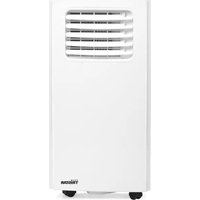
AC-5709 - Air Conditioning TRISTAR - Free user manual and instructions
Find the device manual for free AC-5709 TRISTAR in PDF.


| Product Type | Single air conditioner |
| Brand | Tristar |
| Model | AC-5709 |
| Nominal Cooling Capacity | 2.60 kW |
| Nominal Power Input Cooling | 1.000 kW |
| Energy Efficiency Ratio (EER) | 2.60 |
| Sound Power Level | 65 dB(A) |
| Refrigerant | R290, 0.16 kg |
| Global Warming Potential (GWP) | 3 |
| Operating Modes | Cooling, Dehumidification, Fan |
| Temperature Range Cooling | 16 °C to 31 °C |
| Fan Speeds | Low and High |
| Programmable Timer | 0-24 hours, on/off |
| Remote Control Included | Yes (AAA batteries not included) |
| Connectivity | Wi-Fi via Connected at Home app |
| Washable Air Filter | Cleaning recommended every 2 weeks |
| Condensate Water Drainage | Manual via drain plug (internal tank) |
| Full Water Tank Alarm | Yes (indicator light) |
| Power Supply | Grounded mains socket (230 V, 50 Hz) |
| Installation | Requires hot air exhaust hose to outside |
| Intended Use | Indoor, domestic |
| Weight | Approx. 25 kg (estimate) |
Frequently Asked Questions - AC-5709 TRISTAR
User questions about AC-5709 TRISTAR
0 question about this device. Answer the ones you know or ask your own.
Ask a new question about this device
Download the instructions for your Air Conditioning in PDF format for free! Find your manual AC-5709 - TRISTAR and take your electronic device back in hand. On this page are published all the documents necessary for the use of your device. AC-5709 by TRISTAR.
USER MANUAL AC-5709 TRISTAR
Main parts (see image A)
1 Air inlet
Air filter
3 Control panel
4 Power cord
5 Air outlet
6 Drainage hole
7 Castor
8 Hose connector (window end)
Hot-air exhaust hose
Hose connector (Air conditioner end)
1 Window kit
Remote control
Main parts (see image B)
13 Power on/off
14 Temperature up
15 Temperature down
16 Mode button
17 Fan speed
18 Timer on/off
19 Water full indicator
20 High/ Low fan speed indicator
Cooling indicator
2 Dehumidifying indicator
23 Fan indicator
Main parts (see image C)
24 Fan speed
25 Mode
26 Temperature up
27 Temperature down
28 Timer on/off
29 Power on/off
SAFETY
Safety precautions
- Please read this user's manual carefully to ensure proper use, maintenance and installation.
- By ignoring the safety instructions the manufacturer cannot be held responsible for the damage.
The appliance is for indoor use only. - Do not use the unit on a socket that is damaged or that has not been installed correctly.
-
Do not use the unit:
-
near a source of fire.
- in an area where oil is likely to splash.
- in an area exposed to direct sunlight.
- In an area where water is likely to splash
-
near a bath, a shower or a swimming pool.
-
Never insert your fingers or objects into the air outlet. Take special care to warn children of these dangers.
- Keep the unit upright during transport and storage.
-
Before cleaning the unit, always turn off or disconnect the power supply.
-
Always turn off and disconnect the power supply before moving the unit.
- All the unit sockets must comply with the local electric safety requirements. If necessary please check.
- This appliance can be used by children aged from 8 years and above and persons with reduced physical, sensory or mental capabilities or lack of experience and knowledge if they have been given supervision or instruction concerning use of the appliance in a safe way and understand the hazards involved. Children shall not play with the appliance. Cleaning and user maintenance shall not be made by children without supervision.
- If the supply cord is damaged, it must be replaced by the manufacturer, its service agent or similarly qualified persons in order to avoid a hazard.
- This appliance is only to be used for household purposes and only for the purpose it is made for.
NOTES:
- In the case of any damage, please disconnect the power supply and contact the dealer or a designated repair shop.
- In any case, the power cord shall be firmly grounded.
- To avoid the possibility of danger, if the power cord is damaged, please disconnect the power supply. It must be replaced by the dealer or a designated repair shop.
- The appliance shall be installed in accordance with national wiring regulations.
WARNING
- Please use the recommended defrosting and cleaning process from the manufacturer only. Do not accelerate the defrosting or cleaning process in any other way.
- The appliance shall be stored in a room without continuously operating ignition sources (for example: open flames, an operating gas appliance or an operating electric heater).
- Do not pierce or burn.
- Be aware that refrigerants may not contain an odor.
- The appliance should be installed, operated and stored in a room with a floor area larger than Xm2 . X = 4 for 7000Btu/h, X = 7.7 for 9000Btu/h.
- Only contact an authorized service technician for repair or maintenance of this unit.
- Do not pull, deform or modify the power supply cord or
immense in water. Pulling or misuse of the power supply cord could result in damage to the unit and cause an electrical shock.
- Compliance with national gas regulations should be observed.
- Keep ventilation openings clear of obstructions.
- Any person who is involved with working on or opening a refrigerant circuit should hold a current valid certificate from an industry accredited assessment authority which authorizes their competence to handle refrigerants safely in accordance with an industry recognized assessment specification.
- Do not stop the unit by pulling out the power plug whilst in operation as this may cause an electric shock or fire due to heat generation unless strange sounds are heard or if strange smells or smoke appear from the unit.
Specific information regarding appliances with R 290 refrigerant gas.
- Thoroughly read all of the warnings.
- When defrosting and cleaning the appliance, do not use any tools other than those recommended by the manufacturing company.
- The appliance should not be stored in a room with continuously operating ignition sources (for example: open flames, an operating gas appliance or an operating electric heater).
- Do not puncture and do not burn.
- This appliance contains Y g (see rating label back of unit) of R290 refrigerant gas.
- R290 is a refrigerant gas that complies with the European directives on the environment. Do not puncture any part of the refrigerant circuit.
- If the appliance is installed, operated or stored in a nonventilated area, the room must be designed to prevent to the accumulation of refrigerant leaks that could result in a fire risk or explosion due to ignition of the refrigerant caused by electric heaters, stoves, or other sources of ignition.
- The appliance must be stored in such a way as to prevent mechanical failure.
- Individuals who operate or work on the refrigerant circuit must have the appropriate certification issued by an accredited organization that ensures competence in handling refrigerants according to a specific evaluation recognized by
associations in the industry.
- Repairs must be performed based on the recommendation from the manufacturing company. Maintenance and repairs that require the assistance of other qualified personnel must be performed under the supervision of an individual specified in the use of flammable refrigerants.
Batteries
- Do not expose the battery to high temperatures or direct sunlight. Never throw batteries into the fire. There is a danger of explosion!
- Keep batteries away from children. Batteries are not a toy!
- Do not open the batteries by force.
- Avoid contact with metallic objects.(Rings, nails, screws et cetera) there is a danger of short-circuiting!
- As a result of a short-circuit batteries may heat up considerably or even catch fire. This may result in burns.
- For your safety the battery poles should be covered with adhesive strips during transport.
- Do not touch a ruptured and/or leaking battery. If the liquid from the battery gets into your eyes, rinse your eyes as soon as possible with clean water, without rubbing your eyes. Immediately go to the hospital. If it is not treated properly, it can cause eye problems.
FOREWORD
About this document
This user manual contains all the information for correct, safe, and efficient use of the appliance.
Ensure you have fully read and understood the instructions in this user manual before you use the appliance.
Always store this user manual in a safe place near the appliance for future reference.
Original instructions
This manual is originally written in English. All other languages are translated documents.
General symbols
| Symbol | Description |
| CE | This product complies with conformity requirements of the applicable European regulations or directives. |
| A | Applicable in Italy: The product or packaging can be recycled and components must be disposed of separately. Follow the local regulations. |
| Symbol Description | |
| ® | The Green Dot is the registered trademark of Der Grüne Punkt – Duales System Deutschland GmbH and is protected as a trademark worldwide. The logo may only be used by customers of DSD GmbH holding a valid trademark usage contract or by engaged waste management companies within the Federal Republic of Germany. This also applies to reproduction of the logo by third parties in a dictionary, an encyclopedia or an electronic database containing a reference manual. |
| ® | The universal recycling symbol, logo, or icon is an internationally recognized symbol used to designate recyclable materials. The recycling symbol is in the public domain and is not a trademark. |
| ® | Applicable in France: The product or packaging can be recycled and components must be disposed of separately. Follow the local regulations. |
| ® | Applicable in Italy: The product or packaging can be recycled and components must be disposed of separately. Follow the local regulations. |
APPLIANCE DESCRIPTION
About this appliance
The Tristar Air Conditioner is a stylishly designed mobile air conditioner.
Control the air conditioner with the included remote and use the convenient timer function to shut off the device automatically.
Intended use
This appliance is intended for indoor use only.
This appliance is intended exclusively for domestic, non-commercial use.
This appliance is intended to be used in household and similar applications such as:
-
staff kitchen areas in shops, offices and other working environments;
-
farmhouses;
-
by clients in hotels, motels, and other residential type environments;
-
bed and breakfast type environments.
The appliance is not intended to be operated by means of an external timer or a separate remote-controlled system.
Any use of the appliance other than described in this user manual is regarded as misuse and may cause injury or damage to the appliance and void the warranty.
TABLE AC-5707
| Information requirements for single and double duct air conditioners P | |||
| Information to identify the model(s)to which the information relates to: AC-5707 | |||
| Description Symbol Value Unit | |||
| Rated capacity for cooling Prated 2,05 kW | |||
| Rated capacity for heating | Prated N/A | kW | |
| Rated power input for cooling | Peer | 0,785 | kW |
| Rated power input for heating | Pcop | N/A | kW |
| Rated Energy efficiency ratio | EERd | 2,600 | - |
| Rated Coefficient of performance | COPrated | N/A | - |
| Information to identify the model(s)to which the information relates to: AC-5707 | |||
| Description Symbol Value Unit | |||
| Power consumption in thermostat-off mode | Pto | - | W |
| Power consumption in Standby mode Psb 0,5/2,0 (with | Wi-Fi) | W | |
| Electricity consumption of single/double duct appliances (indicate forcooling and heating separately) | Qsd SD: 0,785 | (Cooling) | kWh/h |
| Sound power level Lwa 65 dB(A) | |||
TABLE AC-5709
| Information requirements for single and double duct air conditioners P | |||
| Information to identify the model(s)to which the information relates to: AC-5709 | |||
| Description Symbol Value Unit | |||
| Rated capacity for cooling Prated 2,60 kW | |||
| Rated capacity for heating Prated N/A | kW | ||
| Rated power input for cooling | Peer | 1,000 | kW |
| Rated power input for heating | Pcop | N/A | kW |
| Rated Energy efficiency ratio | EERd 2,60 - | ||
| Rated Coefficient of performance | COPd | N/A | - |
| Information to identify the model(s) to which the information relates to: | |||
| Description Symbol Value Unit | |||
| Power consumption in thermostat-off mode | Pto | - | W |
| Power consumption in standby mode | Psb 0,5/2,0 (with Wi-Fi) | W | |
| Electricity consumption of single/double duct appliances (indicate forcooling and heating separately) | Qsd SD: 1,000 | (Cooling) | kWh/h |
| Sound power level Lwa 65 dB(A) | |||
The product or equipment contains fluorinated greenhouse gas
| Art.nr. | AC-5707 |
| Coolant: | R290 |
| Quantity in kg: | 0,14 |
| Global warming potential: | 3 |
| Art.nr. | AC-5709 |
| Coolant: | R290 |
| Quantity in kg: | 0,16 |
| Global warming potential: | 3 |
INSTALLATION
- The air-conditioner should be installed on a flat and stable surface. Do not block the air outlet and allow at least 30cm around the unit.
- Socket wiring should be in accordance with the local electric safety requirements.
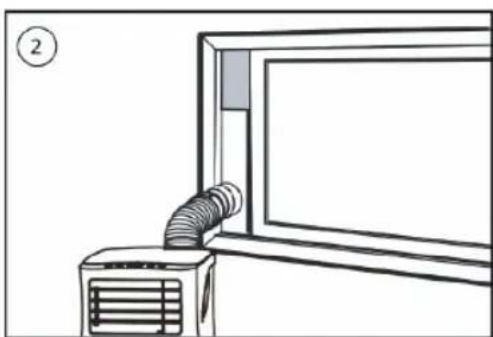
Exhaust Hose Installation
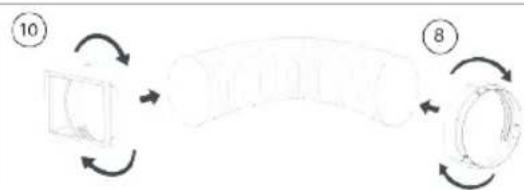
Twist both ends of the hot-air exhaust hose A9 into the hose connector (window end) A8 and the hose connector (air conditioner end)A10
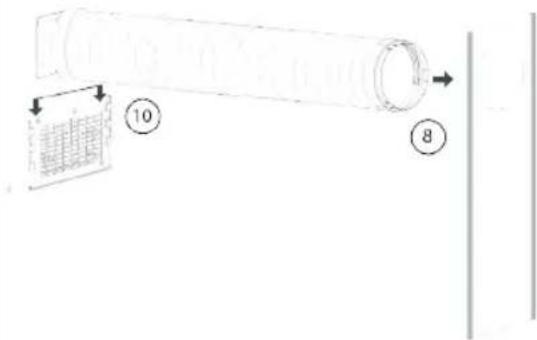
- Insert the hose connector (air conditioner end) Hose connector (Air conditioner end) into the openings at the back of the air conditioner.
Fixtthehose connector (window end) A8to the nearest windowsill.
Window Slider Kit Installation
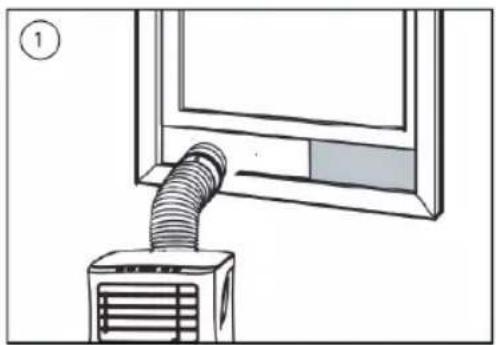
- Adjust the width or height of the window slider to fit the window opening and fixate the position of the window slider with the fixing plugs.
- Slide the window up to the slider.
BEFORE FIRST USE
Before starting operations in this section:
Find a place where there is power supply nearby.
- Install the exhaust hose and adjust the window position well.
- The supplied small white clips must be mounted on the window kit.
- Insert the power cord into a grounded socket.
- Press the power button to turn on the air-conditioner.
- Set the temperature range: 16^ - 31^ .
- Check whether the exhaust hose has been mounted properly.
- When using functions on cooling and dehumidifying, allow at least 3 minutes between powering off and powering on.
Remote control (see image C)
- 2xAAA size batteries are required.
- Ensure he batteries are inserted in the correct direction.
- When replacing, ensure both batteries are changed simultaneously.
USE
Using the on device buttons
- Insert the plug into the mains socket, you will hear a beep.
- PressthestandbybuttonB to turn on the appliance. Press the button again to turn off the appliance.
Cooling operation
Press the "Mode" button B16 till the "Cool" indicator light B21 is on.
- Pressthe"Up"B 14 or"Down"buttonB 15 to select a desired room temperature.
- Allow around 5 minutes for the cooling to start.
- Press the "Fan speed" button B to adjustairflowspeed.
Dehumidifying operation
- Don't connect the exhaust hose A totheappliance.
- Pressthe“Mode”buttonB 16 untilthe“Dehumidify”indicatorlightB 22 ison.
The temperature will automatically be selected - The fan speed will automatically be selected.
Fan operation
- Pressthe“Mode”buttonB 16 tillthe“Fan”indicatorlightB 23ison.
- Press the "Fan speed" button B to adjustairflowspeed.
Timer operation
Timer ON setting
- When the air-conditioner is OFF, press the "Timer" button and select a desired ON time and adjust by usingtheB 14andB 15buttons.
- The ON time can be adjusted to anytime in 0-24 hours.
Timer OFF setting
- When the air-conditioner is ON, press the "Timer" button and select a desired OFF time and adjust by usingtheB 14andB 15buttons.
The OFF time can be adjusted to anytime in 0-24 hours.
Drainage
- After a lengthy operation and before storage, you will need to drain the water that has been collected. Please prepare a suitable location or tray to collect the water and remove the rubber stop from the drainage hole at the bottom of the unit. The water will then begin to drain. After this has stopped, you can insert the drain stop.
Internal Tank Water Full Alarm Function
- The inner water tank in the air-conditioner has one water level safety switch that controls the water level.
When the water level reaches an anticipated height, the water full indicator lamp lights up. Follow previous steps to drain the water.
USING THE APPLIANCE WITH THE CONNECTED AT HOME APP
Connected at Home
The appliance can be used manually with its built-in controls, remote control or you can use a smart phone or voice to control it. Before you begin, ensure the Connected at Home app is downloaded. The app is available on Android and iOS.
Pair your appliance to the "Connected at Home" app
Make sure the appliance is powered.
- Open Connected at Home app.
- Create an account or if you already have an account, please login with your details.
- To set the appliance in pairing mode, long-press the speedmode/ Wi-Fi pairing button on the appliance for 5-6 seconds until you hear one beep. The Wi-Fi lamp will flash, indicating that pairing mode is activated,
- Click "Add new Climate Device" to add a new device.
- Select the device you want to connect.
- Follow the instructions on the app to connect the appliance.
TROUBLESHOOTING
| Problem Possible cause Possible solution | ||
| The unit does not start when pressing power button. | Water full indicator lamp blinks and water tank is full. | Drain the water out of the water tank. |
| Room temperature is higher than the setting temperature. (Electric heating mode) | Adjust the temperature. | |
| Room temperature is lower that the setting temperature. (Cooling mode) | ||
| The unit doesn't cool enough. The doors or windows are not closed. | Make sure all the windows and doors are closed. | |
| Remove the heat sources if possible. | ||
| Connect or clean the hot air exhaust hose. | ||
| Reset the temperature. | ||
| Air inlet is blocked. Clean the air inlet. | ||
| Noisy. The ground is not level or not flat enough. | Place unit on a flat, level ground if possible. | |
| The sound comes from the flowing of the refrigerant inside the air conditioner. | ||
| E0 Code Room temperature sensor failed. Replace room temperature sensor. | sensor. | |
| E1 Code Condenser temperature sensor failed. | Replace condenser temperature sensor. | |
| E2 Code Water tray full when cooling. Take off rubber stopper and empty the watertank. | ||
E3 Code Pipe temperature sensor failed. Replace pipe temperature sensor.
E4 Code Water tank full. Please empty the water tank.
CLEANING AND MAINTENANCE
- Before cleaning, disconnect the unit from any electric supply outlet.
- First clean the surface with a neutral detergent and wet cloth, and then wipe it with a dry cloth.
- Do not use gasoline or other chemicals to clean the unit.
- Do not wash the unit directly.
Air filter
The air filter should be cleaned once every two weeks.
- Open the air inlet grille and take off air filter.
Clean the air filter with neutral detergent in lukewarm 40^ water and allow to dry (not in direct sunlight).
- Re-install the air filter into the inlet grille.
EU DECLARATION OF CONFORMITY
Hereby, Smartwares Europe declares that the radio equipment type AC-5707 / AC-5709 are in compliance with Directive 2014/53/EU
The full text of the EU declaration of conformity is available at the following internet address: www.tristar.eu
DISPOSAL

This appliance should not be put into the domestic garbage at the end of its durability, but must be offered at a central point for the recycling of electric and electronic domestic appliances. This symbol on the appliance, instruction manual and packaging puts your attention to this important issue. The materials used in this appliance can be recycled. By recycling of used domestic appliances you contribute an important push to the protection of our environment. Ask your local authorities for information regarding the point of recollection.
SUPPORT
For spare parts and more information about the appliance, please visit www.tristar.eu
BESCHRIJVING APPARAAT
Over dit apparatus
ANVANDA APPARATEN MED DEN ANSLUTNA HEMMA-APPEN
Uppkopplad hemma
Spárovanie spotrebica s aplíciou "Connected at Home"
BRUG AF APPARATET MED CONNECTED AT HOME-APPEN
Opkoblet derhjemme
Timer OFF-innstilling
- Nár klimaanlegget er PÁ, trykker du pá "Timer"-knappen og velger ønsket AV-tid og justerer den ved hjelp avknappeneB 14 ogB 15.
- AV-tiden kan justeres til när som helst mellom 0-24 timer.