USER MANUAL RCSI-18 Royal Catering
SOFT ICE CREAM MACHINE

| DE | Produktname | Softeismaschine |
| EN | Product name | Soft ice cream machine |
| PL | Nazwa produktu | Maszyna do lodów włoskich |
| CZ | Název výrobku | Stroj na točenou zmrzlinu |
| FR | Nom du produit | Machine à glace italienne |
| IT | Nome del prodotto | Macchina per gelato soft |
| ES | Nombre del producto | Máquina de helado suave |
| HU | Termék neve | Lágyfagylaltgép |
| DA | Produktnavn | Softice-maskine |
| FI | Tuotteen nimi | Pehmytjäätelökone |
| NL | Productnaam | Softijs machine |
| NO | Produktnavn | Softis maskin |
| SE | Produktnamn | Mjukglassmaskin |
| PT | Nome do produto | Máquina de sorvete suave |
| SK | Názov produktu | Stroj na mäkkú zmrzlinu |
| BG | Име на продукта | Машина за мек сладолед |
| EL | Όνομα προϊόντος | Μηχανή παγωτού soft |
| HR | Naziv proizvoda | Stroj za sladoled na točenje |
| LT | Produkto pavadinimas | Minkštųjų ledų aparatas |
| RO | Numele produsului | Maşină de înghețată moale |
| SL | Ime izdelka | Stroj za mehki sladoled |
| DE Modell | EN Product model | PL Model produktu | CZ Model výrobku | FR Modèle | IT Modello | ES Modelo | HU Modell | DA Model | FI Tuotteen malli | NL Productmodel | NO Produktmodell | SE Produktmodell | PT Modelo do produto | SK Model | BG Модел на продукт | EL Movtėlo προϊόντος | HR Model proizvoda | LT: Gaminio modelis | RO: Model de produs | SL: Model izdelka | RCSI-16RCSI-17RCSI-18RCSI-24 |
| DE Hersteller | EN Manufacturer | PL Producent | CZ Výrobce | FR Fabricant | IT Produttore | ES Fabricante | HU Termelő | DA Producent | FI Valmistaja | NL Producent | NO Produsent | SE Tillverkare | PT Fabricante | SK Výrobca | BG Производител | EL Κατασκευαστής | HR Proizvođač | LT Gamintojas | RO Producător | SL Proizvajalec | expondo Polska sp. z o.o. sp. k. |
| DE Anschrift des Herstellers | EN Manufacturer Address | PL Adres producenta | CZ Adresa výrobce | FR Adresse du fabricant | IT Indirizzo del produttore | ES Dirección del fabricante | HU A gyártó címe | DA Producentens adresse | FI Valmistajan osoite | NL Adres producent | NO Produsentens adresse | SE Tillverkarens adress | PT Endereço do fabricante | SK Adresa výrobcu | BG Адрес на производителя | EL: Διεύθυνση κατασκευαστή | HR Adresa proizvođača | LT Gamintojo adresas | RO Adresa producătorului | SL Naslov proizvajalca | ul. Nowy Kisielin – Innowacyjna 7, 66-002 Zielona Góra | Poland, EU |

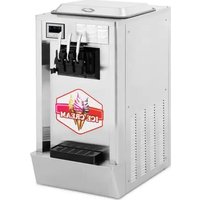
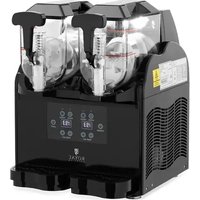
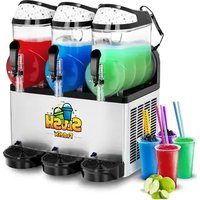
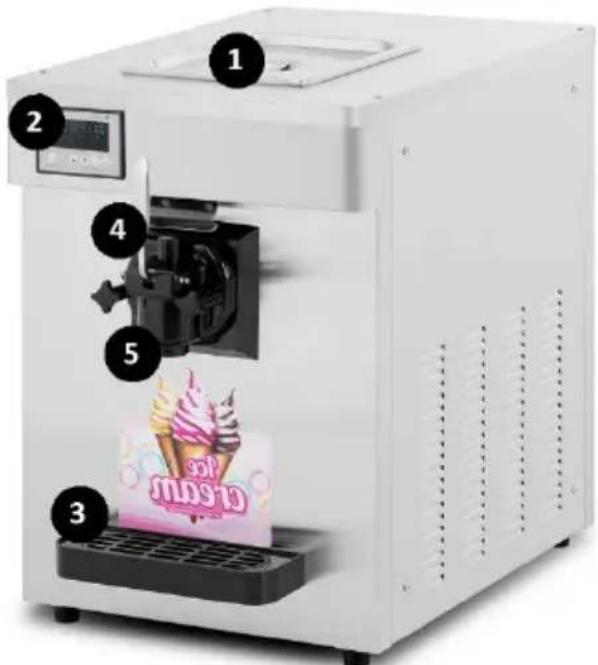
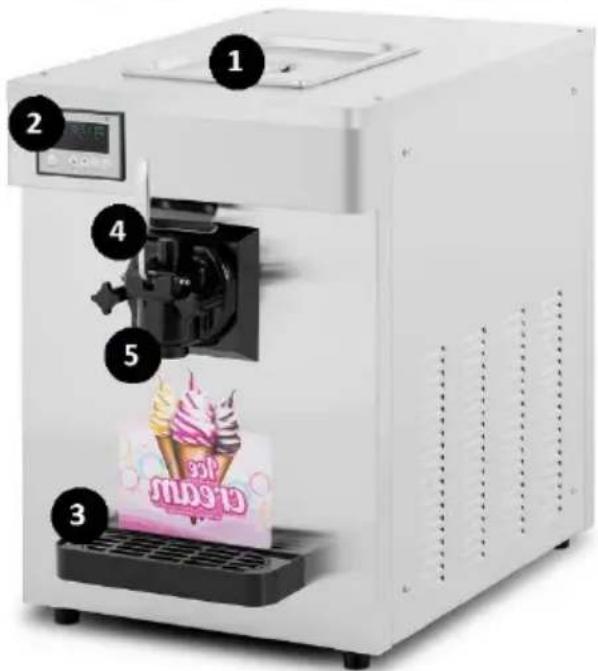
A- Model RCSI-16/ RCSI-17
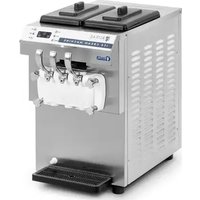
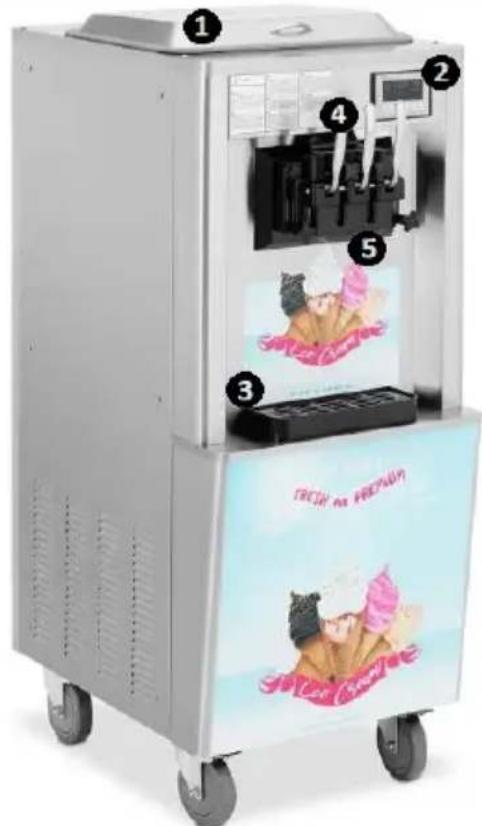
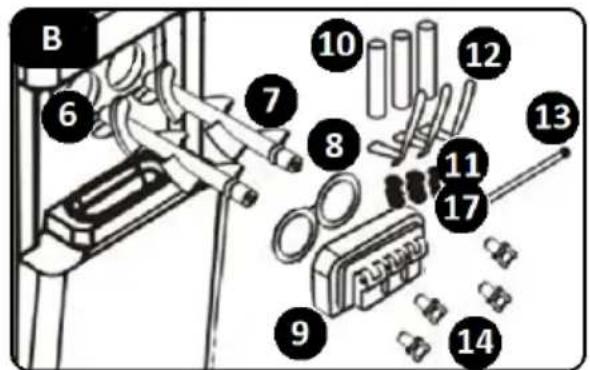
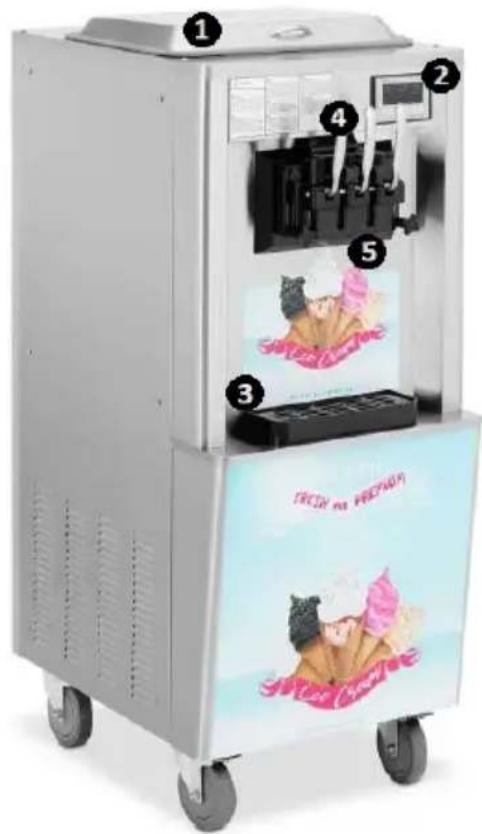
B- Model RCSI-18
This User Manual has been translated for your convenience using machine translation. Reasonable efforts have been made to provide an accurate translation; however, no automated translation is perfect nor is it intended to replace human translators. The official User Manual is the English version. Any discrepancies or differences created in the translation are not binding and have no legal effect for compliance or enforcement purposes. If any questions arise related to the accuracy of the information contained in the User Manual, please refer to the English version of those contents which is the official version.
Technical data
| Parameter specification | Parameter value |
| Product name | SOFT ICE CREAM MACHINE |
| Model | RCSI-16 | RCSI-17 |
| Supply voltage [VAC] / Frequency [Hz] | 230~/50 |
| Rated power [kW] | 1.15 | 1.29 |
| Protection class | I |
| Capacity (throughput) [L/h] | 15 |
| Refrigerant type / charge [g] | R290/145 | R290/145 R600/55 |
| Refrigerating bin dimensions [mm] | 300x240x150 |
| Refrigerating bin volume [L] | 10 + 1.8 |
| Pre-cooling temperature range [°C] | none | 0-25 |
| Ambient temperature range [°C] | 10-43 |
| Dimensions (Width x Depth x Height) [mm] | 495 x 700 x 685 545 x 705 x 875 |
| Weight [kg] | 72 | 86 |
| Model | RCSI-18 | RCSI-24 |
| Supply voltage [VAC] / Frequency [Hz] | 230~/50 |
| Rated power [kW] | 1.64 | 2,14 |
| Protection class | I |
| Capacity (throughput) [L/h] | 23 | 33 |
| Refrigerant type / charge [g] | R290/145 R600/55 |
| Refrigerating bin dimensions [mm] | 300x150x150 |
| Refrigerating bin volume [L] | (6)x2 + (1.8)x2 | (6)x2 + (2)x2 |
| Pre-cooling temperature range [°C] | 0-25 |
| Ambient temperature range [°C] | 10-43 |
| Dimensions (Width x Depth x Height) [mm] | 545 x 680 x 975 | 750 x 550 x 1360 |
| Weight [kg] | 112 | 134 |
1. General overview
This manual is intended to assist you in safe and reliable use. The product is designed and manufactured strictly according to technical specifications using the latest technology and components, and maintaining the highest quality standards.
READ THE MANUAL CAREFULLY AND UNDERSTAND IT BEFORE USE.
To ensure long and reliable operation of the product, operate and maintain it correctly and strictly in compliance with this manual. The technical data and specifications in this manual are up-to-date. The manufacturer reserves the right to modifications for the purpose of quality improvement. Considering the technological progress and the feasibility of noise reduction, the product is designed and built so that risks resulting from noise emissions are minimised as far as possible.
Explanation of symbols
 | The product meets the requirements of relevant safety standards. |
 | Read the manual before use. |
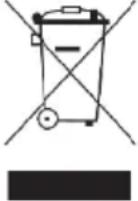 | Recyclable product. |
 | CAUTION! or WARNING! or REMEMBER! indicates a specific instruction.General warning sign. |
 | CAUTION! Risk of electric shock! |
 | For indoor use only. |

NOTE! The figures in this manual are illustrative only and may vary in some details from the actual appearance of the product.
The original version of the manual is in German language. Other language versions are translations from German.
2. Operating safety

CAUTION! Read all safety warnings and all instructions. Failure to follow the warnings and instructions may result in electric shock, fire and/or serious injury or death.
The term “appliance” or “product” in the warnings and instructions refers to the SOFT ICE CREAM MACHINE.
2.1. Electrical safety
a) The appliance power cord plug must fit into the mains outlet. Do not modify the plug in any way. Original power cord plugs and matching mains outlets reduce the risk of electric shock. b) Avoid touching earthed objects, like piping, radiators, heaters, and refrigerators. There is an increased risk of electric shock if your body is earthed and touching the appliance exposed to direct rain, a wet floor or while operating in a humid environment. If water penetrates into the appliance, there is an increased risk of damage to the appliance and electric shock. c) Do not use the power cord in any unintended way. Never use it to carry the appliance or to unplug it from the mains outlet. Keep the power cord away from sources of heat, oil, sharp edges or moving parts. Damaged or tangled cords increase the risk of electric shock. d) If you cannot avoid using the appliance in a wet environment, use a residual current device (RCD) to connect the appliance to electrical mains. Using an RCD reduces the risk of electric shock. e) Do not use the appliance if the power cord is damaged or shows evidence of wear. Have a damaged power cord replaced by a qualified electrician or the manufacturer's technical service. f) To avoid electric shock, do not immerse the power cable, its plug or the appliance itself in water or other liquid. Do not use the appliance on wet surfaces.
2.2. Workplace safety
a) Keep the workplace tidy and well lit. Disorder or poor lighting can lead to accidents. Be careful, watch what you are doing and use common sense when working with the appliance. b) In the event of damage or malfunction of the appliance, turn it off immediately and report the incident to authorised personnel. c) If in doubt as to whether the appliance is working, contact the manufacturer's technical service. d) Repairs to the appliance may only be carried out by the manufacturer's service. Do not attempt to repair the product on your own! e) In the event of ignition or a fire, use dry powder or CO2 extinguishers only to suppress the fire of the appliance if live with electrical voltage. f) No children or unauthorised individuals shall be allowed at the workplace. g) Check the condition of the safety warning stickers regularly. Replace them if they are illegible. h) Keep this manual for future reference. If the product is to be handed over to a third party, hand it over with this user manual. i) Keep packaging components and small installation parts out of the reach of children.

Remember! Keep children and other bystanders safe while operating this product.
2.3. Personal safety
a) Do not operate the appliance if you are tired, ill, or under the influence of alcohol, drugs, or medication that might significantly impair your ability to operate the appliance. b) The product is not intended for use by individuals (including children) with reduced mental, sensory, or intellectual capacity, or lack of experience and/or knowledge, unless they are supervised by a person responsible for their safety or have been instructed by that person on how to operate the product. c) The appliance may only be operated by individuals who are physically fit, capable of handling the appliance, and who have been adequately trained, have read this manual, and have received training in health and safety. d) To prevent accidental operation, make sure the power switch is OFF before connecting the appliance to the mains power. e) The appliance is not a toy. Children must be supervised to ensure that they do not play with it.
2.4. Safe use of the product
a) Do not use the appliance if the power switch does not function properly (does not switch on or off). Appliances that cannot be controlled with their power switches are dangerous, must not be operated, and must be repaired. b) Before adjustment, replacement of any accessories, or storing the appliance, unplug it from the mains. This safety precaution reduces the risk of accidental operation. c) Keep unused appliances out of the reach of children and anyone unfamiliar with the appliance or this manual. Appliances are dangerous in the hands of inexperienced users. d) Keep the product in good working order. Before each use, check for generally evident damage and damage to any moving parts (inspect for cracks in parts and components or any other condition that may affect the safe operation of the product). If damaged, have the product repaired before use. e) Keep the product out of the reach of children. f) The product shall be repaired and maintained by qualified personnel using only original spare parts. This will ensure safe operation of the product. g) To ensure the designed operational integrity of the product, do not remove the factory-installed covers or loosen any bolts.
h) When transporting and handling the appliance from storage to the place of use, follow the health and safety regulations for manual handling that apply in the country of operation of the appliance. i) Avoid stopping the appliance with heavy loads. This can cause overheating of the drive elements and result in damage to the appliance. j) Clean the appliance regularly to prevent permanent deposits of dirt. k) The appliance is not a toy. Cleaning and maintenance shall not be performed by children without adult supervision. l) Never attempt to tamper with the appliance to change its parameters or structure. m) Keep the appliance away from sources of fire and heat. n) Do not cover the vents of the appliance! o) Caution! Do not leave any water in the bin after cleaning. Otherwise, ice may form and cause the motor to stall and fail. p) Operate, handle, and transport this appliance in upright orientation only. Do not tilt the appliance sideways by more than 45 degrees. q) Do not operate any electric appliances not provided for by the manufacturer in any of the compartments of this appliance. r) Do not operate any mechanical tools to remove ice from the refrigerating compartment interior or other implements, appliances or chemicals to accelerate the defrosting. s) Once the appliance has been delivered to its destination and before plugging it into the mains, leave it upright for 24 hours, until the refrigerant inside becomes stable. t) Connect the power cord plug directly to a mains outlet. Do not connect to mains power via any extension cords. u) CAUTION! The R290 refrigerant is a flammable and explosive gas. Maintenance of this appliance shall only be done by qualified professionals!

CAUTION! Although the appliance has been designed to be safe and has been provided with adequate safeguards, and despite the use of additional safety measures, there is still a low, residual risk of accident or injury during its operation. Caution and common sense are advised when using the product.
3. Rules of use
This appliance is intended to make ice cream from a suitably prepared input batch of products.
The user is responsible for any damage caused by non-intended use.
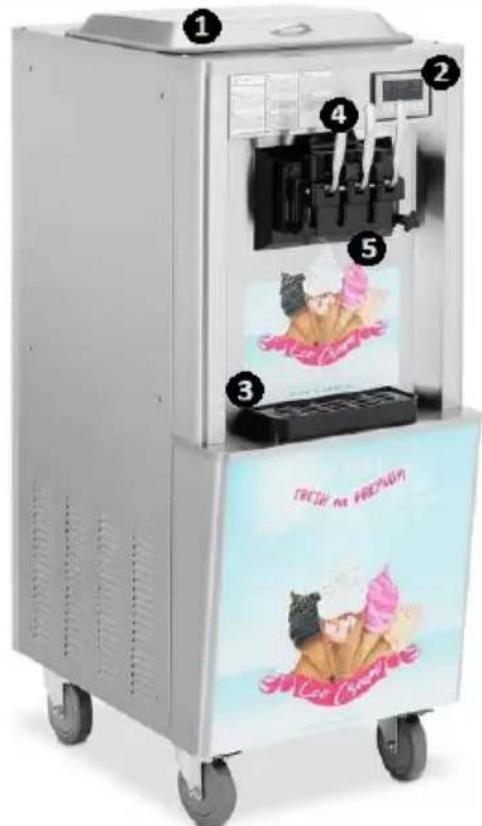
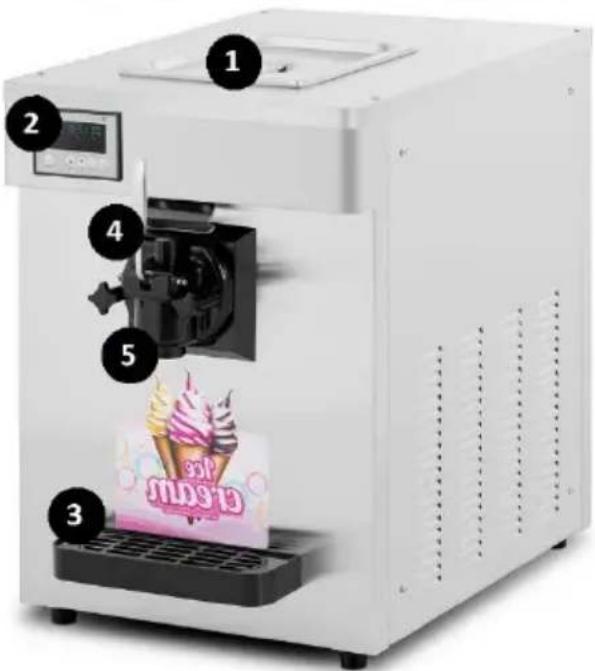
3.1. Appliance overview
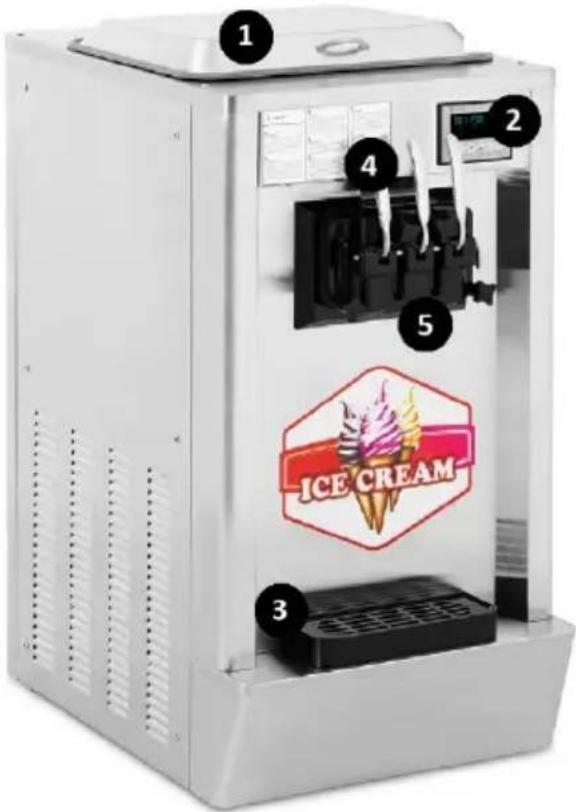
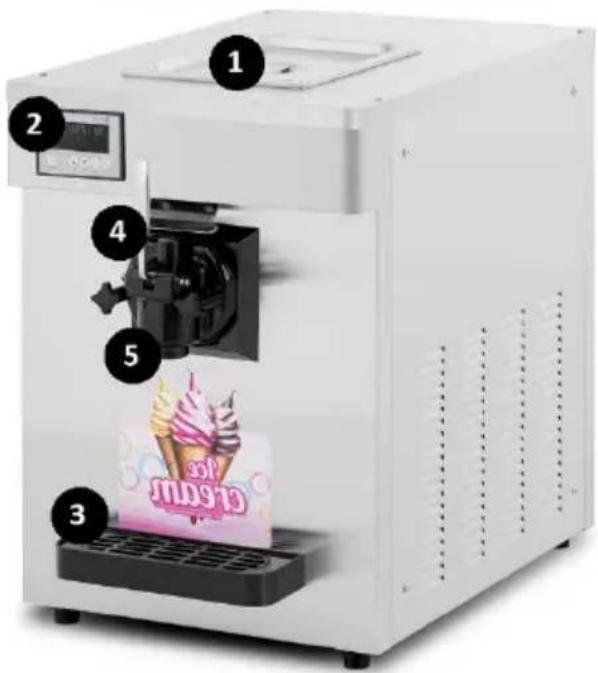
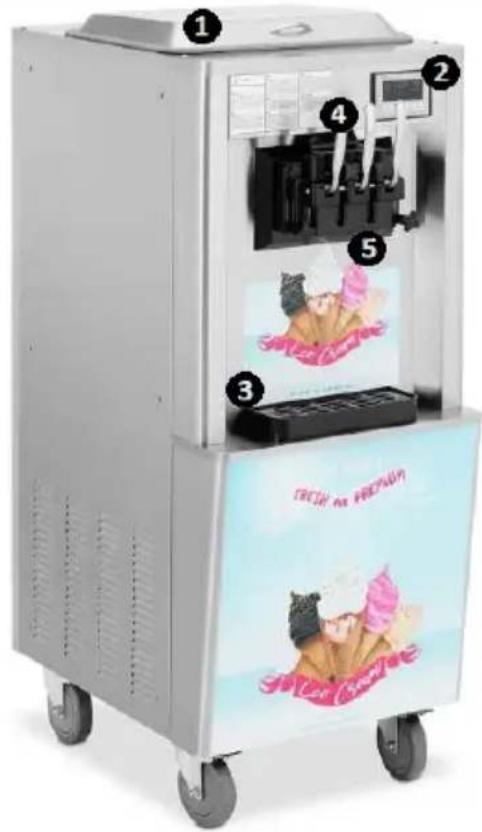
1 – Refrigerating bin lid
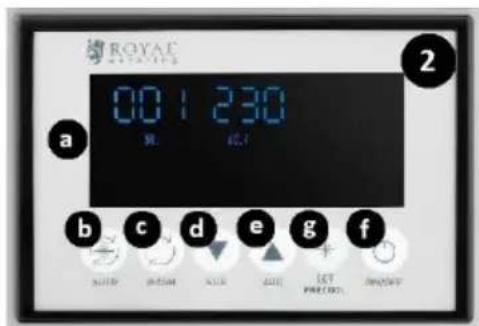
2 - Control panel:
a) LCD display
b) Input batch processing on/off key ("AUTO")
c) Refrigerating compartment wash on/off key ("WASH")
d) Batch thickness reduction key ("SUB")
e) Batch thickness increase key ("ADD")
f) Power switch ("ON/OFF")
g) Batch pre-cooling / cooling level setting key ("SET/PRECOOLING") (on model RCSI-17 / RCSI-18)
3 - Drip tray
4 – Dispenser handle
5 – Dispenser unit
3.2. Preparations for operation
POSITIONING THE APPLIANCE
The ambient temperature shall be within +10 – +43°C at the place of operation. Position the appliance where good air circulation is ensured. Maintain a minimum clearance of 50 cm from all sides of the appliance. Keep the appliance away from any hot surfaces. Always operate the appliance on a level, firm, clean, fireproof, and dry surface and out of the reach of children and individuals with reduced mental, sensory and intellectual capacities. Position the appliance where the mains plug can be reached at any time. Make sure that the mains power ratings match the data on the rating plate!
Prior to first use disassemble all elements and wash them.
INSTALLING THE APPLIANCE
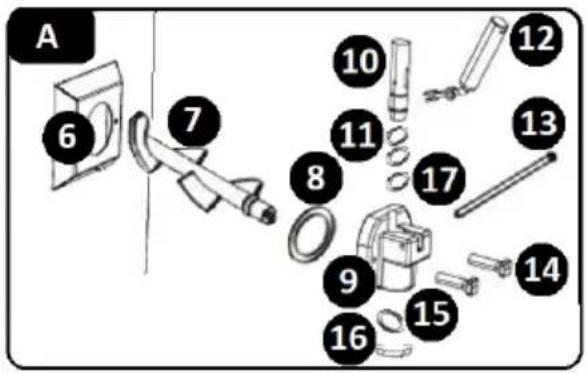
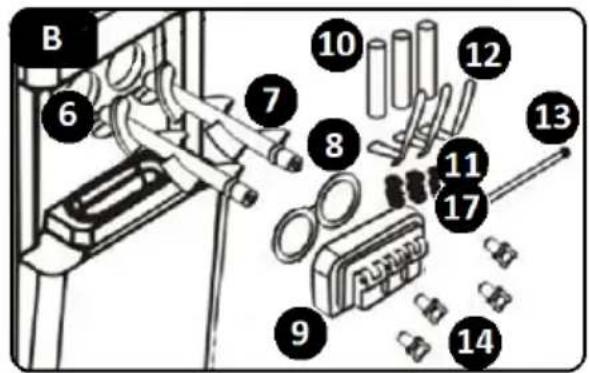
A - Model RCSI-16/ RCSI-17
B - Model RCSI-18
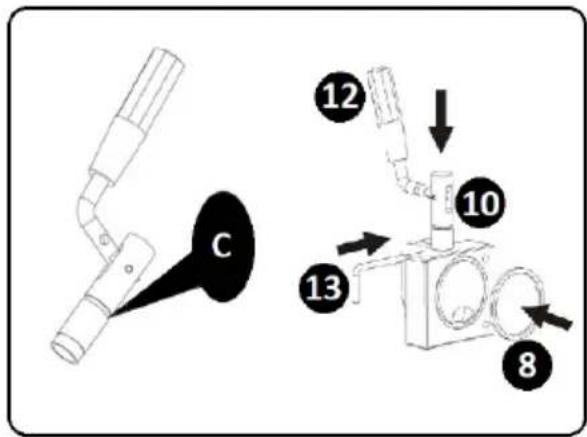
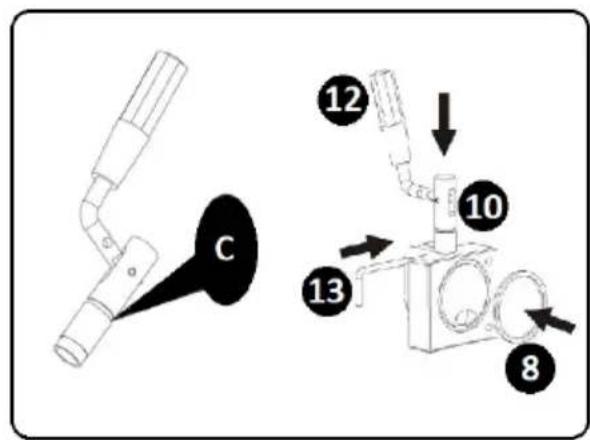
C – Apply the lubricant here
6 – Refrigerating compartment
7 - Stirrer
8 – Refrigerating compartment guard gasket
9 – Refrigerating compartment guard
10 - Valve stem
11 – Valve stem o-rings
12 – Lever
13 - Cotter pin
14 – Fasteners
15 – Dispenser gasket
16 – Dispenser lid
17 – Stem o-ring, mid size
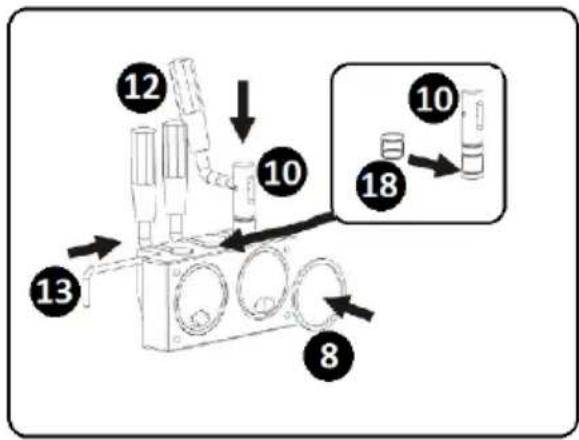
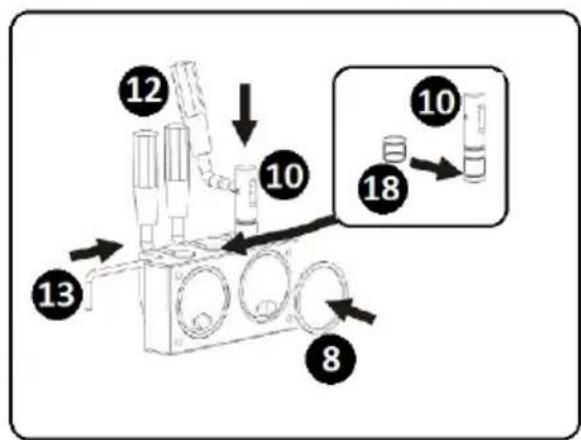
18 - Mid stem gasket (model RCSI-
18)
a) Install the stirrer (7) inside the refrigerating compartment (6).
b) Seat the refrigerating compartment guard gasket (8) inside the compartment guard (9).
c) Slide the dedicated o-rings (17 - size 11x2) onto the valve stem (10).
d) CAUTION! For model RCSI-18: Slide the dedicated gasket (18) onto the mid stem of the valve.
e) Align the resulting assembly with the opening in the opening of the refrigerating compartment guard (9) and install the assembly in the opening.
f) Install the dispenser levers (12) by inserting them into the holes in the valve stems (10). Secure the assembly using the cotter pin (13).
g) CAUTION! For model RCSI-16/ RCSI-17: Install the dispenser gasket (15). Do this by removing the dispenser lid (16) turning it clockwise to detach. Install the gasket (15) inside of the detached part. Reinstall the detached parts.
h) Attach the resulting assembly to the front panel of the appliance. Do this by passing the integrated locating pins through the holes in the refrigerating compartment guard (9). Secure the with the fasteners (14) included.
i) Install the drip tray by sliding it into its receptacle under the dispenser cluster.
j) Disassembly is done in reverse order of assembly.
3.3. Operating the appliance
Before operating this appliance, verify the installation process has been correctly done and connect the power cord plug to a mains outlet. Refer to the appliance parameters and functions. Turn on the appliance and set the desired parameters as described below. Start the appliance by turning the power switch (f) ON. When done, turn the power switch (f) OFF and unplug the appliance from the mains.
3.3.1. CLEANING THE APPLIANCE COMPONENTS
Before operating the appliance and finishing the operation, always run the cleaning of the refrigerating bin, the refrigerating compartment and its parts. The procedure:
a) Fill the refrigerating bin (1) with water. c) A correct cleaning cycle needs at least 3 minutes to run. e) Empty the appliance by operating the dispenser lever(s) (12). f) Repeat the cleaning steps above 2-3 times. g) Clean piston
b) On the control panel, press the refrigerating compartment wash on/off key ("WASH"). The LCD shows the stirrer run icon (I). The appliance beeps shortly.
d) When done cleaning, stop the cleaning mode by switching the refrigerating compartment wash on/off key ("WASH").
- Remove Stem O-ring
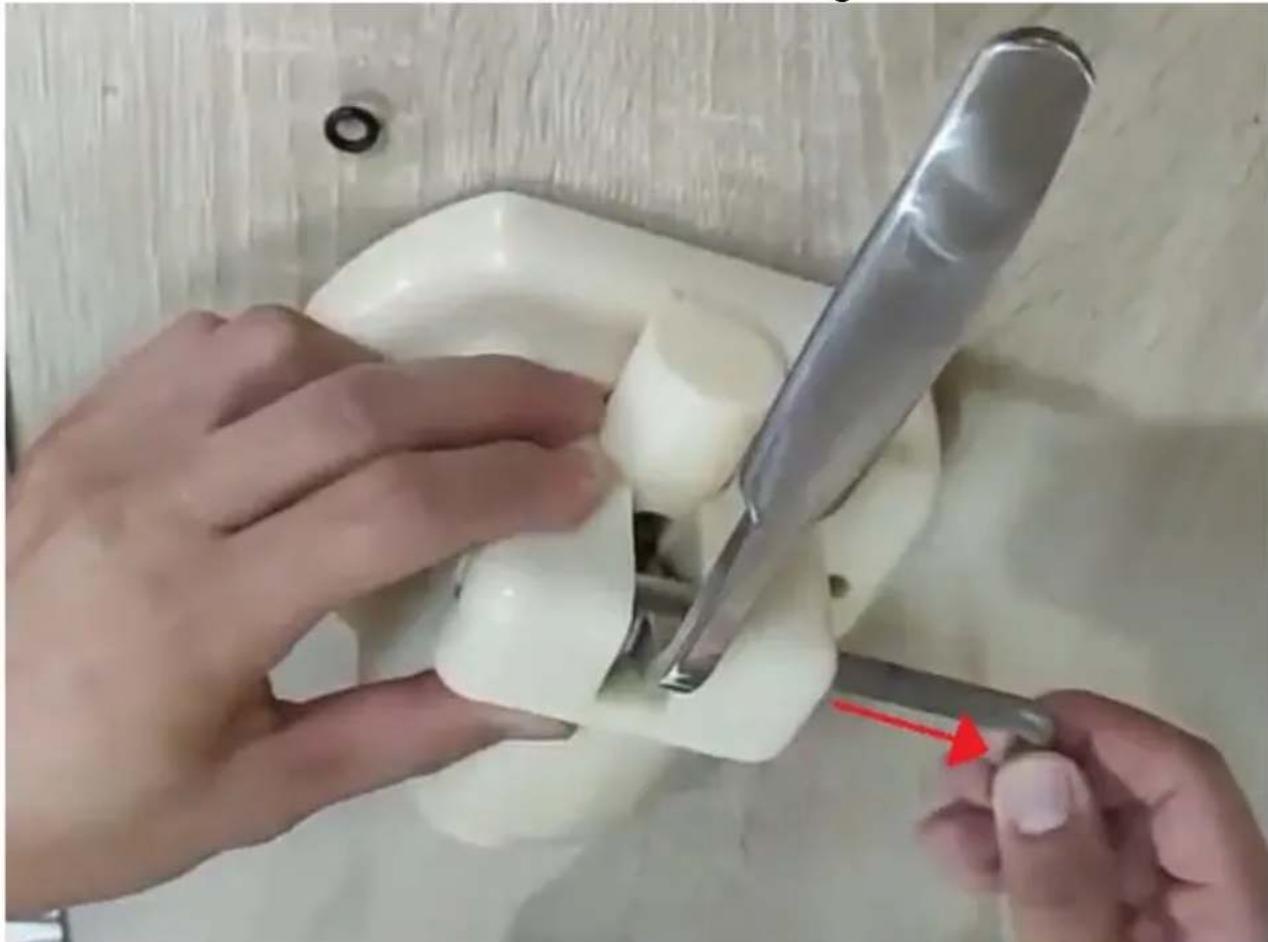
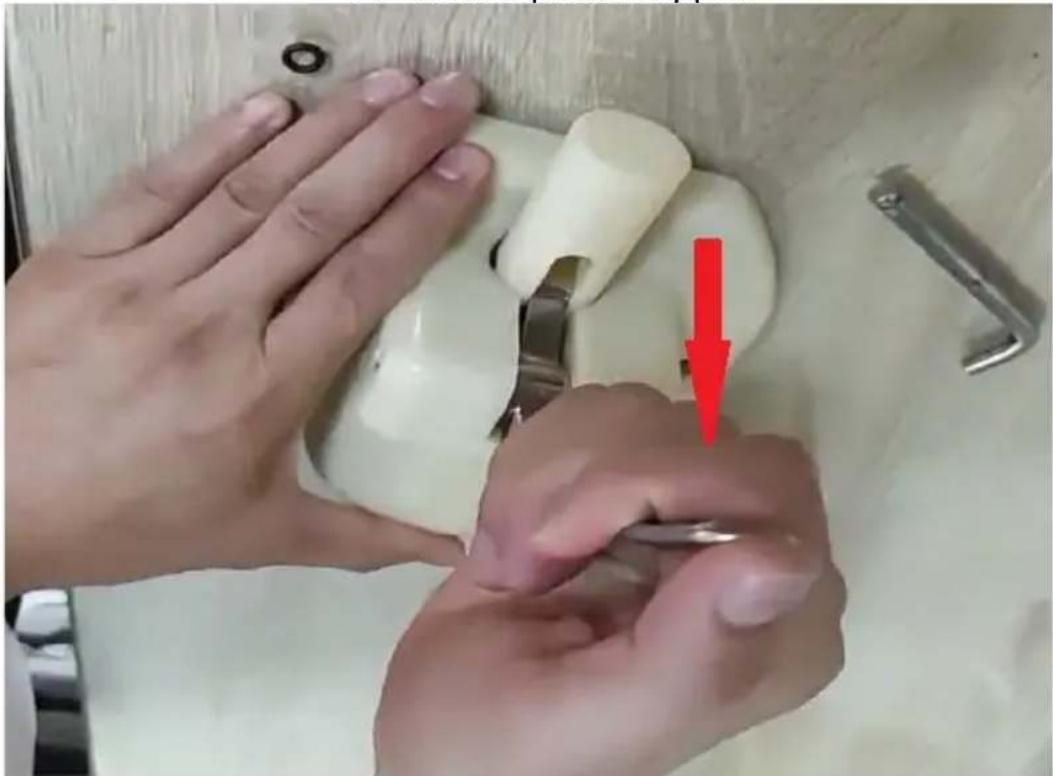
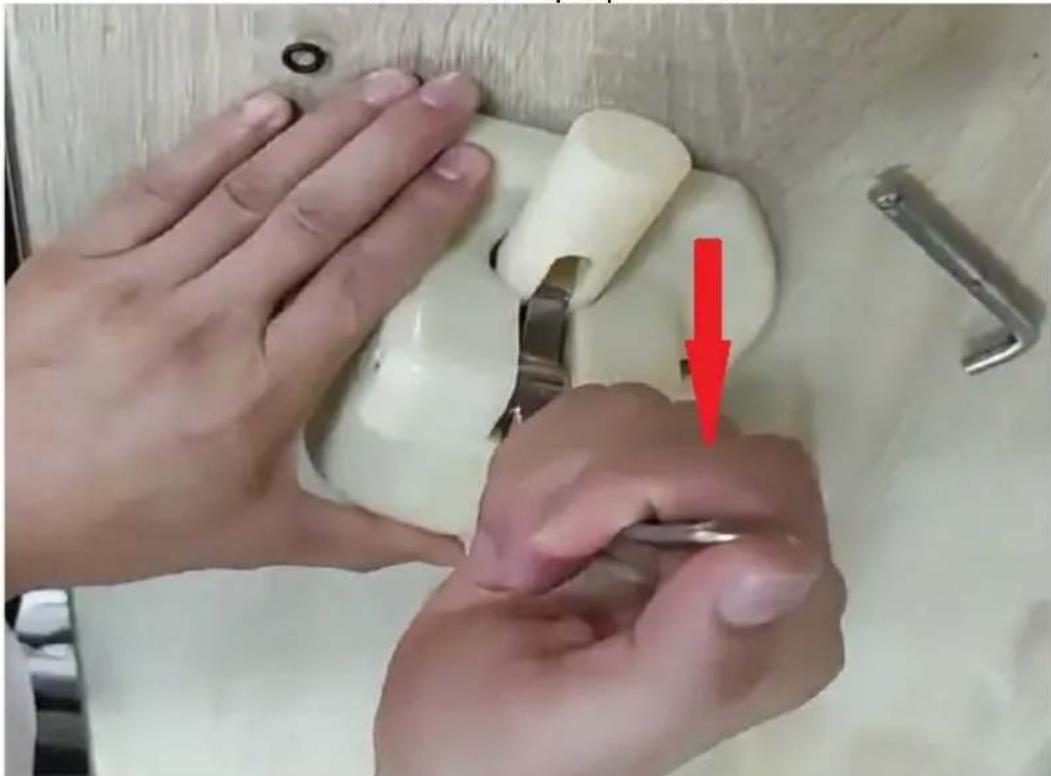
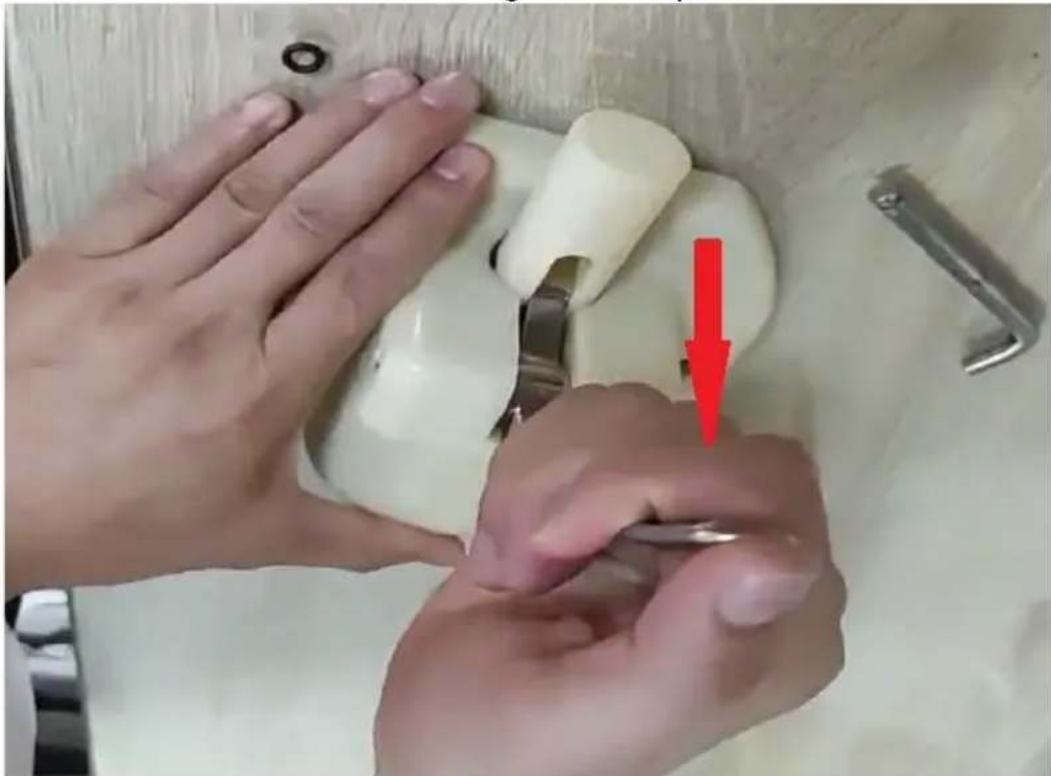
- Pull the Cotter pin
EN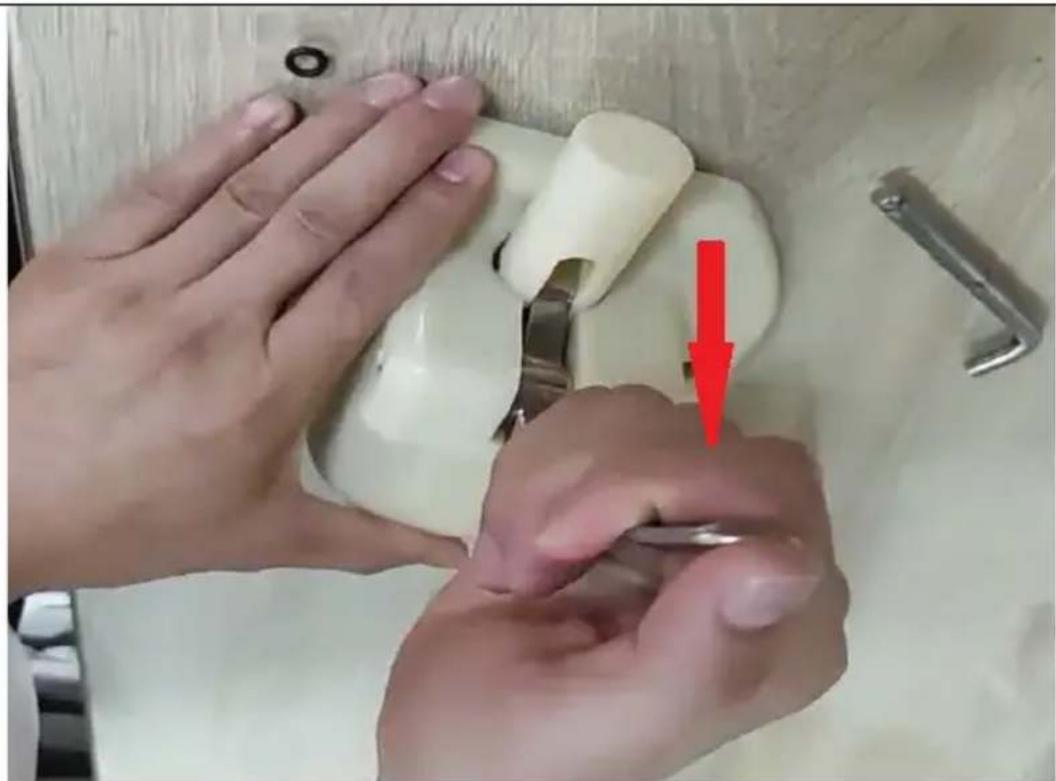
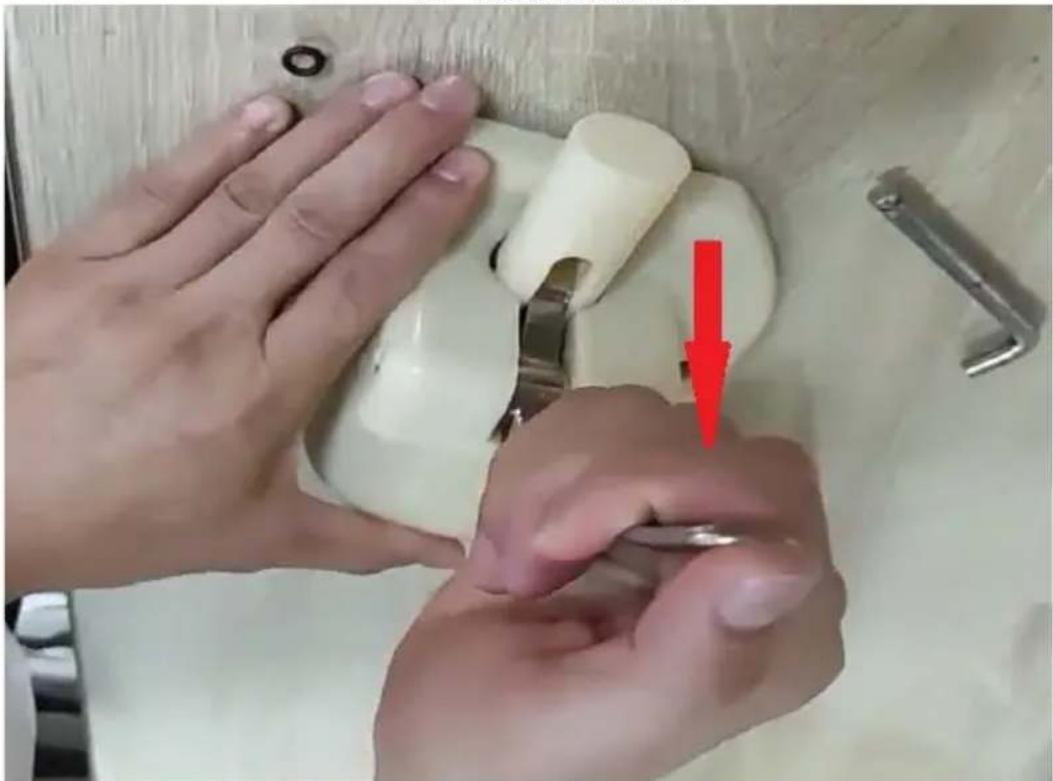
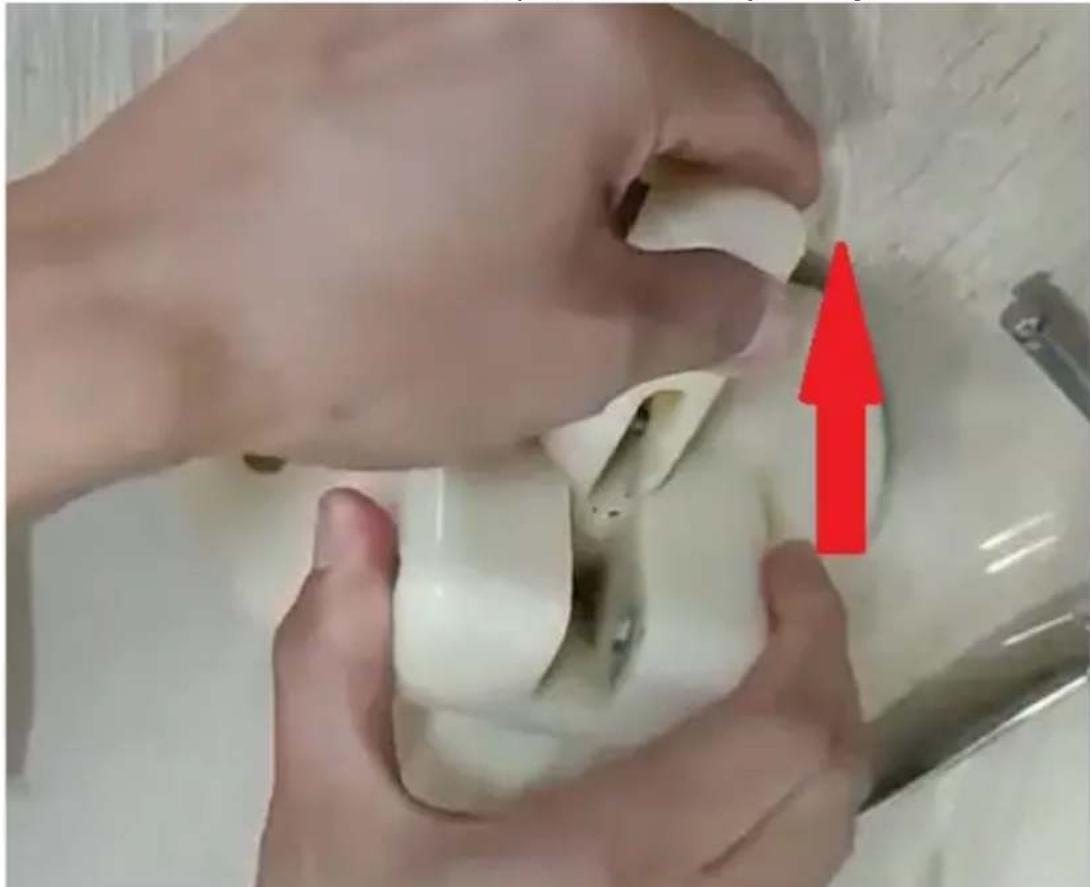
- Pull the Lever down and remove it
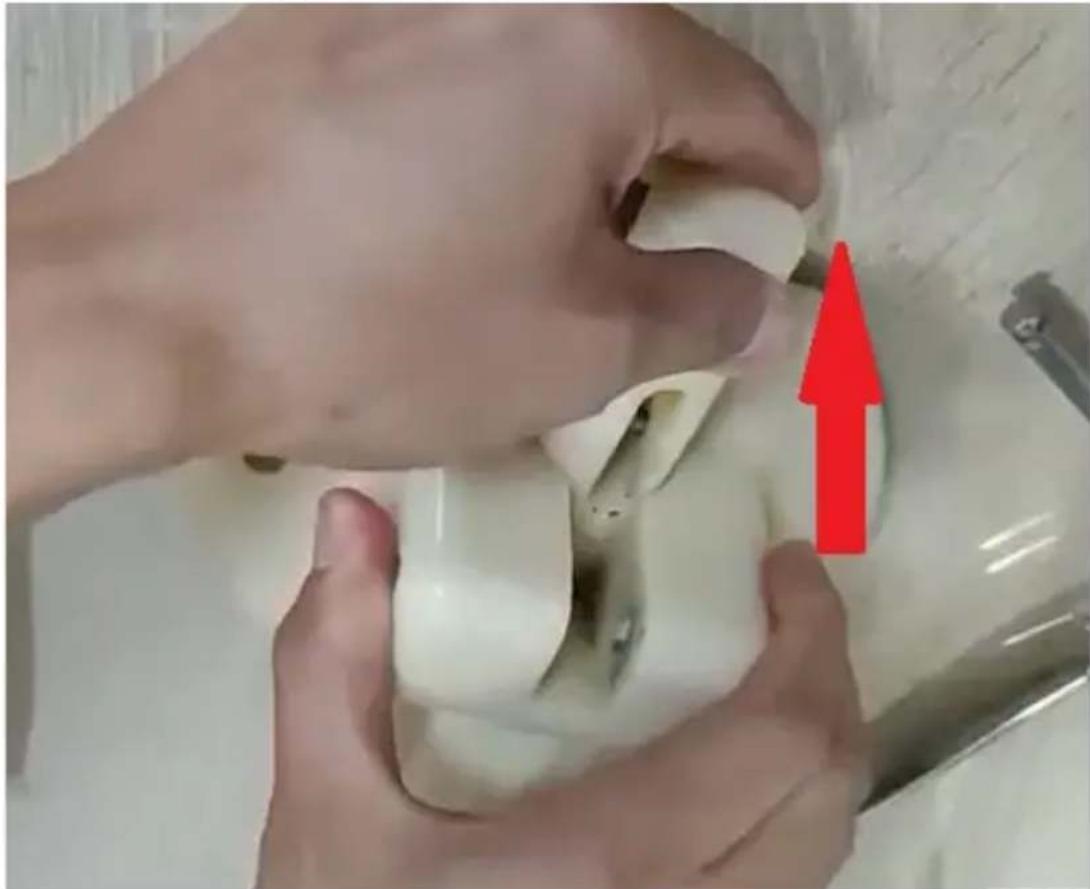
- Pull the Piston upwards for cleaning
- Clean the Piston with dedicated food-approved detergent
- Add food grade lubricants before assembly
- Assembly in reverse order
h) Remove the refrigerating compartment guard (9) and the stirrer (7). i) Clean the refrigerating compartment guard parts with a dedicated food-approved detergent. j) CAUTION! The temperature of water or the dedicated food-approved detergent shall not be more than 40°C. Otherwise there will be a risk of appliance failure. k) With the parts dry, coat the sliding surfaces of the stems using a dedicated food-approved lubricant (see INSTALLING THE APPLIANCE, item C). l) Reassemble the appliance. When done, the appliance can be operated again.
3.3.2. LCD ICONS
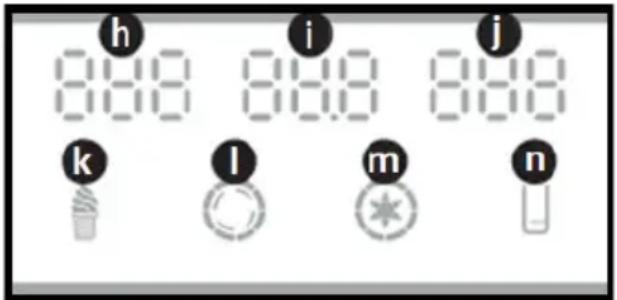
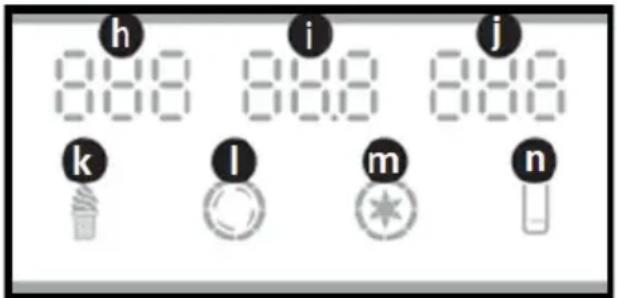
h – “NO.” – dispensed ice cream cone counter
i – “HARD” – ice cream cone thickness level / “AC.V” – supply voltage
j – “TEMPERTURE” – ice cream bulk temperature (model RCSI-17/ RCSI-18)
k – “ICE CREAM” – the icon shows that the ice cream batch is being churned or ready for dispensing: flashing – the ice cream batch is being churned; steadily on – the ice cream batch has been churned and is ready for dispensing
I – “CHURN” – the icon comes on when the stirrer (drive unit) is running. m – “PRECOOL” – the icon comes on when pre-cooling is running / the appliance keeps the batch cold (model RCSI-17/ RCSI-18)
n – “LEVEL” – the icon comes on when the batch in the refrigerating bin is low
3.3.3. STANDBY MODE
When the appliance is plugged into mains and turned on with the power switch (f), it is in standby mode. The appliance beeps shortly. The LCD shows these indications:
a) "NO." – the digits show the number of dispensed ice cream cones. b) “AC.V” – the current supply voltage. c) "TEMPERTURE" – the ice cream bulk temperature (model RCSI-17/ RCSI-18). d) “LEVEL” – the icon comes on when the batch in the refrigerating bin is low
3.3.4. ICE CREAM THICKNESS (HARDNESS) SETTINGS
The final ice cream bulk thickness setting has been factory defined. You can change the setting to suit your ice cream recipe if needed. The procedure:
a) Press and hold the required key for 5 seconds: the "SUB" key to reduce the ice cream batch thickness or the "ADD" key to increase the thickness. The appliance control system enters the setting mode. b) The LCD display will cycle through the parameters. c) Operate either of the both keys to reduce/increase the ice cream bulk thickness (d / e). d) The setting is changed in 0.1 increments. The thickness can be adjusted to anywhere within 2.0 and 6.0. e) Having input the thickness setting, wait for the appliance to store it in memory and show the main readings on the LCD.
3.3.5. PRE-COOLING TEMPERATURE SETTINGS
a) CAUTION! The pre-cooling mode is supported in models RCSI-17/RCSI-18. There are two temperature thresholds selectable for the refrigerating system. First, the low temperature threshold is configured, followed by the high temperature threshold. b) CAUTION! When the appliance reaches the low temperature threshold while running, the refrigerating system will stop. c) CAUTION! When the appliance reaches the high temperature threshold, the refrigerating system will restart. d) Start the pre-cooling. Do this by pressing and holding the batch pre-cooling / cooling level selector key (g) for approx. 5 seconds. e) The control system enters the low temperature threshold setting mode. The setting can be adjusted to anywhere within 0-10°C. f) The LCD reads the current setting of the pre-cooling low temperature threshold. g) Change the temperature setting by operating the "SUB" or "ADD" keys (d / e). h) CAUTION! The user can enter the setting in 1°C increments. i) Having input the setting, wait for the appliance to store it in memory and show the main readings on the LCD. j) Do this by pressing and holding the batch pre-cooling / cooling level selector key (g) for approx. 5 seconds. k) The control system enters the high temperature threshold setting mode. The setting can be adjusted to anywhere within 12-25°C. l) Enter the setting by repeating step (e) in this section.
3.3.6. RESETTING THE DISPENSED ICE CREAM CONE COUNTER
a) CAUTION! Resetting the counter too often may cause the electrical circuitry of the appliance to fail. b) To display the dispensed ice cream counter reading, press and hold the "SUB" and "ADD" buttons (d / e) simultaneously for approx. 5 seconds. c) Now, press and hold the "SUB" (d) or "ADD" (e) key for 5 seconds. The counter is reset to zero.
a) Fill the refrigerating bin with the ready batch of the product. b) Keep the batch level between the MIN and MAX marks. Never attempt to operate the appliance if the batch level is below the MIN mark (the drain port) or the MAX mark shown inside of the refrigerating bin. c) CAUTION! Model RCSI-18 features two refrigerating bins. Load the batch to both bins to operate this appliance. d) CAUTION! Do not operate the refrigerating system of this appliance with a refrigerating bin empty. Risk of failure! e) Having filled the refrigerating bin with enough of the batch, close the bin with the lid. f) Start the stirrer drive unit to mix the batch. Press the "WASH" key (c) on the control panel. The LCD shows the stirrer run icon (I). The appliance beeps shortly. g) The batch should be mixed for approx. 1 minute. h) Run the refrigerating system. Press the "AUTO" key (b) on the control panel. i) CAUTION! The "AUTO" key (b) first starts the stirrer drive unit; after 30 seconds, the refrigerating system comes on. j) The LCD shows the "ICE CREAM" icon while the batch is processed. The appliance beeps shortly. k) When the appliance is running, the stirrer stops automatically once the batch reaches the density setting. l) The appliance restarts processing the batch if two ice cream servings are dispensed from the refrigerating chamber or 5 minutes of inactivity pass. m) Ice cream servings are dispensed by pulling the dispenser lever(s) towards you. The batch stirrer will stop and the dispenser nozzle will release the ice cream dose. n) CAUTION! Always have a serving dish or an ice cream waffle ready to dispense the ice cream cone to. o) CAUTION! You can dispense more servings of the ice cream while the appliance is processing the batch. The appliance will switch on the batch processing again as required. p) CAUTION! If you need to leave the appliance for several hours without dispensing any ice cream and with the ice cream batch in the bin(s), start the pre-cooling before leaving (Model RCSI-17/ RCSI-18). The ice cream batch will be chilled until you turn off the pre-cooling. Start the PRE-COOLING mode by pressing the "SET/PRECOOL" key (g).
3.4. Cleaning and maintenance
a) Before cleaning and when the appliance is not in use, unplug it from the mains. b) Only mild cleaning agents intended for surfaces in contact with food shall be used to clean the appliance.
EN
c) After each cleaning, dry all components well before the appliance is used again. d) Store the appliance in a dry and cool place, protected from moisture and direct sunlight. e) Do not spray the appliance with a stream of water and do not immerse it in water. f) Ensure that water will not enter through the ventilation ports in the housing. g) Clean the ventilation ports with a brush and compressed air. h) Regularly inspect the appliance for technical defects and damage. i) Use a soft cloth for cleaning. j) Do not clean with any sharp and/or metal implements (e.g. a wire brush or a metal scraper) as these may damage the surface of the appliance. k) Do not clean the appliance with acidic substances, medical products, thinners, fuel, oil or other chemicals as they may damage it.
DISPOSAL OF WASTE APPLIANCES
At the end of its service life, this product must not be disposed of with mixed household waste; return it to a collector/recycler of waste electrical and electronic equipment. This is shown by the symbol placed on the product, the user manual or the packaging. The materials used in the appliance can be reused according to their classification identifications. By reuse, recycling or applying other forms of use of waste appliances, you make a significant contribution to the protection of our environment.
Local administration will provide you with the information about the nearest disposal locations for the appliance.
TROUBLESHOOTING
| Problem | Possible cause | Correction action |
| The cream is not puffed well | Ice cream is too hard1.sugar is too lessThe hardness adjustment is not correct | 1.add more sugar (>13%) in the mixture2.adjust the “soft” button |
| Beater doesn’t work1.motor or control panel broken2.Belt is loosenGear box broken | 1.Replace the damage part2.Adjust beltRepair gearbox |
| The discharge hole is stuffed with ice due to the water don’t remove out when cleaning | Stop the machine and take out the ice when melted |
| Ice cream is too soft | The mixture is not correctly formulated,The hardness is lowExtremely large current of motor,Suspected of short circuitIce cream inside | Prepare qualified serous fluid,Readjust the hardness upRepair or replace motorAfter several pcs ice cream, need wait for 4 mins production time |
| Ice cream is too hard | Too much moisture in the ingredients,The hardness is high | Prepare qualified serous fluid again,Readjust the hardness down |
| Leakage of materials | The screw is looseSeal ring broken | Tighten the screw tightenReplace seal ring |
| Leakage of gearbox | The fair of H or O seal ring | Replace the seal ring |
| The display has no signal | The problem of PC board,The plug is loose | Replace PC boardCheck connecting plug |
| The display lacks digits | The display apparatus is damaged (the display apparatus takes in water or materials) | Replace display apparatus. |
| UL error | The voltage is too lowThe power line is too longPower line is too thin | Solve the problem of voltageShorten power lineEnlarge power line |
| Problem | Possible cause | Correction action |
| The cream is not puffed well | Ice cream is too hard1 sugar is too less2 The hardness adjustment is not correct | 1.add more sugar (>13%) in the mixture2.adjust the “soft” button |
| Beater doesn’t work1 motor or control panel broken2 Belt is loosenGear box broken | 1 Replace the damage part2 Adjust beltRepair gearbox |
| The discharge hole is stuffed with ice due to the water don’t remove out when cleaning | Stop the machine and take out the ice when melted |
| Ice cream is too soft | The mixture is not correctly formulated,The hardness is lowExtremely large current of motor,Suspected of short circuitIce cream inside | Prepare qualified serous fluid,Readjust the hardness upRepair or replace motorAfter several pcs ice cream, need wait for 4 mins production time |
| Ice cream is too hard | Too much moisture in the ingredients,The hardness is high | Prepare qualified serous fluid again,Readjust the hardness down |
| Leakage of materials | The screw is loose Seal ring broken | Tighten the screw tighten Replace seal ring |
| Leakage of gearbox | The fair of H or O seal ring | Replace the seal ring |
| The display has no signal | The problem of PC board, The plug is loose | Replace PC board Check connecting plug |
| The display lacks digits | The display apparatus is damaged (the display apparatus takes in water or materials) | Replace display apparatus. |
| UL error | The voltage is too low The power line is too long Power line is too thin | Solve the problem of voltage Shorten power line Enlarge power line |
| The motor doesn’t stop, and the compressor stop when the ice cream is reday | PC board have problem | Repair or replace it |
| The motor doesn’t run when ice cream is serving | Stroke switch have problem, Swing board for distributor don’t make stroke switch on when handle is pushed down | Repair or replace stroke switches Reset swing board to make stroke switch on |
| The stirring beater is broken | This problem doesn’t occur in normal conditions, the problems for using in abnormal conditions are as follows:Too much moisture in the serous fluid, the cylinder freezes.When cleaning, turn on refrigerating function by mistake, resulting in the materials in one cylinder, but no in the other.Refrigerate when the cylinder is empty.When produce ice creams, one cylinder is used too much.Hot serous fluid is quickly refrigerated after being poured into the hopper.The power cable of motor is inversely connected, resulting in refrigeration with materials in it. | Replace beater. |
| Error codeCCC | If the handle is pushed down for more than 1 minute | Take out the plug, push up the handle back and then restart machine |
| Error codeUH | power supply higher than 254 voltages at beginning | restore to normal voltage. |
| Error codeUL | power supply less than 187voltage at beginning | restore to normal voltage. |
| JJJ | the measured current is 2A bigger than the hardness you set for 5 seconds, the alarm(buzz) will be heard and machine will be stop and held for 5 minutes. Ice cream is too hard that machine self-protection | Wait for 5 min |
| Screen is blank and machine could not work after “JJJ” show and restart machine | Old version machine self-protection program is blank screen and lock all function of machine | Plug in and wait for 5 min |
Notes:
- Allowable fluctuation of supply voltage: Standard 230V (187V-254V)
- It is prohibited to press AUTO button with water in the cylinder or hopper.
- Lower the hardness and keep the precool and auto function are on if you want to keep ice cream inside machine for whole night
- There is not precool function for RCSI-16, temperature of precool tank will not be show.
- We provide one more set of sealing for machine, please replace them if there is any leakage found.
- On any side of the machine, a space of over 30cm shall be kept for heat dissipation

NOTE! The figures in this manual are illustrative only and may vary in some details from the actual appearance of the product.
A- Model RCSI-16/ RCSI-17
B- Model RCSI-18
- Pull out the cotter pin
A - Models RCSI-16 / RCSI-17
B - Model RCSI-18
3.3.2. LCD DISPLAY ICONS
- Remove the split pin
A - Model RCSI-16/ RCSI-17
B - Model RCSI-18
- Pull the cotter pin
IT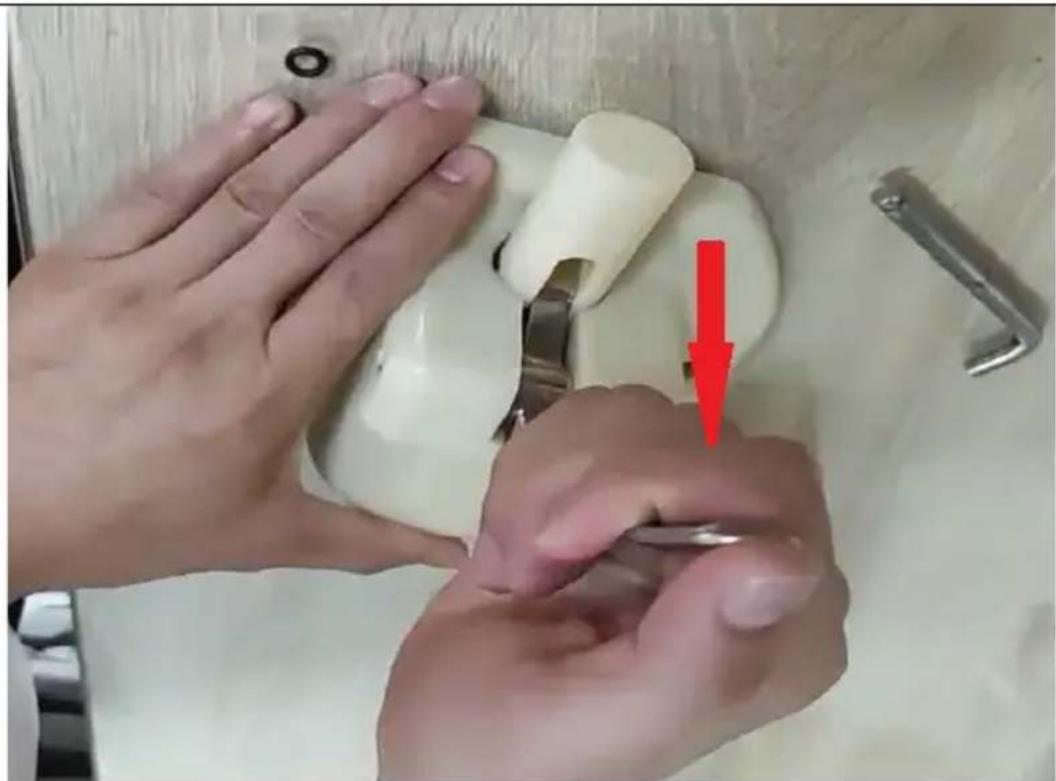
A - Model RCSI-16/ RCSI-17
B - Model RCSI-18
A- RCSI-16/ RCSI-17 model
B- RCSI-18 model
PLACEMENT OF THE DEVICE
INSTALLATION OF THE DEVICE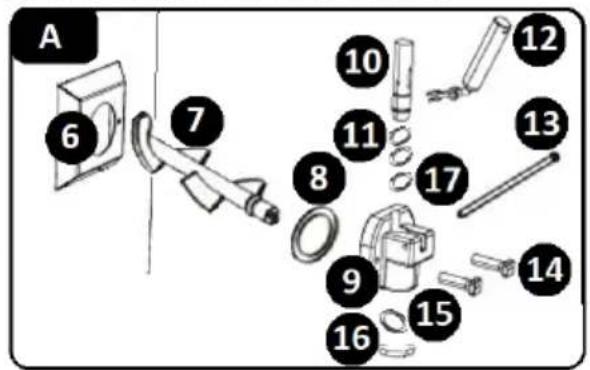
DA
- Pull the locking tab
A - Model RCSI-16/RCSI-17
B - Model RCSI-18
FI
1. Remove the O-ring from the shaft
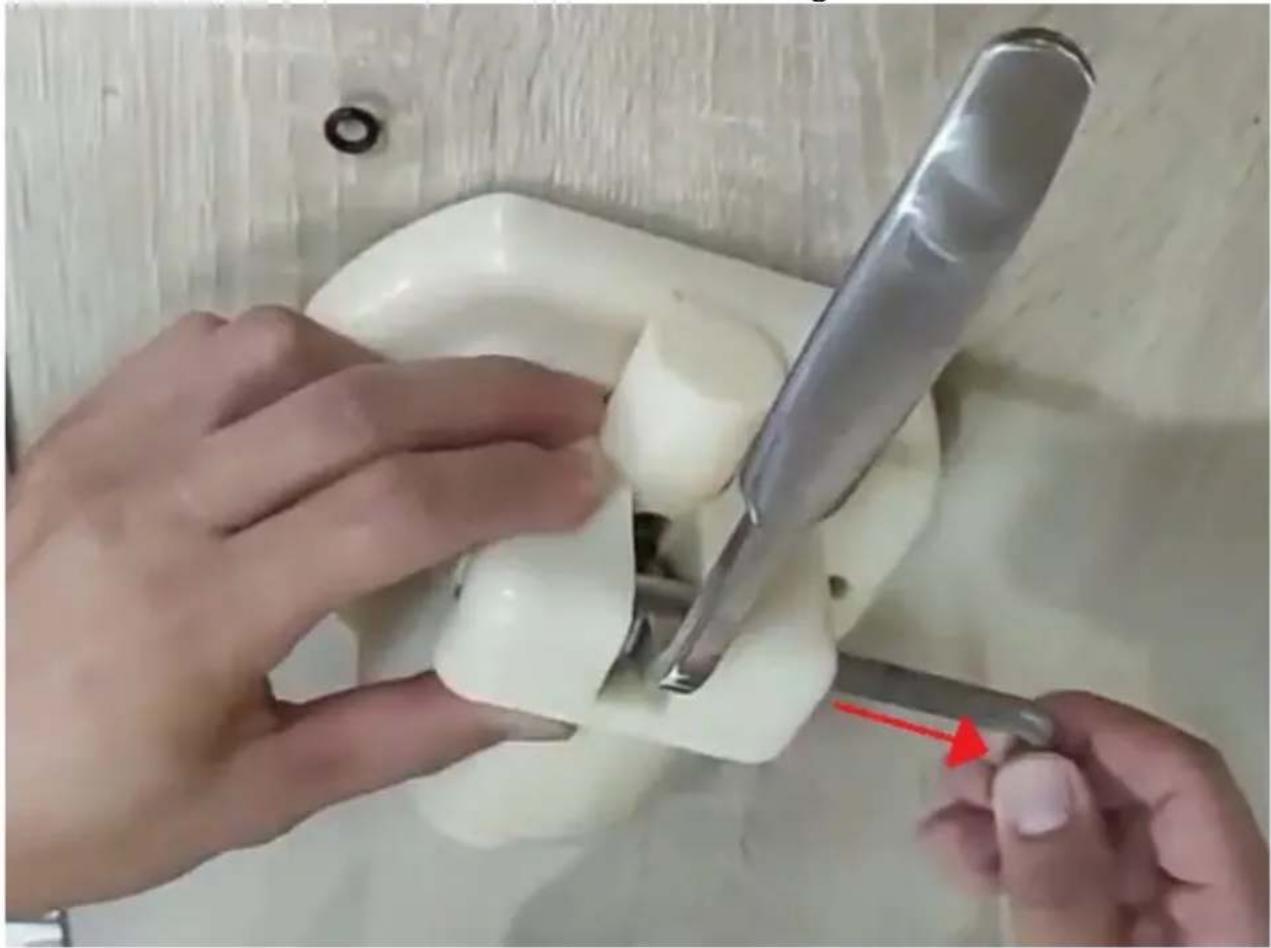
2. Pull the cotter pin
NL
A - Model RCSI-16/ RCSI-17
B - Model RCSI-18
18 – Middle shaft seal (model
RCSI-18)
- Pull out the cotter pin
| A – Modell RCSI-16/ RCSI-17 | 12 – Spak |
| B – Modell RCSI-18 | 13 – Splint |
| C – Påfør smøremiddelet her | 14 – Festemidler |
| 6 – Kjøledel | 15 – Dispenserpakning |
| 7 – Røreverk | 16 – Dispenserlokk |
| 8 – Pakning for kjøleromsbeskyttelse | 17 – O-ring på stammen, |
| 9 – Kjøleromsvakt | mellomstørrelse |
| 10 – Ventilspindel | 18 – Midtstammepakning (modell |
| 11 – Ventilspindel-o-ringer | RCSI-18) |
- Pull the cotter pin
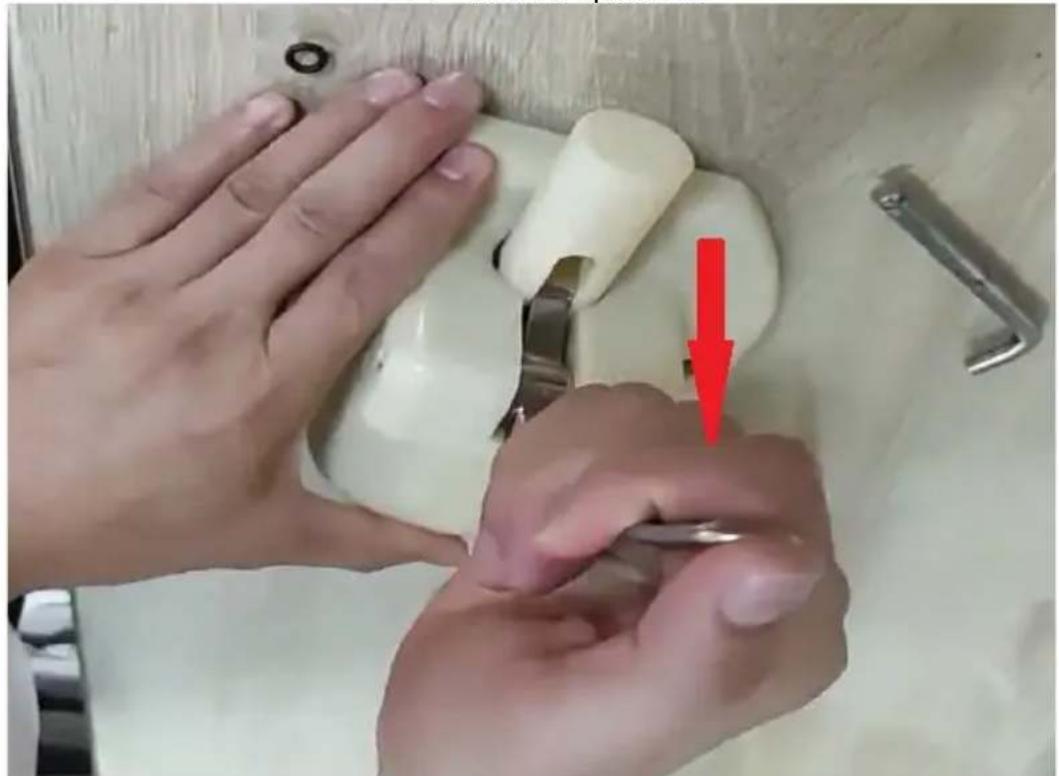
PLACEMENT OF THE DEVICE
A - Model RCSI-16/ RCSI-17
B - Model RCSI-18
17 - O-ring, medium
18 – Middle shaft seal (model
RCSI-18)
a) Install the stirrer (7) inside the cooling part (6).
- Remove the stem's O-ring
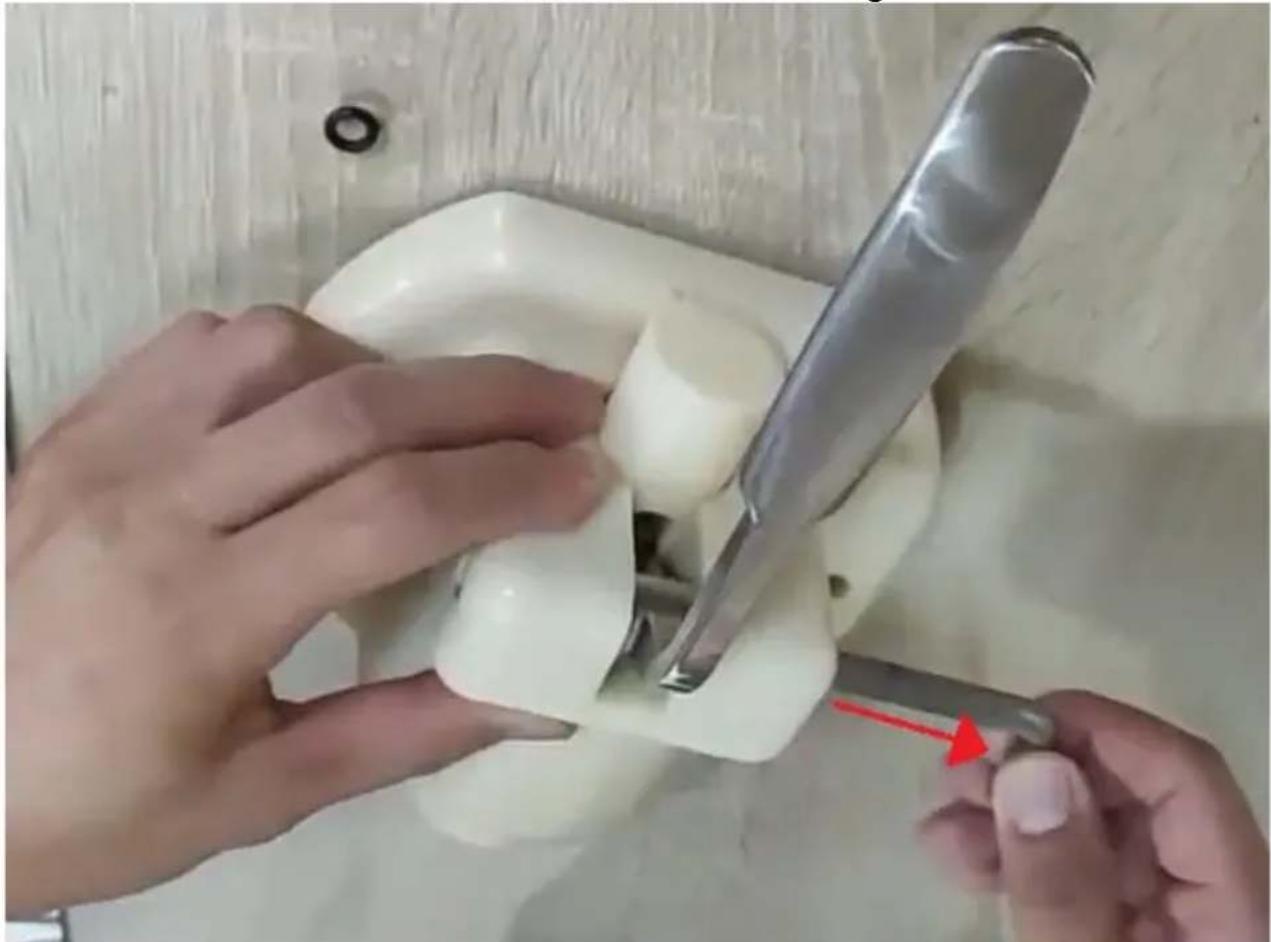
- Pull the cotter pin
A - Model RCSI-16/ RCSI-17
B - Model RCSI-18
C – Apply lubricant here
A - Model RCSI-16/ RCSI-17
B - Model RCSI-18
C – Apply lubricant here
6 – Cooling chamber
7 - Stirrer
8 – Protective seal of the cooling chamber
9 – Protective cover of the cooling chamber
10 – Valve stem
11 – Valve stem O-rings
12 – Lever
13 – Cotter pin
- Remove the stem O-ring
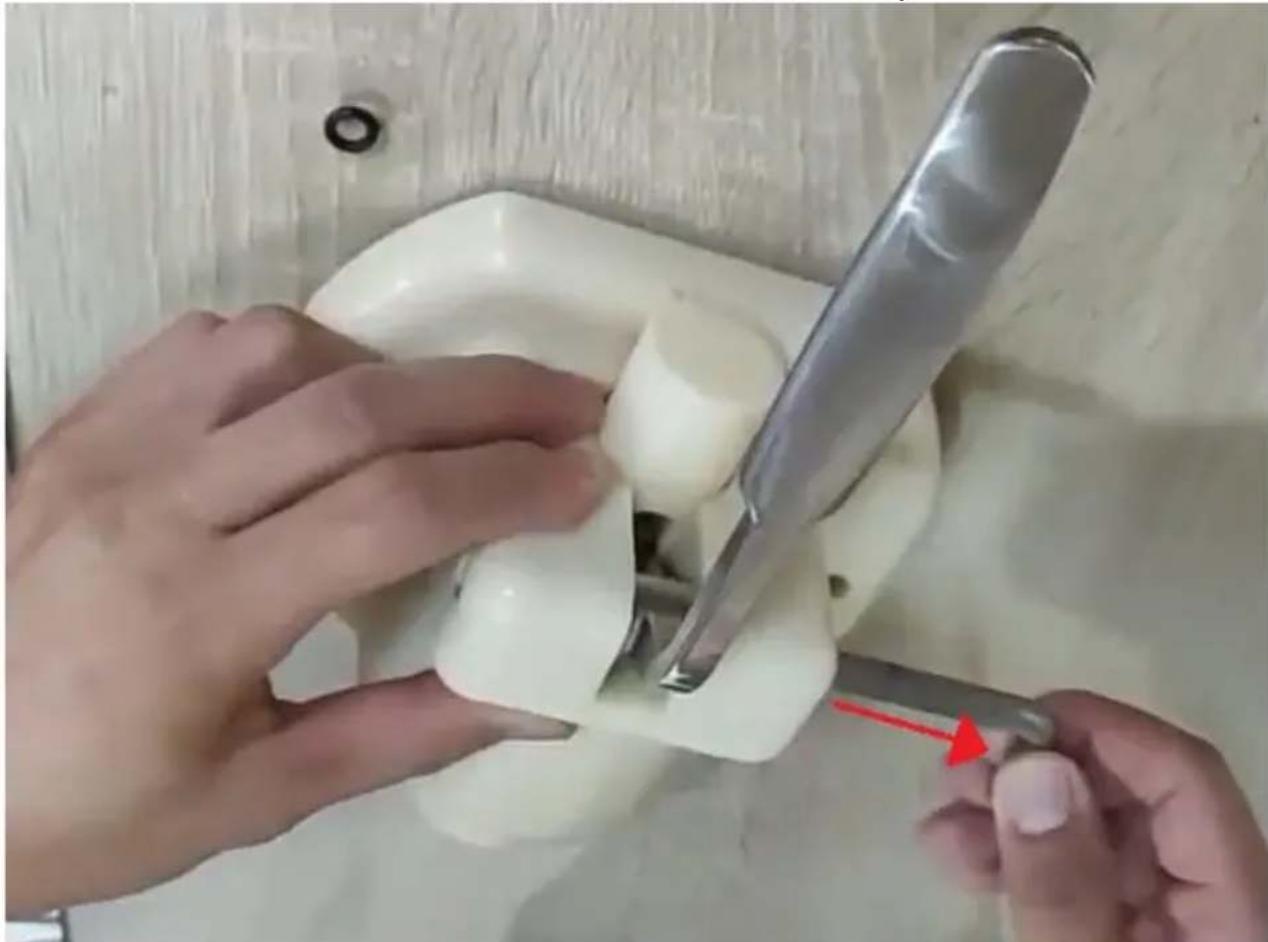
- Pull the cotter pin
- Pull the lever down and remove it
A – Model RCSI-16/ RCSI-17
B – Model RCSI-18
- Pull out the cotter pin
A – Model RCSI-16/ RCSI-17
B – Model RCSI-18
A - Model RCSI-16/ RCSI-17
B - Model RCSI-18
C – Apply lubricant here
- Remove the spindle O-ring
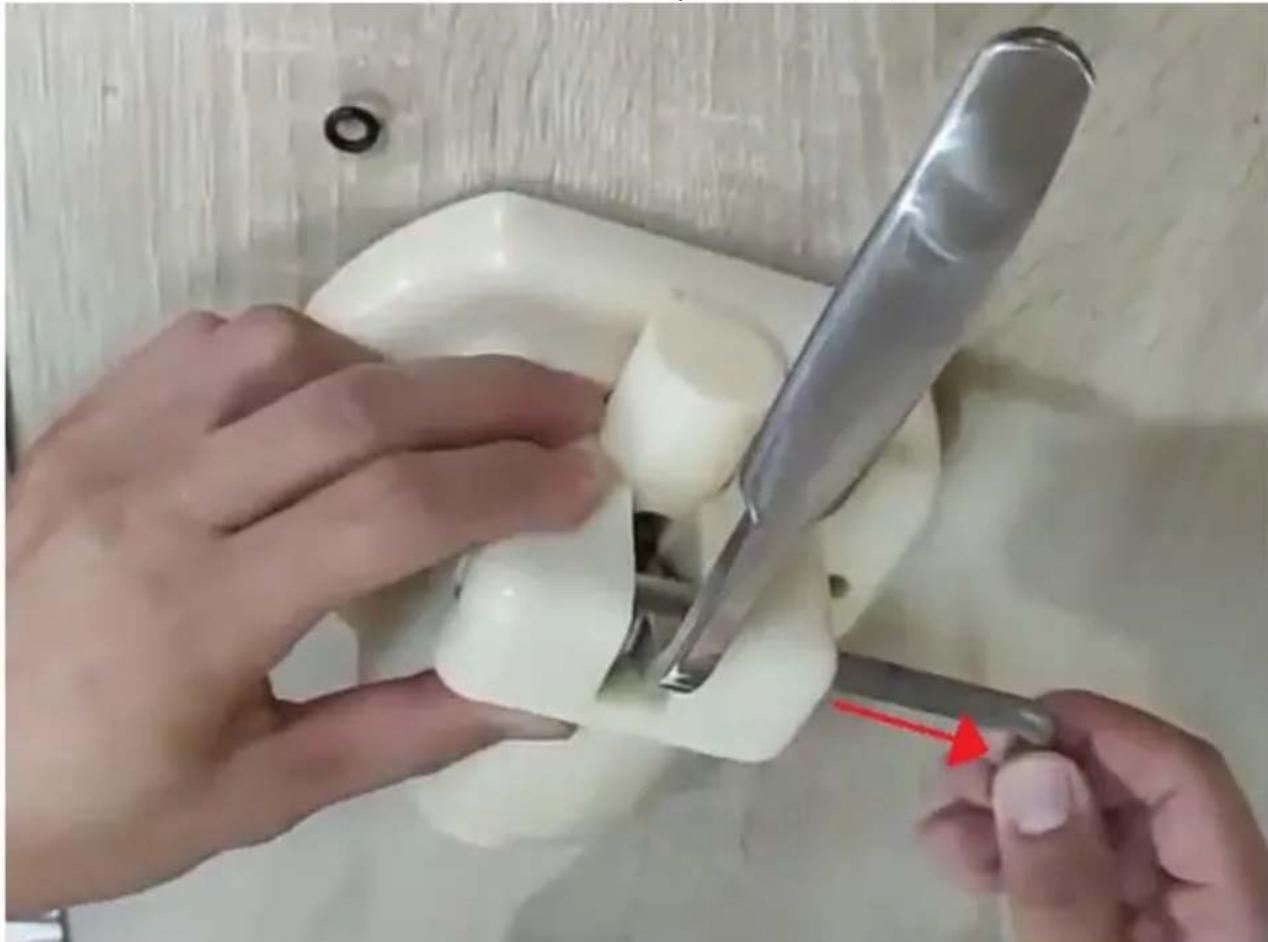
- Pull the pin
- Pull the lever down and remove it
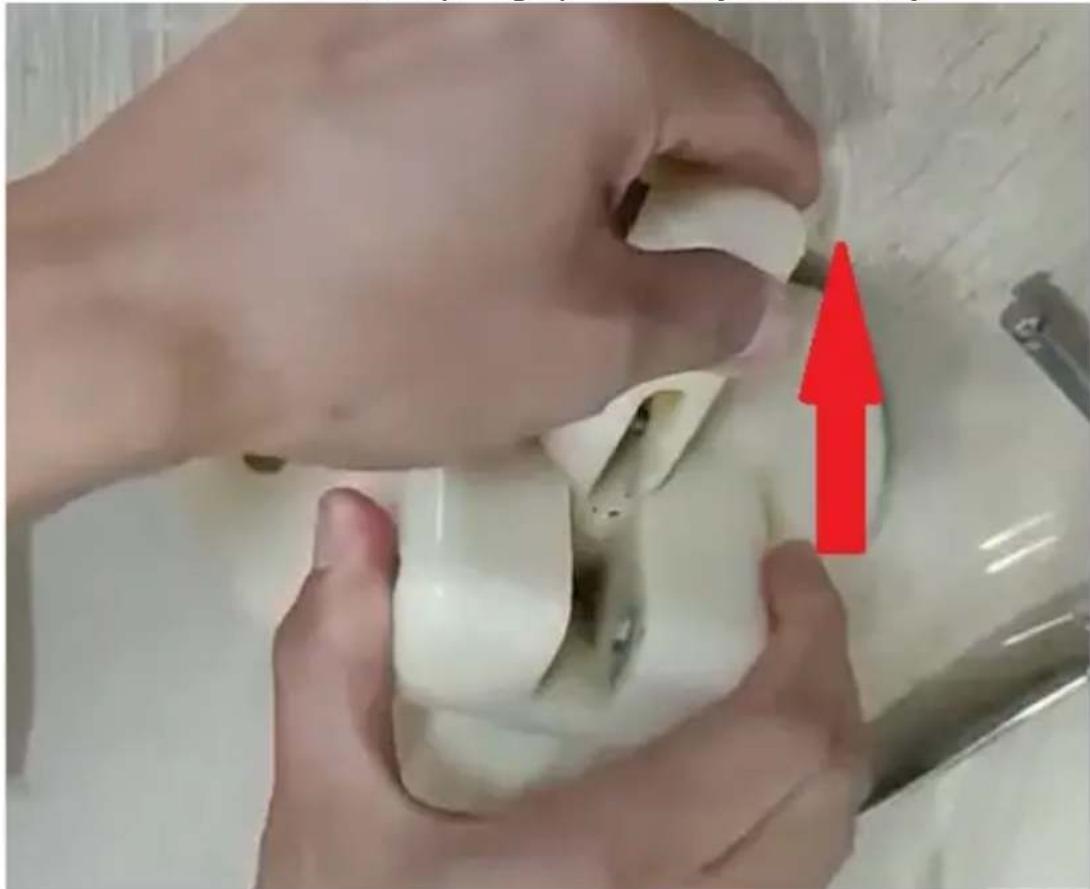
- Pull the piston up for cleaning
- Clean the piston with a dedicated detergent approved for food use
- Add food-grade lubricants before assembly
- Assemble in reverse order

Model A: RCSI-16/RCSI-17
Model B: RCSI-18
- Pull the pin
1 – Refrigerated container capacity
2 – Control panel:
a) LCD display
A - Model RCSI-16/ RCSI-17
B - Model RCSI-18
6 – Refrigerated compartment
7 - Stirrer
- Pull the pin
RO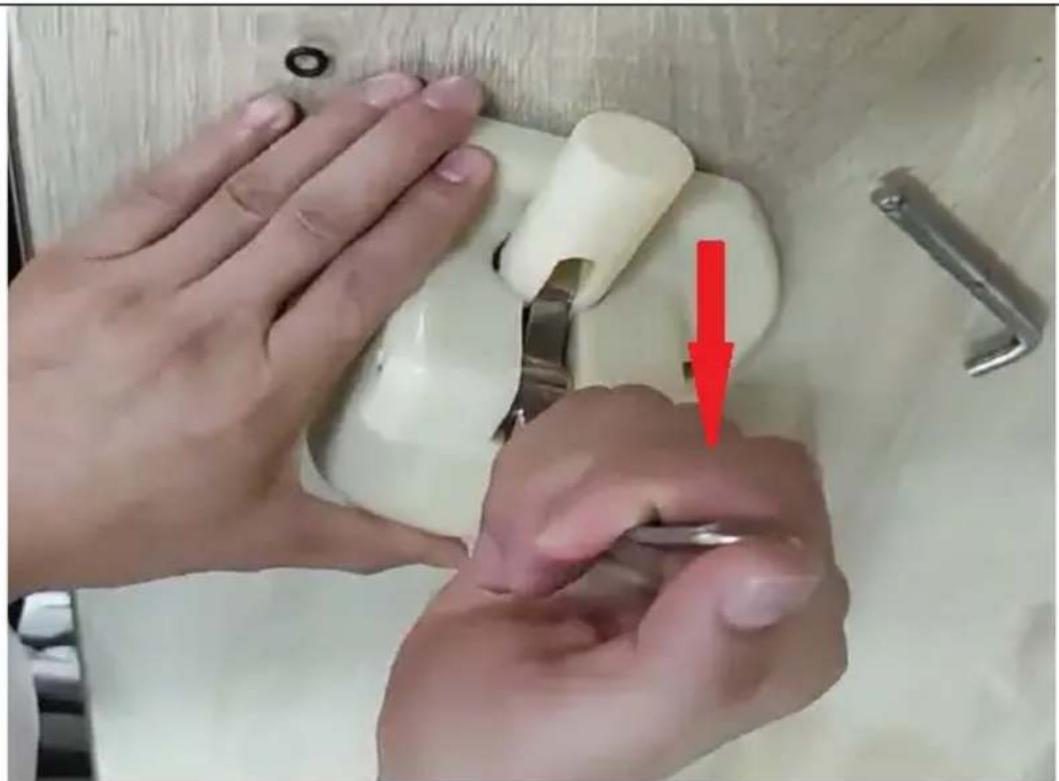
SL
| A – Model RCSI-16/RCSI-17 | 12 – vzvod |
| B – Model RCSI-18 | 13 – Razcepni zatič |
| C – Tukaj nanesite lubrikant | 14 – Pritrdilni elementi |
| 6 – Hladilni del | 15 – Tesnilo razpršilnika |
| 7 – Mešalo | 16 – Pokrov razdelilnika |
| 8 – Zaščitno tesnilo hladilnega prostora | 17 – O-tesnilo stebla, srednje |
| 9 – Zaščita hladilnega prostora | velikosti |
| 10 – Steblo ventila | 18 – Srednje tesnilo stebla (model |
| 11 – O-obročki stebla ventila | RCSI-18) |
- Remove the stem O-ring
SL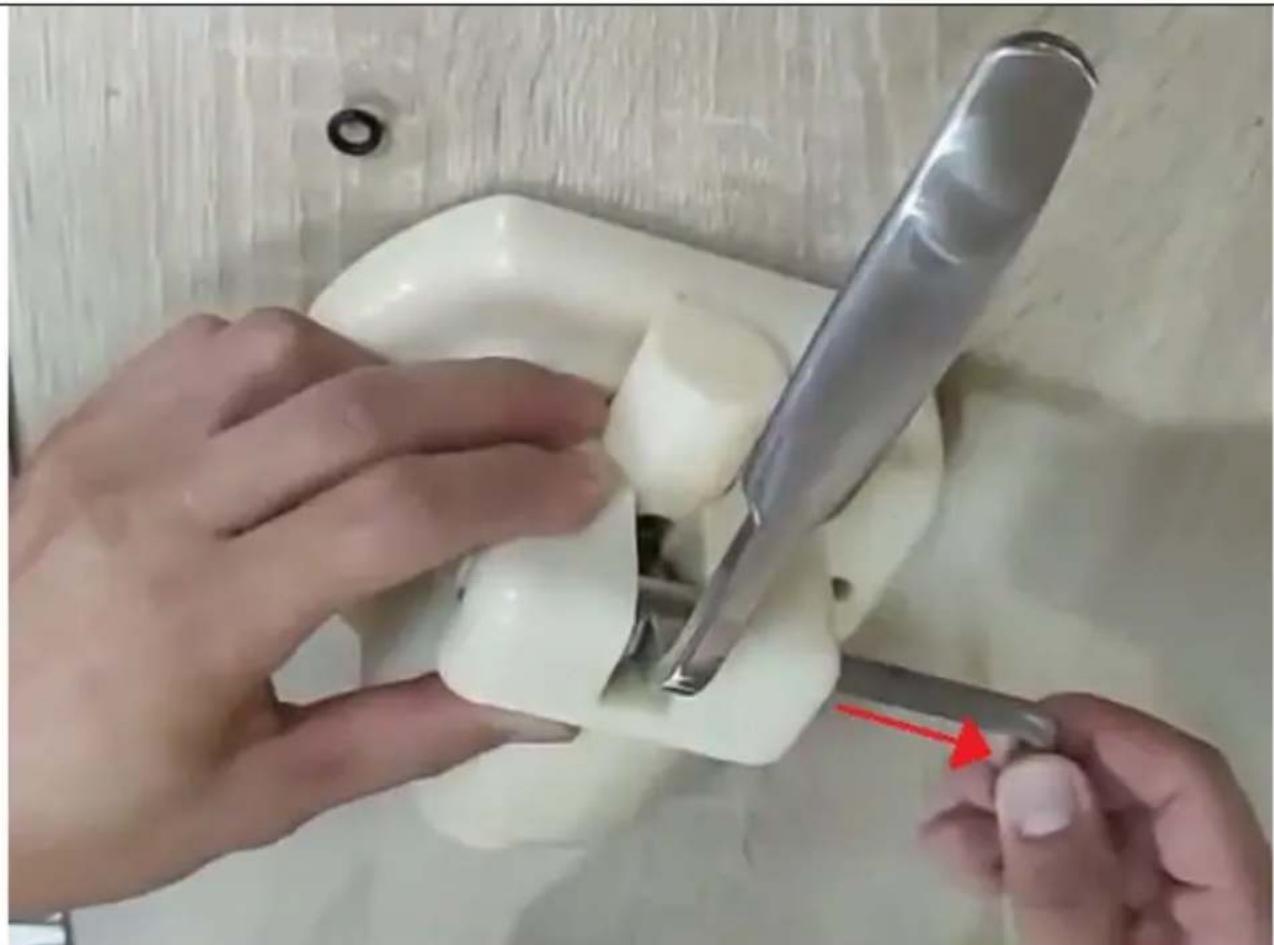
- Pull the cotter pin
- For cleaning, pull the piston upwards
- Clean the piston with a dedicated detergent approved for food contact.
- Apply food-grade lubricants before assembly.
For the disposal of the device, please consider and act according to national and local rules and regulations.
expondo Polska sp. z o.o. sp. k.