PAT 4 D6 - Stapler PARKSIDE - Free user manual and instructions
Find the device manual for free PAT 4 D6 PARKSIDE in PDF.


| Brand | Parkside |
| Model | PAT 4 D6 |
| Product type | Cordless staple gun |
| Rated voltage | 4 V |
| Battery type | Integrated lithium-ion, 2.0 Ah |
| Striking speed | Max. 30 strokes/min |
| Magazine capacity | 100 staples or 50 nails |
| Compatible staples | Type 53 / JT21, width 11.4 mm, length 4–12 mm |
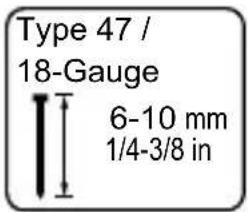
| Compatible nails | Type 47 / 18-Gauge, width 1.2 mm, length 6–10 mm |
| Power supply | 4 V lithium-ion battery, charges via USB-C (charger not included) |
| Charging time | Approx. 60 min |
| Sound pressure level | LpA = 81.98 dB, KpA = 3 dB |
| Sound power level | LWA = 92.98 dB |
| Vibration | ah = 2.537 m/s², K = 1.5 m/s² |
| Main functions | Stapling and nailing into softwood, cardboard, leather, fabric, etc. |
| Safety | Safety contact, on/off switch, deep discharge protection |
| Maintenance and cleaning | Clean with a dry cloth; do not use water or solvents |
| Spare parts | Staples, nails, USB charger (not included) |
| Warranty | 3 years (subject to material or manufacturing defects) |
| Delivery contents | Staple gun, USB cable, 1000 staples 6 mm, 1000 staples 8 mm, 500 nails 10 mm, instruction manual |
| Intended use | Private domestic use, not designed for commercial use or securing electrical cables |
Frequently Asked Questions - PAT 4 D6 PARKSIDE
User questions about PAT 4 D6 PARKSIDE
0 question about this device. Answer the ones you know or ask your own.
Ask a new question about this device
Download the instructions for your Stapler in PDF format for free! Find your manual PAT 4 D6 - PARKSIDE and take your electronic device back in hand. On this page are published all the documents necessary for the use of your device. PAT 4 D6 by PARKSIDE.
USER MANUAL PAT 4 D6 PARKSIDE
Translation of the original instructions
NL BE
4V ACCU-SPIJKERPISTOOL
GB/IE Translation of the original instructions Page 35
natural_image
Black-and-white illustration of a checkmark above a textured surface (no text or symbols)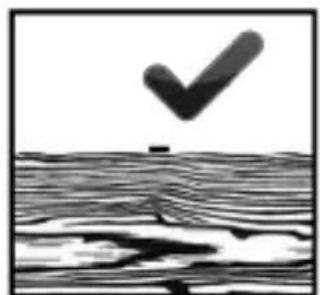
natural_image
Black-and-white illustration of a checkmark above a wavy surface, no text or symbols presentnatural_image
Black and white illustration of a cross symbol above a wooden plank, no text or symbols present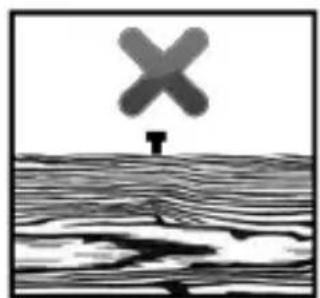
natural_image
Black-and-white illustration of a cross-shaped object above a wavy surface, no text or symbols present.Intended use......Page 37
Parts description ......Page 37
Scope of delivery......Page 38
Technical data......Page 38
General power tools safety warnings......Page 41
Tacker safety warnings......Page 46
Charger safety warnings......Page 46
Before use ......Page 48
Starting the charging process ......Page 48
Completing the charging process ......Page 49
Initial use......Page 49
Adding staples....Page 49
Adding nails......Page 50
Functions ......Page 50
Cleaning and care......Page 53
Warranty claim procedure ......Page 56
Service......Page 57
Translation of original conformity declaration ......Page 59
| List of pictograms used | |
 | Read the instruction manual. |
 | Please read the instructions for use. The instructions for use contain additional information. |
 | |
 | For use in dry indoor locations only. |
 | Protect the product from moisture. |
 | Direct current/voltage |
 | CE mark indicates conformity with relevant EU directives applicable for this product. |
| [SIGNATURE] | Safety informationInstructions for use |
4V Cordless Tacker/Nailer
- Introduction

We congratulate you on the purchase of your new product. You have chosen a high quality product. The instructions for use are part of the product. They contain important information concerning safety, use and disposal. Before using the product, please familiarise yourself with all of the safety information and instructions for use. Only use the product as described and for the specified applications If you pass the product on to anyone else, please ensure that you also pass on all the documentation with it.
Intendeduse
This product is intended for fastening paperboard, sheets of paper, leather, insulation, fabric and similar materials onto soft wood (real wood), plywood boards having similar hardness as softwood and low density fiberboard. It is only intended for private household use. Any other use or modification of the product shall be considered improper use and may result in serious accident hazards. The manufacturer is not liable for any damages caused by improper use. Not intended for commercial use. This product is not intended for securing electrical cables.
Partsdescription
1 Trigger
2 USB Type C socket
3 Pusher
3a Release button
4 Magazine
5 Fill indicator
6 Safety contact
7 Charger*
7a USB cable
7b USB port
8 On/Off switch
9 Charge status/Battery level indicator
*Charger is not included.
- Scope of delivery
1 Cordless Tacker/Nailer
1 USB cable
1000 Staples 6mm
1000 Staples 8mm
500 Nails 10mm
1 Operating instructions
- Technical data
Cordless Tacker: PAT 4 D6
Rated voltage: 4V ---
Rechargeable
battery (installed): Lithium-ion
Cells: 1
Capacity: 2.0Ah
Speed: Max. 30/min
Magazine capacity: 100 staples or 50 nails
Wire staples:
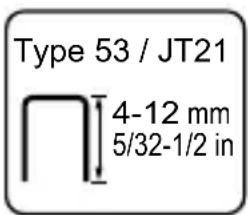
Staple width: 11.4 mm
Staple length: 4–12 mm
Nails: Nail width
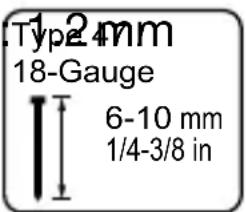
Nail length: 6–10 mm
Use only the following charger* to charge the cordless tool:
| Manufacturer's name or trade mark, commercial registration number and address | OWIM GmbH & Co. KG HRA 721742 Stiftsbergstraße 1, 74167 Neckarsulm, GERMANY | |
| Model identifier HG04995 (with VDE plug), HG04996 (with BS plug) | ||
| Input voltage 100–240 V | ~ | |
| Input AC frequency 50/60 Hz | ||
| Output voltage 5.0 V | --- | |
| Output current 2.2 A | ||
| Output power 11.0 W | ||
| Average active efficiency | 82.5 % | |
| Efficiency at low load (10%) | 77.6 % | |
| No-load power consumption | 0.061 | W |
| Input current | 0.3 A | |
| Protection class | II/☐ | |
| Connection type | USB | |
| Charging time approx. 60 min | ||
*Charger is not included. Please contact the service center via telephone (see “service”) for the charger.
Noise emission value:
The measured values for sound comply with EN 60745. The A-weighted single-event noise level, standardised to 1 s, is typically:
Sound pressure level: L_pA = 81.98 dB
Uncertainty: K _pA = 3 dB
Sound power level: L WA = 92.98 dB
Uncertainty: K WA = 3 dB
Wear hearing protection!
Vibration values determined in accordance with EN 60745:
Vibration emission value a_h = 2.537 m/s^2
Uncertainty K = 1,5m/s ^4
Note: The vibration level specified in these instructions has been measured in accordance with a standardized measuring procedure specified in EN60745 and can be use for equipment comparisons. The specified vibration emission value can also be used to make an initial exposure estimate.
WARNING!
The vibration level varies in accordance with the use of the power tool and may be higher than the value specified in these instructions in some cases. Regular use of the electric tool in such a way may cause the users to underestimate the vibration. Try to keep the vibration loads as low as possible. Measures to reduce the vibration load are, e.g. wearing gloves and limiting the working time. All states of operation much be taken into account (e.g. time when the power tool is switched off and time where the power tool is switched on but running without load).
● General power tools safety warnings
WARNING!
Read all safety directions and instructions. Failure to follow the warnings and instructions may result in electric shock, fire and/or serious injury.
Save all warnings and instructions for future reference.
The term “power tool” in the warnings refers to your mains-operated (corded) power tool or battery-operated (cordless) power tool.
Work area safety
a) Keep work area clean and well lit. Cluttered or dark areas invite accidents.
b) Do not operate power tools in explosive atmospheres, such as in the presence of flammable liquids, gases or dust. Power tools create sparks which may ignite the dust or fumes.
c) Keep children and bystanders away while operating a power tool. Distractions can cause you to lose control. Electrical safety
a) Power tool plugs must match the outlet. Never modify the plug in any way. Do not use any adapter plugs with earthed (grounded) power tools. Unmodified plugs and matching outlets will reduce risk of electric shock.
b) Avoid body contact with earthed or grounded surfaces, such as pipes, radiators, ranges and refrigerators. There is an increased risk of electric shock if your body is earthed or grounded.
c) Do not expose power tools to rain or wet conditions. Water entering a power tool will increase the risk of electric shock.
d) Do not abuse the cord. Never use the cord for carrying, pulling or unplugging the power tool. Keep cord away from heat, oil, sharp edges or moving parts. Damaged or entangled cords increase the risk of electric shock.
e) When operating a power tool outdoors, use an extension cord suitable for outdoor use. Use of a cord suitable for outdoor use reduces the risk of electric shock.
f) If operating a power tool in a damp location is unavoidable, use a residual current device (RCD) protected supply. Use of an RCD reduces the risk of electric shock.
Personal safety
a) Stay alert, watch what you are doing and use common sense when operating a power tool. Do not use a power tool while you are tired or under the influence
of drugs, alcohol or medication. A moment of inattention while operating power tools may result in serious personal injury.
b) Use personal protective equipment. Always wear eye protection. Protective equipment such as dust mask, non-skid safety shoes, hard hat, or hearing protection used for appropriate conditions will reduce personal injuries.
c) Prevent unintentional starting. Ensure the switch is in the off-position before connecting to power source and/or battery pack, picking up or carrying the tool. Carrying power tools with your finger on the switch or energising power tools that have the switch on invites accidents.
d) Remove any adjusting key or wrench before turning the power tool on. A wrench or a key left attached to a rotating part of the power tool may result in personal injury.
e) Do not overreach. Keep proper footing and balance at all times. This enables better control of the power tool in unexpected situations.
f) Dress properly. Do not wear loose clothing or jewellery. Keep your hair, clothing and gloves away from moving parts. Loose clothes, jewellery or long hair can be caught in moving parts.
g) If devices are provided for the connection of dust extraction and collection facilities, ensure these are connected and properly used. Use of dust collection can reduce dust-related hazards.
Power tool use and care
a) Do not force the power tool. Use the correct power tool for your application. The correct power tool will do the job better and safer at the rate for which it was designed.
b) Do not use the power tool if the switch does not turn it on and off. Any power tool that cannot be controlled with the switch is dangerous and must be repaired.
c) Disconnect the plug from the power source and/or the battery pack from the power tool before making any adjustments, changing accessories, or storing power tools. Such preventive safety measures reduce the risk of starting the power tool accidentally.
d) Store idle power tools out of the reach of children. Do not allow persons unfamiliar with the power tool or these instructions to operate the power tool. Power tools are dangerous in the hands of untrained users.
e) Maintain power tools. Check for misalignment or binding of moving parts, breakage of parts and any other condition that may affect the power tool's operation. If damaged, have the power tool repaired before use. Many accidents are caused by poorly maintained power tools.
f) Keep cutting tools sharp and clean. Properly maintained cutting tools with sharp cutting edges are less likely to bind and are easier to control.
g) Use the power tool, accessories and tool bits etc. in accordance with these instructions, taking into account the working conditions and the work to be performed. Use of the power tool for operations
different from those intended could result in a hazardous situation.
Battery tool use and care
a) Recharge only with the charger specified by the manufacturer. A charger that is suitable for one type of battery pack may create a risk of fire when used with another battery pack.
b) Use power tools only with specifically designated battery packs. Use of any other battery packs may create a risk of injury and fire.
c) When battery pack is not in use, keep it away from other metal objects, like paper clips, coins, keys, nails, screws or other small metal objects, that can make a connection from one terminal to another. Shorting the battery terminals together may cause burns or a fire.
d) Under abusive conditions, liquid may be ejected from the battery; avoid contact. If contact accidentally occurs, flush with water. If liquid contacts eyes, additionally seek medical help. Liquid ejected from the battery may cause irritation or burns.
Service
a) Have your power tool serviced by a qualified repair person using only identical replacement parts. This will ensure that the safety of the power tool is maintained.
• Tacker safety warnings
- Always assume that the tool contains fasteners.
Careless handling of the tacker can result in unexpected firing of fasteners and personal injury. - Do not point the tool towards yourself or anyone nearby. Unexpected triggering will discharge the fastener causing an injury.
- Do not actuate the tool unless the tool is placed firmly against the workpiece. If the tool is not in contact with the workpiece, the fastener may be deflected away from your target.
- Disconnect the tool from the power source when the fastener jams in the tool. While removing a jammed fastener, the tacker may be accidentally activated if it is plugged in.
- Use caution while removing a jammed fastener. The mechanism may be under compression and the fastener may be forcefully discharged while attempting to free a jammed condition.
- Do not use this tacker for fastening electrical cables. It is not designed for electric cable installation and may damage the insulation of electric cables thereby causing electric shock or fire hazards.
- Charger safety warnings
- This product can be used by children aged from 8 years and above and persons with reduced physical, sensory or
mental capabilities or lack of experience and knowledge if they have been given supervision or instruction concerning use of the product in a safe way and understand the hazards involved.
- Children shall not play with the product.
- Cleaning and user maintenance shall not be made by children without supervision.
- Do not charge non-rechargeable batteries. Disregarding this instruction may be hazardous.
- If the supply cord is damaged, it must be replaced by the manufacturer, its service agent or similarly qualified persons in order to avoid a hazard.
- Protect the electrical parts against moisture. Do not immerse such parts in water or other liquids to avoid electrical shock. Never hold the product under running water. Pay attention to the instructions
provided for cleaning, maintenance and repair.
- The charger is suitable for indoor use only.
- Before use
Note: Remove all packaging materials from the product.
Note: The rechargeable battery comes partly charged. Charge the battery prior to first use, ideally at least 2–3 hours. Li-Ion batteries may be charged at any time without reducing their life. Interrupting the charging process does not damage the rechargeable battery.
This product is equipped with a depth discharge protection which prevents discharging below final discharging voltage. Do not continuously pull the trigger 1 to prevent damaging the built-in rechargeable battery.
Set the On/Off switch 8 to the "0" position if the product will not be used or will be stored for extended periods.
Note: If the Charge status/battery level indicator ⑨ lights up red during use, the charge is below 30%. Please charge the battery.
● Starting the charging process (see Fig. A)
- Connect the USB cable 7a to the USB port 7b of charger 7.
☐ Connect the other end of the USB cable 7a to the USB Type C socket 2 on the product.
- Connect the charger 7 to a 100–240V\~50/60Hz power source. The charge status indicator 9 shows the charging progress.
| Battery status LED when charging | Charge status | ||
| red yellow green | |||
| Flashing Off Off < 30 % | |||
| Light up Flashing Off 30–60 % | |||
| Light up Light up Flashing 60–90 % | |||
| Light up Light up Light up > 90 % | |||
- Completing the charging process
☐ Disconnect the charger 7 from the power source.
☐ Disconnect the USB cable 7a from the USB Type C socket 2 on the product.
Note: The product cannot be used whilst charging. It is normal for the handle to warm up slightly whilst charging.
- Initial use
- Adding staples
- Set the On/Off switch 8 to the "0" position before working on the product.
Turn the product over.
☐ Squeeze the release button 3a (see Fig. B).
☐ Pull back on the pusher 3 (see Fig. B).
☐ Add staples to the magazine 4 (see Fig. C).
After adding staples, slide the pusher 3 in again until the magazine 4 is fully closed. Release the release button 3a. It must click and lock into place for the magazine 4 to be closed correctly.
Note: Use the window on the fill indicator 5 to see if the magazine 4 is empty.
- Adding nails
- Set the On/Off switch 8 to the “0” position before working on the product.
Turn the product over.
☐ Squeeze the release button 3a (see Fig. B).
☐ Pull back on the pusher 3 (see Fig. B)
Follow icon shown on pusher 3 (see Fig. C) and add nails to the magazine 4 (see Fig. C)
After adding nails, slide the pusher 3 in again until the magazine 4 is fully closed, (see Fig C).
☐ Release the release button 3a. It must click and lock into place for the magazine 4 to be closed correctly.
Note: Use the window on the fill indicator to see if the magazine 4 is empty.
- Functions
Stapling & Nailing
☐ Set the On/Off switch ☐ to the “I” position to switch the product on.
☐ Press the safety contact 6 into the work piece.
☐ Squeeze the trigger 1 to drive a staple/nail into the work piece. Make sure to keep the product pressed against the work piece.
☐ Set the On/Off switch 8 to the "0" position to switch the product off.
Note: Hold tool firmly and press on work surface before firing to ensure the complete penetration of the staple/nail.
☐ Battery level indicator 9 shows the battery level when pressing down trigger 1 while On/Off switch 8 is set to “I” position.
Note: Battery level indicator 9 keeps glowing up for about 5 seconds after releasing trigger 1.
| Battery status LED when use | Battery level | ||
| red yellow green | |||
| Light up Light up Light up >70% | |||
| Light up Light up Off 30–70% | |||
| Light up Off Off < 30% | |||
Clearing Jammed Staples
WARNING! If a staple is jammed, do not squeeze the trigger 1. It may otherwise accidentally be triggered after removing the staple.
Note: Set the On/Off switch 8 to "0" position prior to clearing the jammed staple.
Open the magazine 4 and pull back on the pusher 3.
☐ Remove the jammed staple from the magazine 4.
Note: Do not trigger the staple gun when empty to prevent wear.
Determining the Staple Length
☐ Consider two factors when determining the correct staple length:
- the thickness of the material being fastened
- the composition (hardness) of the material being fastened.
4–6mm staple or 6–8mm nail in length will typically suffice when driving into plywood and fiber board.
8–12 mm staple or 10 mm nail in length will typically suffice when fastening into softwood such as pinewood.

natural_image
Black-and-white illustration of a checkmark above a textured surface (no text or symbols)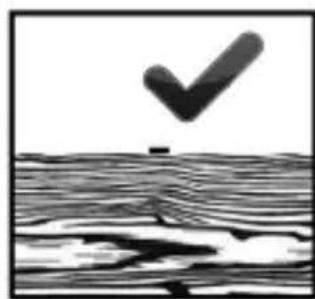
natural_image
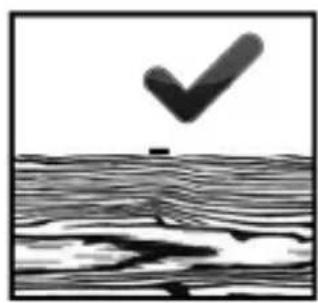
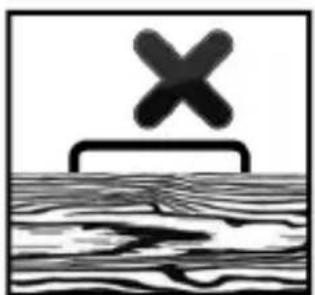
Black-and-white illustration of a checkmark above a wavy surface, no text or symbols presentThe crown of the staple or head of the nail should be flushed with the top of the material being fastened as shown.
natural_image
Black and white illustration of a cross symbol above a wooden plank, no text or symbols present
natural_image
Black-and-white illustration of a cross symbol above a textured surface, no text or symbols present.If the crown of the staple/head of the nail is not flush with the material to be fastened, the staple/nail is too long. In
this case, use the next shorter staple or nail for optimal results.
- Cleaning and care
- Switch off the product before cleaning and maintaining. To do this, press the On/Off switch 8 to the “0” position.
The product must always be clean, dry, and free from oil and grease.
□ Clean the housing with a dry cloth.
This product contains a Lithium-ion rechargeable battery and is therefore subject to hazardous materials regulations. The user may transport the rechargeable batteries on roads without special requirements.
The packaging and marking is subject to special requirements when transported by third parties (e.g. airline, courier, carrier). A hazardous materials expert must be consulted when transported by third parties.
Rechargeable batteries may only be shipped if the housing is intact. Cover open contacts with tape and package the rechargeable batteries so they cannot move inside the packaging. Particularly observe the specific national regulations.
- Disposal
The packaging is made entirely of recyclable materials, which you may dispose of at local recycling facilities.
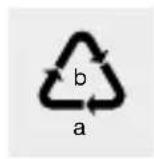
Observe the marking of the packaging materials for waste separation, which are marked with abbreviations (a) and numbers (b) with following meaning: 1–7: plastics/20–22: paper and fibreboard/80–98: composite materials.
Contact your local refuse disposal authority for more details of how to dispose of your worn-out product.
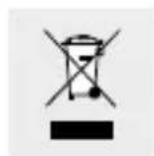
To help protect the environment, please dispose of the product properly when it has reached the end of its useful life and not in the household waste. Information on collection points and their opening hours can be obtained from your local authority.
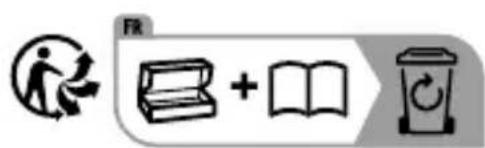
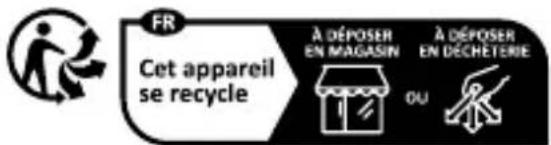
The product and packaging materials are recyclable, subject to extended manufacturer responsibility. Dispose it separately, following the illustrated packaging symbols, for better waste treatment. The Triman logo is valid in France only.
Faulty or used batteries/accumulators must be recycled. Return the batteries/accumulators and the product to the available collection points.
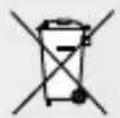
Environmental damage through incorrect disposal of the batteries/rechargeable batteries!
Batteries/rechargeable batteries may not be disposed of with the usual domestic waste. They may contain toxic heavy metals and are subject to hazardous waste treatment rules and regulations. The chemical symbols for heavy metals are as follows: Cd = cadmium, Hg = mercury, Pb = lead. That is why you should dispose of used batteries/rechargeable batteries at a local collection point.
This product has a built-in rechargeable battery which cannot be replaced by the user. The removal or replacement of the rechargeable battery may only be carried out by the manufacturer or his customer service or by a similarly qualified person in order to avoid hazards. When disposing of the product, it should be noted that this product contains a rechargeable battery.
- Warranty
The product has been manufactured to strict quality guidelines and meticulously examined before delivery. In the event of material or manufacturing defects you have legal rights against the retailer of this product. Your legal rights are not limited in any way by our warranty detailed below.
The warranty for this product is 3 years from the date of purchase. The warranty period begins on the date of purchase.
Keep the original sales receipt in a safe location as this document is required as proof of purchase.
Any damage or defects already present at the time of purchase must be reported without delay after unpacking the product.
Should the product show any fault in materials or manufacture within 3 years from the date of purchase, we will repair or replace it – at our choice – free of charge to you. The warranty period is not extended as a result of a claim being granted. This also applies to replaced and repaired parts.
This warranty becomes void if the product has been damaged, or used or maintained improperly.
The warranty covers material or manufacturing defects. This warranty does not cover product parts subject to normal wear and tear, thus considered consumables (e.g. batteries, rechargeable batteries, tubes, cartridges), nor damage to fragile parts, e.g. switches or glass parts.
• Warranty claim procedure
So that your request can be processed quickly, please observe the following instructions:
o For all inquiries, please have the receipt and item number (IAN 458716_2401) ready as proof of purchase.
o The article number can be taken from the identification label on the product, engraving on the product, the front
cover of your manual (at the bottom left), or the sticker on the back or bottom of the product.
o If malfunctions or other defects arise, first contact the service department indicated below by phone or email.
o You can then send a product recorded as defective to the communicated service address postage-free, making sure to enclose proof of purchase (receipt) and information on the details of the defect and when it occurred.
0
PDF ONLINE
parkside-diy.com
You can download and view this and numerous other manuals at parkside-diy.com. This QR code takes you directly to parkside-diy.com. Choose your country and use the search screen to search for the operating instructions. Entering the item number (IAN) 458716_2401 takes you to the operating instructions for your item.
Service
WARNING!
■ Have your product repaired at the service centre or an electrician, using only original manufacturer parts. This will maintain the safety of this product.
GB Service Great Britain
Tel.: 0800 0569216
E-Mail: owim@lidl.co.uk

Service Ireland
Tel.:1800200736
E-Mail: owim@lidl.ie

● Translation of original conformity declaration
EU DECLARATION OF CONFORMITY (No. 458716_2401)
IAN: 458716_2401
Product identification:
Model Number: HG10469
"PARKSIDE" Cordless Tacker / Nailer
The object of the declaration described above is in conformity with the relevant Union harmonisation legislation:
Directive 2006/42/EC
Directive 2014/30/EU
Directive 2011/65/EU and all related amendments
References to the relevant harmonised standards used or references to the other technical specifications in relation to which conformity is declared:
| N° / Parts |
| Directive 2006/42/EC |
| EN 60745-1:2009/A11:2010 |
| EN 60745-2-16:2010 |
| Directive 2014/30/EU |
| EN 55014-1:2017/A11:2020 |
| EN IEC 55014-1:2021 |
| EN 55014-2:1997/A2:2008 |
| EN IEC 55014-2:2021 |
| EN 61000-3-2:2014 |
| EN IEC 61000-3-2:2019/A1:2021 |
| EN 61000-3-3:2013/A2:2021 |
The object of the declaration described above is in conformity with Directive 2011/65/EU of the European Parliament and of the Council of 8 June 2011 on the restriction of the use of certain hazardous substances in electrical and electronic equipment:
| N° / Parts |
| Directive 2011/65/EU |
| EN IEC 63000:2018 |
Keeper of the technical documentation: OWIM GmbH & Co.KG
Signed for and on behalf of:
This declaration of conformity is issued under the sole responsibility of the manufacturer.
Translation of the original declaration of conformity
Neckarsulm 22.01.2024
Place
Date
ppa. Stefan Haensel
Authorised Signatory
ppa Budlai Vppa. Jens Buchheim
Authorised Signatory
Incertitude: K _WA = 3 dB
natural_image
Black checkmark above a textured surface, no text or symbols present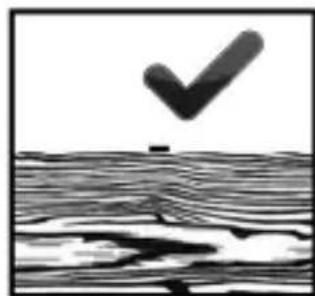
natural_image
Abstract black-and-white graphic with a checkmark above a wavy surface (no text or symbols)natural_image
Simple black-and-white diagram showing a cross symbol above a rectangular structure, with no text or labels present.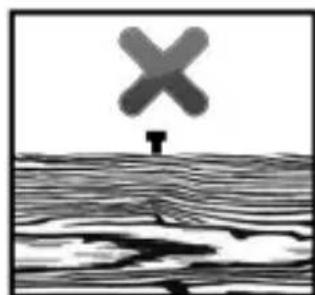
natural_image
Black-and-white illustration of a cross symbol above a wavy surface, no text or symbols presentDirective 2006/42/CE
Directive 2014/30/UE
Directive 2006/42/CE
EN 60745-1:2009/A11:2010
EN 60745-2-16:2010
Directive 2014/30/UE
EN 55014-1:2017/A11:2020
EN IEC 55014-1:2021
EN 55014-2:1997/A2:2008
EN IEC 55014-2:2021
EN 61000-3-2:2014
EN IEC 61000-3-2:2019/A1:2021
EN 61000-3-3:2013/A2:2021
natural_image
Two identical panels showing a checkmark above a wavy surface, with no text or symbols present.natural_image
Black-and-white illustration of a checkmark above a wavy line pattern (no text or symbols)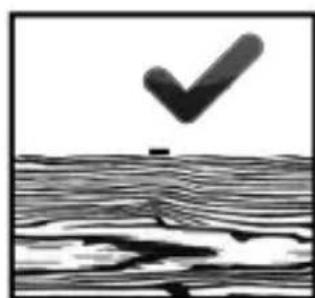
natural_image
Abstract black-and-white graphic with a checkmark above a textured surface (no text or symbols)natural_image
Black and white illustration of a cross symbol above a wooden plank, with no text or symbols present.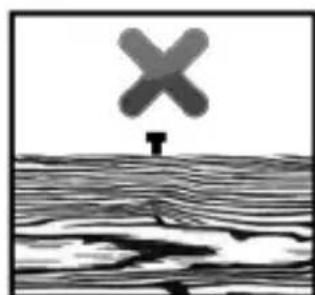
natural_image
Black-and-white illustration of a cross symbol above a textured surface, no text or symbols presentšířka spony:
11,4mm
délka spony:
4-12mm
hřebíku šířka:
1,2mm
Type 47 /
18-Gauge

6-10 mm
1/4-3/8 in
délka hřebíku:
6-10mm
natural_image
Black-and-white illustration of a checkmark above a textured surface (no text or symbols)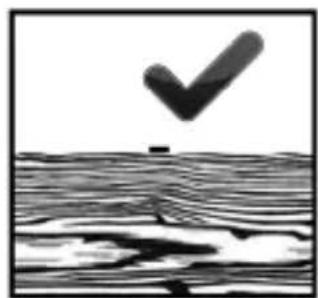
natural_image
Abstract black-and-white illustration of a checkmark above a wavy surface (no text or symbols)natural_image
Black and white illustration of a cross symbol above a wooden plank, no text or symbols present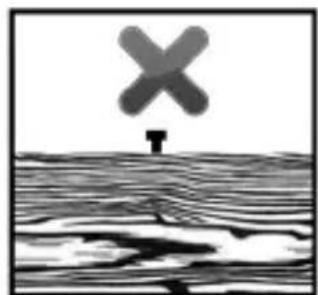
natural_image
Black-and-white illustration of a cross symbol above a wavy surface with a small object at the bottom (no text or symbols)
natural_image
Black-and-white illustration of a checkmark above a textured surface (no text or symbols)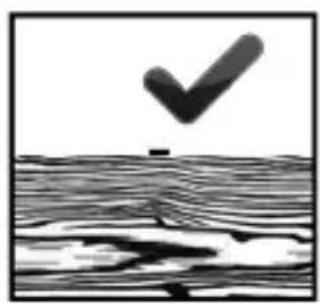
natural_image
Black-and-white illustration of a checkmark above a wavy surface, no text or symbols presentancho de grapa:
11,4mm
longitud de grapa:
4-12mm
Clavos:
ancho de clavo:
1,2mm
Longitud del clavo:
6-10mm
natural_image
Black-and-white illustration of a checkmark above a textured surface (no text or symbols)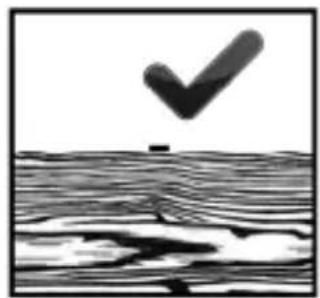
natural_image
Black-and-white illustration of a checkmark above a wavy surface, no text or symbols presentnatural_image
Black and white illustration of a cross symbol above a wooden plank, with no text or symbols present.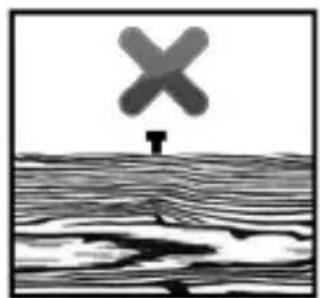
natural_image
Black-and-white illustration of a windmill symbol above water with a falling object below (no text or symbols)
1,2mm Sømlængde:
6–10mm
Usikkerhed: K _pA = 3 dB
Lydeffektniveau: L WA = 92,98 dB
Usikkerhed: K WA = 3 dB
Bær høreværn!
Samlede vibrationsstyrke fastsat iht. EN 60745:
Vibrationsemissionsværdi a_h = 2,537 m/s^2
Usikkerhed K = 1,5 m/s ^2
natural_image
Black-and-white illustration of a checkmark above a textured surface (no text or symbols)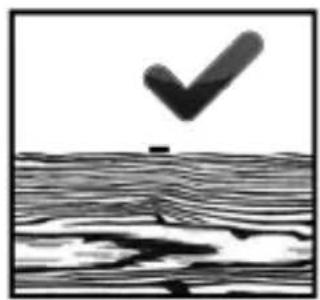
natural_image
Black-and-white illustration of a checkmark above a wavy surface, no text or symbols presentnatural_image
Black and white illustration of a cross symbol above a wavy surface, no text or symbols present.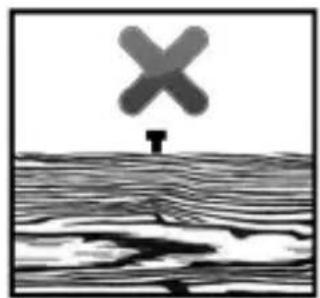
natural_image
Black-and-white illustration of a windmill symbol above water with a small figure at the base (no text or symbols)natural_image
Black checkmark above a textured surface, no text or symbols present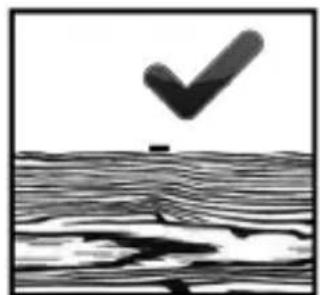
natural_image
Abstract black-and-white graphic with a checkmark above a wavy surface (no text or symbols)natural_image
Simple black-and-white diagram showing a cross symbol above a wavy surface with no text or labels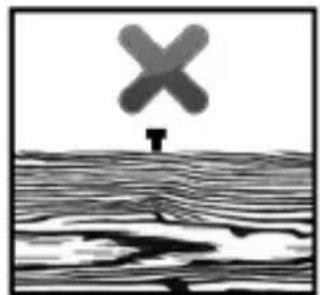
natural_image
Black-and-white illustration of a cross symbol above a wavy surface, no text or symbols presentnatural_image
Black-and-white illustration of a checkmark above a textured surface (no text or symbols)