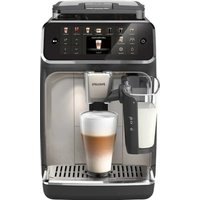
5500 Series LatteGo EP5547 - Coffee machine PHILIPS - Free user manual and instructions
Find the device manual for free 5500 Series LatteGo EP5547 PHILIPS in PDF.


| Product type | Automatic coffee machine with grinder |
| Brand | Philips |
| Model | 5500 Series LatteGo EP5547 |
| Dimensions (W x H x D) | 246 x 377 x 434 mm |
| Weight | 7.5 - 8 kg |
| Water tank capacity | 1.8 L |
| Bean hopper capacity | 275 g |
| Coffee grounds container capacity | 12 servings |
| LatteGo (milk reservoir) capacity | 250 ml |
| Adjustable dispensing spout height | 88 - 145 mm |
| Power cord length | 1200 mm |
| Main functions | Preparation of whole bean coffee, pre-ground coffee, milk-based drinks (cappuccino, latte macchiato, etc.), hot water, iced drinks, extra shot |
| Milk system | LatteGo (removable milk reservoir, quick cleaning) |
| Water filter | AquaClean (replace every 3 months or 95 L) |
| Customizable settings | Aroma intensity (5 levels), coffee quantity, milk quantity, temperature, grind (12 levels) |
| User profiles | Up to 6 profiles (colors) + guest profile |
| Maintenance and cleaning | Removable brew group washable with water, weekly cleaning; monthly cleaning with degreasing tablets; lubrication every 2 months; descaling with Philips solution (30 min) |
| Safety | Auto shut-off, rinse cycle, child safety (not specified but presence of on/off button) |
| Spare parts and accessories | Available at www.philips.com/parts-and-accessories: AquaClean filter CA6903, descaling solution CA6700, grease HD5061, degreasing tablets CA6704 |
| Repairability | Replaceable brew group, spare parts available |
| General information | Complete user manual available on Philips website; online assistance via QR code; registration at www.philips.com/welcome |
Frequently Asked Questions - 5500 Series LatteGo EP5547 PHILIPS
User questions about 5500 Series LatteGo EP5547 PHILIPS
0 question about this device. Answer the ones you know or ask your own.
Ask a new question about this device
Download the instructions for your Coffee machine in PDF format for free! Find your manual 5500 Series LatteGo EP5547 - PHILIPS and take your electronic device back in hand. On this page are published all the documents necessary for the use of your device. 5500 Series LatteGo EP5547 by PHILIPS.
USER MANUAL 5500 Series LatteGo EP5547 PHILIPS
4400 series 5500 series
ENUSERMANUAL
DA BRUGERVEJLEDNING
Personalizing drinks 9
Adjusting machine settings 9
Removing and inserting the brew group 11
Cleaning and maintenance 11
AquaClean water filter 13
14
Ordering accessories 15
Troubleshooting 15
Technical specifications 21
Machine overview (Fig. A)
A1 Control panel A10 Service door
| A2 Cup holder A11 Data label with type number | |
| A3 Pre-ground coffee compartment A12 Water tank | |
| A4 Lid of bean hopper A13 Hot water spout | |
| A5 Adjustable coffee spout A14 Coffee grounds container | |
| A6 Socket for power cord A15 Front panel of coffee grounds container | |
| A7 Grind setting knob A16 Drip tray cover | |
| A8 Coffee bean hopper | A17 Drip tray |
| A9 Brew Group | A18 'Drip tray full' indicator |
| Accessories | |
| A19 Power cord A22 Measuring scoop | |
| A20 Grease tube | A23 Water hardness test strip |
| A21 AquaClean water filter | A24 LatteGo (milk container) |
Control panel
There are multiple versions of this espresso machine, with different control panels. Each version has its own type number. You can find the type number on the data label on the inside of the service door (Fig. A11). You can also find the type number by tapping the Settings icon and selecting 'Support'.
Refer to figure C and D for an overview of all buttons and icons. Below you find the description.
Use the up and down arrows to scroll through the display and tap the OK icon to select or confirm your choices.
All types (Fig. C/D)
C1/D1 One-touch drink icons C4. Navigation icons (up, down, back, ok)
C7. Cleaning menu
C2/D2. Menu with More Drinks C5. Display C8. Personal profiles

C3 Start/stop button C6. Machine settings C9. On/off button
4000 Series only (Fig. C)
C1 One-touch drink icons: Espresso, Coffee, Americano, Iced Coffee, Cappuccino, Latte Macchiato
5000 Series only (Fig. D)
D1 One-touch drink icons: Espresso, Coffee, Americano, Cappuccino, Latte Macchiato, Iced Coffee, Iced Latte
Introduction
Congratulations on your purchase of a Philips fully automatic coffee machine! To fully benefit from the support that we offer, please register your product at www.philips.com/welcome.
Read the separate safety booklet carefully before you use the machine for the first time and save it for future reference.
To help you get started and to get the best out of your machine, we offer support in multiple ways. In the box you can find:
1 The quick start guide with picture-based usage instructions and information on cleaning and maintenance.
2 The separate safety booklet with instructions on how to use the machine in a safe way.
3 For online support (this extended user manual, frequently asked questions, videos, etc.), scan the QR code on the cover of this booklet to download the app, or visit www.philips.com/coffee-care.
There are multiple versions of this espresso machine, which all have different features. Each version has its own type number. You can find the type number on the data label on the inside of the service door (see fig A11).
This machine has been tested with coffee. Although it has been carefully cleaned, there may be some coffee residues left. We guarantee, however, that the machine is absolutely new.
The machine automatically adjusts the amount of ground coffee that is used to make the best-tasting coffee. You should brew 5 coffees initially to allow the machine to complete its self-adjustment.
Make sure you rinse the LatteGo (milk container) before first use.
Before first use
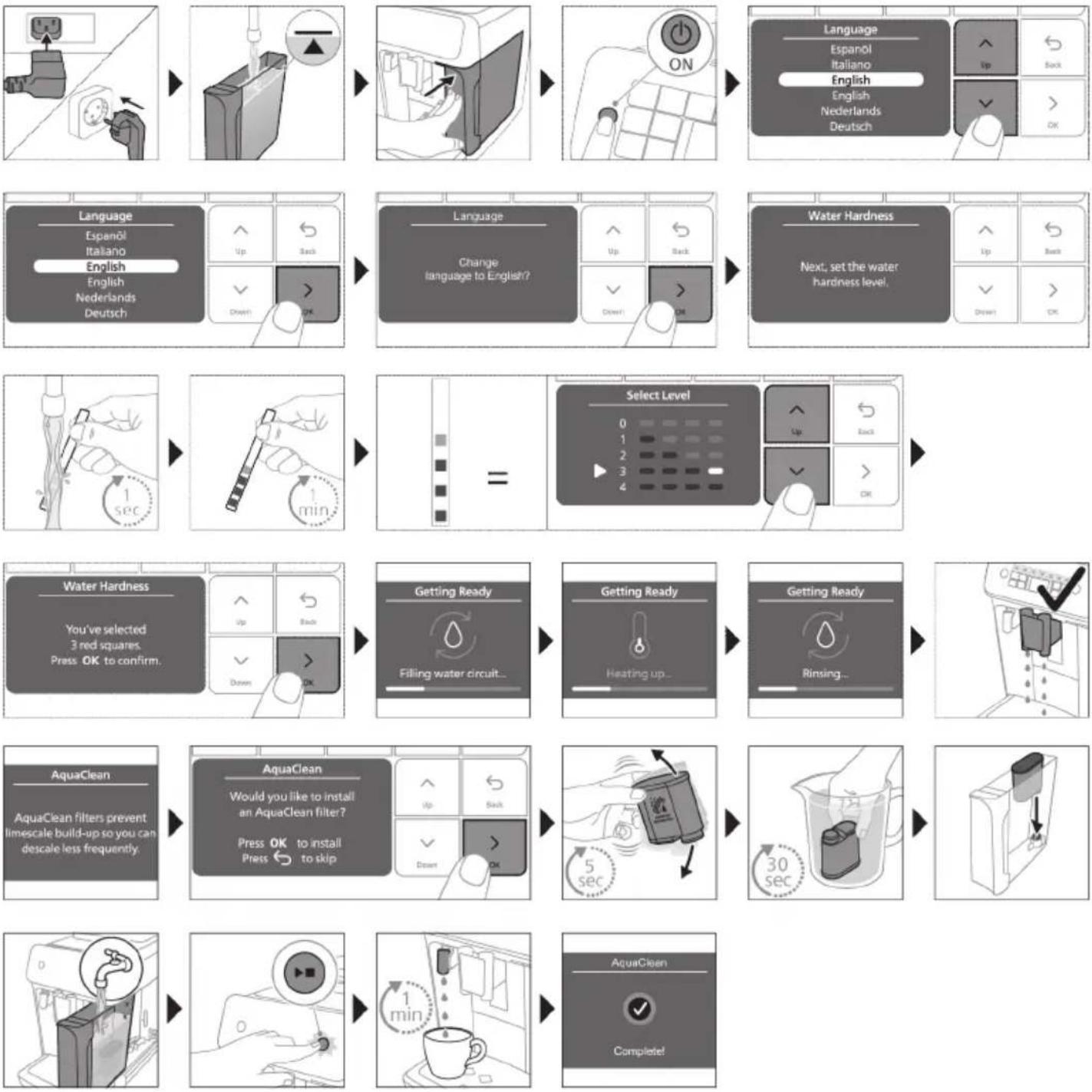
Assembling LatteGo

Brewing drinks
General steps
1 Fill the water tank with tap water and fill the bean hopper with beans.
2 Insert the small plug into the socket located on the back of the machine. Insert the mains plug into the wall socket.
3 Press the on/off button to switch on the machine.
- When all lights in the drink icons light up continuously, the machine is ready for use.
4 Place a cup under the coffee dispensing spout. Slide the coffee dispensing spout up or down to adjust its height to the size of the cup or glass you are using (Fig. 2).
Brewing coffee with beans
1 To brew a coffee, tap the drink icon of your choice or tap the 'More Drinks' icon.
- You can now adjust the drink to your personal taste. Use the up and down arrows to adjust the coffee strength. Tap the OK icon if you want to adjust more settings.
2 Press the start/stop button at any time to start brewing the selected drink.
3 To stop dispensing coffee before the machine is finished, press the start/stop button again.
To brew 2 coffees at the same time, tap the drink icon twice or select the 2x icon scrolling the dedicated bar.
Do not use caramelized or flavored coffee beans.
Brewing milk-based drinks with LatteGo (milk container)
A LatteGo consists of a milk container, a frame and a storage lid. To avoid leakage, make sure the frame and the milk container are properly assembled before you fill the milk container.
1 To assemble LatteGo, first insert the top of the milk container under the hook at the top of the frame (Fig. 8). Then press home the bottom part of the milk container. You hear a click when it locks into place (Fig. 9).
Note: Make sure that the milk container and the frame are clean before you connect them.
2 Slightly tilt LatteGo and put it on the hot water spout (Fig. 10). Then press it home until it locks into place (Fig. 11).
3 Fill LatteGo with milk (Fig. 12). Do not fill the milk container beyond the maximum indication.
If you have personalized the milk quantity, you may need to fill the milk container with more or less milk than indicated for this drink on LatteGo.
Always use milk coming directly from the fridge for optimal results.
4 Place a cup on the drip tray.
5 Tap the milk-based drink icon of your choice or tap the 'More Drinks' icon to select a different drink. - You can now adjust the drink to your own preference.
6 Press the start/stop button.
-
When you brew cappuccino, flat white, latte macchiato, iced cappuccino or iced latte, the machine first dispenses milk and then coffee. When you brew caffe latte, caffe au lait, iced caffe latte, or iced cafe au lait, the machine first dispenses coffee and then milk.
-
To stop dispensing milk before the machine has dispensed the preset amount, press the start/stop button.
7 To stop dispensing the complete drink (milk and coffee) before the machine is finished, press and hold the start/stop button.
Brewing iced drinks
The coffee is brewed with warm water. Brew over ice cubes for optimal results.
1 Take a glass and fill it two-thirds with ice cubes.
2 Place the glass under the coffee dispensing spout.
3 Tap the iced coffee icon.
- You can now adjust the drink to your preferred taste.
We recommend using aroma strength 3.
4 Press the start/stop button.
5 To stop dispensing coffee before the machine is finished, press the start/stop button again.
6 For a special iced coffee treat, top it up with cold milk.
Extra shot (ExtraShot)
Your machine offers you the possibility to add an extra shot of Ristretto to your coffee and milk drinks, for example if you want to have a stronger coffee.
1 Place a cup under the spout
2 Tap one of the one-touch drinks icons to select a drink or tap the 'More Drinks' icon to select a drink.
3 Use the up arrow to set the strength to the top level and then select the ExtraShot function.
4 Tap the OK icon if you want to personalize the other settings. Then press the start/stop icon to start brewing the drink.
5 To stop dispensing the drink before the machine has finished, press the start/stop icon again.
i When you have selected the ExtraShot function, you can only brew one coffee at the time.
Brewing coffee with pre-ground coffee
You can choose to use pre-ground coffee instead of beans, for example if you prefer a different coffee variety or decaffeinated coffee.
1 Open the lid of the pre-ground coffee compartment and pour one leveled measuring scoop of pre-ground coffee into it (Fig. 14). Then close the lid.
2 Tap one of the one-touch drink icons or tap the 'More Drinks' icon to select another drink.
3 Select the pre-ground coffee function. You can do this in 2 different ways:
- use the down arrow to set the strength to the lowest level and then select the pre-ground function.
- press the Settings con and use the down arrow to select the pre-ground function.
4 To stop dispensing coffee before the machine has finished, press the start/stop button again.
When you select the pre-ground coffee function:
- it is automatically stored.
- you can only brew one coffee at a time.
- you cannot select a different aroma strength.
Dispensing hot water
1 If attached, remove LatteGo.
2 Place a cup under the hot water spout.
3 Tap the 'More Drinks' icon and use the up and down arrows to select hot water.
4 Use the up and down arrows to adjust the hot water quantity and/or temperature to your preference.
5 Press the start/stop button.
- Hot water is dispensed from the hot water spout (Fig. 15).
6 To stop dispensing hot water before the machine is finished, press the start/stop button again.
Personalizing drinks
The machine allows you to adjust the settings of a drink to your own preference and to store the adjusted drink in a personal profile. The different profiles have different colors.
After selecting a drink by tapping one of the one-touch drink icons or by tapping the 'More Drinks' icon, you can do the following things:
1 adjust the aroma strength with the up and down icons (Fig. 5). There are 5 strengths, the lowest is the mildest and the highest is the strongest.
2 adjust the coffee quantity (Fig. 16) and/or the milk quantity with the up and down icons. There are 5 quantities for each of the settings.
As soon as the machine has finished brewing, the settings you selected will be stored automatically in the profile you chose.
Select a profile
You can select a profile and store a recipe using My coffee choice profiles (My Coffee Choice Profiles).
1 Tap the profiles 品 icon repeatedly to select one of the colored profiles. All profiles have a different color.
2 Select a drink by tapping one of the one-touch drink icons or by tapping the 'More Drinks' icon.
3 Adjust the drink settings to your favorite taste.
4 Press start/stop button to brew the drink you selected
- Your new settings have now been stored in the colored profile you selected.
You can always restore the factory settings of the machine (see 'Restoring factory settings').
Guest profile
Your machine is equipped with a guest profile. When the guest profile is selected, the profile icon is off. When you select this profile, you can still personalize the settings to your own preference but the recipes you brew will not be stored.
Adjusting machine settings
Setting the water hardness
We advise you to adjust the water hardness setting to the water hardness level in your region for optimal performance and a longer lifetime of the machine. This also prevents you from having to descale the machine too often. The default water hardness setting is 4: hard water.
Use the water hardness test strip supplied in the box to determine the water hardness in your region:
1 Immense the water hardness test strip in tap water or hold it under the tap for 1 second (Fig. 17).
2 Wait 1 minute. The number of squares on the test strip that turn red indicate the water hardness (Fig. 18).
Set the machine to the correct water hardness:
1 Tap the Settings icon and use the up and down arrows to select 'Water hardness'. Then press the OK icon to confirm.
2 Use the up and down arrows to select the water hardness level. The number of red squares selected on the display should be the same as the number of red squares on the test strip (Fig. 19).
3 When you have set the correct water hardness, tap the OK icon to confirm.
Adjusting grinder settings
You can change the coffee strength with the grind setting knob inside the bean container. The lower the grind setting, the finer the coffee beans are ground and the stronger the coffee. There are 12 different grind settings you can choose from.
The machine has been set up to get the best taste out of your coffee beans. Therefore we advise you not to adjust the grind setting until you have brewed 100-150 cups (approx. 1 month of use).
i You can only adjust the grind settings when the machine is grinding coffee beans. You need to brew 2 to 3 drinks before you can taste the full difference.
A Do not turn the grind setting knob more than one notch at a time to prevent damage to the grinder.
1 Place a cup under the coffee dispensing spout.
2 Open the lid of the coffee bean hopper.
3 Tap the espresso icon and then press the start/stop button.
4 When the grinder starts grinding, press down the grind setting knob and turn it to the left or right. (Fig. 20)
Adjusting other machine settings
By tapping the Settings icon you can adjust the following machine settings:
Water hardness: you can select between 5 levels according to the water hardness in your region;
- Standby time: you can select 15, 30, 60 or 180 min
Display brightness: you can select low, medium and high.
Language
Sound: you can activate or deactivate the beeping sound of the machine
- Temperature: you can choose between 3 brewing temperatures for your coffee
- Front illumination (5500 series only): you can choose 'always on', 'on during brewing' or 'always off'.
- Measuring unit: you can choose between ml. or oz.
- Profile activation: you can activate or deactivate profiles.
- Rinsing on start-up: you can activate or deactivate an automatic rinsing cycle when you switch on the machine.
- Display backlight: you can activate or deactivate the backlight in the drink buttons.
Restoring factory settings
The machine offers you the possibility to restore the factory settings at any moment.
1 Tap the Settings on.
2 Use the up and down icons to select 'Factory settings'. Confirm by tapping the OK icon.
3 Press the start/stop button to confirm you want to restore the settings.
- The settings are now being restored.
The following factory settings are restored to default: water hardness, standby time, brightness, display backlight, start-up rinsing, sound, temperature, front illumination, profiles.
Removing and inserting the brew group
Go to www.philips.com/coffee-care for detailed video instructions on how to remove, insert and clean the brew group.
Removing the brew group from the machine
1 Switch off the machine.
2 Remove the water tank and open the service door (Fig. 21).
3 Press the PUSH handle (Fig. 22) and pull at the grip of the brew group to remove it from the machine (Fig. 23).
Reinserting the brew group
Before you slide the brew group back into the machine, make sure it is in the correct position.
1 Check if the brew group is in the correct position. The arrow on the yellow cylinder on the side of the brew group has to be aligned with the black arrow and N (Fig. 24).
- If they are not aligned, push down the lever until it is in contact with the base of the brew group (Fig. 25).
2 Slide the brew group back into the machine along the guiding rails on the sides (Fig. 26) until it locks into position with a click (Fig. 27). Do not press the PUSH button.
3 Close the service door and place back the water tank.
Cleaning and maintenance
Regular cleaning and maintenance keeps your machine in top condition and ensures good-tasting coffee for a long time with a steady coffee flow.
Consult the table below for a detailed description on when and how to clean all detachable parts of the machine. You can find more detailed information and video instructions on www.philips.com/coffee-care. See figure B for an overview of which parts can be cleaned in the dishwasher.
Detachable parts When to clean How to clean
| Brew group Weekly Remove the brew group from the machine (see 'Removing and inserting the brew group'). Rinse it under the tap (see 'Cleaning the brew group under the tap'). |
| Monthly Clean the brew group with the Philips coffee oil remover tablet (see 'Cleaning the brew group with the coffee oil remover tablets'). |
Detachable parts When to clean How to clean
| Pre-ground coffee compartment | Check the pre-ground coffee compartment weekly to see if it is clogged. | Unplug the machine and remove the brew group. Open the lid of the pre-ground coffee compartment and insert the spoon handle into it. Move the handle up and down until the clogged ground coffee falls down (Fig. 28). Go to www.philips.com/coffee-care for detailed video instructions. |
| Coffee grounds container | Empty the coffee grounds container when prompted by the machine. Clean it weekly. | Remove the coffee grounds container while the machine is switched on. Rinse it under the tap with some washing-up liquid or clean it in the dishwasher. The front panel of the coffee grounds container (Fig. A15) is not dishwasher-safe. |
| Drip tray Empty the drip tray daily or as soon as the red 'drip tray full' indicator pops up through the drip tray (Fig. 29). Clean the drip tray weekly. | Remove the drip tray (Fig. 30) and rinse it under the tap with some washing-up liquid. You can also clean the drip tray in the dishwasher. The front panel of the coffee grounds container (Fig. A15) is not dishwasher-safe. | |
| LatteGo After every use First clean LatteGo while it is attached to the machine by using the 'Quick milk clean' program (see 'Quick cleaning LatteGo'). Then remove it from the machine and rinse it under the tap or clean it in the dishwasher. | ||
| Lubrication of the brew group | Every 2 months Consult the lubrication table and lubricate the brew group with the Philips grease (see 'Lubricating the brew group'). | |
| Water tank Weekly Rinse the water tank under the tap | ||
| Machine front Weekly Clean with a non-abrasive cloth | ||
Cleaning the brew group
Regular cleaning of the brew group prevents coffee residues from clogging up the internal circuits. Visit www.philips.com/coffee-care for support videos on how to remove, insert and clean the brew group.
Cleaning the brew group under the tap
1 Remove the brew group (see 'Removing and inserting the brew group').
2Rinse the brew group thoroughly with water. Carefully clean the upper filter (Fig. 31) of the brew group.
3 Let the brew group air-dry before you place it back. Do not dry the brew group with a cloth to prevent fibers from collecting inside the brew group.
Cleaning the brew group with the coffee oil remover tablets
Only use Philips coffee oil remover tablets.
1 Tap the Clean icon and use the up and down arrows to select 'Brew group clean'.
2 Tap the OK icon to confirm and then follow the instructions on the screen.
Lubricating the brew group
To improve your machine's performance, we suggest that you lubricate the brew group every 2 months, to ensure that the moving parts continue to move smoothly.
1 Apply a thin layer of grease on the piston (grey part) of the brew group (Fig. 32).
2 Apply a thin layer of grease around the shaft (grey part) in the bottom of the brew group (Fig. 33).
3 Apply a thin layer of grease to the guiding rails on both sides (Fig. 34).
Cleaning LatteGo (milk container)
Quick cleaning LatteGo
1 Make sure LatteGo is properly attached to the machine (Fig. 10).
2 Place a cup under the spout.
3 Tap the Clean 4 icon and use the up and down arrows to select the 'Quick milk clean' program.
4 Tap the OK icon to confirm and then follow the instructions on the screen to remove any milk that may be left inside the milk system.
- Small jets of hot water will be dispensed by the milk system.
5 Store LatteGo with the remaining milk in the fridge.
Thoroughly cleaning LatteGo
1 Remove LatteGo from the machine (Fig. 35).
2 Pour out any remaining milk.
3 Press the release button and remove the milk container from the frame of LatteGo (Fig. 36).
4 Clean all parts in the dishwasher or under the tap with lukewarm water and some washing-up liquid.
Aquaclean water filter
Your machine is AquaClean enabled. You can place the AquaClean water filter in the water tank to preserve the taste of your coffee. It also diminishes the need for descaling by reducing limescale build-up in your machine. You can purchase an AquaClean water filter from your local retailer, from authorized service centers or online at www.philips.com/parts-and-accessories.
Aquaclean filter status indication
When the AquaClean is active, the status of the AquaClean filter is always visible on the screen as a percentage.
- If the status of the AquaClean filter is 10% or less, the screen shows a message for 2 seconds each time you switch on the machine. This message advises you to buy a new filter.
- If the status of the filter is 0% , the machine asks you to replace the AquaClean filter every time you switch on the machine.
Activating the AquaClean water filter (5 min.)
The machine does not automatically detect that a filter has been placed in the water tank. Therefore you need to activate each new AquaClean water filter that you install in the 'Clean' menu.
When the machine stops showing the filter activation message, you can still activate an AquaClean water filter, but you will need to descale the machine first.
i Your machine has to be completely limescale-free before you start using the AquaClean water filter.
Before activating the AquaClean water filter, it has to be prepared by soaking it in water as described below. If you don't do this, air might be drawn into the machine instead of water, which makes a lot of noise and prevents the machine from being able to brew coffee.
1 Tap the 'Clean' icon and use the up and down arrows to select 'AquaClean'.
2 Tap the OK icon to confirm.
3 Tap the OK icon again when the activation screen appears. Follow the instructions on the screen.
4 Shake the filter for about 5 seconds (Fig. 37).
5 Immerse the filter upside down in a jug with cold water and shake/press it (Fig. 38).
6 Insert the filter vertically onto the filter connection in the water tank. Press it down to the lowest possible point (Fig. 39).
7 Fill the water tank with fresh water and place it back into the machine.
8 If attached, remove the LatteGo.
9 Place a bowl under the hot water spout.
10 Press the start/stop button to start the activation process.
11 Hot water will be dispensed from the hot water spout during 1 minute.
12 The filter is now successfully activated.
Replacing the AquaClean water filter (5 min.)
After 95 liters of water have flowed through the filter, the filter will cease to work. The AquaClean status indicator drops to 0% to remind you to replace the filter. As long as the AquaClean status indicator is shown on the display, you can replace the filter without having to descale the machine first. If you do not replace the AquaClean water filter in time, the AquaClean indicator goes out after some time. In that case you can still replace the filter but you first need to descale the machine.
When the AquaClean status indicator drops to 0% or when the machine reminds you to replace the AquaClean filter:
1 take out the old AquaClean water filter.
2 install a new filter and activate it as described in chapter 'Activating the AquaClean water filter (5 min).
i Replace the AquaClean water filter at least every 3 months, even if the machine does not yet indicate that replacement is required.
Dscaling procedure (30 min.)
Please use Philips descaler only. Under no circumstances should you use a descaler based on sulfuric acid, hydrochloric acid, sulfamic or acetic acid (vinegar) as this may damage the water circuit in your machine and not dissolve the limescale properly. Not using the Philips descaler will void your warranty. Failure to descale the appliance will also void your warranty. You can buy Philips descaling solution in the online shop at
www.philips.com/coffee-care.
When the machine needs descaling, a message appears on the display.
1 Touch the clean icon on the user interface and select 'Dscaling' in the menu.
2 Follow the instructions on the screen.
3 If attached, remove LatteGo.
4 Remove the drip tray and the coffee grounds container, empty them and put them back into place.
5 Remove the water tank and empty it. Then remove the AquaClean water filter.
Pour the whole bottle of Philips descaler in the water tank and then fill it with water up to the Calc / Clean indication (Fig. 40). Then place it back into the machine.
7 Place a large container (1.5 l) under the coffee dispensing spout and the water spout.
8 Press the start/stop button to start the descending procedure. The descending procedure lasts approximately 30 minutes and consists of a descending cycle and a rinsing cycle.
9 Wait until the machine stops dispensing water. Refill the water tank when the message appears on the display. The descending procedure is finished when the machine stops dispensing water.
10 Install and activate a new AquaClean water filter in the water tank.
- When the descending procedure is finished, the machine reminds you to install the new AquaClean filter (see 'Replacing the AquaClean water filter (5 min.)').
Tip: Using the AquaClean filter reduces the need for descaling!
What to do if the descending procedure is interrupted
You can exit the descending procedure by pressing the on/off button on the control panel. If the descending procedure is interrupted before it is completely finished, do the following:
1 Empty and rinse the water tank thoroughly.
2 Fill the water tank with fresh water up to the Calc / Clean level indication and switch the machine back on.
3 Before brewing any drinks, perform a manual rinsing cycle. To perform a manual rinsing cycle, first dispense half a water tank of hot water by repeatedly selecting the hot water function and then brew 2 cups of pre-ground coffee without adding ground coffee.
If the descending procedure was not completed, the machine will require another descending procedure as soon as possible.
Ordering accessories
To clean and descale the machine, only use the Philips maintenance products. These products can be purchased from your local retailer, from the authorized service centers or online at www.philips.com/parts-and-accessories. To find a full list of spare parts online, enter the model number of your machine. You can find the model number on the inside of the service door.
Maintenance products and type numbers:
- Descaling solution CA6700
- AquaClean water filter CA6903
Brew group grease HD5061 - Coffee oil remover tablets CA6704
i Brita-filters are not compatible with this machine.
Troubleshooting
This chapter summarizes the most common problems you could encounter with the machine. Support videos and a complete list of frequently asked questions are available on www.philips.com/coffee-care. If you are unable to solve the problem, contact the Consumer Care Center in your country. For contact details, see the warranty leaflet.
Warning icons
| Warning icon | Solution |
| The 'water tank empty' icon pops up on the display. - The water tank is almost empty. Fill the water tank with fresh water to the maximum level indication. - The water tank is not in place. Place back the water tank. | |
| The 'add beans' icons pops up on the display. - Fill the bean hopper with coffee beans. | |
| The 'empty coffee ground container' icon pops up on the display. - The coffee grounds container is full. Remove and empty the coffee grounds container while the machine is switched on. Wait 5 seconds before you place it back. | |
| The 'insert brew group' icon pops up on the display. - The brew group is not in place or not placed correctly. Remove the brew group and make sure it is locked into place. See chapter 'Removing and inserting the brew group' for step-by-step instructions. |
Error codes
Below you find a list of the error codes showing problems that you can solve yourself. Video instructions are available on www.philips.com/coffee-care. If another error code appears, please contact the Philips Consumer Care Center in your country. For contact details, see the warranty leaflet.
| Error code | Problem Possible solution |
| 01 The coffee funnel is clogged. | Switch off the machine and unplug it. Remove the brew group. Then open the lid of the pre-ground coffee compartment and insert the spoon handle. Move the handle up and down until the clogged ground coffee falls down. Visit www.philips.com/coffee-care for detailed video instructions. |
| 03 The brew group is dirty or not well-greased. | Switch off the machine. Rinse the brew group with fresh water, let it air-dry and then lubricate it. Consult chapter 'Cleaning the brew group' or visit www.philips.com/coffee-care for detailed video instructions. Then switch the machine on again. |
| 04 The brew group is not positioned correctly. | Switch off the machine. Remove the brew group and reinsert it. Make sure that the brew group is in the correct position before you insert it. Consult chapter 'Handling the brew group or visit www.philips.com/coffee-care for detailed video instructions. Then switch the machine on again. |
| 05 There is air in the water circuit. | Restart the machine by switching it off and on again. If this works, dispense 2-3 cups of hot water. Descale the machine if you have not done so for a longer period of time. |
| The AquaClean filter was not prepared properly before installation or it is clogged. Remove the AquaClean filter and try again to brew a coffee. If this works, make sure that the AquaClean filter is prepared properly before you place it back. Put the AquaClean filter back into the water tank. If this still does not work, the filter might be clogged and needs to be replaced. |
Error Problem Possible solution code
| 11 Machine needs to adjust to room temperature | Allow some time for the machine to adjust from transport/outdoor temperature to room temperature. Switch off the machine for 30 minutes and switch it on again. If this does not work, contact the Consumer Care Center in your country. For contact details, see the warranty leaflet. |
| 14 The machine is overheated. | Switch the machine off and switch it back on again after 30 minutes. |
| 19 The machine is not connected to the wall socket properly. | Make sure that the small plug of the power cord is properly connected to the socket on the back of the machine. |
Troubleshooting table
This chapter summarizes the most common problems you could encounter with the machine. Support videos and a complete list of frequently asked questions are available on www.philips.com/coffee-care. If you are unable to solve the problem, contact the Consumer Care Center in your country. For contact details, see the warranty leaflet.
Problem Cause Solution
| There are some coffee residues inside my new coffee machine. | This machine has been tested with coffee. | Although it has been carefully cleaned, there may be some coffee residues left. However, the machine is absolutely new. |
| The drip tray fills up quickly / there is always some water in the drip tray. | This is normal. The machine uses water to rinse the internal circuit and brew group. Some water flows through the internal system directly into the drip tray. | Empty the drip tray daily or as soon as the red 'drip tray full' indicator pops up through the drip tray cover. Tip: place a cup under the dispensing spout to collect rinsing water that comes out of it. |
| The 'empty coffee grounds container' icon remains on. | You emptied the coffee grounds container while the machine was switched off, or placed it back too fast. | Always empty the coffee grounds container while the machine is switched on. Remove the coffee grounds container, wait at least 5 sec. and then insert it again. |
| The machine prompts to empty the coffee grounds container even though the container is not full. | The machine did not reset the counter the last time you emptied the coffee grounds container. | Always wait approx. 5 seconds when you place back the coffee grounds container. In this way the coffee grounds counter will be reset to zero and the number of coffee pucks is counted correctly. |
| Always empty the coffee grounds container while the machine is switched on. If you empty the coffee grounds container when the machine is switched off, the coffee grounds counter won't reset. |
Problem Cause Solution
| The coffee grounds container is too full and the 'empty coffee grounds container' icon did not appear on the display. | You removed the drip tray without emptying the grounds container. | When you remove the drip tray, also empty the coffee grounds container even if it contains only a few coffee pucks. This ensures that the coffee pucks counter is reset to zero and that the number of coffee pucks is counted correctly. |
| I cannot remove the brew group. | The brew group is not in the correct position. | Reset the machine in the following way: close the service door and place back the water tank. Switch the machine off and back on again and wait for the lights in the drinks icons to come on. Try again to remove the brew group. See chapter 'Removing and inserting the brew group' for step by step instructions. |
| I cannot insert the brew group. | The brew group is not in the correct position. | Reset the machine in the following way: close the service door and place back the water tank. Leave the brew group out. Switch the machine off and unplug it. Wait for 30 sec. and then plug the machine back in and switch it on and wait for the lights in the drinks icons to come on. Then put the brew group in the correct position and reinsert it into the machine. See chapter 'Removing and inserting the brew group' for step by step instructions. |
| The coffee is watery. The brew group is dirty or needs to be lubricated. | Remove the brew group (see 'Removing the brew group from the machine'), rinse it under the tap and leave it to dry. Then lubricate the moving parts (see 'Lubricating the brew group'). | |
| The machine is performing its self-adjustment procedure. This procedure is started automatically when you use the machine for the first time, when you change to another type of coffee beans or after a long period of non-use. | Brew 5 cups of coffee initially to allow the machine to complete its self-adjustment procedure. | |
| The grinder is set to a too coarse setting. | Set the grinder to a finer (lower) setting. Brew 2 to 3 drinks to be able to before taste the full difference. | |
| The coffee is not hot enough. | The temperature is set too low. Set the temperature to the maximum setting. To adjust the temperature, press the 'Settings' icon. | |
Problem Cause Solution
| The automatic rinsing cycle is disabled. | Activate the automatic rinsing cycle by pressing press the 'Settings' icon. When this setting is activated, the machine will heat up and perform an automatic rinsing cycle when you turn on the machine. | |
| A cold cup reduces the temperature of the drink. | Preheat the cups by rinsing them with hot water. | |
| Adding milk reduces the temperature of the drink. | Regardless of whether you add hot or cold milk, adding milk always reduces the temperature of the coffee. Preheat the cups by rinsing them with hot water. | |
| Coffee does not come out or coffee comes out slowly. | The AquaClean water filter was not prepared properly for installation. | Remove the AquaClean filter and dispense some hot water. If this works, the AquaClean filter was not installed properly. Reinstall and activate the AquaClean filter and follow all steps in chapter 'AquaClean water filter'. |
| After a long period of non-use, you need to prepare the AquaClean water filter for use again and dispense 2-3 cups of hot water. | ||
| The AquaClean water filter is clogged. | Replace the AquaClean water filter every 3 months. A filter that is older than 3 months can become clogged. | |
| The grinder is set to a too fine setting. | Set the grinder to a coarser (higher) setting. Note that this will impact the coffee taste. | |
| The brew group is dirty. Remove the brew group and rinse it under the tap (see 'Cleaning the brew group under the tap'). | ||
| The coffee dispensing spout is dirty. | Clean the coffee dispensing spout and its holes with a pipe cleaner or needle. | |
| The pre-ground coffee compartment is clogged | Switch off the machine and remove the brew group. Open the lid of the pre-ground coffee compartment and insert the spoon handle into it. Move the handle up and down until the clogged ground coffee falls down (Fig. 28). | |
| The machine circuit is blocked by limescale. | Descale the machine with Philips descaler. Always descale when the machine prompts you. | |
| The milk does not froth. LatteGo is assembled incorrectly. Make sure that the milk container is properly assembled to the frame of LatteGo ('click') (see 'Assembling LatteGo'). | ||
Problem Cause Solution
| The milk container and/or frame of LatteGo are dirty. | Disassemble LatteGo and rinse both parts under the tap or clean them in the dishwasher. | |
| The type of milk used is not suitable for frothing. | Different types of milk result in different amounts of froth and different froth qualities. We have tested the following milk types which proved to deliver a good milk froth result: semi-skimmed or full-fat cow's milk and lactose-free milk. | |
| Milk is leaking from the bottom of the LatteGo milk container. | The frame and the milk container are not assembled properly. | First insert the top of the milk container under the hook at the top of the frame. Then press home the bottom part of the milk container. You hear a click when it locks into place. |
| The milk container and/or frame of LatteGo are dirty. | Disassemble LatteGo and rinse both parts under the tap or clean them in the dishwasher. | |
| The machine seems to be leaking. | The machine uses water to rinse the internal circuit and brew group. This water flows through the internal system directly into the drip tray. This is normal. | Empty the drip tray every day or as soon as the 'drip tray full' indicator pops up through the drip tray cover. Tip: place a cup under the dispensing spout to collect rinsing water and reduce the amount of water in the drip tray. |
| The drip tray is too full and has overflowed which makes it look like the machine is leaking. | Empty the drip tray every day or as soon as the 'drip tray full' indicator pops up through the drip tray cover. | |
| The water tank is not fully inserted, some water is leaking out of the water tank and air is drawn into the machine. | Make sure the water tank is in the correct position: remove it and insert it again pushing it as far as possible. | |
| The brew group is dirty/clogged. Rinse the brew group. | ||
| The machine is not placed on a horizontal surface. | Place the machine on a horizontal surface so that the drip tray does not overflow and the 'drip tray full' indicator works properly. | |
| I cannot activate the AquaClean water filter and the machine asks for descaling. | The filter has not been installed or replaced in time after the screen shows the AquaClean reminder. This means your machine is not anymore completely limescale free. | Descale your machine first and then install the AquaClean water filter. |
| The new water filter does not fit. | You are trying to install another filter than the Philips AquaClean water filter. | Only the Philips AquaClean water filter fits into the machine. |
Problem Cause Solution
| The rubber ring on the AquaClean water filter is not in place. | Place back the rubber ring on the AquaClean water filter. | |
| The machine is making a loud noise. | It is normal that your machine makes some noise during use. | If the machine starts to make a different kind of noise, clean the brew group and lubricate it (see 'Lubricating the brew group'). |
| The AquaClean water filter was not prepared properly and air is now drawn into the machine. | Remove the AquaClean water filter from the water tank and properly prepare it for use before you place it back. See chapter 'AquaClean water filter' for step-by-step instructions. | |
| The water tank is not fully inserted and air is drawn into the machine. | Make sure the water tank is in the correct position: remove it and insert it again pushing it as far as possible. |
Technical specifications
The manufacturer reserves the right to improve the technical specifications of the product. All the preset quantities are approximate.
Description Value
| Size (w x h x d) 246 x 377 x 434 mm |
| Weight 7.5 - 8 kg |
| Power cord length 1200 mm |
| Water tank 1.8 litres |
| Coffee bean hopper capacity 275 g |
| Coffee grounds container capacity 12 pucks |
| LatteGo (milk container) capacity 250 ml |
| Adjustable spout height 88-145 mm |
| Nominal voltage - Power rating - Power supply See data label on inside of service door (Fig. A11) |
Obsah
www.philips.com/coffee-care.
www.philips.com/coffee-care.
Nár maskinen behoover afkalkning, vises en meddeelse i displayet.
www.philips.com/coffee-care.
www.philips.com/coffee-care.
Extra shot (ExtraShot)
Aquaclean-vannfilter
Personalizar as bebidas 295
Personalizar as bebidas
Apart from choosing a particular beverage, you can also choose the most popular ones. For example, you could choose "More Drinks" (Mais bebasas), pour la gueuse et sauf le meilleur.
Encomendar acessórios
www.philips.com/coffee-care.
Pér kětě aparat ekspresi ekzistojné disa versione, tě gjitha me karakteristika tě ndryshme. Secili version pērmban një numér lloji. Numrin e llojit mund ta gjeni ne etiketén e tě dhénave ne pjesen e brendshme tě derës sè shérbimit (shihni Fig. A11).
Kjo makineri eht teestuar me kafe. Ndonese esht pastruar me kujdes, mund te ketembetje kafeje. Megjithate, ju garantojmse makina eht absolutisht re.
Vodni filter AquaClean
Vodny filter AquaClean 376
A18 Indikator for full droppbricka
Tillbehör
A19 Nätkabel
A22 Doseringsskopa
A20 Smörjfettstub
A23 Testremsa for vattnets hardshtetsgrad
6 PlatntoTe to kouupiEvapgns/daikooin.
- 'Otav παραοκευάζεις cappuccino, flat white, latte macchiato, iced cappuccino ἡ iced latte, η μηχανή διανέμει πρώτa to γάλα κι, ἐπείτa, tov καφέ. 'Otav παραοκευάζεις caffe latte, café au lait, iced caffe latte ἡ iced cafe au lait η μηχανή διανέμει πρώτa tov καφέ κι, ἐπείτa, to γάλα.
- Tia va otaaataeTe tn po' yalaktoC npotou n mynavh diaviemu tnv pokaOpiouevn noootnta, patote to koupiEvapgns/diaokon
7 Ia va otaatnoeTe tn poT tou ooknnpwEvou pohmuato (yala kai kahe) npotou tEkwoi n mynavn, patote kal kpatnoTe patnEvto koupiVapGns/daikoNc.
Papakεuπayωμévωv poΦηματωv
A20 Ty6nuka cbc cMa3ka
A23 TectoBa IeHTa 3a TBbpOcT Ha BOdaTa
A21 BoJenФиЛТьр AquaClean
PnroTbHe Ha aic HapNTKn
1 KafoTo ce npuroTbC TOnla B0a. PnpuroTBe Tbpxy Ky6eTa JeI 3a Hau-do6pn pe3yItaTn.
1 B3eMeTe cTBKJIeHa yaHa n HaNbJIHeTe DBe TpeTn OT He C Ky6YeTaJeI.
2 NocTabete yawaTa noJyUpya 3a Kafe.
3ДokochTe uKoHaTa 3a JIeJeHo KaΦe.
Cera moxete da perylnupaTe Hanntkata cnopei npednoHTAHn O T Bac Bkyc.
I IpnopobyBaMe Da n36peTe cuna Ha apomTa 3.
4 HaTnchete 6yToHa 3aTapT/CTon.
5 3a da cnpete HaIINBaHTo Ha KaΦe, npei MaunHaTa Ja e npNKIOUynla, HATNCHeTe 6yTOHa 3a CTapT/CTON THOBO.
6 3a cneuaJHo n3kyueHHe cJeJeHO Kae, dOnbJIHeTe cbc CtydeHO MIAKO.
Допьн即时ддэ (ExtraShot)
MaunHaTa Bn daBa Bb3MOxHocTt Ta da doabnte DoNbJIHnteHa Do3a PnCTpeTo KbM CBOeTO Kafe n MneuHn HapNTKn, HapnpMeP aKO JeJaTe NO-CINHO Kafe.
1 NocTaBete yaa nOJ cyUypa
2Дokochete edha ot 6bp3nte nKOHn 3a haNTkn, 3a da n36epTe haNTka, nIIN DOKochete nKohata More Drinks (OnbHnTeJHHn HAnrTk), 3a da n36epTe hAnrTk.
3 ɪənəlɪsɪe CTpeɪkɑtæ Harope, 3a ña 3aɪdæte CɪlaTæ Do Hau-BɪncokOTO HɪBO N CJIeɪ TOBAɪ36epeTe ΦyɪnkɪŋræTæ ExtraShot.
4 HaTnCHHe TE NkOHATA OK, ako nCKaTe da npomeHHTe npyHHTe HAcTPOKn. CneI TOBa HAtncHeTe NKoHaTa 3a CTapT/CTOn TBA Da 3aNoCHETe npuROTBHeTO Ha HAnNTKaTA.
5 3a da cnpete HaIINBaHeTo Ha HAnITKaTa, npeIM MaIINHaTa da e npIKNoUIna, HaTNCHeTe OTHOBIO NKOHATA 3a CTapT/CTOn
Korato n36epTe cyHKzraExtraShot, He moKe da npurotbte nobuee ot eoHo Kafe eHOBpeMeHHO.
PnroTbIHe Ha Kafe OT PpeBapnteJIHO cMJIHO KaFe
Ioo jeaHne moxete da n3noJ3BaTe npedBapntelHo cMnaHO kafe BmecTo Kafe Ha 3bph, Hnnpimep, aKo npednoHTate dpyr Bd Kafe nn6e3KofoHOBO Kafe.
1 OTbopeTe KaNaKa Ha OTdJIeHHeTo 3a IpeBapNTeJHo CmJIHO KaFe Nn3CnIeTe eJHa paBaHa MepNTeJHa JbXnUka IpeBapNTeJHo CmJIHO KaFe B OTdJIeHHeTo (ΦIr. 14). CneT ToBa 3aTbopeTe KaNaKa.
2 HaTnucHeTe eHa oT 6bP3nTe uKoHn 3a HaNTkN uIu HaTnucHeTe uKoHaTa More Drinks (OnbHnTeJIHn HaNTkN), 3a da n36epeTe npyra HAnrTkA.
3 N36epTe yHKuYra 3a npedBapnteHcMnaHo Kafe. MokeTe da HnpaBte ToBa n0 2 pa3nue HauHa:
- ɪЗползbaɪte CTpeɪnkɑta Naɪdəу, 3a ᵠа 3aɪaɪdete Cɪnlɑta ᶂо Naɪh-нісКOTO HɪNBO,ɪС"—eɪ TOBaɪnɪbεpeTe ΦúнкциЯтæ 3a II preɪdBapɪntelno CMlərno Kaʃe.
- NaTnCSHe TE NKOHaTa 3a HaCTpOiKN iN3NoJ3BaIe CTpeJIKaTa HAnOJy, 3a Da iN36epTe fynKcIra Ta 3a npedBapuTEJIHO CMJIaHO Kafe.
4 3a da cnpete haJIbHaHeTo Ha KaFe, npeNi MaunHaTa Da e npKlOuHla, HATNCHeTe OTHOBo 6yToHa 3a CTapT/CTON
i Korato n36epeTe cyHKcIyTa 3a npedBapntelHo cMJIHO Kafe:
-TaCe CbXpaHraBa aBTOMaTnUHO.
-MOKeIa npIroTbTe CaMo eHNO KaΦe HabeIhX.
-He MoKeJa n36epeTe pa3nUHa cnla Ha apomTa.
Пускане на горецьда
1 Ako e noctabeHo, oTcTaHete LatteGo.
2 NocTabete yaa noidyuypa 3a ropea Boda.
3 HaTnchHeTe IkoHaTa More Drinks (OnbHnTeHn HAnrKn) n 3noJ3BaIe cTpEknTe 3a Harope n HanoIy, 3a da n36epTe ropea Boda.
4 N3noJ3BaIte cTpeKnTe 3a Harope n HaOly, 3a da peryInpate KOINueCTBOTO ropeua BODa n/nn TeMnepaTypa cnopei npednoHTaHnra Ta cn.
5 HaTnCHeTe 6yToHa 3a TapT/ctOn.
- OToUyUpa 3a ropeuBa BOda ce n3JIbBa ropeuBa BOda (ФИг.15).
6 3a da cnpete HaJIbHaHeTo Ha ropeua BODa, npedn MaunHaTa da e npNKIOUHna, HATNCHeTe 6yToHa 3a CTAPT/CTON THOBO.
HactpoTe MaunHaTa Ha npaBnHaTa TBbpOCT Ha BODaTa:
1 HaTnchHeTe NkOHata 3a HacTpoiKn N nI3NoI3BaIte CTrpeJIKeN Te HArope N HAdOly, 3a Da I36epeTe Water hardness (TbbpIOCT Ha BODATA). CLeI TOBa HATnCHHeTe NkOHata OK, 3a Da IOTBbpDInTe.
2 I3noJ3BaIte CTpeKnTe 3a Harope n HaOly, 3a da n36epTe HIBOTo Ha TBbpOCT Ha BODaTa. bpoT cepBEN KBApaTn, n36paHn Ha dncnJe, Tp86Ba Da e CbSuaT KaTo 6pOy cEpBeHn KBaIpaTuEta no TeCT JeHTata (ΦnF.19).
3 Korato cte 3aIann npabnHoto HnBO Ha TBbpOCT Ha BODaTa,HaTncHeTe IKoHaTa OK 3a NOTBbpxJeHne.
PerylnpaHe Ha HacTroPoiKIne Ha KaΦemJaUkaTa
Moxete da npomehnte cnlaTa ha kafoTo c nomoTa ha peryIaTopa 3a hactpoiKa Ha CTeneHTa Ha cmIaHe, HAMpaS ce B KOHTeHepa 3a KafoHa 3bPHa. Kolkoto no-HnCKa e hactpoiKaTa Ha cmIaHe,
TOKOBa NO-ΦHNO Ⅲe ca cMJIeHN KaΦeHnTe 3bPHa N TOJKOBA NO-CINHO Ⅲe 6bJe KaΦeTo. MoKeTe da n36upate Mejdy 12 pa3JIuHn HacTpoKn Ha CTeNEHTa Ha CMJlaHe.
Maшинае Настpoета за полочаиноюбвр Всс OT Kaфе на зьрп. Поради Това впрелорьчамда не ренирахостroйкпес на мелен, дokato He приготвite 100 - 150 чаш (okono 1 мeceц уnotpe6a).
i Mojete da perylnipate NaCTPOknte Ha CTeneHt a cMnlaHe cMo KOraTo MaunHaTa MeIi KaFe Ha 3bPna. Tp86Ba Da npuROTBnTe 2-3 HauNTkn, npedn da Mojete da yceTne PbJHaTa pa3nka.
A He 3aBbPtaIte peryIaTopa 3a HacTroIka Ha cTeIeHTa Ha cMIIaHe c NOBue OTe eHa cTeIeH HaBeIbX, 3a Da npEDoTbPaTITe NobpeHa KaΦemelaUkata.
1 NocTaBeTe yawa nOJ yUypa 3a kafe.
2 OTbOpete KaNaKa Ha cbda 3a KaΦe Ha 3bpHa.
3ДokocheteиkoHaTa 3a ecnpeco, cnei KoTo HaTcHete 6yToHa 3a CTapT/CTOn
4 Korato KafeMeJaKaTa 3aNoUHe Ja Mei, HataChTe HaOly peryIaTopa 3a HacTpoKHa cTeeHTa Ha cmuHa He I r0 3aBbPTeTe HaJIBO UIN HaJcHcO. (ΦIr. 20)
PerylnpaHe Ha dpyrHn HacTpoiKn Ha MaunHaTa
KaTo DOKOCHTe IKOHaTa 3a HAcTPOiKN MoKeTe Da peRyIuPaTe CJIeDNHtE HaCTPOiKn Ha MaIiHaTa:
TbpyocHaBoaTa:MozTe Da n36epeMeJy 5 HnBa cnopei TBbpocTtHa BoaTa BvB BaHnperNoH;
- Bpeme Ha roTOBHOCT: MoKeTe da n36epete 15, 30, 60 nJn 180 mHyTu
-Ярков на дислег: можete за избере тисяка, сpeда и висoka.
E3nK
3Byk:MOKeTe da aKTbBnpaTe NIN DeaAKTNBnpaTe 3ByKOBn CnHaJ Ha MaunHata
Tempepatya: mokeTe da n3epeTe mekdy 3 temepaTpyn 3a npiroTbHe Ha Kafo
- Ocbetlenne otnped (cmo 3a cepn 5500): moxete da n36epete always on (BnHaRn BkIooHe), on during brewing (BknOeHo no BpeMe Ha npiroTbHe) nn always off (BnHaRn N3KIOueHo).
- Мерна сенинца: можеadingа изберete мжду мллллтbp улу унця.
- AktubupaHa Ha npoФил: MoKeTe Ja akTubupaTe nIi DeaakTubupaTe npoФиI.
- Изплakване постаранe: можete за akтувратейпдемakтуен zuкьн ha
Изплakванe, korato BKлочente Maшинотa.
- ПОДСВЕТКа на дисплес: можete за akTNВираTe Илд�аKTINВираTe NOДСВЕТКа на 6уTOHInTe 3a HaNTTKN.
Bb3ctaHOBraHe Ha 6pHnTe HacTpoKn
MaunHata Bn npedocTabr Bb3MOxHOCCTT a Ba Bb3cTaHOBtte fa6pHHTe HactpoiKn IIO BCaKO BpeMe.
1 HaTnchHeTe NkOHaTa 3a HAcTpOuKn
2 I3noJ3BaIte IKOHnTe 3a Harope n HaOly, 3a da n36epeTe Factory settings (Fa6pUHn HacTpoiKn). NotBbPdTe, kato DOKoCHeTe IKoHaTa OK.
3 HaTnCHHe 6yToHa 3a CTapT/CTOn▶3a Da NOTBbPdNTe, Ye NCKaTe Da Bb3CTaHOBnTe HAcTPOKnTe 5e 3aNoOHa T da Ce Bb3CTaHOBBA.
1 CnEHNHe fapuHn HacTpoKn Ce Bb3TaHOBBArNo NpOpa3bupaHe: TBbpOCT Ha BoDaTa, BpeMe Ha RotOBHocT,ApKoCT, NoCDBeTKa Ha DInCJIeR, I3IIaKBAhe npN CTapTnpAHe, 3ByK, TempePaTypa, OCBetJIeHne OTnpEd, npoHnI.
AknBipaHe Ha BodHnA qnlTbp AquaClean (5 mN.)
Maunha Ta He 3acu a ABtomatuho daIb pe3epBoapa 3a B0da e nocTaBeH cneobateHo TpaDa aKtBnPaTe BCEKn HOB cnilTbp AquaClean, KOHTo noCTabTe, B MeHTo Clean (NouctBaHe).
Korato MaunHaTa cnpe da noka3Ba CbO6eHneTo 3a aKTnBupaHe Ha fNilTbp, BCE oUe MoKeTe da aKTnBupaTe fNilTbaAquaClean, Ho nbpBO ue Tpr6Ba da nouCTnte HAKIna OT MaunHaTa.
Maunha Tp6Ba da e HnBnHO nouchTeHa OT HaKIn, npei Da 3aOnHeTe da N3NoJ3BaTe BODHnA
fupAquaClean.
Ipei Da aKTbupate BoHnA qunTp AquaClean, Tp6Ba Da ro noTROBITE, KaTO rHaKncHe BvB Boda, KaKTo e onicaHo nO-dony. Ako He ro HappaBITE, B MaunHaTa MoKe da Bne3e Bb3dyx BmecTo BOda, Koeto Cb3DaBA MHOrO wum I neyu Ha MaunHaTa da npiroTBra Kafe.
1 IOKoCHeTe NkOHaTa 3a NoUcTBe HnN3NoJ3BaIte CTrpeKInTe HaOpe nHaOny, 3a da N36epeTe AquaClean.
2 HaTnchTe NkOHaTa OK, 3a da nOTbPdnte.
3 DoKoCHete OTHOBIO IKOHaTa OK, KOraTo ce nOraBn ekpaHbT 3a aKTINBaUria. CneDbaiTe INHCTpyKcUNTe Ha ekpaHa.
4 Pa3klaTeTe 0nIbpa OKoNo 5 ckyHn (Φnrg. 37).
5 NotoneTe fntbpa Hao6paTHo B KaHa CbC CTydeHa BoJa I Go pa3KlaTe/npTuNCHeTe (ΦnI. 38).
6 ΠbXHeTe ΦnTbpa BeptnKaJnHO Bbpxv Bp3KaTa 3a ΦnTbpa B pe3epBoapa 3a BoJa. HaTncHeTe rHaIOJy Do Hau-HnCKaTa Bb3MOxHa ToUka (ΦIr. 39).
7 HanbHHeTe BoDnna pe3epBoap c npca H Oda n rO noCTaBeTe o6paTHo B MaunHaTa.
8 Ako e nocTaBeHo, oTcTaPaHeTe LatteGo.
9 NocTabete Kyna noJyUpya 3a ropeua Boda.
10 Hatachete 6yToHa 3a cTapT/CToF, 3a da 3anOuHeTe npouce ca no aKtBupaHe.
11 OToUyUpa 3a ropeaa BOda ige ce n3JIbBa ropeaa BOda B npOdbJxKeHne Ha 1 MInHyTa.
12 ΦилтбрьТ Beue eycneшоakTNBupaH.
www.philips.com/coffee-care.
Korato Tp6Ba Da 6bIe N3BbpSeH O npemaxBaHe Ha HAKnA oT MaunHaTa, Ha DnCnJIe Ce NoaBBA Cbo6uHHe.
1Дokocheteикohata 3a nouchteBahe Na notpe6nteJcknI nHTeppeicu n36epete Descaling (IpemaxBaHe Ha hakuna) ot MeHIOTo.
2 CneIbaiTe HnHcTpkyuKuNITe Ha ekpaHa.
3 Ako e nocTaBeHo, OTCpaHete LatteGo.
4 N3BaTe TaBnKaTa 3a OTcExKaHe n CbJa 3a yTaKa OT KaΦe, N3PpA3HeTe rN rN BbPHeTe Ha MeCTaTaNM.
5 N3BaJeTe pe3epBoapa 3a BOda n rO n3npa3HeTe. CneToBa npemaxHeTe BOdHnA qunTbp AquaClean.
6 I3neIte 2aIata 6ytIka npenapat 3a npemaxBaHe Ha hakn Ha Philips B pe3epBoapa 3a Boda n ro HnblHeTe Do HnBoto Calc / Clean (Φnr. 40). Cnej TOBa rnoctabete o6paTHo BMaunHaTa.
7 NocTabete roJAM cBd (1,5JI) noD cyUypa 3a KaFe n 3a BOda.
8 HaTnchHeTe 6yToHa 3a CTapT/CTon ,da 3aNoCHeTe npOueDypaTa 3a npEmaxBaHe Ha HaKIna. IpoUeDpyaTa n O npEmaxBaHe Ha HAKIN npOdbJxaba OKoI0 30 MInHyTu n Ce CbCTOn OT cIKbl Ha npEmaxBaHe Ha HAKIN n cIKbl Ha n3PnAKBaHe.
9 N3uKaITe, DOKaTO MaunHaTa Cnpe Da Nyska BOJa. HanbIHeTe OTHOBO pe3epBoapa 3a BOJa, KOraTo Cbo6eHneTo ce nOBn Ha dncnJe. PpoceDypata No nouchTbaHe Ha haknP e 3aBbPseHa, KOraTo MaunHaTa Cnpe Da Nyska BOJa.
10 NocTaBeTe n aKtBnBaIte HOB BOeH ΦJIbTpAquaClean B pe3epBoapa 3a BOJa.
Korato npoueypaTn no NouchTaHHe Ha haknP e 3aBbPseHa, MaunHaTa ue BN HAnOMn da nocTabte HOBnA qntBp AquaClean (Bx. 'CmHa Ha BODnA qntTpAquaClean (5 mN)'.
CbBeT:ИЗпОЛЗВаHeTo Ha ΦиЛТьpa AquaClean hamajBa hyжdata ot npemaxBaHe Ha hakin!
KaKBo Da npaBnTe, aKO npoceDypaTa NO npemaxBaHe Ha NaKIn 6bIe npeKbChata
Mожete Да ИЗлесе OTnpоцураТЯ NOпpeMaxBaHe HaHaKIN, KaTO HaTUCheTe 6yToHa 3a BkJ./n3KJI. Na KOHTpoHnnaHelen.AKO npOцураТЯ NO npeMaxBaHe HaHaKIN 6bIe npeKbChaTa,прEDи DA 3aBbPshn DOKpaHaprabete CneDHOto:
1 N3npa3HeTe n 3nIpaKHeTe cTapaTeJHo pe3epBoapa 3a BOJa.
2 HanbJIHeTe pe3epBoapa 3a BODa c nIteHa BOda DO o6o3HaueHneTo 3a HnBO Calc/Clean (Hakn/NouchBaHe) u BKJIouyete OTHOBo MaunHaTa.
3Ipei Da nprirotBte KaKBInTo n da 6nlo HAnNTK, n3nbHeTe pueh cikbl Ha n3PnaKbaHe. 3a da n3PiHnTe cIKbHa pBcHNO n3PnAkaBaHe, Hau-Happe, n3CnneTe noIOBnB BoeH pe3epBoap ropea BOda, KaTO HeKoJIKKpAHO n36npaTe yHKuTAta 3a ropea BODa, n CneT ToBA nprirotBeTe 2 aush npedBapntEno cmJrHO KaFe, 6e3 da do6abTe cmJrHO KaFe.
i Ako npoceDypaTa no npemaxBaHe Ha hakn He e 3aBbPshJa, MaunHaTa ige noncka n3BbPbBaHe Ha HOBA TaKaBa npoceDpya Bb3MOxHNo-CKOPO.
Порьвану akcecoари
Използваши само поруктinte Ha Philips 3a поисвае и пемaxbahe Ha нашина.Teэп роруктmoгат да ce зakунгот OT мостня ТьproBEц Ha дpe6ho,OTopииранITE cepВиЗн цentpoBE Илп ONлайн Ha anpec www.philips.com/parts-and-accessories.3a Да habерп te nbileн спись к pezeрвни часи ONлайн, ВьveideTe homepa Ha мдега Ha BAшаТmaшина.Moжete Дa оTKрпeTe homepa ot Bьтpeшнaturaстара Ha cepВиЗнatura Вразчka.
PpOdykTn 3a noIpybXka n TInOBn Homepa:
- Pa3TbOp 3a npemaxBaHe Ha hakn CA6700
-BoJeHΦnItpAquaCleanCA6903 - Cma3ka 3a 6loka 3a npiroToBHe HD5061
- Ta6JIeTKn 3a npemaxBaHe Ha macNo ot Kafe CA6704
iΦnItpnte Brita He ca cBMeCTUMN C Ta3n MaunHa.
CbDbPkaHne Ha onaKOBkata





HaTnCKaIe cTpiIKn Bropy a6o BnH3, 106 npokpyBaTn daHi Ha dnCnJIe. 106 Bn6bIpaTn Ta NiTbEpJxkyBaTn Bn6ip, HATnCKaIe 3NaOc OK.
Yci Tnnn (pnc. B, r)
- Peçent Hanoio Telep MoxHa HaJaalTyBaTn 3a BlaChIMN BNoJIObāHnAMyN.
6 HatnchItb KhoNkY noaTkY/3ynnHeHH.
-ПдчаспригOTуВаннякanyuHNO,флетаNT,лATEMaKiaTo,кanyuHNO3ЛьODOMa6OлATE3ЛьODOM KaBOMaUnHa cNoTuKHaJIbNAeMOLOKO,aNotIM-Kaby.ПдчаспriгOTуВанняKaBnlaTe,KaBn3 MOJOKOM,лATE3ЛьODOMa6O KaBn3MOJOKOMiЛьODOMKaBOMaUnHa cNoTuKHaJIbNAeKaBy,a NotIM-MOLOKO.
- Ⅲo6 npinnHnTn noauy moIoka, nepu hix kaBOMaunHa 3iJIe nepedyctaHOBHeHn o6'em, HATNCITb KONKy NOaTKy/3ynHHeHHra
7 706 npnnnntnoauy roTOBOro haOIO (KaBn 3 MoNOKOM), nepH HIX KaBOMaunHa 3aBepuHTb npnroTyBaHHra, HaTNCiTB iYtpmYte KNONy NOaTKy/3ynHeHHra
PnroTyBaHnXoJOhnxHaIOiB
i Cey Hani I roTyEcBc3 TeIIO BOIOIO. Ira ONTImaJIbHOrO pe3yIbTaTy 3aBapIoTe KaBy B cKJrHKy 3 Ky6nKaMn JbOdy.
1 Bi3bMiTb cKJIaHky Ta HAnOBHiTb II Ha DiBtI TpeTnH Ky6nKaMn IbOy.
2 NocTaBte cKJHky iD By3OJ noJaChi KaBn.
3 TopKHItbcra 3HaayKa KaBn 3 JbOIOm.
- Peçent HanoIO Tepep MoXHa HaJaIaTyBaTn 3a BJIaCHIM CMAKOM.
i PaIIMOBn6paTn 3HaueHHeMiucHOCTi 3.
4 HaTnchItb KhoNkY noaTky/3ynHHeHH
5 506 npnnnntn noaay kabn, nepsh hix kaBOMaunHa 3aBepuNTb nprirotyBaHHra, 3HOBy haTNCHTb KhoNky noatky/3ynHHeHH
6 6063po6nTu KaBy 3 JbOdom 3e CmaHiioU, OdaTe IOn HeI XoJIoHe MoJOkO.
iKoIIMaunHa 3aBepntb npiroToyBaHHa HanoIO, Bn6paHHaJaTuBaHHa BtOMaTnUHO 3aNnUytbcra do BaWoRo npophiHIO.
Bn6ip npoΦiJIO
Bn moxete Bn6patn npophiIb i 36epeTn pecent 3a donomoroio yHKci My Coffee Choice Profiles.
1 HatackaiTe 3NaOk "PpOphii" , 06 Bn6paTn OdnH i3 BnDJIeHnx. Yci npophiI mIoTB pI3Hi KoIbOpOBI nO3HaUKN.
2 Bn6epitb Hani, TopKHyBmncb OndHoro 3i 3NauchkIB WbUdkoro npriroTyBaHHa HanoiB abo 3Haayka «Ihni Haonoi».
3 HaIaIyIe BlaCTIOBcTi HanoIO 3a CMAKOM.
4HaTnCHITb KhONkYNoaTKy/3ynHHeHHra,06 3BaPHTu Bn6paHn Hani.
- Bashi Hobi Hana Tu Ba Hn Tepep 36epekHo y BnpaHomy KolbopoBOMy npophiNi.
Bn 3aBXn MoXe Te BiINOBHTn 3aBOcBki HanaSTyBaHH MaunHn (iIB. 'BiINHOJIeHHra 3aBOcKnx HanaSTyBaHb').
PpOJIb roCTa
Ha Maunhi BCTaHOBnEHO npoipIb roct. JaKIO Bn6paTn NOrO, 3NaUOK npophiIO BmNkaeTbcra. Bn6paBwn Cei npoipIb, BN BCE OndHO MoKeTe nepcoHaJI3yBaTn HalaStYBaHHra 3a BlaChIMN BNoO6aHHaMn, aJe peuePTN BaXnx HaIoIB He 36epiratUmTybcra.
HajauTyBaHHa KabOMaHH
HanaHTyBaHHJ KOpCTKocTi BOIN
LIO6 IOscraTn ONTmAbHoI npOdyKTnBHOCTi Ta NOOBKNTu TepMin Cnyk6MaunH, Mn peKOMeHyEMo HalaHTyBaTH JOpCTKICTb BOIN BiINOBIINO DO NOKa3HnKa B perioHi. Lc taKoX 3anobiraE 3aHaTo qAcTomy BnAJIeHHIO HaKNy 3 MaUNHN. CtaHdapThe 3NaueHHJ XOpCTKocTi BOIN -4 (XOpCTKa BOJa).
IpepeBipTe KOpCTKicTb BODN B perioHi 3a DOnOMoroTOteTOBOi CTpiuKN, IO BXoNTb Do ynaKOBKn.
1 3aHypTe TecToBv CtpiUky I nI BnMIpiIOBaHH JOpCTKoCTI BOuN y BoOy 3-nI KpaHa Ha 1 cekyHny (MaI.17).
2 3auekaite 1 xBnInHy. KIbKicTb KbAdpaTib Ha TeCTObi CMyXci, IIO CTaII N YepBOHmN, BKa3yIoTB Ha XopctKicTb (MaI. 18) BoiN.
YCTaHOBiTb npaBnIbHy KOpCTKicTb BODN B MaunHi.
1 TopKhiTbca 3HaUka «HaIaWtYBaHnra» HaTnCKaIte cTpiKn Brropy a6o Bn3, 0o6 Bn6paTn «XOpCTKicTB BoDn». Notim HATnCHiTb 3HaUOK «OK», 0o6 niTbepdntu Bn6ip.
2 Bn6epiB pBeHb JopctKocTi BOu cTpiKamn Bropy Ta Bn3. KInbKiCTb YepBOHx KbapTuKIB Ha DnCpIeTaHa TectoBi CMyXu (Ma19) Mae 36iratncra.
3 Bn6paBn npaBnIbHy JopcTkicTb BOI, HATNCHITb 3HaOK «OK», 0o6 niTBePdntu Bn6ip.
Hanaштуваимя kabOMOLКN
Miunictb KaBN MOxHa 3mHHTn 3a DOnOMoTO peryIaTopa CTyneH NOMEy, PO3TaWOBaHO R BCEpeuNHi KOHTeHepa IJRA KABOBx 3epeH. YIM HIXKHy CTyniHB NOMEy, TUM dpi6HIwN NOMEJ KABOBx 3epeH, i MiunHsA Kaba. DoCTynHi 12 pi3Hnx CTyneHIB NOMEy.
Kabomauhy haiauTObAo, 063a6e3neHTn BiIMHHm CMaK HanoB i3 BaUoro yIIO6JeHOro copTy KaBn. Tomy m peKomeHdyEmo He peryIIOBaTu CTyniHb NOMEJy, DOKN Bn He 3BaPnte 100-150 qawok Kabn (pni6JIIN3HO 1 MICAuB BVkOpNCtAHHa).
i PerynloBAtn CtyniH nomely moXHa IINIe ToDi, KOJI KABOMaUNHa po3MeIIOc KaBOBi 3epHa. Pi3NciB Cmaky BiDyBaTImeTbcra IINIe NiCIA nprirotyBaHHa 2-3 HanoiB.
A He noBepTaIe peryIaTOp nomely 6JIbIe, HIX Ha OndHy nOdiKyu 3a pa3, 0o6 yHnKHyTu nOswKOJKeHHa KaBOMOLNI.
1 NocTaBte yawky niD By30J noaui kABn.
2 BiikpnIte KpnKky 6ynKepa IЯ KaBOBx 3epeH.
3 TopKHITbc3Haueka ecnpeco, a notim HaTnCHiTb KONky NOaTKy/3ynnHeHH.
4 Koli KaBOMOJIka noHHe MoJOTn, npTncHITb pyUky peYJrTopa cTyneHЯ nOmeIy Ta nobepHITb II IiBOpyu abo npabopuy. (MaI. 20)
IHsi HalaatyBaHHa KabOMaHHn
HaTnchyBwn 3NaOk "HanaStyBaHHa" Bn MoXeTe peRyIIOBaTn HabeJeHnxUe HanaStyBaHHa MaunHn.
- XopctKicTB BOiN: MoXHa Bn6paTn OoH i3 5 pIBHiB, AKn BiIIOBIdaEc XOpCTKOcTi BOiN y BaIoMy perioHi.
- Yac ouikybaHHa: moXHa Bn6paTn 15,30,60 a6o 180 xbuiHn.
-ЯckpaBicTBДиCПЯ:MOxHaO6paTnH3bKy,cepeHIO BvCOky.
MoBa - 3BYK: MOXHa BBIMKHyTn a6o BUMKHyTn 3ByKOBn CnHaJ MaunHn.
- Tempepatypa: MoXHa Bn6upatn 3-nomix 3 tempepatyp npuroTybaHHKaBn.
-Переднec ocbitlenня (лше дя cepii 5500): можна вибрази "3abЖдвВIMKHyTo", "Пid ус пригорува相关内容" abo "3abЖдвВIMKHyTo".
OuHnue BmipuBaHHaMOxHa Bu6paTNIiIITpu a6o yHci. - AktnBaCiI npoΦiIIO: Bn MoKeTe aKTHyBaTn uN deaKTHyBaTn npoΦiJI.
- PpommbaHnI niCJIy: Bn MoKeTe BBIMKHyTn a6o BmMKHyTn aBTOMaTuHn IuKJI npOMBaHHn icJIy BBIMKHeHHa KabOMaunHn.
-ПисВИТКа ДИССЛЕ:ВИМожete BBIMKHyTn a6O BIMKHyTn ПИсВИТКу KHONOK HANO'B.
BidHOBJIeHHaBOIDcbKnxHaJaSTyBaHb
3aBOcBiHaJIaIbYBaHHMaUNHa MoXHa BiHOBHTN B6yDb-IAKIN Yac.
1 TopKHitbca 3HaUka "HanaWtYaBaHHa
2 Bn6epiB "3aOoCbKi HaIaWtYBaHHra", HATNCKaOuN 3HaUKN BROPy Ta BHN3. NiTBePdbTe, HATNCHyBUN 3HaOcK «OK».
3HaTnCHiB KhoNky NoaTkCy/3ynHHeHHy,06 NiTBePdntu 3anyck BiHOBHeHHaHaTaYBaHb. HalaTuBaHHra 36epiraotbcra.
Taki 3aBocki HanaHTyBaHHcKndaOTbcra do CtaHapTHnx: KOpCTKicTB BoN, qac OuyKaBaHHa, RckpaBicb, iDCBITka DnCnIe, npOMBaHHn icIaNcyk, 3ByK, TempepaTypa, nepdHcOCbiTHeHH, npophiNi.
www.philips.com/parts-and-accessories.
IHyKaia cTany iJbTpA AquaClean
Jkuo yHKuio AquaClean yBIMKHeNo, cTah fiIbTpA AquaClean 3aBXn BIDobpaXaETbcra Ha ekpaHIB npoueHTHomy cnIBBiDHOweHHi.
-Якwo stan fiNbtpa AquaClean ctaHOBnTB 10% a6o MeHwe,Ha ekpaHI niD yac KoxHoRO BBIMKHeHHa MaunHn npotrOM 2 cekyHb BIO6paxatmEcbra BiNobiHe NOBIDomJIeHHa Y cbomy nobIDomJIeHHI Bam 6yde 3anponOHBOHO npnd6aTH HOBNI fIbTp.
-Якшостатус fiilbtpa 0%,maшина порочиме заминтфлвтр AquaClean niД уас кожногов BBIMKHeHЯ.
AknBaCiIaIbTpIa IJIy BoOnn AquaClean (5 XB.)
KabomaaHa aBOMaTuHHe Bn3NaHa, 10 fIbTp yCTaHO B pe3epByap Iny Boi. Tomy opa3y, KOJI Bn BCTaHOJIeTe HOBn fIbTp AquaClean, Ioro notpi6Ho AKTINByBaTN B MeHIO "UuJeuHHra".
KoJIM MaHInHa npuINHe noka3 nobIDomJIeHHn pro aKTNaCiIO fIbTpA, Bn dOci MoKeTe BKnUoyHTN BoaHm FJIbTp AquaClean, aJe cnepy cnId oynCTNTMaHInHy BiD hakiny.
I Nepsh hix BnKOpncToBbAtn pfJIbTp AquaClean IJRA BoDn, nepeKoHaTecra, 0B MaunHHeMaE HaKnny.
Iepsh hix akTnByBaTu fiNbTp Ira BODn AquaClean, noro heo6xio nio roTyBaTu 7Jnxom 3amOuyBaHHy y BODi, k OnpcaHo HxJy. KaIoo cboRo He 3po6ntu, do KabOMaunH MoKe BTaryBaTnc NOBITpr 3Amictb BODn, lo BVKnue rHyHm uM i He daCTb kabOMaunHi npiroTyBaTu Kaby.
1 Topkhitbcra 3HaUka "HueHHa" Ta HatackaiTe cTpiKu Bropy a6o Bn3, o6 Bn6paTu fYHKciu AquaClean.
2 TopKhiTbCz 3HaUka OK, 0o6 niTBePdntn.
3 Ha ekpaHI akTINBaui, kNn 3'ABNTbcr, 3HOBy TOPKHiTbcr 3HaUka "OK". BkOHaIe BkAizBKn Ha ekpaHI.
4 NotpycItb fiIbTp npotrom 5 cekyHn (MaI.37).
5 NepeBepHitb fIbTp, 3aHypTe Noro B EMKICTb i3 XoJIoHO BOIOIO I NOTPcITb a60 npNTnCHiTb Noro (MaI. 38).
6 BCTaBTe φiNbTp BepTnKaIbHOB pO3'EM dIy φiNbTp a B pe3epByapi Iy BODN. PpoHTOBxHiTb NOro BHN3 do ynpoy (MaI. 39).
7 HanobHItb pe3epByap IJIa BOiIu HCTOIO BOIOIO Ta BCTaHOBITb NOrO B KaBOMaunHy.
8 Jkso Ioro npneDHaHO, BnMiTb LatteGo.
9 NocTaBTe MscKy niD By30J noaui rapyaOi BOIN.
10 HaTnchItb KhONky noaTy/3yHHeHHrao6 po3noaTu npouec aKTNBauii.
113Byzna noaui rapyooi BOIN 3nBaTmEtbcra rapya BOa npotrrom 1 XBNHn.
12 Hapaizi pijbtp ycniuho aKtNBBOaHO.
3amHa pfIbTpra IJRA BoOn AquaClean (5 XB.)
Iicra nponyckaHn 95 I BODn Upe3 fIbTp BIn nepecta npaioBaTu. IHdkatop cTany AquaClean onyckaetbcra do 0% , 06 haraatn Bam npo 3amHy fIbtpa. Dokn iHdkatop cTany AquaClean BiO6paXaETbcra Ha ekpaHI, BN MOKeTe 3amHITn fIbTp, 3a3dAneriB He OUYUOn MaunHy BiN HAKINy. RaIO BuacHO He 3amHITn fIbTp AquaClean, 3roJOM 3'ABNTbcr BIDNOBIDHn IHdkatop AquaClean. Bn dOci MoKeTe 3amHITn fIbTp, aJe cNoaytky Heo6XiHO BuaJIHTn HAKIN i3 MaunHN.
KoIiHdNkaTOp cTaNy AquaClean onyckaetbca do 0 % a6o MaunHa haraNy BAm npo 3amHy pfIbTpA AquaClean, BnKOHaIte HabeJeHi HxKYe diI.
1 BnMiTb Ctapn fiJbTp AquaClean IJRA BOIN.
2 YctaHOBITb HOBni iJIbTp i aKTnByuTe NOrO, k OncuHo B po3diIi «AKTnBaCi JIbTp a Ira BoDn AquaClean (5 XB.)>.
3amHouTe pIbTp Iy BOnn AquaClean npHaMHi KoxHi 3 Micci, HabItb JkIo MaunHa He NOBIDOMJIe npo Heo6xIHcTb TaKoi 3aMH.
Iopada.BukopncTaHnHaJIbTpA AquaClean 3MeHwE nepioDnHiCt bBuaJeHHaKIny.
Ioo pObTu, kUo npOeDpy BuaJeHnHaKnPy nepepBaHo
IpoceDpy BuaaHnHa KaNpy MoXHa nepeBaTu, HATNCyBUn KHOkky YbIMKHeHHa NaHeJI KepyBaHHa. kso npoeDpy BuaaHnHa KaNpy nepeBaHO do NOBHorO 3aBepWeHHa, 3p06iTb HaCTynHe.
1 CnpoJxHtB pe3epByap Inla BoDn Ta peTeIbHo cnoLoCHItb Noro.
2 HanobHITb pe3epByap IJIy BOIN YNCTOIO BOIOIO DO NO3HaUKN Calc/Clean (BndaJIeHHaKInny) i 3HOBYBIMKHITb MaunHy.
3 Nepsh hix roTybaTn 6yNb-aki Hanoi, BUKOHaTe zHKI npommbaHnB bpyHy. Lio6 BUKOHaTn zIKI npommbaHH BpyHy, cnoaTKy HanoIOBHy 3JIne TaRapuY BoDy 3 pe3epByapy, HaTnCKaUOn 3HaQK cyHKciIraPauOi BOi, a Notim nprirotuTe 2 YaAkn nonepedhbo 3MeJeHOi KaBn 6e3doabAHn MeJeHOi KabN.
IyKIO npOeDpy 6yIe nepePBaHO, MaUNHa nOTpe6yBaTIme Ie OJHOro cIKNBy BnJaJIeHHa HAKINy JAKOMORA ckopiwe.
3amoblenny npnilaandry
MaunHa He niTpmye fIbTpri Brita.
UcyHeHnHa HeCnpaBHOcTei
Y cybomy po3di i p03rIaOTbc8 OCHOBHI npo6JIeMNI, kI MOKytB BnHKHTN iD qac BnKOpNCtAHN MaunH. BiJeO Ta nOBHn cPiCOK uactnx 3aNTaHb DOCTynH 3a NocuHaHm www.philips.com/coffe
care. Raio He MokeTe yCyHyTn npo6IeMy, 3BepHiTbcra Do UeHTpy o6CnyroByBaHHa KJIeHTiB y CBOII KpaHl. KoTHaKTHa iHopMaucia 3hAxOuTbcra B rapaHTiHOMy TaHOH.
PonepeJxUyBaJIbHi 3NaUKN
nnn nn nnn nnn nnn nnn nnn nnn nnn nnn nnn nnn
n7n7
1797
10 1901 JIN7J7U 7u 7non 7u 7n IN, n7un 7T JNNy JIN7J7U 7non TNN 7u
JNNJN
2
- 4700
.7777777777
5.7pc
.097 77777n97 017n7 7In ,ExtraShot n7n7n7n7n7
UNIN0n97Dy n97NO'7N
.1N97 701 n97 IN NNN 97 IITYyDnNnNnNnNnNnNnNnNnNnNnNnNnNnNnNnNnNnNnNnNnNnNnNnNnNnNnNnNnNnNnNnNnNnNnNnNnNnNnNnNnNnNnNnNnNnNnNnNn
.14N) n.nn n97 7u no719n nn nTn 7u nn nn nn nnn
.0000 1000
.7777777777001NIN7UN'7U7NON 7V U7IN,NNN NIN7UN'7ON TNN 7V U7N
2
3:NN
17777777777777777777777777777
y7
- 4.11
i
.INDIOINIONNNT
.097 7nN n97 017n7 7n7nn -
nnnnnnnnnnnn
D'ON D'IN N'XYIN
.1INN,INIIN LatteGo 7D Dx 1
2
1
2
3.DN
4
5.17
77777777777777777777777777

NINJUN 7U NUIK NOXNN
79797 797978000000000000000000000000000000000000
.
n nn nnnnnnnnnnnnnnnnnnnnnnnnnnnnnnnnnnnnnnnnnnnnnnnnnnnnnnnnnnnnnnnnnnnnnnnnnnnnnnnnnnnnnnnnnnnnn
:OIOIOIOIOIOIOIOIOIOIOIOIOIOIOIOIOIOIOIOIOIOIOIOIOIOIOIOIOIOIOIOIOIOIOIOIOIOIOIOIOIOIOIOIOIOIOIOIOIOIOIOIOIOIO
1
.
77 5 77 77 77 77 77 77 77 77 77 7
JINNN
1
799
(77n n n 19)77n n n n n nn nn nn nn nn nn nn nn nn

1.
1N777777777777777777777 2
2
3.772
4nn:
Jnnnn nn nnnnnnnnnnnnn
i
nIX7919
nN,719197nNnNnNnNnNnNnNnNnNnNnNnNnNnNnNnNnNnNnNnNnNnNnNnNnNnNnNnNnNnNnNnNnNnNnNnNnNnNnNnNnNnNnNnNnNnNn
.10NNN7 77nnn nn nn nn nn nn nn nn nn nn nn nn nn nn nn nn nn nn nn nn nn nn nn nn nn nn nn nn nn nn nn nn nn nn nn nn nn nn nn nn nn nn nn nn nn nn nn nn nn nn nn nn nn nn nn nn nn nn nn nn nn nn nn nn nn nn nn nn nn nn
n nn nn nn
Dn n7 nn
77 77 77 77 77
7 7777777777777777777777
.17 17:4N
77 77 77 77 77 77 77
:7
1.(17-)
2.(18·
:nnn nn n 77 nn nn
1
.7UN7T
(19) (20)
27
3.7UX
nnonnnnnnn
70.97n 19 70 n non n n n n n n n n n n n n n n n n n n n n n n n n n n n n n n n n n n n n n n n n n n n n n n n n n n n n n n n n n n
n nn nn n 7 7 7 nn nn nn nn nn nn nn nn nn nn nn nn nn nn nn nn nn nn nn nn nn nn nn nn nn nn nn nn nn nn nn nn nn nn nn nn nn nn nn nn nn nn nn nn nn nn nn nn nn nn nn nn nn nn nn nn nn nn nn nn nn nn nn nn nn nn nn nn nn nn nn nn nn nn nn nn nn nn nn nn nn nn nn nn nn nn nn nn nn nn nn nn nn nn nn nn nn nn nn nn
97 n7n 3 ty 2 077 nn.97 19 nn nn nn nn nn nn nn nn nn nn nn nn nn
77777777777
A
1.7917
2. n9
3.1X7
4
(20) nIX nIX nIX nIX nIX nIX nIX nIX nIX nIX nIX nIX nIX
n nn nn nn nn
:NNn nn nnn nn nn 7n nn 7n nn nn nn nn nn nn
77nDnN1797n75n77nnX:
180 60,30,15 n7n nn
.1111111111111111111
N
7777777777777777777
7n977 1nnn03 nnnn nn
.1nNIN nO7n7n7n7n9,7n9TnNn7nNn:(775500nTO)nTn7nn
.11X.mI 7nNNN:TTT
.17977nunIN77y97nynx:7977yon
.7777777777777777777777777
JIN7Wn 771 INXn INNN 7w nnwn IN 7yON7 7wON:INN XIN
n nn nnn
7 777777777777777

1.7nc
2.
3.
.
i
.17919,777777777777777
H
77777777777777777777777777777
n nn nn nnn
- 2.(21-)
3
.23nNnNnNn7 7u nnnn (22) PUSH-7y
wnn nn nnnn
1111 1111 1111 1111 1111 1111 1111 1111 1111 11
ynn y 7n nn n 7n nn nn nn nn nn nn nn nn nn nn nn nn nn nn nn nn nn nn nn nn nn nn nn nn nn nn nn nn nn nn nn nn nn nn nn nn nn nn nn nn nn nn nn nn nn nn nn nn nn nn nn nn nn nn nn nn nn nn nn nn nn nn nn nn nn nn nn nn nn nn nn nn nn nn nn
.(24)N-1INUN
.257070707070707070707070
.PUSH n97yyn7n7x.(27n)
1
2nnp7
3.DD
npiinn17
n97 nnt dnt 100 7y n97 nnnn 7yn nn nnnn
n7 7n 7n 7n 7n 7n 7n 7n 7n 7n 7n 7n 7n 7n 7n 7n 7n 7n 7n 7n 7n 7n 7n 7n 7n 7n 7n 7n 7n 7n 7n 7n 7n 7n 7n
D7N 17 D7N
nnon
| הכלהה各个方面 הכלהה各个方面 הכלהה各个方面 הכלהה各个方面 הכלהה各个方面 הכלהה各个方面 הכECH�. (7)................................................... .(7).............................. .(7)................. .(7)........... .(7)...... . . . . . . . . . . . . . . . . . . . . . . . . . . . . . . . . . . . . . . . . . . . . . . . . . . . . . . . . . . . . . . . . . . . . . . . . . . . . . . . . . . . . . . . . . . . . . . . . . . . ? . . . . . . . . . . . . . . . . . . . . . . . . . . . . . . . . . . . . . . . . . . . . . . . . . 、 . . . . . . . . . . . . . . . . . . . . . . . . . . . . . . . . . . . . . . . . . . . . . . . . . 。 . . . . . . . . . . . . . . . . . . . . . . . . . . . . . . . . . . . . . . . . . . . . . . . . . 100% 100% 100% 100% 100% 100% 100% 100% 100% 100% 100% 100% 100% 100% 100% 100% 100% 100% 100% 100% 100% 100% 100% 100% 100% 100% |
D7N Nn77 Dn D77n
mon
| הכלהה כרלבִשןLatteGo ההפרההערההערההערההערההערההערההערההערההערההערההערההערההער ⁄. ⁄ |
| הכלה - .( ⁄ |
| הכincess - |
| .( ⁄ |
ywnnnn
-ww.philips.com/coffee7D9n7yN D07 7yN7yN7
71n7 7 n7 7n7 n7 n7 n7 care
7nnn nn n 17
1.(714
2.71
7 777777777777777
7
n97 nnn7 nn70 ny nnnn 7
09797n917nn7n7n7n7wn
1.70
2.70n
n nn nni7 i
777777777777777777777
.777n 777
1.(32-)
2.(33·
3.(34)
(7n 7n) LatteGo-n
LatteGo w n
.10n-7nnNlntiLatteGo-WNTI
.97nnnD Dn 2
1
3
4
.7nn nnyn
17nn nn 17n nn n
5
.7777777777777777777777777777
LatteGo 7U TIDI7
(35) nn -nn LatteGo nn 1
- 3.(36·
4.70
AquaClean D'N JON
AquaClean 77n .AquaClean 77n -www.philips.com-parts IN Dn n n n , AquaClean Dn .and-accessories
AquaClean |Dn Dn |I|N
AquaClean D'On | Don | Don | Don | Don | Don | Don | Don | Don | Don | Don |
77y, n7n7 77.77n7 Dn7 n7 ,AquaClean Dn7 n7y97 .97 77n7 77n7 n7n7 n7n7 n7n7

1'Aqu
2.7UX
3.70
4.(37)
5.38
(39
6
- 8.1INX
9.D
10.n7y
11. nnn
12.nn7
(5) AquaClean 1000000000000000000000000000000000000000000000000000000
7 0%-7 AquaClean 7w ywn JINN .797 709 |pon ,pon n TnT Dn 95-wn7
70xynypon nn qnn7 7n nn,yn ywn AquaClean 7w ywn JINN TnT Dn .pon nn qnn7
1TNN7 nAquaClean JINN ,pon AquaClean 7w ywn pon nn qnn7 nn .pon nn ppon nn
:AquaClean PON JN 77777777777777777777777777777
1.Aqu
2.1
n7nn nnn nn nn nn nn nn nn nn nn nn nn nn nn nn nn nn nn nn nn nn nn nn nn nn nn nn nn nn nn nn nn nn nn nn nn nn nn nn nn nn nn nn nn nn nn nn nn nn nn nn nn nn nn nn nn nn nn nn nn nn nn nn nn nn nn nn nn nn nn nn nn nn nn nn nn nn nn nn nn nn nn nn nn nn nn nn nn nn nn nn nn nn nn nn nn nn nn nn nn nn nn
www.philips.com/coffee-care
yynnynnnynn,nnnnnn7 77777

1.075
2.70
3.11X
4. DNI
5.Aqu
6
7. D
8XINI
9nnoi
10.720
Calc / Clean -7 T y D n i n x 170 p n nn 71 Dn 79 77 77 77 77 77 77 .Dn7 n n n n n n n n n n n n n n n n n n n n n n n n n n n n n n n. (40)
.90
D

7777777777777777777777777777
.('(n1775)AquaClean nnn nn
JINNINONNNNNNNNNOAquaClean PONW:
709" n nn nn nn nn nn nn
y9n nn n7n .nnn n7n n7n nn n7n nn n7n nn n7n nn n7n nn n7n nn n7n nn n7n nn n7n nn n7n nn n7n nn n7n nn n7n nn n7n nn n7n nn n7n nn n7n nn n7n nn n7n nn n7n nn n7n nn n7n nn nn nn nn nn nn nn nn nn nn nn nn nn nn nn nn nn nn nn nn nn nn nn nn nn nn nn nn nn nn nn nn nn nn nn nn nn nn nn nn nn nn nn nn nn nn nn nn nn nn nn nn nn nn nn nn nn nn nn nn nn nn nn nn nn nn nn nn nn
- D
- 3
77 77 77 77 77 77 77 77 77 77 77 77 77 77 77 77 77 77 77 77 77 77 77 77 77 77 77 77 77 77
1
D
nNnNnNnNnNnNnNnNnNnNnNnNnNnNnNnNnNnNnNnNnNnNnNnNnNnNnNnNnNnNnNnNnNnNnNnNnNnNnNnNnNnNnNnNnNnNnNnNnNnNn
77n 1900 nn xixy7 7nn .7w nn nn 7u nn 1900 nn n , 77n 7n nn
.
:01090n7nnn
CA6700 11
AquaClean CA6903 100
HD5061 7
CA6704 n97 nwnn7 n7n
i
n7n n9
77777777777777777777777777777777777777777777777
ninnnnn 17y1 y, nwn nn 97. nnnnnnn
nntx 1700
n9 nTn70
.77 70
-770777777
-7n 7n n.
n nn nnnnnnnnnnnnnnnnnnnnnnnnnnnnnnnnnnnnnnnnnnnnnnnnnnnnnnnnnnnnnnnnnnnnnnnnnnnnnnnnnnnnnnnnnnnnnnnnnnnnnnnnnnnnn
.719
.111111111111111
JINXIITNNW97NI

-5nnn.n7vipnnp
.
-
.7777777777777777777777
N
PHILIPS and the Philips Shield Emblem are registered trademarks of Koninklijke Philips N.V. and are used under license. This product has been manufactured by and is sold under the responsibility of Versuni Holding B.V., and Versuni Holding B.V. is the warrantor in relation to this product.

642001001341 (8/2023) rev.00

www.philips.com/coffee-care