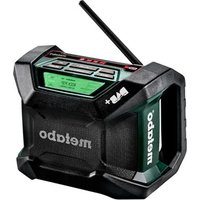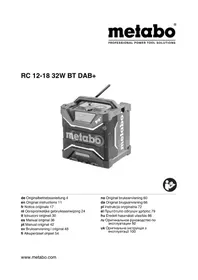
RC 12-18 32W BT DAB+ - Radio METABO - Free user manual and instructions
Find the device manual for free RC 12-18 32W BT DAB+ METABO in PDF.


User questions about RC 12-18 32W BT DAB+ METABO
0 question about this device. Answer the ones you know or ask your own.
Ask a new question about this device
Download the instructions for your Radio in PDF format for free! Find your manual RC 12-18 32W BT DAB+ - METABO and take your electronic device back in hand. On this page are published all the documents necessary for the use of your device. RC 12-18 32W BT DAB+ by METABO.
USER MANUAL RC 12-18 32W BT DAB+ METABO
natural_image
Exterior view of a metallobo electric shock absorber (no signage or text visible on body)
Original instructions
1. Declaration of Conformity
We, being solely responsible, hereby declare that these radios, identified by type and serial number *1), meet all relevant requirements of directives *2) and standards *3). Test report *4), Issuing testing authority *5), Technical documents for *6) - see page 3.
For UK only:
UK CA We as manufacturer and authorized person to compile the technical file, see *6) on page 3, hereby declare under sole responsibility that these radios, identified by type and serial number *1) on page 3, fulfil all relevant provisions of following UK Regulations S.I. 2016/1091, S.I. 2016/1101, S.I. 2012/3032 and Designated Standards see *3) on page 3, Certification Number: 23AE030668W014, illssuing testing authority *5).
2. Specified Conditions of Use
Operate the radio only with a suitable original Metabo or CAS (Cordless Alliance System) L-Ion battery pack (12V, 14.4 V, 18 V) or the mains power cord.
The radio is also suitable for charging:
The device is only suitable for charging inserted Metabo and CAS (Cordless Alliance System) battery packs. Suitable for charging Li-Ion battery packs (12 V - 18 V, 1.3 Ah - 10 Ah, 3-10 cells).

Never attempt to charge batteries that are not rechargeable. Danger of explosion!
The device is suitable for charging/operation of electronic devices with a USB interface (like Smartphones, MP3 Players, tablets, etc.) -- no data exchange
The device is suitable for charging a smart phone wirelessly (provided the smart phone has this charging technology - inductive charging).
This device is not designed for use by persons (including children) with physical, sensory or mental disabilities, or with insufficient experience and/or knowledge, unless they are supervised by a person responsible for their safety, or have received instructions on how to use the tool by this person.
The user bears sole responsibility for any damage caused by inappropriate use.
Generally accepted accident prevention regulations and the enclosed safety information must be observed.
3. General Safety Information

Pay attention to all parts of the text that are marked with this symbol for your own protection and for the protection of your device!

WARNING – Read the operating instructions to reduce the risk of injury.

WARNING – Read all safety warnings, instructions, strations and specifications provided with this device.
Failure to follow all instructions listed below may result in electric shock, fire and/or serious injury.
Save all warnings and instructions for future reference.

Before using the device, carefully read through and familiarise yourself with all closed safety information e Operating Instructions.
Keep all enclosed documentation for future reference, and ensure that you only pass on your device with this documentation.
4. Special Safety Instructions
Danger - electrical voltage!

A slightly acidic, flammable fluid may leak from defective Li-Ion battery packs!

If battery fluid leaks out and comes into contact with your skin, rinse immediately with plenty of water. If battery fluid leaks out and comes into contact with your eyes, wash them with clean water and seek medical attention immediately!
Do not recharge a fully charged battery pack!
Never allow children to use the device.
ENGLISHen
Children should be supervised to ensure that they do not play with the tool.
Keep children away from the device and the working area!
Keep your battery charger out of reach of children!
Pull out the mains plug immediately if the device starts to smoke or flames emerge!
Do not insert objects into the ventilation slots on the device – there is a danger of electric shocks and short circuits!
Do not use faulty battery packs.

Protect battery packs from water and moisture!

Do not expose battery packs to fire!
Do not use faulty or deformed battery packs!
Do not open battery packs!
Do not touch or short circuit battery pack contacts! If the radio is defective, remove the battery pack from the machine.
When not in use, keep batteries away from paper clips, coins, keys, nails, screws or other small metal objects that could bridge the contacts. Shorting the battery terminals together may cause burns or a fire.
Protect the battery pack and batteries from heat (including lengthy exposure to direct sunlight), fire, water and moisture. There is a risk of explosion.
Only recharge with the charger specified by the manufacturer. Chargers designed for a specific type of battery may pose a fire hazard when used together with other battery types.
Do not use this device near water.
Clean it using a dry cloth only.
Do not place the radio near any heat sources such as radiators, heat registers, stoves, or other apparatus that produce heat. Do not expose to open fire.
Only use attachments/accessories specified by the manufacturer.
Disconnect the device from the power supply in storms, before adjustment or repair work and when it will not be used for long periods.
Refer all servicing to qualified service personnel, who must use original spare parts only. Servicing is required when the device has been damaged in any way, such as when a mains adapter is damaged,
liquid has been spilled or objects have fallen into the apparatus, the radio has been exposed to rain or moisture, does not operate normally, or has been dropped.
To reduce the risk of fire or electric shock, do not expose this device to rain or moisture.
Use only the battery packs provided for this purpose in the device. Use of any other battery packs may create a risk of injury, fire or explosion.
Do not operate the device in closed shelves or cabinets without adequate ventilation.
The ideal storage temperature is between 10^ C and 40^ C.
Do not open the device or modify it in any way.
Do not leave an empty rechargeable battery pack in the unplugged radio for longer than 2 weeks.
Leaving the pack there for any longer can result in total discharge and damage to the storage cells. It is possible to recharge completely discharged battery packs using a Metabo charger.
When not in use, disconnect the device from any power supply (mains power, battery pack).
The mains plug is used to separate the device at any time from the power supply and thus must be easily accessible at all times.
Always keep the cover (13) (if not used) and protective cover (20) closed to prevent dirt and moisture from entering.
Prolonged exposure to high noise levels can result in lasting damage to hearing, hearing loss and other problems, such as tinnitus (ringing, whistling or buzzing in the ear). Set the volume as low as possible.
Transport of Li-Ion battery packs:
The shipping of Li-Ion battery packs is subject to laws related to the carriage of hazardous goods (UN 3480 and UN 3481). Inform yourself of the currently valid specifications when shipping Li-Ion battery packs. If necessary, consult your freight forwarder. Certified packaging is available from Metabo.
Only send the battery pack if the housing is intact and no fluid is leaking. Remove the battery pack from the machine for sending. Prevent the contacts from short-circuiting (e.g. by protecting them with adhesive tape).
5. Overview
See page 2.
1 "MODE" button, to switch between FM (ultra short wave / VHF), BT (Bluetooth), DAB/DAB+, AUX
2 "MENU" button to select diverse functions
3 Rotary knob (turn: volume, for various settings and for selecting menu items.
press: switching on/off /standby mode /
SELECT / ENTER)
4 "EQUALIZER" button, for sound setting (bass / treble / "PRE-EQUALIZER")
5 "STATION" button, to save radio stations
6 << button to search radio stations (downwards)
7 >>- Button to search radio stations (upwards)
8 button to switch to Bluetooth mode (and pause / play)
9 button to pair 2 radios with each other via Bluetooth
10 Handle
11 Bottle opener
12 Display
13 USB-C and AUX port cover
14 AUX socket
15 USB-C port
16 Floor space for coupling with a metaBOX
17 Antenna
18 Area for inductive charging of a smart phone
19 Button for opening the battery pack protective cover
20 Battery pack protective cover
21 Mains connection lead
22 Storage for winding up the mains connection cable
23 Battery compartment for backup batteries (time)
24 Battery pack release button
25 Battery pack *
* not in scope of delivery
6. Initial Operation
Before plugging in, check to see that the rated mains voltage and mains frequency, as specified on the rating label, match your power supply.
Always install an RCD with a maximum trip current of 30 mA upstream.
Devices like these that generate direct current can influence simple earth leakage protection devices. Use a type F or better, with a release current of max. 30 mA.
Before initial use, ensure proper ventilation. Minimum distance to other objects is 5 cm. Do not operate the device in closed shelves or cabinets without adequate ventilation.
Use a freely accessible power outlet to ensure fast disconnection from the mains if necessary.
-
Inserting backup batteries (to save the time): Press the (19) button and open the protective cover (20), if needed remove battery pack (25). At the bottom of the interior, open the battery compartment cover (23). Insert two AA batteries. Ensure the correct polarity (+/-), note the mark on the bottom of the interior. Replace the battery compartment cover (23). Close the protective cover (20).
-
Establish power supply: Press (19) button and open the protective cover (20). Insert charged battery pack (25) completely until it locks. Close protective cover of battery pack (20),
and / or Connect the mains cable (21) to the mains.
- Align the antenna (17).
7. Use
7.1 Switching On and Off
To switch on, long press the (3) button (>2 seconds). The display lights up, the device is switched on (radio and charging function).
Long pressing the (3) button switches off the radio, the charging function remains active. The device is in standby mode. (Brief pressing of the button (3) switches the radio on again).
Another long press of (3) button also switches off the charging function. The device is completely switched off.
Note: The radio will automatically turn off after a long period of non-use.
7.2 Adjusting the volume
Adjust the volume by turning the (3) knob.
7.3 Switching between FM (ultra short wave), DAB/DAB+ and AUX (external audio source connected via cable, e.g. smart phone)
Press the "MODE" button (1) several times to switch between modes.
The set mode is shown in the display (12) (FM / DAB / AUX).
7.4 Operation: FM radio stations
Press the "MODE" button (1) several times to set "FM".
- Searching for radio stations
Press “|<<” button (6) or “>>|” button (7) to change the frequency. The current frequency is shown on the display (12).
To search the next radio station with high signal strength, press the "|<<" button (6) or press the ">>|" button (7) and keep pressed briefly. The frequency of the radio station found is shown on the display (12).
- Store set radio station
Press the "STATION" button (5) for a long time. The selected memory number blinks on the display (12).
Rem.: The radio station can only be stored as long as the number is blinking.
Set the desired memory location number by turning the (3) knob.
Press the (3) button briefly to save the radio station.
- Listening to stored radio stations:
Press "STATION" button (5) briefly until the desired stored radio station is shown on the display (12) and played.
7.5 Operation: DAB/DAB+ (Digital Audio Broadcasting) (depending on features)
Press the "MODE" button (1) to set "DAB".
ENGLISHen
- Station scan - Starts automatically on initial commissioning!
(If required, start manually:
Press "MENU" button (2) and select "Auto Scan" by turning the (3) knob. Confirm the selection by briefly pressing the (3) button, the station search starts.)
- Set the desired station:
After the automatic station search, all stations found are automatically stored, using the "l<<" button (6) and ">l" button (7) you can browse the stations received.
Note: In order to set a specific station of which you know the transmission frequency: Press the "MENU" button (2) and select "Manual tune" by turning the knob (3). Confirm the selection by briefly pressing the (3) button. Select the desired transmission frequency by turning the button (3) and confirm the selection by briefly pressing the knob (3).
- Store set radio station
Press the "STATION" button (5) for a long time. The selected memory number blinks on the display (12).
Rem.: The radio station can only be stored as long as the number is blinking.
Set the desired memory location number by turning the (3) knob.
Press the (3) button briefly to save the radio station.
Note: DAB / DAB+ is not transmitted in all countries or areas and cannot be received then.
7.6 Bluetooth (connect radio to smart phone)
-
Press the "BLUETOOTH" button (8). The display shows (12) BT.
-
Activate Bluetooth on your smart phone (or another mobile device such as a tablet).
-
If your smart phone has detected the radio, it will be shown with the device name "RC 12-18 32W".
-
On your smart phone establish the connection to the device "RC 12-18 32W".
The successful connection is shown on the display (12).
-
Start replay e.g. of a song on your smart phone.
-
Pause or restart playback by pressing the button (8).
Note: For pairing of 2 radios, see chapter 7.7.
7.7 Bluetooth (pairing 2 radios)
In BT (Bluetooth) mode, you can pair another radio of this series and thus play back music via both devices simultaneously.
-
Connect the FIRST radio with your smart phone (as described in chapter 7.6).
-
Then press the button (9) on the FIRST radio.
-
Proceed to the SECOND radio and activate Bluetooth by pressing the "BLUETOOTH" button (8) and then press the (9) button to connect both radios.
-
Both radios are automatically connected to each other (If there are connection problems, reduce the distance between the radios).
-
Start replay e.g. of a song on your smart phone.
7.8 AUX (connect radio and smart phone with a cable)
-
Open the cover (13) and plug a smart phone with a suitable cable into the AUX socket (14).
-
Press the "MODE" button (1) several times until the display (12) shows "AUX".
-
Start replay e.g. of a song on your smart phone.
7.9 Set "PRE-EQUALIZER", TREBLE and BASS
"PRE-EQUALIZER" is a fixed, predefined value for treble and bass.
Press the "EQ" button (4) several times to switch between "PRE-EQUALIZER", treble and bass. The active mode is shown in the display (12).
The set value (for treble and bass) is shown in the display (12) and can be changed by turning the knob (3).
Once the requested values have been set, you can switch from treble to bass by briefly pressing the button (3) or exit the menu.
7.10 Further setting options:
Scan tuning:
-
Press the "MODE" button (1) several times to set the requested mode (FM / DAB). The set mode is shown in the display (12).
-
Set the "MENU" button (2), by turning the button (3) go to the sub-item "AUTO SCAN". By briefly pressing the (3) button to start the scan tuning.
"Manual tune" (only when "DAB" is set):
To tune a specific station of which you know the transmission frequency. See chapter 7.5.
Display settings:
Note: Some information is not broadcast by certain stations and cannot be displayed by the radio.
-
Press the "MODE" button (1) several times to set the requested mode (FM / DAB). The set mode is shown in the display (12).
-
Press the "MENU" button (2), by turning the (3) button go to sub-item "DISPLAY TYPE". Briefly pressing the (3) button takes you to the selection menu.
in FM mode:
PROGRAM TYPE = music genre, e.g. pop music
RADIO TEXT = Information broadcasted by the station
PROGRAM SERVICE = station name
in DAB mode:
PROGRAM TYPE = music genre, e.g. pop music
DYNAMIC LABEL = Information broadcasted by the station as scrolling text
FREQUENCY = station frequency
SIGNAL STRENGTH = signal strength (WEAK = weak, STRONG = strong)
Select the desired setting by turning the (3)
button and confirm by briefly pressing the (3) button.
Time mode (12 h / 24 h)
Press the "MENU" button (2), by turning the (3) button go to sub-item "SET CLOCK". Briefly pressing the (3) button takes you to the selection menu.
"24 H MODE"
"12 H MODE" = (AM / PM)
Select the desired setting by turning the (3) button and confirm by briefly pressing the (3) button.
Set the time (hours) by turning the (3) button and confirm by briefly pressing (3) button. Set the time (minutes) by turning the (3) button and confirm by briefly pressing the (3) button.
Display backlight:
Press the "MENU" button (2), go to the sub-item "BACKLIGHT" by turning the (3) button. Briefly pressing the (3) button takes you to the selection menu.
AUTO = lighting switches off automatically after 10 sec
ON ALL TIME= lighting always on Select the desired setting by turning the (3) button and confirm by briefly pressing the (3) button.
Speaker light:
Press "MENU" button (2), go to the sub-item "SPEAKER LIGHT" by turning the (3) button. Briefly pressing the (3) button takes you to the selection menu.
AUTO = lighting on for 10 sec.
ON = lighting on
OFF = lighting off
Select the desired setting by turning the (3) button and confirm by briefly pressing the (3) button.
Reset to factory settings
Press "MENU" button (2), go to the sub-item "RESET ALL" by turning the (3) button. Briefly pressing the (3) button takes you to the selection menu.
NO = cancel process
YES = reset to factory settings
Select the desired setting by turning the (3) button and confirm by briefly pressing the (3) button.
8. Charging function
Charging is only possible when the unit is switched on or in standby mode.
8.1 Charging battery pack
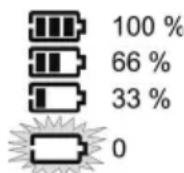
The battery symbol in the display (12) shows the charge level of the battery pack (25) used.
If the mains cable is connected and a battery pack that is not fully charged is inserted, it will be charged (the battery symbol flashes).
Once the charging process has finished, the battery charger automatically switches to conservation mode. The battery pack can remain in the charger and is therefore always ready for use.
Remove battery pack:
Press the battery pack release (24) button and remove the battery pack (25).
Insert battery pack:
Push the battery pack (25) completely to the stop on the sliding seat.
8.2 Wireless charging of a smart phone (inductive charging)
Only intended for smart phones that have this charging technology. Place the smart phone on the marked area (18), it will be charged.
8.3 Charging a USB device
Only connect USB devices which are compatible with the USB standard. Using incompatible devices can lead to malfunctions, damage or injuries.
Open the cover (13) and plug a USB device with a suitable cable into the USB-C port (15). The device is charged.
9. Troubleshooting
Is the Bluetooth connection bad or interrupted?
-> reduce the distance between the devices
No charging function?
-> The radio must be switched on or be in standby mode.
-> Plug in the mains plug
-> Check if an error message appears in the display (12). Error messages and their meaning, please refer to the following text. Remove the battery pack, eliminate the error, insert the battery pack again.
“Batt Err” = temperature of the battery pack too high/ too low. Permissible charging temperature range: 0 °C to 40 °C.
"Batt Insert Err" = battery pack not inserted correctly.
"Batt Fault" = battery pack defective. Remove the battery pack immediately from the charger.
"Batt not ready" = battery pack not recognised. Wrong brand?
Display is discolored black?
-> Increased temperature due to sunlight can lead to discoloration. This disappears again at normal temperature. Observe the permitted ambient temperature.
10. Accessories
Use only original Metabo or CAS (Cordless Alliance System) battery packs and accessories.
Use only accessories that fulfil the requirements and specifications listed in these operating instructions. Only use original Metabo battery packs and Metabo accessories.
ENGLISHen
For a complete range of accessories, see www.metabo.com or the catalogue.
11. Repairs

Repairs to radios must only be carried out by qualified electricians!
If the mains connection cable of this device is damaged, it must be replaced by the manufacturer or the Customer Service department of the manufacturer or a similarly qualified person to prevent endangering personnel and property.
Contact your local Metabo representative if you have Metabo radios requiring repairs. For addresses see www.metabo.com.
You can download a list of spare parts from www.metabo.com.
12. Environmental Protection
Observe national regulations on environmentally compatible disposal and on the recycling of disused machines, packaging and accessories.
Packaging materials must be disposed of according to their labelling in accordance with municipal guidelines. Further information can be found at www.metabo.com in the “Service” section.
Battery packs may not be disposed of with regular waste. Return faulty or used battery packs to your Metabo dealer!
Do not allow battery packs to come into contact with water!

Only for EU countries: never dispose of power tools in your household waste! According to European Directive 2012/19/EU
on Waste from Electric and Electronic Equipment and implementation in national law, used power tools must be collected separately and recycled in an environmentally-friendly manner.
Discharge the battery pack in the power tool before disposal. Prevent the contacts from short-circuiting (e.g. by protecting them with adhesive tape).
13. Technical specifications
Explanatory notes on the specifications on page 3.
Subject to change in accordance with technical progress.
FM (UKW) = ultra shortwave reception range U = operating voltage
_A & = charging current battery pack I_USB - C & = charging current of the USB - C port I_IL & = charging current during inductive charging
m = weight (without battery pack)
IP = protection class IP
--- direct current
\~ AC power
The technical specifications quoted are subject to tolerances (in compliance with relevant valid standards).
Permitted ambient temperature during operation: -20 °C to 40 °C.
Recommended ambient temperature when charging Battery pack: 0 °C to 40 °C.
Notice originale
Transport van li-ion accu-packs:
7.5 Bediening: DAB/DAB+ (Digital Audio
"Manual Tune" (alleen wanneer "DAB" is ingesteld):
--- Corriente continua
\~ Corriente alterna
IP = kapslingsgrad IP
--- Likestrøm
\~ Vekselstrøm
I_A = Ladestrøm for batteripakke
I_USB-C = Ladestrøm for USB-C-tilslutningen
natural_image
Icon showing an open book and a recycling bin with a circular arrow (no text or symbols)Metabowerke GmbH
Metabo-Allee 1
72622 Nuertingen
Germany
www.metabo.com
metabo®
PROFESSIONAL POWER TOOL SOLUTIONS