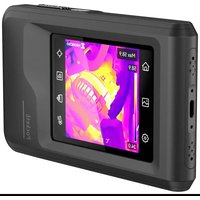
PocketE - Thermal camera Hikmicro - Free user manual and instructions
Find the device manual for free PocketE Hikmicro in PDF.


| Brand | Hikmicro |
| Model | PocketE |
| Category | Thermal camera |
| Product type | Portable thermal camera |
| Dimensions (L x H) | 58.9 x 24.3 mm |
| Weight | Approximately 200 g |
| Power supply | Built-in lithium-ion battery 3.85 V, 2100 mAh |
| Battery life | Up to 6 hours (estimated) |
| Temperature measurement range | -20 °C to 350 °C |
| Measurement accuracy | ±2 °C or 2% (at 15-35 °C ambient, object >0 °C) |
| Protection rating | IP54 |
| Operating temperature | -10 °C to 50 °C |
| Operating humidity | ≤95% |
| Connectivity | Wi-Fi 2.4 GHz, USB Type-C |
| Main functions | Image capture, video recording, temperature measurement, color palettes, flashlight, flashing alarm |
| Storage | Internal memory (capacity not specified) |
| Maintenance and cleaning | Wipe with a soft cloth moistened with ethanol if necessary |
| Safety | Do not expose to extreme environments, do not point the lens at the sun or a laser |
| Spare parts and repairability | Contact the dealer or manufacturer for repair; battery non-removable |
| General information | Compliant with CE, UKCA, IC RSS-102 standards; regular automatic calibration |
Frequently Asked Questions - PocketE Hikmicro
User questions about PocketE Hikmicro
0 question about this device. Answer the ones you know or ask your own.
Ask a new question about this device
Download the instructions for your Thermal camera in PDF format for free! Find your manual PocketE - Hikmicro and take your electronic device back in hand. On this page are published all the documents necessary for the use of your device. PocketE by Hikmicro.
USER MANUAL PocketE Hikmicro

HIKMICRO
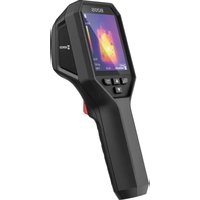
Pocket Thermal Camera
HIKMICRO PocketE Series
Quick Start Guide

HIKMICRO Viewer Android

HIKMICRO Viewer iOS
English 1
Deutsch 8
Français 15
Español 22
Português 29
Italiano 36
Češna 43
Slovenčina 49
Polski 56
Magyar 63
Română 70
Nederlands 77
Dansk 84
Norsk 91
Suomi 97
Svenska 104
Русский 111
Türkçe 118
日本語 124
한국어 131
繁體中文 138
English
natural_image
Technical line drawing of a rectangular mechanical component with a red annotation arrow pointing to a numbered point (no text or symbols present)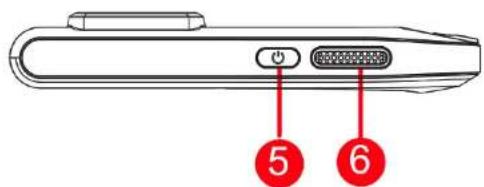
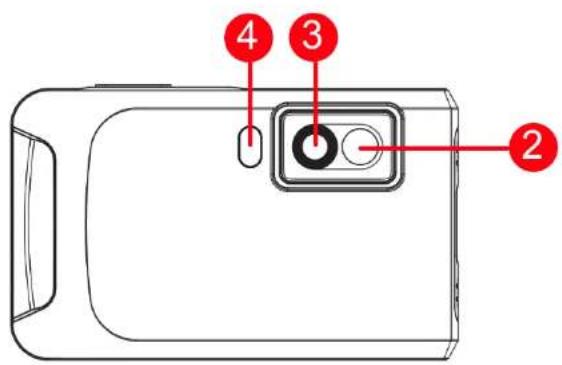
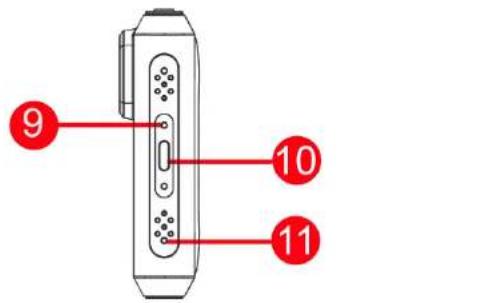
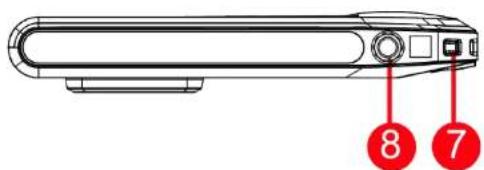
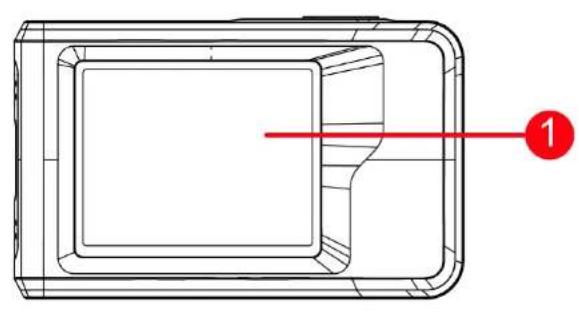
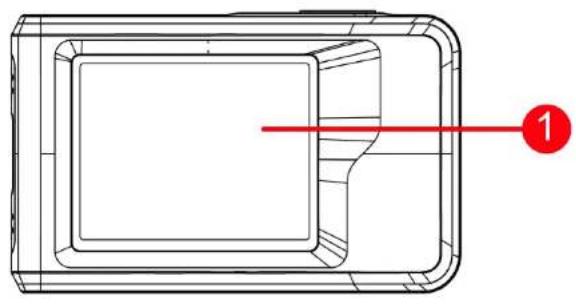
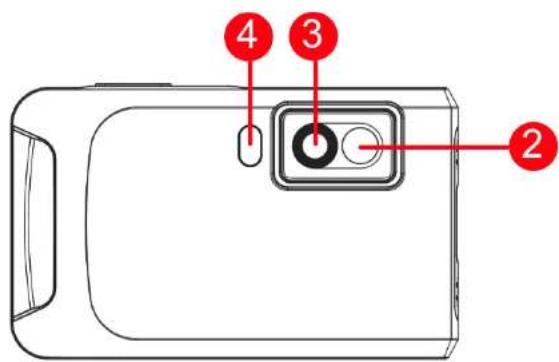
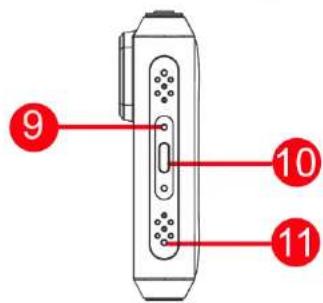
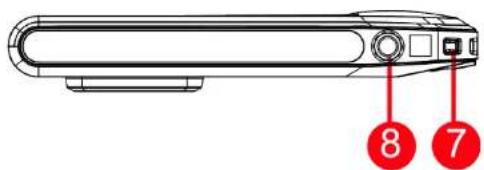
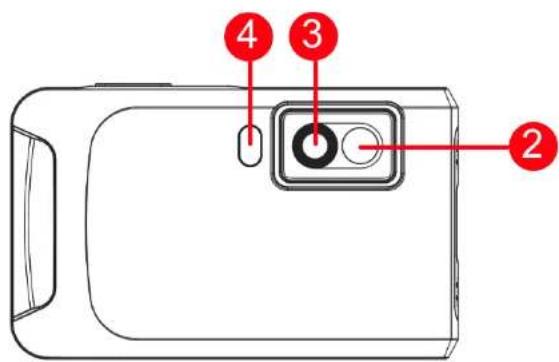
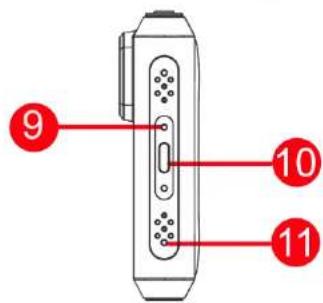
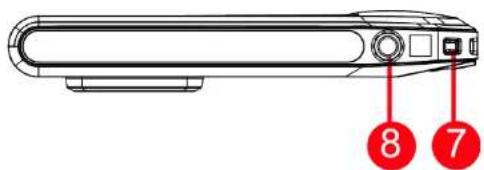
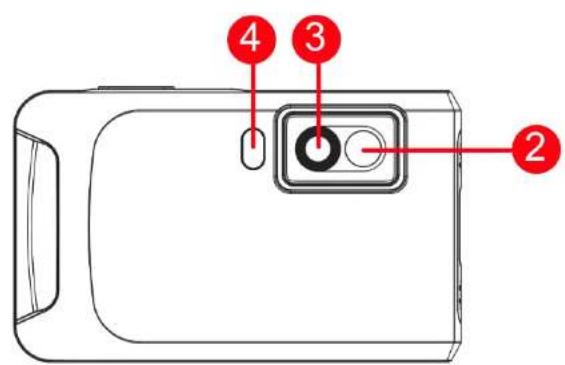
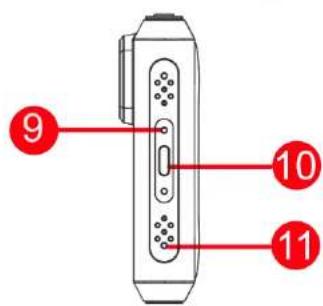
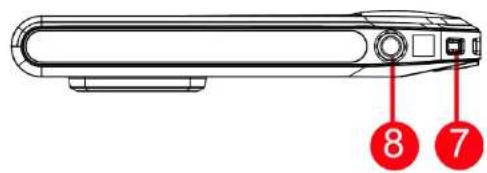
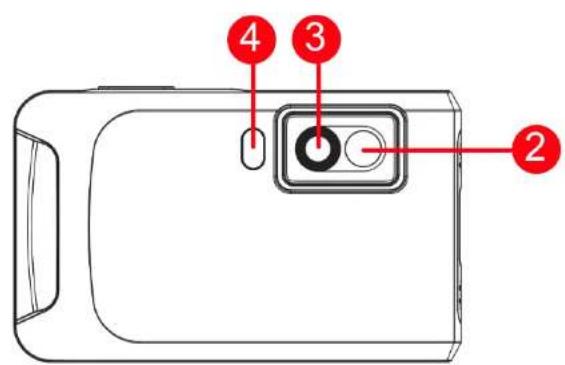
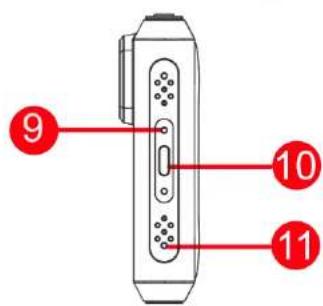
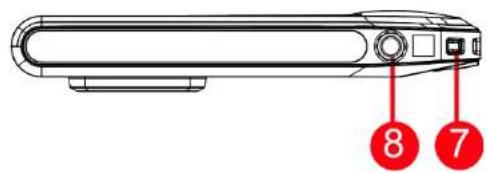
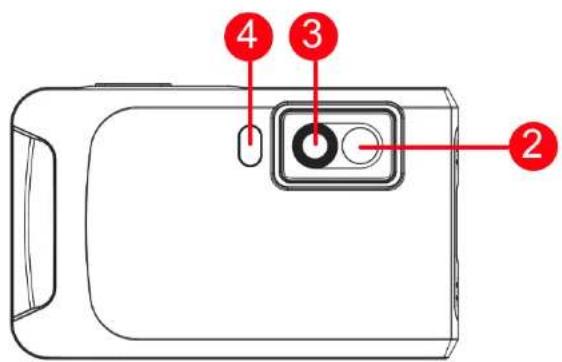
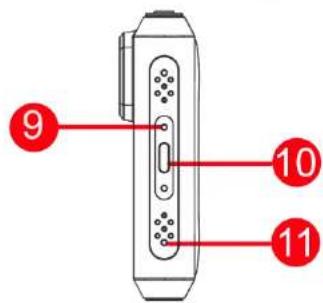
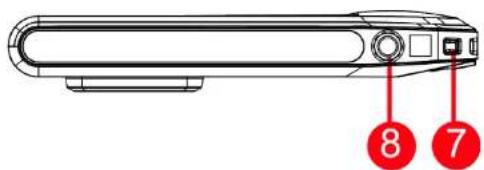
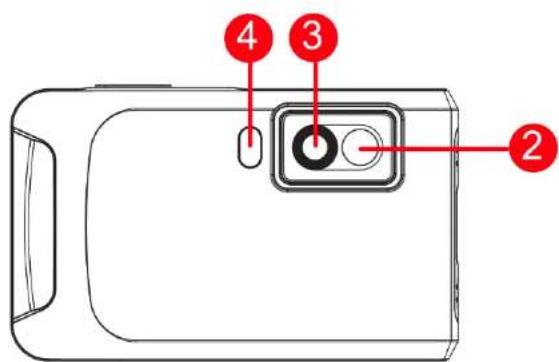
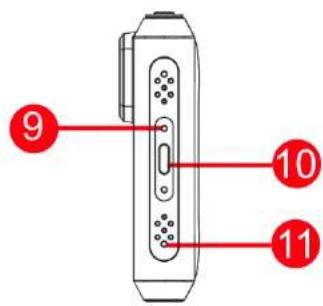
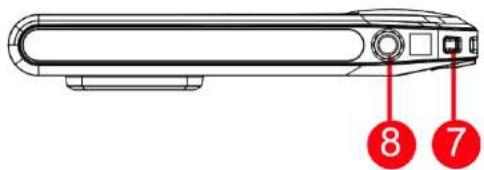
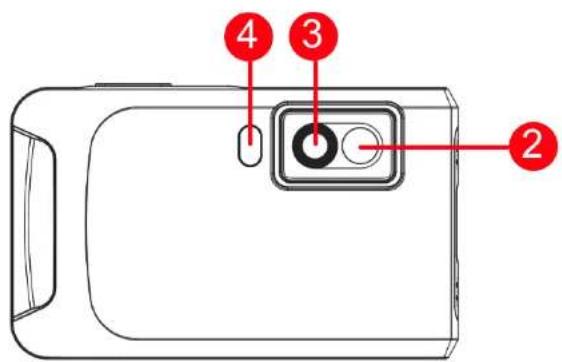
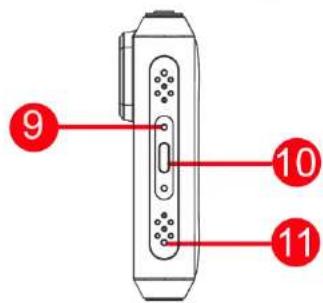
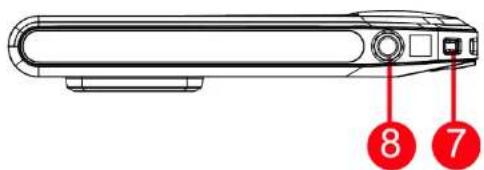
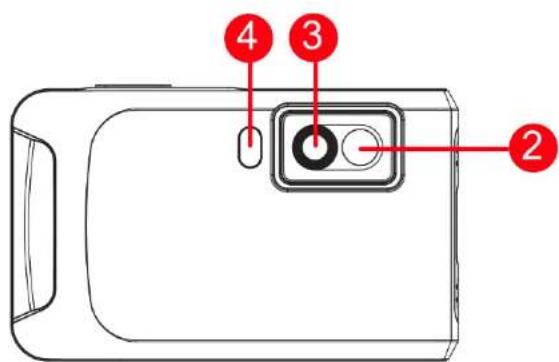
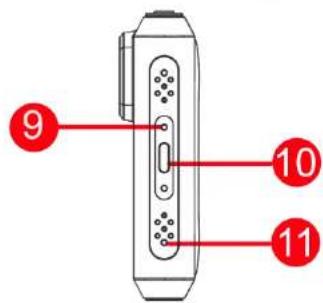
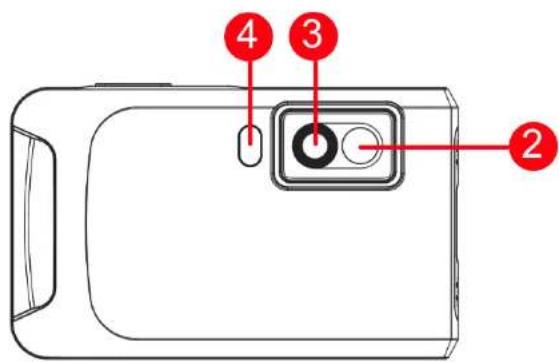
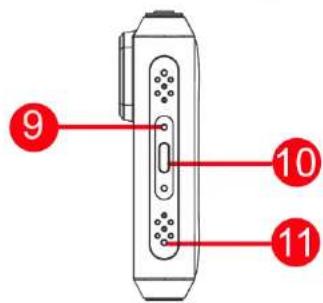
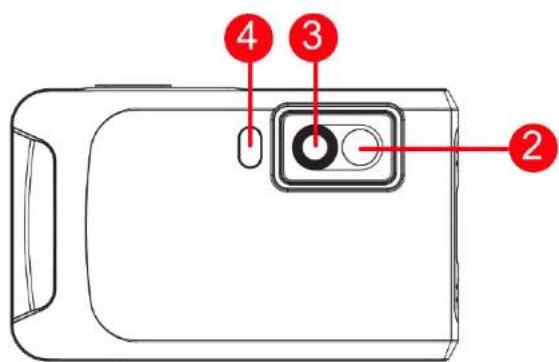
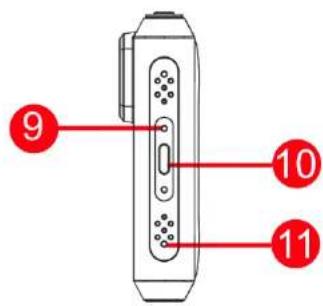
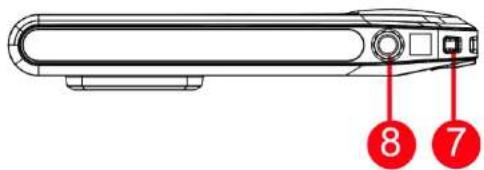
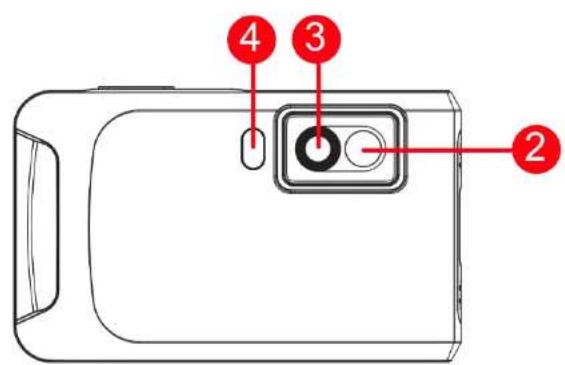
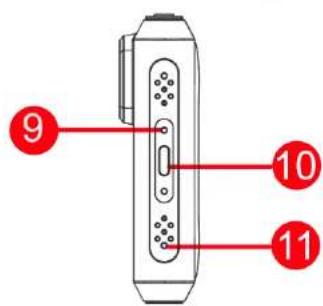
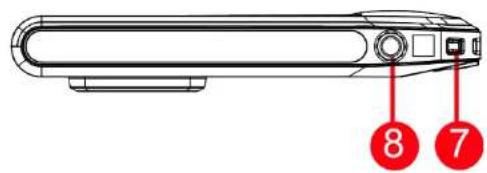
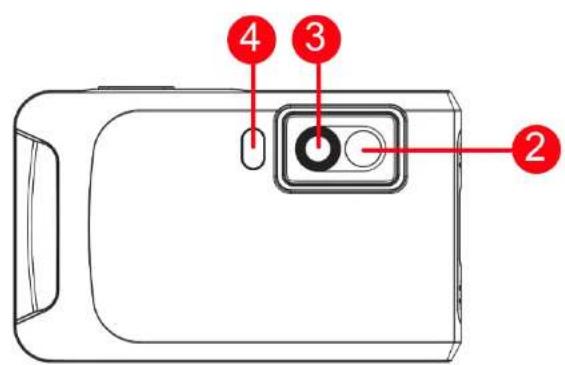
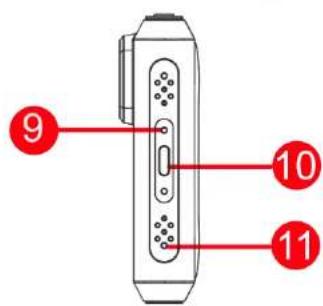
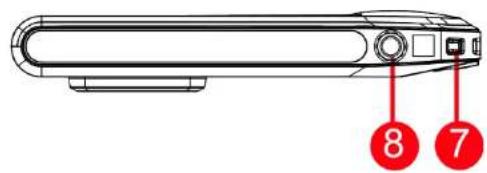
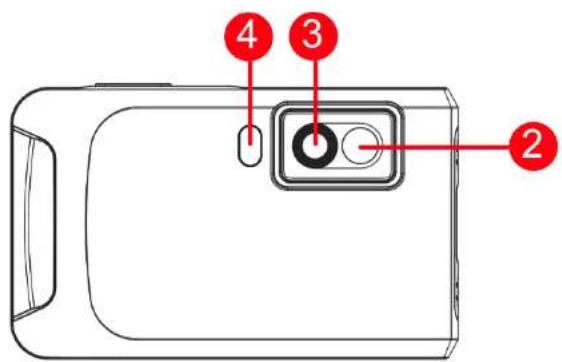
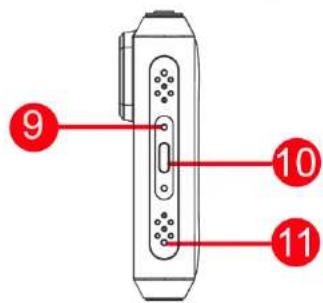
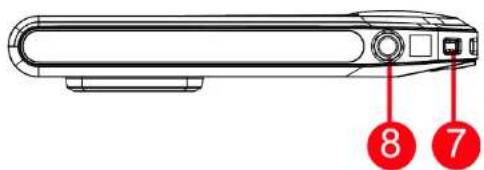
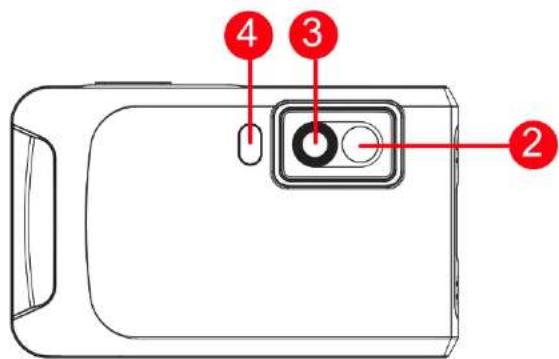
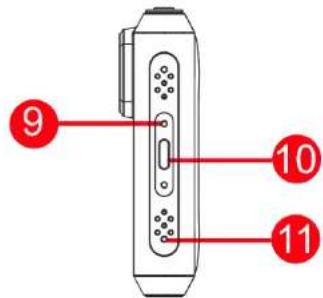
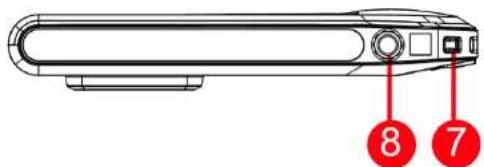
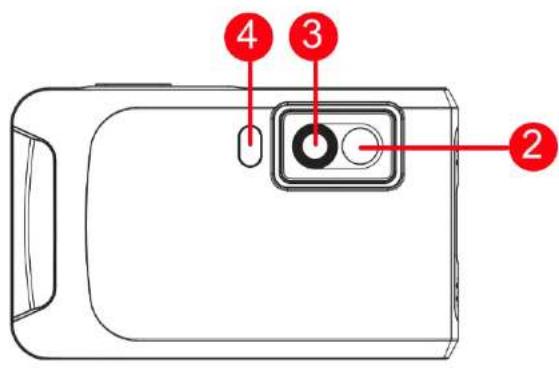
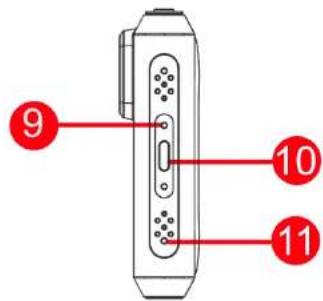
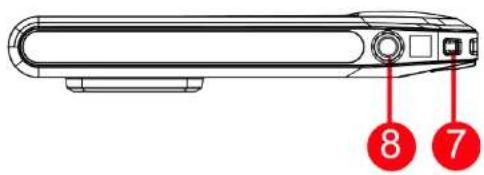
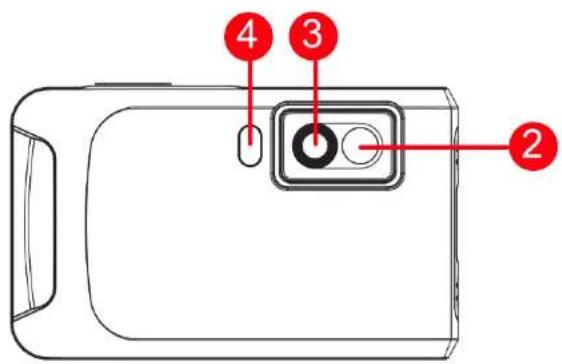
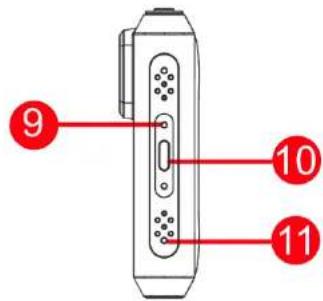
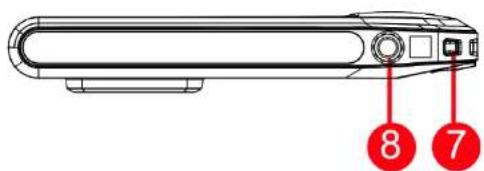
| No. | Descripon | Funcon |
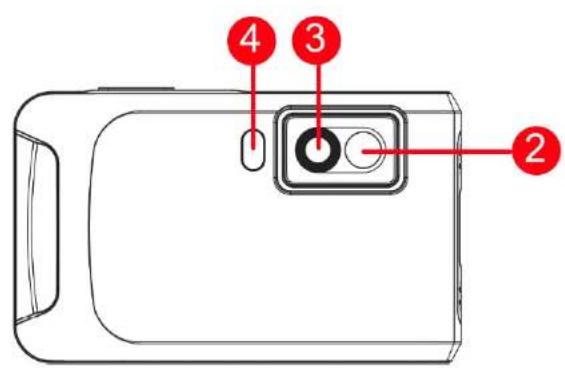
| 1 | Touch Control Screen | View image and operate device with touch control. |
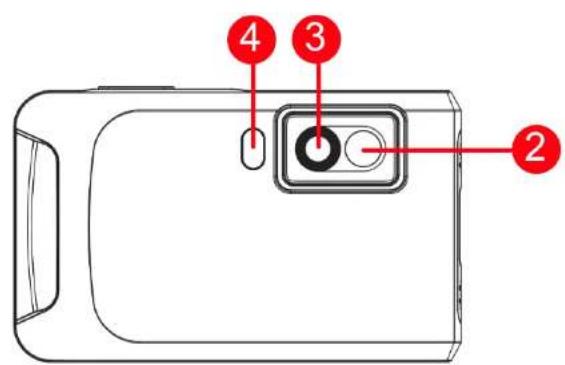
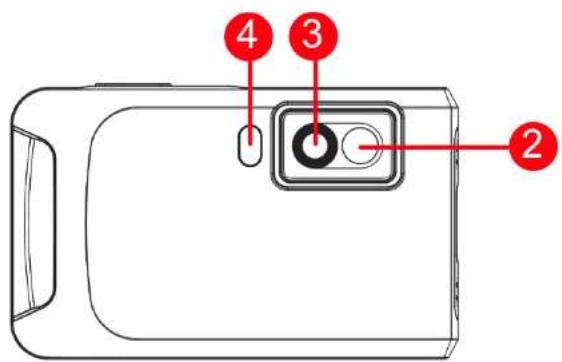
| 2 | Visual Lens | View the opcal image. |
| 3 | Thermal Lens | View the thermal image. |
| 4 | Flash Light | Fill light on objects and output ashing alarm. |
| 5 | Power Key | Hold to power on/o the device. |
| 6 | Capture Key | Press to capture an image.Hold to start recording a video and press again to stop. |
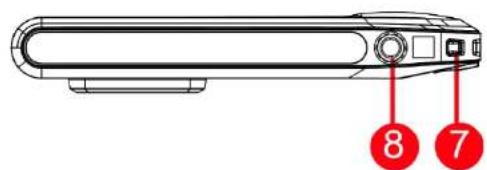
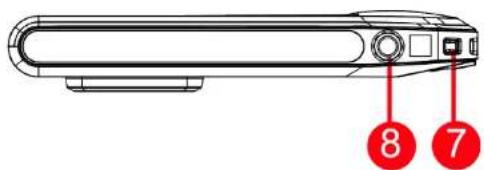
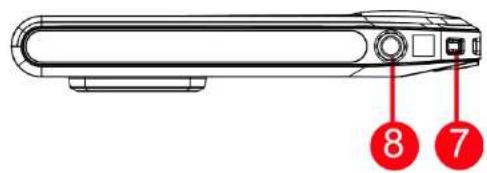
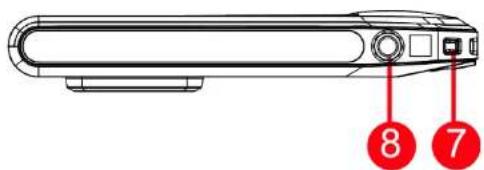
| 7 | Strap Aachment Point | Mount the wrist strap. |
| 8 | Tripod Mount | Mount the tripod. |
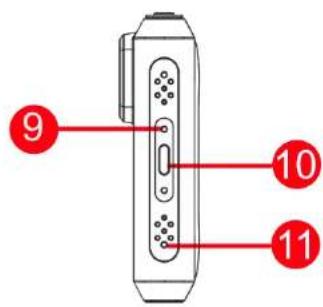
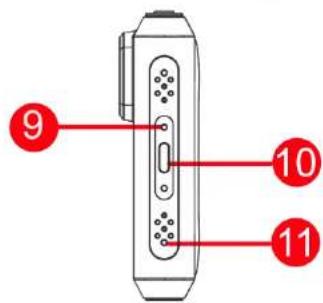
| 9 | Charging Indicator | Indicate the charging status of the device.Solid red: charging normallyFlashing red: charging exceponSolid green: fully charged |
| 10 | Type-C Interface | Charge the device or export les with Type-C cable. |
| 11 | Microphone | Record audio. |
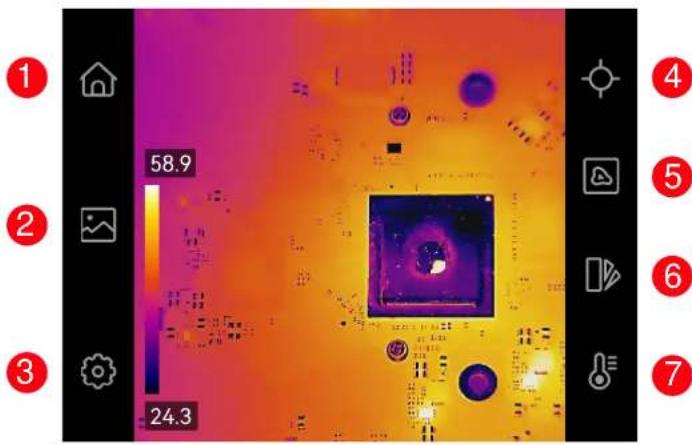
| No. | Descripon | Funcon |
| 1 | Home | Tap to return to live view. |
| 2 | Albums | Enter albums to view captured images and videos. |
| 3 | Sengs | Adjust device local sengs. |
| 4 | Measurements | Turn on/o measurement tools. |
| 5 | Image Display Mode | Switch live image display mode from thermal, visual, fusion, etc. |
| 6 | Palees | Switch thermal image color palees. |
| 7 | Level & Span | Adjust temperature range for thermal image display. |
Temperature Measurement
With the built-in high-sensitivity IR detector and high-performance sensor, the temperature measurement range is -20^ to 350^ (-4°F to 662°F) and the temperature measurement accuracy is ± 2^ ( ± 3.6^ ) or 2% when the ambient temperature is 15^ to 35^ (59°F to 95°F) and the object temperature is above 0^ (32°F).
Swipe-down Menu
You can adjust the brightness in the swipe-down menu, and enable funcons such as Wi-Fi, Hotspot, Screen Cast, ashlight, and Dark/Bright Mode.
Client Soware Connecon
You can view live view, capture snapshots, and record videos via HIKMICRO Viewer app on your phone. Scan the QR codes on the cover to download the app. And you can download HIKMICRO Analyzer (hps://www.hikmicrotech.com/en/industrial-products/hikmicro-analyzer-soware.html) to analyze pictures oine professionally, and generate a custom format
report on your PC.
Image Adjustment
The Level & Span can be manually or automacally adjusted to achieve a good thermal eect for beer temperature dience analysis.
In auto mode, the device adjusts temperature range for display automacally. In manual mode, you can tap an interest area on screen, and scroll the temperature wheel to adjust the temperature range to display.
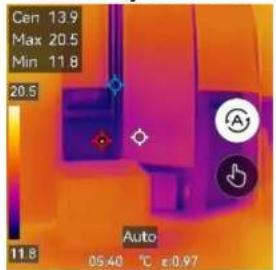
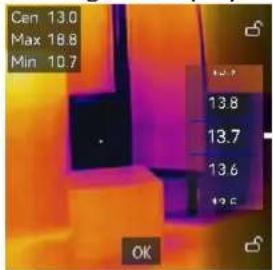
Note: Your camera will periodically perform a self-calibraon to optimize image quality and measurement accuracy. In this process the image will pause briefy and you'll hear a "click" as a shuer moves in front of the detector. The prompt "Calibrang ..." appears in the upper center of the screen as the device is calibrang itself. The
self-calibraon will be more frequent during start up or in very cold or hot environments. This is a normal part of operaon to ensure opmum performance for your camera.
User Manual
For detailed operaon guidance, please scan the QR code to get the user manual.

Legal Informaon
© 2023 Hangzhou Microimage Soware Co., Ltd. All rights reserved. About this Manual
The Manual includes instrucons for using and managing the Product. Pictures, charts, images and all other informaon hereinaer are for descripon and explanaon only. The informaon contained in the Manual is subject to change, without noce, due to rmware updates or other reasons. Please nd the latest version of this Manual at the HIKMICRO website (www.hikmicrotech.com/).
Please use this Manual with the guidance and assistance of professionals trained in supporting the Product.
Trademarks Acknowledgement
HIKMICRO and other HIKMICRO's trademarks and logos are the properes of HIKMICRO in various jurisdicons. Other trademarks and logos menoned are the properes of their respective owners.
LEGAL DISCLAIMER
TO THE MAXIMUM EXTENT PERMITTED BY APPLICABLE LAW, THIS MANUAL
AND THE PRODUCT DESCRIBED, WITH ITS HARDWARE, SOFTWARE AND FIRMWARE, ARE PROVIDED "AS IS" AND "WITH ALL FAULTS AND ERRORS". HIKMICRO MAKES NO WARRANTIES, EXPRESS OR IMPLIED, INCLUDING WITHOUT LIMITATION, MERCHANTABILITY, SATISFACTORY QUALITY, OR FITNESS FOR A PARTICULAR PURPOSE. THE USE OF THE PRODUCT BY YOU IS AT YOUR OWN RISK. IN NO EVENT WILL HIKMICRO BE LIABLE TO YOU FOR ANY SPECIAL, CONSEQUENTIAL, INCIDENTAL, OR INDIRECT DAMAGES, INCLUDING, AMONG OTHERS, DAMAGES FOR LOSS OF BUSINESS PROFITS, BUSINESS INTERRUPTION, OR LOSS OF DATA, CORRUPTION OF SYSTEMS, OR LOSS OF DOCUMENTATION, WHETHER BASED ON BREACH OF CONTRACT, TORT (INCLUDING NEGLIGENCE), PRODUCT LIABILITY, OR OTHERWISE, IN CONNECTION WITH THE USE OF THE PRODUCT, EVEN IF HIKMICRO HAS BEEN ADVISED OF THE POSSIBILITY OF SUCH DAMAGES OR LOSS.
YOU ACKNOWLEDGE THAT THE NATURE OF THE INTERNET PROVIDES FOR INHERENT SECURITY RISKS, AND HIKMICRO SHALL NOT TAKE ANY RESPONSIBILITIES FOR ABNORMAL OPERATION, PRIVACY LEAKAGE OR OTHER DAMAGES RESULTING FROM CYBER-ATTACK, HACKER ATTACK, VIRUS INFECTION, OR OTHER INTERNET SECURITY RISKS; HOWEVER, HIKMICRO WILL PROVIDE TIMELY TECHNICAL SUPPORT IF REQUIRED.
YOU AGREE TO USE THIS PRODUCT IN COMPLIANCE WITH ALL APPLICABLE LAWS, AND YOU ARE SOLELY RESPONSIBLE FOR ENSURING THAT YOUR USE CONFORMS TO THE APPLICABLE LAW. ESPECIALLY, YOU ARE RESPONSIBLE, FOR USING THIS PRODUCT IN A MANNER THAT DOES NOT INFRINGE ON THE RIGHTS OF THIRD PARTIES, INCLUDING WITHOUT LIMITATION, RIGHTS OF PUBLICITY, INTELLECTUAL PROPERTY RIGHTS, OR DATA PROTECTION AND OTHER PRIVACY RIGHTS. YOU SHALL NOT USE THIS PRODUCT FOR ANY PROHIBITED END-USES, INCLUDING THE DEVELOPMENT OR PRODUCTION OF WEAPONS OF MASS DESTRUCTION, THE DEVELOPMENT OR PRODUCTION OF CHEMICAL OR BIOLOGICAL WEAPONS, ANY ACTIVITIES IN THE CONTEXT RELATED TO ANY NUCLEAR EXPLOSIVE OR UNSAFE NUCLEAR FUEL-CYCLE, OR IN SUPPORT OF HUMAN RIGHTS ABUSES.
IN THE EVENT OF ANY CONFLICTS BETWEEN THIS MANUAL AND THE APPLICABLE LAW, THE LATTER PREVAILS.
Regulatory Informaon
These clauses apply only to the products bearing the corresponding mark or informaon.
EU/UK Compliance Statement
CE This product and - if applicable - the supplied accessories too are marked with "CE" and comply therefore with the applicable harmonized European standards listed under the Directive 2014/30/EU (EMCD), Directive 2014/35/EU (LVD), Directive 2011/65/EU (RoHS), Directive 2014/53/EU.
UK CA This product and - if applicable - the supplied accessories too are marked with "UKCA" and comply therefore with the following direcves: Radio Equipment Regulaons 2017, Electromagnec Compatibility Regulaons 2016, Electrical Equipment (Safety) Regulaons 2016, the Restricon of the Use of Certain Hazardous Substances in Electrical and Electronic Equipment Regulaons 2012.
Frequency Bands and Power (for CE/UK)
The frequency bands and transming power (radiated and/or conducted) nominal limits applicable to the following radio equipment are as follows: Wi-Fi: 2.4 GHz (2.4 GHz to 2.4835 GHz): 20 dBm
For the device without a supplied power adapter, use the power adapter provided by a qualified manufacturer. Refer to the product specicaon for detailed power requirements.
For the device without a supplied baery, use the baery provided by a qualified manufacturer. Refer to the product specicaon for detailed baery requirements.
Direcve 2012/19/EU (WEEE Direcve): Products marked with this symbol cannot be disposed of as unsorted municipal waste in the European Union. For proper recycling, return this product to your local supplier upon the purchase of equivalent new equipment, or dispose of it at designated collecon points. For more informaon see: www.recyclethis.info
According to the Waste Electrical and Electronic Equipment Regulaons 2013: Products marked with this symbol cannot be disposed of as unsorted municipal waste in the United Kingdom. For proper recycling, return this product to your local supplier upon the purchase of equivalent new equipment, or dispose of it at designated collecon points. For more informaon see: www.recyclethis.info.

Direcve 2006/66/EC and its amendment 2013/56/EU (Baery Direcve): This product contains a baery that cannot be disposed of as unsorted municipal waste in the European Union. See the product documentaon for speci baery informaon. The baery is marked with this symbol, which may include leering to indicate cadmium (Cd), lead (Pb), or mercury (Hg). For proper recycling, return the baery to your supplier or to a designated collecon point. For more informaon see:www.recyclethis.info.
According to the Baeries and Accumulators (Placing on the Market) Regulaons 2008 and the Waste Baeries and Accumulators Regulaons 2009: This product contains a baery that cannot be disposed of as unsorted municipal waste in the United Kingdom. See the product documentaon for speci baery informaon. The baery is marked with this symbol, which may include leering to indicate cadmium (Cd), lead (Pb), or mercury (Hg). For proper recycling, return the baery to your supplier or to a designated collecon point. For more informaon see: www.recyclethis.info.
Industry Canada ICES-003 Compliance
This device meets the CAN ICES-003 (B)/NMB-003 (B) standards requirements.
This device complies with Industry Canada licence-exempt RSS standard(s). Operaon is subject to the following two conditions:
(1) this device may not cause interference, and
(2) this device must accept any interference, including interference that may cause undesired operaon of the device.
These instrucons are intended to ensure that user can use the product correctly to avoid danger or property loss.
Laws and Regulaons
- Use of the product must be in strict compliance with the local electrical safety regulaons.
Transportaon
- Keep the device in original or similar packaging while transporng it.
- Keep all wrappers aer unpacking them for future use. In case of any failure occurred, you need to return the device to the factory with the original wrapper. Transportaon without the original wrapper may result in damage on the device and the company shall not take any responsibilities.
- Do not drop the product or subject it to physical shock. Keep the device away from magnec interference.
Power Supply
- The input voltage should meet the Limited Power Source (3.85 VDC, 570 mA) according to the IEC61010-1 standard. Please refer to technical specifications for detailed informaon.
- Make sure the plug is properly connected to the power socket.
- DO NOT connect mulple devices to one power adapter, to avoid over-heang or re hazards caused by overload.
- Use the power adapter provided by a qualified manufacturer. Refer to the product specicaon for detailed power requirements.
Baery
- Please charge the device for 3 hours before using for the rst me.
- Improper use or replacement of the baery may result in explosion hazard. Replace with the same or equivalent type only. Dispose of used baeries in conformance with the instrucons provided by the baery manufacturer.
- The built-in baery cannot be dismantled. Please contact the manufacture for repair if necessary.
- For long-term storage of the baery, make sure it is fully charged every half year to ensure the baery quality. Otherwise, damage may occur.
- Use the baery provided by a qualified manufacturer. Refer to the product specicaon for detailed baery requirements.
- DO NOT place the baery near heang or re source. Avoid direct
sunlight.
- DO NOT swallow the baery to avoid chemical burns.
- DO NOT place the baery in the reach of children.
- When the device is powered o and the RTC baery is full, the me sengs can be kept for 6 months.
- In the rst use, charge the device for more than 2.5 hours in the power-o status.
- The baery voltage is 3.85 V, and the baery capacity is 2100 mAh.
• The baery is cered by UL2054.
Maintenance
- If the product does not work properly, please contact your dealer or the nearest service center. We shall not assume any responsibility for problems caused by unauthorized repair or maintenance.
- A few device components (e.g., electrolyc capacitor) require regular replacement. The average lifespan varies, so periodic checking is recommended. Contact your dealer for details.
- Wipe the device gently with a clean cloth and a small quantity of ethanol, if necessary.
- If the equipment is used in a manner not specified by the manufacturer, the protecon provided by the device may be impaired.
Calibraon Service
- We recommend you send the device back for calibraon once a year, and please contact the local dealer for the informaon on maintenance points. For more detailed calibraon services, please refer to https://www.hikmicrotech.com/en/support/calibraon-service.html
Using Environment
- DO NOT expose the device to extremely hot, cold, dusty, corrosive, saline-alkali, or damp environments. Make sure the running environment meets the requirement of the device. The operang temperature shall be -10^ to 50^ (14 °F to 122 °F), and the operang humidity shall be 95% or less.
- Place the device in a dry and well-venlated environment.
- DO NOT expose the device to high electromagnec radiaon or dusty environments.
- DO NOT aim the lens at the sun or any other bright light.
- When any laser equipment is in use, make sure that the device lens is not exposed to the laser beam, or it may burn out.
- The device is suitable for indoor and outdoor uses, but do not expose it in wet conditions.
• The level of protecon is IP 54.
• The polluon degree is 2.
Technical Support
- hps://www.hikmicrotech.com/en/contact-us.html portal will help you as a HIKMICRO customer to get the most out of your HIKMICRO products. The portal gives you access to our support team, sware and documentaon, service contacts, etc.
Emergency
- If smoke, odor, or noise arises from the device, immediately turn o the power, unplug the power cable, and contact the service center.
Manufacture Address
Room 313, Unit B, Building 2, 399 Danfeng Road, Xixing Subdistrict, Binjiang District, Hangzhou, Zhejiang 310052, China Hangzhou Microimage Soware Co., Ltd.
COMPLIANCE NOTICE: The thermal series products might be subject to export controls in various countries or regions, including without limitaon, the United States, European Union, United Kingdom and/or other member countries of the Wassenaar Arrangement. Please consult your professional legal or compliance expert or local government authorities for any necessary export license requirements if you intend to transfer, export, re-export the thermal series products between dierent countries
Deutsch
natural_image
Technical line drawing of a rectangular mechanical component with a red annotation arrow pointing to a numbered point (no text or symbols present)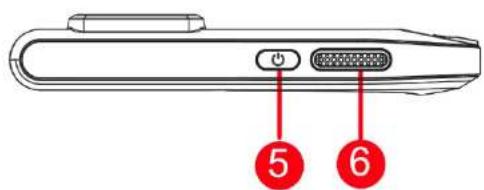
natural_image
Technical line drawing of a rectangular mechanical component with a red annotation arrow pointing to a numbered point (no text or symbols present)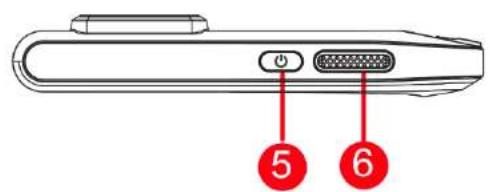
Assistance technique
natural_image
Technical line drawing of a rectangular mechanical component with a red annotation arrow pointing to a numbered point (no text or symbols present)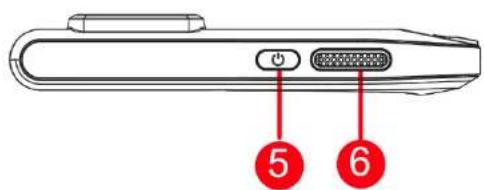
natural_image
Technical line drawing of a rectangular mechanical component with a red annotation arrow pointing to a numbered point (no text or symbols present)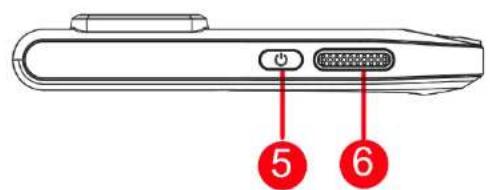
natural_image
Technical line drawing of a rectangular mechanical component with a red annotation arrow pointing to a numbered point (no text or symbols present)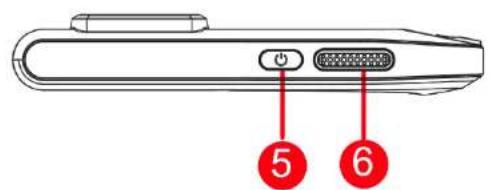
natural_image
Technical line drawing of a rectangular mechanical component with a red annotation arrow pointing to a numbered point (no text or symbols present)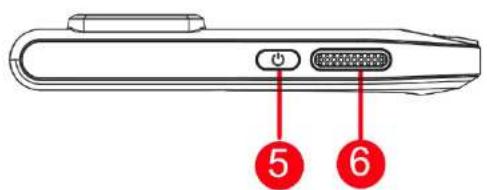
obrazu atd.
(hps://www.hikmicrotech.com/en/industrial-products/hikmicro-analyzer-soware.html).
Nastavení obrazu
natural_image
Technical line drawing of a rectangular mechanical component with a red annotation arrow pointing to a numbered point (1), no text or symbols present.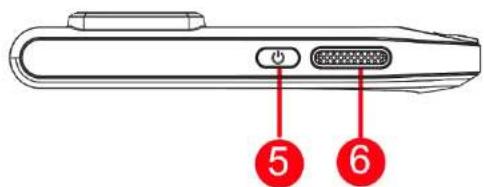
natural_image
Technical line drawing of a rectangular mechanical component with a red annotation arrow pointing to a numbered point (no text or symbols present)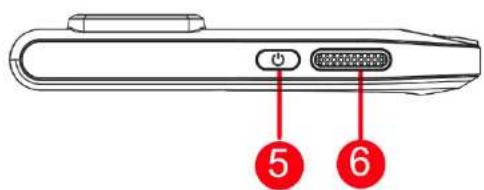
hps://www.hikmicrotech.com/en/support/calibraon-service.html.
Warunki otoczenia
natural_image
Technical line drawing of a rectangular mechanical component with a red annotation arrow pointing to a numbered point (1), no text or symbols present.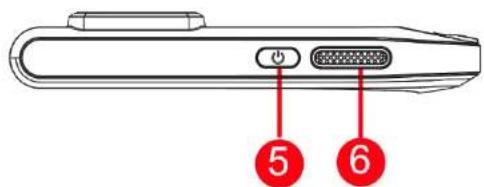


natural_image
Technical line drawing of a rectangular mechanical component with a red annotation arrow pointing to a numbered point (no text or symbols present)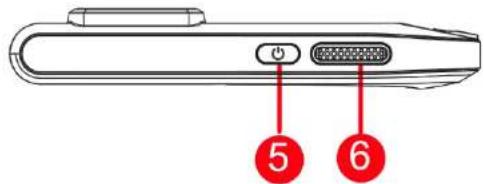
natural_image
Technical line drawing of a rectangular mechanical component with a red annotation arrow pointing to a numbered point (no text or symbols present)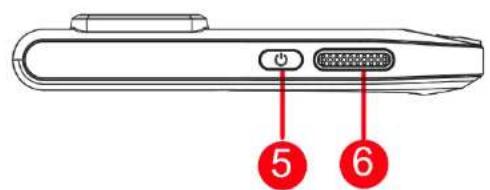

Kamer 313, Unit B, Gebouw 2, 399 Danfeng Road, subdistrict Xixing, district Binjiang, Hangzhou, Zhejiang 310052, China Hangzhou Microimage Soware Co., Ltd.
natural_image
Technical line drawing of a rectangular mechanical component with a red annotation arrow pointing to a numbered point (no text or symbols present)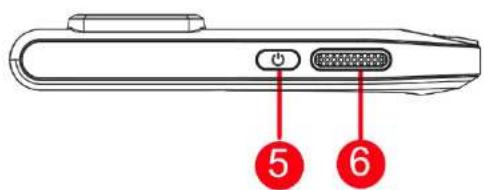
natural_image
Technical line drawing of a rectangular mechanical component with a red annotation arrow pointing to a numbered point (no text or symbols present)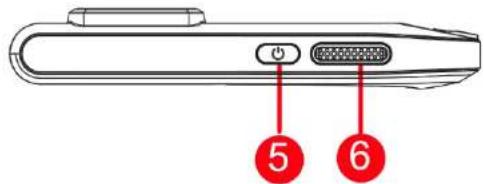

natural_image
Thermal imaging view of a microchip with heat map overlay (no readable text or symbols)natural_image
Technical line drawing of a rectangular mechanical component with a red annotation arrow pointing to a numbered point (1), no text or symbols present.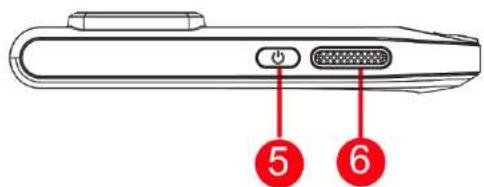
natural_image
Technical line drawing of a rectangular mechanical component with a red annotation arrow pointing to a numbered point (no text or symbols present)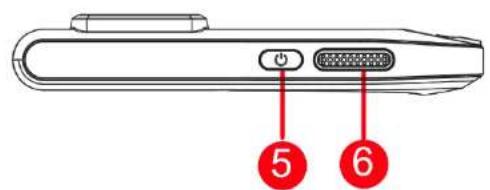
natural_image
Technical line drawing of a rectangular mechanical component with a red annotation arrow pointing to a numbered point (no text or symbols present)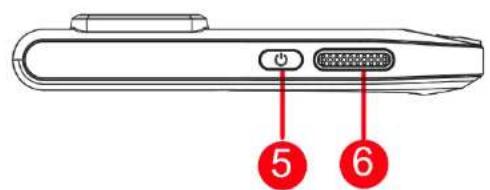
natural_image
Technical line drawing of a rectangular mechanical component with a red annotation arrow pointing to a numbered point (no text or symbols present)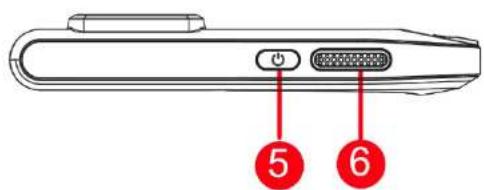
natural_image
Technical line drawing of a rectangular mechanical component with a red annotation arrow pointing to a numbered point (1), no text or symbols present.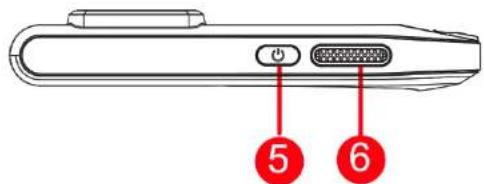
番号 説明
機能
natural_image
Technical line drawing of a rectangular mechanical part with a red annotation arrow pointing to a numbered point (no text or symbols present)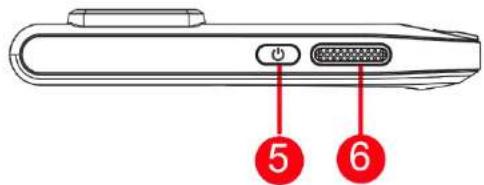
Analyzer(hps://www.hikmicrotech.com/en/industrial-products/hikmicro-analyzer-soware.html)를 다운로드하여
natural_image
Technical line drawing of a rectangular mechanical component with a red annotation arrow pointing to a numbered point (no text or symbols present)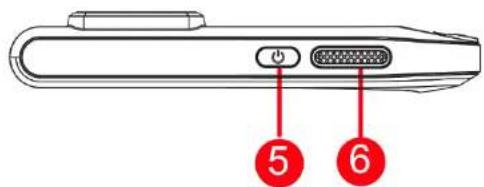
natural_image
Thermal imaging view of a circuit board with temperature scale (58.9 and 24.3) and control icons on the right (no readable text or symbols)編號 說明 功能
See the World in a New Way
Facebook: HIKMICRO Thermography
Instagram: hikmicro_thermography
E-mail: support@hikmicrotech.com
LinkedIn: HIKMICRO
YouTube: HIKMICRO Thermography
Website: hps://www.hikmicrotech.com/
UD32591B-A
- HIKMICRO
- English
- Temperature Measurement
- Swipe-down Menu
- Client Soware Connecon
- Image Adjustment
- User Manual
- Legal Informaon
- Trademarks Acknowledgement
- LEGAL DISCLAIMER
- EU/UK Compliance Statement
- Frequency Bands and Power (for CE/UK)
- Industry Canada ICES-003 Compliance
- Laws and Regulaons
- Transportaon
- Power Supply
- Baery
- sunlight.
- Maintenance
- Calibraon Service
- Using Environment
- Technical Support
- Emergency
- Manufacture Address
- Deutsch
- Assistance technique
- Nastavení obrazu
- Warunki otoczenia
- 番号 説明
- 機能
Brand : Hikmicro
Model : PocketE
Category : Thermal camera