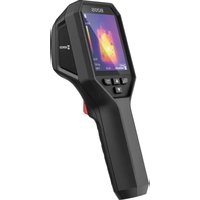
B20S - Measuring equipment Hikmicro - Free user manual and instructions
Find the device manual for free B20S Hikmicro in PDF.


| Product Type | Thermal Camera |
| Brand | Hikmicro |
| Model | B20S |
| Manufacturer | Hangzhou Microimage Software Co., Ltd. |
| Power Supply | Integrated battery 3.7 V DC / 0.5 A |
| Charging | Via USB-C interface, 5 V DC / 2 A adapter (not included) |
| Battery Type | Lithium-ion |
| Charging Time | Not specified |
| Battery Life | Not specified |
| Thermal Sensor | Not specified |
| Temperature Measurement Range | Not specified |
| Measurement Accuracy | Not specified |
| Laser | Yes (on some models), 650 nm, <1 mW, Class 1 IEC 60825-1:2014 |
| LED Lighting | Yes (on some models) |
| Connectivity | USB-C (data and charging), Wi-Fi and hotspot (on some models) |
| Protection | IP54 |
| Operating Temperature | -10 °C to 50 °C |
| Operating Humidity | ≤ 95% |
| Cleaning | Clean cloth moistened with ethanol |
| Calibration | Automatic regular, annual calibration recommended in service |
| Repairability | Non-removable battery, laser replaced at factory, contact customer service |
| Included Accessories | USB cable, wrist strap |
| Main Functions | Thermal observation, temperature measurement with emissivity and distance adjustment, snapshot capture, video recording (via app), multiple color palettes |
| Compliance | CE, RoHS, Directive 2014/30/EU, 2014/35/EU, 2011/65/EU |
Frequently Asked Questions - B20S Hikmicro
User questions about B20S Hikmicro
0 question about this device. Answer the ones you know or ask your own.
Ask a new question about this device
Download the instructions for your Measuring equipment in PDF format for free! Find your manual B20S - Hikmicro and take your electronic device back in hand. On this page are published all the documents necessary for the use of your device. B20S by Hikmicro.
USER MANUAL B20S Hikmicro
| No. | Component | Function |
| 1 | Charging Indicator | Solid Red: Charging. Solid Green: Fully charged. |
| 2 | Buzzer | Output audio alarm. |
| 3 | Wrist Strap Hole | Mount the wrist strap. |
| 4 | Tripod Mount | Connect to UNC 1/4"-20 tripod. |
| 5 | Type-C Interface | Charge the battery or export files using the included USB cable. |
| 6* | Visual Lens* | View the visual image (only supported by certain models). |
| 7 | Thermal Lens | View the thermal image. |
| 8* | LED Light* | Provide additional light in the low-light condition. |
| 9* | Laser* | Locate the target with laser light (only supported by certain models). |
| 10 | Lens Protector Switch | Turn on/off the thermal lens protective cover. |
| 11 Trigger | In live view: Press: Capture snapshots. Hold: Locate the target with laser light (for the models with laser light), and release to capture snapshots. In menu mode, press the trigger to go back to live view. | |
| Button | Function |
| Hold: Power On/Off | |
| Press: Display menu or confirm operation. | |
| Exit the menu or return to previous menu. |
In menu mode: Press parameters.

and to select
In live view mode: Press to switch image modes (only supported by certain models). Press to switch palettes.
Charge Camera
The camera is equipped with a built-in battery. It is recommended to charge the camera with the included USB cable and the Type-C interface on camera. Do not use the USB-C to USB-C cable of other manufacturers. The power adapter (not included) should meet the following standards:
Output Voltage/Current: 5 VDC/2 A
Power Output: 10 W

Note
If the camera is not in use for an extended period and is over-discharged, it is recommended to charge for at least 30 min before powering it on.
It is recommended to use the USB cable included in the package for both charging and data transfer.
Temperature Measurement
You should first set target Emissivity and Distance and before measuring temperatures. Refer to the user manual for more information.
More Tools and Information

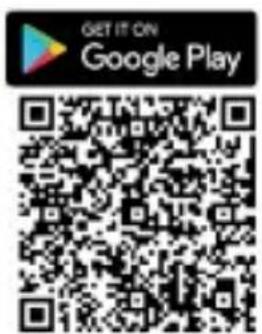
If your particular model supports Wi-Fi and Hotspot, scan the QR code to download the HIKMICRO Viewer App for live view, capture snapshots, record videos, etc.

Download HIKMICRO Analyzer (https://www.hikmicrotech.com/en/industrial-products/hikmicro-analyzer-software.html) to analyze files.

Scan this QR Code to get the user manual of the thermal camera.

Note
Not all the camera models of a series support the mobile applications, software, and all their functions mentioned (or not mentioned) in this manual. Please refer to the compatibility list of the software for more detailed information in HIKMICRO website.
Technical Support

support@hikmicrotech.com

https://www.hikmicrotech.com/en/contact-us.html
support@hikmicrotech.com

https://www.hikmicrotech.com/en/contact-us.html
Apparance (Page 1)
Downloaded on the App Ste


GETITON GooglePlay

Assistance technique

support@hikmicrotech.com

https://www.hikmicrotech.com/en/contact-us.html
Avariencia (pagina 1)
support@hikmicrotech.com

https://www.hikmicrotech.com/en/contact-us.html
Aspeto (page 1)
Downded on the App Ste


GETITON GooglePlay
support@hikmicrotech.com

https://www.hikmicrotech.com/en/contact-us.html
support@hikmicrotech.com

https://www.hikmicrotech.com/en/contact-us.html
Vzhled (Strana 1)
(https://www.hikmicrotech.com/en/industrial-products/hikmicro-analyzer-software.html) a analyzujte soubory.
support@hikmicrotech.com

https://www.hikmicrotech.com/en/contact-us.html
Vzhlad (Strana 1)
(https://www.hikmicrotech.com/en/industrial-products/hikmicro-analyzer-software.html).
support@hikmicrotech.com
https://www.hikmicrotech.com/en/contact-us.html
support@hikmicrotech.com

https://www.hikmicrotech.com/en/contact-us.html
Downgraded on the App Ste


GET IT ON Google Play
support@hikmicrotech.com

https://www.hikmicrotech.com/en/contact-us.html
Aspect (Pagina 1)
support@hikmicrotech.com

https://www.hikmicrotech.com/en/contact-us.html
Uiterlijk (pagea 1)
support@hikmicrotech.com

https://www.hikmicrotech.com/en/contact-us.html
Udseende (side 1)
Hent HIKMICRO Analyzer (https://www.hikmicrotech.com/en/industrial-products/hikmicro-analyzer-software.html) til at analysere filer.

support@hikmicrotech.com

https://www.hikmicrotech.com/en/contact-us.html
Utseende (side 1)
| Nr. | Komponent | Virkemåte |
| 1 | Ladeindikator | Rød - fast: Lader.Lyser grønt: Fullt ladet. |
| 2 | Summer | Alarmlydutgang. |
| 3 | Hull tilhåndstropp | Monter händleddsstroppen. |
| 4 | Stativfeste | Kobles til UNC 1/4"-20-stativ. |
| 5 | Type C-grensesnitt | Lad batteriet eller eksporter filer medden medfølgende USB-kabelen. |
| 6* | Visuell linse* | Se det visuelle bildet (støttes kun avenkelte modeller). |
| 7 | Termisk linse | Vis det termiske bildet. |
| 8* | LED-lys* | Gir ekstra lys i)dårlige lysforhold. |
| 9* | Laser* | Finn målet med laserlys (støttes kun avenkelte modeller). |
| 10 | Bryter tillinsebeskyttelse | Aktiver/deaktiver linsebeskyttelsen tilden termiske linsen. |
| 11 | Ultrøser | I direktevisning:Trykk: Ta Bilder.Holdinne: Finnmölet med laserlys(for modeller med laserlys) og slippfor Å ta Bilder.I menymodus,trykk på utløseren for Åbytte til direktevisning. |
Last ned HIKMICRO Analyzer (https://www.hikmicrotech.com/en/industrial-products/hikmicro-analyzer-software.html) for a analysere filer.

Skann donne QR-koden for a fà tilgang tilBrukermanualentiltermokameraet.

Merk
support@hikmicrotech.com

https://www.hikmicrotech.com/en/contact-us.html
Ulkonäkö (sivu 1)
Downloaded on the App Ste


GETITON GooglePlay

support@hikmicrotech.com

https://www.hikmicrotech.com/en/contact-us.html
Utseende (sida 1)
Ladda ner HIKMICRO Analyzer (https://www.hikmicrotech.com/en/industrial-products/hikmicro-analyzer-software.html) for att analysera filer.

support@hikmicrotech.com

https://www.hikmicrotech.com/en/contact-us.html
BheuHn BnD (cTp. 1)
Ecn KaMepa DolrOe BpeMn He
NcNoIb30BaJacb N CnIbHo pa3pJxHeHa, To
IpeD BKJIouHEm peKOMeHnyetc
NoCTaBtB ee Ha 3apJky He MeHee Yem Ha 30
MNHyT.
Kak dIa 3apAdkn, TaK n IJI nepeaun daHbIX peKoMeHdyetcN cNoIb3ObaTb USB-ka6eIb, BXOJaU B KOMPJIeKT NocTaBKn.
Измeperень TeMпераТурbl
Ipejde yem n3Meprb TeMnepaTpy obbeKToB, Heo6xOdmo
yctaHOBnTB ueJeBbIe 3NaueHnJa napaMeTpoB
I3nyauoaa cnoc6hoctb n PaCCTOJHne. IJIy noJyuHnI IOdpo6HOHΦOpMauOnn ObaTntecb K pyKOBODCTBy I0lb30BaTeJIa.
support@hikmicrotech.com

https://www.hikmicrotech.com/en/contact-us.html
Görünüm (Sayfa 1)
Downloaded on the App Ste


GET IT ON Google Play

support@hikmicrotech.com

https://www.hikmicrotech.com/en/contact-us.html
外観(1)
flaiklul分析s HIKMICRO Analyzer (https://www.hikmicrotech.com/en/in dustrial-products/hikmicro-analyzer-software.html)to daunlo 1d 1
support@hikmicrotech.com

https://www.hikmicrotech.com/en/contact-us.html
の国(1)
嘉勳 1J:5VDC/2A
10W

kanl 30bn 3n 1.
SAH
京都 高速
https://www.hikmicrotech.com/en/contact-us.html
外觀(第1頁)
support@hikmicrotech.com

https://www.hikmicrotech.com/en/contact-us.html
English
Calibration Service
We recommend you send the device back for calibration once a year, and please contact the local dealer for the information on maintenance points. For more detailed calibration services, please refer to https://www.hikmicrotech.com/en/support/calibration-service.html
Maintenance
- Your camera will periodically perform a self-calibration to optimize image quality and measurement accuracy. In this process the image will pause briefly and you'll hear a "click" as a shutter moves in front of the detector. The prompt "Image Calibrating..." appears in the upper center of the screen as the camera is calibrating itself. The self-calibration will be more frequent during start up or in very cold or hot environments. This is a normal part of operation to ensure optimum performance for your camera.
- If the product does not work properly, please contact your dealer or the nearest service center. We shall not assume any responsibility for problems caused by unauthorized repair or maintenance.
- Wipe the device gently with a clean cloth and a small quantity of ethanol, if necessary.
- If the equipment is used in a manner not specified by the manufacturer, the protection provided by the device may be impaired.
Safety Instruction
These instructions are intended to ensure that user can use the product correctly to avoid danger or property loss.
Laws and Regulations
Use of the product must be in strict compliance with the local electrical safety regulations.
Battery
- CAUTION: Risk of explosion if the battery is replaced by an incorrect type. Replace with the same or equivalent type only. Dispose of used batteries in conformance with the instructions provided by the battery
manufacturer.
- Improper replacement of the battery with an incorrect type may defeat a safeguard (for example, in the case of some lithium battery types).
- Do not dispose of the battery into fire or a hot oven, or mechanically crush or cut the battery, which may result in an explosion.
- Do not leave the battery in an extremely high temperature surrounding environment, which may result in an explosion or the leakage of flammable liquid or gas.
- Do not subject the battery to extremely low air pressure, which may result in an explosion or the leakage of flammable liquid or gas.
- Dispose of used batteries in conformance with the instructions provided by the battery manufacturer.
- The built-in battery cannot be dismantled. Please contact the manufacture for repair if necessary.
- For long-term storage of the battery, make sure it is fully charged every half year to ensure the battery quality. Otherwise, damage may occur.
- Use the battery provided by a qualified manufacturer. Refer to the product specification for detailed battery requirements.
- DO NOT charge other battery types with the supplied charger. Confirm there is no flammable material within 2m of the charger during charging.
DO NOT place the battery near heating or fire source. Avoid direct sunlight.
DO NOT swallow the battery to avoid chemical burns. - DO NOT place the battery in the reach of children.
- When the device is powered off and the battery is full, the time settings can be kept for 4 months.
- The standard adapter power supply is 5 V. Laser Light Supplement Warning
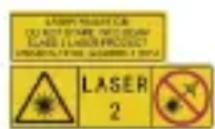
Warning: The laser radiation emitted from the device can cause eye injuries, burning of
skin or inflammable substances. Prevent
eyes from direct laser. Before enabling the Light Supplement function, make sure no human or inflammable substances are in front of the laser lens. The wave length is 650nm and the power is less than 1mW . The laser meets the IEC60825-1:2014 standard.
Laser maintenance: It is not necessary to maintain the laser regularly. If the laser does not work, the laser assembly needs to be replaced in the factory under warranty. Keep the device power off when replacing laser assembly. Caution-Use of controls or adjustments or performance of procedures other than those specified herein may result in hazardous radiation exposure.
Power Supply
- Input voltage should meet the Limited Power Source (3.7 VDC, 0.5 A) according to the IEC62368 standard. Please refer to technical specifications for detailed information.
- Make sure the plug is properly connected to the power socket.
DO NOT connect multiple devices to one power adapter, to avoid over-heating or fire hazards caused by overload. - Use the power adapter provided by a qualified manufacturer. Please refer to technical specifications for detailed information.
Using Environment
- Make sure the running environment meets the requirement of the device. The operating temperature shall be -10^ to 50^ (14°F to 122°F), and the operating humidity shall be 95% or less.
- Place the device in a dry and well-ventilated environment.
DO NOT expose the device to high electromagnetic radiation or dusty environments.
DO NOT aim the lens at the sun or any other bright light. - When any laser equipment is in use, make sure that the device lens is not exposed to the laser beam, or it may burn out.
DO NOT aim the lens at the sun or any other bright light. - The device is suitable for indoor and
outdoor uses, but do not expose it in wet conditions.
The level of protection is IP 54.
Transportation
- Keep the device in original or similar packaging while transporting it.
- Keep all wrappers after unpacking them for future use. In case of any failure occurred, you need to return the device to the factory with the original wrapper. Transportation without the original wrapper may result in damage on the device and the company shall not take any responsibilities.
DO NOT drop the product or subject it to physical shock. Keep the device away from magnetic interference.
Emergency
If smoke, odor, or noise arises from the device, immediately turn off the power, unplug the power cable, and contact the service center.
Manufacture Address
Room 313, Unit B, Building 2, 399 Danfeng Road, Xixing Subdistrict, Binjiang District, Hangzhou, Zhejiang 310052, China Hangzhou Microimage Software Co., Ltd.
Legal Information
© Hangzhou Microimage Software Co., Ltd. All rights reserved.
About this Manual
The Manual includes instructions for using and managing the Product. Pictures, charts, images and all other information hereinafter are for description and explanation only. The information contained in the Manual is subject to change, without notice, due to firmware updates or other reasons. Please find the latest version of this Manual at the HIKMICRO website (www.hikmicrotech.com/).
Please use this Manual with the guidance and assistance of professionals trained in supporting the Product.
Trademarks Acknowledgement
HIKMICRO and other HIKMICRO's trademarks and logos are the properties of HIKMICRO in various jurisdictions.
Other trademarks and logos mentioned are the properties of their respective owners.
LEGAL DISCLAIMER
TO THE MAXIMUM EXTENT PERMITTED BY
APPLICABLE LAW, THIS MANUAL AND THE PRODUCT DESCRIBED, WITH ITS HARDWARE, SOFTWARE AND FIRMWARE, ARE PROVIDED "AS IS" AND "WITH ALL FAULTS AND ERRORS". HIKMICRO MAKES NO WARRANTIES, EXPRESS OR IMPLIED, INCLUDING WITHOUT LIMITATION, MERCHANTABILITY, SATISFACTORY QUALITY, OR FITNESS FOR A PARTICULAR PURPOSE. THE USE OF THE PRODUCT BY YOU IS AT YOUR OWN RISK. IN NO EVENT WILL HIKMICRO BE LIABLE TO YOU FOR ANY SPECIAL, CONSEQUENTIAL, INCIDENTAL, OR INDIRECT DAMAGES, INCLUDING, AMONG OTHERS, DAMAGES FOR LOSS OF BUSINESS PROFITS, BUSINESS INTERRUPTION, OR LOSS OF DATA, CORRUPTION OF SYSTEMS, OR LOSS OF DOCUMENTATION, WHETHER BASED ON BREACH OF CONTRACT, TORT (INCLUDING NEGLIGENCE), PRODUCT LIABILITY, OR OTHERWISE, IN CONNECTION WITH THE USE OF THE PRODUCT, EVEN IF HIKMICRO HAS BEEN ADVISED OF THE POSSIBILITY OF SUCH DAMAGES OR LOSS. YOU ACKNOWLEDGE THAT THE NATURE OF THE INTERNET PROVIDES FOR INHERENT SECURITY RISKS, AND HIKMICRO SHALL NOT TAKE ANY RESPONSIBILITIES FOR ABNORMAL OPERATION, PRIVACY LEAKAGE OR OTHER DAMAGES RESULTING FROM CYBER-ATTACK, HACKER ATTACK, VIRUS INFECTION, OR OTHER INTERNET SECURITY RISKS; HOWEVER, HIKMICRO WILL PROVIDE TIMELY TECHNICAL SUPPORT IF REQUIRED. YOU AGREE TO USE THIS PRODUCT IN COMPLIANCE WITH ALL APPLICABLE LAWS, AND YOU ARE SOLELY RESPONSIBLE FOR ENSURING THAT YOUR USE CONFORMS TO THE APPLICABLE LAW. ESPECIALLY, YOU ARE RESPONSIBLE, FOR USING THIS PRODUCT IN A MANNER THAT DOES NOT INFRinge ON THE RIGHTS OF THIRD PARTIES, INCLUDING WITHOUT LIMITATION, RIGHTS OF PUBLICITY, INTELLECTUAL PROPERTY RIGHTS, OR DATA PROTECTION AND OTHER PRIVACY RIGHTS. YOU SHALL NOT USE THIS PRODUCT FOR ANY PROHIBITED END-USES, INCLUDING THE DEVELOPMENT OR PRODUCTION OF WEAPONS OF MASS DESTRUCTION, THE
DEVELOPMENT OR PRODUCTION OF
CHEMICAL OR BIOLOGICAL WEAPONS, ANY
ACTIVITIES IN THE CONTEXT RELATED TO
ANY NUCLEAR EXPLOSIVE OR UNSAFE
NUCLEAR FUEL-CYCLE, OR IN SUPPORT OF
HUMAN RIGHTS ABUSES.
IN THE EVENT OF ANY CONFLICTS BETWEEN
THIS MANUAL AND THE APPLICABLE LAW,
THE LATTER PREVAILS.
Regulatory Information
These clauses apply only to the products bearing the corresponding mark or information.
EU Conformity Statement

This product and - if applicable - the supplied accessories too are marked with "CE" and comply
therefore with the applicable harmonized European standards listed under the Directive 2014/30/EU (EMCD), Directive 2014/35/EU (LVD), Directive 2011/65/EU (RoHS).
Hereby, Hangzhou Microimage Software Co., Ltd. declares that this device (refer to the label) is in compliance with Directive 2014/53/EU.
The full text of the EU declaration of conformity is available at the following internet address:
https://www.hikmicrotech.com/en/support/download-center/declaration-of-conformity/ For the device without a supplied battery, use the battery provided by a qualified manufacturer. Refer to the product specification for detailed battery requirements For the device without a supplied power adapter, use the power adapter provided by a qualified manufacturer. Refer to the product specification for detailed power requirements.

Directive 2012/19/EU (WEEE Directive): Products marked with this symbol cannot be disposed of as assorted municipal waste in the
European Union. For proper recycling, return this product to your local supplier upon the purchase of equivalent new equipment, or dispose of it at designated collection points.
For more information see:
www.recyclethis.info

Directive 2006/66/EC and its amendment 2013/56/EU (Battery Directive): This product contains a
battery that cannot be disposed of as unsorted municipal waste in the European Union. See the product documentation for specific battery information. The battery is marked with this symbol, which may include lettering to indicate cadmium (Cd), lead (Pb), or mercury (Hg). For proper recycling, return the battery to your supplier or to a designated collection point. For more information see: www.recyclethis.info.
Industry Canada ICES-003 Compliance
This device meets the CAN ICES-003
(B)/NMB-003 (B) standards requirements.
This device complies with Industry Canada licence-exempt RSS standard(s). Operation is subject to the following two conditions:
(1) this device may not cause interference, and
(2) this device must accept any interference, including interference that may cause undesired operation of the device.
This equipment complies with IC RSS-102 radiation exposure limits set forth for an uncontrolled environment.
COMPLIANCE NOTICE: The thermal series products might be subject to export controls in various countries or regions, including without limitation, the United States, European Union, United Kingdom and/or other member countries of the Wassenaar Arrangement.
Please consult your professional legal or compliance expert or local government authorities for any necessary export license requirements if you intend to transfer, export, re-export the thermal series products between different countries.
Deutsch
https://www.hikmicrotech.com/en/support/download-center/declaration-of-conformity/.
https://www.hikmicrotech.com/en/support/ calibration-service.html
Maintenance
https://www.hikmicrotech.com/en/support/download-center/declaration-of-conformity/.
https://www.hikmicrotech.com/en/support/download-center/declaration-of-conformity/
https://www.hikmicrotech.com/en/support/download-center/declaration-of-conformity/
https://www.hikmicrotech.com/en/support/download-center/declaration-of-conformity/
https://www.hikmicrotech.com/en/support/download-center/declaration-of-conformity/
Kamer 313, Unit B, Gebouw 2, 399 Danfeng Road, subdistrict Xixing, district Binjiang, Hangzhou, Zhejiang 310052, China Hangzhou Microimage Software Co., Ltd.
Juridische informatione
https://www.hikmicrotech.com/en/support/download-center/declaration-of-conformity/
https://www.hikmicrotech.com/en/support/download-center/declaration-of-conformity/
FÖRSIKTIGHET! Risk for explosion on
Room 313, Unit B, Building 2, 399 Danfeng
Road, Xixing Subdistrict, Binjiang District, Hangzhou, Zhejiang 310052, Kina
Hangzhou Microimage Software Co., Ltd.
Juridisk information
Foreskrifter
https://www.hikmicrotech.com/en/support/download-center/declaration-of-conformity/
COOTBcTbne cTaHapTaM EU

HaTOnaUe n3dJIne n npHaJLeXHoCTn, BxOJaUe B KOMnJIeKT ero noCTaBKn (B
ClyuaeHXHaJIuHn),OTMeueHbICIMBOJOM
COOTBeTCTBHe COJIacOBaHHbIM
Ebponeckm CtaHdapTaM,
IpeueNCJIeHHbIM B DInpeKTtBax 2014/30/EU (EMCD),2014/35/EU (LVD) n 2011/65/EU (RoHS).
HacToaM KOMnHaHnHa ngZhou Microimage Software Co., Ltd. CBnTeJIbCTByeT, YTO DaHHoe N3deJIne (CM. 3TNKeTKy) COOTBeTCTByeT DInpeKtNBc 2014/53/EU.
Полны Teкт ДeКларачи O COOTBeTCTBиHOPMaTINBHyIM Tpe6OBAHnA M ECdoctyneH no cneDyUoSei CcblKe: https://www.hikmicrotech.com/en/support/ download-center/declaration-of- conformity/
Ecni yctpoiCTBO He yKOMnJIeKTOBaHO
6batapeen, nCnoJb3yIte 6batapeo
pa3peuHOrO n3r0ToBnteJI. Tpe6OBaHn
K 6batapee noDpO6Ho Onncahbl B
Texnueckx xapaKTePncTnKax n3dEJIIN.
Ecni yctpoiCTBO He yKOMnJIeKTOBaHO
aadantepom nITaHn, nCnoJb3yIte aadantep
nITaHn pa3peuHOrO n3r0ToBnteJI.
Tpe6oBaHnno 3JKeKTpOnuTaHnIO npDpo6Ho OINcAHBi B TexHnuecknx XapaKTePncTKaX n3deJIInr.

Oda 313, Birim B, Bina 2, 399 Danfeng
Caddesi, Xixing Nahiyesi, Binjiang Bolgesi,
Hangzhou, Zhejiang 310052, Qin
Hangzhou Microimage Software Co., Ltd.
Yasal Bilgiler
Mevzuat Bilgisi
https://www.hikmicrotech.com/en/support/download-center/declaration-of-conformity/
- Charge Camera
- Note
- Temperature Measurement
- More Tools and Information
- Technical Support
- Assistance technique
- Avariencia (pagina 1)
- Aspeto (page 1)
- Vzhled (Strana 1)
- Aspect (Pagina 1)
- Udseende (side 1)
- Utseende (side 1)
- Merk
- Ulkonäkö (sivu 1)
- Utseende (sida 1)
- Измeperень TeMпераТурbl
- Görünüm (Sayfa 1)
- 京都 高速
- English
- Calibration Service
- Maintenance
- Safety Instruction
- Laws and Regulations
- Battery
- Power Supply
- Using Environment
- Transportation
- Emergency
- Manufacture Address
- Legal Information
- About this Manual
- Trademarks Acknowledgement
- LEGAL DISCLAIMER
- These clauses apply only to the products bearing the corresponding mark or information.
- EU Conformity Statement
- Industry Canada ICES-003 Compliance
- Deutsch
- Juridische informatione
- Juridisk information
- Foreskrifter
- COOTBcTbne cTaHapTaM EU
- Yasal Bilgiler
- Mevzuat Bilgisi
Brand : Hikmicro
Model : B20S
Category : Measuring equipment