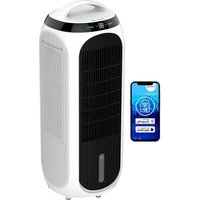
USER MANUAL CA-106 Smart Clean Air Optima
Clean Air Optima® 4in1: Aircooler, Fan, Air purifier & Air humidifier
Model: CA-106 Smart
(EN) User manual
(DE) Gebrauchsanweisung
(NL) Gebruiksaanwijzing
(FR) Mode d'emploi
(ES) Manual del usuario
(IT) Manuale d'uso
(PL) Instrukcja obsługi
(CZ) Uživatelská příručka
(RO) Manual de utilizare
(LT) Naudotojo vadovas
(EE) Kasutusjuhend
(LV) Lietošanas pamācība
Find more languages on: www.cleanairoptima.com/info/manuals
natural_image
White electric air purifier with black ventilation grille and digital display, displayed next to a smartphone showing app icons (no readable text on device)
Read these instructions carefully before you start using this Clean Air Optima® device and keep the manual for future reference.
Clean Air Optima®
Table of contents Page
| English | 3 | |
| German | | 25 |
| Dutch | | 47 |
| French | | 69 |
| Spanish | | 91 |
| Italian | 114 |
| Polish | 136 |
| Czech | 158 |
| Romanian | 180 |
| Lithuanian | 202 |
| Estonian | 224 |
| Latvian | 246 |
CA-106 Smart
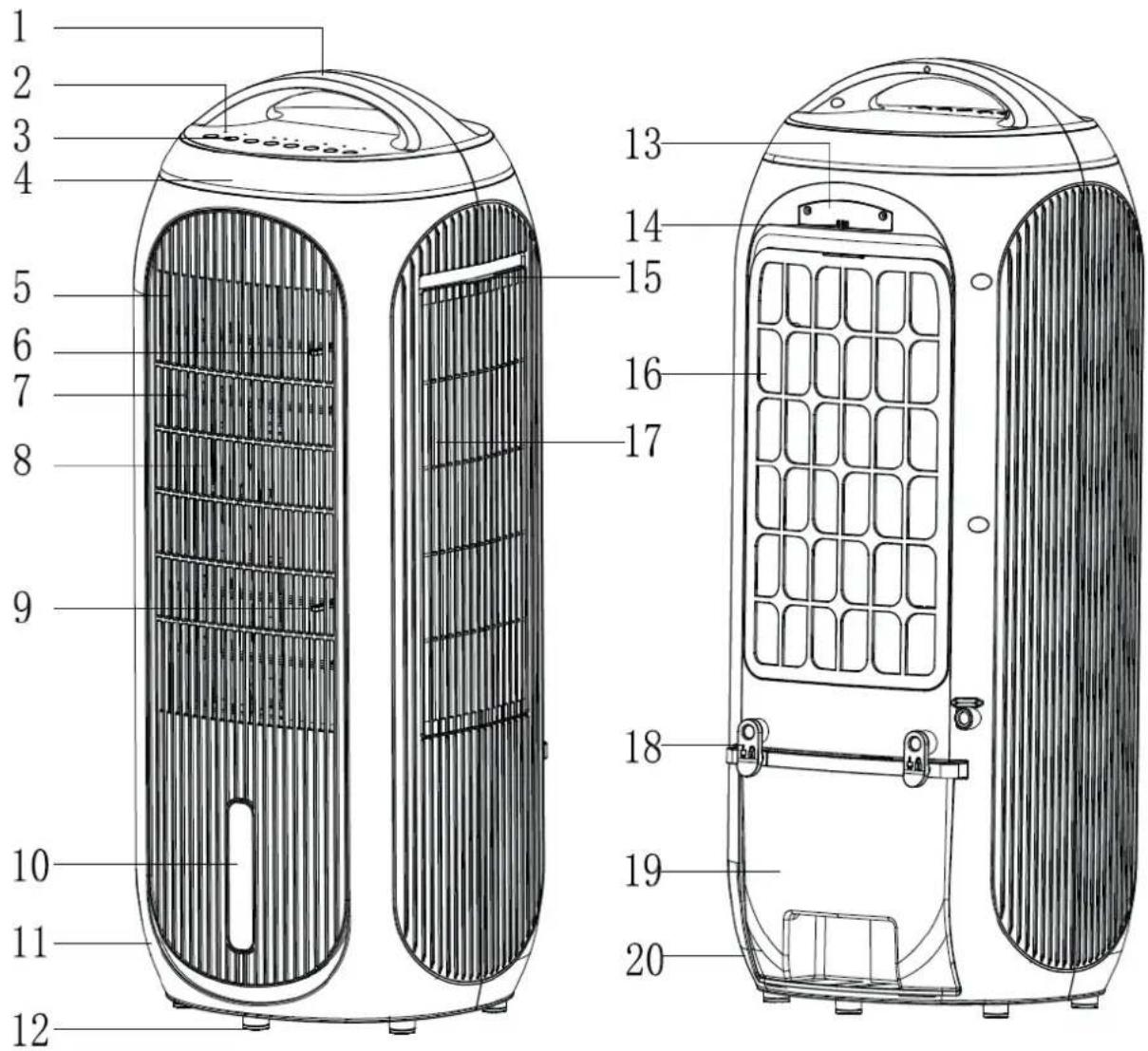
Main unit
Clean Air Optima®
English
Thank you for purchasing the Clean Air Optima® 4in1: Aircooler, Fan, Air purifier & Air humidifier CA-106 Smart.
We wish you many years of healthy indoor air with this efficient and effective product. Ensure that all safety precautions are followed when using this electrical appliance for the proper operation of the device. These instructions describe the safety precautions to be observed during operation. They are meant to prevent injuries and to avoid damaging the device.
Description
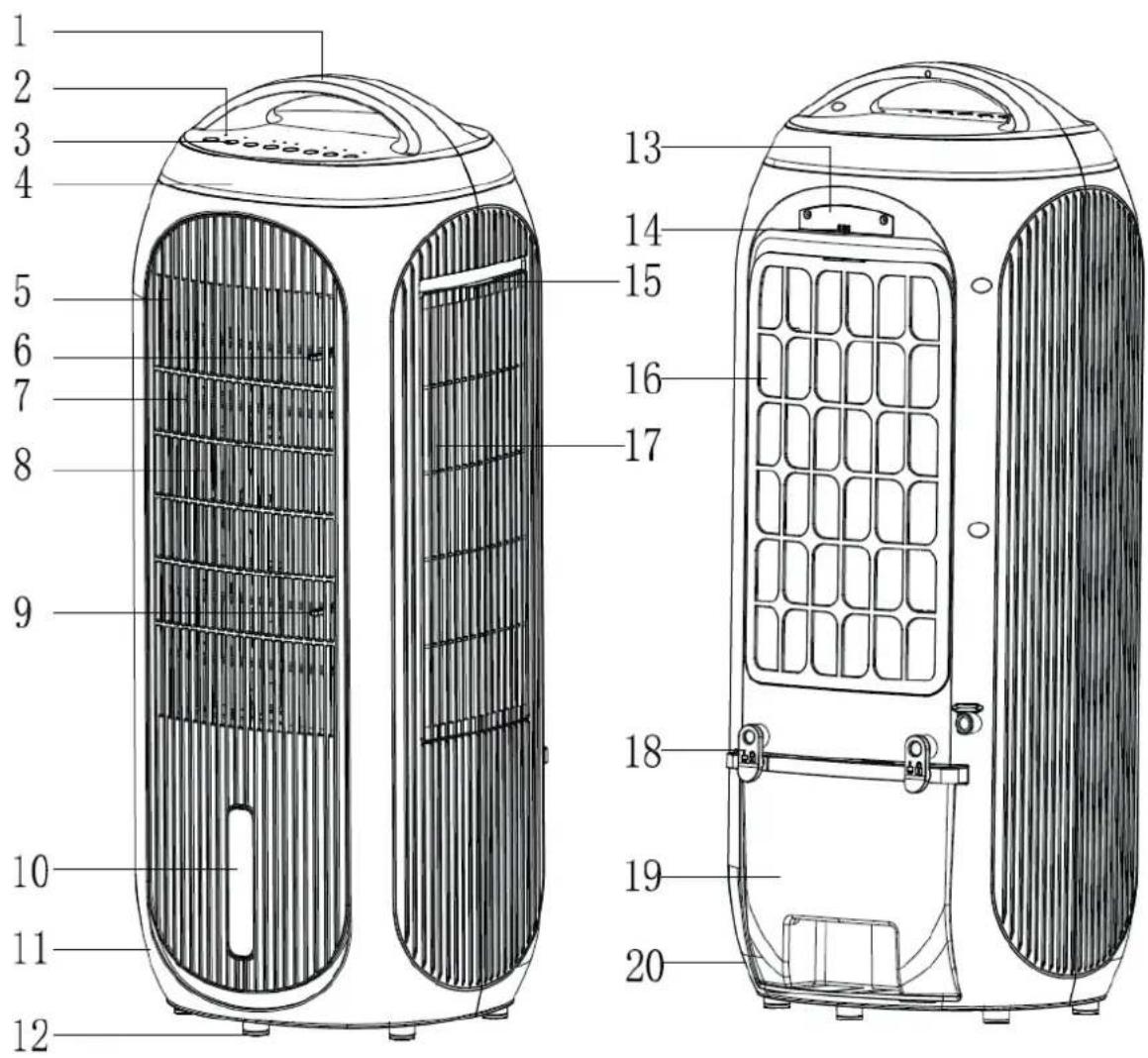
This Clean Air Optima ^® device consists of the following main components:
- Handle
- Led display
- Control panel
- Color LED monitor
- Front cover
- Upper horizontal air flaps
- Cool breeze air outlet
- Vertical air flaps
- Lower horizontal air flaps
- Water level window
- Front cover
- Rubber feet
- PM2.5 rear cover
- PM2.5 air inlet
- Filter cover handle
- Filter cover
- Purifying air outlet
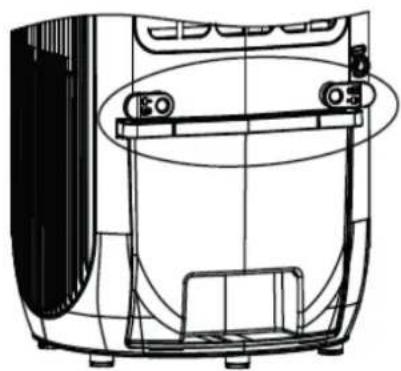
- Fixation clips for watertank
- Water tank
20.Rearshell
Safety warnings
This device may only be used in accordance with this safety instructions. Take the following steps to minimize the risk of personal injury caused by for example electric shocks or fire.
- Leave the device to stand for at least two hours before use, especially after transportation.
- Only for indoor use. Do not use or store outdoors.
- Use proper voltage: AC 220V - 240V, 50Hz.
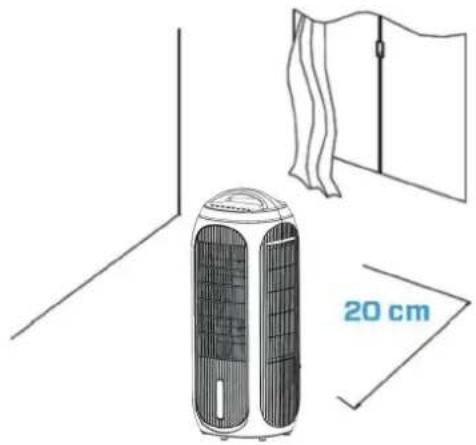
- Allow a free space of min. 20 cm around the air inlet and air outlet of the device.
- This device can be used by children aged from 8 years and above and persons with reduced physical, sensory or mental capabilities or lack of experience and knowledge if they have been given supervision or instruction concerning use of the device in a safe way and understand the hazards involved. Children shall not play with the device. Cleaning and user maintenance shall not be made by children without supervision.
- Do not use the device when there is visible damage on the electrical cord or on the device itself. Do not repair the device yourself in case of damage. Never pull the device by its cord. If the power cord is damaged, then it must be replaced by an authorized service person to prevent electric shock or fire.
- Repairs may only performed by authorized service personal. Do not try to repair the device yourself to prevent electric shock or fire.
- Do not touch the power cord and plug with wet hands.
- Always switch off the device before disconnecting the plug.
- Never attempt to turn off the device by disconnecting the plug.
- Pull the plug when you do not use the device or when you clean internal or external parts of it.
- For safety use put the device in a steady, horizontal position. Do not move while using.
- Do not use the device in rooms where inflammable liquids, gases are stored or close to heat sources like radiator, fire place or heat-generating devices like ceramic heater.
- Never insert any other object into the body to avoid breakdown.
- Never cover the air inlet and air outlet grid.
- Never dissemble or replace the device's inner parts.
- Use and store the device not under 5°C or above 32°C.
- Do not tip the unit to any side when the water tank is full.
- Do not ingest the battery, the battery is a Chemical Burn Hazard.
- This device contains a coin / button cell battery. If the coin / button cell battery is swallowed, it can cause severe internal burns in just 2 hours and can lead to serious complaints or decease.
- Keep new and used batteries away from children.
- If the battery compartment does not close securely, stop using the device and keep it away from children.
- If you think batteries might have been swallowed or placed inside any part of the body, seek immediate medical attention.
- The batteries contain materials, which are hazardous to the environment, they must be removed from the device before it is scrapped and that they are disposed safely.
- Do not put heavy objects on the unit.
- Please avoid places with direct sunlight. There is a risk that the device discolors.
Clean Air Optima®
-
Never immerse the device in water or other liquids.
-
Clean the filter cover regularly, if the filter cover is saturated with dust, it will lead to poor cooling, purifying, air washing, and circulating effect. The power consumption will increase, it can cause failure.
-
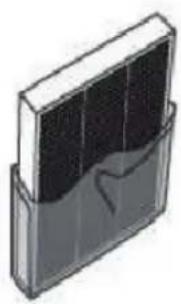
Replace the HEPA H13 Filter and the Cooling Pad every 2 – 3 months, if the HEPA H13 Filter and the Cooling Pad are saturated, it will lead to poor cooling, purifying, air washing, and circulating effect. The power consumption will increase, it can cause failure.
-
Never leave water in the water tank when the device is not in use.
-
Use, maintain and clean the device as described in this manual.
-
The device is not a toy. Keep children and animals away. Only use the device under supervision.
-
Unplug the appliance during filling and cleaning.
-
Be aware that high humidity can promote the growth of biological organisms in the environment.
-
Make sure that objects in the vicinity of the device do not become damp or wet. If moisture develops, emissions must be reduced. Switch the device to a lower setting. If the emissions cannot be reduced, the device may only be used intermittently. Switch off the device completely for a short time. Make sure that absorbing materials, such as carpeting, curtains, net curtains or tablecloths, do not become damp.
-
Make sure the water in the water tank is changed every 3 days. Otherwise there is a risk that micro-organisms will develop in the water tank, which will enter the air or water and pose a health risk.
-
Only fill the water tank with fresh drinking water, ice cubes made from drinking water and/or suitable ice packs.
-
The ice packs are not toys. Keep children and animals away.
-
Never open the ice packs. The liquid in the ice packs can be harmful to health.
-
The ice that may form on the ice packs is not suitable for consumption. There is a health risk!
-
Never leave water in the tank when the appliance is not in use.
-
Empty and clean the aircooler before storing. Clean the aircooler before next use.
Installation
Make sure that the distance from the device is 20 cm away from walls and furniture, see the illustration below.
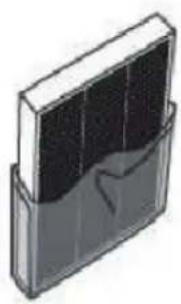
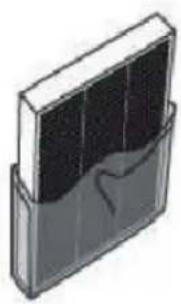
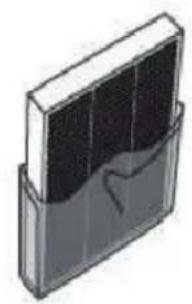
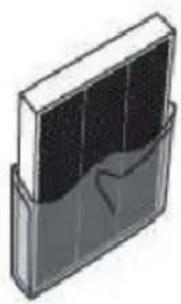
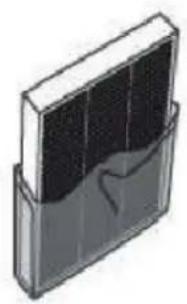
Remove the sealing from the True Hepa H13 filter and the evaporation
filter first.
natural_image
Illustration of a portable air conditioner unit with a 20 cm height label, shown in two technical line drawings (no text or symbols on the device itself)
natural_image
Illustration of a rectangular device with internal components, no visible text or symbols
Remote control
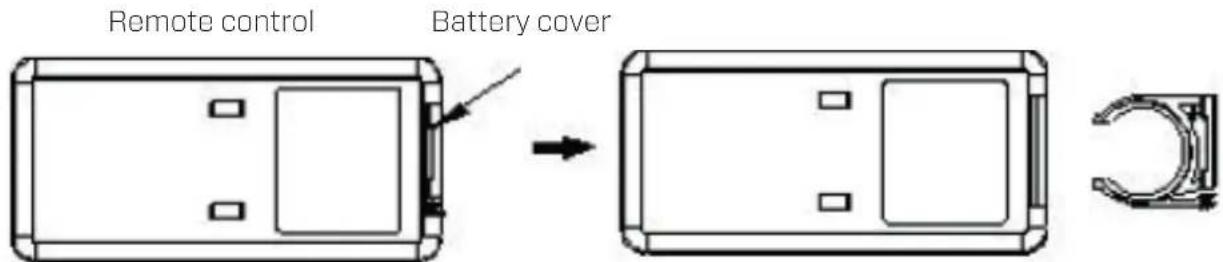
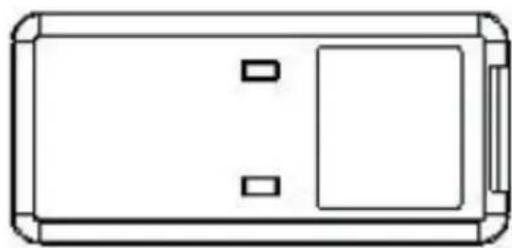
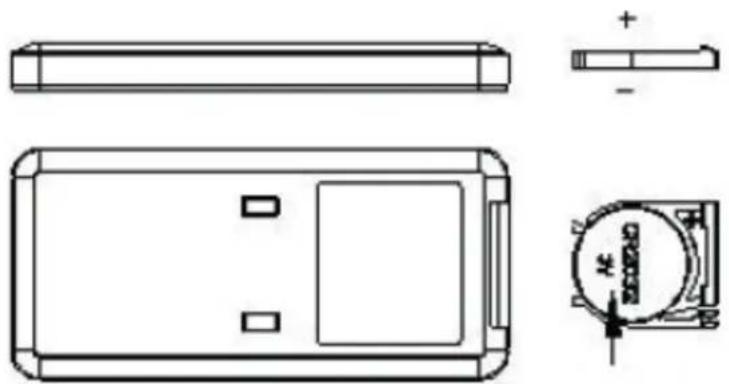
- Open the battery cover at the back side of remote control to place the battery. (see Picture 1).
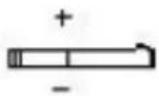
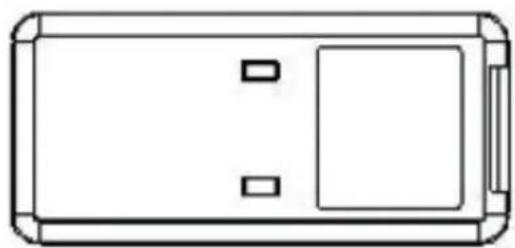
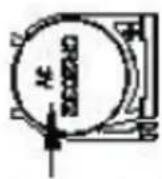
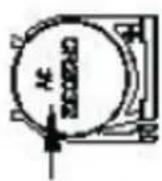
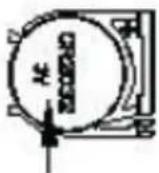
- To place the battery: there is a "security tab" at the bottom of the remote control that you first have to slide to the right and then pull out the battery holder. (see Picture 2). Insert the battery with the correct polarity. (see Picture 3).
- Push the battery cover back into the remote control.
(Picture 1)
(Picture 2)

natural_image
Simple line drawing of a rectangular device with two internal compartments and a side panel (no text or symbols)
(Picture 3)
Battery (CR2032)
Install the True HEPA H13 filter and the evaporation filter
Attention: Make sure that the plug is not yet plugged into the socket.
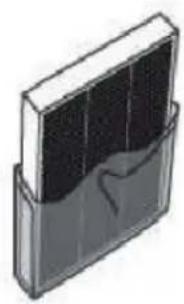
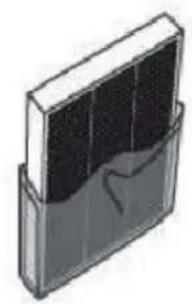
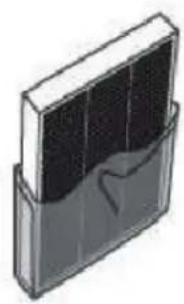
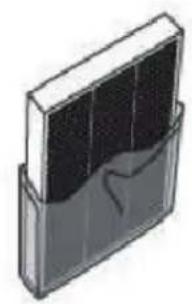
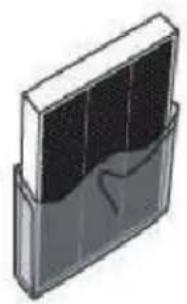
- Slide the filter cover up on the right side to place the True HEPA H13 filter.
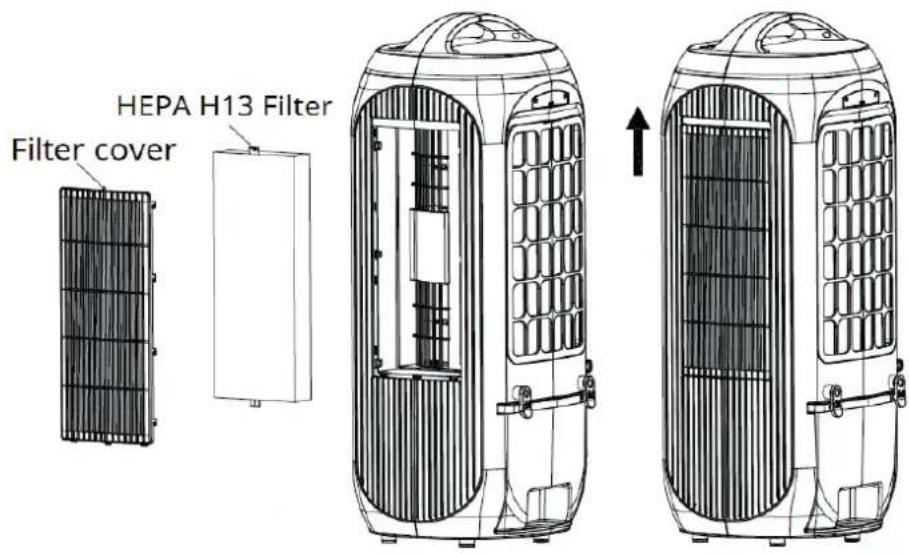
- Slide the filter cover up at the back to insert the evaporative filter.
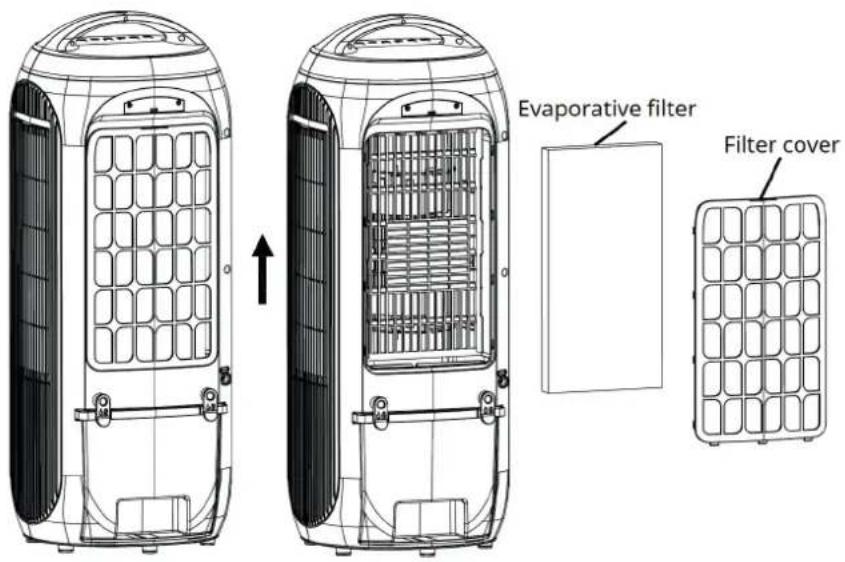
Attention:
Never use the device without the True HEPA H13 filter!
Never use the device without an evaporation filter!
Fill the water tank
Attention: Make sure that the plug is not yet plugged into the socket.
Clean the water tank before using the device, see chapter 'Cleaning and maintenance'.
The device requires fresh drinking water for air cooling.
-
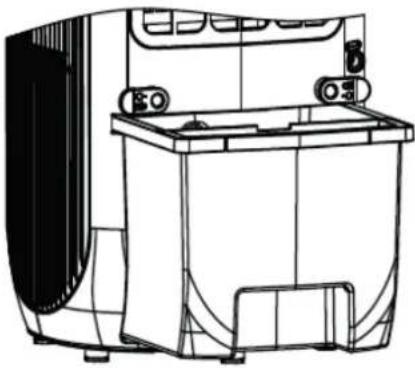
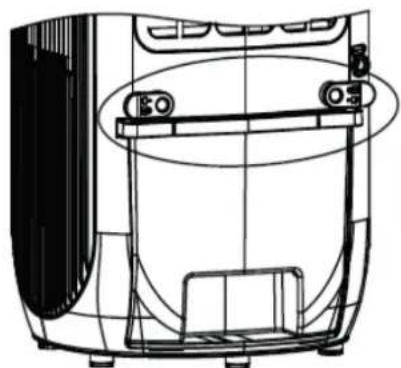
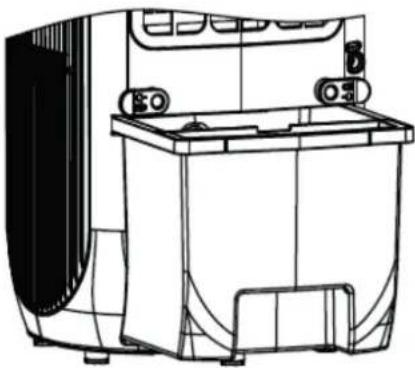
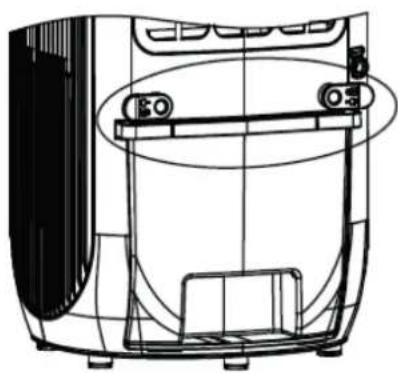
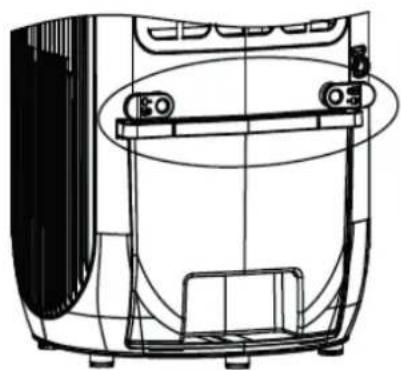
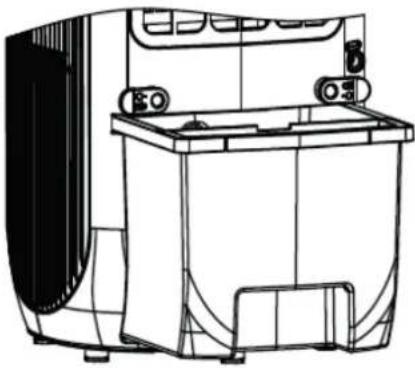
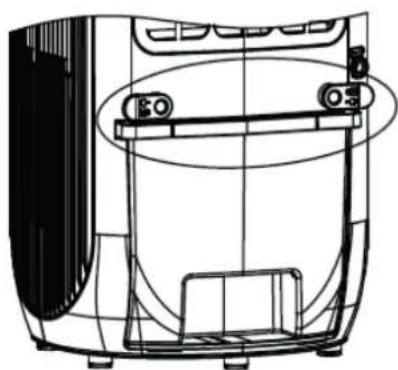
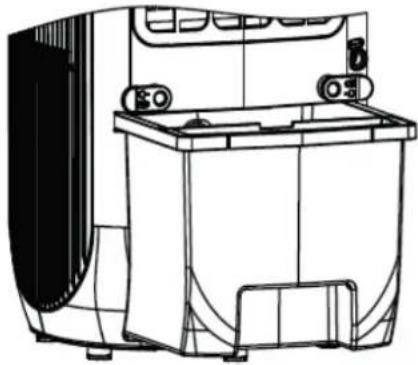
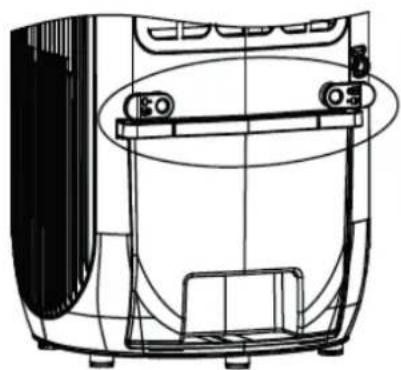
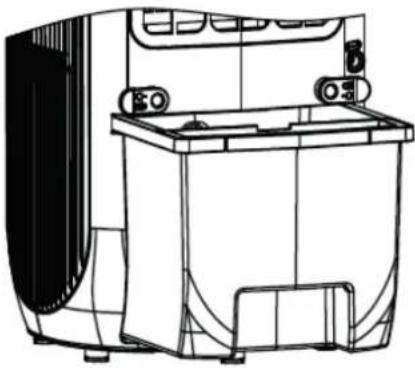
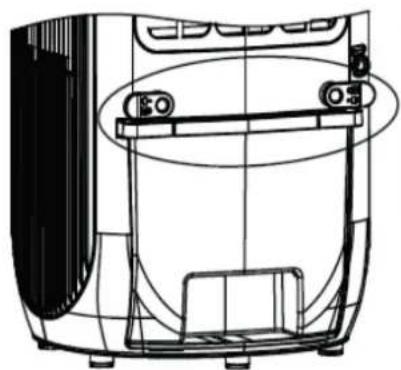
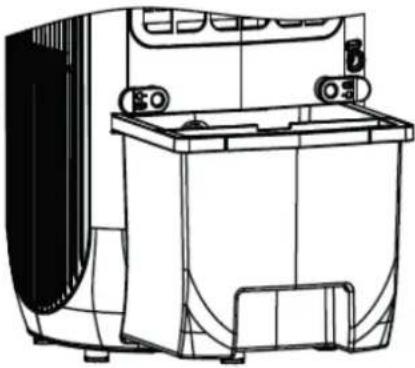
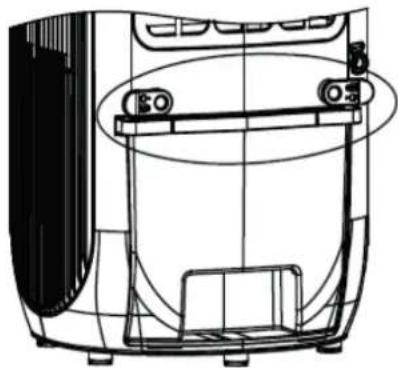
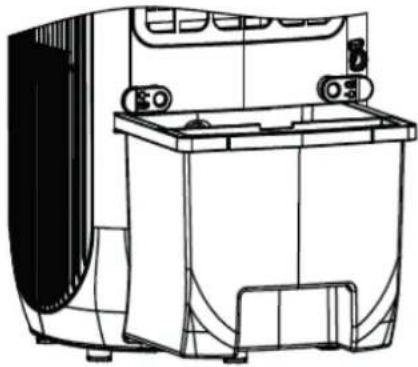
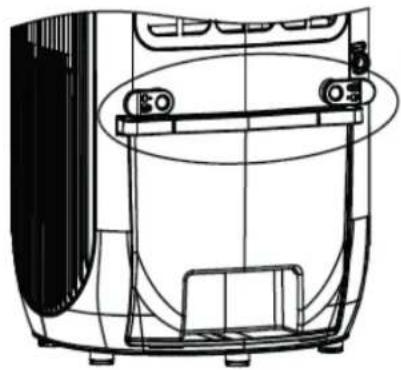
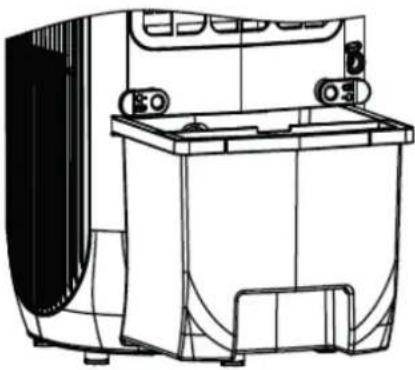
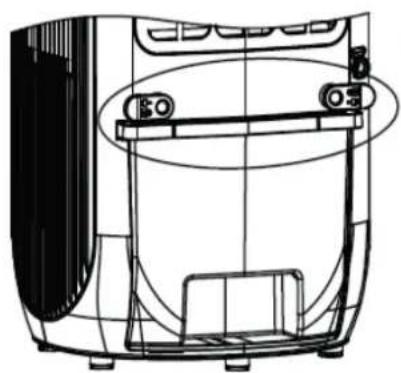
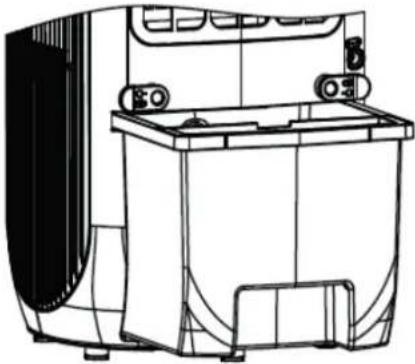
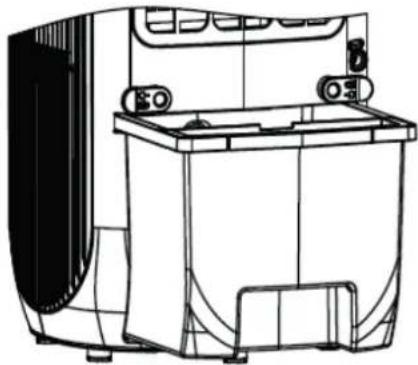
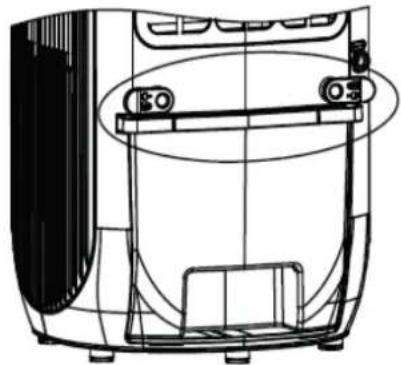
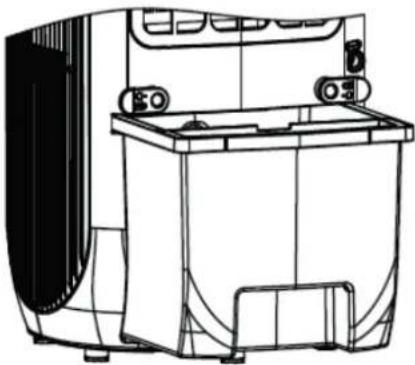
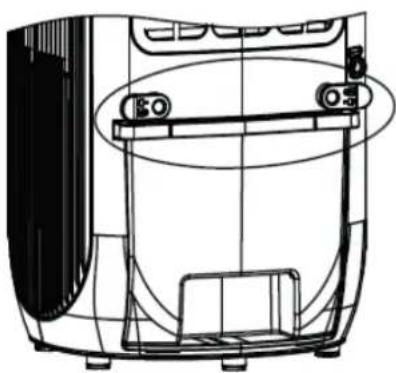
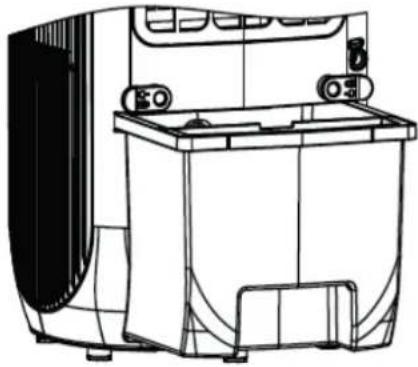
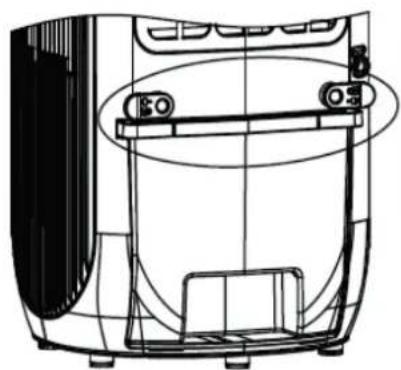
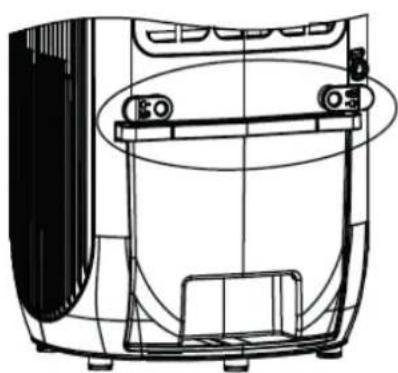
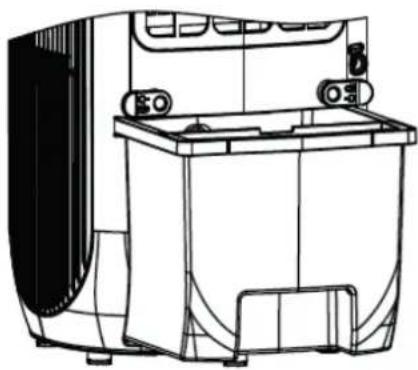
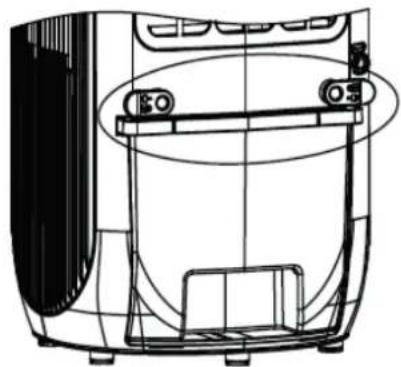
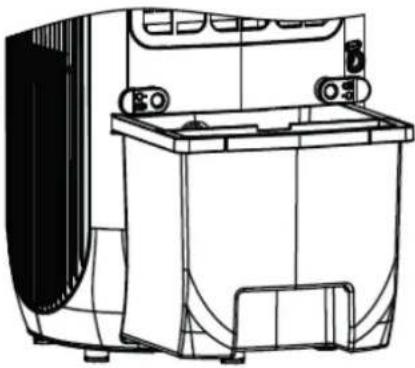
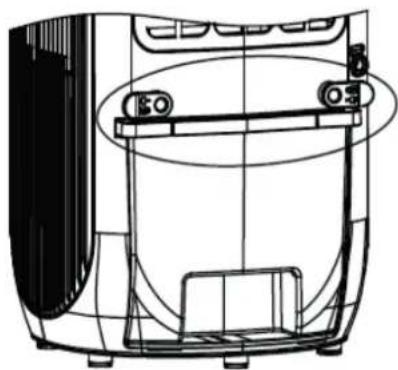
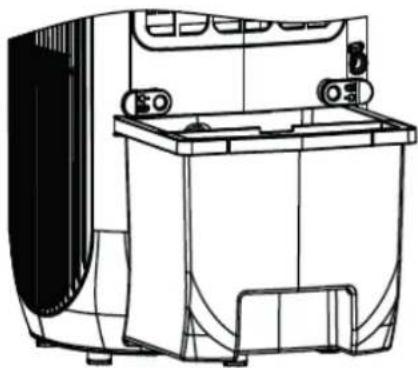
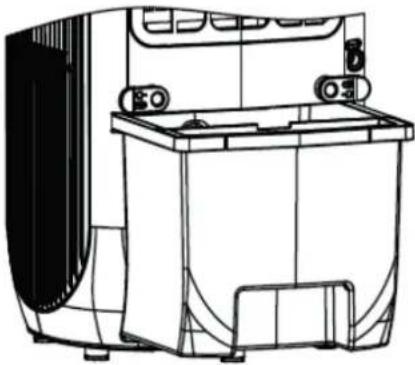
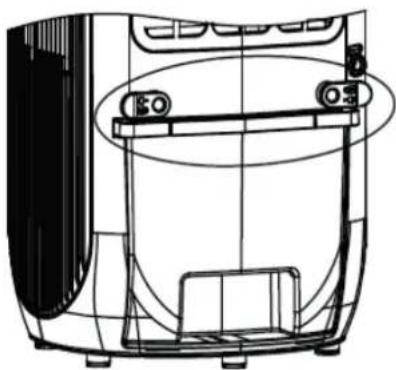
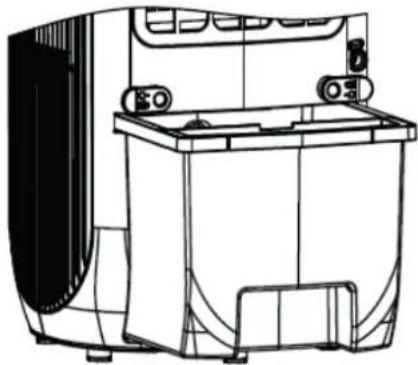
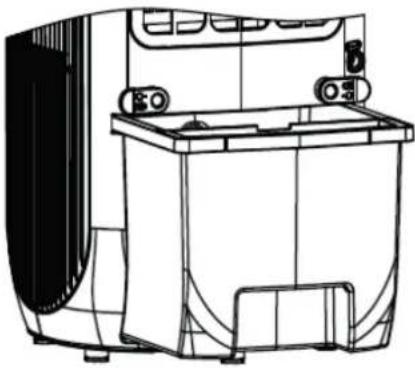
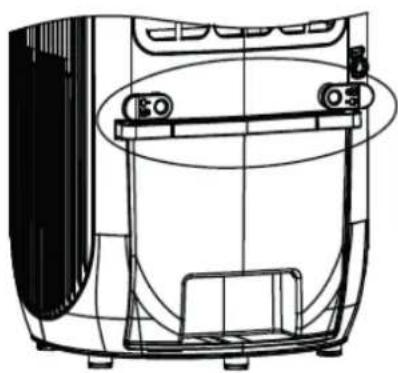
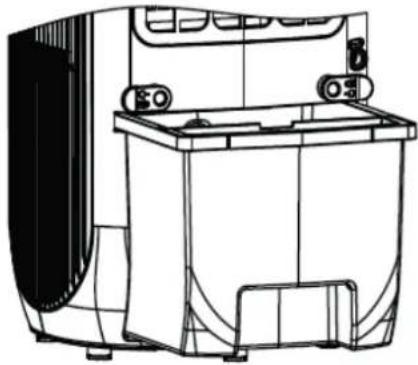
Unlock the water tank by turning the two clips from the vertical position to the horizontal position.
-
Pull the water tank halfway out of the appliance.
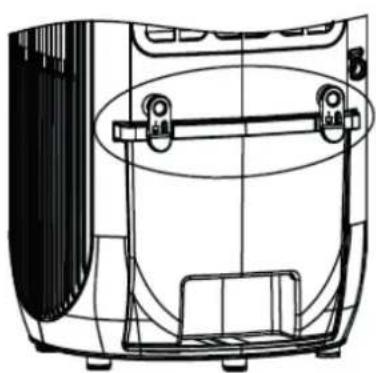
natural_image
Technical line drawing of a device interior with handle and frame (no text or symbols)
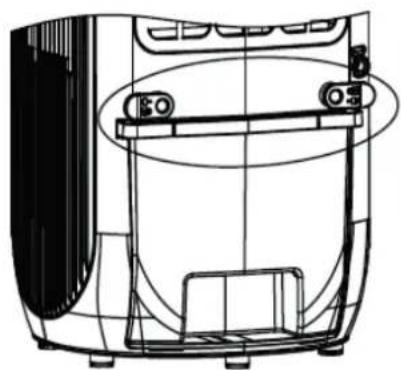
natural_image
Technical line drawing of a device interior with no visible text or symbols
natural_image
Technical line drawing of a mechanical device with no visible text or symbols
-
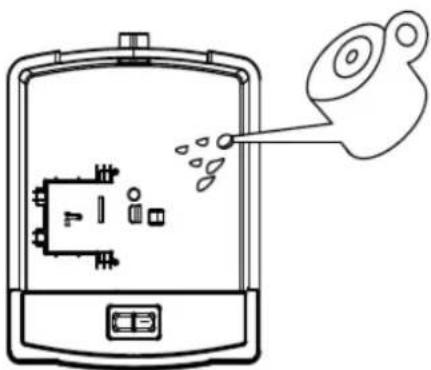
Fill the water tank with a watering can, take into account the maximum waterlevelindicator, see at the front of the device.
-
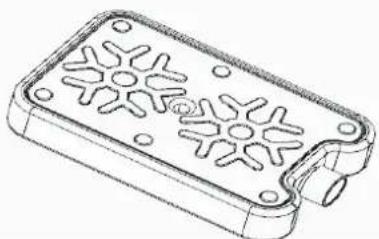
Place the cooling element in the water tank to achieve an extra cooling effect. Place the cooling element on the right side.
-
Only fill the water tank with fresh drinking water. You can add ice cubes to the water for extra cooling.
natural_image
Diagram of a device with internal components and a droplet emitting particles (no text or symbols)
Attention: Only fill the device with fresh drinking water. The water temperature may be max. 40°C.
Attention: Change the water in the water tank every 3 days to prevent bacterial growth.
Use of ice pack
The ice pack has unique cold storage and heat preservation properties, which can slowly absorb the heat in the water, so that the water temperature in the tank is always lower than the ambient temperature for several hours, so that the air blowing out of the air cooler is cooler.
- Place the ice pack in the vreezer until it is completely frozen;
-
Place the frozen ice pack into the water tank and push the water tank back to its original position. After about ten minutes, the water temperature in the water tank will be lower than the ambient temperature.
-
The device is equipped with 2 ice packs, so continuous use is not a problem.
-
Do not open the lid of the ice pack!
Ice pack
natural_image
Technical line drawing of a rectangular electronic device with star-shaped cutouts and mounting holes (no text or symbols)
Clean Air Optima®
Control panel / Operation instruction
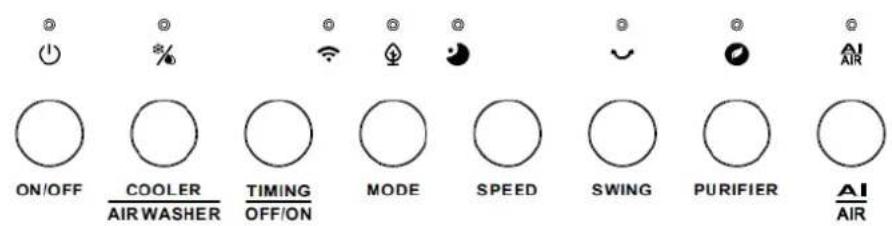
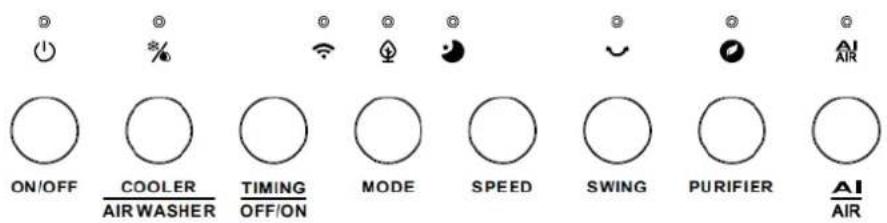
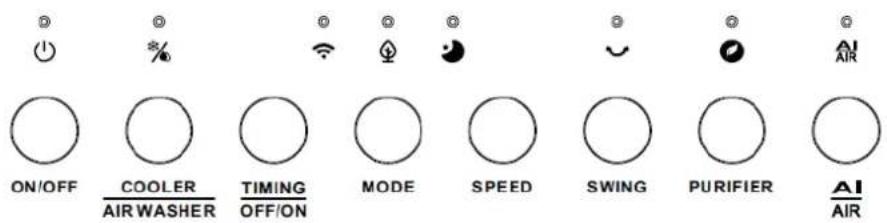
ON/ OFF (Power)
Press the Power Button to activate the device.
Press the Power Button again, the device turns off.
The device starts in the low speed (position 1) and only the fan function and anion function is working.

COOLER/ AIR WASHER
Fill the water tank with water first.
Press the button to activate the cooling/ humidifying function.
Cooling/ Humidifying on: the water pump starts to work and the led light is on.
Cooling/ Humidifying off: the water pump stops work and the led light is off.

TIMING OFF/ON
Press the button to activate the timing function.
The time selection range is 1-24 hours and is shown on the display.
-
In power-on state, press this button to set the working time of the machine. The timer indicator and time indicator turn on and the digital tube flashes to display the set time, indicating that it is in the timer setting state. At this moment, you can press the timer button to set the time, and press any key (except the switch key) or wait 5 seconds to exit the setting. After setting the timer, the digital tube alternately displays the set timer and current wind speed at 10 second intervals, and the wind speed indicator and time indicator display correspondingly. When the internal timing program reaches the set time, the machine will shut down and stay in standby state.
-
In power-off state, press this button to preset the desired switch-on time. While setting the timing, the indicator lights up and the display flashes to show the current setting time. Wait for 5 seconds to set the setup time successfully. After the setup time, the display shows the remaining time of the setup time and the time indicator lights up. When the timer reaches the startup time, the device turns on and remembers the function before the last shutdown (sleepmode, wind mode).

Press the MODE button to switch between normal wind, natural wind and sleep mode.
MODE Normal wind: The fan motor runs at a fixed speed according to the wind speed set by the user.
- Natural wind: The fan motor runs irregularly according to the preset program and can be set to low, medium and strong natural wind in combination with the wind speed button. Natural wind is to imitate the effect of natural wind, making the air volume softer and more comfortable. The wind speed level indicator only shows the initial wind speed status.
The image on the next page shows the working principle of the natural wind mode:
Wind speed table natural wind:
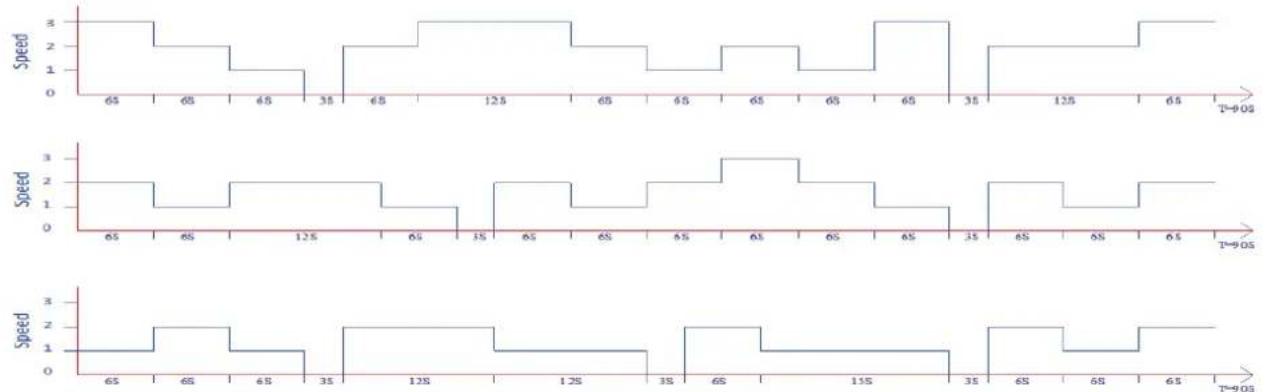
line
| Time | Speed |
|------|-------|
| 65 | 3 |
| 68 | 2 |
| 68 | 1 |
| 35 | 0 |
| 68 | 2 |
| 125 | 3 |
| 65 | 2 |
| 68 | 1 |
| 15 | 0 |
| 65 | 2 |
| 68 | 1 |
| 68 | 0 |
| 125 | 2 |
| 65 | 1 |
| 68 | 0 |
| 15 | 2 |
| 125 | 1 |
| 35 | 0 |
| 68 | 2 |
| 68 | 1 |
| 125 | 0 |
| 65 | 2 |
| 68 | 1 |
| 15 | 0 |
| 35 | 2 |
| 68 | 1 |
| 68 | 0 |
| 125 | 2 |
| 65 | 1 |
| 68 | 0 |
| 15 | 2 |
| 35 | 1 |
| 68 | 0 |
| 68 | -1 |
| 125 | -2 |
| 65 | -1 |
| 68 | -0 |
| 15 | -2 |
| 35 | -1 |
| 68 | -0 |
| 68 | +1 |
| 125 | +2 |
| 65 | +1 |
| 68 | +0 |
| 15 | +2 |
| 35 | +1 |
| 68 | +0 |
| 68 | -1 |
| 125 | -0 |
| 65 | +1 |
| 68 | +0 |
| 15 | +2 |
| 35 | +1 |
| 68 | +0 |
| 68 | -1 |
| 125 | -0 |
| 65 | +1 |
| 68 | +0 |
| 15 | -2 |
| 35 | -1 |
| 68 | -0 |
| 68 | +1 |
| 125 | +2 |
| 65 | +1 |
| 68 | +0 |
| 15 | +2 |
| 35 | +1 |
| 68 }+2 |
| 68 }+1 |
| 125 }+0 |
| 65 }+2 |
| 68 }+1 |
| 15 }+0 |
| 35 }+2 |
| 68 }+1 |
| 68 }+0 |
| 125 }+2 |
| T=90s | T=90s
- Sleep mode: In sleep mode, the display will turn off and the fan is running in the lowest speed level.
Press the MODE button to switch back again in the settings before.

By pressing the Speed button, you can change the speed level. The 3 fan speeds offer individual air flow (1-2-3 means the wind speed increases).

OSC oscillating function
The oscillation function ensures good air distribution in the room. Oscillating SWING distributes the air evenly. There are two positions, fixed or moving.

- Press the PURIFIER button to start or stop the air purifying function. Meanwhile, the
PURIFIER air outlet automatically shifts to the HEPA air filter purification and the air purification function starts. When the function is turned off, the air outlet automatically moves back to the front of the air cooler and the cooling function starts.
- The PM sensor takes 60 seconds to measure the air quality. During this process, the display alternately shows the colors red, yellow and green. After 60 seconds, the corresponding color will be shown on the display based on the detected air quality level.
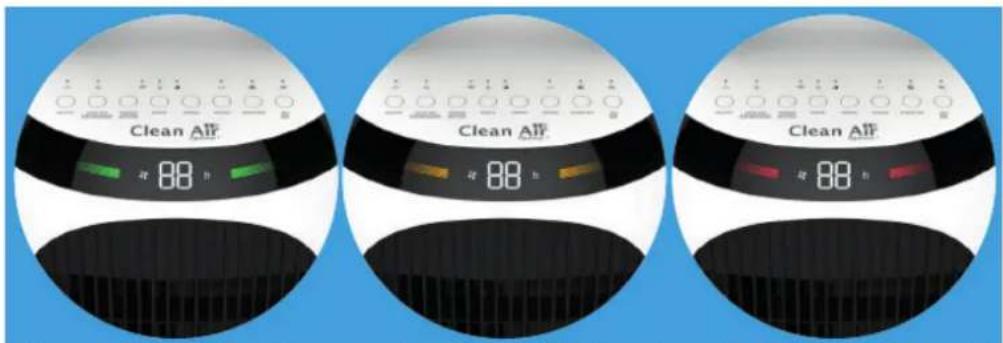
Green - Good: <35ug/m³ Orange - Average: 35-100ug/m³ Red - Bad: 100 ug/m³ or more
- After starting the air purification function, you can manually select the air purification intensity by adjusting the wind speed. The oscillating function and mode button do not work during the air purifying function.
Clean Air Optima®

AI/ AIR-Taste
In the setting AI/ AIR the integrated smart sensor (Intelligent Particle Sensor™) measures and regulates air quality automatically. The fan, controlled by a sensor anticipates automatically to what extent indoor air is polluted by particles size PM2.5 and adapting to the 3 different speeds accordingly.
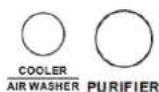
Press both buttons for the air cleaning function and the air humidifying function.
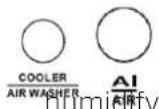
Press both buttons for the intelligent air cleaning function and the air g function.
In the setting Auto (AI/AIR) the integrated smart sensor (Intelligent Particle Sensor™) measures and regulates air quality automatically. The fan, controlled by a sensor anticipates automatically to what extent indoor air is polluted by particles size PM2.5 and adapting to the 3 different speeds accordingly.

Fan Function
Press the Power Button to activate the device. The device starts in the low speed (position 1) and only the fan function is working.
Water tank empty signal
Should the water tank be empty, a tenfold acoustic signal sounds. The device will automatically stop cooling/ air humidifying. In this case, turn off the device with the ON/ OFF button. Refill the water tank.
Dry evaporative filter
A. Press the SPEED button for 3 seconds to turn on the dry wind function, the wind will run at the highest speed (speed 3), the LED light will flash and stay on for 20 minutes.
B. During the operation of the dry wind function, other function keys do not work. Press the SPEED button again for 3 seconds to exit the dry wind function.
C. After running at high speed for 20 minutes, the device will automatically shut down and enter standby mode.
Automatic switching off: When the device is normally started and not timed, the device is automatically switched off after 15 hours if no functions are changed in the meantime.
Anion function: The anion function is switched on when the device starts up and switched off once the device is switched off.
Cleaning and maintenance
You can ensure that your Clean Air Optima® CA-106 Smart Aircooler will provide years of trouble-free operation by following a few simple maintenance procedures. If your water is hard and contains high concentrations of calcium and other minerals, over time white dust (lime) will start to settle on the various surfaces in the room. A white deposit (lime scale) will also form in the interior of the water tank. Lime deposits will impair the proper functioning of the aircooler and the efficient hygienic function of the unit.
We recommend the following:
- Clean the water tank once a week if you use the appliance daily with Clean Air Optima® Cleaner & Descaler
- As soon as the water tank needs refilling, pour out any remaining water and fill it with fresh water.
- Clean the entire device and keep all parts completely dry when the device is not in use.
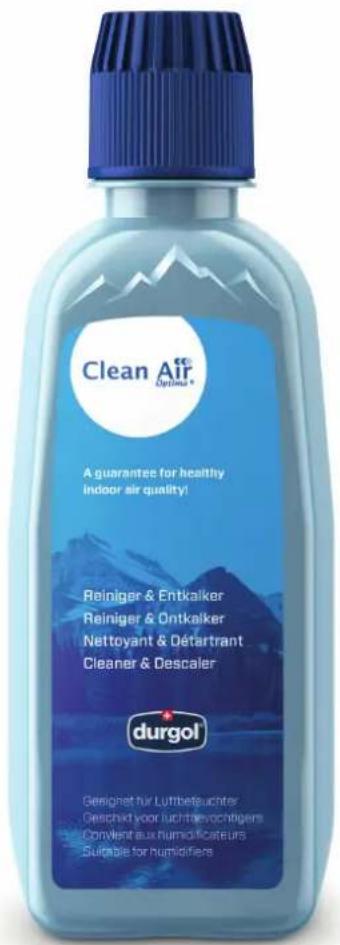
Specially developed for Clean Air Optima® aircoolers, humidifiers and dehumidifiers:
- Not aggressive
- Protects plastic and ceramic materials of the aircooler, humidifier and dehumidifier
- Odour neutral
- Cleans & descales quickly and thoroughly
- Biodegradable
You can order the Clean Air Optima® Cleaner & Descaler from our online shop at www.cleanairoptima.com.
Clean Air Optima®
Cleaning the water tank of the Clean Air Optima® Air Cooler
- Switch off the device and pull the plug. During cleaning and descaling, the device must not be used.
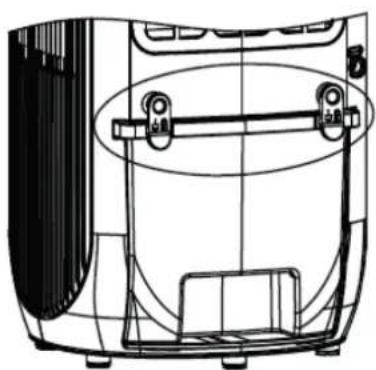
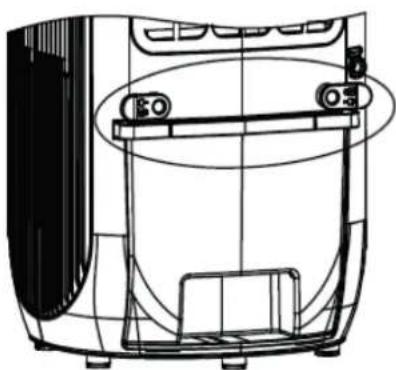
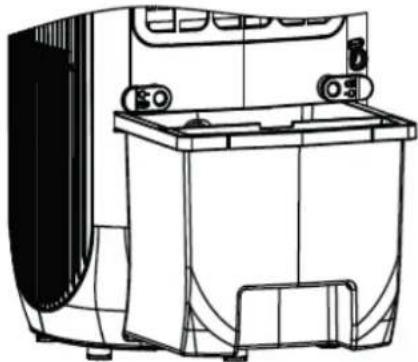
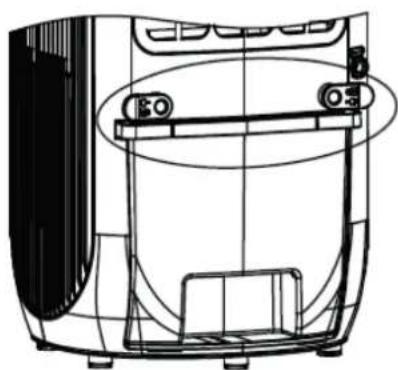
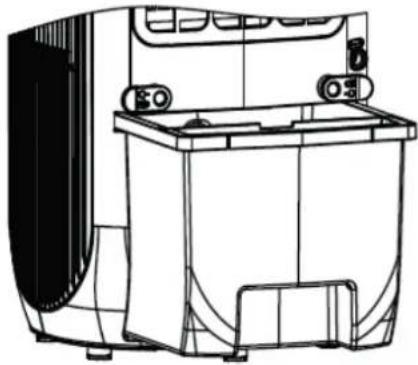
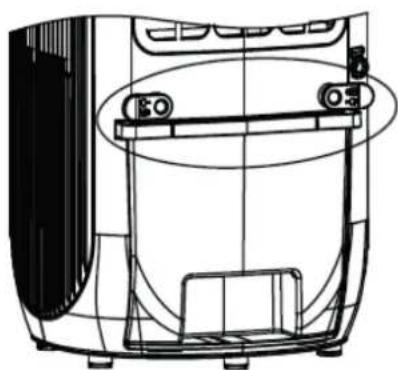
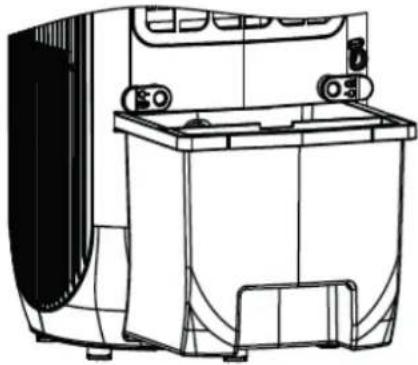
- Unlock the water tank by turning the two clips from the vertical position to the horizontal position.
natural_image
Technical line drawing of a device interior with handle and frame (no text or symbols)
natural_image
Technical line drawing of a mechanical device with no visible text or symbols
natural_image
Technical line drawing of a mechanical device with no visible text or symbols
- Pull the water tank halfway out of the appliance.
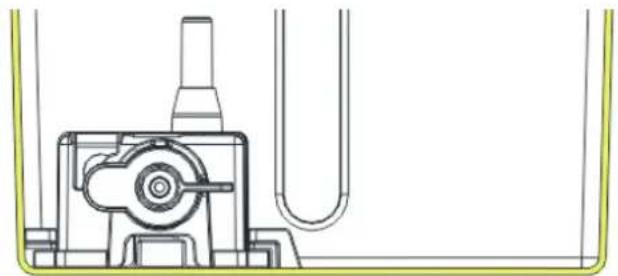
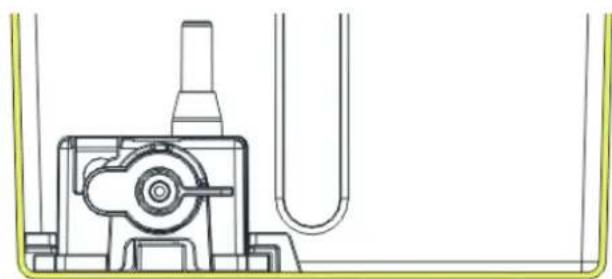
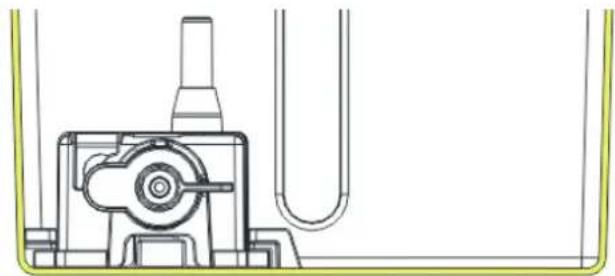
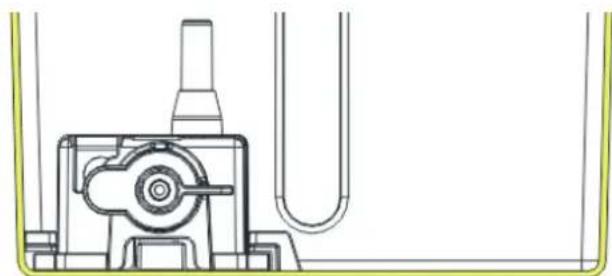
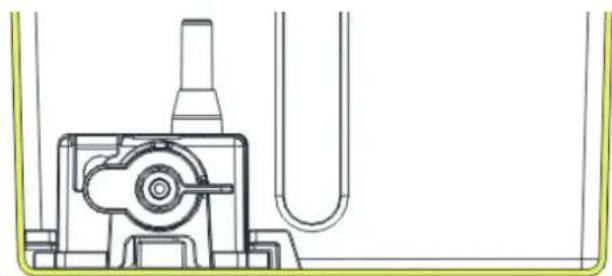
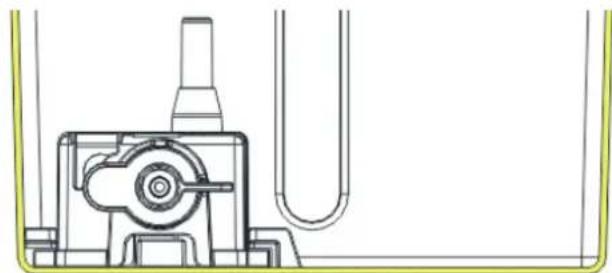
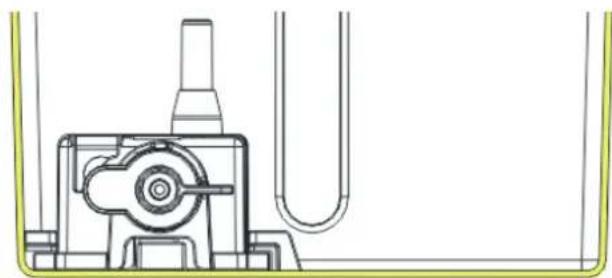
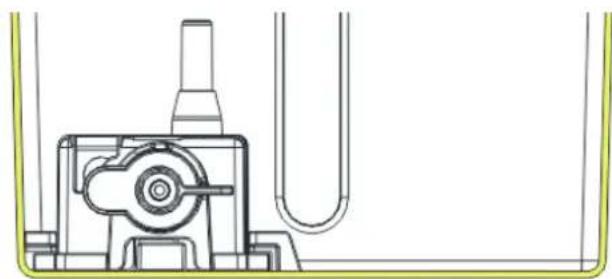
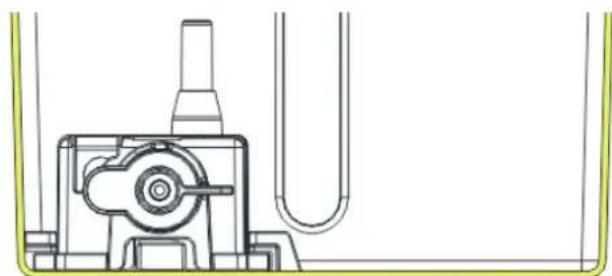
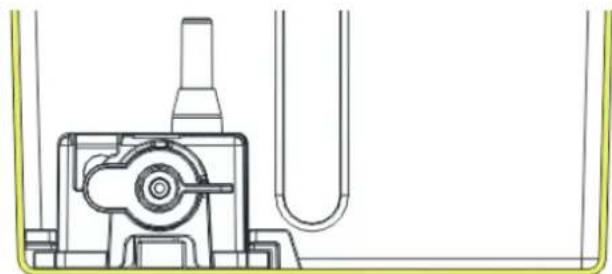
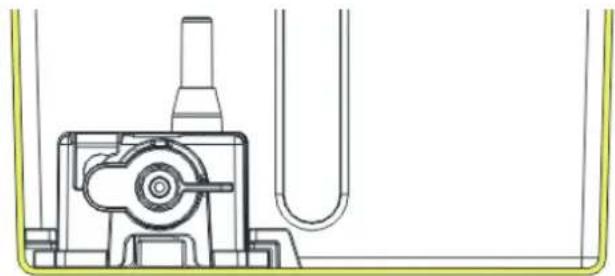
- Turn the water pump handle from the vertical to the horizontal position, see the schematic diagram below for disassembling and assembling the water pump.
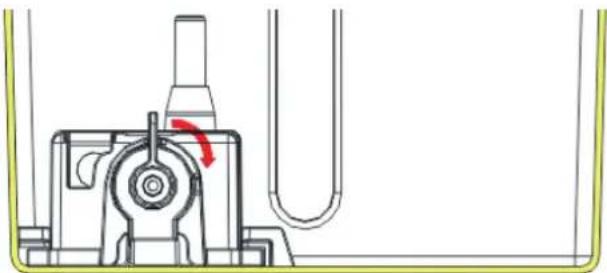
natural_image
Technical line drawing of a mechanical assembly with a red arrow indicating rotation (no text or symbols)
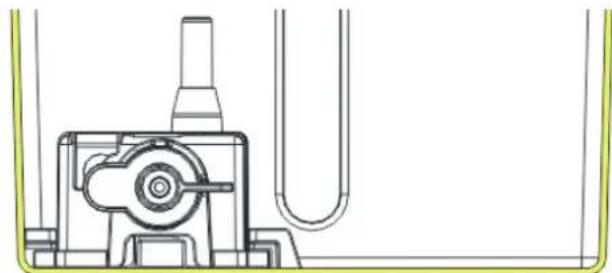
natural_image
Technical line drawing of a mechanical assembly with no visible text or symbols
- Slide the waterpump out of the bracket, see the schematic diagram here on the left.
- Clean the inside of the water tank with Clean Air Optima® Cleaner & Descaler and rinse with clean water. Pour two capfuls of Clean Air Optima® Cleaner & Descaler into the water tank and leave for between two and five minutes.
Then add water up to the rim of the watertank and leave for a minimum of 30 and a maximum of 60 minutes.
Rinse the watertank thoroughly with water.
- Remove any splashes of Clean Air Optima® Cleaner & Descaler from work surfaces or the outside of the device with a soft, damp cloth.
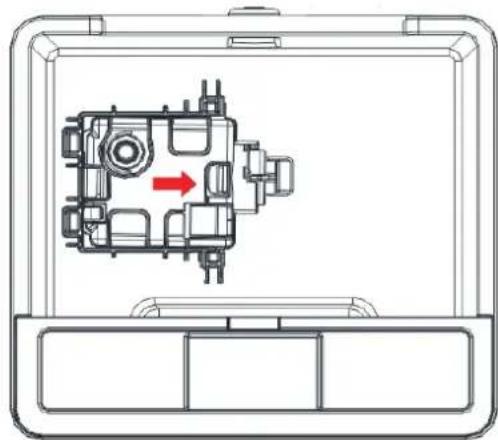
natural_image
Technical diagram of a mechanical assembly inside a device casing, showing internal components and a red arrow indicating direction (no text or labels)
After cleaning and descaling, your device is hygienically clean, free of limescale, free of bacteria, free of viruses and immediately ready for use again.
Please note:
For cleaning and descaling, the device must be turned off/unplugged.
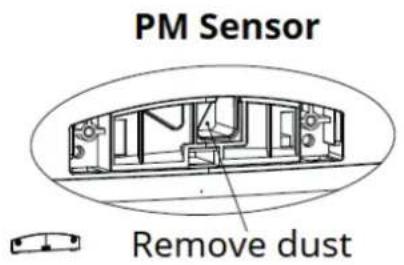
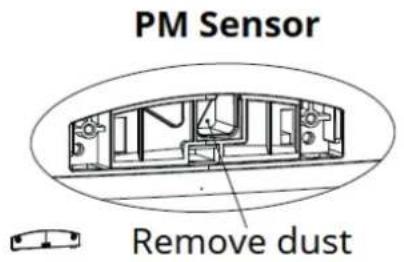
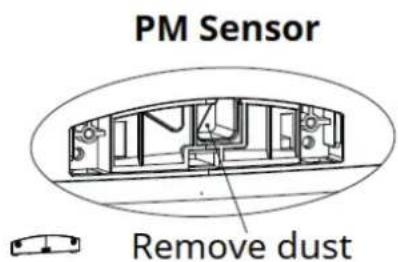
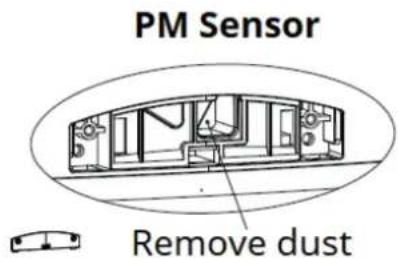
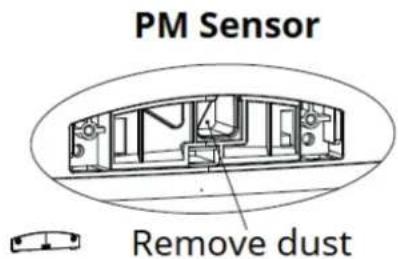
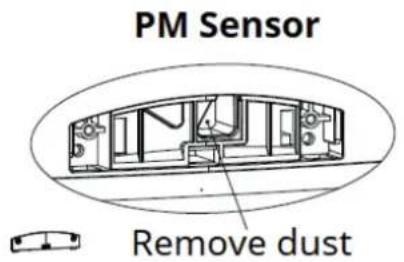
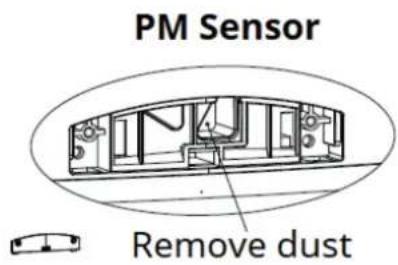
Cleaning the PM2.5 sensor of the Clean Air Optima® Air Cooler Clean the air quality sensor every 6 to 8 weeks.
When the value of PM 2.5 is displayed incorrectly, a cotton swab can be used to clean the sensor lens.
- Switch off the device and pull the plug.
- Use a screwdriver to take out the PM2.5 sensor back cover.
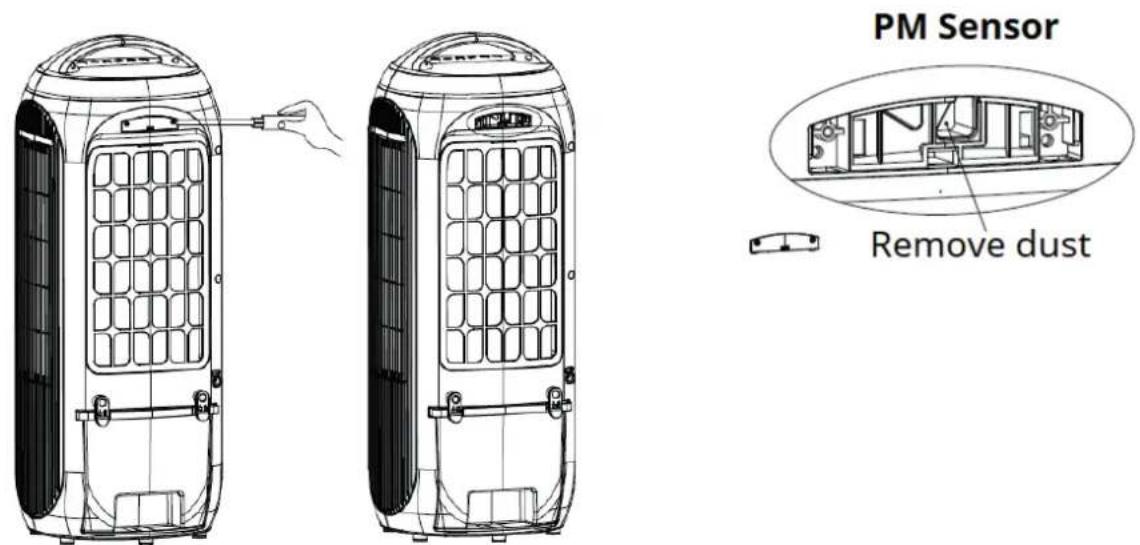
-
Clean the sensor lens with a cotton swab and water as indicated by the arrow. Then dry the lens with a clean cotton swab.
-
Install the cover of sensor.
-
Do not wipe the sensor lens with alcohol or other organic solvent.
Attention!
If the humidity in the room is very high, there is a risk of condensation on the air quality sensor. This may cause the air quality indicator (Digital Display - Particle Measurement) to indicate that the air quality is poor, while this should not be the case. In this case, we recommend that you clean the air quality sensor or do not use the aircooler in automatic mode.
Cleaning the housing of the Clean Air Optima® Air Cooler
- Switch off the device and pull the plug.
- Use a soft and humid piece of cloth to clean the device. Do not use chemical solvent such as benzene, alcohol or gasoline.
- Make sure that no water gets into the device, do not sprinkle with water.
Replacing the True HEPA H13 filter and the Evaporative filter
The Clean Air Optima CA-106 Smart is equipped with a filter lifespan surveillance mechanism that signals that the True HEPA H13 Filter have to be replaced after 600 working hours. To show that the True HEPA H13 Filter need to be replaced, the red indicator light blinks.
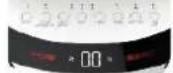
Reset the timer for the True HEPA H13 Filter by pressing and holding the Purifier button for about 3 seconds. If the indicator light goes out, the timer has been successfully reset.
The Clean Air Optima CA-106 Smart is equipped with a filter lifespan surveillance mechanism that signals that the Evaporative Filter have to be replaced after 600 working hours. To show
that the Evaporative Filter need to be replaced, the device emits a double zero indicator light. Reset the timer for the Evaporative Filter by pressing and holding the COOLER/ AIR WASHER button for about 3 seconds. If the indicator light goes out, the timer has been successfully reset.
Depending on the use, the Evaporative Filter and True HEPA H13 Filter has a lifespan of approx. 2 - 3 months.
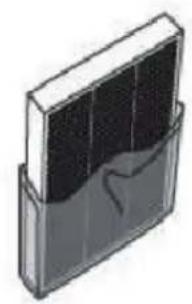
Take out the filters from the filter frame compartment. After filter replacement or filter cleaning reinstall the filters back into the filter frame compartment and assemble back to the device, see the illustration on page 8.
HEPA H13 Filter cleaning
The best effect for a longer lifespan of the True HEPA H13 Filter is reached by cleaning the True HEPA H13 filter once a month. If indoor air is extremely polluted, we advice to clean the True HEPA H13 filter more often ca. once per two weeks.
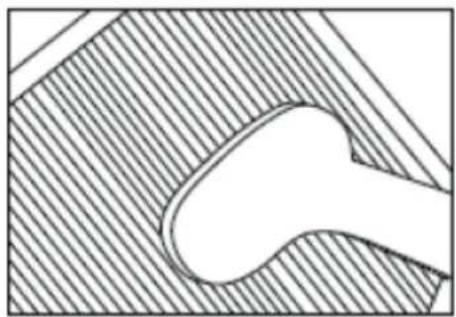
natural_image
Pure technical diagram showing a curved pipe or channel within a hatched material (no text or symbols)
Clean the True HEPA H13 Filter carefully with a brush or your vacuum cleaner. That way bigger dust particles like lint, hair, dust and dander of pets can be removed from the filter.
Evaporative filter cleaning
The best effect for a longer lifespan of the Evaporative filter is reached by cleaning the Evaporative filter once a month. If indoor air is extremely polluted, we advice to clean the Evaporative filter more often ca. once per two weeks.
- Clean the Evaporative filter with a mild detergent and rinse with clean water.
Rinse the filter and don't use a brush, soak the Evaporative filter in water and a mild detergent.
- Let the Evaporative filter dry before using it again.
Warning!
Do not damage the filters, the filters must not be cracked. Damaged filters needs to be replaced.
Never wet or rinse the True HEPA H13 Filter with water. If the True HEPA H13 Filter has been rinsed with water, it needs to be replaced.
Signs for used up filters that needs to be replaced
(Only for True HEPA H13 Filter and Evaporative filter)
Increased sound, reduced air flow, congested filters, rising presence of smells. Filters needs also to be replaced by new ones when the True HEPA H13 Filter changes its color from white to grey or black. If the True HEPA H13 Filter remains white, there is NO need to replace the filter. If the evaporative filter becomes porous, starts to smell or causes increased noise, it should be replaced.
How to order filters:
Contact Clean Air Optima® Customer Service tel. + 31 (0) 742670145 or visit our webshop: https://www.cleanairoptima.com/-accessoires
Clean Air Optima® Aircooler storage
If the Aircooler will not be used for an extended period of time:
-
Drain the water tank completely and make sure that there is no water stocked inside the water tank.
-
Unplug the device and fold up the power supply cord.
-
Remove and clean the filters. After cleaning reinstall the filters back into the device.
-
Store the Aircooler in a cool, dry location, away from direct sunlight, extreme temperature and excessive dust.
Operation with Clean Air Optima® App
Connectivity
Compatibility with smartphone and tablet:
iPhone, iPad and Android devices
Device connets via WiFi with App:
CleanAirOptima
Attention: The router must be set to the 2.4 GHz broadband. If the router is set to the 5.0 GHz, it is impossible to establish a connection.
Set up WiFi connection
- Download and install the Clean Air Optima® App in the App Store or Google Play Store.
- Make an account and log in.
-
Plug the device into the power socket and switch it on. The WiFi indicator will blink.
-
The router must be set to the 2.4 GHz broadband. If the router is set to the 5.0 GHz, no connection can be established.
-
Make sure Bluetooth is enabled on your smartphone.
-
Make sure that your smartphone or tablet is successfully connected to your WiFi network.
-
Open the Clean Air Optima® App and click on 'Add device' + . Your device is listed and you can select it. If not choose 'Auto Scan'. Follow the on-screen instructions to connect the device to your network.
-
Choose to add the Clean Air Optima ^® device on the App, follow the instructions in the App.
-
When the device is paired, the WiFi indicator light stays on constantly.
-
After the configuration is successful, you can use the Clean Air Optima® App to operate the device.

Note:
- If your default network has changed, reset the WiFi connection, follow step 3 to 8 in the 'Set up WiFi connection' section.
- If you want to pair multiple devices to your smartphone or tablet, you have to do this one after the other.
- Make sure that the distance between your smartphone or tablet and the device is less than 5 meters and there are no obstacles. Also make sure you are in the same room as the device.
Reset the WiFi function:
- Reset the WiFi by pressing the 'MODE' button for 5 seconds, the indicator light of the WiFi will blink rapidly. If the WiFi function has to be reset on the device, the device must be on.
- If it is not connected within 3 minutes, the WiFi indicator will turn off. To connect again, you need to press and hold the WIFI button for 5 seconds till it beeps once to reset the WiFi module, the WiFi indicator will flash quickly and you can restart to configure the network in the default mode.
Connect devices to multiple phones
Note: First the other person needs to install the Clean Air Optima® App on his/her phone and create a new account.
Share the device with limited access:
You can choose to share 1 device with several persons.
This person will then have access, but will not be able to manage all the settings.
Follow the instructions below to share the device with several persons:
- Go to the relevant device.
- Go to the pencil or three dots in the top right.
- Select 'Share device.'
- Choose 'Add sharing'.
- Choose the sharing method e.g. via email, whatsapp, sms etc. and continue.
- The device will automatically appear in the Clean Air Optima® App with the other account.
Share device with full access:
You can add a person or several persons to your home management.
That person will then have access to all your devices that are already linked and has full rights and permissions. You will always remain the main administrator.
Follow the instructions below to add someone to your home management:
- Open the Clean Air Optima ^® App and go to 'Me'.
- Then choose 'Home Management'.
- Choose 'Create a home'.
- Select the relevant 'Home' and 'Add member'.
- Choose the sharing method e.g. via email, whatsapp, sms etc. and continue.
- The corresponding 'Home' will automatically appear in the Clean Air Optima® App of the person with whom you have shared your 'Home'.
- On the other account:
Go to the home screen from the Clean Air Optima® App. Go to the top left and select the 'Home'.
Directive 2009/125/EC on the Ecodesign of energy related products.
| Model identifier: CA-106 Smart |
| Clause Ecodesign requirements - GENERICECODESIGN REQUIREMENTS | Result Verdict |
| (d) From 1 January 2014 -- | | |
| Off mode Power conconsumption of equipment in any off-mode condition shall not exceed 0,50 W | | N/A |
| Standby mode | The power consumption of equipment in any condition providing only a reactivation function, or providing only a reactivation function and a mere indication of enabled reactivation function, shall not exceed 0,50W | 0,4 W Pass | |
| The power consumption of equipment in any condition providing only information or status display, or providing only a combination of reactivation function and information or status display, shall not exceed 1,00 W | | N/A |
| Availability of standby and/or off mode | Equipment shall, except where this is inappropriate for the intended use, provide off mode and/or standby mode, and/or another condition which does not exceed the applicable power consumption requirements for off mode and/or standby mode when the equipment is connected to the mains power source | Standby Mode | Pass |
| Power manage-ment | When equipment is not providing the main func-tion, or when other energy- using product(s) are not dependent on its functions, equipment shall, unless inappropriate for the intended use, offer a power management function, or a similar function, that switches equipment after the shortest possible period of time appropriate for the intended use of the equipment, automatically into:- standby mode, or- off mode, or- another condition which does not exceed The applicable power consumption require-ments for off mode and/or standby mode when the equipment is connected to the mains power source. The power management function shall be activated before delivery. | | N/A |
| Contact details Cian Air Optima International GmbH |
Troubleshooting
The following is a troubling shooting guide to help you solve any issues that you may have using the Clean Air Optima® aircooler CA-106 Smart.
| Problem Possible Cause Solution | |
| Device does not switch on. | The power cord does not connect correctly.The power cord or power plug may be damaged. | Connect the power plug and power socket correctly.Check the power cord and plug for damage. |
| The device makes a lot of noise or vibrates. | The device is installed askew.The filters are blocked. | Make sure the device is installed uprightly.Clean or replace the filters. |
| The device does not work or with reduced capacity. | Check the filters for contamination.Check the minimum distances to walls and objects. | Clean or replace the filters if necessary.Move the device away from walls and objects. |
| The device runs, but there is no air cooling. | The device is not in cooling mode.Water pump inlet is blocked.Water pump is not correctly mounted in the water tank. | Activate cooling mode.Check that the water pump inlet is not blocked in the water tank.Make sure the water pump is mounted correctly. |
| Water leakage Filter cover evaportive filter is not proper closed. | Insert filter cover evaporative filter properly. |
| The device does not respond to the remote control. | There are obstacles between the device and the remote control.Battery installed correctly. | Remove obstacles and ensure visual contact between remote control and device.Check battery charge status. |
Display shows double 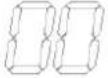 zero . zero . | The evaporative filter needs to be replaced. | Reset the timer for the filter by pressing and holding the COOL-ER/ AIR WASHER button for about 3 seconds. When the indicator light goes out, the timer has been successfully reset. |
| The red indicator light blinks on the front display. | The HEPA H13 filter needs to be replaced. | Reset the timer for the filter by pressing and holding the Purifier button for about 3 seconds.When the indicator light goes out, the timer has been successfully reset. |
Clean Air Optima®
WARNING!
If the above recommended solutions do not work, please contact Clean Air Optima® technical support at the telephone number for your region. Do not attempt to disassemble, reassemble, or repair the device as this may void the warranty.
Specifications CA-106 Smart
| Model | CA-106 | Smart |
| For rooms up to | 65m^2 / 160m^3 / 699ft^2 |
| Rated voltage | 220V - 240V, 50Hz |
| Rated power | 65W |
| Fan capacity | 180 m^3/h |
| Humidifying capacity | Min. 250 ml/h - Max. 600 ml/h |
| Water tank | 5,5 | liter |
| Air purification with: | HEPA H13 Filter, Ionizer |
| Filter performance | 99,97% |
| Sound level | Silent fan < 20dB(A) Low / 48dB(A) High |
| Dimensions | 279 x 276 x 749mm |
| Weight | 6.9kg |
| Colour | White/ black |
| Type of Wi-Fi network | Single-band 2,4GHz |
| Complies with EU regulations | CE / WEEE / RoHS |
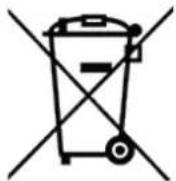
Ask your retailer or your municipality for updated information regarding the disposal of the packaging and of the device.
Service
Warranty Certificate for the Clean Air Optima® Aircooler CA-106 Smart.
Date of purchase: .....
Customers name: .....
Address: .....
Telephone: .....
Email: .....
Seller's name: .....
Address: ....
- Please fill in completely this Warranty Certificate. Send it with the invoice and the unit, postage pre-paid and using the original packing box, to your distributor. Make sure to include the appropriate return postage for the package.
- Please enclose a short description of the damage, fault or malfunction, and the circumstances under which these problems arose.
The Clean Air Optima® Aircooler CA-106 Smart is subjected to strict testing procedures before leaving the factory. If within two years from the date of purchase the product does not perform according to the specifications, because of factory defects, the purchaser is entitled to free repairs or replacement of parts upon presentation of this warranty (provided that the malfunction or damage to the device and/or parts occurred under normal operating conditions). What is covered: All parts defective in material and workmanship. For how long: two years from purchase date. What we will do: Repair or replace any defective parts.
Other Conditions
The provisions of this warranty are in lieu of any other written warranty whether express or implied, written or oral, including any warranty of merchantability or fitness for a particular purpose. The manufacturer's maximum liability shall not exceed the actual purchase price paid by you for the product. In no event shall the manufacturer be liable for special, incidental, consequential, or indirect damages. This warranty does not cover a defect that has resulted from improper or unreasonable use or maintenance, faulty assembly, accident, natural catastrophes, improper packing, or unauthorized tampering, alteration, or modification as determined solely by us. This warranty is void if the label bearing the serial number has been removed or defaced.
Thank you for reading!

Share your feedback about the Clean Air Optima®
Aircooler CA-106 Smart on:
www.cleanairoptima.com

For frequently asked questions about the CA-106 Smart
go to: www.cleanairoptima.com and search for the CA-106 Smart

Download PDF instruction manual on:
www.cleanairoptima.com/info/manuals

Watch all Clean Air Optima® Product
tion video's on:
www.youtube.com
Clean Air Optima International B.V. | Rientjesoven 26 | 7621 HG | Borne
The Netherlands | Phone: +31 (0) 74 - 2670145
Clean Air Optima Germany GmbH | Enschedestraße 14 | 48529 Nordhorn
Germany | Phone: +49 (0) 5921 879-121
E-mail: info@cleanairoptima.com
Internet: www.cleanairoptima.com
CA-106 Smart
Hauptgerät
Clean Air Optima®
Deutsch
natural_image
Illustration of a portable air conditioner unit with a 20 cm height label, shown in two technical line drawings (no text or symbols on the device itself)
natural_image
Illustration of a rectangular device with internal components, no visible text or symbols
Fernbedienung
natural_image
Technical line drawing of a rectangular electronic device with top, front, and side views (no text or symbols)
Achtung:
natural_image
Technical line drawing of a mechanical device with internal components and mounting brackets (no text or symbols)
natural_image
Technical line drawing of a mechanical device with no visible text or symbols
natural_image
Technical line drawing of a mechanical device with no visible text or symbols
natural_image
Technical line drawing of a rectangular electronic device with star-shaped cutouts and mounting holes (no text or symbols)
Kühlakku
Clean Air Optima®
AN/ AUS (Strom)
natural_image
Technical line drawing of a device interior with handle and frame (no text or symbols)
natural_image
Technical line drawing of a device interior with no visible text or symbols

natural_image
Technical line drawing of a mechanical device with no visible text or symbols
natural_image
Technical diagram of a mechanical assembly with a rotating component and pipe connection (no text or symbols)
natural_image
Technical line drawing of a mechanical assembly with no visible text or symbols
natural_image
Technical diagram of a mechanical assembly inside a rectangular frame, showing internal components and a red arrow indicating direction (no text or labels)
natural_image
Technical line drawing of two identical electric vehicle air purifiers with grid panels and a hand adjusting the cover (no text or symbols)
natural_image
Abstract geometric diagram with diagonal hatching and a central curved shape (no text or symbols)
Signs for used up filters that needs to be replaced
natural_image
Symbol of a trash bin with crossed lines indicating no waste or restriction, and a solid black rectangle below (no text or labels)
Nederlands
natural_image
Diagram of a portable air conditioner unit with a 20 cm height label, shown in two orthogonal views (no text or symbols on the device itself)
natural_image
Illustration of a rectangular object with internal compartments, possibly a battery or storage unit (no text or symbols visible)
Afstandsbediening
Let op:
natural_image
Technical line drawing of a device interior with no visible text or symbols
natural_image
Technical line drawing of a device interior with no visible text or symbols
natural_image
Technical line drawing of a mechanical device with no visible text or symbols
natural_image
Diagram of a device with internal components and a droplet emitting particles (no text or symbols)
natural_image
Technical line drawing of a rectangular electronic device with star-shaped cutouts and mounting holes (no text or symbols)
Koelelement
Clean Air Optima®

AAN/ UIT-knop

natural_image
Technical line drawing of a device interior with handle and frame (no text or symbols)
natural_image
Technical line drawing of a device interior with no visible text or symbols
natural_image
Technical line drawing of a mechanical device with mounting holes and internal components (no text or symbols)
natural_image
Technical diagram of a mechanical assembly with a red arrow indicating rotation (no text or symbols)
natural_image
Technical line drawing of a mechanical assembly with no visible text or symbols
natural_image
Technical line drawing of a mechanical component inside a device casing, showing internal components and a red directional arrow (no text or symbols)
natural_image
Abstract geometric pattern with diagonal hatching and a central oval shape (no text or symbols)
Verdampingsfilter reinigen
Specifications CA-106 Smart
| Model | CA-106 | Smart |
| Voor ruimtes tot 65 m2/160 m3/699 ft2 |
| Nominale spanning 220 V - 240 V, 50 Hz |
| Nominaal vermogen | 65W |
| Ventilatorvermogen | 180 | m3/h |
| Capaciteit luchtbevochtiging Min. 250 ml/h - Max. 600 ml/h |
| Waterreservoir | 5,5 | liter |
| Luchtreiniging met: HEPA H13-filter, ionisator |
| Filterprestaties | 99,97% |
| Geluidsniveau Stille ventilator < 20 dB(A) laag/48 dB(A) hoog |
| Afmetingen 279 x 276 x 749mm |
| Gewicht | 6,9kg |
| Kleur | Wit/zwart |
| Type wifi-netwerk Single-band 2,4GHz |
| Voldoet aan de EU-regelgeving CE / WEEE / RoHS |
Clean Air Optima®
Français
natural_image
Diagram of a portable air conditioner unit with a 20 cm height label, shown in two orthogonal views (no text or symbols on the device itself)
natural_image
Illustration of a rectangular device with internal compartments and a curved handle (no text or symbols)
Télécommande
natural_image
Technical line drawing of a rectangular device with internal compartments and an arrow indicating transformation (no text or symbols)
natural_image
Simple line drawing of a rectangular device with two internal compartments and a side panel (no text or symbols)
(Illustration 3)
Pile (CR2032)
Attention:
natural_image
Technical line drawing of a device interior with no visible text or symbols
natural_image
Technical line drawing of a device interior with no visible text or symbols
natural_image
Technical line drawing of a mechanical device with no visible text or symbols
natural_image
Diagram of a device with internal components and a droplet emitting particles (no text or symbols)
natural_image
Technical line drawing of a rectangular electronic device with star-shaped cutouts and mounting holes (no text or symbols)
Bloc réfrigérant
Clean Air Optima®
MARCHE/ARRÊT (Alimentation)
Vert - Bon: <35ug/m³ Orange - Moyen: 35-100ug/m³ Rouge - Mauvais: 100 ug/m³ ou plus
Clean Air Optima®
natural_image
Technical line drawing of a device interior with handle and frame (no text or symbols)
natural_image
Technical line drawing of a device interior with no visible text or symbols
natural_image
Technical line drawing of a mechanical device with mounting holes and internal components (no text or symbols)
natural_image
Technical diagram of a mechanical assembly with a rotating component and pipe connection (no text or symbols)
natural_image
Technical line drawing of a mechanical assembly with no visible text or symbols
natural_image
Technical diagram of a mechanical assembly inside a device casing, showing internal components and a red arrow indicating direction (no text or labels)
natural_image
Technical line drawing of two identical electric vehicle air purifiers with grid panels and side-mounted buttons, no text or symbols present.
natural_image
Pure technical diagram of a mechanical component with hatched background (no text or symbols)
Clean Air Optima®
Español
natural_image
Diagram of a portable air conditioner unit with a 20 cm height label, shown in two orthogonal views (no text or symbols on the device itself)
natural_image
Illustration of a rectangular device with internal components, no visible text or symbols
Mando a distancia
natural_image
Technical line drawing of a rectangular device with internal compartments and an arrow indicating transformation (no text or symbols)
(imagen 1)
(imagen 2)


natural_image
Simple line drawing of a rectangular device with two internal compartments and a side panel (no text or symbols)
(imagen 3)
Pila (CR2032)
natural_image
Technical line drawing of a device interior with handle and frame (no text or symbols)
natural_image
Technical line drawing of a device interior with no visible text or symbols
natural_image
Technical line drawing of a mechanical device with no visible text or symbols
natural_image
Diagram of a device with internal components and a droplet pouring into it (no text or symbols)
natural_image
Technical line drawing of a rectangular electronic component with star-shaped cutouts and mounting holes (no text or symbols)
Clean Air Optima®
natural_image
Technical line drawing of a device interior with handle and frame (no text or symbols)
natural_image
Technical line drawing of a device interior with no visible text or symbols
natural_image
Technical line drawing of a mechanical device with no visible text or symbols
natural_image
Technical line drawing of a mechanical assembly with a red arrow indicating rotation (no text or symbols)
natural_image
Technical line drawing of a mechanical assembly with no visible text or symbols
natural_image
Technical diagram of a mechanical assembly inside a device casing, showing internal components and a red arrow indicating direction (no text or labels)
natural_image
Technical line drawing of two identical air purifiers with heat sinks and ventilation grilles, one being adjusted for size (no text or symbols)
natural_image
Pure technical diagram of a mechanical component with hatched background (no text or symbols)
Clean Air Optima®
natural_image
Line drawing of a portable air conditioner unit with a 20 cm height label, shown in two orthogonal views (no text or symbols on the device itself)
natural_image
Illustration of a rectangular device with internal components, no visible text or symbols
Telecomando
natural_image
Simple line drawing of a rectangular device with two internal compartments and a side panel (no text or symbols)
Attenzione:
natural_image
Technical line drawing of a device with internal components and mounting brackets (no text or symbols)
natural_image
Technical line drawing of a device interior with no visible text or symbols
natural_image
Technical line drawing of a mechanical device with no visible text or symbols
natural_image
Technical line drawing of a rectangular electronic component with internal gear-like slots and mounting holes (no text or symbols)
natural_image
Technical line drawing of a device interior with handle and frame (no text or symbols)
natural_image
Technical line drawing of a device interior with no visible text or symbols
natural_image
Technical line drawing of a mechanical device with no visible text or symbols
natural_image
Technical line drawing of a mechanical assembly with no visible text or symbols
natural_image
Technical line drawing of a mechanical assembly with no visible text or symbols
natural_image
Technical diagram of a mechanical assembly inside a device casing, showing internal components and a red arrow indicating direction (no text or labels)
natural_image
Technical line drawing of two identical air purifiers with internal panel grilles, one being adjusted for a tool (no text or symbols)
natural_image
Abstract geometric diagram with diagonal hatching and a central oval shape (no text or symbols)
If the Aircooler will not be used for an extended period of time:
Note:
Polski
natural_image
Diagram of a portable air conditioner unit with a 20 cm height label, shown in two orthogonal views (no text or symbols on the device itself)
natural_image
Illustration of a rectangular device with internal components, no visible text or symbols
Pilot
natural_image
Simple line drawing of a rectangular device with two internal compartments and a side panel (no text or symbols)
Uwaga:
natural_image
Technical line drawing of a device interior with no visible text or symbols
natural_image
Technical line drawing of a device interior with no visible text or symbols
natural_image
Technical line drawing of a mechanical device with no visible text or symbols
natural_image
Technical line drawing of a rectangular electronic component with star-shaped cutouts and mounting holes (no text or symbols)
Pojemnik na lód


WŁ/WYŁ (Zasilanie)
natural_image
Technical line drawing of a device interior with handle and frame (no text or symbols)

natural_image
Technical line drawing of a device interior with no visible text or symbols
natural_image
Technical line drawing of a mechanical device with no visible text or symbols
natural_image
Technical line drawing of a mechanical assembly with a red arrow indicating rotation (no text or symbols)
natural_image
Technical line drawing of a mechanical assembly with no visible text or symbols
natural_image
Technical line drawing of a mechanical component inside a device casing, showing internal components and a red directional arrow (no text or symbols)
natural_image
Pure technical diagram of a mechanical component with hatched background (no text or symbols)
Ask your retailer or your municipality for updated information regarding the disposal of the packaging and of the device.
Clean Air Optima®
Obstuga serwisowa
Čeština
natural_image
Line drawing of a portable air conditioner unit with a 20 cm height label, shown in two orthogonal views (no text or symbols on the device itself)
natural_image
Illustration of a rectangular device with four vertical panels, no text or symbols visible
Dálkové ovládání
natural_image
Technical line drawing of a device rear panel with mounting holes and a side view showing internal components (no text or symbols)
(obrázek 1)
Upozornění:
natural_image
Technical line drawing of a device interior with handle and frame (no text or symbols)
natural_image
Technical line drawing of a microwave oven with mounting feet and internal compartments (no text or symbols)
natural_image
Technical line drawing of a mechanical device with no visible text or symbols
natural_image
Diagram of a device with internal components and a droplet emitting particles (no text or symbols)
natural_image
Technical line drawing of a rectangular electronic component with star-shaped cutouts and mounting holes (no text or symbols)
ON/ OFF (ZAP / VYP) (napájení)
natural_image
Technical line drawing of a device interior with handle and frame (no text or symbols)
natural_image
Technical line drawing of a mechanical device with no visible text or symbols
natural_image
Technical line drawing of a mechanical device with mounting holes and internal components (no text or symbols)
natural_image
Technical diagram of a mechanical assembly with a central component and a red arrow indicating rotation (no text or labels)
natural_image
Technical line drawing of a mechanical assembly with no visible text or symbols
natural_image
Technical line drawing of a mechanical component inside a device casing, showing internal components and a red directional arrow (no text or symbols)
natural_image
Abstract geometric pattern with diagonal hatching and a central oval shape (no text or symbols)
natural_image
Diagram of a portable air conditioner unit with a 20 cm height label, shown in two orthogonal views (no text or symbols on the device itself)
natural_image
Illustration of a rectangular device with internal components, no visible text or symbols
Telecomandă
natural_image
Technical line drawing of a device interior with no visible text or symbols
natural_image
Technical line drawing of a microwave oven with mounting brackets and internal compartments (no text or symbols)

natural_image
Technical line drawing of a mechanical device with no visible text or symbols
natural_image
Diagram of a device with internal components and a droplet emitting particles (no text or symbols)
natural_image
Technical line drawing of a rectangular electronic component with star-shaped cutouts and mounting holes (no text or symbols)

ON/OFF (Alimentare)
Verde - bun: <35ug/m³
Portocaliu - mediu: 35-100ug/m³
Roşu - rău: sau mai mult 100 ug/m³
natural_image
Technical line drawing of a device interior with handle and frame (no text or symbols)
natural_image
Technical line drawing of a device casing with mounting brackets and internal components (no text or symbols)
natural_image
Technical line drawing of a mechanical device with no visible text or symbols
natural_image
Technical line drawing of a mechanical assembly with a red arrow indicating rotation (no text or symbols)
natural_image
Technical line drawing of a mechanical assembly with no visible text or symbols
natural_image
Technical line drawing of a mechanical assembly inside a device frame, showing internal components and a red arrow indicating direction (no text or symbols)
natural_image
Pure technical diagram of a mechanical component with hatched background (no text or symbols)
Clean Air Optima®
natural_image
Symbol of a trash bin crossed with no text or numbers, representing waste sorting or disposal (no text present)
natural_image
Line drawing of a portable air conditioner unit with a 20 cm height label, shown in two orthogonal views (no text or symbols on the device itself)
natural_image
Illustration of a rectangular device with internal compartments and a curved line on the side (no text or symbols)
Nuotolinio valdymo pultas
natural_image
Technical line drawing of a rectangular device with a side panel and a separate C-shaped bracket (no text or symbols)
natural_image
Technical line drawing of a rectangular electronic device with top, front, and side views (no text or symbols)
(3 pav.)
Maitinimo elementas (CR2032)
Garinimo filtro ir HEPA H13 filtro jrengimas
Dèmesio! Isitikinkite, kad kištukas dar neprijungtas prie lizdo.
Dèmesio!
Niekada nenaudokite prietaiso be HEPA H13 filtro!
Niekada nenaudokite prietaiso be garinimo filtro!
natural_image
Technical line drawing of a device interior with handle and frame (no text or symbols)
natural_image
Technical line drawing of a device interior with no visible text or symbols
natural_image
Technical line drawing of a mechanical device with no visible text or symbols
natural_image
Diagram of a device with internal components and a droplet pouring into it (no text or symbols)
natural_image
Technical line drawing of a rectangular electronic component with star-shaped cutouts and mounting holes (no text or symbols)
Ledo déžuté
Valdymo pultas / valdymo instrukcija


IJUNGIMAS / IŠJUNGIMAS (maitinimas)
natural_image
Technical line drawing of a device interior with handle and frame (no text or symbols)
natural_image
Technical line drawing of a microwave oven with mounting brackets and internal casing (no text or symbols)
natural_image
Technical line drawing of a mechanical device with no visible text or symbols
natural_image
Technical diagram of a mechanical assembly with a central component and directional arrow (no text or labels)
natural_image
Technical line drawing of a mechanical assembly with no visible text or symbols
natural_image
Technical diagram of a mechanical assembly inside a device frame, showing internal components and a red arrow indicating direction (no text or labels)
natural_image
Technical line drawing of two identical air purifiers with heat sinks and ventilation grilles, one being adjusted for size (no text or symbols)
- Jutiklio lešj nuvalykite medvilniniu tamponu ir vandeniu, kaip nurodyta rodykle.
Tada leši nusausinkite švariu medvilniniu tamponu.
4. Uždékite jutiklio dangtelj.
5. Jutiklio lešio nevalykite alkoholiu ar organiniu tirpikliu.
Démesio!
natural_image
Abstract geometric diagram with diagonal hatching and a central oval shape (no text or symbols)
natural_image
Diagram of a portable air conditioner unit with a 20 cm height label, shown in two orthogonal views (no text or symbols on the device itself)
natural_image
Illustration of a rectangular device with internal panels and a wavy line on the side (no text or symbols)
Kaugjuhtimispult
Tähelepanu!
Ärge kunagi kasutage seadet ilma HEPA H13 filtrita!
Ärge kunagi kasutage seadet ilma aurustusfiltrita!
Clean Air Optima®
Täitke veepaak
natural_image
Technical line drawing of a device interior with handle and frame (no text or symbols)
natural_image
Technical line drawing of a mechanical device with no visible text or symbols
natural_image
Technical line drawing of a mechanical device with no visible text or symbols
Jääpaki kasutamine
natural_image
Technical line drawing of a rectangular electronic component with star-shaped cutouts and mounting holes (no text or symbols)
Juhtpaneel / kasutusjuhend

SISSE/VÄLJA (Toide)
natural_image
Technical line drawing of a device interior with handle and frame (no text or symbols)
natural_image
Technical line drawing of a device interior with no visible text or symbols
natural_image
Technical line drawing of a mechanical device with no visible text or symbols
natural_image
Technical diagram of a mechanical assembly with a central component and directional arrow (no text or labels)
natural_image
Technical line drawing of a mechanical assembly with no visible text or symbols
natural_image
Technical line drawing of a mechanical component inside a device casing, showing internal components and a red arrow indicating direction (no text or symbols)
natural_image
Technical line drawing of two identical electric vehicle air purifiers with grid panels and ventilation grilles, showing front and side views (no text or symbols)
natural_image
Abstract geometric pattern with diagonal hatching and a central oval shape (no text or symbols)
natural_image
Diagram of a portable air conditioner unit with a 20 cm height label, shown in two orthogonal views (no text or symbols on the device itself)
natural_image
Illustration of a rectangular device with internal components, no visible text or symbols
Tālvadības pults
natural_image
Technical line drawing of a rectangular electronic component with top, front, and side views (no text or symbols)
natural_image
Technical line drawing of a device interior with no visible text or symbols

natural_image
Technical line drawing of a microwave oven with mounting brackets and internal compartments (no text or symbols)
natural_image
Technical line drawing of a mechanical device with no visible text or symbols
natural_image
Diagram of a device with internal components and a droplet pouring into it (no text or symbols)
natural_image
Technical line drawing of a rectangular electronic component with star-shaped cutouts and mounting holes (no text or symbols)
ON/OFF (IESL./IZSL.) (barošana)
natural_image
Technical line drawing of a device interior with handle and frame (no text or symbols)
natural_image
Technical line drawing of a device interior with no visible text or symbols
natural_image
Technical line drawing of a mechanical device with no visible text or symbols
natural_image
Technical line drawing of a mechanical assembly with a red arrow indicating rotation (no text or symbols)
natural_image
Technical line drawing of a mechanical assembly with no visible text or symbols
natural_image
Technical line drawing of a mechanical assembly inside a device casing, showing internal components and a red arrow indicating direction (no text or symbols)
natural_image
Technical line drawing of two identical air purifiers with heat sinks and ventilation grilles, one being adjusted for a tool (no text or symbols present)
natural_image
Abstract geometric diagram with diagonal hatching and a central oval shape (no text or symbols)
E-pasts: info@cleanairoptima.com
Tîmekla vietne: www.cleanairoptima.com
A guarantee for healthy indoor air quality!