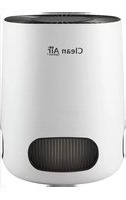
CA-501 - Air purifier Clean Air Optima - Free user manual and instructions
Find the device manual for free CA-501 Clean Air Optima in PDF.


| Product type | Air purifier |
| Brand | Clean Air Optima |
| Model | CA-501 |
| Dimensions (L x l x H) | 185 x 124 x 65 mm |
| Weight | 0,33 kg |
| Power supply | 12V DC adapter, 0,15A |
| Rated power | Max. 3 W |
| Maximum recommended area | Up to 15 m² / 37 m³ |
| Air flow (CADR) | 25 m³/h |
| Filter efficiency | 99,97% (HEPA filter + activated carbon) |
| Negative ions | 2,000,000 ions/cm³ |
| Noise level | < 20 dB(A) (at low speed) |
| Number of speeds | 4 speeds (1-4) |
| Main functions | Purification, ionization, UV lamp, aromatherapy, 4-hour timer |
| Filter maintenance | Clean the prefilter monthly; replace the composite filter every 400 hours |
| Filter replacement indicator | Red light flashing for 5 seconds at startup |
| Safety | Automatic shut-off after 4 hours, indoor use only, do not immerse, do not block grilles |
| Warranty | 2 years (excluding normal wear of filters) |
| Color | Black and gray |
| Included accessories | Power adapter, mounting strap, sponge for aromatherapy |
| After-sales service | +31 (0) 74 2670145 or www.cleanairoptima.com |
Frequently Asked Questions - CA-501 Clean Air Optima
User questions about CA-501 Clean Air Optima
0 question about this device. Answer the ones you know or ask your own.
Ask a new question about this device
Download the instructions for your Air purifier in PDF format for free! Find your manual CA-501 - Clean Air Optima and take your electronic device back in hand. On this page are published all the documents necessary for the use of your device. CA-501 by Clean Air Optima.
USER MANUAL CA-501 Clean Air Optima
Clean Air Optima Car/ Desktop Air Purifier CA-501
(EN) User manual
(DE) Gebrauchsanweisung
(NL) Gebruiksaanwijzing
(FR) Mode d'emploi
(ES) Manual del usuario
(IT) Manuale d'uso
(PL) Instrukcja obsługi
(CZ) Uživatelská příručka
(RO) Manual de utilizare
(LT) Naudotojo vadovas
(EE) Kasutusjuhend
(LV) Lietošanas pamācība
Find more languages on: www.cleanairoptima.com/info/manuals
natural_image
Exterior view of a Clean Air air conditioner unit with grille and ventilation slots (no text or symbols visible)Read these instructions carefully before you start using the Air Purifier and keep the manual for future reference.
Clean Air Optima®
Table of contents Page
| English | 3 | |
| German | 12 | |
| Dutch | 21 | |
| French | 30 | |
| Spanish | 39 | |
| Italian | 48 | |
| Polish | 57 | |
| Czech | 66 | |
| Romanian | 75 | |
| Lithuanian | 84 | |
| Estonian | 93 | |
| Latvian | 102 |
English
Thank you for purchasing the Clean Air Optima Car/ Desktop Air Purifier CA-501.
We wish you many years of healthy indoor air with this efficient and effective product.
Ensure that all safety precautions are followed when using this electrical appliance for the proper operation of the device. These instructions describe the safety precautions to be observed during operation. They are meant to prevent injuries and to avoid damaging the device.
Take into use
The filters are pre-installed. There is nothing further to install in order to start using the unit.
This product is suitable for cars, offices, bedrooms, desktops and children's rooms.
CA-501/ Description of the appliance
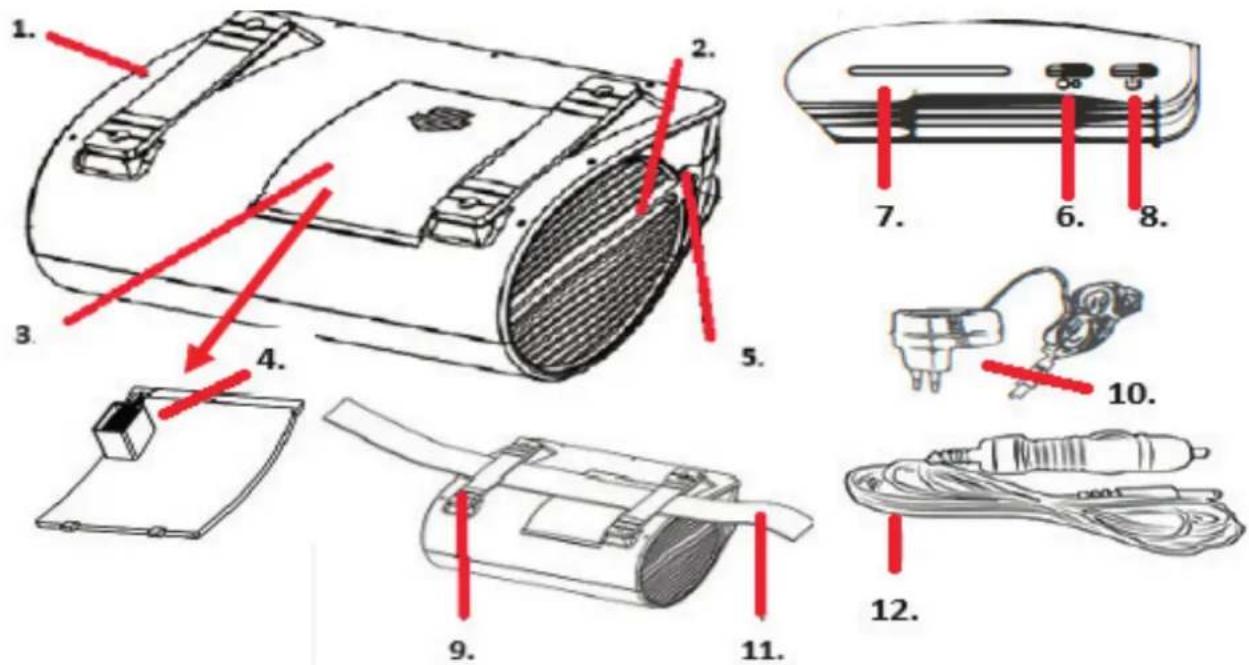
- Air outlet 7. Indicator lights
- Air inlet 8. On/off button
- Backcover 9. Anti-slip silica gel
- Aroma box 10. Adapter for use in home
- Power inlet 11. Fixing strap
- High and low speed 12. Adapter
Clean Air Optima®
Safety warnings
This device may only be used in accordance with this safety instructions. Take the following steps to minimize the risk of personal injury caused by for example electric shocks or fire.
- Only for indoor use. Do not use or store outdoors.
- This device can be used by children aged from 8 years and above and persons with reduced physical, sensory or mental capabilities or lack of experience and knowledge if they have been given supervision or instruction concerning use of the device in a safe way and understand the hazards involved. Children shall not play with the device. Cleaning and user maintenance shall not be made by children without supervision.
- Do not use the device when there is visible damage on the electrical cord or on the device itself. Do not repair the device yourself in case of damage. Never pull the device by its cord. If the power cord is damaged, then it must be replaced by an authorized service person to prevent electric shock or fire.
- Repairs may only performed by authorized service personal. Do not try to repair the device yourself to prevent electric shock or fire.
- Always remove the plug from the cord when the device is not being used.
- Only use power adapters and cords provided. Check if adapter voltage matches local voltage.
- Pull the plug when you do not use the device or when you clean internal or external parts of it.
- For safety use, put the device in a steady position.
- Do not use the device in rooms where inflammable liquids or gases are stored, close to heat sources or in particular humid rooms like the bathroom.
- Before cleaning or replacing the filter, turn off the power and unplug it.
- The working voltage of the unit is 12 volts direct current. Use of higher voltages may cause fire or electric shock hazards.
- Never insert any other object into the body to avoid breakdown.
- Never cover the air inlet and air outlet grid.
- Never dissemble or replace the device's inner parts.
- When the device is running, do not touch the air inlet and outlet grilles, and do not insert the handle or any object into the air outlet to avoid injury or damage to the air purifier.
- To keep the inlet and outlet air grille of the air purifier unimpeded, do not place objects above or near the front cover of the air purifier.
- Do not put heavy objects on the unit.
- Please avoid places with direct sunlight. There is a risk that the device discolors.
- Never immerse the unit in water or other liquids.
- Do not touch the power cord with wet hands.
- Clean the filter regularly, if the filter is saturated with dust, it will lead to poor purifying effect. The power consumption will increase, it can cause failure.
-
The normal operating environment of the device is 10 °C to 45 °C degrees.
-
Only use 100% pure essential oil. Other types, such as fragrance and synthetic oils, can damage the di user and void the warranty.
- Use, maintain and clean the device as described in this manual.
Control Panel / Operation Instruction
The filters are pre-installed. There is nothing further to install in order to start using the unit.
Plug the adapter into the proper power source.
1. Power Button
Pressing the Power button you turn the device on and o .
After 4 hours of operation, the device switches o automatically.
2. Speed mode
By pressing the Speed button, you can change the speed level. There are several fan speeds available. You can choose the speed 1, 2, 3 or 4. Touch the fan speed button repeatedly to select the mode.
Color display:
Speed 1; Green.
Speed 2; Blue.
Speed 3; Yellow.
Speed 4; Red.
3. UV and ION
The ionizer and UV light will always be on when you activate the power button.
4. Timer
After 4 hours of operation, the device switches o automatically.
5. Filter replacement
If the red indicator light flashes for 5 seconds, the composite filter (HEPA and activated carbon filter) needs to be replaced. Every time you turn on the device, the red light will flash for 5 seconds to remind you to replace the filter. The composite filter has a lifespan of 400 hours. Double-click the power button to reset the filter replacement timing.
Open the back cover. Replace the filter.
Clean Air Optima®
Maintenance
Cleaning the outside of the air purifier
- Switch o the device and pull the plug.
- Use a soft and humid piece of cloth to clean the device from dust and dirt.
- Make sure that no water gets into the device.
Filter cleaning
The best effect is reached by cleaning the filters once a month. If indoor air is extremely polluted, more cleaning can be required.
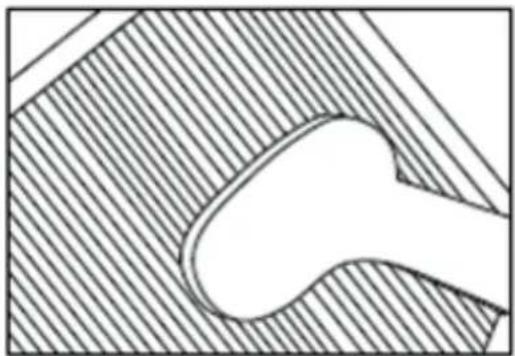
Clean the Pre-filter and the HEPA filter with a brush or your vacuum cleaner. That way bigger dust particles like lint, hair and dander of pets can be removed from the filter.
natural_image
Pure technical diagram of a mechanical component with hatched background (no text or symbols)Warning! Do never wet or rinse the composite filters (HEPA + Activated Carbon Filter) with water.
Signs for used up filters
Increased sound, reduced air flow, congested filters, rising presence of smells. The filter needs to be replaced by a new one when the HEPA filter changes its color from white to grey or black. If the HEPA filter remains white, there is NO need to replace the filter.
How to order filters:
Contact Clean Air Optima Customer Service tel. + 31 (0) 742670145 or visit our webshop: https://www.cleanairoptima.com/-accessoires
Aromatherapy
Activating the aroma function:
- Open the back cover and turn around the back cover.
- Pour 5-10 drops of Clean Air Optima ^® essential oil onto the sponge.
- Put the back cover back on the device.
- When you turn on your air purifier, the aroma function will be activated.
- If you want to deactivate the aroma function, or should the device not be in use for extended periods of time, remove the aroma sponge from the compartment and wash it with a little of mild soap water. Let it dry completely before placing it back in the aroma compartment. Basically the aroma sponge is reusable.
Important
In order to reach the best results and to enjoy your air purifier as much as possible, we advise to read carefully the following instructions regarding the use of essential oils in the air purifier CA-501.
Use of essential oils in the Clean Air Optima Car/ Desktop Air Purifier CA-501
Use our high quality essential oils and enjoy your personal aromatherapy! A scent sensation at its highest level!
You can find high quality essential oils with many different scents in our assortment. They perfectly fit to the air purifier CA-501 and have been specially developed for the use with this air purifier:
You can order the Essential Oils in
our online store at
www.cleanairoptima.com.
Warning!
The use of other essential oils not made for this air purifier or other additives (for example: fragrances and water purification products) can damage the air purifier and must NOT be used!
Devices that are damaged through additives are excluded from the guarantee.
Troubleshooting
The following is a troubling shooting guide to help you solve any issues that you may have using the Clean Air Optima Car/ Desktop Air Purifier CA-501.
| Problem Possible Cause Solution | ||
| Device does not switch on | The power cord does not connect correctly | Connect the power plug and power socket correctly |
| The power cord is broken | Replace the power cord | |
| The back panel is not installed correctly | Install the panel correctly. See chapter: How to use | |
| The air outlet smells foul | The filter traps too much odor or dust | Replace the composite filters |
| The lifetime of the filters has expired | Replace the composite filters | |
| Poor purification effect | Check if the humidity in the room is too dry | Increase the humidity |
| The device is placed in an unventilated room or surrounded by obstacles | Remove the obstacles | |
| No air is blowing out of the device | The airinlet or airoutlet is being blocked | Remove the obstacles |
WARNING!
If the above recommended solutions do not work, please contact Clean Air Optima technical support at the telephone number for your region. Do not attempt to disassemble, reassemble, or repair the device as this may void the warranty.
Specifications
Model CA-501 For rooms up to 15m^2/37m^3/161ft^2 Adapter rated voltage 12V DC, 0,15A Rated power Max. 3W Fan capacity (CADR) 25 m³/h Filter performance 99,97% Negative ion 2.000.000 ions/cm³ Sound level Silent fan <20 dB(A) (Low) Dimensions 185 x 124 x 65mm Weight 0.33kg Colour Black and grey Complies with EU regulations CE / WEEE / RoHS
Ask your retailer or your municipality for updated information regarding the disposal of the packaging and of the device.

natural_image
Symbol of a trash bin with crossed lines indicating no waste or discharge, and a solid black rectangle below (no text or labels)Clean Air Optima®
Service
Warranty Certificate for the Clean Air Optima Car/ Desktop Air Purifier CA-501 .
Date of purchase: ..... Customers name: ..... Address: ..... Telephone: ..... Email: ..... Seller's name: ..... Address: ....
-
Please fill in completely this Warranty Certificate. Send it with the invoice and the unit, postage pre-paid and using the original packing box, to your distributor. Make sure to include the appropriate return postage for the package.
-
Please enclose a short description of the damage, fault or malfunction, and the circum-stances under which these problems arose.
The Clean Air Optima Car/ Desktop Air Purifier CA-501 is subjected to strict testing procedures before leaving the factory. If within 2 years from the date of purchase the product does not perform according to the specifications, because of factory defects, the purchaser is entitled to free repairs or replacement of parts upon presentation of this warranty (provided that the malfunction or damage to the device and/or parts occurred under normal operating conditions). What is covered: All parts defective in material and workmanship. For how long: two years from purchase date. What we will do: Repair or replace any defective parts.
Exclusions: Regular replacement filters.
Other Conditions
The provisions of this warranty are in lieu of any other written warranty whether express or implied, written or oral, including any warranty of merchantability or fitness for a particular purpose. The manufacturer's maximum liability shall not exceed the actual purchase price paid by you for the product. In no event shall the manufacturer be liable for special, incidental, consequential, or indirect damages. This warranty does not cover a defect that has resulted from improper or unreasonable use or maintenance, faulty assembly, accident, natural catastrophes, improper packing, or unauthorized tampering, alteration, or modification as determined solely by us. This warranty is void if the label bearing the serial number has been removed or defaced.
Thank you for reading!

Share your feedback about the Clean Air Optima Air Purifier CA-501 on: www.cleanairoptima.com

For frequently asked questions about the CA-501 go to: www.cleanairoptima.com and search for the CA-501.

Download PDF instruction manual on: www.cleanairoptima.com/info/manuals

Watch all Clean Air Optima Product animation video's on: www.youtube.com
Clean Air Optima International B.V. | David Ricardostraat 9-7 / 9-9 | 7559 SH Hengelo (ov)
The Netherlands | Phone: +31 (0) 74 - 2670145
Clean Air Optima Germany GmbH | Enschedestraße 14 | 48529 Nordhorn | Germany Phone: +49 (0) 5921 879-121
E-mail: info@cleanairoptima.com Internet: www.cleanairoptima.com
Clean Air Optima®
Deutsch
natural_image
Technical line drawing of a device with a lid and internal components, showing assembly and mounting (no text or symbols)Wartung
natural_image
Abstract geometric diagram with diagonal hatching and a central oval shape (no text or symbols)Wichtig
Warnung!
Negatives lon 2.000.000 Ionen/cm³