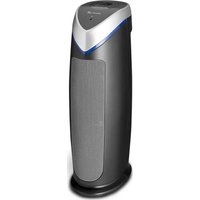
CA-506 - Air purifier Clean Air Optima - Free user manual and instructions
Find the device manual for free CA-506 Clean Air Optima in PDF.

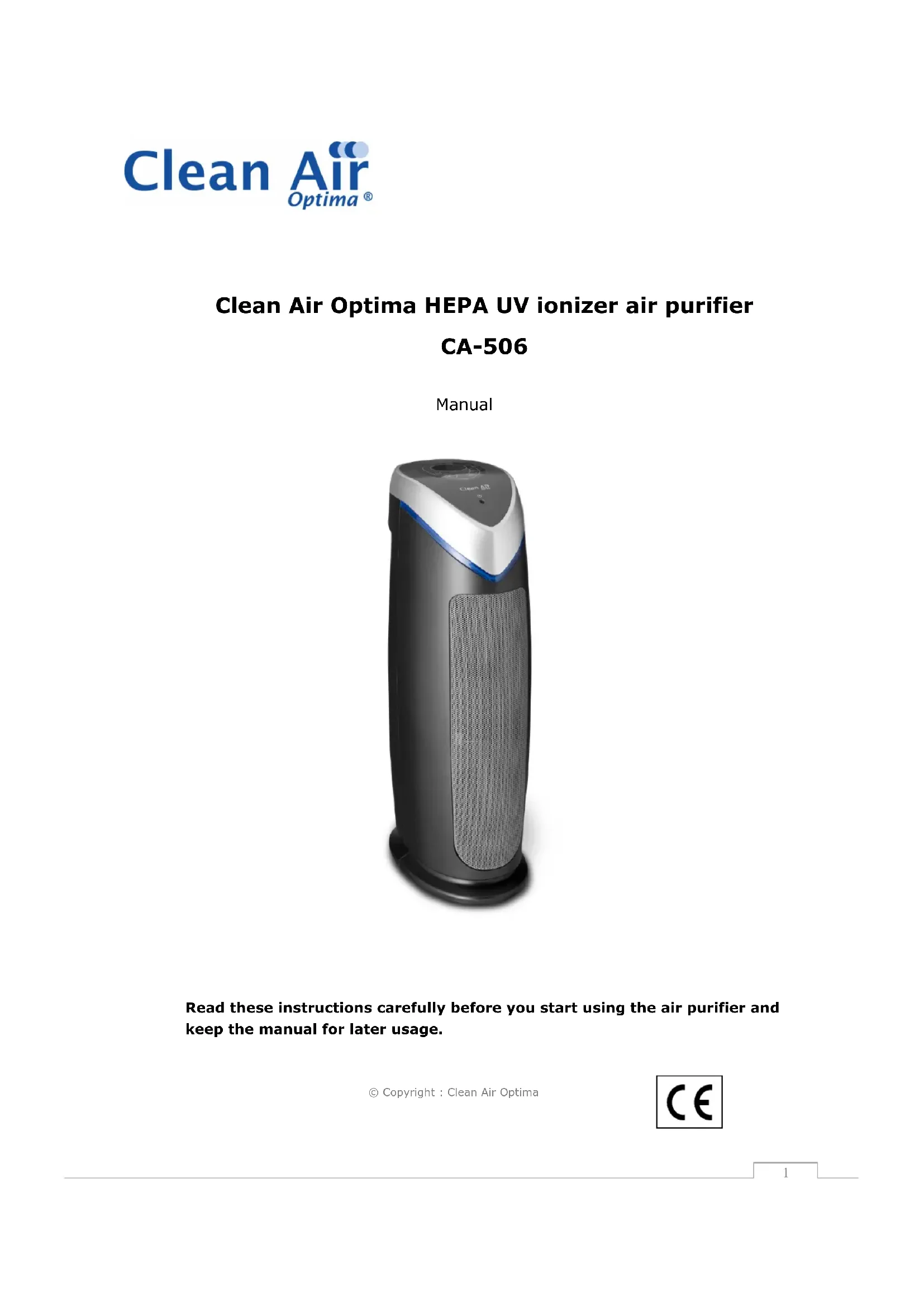


| Product Type | Air Purifier |
| Brand | Clean Air Optima |
| Model | CA-506 |
| Dimensions (L x W x H) | 25 x 17 x 55 cm |
| Weight | 4 kg |
| Power Supply | AC 220-240 V, 50 Hz |
| Max Power Consumption | 48 W |
| Recommended Room Size | Up to 60 m² / 150 m³ |
| CADR (Dust) | 131 cfm |
| Filtration Technologies | 6: Activated Carbon Pre-filter, True HEPA + PPT, UV-C + TiO₂, Ionizer |
| HEPA Filter Efficiency | > 99.97% of particles ≥ 0.3 µm |
| Filter Type | True HEPA with PPT Layer (Pet Pure Treatment) |
| HEPA Filter Lifespan | 6-8 months |
| Activated Carbon Pre-filter Lifespan | 12 months |
| UV-C Lamp Lifespan | 8,000 hours (approx. 1 year continuous use) |
| UV-C Wavelength | 254 nm |
| Negative Ions Produced | > 6,000,000 ions/cm³ |
| Fan Speeds | 5 |
| Timer | 1 to 8 hours |
| Noise Level | 38 dB(A) (low) - 60 dB(A) (high) |
| Max Airflow | 220 m³/h |
| Color | Dark grey / Silver grey |
| Spare Parts Available | Filters and UV-C lamp (via customer service) |
| Warranty | 2 years |
Frequently Asked Questions - CA-506 Clean Air Optima
User questions about CA-506 Clean Air Optima
0 question about this device. Answer the ones you know or ask your own.
Ask a new question about this device
Download the instructions for your Air purifier in PDF format for free! Find your manual CA-506 - Clean Air Optima and take your electronic device back in hand. On this page are published all the documents necessary for the use of your device. CA-506 by Clean Air Optima.
USER MANUAL CA-506 Clean Air Optima
Clean Air Optima HEPA UV ionizer air purifier CA-506
Manual
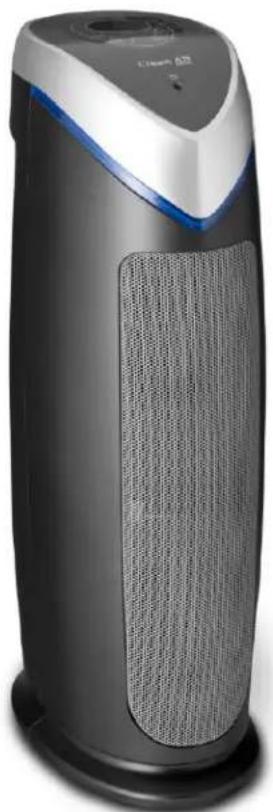
natural_image
Exterior view of a modern air purifier with a black body and blue handle (no visible text or symbols)Read these instructions carefully before you start using the air purifier and keep the manual for later usage.
Introduction
Clean Air Optima wishes to thank you for purchasing this unique air purifier with high quality technology. We live in times where air pollution, viruses and particulate matter seem to be an unavoidable threat for our wellbeing. Clean Air Optima offers an air purifier that represents an affordable and efficient answer to this threat.
In your new air purifier, several technologies have been combined in order to filter small dust particulates and biological particulates out of the air. The device eliminates unicellular organisms, as well as viruses and bacteria floating in the air by means of UV-C light and it purifies the air from unwanted and harmful particulates.
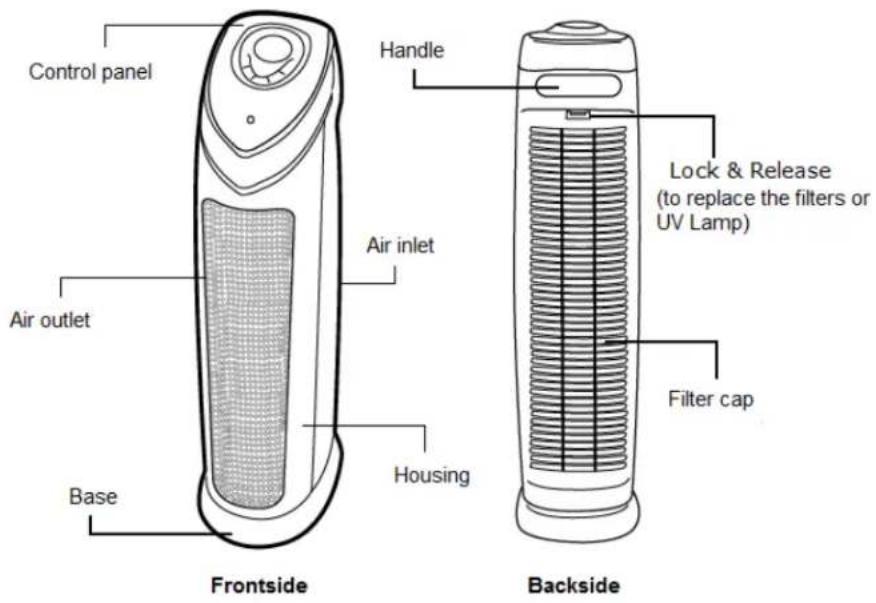
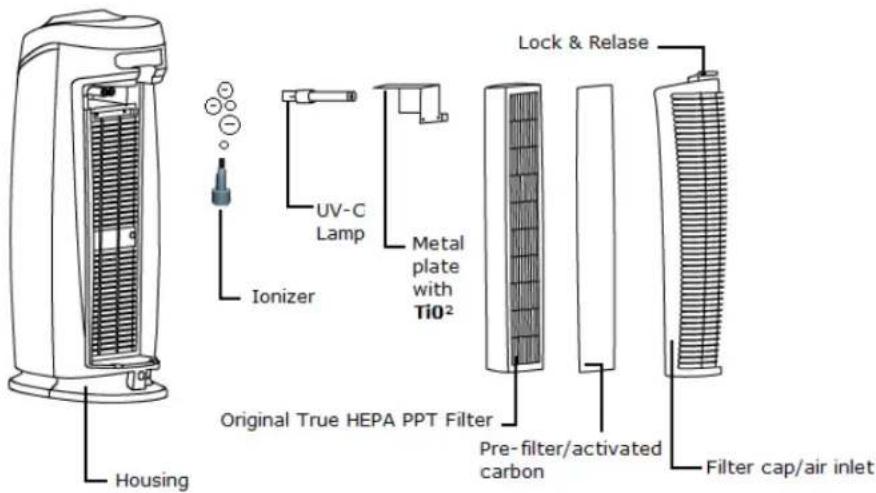
Technical diagram and components of the CA-506
Before use
Features
The Clean Air Optima CA-506 includes 6 filter technologies and is 100% ozone free.
Activated carbon pre-filter
The pre-filter catches big particulates like: lint, hair and dander from pets.
Activated carbon neutralises smoke, chemicals, gases and smells, it prevents the development of bacteria, viruses and mold. The activated carbon pre-filter extends the durability of the TRUE HEPA filter.
Filter combination
Original True HEPA + Pet Pure Treatment: True HEPA catches 99.97% of all floating particulates and allergens like dander of pets, dust mites, pollen, bacteria and viruses >0,3 micron. The Pet Pure Treatment (PPT) is a filter coating to which an antimicrobial substance was added to prevent the development of mold, mildew, bacteria causing smells on the surface of the filter.
UV-C light combined with titanium dioxide
UV-C light technology works in combination with titanium dioxide (TiO ^2 ) to eliminate bacteria and viruses floating in the air. TiO ^2 is activated by the UV-C light to neutralize smell molecules caused by smoking, cooking and pets.
Ionizer
This powerful ionizer produces more than 6.000.000 negative ions/cm ^3 (known as "vitamins of the air") to purify and refresh indoor air. It purifies air from dust, cigarette smoke, pollen, mold and harmful gases.
Air purification method
Warning
Take the following steps to minimize the risk of personal injury caused by for example electric shocks or fire.
- Only for indoor use.
- Pull the plug when you do not use the device or when you clean internal or external parts of it.
-
Use, maintain and clean the device as described in this manual.
-
Do not use the device when there is visible damage on the electrical cord, the UV lamp or on the device itself. Do not repair the device yourself in case of damage.
-
Make sure that the air outlets are always free, clean up dust, hair and other obstruction for the airflow and at the air outlets.
-
Keep your hair, clothes, jewels or fingers away from the air outlets.
-
Do not stick sharp objects through the grid as it can result in failures or electric shocks.
-
Do not use the device in rooms where inflammable liquids or gases are stored, close to heat sources or in particularly humid rooms like the bathroom.
-
Touch the device only with dry hands.
-
Pay attention to damages on the electrical cord. Never pull the device by its cord.
-
Bring discarded devices to the appropriate collecting points. Prevent children from opening the device. The device is not a toy. Children may only use the device under the surveillance of an adult.
-
The UV-C lamp in the device produces UV-C radiation which can be harmful for skin and eyes during direct contact. Never look directly into the UV-C lamp and never put your face close to the grid at front side or the backside. Never use the lamp for other purposes.
Usage
Placement
- Get the air purifier and the filter out of the package and place the filter into the device. Attention: pay attention to the arrow on the filter in order to place the filter correctly.
- Position the device on a solid, flat and straight base.
- The device needs to be positioned at least 30 cm from the walls and furniture to obtain good air flow.
- Make sure that the front air outlet of the device is positioned away from the closest wall or piece of furniture. Make sure that the air in-and outlets are not blocked.
- Insert the plug into the socket.
- Never pull up the device by its loose parts.
Operation
- Make sure that the filters are placed correctly and that all components are snapped.
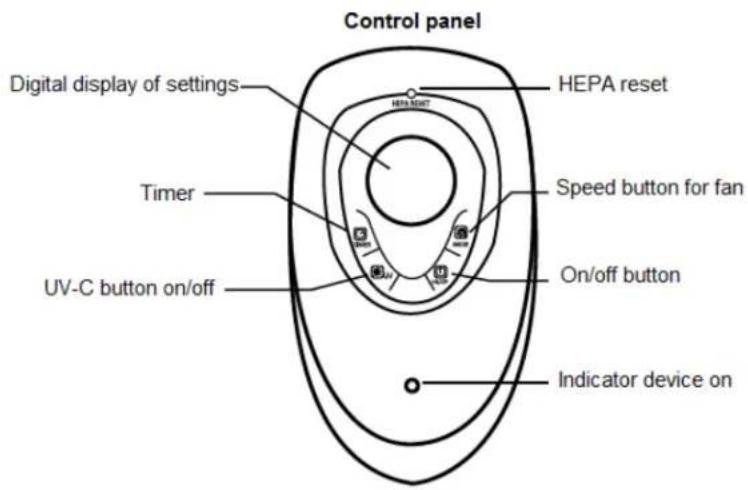
- Use the ON/OFF button on top of the device to switch it on and off.
- Use the MODE button to install the level of purification 1 to 5. 1 = low, 5 = high. LED lights will lighten up and display which level you selected.
Choose the right setting depending on the size of the room and the level of air pollution. If you place the air purifier in a smaller room, for example the bedroom, level 1 is sufficient.
- Press on the TIMER button to set the timer to "switch of automatically" in a range between 1, 2, 3, 4, 5, 6, 7 and 8 hours. The number of hours selected can be read on the display of the timer.
- Press on the UV button to switch the UV lamp on and off.
Tested technology
UV sterilization technology is accepted for more than fifty years and it has been proven that it can considerably reduce the number of bacteria and polluting substances in the air safely.
Longevity
The extremely efficient UV lamp only needs to be replaced after 8.000 working hours. If you use the UV lamp 24 hours a day, you can use it for 12 months. The UV lamp can easily be replaced.
Cleaning and maintenance
Cleaning the outside of the device
- Switch off the device and pull the plug.
- Use a soft and humid piece of cloth to clean the device from dust and dirt.
- Make sure that no water gets into the device.
Replacement of filters
The Clean Air Optima air purifier CA-506 is equipped with a filter monitor that shows when the filters need to be replaced. When the moment of replacement has come, the air purifier will make a 30 seconds long sound after which the HEPA RESET lamp will lighten up. Replace the filters according to the instructions below. Restart the air purifier by resetting: after the replacement of the filters, insert the top of a pen into the HEPA RESET area on the control panel to restart the system.
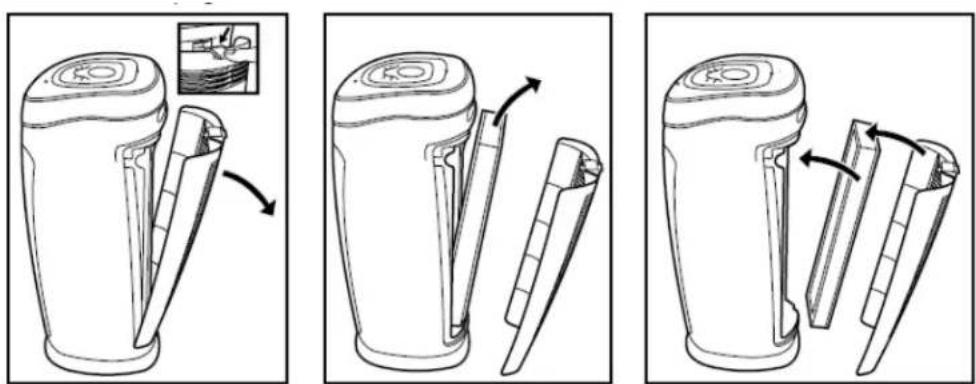
- Switch out the device and pull the plug.
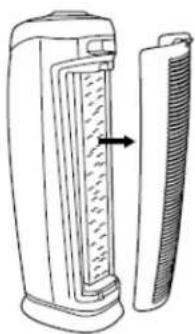
- Press on the release button and remove the rear cover.
- Remove the used activated carbon pre-filter.
- Remove the used HEPA filter from the device.
- Unpack the new filters.
- Position the HEPA filter into the purifier (pay attention to the arrow on the filter for the correct direction).
- Position the activated carbon filter into the back part of the device.
- Position the rear cover and press until it snaps.
Depending on the use, the HEPA filter has a lifespan of 6-8 months and the activated carbon pre-filter can be used during around 12 months. Filter cleaning: the best effect is reached by cleaning the filters once a month. If indoor air is extremely polluted, more cleaning can be required.
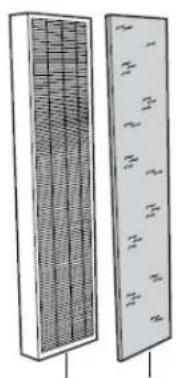
Clean the activated carbon pre-filter and the HEPA filter with a brush or your vacuum cleaner. That way bigger dust particles like lint, hair and dander of pets can be removed from the filter.
Combination filter
natural_image
Two vertical panels showing a grid-patterned panel on the left and a grid-patterned panel with labeled sections on the right (no text or symbols present)True HEPA+PPT
Pre-filter/activated carbon
natural_image
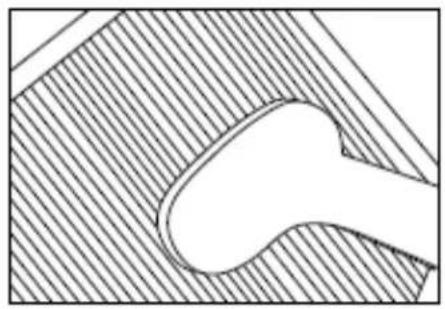
Pure technical diagram showing a curved pipe or channel within a hatched rectangular area, without any text, numbers, or symbols.Signs for used up filters: increased sound, reduced air flow, congested filters, rising presence of smells. The filter needs to be replaced by a new one when the HEPA filter changes its color from white to grey or black. If the HEPA filter remains white, there is NO need to replace the filter.
Warning Do never wet or rinse the HEPA filter with water.
How to order filters:
Contact Clean Air Optima Customer Service tel. + 31(0) 742670145 or visit our webshop: https://www.cleanairoptima.com
Replace the UV-C lamp
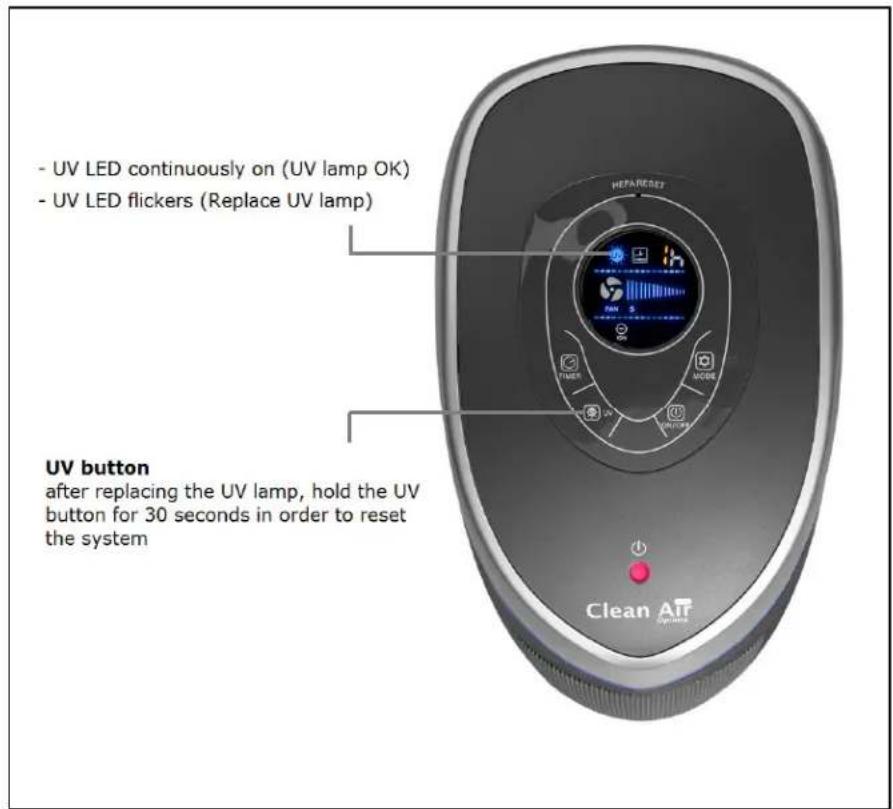
The Clean Air Optima Air purifier CA-506 is equipped with a lifetime surveillance system that indicates when the UV lamp needs to be replaced. When the lamp needs to be changed, the purifier makes a sound during 30 seconds after which the "UV LED" lamp on the display flickers. Follow the instructions underneath to replace the UV lamp. Restart the air purifier by resetting the device: hold the UV button during 30 seconds on the control panel in order to restart the UV lamp lifetime surveillance system.
natural_image
Diagram of a portable electric heater with a side-mounted comb and a side-mounted blade (no text or symbols)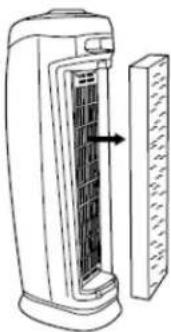
natural_image
Line drawing of a portable electric heater with a side panel showing internal structure (no text or symbols)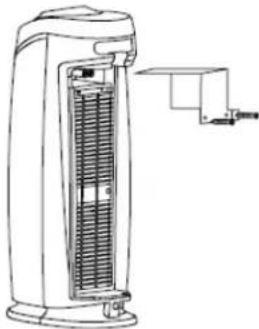
natural_image
Line drawing of a portable electric heater with cooling fins and a side arm (no text or symbols)- Switch of the device and pull the plug
- Press on the release button and remove the rear cover from the device
- Remove the filters
-
Remove the screws from the TiO ^2 metallic protection plate with a screwdriver
-
U can remove the UV-C lamp by softly pulling the lamp with a clean cloth or tissue
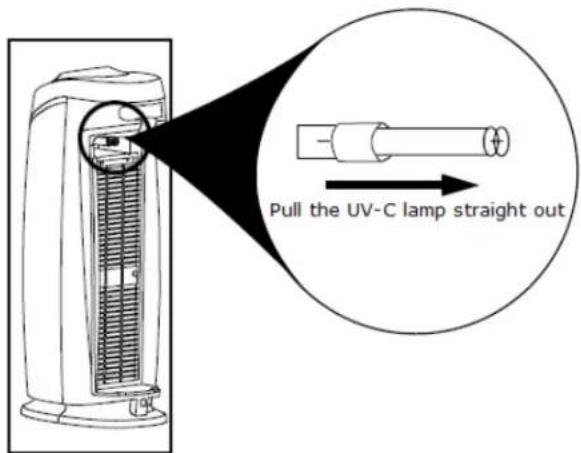
- Reposition the UV-C lamp straight into the slot to snap it
The UV-C lamp of the Clean Air Optima air purifier CA-506 has a lifespan of 8.000 hours = 1 year of 24/7 usage
Order the UV-C lamp
Contact Clean Air Optima Customer Service tel. +31(0) 742670145 or visit our webshop: https://www.cleanairoptima.com
Problem resolution
| Problem Solution | |
| The device does not work Make sure the device is plugged in | |
| The device switches itself off Make sure the device is plugged in and the socket worksCheck whether the HEPA filter is well positioned in the deviceCheck whether the rear cover is snapped | |
| No air circulation Unplug the device. Check whether the activated carbon pre-filterand the HEPA filter are clean. Replace them if necessary | |
| Intensified noise Make sure that the filters are clean. Replace them if necessary. | |
| Long beeping It is time to replace the filters, see chapter "Cleaning and maintenance" | |
Specifications
- Ideal for rooms from up to 60m^2 / 150m^3 (645ft²)
• AHAM certified for rooms up to 20,4m² (220ft²)
Maximum CADR: 131cfm (Dust)
• 6-fold filter technology, 100% ozone free
• True HEPA filter capacity: > 99.97% of all particulate matter of 3 micron or bigger
• True HEPA filter surface: 0.75m² (8.07ft²)
• True HEPA filter provided with PTT (Pet Pure Treatment) coating
• UVC wavelength 254nm
• UVC spectrum >12 W/cm ^2 (on 1 meter distance)
• Fan capacity ca.220 m³/h
• Silent fan ca. 38 dB(A) (Low), 60 dB(A) (HI) - 5 speed levels
- 8 hours timer
• Voltage AC 220V-240V/50Hz
• Maximum power consumption 48 watt - Purifies, enriches and refreshes indoor air with 6.000.000 negative ions/cm ^3
• Digital control panel
• Dimensions 25,6 x 17,0 x 55cm
• Colours dark grey / silver grey - Weight 4kg
Filter spectrum
Dust / dust mite / particulates / bird dust, bacteria, germs / viruses, pollen and other allergens, mildew, mold spores, cigarette smoke, chemicals and volatile organic compounds (VOCs), as well as smells.
What does HEPA mean?
HEPA signifies High Efficiency Particulate Air. HEPA filters are the most effective filters that can be found on the market. Clean Air Optima true HEPA filters catch 99.97% of all particulate matter with the size of 3 microns or bigger passing through the filter.
What does CADR mean?
CADR or Clean Air Delivery Rate describes the amount of purified air (measured in cubic feet per minute or CFM) that an air purifier can deliver to a room. A high CADR shows a high capacity to deliver purified and clean air to the room.
CADR: 112 (cigarette smoke) - CADR: 131 (dust) - CADR: 123 (pollen)
What is AHAM

AHAM (Association of Home Appliance Manufacturers) is an independent organisation that checks the test results of household appliances like air purifiers. AHAM is located in the US and certifies to the client that the Clean Air Delivery Rate (CADR) has been verified independently and is conform to ANSI /AHAM -1 "Method for measuring the performance of portable air purifiers".

Ask your retailer or your municipality for updated information regarding the disposal of the packaging and of the device.
Service
WARRANTY CERTIFICATE FOR THE Clean Air Optima CA-506
HEPA UV Ionizer Air Purifier
Date of purchase: ....
Customers name: ....
Address: ....
Telephone: ....
Email:
Seller's name: ....
Address: ....
-
Please fill in completely this Warranty Certificate. Send it with the invoice and the unit, postage pre-paid and using the original packing box, to your distributor. Make sure to include the appropriate return postage for the package.
-
Please enclose a short description of the damage, fault or malfunction, and the circumstances under which these problems arose.
The Clean Air Optima CA-506 is subjected to strict testing procedures before leaving the factory. If within one year from the date of purchase the product does not perform according to the specifications, because of factory defects, the purchaser is entitled to free repairs or replacement of parts upon presentation of this warranty (provided that the malfunction or damage to the device and/or parts occurred under normal operating conditions). What is covered: All parts defective in material and workmanship. For how long: one year from purchase date. What we will do: Repair or replace any defective parts. Exclusions: Regular replacement filters and UV-C Lamp.
Other Conditions
The provisions of this warranty are in lieu of any other written warranty whether express or implied, written or oral, including any warranty of merchantability or fitness for a particular purpose. The manufacturer's maximum liability shall not exceed the actual purchase price paid by you for the product. In no event shall the manufacturer be liable for special, incidental, consequential, or indirect damages. This warranty does not cover a defect that has resulted from improper or unreasonable use or maintenance, faulty assembly, accident, natural catastrophes,
improper packing, or unauthorized tampering, alteration, or modification as determined solely by us. This warranty is void if the label bearing the serial number has been removed or defaced.
Clean Air Optima®
Clean Air Optima HEPA UV Ionisator Luchtreiniger CA-506
Handleiding
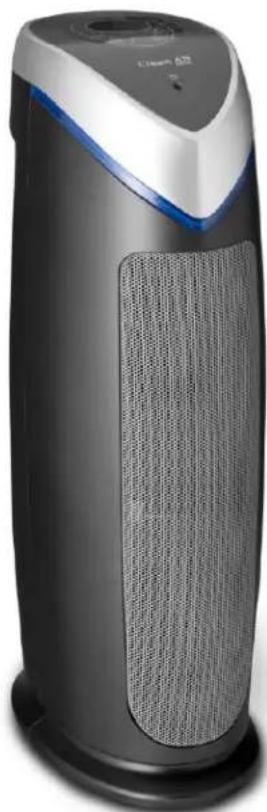
natural_image
Exterior view of a modern air purifier with a mesh grille and blue handle (no visible text or symbols)natural_image
Three-step line drawing of a blender with handle, showing internal structure and rotation (no text or symbols)info@cleanair-online.nl
www.cleanair-online.nl
Clean Air Optima®
Clean Air Optima HEPA UV Ionisator Luftreiniger CA-506
Bedienungsanleitung
natural_image
Exterior view of a modern air purifier with a clear blue cover and mesh grille (no text or symbols visible)natural_image
Line drawing of a portable blender with a handle and lid, showing a curved arrow indicating rotation (no text or symbols)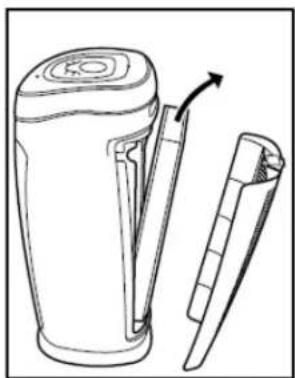
natural_image
Line drawing of a portable electronic device with a handle and spout, showing internal structure and an arrow indicating rotation (no text or symbols)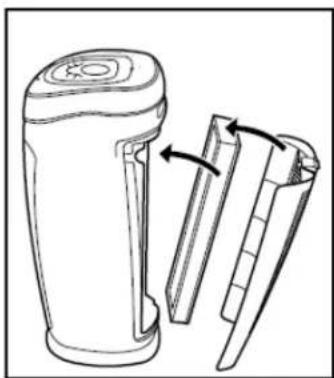
natural_image
Line drawing of a portable electronic device with two blades and a handle, showing internal structure (no text or symbols)AT: https://www.cleanairoptima.at
CH: https://www.cleanairoptima.ch
natural_image
Line drawings of three different types of air purifiers: a front-mounted tower, a side-mounted heater, and a power filter (no text or symbols present)natural_image
Exterior view of a modern air purifier with textured back panel and blue handle (no visible text or symbols)natural_image
Three-step line drawing of a blender with open lid, showing body and neck adjustment (no text or symbols)natural_image
Pure technical diagram of a mechanical component with hatched fill and centerline (no text or symbols)natural_image
Line drawings of three different types of air purifiers, showing front, side, and side views with no text or symbols.Clean Air Service Center / ALTES
natural_image
Exterior view of a modern air purifier with a gray body and blue handle (no visible text or symbols)© Copyright : Clean Air tptima
Úvod
natural_image
Line drawing of a blender with a handle and arrow indicating rotation (no text or symbols)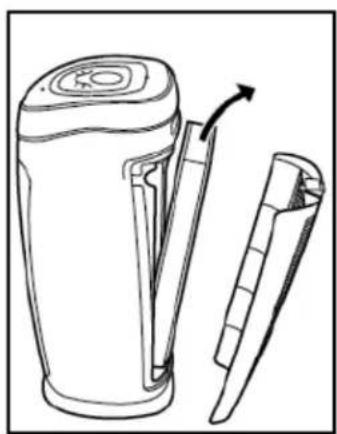
natural_image
Line drawing of a portable blender with a handle and spout, showing internal structure and an arrow indicating rotation (no text or symbols)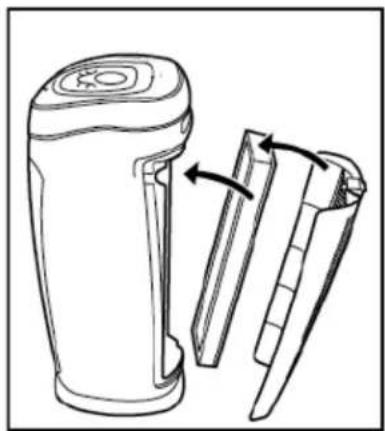
natural_image
Line drawing of a portable electronic device with two blades and a handle, showing internal structure (no text or symbols)natural_image
Two vertical panels with grid patterns, one showing a mesh structure and the other a simple diagram of a grid-like structure (no text or symbols)natural_image
Pure technical diagram of a mechanical component with hatched background (no text or symbols)natural_image
Exterior view of a modern air purifier with a gray body and blue handle (no visible text or symbols)natural_image
Three-step line drawing of a blender with handle, showing internal structure and rotation (no text or symbols)natural_image
Two vertical panels showing a grid-patterned panel on the left and a grid-patterned panel with labeled sections on the right (no text or symbols present)natural_image
Abstract geometric diagram with diagonal hatching and a curved shape inside (no text or symbols)natural_image
Line drawings of three different types of air purifiers, showing internal structure and mounting mechanism (no text or symbols)natural_image
Exterior view of a modern air purifier with a black body and blue handle (no visible text or symbols)Manual de utilizare
CE
RO
natural_image
Three-step illustration of a blender with handle, showing step-by-step assembly and rotation (no text or symbols)natural_image
Line drawings of three different types of air purifiers or thermoseters, showing internal structure and mounting bracket (no text or symbols)
- Clean Air Optima HEPA UV ionizer air purifier CA-506
- Introduction
- Technical diagram and components of the CA-506
- Before use
- Features
- Activated carbon pre-filter
- Filter combination
- UV-C light combined with titanium dioxide
- Ionizer
- Warning
- Usage
- Placement
- Operation
- Tested technology
- Longevity
- Cleaning and maintenance
- Cleaning the outside of the device
- Replacement of filters
- How to order filters:
- Replace the UV-C lamp
- Problem resolution
- Specifications
- Filter spectrum
- What does HEPA mean?
- What does CADR mean?
- What is AHAM
- Service
- WARRANTY CERTIFICATE FOR THE Clean Air Optima CA-506
- HEPA UV Ionizer Air Purifier
- Other Conditions
- Clean Air Optima®
- Clean Air Optima HEPA UV Ionisator Luchtreiniger CA-506
- Clean Air Optima HEPA UV Ionisator Luftreiniger CA-506
- Clean Air Service Center / ALTES
- Úvod
Brand : Clean Air Optima
Model : CA-506
Category : Air purifier