3 Side Water Shave - Shaver TAURUS - Free user manual and instructions
Find the device manual for free 3 Side Water Shave TAURUS in PDF.


| Product type | Electric shaver |
| Brand | Taurus |
| Model | 3 Side Water Shave |
| Usage | Dry and under water (Water Shave) |
| Power source | Rechargeable Li-ion battery, mains charger included |
| Charging time | Approximately 90 minutes |
| Battery life | Indicated by LED, reminder when less than 5 minutes |
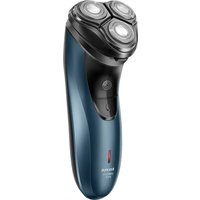
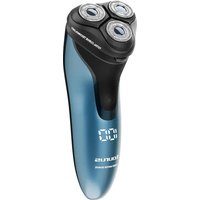
| Shaving system | 3 rotating heads with ring blades |
| Functions | Shaving, integrated sideburn trimmer, LED display, travel lock |
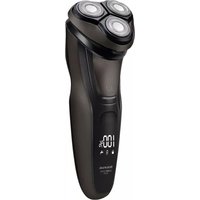
| LED display | Battery indicator, charging, use, travel lock, cleaning reminder |
| Maintenance | Brush cleaning or rinsing under water, removable blades |
| Supplied accessories | Protective cover, cleaning brush, charger |
| Safety | Travel lock, sharp blades, use on mains and battery |
| Spare parts | Replacement blades available separately |
| Repairability | Battery replaceable only by authorized service |
| Weight | Approximately 0.2 kg (estimate) |
| Dimensions (L x W x H) | Approximately 16 x 5 x 5 cm (estimate) |
Frequently Asked Questions - 3 Side Water Shave TAURUS
User questions about 3 Side Water Shave TAURUS
0 question about this device. Answer the ones you know or ask your own.
Ask a new question about this device
Download the instructions for your Shaver in PDF format for free! Find your manual 3 Side Water Shave - TAURUS and take your electronic device back in hand. On this page are published all the documents necessary for the use of your device. 3 Side Water Shave by TAURUS.
USER MANUAL 3 Side Water Shave TAURUS
EN. Instructions for use
FR. Mode d'emploi
English (Original instructions)
SHAYER
3 SIDE WATER SHAVE
DESCRIPTION
A Body
B Shaving unit
C Individual ring blades
D Shaving unit release button
E ON/OFF button
F LED display
F1 Battery and use indicator
F2 Travel lock
F3 Need of charge indicator
F4 Fully charged indicator
F5 Cleaning reminder
G Sideburn trimmer
H Sideburn trimmer release button
I Charging port
J Protective cover
K Cleaning brush
L Charger
If the model of your appliance does not have the accessories described above, they can also be bought separately from the Technical Assistance Service.
USE AND CARE
- Fully extend the appliance's supply cord before each use.
- Do not use the appliance if its accessories are not properly fitted.
-
Do not use the appliance if its accessories attached to it are defective. Replace them immediately.
-
Do not use the appliance if on/off button doesn't work.
- Disconnect the battery charger from the mains when not in use, before undertaking any cleaning task make any adjustment or accessory change.
- Store this appliance out of reach of children and/or persons with physical, sensory or reduced mental or lack of experience and knowledge.
- Keep the appliance in good condition. Check that the moving parts are not misaligned or jammed and make sure there are no broken parts or anomalies that may prevent the appliance from operating correctly.
- Pay special attention when assembling and removing the accessories, as the blades are sharp. Be careful and avoid direct contact with the blades' cutting edges.
- Never leave the appliance connected and unattended if is not in use. This saves energy and prolongs the life of the appliance.
- Keep children and bystanders away when using this appliance.
- Do not use the appliance with pets or animals.
- Do not open the batteries under any circumstances whatsoever.
- Recharge the batteries only with the charger supplied by the manufacturer. A charger that is suitable for one typ of battery may cause explosion or fire hazard when used with other batteries.
- Use the device only with the batteries for which has been specifically designed. The use of any other batteries can cause an explosion or fire hazard.
CHARGING THE BATTERY
Caution: A new battery is not fully charged and must therefore be charged before the appliance is used for the first time.
- Charge the battery at an atmospheric temperature of between 0 and 40^ .
- Connect the charger (L) to the jack using the socket on the appliance. The socket is located at the lower part of the appliance. (I).
- Plug the charger (L) into the mains.
- The charge indicator (F3) will come on to indicate that the charger is charging the battery. (Fig. 1).
-
Approximately 90 minutes are needed for a complete charger of the battery.
-
When the battery is charged disconnect the charger from the mains supply.
HOW TO CHECK THE BATTERY'S CHARGE LEVEL
- The fully charged indicator (F4) will light when the appliance is completely charged. (Fig. 2).
- When the battery power is less than 5 minutes, the need of charge indicator (F3) will flash.
- When you press the on/off button (E), the LED display (F) will show the available time left (F1).
- When you stop the appliance, the LED display (F) will show the time it has been running.
NOTE: For a long battery life, it is advisable to charge the battery only when it has run out completely.
INSTRUCTIONS FOR USE
BEFORE USE
- Make sure that all product's packaging has been removed.
- Please read carefully the "Safety advice and warnings" booklet before first use.
- Before using this product for the first time, it is important to make a full charge of batteries.
USE
- The appliance can be used directly connected to the mains or by using his batteries.
- Extend the supply cord completely before plugging it in.
- Connect the appliance to the mains.
- Remove the protective cover (J).
- Make sure that the blades are correctly aligned.
- Turn the appliance on, by using the on/off button (E).
- Move the shaving heads over the skiing using gentle circular movements.
-
Go against the direction of the facial hair growing, or shave in the same direction if your skin is sensitive.
-
For trimming the sideburn and moustache, push down the sideburn trimmer release button (H) and move it downwards applying gentle pressure. (Fig. 4).
ONCE YOU HAVE FINISHED USING THE APPLIANCE
- Turn the appliance off using the on/off button (E).
- Unplug the appliance from the mains.
- Clean the appliance.
- Put on the protective cover (J).
TRAVEL LOCK
- The travel lock function can be activated with the appliance on or off.
- To block the appliance, press and hold the on/off button (E) for 3 seconds. A countdown will show in the display and a padlock (F2) will appear on the display along with 4 beeps. (Fig. 3).
- To unlock, press and hold the on/off button (E) and after 3 seconds the appliance will be switched on. The padlock will dissappear along 4 beeps.
CLEANING
- Disconnect the battery charger from the mains and allow it to cool before undertaking any cleaning task.
- Clean the equipment with a damp cloth with a few drops of washing-up liquid and then dry.
- Do not use solvents, or products with an acid or base pH such as bleach, or abrasive products, for cleaning the appliance.
- During the cleaning process, take special care with the blades, as they are very sharp.
- If the appliance is not in good condition of cleanliness, its surface may degrade and inexorably affect the duration of the appliance's useful life and could become unsafe to us.
- Press the release button (D) to open the shaving unit. (Fig. 5).
-
Pull out the shaving unit from the shaver. (Fig. 6).
-
Turn the locking device (1) counterclockwise and then pull upwards the retaining frame (2). (Fig. 7).
- Gently take out and clean the individual ring blades one by one, being careful not to touch de blades. (Fig. 8).
- Remove the blade from the housing unit and use the brush for cleaning (K). (Fig. 9).
- Remove the hairs from the blades and from inside the appliance with the brush. It is important to clean off remaining hairs after each use.
- Put the retaining frame back into the shaving unit (2) and turn the locking device clockwise.
- Put back the shaving unit in the shaver. (Fig. 10).
Attention: Do not clean more than one cutter at a time, since they are all matching sets. Is you accidentally interchange the cutter, it could influence the shaving results.
FOR A QUICK CLEANING
- The appliance has a cleaning reminder function.
- If the appliance has been used for more than 30 minutes, the cleaning reminder icon (F5) will flash in the LED display (F).
- Press the release button (D) to open the shaving unit. (Fig. 5).
- Rinse the shaver head under the tap. (Fig. 11).
HOW TO REMOVE THE BATTERIES FROM THE INTERIOR OF THE DEVICE
- This appliance contains batteries that are only replaceable by skilled persons.
- In case you need to replace the batteries, take the appliance to an authorised technical support service. Do not try to dismantle or repair without assistance, as this may be dangerous.
FR
6bIrapck (PpeBOD Ha n3BbpseHnTe nHCTpyKuIN)
SHAYER
3 SIDE WATER SHAVE
ONUCAHNE
A Body
B YcTpoIcTBo 3a 6pbCHeHe
C INHINBnDyaJIHn OCTpneTa Ha npbCTeHa
D Byton 3a ocbo6oxdaBaHe Ha ypeHa 3a 6pbchene
E ByToH ON/OFF
F LED dincpnei
F1 INdkatop 3a 6atepy n ynoTpe6a
F2 3aknueBaHe npn nTsyBaHe
F3 Heo6xoIIMOCT OT INHnKaTOp 3a 3apeJdaHe
F4 INIkaTOp 3a nBnHO 3apeKdaHe
F5 HanomHnHe 3a nouCTBaHe
G Tpimep 3a 6aKeH6apdN
H ByToH 3a ocB6oxkDaBaHe Ha TpImepa 3a CtpaHnUHa I3BnBKa
I NopT 3a 3apeKdane
J 3aunTHo nokpntne
K YeTeKa 3a noUncTbaHe
L 3apyIHO yCTPOIcTBO
Ako moJeBt Ha BaShna ypeH He pa3noJara c onncaHnte no-rope akcecoap, Te MoRaT Da 6bDaT 3aKyIeHn OTdEJIHO OT Cnyk6bata 3a TexHnuecka nOMoU.
YNOTPEBAI IPRXKU
-
PpeiBcraKa ynoTpe6a n3dbpnaIte HnblHo 3axpaHbauJn Ka6eJ Ha ypeJa.
He n3noI3BaIte ypea, ako npnaIaeXHOCTnte My He ca npabUNHO MOHTnpaH.
He n3no3BaIte ypeia, ako npikpeHnTe KbM Hero akcecoapu ca depeKTTH. He3a6abHO rncmehe.
He n3noI3BaIte ypea, ako 6yToHbT 3a BkIIOUbaHe/IN3KIIIOUbaHe He pa6OTn. -
I3KJIIOUeTe 3apAINOTO yCTpOiCTBO OT eIeKTPnueCKaTa MpeXa, KOraTO He rO n3NoJ3BaTe, npEi Da n3BbPWBaTe NOuNCTBaHe, HAcTPOiKa NII CMraHa Ha akcecoapn.
- CbxpahraBaiTe To3n ypei Ha MAcTo, HeoocTbHNO 3a Deca N/Inn IuCa c fN3nueckn, ceH3OpHn INn YMCTBeHn YBpeKdAnHn INn C InnCa Ha ONNT INo3HaHn.
- PóndbpxaIte ypeDa B do6po cBCTOHNHe. IpOBepTe daIIN DnBXeUHTe ce YactN He ca HEnpaBUNHO NOpeHn IJN 3akJeUeHN i Ce yBepTe, Ye HЯMa CuyneHn Yactn IJN aHOMaJIIn, KOnTO MORAT Da nonpeuat Ha npabunHaTa pa6ota Ha ypeDa.
- OБьрhte сециално виманце ри сглобаянeto и CBалянeto ha akcecoapnte, Тьн кato OCTPNETATA ca octpn. Бдete вимателпи И n36ЯВайт epякшт epekeunte pboboe ha octPNETATA.
- Hnkora He octabraiyepea cBbp3an n 6e3 na3op, ako He ce n3no13Ba. Taka ce neCTn eheprna n ce ydbIkaBA XNBOTbT Ha ypeda.
Korato n3no3BaTe To3n ypeD, He dOnyckaTe Deca N BbHsHn Jnua. - He n3noJ3BaIe Te ypeDa c DomaHn IIO6mUu INN JxIBOTn.
- He otbaprnte 6aTeepnnte npn HkaBn o6ctoTeIcTba.
- 3apexdaIte 6aTePnIte cAmO cbc 3apJHOTo yCTPOJCTBO,doCTaBeHO OT npOn3BODNTeJI. 3apJHOTo yCTPOJCTBO, KOeTO e NOxOJaIO 3a eINH TnIb 6aTePnI,MOKe Da IpeIN3BnKa ekCnIO3Nr INI ONaCHOCT OT NOXAp, KOrato ce n3NoI3Ba C dpyr6aTePnI.
- Изпольайу устюговамсбатугшт,за кочTOTo e cneцално\ празнадзаяше.Изпольданeto на дугбатерш може ддовед do onachoct OT ekсллория пожар.
3APEXДАНЕ HA BATEPЯТA
BnmaHne: Hobata 6atepna He e HantbIHO 3apeHa n 3aTOba Tpr6Ba da ce 3apeu npedi nbpBOTO n3noI3BaHe Ha ypeDa.
3apejdaite 6atepna npn atmocepha tempepatya mekdy 0 n 40^
Cbpxte 3apHOTO yctpoiCTBO (L) KbM rHe3dOTO, KaTO n3PON3BaTe rHe3dOTO Haypea. rHe3dOTO e pa3noJoxeHO BdoHaTa qact Ha ypea. (I).
BknHoeTe 3apnHTo yCtpoNCTBO (L) KbM eIeKtpnueckata mpeka.
- Иndикаторьт 3a зараздане (F3) щe сбетнe, 3a за пokжe, щe заюустю заразда bateрята. (Фиг. 1).
3a nblnoTo 3apejdahe Ha 6atepnaTa ca Heo6xoJIMn OkOIO 90 MInHyTN.
Korato 6atepnaTa e 3apeHa, n3KnHouTe 3apAnHOyCTPOIcTBO OT eNeKtpnueckata MpeKa.
KAK DA IPOBEPUTE HNBOTO HA 3APRA HA BATEPNA
- INdikatopbT 3a nbNHO 3apejdahe (F4) ue cBeTHe, KOrato ypeIbTe haNbJH0 3apeJeH. (ФИr.2).
Korato 3apaTbHa 6aTeepnTa e No-MaJIbK OT 5 MInHyTN, INHdNKaTOpBbT 3a Heo6xoDmOcT ot 3apeJdahe (F3) ue mira.
Korato HataChete byToHa 3a BkIIOUbaHe/IM3KIOUbaHe (E), CBeTOIOHOHT DnCpJIe (F) 1e nokaxe ocTabaIoTO BpeMe (F1).
Korato cnpete ypea, CBeToIOJHnT DnCpIe (F) ige nokaxe BpeMeTo, npes KOeTO ToE paBoTnI.
3A6EJIEXKKA: 3a no-Дьлг кИВOT ha 6aTePryTa e npenopbYnteHNo daЯ 3apeXdaTe caMo KOraTo ce n3ToUHnHO.
HCTPYKUN 3A YNOTPEBA
IPEIMN3PON3BAHE
- YBepete ce, Ye BCNUKn ONAKOKN Ha npOdykTa ca OTCTpaHeH.
- MoЯ, npoуeTeBnMaTeHNo 6poWypaTa "CbBETn I npeDynpexKdEHNr 3a 6e3OnaChOCT" npeI nPbPbAra ynotpe6a.
-Прешида ИЗПОЛЗВATE TO3ИnpODYКТ 3a ПьрВИ ПБТ, e Вaxно Да habрВITE Пьлно 3apexДанe Ha 6atePnITE.
N3PON3BAITE
- YpeIbT MoKe Ia Ce I3NoI3Ba DnpeKTHO CBbp3aH KbM eIeKTpueckaTa MpeKa IIN C NOMoUta Ha 6aTePm.
- N3terIeTe 3axpaHbAunKa6en HAnbJnHO, npEi Da rO BKJIIOuHTe.
CbpxeTe ypeDa KbM eJektpnueckaT a Mpeka.
Cbaane 3aunTHna kanak (J). -
YBepete ce, ye octpneeta ca npabnHNO noopabHeH.
BkIIOUeTe ypeDa c nOMOHTa Ha 6yToHa 3a BKIIIOUBAHe/IN3KJIIOUBAHe (E). -
PpemeCTe rnaBnTe 3a 6pbcheHe Bbpxy KoxaTa C JeKn KpbroBn DnHexn.
- DeiCTBaIte Cpeu Iocokata Ha pactexa Ha KOCMTe NO IInCeTo INn Ce 6pbchete B CbUaTApocoka, aKO KOxata BN e UyBCTBNTenHa.
3a noDCTpRBAHe Ha 6akeH6apDnTe N MyCTaUte HATNCHEte HADOny 6byToHa 3a ocbo6oxdabaHe Ha TpImepa 3a 6akeH6apDn (H) n ro npemeCteTe HADOny, KaTo ynpaxnBaTe Jek HATnck. (ΦnR.4).
CJIeI IPIKJIIOUBAHE HA N3PON3BAHETO HA YPEDA
- N3KJIIOUeTe ypeDa c NOMOuTa Ha 6yToHa 3a BkIIOUBaHe/N3KJIIOUBaHe (E).
-ИЗключeteуpeаotelneKtpnueckaTмржа.
-Поочтeteурда.
-Пoctabete 3auntnna KaanK (J).
KAK PPOBEPNTb YPOBEHb 3APYdA AKKYMUTOPA
- Инданкатор понол зарядки (F4) загорпся, когда прибор будет поностью заряжен. (pnc. 2).
- Ecni 3apd 6atapen coctabnaret Mehee 5 MNHyT, Mnaet INHdkatop Heo6xOIMOCTN 3apdKn (F3).
Korda Bbl HaxMeTe KHOJky BKIOUeHnry/BbIKIOUeHnry (E), Ha CBeToIIOHOM DIncPJIee (F) OTo6pa3NTcR ocTabWeecr BpeM (F1).
Korda Bbl octahOBITE npnbop,Ha CBeToIOHOHOM dncnnee (F) 6ydt noka3aHo Bpemerao paobtbi.
NAR DU ER FERDIG MED AT BRUGE APPARATET
NAR DU HAR SLUTAT ANVANDA APPARATEN
(3) 4 by nynnna (F2) bn bnynnnna nn
·y7
477777
77
·nwn
.
·yNnX,
.wwnnn,
.
·ynnx
nny nna nn byn wann nn
·(57x).m
·(67x).n
·n
(77x)(2)
X) .n nn n nn nn nn nn nn nn nn nn nn
(8
.(9) .(K) nwnn nnnnn nn
nynnnn nnpn .nwnnnn nnw nwnn nn nwnn nn
.www 1nnn
.ynn nny npnn nn (2) nnn nnn nnn nn nn
.(10)
ribn w nyon nn nx pna
wov wov wov wov wov wov wov wov
n nn nnnn nn nn nn nn nn nn nn
n nn n nn nn nn nn nn nn nn nn nn nn nn nn nn
a.
.
.
Iului 1 g j aaiu o algo Jia duelg aaoa aogao agdo yg siai all ouiu bgl uui bldy
j_4 = 1 又 a + b = 3 ab( 4 - 3) = 4
a ola lgl 1yol 5u 4u 1u
jglal y jol all ola laloo ly jg jgs aabw gaaa aas .dallil no dyl allo jlgal s
aill j
.5J.
.6J.
.(7J).
Jkill) .iJzIJI JIe Ie Jyollgo. (sJy) 1g aBly gabiaag ydsjll aalll cJzil jy
.8
(9山) .K)
Jaiy jg. jglj 3 1 (E) jy/1 jz j 1 jz j 1 jz j
.4.113 4 gdo