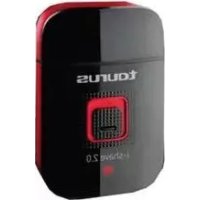
IShave 2.0 - Razor TAURUS - Free user manual and instructions
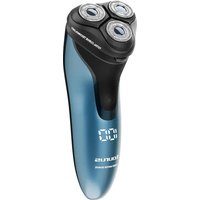
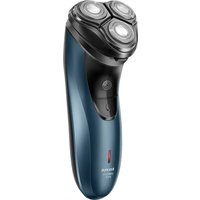
Find the device manual for free IShave 2.0 TAURUS in PDF.



| Product type | Rechargeable electric shaver |
| Brand | Taurus |
| Model | IShave 2.0 |
| Power source | Rechargeable battery (charges via adapter or USB) |
| Charging time | 8 hours (first charge: 10 hours) |
| Input voltage | 100-240 V ~ 50/60 Hz (adapter) |
| Charge indicator | Yes, light indicator |
| Outer blade | Replaceable (recommended once a year) |
| Inner blade | Replaceable (recommended every two years) |
| Included accessories | Adapter, USB cable, cleaning brush, travel case |
| Usage | Dry use only (do not use on wet hair) |
| Cleaning | Disassemble the frame and blades, brush, do not immerse |
| Switch lock | Yes, lock button to prevent accidental start |
| Safety instructions | Do not use near water, wet hands, or in the bath |
| Weight (approximate) | Approximately 200 g |
| Dimensions (approximate) | 16 x 5 x 4 cm |
| Warranty | See provided warranty sheet |
| After-sales service | Contact customer service indicated on the warranty |
Frequently Asked Questions - IShave 2.0 TAURUS
User questions about IShave 2.0 TAURUS
0 question about this device. Answer the ones you know or ask your own.
Ask a new question about this device
Download the instructions for your Razor in PDF format for free! Find your manual IShave 2.0 - TAURUS and take your electronic device back in hand. On this page are published all the documents necessary for the use of your device. IShave 2.0 by TAURUS.
USER MANUAL IShave 2.0 TAURUS
IpeepaKaem3KeTpo6nTBA
Aparat de ras recargabil
3apeKdaa ce MaunHka 3a
noctpnuBaHe
joll 0dy ay ady a
□


E



Espanol
Máquina de afeitar recargable i-Shave 2.0
i
Distinguido paciente:
Many thanks for choosing to purchase a TAURUS brand product.
Thanks to its technology, design and operation and the fact that it exceeds the strictest quality standards, a fully satisfactory use and long product life can be assured.
Description
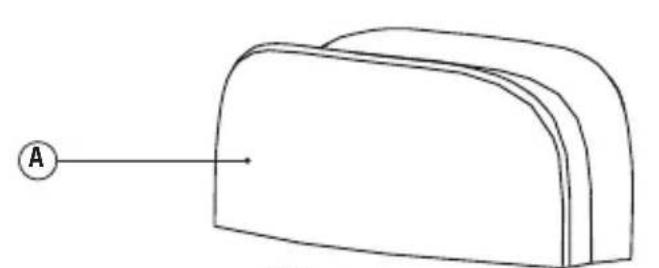
A Protective cap
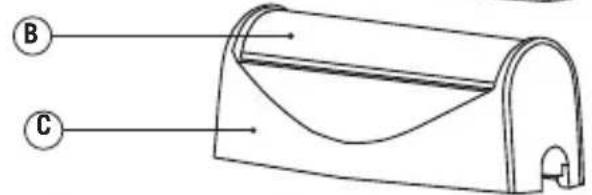
B Outer foil
C Foil frame
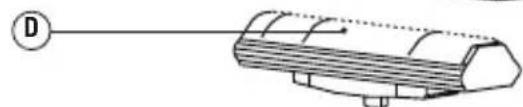
D Inner cutter
E Foil frame release button
F On/off switch
G Switch lock button
H Charging indicator
I USB Interface
J Data line
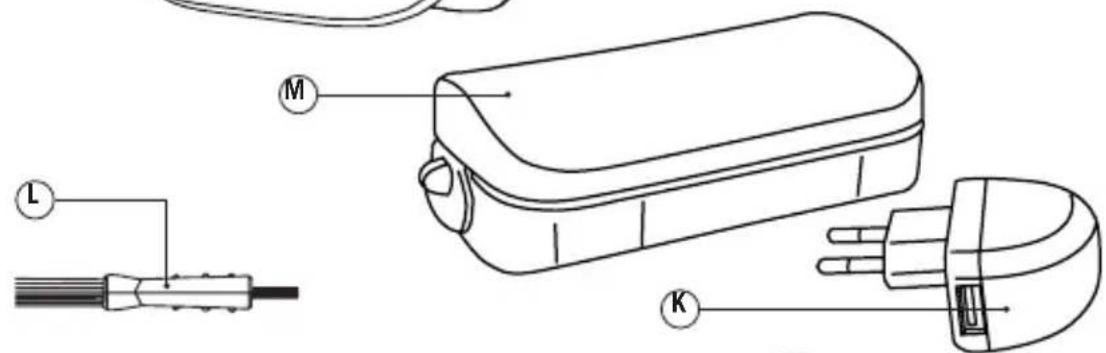
K Adaptor
L Cleaning brush
M Travel case
If the model of your appliance does not have the accessories described above, they can also be bought separately from the Technical Assistance Service.

Safety advice and warnings
- Read these instructions carefully before switching on the appliance and keep them for future reference. Failure to follow and observe these instructions could lead to an accident.
Electrical safety:
-
Do not use the appliance if the cable or plug is damaged.
-
Ensure that the voltage indicated on the rating label matches the mains voltage before plugging in the appliance.
-
Ensure that the voltage indicated on the charger rating label matches the mains voltage before plugging in the charger.
-
Connect the appliance to a socket that can supply a minimum of 10 amperes.
-
Connect the appliance to a base with an earth socket withstanding a minimum of 10 amperes.
-
Connect the appliance to a base with an earth socket withstanding a minimum of 16 amperes.
-
The charger's plug must fit correctly into the mains socket. Do not alter the plug. Do not use plug adaptors.
-
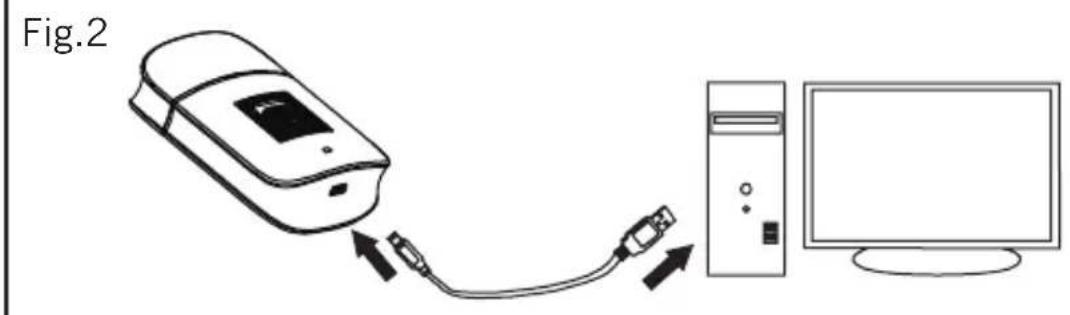
The appliance can also be charged via USB. Connect your USB cable to the USB port on the PC and then connect the USB cable to the appliance.
-
Only use the appliance with the specific electric connector provided.
-
Do not leave the appliance out in the rain or exposed to moisture. If water gets into the appliance, this will increase the risk of electric shock.
-
If any of the appliance casings breaks, immediately disconnect the appliance from the mains to prevent the possibility of an electric shock.
-
Do not use the appliance if it has fallen on the floor, if there are visible signs of damage or if it has a leak.
-
CAUTION: Maintain the appliance
dry.
- CAUTION: Do not use the appliance near water.
- Do not use the appliance near bathtubs, showers or swimming pools.
- Do not use the appliance with damp hands or feet, or when barefooted.
- Do not force the power cord. Never use the power cord to lift up, carry or unplug the battery charger.
- Do not wrap the power cord around the appliance.
- Do not clip or crease the power cord.
- Check the state of the power cord. Damaged or tangled cables increase the risk of electric shock.
- As an additional protection to the electrical supply for the appliance, it is advisable to have a differential current device with a maximum sensitivity of 30mA . Ask for advice from a competent installer.
- Do not touch the plug with wet hands.
Use and care:
- Fully unroll the appliance's power cable before each use.
- Do not use the appliance if the parts or accessories are not properly fitted.
- Do not use the appliance if the accessories or consumables attached to it are defective. Replace them immediately.
- Do not use the appliance on wet hair.
- Do not use the appliance if the on/off switch does not work.
- Disconnect the battery charger from the mains or USB port when not in use and before undertaking any
cleaning task.
- This appliance is for household use only, not professional, industrial use.
- This appliance is intended for adult use. Ensure that this product is not used by the disabled, children or people unused to its handling.
- This appliance should be stored out of reach of children and/or the disabled.
- Do not expose the appliance to extreme temperatures.
- Keep the appliance in a dry, dust-free place, out of direct sunlight.
- Keep the appliance in good condition. Check that the moving parts are not misaligned or jammed and make sure there are no broken parts or anomalies that may prevent the appliance from operating correctly.
- Use the appliance and its accessories and tools in accordance with these instructions, taking into account the working conditions and the work to be performed. Use the appliance for operations different from those intended could result in a hazardous situation.
- Do not use the appliance with pets or animals.
- Pay special attention when assembling and removing the accessories, as the blades of the inner cutter are sharp. Be careful and avoid direct contact with the blades' cutting edges.
- Recharge the battery/ies only with the charger supplied by the manufacturer. A charger that is suitable for one type of battery may cause explosion or fire hazard when used with other battery/ies.
Service:
-
The appliance has been oiled in origin. In order to maintain the appliance in a good operation conditions we suggest greasing the blades every time you clean it by putting a few drops of oil on the ends of the blade, and finally switching on the appliance during a few seconds.
-
It is recommended to replace the outer foil once per year.
- It is recommended to replace the inner cutter once every two years.
- Make sure that the appliance is serviced only by specialist personnel, and that only original spare parts or accessories are used to replace existing parts/accessories.
- Any misuse or failure to follow the instructions for use renders the guarantee and the manufacturer's liability null and void.
Charging the battery
Caution: A new battery is not fully charged and must therefore be charged before the appliance is used for the first time.
-
Charge the battery at an atmospheric temperature of between 4 and 40^ .
-
Make sure that the power is off before charging.
-
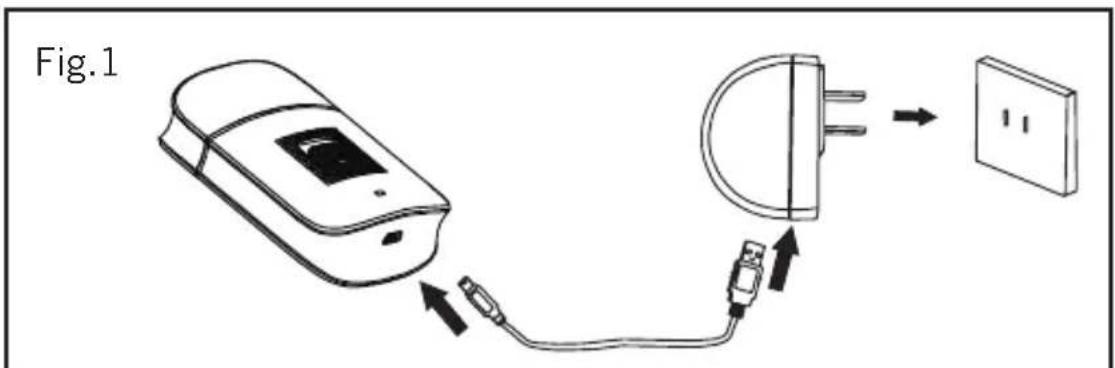
Connect the USB interfaces of shaver and charger by data line, then plug the adaptor (K) into the mains (Fig. 1)
-
A pilot light will come on to indicate that the appliance is being charged.
Approximately 8 hours are needed for a complete charge of the battery. Never attempt to over charge the battery (although it is recommended
that the first charge of the battery be of 10 hours in duration).
- When the battery is charged disconnect the adaptor from the mains supply.
NB: Do not use the appliance while it is connected to the charger.
USB charge
- Please make sure that the power is off before charging.
- Connect the USB interfaces of shaver and computer by data line for charging (Fig. 2)
- A pilot light will come on to indicate that the appliance is being charged. Approximately 8 hours are needed for a complete charge of the battery. Never attempt to over charge the battery (although it is recommended that the first charge of the battery be of 10 hours in duration).
- When the battery is charged disconnect the computer data line.
NB: Do not use the appliance while it is connected to the charger.

Instructions for use
Before use:
- Make sure that all the product's packaging has been removed.
- Ensure that the selected tension on the voltage selector coincides with the tension of the mains.
- Before using this product for the first time, it is important to make a full charge of batteries.
Use:
- Remove the protective cap (A).
- Turn the appliance on, by using the on/off switch.
How to shave:
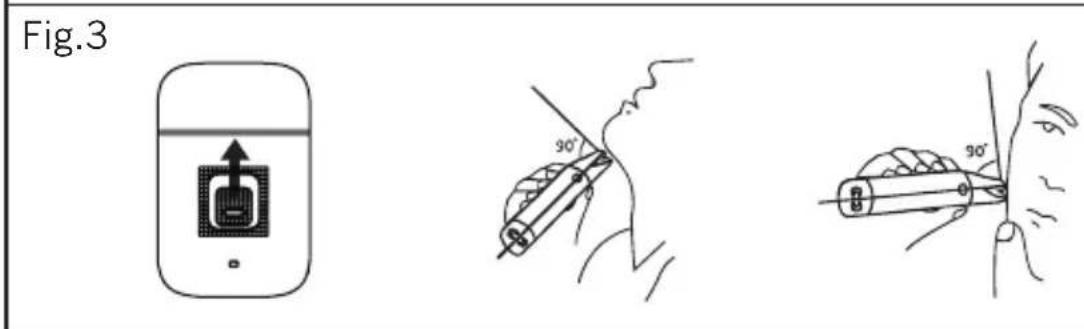
- Hold the shaver at right angle 90^ to your skin (Fig. 3)
- Start shaving by applying a gentle pressure to your face. Stretch your skin with your free hand, moving the shaver back and forth in the direction of your beard.
- you may gently increase the amount of pressure as your skin becomes accustomed to this shaver. Applying excessive pressure does not provide a closer shave.
Switch lock:
- The switch lock button stops the on switch from activating, it prevents the appliance from being switched on accidentally.
Once you have finished using the appliance:
- Turn the appliance off, using the on/off switch.
- Clean the appliance.

Cleaning
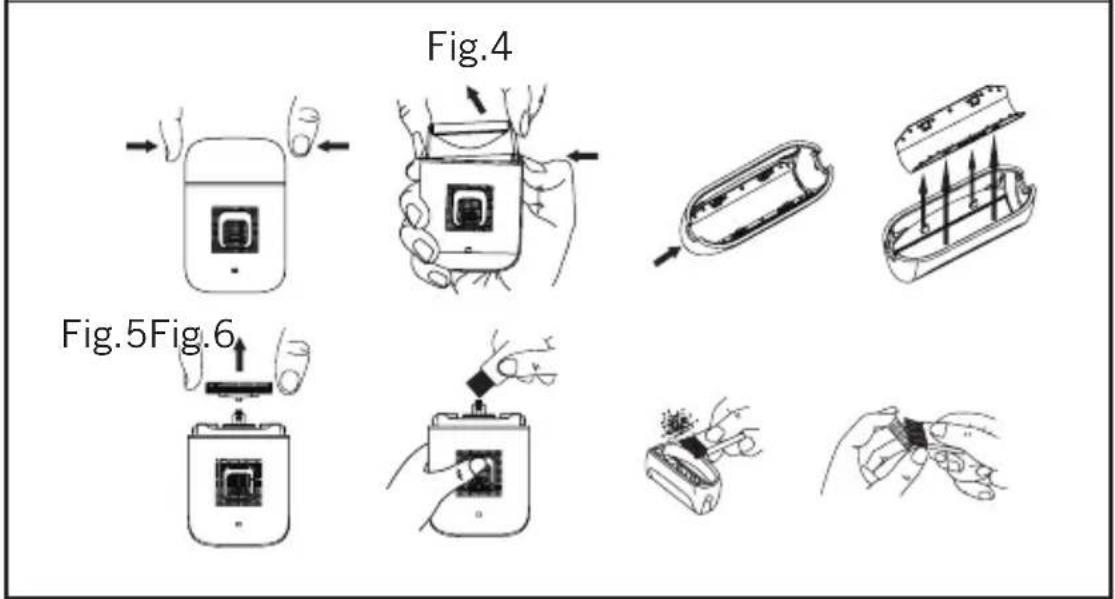
-Push the foil frame release button and detach the foil frame (Fig 4)
-Grasp inner cutter firmly at each side, and pull straight up (Fig. 5)
- Clean away the clipping with the cleaning brush provided (Fig. 6)
-Reassemble the shaver parts in the reverse order.
- Clean the equipment with a damp cloth with a few drops of washing-up liquid and then dry.
- Do not use solvents, or products with an acid or base pH such as bleach, or abrasive products, for cleaning
the appliance.
- Never submerge the appliance in water or any other liquid or place it under running water.
- During the cleaning process, take special care with the blades, as they are very sharp.
Supplies
- Supplies can be acquired from distributors and authorised establishments (such as outer foil, inner cutter, etc.) for your appliance model.
- Always use original supplies, designed specifically for your appliance model.

Anomalies and repair
- Take the appliance to an authorised technical support service if product is damaged or other problems arise. Do not attempt to disassemble or repair the appliance yourself as this may be dangerous.
- In case of breakdown call the customer service telephone number indicated in the guarantee sheet. Do not attempt to disassemble or repair the appliance yourself as this may be dangerous.
- If the connection to the mains has been damaged, it must be replaced and you should proceed as you would in the case of damage.
For EU product versions and/or in case that it is requested in your country:
Ecology and recyclability of the product
- The materials of which the packaging of this appliance consists are
included in a collection, classification and recycling system. Should you wish to dispose of them, use the appropriate public recycling bins for each type of material.
-
The product does not contain concentrations of substances that could be considered harmful to the environment.
-
This appliance contains, or could contain, oil. Remember that one should abide by the regulations concerning the elimination of this type of contaminant.

- This symbol means that in case you wish to dispose of the product once its working life has ended, take it to an authorised waste agent for the selective collection of
Waste from Electric and Electronic Equipment (WEEE).
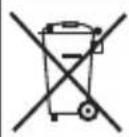
- This symbol means that product may include a battery or batteries; user must to remove them
before disposing of the product.
Remember that batteries must be disposed of in duly authorised containers. Do not dispose of them in fire.
How to remove the batteries from the interior of the device:
CAUTION: It is important that the batteries are fully discharged prior to its withdrawal from the apparatus.
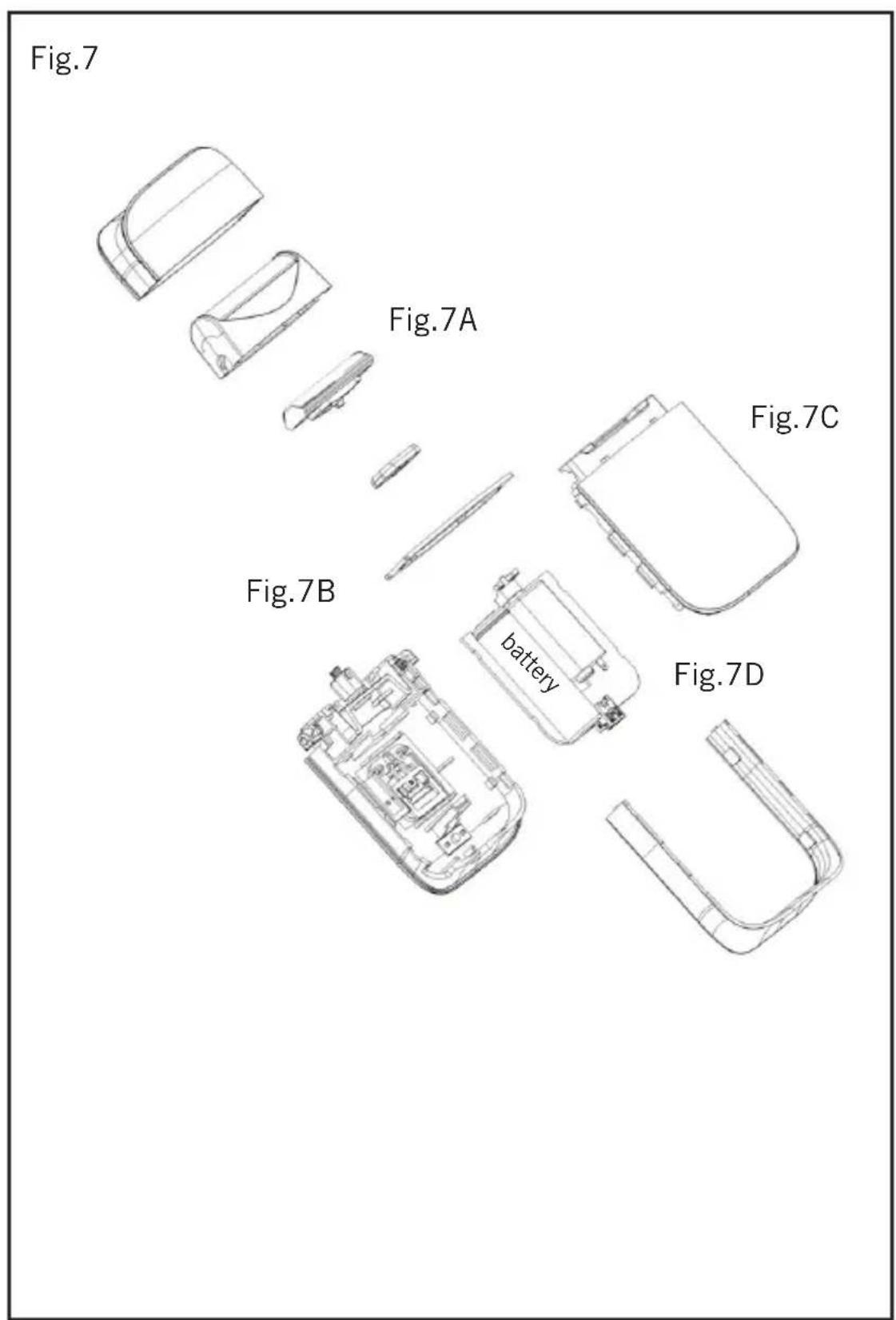
To remove the batteries, once the life of the appliance (Fig. 7), proceed as
follows:
- Remove the outer foil and inner cutter (Fig. 7 A).
- Remove the decorating ring with the help of a screwdriver or similar (Fig. 7 B).
-Open the outer shell separating the front and back shells with the help of a screwdriver or similar (Fig. 7 C). - Identify the battery wires and cut their (Red and Black). To avoid risks of a short circuit with a possible residual battery load, first cut the Red wire and protect it by using insulating tape, then proceed to cut the Black wire proceeding in the same way (Fig. 7 D).
- Safely remove the battery from its housing.
This appliance complies with Directive 2006/95/EC on Low Voltage and Directive 2004/108/EC on Electromagnetic Compatibility.
François
Uouéç kai TpoεiδoToiαeic ασφαλεις
- DiaabaTe npoektka auto to pfuaadio 08nyw npiv theeote eAletoupyia tn oukeun kai pfuaaleto yia meaovtikec avapopec.
HAektpiKn aσφαλεια:
-MynxponoionoeTnv oukeun otav exi to kaawio n npica.
- Piv ouvdoetn oukeun oto
delta,betaaiwtheta ot n taon
nou unobekvctal onnv naketa
Xapaktpiotikwv taipiae ie Tnv taon
deltaou.
- Piv ouvdeetn oukeun oto
delta,betaaiwtheta ot n taon
nou unobekvctal onny naketata
Xapaknpiotikwv taipiae i e Tnv taon
deltaou.
- 2uvdsoe tnv ouakeun oia
baon anhns pueuatoaouvadiv
touaxiotov 10 Anp.
-2uvδεοτη Σουκευι Θην παρεχόμενη βαση με γειωη και που Ανοστηρίζι τουλαχιστον 10 Aμπερ.
- 2uvδεοτη συοκεύησην παρεχόμενη βαση με γειωή καιου Ανοστηρίζει τουλαχιστόν 16 Μιπερ.
-To bouma tnc ouakeunnpenei va taipiazEmu TnV nAektpikn BaoTnS npoxns nAektpikou peuatoC.
-H ouokeuun mnpei enionc va ooptiote i eou USB. Suvdelta to kaawdo USB oac, otv thupa USB tou unoloyio nki eeta auvdelta to kawdo USB otnv ouokeuun.
- Na xpnaiouoiitai n oukeun movaxa TNV ouykepiEvn nAekptiko
ouvdeltao, nou npexetai Tnv
ouakeun.
-Myn EKTeoTe TnV oukeun otyn Bpoxn n oE ouvHenKec UypaiaC.To vep nou th a iOxwpnoi OTNV oukeun th auHoei Tov Kivduvo va oac XtuHoei To nAektpiko peuma.
-Av onaouv kanoia ano ta
nepituliymuata nC oukeunc
anoouvdeote aoeowtvy oukeun ano
to nEktpiko sktuov ia va anofoyete
niogynektpponlaia.
-Mnv xnpouoieTe Tnu oukeun eav exi noei, eav unapxov opata onuadia cnuiac n ev unapxei diappn.
-
IPOEIAOIOIHsH: Na diatnpieTe Oeyn TnV oukeun.
-
IPOEIOIHOH: Mny xonouoiTe TNY OOKeun KovTa ovepo
-Mynxpoaonoiite Tny ouokun KovTa 0e naviepc,vtouiepec nioivec.
-Mynxnpoioite Tny oukeun me Bpeyuva xepia n noia, aaaa oute kal u yuva noia.
-Mynxnooioite note to kaiwdo yia va onkwoete,vaetaepetene va anouvdoeote nvy oukeun.
-Mnv nepituliyet to naektpko kaawdo ouvdeoc yupw ano tyn ouokun.
-Myn afoeTo nAekptko Kaawdo ouvdeanv upeoutei n va capwo
-Ta avakatwéva kaawδia n auta nou exouv βαβn auávouv tvkivduvo va oac xTumnoi to nλεκτρikó pεμa.
-2av 1npo08eTn npootia otny nAekpiK nykataaon nou tpofootei tv oukeun, ouviotatal to va diaheTei ia diataennapaevovtoc pUmaoc,ue aeiotn euaoioia twy 30mA.
-Mny ayyicTe Tnv npia ouvdeoc mE Bpveva xepia.
Xpnon kai ppooxn:
- Piv ano kae xphon, Eetuie Te EVTEwC To Kaawio Tpofooboc Tns oukeunc.
Mny xpnoiounoeite Tnv ouakeun, ev ta aEouap nCdeltaov oxvodc
-Mynxnpaonpoieite Tny ouokean navw 0e BpEyEv aalia.
-Mn xnpaonoeite tv oukeun av 6ev
Aetoupye o nxaiooc Aetoupyiaac/
naoons.
-Autn n ouokun exl oxdelta
movo yia oikakn xpnoan kal oxi yia enayyelmuatikn biounxavikn.
-Mnv enippeve va tvn Xpnouoioouv atoua nou dev ivai Efoikwueva uavotou eiodoc ta npoiovta, naia a atoua eiodkec avaykcs.
-KpatnoTE autHy tv ouokun paia ano ta naia kau/n ano atopa uE 1ikec avayknc.
H ouakeun va mny ektiethai oakpaies 0epuokpaoies.
-Houakeun va diatnpetial ka va a oEva oteyvo hepoc, xwpic n kaiakpia ano to nlaiko fwo.
-EeYTe av ta kivnta koMaia Tc
Eiva ae kaNkataoan, 6ev evai
PAnokapiouva, nwc 6ev unapxov
OtnaoEv aKoMaia kai aAee ouvnkec
nou mtopei va einnpeaocov tyn kaH
Leitoupyia tnc oukeunc.
-H oukeun autn, Ta aEouap kai Ta epyaia tnc, va xpoiunoiouvta ouphiwaue auTc TIC oNyie, laabavovTac unoy nTc ouvNkec epyaia c kai tny douleia nou eiva va yivei.
Ybaxaembi nokynateJIb:
Blaqadapm Bac 3a To, yTo Bbl OCTaHOBN CBOI BbI6Op Ha 6JIeHdepe MapK TAURUS IJDAOMaHHeRo HcNoJIb3OBAHn. IcNoJIb3OBAHne IpeoDBbIX TexHOJOrn, COBpeMeHHbI IN3aH, FyHNCuHOHaJIbHOCTb, a TaKHe Co6JIIODeHne cTpornx Tpe6OBaHn K KaueCTBy rapaHTnpYOT Bam npoDoJIKNTeJIbHyIO 3KcnIyaTaCNU np6opa.
OnicaHne
A 3aunTHa KpbIiKa
B BHeWnHcETKa
C Pamka BHeWHei CETKn
D BnyTpeneHn pe3e
E KhoNka OcBo6oHJeHH paMH cTeHN
F KhONKa BkJIIOueHnra /BbIKJIIOueHnra
G KhoHnKa 6JIOKIpOBKn
H INHnKaTOp 3apAKn
I USB nopT
J LInHnpepaHn daHHbIX Data line
K NepexoHnK
L LéToUka dny uNCTKn JEA3Bn
M DopoKHHbI ΦyTnAp
B TOM cIyuae, ecn BbI He 06HApYKnn yKa3aHHbIX Bblwe akceccyapOB,Bbl moKeTe npNo6peCTn IX OTdJIbHO aABTOpH3npOBaHHOM cepBnCHOM ueHTpe TAURUS.

PekomeHdaunn Mepbl
6e3onacchoctn
-TepeTem KaH NOJb3OBAtbcn np6opom,BHIMaTeJIbHO IpOHTte DaHHU INCTpyKcIIO u COxpaHnTe ee B TeueHne BCero Cpoka Hn3Hn np6opa.
PekomeHdaunn no 3Jektpo6e0anachoctn:
-He pa3pewaaetcnaNoIb30BaTb np6op B clyuae noBpeKdEHHypa nn BNkN 3JKeKTPoNTaHn.
- Ppeep noqKlnoueHnem npnbopa K 3JIeKTPnueeckoCTN y6eNTecb B TOM, qTO HAnpJKeHne B HeN COOTBeTcTByET HAnpJKeHnO, yKa3aHHOMy Ha Kopnyce.
- Y6eHITecb, yTO PO3eTKa HMeet HaDeHXHOe 3a3eMJIeHne I OHa paaccHTaHa He MeHee Yem Ha 10A.
yUHTbIBa yCIOBnI TIN pa60TbI.
-He nCnoIb3yIte np6op dIaCTpNHHDOMaIHHX HINBOTHBIX.
-БудьTe OCo6eHNO BHNMaTeJbHbI npu yctaHOBKe n ChrTmN aKCECCyapOB npn6opa, TaK JezBnO OCTpo 3aTOueHbI. Co6JIouaIte OCTopoXHocTb N 136eRaTe HENOCpeDCTBeHHORO KOHTaKTc PexKyUIMM YactaMn.
-3apndoe yctpoCTBO,poXoJee
Ira Ondoro Tnna aKHyMylrTOPOB,
MOxET CTaTb npuHNOB 03rOpahn
HIN B3pbIBa npn HcNoJIb3OBAHN C
dpymTNnom aKHyMylrTOpa/-OB.
Texnueckoe 6cbnykBaHne:
-Длп подерхань пибopaВ Xopoшem COCTOHH, peKOMeHdyETc BO BpeM qNCTKN Cma3bIBaTb KpaJ Ie3Bn CpeIcTBOM IЯ Cma3KN I BKIOUHTb пибop Ha HeCKoJIbKO CEkyHd.
- PeKOMeHnyeTc3aMeHrTb BHeuHIOOCETKy OIN pa3B rOd.
- PeKOMeHnyeTc3aMeHrTb BHyTpEHHn pe3eU KaKdIe DBa rOda.
-Texnueckoe 06cnykHBaHne npnbopa doJHKHO OCUyecTBJrTbcr cneuaIInCTamn. Pn Heo6xOIMOCTN 3aMeHbI paCXoNbIX MaTePnaIOB / 3anaChbix Yactey bEeNTecb B IN NOHNHHOCTN.
-JIIO6OE HECOOTBETCTBYOUcE
HcnoJb3OBaHHe Iprn6opa nn
HEC06IIODeHne INHCTpyKcNl NO
3KcNpLyatauIN OCBO6OJaOT
IPOUN3BOJNTeJI OT rapaHTnHBIX
O6ra3aTeJBCTB NO pemOHTy, a TaKHe
CHIMAIOT OTBETCTBEHHOCt b C
H3ROTOBITeJI.
3apkaakymyTopoB
BHIMAHHE: HoBbI aKKyMylrTop 3apJKeH He nolnoctbIO. IpeEd
nepBbIM nCNoJIb3OBAHHe m np6oPa Heo6xOdmo nolHOCTbIO 3aprIITb aHHyMylrOp.
-3apKaIte aKHyMylTOp npn Tempeatype ot 4do 40^
-Перед Заряdkоустpoиства ybeintecb,чTo noDAчаэнргпnpekpaueHa.
-CoeHHHe USB npTbI 3JIeKTo6pHTBbl N 3apAHOro yCTpoHCTBa NocpeDCTBOM JINHH INepaun DaHHbIX, 3aTeM NOkHIOHTe 3apHHOe ycToiCTBO (K) K 3JIeKTopcETn (Pnc.1)
-3aropntc cnHaJIbHnaJaMnOuKa, ONOBeUaIOUaO TOM, YTO yCTpOInCTBO 3apJkaetc.
-ДллпногиЗардн aKKymлгета
notpe6yETcR OKOLO 8 YacOB.
HnB KOem cIyae He 3apKaHte aKHyMylrTopbI DOLbWe yKa3aHHOro BpeMeHN (XOTa peHOmeHdyeTc3apKaTa b YcTpoiCTBO B TeueHne 10- yacOB B nepBbI pa3).
-Поссе OkончаняЗapдк OTCOeHnHTe 3apdHoe ycTpoiCTBO OT 3JIeHTpocetN.
NB:He nCnoJb3yIte npn6op B TO Bpem, KOrda OH NIOHIOUeH K 3apAnHomy yCTPOINCTBy.
3apka yepe3 USB
-Перед заряdkоустpoиства ybeintecb,yTO noDAчаэнргпnpekpaueHa.
-CoeHHHe USB npTbI 3JIeKTHpObPHTbI IN KOMNbIOTepa nocpeDCTBOM IINHn NpepaHn DaHHbIX DnI NOd3apAKn (Pnc.2)
-3aropntcraHnaIbHaJ lamnoka, onOBeuaIOaA O TOM, yTO yCTpOHTBO 3apjKaETc.
-Длп NOHOn 3apAn aKHyMnyTopa
noTpe6yeTc8oko8yacob.
HnB KOeM Cnyae He 3apKaIte aKHyMyJTopb IOnbWe yKa3aHHoro BpeMeHN (XOTy peKOMeHdyETc3apKaHTb yCTpOietBO B TeueHne 10- yacOB B nepBbI pa3).
-После Okончаня зардк OTCOeINHITe KOMNbIOTepHyIO JINHIO nepeDAu DAHHbIX.
NB:He nCnoJb3yIte npn6Op B TO Bpem, KOrDa OH NODKIOUeH K 3apAnOMy yCTPOINCTBY.

Hctpkyu no 3Kcnpyataunnpeep npBbIM nCNoIb3OBAHHem:
- Y6eIHTecb TOM, yTO Bbl IIOJIHOCTbIO paacnakOBaII npi6op.
- Y6eHITecb, yTO HAnpRKeHne, UCTaHOBJIeHHoe Ha IpeKJIIOuTeJIe HAnpRKeHnI, COBnaJaEt C O6UIM HAnpRKeHnEM CETN.
-Передпервим Испльзованемприбopa Heo6xODIMO NOJIHOCTbIOЗардntb aHHyMylrTOP.
3Kcnpnyatau:
- CHaTb 3auHnThbI ueXoJ (A)
-BKIOUHTe npH6Op npn nOmoUKNHONKn BkJI/BblKJ.
Kak6pntbca:
-ДерхиTe 6pntBy NOI npaBnIbHbIM yIOM 90^ OTHOCTeJIbHO IOBepXHOCTN KOHN (Pnc.3)
-ПиСТУпайтEkбPITbILO,CJIeRka npHIMa6pNTByKIIuCy. HATrHBAIteKOKyCBO6OHDnpyKoH, DBNra86pNTByBpeEJaHa3aD B HAnpaBLeHnPoCTaIeTINbI.
- Bbl MoKeTe CJIeRka yBeJIInuHTb CTeneHb HaKIma Ha KOxU, KOrda Ba7a KOx npNBbIKHET K 3TOI
3JIeKTPo6pNTBe.CINHkOM CNIbHbI HAnHM Ha 3JIeKTPo6pNTBy He 0BecnHT Bam 6Olee YnCToe 6pNTbe.
Khonka 6JIOKIpOBKn
-KHONKa 6IoknpoBKN ydepKnBaET KNONy BkIIOUeHnO T aKTINBaCnN, npDoTbpaaJ, TaKIM o6pa3OM, clyuahoe BkIoUeHne npnbopa.
Nocne kaxdoRo nCNoB3OBAHn:
-BbIKIIOHTe npIN6Op c NOMOUIKHOHNK BKL/BblKJI.
-BbIMOnTe rnpJIb.

UncTkau yxOa
-HaMMte KNONky OCBO6KdHnpaMKn cETKn n OTcoeHNHTe pAMKy cETKn (Pnc.4)
-KpEnKo 3aXMMTe BHyTpEHHN pe3eC o6eHX cToPOH nNotAHnTe pRMA BBepx (Pnc.5)
- BbIcHTte 06pe3KN BOJoc npn NOMOuBxOJaSeB HabOp 8eTochN DJIyNCTHN Je3Bn (Pnc.6)
-CHOBA npoH3BcHITe c6OpHy 3JIeKTPo6pHTbI, DeiCTByA B o6paTHOM nopdke.
- PpOtpnTe KOpnyc npHbopa BnaJHoN TpIPOuKoC He6OJIbUIM KOJIueCTBOM MOUeO CpeDCTBa H 3aTeM TUaTeNbHO IpocyUHe.
-He nCnoB3yIte paCTbOpHTeHn, OKncJIIOUne, XIOpHbIe NII a6pa3HBHbIe BeIecTbA IJIa YNCTKn np6Opa.
- Hn B Koem Cnyaae He norgpykaite Te npnbop B Body nn Dpyryu KndKoctb, He NOMEaIte ero noD KpaH C BOOJ.
-Bo Bpem qnCTKn npnbopa Heo6xOIMo 6bITb Oc06eHHO OCTOpOHbIM C OCTpbIMn HacaIkaMnHOJAMN.
Akeccyyapbl
-AKCEcyapbI DaBaWeMoeJI np6opamOHHo pno6pctny DnCTpnbIoTOPOB HIN B OΦuuaJIbHbIX yUpeXDeHNx (TaHne akCEcyapbI KaB BHeHnA CETHa, BHyTpEHn pe3eU nT.D.).
- NcnoIb3yIte TOnIbKO nOdJIHHBIE aKceccyapbl, cneuaJIbHO pa3pa6oTaHHbIe dJa daHHo MDoJI npi6opa.

HeuCnpaBHOCTn u cnocobI ux yctpaHEnn
- EcIn BbI 3aMeTnHHeNCpABHOCTn B pa6oTe np6opa, o6paTNTecb B aBTOH3npOBaHHbI CepBnCHbI ueHTp. He nbTaTecb NOuHnTb np6Op camOCToTeJIbHO, 3TO MOHeT 6blbOnacHO.
-Пи BO3нКHOBEHn aBapn NO3BOHnTe B ueTp 06cnyKnBaHH KIneHTOB nO TeIefoHy, yKa3aHHOMy B rapaHTnHOM TaIOHe. He pa3bnpaTe H He YINHTe npH6Op cAmocToTaeJIbHO.
-Bcnyae noBpeKdEHHaJIeKTPoSHHpa,He nbITaHTecb3aMeHHTb eRO cAMOCToTReIbHO,6paTHTecb B aBTOpN3nPOBaHHbIcepBnCHbI ueHtp.
ДляnpodyKTOB,ИЗгOTаВиBaEmbIX BEBPONEHCKOMCOIO3e,N/ NINBTEXClyaX,KOrdaB CTpaHe npON3BOJCTBa HMeOTcR COOTBETCTBYIOUne HOpMaTINbI:
3aunTa OKpykaOuSei Cpebl N BTOPnHnA NpepeabOTKa npOdyKTA -B COOTBeTCTBnC Tpe6oBaHnMn NO OxpaHe OKpykaUoSei Cpebl, yNaHOBkHaN3rOToBLeHa N3 MaTePnaIOB, PpeHa3HaueHHbIX Dn BTOpHnO NpepeabOTKn. EcIn Bbl
3axOTHTe ee BbIbPoCHTb,TO MOKeTe BOCNoJIb3OBaTbcr CneUaJIbHbIMN KOHTeHepaMn IJa KaJDoTtNa MaTePna..
-Hn cam npnbop, Hn ero ynaKOBka He
copejnat BeueCTB, PpeCTabJIoux
OanachocTb dIa OKpyKaIOUeN Cpebl.
POMHnte, YTO Heo6XoJMo CO6JIoDaTb
CyueCTByIOUne HopMaTHBbl
No ydaJIeHIO daHHoro Tnna
3aqr3HIOUx BeueCTB.
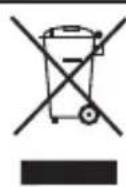
-ДаHHbI CmB0JI O3HaayeT, YTO NO OKOHuaHn NOJe3HOJ HN3HN pN6Opa cIeDyET NpeJaTB eRO B IyHKT pPHeMa OTcIyKHBuNX 3JIeKTpUYeCKHX I 3JIeKTPOHHbIX pN6OpOB
(RAEE) nIIN B pyKn ppeIcTaBntTeJI COOTBETCTByIOUeI OprAHN3aUN.
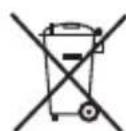
DaHbI CNMBOJ O3HaayeT, yTO np6Op MoKeT coepKaTb 6aTapeKn Hnn aKHyMaTOpbl. N3BLeKeHTe INx, PpeKeJeHm NepePaTb
np60pHa yTuIn3aunIO.
Kak n3BnkeKaTb aKKymyIaTOpbl n3 np6opa:
OCTOPOHHO: Oueh BaHNO, YTO6bl aKHyMyIaTOpbl 6bln NOLHOCTbIO pa3prKeHb I nepei Hx N3BLeeHHem n3 np60pa.
YTO6bI H3BLeueaKHyMylrTopbI NO OKOHuaHn IOne3HOJ KIn3HN np6opa (Fig.7),BbIOJIHHTe CJeDyUOuHe DeiCTBn:
- CHHMMTE BHEUHIO CEHTKY IN BHYTpENHH pe3eC (Pnc. 7 A).
- CHHMMTE DeKopaTINBHOe KOJIbUc C NOMOuBo OTBePTKN HIN NOo6HOrO

H INdkaTop 3a 3apeKdaHe
I INTepeic USB
JUHHDaHHN
K Aanrep
L YeTka 3a noOuNCTBaH e Ha HOxUeTaTa
M Kyφαργε 3a TpaHcnpT
Ako Baunr MoeI ypeHЯMa HraKoN OT ropeonncnTe npNCtABKn,MOHe Da rN 3aKyuHnTe OTdEJIHo B CepBn3nte 3a Texnuecko O6cnykBaHe.

CbBETn nppeDynpeXeHnna 3a6e3onacHOCT
-Прочетete BнмATEJHToTa3N 6poшура npedn da nychete ypeda B DeiCTBne nЯ 3ana3eTe 3a noHaTataBshn cnpabKn. Hecna3BaHeTo
Ha INHCTpyKuNTe MoKe Da IOBeDe Do 3JIOJNYka.
EneKtpnuecka 6e3oNaChocT:
-He n3noI3BaIte ypea npn noBpeJeH ka6e nn nIeenceJ.
-Прддсвьржerteурада КБМ Мржката,пpoВере Дал нocочehOTOHaТабелкataС ТexHnueeCHKeTeхapakTepnCTNK HanpeKHeHneCbBnaDAc HanpeKHeHnEToHaeJIeKtpnYeChKaTa MpeKa.
-Прддсвьржerte урда Кьм Мржкata, поверete дал посочETO Ha Tabeелкata C ТexнческTe xapakTepnCTNK Hарженс cBbnaDA C Hарженeto Ha eJelKtpnYeChKaTa Мржka.
-BKIOUeTe ypeaB 3a3eMeH n3TOuHN Ha eIeKTPnueChn TOK, KOITo Da n3DbpHa Na-MAkO 10 amepa.
-BKIOUeTe ypeaB 3a3eMeH n3TOuHN Ka eJeKTPnuecN ToK, KOITo Da n3DbpHa Ha-NMaIko 10 amepa.
-BKIOUeTe ypeaB 3a3eMeH n3TOuHN Ha eIeKTPnuecN TK, KOITo Da n3DbpKa Hau-MaIKo 16 amepa.
-
LencntHa ypea Tp6Ba da cBnada C eIeKtpueckn KOHTA.
-
YpeBcT cBIO MOHe Da 6bIe 3apeH npE3 USB.CBpKHeTe eINnT Kpa Ha USB Ka6eJa KbM USB nopTa Ha KOMNtbpa HdpyTnT Kpa KbM ypeDa.
-Изпольваиурда само cdoctabaheHata 3aeДнО C Hero OCHOBA 3a eIeKTPnueeCKN KOHeKTOp.
-He n3larate ypeaHa IbKd nBlaara.Boata, npOHnKaHa B Hero,NOBnShaBa pnca OT eJeKtpnuechnyap.
-AKHOHKOBAHHaYacHTHa ypeda
ce cuynn, He3a6abHNO ro n3KIOUcTe OT 3axpaHbAsaTa MpeHa 3a da npdeOTBpATnTE onaCHOCTTA OT eIeKtpoydp. He n3no3BaTeypeDa C MOknppbue H KpaKa, HHTO 60CN.
-He n3noI3BaIte ypea aKo e naIa, aKo hMa BnIMN NOBpeu NII TeU.
-IPEyIPEKDEHNE:
CbXpaHnBaIe ypeDa cyx.
- IN3noI3BaIte ypea B 6JIH3OCTdo BOda.
-He n3noJ3BaIte ypea B 6JIu3OCTdo BAHN,dyoBE n 6aceHn.
-He n3noJ3BaIte ypeDa B 6Jn3ocTdo BAHn,dyoBe n 6aceHn. - Hnkora He ro n3noI3BaIte 3a noBnIraHe, npenacrHe nnNnKIIuOvBaHe Ha ypeDa.
-He hABuBaIe eIeKtpnuecknHa6eI OKoIyo ypeDa. - EneKtpnuecknT Ka6eJ He Tp8Ba da 6bJe npHTncHaT nn npeBHaT.
- NOBpeHnTe HnOnIeTeHn Ka6eHn NOBnBaBAT pncA OT TOKOB ydap.
-Прелорьнтелно e KaTo ДОпьIHNTELHa 3aUNTa KbM eNeKTPnueckKaTa INHCTaIaIuЯ, KOrTO 3axpaHb YApeDa da pa3nOlaIarate C ycTpOiCtBO 3a IInΦepeHcuaJIeH TOK C MaKcImaJIHa YyBCTBHTeJIHOCT 30.
-He ninaTe 电eNcela 3a BkIIOUbaHeB MpeKaTa C BlaKHH pIe.
3no3BaHe n noDpBxka:
-Ппсиуnotpe6аразитЕнпьлно 3axpanBaunKa6eHa ypea.
He n3noI3BaIte ypeDa aKO herOBnTe npictaBnHΦnTpH He ca npabNHO crIo6eHN.
-He n3noJ3BaIte ypeDa Bbpxy MOKpa Koca.
-He n3no3BaIte ypea npn
NOBpehen 6yToH 3a BKn./n3Kn.
-To3n ypeD e npedHa3NaueH eINCTBeHO 3a 6HTOBu HUkDi, He 3a npofoecnoHaJHa HHTO npOMnJleHa ynoTpe6a.
-He no3B0JIbAite da ro n3noJI3BaT HeoNTHNIuca, INBaJINDn Ieua..
-CbXpaHraBaIte ypeDa IaIeUOT Deca n/nnn HBAJIIN.
-He n3laIaIte ypeIa Ha eKCTpEmHO BncoKa TempePaTypa.
-CbXpaHraBaIeTe n na3eTe ypeDa Ha cyxO MRCTo, 6e3 npax n OTdaJeHe OH CTbHcEBAtCABETInHa.
-Поберете далл поднннite чату He ca pa3центpoвани пиблкпари, Далу Нямсчунецч actи n dpyrnoD6Hn HEN3npaBHOCTN, KONTO MOraT Da NOBInYAT Ha npabINHOTO ФункюнраHe MaunHaTa.
-ИзлбВаiteTO3nуpeД,KaHTOnI npHCTaBKeTe INHCTpyMeHTnteKbM Hero KaTo CJIeDBeTe Te3N HCHTpkyuN, mAmKn BnpEdn yCIOBnTaHa pa6OtaNФyHKnTa 3a KOrTo e npedHa3HaueH.
-He n3noJ3BaIte ypeDa 3a IocyuwaBaHe Ha domaunn IIO6mU INN HINBOTHN.
-BHIMaBaiTe MHOro npn noCTaBHeTo
N 3BaXdaHeTo Ha npNCtABHKe,
TbKATO HOXeTaTa ca OCTpn.
BHIMaBaiTe N 36raBaiTe npk
KoHTaKT C KpaAnuTaHa HOXeTaTa.
-HaKo3apAHyyCTpoiCTBa, KOHTO ca noDxOJa73a eHN Bn6baTePN, MoT a 6bDaT OAnCHN I Da npEIN3BnKaT EKcNIO3H Nn NOXap, aHO Ce n3NoJ3BaT dpyra/DPYr6baTePN/6aTePN.
CepBn3:
-3a da ocnhypnte do6paTa pa60Ta Haypeda, npenopbYBaMe da CMa3BaTe
HOHcTeTaBceKINbT, KOraTo rO NOuHCTBaTe, NOCTabRn HrKOJko KaNtOT Cma3OHTo MaCNo N KpaNuaTaHa HOKa IN BkIIOvBaHn UpeDa 3a HrKOJko CeHydN.
-ПрелорьразмБидасменяВьншпялисТВбнг罗шн.
- PpenopbUbaMe Bn da cmeHrTe BbTpewHOTO HOXue BeHNbK Ha DBe rOuHH.
- YBepTe ce, ye NOdRpBxHaTa Ha ypeDa ce ocBsqecTBra BA OT CneuHn3npaHO JIue H BNHaHn I3No13BaIte opuHnHaHn KOHCymTbN IN pe3epBHN qactN.
- HenpaBnHTo n3noJ3BaHe Ha ypea nn HeCna3BaHeTo Ha HnCTpyKuHte 3a pa60Ta e onaCHO, anynpa rapaunraN OcBO6OJaBA npOn3BOUHTeI ON OTROBOPHOCT.
3apeKdaHe Ha 6aTepeYTa
- PEPDUNPEKDEHNE: HOBATA 6aTePnHa He e HaJIbIHO 3apeDeHa n TpIbBa Da ce 3apeN MaKcMajHo IpeNn3NoJ3BaHeTo Ha ypeDa 3a npBb NbT.
-3apeTe 6aTeepnTa npi Tempepatya Ha OKoHaTa cpeMaekdy 4 n 40^ - YBepete ce, che ypea e n3KIOUeH npden da 3anoCHte 3apeXdaHEto.
-CbpbKHe NTHepeIca USB Ha MaunHKata 3a 6pbcHene H 3apdHOTO yCTPOIcTB0 IpE3 WnHITe DaHHN cIeT TOBa BKnIOUeTe aanTepa (K) KbM eI.MpeKaTAt (ΦnR.1)
-CBETINHHNHT INHnKaTOp ige CBETHe 3a Da Bn nokae,Ye ypea ce 3apeKda. - Heo6xOdMn ca np6n3nteJHo 8 yaca 3a IIbIHO TO 3apeKdaHe Ha 6aTePnTa.
Hnkora He ce onntbaTe da 3apeKdATE ypeDa NO-DbIro BpeMe OT npenopbHaHTo (BbnpeKn,Ye PbPBOTo 3apeKdaHe e npenopbTuHTo Ia e B npoDbJKeHne Ha 10- Yaca).
- CneI KpaI Ha 3apeKdaHeto, n3KnIOte yCTPOcTBOTO OT eJeHTpUeCKaTa MpeHa.
3a6eJka: He n3noI3BaIte ypeDa DOkato e BkIIOueH B 3aprHOTO yCTPOIcTBO.
3apeKdaHne npe3 USB
- YBepTe ce, Ye ypeDa e n3KloueH npedn da 3anoHHeTe 3apeKaHaHeTo.
-CbpbjHeTe nHTepfceca USB Ha MaunHkata 3a 6pbcHe He KOMNIObpa npesuHnTe daHHn, 3a Da 3anoHHe 3apeKaHaHeTo (Fnr.2)
-CBETINHHNHTHNDHKATOp 7e CBETHE 3a Da Bn NOKaHe,Ye ypeDa ce 3apeKda.
-Heo6xOaMnCa npHbN3nteH0 8 yaca 3a nHOTo 3apeKdahe Ha 6aTePnTa.
Hnkora He ce onntbaTe da 3apeKdaTe ypeDa no-DbIro BpeMe ot npenopbHaHTo (BbnpeKn, ye nbpBOTo 3apeKdaHe e npenopbUHTeHNo Da e B npodJIkeHne Ha 10- yaca).
-Korato 6aTeepnTa ce 3apeH, n3KIOUeTe KOMNtbpa OT uHHnte daHH.
3a6eJka: He n3noJ3BaIte ypeDa DOKaTO e BHLIOueH B 3aprHOTO ycTpoiCTBO.

Haun Ha ynoTpe6a
Ipeyn ynoTpe6a Ha ypeda:
- YBepete ce, Ye cTe OTcTpaHnIu IyJnata ONaKOBka OT ypeJa.
-Ппддсвржeteуpeda
KbM MpeKaTa, npOBepTe daJIH nOCOeHOTo Ha TaBeIkaTa C TexHHuecHnTe XapaKTepnCTnHn HAnpeKeHne cBbnaDa C HAnpeKeHHeTo Ha eIeHTpUeCKaTa mpeHa.
-Прени уnotpe6a 3a nbpBn nbTe BaJHo Da 3apeHnte n3quIo 6aTePInTe.
Ynotpe6a:
- OTePAnHeTnepea3HnKaIbΦ (A)
-BKIOUeTe ypeDa,HaTnCKaHKn 6yToHa 3a BKNIOUBaHe/u3KIOUBaHe.
Kak da 6pbchete:
-ДрькTe MaunHkata 3a 6pbcheHe, NOI npab bIbI OT 90^ c KOHata (INr. 3)
-3anoyhe6pbchHeHTo KaTo OKaHexe Iek HaTnCK BbpxyIuTeTo. XBaHETe KOHaTa Cbc CBO6oHaTa pbKa, KaTO npINDbNKBaTe MaunHkata Ha3ad N Haped B NoCOKa Ha pacteKa Ha 6paData.
-MoKHeTe Da yBelenuHte JeKO HATNcHa, KOrato KOHata Bn CBNKHe c MaunHKata. Oka3BaHTo Ha NOBeYe HAINCK He O3HaUaBA, Ye 6pbcHEHo 6bIe No-rrAko.
Бутон за SFokupaHe
-БуTOHbT 3a 6IOnHpaHe Ha npeKbcBaay He NO3BOJyBa npeKbcBaay Da ce aKTbHpa. No To3n HauHH MaunHkata He MoKe da Ce BKNIOUc CnyaHNO.
Cnei ynoTpe6a Ha ypea:
- Cnpete ypeda ot 6yToHa 3a BKNIOUBAHe/N3KNIQUVAHe.
-Почирете урEDA.

Почистванe
-HaTnCHete 6yToHa 3a n3BaKdaHe Ha paMKkata Ha JnCTa (ΦnR.4)
-XBaHete3dpaBO6pbchauKaTaOT DBeTe CtpaHnIyN3dbpnaTe Harope (ФИг.5)
-Почирете OCTаьитЕ OT KОСA CпpeДOCТав�нагаВиЧETИGA(ФИR.6)
- NocTaBete HaHOBO yactnTe Ha ypeDa KaTo cna3BaTe 6paTHnPeD.
- NocTe Te ypea c BnaXHa KbPna, HanoeHa C HkoKo KaKn Mneu npenapat nocle ro noocyuete.
-3a nouCTBaHeTo My He n3noJ3BaIte pa3TBOpHTeHn npenapatnc KcEHHnOCHOBeh pH kaTOp, KaTO 6eHHa n a6pa3HBn npoDyKTH.
-He notanrYe ypea BbB BOda Hnnpyra TeuHocT, HnTO rO nocTabrTe npKpaHa Ha YeMaTa.
-ПО ВРЕме на поочиствано на урета,бьдerte ocobeshвимателпс HOXHTATA,3aTOTo ca MHOO OCTPN.
Kohcymatmbi
-MoKeTe Da 3aKynite KOHCyMaTnBte 3a BaShna MoeJI BbBΦnPmTe- nIcTpni6yTopn n OTOpn3npaH MaRa3nHn (KaTo HApnMpE: BbHsHnJ IInCT, BbTppeHOTO HOJHe, n dP.).
-ИЗползВаиTe BINHarN opRnHaJIH N KOHCymaTIVB, cneuaJHo npedHa3HaueHn 3a Baunr moJeI ypeI.

Hn3npaBHOCTn npemOH
-BcnyaHa Hen3npaBHOCT, 3aHece Te ypeDa B OToPn3npaH cepBn3 3aTexHnuecko 06CnyKBaHe. He ce ONNTBAIte Da ro pa3rIo6nte Hn peMOHTnPaTe, TbN KATO TOBa MoKe da Ce OKaKe OnaCHO.
-BcnyaHa Hen3npaBHOCT, N03bHete Ha TelefoHa
Ha noTpe6nTeI NOOcEH B rapaHcNoHHra TaIOH. He ce ONITBaIte Da DEMoHTnpaTe IIN NoppaBArTe ypeDa camH, TbN KaTO TOBa e MHOrO OnaCHO.
-Ako 3axpaHbauT Ka6eI e noBpeDeH, Tp6Ba Da ce noDMeH. HanpaBeTe Cbto KaKTo npn Hen3npaBHOCT.
3a npodynto Ebponeckn Cb03 n/nn B cnya, ye taKa ro n3ncBa HOpMaTHBaTtBb BaWata CTpHa:
Ona3BaHe Ha OKoJIHaTa CpeDa N Bb3MOxHOCCT 3a peuKInpaHe Ha ypeDa
-MatepnaIte,OT KOHTO CE CbCTOn ONAKOBkata Ha To3N eJelKTpoypeD, Ca BKNIOUeH N CBCTema 3a TReXHOTo Cb6npaHe, KlaCnΦnUpaHe n peuNKIIpaHe.
-B npodykTa HMa KOHcHTpaun Ha BeueCTBa, KOnTO MORaT da ce CMrTaBpeHN 3a OKJHaTa cpeJa.
PpHOMHMe Bn, Ye Tp6Ba da ce cna3Ba perIaMeHTaunrTa 3a nXbpyHe Ha TO3N BVn IpOdykTN.
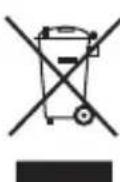
-To3n CnMBOJ O3Haayaba, ye aKO HeJaTe Da ce OCBo6OaNTe OT ypeDa, cIeD KaTO EKcNlOaTaUHOHHrT My HNBOT e N3TeKn, Tpr6Ba da ro npdaTe NO nOxDxOra HaunH HaΦnpMa 3a
npepaotkaHaOTnadbU,
OTOpn3npaHa 3a pa3deJHo Cb6npaHe
Ha OTHOCHO OTnAdbU O
eNEKtpnuecKO n eNEKtpoHNO
O6OpyDbAHe (OEEO).
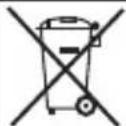
To3n CmB0J O3Haayaba, Ye BbB BbTpEshOCTTa Ha ypea MoKe Da HMa 6aTePN, KOHT Tp8Ba da ce n3BaAIT, PpeN da ce
OCBO6OaIteOT Hero.
Kak da OTCpaHm 6aTepuHte OT BbTpewHocTtHa ypeJa:
BHHMaHHe: BaHHO e 6aTeepnnte da ca HAnbJIno 3apeDeH npeH da rN n3BaJNTe OT ypeHa.
3a da n3BaJnte 6aTepeHnTe, cIeI KaTO eKcIIoatauONHHrT NM KHBOT e n3TeBJI (ΦIr.7), cIeDbaIte CJIeHNTe CTbNkI:
- OTepaHete BbHnHnJnCTnBbTpewHOTo HOXue (ΦIr. 7 A).
-ИЗваде Te DeKopaTNBHaTa XbIka C NOMOUSA HA OTBepTKa HIN NOIo6eH INHCTpyMeHT (ФИR.7В).
-OTBopTe BbHnHaTa Tana, KOrTo pa3dJI npedHaTn 3aHaTa Tana c NOMOa Ha OTBepTKa nI INoO6eH HcTpymENT (Fur.7C).
-HamepeTe 6aTePnraTn npepeKeTe HeHnHe T KaBeJI (YepBEN N Yepen). 3a da n36eHHeTe ONaCHocCTTa OT KbCO CbeDInHeHne,OT Bb3MOHNrT OCTaTbUeH 3apJd Ha 6aTePnraTa, IpbBO npepeKeTe UepBeHnT Ka6eI IN PpeDnAsTe OToJeHaTMy YaCT Cn30JIpaAa JENTa,CleJ KoETO npepeKeTe UepHnT Ka6eI NO CbUeHrT NaHH.(ΦnR.7D).
-ИЗbaDETe 6aTePnIra OТ HeHOTOMACTO3a CnHypHOCT.
To3n ypeI OTROBapHa n3NcKBaHnraTa Ha DnpeKTHBa 2006/95/EC 3a HnCKo HnpeKeHne N DnpeKTHBa 2004/108/EC 3a eJekTpomarHnTHa CbBMECTMOCt.
J 1

S ACD = S COD + S BDO - S DCA
jgl jg 15 JgJgJgJgJgJgJgJgJgJgJgJgJgJgJgJgJgJgJgJgJgJgJgJgJgJgJgJgJgJgJgJgJgJgJgJgJgJgJgJg
- Espanol
- i
- Distinguido paciente:
- Description
- Safety advice and warnings
- Electrical safety:
- Use and care:
- Service:
- Charging the battery
- USB charge
- Instructions for use
- Before use:
- Use:
- How to shave:
- Switch lock:
- Once you have finished using the appliance:
- Cleaning
- Supplies
- Anomalies and repair
- Ecology and recyclability of the product
- How to remove the batteries from the interior of the device:
- François
- Uouéç kai TpoεiδoToiαeic ασφαλεις
- Xpnon kai ppooxn:
- Ybaxaembi nokynateJIb:
- PekomeHdaunn Mepbl
- 6e3onacchoctn
- PekomeHdaunn no 3Jektpo6e0anachoctn:
- Texnueckoe 6cbnykBaHne:
- 3apkaakymyTopoB
- 3apka yepe3 USB
- Hctpkyu no 3Kcnpyataunnpeep npBbIM nCNoIb3OBAHHem:
- 3Kcnpnyatau:
- Kak6pntbca:
- Khonka 6JIOKIpOBKn
- Nocne kaxdoRo nCNoB3OBAHn:
- UncTkau yxOa
- Akeccyyapbl
- HeuCnpaBHOCTn u cnocobI ux yctpaHEnn
- Kak n3BnkeKaTb aKKymyIaTOpbl n3 np6opa:
- CbBETn nppeDynpeXeHnna 3a6e3onacHOCT
- EneKtpnuecka 6e3oNaChocT:
- 3no3BaHe n noDpBxka:
- CepBn3:
- 3apeKdaHe Ha 6aTepeYTa
- 3apeKdaHne npe3 USB
- Haun Ha ynoTpe6a
- Ipeyn ynoTpe6a Ha ypeda:
- Ynotpe6a:
- Kak da 6pbchete:
- Бутон за SFokupaHe
- Cnei ynoTpe6a Ha ypea:
- Почистванe
- Kohcymatmbi
- Hn3npaBHOCTn npemOH
- Kak da OTCpaHm 6aTepuHte OT BbTpewHocTtHa ypeJa:
Brand : TAURUS
Model : IShave 2.0
Category : Razor