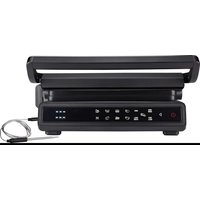
HCG1600DBT - Electric grill HISENSE - Free user manual and instructions
Find the device manual for free HCG1600DBT HISENSE in PDF.


User questions about HCG1600DBT HISENSE
0 question about this device. Answer the ones you know or ask your own.
Ask a new question about this device
Download the instructions for your Electric grill in PDF format for free! Find your manual HCG1600DBT - HISENSE and take your electronic device back in hand. On this page are published all the documents necessary for the use of your device. HCG1600DBT by HISENSE.
USER MANUAL HCG1600DBT HISENSE
natural_image
Black flat-screen grating with control panel and buttons (no visible text or symbols)HCG1600DBT
SI Navodila za uporabo ....1
Upravljalna enota

Pred prvo uporabo
natural_image
Technical line drawing of a mechanical device with a highlighted component (no text or symbols)natural_image
Technical line drawing of a mechanical device with a highlighted circular component (no text or symbols)natural_image
Technical line drawing of a portable heater or solar panel with cooling fins and mounting base (no text or symbols)natural_image
Technical line drawing of a portable heater with a magnified inset showing the cable being inserted (no text or symbols present)natural_image
Line drawing of a hand operating a flat-screen grating machine (no text or symbols present)Pozor:
natural_image
Line drawing of a computer monitor with hands operating it (no text or symbols)Pozor:
natural_image
Technical line drawing of a mechanical device with a sensor or probe inserted (no text or symbols present)Pozor:
Upravljačka ploča

Prije prve uporabe
natural_image
Technical line drawing of a mechanical device with a highlighted component (no text or symbols)- Zatvoreni način za gornju i donju ploču za pečenje. U ovom načinu se tipka za zaključavanje ne koristi (pogledajte krug na donjoj slici). Gornja ploča je poklopljena, a udaljenost između gornje i donje ploče određena je hranom koja se nalazi u sredini.
natural_image
Technical line drawing of a mechanical device with a highlighted circular component (no text or symbols)natural_image
Line drawing of a portable heater or refrigerator with heat exchanger and side-mounted base (no text or symbols)- Otvorite gornju i donju ploču pod kutom od 180° kada gornja ploča stoji uspravno. Povucite gumb gornjeg poklopca prema gore, držeći ručku i pritišćući prema dolje; zatim se gornja i donja ploča za pečenje mogu otvoriti pod kutom od 180°, kao što je prikazano na slici ispod.
natural_image
Technical line drawing of a portable heater with a magnified inset showing the cable being inserted (no text or symbols present)Upute za uklanjanje i sastavljanje ploča
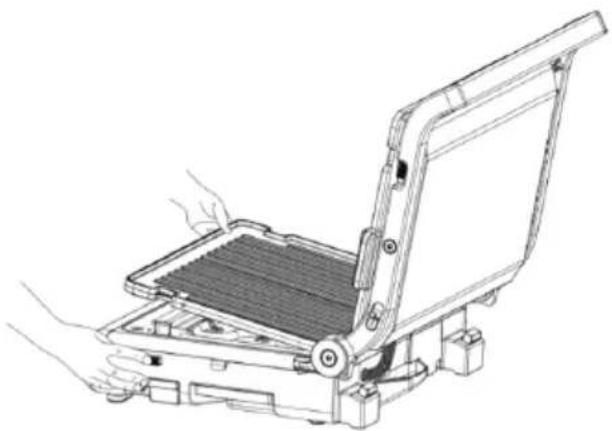
- Uklanjanje ploče. Otvorite gornju i donju ploču uređaja pod kutom od 95° (ili 180°). Pritisnite gumb za otpuštanje ploče i ploča će automatski iskočiti. U tom trenutku korisnik može izravno ukloniti ploču s fiksnog nosača, kao što je prikazano na donjoj slici.
natural_image
Line drawing of a mechanical device with hands operating it, showing a tray and frame structure (no text or symbols)Pažnja:
natural_image
Line drawing of a mechanical device with hands operating it, showing internal components and mounting base (no text or symbols)Pažnja:
- Ploča je neophodni dio ovog proizvoda. Mora se postaviti prije uporabe uređaja.
Temperaturna sonda
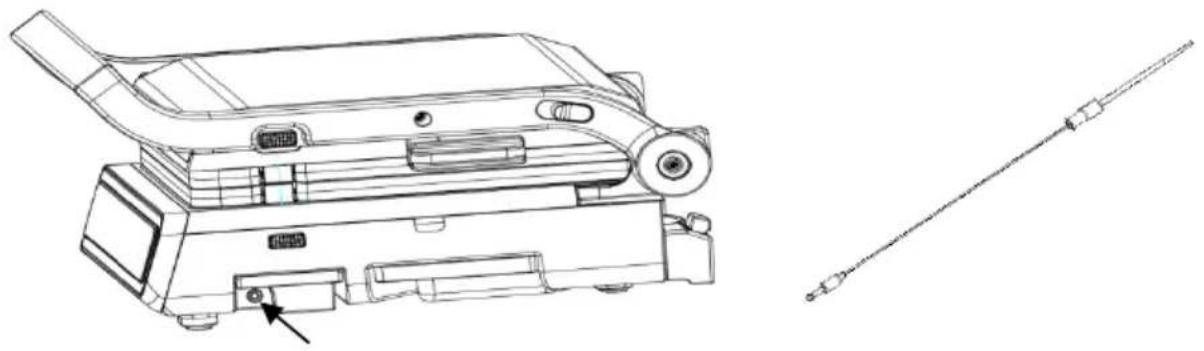
Pomoću temperaturne sonde možete otkriti unutarnju temperaturu hrane kako biste postigli bolju temperaturu i razinu pečenja. Kada trebate koristiti sondu, izvucite spremnik sonde s desne strane uređaja. Zatim izvadite sondu i umetnite priključak u okrugli otvor uređaja, pazeći da je pravilno postavljen.
natural_image
Technical line drawing of a mechanical device with mounting bracket and sensor cable (no text or symbols)Pažnja:
- Sonda za hranu radi samo s funkcijom za odrezak i ručnim načinom rada; ne radi s drugim načinima rada.
- Ako koristite funkciju za odrezak, sonda za hranu neće prestati zagrijavati dok ne dosegne prethodno podešenu temperaturu, a ne prethodno podešeno vrijeme.
- Umetnite sondu za hranu u otvor prije odabira funkcije. Umetanje sonde za hranu nakon uključivanja funkcije može uzrokovati zaustavljanje programa.
- Kad se koristi sonda, njezina vrijednost temperature prikazat će se na položaju za prikaz temperature gornje ploče. To jest, nakon umetanja sonde, temperatura gornje ploče prikazuje se kao temperatura sonde (pogledajte sliku u nastavku).

Upute za rukovanje
Ručni način rada Zagrijavanje donje ploče
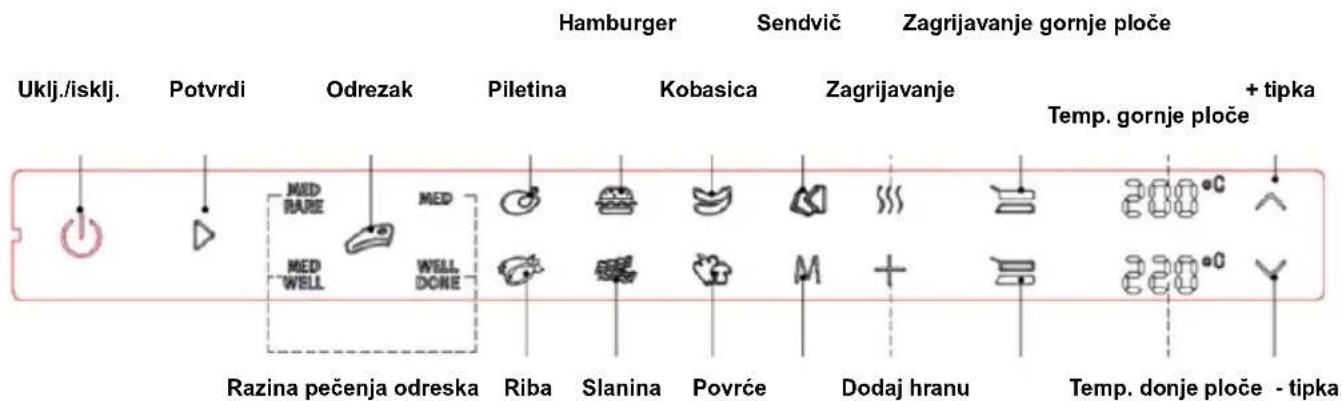
- Funkcija za odrezak je sljedeća: Na temelju koraka 2, pritisnite tipku za odrezak za odabir razine pečenja. Razine pečenja su medrare→med→medwell→welldone. Ponovite na ovaj način tako da odabrani indikator razine pečenja treperi a ostali indikatori razine pečenja ostanu uključeni. Nakon odabira razine pečenja odreska, pritisnite tipku "Potvrdi" i uređaj će se početi zagrijavati. Indikator tipke Uključeno, indikator tipke Potvrdi, indikator tipke za odrezak i odabrani indikator razine pečenja ostat će uključeni. Kad indikator zagrijavanja treperi i drugi indikatori se isključuju, prikazuje se temperatura zagrijavanja gornje i donje ploče, kao što je prikazano na sljedećoj slici.

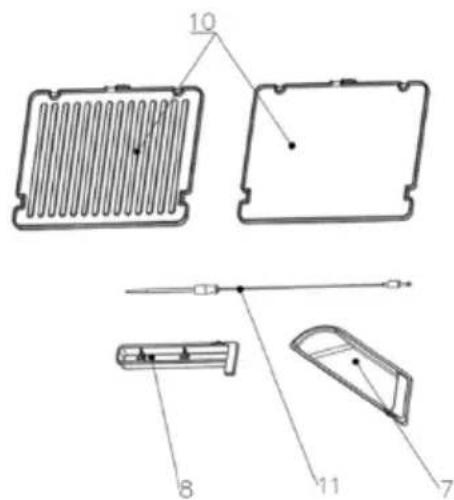
- Baza
- Kutija za masnoću
- Kutija sonde za hranu
- Kontrolna tabla
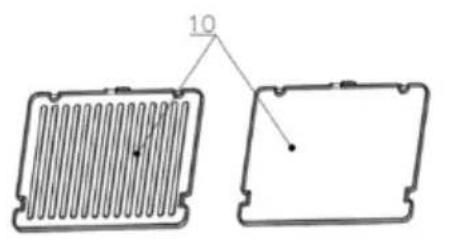
- Ploče za pečenje
- Temperaturna sonda
Kontrolna tabla

Pre prve upotrebe
- Izvadite proizvod iz pakovanja.
- Pre bacanja ambalažnog materijala, proverite sve komponente kako biste bili sigurni da ništa ne nedostaje.
- Pažljivo pročitajte ovo uputstvo za upotrebu i čuvajte ga za kasniju upotrebu.
- Proverite da li je uređaj napuknut ili oštećen, obraćajući posebnu pažnju na kabl za napajanje. Ako pronađete oštećenje, obratite se prodavcu.
- Pre upotrebe očistite gornje i donje ploče i posude za masnoću vrućom vodom, isperite tečnošću i neabrazivnim suđerom, ostavljajući ploče da se osuše pre sastavljanja.
- Dodajte malo vode u kutiju za masnoću i polako je gurnite sa dna roštilja.
Napomena: Normalno je da proizvod malo miriše ili proizvodi dim kratko vreme kada se prvi put koristi. Provetrite prostoriju ako osetite neželjeni miris.
Vodič za podešavanje režima pečenja
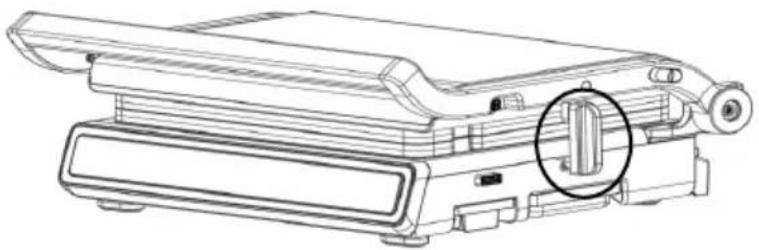
- Režim zaključavanja gornje i donje ploče za pečenje, pri čemu se koristi taster za zaključavanje (pogledajte krug na donjoj slici). Gornja i donja ploča se savršeno uklapaju i neće se otvoriti. Ovaj režim se koristi za skladištenje ili transport proizvoda i ne može se koristiti dok se proizvod zagreva.
natural_image
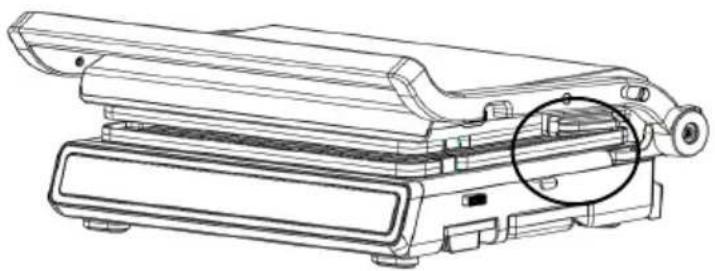
Technical line drawing of a mechanical device with a highlighted cylindrical component (no text or symbols)- Zatvoreni režim za gornju i donju ploču za pečenje. U ovom režimu se ne koristi taster za zaključavanje (pogledajte krug ispod). Gornja ploča je poklopljena, a udaljenost između gornje i donje ploče je određena hranom koja se nalazi u sredini.
natural_image
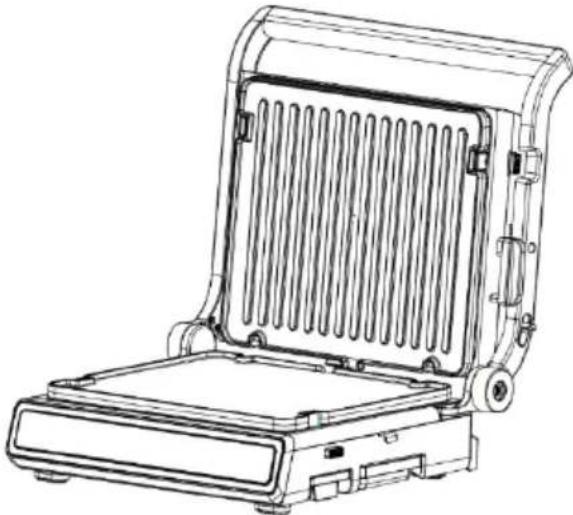
Technical line drawing of a mechanical device with a highlighted circular component (no text or symbols)- Gornja ploča je otvorena. Držite ručku da biste otvorili gornju ploču. U ovom trenutku, gornju i donju ploču za pečenje treba odvojiti pod uglom od oko 95°, kao što je prikazano u nastavku. U ovom reži mu donja ploča može poslužiti kao ravna ploča koja se može koristiti za pečenje palačinki, jaja i dru ge hrane. Gornju ploču za pečenje treba isključiti jer stoji uspravno.
natural_image
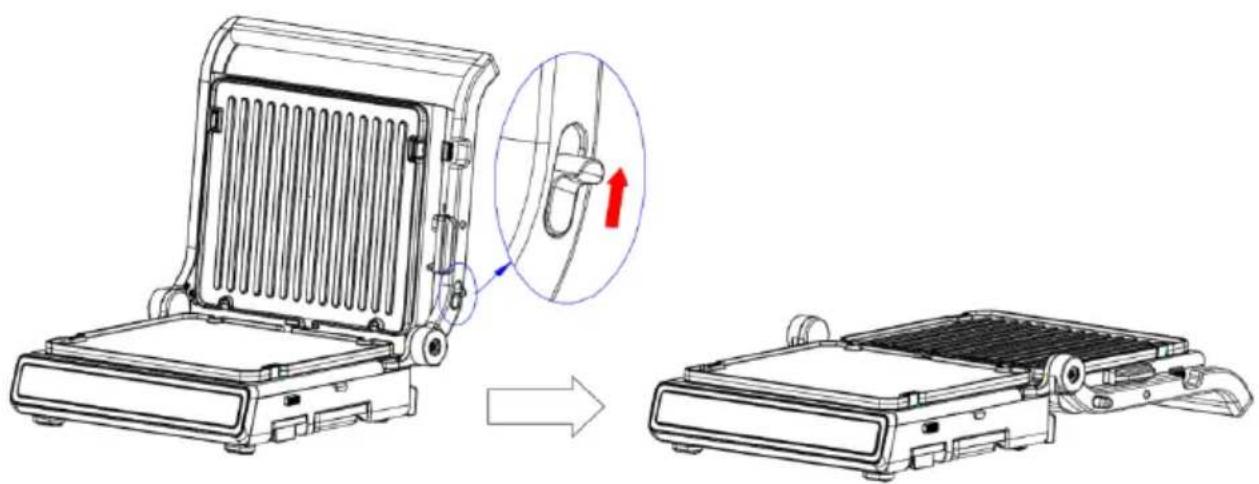
Line drawing of a portable flat-screen grater with heat exchanger and side-mounted base (no text or symbols)- Otvorite gornju i donju ploču pod uglom od 180° kada gornja ploča stoji uspravno. Povucite dugme gornjeg poklopca prema gore dok držite ručku i pritišćete nadole; zatim se gornja i donja ploča za pečenje mogu otvoriti pod uglom od 180°, kao što je prikazano na slici ispod.
natural_image
Technical line drawing of a portable refrigerator with a magnified inset showing the handle mechanism (no text or symbols)natural_image
Line drawing of a computer monitor with hands operating it (no text or symbols)Pažnja:
- Dok je gornja ploča za pečenje u uspravnom položaju, držite ploču rukom kada pritisnete dugme za otpuštanje gornje ploče kako biste sprečili da padne.
-
Kada je pečenje završeno i ploče su još vruće, nemojte odmah uklanjati ploče. Da biste izbegli opekotine, sačekajte da se ploče ohlade.
-
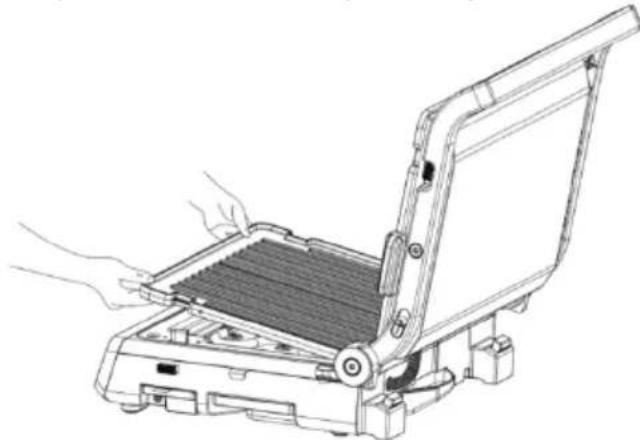
Sastavite ploče, otvorite gornju i donju ploču uređaja pod uglom od 95° (ili 180°), umetnite dva kraja ploča sa zarezima u nosač za pričvršćivanje ploče, a zatim stavite ploču na reflektujući pladanj. Pritisnite ploču dok ne začujete zvuk "klik". Ploča je sastavljena, kao što je prikazano na slici ispod.
natural_image
Line drawing of a computer monitor with hands operating the screen (no text or symbols)Pažnja:
- Ploča je neophodan deo ovog proizvoda. Mora se instalirati pre upotrebe uređaja.
Temperaturna sonda
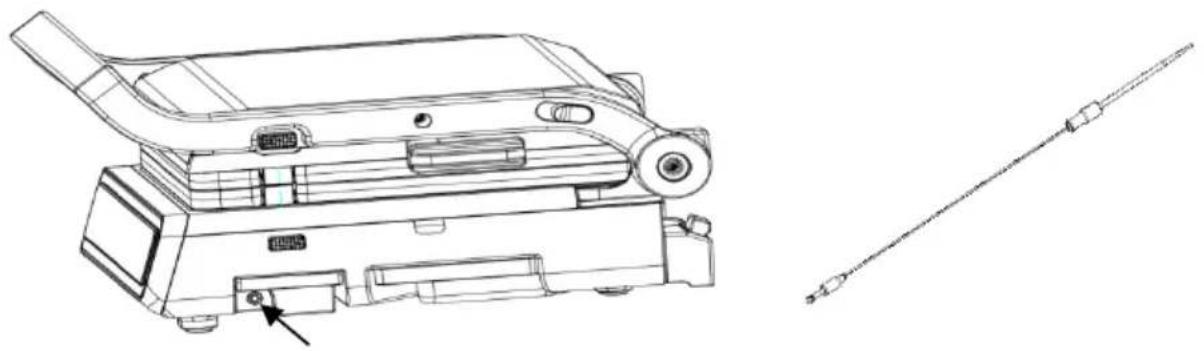
Pomoću temperaturne sonde možete da otkrijete unutrašnju temperaturu hrane kako biste postigli bolju temperaturu i nivo pečenja. Kada treba da koristite sondu, izvucite kutiju sonde sa desne strane uređaja. Zatim izvadite sondu i umetnite priključak u okrugli otvor uređaja, pazeći da je pravilno postavljen.
natural_image
Technical line drawing of a device with a mounted component and a separate cable or connector (no text or symbols present)Pažnja:
- Sonda za hranu radi samo sa funkcijom za odrezak i ručnim režimom rada; ne radi sa drugim režimima rada.
- Ako koristite funkciju za odrezak, sonda za hranu se neće prestati zagrevati dok ne dostigne unapred podešenu temperaturu, a ne unapred podešeno vreme.
- Umetnite sondu za hranu u otvor pre nego što izaberete funkciju. Umetanje sonde za hranu nakon uključivanja funkcije može prouzrokovati zaustavljanje programa.
- Kada se koristi sonda, njena vrednost temperature će biti prikazana na položaju za prikaz temperature gornje ploče. To jest, nakon umetanja sonde, temperatura gornje ploče se prikazuje kao temperatura sonde (pogledajte sliku ispod).

- Funkcija za odrezak je sledeća: Na osnovu koraka 2, pritisnite taster za odrezak da biste izabrali nivo pečenja. Nivoi pečenja su medrare → med → medwell → welldone. Ponovite na ovaj način tako da izabrani indikator nivoa pečenja treperi, a ostali indikatori nivoa pečenja ostanu uključeni. Nakon odabira nivoa pečenja odreska, pritisnite dugme „Potvrdi” i uređaj će se početi zagrevati. Indikator tastera Uključeno, indikator tastera Potvrdi, indikator tastera za odrezak i izabrani indikator nivoa pečenja će ostati uključeni. Kada indikator zagrevanja treperi i drugi indikatori se isključuju, prikazuje se temperatura zagrevanja gornje i donje ploče, kao što je prikazano na sledećoj slici.

Kada se zagrevanje završi, zvučni signal će se oglasiti tri puta. Istovremeno, indikator zagrevanja prestaje da treperi i ostaje uključen, a indikator za dodavanje hrane treperi kako bi podsetio korisnika da doda hranu. Nakon dodavanja hrane pritisnite dugme „Potvrdi” i uređaj će se početi zagrevati. Kad su indikator zagrevanja i indikator dodavanja hrane isključeni, temperatura zagrevanja će se prikazati na gornjoj i donjoj ploči, kao što je prikazano na slici ispod:

Nakon završetka zagrevanja, kontrolna tabla će se vratiti na korak 2.
- Ostale automatske funkcije menija: Osim funkcije za odrezak, postoji sedam automatskih programa menija, uključujući program za piletinu, hamburgere, kobasice, sendviče, ribu, slaninu i povrće. Ovi automatski meniji rade na isti način. Uzmimo program za piletinu kao primer - pritisnite taster za piletinu na osnovu koraka 2. U tom će trenutku treperiti indikatorska lampica tastera za piletinu i na kontrolnoj tabli će se prikazati temperatura zagrevanja funkcije za piletinu. Pritisnite dugme „Potvrdi” i uređaj će se početi zagrevati. Indikator tastera za uključivanje/isključivanje, indikator tastera „Potvrdi” i indikator tastera "Piletina" će ostati uključeni, dok indikator zagrevanja treperi. Kada se drugi indikatori isključe, kontrolna tabla će prikazati temperaturu zagrevanja gornje i donje ploče, kao što je prikazano na slici ispod:

Kada se zagrevanje završi, zvučni signal će se oglasiti tri puta. Istovremeno, indikator zagrevanja prestaje da treperi i ostaje uključen, a indikator za dodavanje hrane treperi kako bi podsetio korisnike da dodaju hranu. Nakon dodavanja hrane, pritisnite dugme „Potvrdi” i uređaj će se početi zagrevati. Indikator zagrevanja i indikator za dodavanje hrane će biti isključeni, a na kontrolnoj tabli će se prikazati temperatura zagrevanja za piletinu, kao što je prikazano na slici ispod:

Nakon završetka zagrevanja, kontrolna tabla će se vratiti na korak 2.
5. Ručno upravljanje funkcijama:
a. Kada gornja i donja ploča imaju istu temperaturu: pritisnite dugme za Ručni režim rada na osnovu koraka 2. Istovremeno će treperiti indikatori tastera za ručni režim rada, tasteri za zagrevanje gornje ploče i tasteri za zagrevanje donje ploče. Temperatura gornje i donje ploče je "---". Pritisnite taster + (-) da biste sinhronizovano podesili temperaturu gornje i donje ploče. Podešavanja temperature se kreću od 80 do 230 °C. Svakim pritiskom na + (-) temperatura se povećava (ili smanjuje) za 10°C. Nakon odabira temperature, pritisnite taster „Potvrdi” i uređaj će se početi zagrevati. Kad se uređaj zagreje na izabranu temperaturu, zvučni signal će se oglasiti zvučnim signalom upozorenja. Nakon dostizanja izabrane temperature, uređaj će automatski raditi 60 minuta, a zatim izaći iz ručnog režima rada i vratiti se na korak 2.
b. Kada temperature gornje i donje ploče nisu iste: pritisnite dugme Ručni režim rada na osnovu koraka 2. Istovremeno će treperiti indikatori tastera za ručni režim rada, tasteri za zagrevanje gornje ploče i tasteri za zagrevanje donje ploče. Temperatura gornje i donje ploče je "---". U tom trenutku pritisnite taster za zagrevanje gornje (ili donje) ploče. Indikator tastera za zagrevanje gornje (ili donje) ploče će treperiti i indikator zagrevanja donje (ili gornje) ploče će ostati uključen. U tom trenutku, proizvod je u stanju zagrevanja gornje (donje) ploče. Kada koristite taster + (-) za podešavanje temperature gornje (ili donje) ploče, opseg podešavanja temperature će biti od 80 °C do 230 °C. Svakim pritiskom na + (-) temperatura se povećava (ili smanjuje) za 10 °C. Nakon podešavanja temperature jedne ploče, pritisnite dugme „Potvrdi” za podešavanje temperature druge ploče. Kada podesite temperaturu ploča, uređaj će se početi zagrevati. Kada uređaj dostigne izabranu temperaturu, zvučni signal će se oglasiti zvučnim signalom upozorenja. Nakon dostizanja izabrane temperature, uređaj će automatski raditi 60 minuta, a zatim izaći iz ručnog režima rada i vratiti se na korak 2.
Pažnja:
- Kada se koristi taster -, ako je temperatura prikazana kao "--", to znači da ploče za pečenje trenutno nisu zagrejane.
- Dugo pritisnite taster + (ili -) da biste kontinuirano povećavali (ili smanjivali) vrednost temperature.
Programi i meniji
| Meni | Temp. zagrevanja (°C) | Temp. pečenja (°C) | Vreme pečenja | Temp. sonde (°C) |
| Piletina | 200 | 220 | 260 s | |
| Hamburger | 220 | 230 | 300 s | |
| Kobasica | 160 | 180 | 270 s | |
| Sendvič | 160 | 180 | 105 s | |
| Riba | 190 | 210 | 300 s | |
| Slanina | 190 | 220 | 110 s | |
| Povrće | 170 | 200 | 130 s | |
| Slabije pečeno za odrezak | 220 | 230 | 60 s | 57 |
| Srednje pečeno za odrezak | 220 | 230 | 90 s | 62 |
| Srednje dobro pečeno za odrezak | 220 | 230 | 120 s | 65 |
| Dobro pečeno za odrezak | 220 | 230 | 200 | 71 |
Rešavanje problema
| Problem | Mogući uzrok | Rešenje |
| Uređaj ne radi | Kabl za napajanje nije uključen u utičnicu. | Priključite kabl za napajanje u utičnicu |
| Između ploča za pečenje izlazi dim | Ostalo je ostataka hrane nakon poslednje upotrebe | Očistite gornju i donju ploču i posude za masnoću nakon svake upotrebe kako biste uklonili ostatke hrane |
| Hrana je prepečena (izgorela) ili nedovoljno pečena. | Nakon uključivanja, odgovarajuća temperatura nije podešena u skladu sa hranom koju pečete. Temperaturu ovog uređaja možete da podesite. | Podesite temperaturu u skladu sa hranom koju pečete i podesite je na najviši položaj |
| Hleb gori kada se peče | Vreme pečenja hleba se razlikuje u zavisnosti od toga da li je uređaj hladan ili vruć. Vreme potrebno za pečenje hleba je duže ako je uređaj hladan. | Ako je uređaj zagrejan, skratite vreme pečenja |
| Uređaj radi neko vreme, iznenada se zaustavlja i čuje se zvuk "di"; | Maksimalno radno vreme tajmera je 60 minuta i automatski će se isključiti nakon isteka vremena. | Ponovo ga uključite |
| Hrana nije ravnomerno pečena | Veličine hrane se razlikujuVrste hrane se razlikujuKada je ploča za pečenje otvorena pod uglom od 95° i 180°, hrana nije okrenuta tokom pečenja. | Hrana je iste veličineIsta grupa namirnicaKada pečete hranu, treba je okrenuti. |
| Odrezak je izgoreo spolja | Vreme pečenja je predugo | Pogledajte meni da biste podesili vreme |
Čišćenje
Upozorenje:
- Pre čišćenja isključite kabl za napajanje i ostavite da se uređaj i ploče potpuno ohlade kako biste izbegli opekotine.
- Nemojte uranjati kabl za napajanje, utikač ili uređaj u vodu ili druge tečnosti.
- Prilikom čišćenja nemojte koristiti materijale za čišćenje sa metalnim svojstvima.
-
Prilikom čišćenja nemojte koristiti metalnu lopaticu za čišćenje ploča.
-
Nakon svake upotrebe očistite unutrašnje i spoljašnje površine vlažnom krpom ili suđerom.
- Ploče se mogu prati u vodi ili u mašini za pranje sudova.
- Prilikom čišćenja može se koristiti odgovarajuća količina alkalne tečnosti za čišćenje.
- Nakon čišćenja svih delova, osušite ih čistom krpom kako biste sprečili oksidaciju i stvaranje rđe.
- Na kraju, pratite odgovarajuće korake za stavljanje ploča u uređaj za sledeću upotrebu.
BRIGA ZA ŽIVOTNU SREDINU
Nakon isteka njegove predviđene životne dobi aparat nemojte baciti zajedno s uobičajenim otpacima iz domaćinstva, nego ga predajte ovlašćenim zbirnim mestima za recikliranje. Takvim odlaganjem dotrajalog aparata pomažete u očuvanju okoline.
GARANCIJA I SERVIS
Za bilo kakve informacije ili u slučaju kvara aparata obratite se Centru za korisnike Hisense u vašoj državi (telefonski broj takvog centra naveden je u globalnom garantnom listu koji važi u celom svetu). Ukoliko u vašoj državi nema Centra za korisnike Hisense, obratite se vašem lokalnom prodavcu Hisense proizvoda, ili pozovite odeljenje Hisense za servisiranje kućanskih aparata.
Контролен панел

natural_image
Technical line drawing of a mechanical device with a highlighted component (no text or symbols)natural_image
Technical line drawing of a mechanical device with a highlighted circular component (no text or symbols)natural_image
Line drawing of a portable flat-screen heater with heat exchanger and mounting base (no text or symbols)natural_image
Technical line drawing of a portable heater with a magnified inset showing the cable being inserted (no text or symbols present)natural_image
Line drawing of a mechanical device with hands operating it, showing a tray and base assembly (no text or symbols)Внимание:
natural_image
Line drawing of a computer monitor with hands operating it, showing internal components and no text or symbolsВнимание:
natural_image
Technical line drawing of a device with a handle and connector, alongside a separate schematic symbol (no text or labels present)Внимание:
Important safety instructions
Warning!
Appliance is hot when turned on – beware of skin burn! Allow the appliance to cool down completely before storing it away.
- Read carefully the instructions before first use.
- Never connect this appliance to an external timer switch or remote control system in order to avoid a hazardous situation.
- Children less than 8 years of age shall be kept away unless continuously supervised.
• Children should be supervised to ensure that they do not play with the appliance. - This appliance can be used by children aged from 8 years and above and persons with reduced physical, sensory or mental capabilities or lack of experience and knowledge if they have been given supervision or instruction concerning use of the appliance in a safe way and understand the hazards involved.
• Children shall not play with the appliance. - Cleaning and maintenance shall not be made by children unless they are older than 8 and supervised.
- Keep the appliance and its cord out of reach of children less than 8 years.
- Use the appliance only for the usage it is made for. Do not remake any of its components.
- Make sure the power cord does not touch any hot parts of the grill.
- Clean well before first use.
- Before the grill plates are mounted check if the are totally dry.
- Check if the grill plates are fixed firmly on its surface and if the fixing clip is in locking position.
- Keep out of reach of children. Do not leave unattended while turned on.
- Always unplug:
- Before storing or taking off the grill plates,
- Before cleaning,
- After use.
• Always use certified lengthening cords. - For indoor use only.
- To disconnect the plug pull the plug not the cord.
- Turn on after the grill plates have been fixed.
-
Cool to room temperature before storing.
-
Do not touch the grill plates with metal or other sharp objects.
- If the mains cord is damaged, you must have it replaced a authorised service centre or similarly qualified persons in order to avoid a hazard.
This appliance is marked according to the European directive 2012/19/EU on Waste Electrical and Electronic Equipment (WEEE). This guideline is the frame of a European-wide validity of return and recycling on Waste Electrical and Electronic Equipment.
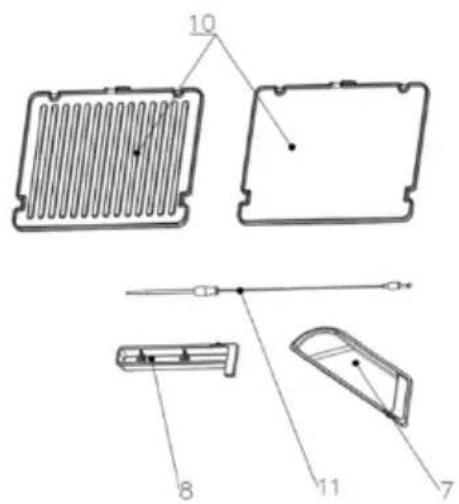
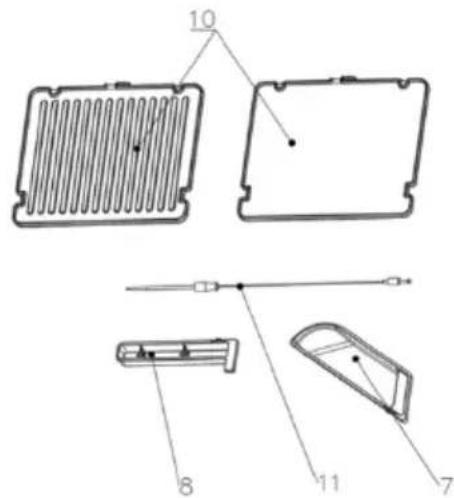
General description
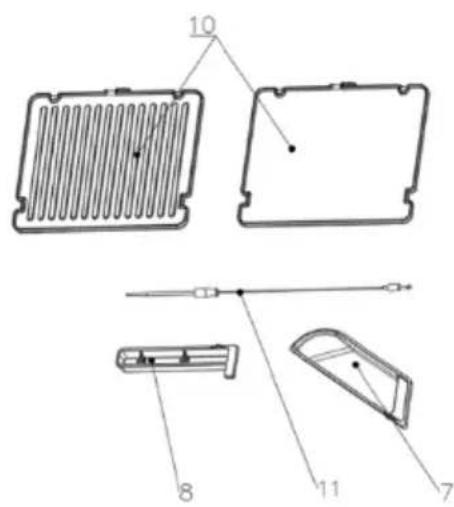
- Handle
- Top cover
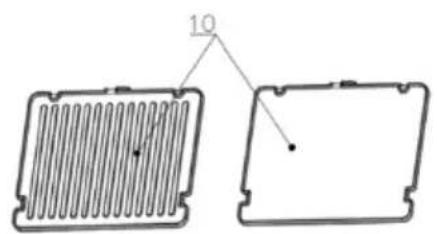
- Baking plate release key
- Lock key
- Switch to open and close the cover
- Base
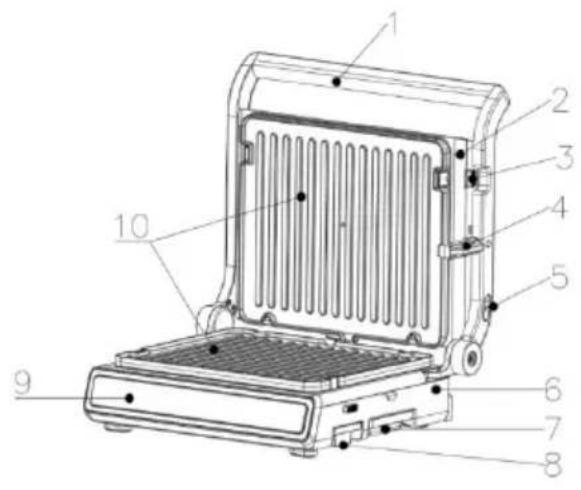
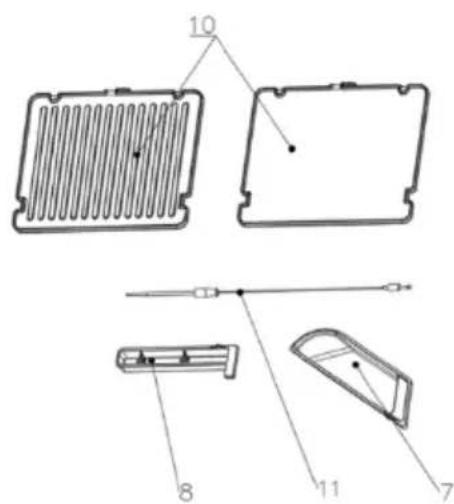
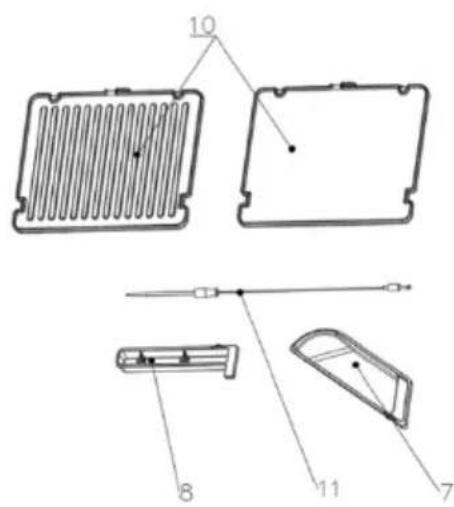
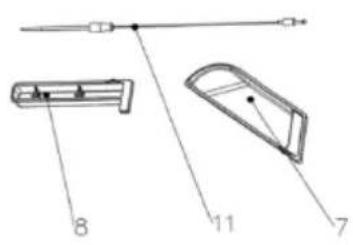
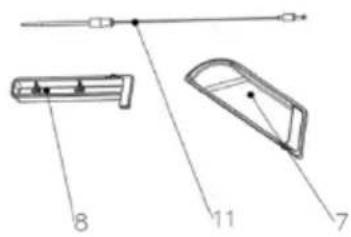
- Grease box
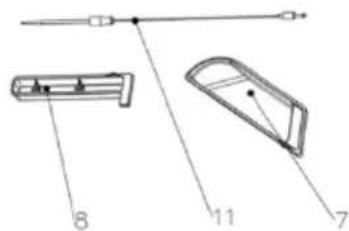
- Food Probe box
- Control Panel
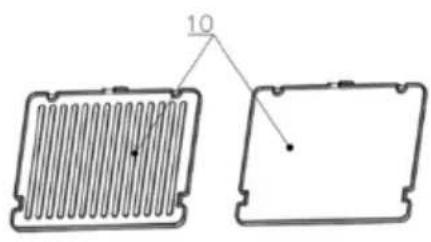
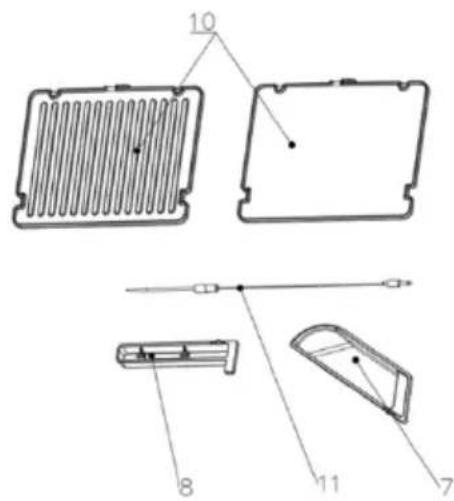
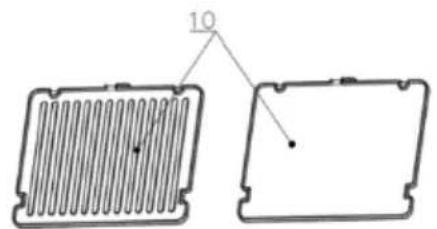
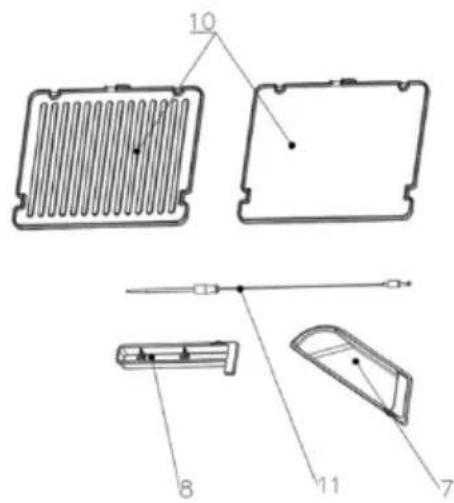
- Baking plates
- Temperature probe
natural_image
Technical line drawing of two rectangular components with internal ribbed structures, no text or symbols present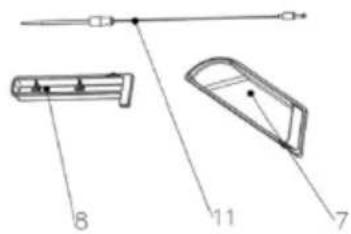
Control panel

Before first use
- Remove the product from its packaging.
- Before discarding the packaging materials, check all components to ensure there is nothing missing.
- Read this product manual carefully and keep it safe for later use.
- Check whether the machine is cracked or damaged, paying specific attention to the power cord. If damage is found, please contact the seller.
- Before use, clean the upper and lower plates and the grease receptions with hot water, washing up liquid and a non-abrasive sponge, allowing the plates to dry before assembly.
- Add some water into the grease box and push it slowly from the bottom of the grill.
Note: It is normal for the product to smell slightly or smoke for a short time when it is used for the first time. Air the room if there is any unwanted smell.
Baking mode adjustment guide
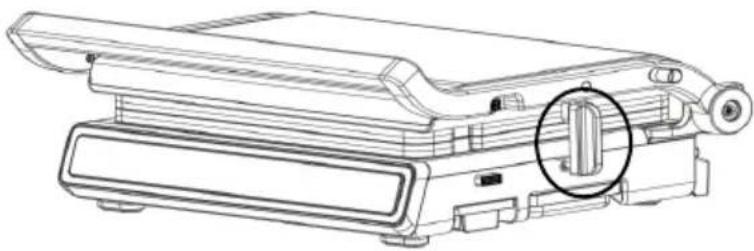
- Lock mode for upper and lower baking plates, whereby the lock key is used (see the circle below). The upper and lower plates fit together perfectly and will not open. This mode is used for storing or transporting the product and cannot be used while the product is being heated.
natural_image
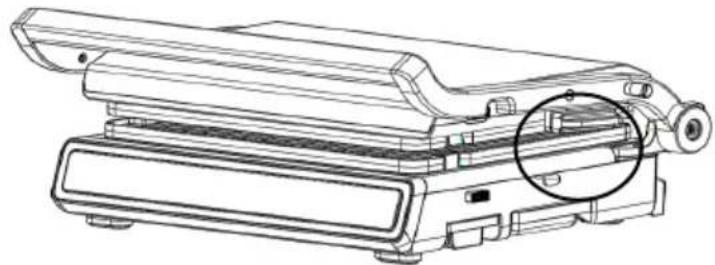
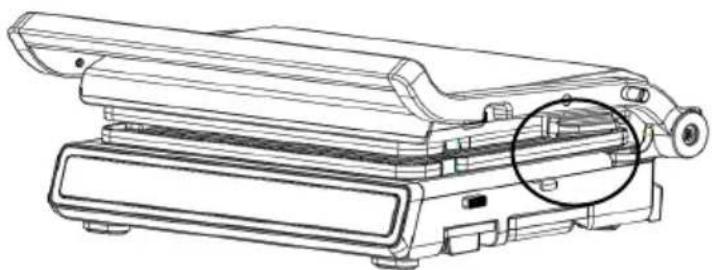
Technical line drawing of a mechanical device with a highlighted component (no text or symbols)- Closed mode for upper and lower baking plates. In this mode, the lock key is not in use (see the circle below). The upper plate is suspended, and the distance between the upper and lower plates is determined by the food placed in the middle.
natural_image
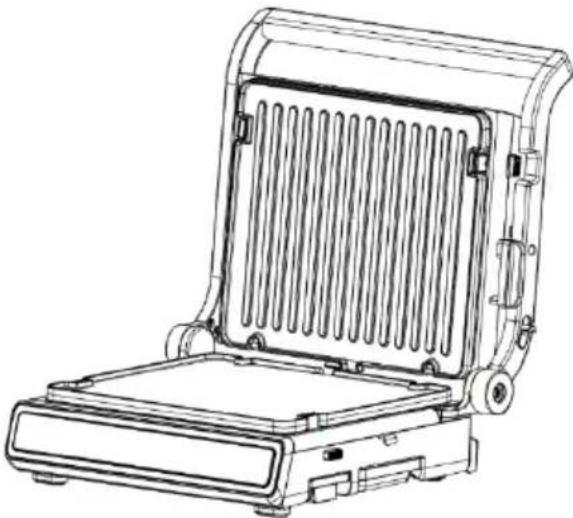
Technical line drawing of a mechanical device with a highlighted circular component (no text or symbols)- Upper plate open and stand mode. Hold the handle to open the upper plate. At this point, the upper and lower baking plates should be separated at an angle of about 95^ , as shown below. In this mode, the lower plate can be replaced with a flat plate, which can be used to make pancakes, eggs and other food substances. The upper baking pan is recommended to stop heating due to its upright hanging state.
natural_image
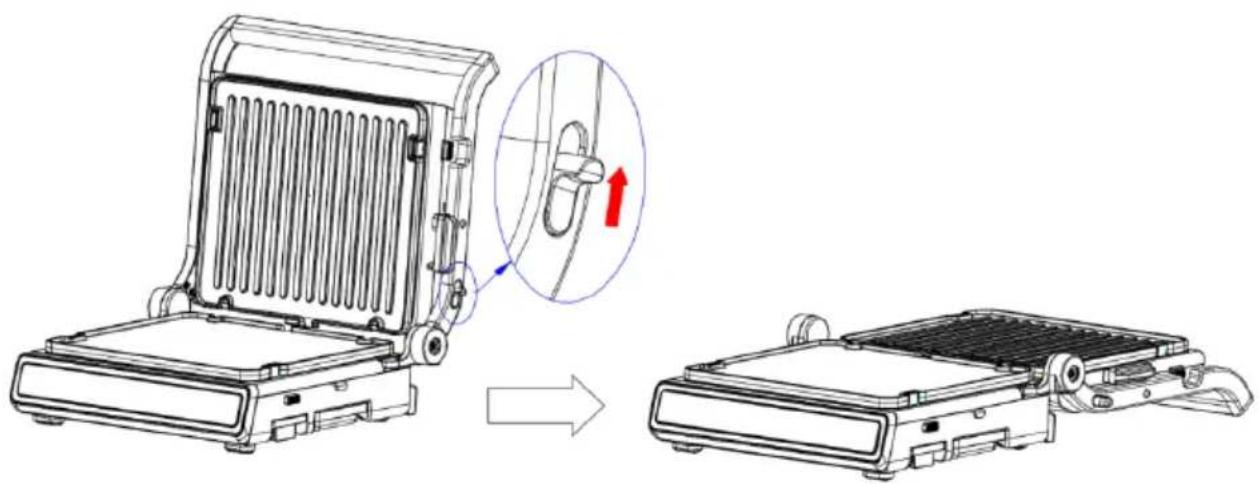
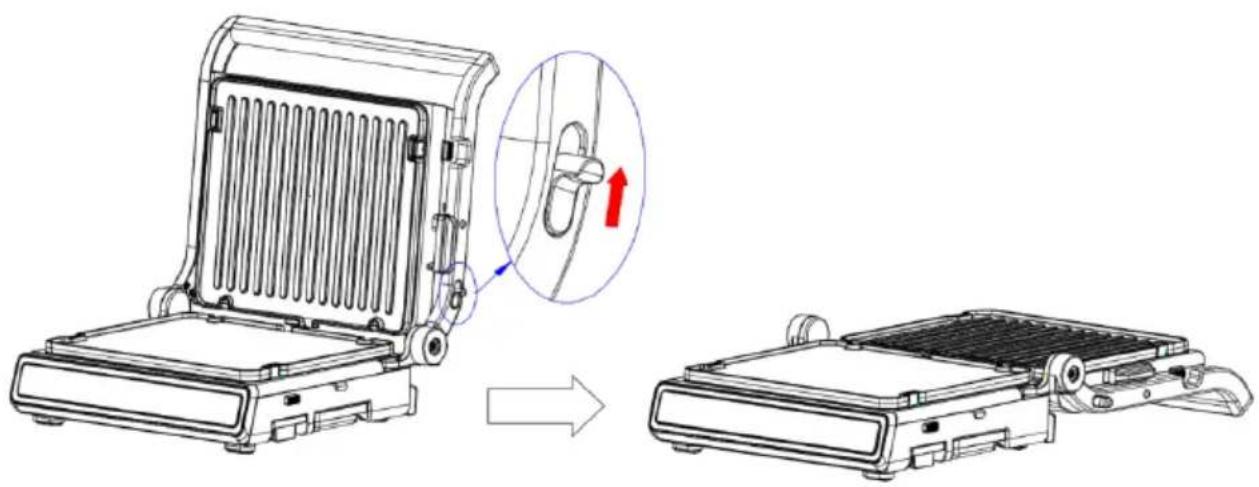
Line drawing of a portable heater or solar panel with cooling fins and mounting base (no text or symbols)- Turn the upper and lower plate to 180^ in the upright mode of the upper baking tray. Pull the button of the closing cover upward while holding the handle and pushing down; then the upper and lower baking tray can be opened at 180^ , as shown in the figure below.
natural_image
Technical line drawing of a portable heater with a magnified inset showing the internal structure (no text or symbols)Instructions for removing and assembling the plates
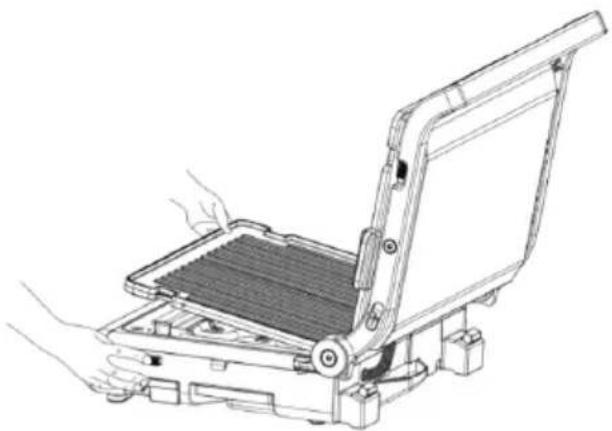
- Removing the plate. Open the upper and lower plates of the machine at 95^ (or 180^ ). Press the button to release the plate and the plate will automatically spring up. At this point, the user can directly remove the plate from the fixed bracket, as shown in the figure below.
natural_image
Line drawing of a mechanical device with hands operating it, showing internal components and mounting base (no text or symbols)Attention:
- While the upper baking tray is in the upright position, hold the plate with your hand when pressing the plate release button of the upper plate so as to stop it from falling.
-
When baking is finished and the plates are still hot, do not take out the plates immediately. To avoid burns, wait until the plates have cooled.
-
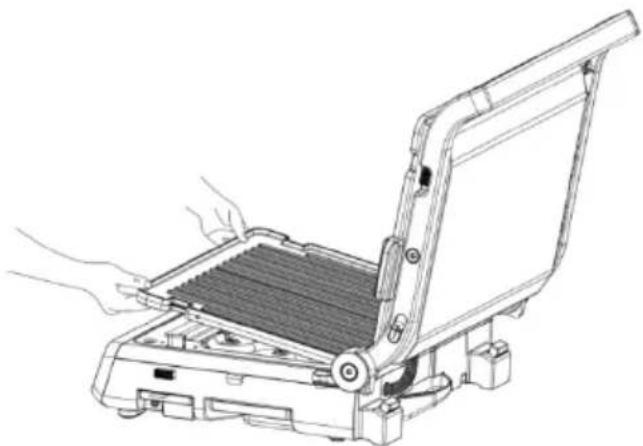
Assemble the plates, open the upper and lower plates of the machine at 95^ (or 180^ ), insert the two ends of the plates with notches into the fixing bracket of the plate, then place the plate on the reflecting tray. Press down on the plate until you hear a "click" sound. The plate is assembled, as shown in the figure below.
natural_image
Line drawing of a mechanical device with hands operating it, showing internal components and mounting base (no text or symbols)Attention:
- The plate is a necessary part of this product. It must be installed before the machine is used.
Temperature Probe
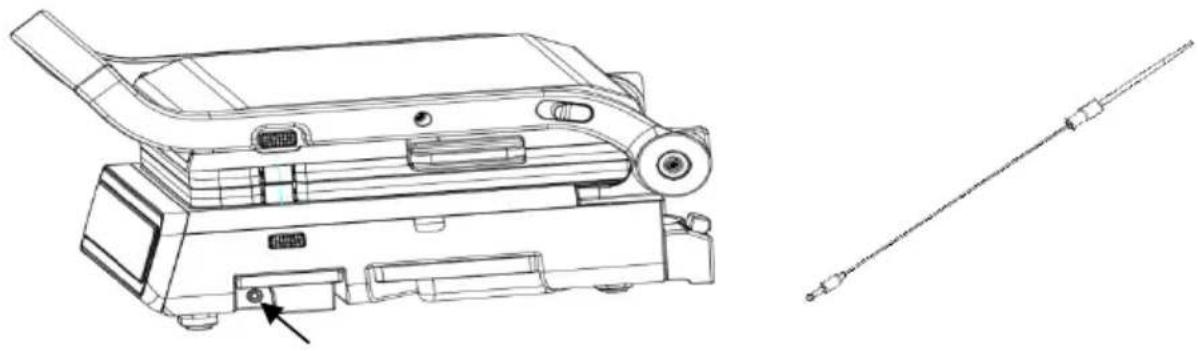
Using a temperature probe, you can detect the internal temperature of food in order to get a better temperature and doneness. When you need to use the probe, pull out the probe box from the right side of the machine. Then take out the probe and insert the terminal into the round hole of the machine, ensuring that it is correctly in place.
natural_image
Technical line drawing of a mechanical device with a sensor or probe inserted (no text or symbols present)Attention:
- Food probe only works with the steak function and manual mode; it does not work with other modes.
- In the case of the steak function, the food probe will not stop heating until it reaches the preset temperature, not the preset time.
- Insert the food probe into the hole before selecting the function. Inserting a food probe after starting the function may cause the program to stop.
- When the probe is used, its temperature value will be displayed on the temperature display position of the upper plate. That is, after inserting the probe, the temperature of the upper plate is displayed as the temperature of the probe (see the figure below).

Operating Instructions
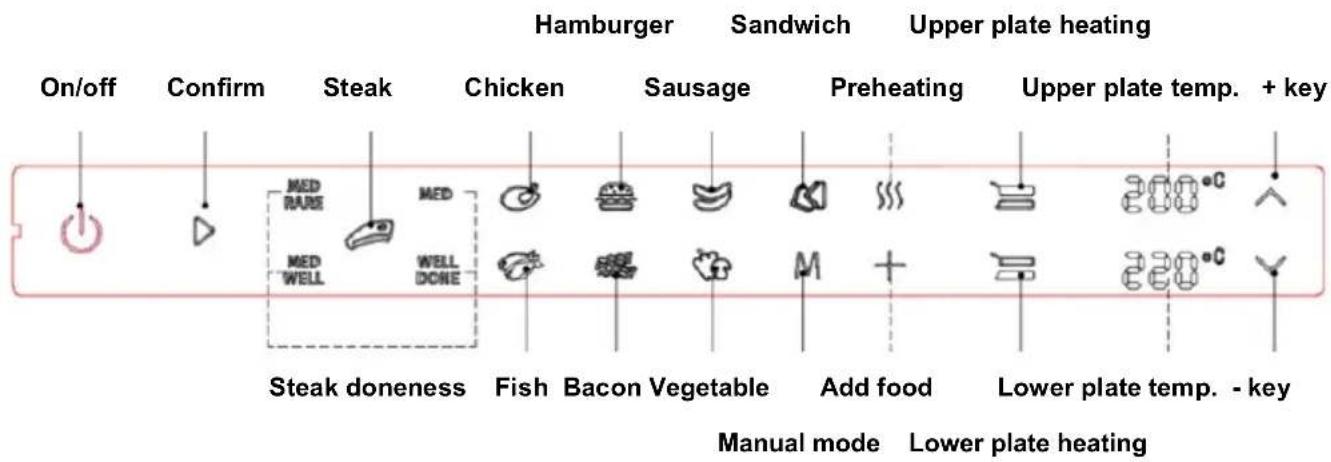
-
Plug the power cord into a suitable household outlet. At this point, the buzzer will make a "drip" sound, and all the indicators on the control panel will blink once before turning off. Only the on/off indicator light will continue to blink.
-
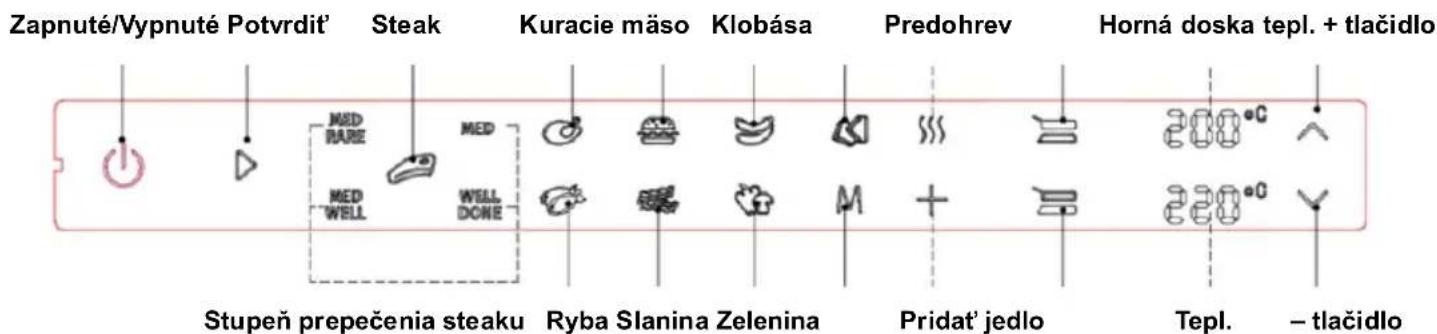
Press the "On/off" button, and all function key indicators will turn on, as shown in the picture below.

- Steak function is as follows: Based on Step 2, press the steak key to select the degree of doneness. The levels of doneness are medrare→med→medwell→welldone. Repeat in this way so that the selected doneness indicator blinks and the other doneness indicators stay on. After selecting the steak doneness, press the "Confirm" button, and the machine will enter the preheating state. The On key indicator, the Confirm key indicator, the steak key indicator and the selected doneness indicator will stay on. When the preheating indicator blinks and other indicators turn off, the preheating temperature of the upper and lower plates are displayed, as shown in the following figure.

After the preheating is complete, the buzzer will sound three alerts. At the same time, the preheating indicator turns from blinking to on, and the indicator for adding food blinks to remind the user to add the food. After adding the food, press the "Confirm" button and the product will enter the heating state. When the preheating indicator light and the Add food indicator light are off, the heating temperature will be displayed on the upper and lower plates, as shown in the figure below

After the heating time of this function is completed, the panel will switch back to Step 2.
- Other automatic menu functions: In addition to the steak function, there are seven automatic menu programs, including chicken, burgers, sausages, sandwiches, fish, bacon and vegetables. These automatic menus operate in the same way. Take chicken as an example - press the chicken key on the basis of step 2. At this time, the indicator light of the chicken key will blink and the control panel will display the heating temperature of the chicken function. Press the "Confirm" button, and the product will enter the preheating state. The on/off indicator, the "confirm" indicator and the "chicken" indicator will stay on, while the preheating indicator will blink. When the other indicators turn off, the control panel will display the preheating temperature of the upper and lower plates, as shown in the figure below:

After the preheating is complete, the buzzer will sound three alerts. At the same time, the preheating indicator light will change from blinking to on, and the indicator light for adding food will blink to remind users to add food. After adding the food, press the "Confirm" button and the product will enter the heating state. The preheating indicator light and the Add food indicator light will be off, and the control panel will display the chicken heating temperature, as shown in the figure below:

After the heating time of this function is completed, the panel will switch back to Step 2.
5. Manual function operation:
a. When the upper and lower plates have the same temperature: press the Manual Mode button based on Step 2. The indicators for the manual mode key, the heating key of the upper plate and the heating key of the lower plate will blink at the same time. The temperature of the upper and lower plates is “--”. Press the + (-) key to set the temperature of the upper and lower plates synchronously. Temperature settings range from 80 to 230°C. Every time + (-) is pressed, the temperature increases (or decreases) by 10°C. After selecting the temperature, press the "Confirm" button, and the machine will start to heat. When the machine heats to the selected temperature, the buzzer will sound a warning tone. After reaching the selected temperature, the machine will automatically run for 60 minutes, then exit the manual mode and return to Step 2.
b. When the upper and lower plate temperatures are not the same: press the Manual Mode button based on Step 2. The indicators for the manual mode key, the heating key of the upper plate and the heating key of the lower plate will blink at the same time. The temperature of the upper and lower plates is “--”. At this time, press the heating key of the upper (or lower) disk. The heating key indicator of the upper (or lower) disk will blink and the heating indicator of the lower (or upper) disk will stay on. At this time, the product is in the upper (lower) disk state. When using the + (-) key to set the upper (or lower) disk temperature, the temperature setting range will be from 80°C to 230°C. Every time + (-) is pressed, the temperature increases (or decreases) by 10°C. After setting the temperature of one disk, press the "Confirm" button to set the temperature of the other disk. When the temperature of the two disks is set, the machine will start to heat up. When the machine reaches the selected temperature, the buzzer will sound a warning tone. After reaching the selected temperature, the product will automatically run for 60 minutes, then exit manual mode and return to Step 2.
Attention:
- When the - key is used, if the temperature is displayed as "--", it indicates that the baking plates are not heated at this time.
- Long press the + (or -) key to continuously increase (or decrease) the temperature value.
Programs and menus
| Menu | Preheating temp. (°C) | Baking Temp. (°C) | Baking time | Probe Temp. (°C) |
| Chicken 200 | 220 260s | |||
| Hamburger | 220 | 230 | 300s | |
| Sausage | 160 | 180 | 270s | |
| Sandwich | 160 | 180 | 105s | |
| Fish | 190 | 210 | 300s | |
| Bacon | 190 | 220 | 110s | |
| Vegetables | 170 | 200 | 130s | |
| Medium-rare for steak | 220 | 230 60s 57 | ||
| Medium for steak | 220 | 230 | 90s | 62 |
| Medium well for steak | 220 | 230 | 120s | 65 |
| Well done for steak | 220 | 230 | 200 | 71 |
Troubleshooting
| Problem | Possible cause | Solution |
| The machine is not working | The power cable is not plugged into a power socket. | Plug the power cord into the power outlet |
| There is smoke between the two baking plates | There is residue left after the last use | Clean the upper and lower plates and grease receptacles after each use to remove residue |
| Food is overcooked (burnt) or undercooked. | After starting, the corresponding temperature is not adjusted according to the cooked food. The temperature of this machine can be adjusted. | Adjust the temperature according to the cooked food, setting it to the highest position |
| Bread burns when cooked | The time for cooking bread is different between a cold machine and a hot machine. The time needed to cook bread in a cold machine is longer. | For a heated machine, shorten the cooking time |
| The machine works for a period of time, suddenly stops, and makes a "di" sound; | The maximum working time of the timer is 60 minutes, and the timer will shut down automatically after timeout. | Turn it on again |
| The food is not cooked evenly | Food sizes varyFood types varyWhen the baking tray is opened at 95° and 180°, the food has not been turned over during the baking process. | Food is the same sizeThe same food groupWhen baking food, it needs to be turned. |
| The steak was seared on the outside | Cooking time is too long | Refer to the menu to set the time |
Cleaning
Warning:
- Before cleaning, unplug the power cord and allow the machine and plates to cool completely to avoid burns.
- Do not immerse the power cord, plug or appliance in water or other liquids.
- When cleaning, do not use cleaning materials with metal properties.
-
When cleaning, do not use a metal spatula to clean the plates.
-
Clean the inside and outside surfaces with a damp cloth or sponge after each use.
- The plates can be washed in water or in the dishwasher.
- When cleaning, an appropriate amount of alkaline cleaning liquid can be used.
- After cleaning all components, dry them with a clean cloth to prevent oxidation and rust.
- Finally, follow the correct steps to put the plates into the machine for next use.
ENVIRONMENT
At the end of the appliance's useful life, do not discard it with common household waste. Take is to an authorized recycling centre. This will help preserve the environment.
WARRANTY AND REPAIR
For more information or in case of problems, please contact Hisense Call Centre in your country (phone number listed in the International Warranty Sheet). If there is no such centre in your country, please contact the local Hisense dealer or Hisense small domestic appliance department.
For personal use only!
Hisense
WISHES YOU A LOT OF PLEASURE IN USING YOUR APPLIANCE.
We reserve the right to modifications.
natural_image
Two rectangular electronic components with internal channels and a labeled dimension '10' (no text or symbols beyond the label)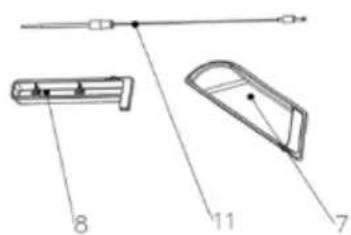
Panou de comandă

natural_image
Technical line drawing of a mechanical device with a highlighted cylindrical component (no text or symbols)natural_image
Technical line drawing of a mechanical device with a highlighted circular component (no text or symbols)natural_image
Technical line drawing of a portable heater or refrigerator with heat exchanger and cooling unit (no text or symbols)natural_image
Technical line drawing of a portable refrigerator with a magnified inset showing the handle mechanism (no text or symbols)natural_image
Line drawing of a mechanical device with hands operating it, showing a tray and frame structure (no text or symbols)Atentie:
natural_image
Line drawing of a computer monitor with hands operating the screen (no text or symbols)Atentie:
natural_image
Technical line drawing of a mechanical device with a connector and cable, no text or symbols presentAtentie:
Vezérlő panel

natural_image
Technical line drawing of a mechanical device with a highlighted component (no text or symbols)natural_image
Technical line drawing of a mechanical device with a highlighted circular component (no text or symbols)natural_image
Line drawing of a portable heater or refrigerator with heat exchanger and side-mounted base (no text or symbols)natural_image
Technical line drawing of a portable heater with an inset showing a cable being inserted (no text or symbols present)natural_image
Line drawing of a mechanical device with hands operating it, showing internal components and mounting base (no text or symbols)Figyelem:
natural_image
Line drawing of a computer monitor with hands operating it, showing internal components and no text or symbolsFigyelem:
natural_image
Technical line drawing of a mechanical device with a sensor or probe inserted (no text or symbols present)Figyelem:
natural_image
Technical line drawing of a mechanical device with a highlighted cylindrical component (no text or symbols)natural_image
Technical line drawing of a mechanical device with a highlighted circular component (no text or symbols)natural_image
Line drawing of a portable heater or refrigerator with heat exchanger and side-mounted base (no text or symbols)natural_image
Technical line drawing of a portable heater with a magnified inset showing the internal structure (no text or symbols)natural_image
Line drawing of a hand operating a flat-screen computer with a grid panel (no text or symbols)Внимание:
natural_image
Line drawing of a mechanical device with hands operating it, showing internal components and mounting base (no text or symbols)Внимание:
natural_image
Technical line drawing of a mechanical device with a sensor or probe inserted (no text or symbols present)Внимание:
Панель керування

natural_image
Technical line drawing of a mechanical device with a highlighted component (no text or symbols)natural_image
Technical line drawing of a mechanical device with a highlighted circular component (no text or symbols)natural_image
Line drawing of a portable flat-screen heater with heat exchanger and mounting base (no text or symbols)natural_image
Technical line drawing of a portable refrigerator with a magnified inset showing the handle mechanism (no text or symbols)natural_image
Line drawing of a mechanical device with hands operating it, showing a grid-like component being inserted (no text or symbols present)Увага!
natural_image
Line drawing of a mechanical device with hands operating it, showing internal components and mounting base (no text or symbols)Увага!
natural_image
Technical line drawing of a mechanical device with a separate schematic view showing internal components and a rod (no text or symbols present)Увага!
Kontrolný panel

Pred prvým použitím
natural_image
Technical line drawing of a mechanical device with a highlighted component (no text or symbols)natural_image
Technical line drawing of a mechanical device with a highlighted circular component (no text or symbols)natural_image
Line drawing of a portable heater or refrigerator with heat exchanger and side-mounted base (no text or symbols)natural_image
Technical line drawing of a portable heater with a magnified inset showing the internal structure (no text or symbols)natural_image
Line drawing of a mechanical device with hands operating it, showing a grid-like component mounted on a base (no text or symbols)Pozor:
natural_image
Line drawing of a mechanical device with hands operating it, showing internal components and mounting base (no text or symbols)Pozor:
natural_image
Technical line drawing of a mechanical device with no visible text or symbols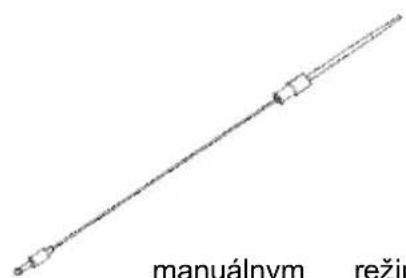
Prevádzkové pokyny
Hamburger Sendvič Ohrev hornej dosky
natural_image
Diagram of two rectangular electronic components with internal structure, no text or symbols present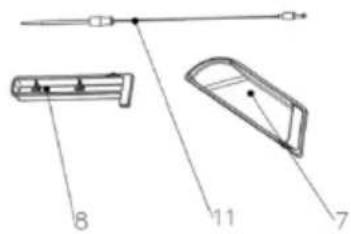
Kontrolní panel

natural_image
Technical line drawing of a mechanical device with a highlighted component (no text or symbols)natural_image
Technical line drawing of a mechanical device with a highlighted circular component (no text or symbols)natural_image
Line drawing of a portable heater or refrigerator with heat exchanger and side-mounted base (no text or symbols)natural_image
Technical line drawing of a portable refrigerator with a magnified inset showing the handle mechanism (no text or symbols)natural_image
Line drawing of a mechanical device with hands operating it, showing internal components and mounting base (no text or symbols)Pozor:
natural_image
Line drawing of a computer monitor with hands operating the screen (no text or symbols)Pozor:
natural_image
Technical line drawing of a mechanical device with a sensor or probe inserted (no text or symbols present)Pozor:
Provozní pokyny
Panel sterowania

natural_image
Technical line drawing of a mechanical device with a highlighted cylindrical component (no text or symbols)natural_image
Technical line drawing of a mechanical device with a circled component (no text or symbols)natural_image
Line drawing of a portable flat-screen heater with ventilation slots and mounting base (no text or symbols)natural_image
Technical line drawing of a portable heater with a magnified inset showing the cable being inserted (no text or symbols present)natural_image
Line drawing of a mechanical device with hands operating it, showing a tray and frame structure (no text or symbols)Uwaga:
natural_image
Line drawing of a computer monitor with hands operating the screen (no text or symbols)Uwaga:
natural_image
Technical line drawing of a mechanical device with mounting bracket and sensor cable (no text or symbols)Uwaga:
Панель управления

natural_image
Technical line drawing of a mechanical device with a highlighted cylindrical component (no text or symbols)natural_image
Technical line drawing of a mechanical device with a highlighted circular component (no text or symbols)natural_image
Line drawing of a portable flat-screen TV or audio device with no visible text or symbolsnatural_image
Technical line drawing of a portable heater with a magnified inset showing the internal structure (no text or symbols)natural_image
Line drawing of a computer monitor with hands operating it, showing internal components and no text or symbolsВнимание!
natural_image
Line drawing of a computer monitor with hands operating the screen (no text or symbols)Внимание!
natural_image
Technical line drawing of a device with a mounted component and a separate cable or wire assembly (no text or symbols present)Внимание!
natural_image
Diagram of two rectangular electronic components with internal parallel lines, one labeled '10' pointing to a small dot (no text or symbols on the components themselves)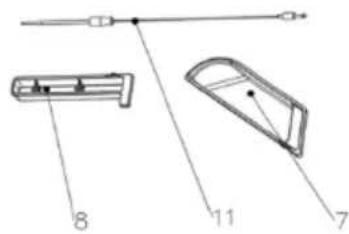
Paneli i kontrollit

natural_image
Technical line drawing of a mechanical device with a magnified inset showing a cylindrical component (no text or symbols)natural_image
Technical line drawing of a mechanical device with a highlighted circular component (no text or symbols)natural_image
Line drawing of a portable heater or refrigerator with heat exchanger and side-mounted base (no text or symbols)natural_image
Technical line drawing of a portable heater with a magnified inset showing the internal structure (no text or symbols)natural_image
Line drawing of a hand operating a flat-screen computer stand (no text or symbols)Kujdes:
natural_image
Line drawing of a computer monitor with hands operating it, showing internal components and no text or symbolsKujdes:
natural_image
Technical line drawing of a mechanical device with a sensor or probe inserted (no text or symbols present)Kujdes:
natural_image
Two rectangular electronic components with internal parallel lines, one labeled '10' pointing to a small dot (no text or symbols on the components themselves)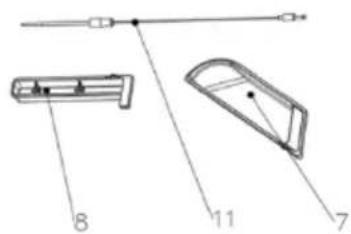
Panneau de commande

natural_image
Technical line drawing of a mechanical device with a highlighted component (no text or symbols)natural_image
Technical line drawing of a mechanical device with a highlighted circular component (no text or symbols)natural_image
Line drawing of a portable heater or refrigerator with heat exchanger and mounting base (no text or symbols)natural_image
Technical line drawing of a portable heater with a magnified inset showing the cable being inserted (no text or symbols present)natural_image
Line drawing of a hand operating a flat-screen computer stand (no text or symbols)Attention :
natural_image
Line drawing of a computer monitor with hands operating it (no text or symbols)Attention :
natural_image
Technical line drawing of a mechanical device with a sensor or probe inserted (no text or symbols present)Attention :
natural_image
Technical line drawing of two rectangular electronic components with internal channels and a labeled dimension (10), no text or symbols present.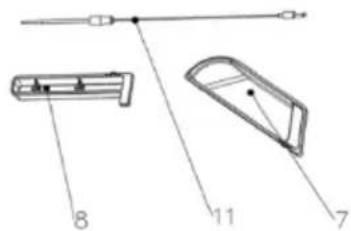
Panel de control

natural_image
Technical line drawing of a mechanical device with a highlighted component (no text or symbols)natural_image
Technical line drawing of a mechanical device with a highlighted circular component (no text or symbols)natural_image
Line drawing of a portable flat-screen TV or DVD unit with ventilation grilles and mounting base (no text or symbols)natural_image
Technical line drawing of a portable heater with a magnified inset showing the handle mechanism (no text or symbols)natural_image
Line drawing of a hand operating a flat-screen computer stand (no text or symbols)Atención:
natural_image
Line drawing of a computer monitor with hands operating it, showing internal components and no text or symbolsAtención:
natural_image
Technical line drawing of a mechanical device with a sensor or probe inserted (no text or symbols present)Atención:
- Caixa de gordura
- Caixa de sonda alimentar
- Painel de controlo
- Placas de cozedura
- Sonda de temperatura
Painel de controlo

natural_image
Technical line drawing of a mechanical device with a highlighted cylindrical component (no text or symbols)natural_image
Technical line drawing of a mechanical device with a highlighted circular component (no text or symbols)natural_image
Line drawing of a portable electric heater with cooling fins and mounting base (no text or symbols)natural_image
Technical line drawing of a portable heater with a magnified inset showing the internal structure (no text or symbols)natural_image
Line drawing of a hand operating a flat-screen computer stand (no text or symbols)Atenção:
natural_image
Line drawing of a computer monitor with hands operating the screen (no text or symbols)Atenção:
natural_image
Technical line drawing of a mechanical device with a pin and mounting bracket (no text or symbols)Atenção:
natural_image
Technical line drawing of a mechanical device with a highlighted cylindrical component (no text or symbols)natural_image
Technical line drawing of a mechanical device with a highlighted circular component (no text or symbols)natural_image
Line drawing of a portable heater or refrigerator with heat exchanger and mounting base (no text or symbols)natural_image
Technical line drawing of a portable heater with a magnified inset showing the internal structure (no text or symbols)natural_image
Line drawing of a computer monitor with hands operating the panel (no text or symbols)Attenzione:
natural_image
Line drawing of a computer monitor with hands operating it, showing internal components and no text or symbolsAttenzione:
natural_image
Technical line drawing of a mechanical device with a sensor or probe inserted (no text or symbols present)Attenzione:
Bedienfeld

natural_image
Technical line drawing of a mechanical device with a highlighted cylindrical component (no text or symbols)natural_image
Technical line drawing of a mechanical device with a highlighted circular component (no text or symbols)natural_image
Line drawing of a portable heater or refrigerator with heat exchanger and mounting base (no text or symbols)natural_image
Technical line drawing of a portable heater with a magnified inset showing the cable being inserted (no text or symbols present)natural_image
Line drawing of a mechanical device with hands operating it, showing internal components and mounting base (no text or symbols)Achtung:
natural_image
Line drawing of a hand inserting a tray into a device (no text or symbols)Achtung:
natural_image
Technical line drawing of a mechanical device with two separate components (no text or symbols)Achtung:
Баскару панелі

natural_image
Technical line drawing of a mechanical device with a circular annotation highlighting a component (no text or symbols present)natural_image
Technical line drawing of a mechanical device with a highlighted circular component (no text or symbols)natural_image
Line drawing of a portable electric heater with cooling fins and mounting base (no text or symbols)natural_image
Technical line drawing of a portable heater with a magnified inset showing the internal structure (no text or symbols)natural_image
Line drawing of a computer monitor with hands operating the panel (no text or symbols)Назар аударыңыз!
natural_image
Line drawing of a computer monitor with hands operating the screen (no text or symbols)Назар аударыңыз!
natural_image
Technical line drawing of a device with a connector and cable, no text or symbols presentНазар аударыңыз!