

Enlever le verrouillage
Je n’arrive pas a enlever le verrouillage du telephone
Find the device manual for free HALO 4 LTE myPhone in PDF.

| Product type | Mobile phone |
| Brand | myPhone |
| Model | HALO 4 LTE |
| Dimensions | 152 × 64 × 14.2 mm |
| Weight | 129 g |
| Power supply | Lithium-ion battery 2500 mAh, 3.7 V; mains charger 5 V / 0.55 A |
| Display | 3.5-inch LCD, resolution 320 × 480 pixels |
| Processor | Unisoc T117 single-core |
| Mobile networks | GSM 850/900/1800/1900 MHz, UMTS 900/2100 MHz |
| Connectivity | Bluetooth 2.1, 3.5 mm jack, USB-C |
| Storage | microSD memory card up to 32 GB (not included) |
| Camera | Yes, with LED flash |
| FM radio | Yes (requires earphones as antenna) |
| Main functions | Hands-free, flashlight, SOS, phonebook, messaging, FM radio |
| SOS function | Long press on the SOS button for alert and automatic call |
| Kit contents | Phone, battery, mains charger, user manual |
| Maintenance and cleaning | Dry cloth only; avoid acidic or alkaline products |
| Safety | Do not use while driving, turn off in explosive risk areas, keep out of reach of children |
| Spare parts and repairability | Repair only by an authorized service; use original accessories |
| General information | Manufacturer: mPTech Sp. z o.o., Warsaw, Poland; batch number: 202408 |
1 question about this device. Answer the ones you know or ask your own.
Je n’arrive pas a enlever le verrouillage du telephone
Download the instructions for your Phone in PDF format for free! Find your manual HALO 4 LTE - myPhone and take your electronic device back in hand. On this page are published all the documents necessary for the use of your device. HALO 4 LTE by myPhone.
Polski
English
Česky
Slovenská
Magyar nyelv
Deutsch
Italiano
Espanol
Portugués
François
Eesti keel
Lietuvić kalba
Latviešu valoda
Romāna
Puplesκий язvik
Блгарский eзник
ληνική γλώσα
LTE: 800/900/1800/2100/2600 MHz
Table of contents 21
Safety.
22
Package content. 24
Technical specification. 25
Phone, its functions and buttons 26
Turning the phone on/off.
28
Inserting SIM card(s), memory card and battery.
28
Charging the battery. 28
Emergency change of language. 29
Software update. 29
Troubleshooting 29
Device maintenance.
30
Correct disposal of electrical and electronic equipment. 31
Caution
Statement
The manufacturer is not responsible for any consequences caused by improper usage of the phone and not obeying the above instructions.
The software version can be upgraded without earlier notice. The representative retains the right to determine the correct interpretation of the above instructions.
Without prior written consent of the manufacturer, no part of this manual may be photocopied, reproduced, translated or transmitted in any form or by any means, electronic or mechanical, including photocopying, recording or storing in any systems of storing and sharing information.
Please read the precautions and phone user's manual before use. The descriptions contained in this manual are based on the default settings of the phone. The newest version of the manual can be found on our company website:
Depending on the installed version of the software, applications, service provider, SIM card or country, some of the descriptions in this manual may not match your phone.
Only qualified personnel or an authorized service center may install or repair this product. Repairing by an unauthorized or unqualified service may cause device damage and warranty loss.
-ALARM CALLS
Making alarm calls may not be possible in some areas or circumstances. It is recommended to find an alternative way to notify emergency services if you are going to undeveloped or remote areas.
Do not use this device while driving any kind of vehicle.
Do not use your mobile phone while refuelling at a petrol station or in the vicinity of chemicals.
CAUTION! In places where there is a risk of explosion (i.e. Petrol stations, chemical factories etc.), it is advisable to turn off the phone. Please refer to regulations governing the use of GSM equipment in these places.
Protect the device from water and other liquids. It can influence work and the life span of electronic components. Avoid using the device in environments with high humidity like kitchens, bathrooms or during rainy weather. Particles of water can cause the liquefaction of moisture in the device, and this may have a negative impact on the work of electronic components.
Avoid exposing the battery to very high/low temperatures (below 0^ / 32^ and over 40^ / 104^ ). Extreme temperatures may influence capacity and battery life. Avoid contact with liquids and metal objects as it may cause partial or complete battery damage. The battery should be used only according to its purpose. Do not destroy, impair or throw the battery into flames - it is dangerous and may cause fire. Worn-out or impaired battery should be placed in a dedicated container. Excessive charging the battery can cause damage. Therefore a single battery charge should not last longer than 1 day. Installing an incorrect battery type can cause an explosion. Never open the battery. Please dispose of battery according to the instructions. Disconnect an unused charger from power grid. In case of the charger wire damage, it should not be repaired but replaced with a new one. Use only the original manufacturer's accessories.

To avoid hearing damage, do not use the device at high volume levels for a long period of time, do not

put operating device directly to the ear.
To avoid eyesight damage do not look closely onto the diode during its work. A strong bean of light may
cause permanent eye damage!
mPTech Sp. z 0.o.
00-511 Warsaw, Poland
Before you start using your phone, make sure all of the following items are included in the box:
If any of the above items is missing or damaged, please contact your dealer. We advise to keep the container in case of any complaints. Keep the container out of reach of children.
GSM: 850/900/1800/1900 MHz
UMTS: 900/2100 MHz
LTE: 800/900/1800/2100/2600 MHz
Processor: Unisoc T117, single-core
Display: 3.5" 320x480
Loudspeaker mode; Torch; Photo camera; FM radio, SOS function,
Bluetooth 2.1
Memory cards support: max. 32 GB
Connectors:Jack 3.5 mm,USB-C
Battery capacity:
MF2304: Li-ion 2500 mAh, 3.7 V
MF2304e: Li-ion 2500 mAh, 3.7 V
Input parameters chargers: 100-240V~, 50/60Hz, 0.2A
Output parameters chargers: 5.0V -0.55A, 2.75W
Average efficiency during operation (for 230V, 50Hz): 73.15%
Energy consumption in no-load condition: 0.067W
Dimensions: 152 × 64 × 14.2 ~mm
Weight: 129 g
Phone, its functions and buttons
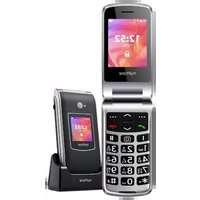
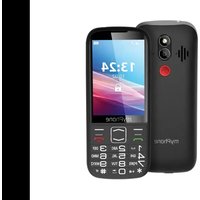
| 1 | Speaker | A speaker used in phone conversations. |
| 2 | Display | LCD display. |
| 3 | Menu button | While on the main screen enables entering the Menu, and confirms choice while in the Menu. Confirmation of selection is also possible using the number 5 key on the phone keypad. |
| 4 | Green handset button | Allows you to receive an incoming call or look through the list of calls. |
| 5/6 | Navigation button Up / Down | While in Menu enables navigating around it. On the main screen launches shortcuts to selected functions. Allows you to increase or decrease the volume of a phone call or radio. |
| 7 | Contacts button | Press to enter the phonebook. While in the Menu you can exit or opt out. |
| 8 | Red handset button | Allows you to reject an incoming call. While in the Menu allows you to return to the main screen. When held for a long time, it turns off the |
| phone or, if it is switched off, turns it on. | ||
| 9 | * button | Pressed after button Menu allows to lock or unlock the phone. When writing an SMS, it displays symbols for insertion into the content. |
| 10 | # button | Switches the character input mode for text messages. |
| 11 | Torch On / Off | Allows you to turn on or off the flashlight diode at any time. |
| 12 | Camera | Camera lens. |
| 13 | SOS button | Press and hold to activate an alarm and/or auto-dial of predefined numbers. |
| 14 | External speaker | Loudspeaker for system sounds, ringtones, music. |
| 15 | Phone keypad | Buttons for dialing a phone number on the main screen and entering letters or numbers in the SMS writing mode. |
| 16 | LED | Diode is used as a torch. |
| 17 | Flash | The diode serves as a flash. |
| 18 | USB-C port | When connected enables recharging the battery. You can transfer data (photos, videos, music) when you connect it to your computer. |
| 19 | Gap | Allows to take off a cover of the |
| phone. | ||
| 20 | Headphone jack | For connecting headphones (they function as an antenna when listening to FM radio). |
| 21 | Microphone | When talking, do not cover it with your hand. |
| 22 | Pins | Allow you to charge your phone in the charging station. |
To turn the phone on/off press and hold Red handset until the phone switches on/off. If directly after turning the phone on you will see the PIN code request, (in form of “*”) type the code and press button Menu.
If the phone is switched on - switch it off. Remove the back cover of the phone - use your fingernail to raise it using the gap in the case and remove the battery. Insert the SIM card(s) - place the SIM card(s) with its (their) golden contacts facing down as the recess is embossed.
Insert the memory card - Insert the microSD memory card with its gold contacts facing down, the way in which the slot is made.. Insert the battery so that its gold contacts touch the triple connector in the phone bay. Put on and gently press down the cover until you hear the click of the latches. Make sure the cover is well attached.
Connect the USB-C charger to the charger connector on your phone, then connect the charger into the power grid.
*CAUTION: Improper connection of the charger can cause serious damage to the phone. Damages caused by an improper use of the phone are not covered by the warranty.
During charging, the battery icon in the upper right corner of the screen should be animated. When charged, the battery icon will no longer be animated and then disconnect the charger from the wall outlet. Unplug the cable from the socket on the phone.
To restore the factory settings, enter, starting from the phone Menu: [Menu] >
The manufacturer, from time to time, provides system software updates through which devices receive new capabilities, fixes, etc. The phone will inform the user about the available update. After receiving the notification, go to the update center: Settings -> Check update, in order to run it. The information about an available update can be checked at any time. After choosing an available update, the phone will automatically install it.

During the update process, the device may reboot itself
several times. Do not remove the battery or use its functions at that time, as this may cause the device to stop working.
Troubleshooting
| Message | Possible solution |
| Insert SIM card | Make sure that the SIM card is installed correctly. |
| Input PIN | If the SIM card is secured with the PIN code you have to enter the PIN when turning the phone on and press OK. |
| No one can call me | The phone has to be on and within GSM network reach. |
| Network fail | In areas where signal or reception is weak, calls may not be possible. Also receiving calls may not be possible. Move to another location and try again. |
| Poor sound quality during conversation | Make sure that the speaker and microphone are not covered. |
| I cannot hear the caller./ The caller cannot hear me | The mic. should be close to mouth. Check if the built-in mic. is not covered. When a headset is in use, check if it has been connected correctly. Check if the built-in speaker isn't covered. |
| The connection cannot be established | Check if the typed-in phone number is correct. Check if the phone number entered to the [Contacts] is correct. Enter the correct phone number if necessary. |
Follow the instructions below.

The device is marked with a crossed-out garbage bin, in accordance with the European Directive 2012/19/EU on used electrical and electronic Equipment (Waste Electrical and Electronic equipment - WEEE). Products marked with this symbol should not be disposed of or
dumped with other household waste after a period of use. The user is obliged to get rid of used electrical and electronic equipment by delivering it to designated recycling point in which dangerous waste are being recycled. Collecting this type of waste in designated locations, and the actual process of their recovery contribute to the protection of natural resources. Proper disposal of used electrical and electronic equipment is beneficial to human health and environment. To obtain information on where and how to dispose of used electrical and electronic equipment in an environmentally friendly manner user should contact their local government office, the waste collection point, or point of sale, where the equipment was purchased.

According to the EU directive 2006/66/EC with changes contained in EU directive 2013/56/UE on the disposal of batteries, this product is marked with crossed-out garbage bin symbol. The symbol indicates
that the batteries used in this product should not be disposed with regular household waste, but treated according to the legal directives and local regulations. It is not allowed to dispose of batteries and accumulators with unsorted municipal waste. Users of batteries and accumulators must use the available collection points of these items, which allows them to return, recycle and disposal. Within the EU, the collection and recycling of batteries and accumulators is a subject to separate procedures. To learn more about existing procedures of recycling of batteries and accumulators please contact your local office or an institution for waste disposal or landfill.
LTE: 800/900/1800/2100/2600 MHz
Procesor: Unisoc T117, Jednojádrové
Displej: 3.5" 320x480
LTE: 800/900/1800/2100/2600 MHz
Procesor: Unisoc T117, Jednojadrovy
Displej: 3.5" 320x480
LTE: 800/900/1800/2100/2600 MHz
LTE: 800/900/1800/2100/2600 MHz
Prozessor: Unisoc T117, Single-Core
Display: 3.5" 320x480
Technical specification 89
GSM: 850/900/1800/1900 MHz
UMTS: 900/2100 MHz
LTE: 800/900/1800/2100/2600 MHz
Processore: Unisoc T117, single-core
Schemo: 3.5" 320x480
LTE: 800/900/1800/2100/2600 MHz
LTE: 800/900/1800/2100/2600 MHz
Processor: Unisoc T117, nucleo unico
Mostrador: 3.5" 320x480
LTE: 800/900/1800/2100/2600 MHz
LTE: 800/900/1800/2100/2600 MHz
Protessor: Unisoc T117, ühetuumaline
Ekraan: 3.5" 320x480
Valjuhäldi režim, Törvik, Fotokaamera, FM-raadio, Bluetooth 2.1
SOS-funktsioon
Mälukaartide tugi: max. 32 GB
Pistikud: Jack 3,5 mm, USB-C
Aku mahutavus:
MF2304: Li-ion 2500 mAh, 3.7 V
MF2304e: Li-ion 2500 mAh, 3.7 V
Laadjate sisend-/väljund parameetrid: 100-240V~, 50/60Hz, 0.2A
LTE: 800/900/1800/2100/2600 MHz
Procesorius: Unisoc T117, vieno branduolio
Displèjus: 3.5" 320x480
Laisvju rankju jrangas, Žibintuvélis, Fotoaparatas, FM radijas, SOS funkcija, Bluetooth 2.1
Atminties korteliu aptarnavimas: max. 32 GB
LTE: 800/900/1800/2100/2600 MHz
LTE: 800/900/1800/2100/2600 MHz
CopejkaHne. 188
Бezоносто... 190
CopejkaHne yIaKOBKn 193
TexHnuecka cneuKauia 193
BheHHn BnTeJefoHa, ero yHKnN n KhoNk 194
BkIIOueHne/BBIKIOUeHne TeJeΦoHa. 197
MoHTaK SIM-KapT(bI), KapTbI NaMaTn N aKKymyJIaTopa 197
3apka 6aTapeu 198
CmeHa y3bIka. 198
06HOBJIeHHe IporpaMMHoro o6ecpeHnra 199
3abOdckne HacTpoiKn 199
YcTpaHHe HeNcIpaBHOcte1 199
06cIyXnBaHne yCTpoiCtBa. 201
IpaBnJIbHa yTnJIn3aunna 3JeKtpnueckoro n
3JIeKTpOHHoro 6OpudobHnra 201
IpaBnJIbHa yTnJIn3aunr HcnoJb3oBaHHbIX 6aTapei .202
| В<nманце | Заявлене |
IpoH3BODHTeJIb He HeceT OTBeTCTBHeHHOCTN 3a JIO6bIe IocJIeDCTBnJ, BbI3BaHHbIe HeIIpaBnJIbHbIM HCIOJIb3OBaHHem TeJIeΦOHa H Heco6JIIODeHHem BblIeYKa3aHHbIX HHCTpyKcN.
BercnI npoRpaMMHOrO
obecneueHnMozKeT 6bITb
OBHOJIeHa 6e3
IpeiBaPHTeJIbHOrO
yBeIOmJIeHn. IpoJaBeu
OCTaBJAEr3a cOboI ppAO
OIIpeJIArTB IIpaBnJIbHOe TOJIKOBAHHe
BbIIEyKa3aHHbIX
HHCTpyKcH.
Бe3 ПразВарптельного ПИСьМeHHOrO coIaCnI ПрОЗВОДNTeJIЯ HNKаКаЧаСТь ДaHнОу рУКOBODCTBa He МожЕТ 6ыТь ФOTOKОПЮВаHA, BOCПрОЗВeДeHa, ПеpeВeДeHa Ил ПepeДaHa B Лобов Форme Ил Лобим СрEDCTВамN, 3ЛeКТрОНHBIMи Ил МexаHNчecКИМN, ВКЛIOчА ФOTOKОПЮВаHne, 3aIIncь Ил XpaHeHne B ЛIOбБIX сИСTeMax XpaHeHЯ N O6MeHa INФOPMaцHe.
IpoHTaTe MepbI IpeIOCTOpOxHocTHn pyKOBoCTBO IOJIb3OBaTeJIa TeJIeΦOHa IpePeN HCIOJIb3OBaHHem. OINcAHNa, coJePkaIeNecB DaHHOM pyKOBoCTBe, OCHOBaHbI Ha HacTpoKax Po yMOJIuHaHHIO TeJIeΦOHa. HOBeIyUo BepCNo pyKOBoCTBa MoJHo HaHTn Ha caHTe NaIe KOMIIaHH:
B 3aBnCmOCTn OT yCTaHOBJIeHHoB BepcH NpOgrpaMMHO OBeecIeueHn, PnJIooJKeHn, NocTaBUnKa ycIyr, SIM-KapTbI HJI N CTPaHbI, HeKOToPbIE OINcaHn B 3TOM pyKOBOdCTBe
MORYT He COOTBETCTBOBaTb BaIIeMy TeJIeOHy.
ToIbKO KBAJIHΦHnIropOBaHHbI IepcoHaJI HJN aBTOpH3nPoBaHHbI cepBnCHbI ΒeHTp MOryT KOHΦHrypHnpOBaTB HJN peMOHTnPoBaTb yCTpoIcTBO. PEmoHT, OcyIeCTBJIeHHbI HecaHKnOHNpOBaHHbIM HJN HeKBAJIHΦHnIrpOBaHHbIM ΒeHTpOM, MoJKeT IIprNBecTH K IOBpeJdeHHIO TeJeΦOHa N IOTepn rapaHTnH.
B HeKOTopbIX MecTax HIN Iprn HeKOToPbIX 6cTOrTeJIbCTBaX OcyIeCTBJIeHne 3KCTpeHHbIX BbI30BOB MoJKeT 6bITb HeBO3MOJHO. PekomeHdyetc HauTH aJIbTePhaTHBHi CnOcO6 yBeIOmJIeHnA bApNHBIX cJyK6, ecJN Bbl co6npaTeCb Ipe6bIBaTb B Hepa3BHTbIX HIN OTJaJIeHHbIX paiohax.
He IIOJIb3yI TeCb MO6HJIbHbIM TeJIefoHOM BO BpeM 3aIIpaBKn Ha aBT03aIIpaBOUHO CTaHcH NJIH B HeIOcpeICTBeHHoJ 6JIH3OCTN OT XHMnKaTOB.
BHHMAHHe! B Mecmax, 2de cyuecmeyem puck 3pbiea [HanpuMep, Ha aBmo3anpaBOyhIX cmaHuzx, Xumueckux 3abodax u m. d], pekomendyemcBbIKIOUamb melefoH. O3nakombmecb C npabulamu, pezlaMeHMupyUoMuMu uCnoIb30BaHue obopydoBaHua GSM bEmux Mecmax,
He nCIOJIb3yIte 3TO yCTpOiCTBO BO BpeMЯ BOXJdeHnRAJIIO6Oro TpaHCnOpTHoro cpeiCTBa.
3TO yCTPOHCTBO He DoJIgKHO 3KcIIlyaTHpOBaTbCS JIOdbMn [BkJIouyA JeTei] C OrpaHnueHHbIMN Φn3nueckHMn HJIn YMCTBeHHbIMN cNoC6HOCTaMn, a TaKKe JIOdbMn, He HMeIoIeMMN OIbIta pa6OtBi C 3JIeKTPoHHbIM O6OpYIOBaHHeM. Ohn MOrYT NcIOJIb3OBA Tb UcTPOHCTBO TOJbKO IOD Ha6JIIODeHHeM JIOdeN, OTBeTCTBeHHbIX 3a HX 6e3OJaacHocTB. 3TO yCTPOHCTBO He nrgPyuHa. KapTa PAmrtn H SIM-KapTa DoCTaTOUHO MaIbI, YTO6bI Hx MoR IIporJIoTHTb pe6eHOK, YTO MoKet BbI3BaTb ydyuShe. XpaHnTe yCTPOHCTBO H erO akceccyapbl B HeIOCTUHNOM dJIa DeTei MeCTe.
BepereYcTpoIcTBo OT IOnpaIaHnB OdbI N dpyHX
KndKOCTe.3TO MoKeT HeRaTHBHO BJIaTb Ha 3JIeKTPOHHbIE
KOMIOHEHTbI TeJeOHa. H36eAITE NCIOJIb3OBaHHa
yCTPOIcTBA B MeCTax C BbICOKoBlaJXHOCTbIO, TaKHX KaK
KyxHN, BaHHbIE KOMHaTbI HIN B DOxJINByU IOrOdy.
CaCTNtBi BObl MOyT BbI3BaTb cKoJIeHne BJIaRn B
yCTPOIcTBe, YTO MoKeT OTPuIaTeJbHO cKa3aTbCn Ha pa6Ote
3JIeKTPoHHbIX KOMIOHEHTOB.
-БАТApEЯ NAKCECYAPbl -
He IIOBBePraIte 6aTapeIO BO3JeIcTBIO OueHb BbICOKHX/Hn3KHX TeMIIepaTyp [HnJKe 0°C H BblIe 40°C). ΘKCTpeMaJIbHbIe TeMIIepaTypbI MOrYT IOBJIHbTb Ha MoIiHOCTb H cPOK cIyJb6bI 6aTapeN. N36eAite KOHTaKTa C KHNKOCTaMH N MeTAJIINUeCKHM NpeDMeTamN TaK KaK 3TO MoXET Bbl3BaTb QACTNUHoe HJN IIOJIHoe pa3pyIeHne 6aTapeN. BaTapeN DOJIkHa NCIOJIb3OBaTbCS TOLbKO B COOTBeTCTBn C eE IIpeDHa3NaUeHHem. He pa3pyuHaTe, He pa3bpaIte H He 6pOcaIte 6aTapeIO B OToHb - 3TO OAnCHO H MoXET IIPNBeCTN K IIOJAPy. N3HOWeHHbIe HJN IIOBpeJDeHHbIe 6aTapeN DOJIKHyI 6bITb IOMeIeHbI B CIneIaJIbHbI KOnTeHep. Ype3MepHaarapdKa 6aTapeN MoXET IIPNBeCTN K eE IIoBpeJdeHHIO. TaKIM o6pa3OM OJHa 3apJaKa 6aTapeN DoJIkHa DlNTbcR He 6oJee 1 DnA. UcTaHOVBKa HeIrpABnJIbHorO TnPa 6aTapeN MoXET IIPNBeCTN Ko B3pBy. HnkOrda He pa36npaIte 6aTapeIO. YTHIN3npyIte 6aTapeIO B COOTBeTCTBn C HNCtpyKzIyMn. OTKJIouHtE HeNCIOJIb3yEmoe 3apJdHoe yCTpoIcTBO OT cEtN IHTaHHa. B cIyuae IOBpeJdeHHa Ka6eJyCTPOIcTBA, erO Heo6xOJIMO He peMOHTnpoBArB, a 3aMeHHTb HOBbIM. HcIOJIb3yIte TOJIbKO opIRHaJIbHbIe akceccyapbl OT Ipn3BOJNTeJIa.
Bo n36eJahanie IOBpeJdeHnna cIyxa He HcIOJIb3yIte yCTpoIcTBO Ha BbICOKHX yPOBHX rPOMKocTH B TeueHne dIHTeJIbHOro IepNoJa He npscIohJte fYHKUHNPuOiN nnHaMnK CTBeHHo K Uxy.

Глаз!
Bo n36eJkaHne IOBpeJdeHnra 3peHnra He cMOTpHTe BkJIIOUeHbI JnOJ. CnJIbHbI JyUcBeTa MoKet IIpNBecTn K Heo6paTHMOMy IOBpeJdeHnIO
mPTech Sp. z 0.o.
YJI.HOBORpoI3ka,31
00-511 BapшаВa
Pojbua
www.mptech.eu
Ipei nCIOJIb3OBAHHem TeJIefoHa, y6eIHTecb, YTO BCE IpeueHcJIeHHbI HnJke IpeIMeTbI BKJIIOUeHbI ByyIIaKOBky:
MO6HJIbHbI TeJeΦOH
- 6aTapey
3apJHoe yCTpoIcTBO
pyKOBODCTBOIOJIb30BaTeJIa
EcIn KaKoJ-Jn60 H3 BbIepepeHcJIeHHbIX IpeIMTeOB OTCyTCTByeT INI IOBpeJdeH, o6paHTeCb K IpOJaBcy. PeKomeHJyETc8 CoXpaHHTb yIaKOBky JJIaClyuay JaIo6. XpaHNTe yIaKOBky B HeIOCTUHOM JJIa DeTei MeCTe.
GSM: 850/900/1800/1900 MHz
UMTS: 900/2100 MHz
LTE: 800/900/1800/2100/2600 MHz
Пюцeccop:Unisoc T117,ODHOBepHyB
3.5" 320x480
PexnM rpoMKoROBOpHTeJ; fOHaRk; fOToKaMepa; FMpaIHO, yHKsna SOS, Bluetooth 2.1
Подержka KapT памгн: max 32 GB
Pa3beMbI:Jack 3,5 MM,USB-C
EMKocTb 6aTapeH
MF2304: Li-ion 2500 mAh, 3.7 V
MF2304e: Li-ion 2500 mAh, 3.7 V
BxOДHbIe / BbIXoДHbIe IapaMeTpbl 3apAДHOrO yCTpoIcTBA: 100-240V\~,50/60Hz,0.2A
BbIXoHbIe npaMeTpbl 3apAnHO yCTpoNCTBa:5.0V 0.55A,2.75W
peHЯ ΘΦΦeKTHBHO B O BpeMpa60TbI (ДЯ 230 B,50 T):73.15%
Iotppe6JIeMaJ MOUHocTb 6e3 Harpy3Kn: 0.067W
Pa3mepbI: 152 x 64 x 14.2 mm
Bec: 129 g
BHeHn BnTeJeOHa, ero yHKuH N KHOJIKN
Партуден Homep: 202408
CbDbpxKaHne 204
Be30nacHocT 205
CbDbpJkaHne Ha naketa. 208
TexHnueckxapaKTepeNCTnKN 208
Функциии 6утони Na Teleфona 209
BkIIOUBaHe/IV3KIIIOUBaHe Ha TelefoHa. 211
Claarhe ha SIM kapta, kapta namet n 6aTepeyra 211
3apexdaheHa6atepnaTa 212
Heymnulena cMaHa Ha e3nka 212
AkrtyaIin3aunHa coΦTyepa. 212
YeceToCpeuHn npo6IeMn 213
PoaepbXka Ha yctpoiCTBOTO 214
IpaBnlo n3XbpyHe Ha eJeKtpoHnka 215
IpaBnlo n3XbpyIe Ha n3noJ3BaHn 6aTepn 215
| Вниманne | Забелека |
| Проблемы не Ноч OTROBOPHOCТ 3a постдовая о.TСТУАЦИС Небравлино ИЗПОЛЗВАЕ ИЛN Heсязваны на горнITE пленорьки. | Софтуерна Т Версаню може да се посторбп 6e3 прееваротелно уveдомлени. |
ToBa yCTpoiCTBO He Tp8Ba Da ce H3NoI3Ba OT Xopa (BkJIIOHTeJIHO Deca) C OrpaHnueHn FIn3NueCKn IIN YMCTBeHn cNoCobHocTn, KaKTo N OT Xopa 6e3 OOnT B pa6oTaTa C eJeKtPOHHO obOpudBaHe. Te Morat Da H3NoI3BaT yCTpoiCTBOTO camo PoJn HaD3Opa Ha Liuca, OTROBOPHN 3a TExHaTa 6e3OJaacHocT. ToBa yCTpoiCTBO He e InrpaUka. KapTata C nAmet n SIM kaptata ca DoCTaTbUHO MaIKn, 3a Da 6bDaT nOrbLnHaTHn OT dTe n da npUnHnT 3aDaBAnHe. DpbXte yCTpoiCTBOTo n HerOBnTe akcecoapn DaJIeYOT Deua.
Ia3eTe ycTpoiCTBOTO OT BODa n dpyrN TeuHocTn. TЯ може д IOBIIRe Ha pa6oTata N npOdbJIxHTeJIHOCCTTa Ha JxIBOTA Ha eJIeKTPoHHITE KOMNoHEtN. I36yBaIte Da n3POn3BaTe yCTPOiCTBOTO B YcIobNc CBnCOKa BlaJXHOCT KaTO KUxHn, 6aHn IIN pRn DbJxIDOBHo BpeMe. KaKN BODa Morat Da npuHnT BTeuHBAHe Ha BlaRaTa B yCTpoiCTBOTO n TOBa Mожe DA nMa
OTPncaTeJIHO Bb3dEiCTBne Bbpxy pa6oTaTHa eIeKTPoHHnTe KOMNoHEnTn.
I36yBaIte Da n3laIate 6aTePnIa Ha MHO T BNCOKN/HNCKN TeMnepaTyPi (noD 0^ / 32^ n Hnd 40^ / 104^) . EkCTpeMHnTe TeMnepaTyPi Moat Da NOBJIaRt Ha KaNaCuNTeTa I JKNBOTa Ha 6aTePnIa. I36yBaIte KOHTAKT C TeuHocTN mEtALHn PpeDMetN, Tb KATO TOBA MOKe Da npUHHn ChACTNUHa IIN PbJIHa NobPeDa Ha 6aTePnIa. BATEPnIa Tp8Ba Da Ce I3NoJ3Ba Cnpoed npEHa3NaueHHeTo N. He yHnOJkaBaIte, NOBpeJdaTe N He XbPraIte 6aTePnIa BA IIaMbZI - TOBA MoKe Da 6bDe OnaCHO I da npUHH NoKap. I3HoCeHaTa IIN NOBpeJHa 6aTePnIa BA Da Ce NocTabN B CneuaJen KOHTeJHep. IpeKomepHOTo 3apeJdaHe Ha 6aTePnIa MoKe Da npUHH NOBPeDa. CLeDobAteJHo eJHO 3apeJdaHe Ha 6aTePnIa He Tp8Ba Da I3DbPjKa NObue ot 1 DeH. INcTaNpaHTo Ha HnPaBvIeN TII BATEPnIa MoKe Da npUHH EKcPlo3Jr. Hnkora He OTBapYIte 6aTePnIa. MoJr, n3XbPJIeTe 6aTePnIa cNopeJnHCTpyKzInTe. I3KnIOUeTe Hen3NoJ3BaHOTo 3apJdHO UcTPOIcTB OTEleKTPnuEcKaTa MpeJx. B Clyuay Ha NOBPeDa Ha KaBeLa Ha 3apJdHOTo UcTPOIcTBO, ToJ He Tp8Ba Da ce peMOHTnpa, a Da Ce CMeHn C HOB. I3NoJ3BaIte camo OpunHaJIHnTe akceCoApn Ha pON3BOJnteJr.
3a Да ИЗБЕГHEТЕ уВржДАне Ha clyxa, He I3ПОЛЗВайтЕ устpoИCTBOTO пп ВиСOKИ НИВа Ha cnilata Ha 3ВУКa 3a Дьлг перноД OT Врeme, He e pa6OTeшOTO устpoICTBO дИрЕKTHO Do yXOTO.

3a Da n36eHHeTe yBpeKdAHe Ha 3peHneTo, He rIeJaTe dIpeKTHO B dNoDa, DOKaTO Toe BkJIoueH. CnHaTa CBetTInHa MoKe Da npuHH TpaHNO
yBpeKdaHe Ha ouHTe!
mPTech Sp. z o.o.
00-511 Warsaw, Poland
www.mptech.eu
LTE: 800/900/1800/2100/2600 MHz
CleDbaiTe HnCTpyKcuiTe no-dOly.
3a nouchteBaHe n3noJ3BaTe cMo cyXa Kbpna. Hnkora He n3noJ3BaTe cpeICTBa C BnCOKa KOHcHTpaZna Ha KInCeJIHH nIIN OCHOBn.
- Изпольваite само оригиналнITE akcecoapи. hapшаванeto Na TOBa npabnilo може дa doBede do anyлраhe Na rapaHцята.
Avaloya Tnv EyKatEOTnuev n Ekdoon Tou loyioikou, Tov npao ounnpoeiwv, Tnv kapra SIM nTn xwpa, opouevc aTc πepiypaoec tou yxieipidiou evexetai va mny taipiaqouv me to tnAeawvo ac, Evw to idio to tnaeewvo kai ta aEosouap tou evexetai va diapopouv aoa Tou nepiiauavovtal otic eKovc Tou npovtoc yxieipidiou.
H npaymuatooinon knoeewv ektaKTnc avayknc vdeltaxetai va mnu evai duvatn oe opioeves c n ouvthetac. suviotatai va p e i t e evav evaalaktko tpono yia va eldoonoiote tic unnpoeic c ektaKTnc avayknc, av npokietai va nate o totoou siouc aonpuouevcs neploxc.
—EΠΙΣΚΕΥΗ—
LTE: 800/900/1800/2100/2600 MHz
Eπεξεργαστής: Unisoc T117, single-core
Oθóvn: 3.5" 320x480