
SGD2800WV - Iron GORENJE - Free user manual and instructions
Find the device manual for free SGD2800WV GORENJE in PDF.
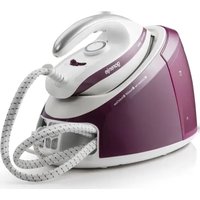


| Product type | Steam generator (iron with station) |
| Brand | Gorenje |
| Model | SGD2800WV |
| Water tank capacity | 1,7 L |
| Power | Approximately 2000 W (estimated) |
| Supply voltage | 230 V / 50 Hz (according to rating plate) |
| Soleplate | Non-stick, stainless steel |
| Steam functions | Adjustable steam output (low, medium, high), steam burst (rapid pressure) |
| Dry ironing | Yes |
| Automatic shut-off | Yes, after 10 minutes of inactivity (steam/button) |
| Anti-scale system | Self-cleaning function with descaling indicator |
| Iron lock on station | Yes, for easy transport |
| Weight | Approximately 4 kg (estimated with full tank) |
| Dimensions (approx.) | 35 × 25 × 30 cm (L × W × H) |
| Power cord length | Approximately 1.5 m (integrated storage) |
| Steam hose length | Approximately 1.2 m (integrated storage) |
| Recommended water type | Tap water or purified water (avoid demineralized or perfumed water) |
| Maintenance | Clean soleplate with damp cloth, periodic self-cleaning, empty tank if long-term storage |
| Safety | Automatic shut-off, overheating protection, child lock (not mentioned, absent) |
| Usage | Household use only |
Frequently Asked Questions - SGD2800WV GORENJE
User questions about SGD2800WV GORENJE
0 question about this device. Answer the ones you know or ask your own.
Ask a new question about this device
Download the instructions for your Iron in PDF format for free! Find your manual SGD2800WV - GORENJE and take your electronic device back in hand. On this page are published all the documents necessary for the use of your device. SGD2800WV by GORENJE.
USER MANUAL SGD2800WV GORENJE
SGD2800WV
| INSTRUCTION MANUAL | EN |
| BEDIENUNGSANLEITUNG | DE |
| MANUEL D'INSTRUCTIONS | FR |
| MANUALE DI ISTRUZIONI | IT |
| MANUAL DE INSTRUCCIONES | ES |
| UPUTE ZA UPORABU | HR |
| NAVODILA ZA UPORABO | SI |
| MANUAL UDHËZIMI | SQ |
| UPUTSTVA ZA UPOTREBU | SRB |
| УПАТСТВО ЗА УПОТРЕБА | MK |
| MANUAL DE INSTRUCTIUNI | RO |
| ТРУКЦИЯ ПО ЭКСПЛУАТАЦИИ | RU |
| NÁVOD K OBSLUZE | CZ |
| HASZNÁLATI ÚTMUTATÓ | HU |
| INSTRUKCJA OBSLUGI | PL |
| NÁVOD NA POUŽITIE | SK |
| ПОСІБНИК З ЕКСПЛУАТАЦІЇ | UA |
| ИНСТРУКЦИЯ ЗА УПОТРЕБА | BG |
IMPORTANT SAFEGUARDS
Before using the electrical appliance, basic precautions should always be followed including the following:
Read all instructions.
- Before using, check that the voltage of the wall outlet corresponds to the one shown on the rating plate.
- Do not use the appliance if the main cord, plug, light, or the appliance itself shows visible damage, or if the appliance has been dropped or is leaking. Take it to the nearest authorized service facility or a qualified serviceman for examination and repair in order to avoid a hazard.
- If the supply cord is damaged, it must be replaced by the manufacturer, its service agent, or similarly qualified persons in order to avoid a hazard.
- Do not allow the cord to come into contact with the soleplate when it is hot.
- Burns may occur from touching hot metal parts, hot water, or steam.
- Do not let the cord hang over the edge of a table or hot surface.
- To protect against a risk of electric shock, never immerse the iron in water or other liquids. If this has happened, do not use this appliance any more; dispose of the appliance.
- Do not leave the iron unattended while it is connected to the power supply or placed on an ironing board.
- Always place or use the appliance on a stable, level, and horizontal surface.
- The use of accessories not recommended by the manufacturer may cause injury to persons or damage to the appliance.
- When placing the iron on its stand, ensure that the surface on which the stand is placed is stable.
- The knob at the bottom of the unit base must always be well closed during use.
- Never fill the water tank with hot water, scent, vinegar, starch, descaler, fabric softener, or other chemical reagents.
- Unplug from the outlet when not in use, before filling water, or cleaning.
- Do not use the appliance for other than its intended use.
- This appliance can be used by children aged 8 years and above and persons with reduced physical, sensory, or mental capabilities or lack of experience and knowledge if they have been given supervision or instruction concerning use of the appliance in a
safe way and understand the hazards involved.
- Children shall not play with the appliance. Cleaning and user maintenance shall not be made by children without supervision.
- The iron is not to be used if it has been dropped, if there are visible signs of damage, or if it is leaking.
- Keep the iron and its cord out of reach of children less than 8 years of age when it is energized or cooling down.
- Never touch the hot soleplate unless the iron is cooled down completely and unplugged.
- Do not use outdoors.
- Save these instructions.
HOUSEHOLD USE ONLY
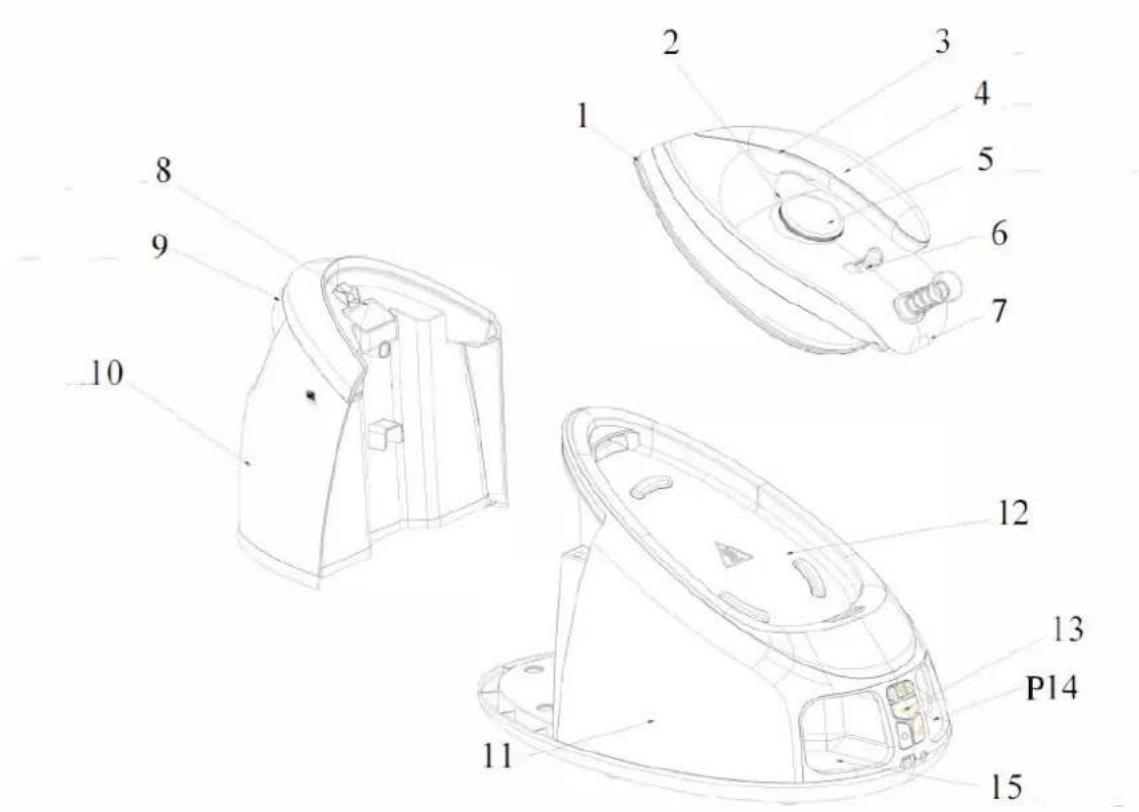
| Number | Description |
| 1 | Soleplate |
| 2 | Temperature indicator |
| 3 | Steam trigger |
| 4 | Handle |
| 5 | Temperature knob |
| 6 | Iron to station lock |
| 7 | Iron |
| 8 | Filling aperture |
| 9 | Water tank handle |
| 10 | Water tank |
| 11 | Unit base |
| 12 | Thermal insulation stand |
| 13 | Control panel |
| 14 | Power cord storage |
| 15 | Steam cord storage |
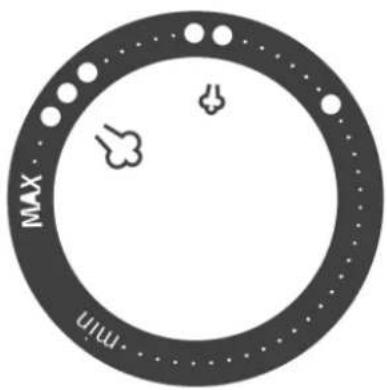
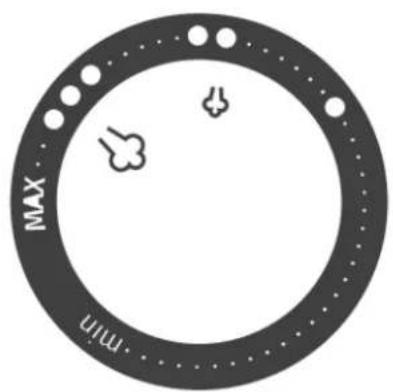
TEMPERATURE DIAL
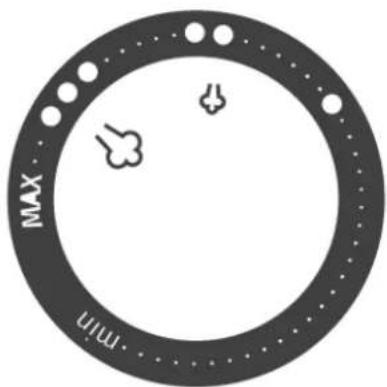
| Silk 80 | |
| Wool 115 | |
| Cotton 170 | |
| MAX | Maximum 175 |
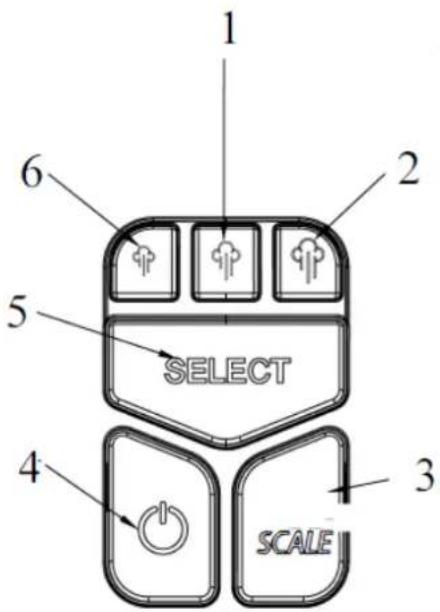
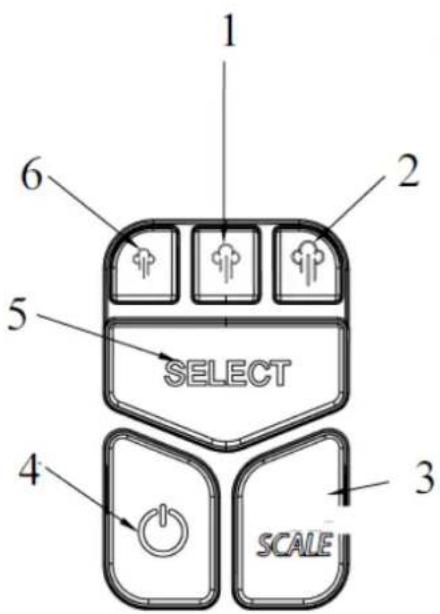
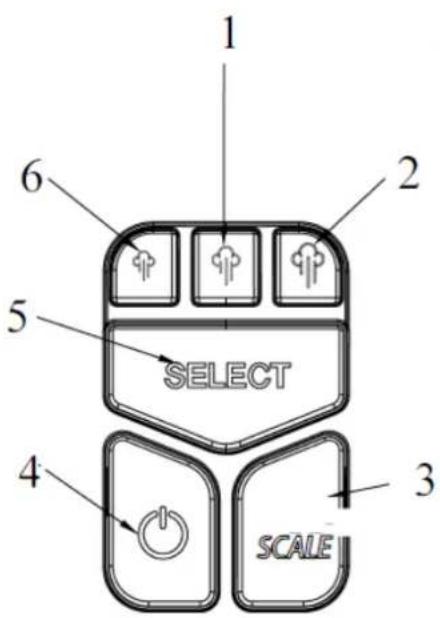
CONTROL PANEL
| Number | Description |
| 1 | Medium steam |
| 2 | High steam |
| 3 | Descaling button |
| 4 | Power button |
| 5 | Steam rate control |
| 6 | Low steam |
Filling aperture
Fill the water tank with water through the filling aperture of the water tank. Make sure that the water does not exceed the MAX mark of the water tank.
Power button
Plug in the appliance and press down the power button. The power indicator will illuminate, and the low steam rate is regarded as the default one, with its indicator blinking. Hold and press the power button for more than 2 seconds to cut off the appliance.
Steam rate control button
The steam rate can be selected as low, medium, or high using the steam rate control button. When any one is selected, its indicator will blink, and it will illuminate solidly after preheating is finished, meaning the steam is ready for use. The indicator of the selected steam rate will blink when the steam rate is switched from low to high, while it will illuminate solidly when the steam rate is switched from high to low.
Temperature dial
Turn the dial to set the ironing temperature based on the garment to be ironed.
Temperature indicator
The appliance will heat up when it has not reached the selected temperature. The temperature indicator will illuminate when the appliance is heating up. Once the appliance has reached the selected temperature, the temperature indicator will extinguish. The temperature indicator will cycle on and off as the iron maintains the selected temperature during ironing.
Iron lock
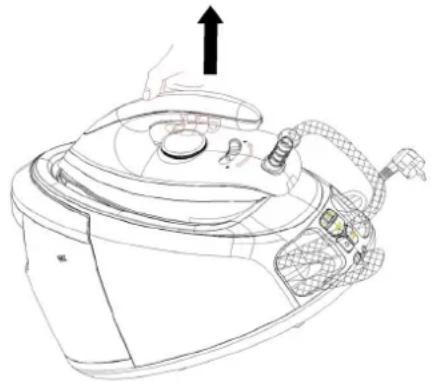
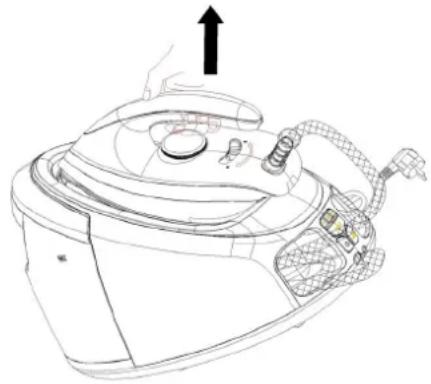
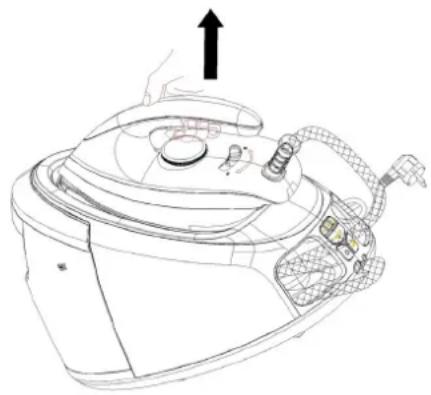
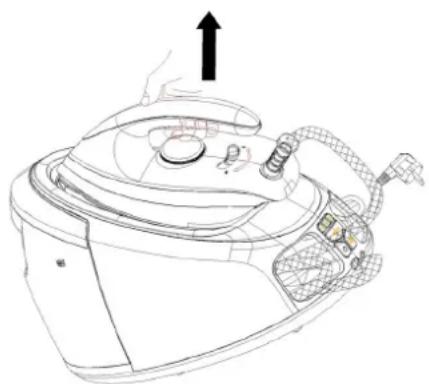
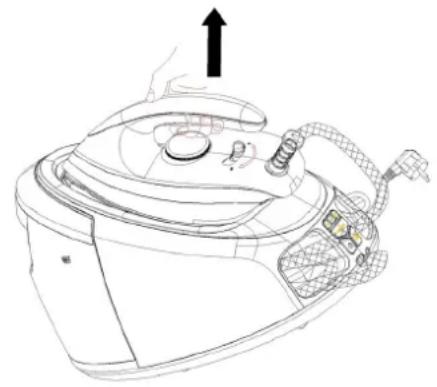
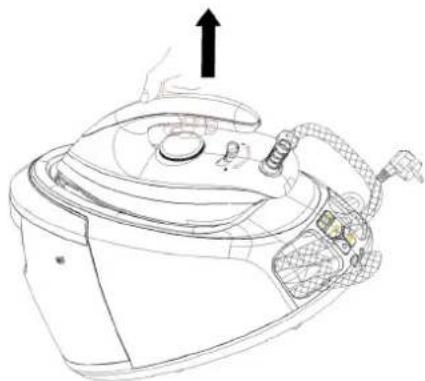
Place the iron on the thermal insulation stand of the unit base, then push the iron lock to the “☐” position to lock the iron on the unit base. To unlock, push the iron lock to the “☐” position, then you can remove the iron to iron clothes (see Fig.1). The whole steam station can be lifted up by grasping the iron’s handle after the iron is properly locked on the unit base (see
Fig.2).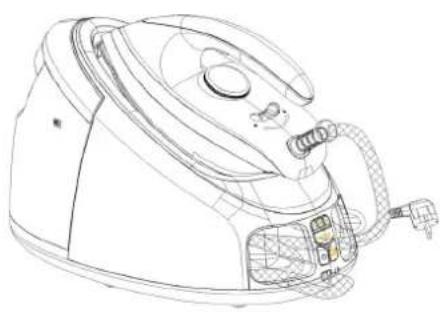
Fig.1
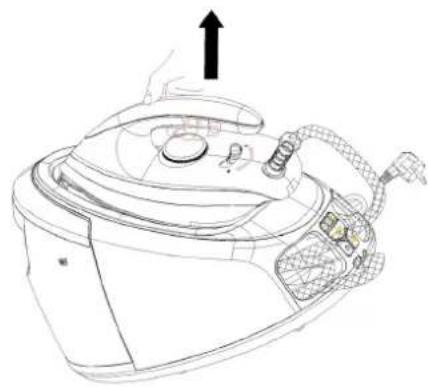
Fig.2
Steam trigger
After pressing down the power button and choosing the desired steam rate, it indicates the steam can be used for ironing when the steam rate indicator changes from blinking to illuminating solidly. At that time, press the steam trigger with a little force, the steam will be sprayed from the soleplate continuously. When loosen the steam trigger, the appliance can only be used for dry ironing without steam.
Shot of steam
Quickly press the steam trigger twice to produce shot of steam, which will last for 6 minutes (see Fig.3). If you want to stop producing shot of steam during operation, only need to press the steam trigger or any button on the control panel once.
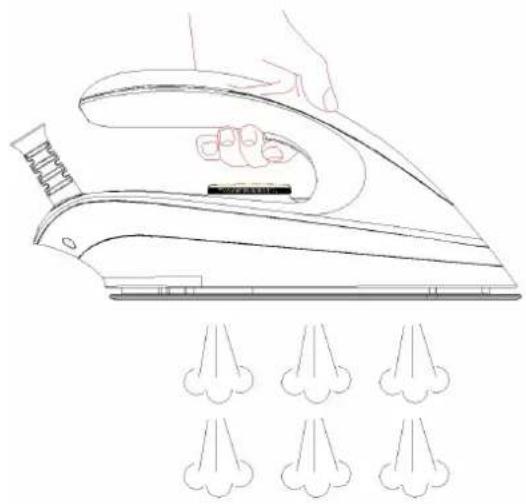
Fig.3
Descaling indicator
If the descaling indicator illuminates, it indicates the steam generator shall be cleaned by virtue of the mineral deposits collecting to a degree. When the system ensures the mineral deposits have been removed, the indicator will extinguish.
Power cord storage box & Steam supply hose storage box
When not in use, the steam supply hose and power cord can be folded well and stored in their respective storage boxes.
Automatic power off
The appliance will turn off automatically if do not activate the “Steam” function or do not activate the control buttons on the control panel within 10 minutes.
BEFORE FIRST USE
- Remove any sticker or protective foil from the soleplate.
- Fill the water tank with water and heat up the iron at the maximum temperature, and then iron over a piece of damp cloth for several minutes for the purpose of removing any residue on the soleplate according to the section of “Steam ironing”.
NOTE:
1) It is normal that strange odour comes out from the unit for the first use. This will cease after a short while. 2) Some particles may come out of the soleplate when you use the iron for the first time. This is normal; the particles are harmless and stop coming out of the iron after a short while. 3) When you activate the "Steam" function, the appliance may produce a pumping sound. This is normal; the sound tells you that water is pumped into the steam generator. 4) During the heating process of the soleplate, there will be little steam coming out from the soleplate automatically and this phenomenon will continue for about 3 seconds, this is normal. 5) There will be little condensation water in the steam supply hose after first use.
But in the second use, the condensation water will be sprayed out together with the steam at the beginning of releasing steam. This phenomenon will continue for several seconds. This is normal.
- The appliance will shut off automatically if all the indicators blink five times together with five beeps can be heard after being powered on, at that time, please contact the after-sales service department.
The appliance has two ironing ways. You can use dry ironing or steam ironing, the details refer to the following:
Dry ironing
- Put the unit base on a stable and level surface and then put the iron on the thermal insulation stand of unit base.
- Connect the appliance with power source and press down the power button, the power indicator turns on.
- Turn temperature dial to your desired setting, which is depended on the fabric of garment. The iron starts heating, and the temperature indicator will illuminate solidly during heating. Refer to "IRONING TIPS".
- The temperature indicator will turn off when the selected temperature is reached. You can start ironing now.
WARNING: Never touch hot soleplate at any time before cooling down!
Steam ironing
- Put the unit base on a stable and level surface.
- Grasp the water tank's handle to remove the water tank, then fill it with water through the filling aperture. You had better use purified water with less calcium particles. After it, replace the water tank properly. The max capacity of water tank is 1.7L, the water level shall not be exceeded the MAX mark.
- Put the iron on the thermal insulation stand of unit base.
- Connect the appliance to a power source, press the power button, and the default low steam rate indicator will blink. There are three steam rate modes available: low, medium, and high. You can select the desired steam rate for each garment according to your requirements. Make sure there is enough water in the tank.
- Turn the temperature dial to your desired setting, which depends on the fabric of the garment. The iron starts heating, and the temperature indicator will illuminate solidly during heating. Refer to "IRONING TIPS" and "ADDITIONAL TABLE" below when selecting the temperature.
- After a few minutes, the temperature indicator will extinguish, indicating that the soleplate temperature has reached the selected temperature. When the indicator of the selected steam rate changes from flashing to illuminating, it indicates that the iron is ready for ironing garments with steam.
- Press the steam trigger with a little force, and steam will be sprayed from the soleplate continuously. You can then iron the garment with steam.
- Quickly press the steam trigger twice to produce a shot of steam if you need to remove hard creases.
Note: There may be dripping water during steam spraying when the soleplate temperature is at or below the second setting. This is normal.
Caution:
1) Do not touch the hot soleplate at any time before it cools down!
2) Never direct the steam at people!
3) Do not activate the steam trigger when the iron is placed on the unit base to avoid being scalded by steam.
- After ironing, press down the power button for more than 2 seconds, the appliance will be turned off and all the indicators will extinguish. Remove the plug from the wall socket. But the soleplate is still hot, never touch it with hand, place it on the thermal insulation stand until it cools down completely.
AUTO-CLEAN FUNCTION
If the “Descaling indicator” illuminates, it indicates the steam generator shall be cleaned by virtue of the mineral deposits collecting to a degree. When the system ensures the mineral deposits have been removed, the “Descaling indicator” will extinguish.
Before cleaning, make sure that the “Descaling indicator” lights solidly, then unplug the appliance and make it cool down.
- Remove the water tank, upend the unit base and put it on a flat surface, then anticlockwise rotate the knob at the bottom of unit base to remove it.
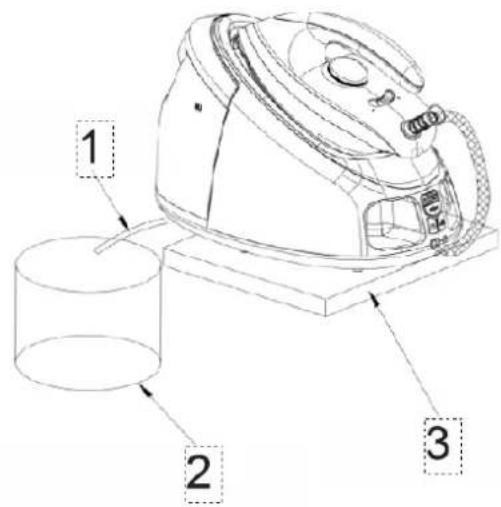
WARNING: To avoid a risk of scald, make sure the appliance has been cooled down completely before removing the knob, position 1 on picture below.
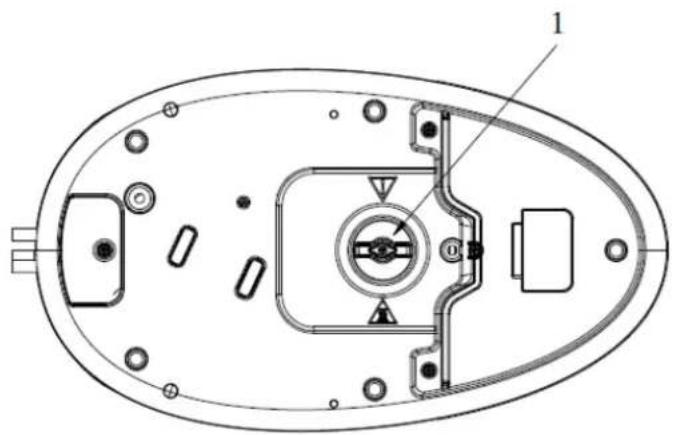
- Install the drain connector into the drain pipe.
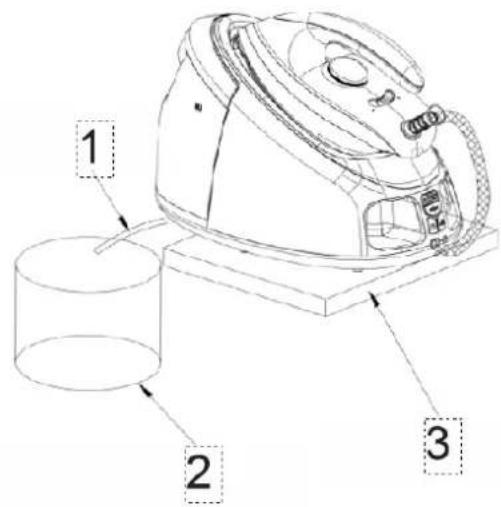
- Put the unit base on a suitable and fixed table, then put the silicone tube into a container, after it, fill the water tank with water and replace it back in position (see Fig.4). Make sure that the appliance shall be placed steadily.
| Number | Description |
| 1 | Silicone tube |
| 2 | Container |
| 3 | Fixed table |
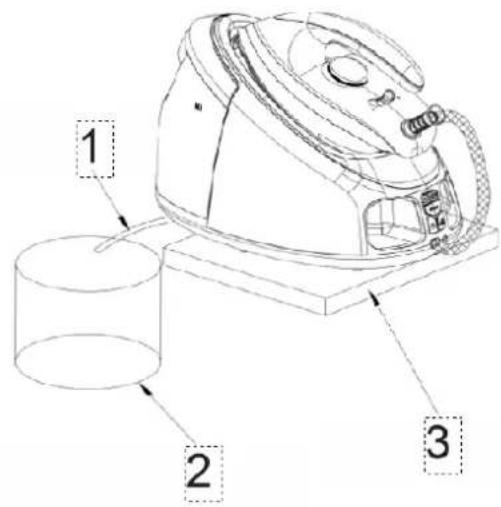
Fig.4
- Connect the appliance with power source, press down the power button, then hold and press “Descaling button” and “Steam trigger” simultaneously for about 1 second, at that time, one beep can be heard and the descaling indicator begins to blink, then the appliance starts to clean the steam generator, and the steam and scale flows out of the steam generator, about 3 minutes later, one beep can be heard, the descaling indicator extinguishes and the appliance shuts off automatically.
NOTE: Do not touch or get close to the container during cleaning to avoid being scalded.
- Unplug and remove the water tank, then put the iron on a flat surface, after it, upend the unit base and put it on a flat surface, and then rotate the knob clockwise to tighten it and install the drain connector well in position. Finally, upend the unit base and put the iron on the thermal insulation stand of unit base.
CLEANING AND MAINTENANCE
Before cleaning, first disconnect the plug from the Fig.8 outlet and let the appliance cool down.
- Wipe the residues and any other deposits on the soleplate with a damp cloth or a non-abrasive (liquid) cleaner.
NOTE: Do not use chemical, steel, wooden, or abrasive cleaners to scrape the soleplate.
- Clean the upper part of the iron with a soft damp cloth. Wipe the water drops on the unit base and the thermal insulation stand with a dry cloth.
- Perform auto-clean by following the operation described in “AUTO-CLEAN FUNCTION” when the “Descaling indicator” illuminates.
- When not using the appliance for a long time, pour out the water in the tank, turn the temperature dial to the minimum setting, and store the iron on the thermal insulating cushion. Then push the iron lock to the lock position to lock the iron well.
Note: The whole steam station can be lifted up by grasping the iron's handle after the iron is properly locked on the unit base.
- When not in use, the steam supply hose and power cord can be folded well and stored in their respective storage boxes. Then put the appliance in a place out of the reach of children.
IRONING TIPS
- Always check first whether a label with ironing instructions is attached to the article. Follow these ironing instructions in any case.
- The iron heats up quicker than it cools down. Therefore, you should start ironing the articles requiring the lowest temperature, such as those made of synthetic fiber.
- If the fabric consists of various kinds of fibers, you must always select the lowest ironing temperature to iron the composition of those fibers.
Synthetic fibre and silk fabrics should be ironed on their inner side to avoid being shone.
Velvet and other textures that rapidly become shiny should be ironed in one direction with light pressure applied. Always keep the iron moving at any moment.
Pure wool fabrics (100% wool) may be ironed with the steam iron. Preferably set temperature dial to the third position and use a dry cloth as a mat.
Never iron over zips or rivets in the cloth. This will damage the soleplate. Iron around any such object.
ENVIRONMENT FRIENDLY DISPOSAL
You can help protect the environment! Please remember to respect the local regulations: hand in the non-working electrical equipments to an appropriate waste disposal center
| Soie 80 | |
| Laine 115 | |
| Coton 170 | |
| MAX | Maximum 175 |
Steam trigger
Fig. 3
Fig. 4
| Seta 80 | |
| Lana 115 | |
| Cotone 170 | |
| MAX | Massimo 175 |
CONTROL PANEL
Fig. 1
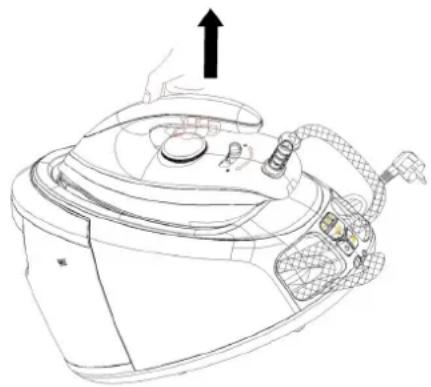
Fig. 2
Steam button
Fig. 3
Fig. 4
TEMPERATURE CONTROL
| ● | Seda 80 < T < 120 |
| ●● | Lana 115 < T < 160 |
| ●●● | Algodón 170 < T < 215 |
| MÁX. | Máximo 175 < T < 225 |
CONTROL PANEL
Fig. 1
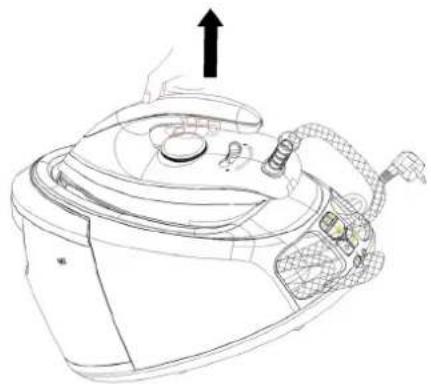
Fig. 2
Steam button
Fig. 3
Fig. 4
| Svila 80 | |
| Vuna 115 | |
| Pamuk 170 | |
| MAX | Maksimum 175 |
CONTROL PANEL
| Broj | Opis |
| 1 | Srednja razina pare |
| 2 | Visoka razina pare |
| 3 | Gumb za uklanjanje kamenca |
| 4 | Gumb za uključivanje |
| 5 | Regulacija razine pare |
| 6 | Niska razina pare |
Filling opening
Fill the tank with water through the water tank filling opening. Make sure the water does not exceed the MAX mark on the water tank.
Temperature regulator
Fig. 1
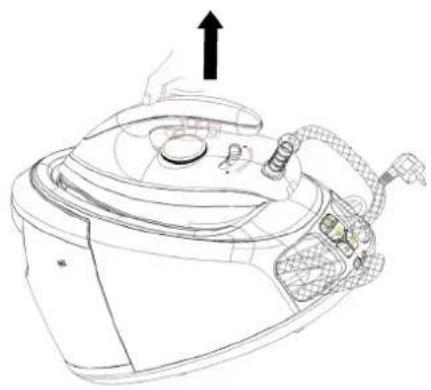
Fig. 2
Steam trigger
After pressing the power button and selecting the desired steam level, the button indicates that steam can be used for ironing when the steam level indicator stops flashing and starts to glow. At that moment, gently press the steam trigger; steam will be continuously sprayed from the ironing plate. When you release the steam trigger, the appliance can only be used for dry ironing without steam.
Steam jet
Fig. 3
Descaling indicator
- Place the drain connector into the drain hose.
- Place the base on a suitable and stable table, then put the silicone hose into the tank, after that fill the tank with water and return it to its position (see Fig. 4). Make sure the appliance is placed stably.
| Broj | Opis |
| 1 | Silikonska cijev |
| 2 | Spremnik |
| 3 | Pričvršćeni stol |
S1.4
- Connect the device to the power source, press the power button, then simultaneously press and hold the "Descaling Button" and the "Steam Trigger" for about 1 second. A beep will sound and the descaling indicator will start flashing, then the device will begin cleaning the steam generator, and steam and scale will come out of the steam generator. After 3 minutes, a beep will sound, the descaling indicator will turn off, and the device will automatically shut down.
| Svila 80 | |
| Volna 115 | |
| Bombaž 170 | |
| MAX | Največja temperatura 175 |
CONTROL PANEL
Temperature regulator
Figure 1
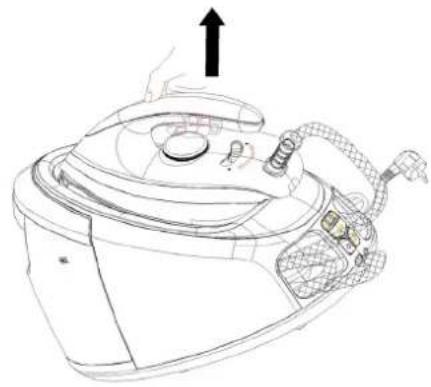
Figure 2
Steam trigger
Figure 3
Figure 4
| Mëndafsh 80 | |
| Lesh 115 | |
| Pambuk 170 | |
| MAX | Maksimumi 175 |
CONTROL PANEL
Fig.1

Fig.2
Steam trigger
Fig.3
Fig.4
| Svila 80 | |
| Vuna 115 | |
| Pamuk 170 | |
| MAX | Maksimum 175 |
CONTROL PANEL
| Broj | Opis |
| 1 | Srednji nivo pare |
| 2 | Visoki nivo pare |
| 3 | Dugme za uklanjanje kamenca |
| 4 | Dugme za uključivanje |
| 5 | Kontrola nivoa pare |
| 6 | Niski nivo pare |
Filling opening
Fill the water tank with water through the water tank filling opening. Make sure the water does not exceed the MAX mark on the water tank.
Temperature regulator
Turn the regulator to set the ironing temperature based on the clothes to be ironed.
Temperature indicator
Fig. 1
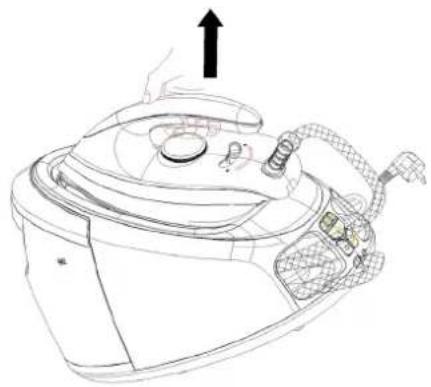
Fig. 2
Steam trigger
After pressing the power button and selecting the desired steam level, the button indicates that steam can be used for ironing when the steam level indicator stops flashing and starts to glow. At that moment, gently press the steam trigger; steam will be continuously sprayed from the soleplate. When you release the steam trigger, the appliance can only be used for dry ironing without steam.
Steam burst
Press the steam trigger twice quickly to produce a steam burst, which will last for 6 minutes (see Fig. 3). If you want to stop the steam burst during operation, simply press the steam trigger once or any button on the control panel.
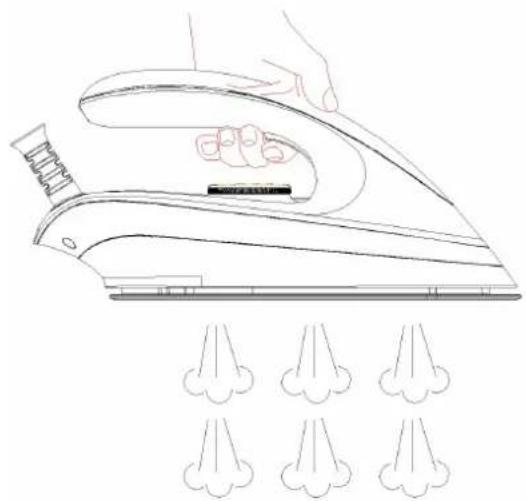
Fig. 3
Descaling indicator
If the descaling indicator lights up, it means that the steam generator needs to be cleaned of mineral deposits that have accumulated to a certain degree. When the system verifies that the mineral deposits have been removed, the indicator will turn off.
- Install the drain connector into the drain hose.
- Place the base on a suitable and stable table, then insert the silicone hose into the water tank, fill the tank with water, and put it back in place (see Fig. 4). Make sure the appliance is placed stably.
| Broj | Opis |
| 1 | Silikonska cev |
| 2 | Rezervoar |
| 3 | Pričvršćen sto |
S1.4
- Connect the appliance to the power supply, press the power button, then simultaneously press and hold the "Descaling Button" and the "Steam Trigger" for about 1 second. A beep will sound, the descaling indicator will start flashing, and the appliance will begin cleaning the steam generator. Steam and scale will be expelled from the generator. After 3 minutes, a beep will sound, the descaling indicator will turn off, and the appliance will automatically shut down.
| Свила 80 | |
| Волна 115 | |
| Памук 170 | |
| MAX | Максимум 175 |
CONTROL PANEL
Figure 1
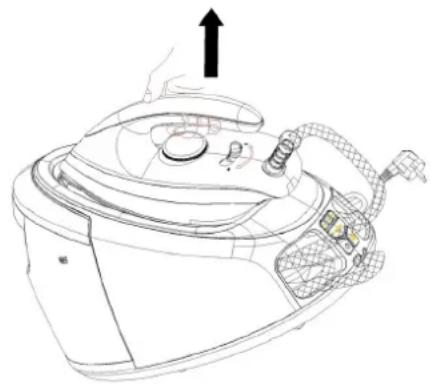
Figure 2
Steam button
Figure 3
Figure 4
TEMPERATURE DIAL
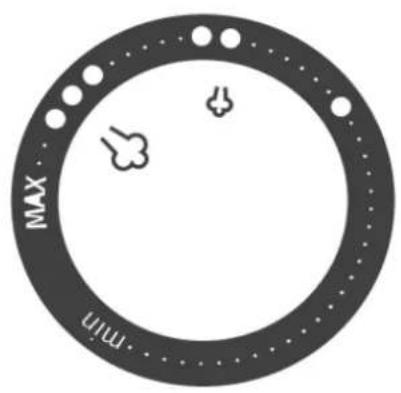
Fig.1
Steam trigger
Descaling indicator
Steam button
TEMPERATURE SELECTOR
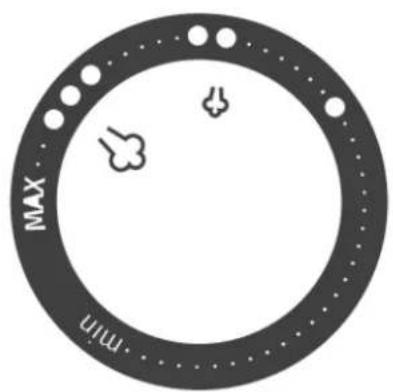
| Hedvábí 80 | |
| Vlna 115 | |
| Bavlna 170 | |
| MAX | Maximum 175 |
CONTROL PANEL
Steam release
Fig. 3
Descaling indicator
Fig. 4
| ● | Selyem 80 |
| ●● | Gyapjú 115 |
| ●●● | Pamut 170 |
| MAX | Maximum 175 |
CONTROL PANEL
- Fig.
- Fig.
Steam release button
- Fig.
Fig. 1 Fig. 2
Steam release
Fig. 3
Fig. 4
TEMPERATURE SELECTOR
| Hodváb 80 < T < 120 | |
| Vlna 115 < T < 160 | |
| Bavlna 170 < T < 215 | |
| MAX | Maximum 175 < T < 225 |
CONTROL PANEL
Fig. 1
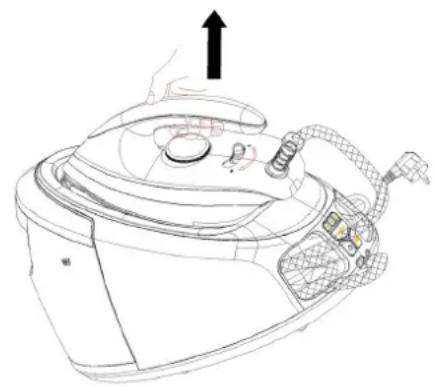
Fig. 2
Steam release
Fig. 3
Fig. 4
Fig. 1
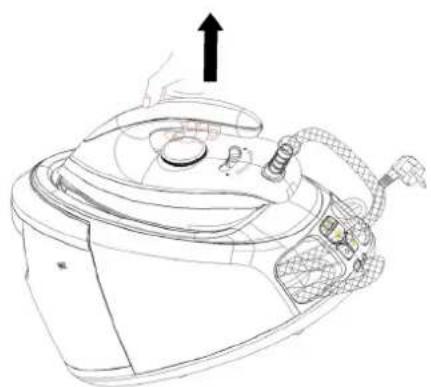
Fig. 2
Fig. 3
Fig. 4
Fig. 1
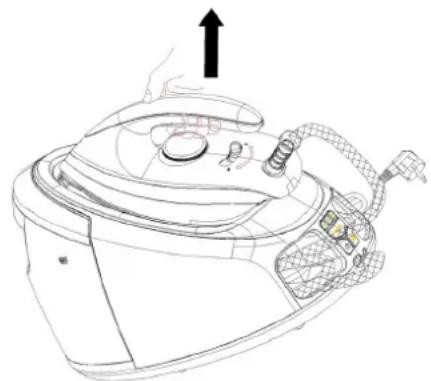
Fig. 2
Steam release
Fig. 3
Fig. 4


- SGD2800WV
- IMPORTANT SAFEGUARDS
- READ ALL INSTRUCTIONS
- HOUSEHOLD USE ONLY
- TEMPERATURE DIAL
- CONTROL PANEL
- FILLING APERTURE
- POWER BUTTON
- STEAM RATE CONTROL BUTTON
- TEMPERATURE INDICATOR
- IRON LOCK
- STEAM TRIGGER
- SHOT OF STEAM
- DESCALING INDICATOR
- POWER CORD STORAGE BOX & STEAM SUPPLY HOSE STORAGE BOX
- AUTOMATIC POWER OFF
- BEFORE FIRST USE
- NOTE
- DRY IRONING
- STEAM IRONING
- CAUTION
- AUTO-CLEAN FUNCTION
- CLEANING AND MAINTENANCE
- IRONING TIPS
- ENVIRONMENT FRIENDLY DISPOSAL
- STEAM BUTTON
- TEMPERATURE CONTROL
- FILLING OPENING
- TEMPERATURE REGULATOR
- STEAM JET
- STEAM BURST
- TEMPERATURE SELECTOR
- STEAM RELEASE
- STEAM RELEASE BUTTON
Brand : GORENJE
Model : SGD2800WV
Category : Iron