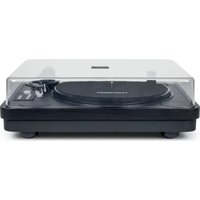
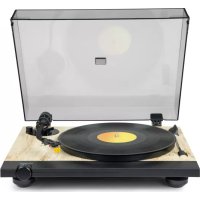
TT650BT - Turntable THOMSON - Free user manual and instructions
Find the device manual for free TT650BT THOMSON in PDF.

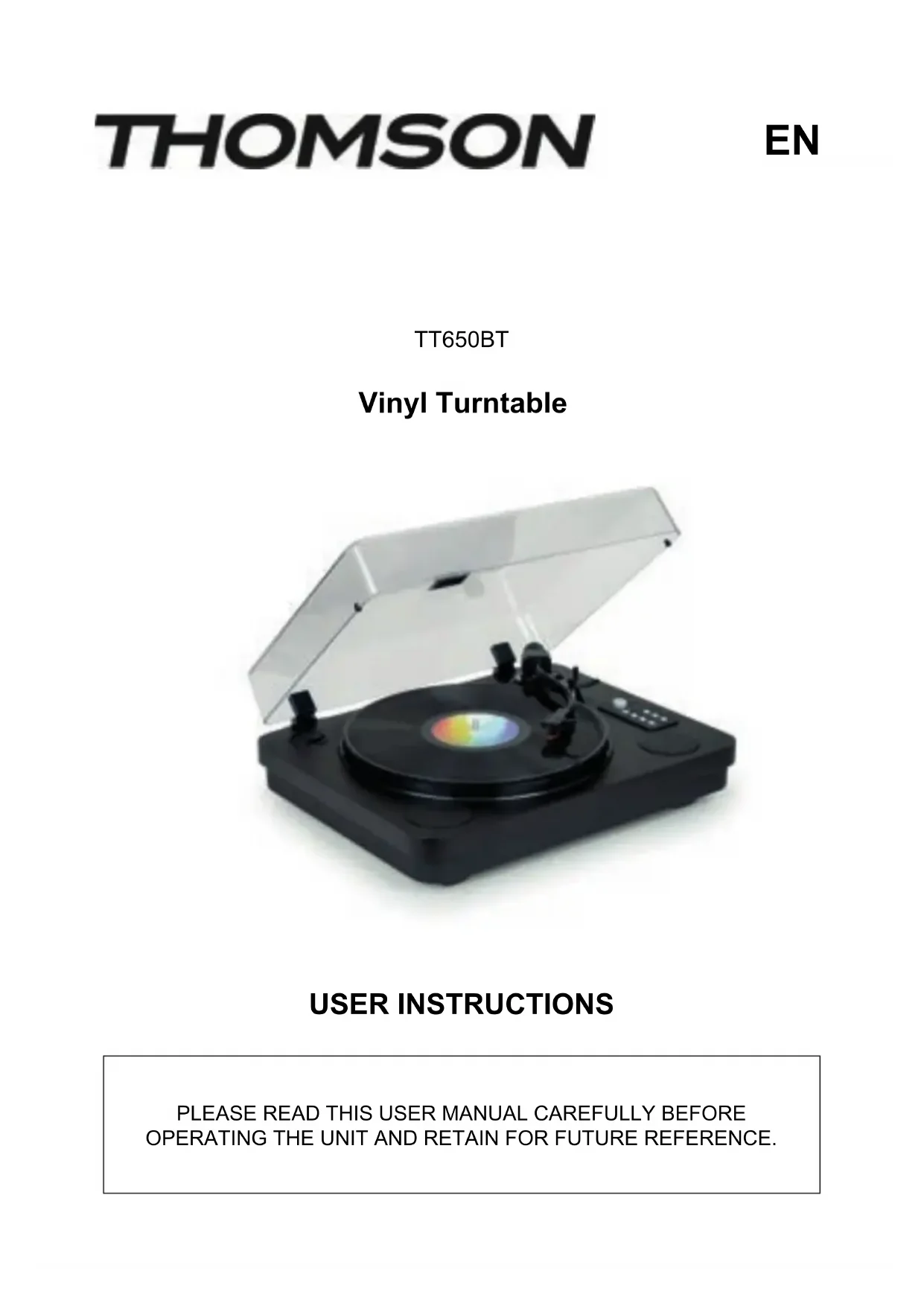


| Product type | Turntable |
| Model | TT650BT |
| Brand | Thomson |
| Power supply | External power adapter 12V = 1A |
| Playback speeds | 33, 45 and 78 RPM |
| Main functions | Vinyl playback, USB MP3 playback, USB recording, Bluetooth receiver, built-in speakers, RCA line output |
| Speed adjustment | Adjustable pitch (turn left/right) |
| Audio output | RCA line output (active/disableable amp) and built-in speakers |
| Wireless connectivity | Bluetooth (receiver, range up to 10 m) |
| USB recording | MP3 format, from vinyl |
| Package contents | Turntable, RCA audio cable, power adapter, 45 RPM adapter, manual |
| Care and cleaning | Soft cloth, no abrasive or aggressive products |
| Safety | Do not open, do not use near water, keep out of reach of children, unplug during storms |
| Warranty | 2 years by Bigben Interactive |
| Manufacturer | Bigben Interactive, France |
| Country of origin | China |
Frequently Asked Questions - TT650BT THOMSON
User questions about TT650BT THOMSON
0 question about this device. Answer the ones you know or ask your own.
Ask a new question about this device
Download the instructions for your Turntable in PDF format for free! Find your manual TT650BT - THOMSON and take your electronic device back in hand. On this page are published all the documents necessary for the use of your device. TT650BT by THOMSON.
USER MANUAL TT650BT THOMSON
natural_image
Black and white photo of a vintage typewriter with open lid and reflective disc (no visible text or symbols)MODE D'EMPLOI
AVANT D'UTILISER CET APPAREIL, VEUILLEZ LIRE ATTENTIVEMENT CE MODE D'EMPLOI ET LE CONSERVER AFIN DE POUVOIR LE CONSULTER ULTÉRIEUREMENT.
FR
natural_image
Line drawing of a device with labeled ports and wiring, no readable text or symbols present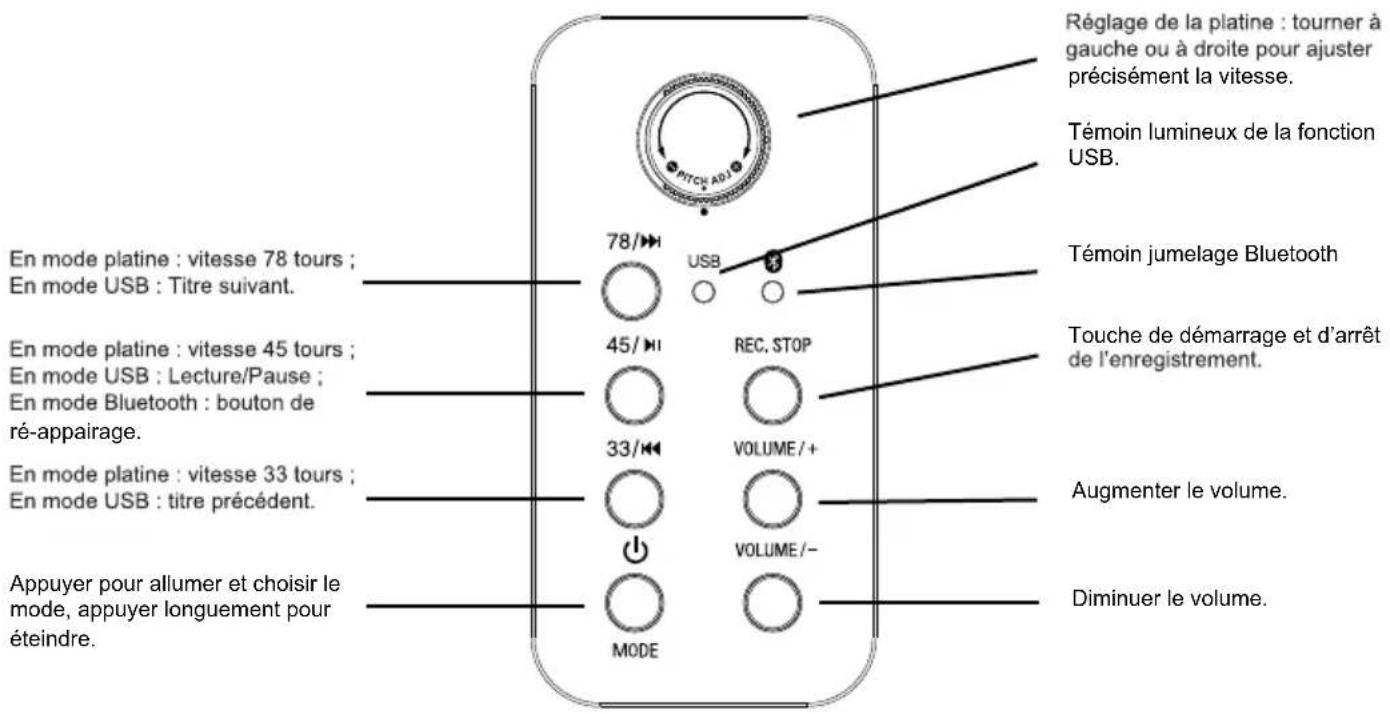

natural_image
Diagram showing mechanical assembly with two views of a tool and a close-up of a screwdriver (no text or symbols)Stylet
b) Lecture (USB)
natural_image
Two icons: a stack of documents inside a shield-shaped frame and a recycling bin with an arrow (no text or symbols)
Fabricant : Bigben Interactive FRANCE
396-466, rue de la Voyette - CRT2
59273 Fretin, France
BELGIQUE, customerservice@bigben-interactive.be
NEDERLAND, customerservice@bigben-interactive.nl
OTHERS, from monday to friday (except on public holidays)
9.00 am - 6.00 pm: www.bigben.fr/support (Chatbot)
or support@bigben.fr
www.bigben.eu
| Enceinte / Speaker / Altavoz / Altoparlante / Altifalante / Lautsprecher / Luidspreker | Speaker 2 x 2" | |
| Puissance - Peak power - Potencia máxima - Picco potenza - Potência - Peak lautsprecher - Peak speaker - Högsta effekt - Huipputeho - Top-effekt - Makseffekt - Špičkový výkon - Maximális teljesítmény - Moc szczytowa | 2 x 2W RMS | |
| Distorsion - Distortion - Distorsión - Distorsione - Distorção - Verzerrung - Vervorming - Distortion - Vääristymä - Forvrængning - Forvrengning - Zkreslení - Torzítás - Znieksztalcenie | < 5% | |
| Fréquence - Frequency - Frequencia - Frequenza - Frequência - Frequenzbereich - Frequentie - Frekvens - Taajus - Frekvens - Frekvens - Frekvence - Frekvencia - Częstotliwość | 60 Hz - 20 KHz | |
| Impédance - Impedance - Impedancia - Impedanza - Impedância - Impedanz - Impedantie - Impedans - Impedanssi - Impedans - Impedans - Impedance - Impedanciája - Impedancja | 4 Ω | |
| Entrée alimentation - Power input - Entrada de corriente - Ingresso di alimentazione - Entrada de alimentação - Netzeingang - Ingang - Ingáng - Enter - Indgang - Inngang - Vstup - Bemenet - Wejście | 12V/1A | |
| Ratio S/B - S/N Ratio - Relación S/R - Rapporto segnale rumore - Relação S/B - S/R-Verhältnis - Signaal-ruisverhouding - S/N-förhållande - S/B-suhde - S/B rapport - Signal/støy-forhold - Poměr S/B - S/B arány - Stosunek sygnału do szumu (SNR) | ≥ 70 dB | |
| Consommation - Consumption - Consumo de energía - Consumo energetico - Consumo de energía - Energieverbrauch - Energieverbruik - Energiförbrukning - Energiankulutus - Energiforbrug - Energiforbruk - Spotřeba energie - Energiafogyasztás - Zużycie energii | 0,4W | |
| Entrée alimentation - Power input - Entrada de corriente - Ingresso di alimentazione - Entrada de alimentação - Netzeingang - Ingang - Ingáng - Enter - Indgang - Inngang - Vstup - Bemenet - Wejście | 12V/1A | |
| Bluetooth | Version - Version - Versión - Versione - Versão - Version - Versie - Version - Versio - Udgave - Versjon - Verze - Verzió - Wersja | 5.0 |
| Nom de jumelage - Pairing name - Nombre para emparejamiento - Nome abbinamento - Nome pde emparelhamento - Kopplungsname - Koppelingsnaam - Namn - parinmuodostuksen nimi - Navn på parring - Navn for sammenkobling - Název párování - Párosítás neve - Nazwa parowania | TT650BT | |
| Fréquence - Frequency - Frequencia - Frequenza - Frequência - Frequenzbereich - Frequentie - Frekvens - Taajus - Frekvens - Frekvens - Frekvence - Frekvencia - Częstotliwość | 2402 - 2480 MHz | |
| EIRP | 0.89 dBm | |
| Radio FM | Fréquence - Frequency - Frequencia - Frequenza - Frequência - Frequenzbereich - Frequentie - Frekvens - Taajus - Frekvens - Frekvens - Frekvence - Frekvencia - Częstotliwość | 88,0 - 108 MHz |
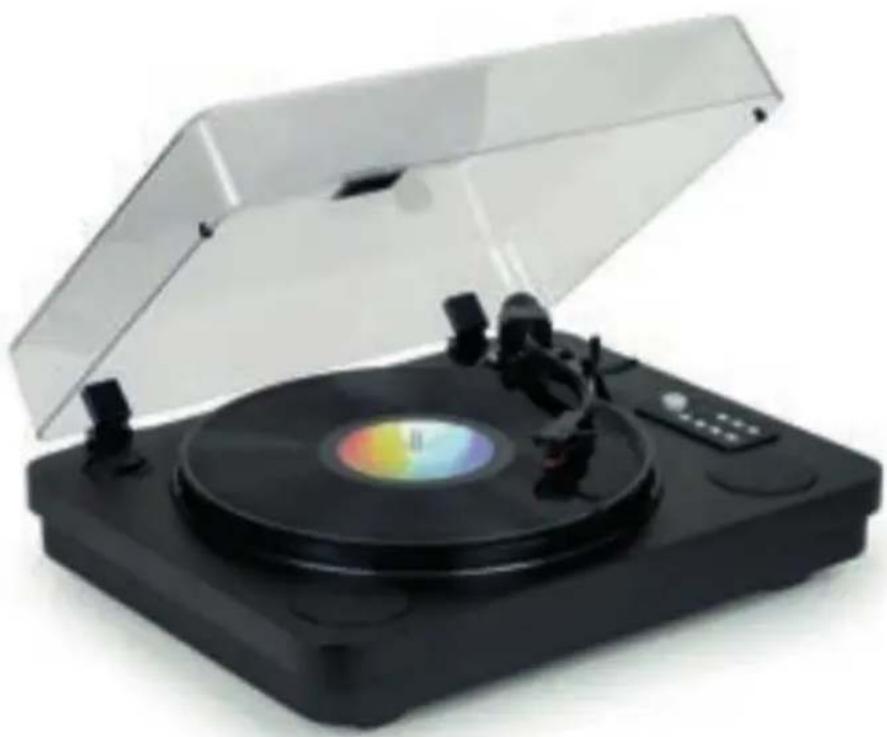
THOMSON
TT650BT
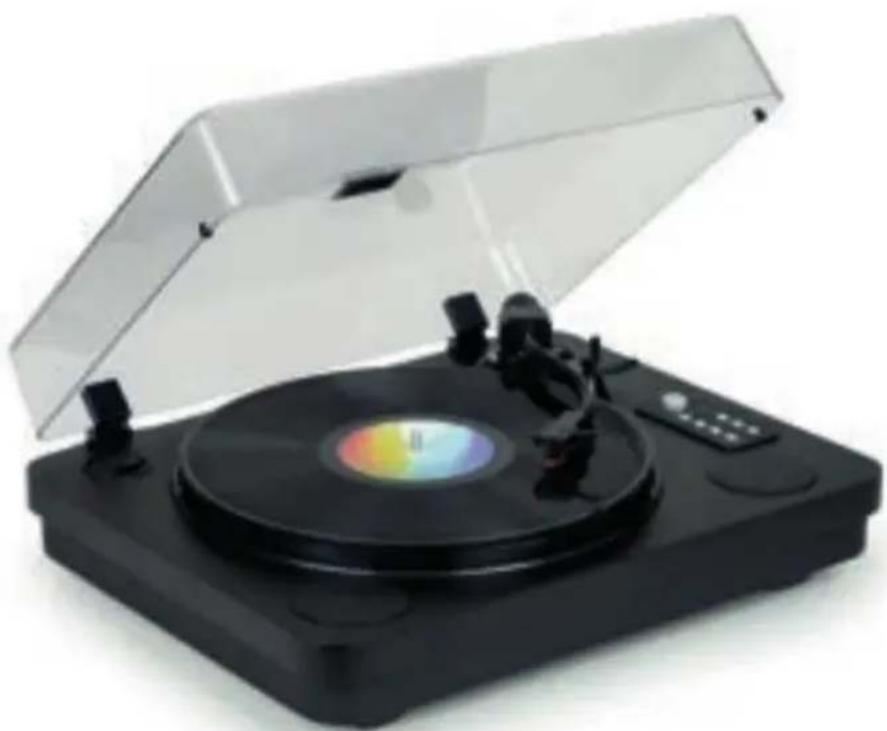
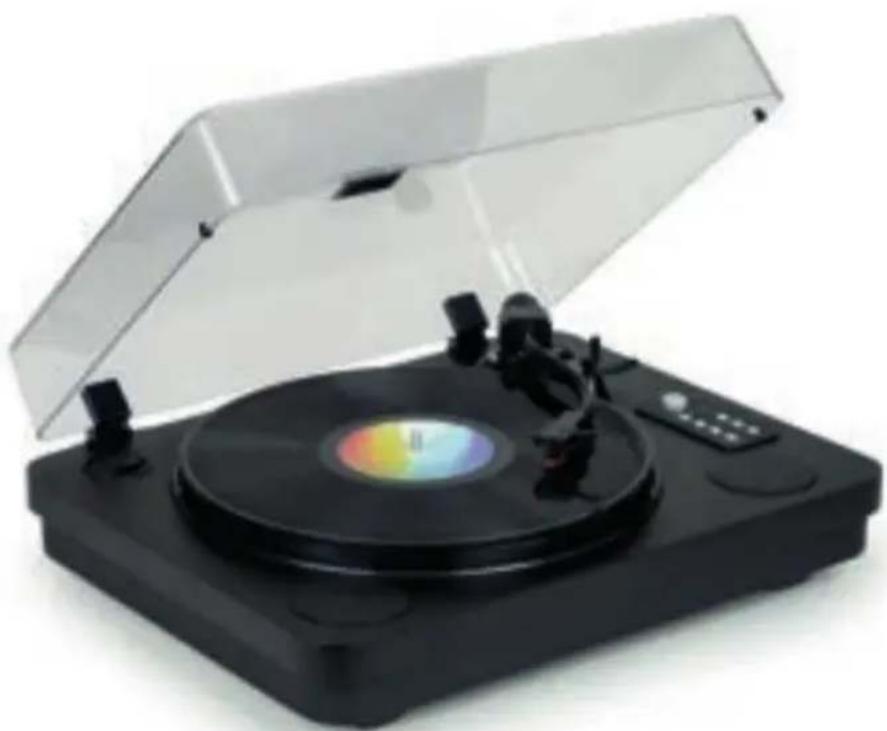
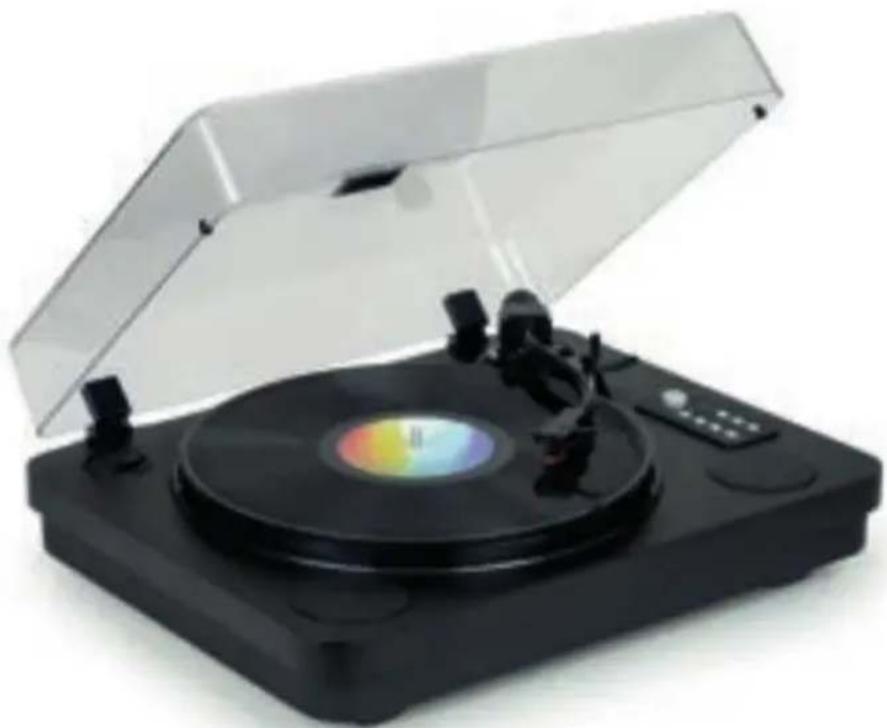
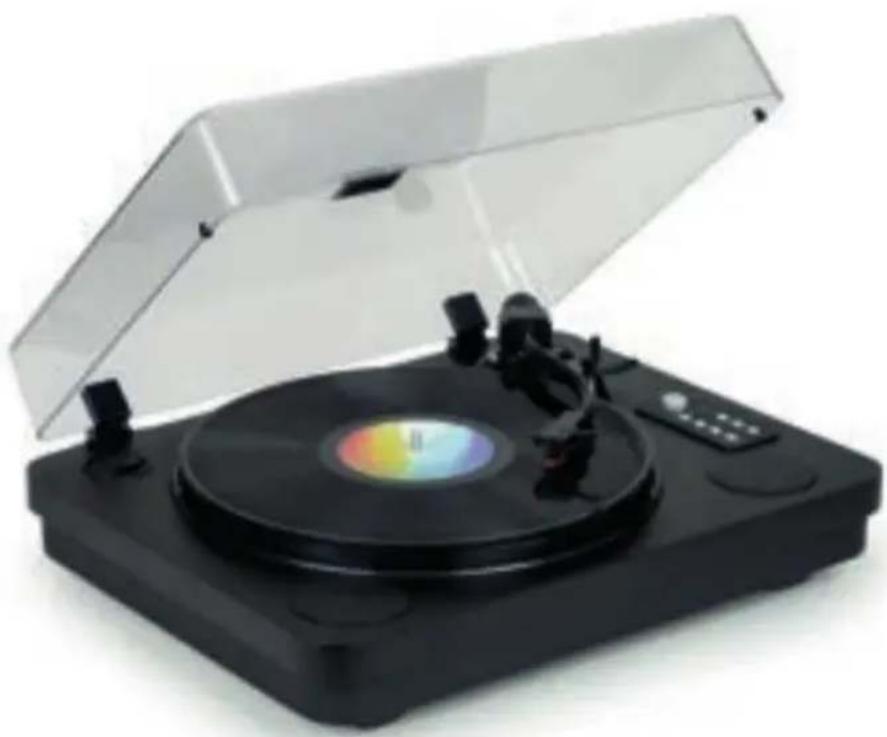
Vinyl Turntable
natural_image
Black and silver photo of a vintage typewriter with open lid and control buttons (no visible text or symbols)USER INSTRUCTIONS
PLEASE READ THIS USER MANUAL CAREFULLY BEFORE OPERATING THE UNIT AND RETAIN FOR FUTURE REFERENCE.
EN
Please read this user guide carefully before operating the unit and retain for future reference.

You must read and understand all the instructions before using this device. The warranty will not apply if damage is caused by failure to follow the instructions.
GETTING STARTED
Take the device out of the box.
Remove all the packaging from the product.
Place the packaging inside the box or dispose of it safely in compliance with the waste sorting instructions shown on the outside.
SAFETY WARNING AND NOTICE
- Do not sleep with the product.
- The appliance must be placed at least 20 cm from the human body when in use.
- Never remove the device casing.
- Never place this device on top of other electrical equipment.
- Protect the power cable from being stepped on or pinched, particularly at the plugs, sockets, and the point where it exits the device. Make sure that the power rating corresponds to the voltage shown on the rating plate at the rear of the device. Always pull the plug from the socket when disconnecting from the mains. Never pull on the cable. Ensure you have completed all the other connections before connecting the mains plug.
- Only use attachments/accessories that are recommended by the manufacturer.
-
Entrust all device repairs to qualified repairers. Repair is needed if the device has been damaged in any fashion, and in particular:
-
if the power cable is damaged;
- in the event of a liquid spill or objects being inserted into the device;
- if the device is exposed to rain or dampness;
- if the device does not operate normally;
-
or if the device has been dropped or impacted.
-
The series panel is located on the bottom of the device.
-
Never block the air vents.
-
Make sure you have enough space for ventilation. Place the product on a stable surface.
- This device must be used in a moderate climate, away from direct sunlight, naked flames or sources of heat, heaters, cookers or any other devices (including amplifiers) that generate heat. Do not install near a heat source.
- The batteries (battery pack or inserted batteries) must not be exposed to excessive heat, such as sunshine, fire, etc.
- Always unplug the device before cleaning it. Never lubricate any part of this device. Clean it using a soft cloth. Do not use abrasive products or harsh cleaners.
- Ensure that you always have easy access to the power cable, plug or adapter to disconnect this device from the mains if necessary.
-
Do not use this device near water. It must not be dripped on or splashed. Do not use this device in a damp or wet environment.
-
Disconnect this device in the event of a storm, or if you intend not to use it for a long period of time.
- This device can be used by children aged 8 and over, and by persons with a physical or sensory disability, learning difficulties or a lack of experience and knowledge, provided they are supervised or have received instructions on the safe use of the device, and understand the risks involved. Children must not play with the device or power cable (risk of strangulation). Children must not clean or maintain the device without supervision.
- This device must only be supplied with very low safety voltage as indicated of the device.
- If your product includes a battery, it should be removed from the device before disposal. The device must be disconnected from the power supply when removing the battery.
- This device is for household use only; do not use outdoors.
- Do not use for purposes other than its intended purposes.
- It is not designed to operate with an external timer or a separate remote control system.
- Clean all of the removable accessories before the first use.
- If your product includes a transformer, the latter must be regularly inspected to check that the power cable, plug, casing, and other parts are not damaged and, if they are damaged, it must not be used until it has been repaired.
- Incorrect use of the transformer risks causing electric shocks. Respect the advised voltage.
WARNINGS
If your product is a luminaire and if it's on play and charging mode at the same time, the light will automatically turn off after working for 10 hours to protect the motor.
The light source of this luminaire is not replaceable; when the light source reaches its end of light the whole luminaire shall be replaced.
The lightning bolt symbol within an equilateral triangle alerts users to the presence of dangerous uninsulated voltages, inside the device, that may present a risk of electric shock.

The exclamation mark inside a triangle indicates the presence of important operating and maintenance (repair) instructions in the literature accompanying the device.
If your product includes batteries
- Use batteries correctly to prevent any injury or fire caused by a leak, overheating, explosion, erosion or other damage.
- Keep new and used batteries out of the reach of children or any vulnerable person. Stop using the device if the battery compartment does not close properly.
- If the liquid from an alkaline battery comes into contact with skin or eyes, rinse immediately with fresh water and consult a physician.
- If an alkaline battery leaks, clean the liquid with a cloth and replace the battery with a new one.
- Do not swallow batteries. If swallowed, a battery can cause severe internal burns in 2
hours and can cause death. If batteries are swallowed, contact a poison centre immediately and consult a physician.
- Use AA Ni-MH, alkaline or lithium batteries.
- Do not charge these batteries. Charging non-rechargeable batteries generates gas or heat emissions that can cause explosions or fires.
- Do not use different types of batteries or a mixture of new and old batteries.
- Insert the batteries according to the correct polarity (+ and -).
- Do not allow the same battery poles to be in contact.
- Remove spent batteries quickly. There is a risk of the battery exploding if it is not replaced or if the device is unused for a long period of time.
- Replace the battery with an identical or equivalent model.
- The batteries (or battery pack) must not be exposed to excessive heat, such as sunlight fire, etc.
- Do not heat batteries or dispose of them in a fire or in water.
- Do not use metal pliers or metal objects such as the point of a pen or tweezers to remove batteries. Avoid deforming, crushing or piercing batteries.
- Do not disassemble the batteries.
- Cover the ends of the batteries with tape to prevent explosions and combustion when these are scrapped.
- Scrap batteries in an environmentally friendly way.
- Do not dispose of batteries in ordinary household waste.
- When disposing of batteries, be sure to follow local disposal regulations.
KEEP OUT OF REACH OF CHILDREN

Swallowing can lead to chemical burns, perforation of soft tissue, and death. Severe burns can occur within two hours of ingestion. Seek medical attention immediately.
Contents of the box
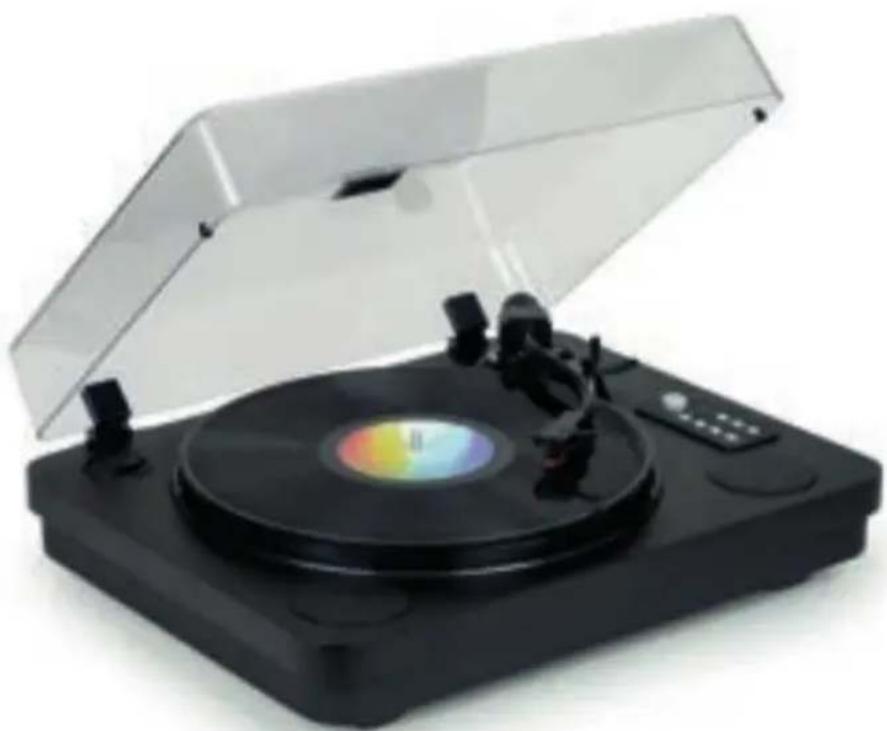
- Vinyl Turntable
• RCA stereo audio cable - User manual
• 45 rpm Adapter
Power supply
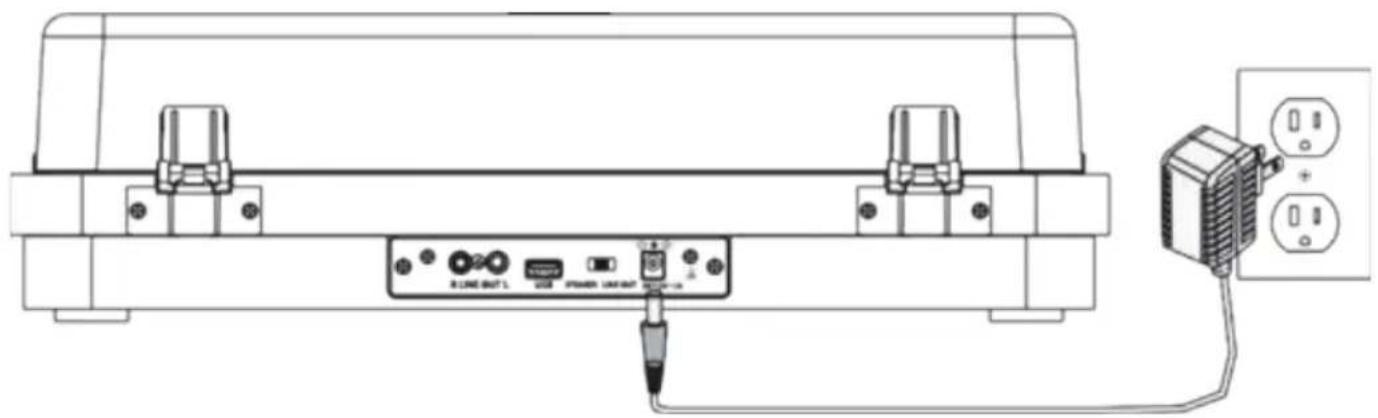
Plug the mains adapter (included) into a standard power socket.
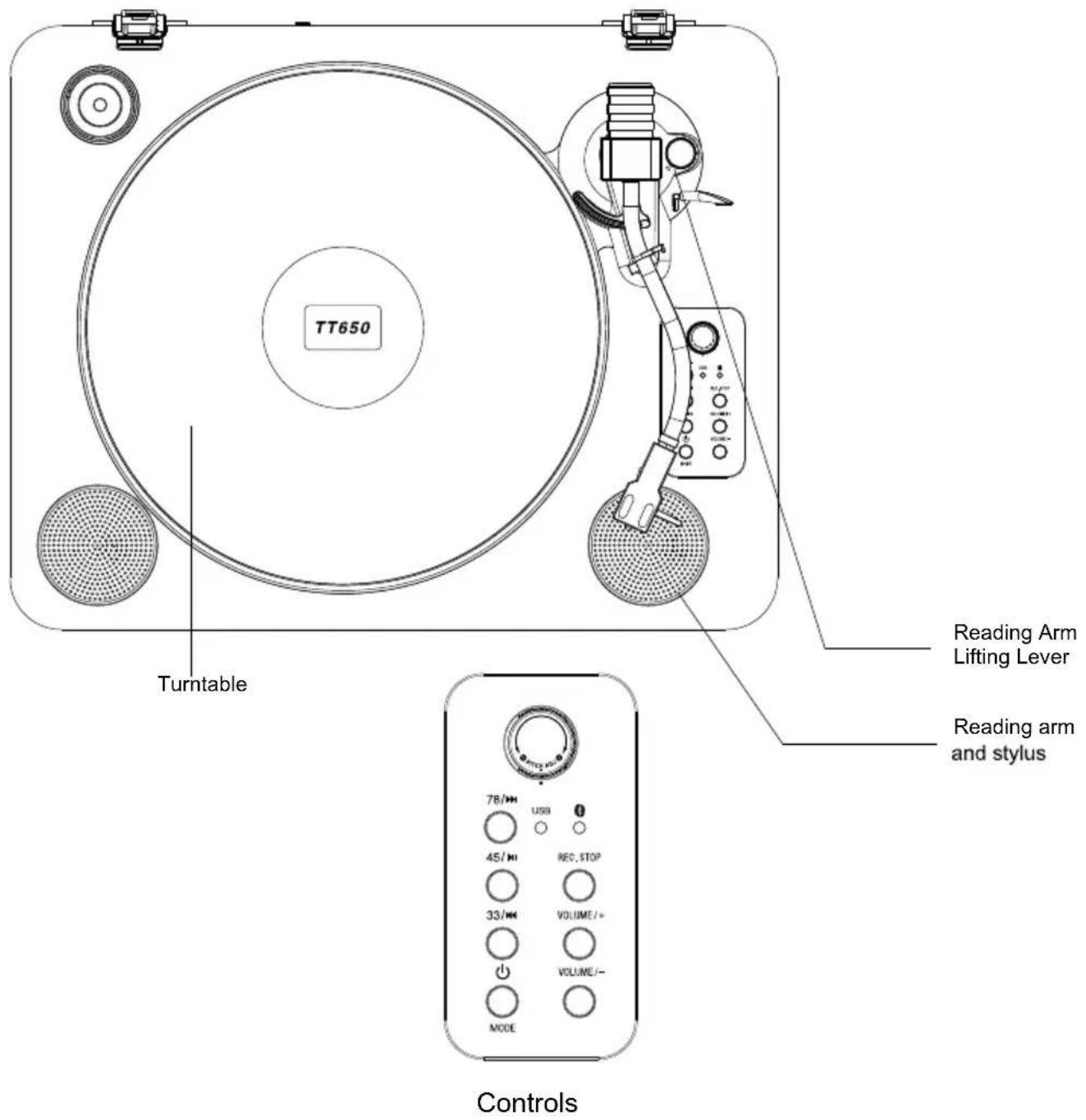
In turntable mode: Speed 78 revolutions; In USB mode: Next track.
In turntable mode: Speed 45 revolutions; In USB mode: Play/Pause; In Bluetooth mode: Pairing button.
In turntable mode: Speed 33 revolutions; In USB mode: Previous Track.
Press to turn on and choose the mode, long press to turn off.
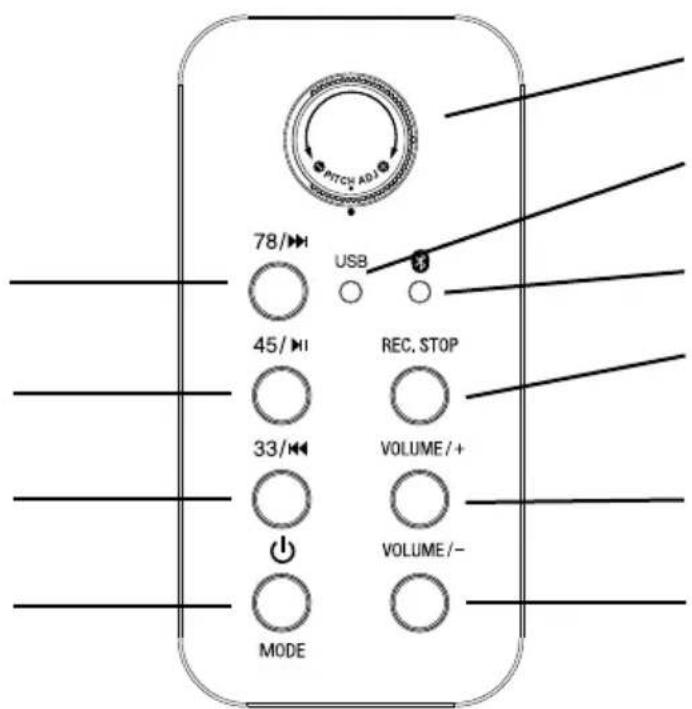
Adjusting the turntable: turn left or right to precisely adjust the speed.
USB function indicator light.
Bluetooth Pairing Indicator
Recording start and stop button.
Increase the volume.
Decrease the volume.
Functions and Controls
Pitch Adjustment.
Use to precisely adjust the speed of the vinyl turntable.
78 /45 /33
Press to select the playback speed of a record.
Power
Press to turn the device on/off.
Rec. stop
During USB playback, press this button to stop playback.
In disc playback mode, press this button after inserting the USB media to start and stop recording.
Recording
Tap to start recording music to a USB media.
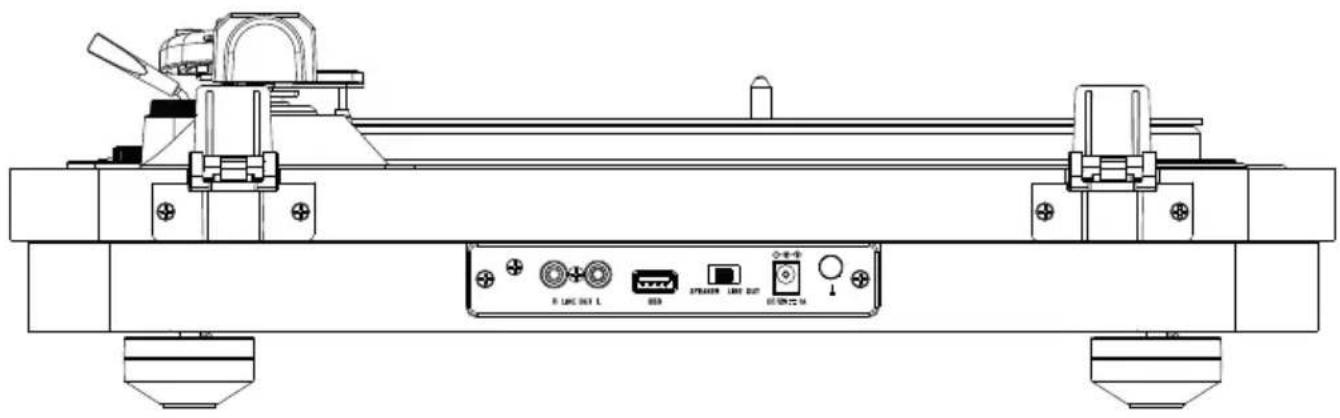
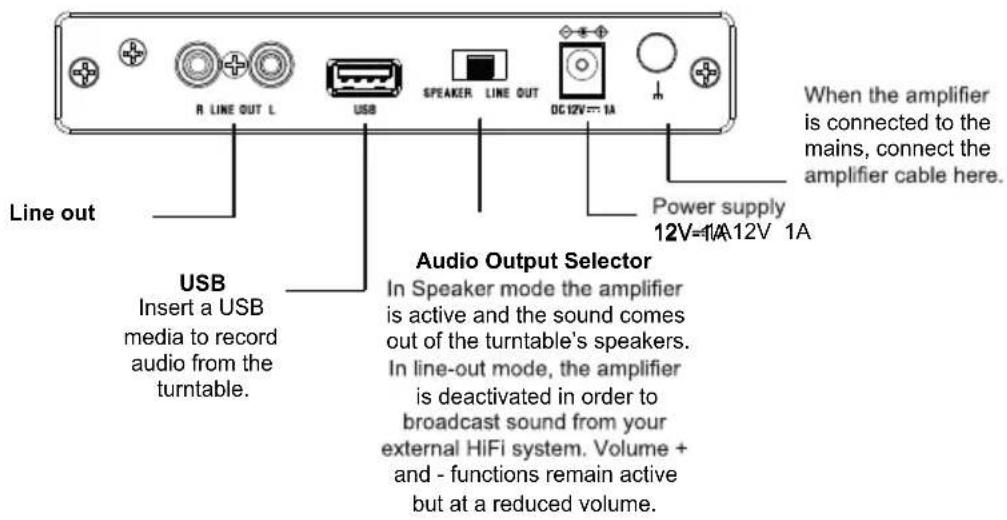
Connecting to a Bluetooth Speaker
Note: This turntable has a Bluetooth receiver and can therefore stream your music through the built-in speakers.
- Press the Mode button to enter Bluetooth mode: the Bluetooth indicator will flash.
- Turn on the Bluetooth function of your mobile phone and look for the TT-650 connection.
- Once the connection is established, the Bluetooth indicator will remain on.
- Press the VOL+/VOL- button to adjust the volume.
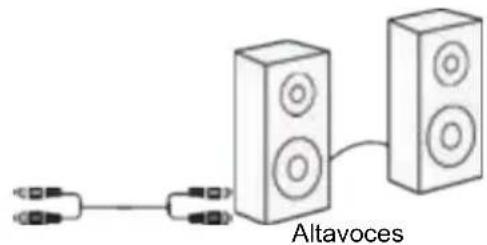
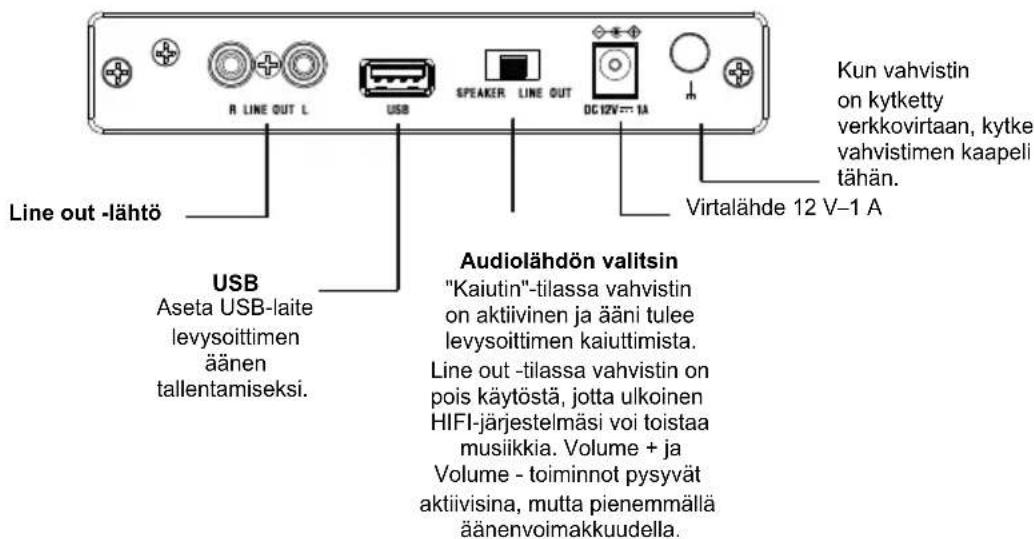
Using Line Out
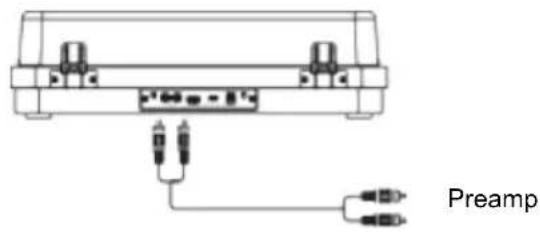
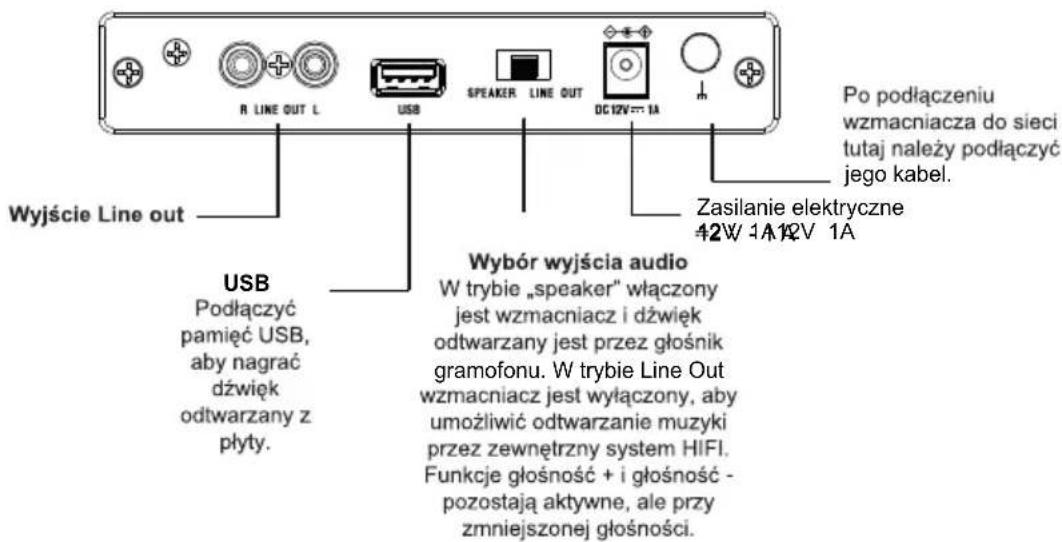
Requires RCA audio cable (included).
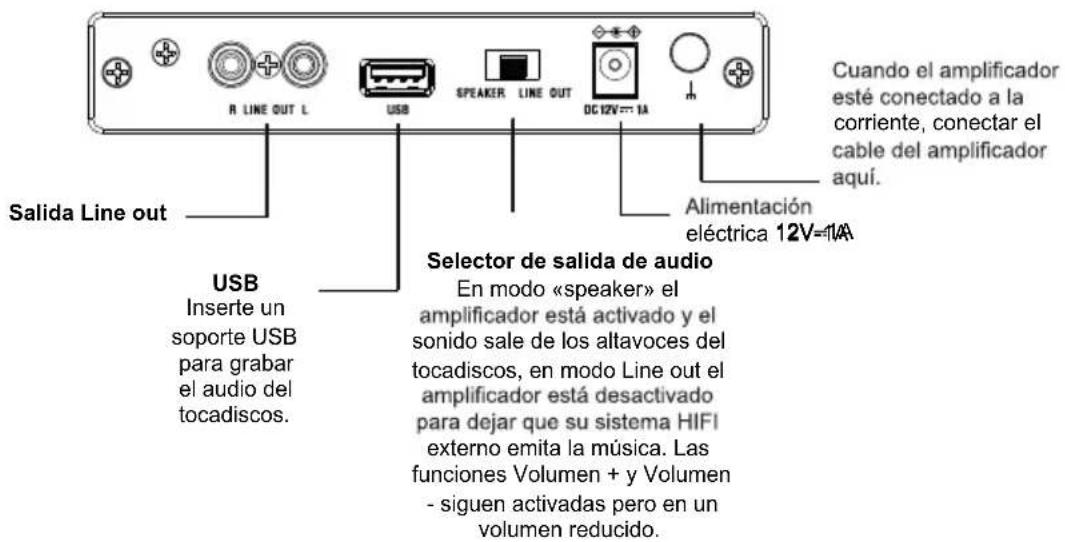
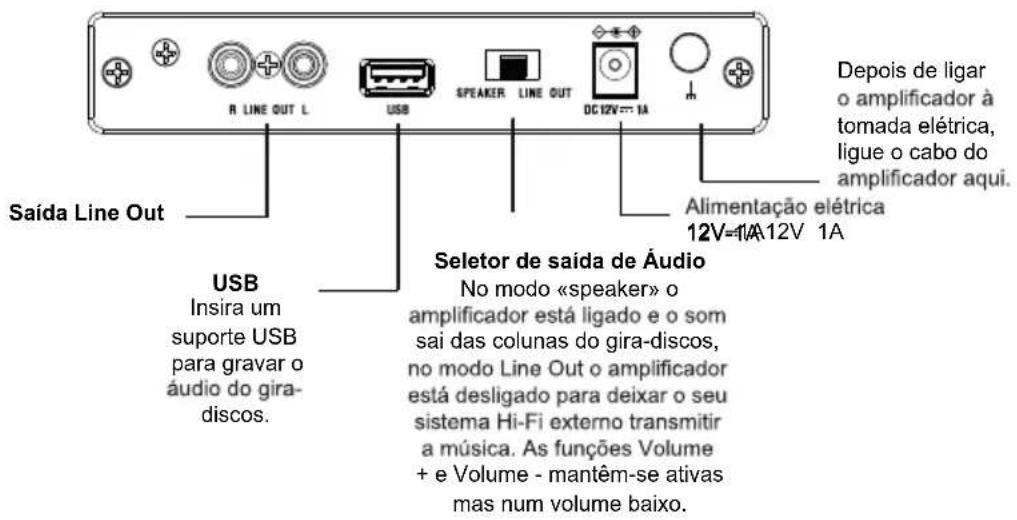
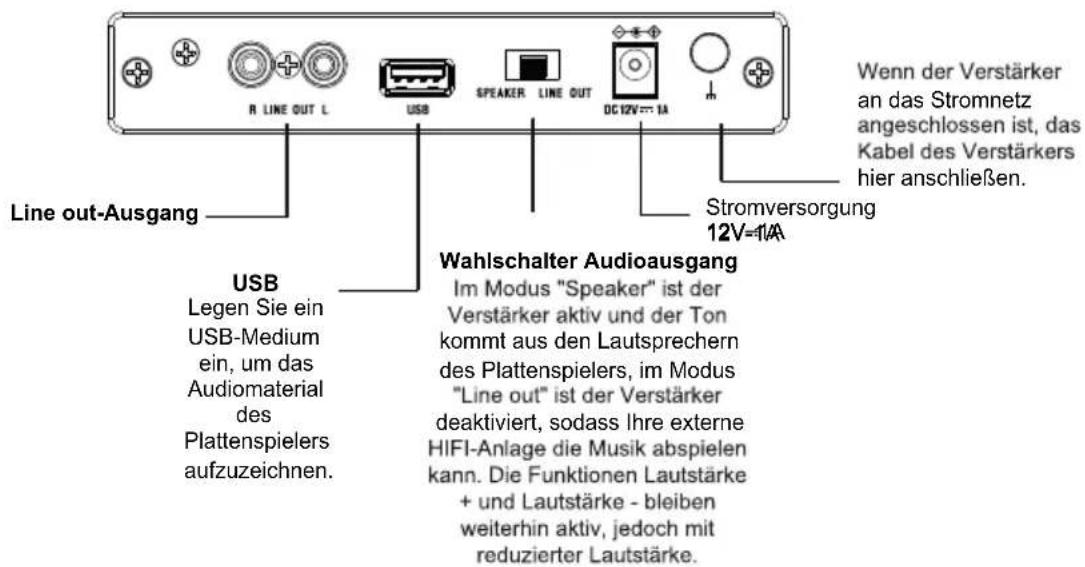
- Connect the RCA audio cable (included) from the turntable's Line Out socket to your amplifier.
- Set playback mode to Phono.
- The sound of the record being played will then be broadcast by the connected amp/speakers.
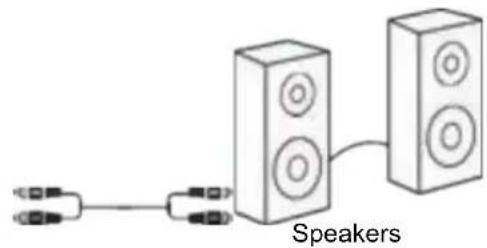
Operation
a) Playing a disc
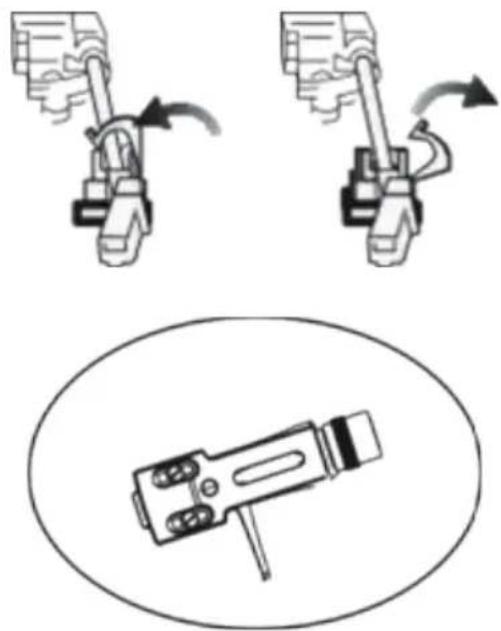
It is recommended to handle the playback arm, stylus and other components with the utmost care. These parts are fragile and can easily break or damage if not handled with care.
- Remove the cap that protects the stylus and release the locking system that holds the playback arm in place.
- Lift the stylus with the playback arm lever.
- Gently move the lifting arm to the desired location on the record. The turntable will start rotating as soon as the arm is in position.
Lock Unlock
natural_image
Diagram showing mechanical assembly with two views and a close-up of a device component (no text or symbols)Stylus
b) Playback (USB)
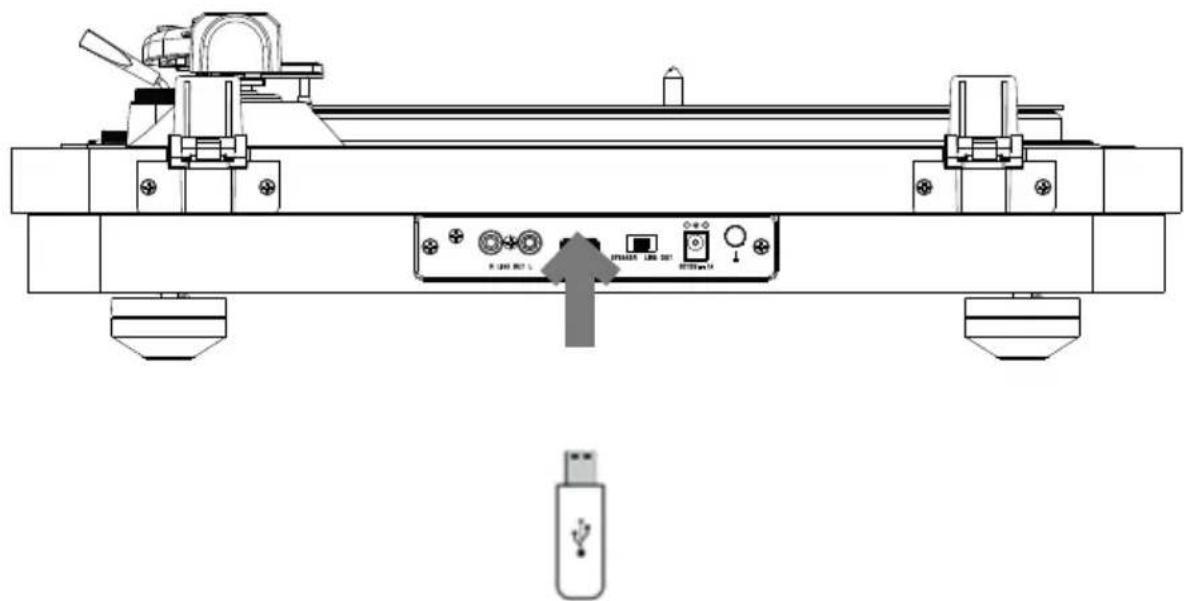
Please note: This device can play USB media in MP3 format.
- Insert the USB media device into the device's USB socket.
- Press the Mode button to switch to USB function, the red USB indicator light will come on.
- Press the 45/Play/Pause button to play the record or pause. Press button 78 to move to the next track. Press button 33 to return to the previous track.
c) According to USB
- This device can only record music from the turntable in MP3 format.
- Insert the USB media into the USB socket, turn the device into turntable mode, and start playing the vinyl disc you want to record.
- Press the REC/stop button and the USB indicator light will come on to indicate that recording mode has been activated. When recording is complete, press the REC/stop button again to confirm. The desired tracks will have been recorded to your USB media, and you can repeat the previous operations for other tracks.
* The USB indicator light remains on while in USB mode. To stop recording, press the Stop button, the disc will stop and recording will end.
Note: the maximum connection distance is approximately 10 metres. Place your Bluetooth speaker as close as possible to the device to avoid disruption of the connection.
If your product incorporates Bluetooth® technology
The maximum connection distance is approximately 10 metres. Place your Bluetooth® speaker as close as possible to the device to avoid any interference with the connection. The device may turn off in an environment with electrostatic discharge. The user must then recharge the battery and reset the device.
If your product includes a back-up battery which needs to be changed
- Remove the safety screw using a compatible screwdriver.
- Using a tool, turn the cover of the battery compartment counter-clockwise, to align the two guide triangles. You'll feel slight resistance.
- Remove the battery compartment cover and take out the used battery.
- Replace the battery with a new CR2025 battery.
- Replace the battery compartment cover and turn it clockwise to slot it back into place, and check that the hole is properly aligned with the screw thread.
- Screw the screw back in. You have completed the battery change.
Environmental protection

Your product has been designed and manufactured using high-quality materials and components that can be recycled and reused. Attention should be drawn to the environmental aspects of battery disposal.
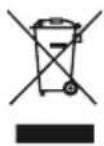
When the crossed-out wheelie bin symbol appears on a product, it means that the product is covered by European Directive 2002/96/EC. Please find out about the local sorting and collection system for electrical and electronic products. Please act according to local rules and do not dispose of your old products in your household waste. By ensuring this product is disposed of correctly, you are helping to prevent potentially negative consequences for the environment and human health.
Additional informations
- When the device does not transmit audio output for a certain amount of time, it will automatically go into standby mode to save energy. It can then be switched back on using the power button.
- If an incoming call is received while the system is connected to your mobile phone during music playback, the music will immediately pause when you answer the call, and start again once the call is finished (depending on the mobile phone, playback may sometimes stay paused after the end of the call).
- The word Bluetooth®, the brand and logo are registered trademarks owned by Bluetooth SIG, Inc., and any use of such marks by Bigben Interactive is under licence.
- THOMSON is a trademark of Talisman Brands, Inc. used under licence by Bigben Interactive. This product is manufactured and sold under the responsibility of Bigben Interactive.
- THOMSON and the THOMSON logo are trademarks operated under licence by Bigben Interactive – for more information: www.thomson-brand.com.
- All other products, services, companies, trademarks, trade or product names and logos referenced herein are the property of their respective owners.
Declaration of conformity
Bigben Interactive hereby declares that this product is in compliance with Directive 2014/53/EU. The full text of the EU declaration of conformity is available at the following internet address: https://www.bigben-interactive.co.uk/support/
Warranty
This product is guaranteed by Bigben for a period of 2 years from the date of purchase, except in countries of the European Economic Area, which offer a longer warranty period. We recommend that you keep your receipt for any claims. The warranty covers breakdowns due to defective material, a missing element or manufacturing defect. In this case, contact our technical support. For any problem with a defective product, contact your point of purchase with your receipt. The warranty does not cover problems of improper use.
Support
From monday to friday (except on public holidays) 9.00 am - 6.00 pm: www.bigben.fr/support (Chatbot) or support@bigben.fr www.bigben-interactive.co.uk/support
We recommend you follow the national waste sorting guidelines that apply to the product and this user guide.
Fabricant : Bigben Interactive FRANCE
396-466, rue de la Voyette - CRT2
59273 Fretin, France
BELGIQUE, customerservice@bigben-interactive.be
NEDERLAND, customerservice@bigben-interactive.nl
OTHERS, from monday to friday (except on public holidays)
9.00 am - 6.00 pm: www.bigben.fr/support (Chatbot)
or support@bigben.fr
www.bigben.eu
| Enceinte / Speaker / Altavoz / Altoparlante / Altifalante / Lautsprecher / Luidspreker | Speaker 2 x 2" | |
| Puissance - Peak power - Potencia máxima - Picco potenza - Potência - Peak lautsprecher - Peak speaker - Högsta effekt - Huipputeho - Top-effekt - Makseffekt - Špičkový výkon - Maximális teljesítmény - Moc szczytowa | 2 x 2W RMS | |
| Distorsion - Distortion - Distorsión - Distorsione - Distorção - Verzerrung - Vervorming - Distortion - Vääristymä - Forvrængning - Forvrengning - Zkreslení - Torzítás - Znieksztalcenie | < 5% | |
| Fréquence - Frequency - Frequencia - Frequenza - Frequência - Frequenzbereich - Frequentie - Frekvens - Taajus - Frekvens - Frekvens - Frekvence - Frekvencia - Częstotliwość | 60 Hz - 20 KHz | |
| Impédance - Impedance - Impedancia - Impedanza - Impedância - Impedanz - Impedantie - Impedans - Impedanssi - Impedans - Impedans - Impedance - Impedanciája - Impedancja | 4 Ω | |
| Entrée alimentation - Power input - Entrada de corriente - Ingresso di alimentazione - Entrada de alimentação - Netzeingang - Ingang - Ingáng - Enter - Indgang - Inngang - Vstup - Bemenet - Wejście | 12V/1A | |
| Ratio S/B - S/N Ratio - Relación S/R - Rapporto segnale rumore - Relação S/B - S/R-Verhältnis - Signaal-ruisverhouding - S/N-förhållande - S/B-suhde - S/B rapport - Signal/støy-forhold - Poměr S/B - S/B arány - Stosunek sygnału do szumu (SNR) | ≥ 70 dB | |
| Consommation - Consumption - Consumo de energía - Consumo energetico - Consumo de energía - Energieverbrauch - Energieverbruik - Energiförbrukning - Energiankulutus - Energiforbrug - Energiforbruk - Spotřeba energie - Energiafogyasztás - Zużycie energii | 0,4W | |
| Entrée alimentation - Power input - Entrada de corriente - Ingresso di alimentazione - Entrada de alimentação - Netzeingang - Ingang - Ingáng - Enter - Indgang - Inngang - Vstup - Bemenet - Wejście | 12V/1A | |
| Bluetooth | Version - Version - Versión - Versione - Versão - Version - Versie - Version - Versio - Udgave - Versjon - Verze - Verzió - Wersja | 5.0 |
| Nom de jumelage - Pairing name - Nombre para emparejamiento - Nome abbinamento - Nome pde emparelhamento - Kopplungsname - Koppelingsnaam - Namn - parinmuodostuksen nimi - Navn på parring - Navn for sammenkobling - Název párování - Párosítás neve - Nazwa parowania | TT650BT | |
| Fréquence - Frequency - Frequencia - Frequenza - Frequência - Frequenzbereich - Frequentie - Frekvens - Taajus - Frekvens - Frekvens - Frekvence - Frekvencia - Częstotliwość | 2402 - 2480 MHz | |
| EIRP | 0.89 dBm | |
| Radio FM | Fréquence - Frequency - Frequencia - Frequenza - Frequência - Frequenzbereich - Frequentie - Frekvens - Taajus - Frekvens - Frekvens - Frekvence - Frekvencia - Częstotliwość | 88,0 - 108 MHz |
THOMSON
ES
TT650BT
Tocadiscos
natural_image
Black and silver photo of a vintage flatset CD with open lid and control buttons (no visible text or symbols)natural_image
Line drawing of a device with labeled ports and connections, no readable text or symbols present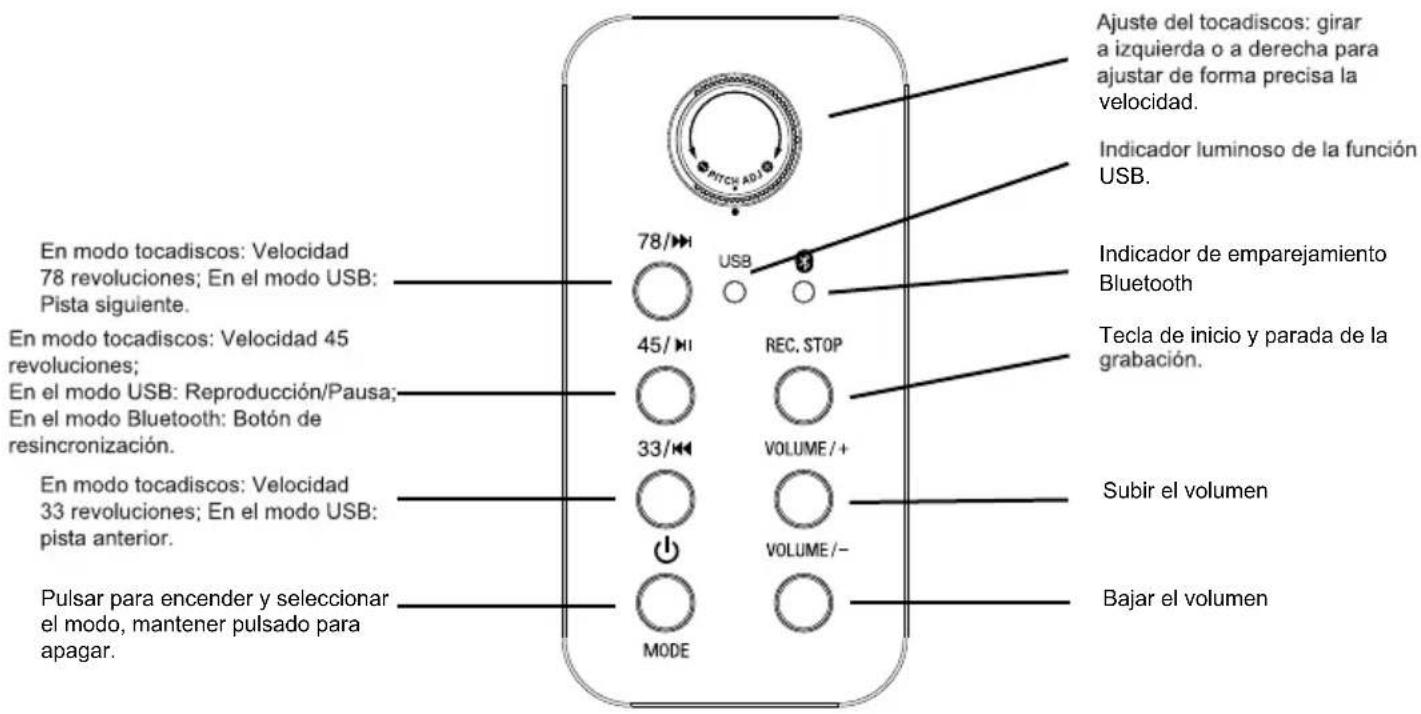
Funcionamiento
natural_image
Diagram showing two mechanical components with rotating arrows, one enclosed in an oval (no text or symbols)Estilete
BELGIQUE, customerservice@bigben-interactive.be
NEDERLAND, customerservice@bigben-interactive.nl
OTHERS, from monday to friday (except on public holidays)
9.00 am - 6.00 pm: www.bigben.fr/support (Chatbot)
or support@bigben.fr
www.bigben.eu
| Enceinte / Speaker / Altavoz / Altoparlante / Altifalante / Lautsprecher / Luidspreker | Speaker 2 x 2" | |
| Puissance - Peak power - Potencia máxima - Picco potenza - Potência - Peak lautsprecher - Peak speaker - Högsta effekt - Huipputeho - Top-effekt - Makseffekt - Špičkový výkon - Maximális teljesítmény - Moc szczytowa | 2 x 2W RMS | |
| Distorsion - Distortion - Distorsión - Distorsione - Distorção - Verzerrung - Vervorming - Distortion - Vääristymä - Forvrængning - Forvrengning - Zkreslení - Torzítás - Znieksztalcenie | < 5% | |
| Fréquence - Frequency - Frequencia - Frequenza - Frequência - Frequenzbereich - Frequentie - Frekvens - Taajus - Frekvens - Frekvens - Frekvence - Frekvencia - Częstotliwość | 60 Hz - 20 KHz | |
| Impédance - Impedance - Impedancia - Impedanza - Impedância - Impedanz - Impedantie - Impedans - Impedanssi - Impedans - Impedans - Impedance - Impedanciája - Impedancja | 4 Ω | |
| Entrée alimentation - Power input - Entrada de corriente - Ingresso di alimentazione - Entrada de alimentação - Netzeingang - Ingang - Ingáng - Enter - Indgang - Inngang - Vstup - Bemenet - Wejście | 12V/1A | |
| Ratio S/B - S/N Ratio - Relación S/R - Rapporto segnale rumore - Relação S/B - S/R-Verhältnis - Signaal-ruisverhouding - S/N-förhållande - S/B-suhde - S/B rapport - Signal/støy-forhold - Poměr S/B - S/B arány - Stosunek sygnału do szumu (SNR) | ≥ 70 dB | |
| Consommation - Consumption - Consumo de energía - Consumo energetico - Consumo de energía - Energieverbrauch - Energieverbruik - Energiförbrukning - Energiankulutus - Energiforbrug - Energiforbruk - Spotřeba energie - Energiafogyasztás - Zużycie energii | 0,4W | |
| Entrée alimentation - Power input - Entrada de corriente - Ingresso di alimentazione - Entrada de alimentação - Netzeingang - Ingang - Ingáng - Enter - Indgang - Inngang - Vstup - Bemenet - Wejście | 12V/1A | |
| Bluetooth | Version - Version - Versión - Versione - Versão - Version - Versie - Version - Versio - Udgave - Versjon - Verze - Verzió - Wersja | 5.0 |
| Nom de jumelage - Pairing name - Nombre para emparejamiento - Nome abbinamento - Nome pde emparelhamento - Kopplungsname - Koppelingsnaam - Namn - parinmuodostuksen nimi - Navn på parring - Navn for sammenkobling - Název párování - Párosítás neve - Nazwa parowania | TT650BT | |
| Fréquence - Frequency - Frequencia - Frequenza - Frequência - Frequenzbereich - Frequentie - Frekvens - Taajus - Frekvens - Frekvens - Frekvence - Frekvencia - Częstotliwość | 2402 - 2480 MHz | |
| EIRP | 0.89 dBm | |
| Radio FM | Fréquence - Frequency - Frequencia - Frequenza - Frequência - Frequenzbereich - Frequentie - Frekvens - Taajus - Frekvens - Frekvens - Frekvence - Frekvencia - Częstotliwość | 88,0 - 108 MHz |
THOMSON
IT
TT650BT
Giradischi per vinili
natural_image
Black and silver photo of a vintage flattex machine with open lid and control buttons (no visible text or symbols)ISTRUZIONI PER L'USO
LEGGERE IL PRESENTE MANUALE CON ATTENZIONE PRIMA DI METTERE IN FUNZIONE IL DISPOSITIVO E CONSERVARLO PER UNA CONSULTAZIONE FUTURA.
IT
TENERE FUORI DALLA PORTATA DEI BAMBINI

natural_image
Line drawing of a device with two switches and connected to an electrical outlet (no text or symbols)
natural_image
Diagram showing two mechanical components with rotating arrows, one enclosed in an oval (no text or symbols)Puntina
BELGIQUE, customerservice@bigben-interactive.be
NEDERLAND, customerservice@bigben-interactive.nl
ESPANA / PORTUGAL, soporte@metronic.com
Tel.: +34 93 713 26 25
ITALIA, tecnico@metronic.com - Tel.: 02 94 94 36 91
OTHERS, from monday to friday (except on public holidays)
9.00 am - 6.00 pm: www.bigben.fr/support (Chatbot)
or support@bigben.fr
www.bigben.eu
| Enceinte / Speaker / Altavoz / Altoparlante / Altifalante / Lautsprecher / Luidspreker | Speaker 2 x 2" | |
| Puissance - Peak power - Potencia máxima - Picco potenza - Potência - Peak lautsprecher - Peak speaker - Högsta effekt - Huipputeho - Top-effekt - Makseffekt - Špičkový výkon - Maximális teljesítmény - Moc szczytowa | 2 x 2W RMS | |
| Distorsion - Distortion - Distorsión - Distorsione - Distorção - Verzerrung - Vervorming - Distortion - Vääristymä - Forvrængning - Forvrengning - Zkreslení - Torzítás - Znieksztalcenie | < 5% | |
| Fréquence - Frequency - Frequencia - Frequenza - Frequência - Frequenzbereich - Frequentie - Frekvens - Taajus - Frekvens - Frekvens - Frekvence - Frekvencia - Częstotliwość | 60 Hz - 20 KHz | |
| Impédance - Impedance - Impedancia - Impedanza - Impedância - Impedanz - Impedantie - Impedans - Impedanssi - Impedans - Impedans - Impedance - Impedanciája - Impedancja | 4 Ω | |
| Entrée alimentation - Power input - Entrada de corriente - Ingresso di alimentazione - Entrada de alimentação - Netzeingang - Ingang - Ingáng - Enter - Indgang - Inngang - Vstup - Bemenet - Wejście | 12V/1A | |
| Ratio S/B - S/N Ratio - Relación S/R - Rapporto segnale rumore - Relação S/B - S/R-Verhältnis - Signaal-ruisverhouding - S/N-förhållande - S/B-suhde - S/B rapport - Signal/støy-forhold - Poměr S/B - S/B arány - Stosunek sygnału do szumu (SNR) | ≥ 70 dB | |
| Consommation - Consumption - Consumo de energía - Consumo energetico - Consumo de energía - Energieverbrauch - Energieverbruik - Energiförbrukning - Energiankulutus - Energiforbrug - Energiforbruk - Spotřeba energie - Energiafogyasztás - Zużycie energii | 0,4W | |
| Entrée alimentation - Power input - Entrada de corriente - Ingresso di alimentazione - Entrada de alimentação - Netzeingang - Ingang - Ingáng - Enter - Indgang - Inngang - Vstup - Bemenet - Wejście | 12V/1A | |
| Bluetooth | Version - Version - Versión - Versione - Versão - Version - Versie - Version - Versio - Udgave - Versjon - Verze - Verzió - Wersja | 5.0 |
| Nom de jumelage - Pairing name - Nombre para emparejamiento - Nome abbinamento - Nome pde emparelhamento - Kopplungsname - Koppelingsnaam - Namn - parinmuodostuksen nimi - Navn på parring - Navn for sammenkobling - Název párování - Párosítás neve - Nazwa parowania | TT650BT | |
| Fréquence - Frequency - Frequencia - Frequenza - Frequência - Frequenzbereich - Frequentie - Frekvens - Taajus - Frekvens - Frekvens - Frekvence - Frekvencia - Częstotliwość | 2402 - 2480 MHz | |
| EIRP | 0.89 dBm | |
| Radio FM | Fréquence - Frequency - Frequencia - Frequenza - Frequência - Frequenzbereich - Frequentie - Frekvens - Taajus - Frekvens - Frekvens - Frekvence - Frekvencia - Częstotliwość | 88,0 - 108 MHz |
THOMSON
PT
TT650BT
Giro-discos
natural_image
Black and silver photo of a vintage typewriter with open lid and control buttons (no visible text or symbols)natural_image
Line drawing of a device with labeled ports and connections, no readable text or symbols present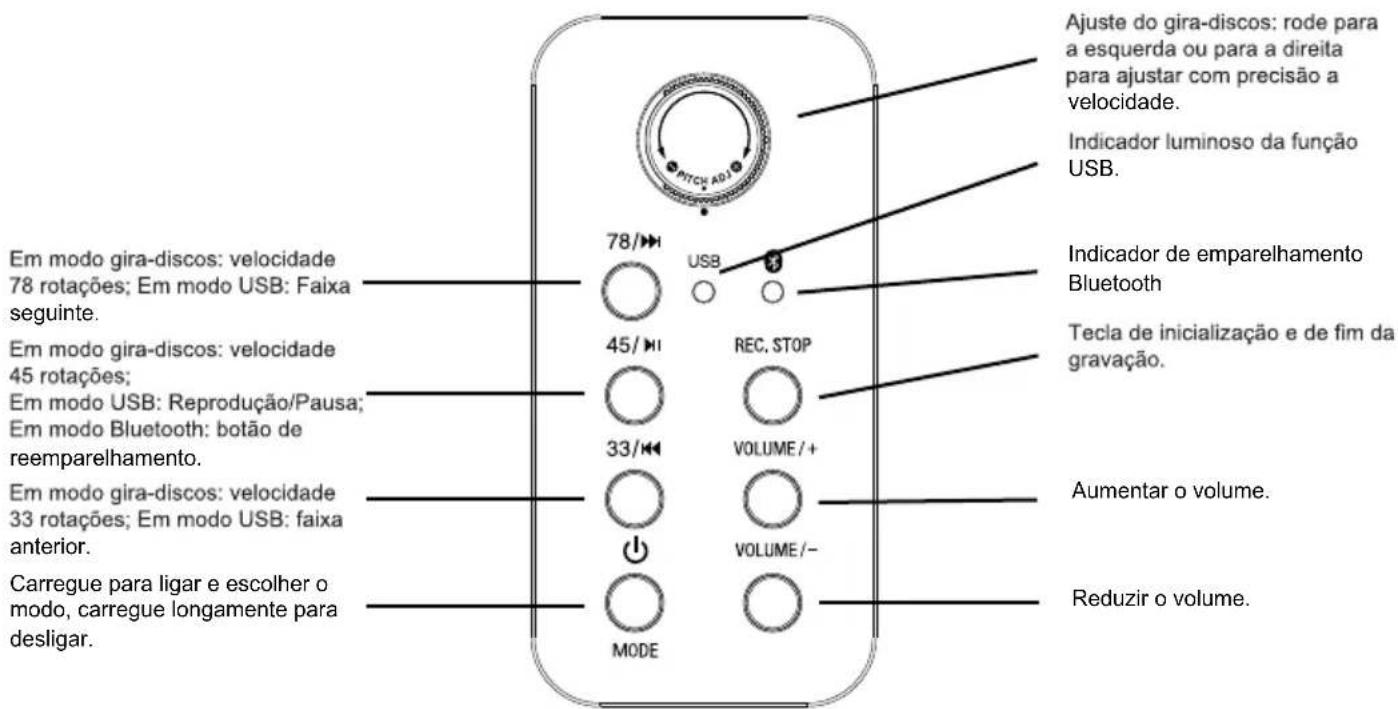
natural_image
Diagram showing two mechanical components with rotating arrows, one enclosed in an oval (no text or symbols)Agulha
b) Reprodução (USB)
BELGIQUE, customerservice@bigben-interactive.be
NEDERLAND, customerservice@bigben-interactive.nl
OTHERS, from monday to friday (except on public holidays)
9.00 am - 6.00 pm: www.bigben.fr/support (Chatbot)
or support@bigben.fr
www.bigben.eu
| Enceinte / Speaker / Altavoz / Altoparlante / Altifalante / Lautsprecher / Luidspreker | Speaker 2 x 2" | |
| Puissance - Peak power - Potencia máxima - Picco potenza - Potência - Peak lautsprecher - Peak speaker - Högsta effekt - Huipputeho - Top-effekt - Makseffekt - Špičkový výkon - Maximális teljesítmény - Moc szczytowa | 2 x 2W RMS | |
| Distorsion - Distortion - Distorsión - Distorsione - Distorção - Verzerrung - Vervorming - Distortion - Vääristymä - Forvrængning - Forvrengning - Zkreslení - Torzítás - Znieksztalcenie | < 5% | |
| Fréquence - Frequency - Frequencia - Frequenza - Frequência - Frequenzbereich - Frequentie - Frekvens - Taajus - Frekvens - Frekvens - Frekvence - Frekvencia - Częstotliwość | 60 Hz - 20 KHz | |
| Impédance - Impedance - Impedancia - Impedanza - Impedância - Impedanz - Impedantie - Impedans - Impedanssi - Impedans - Impedans - Impedance - Impedanciája - Impedancja | 4 Ω | |
| Entrée alimentation - Power input - Entrada de corriente - Ingresso di alimentazione - Entrada de alimentação - Netzeingang - Ingang - Ingáng - Enter - Indgang - Inngang - Vstup - Bemenet - Wejście | 12V/1A | |
| Ratio S/B - S/N Ratio - Relación S/R - Rapporto segnale rumore - Relação S/B - S/R-Verhältnis - Signaal-ruisverhouding - S/N-förhållande - S/B-suhde - S/B rapport - Signal/støy-forhold - Poměr S/B - S/B arány - Stosunek sygnału do szumu (SNR) | ≥ 70 dB | |
| Consommation - Consumption - Consumo de energía - Consumo energetico - Consumo de energía - Energieverbrauch - Energieverbruik - Energiförbrukning - Energiankulutus - Energiforbrug - Energiforbruk - Spotřeba energie - Energiafogyasztás - Zużycie energii | 0,4W | |
| Entrée alimentation - Power input - Entrada de corriente - Ingresso di alimentazione - Entrada de alimentação - Netzeingang - Ingang - Ingáng - Enter - Indgang - Inngang - Vstup - Bemenet - Wejście | 12V/1A | |
| Bluetooth | Version - Version - Versión - Versione - Versão - Version - Versie - Version - Versio - Udgave - Versjon - Verze - Verzió - Wersja | 5.0 |
| Nom de jumelage - Pairing name - Nombre para emparejamiento - Nome abbinamento - Nome pde emparelhamento - Kopplungsname - Koppelingsnaam - Namn - parinmuodostuksen nimi - Navn på parring - Navn for sammenkobling - Název párování - Párosítás neve - Nazwa parowania | TT650BT | |
| Fréquence - Frequency - Frequencia - Frequenza - Frequência - Frequenzbereich - Frequentie - Frekvens - Taajus - Frekvens - Frekvens - Frekvence - Frekvencia - Częstotliwość | 2402 - 2480 MHz | |
| EIRP | 0.89 dBm | |
| Radio FM | Fréquence - Frequency - Frequencia - Frequenza - Frequência - Frequenzbereich - Frequentie - Frekvens - Taajus - Frekvens - Frekvens - Frekvence - Frekvencia - Częstotliwość | 88,0 - 108 MHz |
THOMSON
DE
TT650BT
Plattenspieler
natural_image
Black and silver photo of a vintage flatset CD with open lid and control buttons (no visible text or symbols)BEDIENUNGSANLEITUNG
natural_image
Line drawing of a device with two switches and a connected power cord (no text or symbols)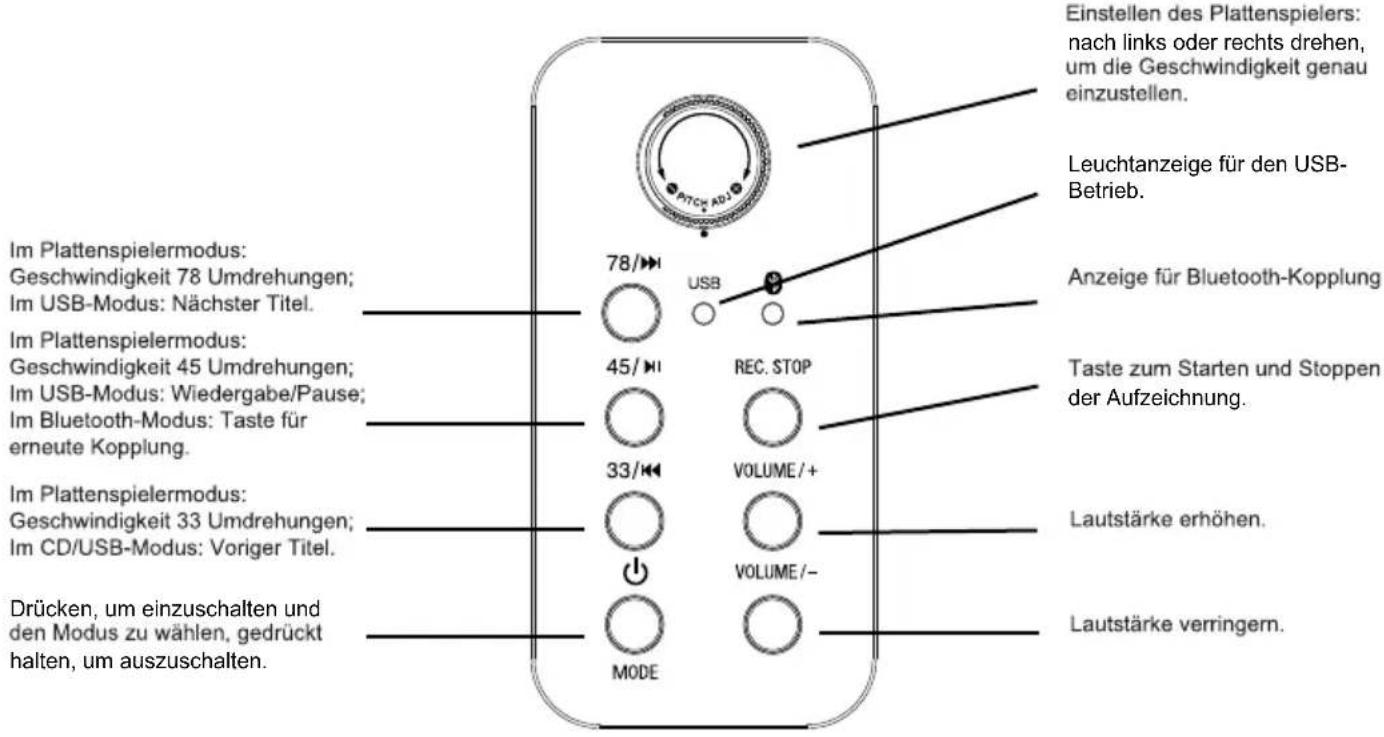
natural_image
Diagram showing mechanical assembly with two views of a tool and a close-up of a screwdriver (no text or symbols)Nadel
b) Wiedergabe (USB)
BELGIQUE, customerservice@bigben-interactive.be
NEDERLAND, customerservice@bigben-interactive.nl
OTHERS, from monday to friday (except on public holidays)
9.00 am - 6.00 pm: www.bigben.fr/support (Chatbot)
or support@bigben.fr
www.bigben.eu
| Enceinte / Speaker / Altavoz / Altoparlante / Altifalante / Lautsprecher / Luidspreker | Speaker 2 x 2" | |
| Puissance - Peak power - Potencia máxima - Picco potenza - Potência - Peak lautsprecher - Peak speaker - Högsta effekt - Huipputeho - Top-effekt - Makseffekt - Špičkový výkon - Maximális teljesítmény - Moc szczytowa | 2 x 2W RMS | |
| Distorsion - Distortion - Distorsión - Distorsione - Distorção - Verzerrung - Vervorming - Distortion - Vääristymä - Forvrængning - Forvrengning - Zkreslení - Torzítás - Znieksztalcenie | < 5% | |
| Fréquence - Frequency - Frequencia - Frequenza - Frequência - Frequenzbereich - Frequentie - Frekvens - Taajus - Frekvens - Frekvens - Frekvence - Frekvencia - Częstotliwość | 60 Hz - 20 KHz | |
| Impédance - Impedance - Impedancia - Impedanza - Impedância - Impedanz - Impedantie - Impedans - Impedanssi - Impedans - Impedans - Impedance - Impedanciája - Impedancja | 4 Ω | |
| Entrée alimentation - Power input - Entrada de corriente - Ingresso di alimentazione - Entrada de alimentação - Netzeingang - Ingang - Ingáng - Enter - Indgang - Inngang - Vstup - Bemenet - Wejście | 12V/1A | |
| Ratio S/B - S/N Ratio - Relación S/R - Rapporto segnale rumore - Relação S/B - S/R-Verhältnis - Signaal-ruisverhouding - S/N-förhållande - S/B-suhde - S/B rapport - Signal/støy-forhold - Poměr S/B - S/B arány - Stosunek sygnału do szumu (SNR) | ≥ 70 dB | |
| Consommation - Consumption - Consumo de energía - Consumo energetico - Consumo de energía - Energieverbrauch - Energieverbruik - Energiförbrukning - Energiankulutus - Energiforbrug - Energiforbruk - Spotřeba energie - Energiafogyasztás - Zużycie energii | 0,4W | |
| Entrée alimentation - Power input - Entrada de corriente - Ingresso di alimentazione - Entrada de alimentação - Netzeingang - Ingang - Ingáng - Enter - Indgang - Inngang - Vstup - Bemenet - Wejście | 12V/1A | |
| Bluetooth | Version - Version - Versión - Versione - Versão - Version - Versie - Version - Versio - Udgave - Versjon - Verze - Verzió - Wersja | 5.0 |
| Nom de jumelage - Pairing name - Nombre para emparejamiento - Nome abbinamento - Nome pde emparelhamento - Kopplungsname - Koppelingsnaam - Namn - parinmuodostuksen nimi - Navn på parring - Navn for sammenkobling - Název párování - Párosítás neve - Nazwa parowania | TT650BT | |
| Fréquence - Frequency - Frequencia - Frequenza - Frequência - Frequenzbereich - Frequentie - Frekvens - Taajus - Frekvens - Frekvens - Frekvence - Frekvencia - Częstotliwość | 2402 - 2480 MHz | |
| EIRP | 0.89 dBm | |
| Radio FM | Fréquence - Frequency - Frequencia - Frequenza - Frequência - Frequenzbereich - Frequentie - Frekvens - Taajus - Frekvens - Frekvens - Frekvence - Frekvencia - Częstotliwość | 88,0 - 108 MHz |
THOMSON
NL
TT650BT
Platenspeler
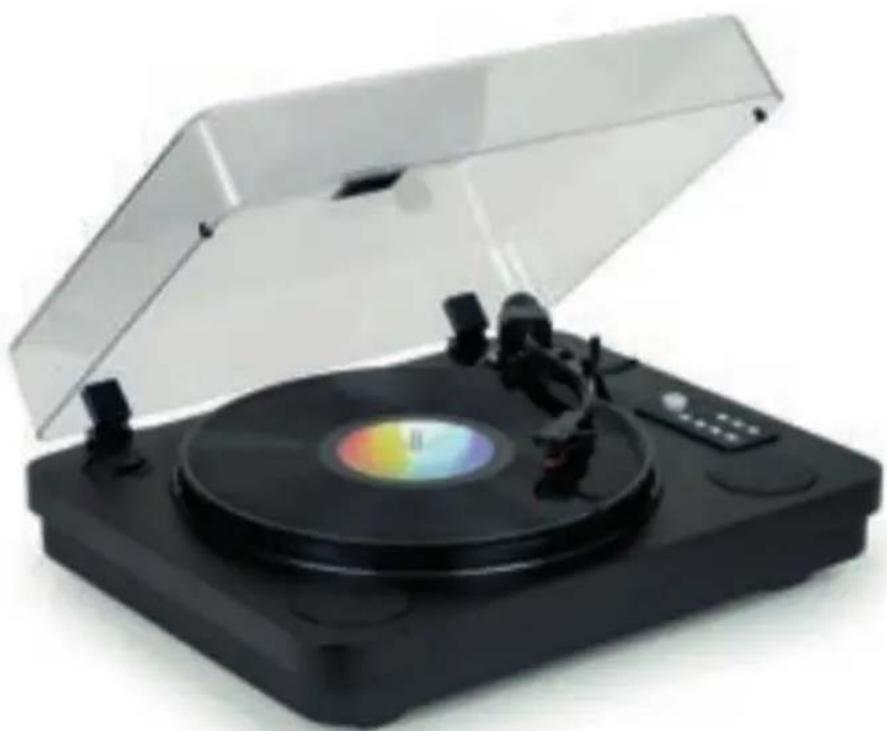
natural_image
Black and silver photo of a vintage flat-screen vinyl record with open lid (no visible text or symbols)GEBRUIKSAANWIJZING
ALVORENS DIT APPARAAT TE GEBRUIKEN, LEES DEZE INSTRUCTIES AANDACHTIG DOOR EN BEWAAR DEZE VOOR TOEKOMSTIGE RAADPLEGING.
NL
WAARSCHUWINGEN EN VEILIGHEIDSINSTRUCTIES
natural_image
Line drawing of a device with labeled ports and wiring, no readable text or symbols presentnatural_image
Technical line drawing of a mechanical assembly with mounting flanges and control panel (no text or symbols)
natural_image
Diagram showing mechanical assembly steps with no visible text or symbolsNaald
b) Afspelen (USB)
customerservice@bigben-interactive.nl
BELGIQUE, customerservice@bigben-interactive.be
NEDERLAND, customerservice@bigben-interactive.nl
OTHERS, from monday to friday (except on public holidays)
9.00 am - 6.00 pm: www.bigben.fr/support (Chatbot)
or support@bigben.fr
www.bigben.eu
| Enceinte / Speaker / Altavoz / Altoparlante / Altifalante / Lautsprecher / Luidspreker | Speaker 2 x 2" | |
| Puissance - Peak power - Potencia máxima - Picco potenza - Potência - Peak lautsprecher - Peak speaker - Högsta effekt - Huipputeho - Top-effekt - Makseffekt - Špičkový výkon - Maximális teljesítmény - Moc szczytowa | 2 x 2W RMS | |
| Distorsion - Distortion - Distorsión - Distorsione - Distorção - Verzerrung - Vervorming - Distortion - Vääristymä - Forvrængning - Forvrengning - Zkreslení - Torzítás - Znieksztalcenie | < 5% | |
| Fréquence - Frequency - Frequencia - Frequenza - Frequência - Frequenzbereich - Frequentie - Frekvens - Taajus - Frekvens - Frekvens - Frekvence - Frekvencia - Częstotliwość | 60 Hz - 20 KHz | |
| Impédance - Impedance - Impedancia - Impedanza - Impedância - Impedanz - Impedantie - Impedans - Impedanssi - Impedans - Impedans - Impedance - Impedanciája - Impedancja | 4 Ω | |
| Entrée alimentation - Power input - Entrada de corriente - Ingresso di alimentazione - Entrada de alimentação - Netzeingang - Ingang - Ingáng - Enter - Indgang - Inngang - Vstup - Bemenet - Wejście | 12V/1A | |
| Ratio S/B - S/N Ratio - Relación S/R - Rapporto segnale rumore - Relação S/B - S/R-Verhältnis - Signaal-ruisverhouding - S/N-förhållande - S/B-suhde - S/B rapport - Signal/støy-forhold - Poměr S/B - S/B arány - Stosunek sygnału do szumu (SNR) | ≥ 70 dB | |
| Consommation - Consumption - Consumo de energía - Consumo energetico - Consumo de energía - Energieverbrauch - Energieverbruik - Energiförbrukning - Energiankulutus - Energiforbrug - Energiforbruk - Spotřeba energie - Energiafogyasztás - Zużycie energii | 0,4W | |
| Entrée alimentation - Power input - Entrada de corriente - Ingresso di alimentazione - Entrada de alimentação - Netzeingang - Ingang - Ingáng - Enter - Indgang - Inngang - Vstup - Bemenet - Wejście | 12V/1A | |
| Bluetooth | Version - Version - Versión - Versione - Versão - Version - Versie - Version - Versio - Udgave - Versjon - Verze - Verzió - Wersja | 5.0 |
| Nom de jumelage - Pairing name - Nombre para emparejamiento - Nome abbinamento - Nome pde emparelhamento - Kopplungsname - Koppelingsnaam - Namn - parinmuodostuksen nimi - Navn på parring - Navn for sammenkobling - Název párování - Párosítás neve - Nazwa parowania | TT650BT | |
| Fréquence - Frequency - Frequencia - Frequenza - Frequência - Frequenzbereich - Frequentie - Frekvens - Taajus - Frekvens - Frekvens - Frekvence - Frekvencia - Częstotliwość | 2402 - 2480 MHz | |
| EIRP | 0.89 dBm | |
| Radio FM | Fréquence - Frequency - Frequencia - Frequenza - Frequência - Frequenzbereich - Frequentie - Frekvens - Taajus - Frekvens - Frekvens - Frekvence - Frekvencia - Częstotliwość | 88,0 - 108 MHz |
THOMSON
PL
TT650BT
Gramofon
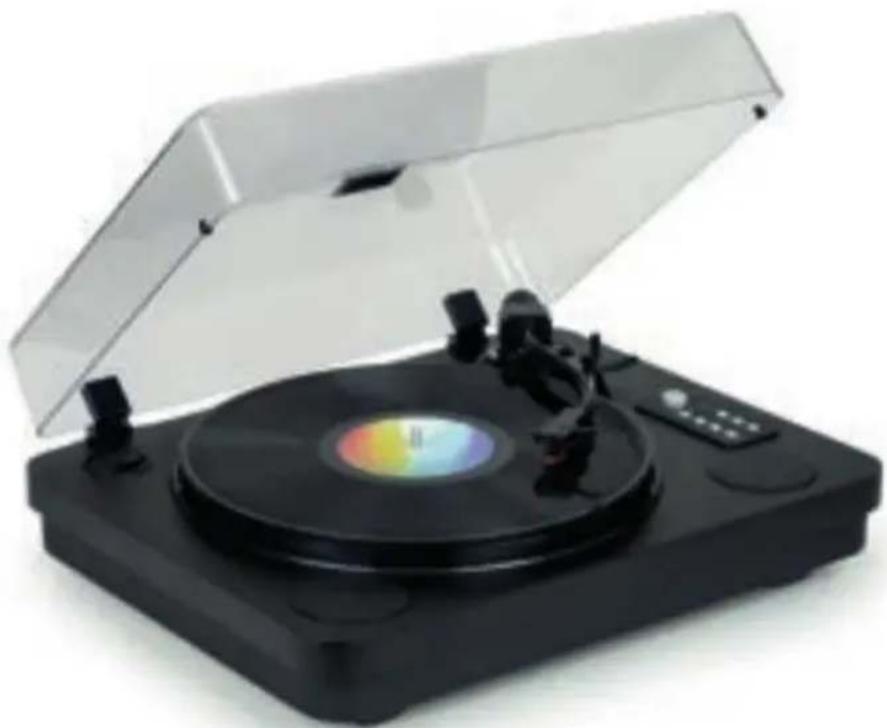
natural_image
Black and silver photo of a vintage typewriter with open lid and control buttons (no visible text or symbols)INSTRUKCJA OBSŁUGI
natural_image
Line drawing of a device with two switches and connected to an electrical outlet (no text or symbols present)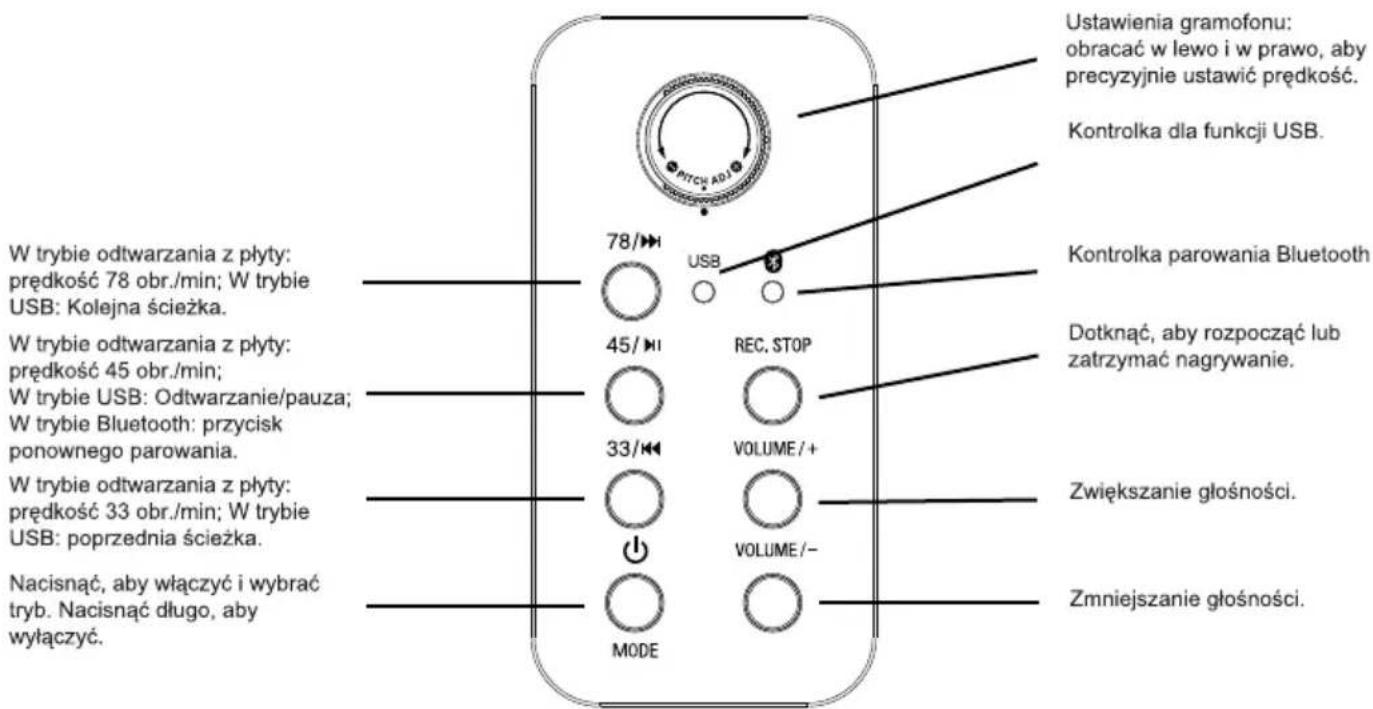
natural_image
Diagram showing mechanical assembly with two views of a tool and a close-up view of a screwdriver (no text or symbols)Igła
b) Odtwarzanie (USB)
From monday to friday (except on public holidays): 9.00 am - 6.00 pm
www.bigben.fr/support (Chatbot) / support@bigben.fr
natural_image
Three black-and-white icons: a person recycling with arrows, a document stack, and a trash bin with an 'Recycle' symbol (no text or numbers present)
Fabricant : Bigben Interactive FRANCE
396-466, rue de la Voyette - CRT2
59273 Fretin, France
BELGIQUE, customerservice@bigben-interactive.be
NEDERLAND, customerservice@bigben-interactive.nl
OTHERS, from monday to friday (except on public holidays)
9.00 am - 6.00 pm: www.bigben.fr/support (Chatbot)
or support@bigben.fr
www.bigben.eu
| Enceinte / Speaker / Altavoz / Altoparlante / Altifalante / Lautsprecher / Luidspreker | Speaker 2 x 2" | |
| Puissance - Peak power - Potencia máxima - Picco potenza - Potência - Peak lautsprecher - Peak speaker - Högsta effekt - Huipputeho - Top-effekt - Makseffekt - Špičkový výkon - Maximális teljesítmény - Moc szczytowa | 2 x 2W RMS | |
| Distorsion - Distortion - Distorsión - Distorsione - Distorção - Verzerrung - Vervorming - Distortion - Vääristymä - Forvrængning - Forvrengning - Zkreslení - Torzítás - Znieksztalcenie | < 5% | |
| Fréquence - Frequency - Frequencia - Frequenza - Frequência - Frequenzbereich - Frequentie - Frekvens - Taajus - Frekvens - Frekvens - Frekvence - Frekvencia - Częstotliwość | 60 Hz - 20 KHz | |
| Impédance - Impedance - Impedancia - Impedanza - Impedância - Impedanz - Impedantie - Impedans - Impedanssi - Impedans - Impedans - Impedance - Impedanciája - Impedancja | 4 Ω | |
| Entrée alimentation - Power input - Entrada de corriente - Ingresso di alimentazione - Entrada de alimentação - Netzeingang - Ingang - Ingáng - Enter - Indgang - Inngang - Vstup - Bemenet - Wejście | 12V/1A | |
| Ratio S/B - S/N Ratio - Relación S/R - Rapporto segnale rumore - Relação S/B - S/R-Verhältnis - Signaal-ruisverhouding - S/N-förhållande - S/B-suhde - S/B rapport - Signal/støy-forhold - Poměr S/B - S/B arány - Stosunek sygnału do szumu (SNR) | ≥ 70 dB | |
| Consommation - Consumption - Consumo de energía - Consumo energetico - Consumo de energía - Energieverbrauch - Energieverbruik - Energiförbrukning - Energiankulutus - Energiforbrug - Energiforbruk - Spotřeba energie - Energiafogyasztás - Zużycie energii | 0,4W | |
| Entrée alimentation - Power input - Entrada de corriente - Ingresso di alimentazione - Entrada de alimentação - Netzeingang - Ingang - Ingáng - Enter - Indgang - Inngang - Vstup - Bemenet - Wejście | 12V/1A | |
| Bluetooth | Version - Version - Versión - Versione - Versão - Version - Versie - Version - Versio - Udgave - Versjon - Verze - Verzió - Wersja | 5.0 |
| Nom de jumelage - Pairing name - Nombre para emparejamiento - Nome abbinamento - Nome pde emparelhamento - Kopplungsname - Koppelingsnaam - Namn - parinmuodostuksen nimi - Navn på parring - Navn for sammenkobling - Název párování - Párosítás neve - Nazwa parowania | TT650BT | |
| Fréquence - Frequency - Frequencia - Frequenza - Frequência - Frequenzbereich - Frequentie - Frekvens - Taajus - Frekvens - Frekvens - Frekvence - Frekvencia - Częstotliwość | 2402 - 2480 MHz | |
| EIRP | 0.89 dBm | |
| Radio FM | Fréquence - Frequency - Frequencia - Frequenza - Frequência - Frequenzbereich - Frequentie - Frekvens - Taajus - Frekvens - Frekvens - Frekvence - Frekvencia - Częstotliwość | 88,0 - 108 MHz |
THOMSON
DA
TT650BT
Vinyl-Pladespiller
natural_image
Black and white photo of a vintage typewriter with open lid and reflective disc (no visible text or symbols)BRUGSANVISNING
F∅R DU BRUGER DETTE ENHED, BEDES DU LÆSE DENNE BETJENINGSVEJLEDNING OMHYGGELIGT OG GEMME DEN TIL SENERE BRUG.
DA
natural_image
Line drawing of a device with labeled ports and connections, no readable text or symbols present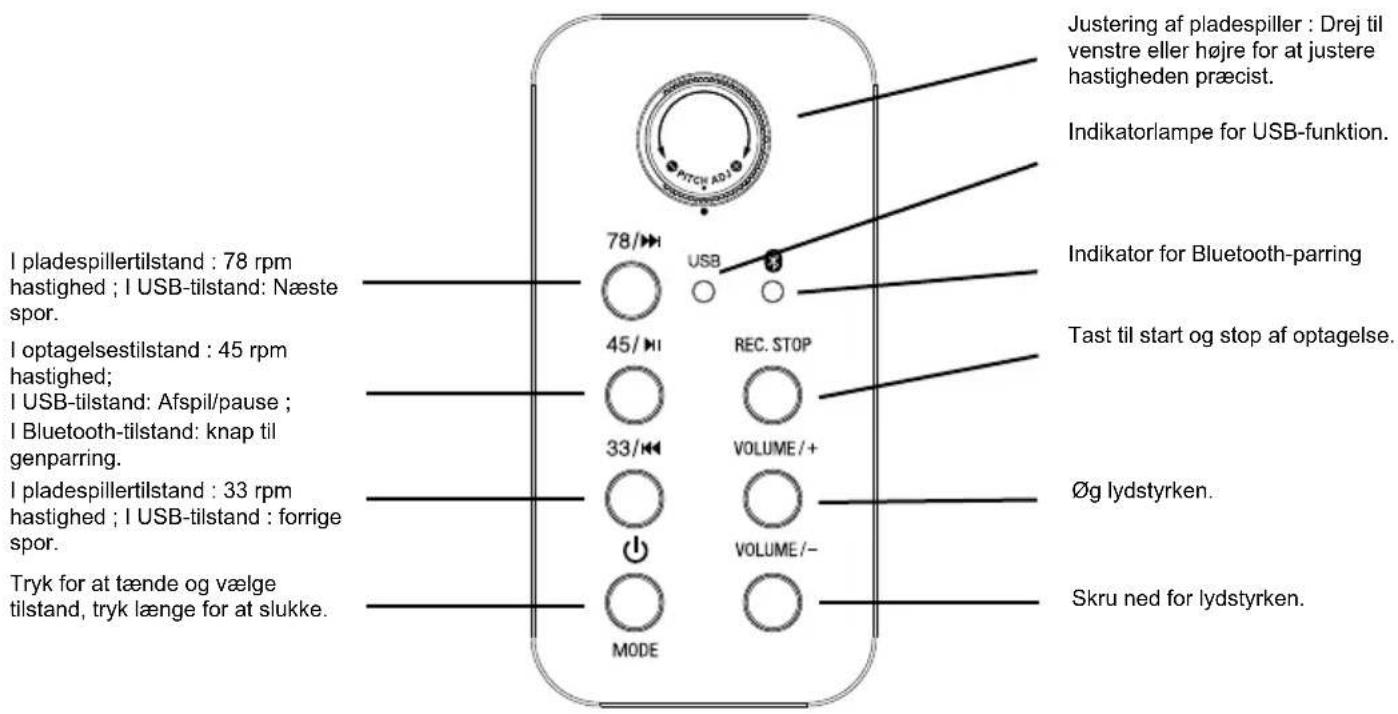
natural_image
Technical line drawing of a mechanical assembly with mounting flanges and control panel (no text or symbols)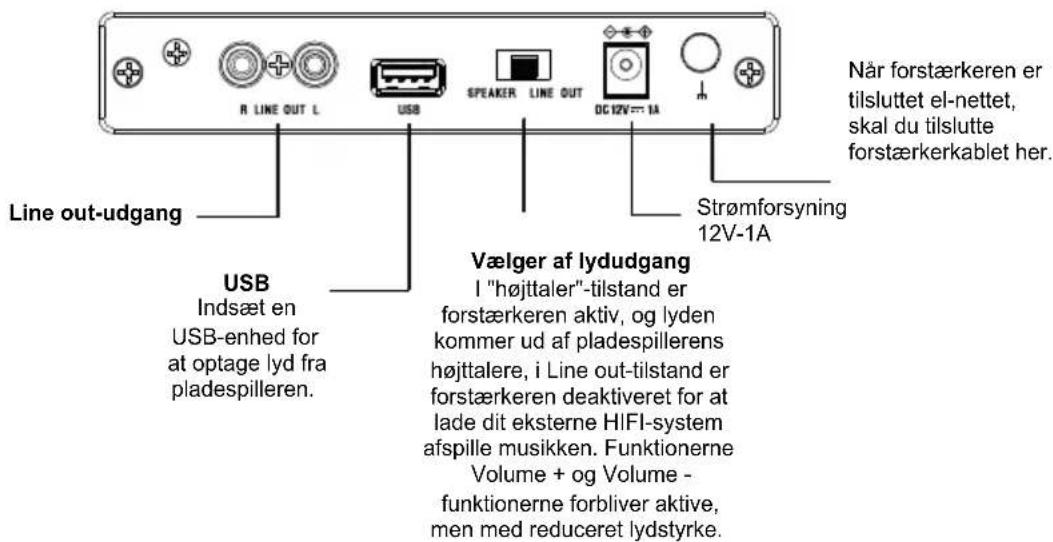
natural_image
Diagram showing mechanical assembly steps with arrows indicating motion, including a close-up of a tool component (no text or symbols present)Stylus
b) afspilning (USB)
From monday to friday (except on public holidays): 9.00 am - 6.00 pm
www.bigben.fr/support (Chatbot) / support@bigben.fr
BELGIQUE, customerservice@bigben-interactive.be
NEDERLAND, customerservice@bigben-interactive.nl
OTHERS, from monday to friday (except on public holidays)
9.00 am - 6.00 pm: www.bigben.fr/support (Chatbot)
or support@bigben.fr
www.bigben.eu
| Enceinte / Speaker / Altavoz / Altoparlante / Altifalante / Lautsprecher / Luidspreker | Speaker 2 x 2" | |
| Puissance - Peak power - Potencia máxima - Picco potenza - Potência - Peak lautsprecher - Peak speaker - Högsta effekt - Huipputeho - Top-effekt - Makseffekt - Špičkový výkon - Maximális teljesítmény - Moc szczytowa | 2 x 2W RMS | |
| Distorsion - Distortion - Distorsión - Distorsione - Distorção - Verzerrung - Vervorming - Distortion - Vääristymä - Forvrængning - Forvrengning - Zkreslení - Torzítás - Znieksztalcenie | < 5% | |
| Fréquence - Frequency - Frequencia - Frequenza - Frequência - Frequenzbereich - Frequentie - Frekvens - Taajus - Frekvens - Frekvens - Frekvence - Frekvencia - Częstotliwość | 60 Hz - 20 KHz | |
| Impédance - Impedance - Impedancia - Impedanza - Impedância - Impedanz - Impedantie - Impedans - Impedanssi - Impedans - Impedans - Impedance - Impedanciája - Impedancja | 4 Ω | |
| Entrée alimentation - Power input - Entrada de corriente - Ingresso di alimentazione - Entrada de alimentação - Netzeingang - Ingang - Ingáng - Enter - Indgang - Inngang - Vstup - Bemenet - Wejście | 12V/1A | |
| Ratio S/B - S/N Ratio - Relación S/R - Rapporto segnale rumore - Relação S/B - S/R-Verhältnis - Signaal-ruisverhouding - S/N-förhållande - S/B-suhde - S/B rapport - Signal/støy-forhold - Poměr S/B - S/B arány - Stosunek sygnału do szumu (SNR) | ≥ 70 dB | |
| Consommation - Consumption - Consumo de energía - Consumo energetico - Consumo de energía - Energieverbrauch - Energieverbruik - Energiförbrukning - Energiankulutus - Energiforbrug - Energiforbruk - Spotřeba energie - Energiafogyasztás - Zużycie energii | 0,4W | |
| Entrée alimentation - Power input - Entrada de corriente - Ingresso di alimentazione - Entrada de alimentação - Netzeingang - Ingang - Ingáng - Enter - Indgang - Inngang - Vstup - Bemenet - Wejście | 12V/1A | |
| Bluetooth | Version - Version - Versión - Versione - Versão - Version - Versie - Version - Versio - Udgave - Versjon - Verze - Verzió - Wersja | 5.0 |
| Nom de jumelage - Pairing name - Nombre para emparejamiento - Nome abbinamento - Nome pde emparelhamento - Kopplungsname - Koppelingsnaam - Namn - parinmuodostuksen nimi - Navn på parring - Navn for sammenkobling - Název párování - Párosítás neve - Nazwa parowania | TT650BT | |
| Fréquence - Frequency - Frequencia - Frequenza - Frequência - Frequenzbereich - Frequentie - Frekvens - Taajus - Frekvens - Frekvens - Frekvence - Frekvencia - Częstotliwość | 2402 - 2480 MHz | |
| EIRP | 0.89 dBm | |
| Radio FM | Fréquence - Frequency - Frequencia - Frequenza - Frequência - Frequenzbereich - Frequentie - Frekvens - Taajus - Frekvens - Frekvens - Frekvence - Frekvencia - Częstotliwość | 88,0 - 108 MHz |
THOMSON
FI
TT650BT
Vinyylilevysoitin
natural_image
Black and silver photo of a vintage flatset CD with open lid and control buttons (no visible text or symbols)KÄYTTÖOHJE
ENNEN KUIN KÄYTÄT TÄTÄ LAITETTA, LUE NÄMÄ KÄYTTÖOHJEET HUOLELLISESTI JA SÄILYTÄ NE MYÖHEMPÄÄ KÄYTTÖÄ VARTEN.
FI
natural_image
Line drawing of a device with two switches and a connected power outlet (no text or symbols)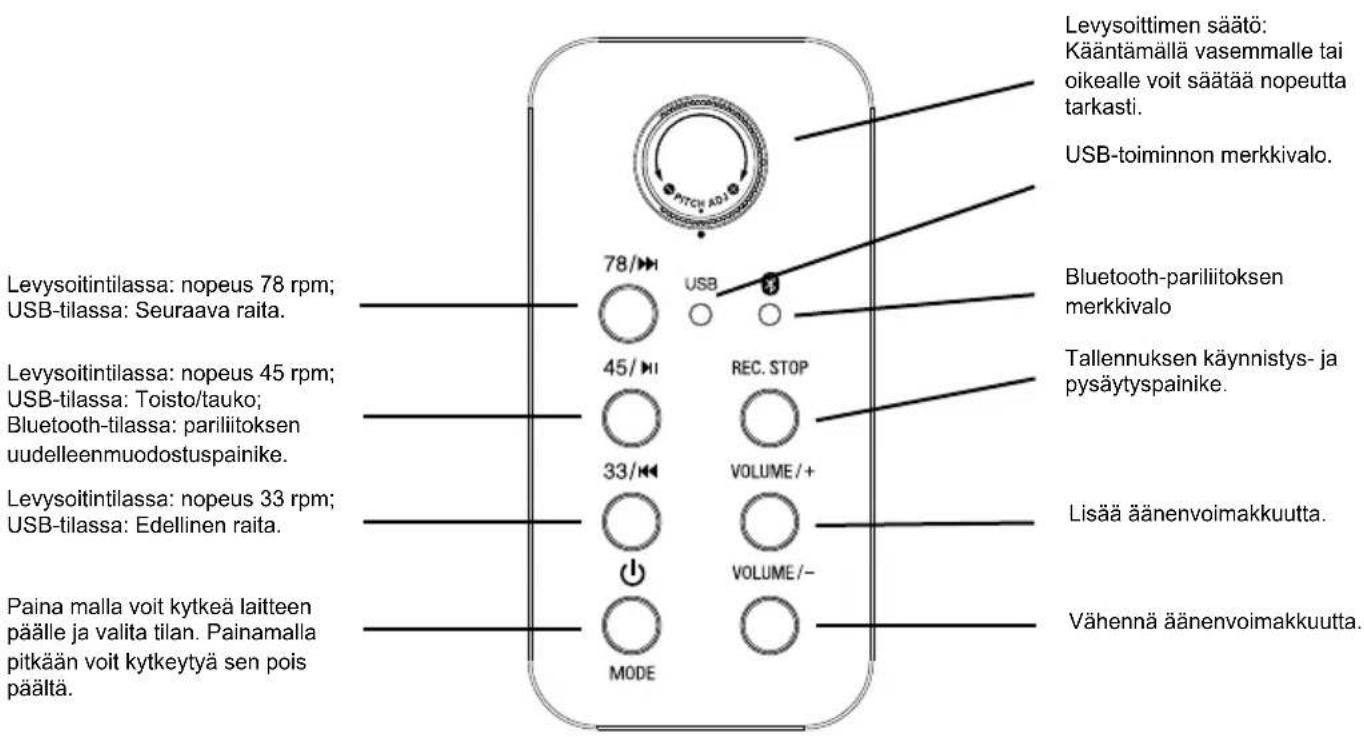
From monday to friday (except on public holidays): 9.00 am - 6.00 pm
www.bigben.fr/support (Chatbot) / support@bigben.fr
BELGIQUE, customerservice@bigben-interactive.be
NEDERLAND, customerservice@bigben-interactive.nl
OTHERS, from monday to friday (except on public holidays)
9.00 am - 6.00 pm: www.bigben.fr/support (Chatbot)
or support@bigben.fr
www.bigben.eu
| Enceinte / Speaker / Altavoz / Altoparlante / Altifalante / Lautsprecher / Luidspreker | Speaker 2 x 2" | |
| Puissance - Peak power - Potencia máxima - Picco potenza - Potência - Peak lautsprecher - Peak speaker - Högsta effekt - Huipputeho - Top-effekt - Makseffekt - Špičkový výkon - Maximális teljesítmény - Moc szczytowa | 2 x 2W RMS | |
| Distorsion - Distortion - Distorsión - Distorsione - Distorção - Verzerrung - Vervorming - Distortion - Vääristymä - Forvrængning - Forvrengning - Zkreslení - Torzítás - Znieksztalcenie | < 5% | |
| Fréquence - Frequency - Frequencia - Frequenza - Frequência - Frequenzbereich - Frequentie - Frekvens - Taajus - Frekvens - Frekvens - Frekvence - Frekvencia - Częstotliwość | 60 Hz - 20 KHz | |
| Impédance - Impedance - Impedancia - Impedanza - Impedância - Impedanz - Impedantie - Impedans - Impedanssi - Impedans - Impedans - Impedance - Impedanciája - Impedancja | 4 Ω | |
| Entrée alimentation - Power input - Entrada de corriente - Ingresso di alimentazione - Entrada de alimentação - Netzeingang - Ingang - Ingáng - Enter - Indgang - Inngang - Vstup - Bemenet - Wejście | 12V/1A | |
| Ratio S/B - S/N Ratio - Relación S/R - Rapporto segnale rumore - Relação S/B - S/R-Verhältnis - Signaal-ruisverhouding - S/N-förhållande - S/B-suhde - S/B rapport - Signal/støy-forhold - Poměr S/B - S/B arány - Stosunek sygnału do szumu (SNR) | ≥ 70 dB | |
| Consommation - Consumption - Consumo de energía - Consumo energetico - Consumo de energía - Energieverbrauch - Energieverbruik - Energiförbrukning - Energiankulutus - Energiforbrug - Energiforbruk - Spotřeba energie - Energiafogyasztás - Zużycie energii | 0,4W | |
| Entrée alimentation - Power input - Entrada de corriente - Ingresso di alimentazione - Entrada de alimentação - Netzeingang - Ingang - Ingáng - Enter - Indgang - Inngang - Vstup - Bemenet - Wejście | 12V/1A | |
| Bluetooth | Version - Version - Versión - Versione - Versão - Version - Versie - Version - Versio - Udgave - Versjon - Verze - Verzió - Wersja | 5.0 |
| Nom de jumelage - Pairing name - Nombre para emparejamiento - Nome abbinamento - Nome pde emparelhamento - Kopplungsname - Koppelingsnaam - Namn - parinmuodostuksen nimi - Navn på parring - Navn for sammenkobling - Název párování - Párosítás neve - Nazwa parowania | TT650BT | |
| Fréquence - Frequency - Frequencia - Frequenza - Frequência - Frequenzbereich - Frequentie - Frekvens - Taajus - Frekvens - Frekvens - Frekvence - Frekvencia - Częstotliwość | 2402 - 2480 MHz | |
| EIRP | 0.89 dBm | |
| Radio FM | Fréquence - Frequency - Frequencia - Frequenza - Frequência - Frequenzbereich - Frequentie - Frekvens - Taajus - Frekvens - Frekvens - Frekvence - Frekvencia - Częstotliwość | 88,0 - 108 MHz |
THOMSON
NO
TT650BT
Vinylplatespiller
natural_image
Black and white photo of a vintage typewriter with open lid and reflective disc (no visible text or symbols)BRUKSANVISNING
LES DENNE BRUKSANVISNINGEN N∅YE F∅R DU TAR PRODUKTET I BRUK OG TA VARE PÅ DEN SLIK AT DEN ER TILGJENGELIG HVIS DU FÅR BRUK FOR DEN IGJEN.
NO
natural_image
Line drawing of a device with labeled ports and wiring, no readable text or symbols present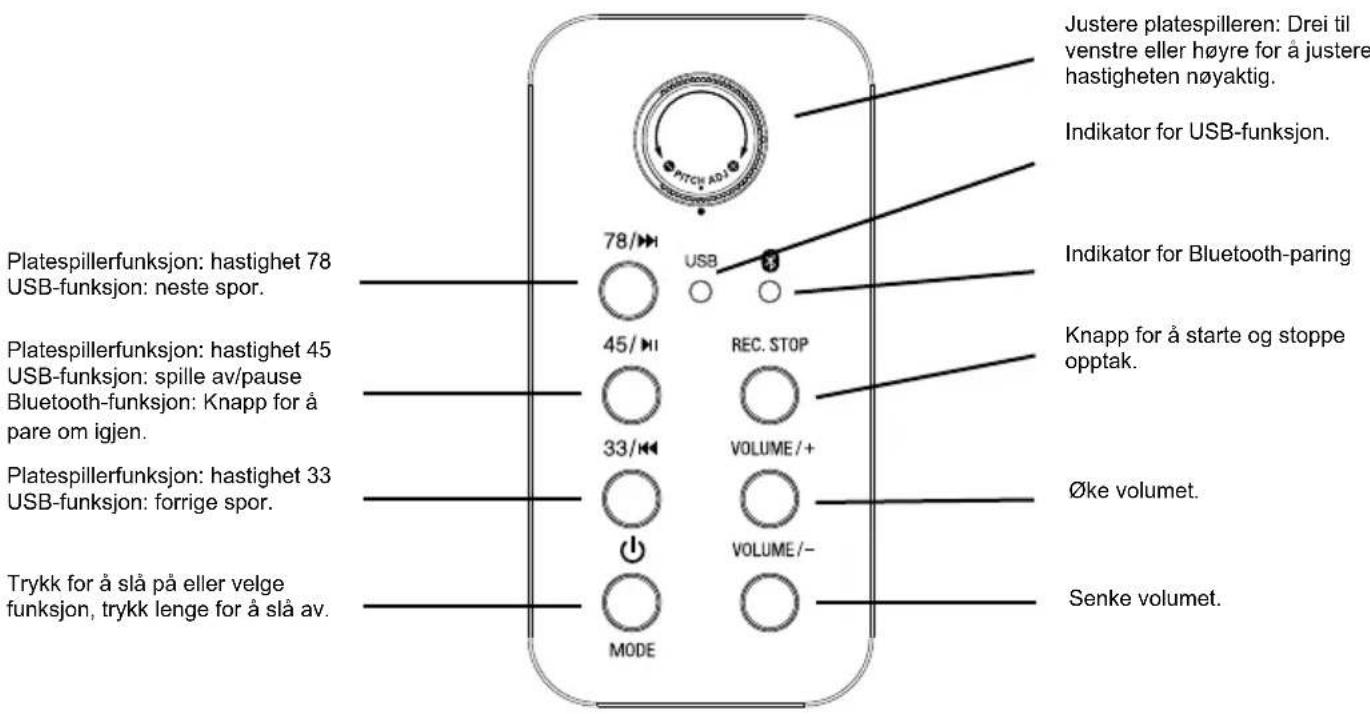
natural_image
Technical line drawing of a mechanical assembly with no visible text or symbols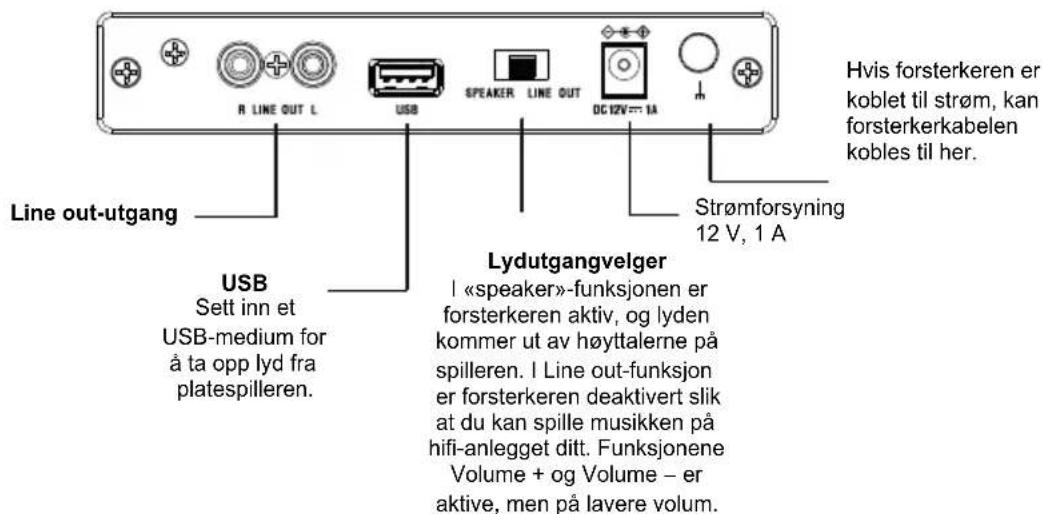
natural_image
Diagram showing mechanical assembly steps with arrows indicating motion, including a close-up of a component (no text or symbols present)Stift
b) Avlesing (USB)
Merk: Denne enheten kan lese et USB-medium på MP3-format.
From monday to friday (except on public holidays): 9.00 am - 6.00 pm
www.bigben.fr/support (Chatbot) / support@bigben.fr
BELGIQUE, customerservice@bigben-interactive.be
NEDERLAND, customerservice@bigben-interactive.nl
OTHERS, from monday to friday (except on public holidays)
9.00 am - 6.00 pm: www.bigben.fr/support (Chatbot)
or support@bigben.fr
www.bigben.eu
| Enceinte / Speaker / Altavoz / Altoparlante / Altifalante / Lautsprecher / Luidspreker | Speaker 2 x 2" | |
| Puissance - Peak power - Potencia máxima - Picco potenza - Potência - Peak lautsprecher - Peak speaker - Högsta effekt - Huipputeho - Top-effekt - Makseffekt - Špičkový výkon - Maximális teljesítmény - Moc szczytowa | 2 x 2W RMS | |
| Distorsion - Distortion - Distorsión - Distorsione - Distorção - Verzerrung - Vervorming - Distortion - Vääristymä - Forvrængning - Forvrengning - Zkreslení - Torzítás - Znieksztalcenie | < 5% | |
| Fréquence - Frequency - Frequencia - Frequenza - Frequência - Frequenzbereich - Frequentie - Frekvens - Taajus - Frekvens - Frekvens - Frekvence - Frekvencia - Częstotliwość | 60 Hz - 20 KHz | |
| Impédance - Impedance - Impedancia - Impedanza - Impedância - Impedanz - Impedantie - Impedans - Impedanssi - Impedans - Impedans - Impedance - Impedanciája - Impedancja | 4 Ω | |
| Entrée alimentation - Power input - Entrada de corriente - Ingresso di alimentazione - Entrada de alimentação - Netzeingang - Ingang - Ingáng - Enter - Indgang - Inngang - Vstup - Bemenet - Wejście | 12V/1A | |
| Ratio S/B - S/N Ratio - Relación S/R - Rapporto segnale rumore - Relação S/B - S/R-Verhältnis - Signaal-ruisverhouding - S/N-förhållande - S/B-suhde - S/B rapport - Signal/støy-forhold - Poměr S/B - S/B arány - Stosunek sygnału do szumu (SNR) | ≥ 70 dB | |
| Consommation - Consumption - Consumo de energía - Consumo energetico - Consumo de energía - Energieverbrauch - Energieverbruik - Energiförbrukning - Energiankulutus - Energiforbrug - Energiforbruk - Spotřeba energie - Energiafogyasztás - Zużycie energii | 0,4W | |
| Entrée alimentation - Power input - Entrada de corriente - Ingresso di alimentazione - Entrada de alimentação - Netzeingang - Ingang - Ingáng - Enter - Indgang - Inngang - Vstup - Bemenet - Wejście | 12V/1A | |
| Bluetooth | Version - Version - Versión - Versione - Versão - Version - Versie - Version - Versio - Udgave - Versjon - Verze - Verzió - Wersja | 5.0 |
| Nom de jumelage - Pairing name - Nombre para emparejamiento - Nome abbinamento - Nome pde emparelhamento - Kopplungsname - Koppelingsnaam - Namn - parinmuodostuksen nimi - Navn på parring - Navn for sammenkobling - Název párování - Párosítás neve - Nazwa parowania | TT650BT | |
| Fréquence - Frequency - Frequencia - Frequenza - Frequência - Frequenzbereich - Frequentie - Frekvens - Taajus - Frekvens - Frekvens - Frekvence - Frekvencia - Częstotliwość | 2402 - 2480 MHz | |
| EIRP | 0.89 dBm | |
| Radio FM | Fréquence - Frequency - Frequencia - Frequenza - Frequência - Frequenzbereich - Frequentie - Frekvens - Taajus - Frekvens - Frekvens - Frekvence - Frekvencia - Częstotliwość | 88,0 - 108 MHz |
THOMSON
SV
TT650BT
Skivspelare
natural_image
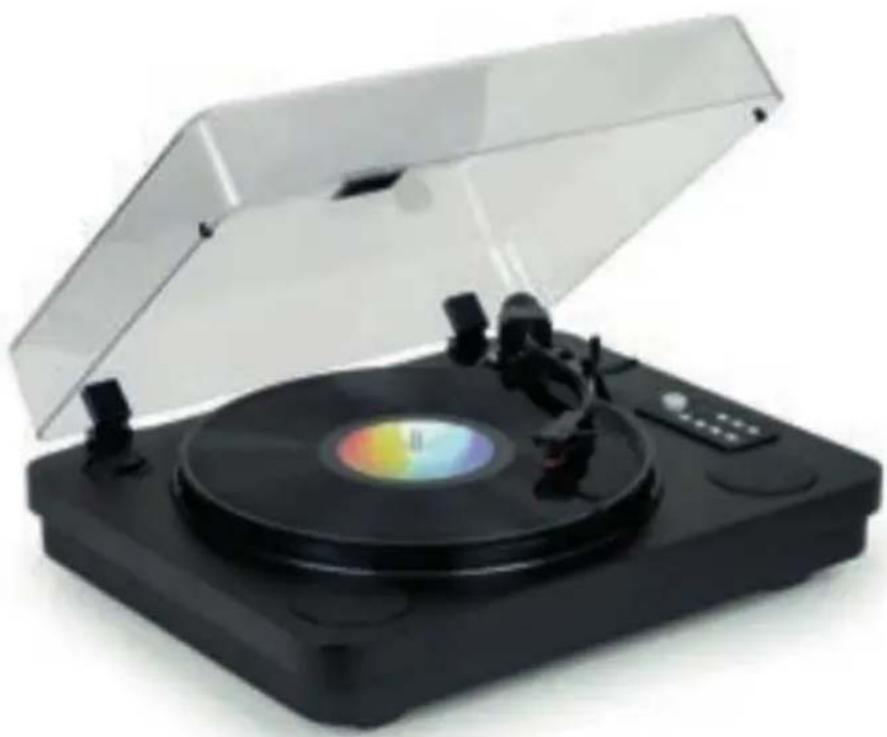
Black and silver photo of a vintage flat-screen vinyl record with open lid and control buttons (no visible text or symbols)BRUKSANVISNING
INNAN DU ANVÄNDER ENHETEN, LÄS DENNA BRUKSANVISNING NOGGRANT OCH BEHÅLL DEN FÖR FRAMTIDA REFERENS.

natural_image
Line drawing of a device with labeled ports and connections, no readable text or symbols present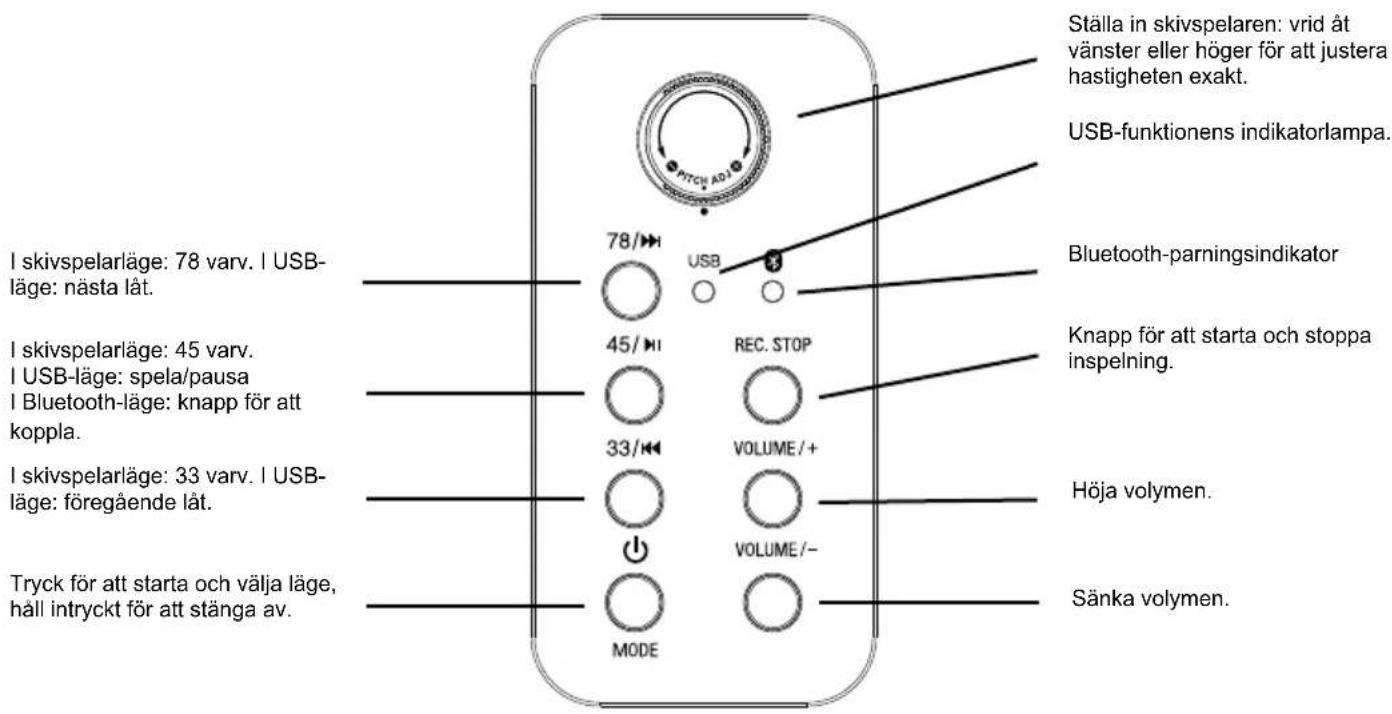
natural_image
Technical line drawing of a mechanical assembly with mounting flanges and control panel (no text or symbols)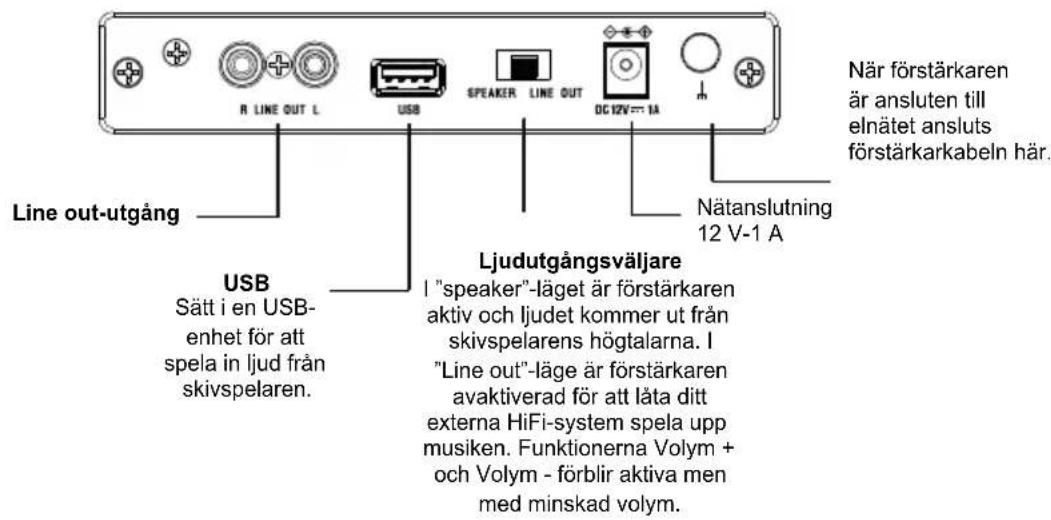
From monday to friday (except on public holidays): 9.00 am - 6.00 pm www.bigben.fr/support (Chatbot) / support@bigben.fr
BELGIQUE, customerservice@bigben-interactive.be
NEDERLAND, customerservice@bigben-interactive.nl
OTHERS, from monday to friday (except on public holidays)
9.00 am - 6.00 pm: www.bigben.fr/support (Chatbot)
or support@bigben.fr
www.bigben.eu
| Enceinte / Speaker / Altavoz / Altoparlante / Altifalante / Lautsprecher / Luidspreker | Speaker 2 x 2" | |
| Puissance - Peak power - Potencia máxima - Picco potenza - Potência - Peak lautsprecher - Peak speaker - Högsta effekt - Huipputeho - Top-effekt - Makseffekt - Špičkový výkon - Maximális teljesítmény - Moc szczytowa | 2 x 2W RMS | |
| Distorsion - Distortion - Distorsión - Distorsione - Distorção - Verzerrung - Vervorming - Distortion - Vääristymä - Forvrængning - Forvrengning - Zkreslení - Torzítás - Znieksztalcenie | < 5% | |
| Fréquence - Frequency - Frequencia - Frequenza - Frequência - Frequenzbereich - Frequentie - Frekvens - Taajus - Frekvens - Frekvens - Frekvence - Frekvencia - Częstotliwość | 60 Hz - 20 KHz | |
| Impédance - Impedance - Impedancia - Impedanza - Impedância - Impedanz - Impedantie - Impedans - Impedanssi - Impedans - Impedans - Impedance - Impedanciája - Impedancja | 4 Ω | |
| Entrée alimentation - Power input - Entrada de corriente - Ingresso di alimentazione - Entrada de alimentação - Netzeingang - Ingang - Ingáng - Enter - Indgang - Inngang - Vstup - Bemenet - Wejście | 12V/1A | |
| Ratio S/B - S/N Ratio - Relación S/R - Rapporto segnale rumore - Relação S/B - S/R-Verhältnis - Signaal-ruisverhouding - S/N-förhållande - S/B-suhde - S/B rapport - Signal/støy-forhold - Poměr S/B - S/B arány - Stosunek sygnału do szumu (SNR) | ≥ 70 dB | |
| Consommation - Consumption - Consumo de energía - Consumo energetico - Consumo de energía - Energieverbrauch - Energieverbruik - Energiförbrukning - Energiankulutus - Energiforbrug - Energiforbruk - Spotřeba energie - Energiafogyasztás - Zużycie energii | 0,4W | |
| Entrée alimentation - Power input - Entrada de corriente - Ingresso di alimentazione - Entrada de alimentação - Netzeingang - Ingang - Ingáng - Enter - Indgang - Inngang - Vstup - Bemenet - Wejście | 12V/1A | |
| Bluetooth | Version - Version - Versión - Versione - Versão - Version - Versie - Version - Versio - Udgave - Versjon - Verze - Verzió - Wersja | 5.0 |
| Nom de jumelage - Pairing name - Nombre para emparejamiento - Nome abbinamento - Nome pde emparelhamento - Kopplungsname - Koppelingsnaam - Namn - parinmuodostuksen nimi - Navn på parring - Navn for sammenkobling - Název párování - Párosítás neve - Nazwa parowania | TT650BT | |
| Fréquence - Frequency - Frequencia - Frequenza - Frequência - Frequenzbereich - Frequentie - Frekvens - Taajus - Frekvens - Frekvens - Frekvence - Frekvencia - Częstotliwość | 2402 - 2480 MHz | |
| EIRP | 0.89 dBm | |
| Radio FM | Fréquence - Frequency - Frequencia - Frequenza - Frequência - Frequenzbereich - Frequentie - Frekvens - Taajus - Frekvens - Frekvens - Frekvence - Frekvencia - Częstotliwość | 88,0 - 108 MHz |
- MODE D'EMPLOI
- FR
- Fabricant : Bigben Interactive FRANCE
- THOMSON
- Vinyl Turntable
- USER INSTRUCTIONS
- EN
- Please read this user guide carefully before operating the unit and retain for future reference.
- GETTING STARTED
- SAFETY WARNING AND NOTICE
- WARNINGS
- If your product includes batteries
- KEEP OUT OF REACH OF CHILDREN
- Contents of the box
- Power supply
- Pitch Adjustment.
- /45 /33
- Power
- Rec. stop
- Recording
- Connecting to a Bluetooth Speaker
- Using Line Out
- Operation
- c) According to USB
- If your product incorporates Bluetooth® technology
- If your product includes a back-up battery which needs to be changed
- Environmental protection
- Additional informations
- Declaration of conformity
- Warranty
- Support
- We recommend you follow the national waste sorting guidelines that apply to the product and this user guide.
- Tocadiscos
- Funcionamiento
- Giradischi per vinili
- ISTRUZIONI PER L'USO
- IT
- TENERE FUORI DALLA PORTATA DEI BAMBINI
- Plattenspieler
- BEDIENUNGSANLEITUNG
- GEBRUIKSAANWIJZING
- NL
- WAARSCHUWINGEN EN VEILIGHEIDSINSTRUCTIES
- INSTRUKCJA OBSŁUGI
- BRUGSANVISNING
- DA
- Vinyylilevysoitin
- KÄYTTÖOHJE
- FI
- Vinylplatespiller
- BRUKSANVISNING
- NO
- Skivspelare
Brand : THOMSON
Model : TT650BT
Category : Turntable