DIR3605MSBT - Media player HAMA - Free user manual and instructions
Find the device manual for free DIR3605MSBT HAMA in PDF.



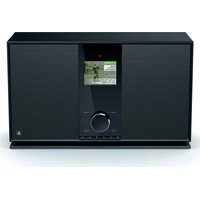
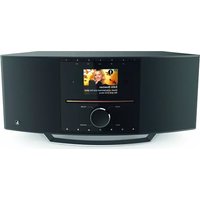
| Product type | Internet radio DAB/DAB+/FM/Bluetooth with media player |
| Brand | Hama |
| Model | DIR3605MSBT |
| Power supply | Mains 230 V ~ 50 Hz via supplied power cord |
| Display | 3.2-inch colour screen |
| Connectivity | WiFi (2.4/5 GHz), LAN Ethernet, Bluetooth, USB, AUX IN, Line Out, Optical, Headphone jack |
| Radio | DAB/DAB+, FM, Internet radio (via WiFi/LAN) |
| Remote control | Yes, with LR03/AAA batteries included |
| Antenna | Removable telescopic antenna (coaxial connection) |
| Main functions | Alarm, Snooze, Sleep timer, Equalizer, Presets (10), UNDOK app |
| Maintenance | Cleaning with a slightly damp, lint-free cloth, without harsh detergent |
| Safety | Do not open the device, risk of electric shock; use exclusively on an accessible mains socket |
| Spare parts and repairability | No spare parts supplied; repair only by a qualified technician |
| Package contents | Radio, power cord, remote control, 2 LR03/AAA batteries, manual, leaflet, antenna |
| Available languages | French, English, German, Danish, Dutch, Finnish, Italian, Norwegian, Polish, Portuguese, Spanish, Swedish, Turkish, Czech, Slovak |
| Frequency bands | Bluetooth 2.402-2.480 GHz; WiFi 2.412-2.472 GHz and 5.150-5.350 GHz / 5.470-5.725 GHz |
| Maximum RF power | Bluetooth 6 dBm (EIRP); WiFi 2.4 GHz 17 dBm (EIRP); WiFi 5 GHz 16.5 dBm (EIRP) |
| General information | User manual PDF downloadable at www.hama.com; item number 00054885 |
Frequently Asked Questions - DIR3605MSBT HAMA
User questions about DIR3605MSBT HAMA
0 question about this device. Answer the ones you know or ask your own.
Ask a new question about this device
Download the instructions for your Media player in PDF format for free! Find your manual DIR3605MSBT - HAMA and take your electronic device back in hand. On this page are published all the documents necessary for the use of your device. DIR3605MSBT by HAMA.
USER MANUAL DIR3605MSBT HAMA
natural_image
Front view diagram of a portable electronic device with front panel, screen, and control buttons (no text or symbols)QuickGuide
Kurzanleitung
Noticed'utilisation
Instruccionesbreves
Краткоеруководство
Istruzionibrevi
Further information and features are available on/
00054885:www.hama.com/54836#downloads
flowchart
graph LR
    A[" "] --> B[" "]
    B --> C["→"]
ControlsandDisplays
Radio
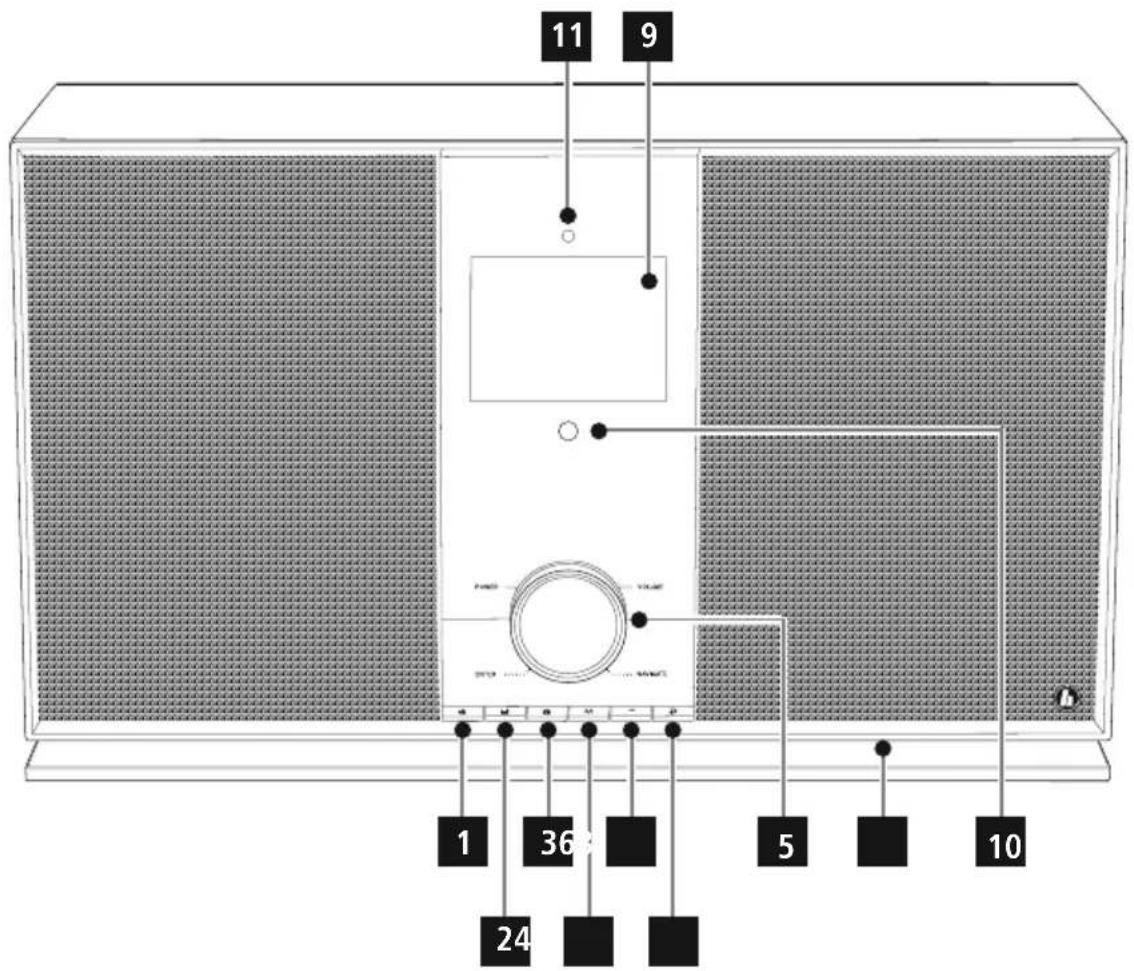
Front
1.[SETTINGS/MENU]button
2.[MEMORY]button
3.[INFO]button
4.[MODE]button
5. [POWER] button** / [VOLUME] / [ENTER] / [NAVIGATE]
6.[HOME]button
7.[BACK]button
8.LED
9.3.2"colourdisplay
10. Infrared receiver
11.Brightnesssensor
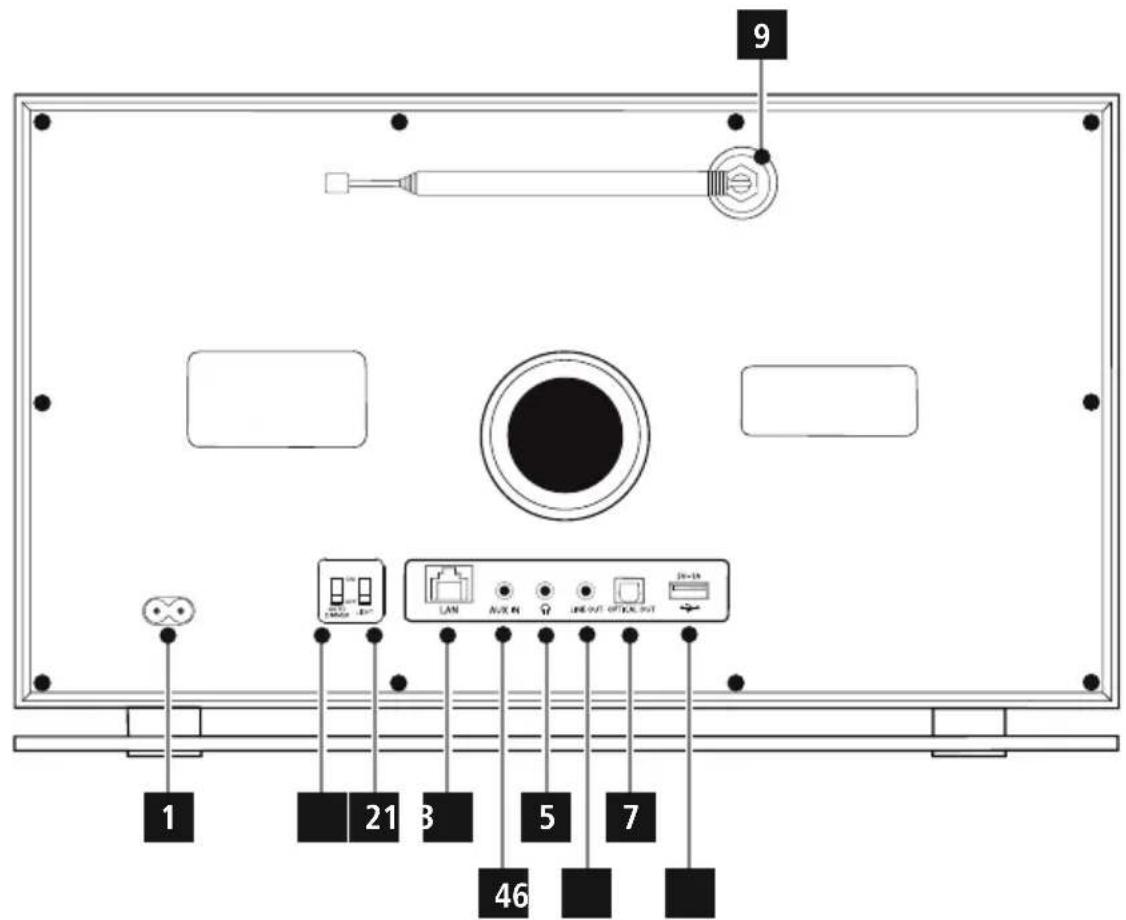
Rear
- Mainspowersupply
2.LEDswitch(ON/OFF) - LAN connection
4.AUX-Insocket - Headphonesocket
6.Line-outsocket - Optical connection
8.USBconnection
9.Antenna*
10.Autodimmerswitch
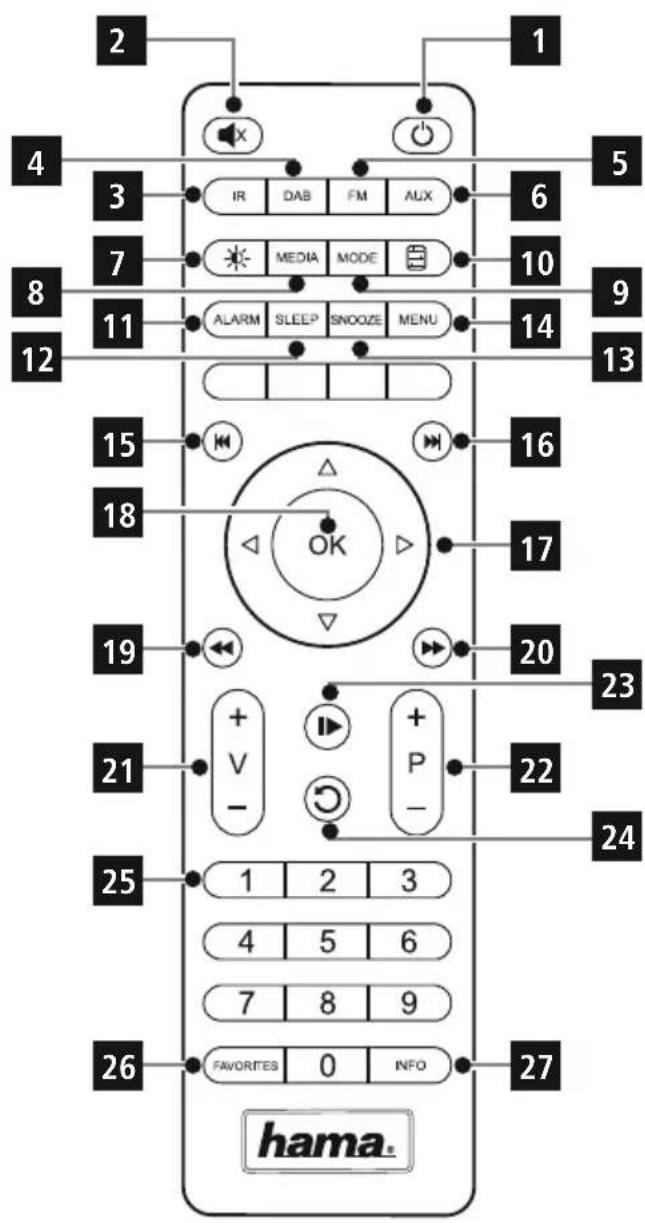
RemoteControl
1.[POWER]button
2.[MUTE]button
3.InternetRadio- Mode
4. DAB Radio- Mode
5.FMRadio- Mode
6.AUX- Mode
7. BacklightLevel
8.Media-Player- Mode
9.[MODE]button
10.[EQUALIZER]button
11.[ALARM]button
12.[SLEEP]button
13.[SNOOZE]button
14.[MENU]button
15.[PREVIOUS]button
16.[NEXT]button
17. Navigationbuttons
▲ Up
▼ Down
Back
▶ Forward, okay
18.SELECTbutton
19.[REWIND]button
20.[FAST-FORWARD]button
21.[VOLUME]+/-buttons
22.PresetsUp/Downbuttons
23.[PLAY/P AUSE]button
24.[BACK]button
25.Presetsbuttons(1-10)
26.[PRESETS/FAVORITES]Menu
27.[INFO]button

Note
* This radio has a changeable antenna. You can use an active or passive antenna equipped with a coaxial connection.
** You can adjust the volume, or navigate through the menu structure by turning the rotary controller. You can switch the device to standby mode by pressing the volume controller, or you can confirm a selection by pressing the navigationcontroller.

Importantnote- 0 peratinginstructions:
- This is a quick guide to provide you with the most important basic information, such as safety warnings and how to getstartedusingtheproduct.
- For the sake of protecting the environment and saving resources, Hama dispenses with printed operating instructions and provides them only in the form of PDF files / eManuals on www.hama.com.
- Use the search function with the item number of your product to easily find the product documentation.
- Save the operating instructions to your computer's hard drive for future reference, or print it out if necessary.
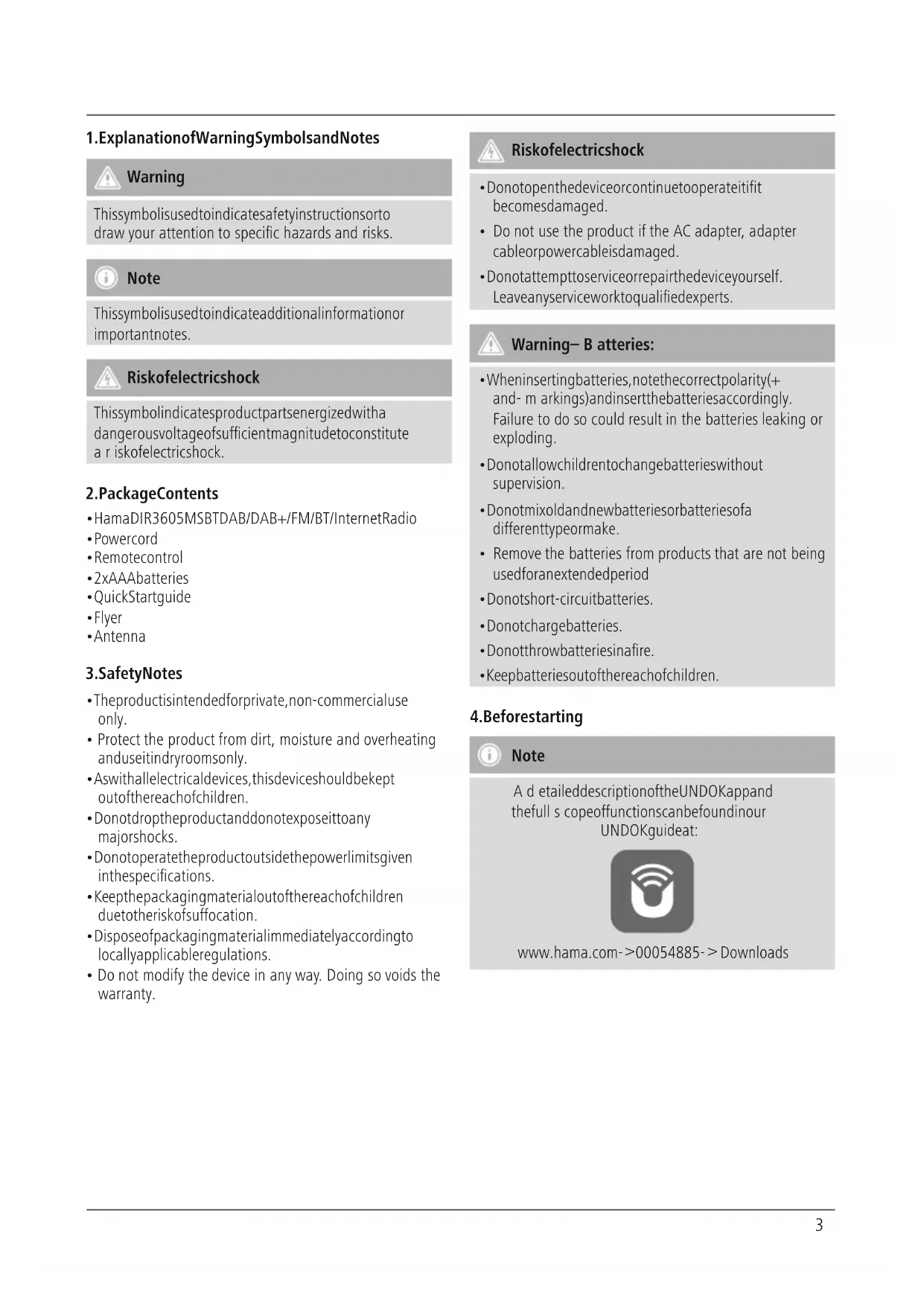
1. ExplanationofWarningSymbolsandNotes

Warning
This symbol is used to indicate safety instructions to draw your attention to specific hazards and risks.

Note
This symbol is used to indicate additional information or important notes.

Riskofelectricshock
This symbol indicates product parts energized with a dangerous voltage of sufficient magnitude to constitute a risk of electric shock.
2.PackageContents
• HamaDIR3605MSBTDAB/DAB+/FM/BT/InternetRadio
- Powercord
- Remotecontrol
- 2xAAAbatteries
- QuickStartguide
• Flyer
- Antenna
3.SafetyNotes
• The product is intended for private, non-commercial use only.
- Protect the product from dirt, moisture and overheating and use it indryroom only.
- Aswithallelectricaldevices, this devices should be kept out of thereachofchildren.
- Donotdropheproductanddonotexposeittoany majorshocks.
- Donotoperatetheproductoutsidethepowerlimitsgiven inthespecifications.
- Keep the packaging material out of thereachofchildren duetotheriskofsuffocation.
- Disposeofpackagingmaterialimmediatelyaccordingto locallyapplicableregulations.
- Do not modify the device in any way. Doing so voids the warranty.

Riskofelectricshock
- Donotopenthedeviceorcontinuetooperateitifit becomesdamaged.
- Do not use the product if the AC adapter, adapter cableorpowercableisdamaged.
- Donotattempttoserviceorrepairthedeviceyourself. Leaveanyserviceworktoqualifiedexperts.

Warning- B atteries:
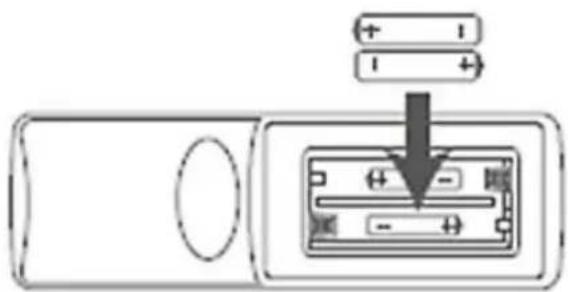
- Wheninsertingbatteries, notethecorrectpolarity(+ and- m arkings)andinsertthebatteriesaccordingly. Failure to do so could result in the batteries leaking or exploding.
- Donotallowchildrentochangebatterieswithout supervision.
- Donotmixoldandnewbatteriesorbatteriesofa differenttypeormake.
- Remove the batteries from products that are not being usedforanextendedperiod
- Donotshort-circuitbatteries.
- Donotchargebatteries.
- Donotthrowbatteriesinafire.
- Keepbatteriesoutofthereachofchildren.
4. Beforestarting

Note
A d etaileddescriptionoftheUNDOKappand thefull s copeoffunctionscanbefoundinour UNDOKguideat:

www.hama.com->00054885->Downloads

NotesonUse
- The[OK]and▶ buttonontheremotecontrolhave thesamefunctionasthe[ENTER]buttononthefront oftheradio.
- The ◀ buttononther emotcontrolhasthesame functionasthe[BACK]buttononthefrontofthe radio.
- The ▲▼ buttons on the remote control have the samefunctionasturningthenavigationcontroller on thefrontoftheradiototheleftandright.
Activatingtheremotecontrol
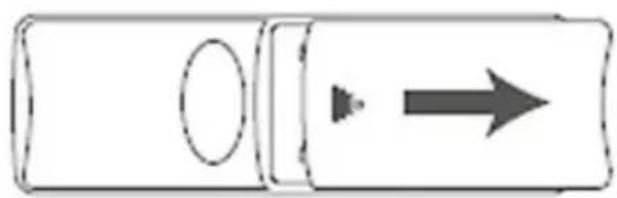
Openthebatterycompartmentcover. It islocatedonthe rearoftheremotecontrolandcanbeopenedbyslidingit in the direction indicated. Two AAA batteries are included inthedelivery, they should be inserted in the battery compartment of theremote control. Observethe correct polarity when inserting batteries. The polarity (+/-) is indicated in the battery compartment.).
Settingupa n etworkconnection
4.1 LAN(wirednetwork)
- ConnecttheLANconnectionofyourroutertotheLAN connection on your radio. You will require an Ethernet cable,whichisnotincludedinthedelivery, to do this.
- Make sure that the router is on and working properly, and that you have an Internet connection.
- Seetheoperatinginstructionsforyourrouterregardinga properlyfunctioningLANconnection.
- Thenproceedasdescribedinpoint5, "GettingStarted".
4.2WLAN(wirelessnetwork)
- Ensure that the router is switched on, is functioning correctly and that there is a connection to the internet.
- Activate the WLAN function of your router.
- Follow your router's operating instructions as regards the correctionfunctioningoftheWLANconnection.
- Thenproceeddirectlyasdescribedundersection5, Gettingstarted'.
5. Gettingstarted

Note- O ptimalreception
Thisproductisequippedwithanantennaconnectionfor externalantennaswithcoaxialconnection.A te l e s c o p i c antennathatenablesDAB,DAB+andFMreception is included in the delivery. Alternatively, you can use anactiveorpassiveantennatoimproveception,or accordingtoyourrequirements.
Notethefollowing:
• Pull t heantennaoutcompletely.
- Werecommendyouadjusttheantennaverticallyto ensure o ptimalreception.

Note
- Optional, switchable lightsourcesorbrightness sensorsresultinhigherpowerconsumptioninthe switched-onstate.
5.1 Switchingthedeviceon
- Connect the power cable to a properly installed power socket.

Warning
- Only connect the product to a socket that has been approvedforthedevice.Theelectricalsocketmust alwaysbeeasilyaccessible.
- Disconnect the product from the powersupply using the on/off switch— if this is not available, unplug the power cord from the socket.
- Wait until the radio initialisation procedure has finished.
- Pressthe[POWER]buttontoswitchtheradioon.
5.2 Language and setup wizard
The first time the system starts the radio uses English.
Confirmyourselectionbypassingthe[ENTER]or[OK]button.

Note
- You can choose from the following languages: English, German, Danish, Dutch, Finnish, French, Italian, Norwegian, Polish, Portuguese, Spanish, Swedish, Turkish, Czech and Slovak
6.CareandMaintenance
- Only clean this product with a slightly damp, lint-free clothanddonotuseaggressivecleaningagents.
- If you do not use the product for a long time, turn off the device and disconnect it from the powersupply. Store it in a clean, dry place out of direct sunlight.
7.WarrantyDisclaimer
Hama GmbH & Co KG assumes no liability and provides no warrantyfordamageresultingfromimproperinstallation/mounting,improperuseoftheproductorfromfailuretoobservetheoperatinginstructionsand/orsafetynotes.
8. Service and Support
PleasecontactHamaProductConsultingifyouhaveany questionsaboutthisproduct. Hotline:+499091502-115(German/English)
Furthersupportinformationcanbefoundhere: www.hama.com
9. Recycling Information
Noteonenvironmentalprotection:
AftertheimplementationoftheEuropean Directive2012/19/EUand2006/66/EUinthe nationallegalsystem,thefollowingapplies:
Electricandelectronicdevicesaswellasbatteries mustnotbedisposedofwithhouseholdwaste. Consumers are o bligedbylawtoreturnelectricalandelectronic devicesaswell a s batteriesattheendoftheirservicelives tothepubliccollectingpointsetupforthispurposeor point of sale. Details to this are defined by the national lawoftherespectivecountry. T hissymbolontheproduct, theinstructionmanualorthepackageindicatesthata productissubjecttotheseregulations.Byrecycling, reusingthematerialsorotherformsofutilisingold devices/Batteries,youare m akinganimportant contributiontoprotectingourenvironment.
10. Declaration of Conformity

Hereby, Hama GmbH & Co KG declares that the radioequipmenttype[00054885]isincompliance with Directive 2014/53/EU. The full text of the EU
declarationofconformityisavailableatthefollowing internetaddress:
www.hama.com->00054885->Downloads.
| Frequencyband(s) | Bluetooth:2.402- 2 .480GHzWiFi:2.412- 2 .472GHzWiFi:5.150- 5 .350GHzWiFi:5.470- 5 .725GHz |
| Maximumradio-frequency powertransmitted | Bluetooth:6dBm(EIRP)WiFi:2.4GHz/ 1 7dBm(EIRP)WiFi:5GHz/ 1 6.5dBm(EIRP) |
RestrictionsorRequirementsin
Belgium, Bulgaria, Czech Republic, Denmark, Germany, Estonia, Ireland, Greece, Spain, France, Croatia, Italy, Cyprus, Latvia, Lithuania, Luxembourg, Hungary, Malta, the Netherlands, Austria, Poland, Portugal, Romania, Slovenia, Slovakia, Finland, Sweden, United Kingdom

Note
Ifchannels36–64(frequency5.150–5.350GHz)are usedina 5 -GHzWLAN, theproductmayonlybeused inclosedrooms.
Restrictionsouexigencesen
9. Pokynyk likvidaci
Hotline:+499091502-115(Ger/Ang)
The Spotify software is subject to third party licenses found here: www.spotify.com/connect/third-party-licenses
TheBluetooth ^® word mark and logos are registered trademarks owned by Bluetooth SIG, Inc. and any use of such marks by Hama GmbH & Co KG is under license. Other trademarks and trade names are those of their respective owners.
All listed brands are trademarks of the corresponding companies. Errors and omissions excepted, and subject to technical changes. Our general terms of delivery and payment are applied.


- ControlsandDisplays
- Radio
- Front
- Rear
- RemoteControl
- Note
- Importantnote- 0 peratinginstructions:
- ExplanationofWarningSymbolsandNotes
- Warning
- Riskofelectricshock
- 2.PackageContents
- 3.SafetyNotes
- Warning- B atteries:
- Beforestarting
- NotesonUse
- Activatingtheremotecontrol
- Settingupa n etworkconnection
- LAN(wirednetwork)
- 4.2WLAN(wirelessnetwork)
- Gettingstarted
- Note- O ptimalreception
- Switchingthedeviceon
- Language and setup wizard
- 6.CareandMaintenance
- 7.WarrantyDisclaimer
- Service and Support
- Recycling Information
- Noteonenvironmentalprotection:
- Declaration of Conformity
- RestrictionsorRequirementsin
- Restrictionsouexigencesen
- Pokynyk likvidaci
Brand : HAMA
Model : DIR3605MSBT
Category : Media player