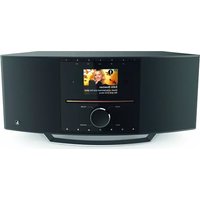
DIR3505MSCBT - Media player HAMA - Free user manual and instructions
Find the device manual for free DIR3505MSCBT HAMA in PDF.



| Brand | Hama |
| Model | DIR3505MSCBT |
| Category | Media Player / Internet Radio |
| Reception Type | DAB/DAB+, FM, Internet Radio (WiFi), Bluetooth |
| CD Player | Yes, for audio CDs |
| Display | 2.8" color display |
| Network Connectivity | WiFi (2.4/5 GHz), LAN (Ethernet) |
| Audio Inputs | AUX IN jack, USB (for playback) |
| Audio Outputs | Headphone jack, Line Out (RCA), Optical |
| Antenna | Telescopic antenna included, coaxial connector for external antenna |
| Power Supply | Mains adapter (230V AC, 50Hz) |
| Remote Control | Yes, with LR03/AAA batteries included |
| Additional Functions | Alarm, Timer (SLEEP), SNOOZE, Equalizer, Presets |
| Cleaning and Maintenance | Clean with a slightly damp lint-free cloth; no aggressive detergent |
| Safety Instructions | Do not open the device; avoid moisture and shocks; observe battery polarity |
| Included Accessories | Mains adapter, remote control, batteries, antenna, user manual |
Frequently Asked Questions - DIR3505MSCBT HAMA
User questions about DIR3505MSCBT HAMA
0 question about this device. Answer the ones you know or ask your own.
Ask a new question about this device
Download the instructions for your Media player in PDF format for free! Find your manual DIR3505MSCBT - HAMA and take your electronic device back in hand. On this page are published all the documents necessary for the use of your device. DIR3505MSCBT by HAMA.
USER MANUAL DIR3505MSCBT HAMA
Further information and features are available on/
00054891:www.hama.com/54891#downloads
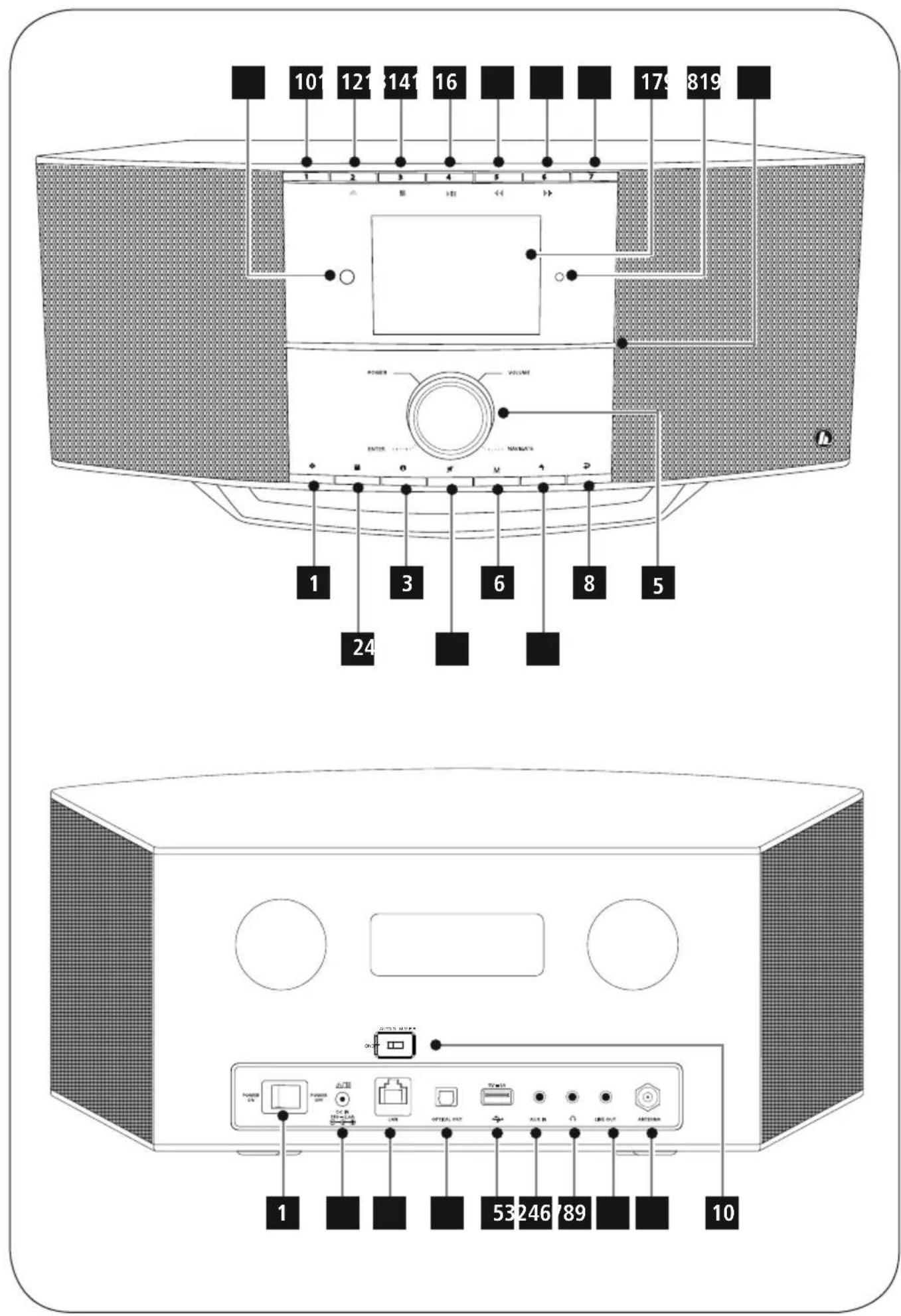
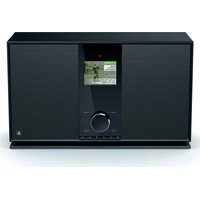
ControlsandDisplays
Radio
Front
1.[SETTINS/MENU]button
2.[MEMORY]button
3.[INFO]button
4.[MUTE]button
5. [POWER] button** / [VOLUME] / [ENTER] / [NAVIGATE]
6.[MODE]button
7.[HOME]button
8.[BACK]button
9. Infraredreceiver
10.[PRESET1]button
11.[PRESET2/▲]button
12.[PRESET3/■] button
13. [PRESET 4 / ▷ II] button
14.[PRESET5/按钮]
15.[PRESET6/▶▶] button
16.[PRESET7]button
17.2.8"colourdisplay
18.Brightnesssensor
19.CDDrive
Rear
1.Powerswitch
2.Mainspowersupply
3.LANconnection
4. Optical connection
5.USBconnection
6.AUX-Insocket
7. Headphonesocket
8.Line-outsocket
9.Antenna*
10.Autodimerswitch
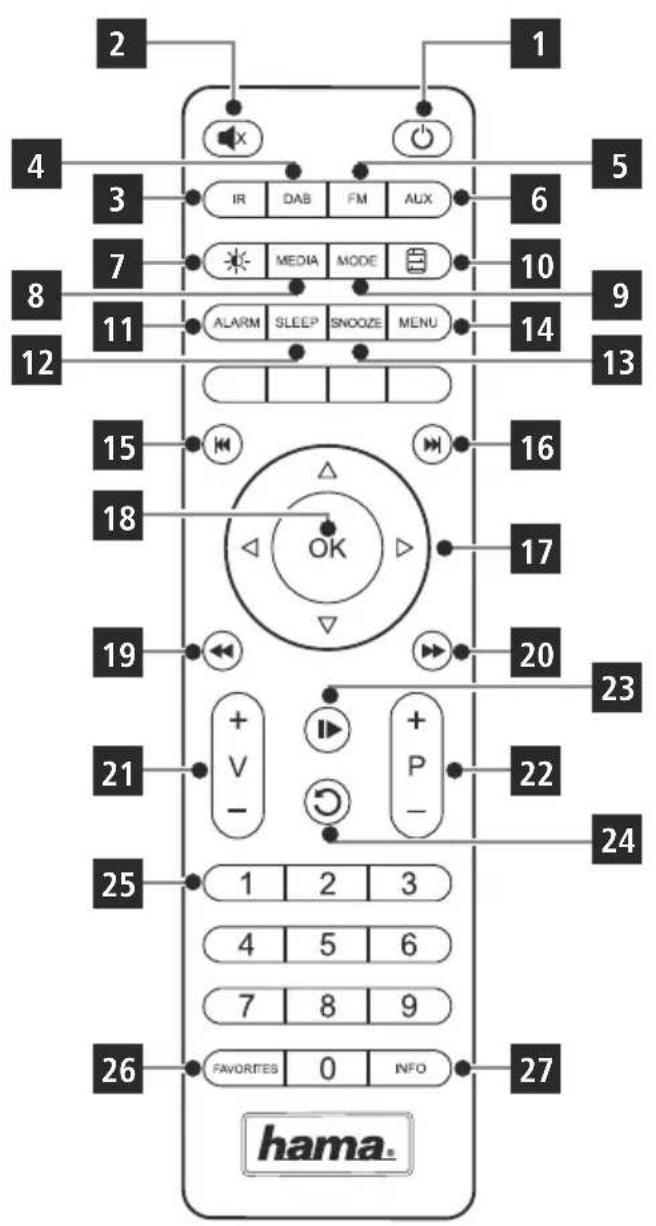
RemoteControl
1.[POWER]button
2.[MUTE]button
3.InternetRadio-Mode
4.DAB R audio-Mode
5.FMRadio-Mode
6.AUX-Mode
7.BacklightLevel
8. Media-Player- Mode
9.[MODE]button
10.[EQUALIZER]button
11.[ALARM]button
12.[SLEEP]button
13.[SNOOZE]button
14.[MENU]button
15.[PREVIOUS]button
16.[NEXT]button
17. Navigationbuttons
Up
Down
Back
Forward, okay
18.SELECTbutton
19.[REWIND]button
20.[FAST-FORWARD]button
21.[VOLUME]+/-buttons
22. PresetsUp/Downbuttons
23.[PLAY/PAUSE]button
24.[BACK]button
25.Presetsbuttons(1-10)
26.[PRESETS/FAVORITES]Menu
27.[INFO]button

Note
- This radio has a changeable antenna. You can use an active or passive antenna equipped with a coaxial connection.
** You can adjust the volume, or navigate through the menu structure by turning the rotary controller. You can switch the device to standby mode by pressing the volume controller, or you can confirm a selection by pressing the navigationcontroller.

Importantnote- O peratinginstructions:
- This is a quick guide to provide you with the most important basic information, such as safety warnings and how to get started using the product.
- For the sake of protecting the environment and saving resources, Hama dispenses with printed operating instructions and provides them only in the form of PDF files / eManuals on www.hama.com.
- Use the search function with the item number of your product to easily find the product documentation.
- Save the operating instructions to your computer's hard drive for future reference, or print it out if necessary.
1.ExplanationofWarningSymbolsandNotes

Warning
Thissymbolisusedtoindicatesafetyinstructionso rto draw your attention to specific hazards and risks.

Note
Thissymbolisusedtoindicateadditionalinformationor importantnotes.

RiskofElectricshock
Thissymbolindicatesproductpartsenergizedwithadangerousvoltageofsfuicientmagnitudetoconstituteariskofelectricshock.
2.PackageContents
HamaDIR3505MSCBT DAB/DAB+/FM/BT/CD/InternetRadio
- Powersupplyunit
- Remotecontrol
-2xAAAbatteries
- QuickStartGuide
- Flyer
Antenna
3.SafetyNotes
The productis intended for private, non-commercial use only.
- Protect the product from dirt, moisture and overheating anduseitindryroomsonly.
- Aswithallelectricaldevices, this devices should be kept out ofthereachofchildren.
- Donotdroptheproductanddonotexposeittoany majorshocks.
- Donotoperatetheproductoutsidethepowerlimitsgiven inthespecifications.
- Keepthepackagingmaterialoutofthereachofchildren duetotheriskofsuffocation.
- Disposefpackagingmaterialimmediatelyaccordingto locallyapplicableregulations.
- Do not modify the device in any way. Doing so voids the warranty.

RiskofElectricshock
- Donotopenthedevicorcontinuetooperateitifit becomesdamaged.
- Do not use the product if the AC adapter, adapter cable or power cable is damaged.
- Donotattemptoserviceorrepairthedeviceyourselves. Leaveanyserviceworktoqualifiedexperts.

Warning-B batteries:
- When inserting batteries, not the correct polarity (+ and - m arkinges) and insert the batteries accordingly. Failure to do so could result in the batteries leaking or exploding.
- Donotallowchildrentochangebatterieswithout supervision.
- Donotmixoldandnewbatteriesorbatteriesofadifferenttypeormake.
- Remove the batteries from products that are not being used for an extended period
- Donotshort-circuitbatteries.
- Donotchargebatteries.
- Donotthrowbatteriesinafire.
- Keepbatteriesoutofthereachofchildren.
4.Beforestarting

Note
A detailed description of the UNDOKappand the full scope of functions can be found in our UNDOKguide:

www.hama.com->00054891->Downloads

NotesonUse
The[OK]and buttonontheremotecontrolhave thesamefunctionasthe[ENTER]buttononthefront oftheradio.
- The buttononther emotecontrolhasthesame functionasthe[BACK]buttononthefrontofthe radio.
The buttonsontheremotecontrolhavethe samefunctionasturningthenavigationcontroller on thefrontoftheradiototheleftandright.
Activatingtheremotecontrol
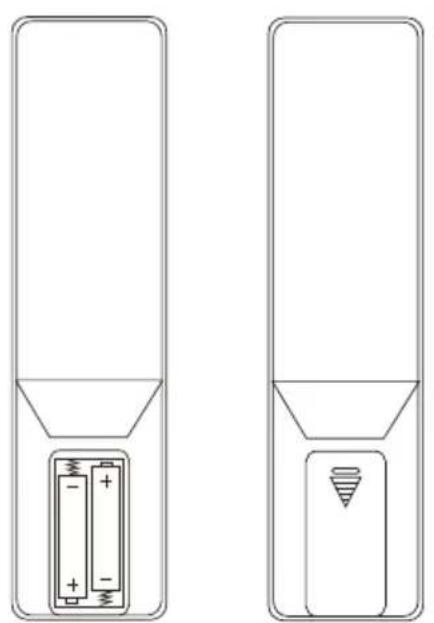
Openthebatterycompartmentcover. I t islocatedontherearoftheremotecontrolandcanbeopenedbyslidingit in the direction indicated. Two AAA batteries are included inthedelivery, t heyshouldbeinsertedinthebattery compartmentoftheremotecontrol.Observetecorrect polaritywheninsertingbatteries.Thepolarity (+ / - ) i s indicatedinthebatterycompartment.).
Settingupa n etworkconnection 4.1LAN(wirednetwork)
- ConnecttheLANconnectionofyourroutertotheLAN connection on your radio. You will require an Ethernet cable, which is not included in the delivery, to do this.
- Make sure that the router is on and working properly, and that you have an Internet connection.
- SeetheoperatinginstructionsforyourrouterregardingaproperlyfunctioningLANconnection.
- Thenproceedasdescribedinpoint5, "GettingStarted".
4.2WLAN(wirelessnetwork)
- Ensure that the router is switched on, is functioning correctly and that there is a connection to the internet.
- Activate the WLAN function of your router.
- Follow your router's operating instructions as regards the correct functioning of the WLAN connection.
- Then proceed directly as described under section 5, Gettingstarted'.
5. Gettingstarted

Note- O ptimalreception
ThisproductisequippedwithanantennaconNECTIONfor externalantennaswithcoaxialconnection.A t e l e s c o p i c antennathatenablesDAB,DAB ^+ andFMreception is included in the delivery. Alternatively, you can use anactiveorpassiveantennatoimprovereception,or accordingtoyourrequirements.
Notethefollowing:
Pull the heantennaoutcompletely.
- Werecommendyouadjusttheantennavertically to ensure o ptimalreception.
5.1Switchingthedevicemon
- Connect the power cable to a properly installed power socket.

Warning
- Only connect the product to a socket that has been approvedforthedevicetheelectricalsocketmust alwaysbeasasilyaccessible.
-
Disconnect the product from the powersupply using theon/off switch - if this is not available, unplug the power cord from the socket.
-
Switchthepoweronusingthepowerswitch.
- Wait until the radio initialisation procedure has finished.
Pressthe[POwER]buttonoswitchtheradioon.
5.2 Language and setup wizard
The first time the system starts the radio uses English. To change t his,proceedasfollows: Press [MENU] > System settings > Language > Select language
Confirmyourselectionbypressingthe[ENTER]or[OK] button.

Note
- You can choose from the following languages: English, German, Danish, Dutch, Finnish, French, Italian, Norwegian, Polish, Portuguese, Spanish, Swedish, Turkish, Czech and Slovak.
6.CareandMaintenance
- Only clean this product with a slightly damp, lint-free cloth and donotuseaggressivecleaning agents.
- If you do not use the product for a long time, turn off the device and disconnect it from the powersupply. Store it in a clean, dry place out of direct sunlight.
7.WarrantyDisclaimer
Hama GmbH & Co KG assumes no liability and provides no warrantyfordamageresultingfromimproperinstallation/ mounting,improperuseoftheproductormfromfailureo observetheoperatingsand/orsafetynotes.
8. Service and Support
Please contact Hama Product Consulting if you have any questions about this product. Hotline: +499091502-115 (German/English)
Furthersupportinformationcanbefoundhere: www.hama.com
9.RecyclingInformation
Noteonenvironmentalprotection:
AftertheimplementationoftheEuropean Directive2012/19/EUand2006/66/EUnthe nationallegalsystem,thefollowingapplies:
Electricandecronicidevicesaswellasbatteries
mustnotbedispersedofwithhouseholdwaste.Consumers are o bligebbylawtoreturnelectrcalendelectronic devicesaswellasbatteriesattheendoftheirservicelives tothepubliccollectingpointsetupforthispurposeor point of sale. Details to this are defined by the national lawoftherespectivecountry.T hissymbolontheproduct, theinstructionmanualorthepackageindicateshata productissubjecttotheseregulations.Byrecycling, reusingthematerialsorotherformsofutilisingold devices/Batteries,youare m akinganimportant contributiontoprotectingourenvironment.
10.DeclarationofConformity
Hereby, Hama GmbH & Co KG declares that the radioequipmenttype[00054891]isincompliance with Directive 2014/53/EU. The full text of the EU declarationofconformityisavailableatthefollowing internetaddress: www.hama.com->00054891->Downloads.
| Frequencyband(s) | Bluetooth:2.402- 2 .480GHz WiFi:2.412- 2 .472GHz WiFi:5.150- 5 .350GHz WiFi:5.470- 5 .725GHz |
| Maximumradio-frequency powertransmitted | Bluetooth:6dBm(EIRP)WiFi:2.4GHz/ 1 7dBm(EIRP)WiFi:5GHz/ 1 6.5dBm(EIRP) |
RestrictionsorRequirementsin
Belgium, Bulgaria, Czech Republic, Denmark, Germany, Estonia, Ireland, Greece, Spain, France, Croatia, Italy, Cyprus, Latvia, Lithuania, Luxembourg, Hungary, Malta, the Netherlands, Austria, Poland, Portugal, Romania, Slovenia, Slovakia, Finland, Sweden, United Kingdom

Note
Ifchannels36-64(frequency5.150-5.350GHz)are usedina 5-GHzWLAN, the product may only be used in closed rooms.
4.Avantlamiseenservice

Remarque
Restrictionsouexigencesen
3.TexHnka6e3oNaCHOCTN
- N3dJIeNpeIpaHa3HauYeHO ToJIbKO IJRA DOMaUHeRo npIMeHEnHr.
-BepebOTrpa3n,BlaHnI neperpeBaHna. 3KcNJIyatnpoBaTbToJbKO B CyXnx NOMeueHnax.
-HeJaBaTbIeTЯM! - He poHrTb. BepeB OT CnIbHbIX yIapOB.
- C6bIIOdaTbTexHnueckneXapakTepeNtKn.
- YnakOBky He daBaTb DeTAM: onaCHOCTb acfHKcN.
- YTNIN3npoBaTb yNaKOBky B COOTBETCTBUN C MecTHbIMN HOpMaMn.
3anpeaaetcBHOCTb N3MeHeHnB KOHCTpyKUIO. B npOTNBHomCnyaerapaHTnHbEo6raTeIbCTBa aHHyInpyIOTc.

OnachoctbnopaxKeHnTOKOM
-ⅢdJIeHeoKpbBaTb.3anpeaetc 3KcIpyaTnpoBaTbHeuCnpaBHOeUN3deJIne.
3aPpeaaetc3KcnjIyataun npHHeuCnpabHom 6JIOKe nHTAHnUNIOBpexDeHHOMKa6eJeNTaHn.
3anpeuaeTcraMoCTaTeJIbHOBbINHHTb Texnueeckooeo6CnyxNBaHneuNIpemOHtycToiCTBa. IIObIepa6ObTIOTexnueeCKOMy6CnyxBaHIO uNIpemOHtypa3peuaeTcraBBInOINHrTaTOJbKO KbAnuNupOBaHHomUepcoHaNy.

PpeynpexkdeHne-BaTapeu
3arpyxagbatapeu,co6nqdaute nojarpnoctb (+n - ) Heco6nqdeHne nojarpnoctm MoXe TcTaB npunHOB bITEKaHnMnNB3pbIbBaatapeu.
-TeTm3aIpeuaeTc3aMeHrTa6bAtapeu6e3 npncMOTpaB3pOcJIbIX.
- HenpimHeHb6aTapeupa3HbIXTNOB,pa3HbIX npOn3BODnteJnHOBBeNCTapbIe 6aTapeu BMECTe.
Bcnyae60nbIoro nepepbBa B3KcnIyatauIN 3BnEb6aTapeuN3yCTpoNCTBa.
He 3akopauHbTaKoHTaKtB6aTapei.
-06bIyHbIe6aTapeuHHe3apJxatb.
He 6pocatb 6aTapen B oroHb.
XpaHb6BaTapeB MeTe, HeNoCTynHom JnJeTeN.
4.DeIcTBnIpepeHaJauIompa60TbI

PpimueaHne
Iopno6HoeonncAHnepnIOJoxheny UNDOKne roohKunOHbHbIX BO3MOXHOCTeICMOTnPITeB C npaBKe UNDOKnoapecy:

www.hama.com->00054891->Downloads

HnctpyKcnnno3KnJnyataa
- KhoNka [OK] nnn ▷ ha nyIbTe dIscTaHcUHOHOrO ynpabHeHHaCOoTBetCTByeTKHOnKe[ENTER]Ha nepeHneHnPaHnpaDnOpnpeMHnKa.
-KhONka HanyIb TeiNCTaHcUOnHOrO y npaBNeHn coOTBeTCTByeTKHONKe[BACK]HanepdHeuHaHeu paDIOnpneMnKa.
KhONKn ▲▼Ha NyIbTe DnCTaHcUHOHOrO ynpabHeHHa COOTBeTCTByIOT NOBOPoTy BJIeBO N BnpaBO peryIaTopa nepeXoJa MexJy 3JeMeHTaMm MeHIO Ha nepeHneHnaneHnpaAnOpnpnEmHKa
Hauano pa6oTbI C nyltom nuctaHnOHHO ynpablenna
Chmnte KpbIkky OTeKa 6aTape. OHa HaxoHTCn Ha 3aHnei CTOpOHe NylbTa DnCTaHcNHOHOrO ynpabJeHn.ДЯ OTKpBTNa CdbNbTe ee B O6O3NaeHHOM HaprabNeHn. B KOMnEKT NOCTaBKN BXoJr T DBe 6aTapeA AAA, KOtOpbie nepeJ hauanom pa60tbl He6xOIMo BCTaBnTB B OTeCk 6aTape.BCTaBnJb 6aTapeu, co6HJaTe noJrphocTb. HyxHna NojraPnoctb (+/-) 6o3NaueHa B OTeKe 6aTapei.
Co3dahne ceteBoro coeHHeHn
4.1LAN(npoBoDnaCetb)
CoeHnHTe Ka6eHem pa3bem LAN mappyTu3aTopa c aHaIOrnHybIMpa3BeMOMpaDIOnpneMHNka,IyraToTO Heo6xOIMO nCNoB3OBaTB Ka6eJIb Ethernet, KOTOpBn HE BXoNT B KOMIIKeT NocTaBKn.
- Y6eIInTeCb, yTo MapUpyTn3aTOP BKNIOueH, npabINbHO pa6oTaET n eCt b NOKNIQUeHne K INHTepHety.
-ДлябессенипраBNьнйра6OTbICоeINHeHNAILOJDAItepyKOBOIDCTBONO3KcNlyatauImMapшутузаTopa.
3aTeM HEnOcpeIcTBeHNO IepexoIte K BbINOJIHeHIO DeIcTBn, OINcaHHbIX B pa3JeIe 5. «BbOd B EKcNJIyatauHIO»
4.2WLAN(6ecnpoBODhaCetb)
- Y6eIntecb, yTO MapuPytn3aTOp BKNHoueH, npaBnIbHo pa6oTaET n eCt b NOKJIHoueHne K INHTepHety.
- AktiBupyTe ΦyHKuHo WLAN MapUpyTn3aTopa.
-ДляобсесеняправиьногаразбтбоeннehWAIONco6JIIOdaItepykoBOIDCTBONO3KcNlyaatauImMapшутузатopa. - 3aTeM nepexoNTe K BblIOJIHeHnIO DeICTBnI, ONICAHbIX B pa3dene 5. «BBoD B 3KcNlpyatauHIO»
5.BBODB 3 Kcnnyataaio

Yka3aHHe—OnTmMaJIbHbIINpneM
JaHHOe3dEneOcHaueHopa3bemOMdIaNOKJIUChEHNBAHEuHHeaHTeHHbICp a3bemOMdIaKOaKcnaIbHOrO Ka6JIa. B KOMnJIeKT NoCTaBKnBXoINTOXoJAATeNeCKOnuYeCKaAHTeHHa, oBeCneuBaHuaapnEmDAB,DAB+uFM.BKaueCTBeaJIbTepHaTnBBIMOXHONcNoJIb30BaTbAKTNBHHyIOUNIaCCNBHyOaHTeHHy,CnocO6HyIOBbICtMbMOHOCbTpNnHMaEMO CnHaJauJInyDOBLeTBOpUTbKOHKeTbIeNtpe6HoCTn.
BHHMaHHe!
-BcerdanaOpJHocTbIpaKnaIbIBaIteaHTeHHy.
-ДяontmamalbHOrO n pueMaMbipeKomeHnyempacnoJaTaB aHTeHHy BepTKaJIbHO.
5.1BkIIOueHne
-ПолсоeинHTe ceTeBOI Ka6eIb K HаДлжkaUIM O6pa3OMyCTaHOBJIeHHOHyPO3eTKe.

PpeynpexdneHnE
-ПиборраЗpeшаetсяндкючатьтобк K COOTBETCTByIOUeHpo3ETKe эл ektpocTe. Po3etKa эл ektpocTeДоЖнha 6bITb JERKOdoCTynHa.
- OTKIIOUaHTeYCTPOINCTBOC N OMOUbIOBbIKIOuTeJIa 3JIeKTPoCeTn, a npn erO OTCyTCTBn BbITaUNTe IpOBOD n3pO3eTKN.
BkIIOUCHITe6JIOKNHTaHnA.
-IOxJNTecb, noka 3aBepuNTcHnHnuaJIaI3auJpaINo.
- HaxMMTeKHONky[POWER],YTO6bIBKJIIOHTb paHIOnpnEMnK. (HaxKatne IeBOro peryIaTopa.)

PpmeaHne-PpnpepBbMKJIOeHN
-ПрипенивовьключениabTomatMuYeCKn3aNyckaetcmaCTepHacTpoiKu(SetupWizard).
-MactepHAcTpoKINBbINOJHReTcHaaHrNnCKOM 3bIke.
Pa60Ty MaCTepa MoXHO npOnyCTnTb n 3aTeM BHOBb Bbl3BaTbeRo.
5.23bIKMaCTepHaCTpoKn
Pn nepBOM 3anycke paAnonpneMHnka nCNoIb3yeTc
aHrlnckn a3bIK. TTo6bl N3MeHntb a3bIK, BbINOHNITE
yKa3aHHbte Hxke DeNCTBnR.
Bb6epntenocJeIOBaTeJbHo[MENU]>
Systemeinstellungen (CnCTemHbie HaCTpoiKn) > Sprache
(3bIK) > Sprache auswahlen (Bb6paTb a3bIK)
YTo6bI NOiTBePdNtB CBOI BbI6Op, HaxMnTe KHOnKy [ENTER] nIIN[OK].

PpMueaHne
HaBbI6OpDcTynHbICJeHyUoUe3bIKn: anrnnckn, HemeKn, DaTCKn, rOJIaHdCKn, mHckn, ppaHcy3ckn, nTaJIbHckn, HopBeJckn, noIbckn, npTyraJIbckn, nCnaHckn, WBeJckn, typeckn, Yewckan C nobauKa
6.YxOuTeXo6cIyXnBaHne
- YNCTky n3dEJIINI pON3BODNTb TOnbKO 6e3BOPCOBOI CnerKabJaxHOHcAInΦeTKo.3aPpeaaetcnpmHeYr arpeccNBbIeUncTAAuNEcpeDCTBa.
- Ecnnn3dneHHeHcNoJb3yeTcHAnpOToXeHNn DOJIrTO BpeMeHn, BblKnIOHTe eRO n OTKlIOHTe OT cETn. XpaHnte eRO B YIcTOM cyXOM MeCTe, HeIOCTyHOM dIra nprMoTO COJIHeCHOro I3JIyEHHa.
7.0Tka3OTrapaHTmHbIXo6raTeIbCTB
KomnaHamaGmbH&CoKGHe Hecet OTBeTCTBHeHOCTb3ayuep6,B03HNKwINBCJeDCTBne He npabNlboHOroMOHTaxa,NoKIOUeHnI NcNoJIb3OBAHnI N3dEJIHnI He No Ha3NaueHnO,a TaKKe BCJeDCTBHeHec6JIIOHeHnIHCTpyKUnnO3KcnIyataun INTEXHKn630NAChOCTn.
8.OTdTeXo6cnyKuBaHn
IobOpocampeMoHTa IIN3aMeHbIHeNCpabHBIX
I3JeNIO6paauTecb K pOdaBcy NnB CepBuChyIO
cLyK6y KOMNaHn Hama.
FopayannnnoTdeIaTeXo6cnyxNBAHNA+499091502-115(hemeKn,aHrnnckn)
Ponpo6HeecMoTpuTe3decb:ww.hama.com
9.IHCTpyKuINnoyTuIN3aUN OxpaHaOKpyKaIOSeiCpeBbI:

CMOMeHTa nepexoHa haunohJbHOrO 3aKHOdaTeJIbCTBaHaBcPoNecknEHopMaTINBbl 2012/19/EUn2006/66/EUdEiCTBtEnbHo CJeNyUooe:3JeKTPuueckmEn 3JeKTPoHHbIe
Pn6bopbl, a TaKke 6aTape3aPeuaTeC yTNIN3HPOBaTb C O6bIuHbIM MycOpOM. IOTpe6ntel, corlaacHO 3aKOHy, o6raah YtININ3HPOBaTb 3NeKTPnueCKne n 3NeKTPoHHbIe Pn6bOpbl, a TaKxe 6bAtpen n akKymyJrTObpbl NocLe INX NCIOJIb3OBAHnB CNEUaNBHpEJaHa3NaHeHHbIXNIArTOrOyHKtaxC60pa, Jn6o B NyHKtax npodaxn. DeTaIbHnapeIaMeHTaunr 3TxN Tpe6OBAHmOcUYIeCTBJIeTCRAOTBeTCTByIOUmmMeCTHBIM 3aKOHdATEJIbCTBOM. Heo6xoIMMoCTb COJIIOJeHn DaHNbIX PpeINsCaHIno6O3HaayeTCAO6bIM3HaYKOMHaN3DeJnn, HNCTpyKUnNO3KnlyatauunnInnynakOBKe.Pnp nepepa6OTke, NOBTopHomncNoIb3OBAHmMaTePmaJIOBUNI npNDpyroFOpMeyTIuIN3aun6bIBwXb y NOTpe6NeHn Pnp6OpOBBbINOMor aeTeox paneokpykaOnueCpeDb.I COOTBeTCTBmNcPi peDnSCAHmIMNo6pauneHIOc 6bTaapeMn, B TepMaHm N BiIeHa3BaHHbIe HopMaTINBbl DeiCTByOT dIy TynIN3aun G batape n akKymyJrTOpOB.
10.ДeКлараци npOn3BODuTeTЯ

HaCTOaUMKOMnHaHamaGmbHcC0KG 3aBnEeT,TO p aAnoo6OpyDoBaHneTu na [00054891]OTBeueaTpe6oBaHnMaMnIupeKTNBbl
2014/53/EC.C noHbIM TeKCTOM deKnapaun O COOTBETCTBnITpe6ObaHnREMCMOxHoo3HaKOMntbCra 3decb:ww.hama.com>00054891->Downloads.
Hana30H/naana30HbI yactOT
Bluetooth:2.402-2.480GHz
WiFi:2.412-2.472GHz
WiFi:5.150-5.350GHz
WiFi:5.470-5.725GHz
MaKcImaJIbHaI n3JvuaeMaJaMOuHOCt b
Bluetooth:6dBm(EIRP)
WiFi:2.4GHz/17dBm(EIRP)
WiFi:5GHz/16.5dBm(EIRP)
OrpaHueHnIITpe6oBaHnB
Bebnra,BoIrapna,YeIckaPecny6nka,Danra,
FepMaHnra,3ctOnnra,NpIaNnra,FpeuNa,NCnAnna,
ΦpaHnra,XopBaTnra,UtaNna,Knp,LatBnra,LntBa,
JIOKcEm6bypr,Behrpna,MalbTa,HndeplAndbi,ABCTpnra,
PiNbsha,IopTyraNna,PymbHnra,CloBeHnra,CNoBaKnra,
PhiHnAHHnra,UWeuNa,Benko6pTuHaHnra

PpmeaHne
PpncnoB3OBAHnKaHaOB36-64(actota 5,150—5,350TgU)B6ecnpoBoHOn cetu (WLAN)c qactotoi 5TTu n3dJIne pa3peSeHo npImeHrToJbKO B3akpbItbIXNOMeueHnx.
Uzaktankumandayidevreyealma
8. Services i support
Daca avei intrebari adresati-va la Hama consultantapentruproduse.
Hotline: +499091502-115(Ger/Ang)
The Spotify software is subject to third party licenses found here: www.spotify.com/connect/third-party-licenses
TheBluetooth® word mark and logos are registered trademarks owned by Bluetooth SIG, Inc. and any use of such marks by Hama GmbH & Co KG is under license. Other trademarks and trade names are t hoseoftheirrespectiveowners.
All listed brands are trademarks of the corresponding companies. Errors and omissions excepted, and subject to technical changes. Our general terms of delivery and payment are applied.


- ControlsandDisplays
- Radio
- Front
- Rear
- RemoteControl
- Note
- Importantnote- O peratinginstructions:
- 1.ExplanationofWarningSymbolsandNotes
- Warning
- RiskofElectricshock
- 2.PackageContents
- 3.SafetyNotes
- Warning-B batteries:
- 4.Beforestarting
- NotesonUse
- Activatingtheremotecontrol
- Settingupa n etworkconnection 4.1LAN(wirednetwork)
- 4.2WLAN(wirelessnetwork)
- Gettingstarted
- Note- O ptimalreception
- 5.1Switchingthedevicemon
- Language and setup wizard
- 6.CareandMaintenance
- 7.WarrantyDisclaimer
- Service and Support
- 9.RecyclingInformation
- Noteonenvironmentalprotection:
- 10.DeclarationofConformity
- RestrictionsorRequirementsin
- 4.Avantlamiseenservice
- Remarque
- Restrictionsouexigencesen
- 3.TexHnka6e3oNaCHOCTN
- OnachoctbnopaxKeHnTOKOM
- PpeynpexkdeHne-BaTapeu
- 4.DeIcTBnIpepeHaJauIompa60TbI
- PpimueaHne
- HnctpyKcnnno3KnJnyataa
- Hauano pa6oTbI C nyltom nuctaHnOHHO ynpablenna
- Co3dahne ceteBoro coeHHeHn
- 4.1LAN(npoBoDnaCetb)
- 4.2WLAN(6ecnpoBODhaCetb)
- 5.BBODB 3 Kcnnyataaio
- Yka3aHHe—OnTmMaJIbHbIINpneM
- 5.1BkIIOueHne
- PpeynpexdneHnE
- PpmeaHne-PpnpepBbMKJIOeHN
- 5.23bIKMaCTepHaCTpoKn
- PpMueaHne
- 6.YxOuTeXo6cIyXnBaHne
- 7.0Tka3OTrapaHTmHbIXo6raTeIbCTB
- 8.OTdTeXo6cnyKuBaHn
- 9.IHCTpyKuINnoyTuIN3aUN OxpaHaOKpyKaIOSeiCpeBbI:
- 10.ДeКлараци npOn3BODuTeTЯ
- OrpaHueHnIITpe6oBaHnB
- PpmeaHne
- Uzaktankumandayidevreyealma
- Services i support
- The Spotify software is subject to third party licenses found here: www.spotify.com/connect/third-party-licenses
Brand : HAMA
Model : DIR3505MSCBT
Category : Media player