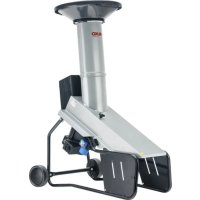
USER MANUAL Easy Crush MH 2810 AL-KO
natural_image
Line drawing of a mechanical device with wheels and a top component (no text or symbols)
natural_image
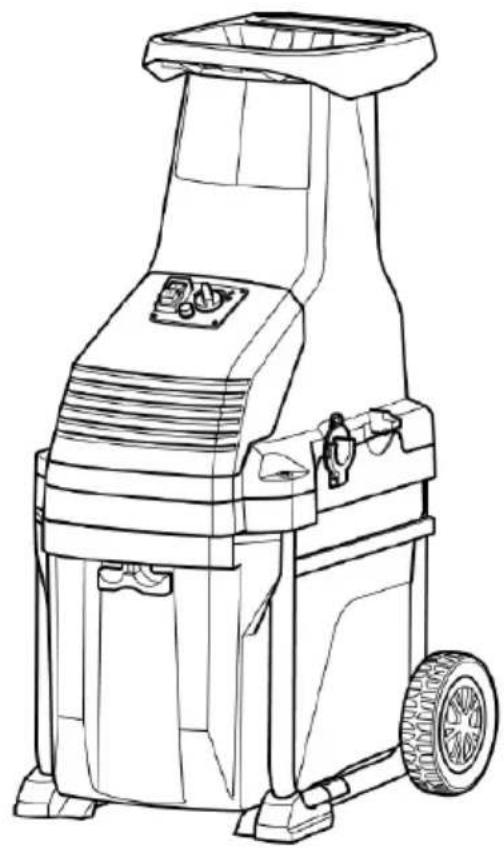
Line drawing of a mechanical device with wheels and control panel (no text or symbols)






Inhaltsverzeichnis
Deutsch 8
English....18
Nederlands 28
Français....39
Español 50
Italiano....61
Slovenščina 72
Hrvatski....82
Polski....92
Česky 103
Slovenská 113
Magyarul....123
Dansk 133
Svensk....143
Norsk 153
Suomi 163
Lietuvių 173
Latviešu 183
Русский....193
Україна....205
© 2021
AL-KO KOBER GROUP Kötz, Germany
This documentation or excerpts therefrom may not be reproduced or disclosed to third parties without the express permission of the AL-KO KOBER GROUP.
01
natural_image
Technical line drawing of a mechanical component with no visible text or symbols



| MH 2810 LH 2810 | |
 | 113872 113873 | |
 | 230 V – 240 V AC / 50 Hz 230 V – 240 V AC / 50 Hz |
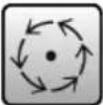 | 2850 min^-1 | 46 min^-1 |
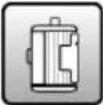 | 2800 W (P40*) 2800 W (P40*) | |
 | 40 mm 42 mm | |
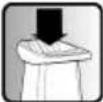 | 125 kg/h 80 kg/h | |
 | 25 kg 29 kg | |
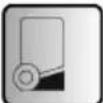 | 48 | 48 | | |
 | | | | |
 | L_wA = 102 dB(A) K = 2 dB(A) | L_wA = 90 dB(A) K = 2 dB(A) |
 | L_pA = 93,9 dB(A) K = 3 dB(A) | L_pA = 77,8 dB(A) K = 3 dB(A) |
* refer to section 3.1 for description of P40.
www.al-ko.com/service-contacts
14 GARANTIE
1 Special safety instructions .... 18
2 About these operating instructions ..... 18
2.1 Symbols on the title page.... 18
2.2 Legends and signal words ...... 19
3 Product description 19
3.1 Intended use 19
3.2 Possible foreseeable misuse .... 19
3.3 Residual risks...... 19
3.4 Symbols on the machine.... 19
3.5 Safety and protective devices ..... 20
3.6 Electrical requirements.... 20
3.6.1 Mains connection.... 20
3.6.2 Mains cable 20
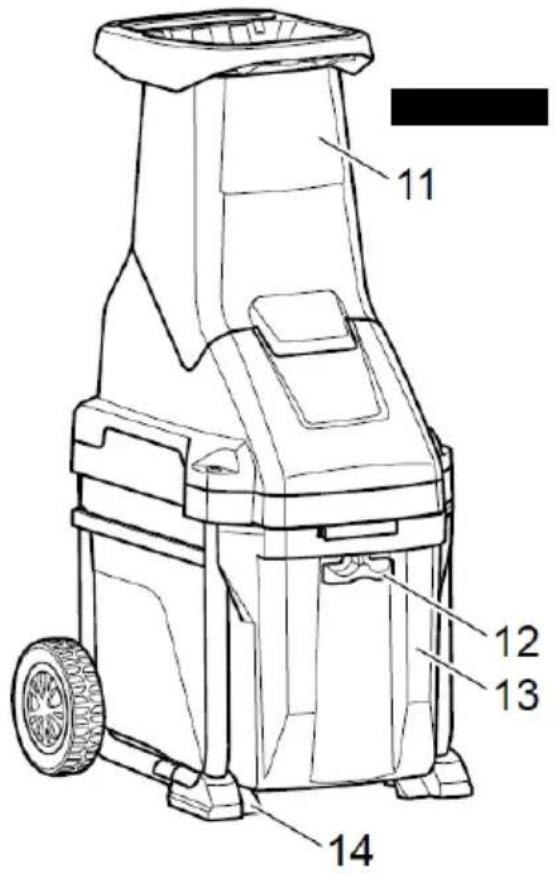
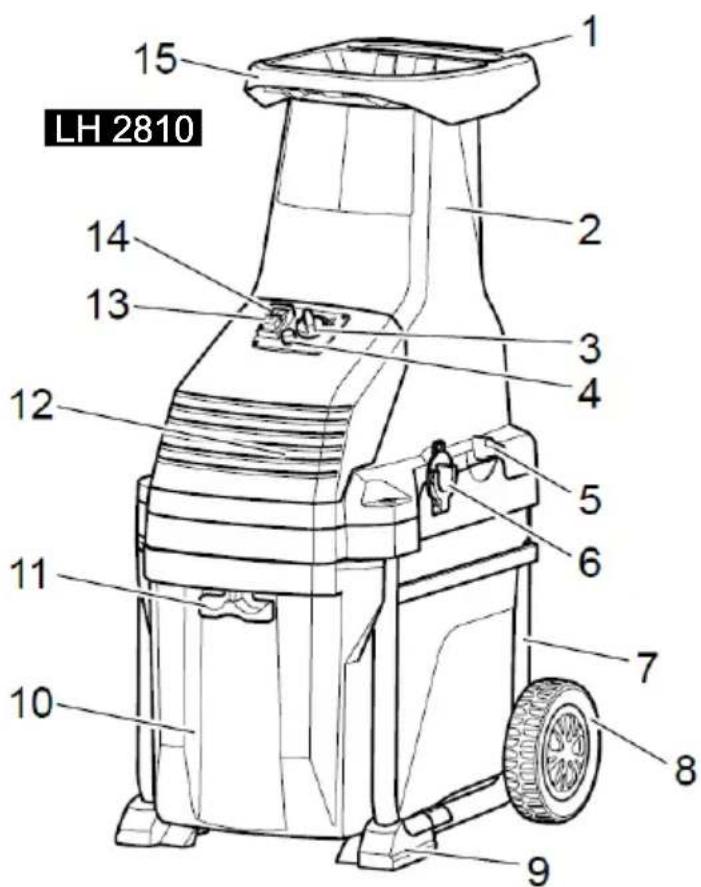
3.7 Product overview (01) 21
3.8 Scope of supply.... 21
4 Safety instructions 21
5 Assembly 22
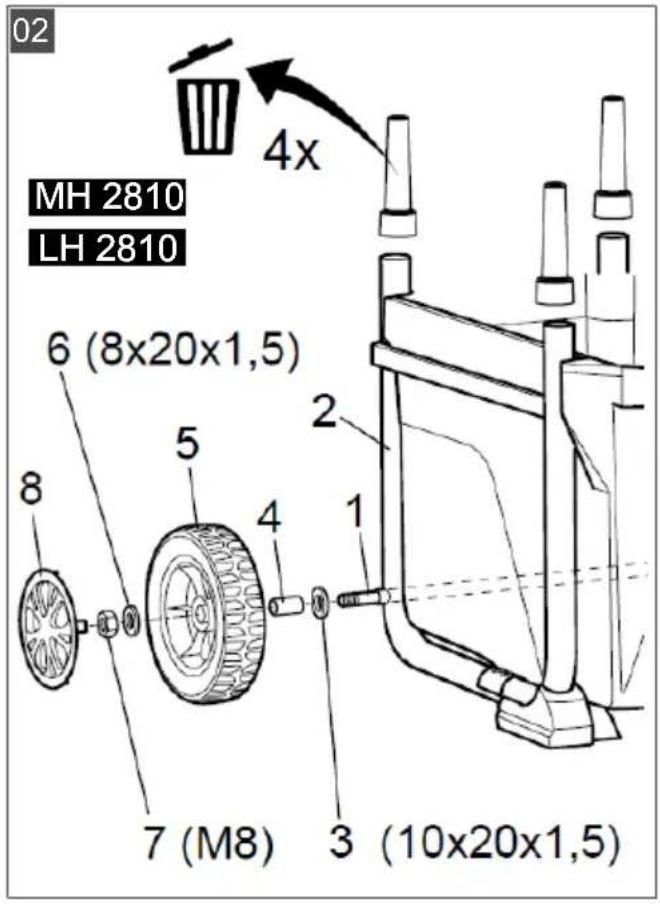
5.1 Mounting the transport wheels (02).... 22
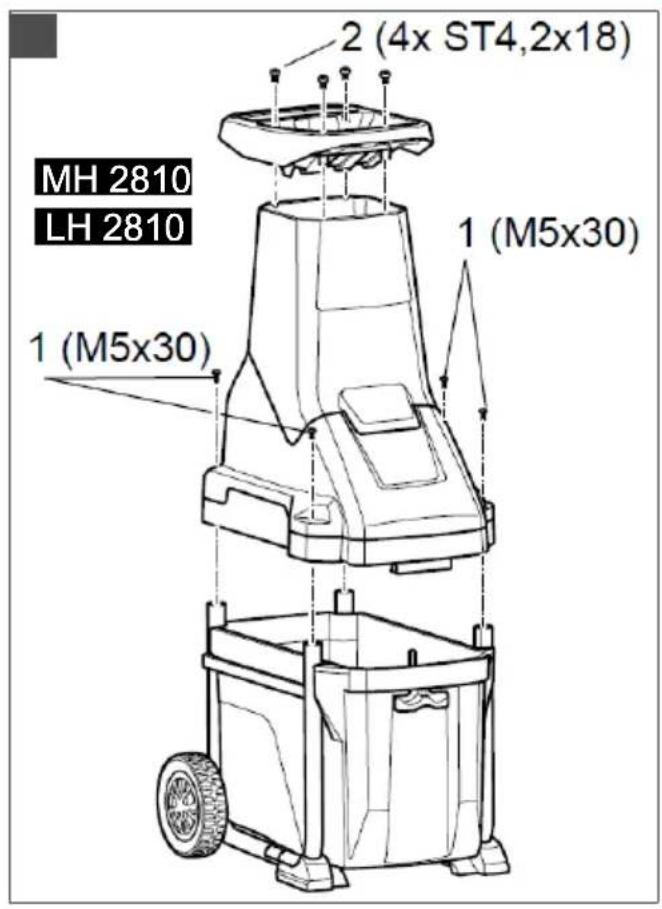
5.2 Fitting shredder upper section with cutting unit and motor unit (03) ..... 23
5.3 Fitting the hopper (03).... 23
6 Start-up 23
7 Operation 23
7.1 Connecting the mains plug (04/05) .... 23
7.2 Switching on the motor (06) 23
7.3 Switching off the motor (06) 23
7.4 Clearing a cutting disk/cutting drum blockage.... 23
7.5 Emptying the collector box (11/12)..... 24
8 Maintenance and care 24
8.1 Shredder blades (MH 2810).... 24
8.2 Replacing/turning the shredder blades (MH 2810) (11/12) ...... 24
8.3 Re-adjusting the counterplate (LH 2810) (07).... 25
8.4 Care 25
9 Storage 25
10 Help in case of malfunctions 25
11 Transport.... 27
12 Disposal.... 27
13 After-Sales / Service.... 27
14 Guarantee 27
1 SPECIAL SAFETY INSTRUCTIONS
This appliance can be used by children of 8 years and older and by persons with reduced physical, sensory or mental capabilities, or those lacking experience and knowledge, if they are supervised or have been instructed with regard to the safe use of the appliance and the ensuing risks. Children must not be allowed to play with the appliance. Cleaning and maintenance must not be carried out by children without supervision.
People with very strong and complex restrictions may have needs that exceed the instructions described here.
2 ABOUT THESE OPERATING INSTRUCTIONS
The German version is the original operating instructions. All additional language versions are translations of the original operating instructions.
■ Always safeguard these operating instructions so that they can be consulted if you need any information about the appliance.
■ Only pass on the appliance to other persons together with these operating instructions.
■ Comply with the safety and warning information in these operating instructions.
2.1 Symbols on the title page
Symbol Meaning

It is essential to read through these operating instructions carefully before start-up. This is essential for safe working and trouble-free handling.

Operating instructions
Symbol Meaning

To avoid electric shock, do not damage or cut the power cable!
2.2 Legends and signal words
⚠️ DANGER! Denotes an imminently dangerous situation which will result in fatal or serious injury if not avoided.
WARNING! Denotes a potentially dangerous situation which can result in fatal or serious injury if not avoided.
CAUTION! Denotes a potentially dangerous situation which can result in minor or moderate injury if not avoided.
IMPORTANT! Denotes a situation which can result in material damage if not avoided.
NOTE Special instructions for ease of understanding and handling.
3 PRODUCT DESCRIPTION
This documentation describes the following versions of the Easy Crush shredder:
■ Easy Crush MH 2810 Blade Shredder
■ Easy Crush LH 2810 Drum Shredder
3.1 Intended use
The machine is intended for the shredding of twigs and branches from trees and bushes with a maximum diameter of 40 mm (MH 2810) or 42 mm (LH 2810).
This trailer is intended solely for use in non-commercial applications. Any other use (as well as unauthorised conversions or add-ons) are regarded as contrary to the intended use and will result in exclusion of the warranty as well as loss of conformity (CE mark); the manufacturer will thus decline any responsibility for damage and/or injury suffered by the user or third parties.
P40: continuous operation with interruptions
The appliance can be operated continuously but with regular interruptions at high loads. If it is operated for too long at high loads, the overload protection switches the appliance off. The appliance has been tested and approved for operation at full load for 40 s followed by an idling time of 60 s.
3.2 Possible foreseeable misuse
■ The machine is not intended for commercial use or in agriculture and forestry.
■ Do not use the machine in rainy weather.
■ The safety devices on the machine must not be dismantled or bypassed.
3.3 Residual risks
Even during correct use of the appliance, there is always a certain residual risk that cannot be excluded. Depending on the use, the following potential risks can be derived from the type and construction of the appliance:
Injuries from flying cuttings
■ Injuries due to inhaling cutting particles
■ Injuries due to reaching into the shredder mechanism
■ Injuries due to the machine tipping over
3.4 Symbols on the machine
Symbol Meaning

Pay special attention when handling this product!
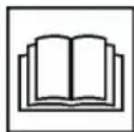
Read the operating instructions before starting operation!
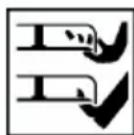
Keep hands and feet away from the shredder mechanism!
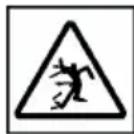
Keep other people out of the danger area!
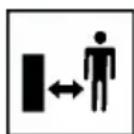
Maintain a safety distance!
Always disconnect the machine from the mains before maintenance or if the cable is damaged or cut.

Wear protective glasses and ear defenders.
Symbol Meaning

Wear gloves.
3.5 Safety and protective devices
WARNING! Risk of injury. Defective and disabled safety and protective devices can result in serious injury.
■ Have any defective safety and protective devices repaired.
■ Never disable safety and protective devices.
Motor protection switch
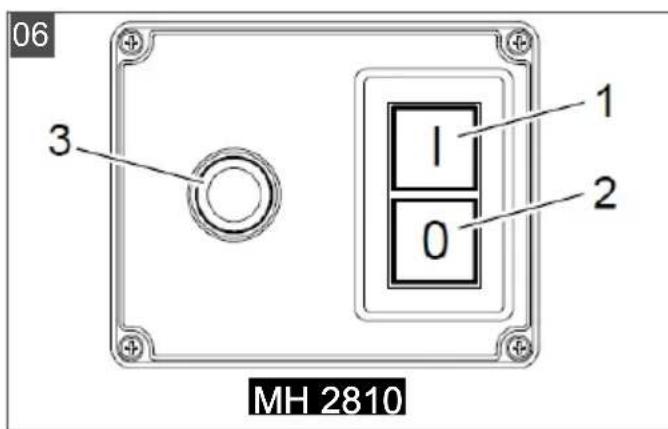
The motor protection switch disconnects in the case of overload. Hereby, switch (06/3) pops out of the control panel. The switch can be pushed back in again after a cooling-down phase of approx. 5 minutes, and the machine can be switched on. If the switch does not remain by itself in the pressed position, extend the cooling-down phase. If the problem continues to exist, take the machine to a specialist workshop.
Restarting protection
For your safety, the machine is fitted with a 0 voltage switch, which automatically switches off the machine in the case of a power interruption. Once the voltage supply is re-established, the machine does not restart automatically. Press the ON switch (06/1) to restart.
Protection switch on the shredder upper section (MH 2810)
The shredder upper section is equipped with a protection switch, which switches off if the locking screw (01/2) is loosened. The motor is thus prevented from unintentional starting.
The machine can only be switched on again when the shredder upper section (01/11) has been fitted and the locking screw tightened.
3.6 Electrical requirements
3.6.1 Mains connection
⚠️ DANGER! Risk of electric shock if the log splitter is operated without residual current circuit breaker. Operation of the appliance without residual current circuit breaker in the mains connection can result in serious injuries or even death due to electric shock.
■ Before connecting the appliance, check whether the mains connection has a residual current circuit breaker for a maximum leakage current of 0.03 A.
If you cannot be sure that a residual current circuit breaker is installed: Use an additional portable residual current device with switched PE conductor.
■ Mains voltage, see "Technical data". Do not use any other mains voltage!
Only for Great Britain (240 V)!
This machine must be earth!
■ Never use a faulty power cable!
- Check the power cable regularly for signs of wear and tear!
Wiring instructions:
When wiring the English 3 pin plug, please follow the instruction according to the colour coding as shown below:
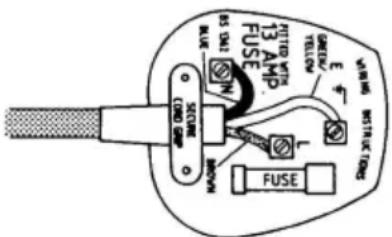
Green and yellow to terminal
E Earth
Brown to terminal
L Live
Blue to terminal
N Neutral
3.6.2 Mains cable
WARNING! Risk of injury from electric shock. A defective mains cable can result in serious injuries due to electric shock.
■ Make sure that the mains cable is not damaged or severed.
Use only rubber-sheathed cables of quality H05RN-F according to DIN 57282, Part 817 / VDE 0282, Part 817 with a rubber-coated plug connector and a conductor cross section of at least 1.5mm^2 (230 V: 3× 1.5mm^2 , 400 V: 5× 1.5mm^2 ). The cable must not be of a lighter type.
For the United Kingdom only: rubber-sheathed cables of type BS 6500 (1984), Table 16 PVC 3 core flex, 300/500 V HOS VV-F with a rubber-coated plug connector and a 13 A fuse.
The maximum permissible cable length is 50 m. A longer cable impairs the motor power and hence the performance and function of the log splitter.
■ Mains cable, mains plug and coupling socket must be undamaged. A defective mains cable (e.g. with cracks/fractures, cuts, crushed or kinked points in the insulation) must not be used.
- Check the condition of your mains cable each time prior to use.
- Protect the mains cable from heat and sharp edges. Do not expose plug connectors to moisture.
- Do not pull on the mains cable to remove the mains plug from the socket.
If the mains cable is damaged, immediately disconnect it from the mains.
■ Repairs to the mains cable, mains plug and coupling socket may only be carried out by qualified electricians.
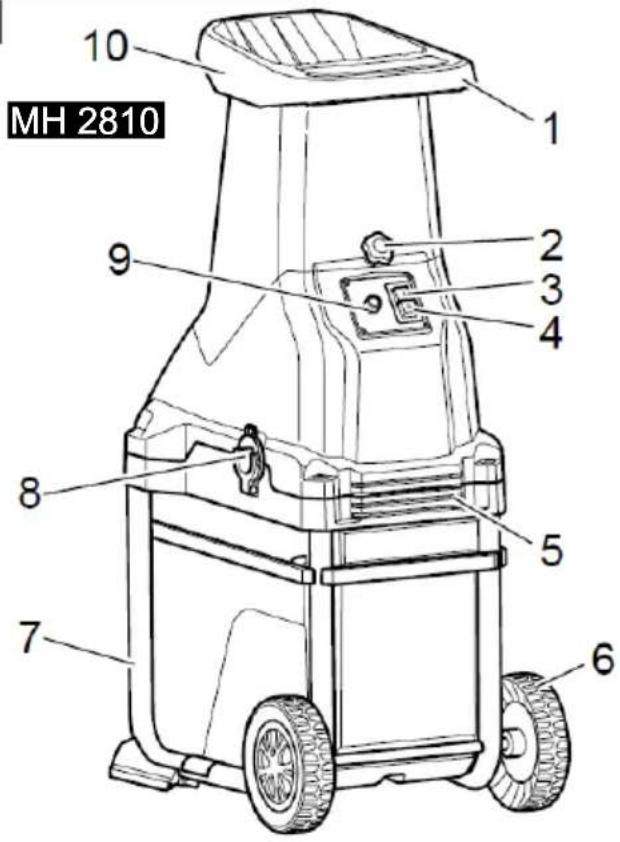
3.7 Product overview (01)
MH 2810
| No. Component |
| 1 Handle |
| 2 Locking screw |
| 3 On-switch |
| 4 Off-switch |
| 5 Venting slots |
| 6 Transport wheels |
| 7 Base |
| 8 Socket |
| 9 Switch for overload protection |
| No. Component |
| 10 Hopper |
| 11 Upper shredder part with feed chute |
| 12 Grass catcher lock |
| 13 Fangbox |
| 14 Feet |
LH 2810
| No. Component |
| 1 Handle |
| 2 Feed chute |
| 3 Direction of rotation selector |
| 4 Switch for overload protection |
| 5 Adjusting screw for counterplate |
| 6 Socket |
| 7 Base |
| 8 Transport wheels |
| 9 Feet |
| 10 Fangbox |
| 11 Grass catcher lock |
| 12 Venting slots |
| 13 Off-switch |
| 14 On-switch |
| 15 Hopper |
3.8 Scope of supply
The scope of supply of the machine comprises the following components:
■ Base with collector box
■ Shredder upper section with shredder mechanism and motor
Hopper
■ Two transport wheels with wheel caps
■ Bag with assembly parts and operating instructions
4 SAFETY INSTRUCTIONS
Operator:
■ Persons under the influence of alcohol, drugs or medication are not allowed to use the machine.
Personal protective equipment:
■ Wear clothing and protective equipment in accordance with the regulations in order to avoid injuries to the eyes, as well as to avoid hearing impairment.
The clothing must be appropriate (tightly fitting) and must not restrict movements. If you have long hair, it is essential to wear a hair net. The personal protective equipment comprises:
Ear protection
- Protective glasses
Work gloves
Safety shoes
Long trousers
Working area:
No further persons, children or animals may be in the working area of the shredder.
- Keep the working area free from material to be shredded and other objects – danger of stumbling.
The user of the machine is responsible for accidents involving other persons or their property.
■ Ensure good lighting of the working area.
Operating times:
■ When operating in residential areas, observe country-specific and communally permitted operating times according to the regulations on noise pollution.
■ Work with the machine in daylight or with good lighting only.
Operation:
- Do not reach into the hopper or feed chute during operation!
The cutting disk (MH 2810) or cutting drum (LH 2810) runs on after the machine has been switched off!
■ Only put the machine into operation when assembly has been completed.
■ Always perform a visible inspection prior to using the machine. The machine must be in a safe operating condition.
■ Never work alone.
- Immediately renew damaged or worn parts.
■ Only use the machine if it is in the technical condition stipulated by the manufacturer.
- Do not undertake shredding work in the rain, snow, stormy weather or during thunder-
storms (danger of lightning!). Do not use the shredder in wet or damp surroundings.
- Do not deactivate safety and/or protective devices on the machine.
■ Always ensure that the machine is stable before starting work.
■ Never transport the shredder with the motor running.
■ Never transport the shredder with open or unlocked shredder upper section.
Before moving the shredder, switch off the motor, wait for the cutting disk (MH 2810) or cutting drum (LH 2810) to come to a standstill and disconnect the machine from the mains power supply.
■ When moving the shredder, transport it only with its handle (01/1).
■ Always ensure a stable stance when working. Do not bend forward too far.
- Do not feed the shredder from an elevated position.
■ Always disconnect the shredder from the mains power supply when not in use.
In the event of a malfunction or accident:
- Immediately disconnect the mains plug from the mains if the mains cable has been damaged or severed!
If a foreign object is drawn in or in the event of unusual noises or vibrations, immediately switch off the shredder and disconnect it from the mains. Then proceed as follows:
- Inspect the damage.
■ Refasten loose parts, e.g. tighten screws.
- Have all damaged parts exchanged or repaired by our customer service.
5 ASSEMBLY
CAUTION! Danger of injury if the machine is incomplete! Incomplete machines can lead to injuries and damage to the machine!
- Do not operate the machine until it has been fully assembled.
5.1 Mounting the transport wheels (02)
- Slide the wheel shaft (02/1) into the base (02/2).
- Next, slide a large 10x20x1.5 washer (02/3) and the bushing (02/4) onto the shaft (02/1).
-
Afterwards, slide the transport wheel (02/5) onto the bushing (02/4).
-
Slide the medium 8x20x1.5 washer (02/6) on-to the thread and secure the transport wheel using an M8 nut (02/7).
- Finally, press the wheel cap (02/8) onto the transport wheel (02/5).
- Fit the opposite transport wheel in the same sequence.
5.2 Fitting shredder upper section with cutting unit and motor unit (03)
- Lift the shredder upper section onto the base and secure it using M5x30 bolts (03/1) and washers 5x10x1.
5.3 Fitting the hopper (03)
- Place the hopper onto the shredder upper section and secure it using ST 4.2x18 bolts (03/2).
6 START-UP
■ Comply with working time regulations in force in your country.
- Do not route the extension lead over the hopper or under the discharge opening.
■ The shredder can only be started when the collector box is locked.
- Check the hopper and shredder upper section (MH 2810) or hopper (LH 2810) for obstructions before starting the machine.
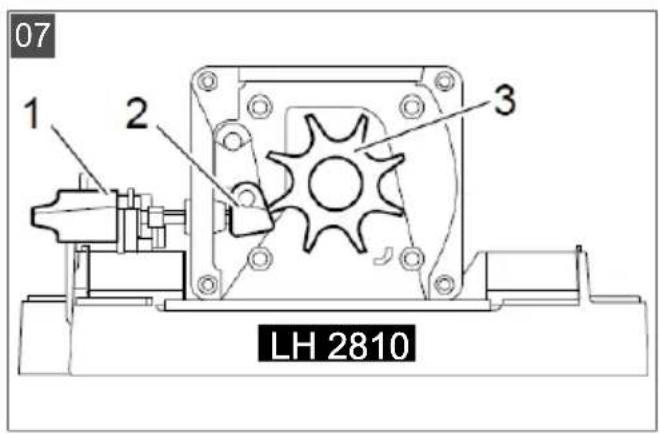
LH 2810: The counterplate (07/2) is factory-calibrated and must not be adjusted during initial start-up.
■ Do not use the shredder if you are:
Tired
Unwell
■ Under the influence of alcohol, medicines and drugs
⚠️ DANGER! Danger of injury from damaged components! Damaged components can lead to serious and even fatal injuries!
■ Before putting into operation, carry out a visual inspection and check the components for function.
WARNING! Risk of injury due to negligence! Negligence in handling the machine can result in serious injuries!
■ Only use the shredder on firm, level ground and in a stable position. Do not tilt or incline the machine during operation.
7 OPERATION
WARNING! Danger of serious injury!
There is a risk of serious injuries for children, persons with impaired physical, sensory or mental abilities, persons with insufficient knowledge and experience and persons who are not familiar with the operating instructions.
■ Never permit the above persons to use the machine.
■ Always observe the local regulations concerning the age limit for users.
7.1 Connecting the mains plug (04/05)
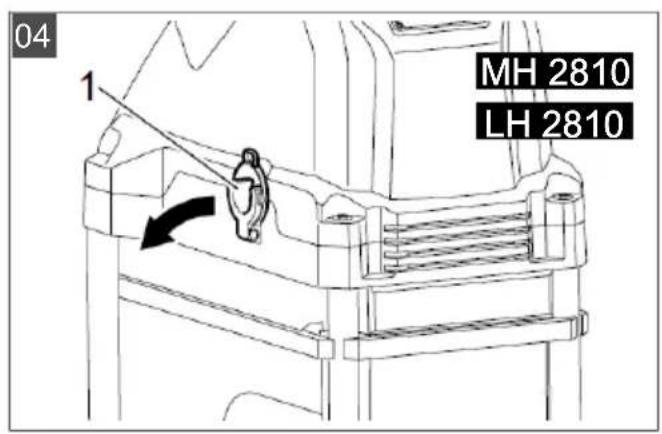
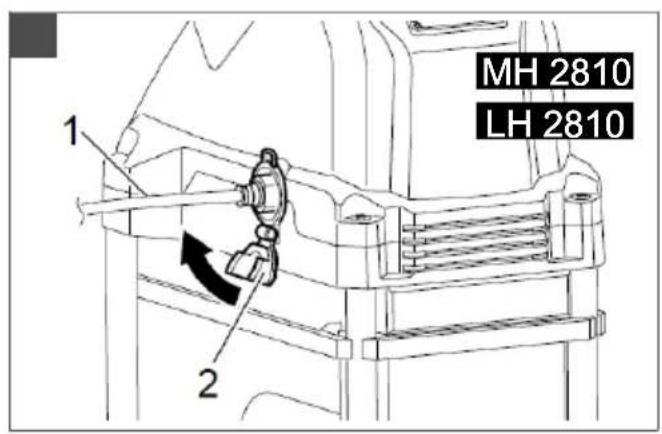
- Push down the cable lock (04/1) and insert the extension lead (05/1) into the socket of the shredder.
- Check that the extension lead is connected securely.
- Then connect the extension lead to the mains voltage.
7.2 Switching on the motor (06)
MH 2810
- Press the ON switch (06/1).
LH 2810
Normal operation:
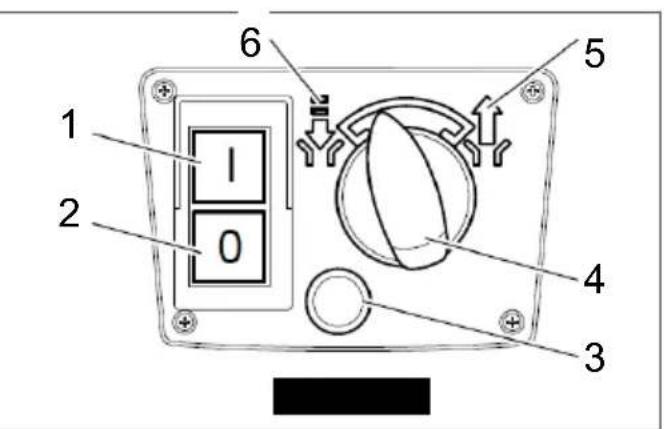
- Turn the direction of rotation switch (06/4) of the cutting drum to the left (06/6).
- Then press the ON switch (06/1).
- The material to be shredded is pulled in.
Reverse:
See see chapter 7.4 "Clearing a cutting disk/cutting drum blockage", page 23.
7.3 Switching off the motor (06)
- Press the OFF switch (06/2) to switch the motor off.
CAUTION! Damage to the machine due to improper operation! Incorrect handling can result in machine damage!
■ Only feed material to be shredded after the machine has been switched on.
- Do not feed material to be shredded after the machine has been switched off.
7.4 Clearing a cutting disk/cutting drum blockage
Clearing a cutting disk blockage (MH 2810) (09/10)
-
Switch off the shredder.
-
Disconnect the machine from the mains power supply.
- Loosen locking screw (09/1) and remove shredder upper section (09/2).
- Remove the material causing the blockage.
- Check cutting disk and shredder blade (10/3) for damage.
- Position the shredder upper section (09/2) and tighten the locking screw (09/1) again.
- Reconnect the machine to the mains power supply.
- Switch on the shredder again.

CAUTION! Danger of crushing when
opening and closing the housing! Hand and
other injuries may occur!
■ Beware of your hands and fingers when opening and closing the housing.
Clearing a cutting drum blockage (LH 2810) (06/08)
- Switch off the shredder.
- Turn direction of rotation switch (06/4) to the right (06/5) and press the ON switch (06/1) (reverse). The material to be shredded should now be released upwards.
- Switch off the machine and wait for the cutting drum to come to a standstill.
- Turn the direction of rotation switch (06/4) to the left (06/6) again.
- Switch on the shredder again.
If the material to be shredded is not released upwards:
- Loosen the adjusting screw of the counter-plate (08/1), until the cutting drum runs freely again and the blockage is cleared.
- Readjust the counterplate, see description "Readjusting the counterplate".
If the blockage cannot be cleared, contact our customer service.

WARNING! Risk of injury due to lack of
centration while working! Ejected parts can
se very severe injuries!
- Watch out for flying parts and keep your face away from the feed chute.
7.5 Emptying the collector box (11/12)
- Switch off the shredder.
-
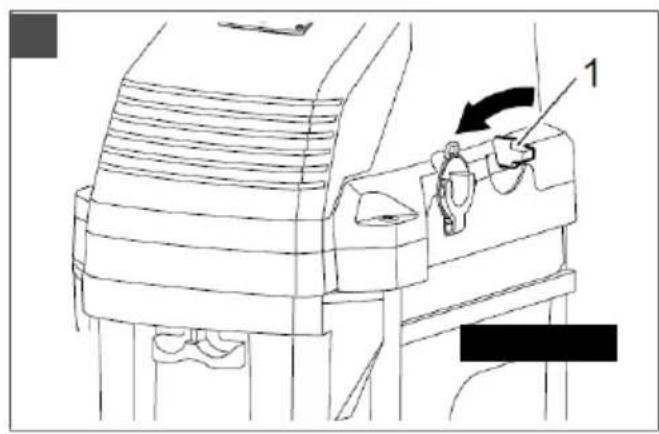
Pull the lock (11/1) down and the collector box (11/2) out of the base.
-
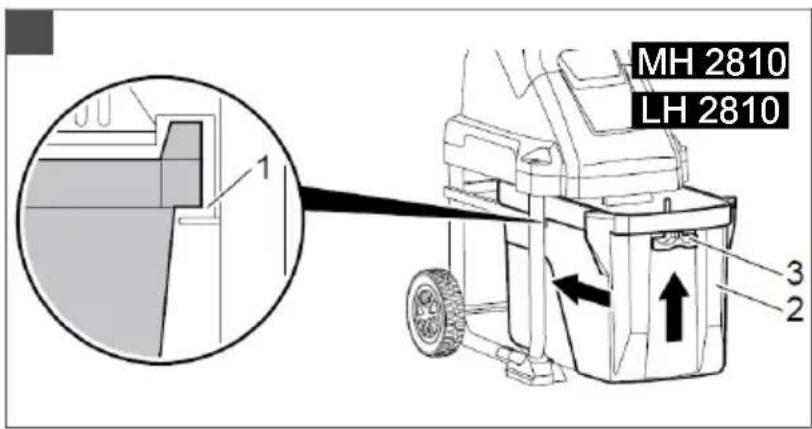
Place the empty collector box (12/2) onto the guide rail (12/1) and push it completely into the base.
- Push lock (12/3) up until it engages.
8 MAINTENANCE AND CARE

DANGER! Fatal electric shock hazard!
Touching live parts poses an immediate risk of fatal injury due to electric shock.
■ Disconnect the appliance from the mains prior to all maintenance, care and cleaning work.

WARNING! Danger of lacerations. Danger cutting injuries when reaching into sharp-ed, moving appliance parts and into cutting s.
■ Before maintenance, care and cleaning work, always switch off the appliance. Disconnect the appliance from the mains power supply.
■ Always wear protective gloves during maintenance, care and cleaning work.

WARNING! Risk of injury during repair
work. Improper repairs can lead to serious injuries and damage to the appliance.
■ Have repair work performed by the manufacturer's service centres and authorised specialist companies only!
■ After each use, check the shredder for wear and renew any damaged components.
- Keep venting slots free of remnants and accumulations.
■ Only use spare parts specified by the manufacturer.
8.1 Shredder blades (MH 2810)
To obtain an optimum shredding result and prevent damage to the machine, the blades must be replaced at regular intervals.
■ Always replace the blades in pairs.
■ Always tighten the bolts securely.
■ Do not work with blunt blades.
8.2 Replacing/turning the shredder blades (MH 2810) (11/12)
Replacement blades for Easy Crush MH 2810 Art. No. 113079
- Switch off the shredder and disconnect it from the mains power supply.
-
Loosen locking screw (11/1) and remove shredder upper section (11/2).
-
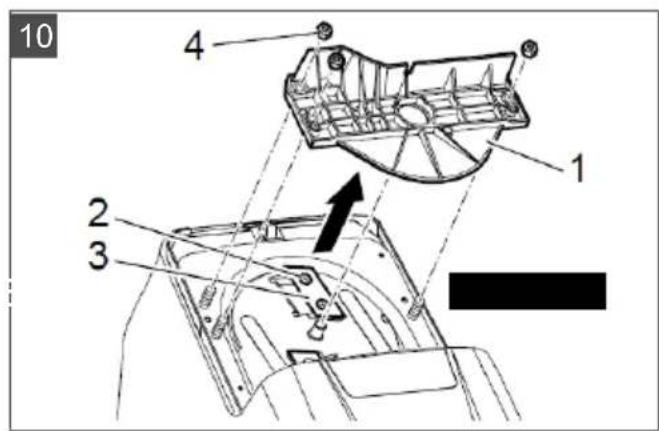
Remove the counterplate and guide plate (12/1) by loosening the three M8 nuts (12/4).
- Loosen and remove countersunk head screws M8x10 (12/2).
- Remove and turn blade (12/3). Replace the blades if both sides are blunt.
- Secure blade (12/3) using the countersunk head screws M8x10 (12/2) and turn or replace the second blade.
- Then fit the counterplate and guide plate (12/1) again and tighten the M8 nuts (12/4).
- Finally fit and screw the shredder upper section tight.
8.3 Re-adjusting the counterplate (LH 2810) (07)
A worn or damaged cutting drum and counter-plate may only be replaced by an authorised specialist.
To obtain an optimum shredding result and prevent damage to the blade unit (07/3), the counterplate (07/2) must be readjusted at regular intervals.
The counterplate must also be adjusted if material frequently becomes jammed between counterplate and blade.
With the motor running:
- Turn adjusting screw (07/1) 1/6 turn to the right (clockwise), until a slight grinding noise can be heard and fine aluminium chips fall from the ejector chute for a short period of time.
- The material to be shredded should now be cut completely again.
8.4 Care
■ Remove dirt and material residues after every use.
- Do not clean the machine with running water or high-pressure.
■ Do not use any cleaning agents or solvents.
■ Use a soft brush or cloth for cleaning.
To protect the inner side of the housing from corrosion, spray it with a biologically degradable oil.
9 STORAGE
Clean the shredder after its use. Store it in a dry, lockable place out of the reach of children.
Perform the following tasks when storing during the winter period:
MH 2810 (11/12)
- Switch off the machine and disconnect it from the mains power supply.
- Wait for the cutting disk to come to a standstill.
- Loosen locking screw (11/1) and remove shredder upper section (11/2).
- Remove coarse and wet material to be shredded from the inside of the shredder.
- Spray the shredder blades (12/3) with an oily care spray.
- Empty the collector box.
- Finally fit and screw the shredder upper section (11/2) tight again.
- Store the shredder upright.
LH 2810
- Switch off the machine and disconnect it from the mains power supply.
- Empty the collector box.
- Store the shredder upright.
10 HELP IN CASE OF MALFUNCTIONS
NOTE For malfunctions that are not listed in this table or that you cannot resolve yourself, please contact our customer service.
MH 2810
| Malfunction Possible cause Solution | |
| Motor does not start. Collector box missing or not locked. | Push collector box in completely and lock it. |
| Mains socket (house installation) defective. |
| Extension lead defective. Inspect the lead and replace it, if necessary. |
| Malfunction Possible cause Solution | |
| Machine does not pull in material to be shredded. | Collector box overflowing due to material backing up in the cutting unit. | Empty collector box.Remove material to be shredded from the cutting unit, if necessary, see see chapter 7.4 "Clearing a cutting disk/cutting drum blockage", page 23. |
| Cutting unit clogged with wet material to be shredded. | Clear the clogging by feeding branch material. |
| Material to be shredded is not properly cut. | Blades blunt or damaged Turn or replace the blades, see see chapter 8.2 "Replacing/turning the shredder blades (MH 2810) (11/12)", page 24 |
| Motor switches off. Motor protection switch switched off due to cutting disk overload or blockage. | The motor can be switched on again after a cool-down phase of approx. five minutes. |
| Unusual noises, rattling in the machine. | Bolts on the motor, its mounting, the carriage or the cutting unit are loose. | Re-tighten bolts. |
LH 2810
| Malfunction Possible cause Solution | |
| Motor does not start. Direction of rotation switch in zero position. | Turn the direction of rotation switch to the left or right. |
|
|
|
|
|
| Machine does not pull in material to be shredded. | Direction of rotation of the cutting drum incorrect. | Turn direction of rotation switch to the left (normal operation). |
| Collector box overflowing due to material backing up in the cutting drum. | Empty collector box.Remove material to be shredded from the cutting unit, if necessary, see see chapter 7.4 "Clearing a cutting disk/cutting drum blockage", page 23. |
| Cutting drum clogged with wet materials to be shredded. | Clear the clogging by feeding branch material. |
| Material to be shredded is not properly cut. | Counterplate in the cutting unit not correctly adjusted. | Readjust the counterplate, see see chapter 8.3 "Re-adjusting the counterplate (LH 2810) (07)", page 25. |
| Motor switches off. Motor protection switch switched off due to cutting disk overload or blockage. | The motor can be switched on again after a cool-down phase of approx. five minutes. |
| Malfunction Possible cause Solution |
| Unusual noises, rattling in the machine. | Bolts on the motor, its mounting or the carriage are loose. | Re-tighten bolts. |
11 TRANSPORT
Transport the shredder only with the shredder upper section closed and locked.
- Switch off the motor and wait for the cutting disk (MH 2810) or cutting drum (LH 2810) to come to a standstill.
- Then disconnect the machine from the mains power supply.
- Hold the shredder at the handle (01/1) and tilt the machine slightly.
- Pull the machine behind you when moving to the next location. Pay attention to the ground to prevent the machine from tipping over during transport.
12 DISPOSAL
Electrical and electronic appliances do not belong in household waste, but should be collected and disposed of separately.
- Owners or users of electrical and electronic appliances are obliged by law to return them after use.
The symbol of the crossed-through rubbish bin means that electrical and electronic appliances may not be disposed of in the household rubbish.
Electrical and electronic appliances can be handed in at the following places at no charge:
■ Public service disposal or collection points (e.g. municipal building yards)
■ Points of sale of electrical appliances (stationary and online) provided traders are obliged to take them back or offer this voluntarily.
These statements only apply to appliances that are installed and sold in the countries of the European Union and are subject to European Directive 2012/19/EU. Different provisions may apply to the disposal of electrical and electronic appliances in countries outside the European Union.
13 AFTER-SALES / SERVICE
In the event of questions of warranty, repair or spare parts, please contact your nearest AL-KO Service Centre. These can be found on the Internet at:
www.al-ko.com/service-contacts
14 GUARANTEE
We will resolve any material or manufacturing faults on the appliance during the legal warranty period for claims relating to faults, in accordance with our choice either to repair or replace. The legal warranty period is determined by the legislation of the country in which the appliance was purchased.
Our warranty promise applies only if:
■ These operating instructions are heeded
■ The appliance is handled correctly
■ Original spare parts have been used
The warranty becomes void in the case of:
■ Unauthorised repair attempts
■ Unauthorised technical modifications
Non-intended use
The guarantee excludes:
■ Paint damage that can be attributed to normal wear and tear
■ Wear parts that are marked with a frame xxxxxx (x) on the spare parts card
The guarantee period commences with purchase by the first end user. The date on the proof of purchase is decisive. In the event of a guarantee claim, please take this guarantee declaration and the original proof of purchase, and contact your dealer or the nearest authorised customer service centre. This statement does not affect the purchaser's statutory claims for defects against the vendor.
VERTALING VAN DE ORIGINELE GEBRUIKERSHANDLEIDING
Inhoudsopgave
13 Klantenservice/service centre 37
14 Garantie.... 38
1 SPECIALE VEILIGHEIDSINSTRUCTIES
3 PRODUCTOMSCHRIJVING
www.al-ko.com/service-contacts
14 GARANTIE
www.al-ko.com/service-contacts
14 GARANZIA
www.al-ko.com/service-contacts
14 GARANCIJA
www.al-ko.com/service-contacts
14 JAMSTVO
Možebitne greške u materijalu ili proizvodnji na uređaju uklonit ćemo tijekom zakonskoga roka zastare za jamstvo na nedostatke prema vlastitom izboru popravljanjem ili zamjenskom dostavom. Rok zastare određuje se prema pravu države u kojoj je uređaj kupljen.
www.al-ko.com/service-contacts
14 ZÁRUKA
www.al-ko.com/service-contacts
14 ZÁRUKA
www.al-ko.com/service-contacts
14 GARANTI
www.al-ko.com/service-contacts
14 GARANTI
13 Kundeservice/service ....161
14 Garanti....162
1 SPESIELLE SIKKERHETSANVISNINGER
Vernebryter for motor
8 VEDLIKEHOLD OG PLEIE
www.al-ko.com/service-contacts
14 GARANTI
www.al-ko.com/service-contacts
14 TAKUU JA TUOTEVASTUU
www.al-ko.com/service-contacts
14 GARANTIJA
www.al-ko.com/service-contacts
14 ГАРАНТИЯ