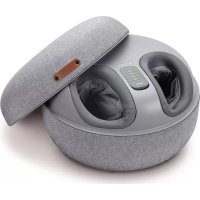
FM 120 - Massage device BEURER - Free user manual and instructions
Find the device manual for free FM 120 BEURER in PDF.


| Product Type | 2-in-1 Shiatsu Foot Massager (Massage + Stool) |
| Brand | Beurer |
| Model | FM 120 |
| Dimensions | 43.5 x 43.5 x 28 cm |
| Weight | Approx. 8.1 kg |
| Power Supply | Mains adapter: input 100–240 V~, 50/60 Hz, 1.5 A; output 24 V ⎓ 2.0 A, 48 W |
| Power Consumption | Average efficiency ≥ 89.35%, no-load consumption ≤ 0.08 W |
| Main Functions | Rotary Shiatsu massage, air compression, heating function, 3 modes, 3 intensity levels, wireless remote control |
| Massage Modes | Mode 1: massage + air pressure; Mode 2: air pressure only; Mode 3: massage only |
| Air Pressure Intensities | Low, medium, high |
| Heating | Yes, can be turned on/off |
| Remote Control | Wireless, included |
| Remote Control Battery | CR2032, 3 V (included) |
| Removable Cover | Yes, hand washable |
| Maximum Capacity (Stool) | 100 kg |
| Auto Shut-off | After 15 minutes |
| Safety Class | II (double insulation) |
| Warranty | See the warranty card provided |
| Care | Clean with a slightly damp cloth; hand washable covers |
| Included Accessories | 1 unit, 1 remote control, 1 CR2032 battery, 1 mains adapter, 1 instruction manual |
Frequently Asked Questions - FM 120 BEURER
User questions about FM 120 BEURER
0 question about this device. Answer the ones you know or ask your own.
Ask a new question about this device
Download the instructions for your Massage device in PDF format for free! Find your manual FM 120 - BEURER and take your electronic device back in hand. On this page are published all the documents necessary for the use of your device. FM 120 by BEURER.
USER MANUAL FM 120 BEURER
natural_image
Close-up of a modern massage device with open lid and internal compartments (no visible text or symbols)EN 2-in-1 Shiatsu foot massager Instructions for use....13
natural_image
Illustration of an open book with a geometric arrow pointing to the page, showing text lines and page layout (no readable text or symbols)EN Unfold page 3 before reading the instructions for use.
natural_image
Simple line drawing of a circular object with internal cross-like structure and an arrow pointing to it (no text or symbols)Batterien einlegen
Read these instructions for use carefully. Observe the warnings and safety notes. Keep these instructions for use for future reference. Make the instructions for use accessible to other users. If the device is passed on, provide the instructions for use to the next user as well.
WARNING
- The device is only intended for domestic/private use, not for commercial use.
- This device may be used by children over the age of 8 years and by people with reduced physical, sensory or mental capabilities or a lack of experience or knowledge, provided that they are supervised or have been instructed on how to use the device safely, and are fully aware of the risks of using the device.
• Children must not play with the device. - Cleaning and user maintenance must not be performed by children unless supervised.
- If the mains connection cable of this device is damaged, it must be disposed of. If it cannot be removed, the device must be disposed of.
- The device has a hot surface in the foot section. People who are not sensitive to heat must be careful when using the device.
- Do not insert any objects in the device apertures or in the rotating parts. Ensure that the moving parts can move freely at all times.
- Under no circumstances should you open or repair the device yourself, otherwise proper functionality can no longer be guaranteed. Failure to comply will invalidate the warranty.
CONTENTS
- Included in delivery ....14
- Signs and symbols....14
- Intended use....15
- Warnings and safety notes....15
- Device description.....17
- Usage....18
6.1 Initial use ....18
6.2 Use of massage function....18
6.3 Use of stool function .....19
-
Cleaning and maintenance....19
-
What if there are problems?......20
-
Disposal....20
-
Technical specifications .....21
-
Warranty ......21
1. INCLUDED IN DELIVERY
Check that the exterior of the cardboard delivery packaging is intact and make sure that all contents are present. Before use, ensure that there is no visible damage to the device or accessories and that all packaging material has been removed. If you have any doubts, do not use the device and contact your retailer or the customer service address provided.
- 1 foot massager
- 1 remote control
• 1 3VCR2032 battery - 1 mains adapter
• 1 copy of these instructions for use
2. SIGNS AND SYMBOLS
The following symbols are used on the device, in these instructions for use, on the packaging and on the type plate for the device:
| WARNINGIndicates a potentially impending danger. If it is not avoided, there is a risk of death or serious injury. |
| CAUTIONIndicates a potentially impending danger. If it is not avoided, slight or minor injuries may result. |
| NOTICEIndicates a potentially harmful situation. If it is not avoided, the system or something in its vicinity may be damaged. |
| Product informationNote on important information |  | Read the instructions | |
| Disposal in accordance with the Waste Electrical and Electronic Equipment EC Directive (WEEE) |  | CE labellingThis product satisfies the requirements of the applicable European and national directives. | |
| Do not dispose of batteries containing harmful substances with household waste |  | Separate the product and packaging elements and dispose of them in accordance with local regulations. | |
| Manufacturer Dispose of packaging in an |  | mentally friendly manner | |
| Marking to identify the packaging material.A = material abbreviation,B = material number:1-7 = plastics,20-22 = paper and cardboard |  | Protection class II deviceThe device is double-insulated and, therefore, is in protection class 2 | |
| The products demonstrably meet the requirements of the Technical Regulations of the EAEU |  | Only use indoors. | |
| IP20 | Protected against solid foreign objects 12.5 mm in diameter and larger |  | Energy efficiency level 6 |
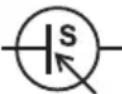 | Switching mains adapter Safety isolating tr |  | short-circuit proof |
| Direct currentThe device is suitable for use with direct current only | The products demonstrably meet the requirements of the Technical Regulations of the EAEU. | ||
| Polarity Alternating current | |||
| Importer symbol Keep out of reach of children |
3. INTENDED USE
This foot massager (hereinafter device) is solely intended for foot massage on people. The device is only intended for private use, and not for medical or commercial purposes. Use the device for the purpose it was developed for only and in the manner specified in these instructions for use. Any form of improper use can be dangerous. The manufacturer is not liable for damage resulting from improper or incorrect use. Do not use the device if one or several of the notes in chapter “4. Warnings and safety notes” apply to you. If you are unsure whether the device is suitable for you, please consult your doctor.
4. WARNINGS AND SAFETY NOTES
WARNING
- Keep the device and packaging material away from children. The mains adapter cable poses a risk of strangulation and there is a risk of choking due to small parts that can be swallowed.
- Do not use the device if you suffer from a medical abnormality or injury in the area of your feet (e.g. open wounds, warts, athlete's foot).
- Do not use the device on acutely or chronically diseased, injured or irritated skin (e.g. inflamed skin – whether painful or not, reddened skin, rashes, venous inflammation, arterial thrombosis, venous thrombosis, thrombophlebitis, varicose veins, allergies, burns, bruises, swellings, wounds that are still healing or post-operative scars).
- Only use the device on healthy and clean skin.
- Do not use the device on animals.
- Do not use the device for periods of longer than 15 minutes.
- Do not use the device whilst asleep, driving a vehicle or operating machinery.
- Do not use the device on tissue that is prone to bleeding.
- Never operate the device unsupervised. Supervise children around the device to ensure they do not play with it.
- If you are unsure whether the device is suitable for you, please consult your doctor before use.
- If you suffer from a severe illness or have recently had surgery on your feet, please consult your doctor before using the device.
- If you suffer from diabetes or thrombosis, consult your doctor before using the device.
- If you suffer from sensory impairment that reduces the feeling of pain (e.g. metabolic disorders), please consult your doctor before use.
- If you are suffering from pain, the cause of which is unknown, consult your doctor before using the device.
Electric shock
WARNING
As with every electrical device, use this device carefully and cautiously, in order to avoid hazards due to electric shock.
- Only operate the device with the mains voltage specified on the device.
- Never operate the device if it or any of its accessories are visibly damaged.
- Do not operate the device during a storm.
- In the event of defects or operational faults, switch the device off immediately and disconnect it from the mains socket. Do not pull on the mains cable or on the device to disconnect the plug from the socket. Never hold or carry the device by the mains cable. Keep the cables away from hot surfaces. Never open the device. Ensure that the device and the mains cable do not come into contact with water, steam or other liquids.
- Only use the device in dry rooms (e.g. never in the bath, sauna).
- Only use the device with dry hands.
- Do not pull, twist or bend the mains cable. Do not insert needles or any sharp objects. Ensure that the mains cable is not routed or pulled over pointed or sharp objects.
- Never pick up a device that has fallen into water. Disconnect the mains plug immediately. Do not use the device if it or its accessories are visibly damaged. Do not drop the device or subject it to any impacts.
- Never submerge the device and the mains adapter in water or other liquids.
Repairs
WARNING
Only specialist personnel may perform repairs on electrical devices. Improper repairs may put users in significant danger. For repairs, please contact Customer Services or an authorised retailer. Never attempt to open and/or repair the device yourself. Repairs may only be carried out by Customer Services or authorised retailers. Failure to comply will invalidate the warranty.
Risk of fire
WARNING
- There may be a risk of fire if the device is used improperly or these instructions for use are ignored.
- Never leave the device unattended when it is in operation, particularly if there are children nearby.
- Never operate the device underneath a cover, such as a blanket, pillow, etc.
- Never use the device near petrol or other highly flammable substances.
Handling
CAUTION
The device must be switched off and disconnected after every use and before cleaning.
- Do not place your full weight (sitting, lying down, or standing) on the moving parts of the device or place any objects on the device.
- Do not expose the device to direct sunlight or high temperatures.
- Protect the device from dust, dirt and moisture.
Damage
WARNING
- If the device is damaged, do not use it and contact your retailer or the specified Customer Services address.
-
To ensure that the device functions effectively, do not drop it or dismantle it.
-
Check the device for signs of wear and tear or damage. If there are such signs of wear and tear or damage or if the device was used improperly, it must be returned to the manufacturer or retailer before further use.
- Switch the device off immediately if it is faulty or not working properly.
- The manufacturer is not liable for damage resulting from improper or incorrect use.
Notes on handling batteries
WARNING
- If your skin or eyes come into contact with battery fluid, flush out the affected areas with water and seek medical assistance.
- Choking hazard! Small children may swallow and choke on batteries. Store the batteries out of the reach of small children.
- Observe the plus (+) and minus (-) polarity signs.
- If a battery has leaked, put on protective gloves and clean the battery compartment with a dry cloth.
- Protect the batteries from excessive heat.
- Risk of explosion! Never throw batteries into a fire.
- Do not charge or short-circuit batteries.
- If the device is not to be used for a long period, take the batteries out of the battery compartment.
- Use identical or equivalent battery types only.
• Always replace all batteries at the same time. - Do not use rechargeable batteries.
- Do not disassemble, split or crush the batteries.
5. DEVICE DESCRIPTION
The associated drawings are shown on page 3.
Foot massager Remote control
1 Lid
2 Connection socket for mains adapter
3 LED strip
4 Removable cover
5 Massage area with massage heads
6 Remote control
7 Heat button
8 Intensity button
9 Mode button
10 ON/OFF button
6. USAGE
6.1 Initial use
Connecting the mains adapter
To operate the device with the supplied mains adapter, you need to connect the mains adapter to the device first. To do so, proceed as follows:
- Remove all packaging material.
- Check the device, the mains adapter and the mains cable for damage.
- Connect the mains adapter cable to the connection socket on the side of the device.
- Insert the mains adapter into a suitable socket.

CAUTION
Trip hazard! Ensure that the mains cable does not pose a trip hazard.
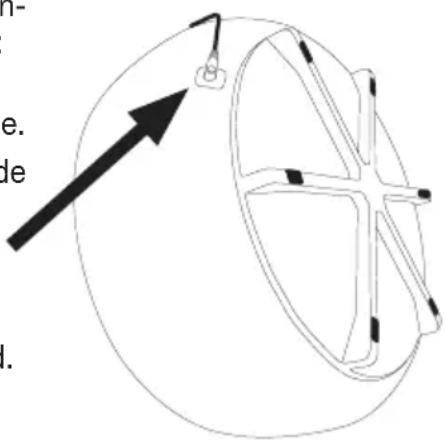
Inserting the batteries
If present, pull the battery insulating strip off the battery compartment cover or remove the battery's protective film and insert the battery according to the polarity.
6.2 Use of massage function

WARNING
Only use the device when you are sitting down. Never use the foot massager when standing up. Use the device for max. 15 minutes. Longer massages can lead to over-stimulation of the muscles, creating tension instead of aiding relaxation.

The device features an automatic switch-off function, which is set to the maximum operating duration of 15 minutes.
Follow the steps below to start the foot massage:
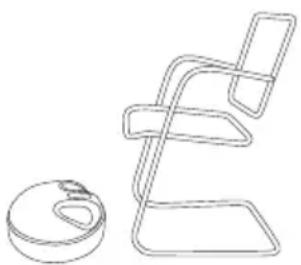
Step 1: Placing the device on the floor
-
Place the device on an even, hard surface. Position the device in front of your chair so that you can reach the device comfortably with your feet when sitting. Make sure that you do not trip over the mains cable.
-
Insert the mains adapter into a suitable socket. The ON/OFF symbol ☐ on the device starts to flash green. The device is now in standby mode.
natural_image
Line drawing of a chair with a circular base and a rectangular seat (no text or symbols)Step 2: Placing your feet in the device
You can use the device either barefoot or with socks.
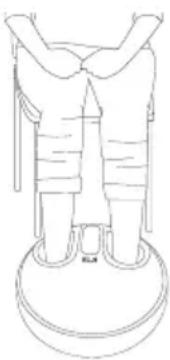
Slip your feet into the device. Ensure that the soles of your feet are placed on the massage heads.
Step 3: Switching on the device
Press the ON/OFF button 10 on the remote control to switch on the device. The LED of the ON/OFF button 10 will light up continuously and mode 1 will be activated.
natural_image
Line drawing of a person standing on a circular platform with arms crossed (no text or symbols)Step 4: Setting the mode
The device has three different massage modes. Select a mode using the mode button 9.
Mode 1: M lights up green, lights up faint green = massage and air pressure
Mode 2: M does not light up, lights up faint green = air pressure only (without massage)
Mode 3: M lights up green, does not light up = massage only (without air pressure)
Step 5: Adjusting the intensity
For the air pressure massage, the foot massager has three intensity levels (low, medium, high). Select your desired intensity level using the intensity button 8.
lights up faint green = low intensity of air pressure massage
lights up normal green = medium intensity of air pressure massage
lights up intensely green = high intensity of air pressure massage
Step 6: Switching the heat function on/off
The foot massager has an optional heat function to warm up your feet during the massage. To switch the heat function on or off, press the heat button 7 during the massage.
lights up red = heat function switched on
does not light up = heat function switched off
Step 7: Switching off the device
To switch off the device after use, press the ON/OFF button 10. The ON/OFF symbol (on the device starts to flash green. The device is now in standby mode. Remove the mains adapter from the mains socket.
6.3 Use of stool function
CAUTION
The stool function is suitable up to a body weight of 100 kg. Never stand on the stool. Do not let your full body weight fall onto the stool.
Between your massages, you can use the device as a comfortable stool.
- To do so, store the mains cable and the mains adapter in the foot section of the device.
- Close the lid 1. You can now use the device as a stool. It is suitable for sitting on or resting your legs.
7. CLEANING AND MAINTENANCE
Cleaning the device
WARNING
Unplug the device each time before cleaning. Clean the device using only the methods specified. Liquid must not penetrate the device or the accessories under any circumstances.
- Clean the device with a slightly damp cloth.
- If it is very dirty, you can also moisten the cloth with a mild soapy solution.
Cleaning the covers
The removable covers 4 of the massage heads can be washed by hand. Observe the care instructions on the care label.
- To remove the covers from the device, open the zip fastener on the covers 4.
- Wash the covers by hand.
- Allow the covers to dry. Only insert the covers into the device again when they are completely dry.
- Ensure that the zip fasteners of the covers are firmly attached to the device.
Storage
The device is intended to be part of your living space, even when the massage function is not being used. Store the device away from children and pets. Do not place any objects on the device.
8. WHAT IF THERE ARE PROBLEMS?
| Problem Possible cause Solution | ||
| The massage heads are rotating too slowly | The load on the massage heads is too great | Free up massage heads |
| The massage heads do not move | The device is not connected to mains power supply. | Plug the mains adapter into a suitable socket and switch on the device |
| Overheating protection has been triggered | Disconnect the device from the power supply, wait at least 15 minutes, then plug in again and switch on | |
9. DISPOSAL
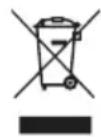
For environmental reasons, do not dispose of the device in household waste at the end of its service life. Dispose of the device at a suitable local collection or recycling point in your country. Observe the local regulations for material disposal. Dispose of the device in accordance with EC Directive Waste Electrical and Electronic Equipment (WEEE). If you have any questions, please contact the local authorities responsible for waste disposal. You can obtain the location of collection points for old devices, for example, from the local or municipal authorities, local waste disposal companies or your retailer.
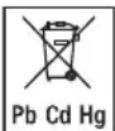
Spent batteries and rechargeable batteries do not constitute normal household waste! They are conside-
red to be toxic waste and, as such, should be disposed of in special containers, toxic waste collection points or brought to electrical goods dealers. Note: Batteries containing pollutant substances are marked as follows: Pb = Battery contains lead, Cd = Battery contains cadmium, Hg = Battery contains mercury.
- TECHNICAL SPECIFICATIONS
| Mains operation:InputOutput | 100-240 V~, 50/60 Hz, 1.5 A24.0 V—— 2.0 A, 48.0 W |
| Average efficiency during operation: ≥ 89.35% | |
| Efficiency at low load (10%): ≥ 87.87% | |
| No-load power consumption: ≤ 0.08 W | |
| Dimensions: 43.5 x 43.5 x 28 cm | |
| Weight: Approx. 8.1 kg |
Technical information is subject to change without notification to allow for updates.
11. WARRANTY
Further information on the warranty and warranty conditions can be found in the warranty leaflet supplied.
FRANÇAIS
natural_image
Simple line drawing of a circular object with an arrow pointing upward and a small inset showing internal structure (no text or symbols)Insérer les piles
natural_image
Line drawing of a chair with a circular base and a rectangular frame (no text or symbols)natural_image
Line drawing of a person standing on a circular platform (no text or symbols)natural_image
Line drawing of a person standing on a circular base with a magnifying glass above, and a separate circular object labeled 'ma de' (no text or symbols on the figure itself)natural_image
Line drawing of a chair with a circular base and a rectangular seat (no text or symbols)natural_image
Line drawing of a person standing on a circular platform (no text or symbols)natural_image
Line drawing of a chair with a circular base and a separate abstract shape (no text or symbols)natural_image
Line drawing of a person standing on a circular platform, viewed from the side (no text or symbols)natural_image
Simple line drawing of a circular object with an arrow pointing to it, no text or symbols present.Установка батареек
natural_image
Line drawing of a chair with no text or symbolsnatural_image
Line drawing of a person standing on a circular platform with arms crossed (no text or symbols)natural_image
Simple line drawing of a circular object with an arrow pointing to its top edge (no text or symbols)Wkładanie baterii
natural_image
Line drawing of a chair with a circular base and a rectangular frame (no text or symbols)natural_image
Line drawing of a person standing on a circular platform (no text or symbols)4. WAARSCHUWINGEN EN VEILIGHEIDSRICHTLIJNEN
⚠ WAARSCHUWING
5. BESCHRIJVING VAN HET APPARAAT
natural_image
Simple line drawing of a circular object with an arrow pointing to its top edge (no text or symbols)Batterijen plaatsen
natural_image
Simple line drawing of a chair with no text or symbolsnatural_image
Line drawing of a person standing on a circular platform (no text or symbols)Stap 4: Modus instellen
natural_image
Line drawing of a chair with a circular base and a rectangular frame (no text or symbols)natural_image
Simple line drawing of a person standing on a circular platform (no text or symbols)natural_image
Line drawing of a chair with a circular base and a rectangular frame (no text or symbols)natural_image
Line drawing of a person standing on a circular platform (no text or symbols)natural_image
Line drawing of a chair with a circular base and a rectangular frame (no text or symbols)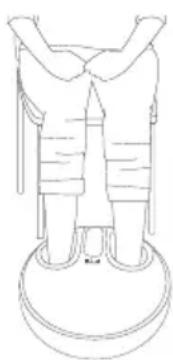
natural_image
Line drawing of a person standing on a circular platform (no text or symbols)Steg 4: Stille inn modus
Apparatet har tre ulike modus. Velg en modus med modusknappen 9.
natural_image
Simple line drawing of a circular object with an arrow pointing to its top edge, no text or symbols present.natural_image
Line drawing of a chair with a circular base and a rectangular frame (no text or symbols)natural_image
Line drawing of a person standing on a circular platform (no text or symbols)Vaihe 4: Aseta tila
BEURER UK Ltd., Suite 16, Stonecross Place
Yew Tree Way
WA32SH Golborne
United Kingdom