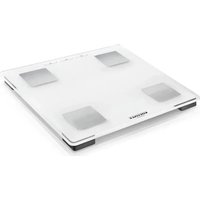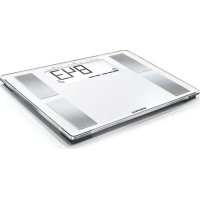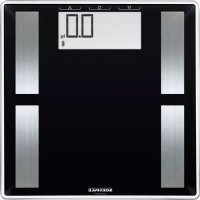
Shape Sense Connect 50 - Scale SOEHNLE - Free user manual and instructions
Find the device manual for free Shape Sense Connect 50 SOEHNLE in PDF.



| Product Type | Connected impedance scale |
| Brand | Soehnle |
| Model | Shape Sense Connect 50 |
| Maximum Capacity | 180 kg (396 lb / 28 st) |
| Accuracy | 100 g (0.2 lb) |
| Power Supply | 3 AAA 1.5 V batteries |
| Connectivity | Bluetooth 4.1 (2.4 GHz, max power 10 mW) |
| Compatible Applications | Soehnle Connect (Android 6.0+ / iOS 10+) |
| Measurement Functions | Weight, BMI, body fat percentage, body water, muscle mass, basal metabolism (kcal) |
| User Recognition | Up to multiple users, automatic after first measurement |
| Display | Digital LCD screen |
| Measurement Units | kg/cm, st/in, lb/in (adjustable) |
| Auto Off | After 40 seconds of inactivity |
| User Age | 17 to 99 years |
| Material | Tempered glass and plastic |
| Approximate Dimensions | 30 x 30 x 2.5 cm |
| Approximate Weight | 1.2 kg |
| Care and Cleaning | Clean with a damp cloth; do not use solvents or abrasive products; do not immerse in water |
| Safety | Do not use by persons with medical implants; risk of slipping if surface wet; do not leave children unattended |
| Warranty | 3 years (excluding batteries and normal wear) |
| Spare Parts / Repairability | No spare parts available; product replacement under warranty |
| General Information | Compatible with Google Fit and Apple Health; CE compliance; disposal according to European directives |
Frequently Asked Questions - Shape Sense Connect 50 SOEHNLE
User questions about Shape Sense Connect 50 SOEHNLE
0 question about this device. Answer the ones you know or ask your own.
Ask a new question about this device
Download the instructions for your Scale in PDF format for free! Find your manual Shape Sense Connect 50 - SOEHNLE and take your electronic device back in hand. On this page are published all the documents necessary for the use of your device. Shape Sense Connect 50 by SOEHNLE.
USER MANUAL Shape Sense Connect 50 SOEHNLE
Shape Sense Connect 50
P MANUAL DE INSTRUÇÕES 30
DK BRUGSANVISNING 33
S BRUKSANVISNING 36
NO BRUKSANVISNING 39
FI KÄYTTÖOHJE 42
CZ NÁVOD K POUŽITI 45
SK NÁVOD NA OBSLUHU 48
BG УПЪТВАНЕ ЗА УПОТРЕБА 51
HR UPUTE ZA UPORABU 81
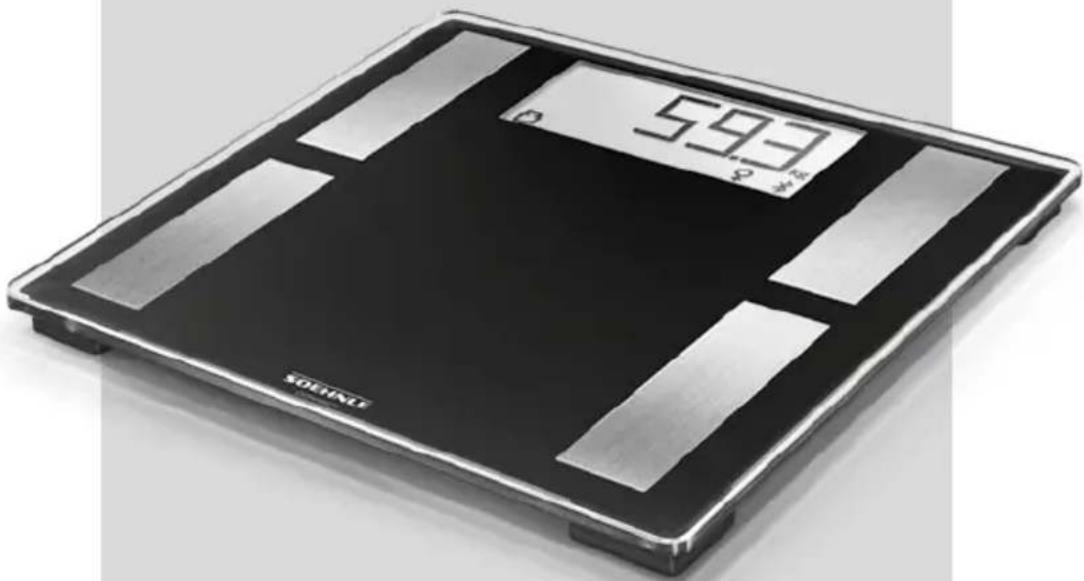
natural_image
Digital twin-chip digital balance scale with black and silver plates, showing reading of 593.72 (no text or symbols beyond branding)| - | 😊 | + | |||||||
| BMI | < 17,4 17 | 5 - 17,9 18,0 | - 18,4 18,5 - | 20,4 20,5 - 22 | 9 23,0 - 24,9 | 25,0 - 27,4 27 | 7,5 - 29,9 | ≥ 30 | |
BMI
D Body-Mass-Index • GB Body Mass Index • NL Body-Mass-Index • I Indice di massa corporea (BMI) • F Indice de masse corporelle • E Índice de masa corporal • P Índice de massa corporal • DK Body Mass Index • S Body-Mass-Index • NO Kroppsmasseindeks • FI Painoindeksi • CZ Wskaźnik masy ciała • SK Index telesnej hmotnosti • BG Body Mass Index • RUS Body-Mass-Index • PL Index tèlesné hmotnosti • ARAB مۇشر كتلة الجسم • EST Kehamassiindeks • LV Kermena masas indekss • LT Kūno masés indeksas (KMI) • RO Indexul de masă corporală • SLO Indeks telesne mase • SR Body Mass Index • HR Indeks tjelesne mase
| Alter/Age |
| 17-18 |
| 18-30 |
| 30-40 |
| 40-50 |
| 50-60 |
| 60+ |
| - | + | ++ | |||
| < 15 | ≥ 15-25 | ≥ 25-33 | >33 | >52,5 | >28 |
| < 20 | ≥ 20-29 | ≥ 29-36 | >36 | >49,5 | >28 |
| < 22 | ≥ 22-31 | ≥ 31-38 | >38 | >47,5 | >28 |
| < 24 | ≥ 24-33 | ≥ 33-40 | >40 | >46,5 | >28 |
| < 26 | ≥ 26-35 | ≥ 35-42 | >42 | >46 | >28 |
| < 28 | ≥ 28-37 | ≥ 37-47 | >47 | >45 | >28 |
| - | + | ++ | |||
| < 8 | ≥ 8-18 | ≥ 18-24 | >24 | >58,5 | >38 |
| < 8 | ≥ 8-18 | ≥ 18-24 | >24 | >57 | >38 |
| < 11 | ≥11-20 | ≥ 20-26 | >26 | >56 | >38 |
| < 13 | ≥13-22 | ≥ 22-28 | >28 | >55 | >38 |
| < 15 | ≥15-24 | ≥ 24-30 | >30 | >54 | >38 |
| < 17 | ≥17-26 | ≥ 26-34 | >34 | >53 | >38 |
D
Alle Angaben in % • GB All figures in % • NL Alle waarden in % • I Tutte le indicazioni sono in % • F Toutes les données en % • E Todos los datos en % • P Todas as informações em % • DK Alle tal i % • S Alla uppgifter i % • NO Alle tall i % • FI Kaikki tiedot prosenteïna • CZ Wszystkie dane w % • SK Všetky údaje sú v % • BG Всички данни в % • RUS Все показатели в % • PL Všechny údaje jsou v % • ARAB % كالقة البيانات بننسية المنوية % EST Kölk väärtused %-na • LV Visi lielumi norāditi % • LT Visi skaičiai pateikiami procentais (%) • RO Toate datele în % • SLO Vsi podatki v % • SR Svi navodi su u % • HR Svi podaci u %

D Körperfettanteil • GB body fat content • NL lichaamsvetaandeel • I percentuale di grasso • F taux de graisse • E porcentaje de la grasa corporal • P percentagem de gordura corporal • DK fedtprocent • S andelen kroppsfett • NO Fettprosent • FI Kehon rasvaprosentti • CZ podíl tělesného tuku • SK zawartość tłuszczu w ciele • BG Процент на телесната мазнина • RUS процент жира в организме • PL test zsírtartalmát • ARAB نسبة الدهون في الحسم • EST Rasvaprotsent • LV Kermena tauku procents • LT Küno riebalı procentinè dalis • RO Coeficient de gräsime corporală • SLO Delež telesne maščobe • SR Udeo telesne masnoće • HR Udio tjelesne masti

D Körperwasseranteil • GB body water content • NL lichaamswateraandeel • I percentuale acqua corporei • F taux d'eau dans le corps • E porcentaje del agua corporal • P percentagem de água corporal • DK vandprocent • S andelen kroppsvatten • NO Vannprosent • FI Kehon vesipitoisuus • CZ podíl vody v těle • SK zawartość wody w ciele • BG Процент на телесната вода • RUS процентное содержание воды в организме • PL test víztartalmát • ARAB نسبة الماء في الجسم • EST Veeprotsent • LV Kermeña údens procents • LT Küno vandens procentinis • RO Coeficient de apă în corp • SLO Delez vode v telesu • SR Udeo telesne vode • HR Udio vode u tijelu

D Muskelanteil • GB muscle proportion • F pourcentage de muscles • I massa muscolare • NL Spierenaandeel • E porción de los músculos • P percentagem de músculo • DK muskler andelen • S muskelandel • NO Muskelprosent • FI Lihasprosentti • CZ podílu svalů • SK masy mięśniowej • BG Процент на мускулите • RUS процент мышц • PL izom arány • ARAB نسبة العضلات • EST Lihasmassi osakaal • LV Muskulu procents • LT raumenų procentinė dalis • RO Coeficient de masă musculară • SLO Delež mišične mase • SR Udeo mišića • HR Udio mišića
A
text_image
1 2 3B
1.
natural_image
Pure electrical circuit lines without any symbols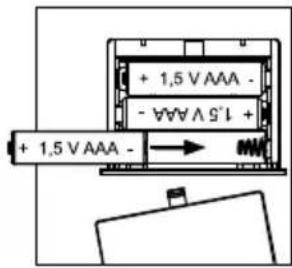
text_image
+ 1,5 V AAA - - ∀∀ ∧ 5'↓ + + 1,5 V AAA -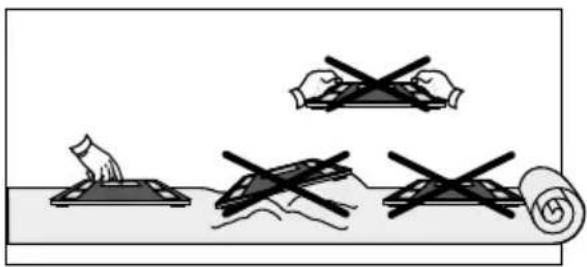
natural_image
Illustration of four hand-drawn diagrams showing different methods: cutting, rolling, and cutting with a magnified view (no text or symbols)
natural_image
Simple line drawing of a faucet pouring liquid into a pipe with a flame, no text or symbols present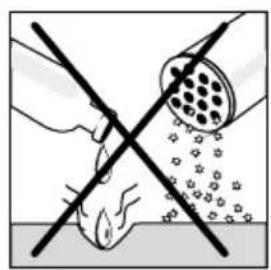
natural_image
Diagram showing a hand using a tool to clean particles from a pipe, with no text or symbols present.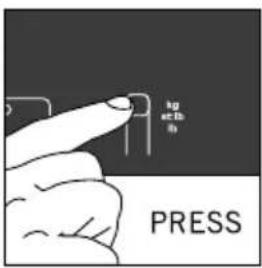
text_image
kg ±0.5 mm PRESS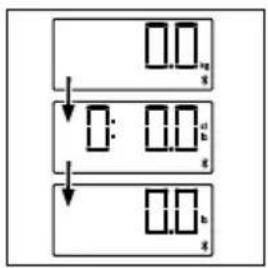
flowchart
graph TD
    A[" "] --> B[" "]
    B --> C[" "]
    C --> D[" "]
C
1

text_image
Diagram showing a hand holding a pen above a screen with labeled buttons V, G, A, and an arrow pointing to it.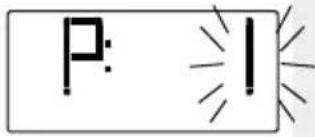
text_image
P: I
text_image
H:170
text_image
8:40
text_image
5: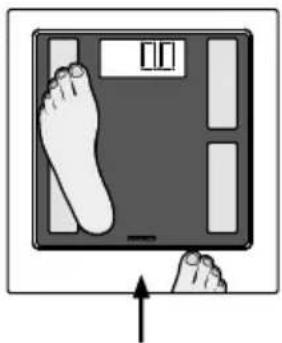
natural_image
Illustration of a hand pressing down on a digital balance scale with a foot symbol (no text or labels)D
1.
natural_image
Illustration of a foot pressing down on a digital balance scale with an upward arrow (no text or symbols)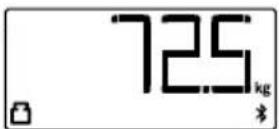

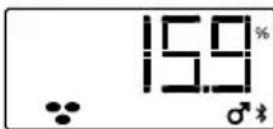

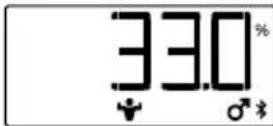

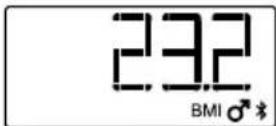
E
1.
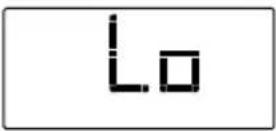

text_image
+ 1,5 V AAA - - ∀∀∀ ∧ S'↓ + + 1,5 V AAA - →New batteries 3 x 1,5 V AAA

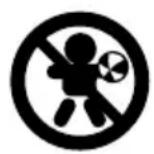
GB This device may be used by children over the age of 8 and persons with reduced physical, sensory, or mental abilities or with a lack of experience and knowledge only if such are supervised or have been instructed in the safe use of the device as well as the resulting risks. Cleaning and maintenance shall not be made by children without supervision, Children shall not play with the device.
GB It is not suitable for persons with electronic implants (pacemaker, etc.).
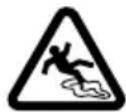
GB Attention! Slipping hazard in case of wet surface
text_image
QR code image containing encoded data, no visible human-readable text
text_image
GET IT ON Google Play Download on the App StoreAndroid™-Smartphones / Tablets
Apple, iPhone, iPad, iOS, Apple Health and the Apple logo are trademarks of Apple Inc., registered in the U.S. and other countries. App Store is a service mark of Apple Inc., registered in the U.S. and other countries.
Android, Google Fit, Google Play and the Google Play logo are trademarks of Google Inc.
The Bluetooth ^® word mark and logos are registered trademarks owned by Bluetooth SIG, Inc.
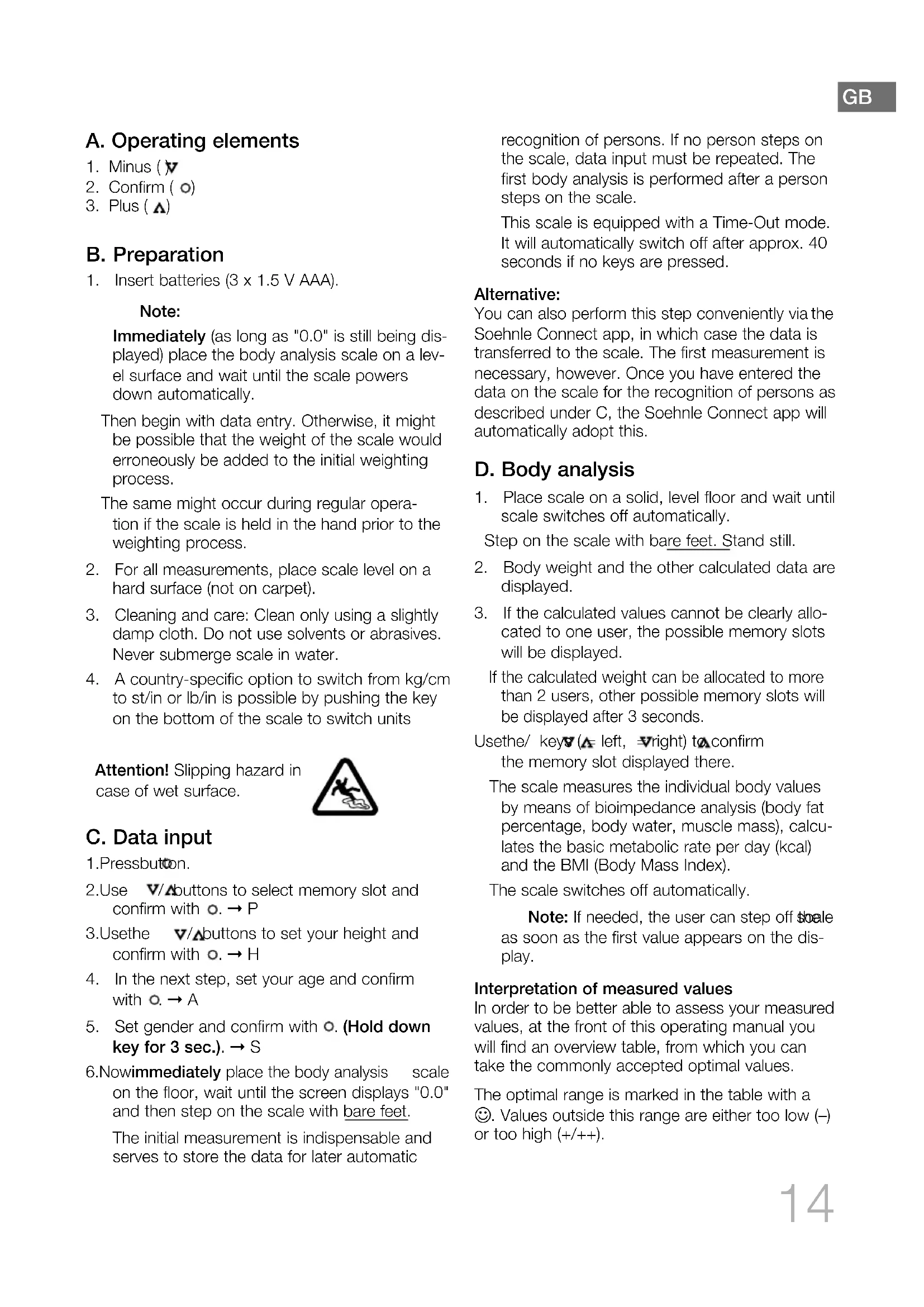
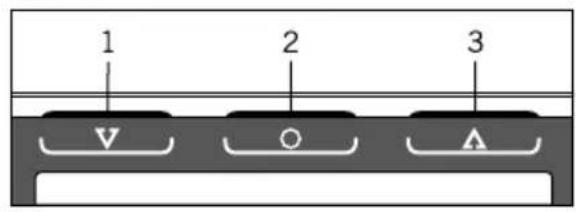
A. Operating elements
- Minus (v
- Confirm (○)
- Plus ( )
B. Preparation
- Insert batteries (3 x 1.5 V AAA).
Note:
Immediately (as long as "0.0" is still being displayed) place the body analysis scale on a level surface and wait until the scale powers down automatically.
Then begin with data entry. Otherwise, it might be possible that the weight of the scale would erroneously be added to the initial weighting process.
The same might occur during regular operation if the scale is held in the hand prior to the weighting process.
- For all measurements, place scale level on a hard surface (not on carpet).
- Cleaning and care: Clean only using a slightly damp cloth. Do not use solvents or abrasives. Never submerge scale in water.
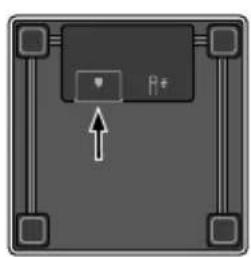
- A country-specific option to switch from kg/cm to st/in or lb/in is possible by pushing the key on the bottom of the scale to switch units
Attention! Slipping hazard in case of wet surface.
C. Data input
- Pressbutton.
- Use V/A buttons to select memory slot and confirm with o. → P
- Use the / buttons to set your height and confirm with . H
- In the next step, set your age and confirm with . A
- Set gender and confirm with . (Hold down key for 3 sec.). S
6.Nowimmediately place the body analysis scale on the floor, wait until the screen displays "0.0" and then step on the scale with bare feet.
The initial measurement is indispensable and serves to store the data for later automatic
recognition of persons. If no person steps on the scale, data input must be repeated. The first body analysis is performed after a person steps on the scale.
This scale is equipped with a Time-Out mode. It will automatically switch off after approx. 40 seconds if no keys are pressed.
Alternative:
You can also perform this step conveniently via the Soehnle Connect app, in which case the data is transferred to the scale. The first measurement is necessary, however. Once you have entered the data on the scale for the recognition of persons as described under C, the Soehnle Connect app will automatically adopt this.
D. Body analysis
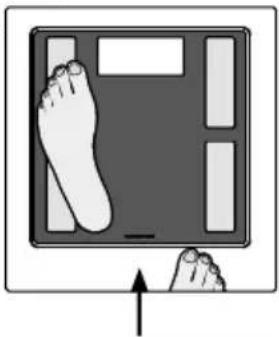
- Place scale on a solid, level floor and wait until scale switches off automatically.
Step on the scale with bare feet. Stand still. - Body weight and the other calculated data are displayed.
- If the calculated values cannot be clearly allocated to one user, the possible memory slots will be displayed.
If the calculated weight can be allocated to more than 2 users, other possible memory slots will be displayed after 3 seconds.
Usethe/ key(▲ left, ▼right) to confirm the memory slot displayed there.
The scale measures the individual body values by means of bioimpedance analysis (body fat percentage, body water, muscle mass), calculates the basic metabolic rate per day (kcal) and the BMI (Body Mass Index).
The scale switches off automatically.
Note: If needed, the user can step off scale as soon as the first value appears on the display.
Interpretation of measured values
In order to be better able to assess your measured values, at the front of this operating manual you will find an overview table, from which you can take the commonly accepted optimal values.
The optimal range is marked in the table with a 😊. Values outside this range are either too low (−) or too high (+/++)
Here is an example:
A female user is 35 years old and is shown a body fat content of 28.2 % from the scale. For the age group of 30-40 year old women, this is a value in the optimal range (22-31 % → 😊).
Classification of weight according to BMI (source: World Health Organisation, 2016)
BMI (kg/m²) Classification
| < 18,5 Underweight |
| 18,5 - 24,9 Normal weight |
| 25,0 - 29,9 Overweight |
| 30,0 - 34,9 Obesity level I |
| 35,0 - 39,9 Obesity level II |
| > 40,0 Obesity level III |
E Notifications
- Replace battery (Lo = low battery)
- Overloading of scale (max. 180 kg)
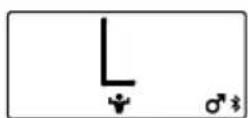
- The measured value is above (H) or below (L) the threshold value specified below.
| L H | L H | L H | ||||
| ♀ | < 10 % > | 60 % < 5 | % >90 % | < 5 % > | 90 % | |
| ♂ | < 4 % > | 60 % < 5 | % >90 % | < 5 % > | 90 % | |
F. Other add-on functions via the Soehnle Connect app
You can connect this body analysis scale with your smartphone (iOS ^® or Android ^TM ) via Bluetooth ^® . Use the Soehnle Connect app for this to make use of more functions among other things:
- Difference to last weighing
- Difference to the desired weight
- Difference to standard BMI
G. Installation of the Soehnle Connect app
Install the Soehnle Connect app on your smartphone or tablet as follows:
text_image
QR code image containing encoded data, no visible human-readable text
text_image
GET IT ON Google Play Download on the App StoreAndroid™ smartphones / tablets
If you use an Android device, download and install the Soehnle Connect app from the Google Play Store. To do so, scan the QR code or open the app with the name "Play Store" and look for "Soehnle Connect app". Then load and install the free app.
iPhone® / iPad® (iOS®)
If you use an Apple iPhone or iPad, download and install the Soehnle Connect app from the Apple App Store. To do so, scan the QR code or open the app with the name "App Store" on your iPhone and look for "Soehnle Connect app". Then load and install the free app.
System requirements for using the Soehnle Connect app and full functionality:
Android™: 6.0 or later iOS®: iOS 10 or later Bluetooth®: 4.0 or later
Compatibility
The Soehnle Connect app is compatible with Google Fit® and Apple Health®.
You can find more information on the Internet at www.soehnle.de. Or contact our consumer service.
H. Connect scale with smartphone / tablet
- ActivateBluetooth ^® on your smartphone or tablet and start the Soehnle Connect app.
2.a. When you start the Soehnle Connect app for the first time, you are automatically guided through the process for connecting a Soehnle appliance. Make sure that the scale is switched on (step onto the scale briefly).
2.b. Once you have already used the Soehnle Connect app, go to the connection in the Soehnle Connect app on the "main menu" and press "my devices" and then also "Add device".
I. Technical data
Bluetooth®: 4.1
Frequency band: 2.4 GHz
Maximum transmission power: 10 mW
Max. 180 kg / 100 g
Max. 396 lb / 0.2 lb
Max. 28 st / 0.2 lb
Age: 17-99 years
Batteries required: 3 x 1.5 V AAA
Guarantee
Leifheit AG offers a 3 year guarantee for this quality product as of the purchase date (or in case of orders, as of receipt of the goods). Guarantee claims must be asserted within the guarantee period immediately after occurrence of the defect. The guarantee includes product quality.
The following are excluded from the guarantee:
(1) Wear caused by use or other natural wear;
(2) Damage caused by improper use or handling (e.g. impact, shock, drop),
(3) Damage caused by non-compliance with these operating instructions;
(4) Battery, or rechargeable battery
In case of a guarantee claim, Leifheit, at its own discretion, either repairs the defective components or replaces the product. If a repair cannot be performed and an identical product is no longer available in the product range for the purpose of replacement, you will receive a replacement product of the closest equivalent value. Reimbursement of the purchase price is not possible in case of a guarantee claim. This guarantee furthermore does not grant any claims for damages.
To assert the guarantee, please contact the seller where you have acquired the product and present the defective product and the purchase receipt (copy). This guarantee is valid worldwide.
Your statutory rights, in particular warranty rights, continue to apply and are not limited by this guarantee.
CE conformity

This device complies with the applicable EU Directive (www.soehnle.com).
Battery disposal EU Directive
Batteries are not a part of your regular household waste. You must return batteries to your municipality's public collection or wherever batteries of the respective type are being sold.
Batteries that contain hazardous substances feature this sign:

Pb = Battery contains lead Cd = Battery contains cadmium Hg = Battery contains mercury
Disposal of electric and electronic devices EU Directive
This product is not to be treated as regular household waste but must be returned to a collection point for recycling electric and electronic devices. Further
information is available from your municipality, your municipality's waste disposal services, or the retailer where you purchased your product.
Consumer service
The following contact partners are happy to help you in case of questions and comments:
Germany Tel.: (08 00) 5 34 34 34
International Tel.: +49 26 04 97 70
Monday to Thursday 8.00 am to 5.00 pm
Friday 8.00 am to 4.00 pm
Legal information
Apple, iPhone, iPad, iOS, Apple Health and the Apple logo are trademarks of Apple Inc., registered in the U.S. and other countries. App Store is a service mark of Apple Inc., registered in the U.S. and other countries.
Android, Google Fit, Google Play and the Google Play logo are trademarks of Google Inc.
The Bluetooth ^® word mark and logos are registered trademarks owned by Bluetooth SIG, Inc.
A. Bedieningselementen
- Min (y)
- Bevestigen (○)
- Plus ( )
B. Voorbereiding
text_image
QR code image containing encoded data, no visible human-readable text
text_image
GET IT ON Google Play Download on the App StoreAndroid™-smartphones/tablets
iPhone®/iPad® (iOS®)
text_image
QR code image containing encoded data, no visible human-readable text
text_image
GET IT ON Google Play Download on the App StoreSmartphone / tablet Android™
text_image
QR code image containing encoded data, no visible human-readable text
text_image
GET IT ON Google Play Download on the App StoreSmartphones/tablettes Android™
text_image
QR code image containing encoded data, no visible human-readable text
text_image
GET IT ON Google Play Download on the App StoreiPhone®/iPad® (iOS®)
text_image
QR code image containing encoded data, no visible human-readable text
text_image
GET IT ON Google Play Download on the App StoreSmartphones/Tablets Android™
text_image
QR code image containing encoded data, no visible human-readable text

Android ^TM -smartphones / tablets
text_image
QR code image containing encoded data, no visible human-readable text
text_image
GET IT ON Google Play Download on the App StoreAndroid™-Smartphones / Tablets
25,0 - 29,9 Pre-fedme
30,0 - 34,9 Fedme klasse I
35,0 - 39,9 Fedme klasse II
40,0 Fedme klasse III
E. Meldinger
text_image
QR code image containing encoded data, no visible human-readable text

Android™-smarttelefoner/nettbrett
iPhone®/iPad® (iOS®)
text_image
QR code image containing encoded data, no visible human-readable text
text_image
GET IT ON Google Play Download on the App StoreiPhone®/iPad® (iOS®)
text_image
QR code image containing encoded data, no visible human-readable text
text_image
GET IT ON Google Play Download on the App StoreChytrý telefon / tablet Android™
text_image
QR code image containing encoded data, no visible human-readable text
text_image
GET IT ON Google Play Download on the App Storetext_image
QR code image containing encoded data, no visible human-readable text
text_image
GET IT ON Google Play Download on the App Storetext_image
QR code image containing encoded data, no visible human-readable text
text_image
GET IT ON Google Play Download on the App Storetext_image
QR code image containing encoded data, no visible human-readable text

Smartfony z systemem Android™/ tablety
| L H | L H | L H | ||||
| ♀ | <10% | >60% | <5% | >90% | <5% | >90% |
| ♂ | <4% | >60% | <5% | >90% | <5% | >90% |
text_image
QR code image containing encoded data, no visible human-readable text

text_image
QR code image containing encoded data, no visible human-readable text

| L H | L H | L H | ||||
| ♀ | <10%> | 60%<5% | >90%<5%>90% | |||
| ♂ | <4%> | 60%<5% | >90%<5%>90% | |||
text_image
QR code image containing encoded data, no visible human-readable text
text_image
GET IT ON Google Play Download on the App Storetext_image
QR code image containing encoded data, no visible human-readable text
text_image
GET IT ON Google Play Download on the App Store25,0 - 29,9 Pre-adipositate
30,0 - 34,9 Adipozitate gradul I
35,0 - 39,9 Adipozitate gradul II
40,0 Adipozitate gradul III
E. Mesaje
| L H | L H | L H | ||||
| <10%> | 60%<5% | >90%< | 5%>90% | |||
| <4%> | 60%<5% | >90%<5% | %>90% | |||
text_image
QR code image containing encoded data, no visible human-readable text
text_image
GET IT ON Google Play Download on the App StoreSmartphone / Tablete Android™
The Bluetooth ^® word mark and logos are registered trademarks owned by Bluetooth SIG, Inc.
A. Upravljalni elementi
- Minus ()v
- Potrditev d)
- Plus ( )
B. Priprava
- Vstavite baterije (3 x 1,5 V AAA).
Napotek:
Tehtnico za analizo telesa takoj (dokler je pri-kazana vrednost 0,0) postavite na ravno površino in počakajte, da se tehtnica sama izključi.
| L H | L H | L H | ||||
| ♀ | <10%> | 60%<5% | >90%<5%>90% | |||
| ♂ | <4%> | 60%<5% | >90%<5%>90% | |||
F. Nadaljnje dodatne funkcije z aplikacijo Soehnle Connect
text_image
QR code image containing encoded data, no visible human-readable text
text_image
GET IT ON Google Play Download on the App StorePametni telefoni/tablični računalniki s sistemom Android™
| L H | L H | L H | ||||
| ♀ | <10%> | 60%<5% | >90%< | 5%>90% | ||
| ♂ | <4%> | 60%<5% | >90%< | 5%>90% | ||
text_image
QR code image containing encoded data, no visible human-readable text
text_image
GET IT ON Google Play Download on the App StoreAndroid™ pametni telefoni/tableti
Ako koristite Android uređaj, preuzmite i instalirajte aplikaciju Soehnle Connect iz Google Play Store-a. Za to skenirajte QR kod ili otvorite aplikaciju pod nazivom „Play Store“ i tražite „Soehnle Connect App“. Sada preuzmite i instalirajte besplatnu aplikaciju.
iPhone ^® /iPad ^® (iOS ^® )
Ako koristite iPhone ili iPad, preuzmite i instalirajte aplikaciju Soehnle Connect iz Apple App Store-a. U tu svrhu skenirajte QR kod ili otvorite aplikaciju pod nazivom „App Store“ na Vašem iPhone-u i tražite „Soehnle Connect App“. Sada preuzmite i instalirajte besplatnu aplikaciju.
Uslovi operativnog sistema za korišćenje aplikacije Soehnle Connect i celokupnog obima funkcija:
Android ^TM : ≥ 6.0
iOS ^® : ≥ iOS 10
Bluetooth ^® : ≥ 4.0
Kompatibilnost
Aplikacija Soehnle Connect kompatibilna je sa Google Fit ^ i Apple Health ^ .
Apple, iPhone, iPad, iOS, Apple Health and the Apple logo are trademarks of Apple Inc., registered in the U.S. and other countries. App Store is a service mark of Apple Inc., registered in the U.S. and other countries.
Android, Google Fit, Google Play and the Google Play logo are trademarks of Google Inc.
The Bluetooth ^® word mark and logos are registered trademarks owned by Bluetooth SIG, Inc.
25,0 - 29,9 Pretilost
| L H | L H | L H | ||||
| ♀ | <10% | 60%<5% | <90% | 5%<90% | ||
| ♂ | <4% | 60%<5% | <90% | 5%<90% | ||
F. Druge dodatne funkcije putem aplikacije Soehnle Connect
Ovu vagu za tjelesnu analizu možete putem Bluetooth ^a spojiti sa svojim pametnim telefonom (iOS-om ^a ili
Androidom™). Zato se koristite aplikacijom Soehnle Connect kako biste, između ostaloga, upotrebljavali druge funkcije:
text_image
QR code image containing encoded data, no visible human-readable text
text_image
GET IT ON Google Play Download on the App Storepametni telefoni ili tableti sa sustavom Android™
Ako upotrebljavate uređaj sa sustavom Android, preuzmite i instalirajte aplikaciju Soehnle Connect iz trgovine Google Play Store. Za to skenirajte QR kôd ili otvorite aplikaciju pod nazivom „Play Store“ i potražite aplikaciju „Soehnle Connect App“. Sada učitajte i instalirajte besplatnu aplikaciju.
iPhone ^® / iPad ^® (iOS ^® )
Ako upotrebljavate Appleov iPhone ili iPad, preuzmite i instalirajte aplikaciju Soehnle Connect iz trgovine Apple App Store. Za to skenirajte QR kôd ili otvorite aplikaciju pod nazivom „App Store“ na svom uređaju iPhone i potražite tamo aplikaciju „Soehnle Connect“. Sada učitajte i instalirajte besplatnu aplikaciju.
text_image
QR code image containing encoded data, no visible human-readable textwww.soehnle.com
text_image
QR code with a recycling symbol in the center, likely linking to a website or digital content.More disposal information: www.leifheit.com/en-en/service/sustainability
SOEHNLE
Quality & Design by
Leifheit AG
Leifheitstraße 1
56377 Nassau / Germany
www.soehnle.com