
Body Balance Comfort Select 63760 4 - Scale SOEHNLE - Free user manual and instructions
Find the device manual for free Body Balance Comfort Select 63760 4 SOEHNLE in PDF.


| Product Type | Body Composition Scale |
| Brand | Soehnle |
| Model | Body Balance Comfort Select 63760 4 |
| Dimensions | Approximately 30 x 30 x 2 cm |
| Weight | Approximately 1.5 kg |
| Power Supply | 4 x AAA batteries (included) |
| Measurement Technology | Bioelectrical Impedance Analysis (BIA) |
| Weight Capacity | Up to 150 kg (330 lb) |
| Weight Graduation | 100 g (0.2 lb) |
| Body Fat Measurement | Yes |
| Body Water Measurement | Yes |
| Muscle Mass Measurement | Yes |
| Bone Mass Measurement | Yes |
| BMI Calculation | Yes |
| Calorie Requirement (BMR/AMR) | Yes |
| User Memory | Up to 10 users |
| Display | Large LCD display |
| Platform Material | Safety glass with stainless steel electrodes |
| Unit Switch | kg / lb / st |
| Automatic Shut-off | Yes |
| Low Battery Indicator | Yes |
| Overload Indicator | Yes |
| Cleaning Instructions | Wipe with a damp cloth; do not immerse in water |
| Spare Parts / Repairability | Batteries; non-repairable, replace unit |
| Safety | Use on hard, flat surface; avoid impact |
Frequently Asked Questions - Body Balance Comfort Select 63760 4 SOEHNLE
User questions about Body Balance Comfort Select 63760 4 SOEHNLE
0 question about this device. Answer the ones you know or ask your own.
Ask a new question about this device
Download the instructions for your Scale in PDF format for free! Find your manual Body Balance Comfort Select 63760 4 - SOEHNLE and take your electronic device back in hand. On this page are published all the documents necessary for the use of your device. Body Balance Comfort Select 63760 4 by SOEHNLE.
USER MANUAL Body Balance Comfort Select 63760 4 SOEHNLE
Operating Instructions


BIO IMPEDANCE TECHNOLOGY

SOEHNLE
Content Page
1 Introduction
1.1 Proper use 3
1.2 Safety information 4
1.3 Body monitoring software 6
1.4 Bio impedance analysis (BIA) 7
1.5 The body mass index (BMI) 7
1.6 Rules for weighing 8
2 Start-up operation
2.1 Description of the device and operating elements 10
2.2 Inserting or replacing batteries 11
2.3 Installation 12
2.4 General menu navigation 13
2.5 Basic settings 14
2.5.1 Language selection 14
2.5.2 Initial setting of the time 15
2.5.3 Initial setting of the date 16
2.6 Other settings 17
2.6.1 Setting the weighing units (kg - lb) 18
2.6.2 Setting temperature units ( ° C - ° F) 19
2.6.3 Setting the display contrast 20
2.6.4 Display mode / Batteries spent 21
2.6.5 Changing the time 22
2.6.6 Changing the date 23
2.6.7 Changing the language 23
2.7 Entering new user 24
2.7.1 Entering personal data 25
2.7.2 Correcting personal data 29
2.7.3 New recognition of persons 31
2.7.4 Deleting a user 32
3 Body analysis 33
4 Recalling analysis values 36
5 Weighing without body analysis 38
6 Evaluation of measurement results and individual recommendation 39
7 Notifications 44
8 Technical information 46
9 Declaration of conformity 47
10 Disposal 47
11 Service and Support 47
12 Guarantee 48
1. Introduction
1.1 Proper use
Thank you for choosing a Soehnle Body Analysis scale! You are part of the group of people that take the health of their body to heart.
A healthy diet and sufficient physical exercise can help avoid excess weight and the connected illnesses. Too little weight can also be harmful and should not be underestimated under any circumstances.
A person that knows its body's weaknesses and problems can ensure physical wellbeing and resilience with relatively simple measures. The condition for this is to know one's own body values and the interpretation of them. Soehnle helps you determine specific goals and find suitable measures to enhance your health. Your new scale analyses the current individual status of your body and shows whether your values are in balance or outside of the standard range.
If one or more of your body values deviate from the standard range, it is recommended that you first explore the situation in detail. The internet will offer a plethora of information on these topics. However, please do not rely on standard explanations. Every person needs individual concepts that are aligned to that persons specific need.
With our products we would like to support you in your responsibility for your body and motivate you to lead a healthy lifestyle.
If you are unsure of which measures are suitable for your personal wellbeing, it is imperative that you obtain professional advice from a physician or dietician.
This scale is designed for persons 16 years of age or older.
This device is not designed for medical and commercial use.
Due to a special condition of your body, implausible measurement results may occur if you are pregnant or a body-builder.
Please read in particular the safety information and observe the care instructions and you will enjoy your body analysis scale for a long time.
Please store these instructions for future use.
Further information can be found at our website at www.soehnle.com.
SOEHNLE
1.2 Safety information

Danger
Improper use may result in hazards that may lead to death or severe injury.

Warning
Improper use may, in certain circumstances, cause injuries and pose risks to your health.

Attention
Improper use may result in injury or property damage.
Notes
Important information
Danger
Never use this device with
• electronic medical devices, e.g. pace makers
• electronic life-sustaining systems, e.g. heart/lung machines
- portable electronic medical devices, e.g. electrocardiographs
This device may cause malfunctions in the above-mentioned electronic medical devices.
- Never use the device on slippery floor covers.
- Risk of slipping if your feet or the surface of the platform are wet.
Dry your feet and the platform prior to using the device.
• Never throw used batteries into open flame. Danger of explosion!
• Never short-circuit batteries.


Warning
- Consult a physician or a dietician before reducing your weight.
- Keep the device away from small children.
- Support physically handicapped persons in the use of this device.
- Always step onto the intended location of the device and never on the edges and corners; always stand still during the analysis.
- Be sure to use the right type of battery. Insert the battery with the pole in the correct direction. Always use a fresh battery when replacing the battery and never use batteries from different manufacturers, with different charges, or batteries with visible damages - this could result in overheating or explosions.
• Always store batteries outside of the reach of children.
SOEHNLE
Attention
- The individual components of this device may not be disassembled, repaired or modified.
- Batteries contain chemicals. A leakage of these chemicals could result in damages to objects or bodily injuries. If battery acid comes into contact with the eye, immediately rinse the eye with plenty of water and contact a physician.
- Remove the batteries from the device if it is not used for a long time.
Notes
The result may be falsified
• in the vicinity of cellular phones
- in the vicinity of heat sources or locations with variations in temperature
• in locations with great humidity and
- in locations that are influenced by vibrations or impacts
- when operating the device on carpets.
Therefore it is imperative that you always place the device on a solid surface.
• Never subject the device to direct sunlight.
• Never step on the display terminal.
- Dispose used batteries according to the regulations of your country
- Clean the parts of this device only with a damp cloth and some mild cleaning agents if required. Corrosive or abrasive cleaning agents will cause damages.
SOEHNLE
1.3 Body monitoring software
Basically, it's very easy:
A balanced and controlled diet and exercise are the true “secret” for great health, moderate body weight, and general wellbeing.
A Soehnle body analysis scale will enable you to determine the body values that are relevant to your health.
Yet, since body values change slowly, a trend display is an important feature of this body analysis scale.
The operating terminal of your body analysis scale will allow you to always see the important data and trends at a glance.

And in order to make everything even more convenient, Soehnle includes software for trend evaluation on the PC with this device.
Software installation
For installation, insert the CD into the drive of your PC. The CD will start automatically, unless automatic CD start is disabled. In that case, the installation routine must be initiated in Explorer using setup.exe.
Then simply follow the installation routine.
Start the program after successful installation. Use the enclosed USB cord to connect the operating terminal - which must be in time mode – to the computer. The PC will automatically recognize the operating terminal. The installation assistant for the USB driver will be called up and installation will be completed.
You may then read and manipulate the data from the operating terminal using the PC software.
Values recommended by health experts
| Men | Women | |||||||||||
| Age Body fat* | Body water | Muscle mass | Body fat* | Body water | Muscle mass | |||||||
| low | normal | Above-average | Very high | normal | normal low | normal | normal | Above-average | Very high | normal | normal | |
| 16-18 | < 8 | 8-18 | 18-24 | >24 >58 | .5 >38 | < 15 | 15-25 | 25-33 | >33 >52.5 >28 | |||
| 18-30 | < 8 | 8-18 | 18-24 | >24 >57 | >38 < | 20 | 20-29 | 29-36 >36 >4 | 9.5 >28 | |||
| 30-40 | < 11 | 11-20 | 20-26 | >26 | >56 | >38 | < 22 | 22-31 | 31-38 | >38 | >47.5 | >28 |
| 40-50 | < 13 | 13-22 | 22-28 | >28 | >55 | >38 | < 24 | 24-33 | 33-40 | >40 | >46.5 | >28 |
| 50-60 | < 15 | 15-24 | 24-30 | >30 | >54 | >38 | < 26 | 26-35 | 35-42 | >42 | >46 | >28 |
| 60+ | < 17 | 17-26 | 26-34 | >34 | >53 | >38 | < 28 | 28-37 | 37-47 | >47 | >45 | >28 |
* Based on NIH/WHO BMI guidelines (US National Institute of Health/World Health Organization).
1.4 Bio impedance analysis (BIA)
BIA is the common measurement method among Body Balance body analysis scales. This method does not directly measure values like body fat, body water, and muscle mass but instead measures the electric resistance (impedance) of the body. The respective body values are then calculated based on the personal values (body weight and measured body impedance). The evaluation of the body values is based on a scientific study of a European reference population group.
The impedance measurement is performed by electrodes located on the platform of the scale. This is done by a harmless, weak electrical signal, which is send through the body (< 0.1 mA). The electric current is able to flow better through body fluids (water), which are contained chiefly in the muscles of the human body, than through body fat. The higher the body's resistance against the electric signal, the higher the body fat content and the lower the body water content. And vice-versa: the higher the muscle mass in percent, the higher the body water content in percent and the lower the body fat content in percent.
The body water content is grouped in intracellular water (in the cells) and extracellular water (outside of the cells).
1.5 The body mass index (BMI)
The foundation of this calculation is the body mass index - an index number that can be used to interpret body weight in terms of the risk it poses to your health.
The index number is calculated based on the body weight in kilogram, divided by the body height squared
( example: BMI = 7 5 kg/1 . 7 5 m × 1 . 7 5 m = 2 4. 5)
Classification of the body weight based on BMI
(Source: World health organization, 2000)
| BMI (kg/m2) Classification | |
| < 18.5 Underweight | |
| 18.5 - 24.9 Normal weight | |
| 25.0 - 29.9 Overweight | |
| ≥ 30.0 Adiposity | |
| 30.0 - 34.9 Adiposity level I | |
| 35.0 - 39.9 Adiposity level II | |
| ≥ 40.0 Adiposity level III |
1.6 Rules for weighing
The weight of an adult can change by approx. 2-3 kg during one day.
For a reliable weight control it is therefore important to maintain constant weighing conditions.
That's why it's best to weigh oneself
- sober
- always at the same time: the time between 6 p.m. and 8 p.m. is best for body analysis.
- undressed
Ensure the sturdy and secure placement of the platform. Textile or soft floor surfaces can influence the measurement results rather strongly.
In order to prevent falsification of the weighing result, the scale should not be moved for 3 minutes prior to the weighing process.
The body analysis
- Step on platform barefoot.
- Stand on the platform symmetrically. An uneven load on the platform may falsify the weighing result.
- Stand still.
- Do not hold on to anything for support.
- Always weigh yourself at the same location. Environmental changes, i.e. floor coverings, temperature, humidity, can result in a variance of weighing results.
Circumstances influencing a body analysis
The body mass information provided by the bio impedance measurement method can fluctuate during the course of a day. This is not due to a lack of precision of the Body Balance body analysis scales, but rather due to the fluctuations of the body's daily water content.
The human body may lose up to 2 - 3 kg of body water while sleeping. Therefore, the body is usually dehydrated (lacking water) immediately after getting up in the morning. However, the lower the body water content, the higher the body resistance and the calculated body fat content while the calculated muscle mass is lower.
Water reserves are refilled over the course of a day and the measurement values return to a normal range.
While regular weighing is recommended immediately after waking, body analysis should be performed in the evening. The time between 6:00 p.m. and 8:00 p.m. is usually best for body analysis.
SOEHNLE

In order to obtain comparable measurement values, the measurements should always be performed at the same time of day and under the same conditions.
Other circumstances influencing a body analysis
Besides fundamental fluctuations in daily measurement values, fluctuations may also arise due to changes in the water content due to the consumption of foods and liquids, menstruation, illness, exercise, and bathing.
Implausible results may occur among
- persons with fever, edema, or osteoporosis
• persons in dialysis treatment
• persons taking cardiovascular medicines - pregnant women
- youth under the age of 16
- persons of the Asian and African population group.
2. Start-up operation
2.1 Description of the device and operating elements


USB interface (located on the side)
- Display
Menu keys
- Return/escape key
- "Set" key
- "Confirm" key
Measured value recall key
- Body weight
- Body fat content
- Body water content
- Muscle mass
- Total energy requirement
- Light sensor for night-time off

SOEHNLE
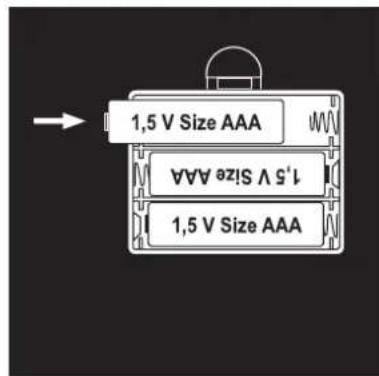
2.2 Inserting or replacing batteries
a. Open battery compartment of weighing platform.
b. Insert batteries. Observe correct polarity!
c. Open battery compartment of the operating terminal.
d. Insert batteries. Observe correct polarity!
Attention
VWhen replacing used batteries, only use fresh batteries of the same type. Never use batteries of a different type or of different charge!
As an alternative to regular alkaline batteries, NiMh accumulator batteries with a low self discharge rate are also recommended.
Important: accumulator batteries must be recharged outside of the device. It is not possible to charge accumulator batteries via the USB connection in the operating terminal.
a.

b.
d.

SOEHNLE
2.3 Installation
- Place scale on a sturdy, level surface.
Attention! Slipping hazard if surface is wet.
-
The operating terminal can be held in the hand, placed on a table, remain on the scale, or it can be installed on a wall. When attaching the magnetic wall bracket on a hard, smooth, dry, non-dusty and non-greasy surface, it is possible to simply insert the wall bracket into the oval recess on the back of the operating terminal. Remove the adhesive strip and push the operating terminal at eye-level horizontally onto the point of installation.
-
The durability of the adhesive cannot be guaranteed when used on tiles or rough surfaces. Therefore, the wall bracket should be screwed into the wall. To do this, remove the cover of the magnetic wall bracket by simply pushing a finger nail or the tip of a knife underneath the recess and lifting the case.
Then drill 2 holes at a distance of 2 cm into the wall, horizontally next to each other. The size of the drill depends on whether you use anchors or not. Then screw the bracket tight and reattach the case. Place operating terminal on magnetic bracket.

2.4 General menu navigation
The intuitive operation of the Soehnle Body Balance Comfort Select is supported by a menu with only 3 sensor keys.
If the operating terminal is in standby mode (time/temperature display), simply push the OK key to activate the terminal.
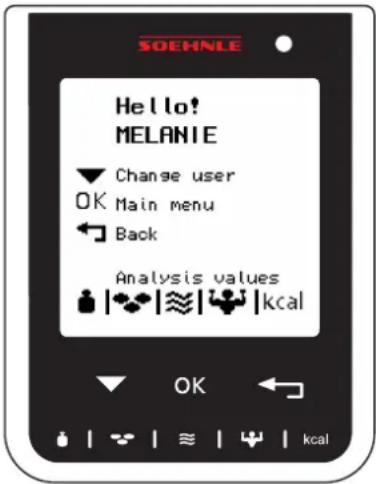
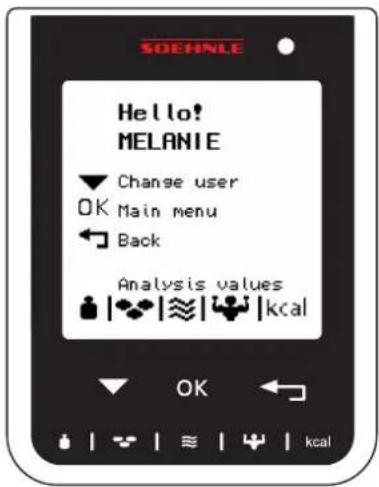
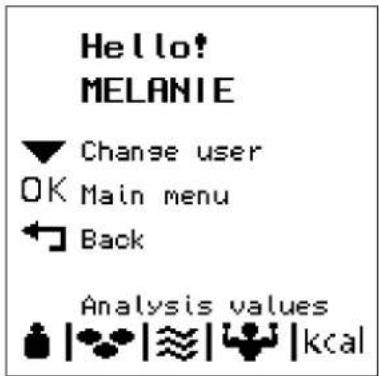
The last user is greeted on the start-up display and the individual function keys are described.
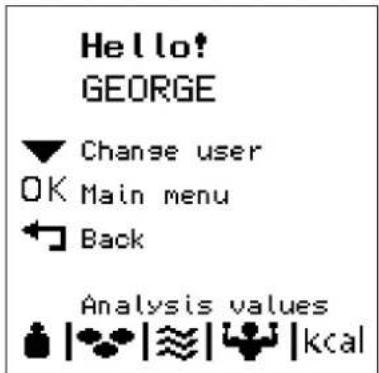
Use the ▼ key to change users.
Use the OK key to return to the main menu and confirm the respective selection made by using the ▼ key.
Use the Escape key ( → ) to go back one step in the menu.
The bottom 5 keys are used to recall the last measurement values and corresponding trend curves directly.
Note
Upon activation, the response time is somewhat delayed (1 second). The keys will then respond without delay.
2.5 Basic settings
After inserting the batteries into the operating terminal, the start-up display will appear.
The basic settings must then be entered using the following menu items
• Language selection
- Time
- Date
For later changes simply push the OK key to enter the main menu and change the desired menu item using "Settings".
2.5.1 Language selection
Select the desired language using the ▼ key.
The selected language is highlighted in a dark color.
Confirm your selection using the OK key.
SOEHNLE
Comfort Select
Language
Deutsch
English
Français
Italiano
Nederlands
Castellano
Svenska
2.5.2 Initial setting of the time
Use the ▼ key to select the time display format (12h / 24h) and confirm using OK.
Note
The selection is always highlighted in a dark color.
Confirm using OK to change the time.
Use the ▼ key to set the time for each digit and confirm each using OK.
If the time is set, use the ▼ key to highlight "confirm" and push OK.
Clock format

Set clock
09:53
confirm
Set clock
15:53
confirm
Set clock
10:53
confirm
2.5.3 Initial setting of the date
After the time has been set, the menu will automatically skip to setting the date.
Confirm using OK to change the date.
Use the ▼ key to set the date for each digit and confirm each using OK.
Note
It is imperative that you enter the current date, since entering a past date will result in the wrong allocation of the measured values. The wrong entry can be corrected only by deleting and re-entering the respective user. Any currently stored measurement values will be lost.
If the date is set, use the ▼ key to highlight "confirm" and push OK.
Note
Implausible entries, e.g. 39.17.2010 will not be accepted.
The basic setting is complete.
Set date
01.01.2010
confirm
Set date
01.01.2010
confirm
Set date
21.01.2010
confirm
09:53
19.7°C
2.6 Other settings
Use the OK key to activate the operating terminal.
The last user is greeted on the start-up display and the individual function keys are described.
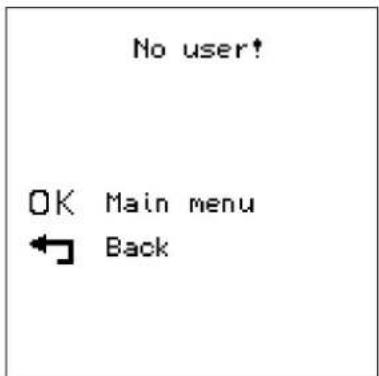
If no user is stored, a corresponding message appears.
Push the OK key to enter the main menu.
Use the ▼ key to select the menu item you would like to change and confirm using OK.


2.6.1 Setting the weighing units (kg - lb)
To change weight units, use the ▼ key to select the menu item "kg / lb" and confirm using OK
Use the ▼ key to select the units in which the body weight is to be displayed and confirm using OK.
Use the ▼ key to select another menu item and confirm your selection using the OK key or exit the menu level by pushing the Escape key (↑ diese Menüebene.
Main menu
User
Time
Date
Language

Temperature
Contrast
Power consumption
Weight

Main menu
User
Time
Date
Language

Temperature
Contrast
Power consumption
2.6.2 Setting temperature units (°C - °F)
To change the temperature units, use the ▼ key to select the menu item "°C / °F" and confirm using OK.
Use the ▼ key to select the units in which the room temperature is to be displayed and confirm using OK.
Use the ▼ key to select another menu item and confirm your selection using the OK key or exit the menu level by pushing the Escape key ( ).
Main menu
User
Time
Date
Language
Weight
Temperature
Contrast
Power consumption
Temperature

Main menu
User
Time
Date
Language
Weight
Temperature
Contrast
Power consumption
2.6.3 Setting the display contrast
To change the display contrast, use the ▼ key to select the menu item "contrast" and confirm using OK.
Use the ▼ key to set the contrast value that is most easily readable for your lighting situation and confirm using OK.
Use the ▼ key to select another menu item and confirm your selection using the OK key or exit the menu level by pushing the Escape key (→).
Main menu
User
Time
Date
Language
Weight
Temperature
Contrast
Power consumption
Contrast

Main menu
User
Time
Date
Language
Weight
Temperature
Contrast
Power consumption
2.6.4 Display mode / Batteries spent
The service life of the batteries can be increased significantly by changing the display mode.
Use the ▼ key to select the menu item "battery consumption" and confirm using OK.
Use the ▼ key to select your preferred mode and confirm using OK.
Normal Without energy saving measures / at least one half year Eco With night-time off / approx. 1 year battery life Eco Plus With auto-off and activation via OK key / approx. 3 year battery life
Note
After night-time off (Eco), activation may take a few seconds. Keep your finger on the OK key until the start-up display appears.
Use the ▼ key to select another menu item and confirm your selection using the OK key or exit the menu level by pushing the Escape key ( ).
Main menu
User
Time
Date
Language
Weight
Temperature
Contrast
Power consumption
Power
consumption
Normal
Eco
Eco plus
Main menu
User
Time
Date
Language
Weight
Temperature
Contrast
Power consumption
2.6.5 Changing the time
To set the time and time format, use the ▼ key to select the menu item "time" and confirm using OK.
Use the ▼ key to select the time and date format (12h / 24h) and confirm using OK.
Use the ▼ key to select the time and confirm using OK.
Use the ▼ key to set the time for each digit and confirm each using OK.
Once the time has been set, use the Escape key ( → ) to return to the main menu.
Push the Escape key (→) to exit the main menu level.
Clock format

Set clock

Set clock

Set clock

2.6.6 Changing the date
To set the date, use the ▼ key to select the menu item "date" and confirm using OK.
Use the ▼ key to set the date for each digit and confirm each using OK.
Note
It is not possible to enter a past date once current measurement values exist. The entry can be corrected only by deleting and re-entering the respective user. Any currently stored measurement values will be lost.
Once the date has been set, use the Escape key (→) to return to the main menu.
Push the Escape key ( → ) to exit the main menu level.
2.6.7 Changing the language
Use the OK key to enter the main menu.
Use the ▼ key to select the menu item "language" and confirm using OK.
Use the ▼ key to select the desired language and confirm using OK.
Push the Escape key (→) to exit the main menu level.
Set date
01.01.2010
Set date
21.01.2010
Set date
21.01.2010
Language
Deutsch
English
Français
Italiano
Nederlands
Castellano
Svenska
2.7 Entering new user
Your new body analysis scale is equipped with a function that allows the automatic recognition of persons. In order for you, the user, to be recognized, you must perform an initial body analysis and then immediately enter your following personal data:
User name, birth date, sex, body height, and level of activity.
Note
We recommend reading this chapter completely prior to performing the initial body analysis.
During the entry as a new user, you will be asked to step on the body analysis scale with bare feet. This is imperative for body analysis. Take off your shoes and socks.
If the operating terminal is in standby mode (time/temperature display), simply push the OK key to activate the terminal.
The last user is greeted on the start-up display and the individual function keys are described.
Use the OK key to enter the main menu.
Use the ▼ key to select the menu item "user" and confirm using OK.
Use the ▼ key to highlight the menu item "new user" and confirm using OK.
Step onto the platform for an initial measurement.
The initial measurement is indispensable and serves to store the data for later automatic recognition of persons.
Note
If nobody steps on the platform or uses the platform with socks or shoes, the message “error during body analysis” will appear on the display and the measurement must be repeated.
Stand still until the display "enter user name" appears.
Continue to enter personal data as described on the following pages.
Main menu
User
Time
Date
Language
Weight
Temperature
Contrast
Power consumption
User
New user
1 GEORG
2 CARMEN
3 PETER
Please step on
scale with
bare feet!
70.0kg
body analysis
runs
Note
This scale is equipped with a Time-Out mode. After approx. 30 seconds without any use it will automatically switch to display the time.
2.7.1 Entering personal data
After the first measurement, the menu to enter the user name will appear. Push OK key.
Enter user name, letter by letter.
To do this, use the ▼ key to select the corresponding letter and confirm using the OK key. The cursor will move to the next position. Again select the letter using the ▼ key and again confirm using OK. Continue in this manner. After the last letter has been entered, push the Escape key (→).
Note
The sequence in which the alphabet is being scrolled through is A to Z in the default setting. The alphabet can be scrolled through from Z to A by pushing the body fat key
Use the ▼ key to highlight the menu item "confirm" and push OK.
User name

confirm
User name
MELA
confirm
User name
MELANIE
confirm
The birth date will then be entered.
To do this, use the ▼ key to select the date if it is not yet marked.
Then push OK. The cursor will blink at the first digit.
Use the ▼ key to select the numbers and confirm entry using the OK key.
The cursor will move to the next position. Again select the number using the
▼ key and again confirm using OK. Continue in this manner.
After the last number confirm again using OK.
Then use the ▼ key to highlight the menu item "confirm" and push OK.
The sex will then be entered.
To do this, use the ▼ key to select the corresponding sex and confirm using the OK key.
Date of birth
01.01.1970
confirm
Date of birth
22.10.1978
confirm
Date of birth
22.10.1976
confirm
Gender
male
female
SOEHNLE
The body height will then be entered.
To do this, use the ▼ key to select the corresponding number and confirm using the OK key.
After the last number, use the ▼ key to highlight the menu item "confirm" and push OK.
The level of activity will then be entered.
To do this, use the ▼ key to select the corresponding level of activity and confirm using the OK key.
| 1 Very little physical activity | Max. 2 hours/day standing or moving | |
| 2 Light, active, sitting and standing activity | ||
| 3 | House and garden work, chiefly standing; sitting only occasionally. | |
| 4 Athletes and people with plenty of exercise | Intensive training at least 5 hrs/week | |
| 5 Hard physical labor, highly active athlete | Intensive training at least 10 hrs/week | |
The activity levels 4 and 5 are taken into consideration in the determination of the body values only from an age of 18 years on.
Body height
170 cm confirm
Body height
170 cm confirm
Activity level
1 very low
2 low
3 average
5 very athletic
4 athletic
SOEHNLE
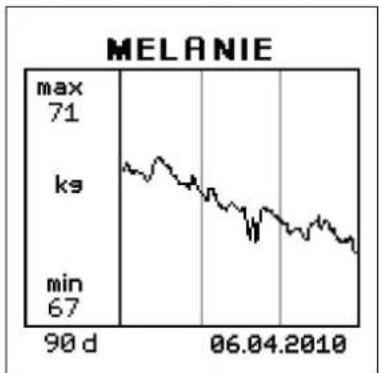
The data will be stored; the body weight with BMI (Body Mass Index), the body fat content (%), the body water content (%), the muscle mass (%), the energy requirement (kcal), an action recommendation, and the weight trend curve are being displayed in sequence. The display will then again switch to time/room temperature mode.
Note
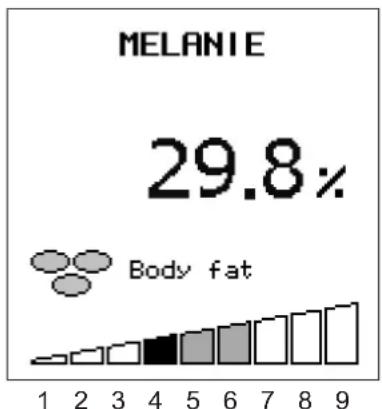
A 9-segment bar appears at the bottom edge of the display, which interprets the corresponding body value. The segment where the individual measurement is located will be highlighted in black. The center segments, highlighted in gray, constitute the normal range.

Number of days in the trend curve
2.7.2 Correcting personal data
If, for example:
• the body height changes (children in a growing period),
• the level of activity changes,
or corrections are to be performed, you can change the desired data for the memory slot already programmed for you.
If the operating terminal is in standby mode (time/temperature display), simply push the OK key to activate the terminal.
The last user is greeted on the start-up display and the individual function keys are described.
Push the OK key to enter the main menu.
Use the ▼ key to select the menu item "user".
Confirm your selection using the OK key.
Then use the ▼ key to select the corresponding user name and confirm using the OK key.
09:53
19.7°C
He I lo!
MELANIE

Change user

Main menu

Back
Analysis values


Main menu
User
Time
Date
Language
Weight
Temperature
Contrast
Power consumption
User
New user
1 GEORG
2 CARMEN
3 PETER
4 MELANIE
You will then be able to change the personal data (name, body height, sex, birth date, level of activity).
Use the ▼ key to select the setting to be changed and confirm using the OK key.
Then change the value, each letter or number at a time, using the ▼ key and confirm using OK.
If all digits have been entered, the value will be highlighted in a dark color.
Use the ▼ key to select "save" and confirm using the OK key.
Note
Changing the name is slightly different.
After the last letter has been entered, push the Escape key ( ). Use the
▼ key to select "save" and confirm using the OK key.
MELANIE
Save
MELANIE
179 cm
Gender w
22.10.1976
Activity level 3
User recognition
Remove user
MELANIE
Save
MELANIE
171 cm
Gender w
22.10.1976
Activity level 3
User recognition
Remove user
MELANIE
Save
MELANIE
174 cm
Gender w
22.10.1976
Activity level 3
User recognition
Remove user
MELANIE
Save
MELANIE
171 cm
Gender w
22.10.1976
Activity level 3
User recognition
Remove user
2.7.3 Re-recognition of persons
If the user cannot be recognized automatically or if the user is allocated to a wrong memory slot, please proceed as follows:
If the operating terminal is in standby mode (time/temperature display), simply push the OK key to activate the terminal.
The last user is greeted on the start-up display and the individual function keys are described.
Push the OK key to enter the main menu.
Use the ▼ key to select the menu item "user".
Confirm your selection using the OK key.
Then use the ▼ key to select the corresponding user name and confirm using the OK key.
Use the ▼ key to select "recognition of persons" and confirm using the OK key.
Upon request, immediately step on body analysis scale with bare feet.
The body analysis will be performed and the individual values will be displayed.
The user is again allocated to his or her previous memory slot and will again be recognized automatically.
Main menu
User
Time
Date
Language
Weight
Temperature
Contrast
Power consumption
User
New user
1 GEORG
2 CARMEN
3 PETER
4 MELANIE
MELANIE
Save
MELANIE
170 cm
Gender
22.10.1976
Activity level 3
User recognition
Remove user
Please step on
scale with
bare feet!
2.7.4 Deleting a user
If the operating terminal is in standby mode (time/temperature display), simply push the OK key to activate the terminal.
The last user is greeted on the start-up display and the individual function keys are described.
Push the OK key to enter the main menu.
Use the ▼ key to select the menu item "user".
Confirm your selection using the OK key.
Then use the ▼ key to select the corresponding user name and confirm using the OK key.
Use the ▼ key to select "remove user" and confirm using the OK key.
Confirm the security inquiry with "yes".
In the subsequent user menu, select "back" and confirm using the OK key.
Push the Escape key (→) to return from the main menu to the time display.
Main menu
User
Time
Date
Language
Weight
Temperature
Contrast
Power consumption
User
New user
1 GEORG
2 CARMEN
3 PETER
4 MELANIE
MELANIE
Save
MELANIE
170 cm
Gender w
22.10.1976
Activity level 3
User recognition
Remove user
Remove user?
No
Yes
SOEHNLE
3 Body analysis
A body analysis is only possible with bare feet. Personal data must have been entered beforehand.
For concise results, please step onto the platform without any clothing and under the same conditions (time, food consumption, etc.).
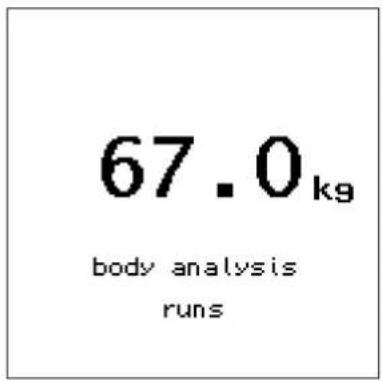
- Step onto platform. The weight will be displayed. Stand still while the body analysis is being performed.
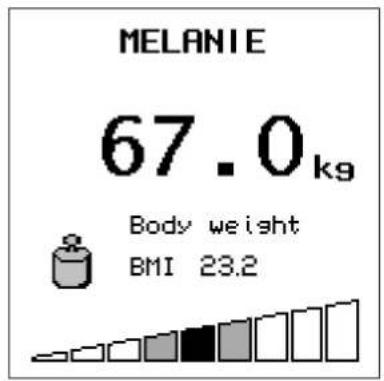
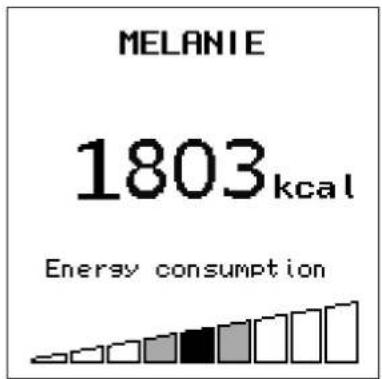
- After automatic recognition of persons, the body weight and BMI (body mass index), body fat content, body water content, muscle mass and energy consumption is displayed.
A bar chart will be displayed to interpret measurement results. The average range for the respective person is located in the center 3 segments of the bar indicator.



Note
A 9-segment bar chart appears at the bottom edge of the display, which interprets the corresponding body value. The segment where the individual measurement is located will be highlighted in black. The center segments, highlighted in gray, represent the normal range.
SOEHNLE
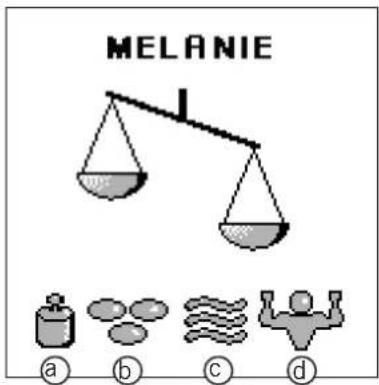
- An assessment of the data will then be displayed.
"LIFE IN BALANCE" means that all is well.
However, if an unlevel scale is displayed followed by one or more of the following symbols, then one or more of your body values are not within the average range.
a. Body weight
b. Body fat
c. Body water
d. Muscle mass
If one or more of your body values deviate from the standard values, it is recommended that you first explore this situation in detail. The internet offers a plethora of information on any of these topics. However, please do not rely on standard explanations. Every person needs individual concepts that are aligned to that person's specific need.
With our products we would like to support you in your responsibility for your body and motivate you to lead a healthy lifestyle.
If you are unsure of which measures are suitable for your personal wellbeing, it is imperative that you obtain professional advice from a physician or dietician.
- Step off of the platform.
The scale will shut off automatically and return to time/temperature mode.


SOEHNLE
Note
In rare cases it is not possible to automatically allocate the analysis results to one memory slot.
The user must then be allocated manually:
Use the ▼ key to select the corresponding user name and confirm using the OK key.
Following this, body weight, body fat and body water content, muscle mass, as well as total energy consumption is displayed, as well as the evaluation.
Very rarely, in case of users with a very similar weight and values, the values may be allocated to the wrong person. This will falsify the trend curve.
Please select user
1 GEORG
2 CARMEN
3 PETER
4 MELANIE
Hello!
MELANIE
4 Recalling body analysis values
The last measured values as well as the corresponding trend curves of every user can be recalled directly.
If the operating terminal is in standby mode (time/temperature display), simply push the OK key to activate the terminal.
The last user is greeted on the start-up display and the individual function keys are described.
Use the ▼ key to change users.
Push one of the measured value recall keys to display the last measured values of the selected user. If the last user has measured him- or herself several times that day, the respective average values will be displayed:
Body weight
dy fat
Body water
Muscle mass
kcalergy requirement
Push the same key again to display the corresponding trend curve.
Use the ▼ key to switch to the values of other users.
The operating terminal will shut off automatically or by pushing the Escape key ( ).

SOEHNLE
Use the ▼ key to switch between individual users even while the individual values are being displayed.
Push the measured value recall keys to display the last measured values, and push the same key again to display the trend curves of the selected user.
5. Weighing without body analysis
A body analysis cannot be performed when you step onto the platform with shoes or socks. The body analysis scale will then determine only your body weight.
80.3 kg
SOEHNLE
6. Evaluation of measurement results
The Body Balance will determine your individual ideal condition in regard to body weight and body fat content based on your personal data and the recommendations of health experts.
It will furthermore determine the total water content and muscle content. Please note that muscles also contain body water, which is already taken into consideration in the body water analysis. Therefore, the total calculation will always result in a value of more than 100%.
Body weight
While the body weight will be displayed in kg, the BMI (Body Mass Index) will be displayed below it; the bar chart on the bottom edge of the display will show an initial interpretation of the individually determined BMI value.
The BMI is a parameter for the evaluation of the body mass of a person.
Note: The segment where the individual measurement is located will be highlighted in black. The center segments, highlighted in gray, represent the normal range.
| BMI (kg/m2) Classification |
| < 18.5 Underweight |
| 18.5 - 24.9 Normal weight |
| 25.0 - 29.9 Overweight |
| ≥ 30.0 Adiposity |
| 30.0 - 34.9 Adiposity level I |
| 35.0 - 39.9 Adiposity level II |
| ≥ 40.0 Adiposity level III |
Source:
World health organization, 2000

Absolute deviation of BMI from individual normal value
1 = lt; - 7, 5 2 = - 7, 5 3 = - 5, 0 4 = - 2, 5 5 = 0, 0 6 = + 2, 5 7 = + 5, 0 8 = + 7, 5 9 = gt; + 7, 5
SOEHNLE
Body fat content
While the body fat content will be displayed in %, the bar chart on the bottom edge of the display will show an initial interpretation of the individually determined body fat content. The segment where the individual measurement is located will be highlighted in black. The center segments, highlighted in gray, represent the normal range.
Too much body fat is unhealthy. But, what's even more important, is that a high body fat content is usually connected to an increased blood fat content (lipids) and therefore increases the risk of a variety of diseases, e.g. diabetes, heart diseases, high blood pressure, etc. An extremely low body fat content, however, is also unhealthy. Besides the subcutaneous fatty tissue, the body also builds important fat reserves to protect the organs and to ensure important metabolic functions.
Metabolic disorders may develop if this essential reserve of fat is depleted. In case of women with body fat content of less than 10%, the menstrual period may become irregular. The risk for osteoporosis also increases. The normal body fat content depends on age and particularly the sex. For women, the normal value is approx. 10% higher than for men. With increasing age, the body also reduces muscle mass and increases the body fat content.
Deviation from personal normal value
| 1 | < -12 % | Very low fat content |
| 2 | -12 % | Low fat content |
| 3 | -7 % | |
| 4 | -3 % | |
| 5 | 0 % | Normal fat content |
| 6 | + 3 % | |
| 7 | + 7 % | High fat content |
| 8 | + 12 % | |
| 9 | > + 12 % | Very high fat content |
Body water content
While the body water content will be displayed in %, the bar chart on the bottom edge of the display will show an initial interpretation of the individually determined body water content. The segment where the individual measurement is located will be highlighted in black. The center segments, highlighted in gray, represent the normal range.
The value determined during this analysis corresponds to the so-called "Total Body Water" (TBW).
The body of an adult contains approx. 60% water. There is a certain range in which older persons may have lower water content than younger people and men show higher water content than women.
The difference between men and women is in this case based on the higher body fat content of women. Since the majority of body water is located in non-fatty tissue (73%) and the water content of fatty tissue is naturally rather low (approx. 10%), the body water content will automatically decrease as the body fat content increases.
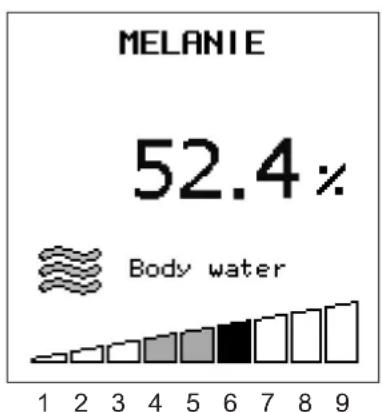
Deviation from personal normal value
| 1 | < - 6 % | Very low water content |
| 2 | - 6 % | Low water content |
| 3 | - 4 % | |
| 4 | - 2 % | |
| 5 | 0 % | Normal water content |
| 6 | + 2 % | |
| 7 | + 4 % | High water content |
| 8 | + 6% | |
| 9 | > + 6 % |
SOEHNLE
Muscle mass
While the muscle mass will be displayed in %, the bar chart on the bottom edge of the display will show an initial interpretation of the individually determined muscle mass. The segment where the individual measurement is located will be highlighted in black. The center segments, highlighted in gray, represent the normal range.
The muscle mass is the “motor” of our body. The muscles are chiefly responsible for the consumption of energy. The muscles maintain the body temperature and are the foundation for our physical performance. A well-trained, muscles body is seen as aesthetically pleasing.
The control of the muscle mass is important, particularly for persons with weight or fat problems. Since the body needs muscles to reduce excess energy or fat reserves, a reduction of weight can be successful only with the simultaneous increase of muscle.

Deviation from personal normal value
| 1 | < - 6 % | Very low muscle content |
| 2 | - 6 % | Low muscle content |
| 3 | - 4 % | |
| 4 | - 2 % | |
| 5 | 0 % | Normal muscle content |
| 6 | + 2 % | |
| 7 | + 4 % | High muscle content |
| 8 | + 6 % | |
| 9 | > + 6 % |
Energy consumption
While the energy consumption will be displayed in %, the bar chart on the bottom edge of the display will show an initial interpretation of the individually determined energy consumption. The segment where the individual measurement is located will be highlighted in black. The center segments, highlighted in gray, represent the normal range.
The energy consumption is calculated based on your personal data – corrected by a factor for your individual level of activity – and the measured body mass index.
Basic consumption + power consumption = energy consumption
If you consume fewer calories than needed for your individual energy consumption, your body will react by losing weight. The weight will increase if you consume more calories.
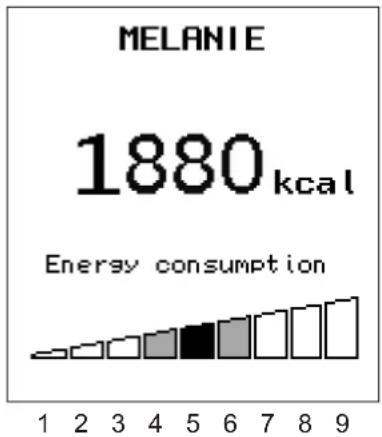
Deviation from personal normal value
1 < - 15 % Very low energy consumption
2 - 15 % Low energy consumption
3 - 10 %
4 - 5 %
5 0 % Normal energy consumption
6 + 5 %
7 + 10 % High energy consumption
8 + 15%
9 > + 15%
7. Notifications
- Batteries in operating terminal must be replaced.
Tip
If the batteries in the operating terminal must be replaced, various settings (language, time mode, time, date) must also be re-set. This re-setting is not required if the operating terminal is connected to a PC via the USB cord while the batteries are being replaced.
The personal data and measured values will remain stored even if the batteries are replaced.
Platform batteries are dead.
Please always replace all batteries of the platform and the operating terminal at the same time. The service life of the batteries will decrease if only individual batteries are replaced.
-
The load capacity of the body analysis scale is max. 150 kg / 330 lb. The display will show "overload" if this value is exceeded.
-
Implausible analysis results
Review personal programming.
Improper foot contact
Clean platform or feet and ensure sufficient skin moisture.
Dry skin
Slightly dampen feet or perform measurement preferably after bath or shower.
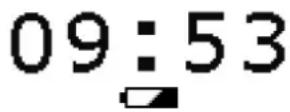
Batteries used up!
Overload
Error body analysis
SOEHNLE
- The wireless connection between platform and operating terminal malfunctions. The range of the wireless signal and the proper operation depend on several factors:
Battery status, location and placement, deflecting objects, other objects on the same frequency.
Under the influence of electrostatic discharge, the wireless connection between operating terminal and platform may be disrupted. Remove and replace batteries to remove this interference.
Under the influence of interfering frequencies of other devices, the wireless connection between operating terminal and platform may be disrupted. This interruption can be repaired by switching off the other devices or removing them from the range of the scale.
Extreme electromagnetic influences, e.g. operating a radio transmitter in the immediate proximity of the device, can influence the measurement results.
After removal of the influence, the product will be fully functional again.
However, it might be necessary to switch the device off and back on.
Error transmission
8. Technical information
- Load capacity x graduation = max 150 kg x 100 g / max 330 lb / 0.2 lb
- Display resolution: body fat content: 0.1%
- Display resolution: body water content: 0.1%
- Display resolution: muscle mass: 0.1%
- Display resolution: calorie consumption: 1 kcal
- Body height: 100-250 cm
- Age: 16-99 years
- 8 memory slots for individual persons
- Memory capacity: 3650 day values per user (10 years)
- External wireless display with large LCD screen
- Measurement current: < 0.1 mA RMS, 50/5 kHz
- Radio frequency: 433 MHz, range: 3m
- Batteries: 3 x 1.5 V AAA for platform and 3 x 1.5 V AA for operating terminal. Batteries included. As an alternative to regular alkaline batteries, NiMh accumulator batteries with a low self discharge rate are also recommended.
Important
Accumulator batteries must be recharged outside of the device. Accumulator batteries cannot be recharged inside the operating terminal via the USB connection.
9. Declaration of conformity
Soehnle herewith declares that this device is in compliance with the basic requirements and all other applicable regulations of directive 2004/108/EC.
10. Disposal
Disposal of used electronic devices

The symbol on the product or its packaging informs you that this product cannot be regarded as normal household waste, but must be returned at a collection point for recycling electronic and electrical devices.
Please contact your local community, your communal waste disposal companies or the store where you bought the product.
Battery disposal
Batteries should not be disposed of with your regular household waste. You, the consumer, are obligated to return used batteries. You can return used batteries to your communal collection points or wherever batteries of the respective type are sold.

Pb - Cd - Hg
Pb = contains lead
Cd = contains cadmium
Hg = contains mercury
11. Service and Support
Monday through Friday from 9:00 a.m. to noon
Germany
Ph.: 08 00 - 5 34 34 34
International
Ph.: +49 - 26 44 - 97 70
SOEHNLE
12. Guarantee
SOEHNLE guarantees a rectification of faults based on material or production errors free of charge, either by repair or replacement, for 3 years as of the date of purchase. Please retain the receipt of purchase. In case of a guarantee claim, please return the scale with filled-in guarantee slip and receipt of purchase to your seller.
Name
Address
Purchase date
Seller
Description of fault
SOEHNLE
Quality & Design by
Leifheit AG
Leifheitstraße
56377 Nassau / Germany
Telefon +49 2604 977-0
Fax +49 2604 977-300
www.soehnle.com




- OPERATING INSTRUCTIONS
- SOEHNLE
- CONTENT PAGE
- 1 INTRODUCTION
- INTRODUCTION
- 1.1 PROPER USE
- 1.2 SAFETY INFORMATION
- DANGER
- WARNING
- ATTENTION
- NOTES
- 1.3 BODY MONITORING SOFTWARE
- SOFTWARE INSTALLATION
- 1.4 BIO IMPEDANCE ANALYSIS (BIA)
- 1.5 THE BODY MASS INDEX (BMI)
- CLASSIFICATION OF THE BODY WEIGHT BASED ON BMI
- 1.6 RULES FOR WEIGHING
- THE BODY ANALYSIS
- CIRCUMSTANCES INFLUENCING A BODY ANALYSIS
- OTHER CIRCUMSTANCES INFLUENCING A BODY ANALYSIS
- START-UP OPERATION
- 2.1 DESCRIPTION OF THE DEVICE AND OPERATING ELEMENTS
- 2.2 INSERTING OR REPLACING BATTERIES
- 2.3 INSTALLATION
- 2.4 GENERAL MENU NAVIGATION
- NOTE
- 2.5 BASIC SETTINGS
- 2.5.1 LANGUAGE SELECTION
- LANGUAGE
- 2.5.2 INITIAL SETTING OF THE TIME
- 2.5.3 INITIAL SETTING OF THE DATE
- 2.6 OTHER SETTINGS
- 2.6.1 SETTING THE WEIGHING UNITS (KG - LB)
- MAIN MENU
- WEIGHT
- 2.6.2 SETTING TEMPERATURE UNITS (°C - °F)
- TEMPERATURE
- 2.6.3 SETTING THE DISPLAY CONTRAST
- CONTRAST
- 2.6.4 DISPLAY MODE / BATTERIES SPENT
- POWER
- CONSUMPTION
- 2.6.5 CHANGING THE TIME
- 2.6.6 CHANGING THE DATE
- 2.6.7 CHANGING THE LANGUAGE
- 2.7 ENTERING NEW USER
- USER
- NEW USER
- 2.7.1 ENTERING PERSONAL DATA
- BODY HEIGHT
- ACTIVITY LEVEL
- 4 ATHLETIC
- 2.7.2 CORRECTING PERSONAL DATA
- MELANIE
- SAVE
- 2.7.3 RE-RECOGNITION OF PERSONS
- USER RECOGNITION
- 2.7.4 DELETING A USER
- 3 BODY ANALYSIS
- PLEASE SELECT USER
- 4 RECALLING BODY ANALYSIS VALUES
- WEIGHING WITHOUT BODY ANALYSIS
- EVALUATION OF MEASUREMENT RESULTS
- BODY WEIGHT
- BODY FAT CONTENT
- BODY WATER CONTENT
- MUSCLE MASS
- ENERGY CONSUMPTION
- NOTIFICATIONS
- TIP
- TECHNICAL INFORMATION
- IMPORTANT
- DECLARATION OF CONFORMITY
- DISPOSAL
- DISPOSAL OF USED ELECTRONIC DEVICES
- BATTERY DISPOSAL
- SERVICE AND SUPPORT
- GUARANTEE
Brand : SOEHNLE
Model : Body Balance Comfort Select 63760 4
Category : Scale