
Web Connect - Scale SOEHNLE - Free user manual and instructions
Find the device manual for free Web Connect SOEHNLE in PDF.


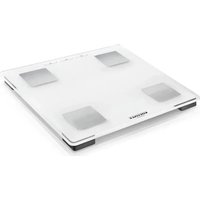
| Product Type | Digital bathroom scale with web connectivity |
| Brand | Soehnle |
| Model | Web Connect |
| Connectivity | Web box connected to router via LAN; 434 MHz radio link to scale |
| Maximum Capacity | 150 kg / 330 lb |
| Graduation | 100 g / 0.2 lb |
| Number of User Profiles | 8 |
| Display | Digital LCD |
| Power Supply (Scale) | 4 x 1.5 V AAA batteries (included) |
| Power Supply (Web Box) | AC adapter: 100-240 V ~50/60 Hz, output 5 V / 1000 mA |
| Radio Frequency | 434 MHz |
| Functions | Weight measurement, BMI calculation, target weight setting, data synchronization to personal online account |
| Target Weight Setting | Yes |
| Online Account | Accessible via my.soehnle.com |
| Suitable Age | 17 years and older |
| Intended Use | Home use, not for medical or commercial purposes |
| Safety Features | Anti-slip platform, do not use on wet floors |
| Cleaning | Wipe with damp cloth and mild detergent if needed; do not use abrasive cleaners |
| Guarantee | 3 years |
| Dimensions (Approx.) | 30 x 30 cm (typical) |
| Weight (Approx.) | 2 kg |
Frequently Asked Questions - Web Connect SOEHNLE
User questions about Web Connect SOEHNLE
0 question about this device. Answer the ones you know or ask your own.
Ask a new question about this device
Download the instructions for your Scale in PDF format for free! Find your manual Web Connect - SOEHNLE and take your electronic device back in hand. On this page are published all the documents necessary for the use of your device. Web Connect by SOEHNLE.
USER MANUAL Web Connect SOEHNLE
SOEHNLE
Content
- Introduction 3
1.1 Proper use 3
1.2 Safety information 3
1.3 The body mass index (BMI) 5
1.4 Rules for weighing 5
- Start-up operation 6
2.1 Description of the device 6
2.2 System requirements 7
2.3 Installation 7
2.4 Insert or replace batteries 7
2.5 Activate connection between web box and scale 8
2.6 Messages 8
2.7 Configure IP setting manually 9
2.8 Setting up the user account 10
2.9 Entering personal data I Unit of measurement (kg-lb-st) I Target weight 11
-
Weighing 12
-
The personal account 13
4.1 The main menu 13
4.2 Diagram display 13
4.3 Tabular display 14
-
Feedback 14
-
Deleting Account 14
-
Messages 15
-
Technical specifications 16
-
Declaration of conformity 17
-
Service and Support 18
-
Guarantee 18
1. Introduction
1.1 Proper use
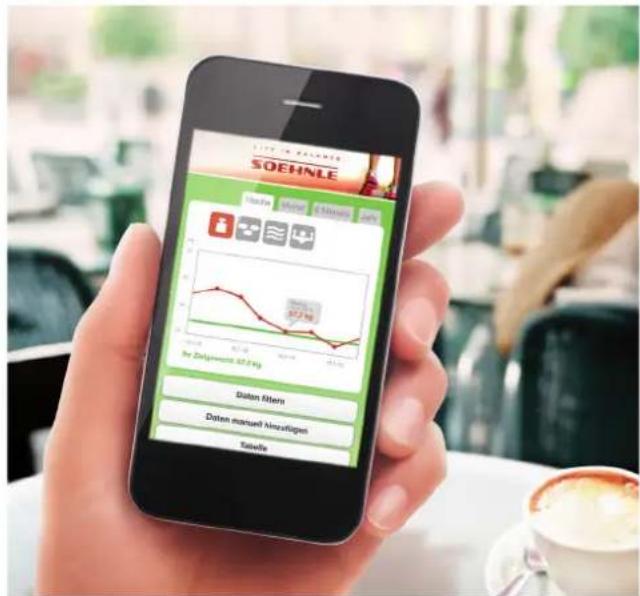
With Soehnle Web Connect you will always have your body weight and BMI at a glance. Whether at home on the PC or while on the go using your pad or smartphone - with the personal account on the web you are always up to date.
With our products we would like to support you in your personal responsibility for your body. If you are unsure of which measures are suitable for your personal wellbeing, it is imperative that you obtain professional advice from a physician or dietician.
This body analysis scale is designed for persons 17 years of age or older.
Up to 8 people can register per scale.
This device is not designed for medical and commercial use.
Please thoroughly read these instructions, particularly the safety information, and follow the instructions for care.
Please store these instructions for future use.
Further information can be found at our website at www.soehnle.com.
1.2 Safety information

Danger
Improper use may result in hazards that may lead to death or severe injury.

Warning
Improper use may, in certain circumstances, cause injuries and pose risks to your health.

Attention
Improper use may result in injury or property damage.
Notes
Important information
Danger
- Never use the device on slippery floor covers.
- Risk of slipping if your feet or the surface of the platform are wet.
Dry your feet and the platform prior to using the device. - Never throw used batteries into open flame. Danger of explosion!
- Never short-circuit batteries.

SOEHNLE
Warning
- Consult a physician or a dietician before reducing your weight.
- Keep the device away from small children.
- Support physically handicapped persons in the use of this device.
• Always step onto the intended location of the device and never on the edges and corners; always stand still during the analysis. - Be sure to use the right type of battery. Insert the battery with the pole in the correct direction. Always use a fresh battery when replacing the battery and never use batteries from different manufacturers, with different charges, or batteries with visible damages - this could result in overheating or explosions.
• Always store batteries outside of the reach of children.
Attention
- The individual components of this device may not be disassembled, repaired or modified.
- Batteries contain chemicals. A leakage of these chemicals could result in damages to objects or bodily injuries. If battery acid comes into contact with the eye, immediately rinse the eye with plenty of water and contact a physician.
- Remove the batteries from the device if it is not used for a long time.
Notes
The result may be falsified
• in the vicinity of cellular phones
• in the vicinity of heat sources or locations with variations in temperature
• in locations with great humidity and
- in locations that are influenced by vibrations or impacts
- when operating the device on carpets.
Therefore it is imperative that you always place the device on a solid surface.
- Never subject the device to direct sunlight.
- Never step on the display terminal.
- Dispose used batteries according to the regulations of your country
- Clean the parts of this device only with a damp cloth and some mild cleaning agents if required. Corrosive or abrasive cleaning agents will cause damages.

SOEHNLE
1.3 The body mass index (BMI)
The foundation of this calculation is the body mass index - an index number that can be used to interpret body weight in terms of the risk it poses to your health.
The index number is calculated based on the body weight in kilogram, divided by the body height squared
(example: BMI = 75 kg1,75 mx 1,75 m = 24,5)
Classification of the body weight based on BMI
(Source: World health organization, 2000)
| BMI (kg/m2) Classification |
| < 18.5 Underweight |
| 18.5 - 24.9 Normal weight |
| 25.0 - 29.9 Overweight |
| ≥ 30.0 Adiposity |
| 30.0 - 34.9 Adiposity level I |
| 35.0 - 39.9 Adiposity level II |
| ≥ 40.0 Adiposity level III |
1.4 Rules for weighing
The weight of an adult can change by approx. 2-3 kg during one day.
For a reliable weight control it is therefore important to maintain constant weighing conditions.
That's why it's best to weigh oneself
- sober
• always at the same time: the time between 6 p.m. and 8 p.m. is best for body analysis. - undressed
Ensure the sturdy and secure placement of the platform. Textile or soft floor surfaces can influence the measurement results rather strongly.
In order to prevent falsification of the weighing result, the scale should not be moved for 3 minutes prior to the weighing process.
2. Start-up operation
2.1 Description of the device
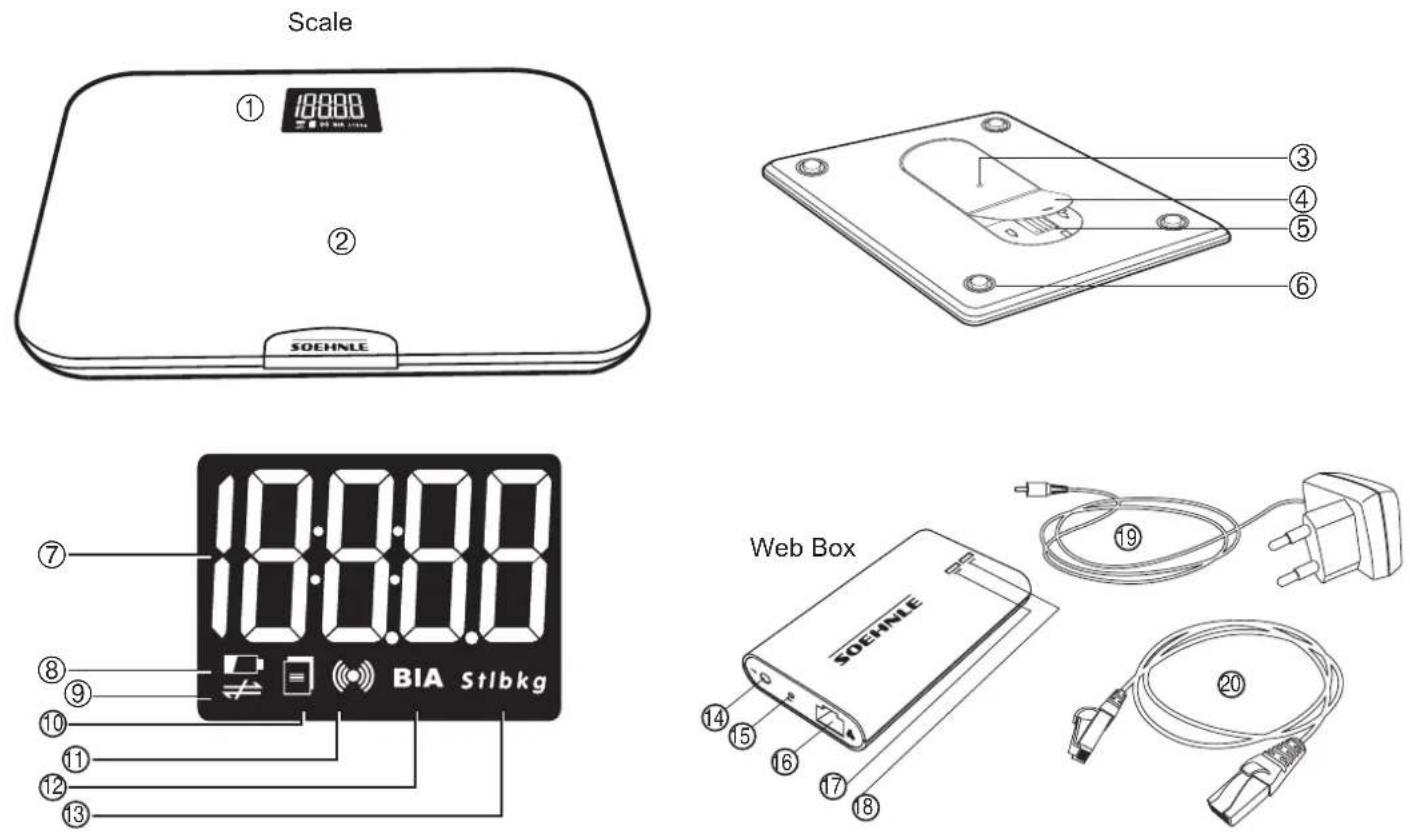
- Display
- Weighing platform
- Activation key
- Battery cover
- Battery compartment
-
Weighing cell
-
Measured value
-
Weak battery
-
Internet connection disrupted
-
Determine data for transmission
-
Data transmission
- Body fat measurement (not applicable with this device)
-
Measurement unit
-
Power supply socket
- Reset key
- Broadband interface
- Internet connection indicator
-
Network connection indicator
-
Power supply unit
-
Internet cable
SOEHNLE
2.2 System requirements
- Broadband router with one free LAN port (10 Mbit/s) and internet access
- Internet-capable device (e.g. smartphone, tablet or PC/MAC) with web browser of the newest generation. No software or app installation required.
- Valid email address for registration on the portal.
2.3 Installation
- Connect the web box with the power supply unit to the power network.
- Use the network cable to connect the web box to the router.
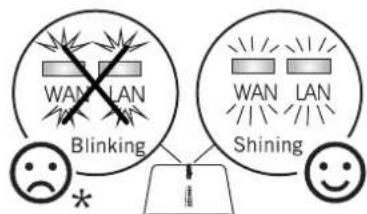
The connection is established when both LEDs light up.
Troubleshooting should be performed according to the display if one or both LEDs flash.
WAN = check internet connection
LAN = check router or connection to the router

2.4 Insert or replace batteries
Open battery compartment of weighing platform. Insert batteries. Observe correct polarity.

Attention
When replacing used batteries, only use fresh batteries of the same type. Never use batteries of a different type or of different charge status!
As an alternative to regular alkaline batteries, NiMh accumulator batteries with a low self-discharge rate are also recommended.
Important: accumulator batteries must be recharged outside of the device.
SOEHNLE
2.5 Activate connection between web box and scale
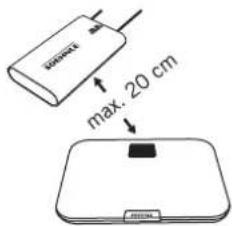
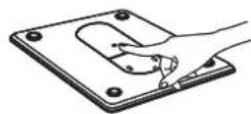
The distance between the web box and the scale should not exceed 20 cm during activation.
Push the button on the back of the scale to start activation.
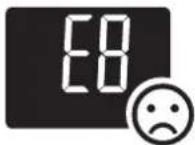
Activation was successful if [] is displayed.
However, if the scale displays E8, activation failed.
![graph LR A["0s"] --> B["0s"] B --> C["0s"] C --> D["[S"]]](/content/2026/06/1242633/images/1274918debfec0f7880b6d3fe8d0d9223041c309d31f6c3b2c98f1679e03cf8a.jpg)
2.6 Messages
| ProblemCauseSolution | ||
| LAN and WAN LED are dark | Error in power supply Check | the web box power supply connection |
| LAN and WAN LED are flashing | Web box does not communicate with the router | 1) Check the router power supply connection2) Check the connection between web box and router |
| LAN LED lights up, WAN LED flashes | Network is okay but the web box does not communicate with the network | 1) If the DHCP function was activated on the router: push reset key on web box to reset to factory settings.2) If the DHCP function was not activated on the router: follow chapter 2. |
| LAN and WAN LED light up. Data transmission was successful but data is not displayed in the personal account | No user selected Please set up user, see chapter 2.8 | |
| Data cannot be allocated automatically to a user | Please follow the steps in chapter 3 to allocate data to a user. | |
2.7 Configure IP setting manually
In rare cases it might be necessary to configure IP addresses manually. This might be the case if the DHCP* function is deactivated on the router. If this is the case, please continue as follows:
- The web box must be switched on (both LEDs are flashing).
-
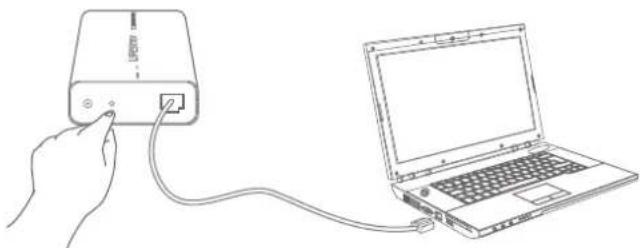
Push the reset key and hold it for approx. 5 seconds.
Both LEDs will light up simultaneously.
When both LEDs begin to flash, release the key. -
Then connect web box and PC using the network cable.
-
Access the network connections via Start => Control panel => Network connections.
-
Click on LAN connection (for WIN95 use right mouse button) and select settings.
-
Next to internet protocol, mark (TCP/IP) and select settings.
-
You now have the choice to obtain the IP address automatically or to configure it manually.
Select "Use following IP address" and enter the following IP address: 192.168.1.5 Subnet mask: 255.255.255.0 and confirm.
- Now enter the following information into your browser: http://192.168.1.2/
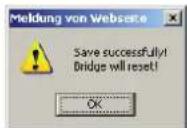
The adjacent input screen will appear and must contain this information precisely. Change if required and then confirm.
- The web box can now be connected via the router (chapter 2.3).
Bridge Setting Interface
中文 | English
You can get IP address automatically if your network supports this capability. Otherwise, you need to ask your network administrator for the appropriate IP settings.
- Obtain an IP address automatically
C Use the following IP address:
IP address.
192.168.1.2
Subnet mask
255.255.255.0
Default gateway:
192.168.1.1
Obtain DNS server address automatically
C Use the following DNS server address:
Preferred DNS server
192.168.1.1
Alternate DNS server.
0.0.0.0
Submit
Cancel
* The Dynamic Host Configuration Protocol (DHCP) provides a framework for passing configuration information to hosts on a TCP/IP network.
2.8 Setting up the user account
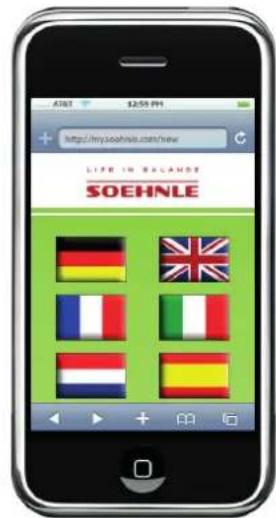
- Visit the website "my.soehnle.com/new"
- Select the desired language.
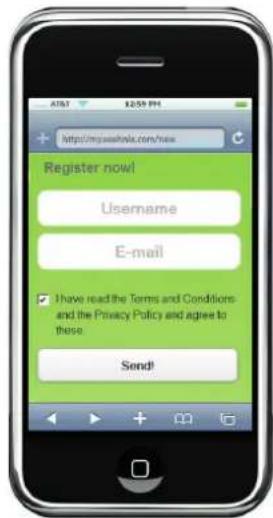
- Go to "Registration" and enter your user name and your personal email address.
Note: The scale can be used by up to 8 persons. Each user must have its own email address.
-
Continue with "Send".
-
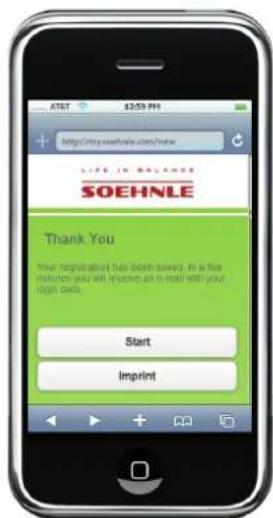
You will now receive an email with your user name and password.
Note: You can see your personal data at any time in your login area.
-
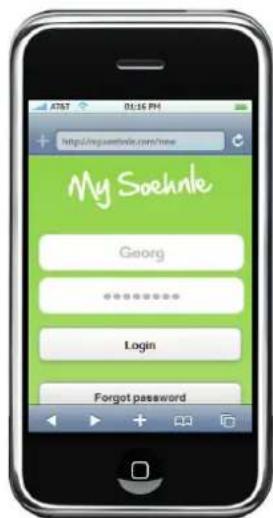
Select "Start" and enter your user name and password. Continue with "Login".
-
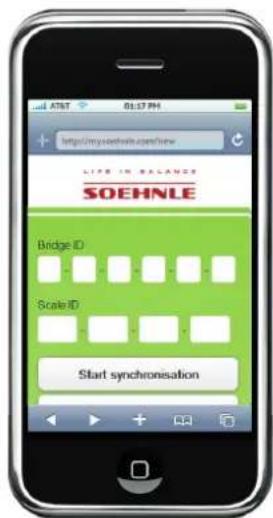
Enter the ID number of the web box (bridge) and the scale. You will find these on the bottom of the respective product.
Note: Please note that for synchronization, scale and web box must be ready for operation and an internet connection must be established (WAN and LAN LED light up).
Start synchronization.
-
Step onto the scale within the next five minutes, with bare feet and if possible undressed, and stand still until the display goes out.
-
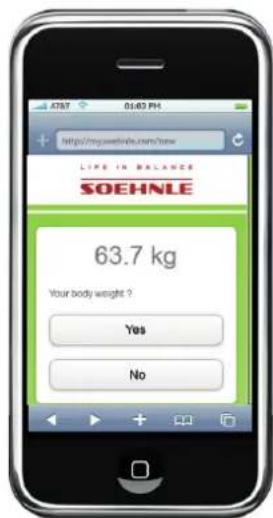
If your weight is being displayed in "My Soehnle", please confirm using "Yes".
-
Personal data will be entered next (chapter 2.8.1)
2.9 Entering personal data
More personal data must be entered to finish setting up the user account. This data is absolutely necessary for interpretation of the measurement data.
- Select language
- Enter gender
- Enter the name with which you would like to be addressed
- Set up birthdate
- Enter body height
- Select activity level
- Select desired unit of measurement for display (kg-lb-st)
- Enter target weight
- The user name can be changed here
- If the password is to be changed, this can be entered here
- Email address can be changed here
- Confirm entries with "Save"
Note: Personal data can be changed anytime.
It is also possibly to completely delete the account.
Use "Logout" to log out.

3. Weighing
For concise results, please step onto the platform without any clothing and under the same conditions (time, food consumption, etc.).
Note: An internet connection must be available if the data is to be transmitted to your personal account. Only the weight will be displayed if no internet connection is available. The measured data will not be saved.
- Step onto platform.
- The weight will be displayed.
Stand still during transmission and while data is being transmitted.
The data will be automatically allocated to your personal account.

Note
In rare cases, an automatic allocation to one account is not possible.
The user must then be allocated manually.
The user will receive a note in its personal account that data cannot be allocated to a user.
Have the list displayed to you and accept the data into your account or tap on "Ignore". The data will then remain available for another user.

4. The personal account
4.1 The main menu
- Go to my.soehnle.com, enter your user name and your password and tap on "Login".
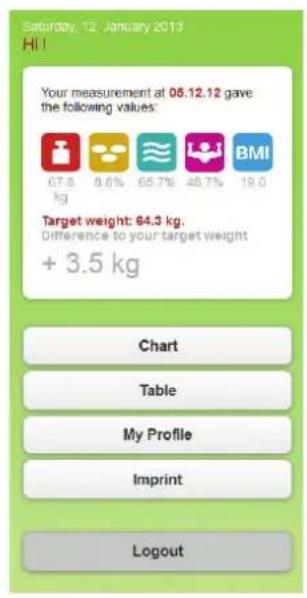
- You will be in the main menu.
The values that were determined last and the difference to your desired weight will be displayed.
Links to the other information pages are available here:
- Diagram display
- Table display
- My profile (see chapter 2.7.1)
4.2 Diagram display
Select the period for review and the parameter to be displayed.
Use "Filter data" to individually adjust the period for review and the parameters to be displayed.
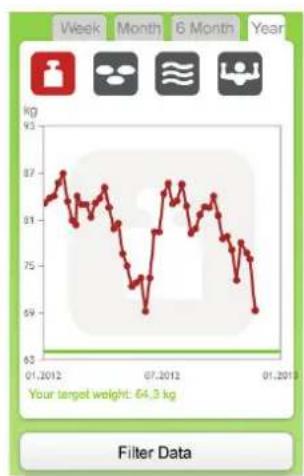
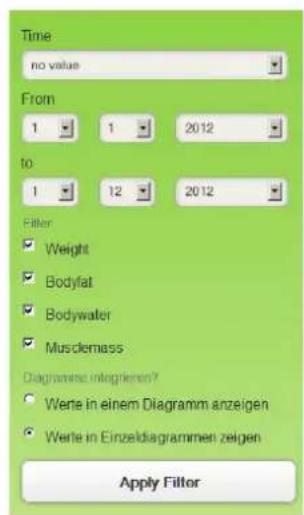
Select the period for review (week, month, 6 months, year, or customized via "Filter data") for which the values are to be displayed.
If you tap on next to an individual value, you can edit this data or add a comment.
Use "Add data manually" to add weight values and comments without using the scale.
5. Feedback
Use "My profile/feedback" to send us remarks regarding this program or the product.
6. Deleting Account
Use "My profile/delete account" to delete your personal account.
All data will be irretrievably deleted after a security query and the corresponding confirmation.

- Messages
| Problem Cause Solution | |||
| No display | No batteries or batteries are empty | Insert or replace batteries | |
| Batteries inserted incorrectly Insert batteries correctly | |||
| Display while the product is being activated or synchronized |  | 1. Radio communication is interrupted2. Distance between scale and web box is too great during activation | Activate the product again with a distance of 20 cm between scale and web box. |
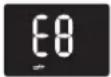 | Network error Check the network connection | ||
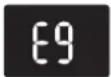 | The product has not been synchronized | Synchronize the product (see chapter 2.8) | |
| Display while the product is being used |  | Broadband error WAN LED flashes | Check the internet connection |
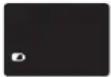 | Weak batteries Replace batteries | ||
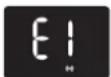 | 1. The connection between scale and web box has been interrupted2. The scale is outside of the radio range | Bring the scale back to the radio range of the web box.Interrupt the power supply of the web box for 30 seconds. | |
 | Your measurement results cannot be transmitted due to a network error | Check the network connection | |
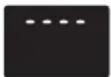 | Overload display Load scale with max. 150 kg. | ||
| Last measured data is not being displayed in the personal account | The measured data cannot be allocated to a user. | Go to your personal account and accept the data (see chapter 3.0) | |
| Broadband error WAN LED flashes | Check the internet connection | ||
8. Technical specifications
Web Box
- Radio frequency: 434 MHz
- Power supply unit: Model: BLJ5W050100P-V
Input: 100-240V\~50/60Hz, 150mA
Output: 5V -- 1000mA
Scale
- Load capacity x graduation = max 150 kg x 100 g / max 330 lb / 0.2 lb
- 8 memory slots for individual persons
- Measurement current: < 0.1 mA RMS, 50/5 kHz
- Radio frequency: 434 MHz
- Batteries: 4 x 1.5 V AAA batteries included in the scope of delivery.
As an alternative to regular alkaline batteries, NiMh accumulator batteries with a low self-discharge rate are also recommended.
Important
Accumulator batteries must be recharged outside of the device.
9. Declaration of conformity
Soehnle herewith declares that this device is in compliance with the basic requirements and all other applicable regulations of directive 1999/5/EC. You will find the EU compliance declaration on www.soehnle.com.
Although the appliance has been tested and its emissions do not exceed the permitted radio frequency emission levels as laid down in the above directives, there is no guarantee that interference will not occur in certain situations. Possible interference can be detected by switching the appliance on and off at the same time as checking the radio or TV reception. You can try to remove interference by carrying out one or more of the following steps:
- Point the appliance in question or its antenna in a different direction.
- Increase the distance between the appliance in question and the scale.
- If necessary, call in an experienced radio/TV engineer.
IMPORTANT! Making modifications to this product's electronics or housing requires express consent from Soehnle; ignoring this regulation may result in the user's permission to operate the appliance being withdrawn.
Electromagnetic influences
Under extreme electromagnetic influences, e.g. operating a radio-controlled appliance in the immediate proximity of the appliance, this may cause a detrimental effect to the display value. When the cause of the disturbance ceases, the appliance can be used again as intended, or it may be necessary to switch if off and on or temporarily remove the batteries. Subject to technical changes.
10. Disposal
Disposal of used electronic devices
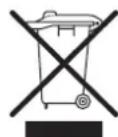
The symbol on the product or its packaging informs you that this product cannot be regarded as normal household waste, but must be returned at a collection point for recycling electronic and electrical devices.
Please contact your local community, your communal waste disposal companies or the store where you bought the product.
Battery disposal
Batteries should not be disposed of with your regular household waste. You, the consumer, are obligated to return used batteries. You can return used batteries to your communal collection points or wherever batteries of the respective type are sold.

Pb - Cd - Hg
Pb = contains lead
Cd = contains cadmium
Hg = contains mercury
11. Service and Support
Monday through Friday from 8:30 a.m. to noon
Germany Ph.: 08 00 - 5 34 34 34
International Ph.: +49 - 26 04 - 97 70
If you'd like to contact us in writing, please use the contact form at the SOEHNLE homepage www.soehnle.com. For contact information of SOEHNLE representative in your country, visit www.soehnle.com.
12. Guarantee
SOEHNLE guarantees a rectification of faults based on material or production errors free of charge, either by repair or replacement, for 3 years as of the date of purchase. Please retain the receipt of purchase. In case of a guarantee claim, please return the scale with filled-in guarantee slip and receipt of purchase to your seller.
Name
Address
Purchase date
Seller
Description of fault
SOEHNLE
Quality & Design by
Leifheit AG
Leifheitstraße 1
56377 Nassau / Germany
Telefon +49 2604 977-0
Fax +49 2604 977-300
www.soehnle.com
JFS
EN
05/2013
007606/A




- SOEHNLE
- CONTENT
- INTRODUCTION
- 1.1 PROPER USE
- 1.2 SAFETY INFORMATION
- DANGER
- WARNING
- ATTENTION
- NOTES
- 1.3 THE BODY MASS INDEX (BMI)
- CLASSIFICATION OF THE BODY WEIGHT BASED ON BMI
- 1.4 RULES FOR WEIGHING
- START-UP OPERATION
- 2.1 DESCRIPTION OF THE DEVICE
- 2.2 SYSTEM REQUIREMENTS
- 2.3 INSTALLATION
- 2.4 INSERT OR REPLACE BATTERIES
- 2.5 ACTIVATE CONNECTION BETWEEN WEB BOX AND SCALE
- 2.6 MESSAGES
- 2.7 CONFIGURE IP SETTING MANUALLY
- BRIDGE SETTING INTERFACE
- 2.8 SETTING UP THE USER ACCOUNT
- 2.9 ENTERING PERSONAL DATA
- WEIGHING
- NOTE
- THE PERSONAL ACCOUNT
- 4.1 THE MAIN MENU
- 4.2 DIAGRAM DISPLAY
- FEEDBACK
- DELETING ACCOUNT
- TECHNICAL SPECIFICATIONS
- WEB BOX
- SCALE
- IMPORTANT
- DECLARATION OF CONFORMITY
- ELECTROMAGNETIC INFLUENCES
- DISPOSAL
- DISPOSAL OF USED ELECTRONIC DEVICES
- BATTERY DISPOSAL
- SERVICE AND SUPPORT
- GUARANTEE
Brand : SOEHNLE
Model : Web Connect
Category : Scale