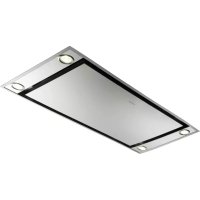
Heaven 2.0 120 X Plus - Range hood FABER - Free user manual and instructions
Find the device manual for free Heaven 2.0 120 X Plus FABER in PDF.



| Brand | Faber |
| Model | Heaven 2.0 120 X Plus |
| Product type | Range hood |
| Category | Decorative chimney hood |
| Width | 120 cm |
| Minimum safety height | 650 mm above cooking surface |
| Exhaust duct diameter | 120 mm minimum |
| Power supply | 220-240 V ~ 50/60 Hz |
| Motor power (estimated) | 300 W |
| Lighting | LED white, class 1M, max optical power 7 μW |
| Motor speeds | 4 speeds (1, 2, 3, Timed intensive 6 min) |
| Delay function | Delayed shutdown of 30 minutes |
| Remote control | Included (AAA batteries not supplied) |
| Grease filters | Metallic, dishwasher safe, saturation alarm after 100 h |
| Activated carbon filter | Not washable, replace every 4 months, alarm after 200 h |
| Installation type | Extraction or recirculation with carbon filter |
| Net weight (estimated) | Approximately 20 kg |
| Protection class | Class I (grounding required) |
| Noise level (estimated) | 55-65 dB(A) depending on speed |
| Maintenance | Clean grease filters every 2 months, replace carbon filter every 4 months, clean exterior with a damp cloth |
| Safety | Automatic shutdown of intensive speed after 6 min, Delay function, do not flambé under the hood |
| After-sales service | Contact customer service for LED replacement |
Frequently Asked Questions - Heaven 2.0 120 X Plus FABER
User questions about Heaven 2.0 120 X Plus FABER
0 question about this device. Answer the ones you know or ask your own.
Ask a new question about this device
Download the instructions for your Range hood in PDF format for free! Find your manual Heaven 2.0 120 X Plus - FABER and take your electronic device back in hand. On this page are published all the documents necessary for the use of your device. Heaven 2.0 120 X Plus by FABER.
USER MANUAL Heaven 2.0 120 X Plus FABER
natural_image
Technical line drawing of a mechanical assembly with two rectangular components mounted on a base plate (no text or symbols)RECOMMENDATIONS AND SUGGESTIONS 13
CHARACTERISTICS 16
INSTALLATION....17
USE 18
MAINTENANCE 20
SOMMAIRE
FR
CONSEILS ET SUGGESTIONS....22
CARACTERISTIQUES....25
INSTALLATION....26
UTILISATION 27
ENTRETIEN 29
INHALTSVERZEICHNIS
DE
EN INSTALLATION MANUAL
Warning! Before proceeding with installation, read the Recommendations and Suggestions in the User Manual.
FR MANUEL D'INSTALLATION
natural_image
Simple line drawing of a wrench and screwdriver (no text or symbols)HU ÜZEMBE HELYEZÉSI ÚTMUTATÓ
HR KNJIŽICE S UPUTAMA
Upozorenje! Prije instalacije pročitajte sigurnosne informacije u Uputama za uporabu.
SL NAVODILO ZA NAMESTITEV

natural_image
Illustration of a cardboard box with a shipping cart and open box, no text or symbols present





natural_image
Two stylized house icons with wind turbine symbols, no text or labels present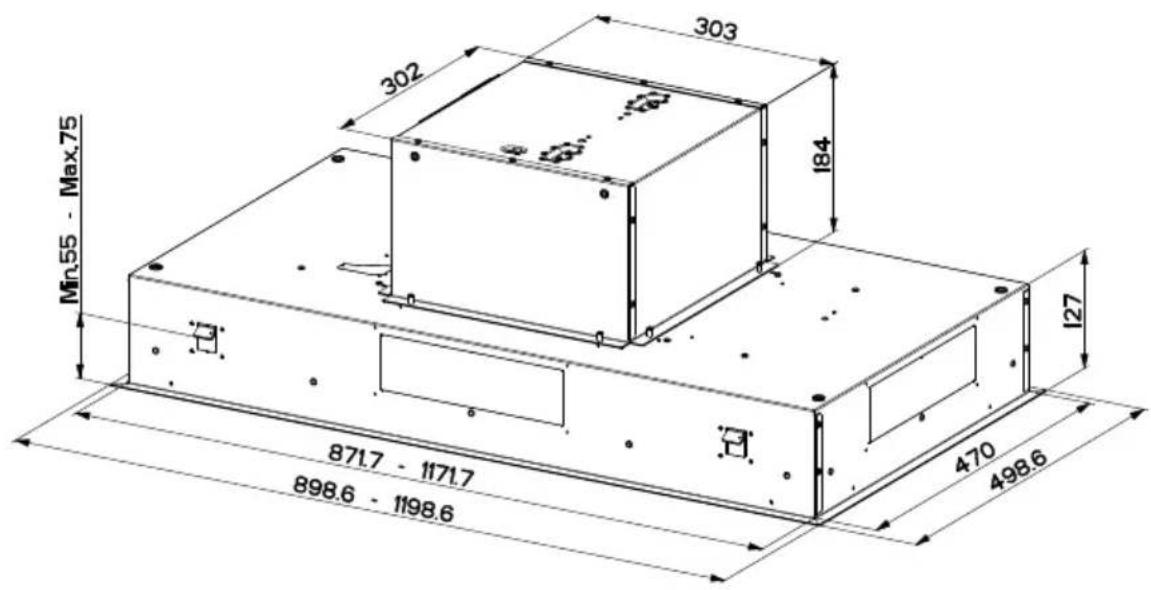



natural_image
Diagram of a building interior with airflow indicators and structural elements (no text or symbols)

natural_image
Diagram showing a 3D printing setup with a box on a platform, including a hand holding a pen, and a cooking pot on a stove (no text or symbols present)
3


natural_image
Technical diagram showing a mechanical assembly with a bracket and a close-up of a component inserted into a housing (no text or symbols present)4


natural_image
Simple 3D diagram showing a rectangular block on a flat surface with two upward-pointing arrows indicating direction (no text or symbols)
natural_image
Technical line drawing of a mechanical bracket or frame assembly (no text or symbols)


10


natural_image
Technical line drawing of a rectangular frame with circular cutouts and directional arrows, no text or symbols present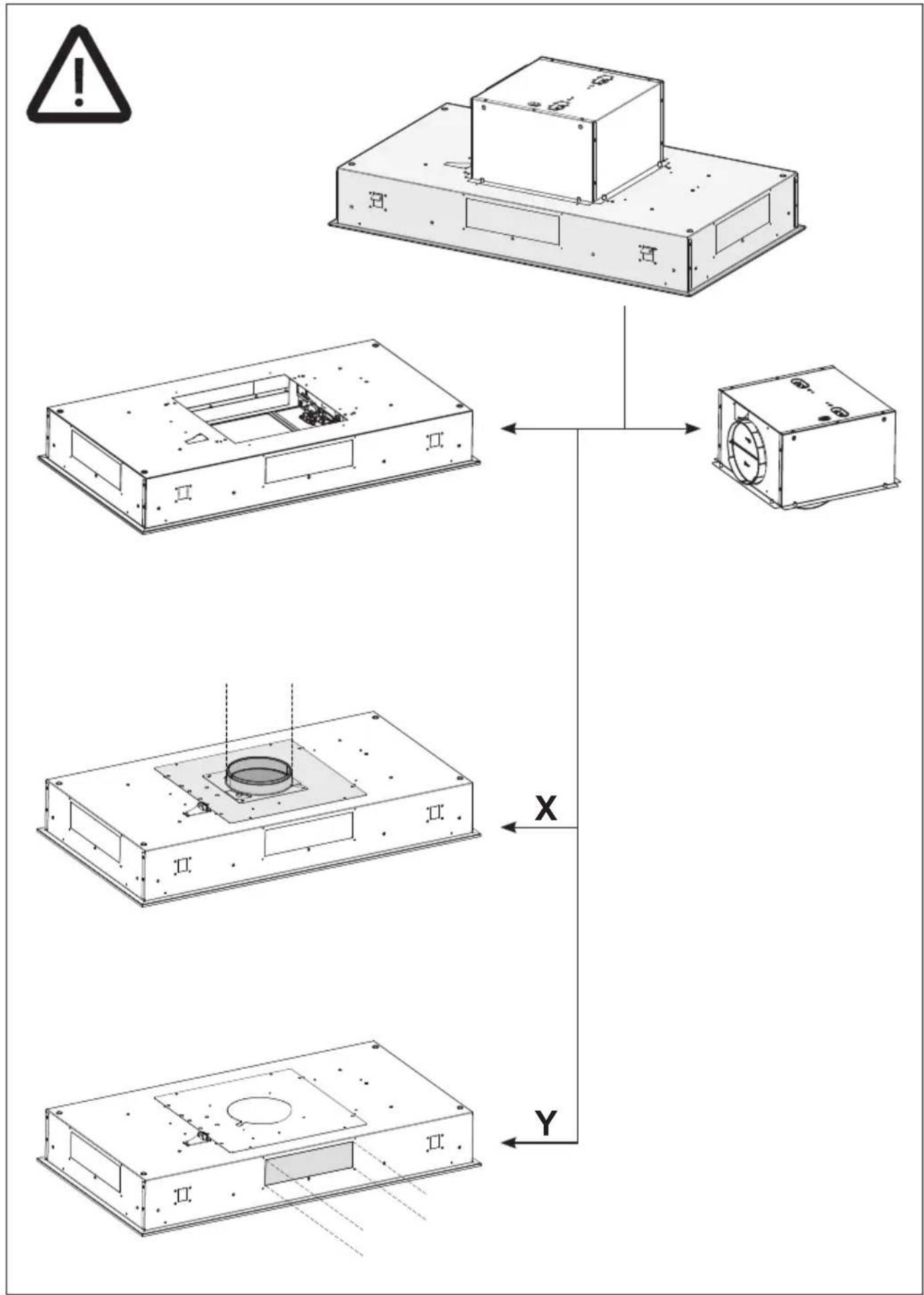
flowchart
graph TD
    A["Start"] --> B["Component 1"]
    B --> C["Component 2"]
    C --> D["Component 3"]
    D --> E["Component 4"]
    E --> F["End"]
    style A fill:#f9f,stroke:#333
    style B fill:#ccf,stroke:#333
    style C fill:#cfc,stroke:#333
    style D fill:#fcc,stroke:#333
    style E fill:#cff,stroke:#333
    style F fill:#ffc,stroke:#333
11
X-Y
natural_image
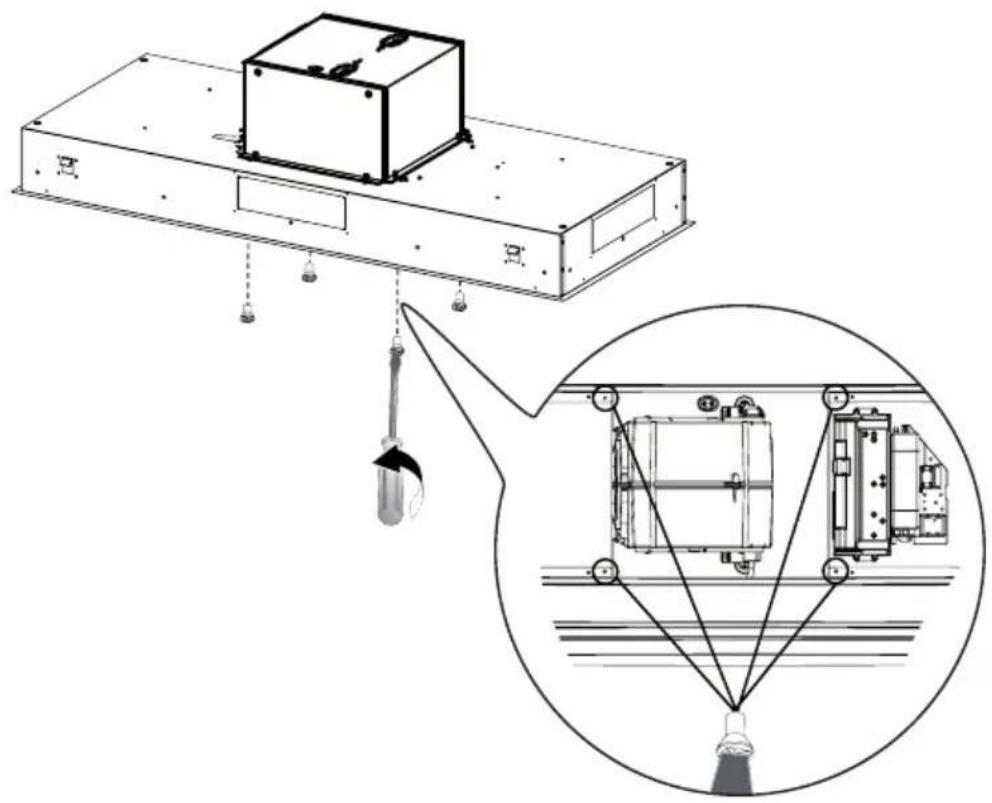
Technical diagram of a mechanical device with a suspended load and a close-up inset showing internal components (no text or symbols)12
X-Y


natural_image
Technical line drawing of a mechanical housing with two views: top shows a circular component, bottom shows internal components (no text or symbols)

15
x
natural_image
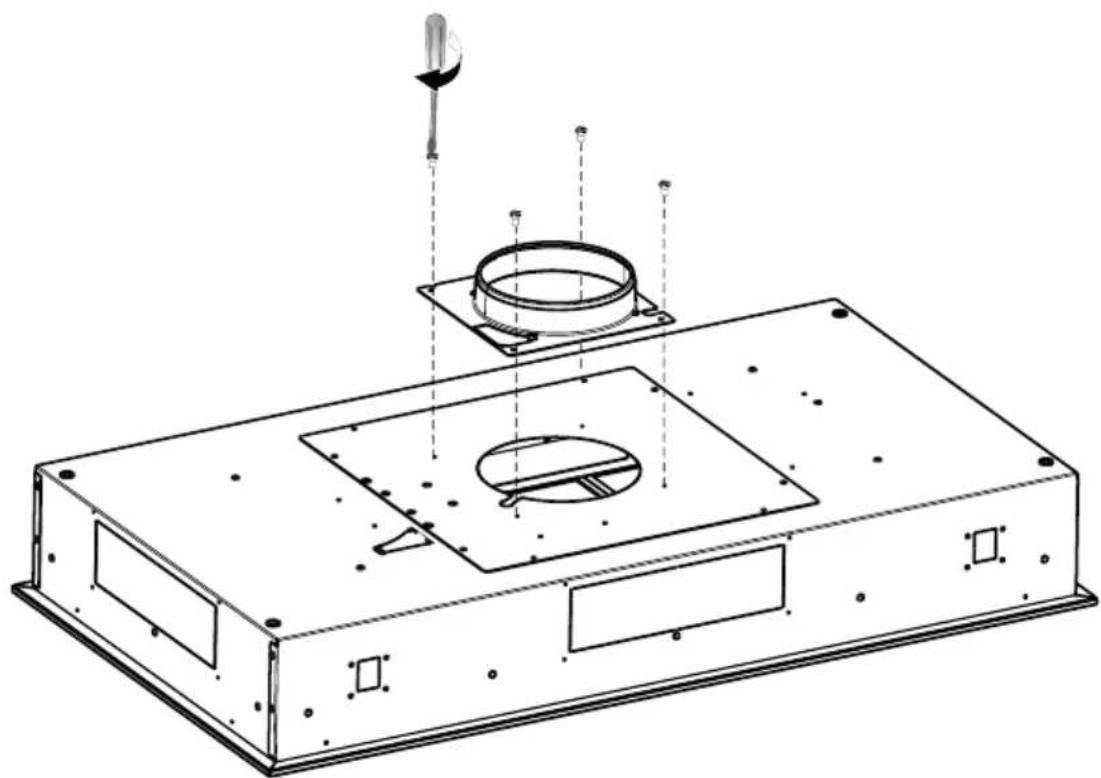
Technical line drawing of a mechanical assembly with mounting base, circular components, and a tool (no text or symbols)16
x

natural_image
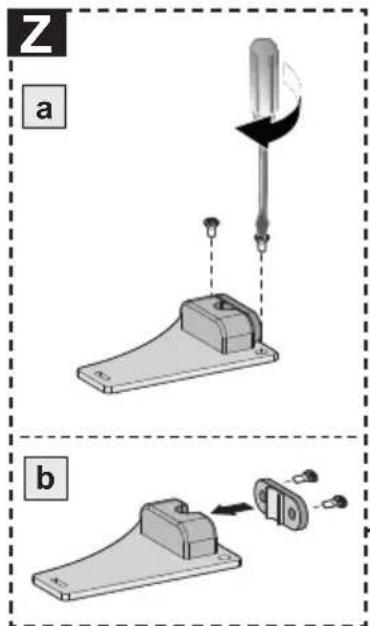
Technical line drawing of a mechanical assembly with a central circular component and a tool, no visible text or symbols
17
Y

natural_image
Technical line drawing of an electronic device casing with internal components and a labeled component 'D' (no text or symbols beyond label)!

natural_image
Technical line drawing of a rectangular electronic device with mounting holes and internal compartments (no text or symbols)

natural_image
Technical line drawing of an electronic device with a warning symbol and a 3D cube connection (no text or labels)


natural_image
Illustration of a chemical experiment setup with a conical flask, thermometer, and smoke rising (no text or symbols)
natural_image
Illustration of a greenhouse with a pot and smokestack, crossed by a green X-shaped line (no text or symbols)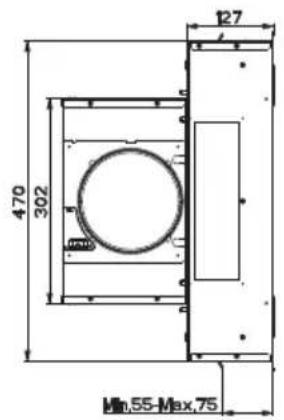


Fissaggio Cappa

natural_image
Diagram showing a device with an open lid and a base tray, both with upward arrows indicating motion (no text or symbols)natural_image
Illustration of a medical device with a circular dial and internal components, showing a green arrow pointing to it (no text or symbols present)Quadro comandi Telecomando

natural_image
Simple line drawing of a box with a hand pointing at the top and a green curved arrow indicating rotation (no text or symbols)natural_image
Hand inserting a green arrow into a smartphone screen (no text or symbols visible)natural_image
Diagram of a mechanical device with rotating blades and green arrows indicating motion (no text or symbols)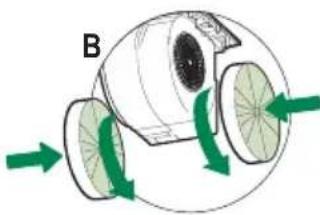
natural_image
Diagram of a biological structure with green arrows indicating directional flow, no text or symbols presentIlluminazione
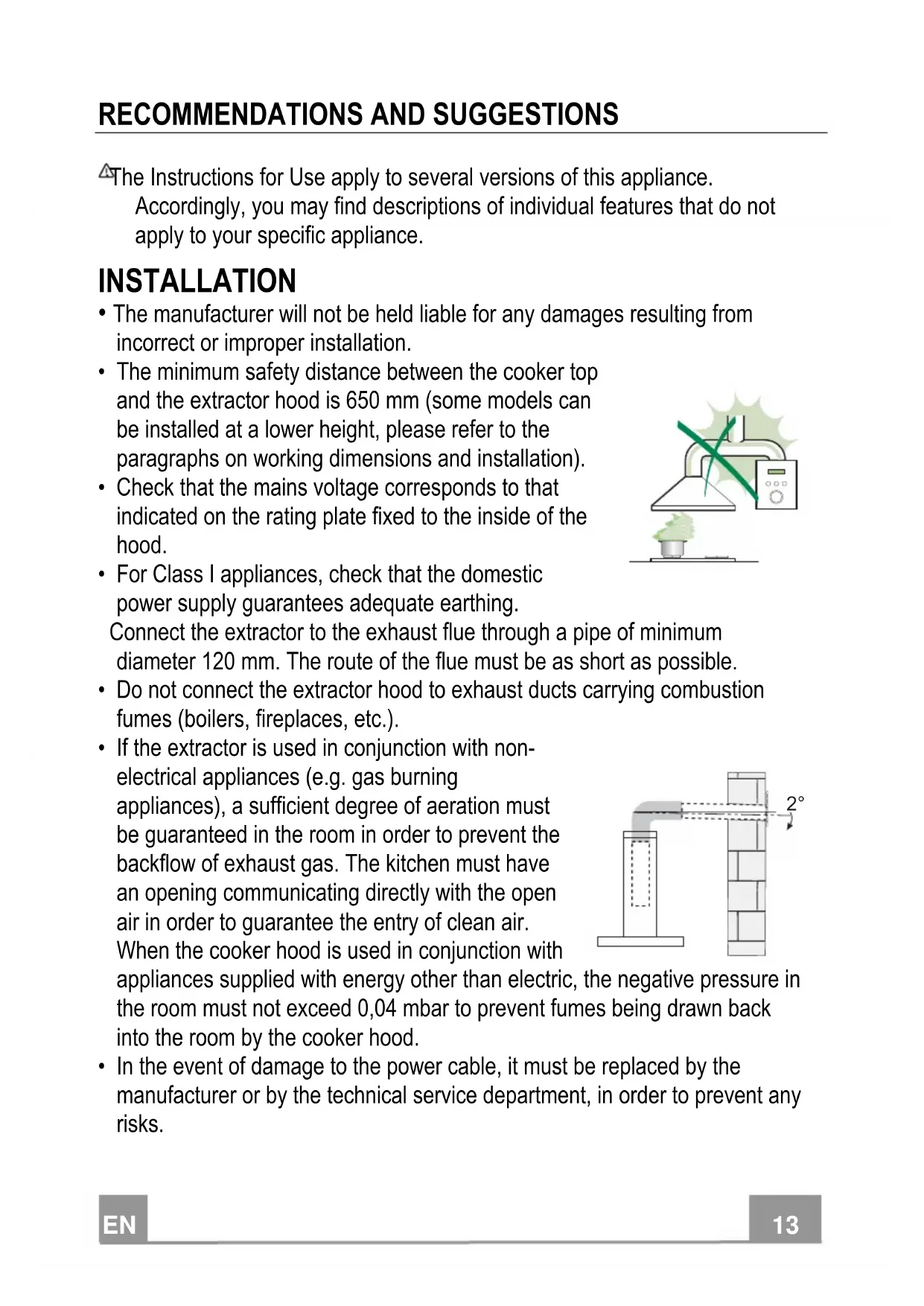
The Instructions for Use apply to several versions of this appliance.
Accordingly, you may find descriptions of individual features that do not apply to your specific appliance.
INSTALLATION
- The manufacturer will not be held liable for any damages resulting from incorrect or improper installation.
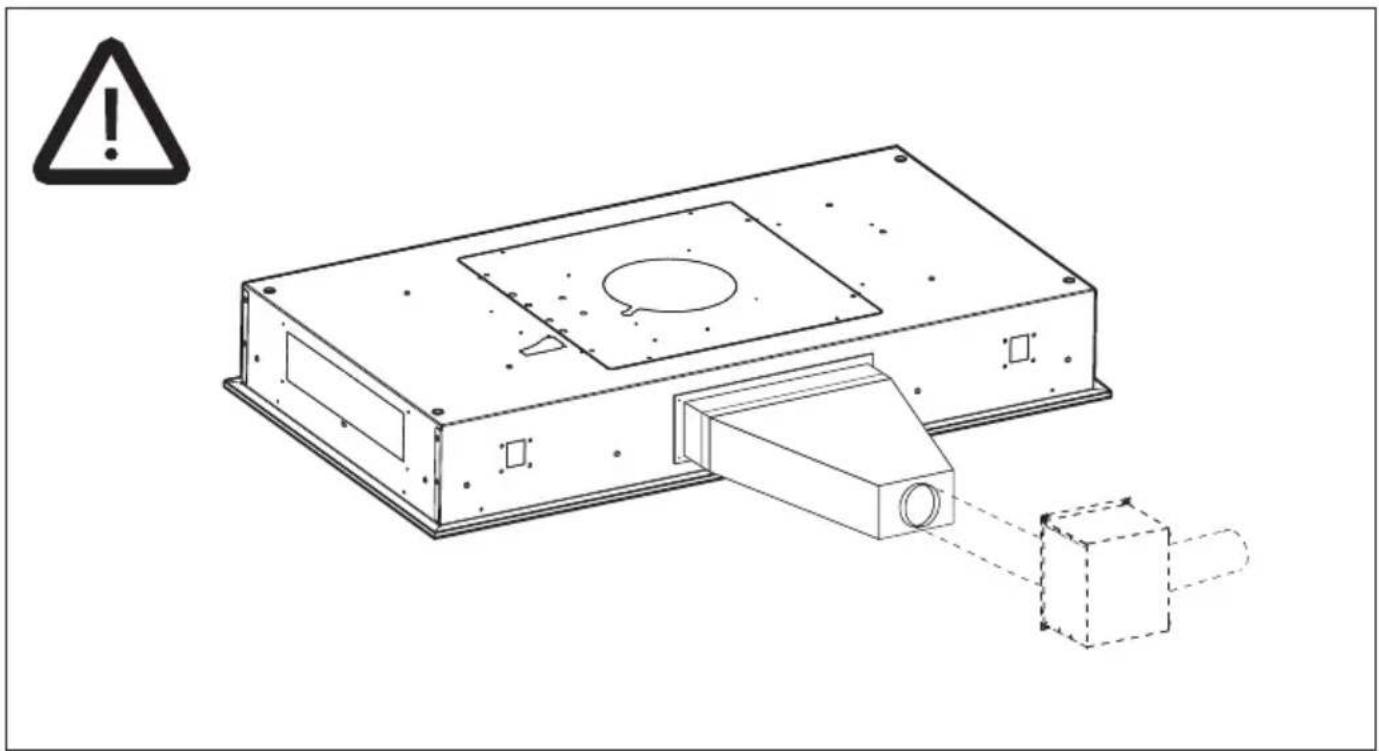
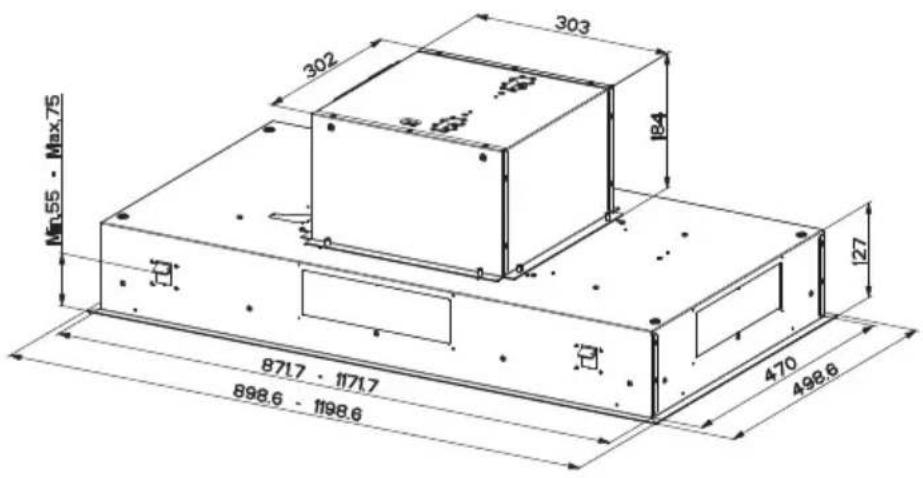
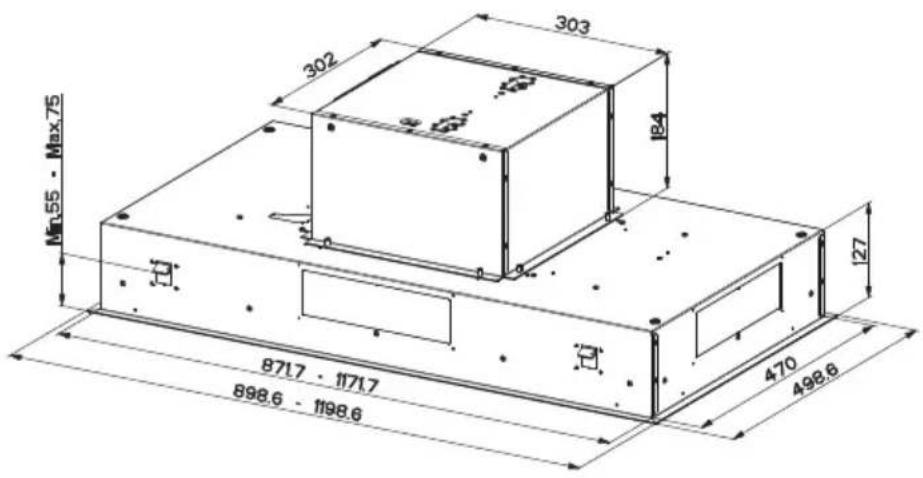
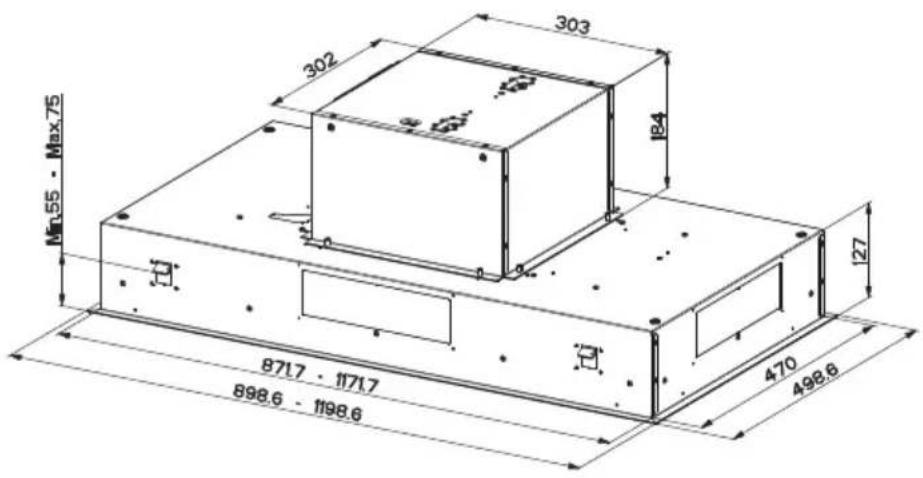
- The minimum safety distance between the cooker top and the extractor hood is 650 mm (some models can be installed at a lower height, please refer to the paragraphs on working dimensions and installation).
- Check that the mains voltage corresponds to that indicated on the rating plate fixed to the inside of the hood.
- For Class I appliances, check that the domestic power supply guarantees adequate earthing.
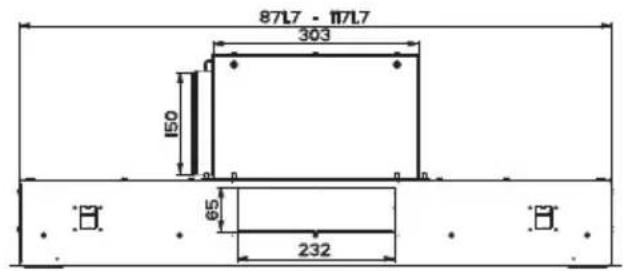
Connect the extractor to the exhaust flue through a pipe of minimum diameter 120 mm. The route of the flue must be as short as possible.

natural_image
Illustration of a chemical experiment setup with a conical flask, thermometer, and smokestack (no text or symbols)- Do not connect the extractor hood to exhaust ducts carrying combustion fumes (boilers, fireplaces, etc.).
- If the extractor is used in conjunction with non-electrical appliances (e.g. gas burning appliances), a sufficient degree of aeration must be guaranteed in the room in order to prevent the backflow of exhaust gas. The kitchen must have an opening communicating directly with the open air in order to guarantee the entry of clean air.
When the cooker hood is used in conjunction with

appliances supplied with energy other than electric, the negative pressure in the room must not exceed 0,04 mbar to prevent fumes being drawn back into the room by the cooker hood.
- In the event of damage to the power cable, it must be replaced by the manufacturer or by the technical service department, in order to prevent any risks.
- If the instructions for installation for the gas hob specify a greater distance specified above, this has to be taken into account. Regulations concerning the discharge of air have to be fulfilled.
- Use only screws and small parts in support of the hood.
Warning: Failure to install the screws or fixing device in accordance with these instructions may result in electrical hazards. - Connect the hood to the mains through a two-pole switch having a contact gap of at least 3 mm.
USE
- The extractor hood has been designed exclusively for domestic use to eliminate kitchen smells.
- Never use the hood for purposes other than for which it has been designed.
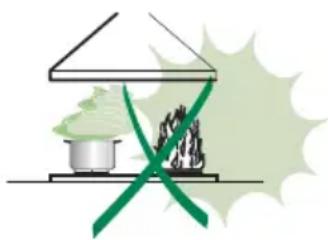
- Never leave high naked flames under the hood when it is in operation.
- Adjust the flame intensity to direct it onto the bottom of the pan only, making sure that it does not engulf the sides.
- Deep fat fryers must be continuously monitored during use: overheated oil can burst into flames.
- Do not flambè under the range hood; risk of fire.
- This appliance can be used by children aged from 8 years and above and persons with reduced physical, sensory or mental capabilities or lack of
natural_image
Illustration of a greenhouse with a pot and smokestack, crossed by a green X-shaped line (no text or symbols)experience and knowledge if they have been given supervision or instruction concerning use of the appliance in a safe way and understand the hazards involved. Children shall not play with the appliance. Cleaning and user maintenance shall not be made by children without supervision.
- “CAUTION: Accessible parts may become hot when used with cooking appliances.”
MAINTENANCE
- Switch off or unplug the appliance from the mains supply before carrying out any maintenance work.
- Clean and/or replace the Filters after the specified time period (Fire hazard).
- The Grease filters must be cleaned every 2 months of operation, or more frequently for particularly heavy usage, and can be washed in a dishwasher.
- The Activated charcoal filter is not washable and cannot be regenerated, and must be replaced approximately every 4 months of operation, or more frequently for particularly heavy usage.
- "Failure to carry out cleaning as indicated will result in a fire hazard".
- Clean the hood using a damp cloth and a neutral liquid detergent.
The symbol on the product or on its packaging indicates that this product may not be treated as household waste. Instead it shall be handed over to the applicable collection point for the recycling of electrical and electronic equipment. By ensuring this product is disposed of correctly, you will help prevent potential negative consequences for the environment and human health, which could otherwise be caused by inappropriate waste handling of this product. For more detailed information about recycling of this product, please contact your local city office, your household waste disposal service or the shop where you purchased the product.
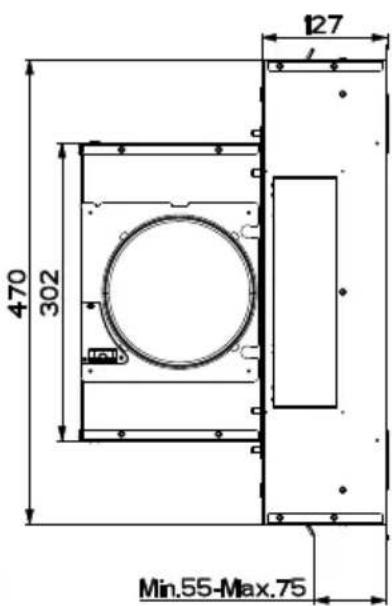
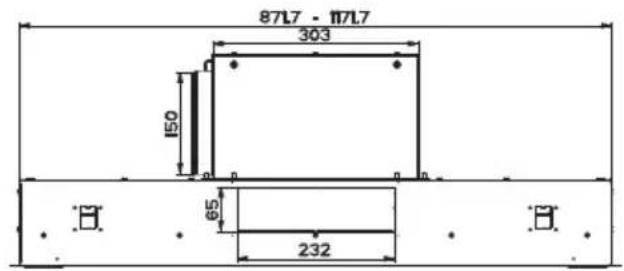
Dimensions


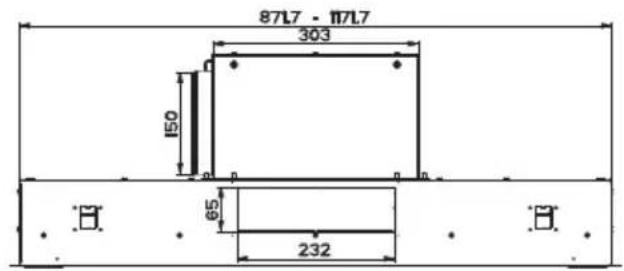

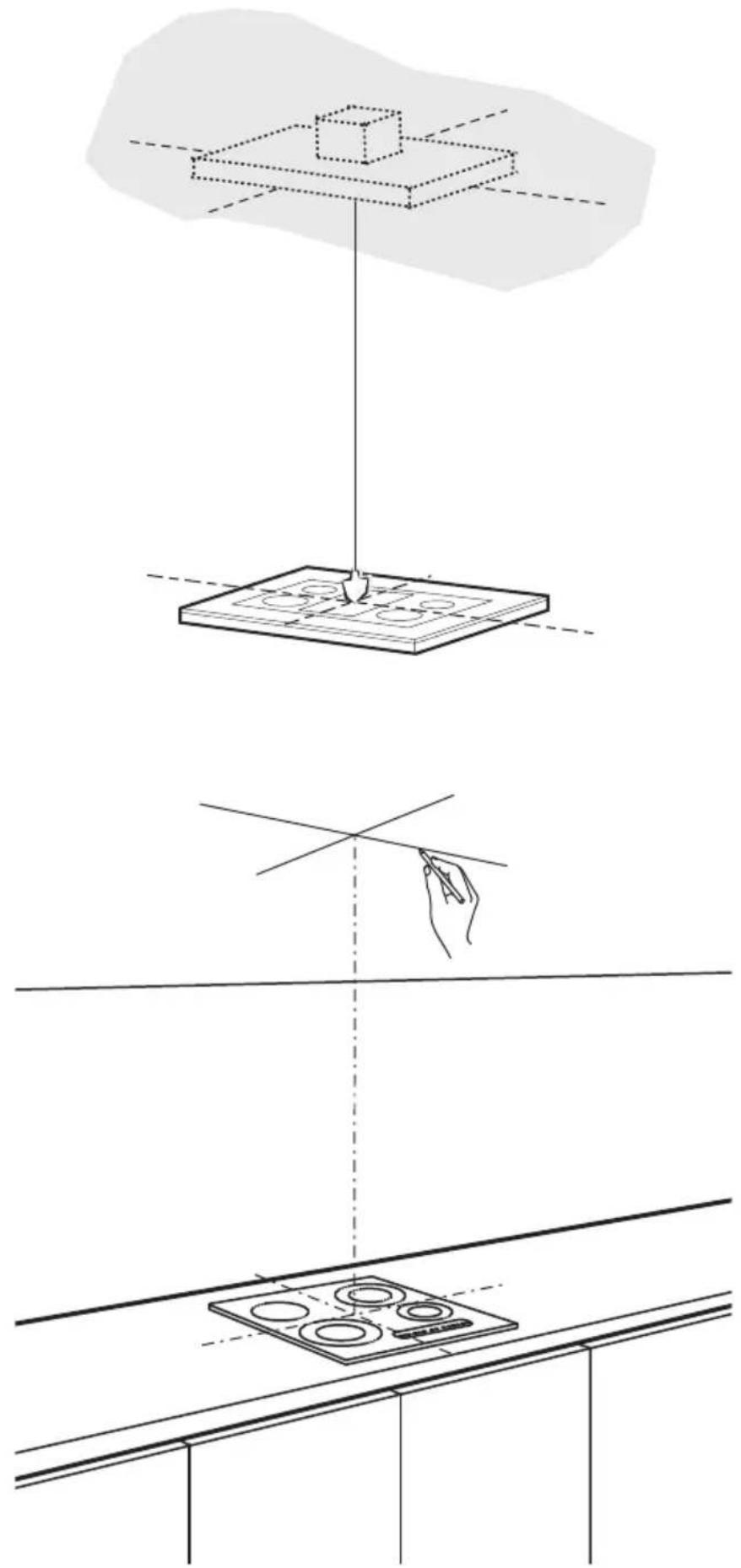
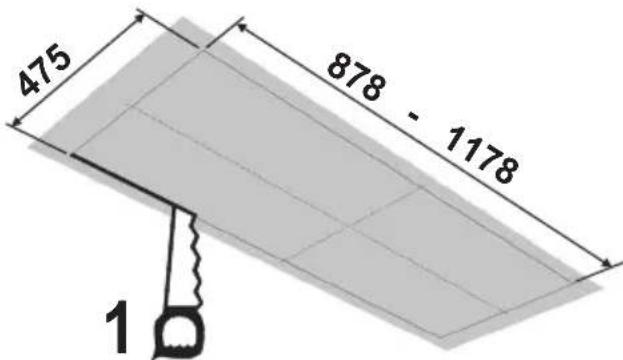
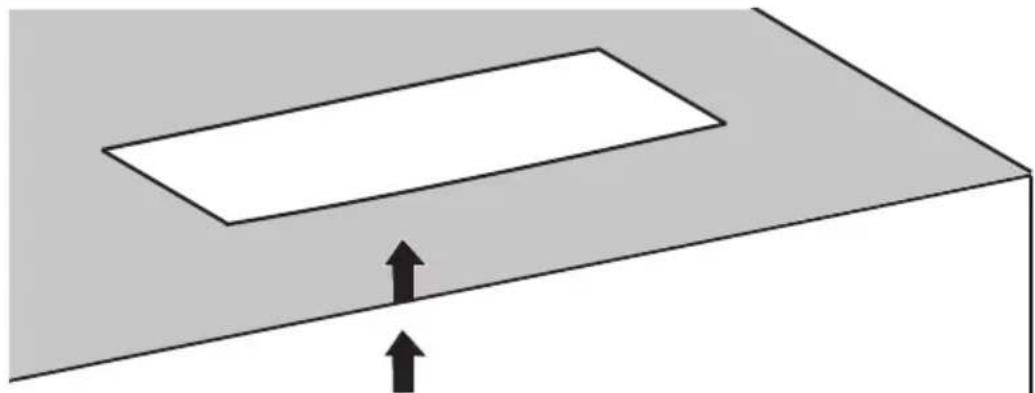
Fixing the Hood

natural_image
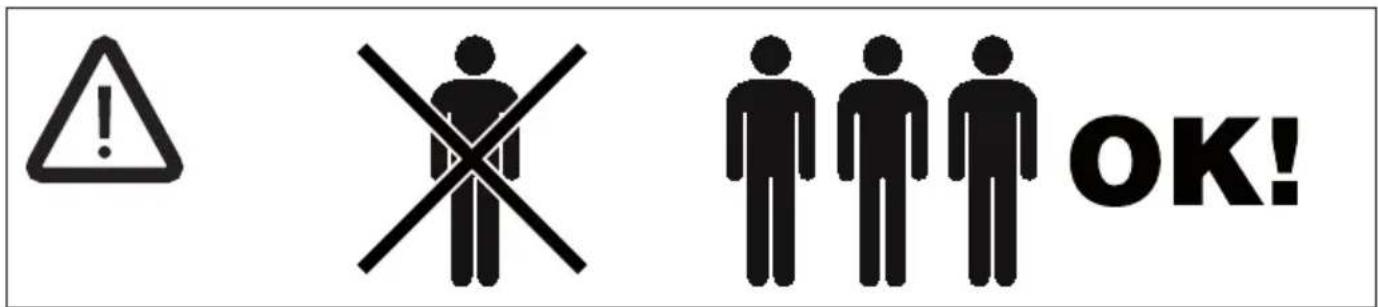
Diagram showing a device with an open lid and a base tray, both with upward arrows indicating motion (no text or symbols)- In all cases where the ceiling is not strong enough at the suspension point, the installer must provide strengthening using suitable plates and backing pieces anchored to the structurally sound parts.
ELECTRICAL CONNECTION
- Connect the hood to the mains through a two-pole switch having a contact gap of at least 3 mm..

Control panel
| Button | Led Function | |
| L - Turns the lights ON/OFF at maximum strength. | ||
| Press and hold for approx. 2 seconds to turn the lighting system on and off at reduced intensity. | ||
| T1 Fixed Turns the motor on/off at speed one. | ||
| Delay function:Press and hold the button for approx. 3 seconds to Activate/Deactivate the Delay function (automatic switching off of the Motor, the Fans and the Lighting with a 30' delay).Cannot be enabled when Intensive or 24h are on. | ||
| T2 Fixed Turns the Motor on at speed two. | ||
| Press and hold the button for approximately 5 seconds, with all the loads turned off (Motor and Lights), to turn the Activated Charcoal Filter alarm on. The relevant LED flashes twice to confirm.To turn the alarm off, press the button again and hold for at least 5 seconds. The relevant LED flashes once. | ||
| T3 Fixed Turns the Motor on at speed three. | ||
| Press and hold the button for approximately 3 seconds, with all the loads turned off (Motor and Lights), to perform a reset. The LED S1 flashes three times. | ||
| T4 Fixed Turns the Motor on at INTENSIVE Speed.This speed is timed to run for 6 minutes. At the end of this time, the system returns automatically to the speed that was set before. If it is activated with the motor turned off, it will switch to OFF at the end of the time. | ||
| Press and hold for 5 seconds to enable the remote control, indicated by the LED flashing twice.Press and hold for 5 seconds to disable the remote control, indicated by the LED flashing just once. | ||
| S1 | Fixed | Signals the Metal Grease Filter saturation alarm, indicating that it is necessary to wash the filters. The alarm is triggered after the Hood has been in operation for 100 working hours. (Reset see the parag. Maintenance) |
| Flashing | When this is activated, it signals the Activated Charcoal Filter saturation alarm, indicating that the filter must be changed; the Metal Grease Filters must also be washed. The Activated Charcoal Filter saturation alarm comes into operation after the Hood has been working for 200 hours. (Activation and Reset see the parag. Maintenance) | |
REMOTE CONTROL
The appliance can be controlled using a remote control powered by a 1.5 V carbon-zinc alkaline batteries of the standard LR03-AAA type (not included).
- Do not place the remote control near to heat sources.
- Used batteries must be disposed of in the proper manner.

natural_image
Illustration of a car interior with a circular vent and a green arrow indicating direction (no text or symbols)Remote control panel
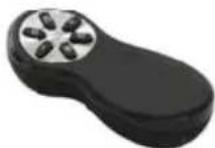
| ➊ | Motor Motor On / Off. | |
| - | Decreases | the working speed each time it is pressed. |
| + | Increases | the working speed each time it is pressed. |
| ➀ | Intensive | Activates the Intensive function |
| ➇ | Delay | Activates / Deactivates the Delay function |
| ➊ | Light Lights On / OffPress for 2 | seconds to modify the intensity of the Light. |
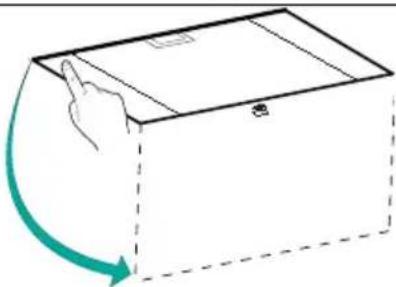
Opening Panel
- Open the Panel by pulling it.
- Clean the outside with a damp cloth and neutral detergent.
- Clean the inside using a damp cloth and neutral detergent; do not use wet cloths or sponges, or jets of water; do not use abrasive substances.
natural_image
Simple line drawing of a box with a hand pointing at the top and a green curved arrow indicating rotation (no text or symbols)Metal grease filters
These can be washed in the dishwasher, and need to be cleaned whenever the S1 Led comes on or at least once every 2 months use, or more frequently if use is particularly intensive.
CLEANING THE FILTERS
Resetting the alarm signal
- Turn the Lights and the Suction Motor off.
- Press T3 and hold for at least 3 seconds, until LED flashes three times in confirmation.

natural_image
Hand inserting a green arrow into a smartphone screen (no text or symbols visible)Cleaning the Filters
- Open the doors.
- Remove the Filter, pushing it towards the back of the unit and at the same time pulling downward.
- Wash the filter without bending it, and leave it to dry thoroughly before replacing (if the surface of the filter changes colour over time, this will have absolutely no effect on its efficiency).
- Replace, taking care to ensure that the handle faces forwards.
- Close the doors again.
This cannot be washed or regenerated, and must be changed when led S1 starts to flash, or at least once every 4 months. The Alarm signal, if it has been activated, only appears when the Suction motor is turned on.
Activating the alarm signal
- In Recirculation Version Hoods, the Filter Saturation Alarm must be activated on installation or at a later date.
- Turn the Lights and the Suction Motor off.
- Press button T2 and hold it for 5 seconds until the LED flashes twice in confirmation:
CHANGING
Resetting the alarm signal
- Turn the Lights and the Suction Motor off.
- Press T3 and hold for at least 3 seconds, until LED flashes three times in confirmation.
Changing the Filter
- Open the doors.
- Remove the Metal Grease Filter.
• Fit the new Filters, as indicated (B). - Replace the Metal grease filters.
- Close the doors.
- Remove the saturated Activated Charcoal Filters, as indicated (A).

natural_image
Diagram of a mechanical device with green arrows indicating rotational or fluid flow (no text or symbols)
natural_image
Diagram of a human eye with green directional arrows indicating rotation or movement (no text or symbols)Lighting unit
Warning: This appliance is fitted with a white LED lamp classed as 1M according to EN 60825-1: 1994 + A1:2002 + A2:2001 standards; maximum optical power emitted @439nm: 7μW. Do not look directly at the light through optical devices (binoculars, magnifying glasses...).
- For replacement contact technical support. ("To purchase contact technical support")
natural_image
Illustration of a chemical experiment setup with a conical funnel, thermometer, and gas stove (no text or symbols)
natural_image
Diagram of a pipe connection with a 2° angle indicator, showing structural components without any text or symbols.natural_image
Illustration of a greenhouse with a stove and a green leafy plant, crossed by a green ribbon (no text or symbols)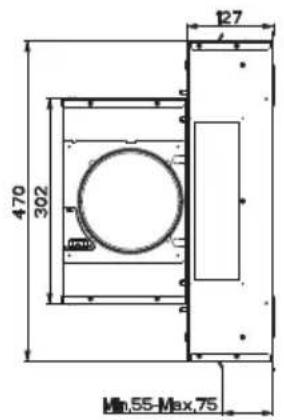


Fixation de la Hotte
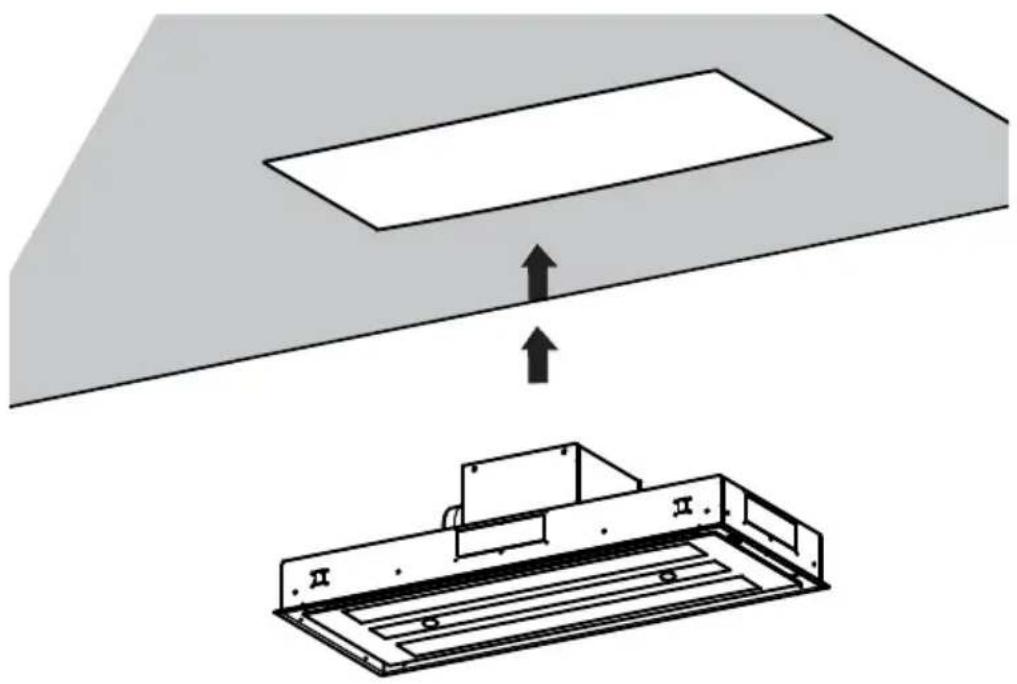
natural_image
Diagram showing a device with an open lid and a base tray, both with upward arrows indicating motion (no text or symbols)natural_image
Illustration of a car door with a circular vent and a green arrow pointing to the bottom (no text or symbols)natural_image
Simple line drawing of a box with a hand pointing at the top and a green curved arrow indicating rotation (no text or symbols)natural_image
Hand holding a smartphone with a green arrow indicating the left side (no text or symbols present)Nettoyage filtres
natural_image
Diagram of a mechanical device with rotating components and green arrows indicating motion (no text or symbols)
natural_image
Diagram of a mechanical or biological structure with green arrows indicating rotational or directional movement (no text or symbols)Éclairage
natural_image
Illustration of a chemical experiment setup with a conical flask, thermometer, and smokestack (no text or symbols)natural_image
Illustration of a greenhouse with a pot and smokestack, crossed by a green ribbon (no text or symbols)


natural_image
Diagram showing a device with an open lid and a base tray, both with upward arrows indicating motion (no text or symbols)natural_image
Illustration of a medical device with a circular dial and internal components, showing a green arrow pointing to it (no text or symbols present)natural_image
Simple line drawing of a box with a hand pointing at the top and a green curved arrow indicating rotation (no text or symbols)Metallfettfilter
natural_image
Hand holding a smartphone with a green arrow indicating the left side (no text or symbols present)natural_image
Diagram of a mechanical device with green arrows indicating rotational or directional motion (no text or symbols)
natural_image
Diagram of a mechanical device with green arrows indicating rotational or directional motion (no text or symbols)Beleuchtung
LED-Strahler
natural_image
Illustration of a chemical experiment setup with a conical flask, thermometer, and smokestack (no text or symbols)
natural_image
Illustration of a cooking setup with a pot and steam rising, crossed by a green X (no text or symbols)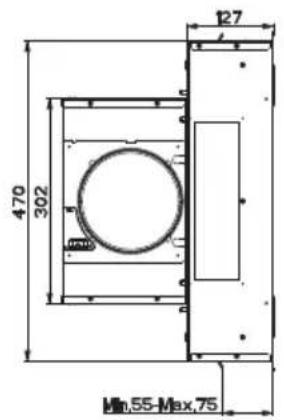
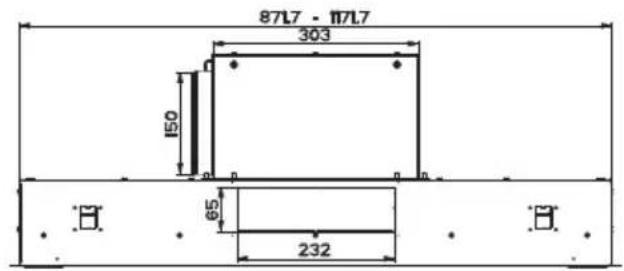
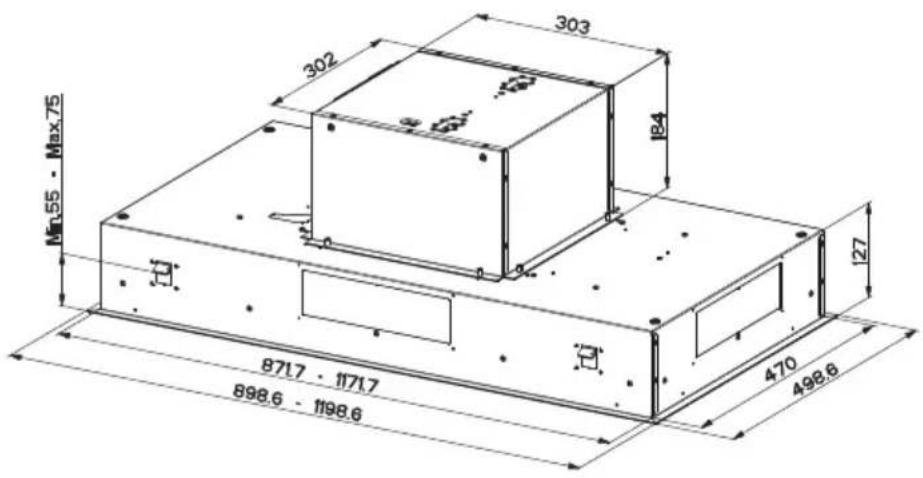
Bevestiging Afzuigkap

natural_image
Diagram showing a device with an open lid and a base tray, both with upward arrows indicating motion (no text or symbols)natural_image
Illustration of a car body with a circular vent and internal components, showing a green arrow pointing to the bottom (no text or symbols)natural_image
Simple line drawing of a box with a hand pointing at the top and a green curved arrow indicating rotation (no text or symbols)Metalen vetfilters
natural_image
Illustration of a hand pressing a green arrow on a device screen (no text or symbols)natural_image
Diagram of a mechanical device with green arrows indicating rotational or directional motion (no text or symbols)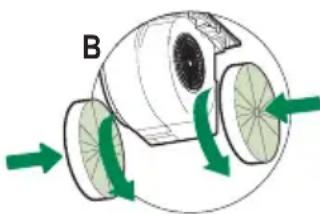
natural_image
Diagram of a mechanical or fluidic device with green arrows indicating flow or movement, no text or symbols present.Verlichting
natural_image
Illustration of a chemical experiment setup with a conical flask, thermometer, and smoke rising (no text or symbols)natural_image
Illustration of a greenhouse with a pot and smokestack, crossed by a green ribbon (no text or symbols)

natural_image
Diagram showing a device with an open lid and a base tray, both with upward arrows indicating motion (no text or symbols)natural_image
Illustration of a car door with a circular vent and a green arrow pointing to the bottom (no text or symbols)natural_image
Simple line drawing of a box with a hand pointing at the top and a green curved arrow indicating rotation (no text or symbols)natural_image
Hand inserting a green arrow on a smartphone screen (no text or symbols visible)natural_image
Diagram of a mechanical device with rotating green arrows indicating motion or force (no text or symbols)
natural_image
Diagram of a mechanical or fluidic device with green arrows indicating rotational flow, no text or symbols present.Iluminación
natural_image
Illustration of a chemical experiment setup with a conical flask, thermometer, and smoke rising (no text or symbols)
natural_image
Illustration of a greenhouse with a pot and smokestack, crossed by green ribbon (no text or symbols)

natural_image
Diagram showing a device with an open lid and a base tray, both with upward arrows indicating motion (no text or symbols)natural_image
Illustration of a car door with a circular vent and a green arrow indicating motion (no text or symbols)Betjeningspanel – fjernstyring

natural_image
Simple line drawing of a box with a hand pointing at the top and a green curved arrow indicating rotation (no text or symbols)Fedtfiltre af metal
natural_image
Hand inserting a green arrow on a smartphone screen (no text or symbols visible)Rengøring af filtre
natural_image
Diagram of two mechanical components labeled A and B with green directional arrows indicating motion (no text or symbols beyond labels)Belysning
natural_image
Illustration of a chemical experiment setup with a conical flask, thermometer, and smoke rising (no text or symbols)natural_image
Illustration of a greenhouse with a pot and smokestack, crossed by a green X symbol (no text or symbols present)

natural_image
Diagram showing a device with an open lid and a base tray, both with upward arrows indicating motion (no text or symbols)natural_image
Illustration of a car door with a circular vent and a green arrow indicating motion (no text or symbols)natural_image
Simple line drawing of a box with a hand pointing at the top and a green curved arrow indicating rotation (no text or symbols)natural_image
Hand inserting a green arrow into a smartphone screen (no text or symbols visible)natural_image
Diagram of two mechanical components labeled A and B with green arrows indicating rotational motion (no text or symbols beyond labels)Valaistus
natural_image
Illustration of a chemical experiment setup with a conical flask, thermometer, and smoke rising (no text or symbols)natural_image
Illustration of a greenhouse with a pot and smokestack, crossed by a green X symbol (no text or symbols present)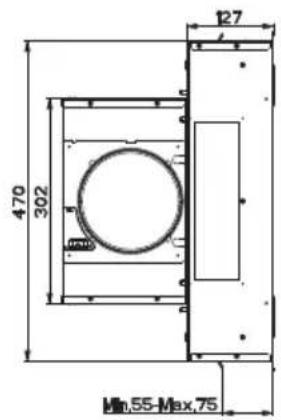
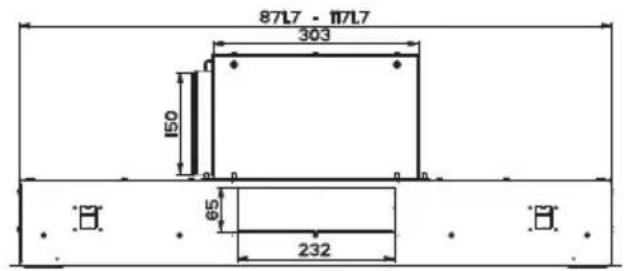

natural_image
Diagram showing a device with an open lid and a base tray, both with upward arrows indicating motion (no text or symbols)natural_image
Illustration of a car door with a circular vent and a green arrow pointing to the bottom (no text or symbols)Fjärrkontrollens kontrollpanel

natural_image
Simple line drawing of a box with a hand pointing at the top and a green curved arrow indicating rotation (no text or symbols)Metallfettfilter
natural_image
Hand inserting a green arrow into a smartphone screen (no text or symbols visible)Rengöring av filter
natural_image
Diagram of a mechanical device with rotating wheels and green directional arrows indicating motion (no text or symbols)
natural_image
Diagram of a mechanical or biological structure with green arrows indicating direction, no visible text or symbolsBelysning
natural_image
Illustration of a chemical experiment setup with a conical flask, thermometer, and smoke rising (no text or symbols)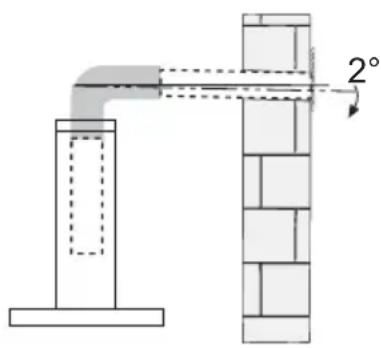
natural_image
Illustration of a cooking setup with a pot and steam rising, crossed by a green X (no text or symbols)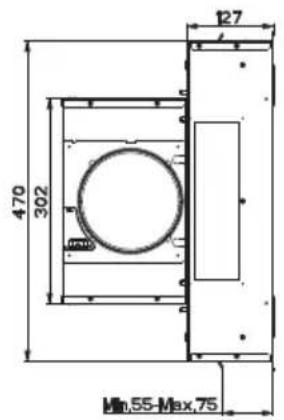
natural_image
Diagram showing a device with an open lid and a rectangular panel, both with upward arrows indicating motion (no text or symbols)natural_image
Illustration of a car with a circular head and internal components, showing a green arrow pointing to the bottom-right corner (no text or symbols)Kontrollpanel - Fjernkontroll

natural_image
Simple line drawing of a box with a hand pointing at the top and a green curved arrow indicating rotation (no text or symbols)natural_image
Hand inserting a green arrow on a smartphone screen (no text or symbols visible)natural_image
Diagram of a mechanical device with rotating components and green arrows indicating motion (no text or symbols)
natural_image
Diagram of a biological structure with green arrows indicating directional flow, no text or symbols presentBelysning
Advarsel: Dette apparatet har et hvitt LED-lys i klasse 1M, i samsvar med standarden NEK EN 60825-1:1994 + A1:2002 + A2:2001; maks lysstyrke: 7 μW v. 439 nm. Ikke se mot lyset med optiske instrumenter (kikkert, forstørrelsesglass, osv.).
- Kontakt kundeservice for utbytting. ("Kontakt kundeservice for kjøp").
natural_image
Illustration of a kitchen induction setup with a conical lamp, smokestack, and control panel (no text or symbols)
natural_image
Illustration of a cooking setup with a pot and steam rising, crossed by a green X (no text or symbols)


natural_image
Diagram showing a device with an open lid and a base tray, both with upward arrows indicating motion (no text or symbols)natural_image
Illustration of a medical device with a circular dial and internal components, showing a green arrow pointing to it (no text or symbols present)natural_image
Simple line drawing of a box with a hand pointing at the top and a green curved arrow indicating rotation (no text or symbols)natural_image
Hand inserting a green arrow into a smartphone screen (no text or symbols visible)Очистка фильтров
natural_image
Diagram of two mechanical components labeled A and B with green directional arrows indicating motion (no text or symbols beyond labels)Освещение
natural_image
Illustration of a chemical experiment setup with a conical flask, thermometer, and smoke rising (no text or symbols)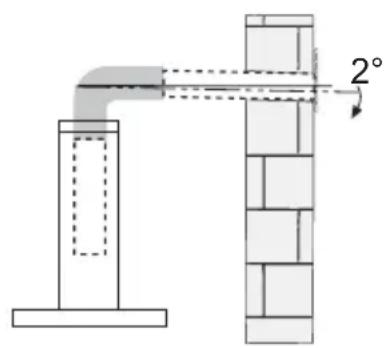
natural_image
Illustration of a greenhouse with a pot and smokestack, crossed by a green X-shaped line (no text or symbols)natural_image
Diagram showing a device with an open lid and a base tray, both with upward arrows indicating motion (no text or symbols)natural_image
Illustration of a car door with a circular vent and a green arrow indicating motion (no text or symbols)Uzaktan Kumanda Panosu

natural_image
Simple line drawing of a box with a hand pointing at the top and a green curved arrow indicating rotation (no text or symbols)natural_image
Hand inserting a green arrow into a smartphone screen (no text or symbols visible)natural_image
Diagram of a mechanical device with green arrows indicating rotational or directional movement (no text or symbols)
natural_image
Diagram of a mechanical or biological structure with green arrows indicating rotational or directional movement (no text or symbols)Aydınlatma


- SOMMAIRE
- INHALTSVERZEICHNIS
- EN INSTALLATION MANUAL
- FR MANUEL D'INSTALLATION
- HU ÜZEMBE HELYEZÉSI ÚTMUTATÓ
- HR KNJIŽICE S UPUTAMA
- SL NAVODILO ZA NAMESTITEV
- Quadro comandi Telecomando
- Illuminazione
- INSTALLATION
- USE
- MAINTENANCE
- Dimensions
- ELECTRICAL CONNECTION
- REMOTE CONTROL
- Remote control panel
- Opening Panel
- Metal grease filters
- CLEANING THE FILTERS
- Resetting the alarm signal
- Activating the alarm signal
- CHANGING
- Changing the Filter
- Lighting unit
- Fixation de la Hotte
- Nettoyage filtres
- Éclairage
- Metallfettfilter
- Beleuchtung
- LED-Strahler
- Bevestiging Afzuigkap
- Metalen vetfilters
- Verlichting
- Iluminación
- Betjeningspanel – fjernstyring
- Fedtfiltre af metal
- Rengøring af filtre
- Belysning
- Valaistus
- Fjärrkontrollens kontrollpanel
- Rengöring av filter
- Kontrollpanel - Fjernkontroll
- Очистка фильтров
- Освещение
- Uzaktan Kumanda Panosu
- Aydınlatma
Brand : FABER
Model : Heaven 2.0 120 X Plus
Category : Range hood