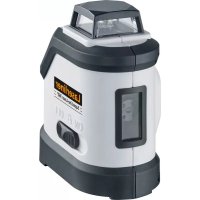
SuperLineLaser RX30 - Laser pointer Laserliner - Free user manual and instructions
Find the device manual for free SuperLineLaser RX30 Laserliner in PDF.



| Brand | Laserliner |
| Model | SuperLineLaser RX30 |
| Category | Line laser level |
| Laser type | Diode laser, class 2 |
| Wavelength | 650 nm |
| Power | < 1 mW |
| Self-leveling range | ± 3° |
| Accuracy | ± 0.35 mm/m |
| Working range | Up to 15 m (without receiver) |
| Range with RX receiver | 10 - 30 m (depending on receiver model) |
| Laser lines | 1 horizontal 360° line, 2 vertical lines |
| Special functions | Self-leveling, tilt mode, manual receiver mode, transport lock, PowerBright, RX-Ready |
| Power supply | 4 AA alkaline batteries (1.5 V) |
| Battery life (all lines) | approx. 15 h |
| Battery life (horizontal line only) | approx. 25 h |
| Operating temperature | 0 °C to +40 °C |
| Storage temperature | -10 °C to +70 °C |
| Dimensions (L x H x D) | 70 x 125 x 110 mm |
| Weight (with batteries) | 620 g |
| Tripod mount | 1/4" thread (under the device) |
| Protection rating | Not specified (indoor use) |
| Maintenance | Clean the output windows with a soft, dry cloth. Do not use harsh products. |
| Safety | Do not look directly into the beam. Keep out of reach of children. Use only within specifications. |
| Repairability | In case of defect, contact UMAREX-LASERLINER customer service. Do not open the device. |
| Warranty | Refer to the included warranty booklet |
| Certifications | CE, compliant with WEEE directive |
Frequently Asked Questions - SuperLineLaser RX30 Laserliner
User questions about SuperLineLaser RX30 Laserliner
0 question about this device. Answer the ones you know or ask your own.
Ask a new question about this device
Download the instructions for your Laser pointer in PDF format for free! Find your manual SuperLineLaser RX30 - Laserliner and take your electronic device back in hand. On this page are published all the documents necessary for the use of your device. SuperLineLaser RX30 by Laserliner.
USER MANUAL SuperLineLaser RX30 Laserliner
AUTOMATIC
LEVEL
Laser 650 nm


lock
Laserliner®
!
natural_image
Warning symbol with a triangular frame and central sunburst pattern (no text)natural_image
Interior view of a portable battery with exposed internal components and labeled terminals (no text or symbols visible)

natural_image
Close-up of a white industrial robot with control panel and indicator lights (no visible text or symbols)Read the operating instructions and the enclosed brochure „Guarantee and additional notices“ completely. Follow the instructions they contain. This document must be kept in a safe place and if the laser device is passed on, this document must be passed on with it.
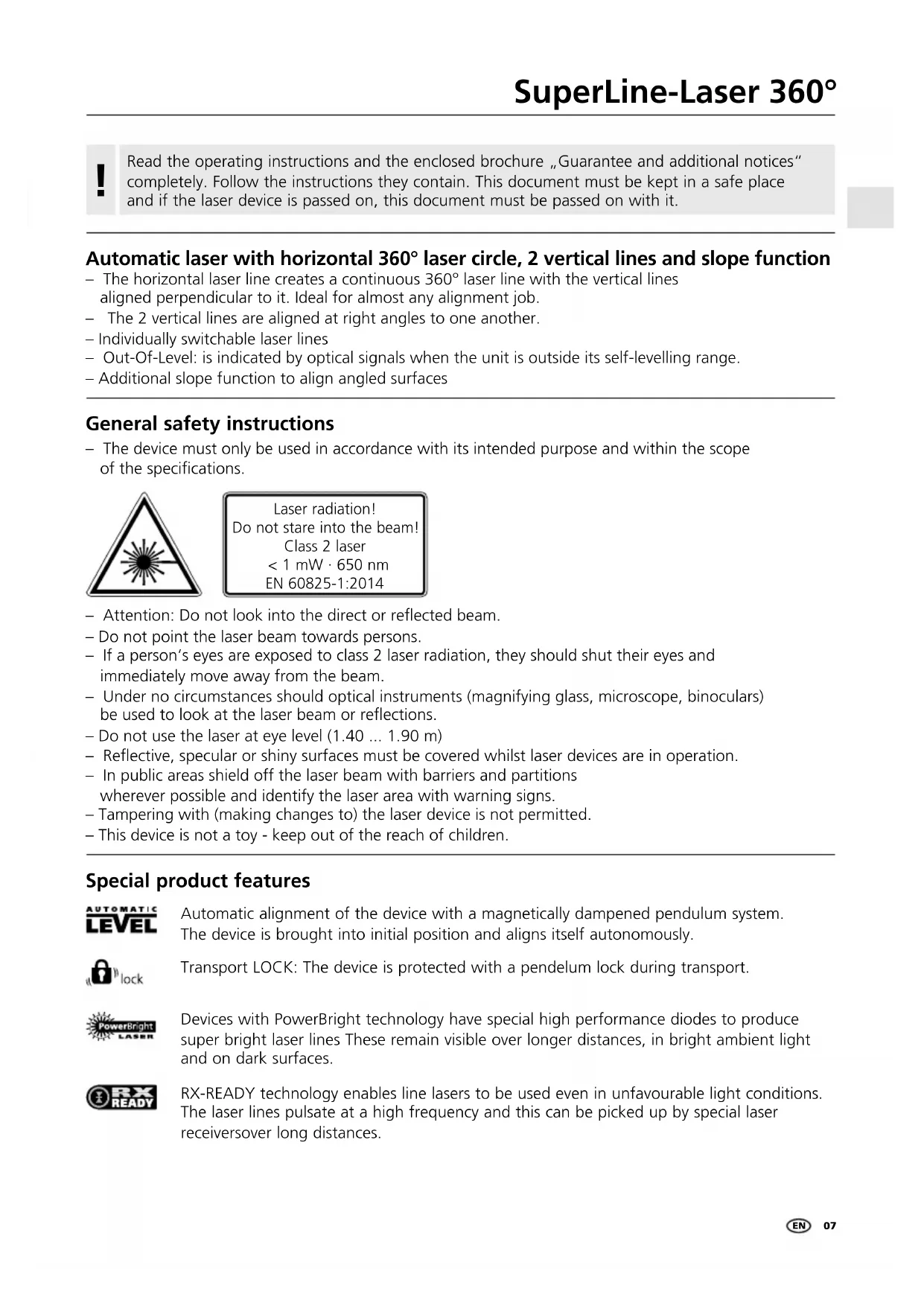
Automatic laser with horizontal 360° laser circle, 2 vertical lines and slope function
- The horizontal laser line creates a continuous 360^ laser line with the vertical lines aligned perpendicular to it. Ideal for almost any alignment job.
- The 2 vertical lines are aligned at right angles to one another.
– Individually switchable laser lines - Out-Of-Level: is indicated by optical signals when the unit is outside its self-levelling range.
– Additional slope function to align angled surfaces
General safety instructions
- The device must only be used in accordance with its intended purpose and within the scope of the specifications.

Laser radiation! Do not stare into the beam! Class 2 laser < 1 mW · 650 nm EN 60825-1:2014
- Attention: Do not look into the direct or reflected beam.
- Do not point the laser beam towards persons.
- If a person's eyes are exposed to class 2 laser radiation, they should shut their eyes and immediately move away from the beam.
- Under no circumstances should optical instruments (magnifying glass, microscope, binoculars) be used to look at the laser beam or reflections.
- Do not use the laser at eye level (1.40 ... 1.90 m)
- Reflective, specular or shiny surfaces must be covered whilst laser devices are in operation.
- In public areas shield off the laser beam with barriers and partitions wherever possible and identify the laser area with warning signs.
- Tampering with (making changes to) the laser device is not permitted.
- This device is not a toy - keep out of the reach of children.
Special product features
AUTOMATIC LEVEL
Automatic alignment of the device with a magnetically dampened pendulum system. The device is brought into initial position and aligns itself autonomously.
lock
Transport LOCK: The device is protected with a pendulum lock during transport.
PowerBright LASER
Devices with PowerBright technology have special high performance diodes to produce super bright laser lines. These remain visible over longer distances, in bright ambient light and on dark surfaces.
RX READY
RX-READY technology enables line lasers to be used even in unfavourable light conditions. The laser lines pulsate at a high frequency and this can be picked up by special laser receivers over long distances.
Number and direction of the lasers
H = horizontal laser / V = vertical laser / S = Slopefunction

1H360° 2V S

■Inserting the batteries
Open the battery compartment (2) and insert the batteries in accordance with the installation symbols, ensuring the correct polarity.

natural_image
Cutaway view of a portable battery with internal compartments and labeled terminals (no text or symbols visible)

1 Laser emitting window
2 Battery compartment (bottom)
3 Slide switch
a ON
b Slope mode
c OFF / Transport lock
4 1/4" tripod threads (bottom)
5 Hand receiver mode
6 LED Hand receiver mode
7 LED status indicator (the LED lights red when the battery charge is low)
8 Laser line selection button
2Horizontal and vertical levelling
Release the transport restraint, set slide switch (3) to „ON“. The horizontal laser line appears. The laser lines can be switched individually with the selection button.

flowchart
graph LR
    A["3D Cube with shaded faces"] --> B["LASER"]
    B --> C["Black Dot"]
    C --> D["Laser"]
    D --> E["Black Dot"]
The transport restraint must be released for horizontal and vertical levelling. The laser lines flash when the device is outside the automatic levelling range of 3^ . Position the device such that it is within the levelling range.
35lope mode
Do not release the transport restraint, set slide switch (3) to the mid-position and select the lasers with the selector switch. Sloping planes and tilts can now be measured. In this mode, the laser lines no longer align automatically. This is signalised by the laser lines flashing.

flowchart
graph LR
    A["3D Cube with internal structure"] --> B["Laser"]
    B --> C["Black Dot"]
    C --> D["Laser"]
    D --> E["Black Dot"]
4 Band receiver mode
Optional: Working with the laser receiver RX
Use an RX laser receiver (optional) to carry out levelling at great distances or when the laser lines are no longer visible.
To work with a laser receiver, switch the line laser to hand-held receiver mode by keeping button 5 (hand-held receiver mode on / off) pressed. The laser lines will now pulsate with high frequency, making the laser lines darker. The laser receiver can detect these pulsating laser lines.

natural_image
Front view of a white and black industrial robot with control panel and indicator lights (no visible text or symbols)! Follow the operating instructions of the corresponding laser receiver.
Preparing the calibration check:
It is possible for you to check the calibration of the laser. To do this, position the device midway between 2 walls, which must be at least 5 metres apart. Do this by turning the unit on, thus releasing the transport restraint (cross laser on). Please use a tripod.

- Mark point A1 on the wall.
- Turn the device through 180^ and mark point A2. You now have a horizontal reference between points A1 and A2.
Performing the calibration check:

- Position the device as near as possible to the wall at the height of point A1.
- Turn the device through 180^ and mark point A3. The difference between points A2 and A3 is the tolerance.
When A2 and A3 are more than 0.35 mm / m apart, an adjustment is necessary. Contact your authorised dealer or else the UMAREX-LASERLINER Service Department.
Checking the vertical line:
Position the device about 5 m from a wall. Fix a plumb bob with a line of 2.5 m length on the wall, making sure that the bob can swing freely. Switch on the device and align the vertical laser to the plumb line. The precision is within the specified tolerance if the deviation between the laser line and the plumb line is not greater than ± 1.75 mm.
Checking the horizontal line:
Position the device about 5 m from a wall and switch on the cross laser. Mark point B on the wall. Turn the laser cross approx. 2.5 m to the right and mark point C. Check whether the horizontal line from point C is level with point B to within ± 1.75 mm. Repeat the process by turning the laser to the left.

! Regularly check the adjustment before use, after transport and after extended periods of storage.
| Technical data (Subject to technical alterations. 03.17) | |
| Self-levelling range ± 3° | |
| Precision | ± 0.35 mm / m |
| Levelling automatic | |
| Operating range (depending on room illumination) | 15 m |
| Operating range with hand receiver (depends on how the technology affects the difference in brightness) | SuperLine-Laser 360° RX 30: 10 - 30 mSuperLine-Laser 360° RX 40: 10 - 40 m |
| Laser wavelength | 650 nm |
| Laser class | 2 / < 1 mW |
| Power supply 4 x 1.5 V alkaline batteries (Type AA) | |
| Operating time with all laser lines with horizontal laser line | approx. 15 hoursapprox. 25 hours |
| Operating temperature | 0°C ... +40°C |
| Storage temperature | -10°C ... +70°C |
| Weight (incl. batteries) | 620 g |
| Dimensions (W x H x D) | 70 x 125 x 110 mm |
EU directives and disposal
This device complies with all necessary standards for the free movement of goods within the EU.
This product is an electric device and must be collected separately for disposal according to the European Directive on waste electrical and electronic equipment.
Further safety and supplementary notices at:
http://laserliner.com/info?an=sulilas360

!
natural_image
Warning symbol with a triangular frame and central sunburst pattern (no text)natural_image
Interior view of a portable battery with internal compartments and labeled terminals (no text or symbols visible)

flowchart
graph LR
    A["3D Cube with shaded faces"] --> B["3D Cube with internal structure"]
    B --> C["●"]
    C --> D["●"]
    D --> E["●"]
natural_image
Close-up of a white industrial robot with control panel and indicator lights (no readable text or symbols)!
natural_image
Cutaway view of a portable battery with internal compartments and labeled ports (no text or symbols visible)

flowchart
graph LR
    A["3D Cube with shaded faces"] --> B["3D Cube with internal arrows"]
    B --> C["Black Dot"]
    C --> D["3D Cube with internal arrows and dots"]
    D --> E["Black Dot"]
natural_image
Close-up of a white and black industrial robot with control panel and indicator lights (no visible text or symbols)natural_image
Cutaway view of a portable battery with internal compartments and labeled terminals (no text or symbols)

flowchart
graph LR
    A["3D Cube with shaded faces"] --> B["LASER"]
    B --> C["3D Cube with internal structure"]
    C --> D["●"]
    D --> E["●"]
    E --> F["●"]
flowchart
graph LR
    A["3D Cube with shaded faces"] --> B["3D Cube with internal lines"]
    B --> C["Black Dot"]
    C --> D["Black Dot"]
natural_image
Close-up of a white and black industrial robot with control panel and indicator lights (no visible text or symbols)natural_image
Warning symbol with a sunburst pattern inside a triangle (no text or numbers)natural_image
Interior view of a portable battery with internal compartments and labeled terminals (no text or symbols visible)

natural_image
Close-up of a white and black industrial robot with control panel and indicator lights (no visible text or symbols)natural_image
Internal view of a portable battery with multiple cylindrical batteries and exposed casing (no text or symbols visible)

natural_image
Close-up of a white robotic device with control buttons and a sun icon (no readable text or symbols)natural_image
Warning symbol with a sunburst pattern inside a triangle (no text or numbers)natural_image
Cutaway view of a portable battery with internal compartments and labeled ports (no text or symbols visible)

1 Okienko wylotu lasera
natural_image
Close-up of a white robotic device with control buttons and a sun icon (no readable text or symbols)natural_image
Warning symbol with a triangular triangle and central sunburst pattern (no text)natural_image
Interior view of a portable battery with internal compartments and labeled ports (no text or symbols visible)

flowchart
graph LR
    A["3D Cube with black dots"] --> B["3D Cube with black dots"]
    B --> C["Black Dot"]
    C --> D["Black Dot"]
natural_image
Close-up of a white industrial robot with control panel and indicator lights (no readable text or symbols)!
natural_image
Cutaway view of a portable battery with internal compartments and labeled ports (no text or symbols visible)

flowchart
graph LR
    A["3D Cube with shaded faces"] --> B["3D Cube with internal structure"]
    B --> C["●"]
    C --> D["●"]
    D --> E["●"]
natural_image
Close-up of a white robotic device with control panel and indicator lights (no readable text or symbols)Laserstrålning! Titta aldrig direkt in i laserstrålen! Laser klass 2 < 1 mW · 650 nm EN 60825-1:2014
natural_image
Interior view of a portable battery with internal compartments and labeled terminals (no text or symbols visible)

natural_image
Close-up of a white industrial robot with control panel and indicator lights (no readable text or symbols)! Beakta bruksanvisningen till den aktuella lasermottagaren.
!
Laserstråling! Ikke se inn i strålen! Laser klasse 2 < 1 mW · 650 nm EN 60825-1:2014
natural_image
Interior view of a portable flash bulb showing internal battery compartments and casing (no text or symbols visible)

1 Laserstrålehull
2 Batterirom (underside)
3 Skyvebryter
a PÅ
b Hellingsmodus
c AV / Transportsikringg
flowchart
graph LR
    A["3D Cube with shaded faces"] --> B["3D Light Grey Shape"]
    B --> C["Black Dot"]
    C --> D["Black Circle"]
    D --> E["Output: Black Dot"]
4 RX READY Manuell mottakermodus
natural_image
Close-up of a white robotic device with control buttons and a sun icon (no readable text or symbols)! Se bruksanvisningen for lasermottakeren.
Forberedelse av kontroll av kalibreringen:
natural_image
Interior view of a portable battery with internal compartments and labeled terminals (no text or symbols visible)

natural_image
Close-up of a white industrial robot with control panel and indicator lights (no visible text or symbols)natural_image
Interior view of a tiled bathroom with a robot in the foreground (no text or symbols visible)SERVICE


Umarex GmbH & Co. KG
- Laserliner -
- Automatic laser with horizontal 360° laser circle, 2 vertical lines and slope function
- General safety instructions
- Special product features
- AUTOMATIC LEVEL
- lock
- PowerBright LASER
- RX READY
- Number and direction of the lasers
- ■Inserting the batteries
- 2Horizontal and vertical levelling
- 35lope mode
- Band receiver mode
- Optional: Working with the laser receiver RX
- Preparing the calibration check:
- Checking the vertical line:
- Checking the horizontal line:
- EU directives and disposal
- RX READY Manuell mottakermodus
- Forberedelse av kontroll av kalibreringen:
Brand : Laserliner
Model : SuperLineLaser RX30
Category : Laser pointer