
DIR355BT - Radio HAMA - Free user manual and instructions
Find the device manual for free DIR355BT HAMA in PDF.



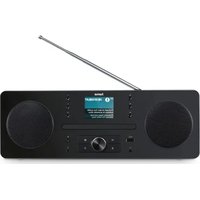
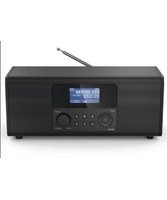
| Product Type | Internet Radio, DAB+, FM, Bluetooth, WiFi |
| Brand | Hama |
| Model | DIR355BT |
| Power Supply | AC adapter 12 V DC / 1.0 A, input 100-240 V ~ 50/60 Hz |
| Power Consumption (standby) | ≤ 0.5 W (without display) / ≤ 1.0 W (with display) |
| Power Consumption (off) | ≤ 0.5 W |
| Main Functions | Internet Radio, DAB+, FM, Spotify Connect, Bluetooth, WiFi 2.4/5 GHz |
| Connectivity | WiFi (2.4 and 5 GHz), Bluetooth 2.402-2.480 GHz, AUX 3.5 mm input, headphone 3.5 mm jack |
| Radio Frequency Bands | FM 87.5-108 MHz, DAB+ 174-240 MHz, WiFi 2.4/5 GHz, Bluetooth 2.4 GHz |
| Maximum RF Power | Bluetooth 6.5 dBm (EIRP), WiFi 2.4 GHz 15.5 dBm, WiFi 5 GHz 16.5 dBm |
| Presets | 7 direct preset buttons |
| Display | Backlit LCD screen |
| Menu Languages | French, English, German, Danish, Dutch, Finnish, Italian, Norwegian, Polish, Portuguese, Spanish, Swedish, Turkish, Czech, Slovak |
| Package Contents | Radio, power supply unit, user manual, mounting kit |
| Care and Cleaning | Clean with a slightly damp, lint-free cloth, avoid harsh detergents |
| Safety | Keep out of reach of children, do not open, do not expose to moisture or heat, indoor use only |
| Recycling | Do not dispose of with household waste, follow local regulations (WEEE and batteries) |
| Minimum distance to body | ≥ 20 cm |
| Operating Temperature | Moderate climate, avoid direct sunlight |
Frequently Asked Questions - DIR355BT HAMA
User questions about DIR355BT HAMA
0 question about this device. Answer the ones you know or ask your own.
Ask a new question about this device
Download the instructions for your Radio in PDF format for free! Find your manual DIR355BT - HAMA and take your electronic device back in hand. On this page are published all the documents necessary for the use of your device. DIR355BT by HAMA.
USER MANUAL DIR355BT HAMA
| AudioConnectorsAudioAnschlüsse | |
| InputsAUXIn3.5mm | |
| OutputsHeadphone3.5mm | |
| SourcesQuellen | Presets Favoriten | |
| DAB/DAB+(174.928- 2 39.2MHz) | √ | 30 |
| FM(87.5- 1 08MHz) | √ | 30 |
| InternetRadio | √ | 30 |
| SpotifyConnect | √ | 10 |
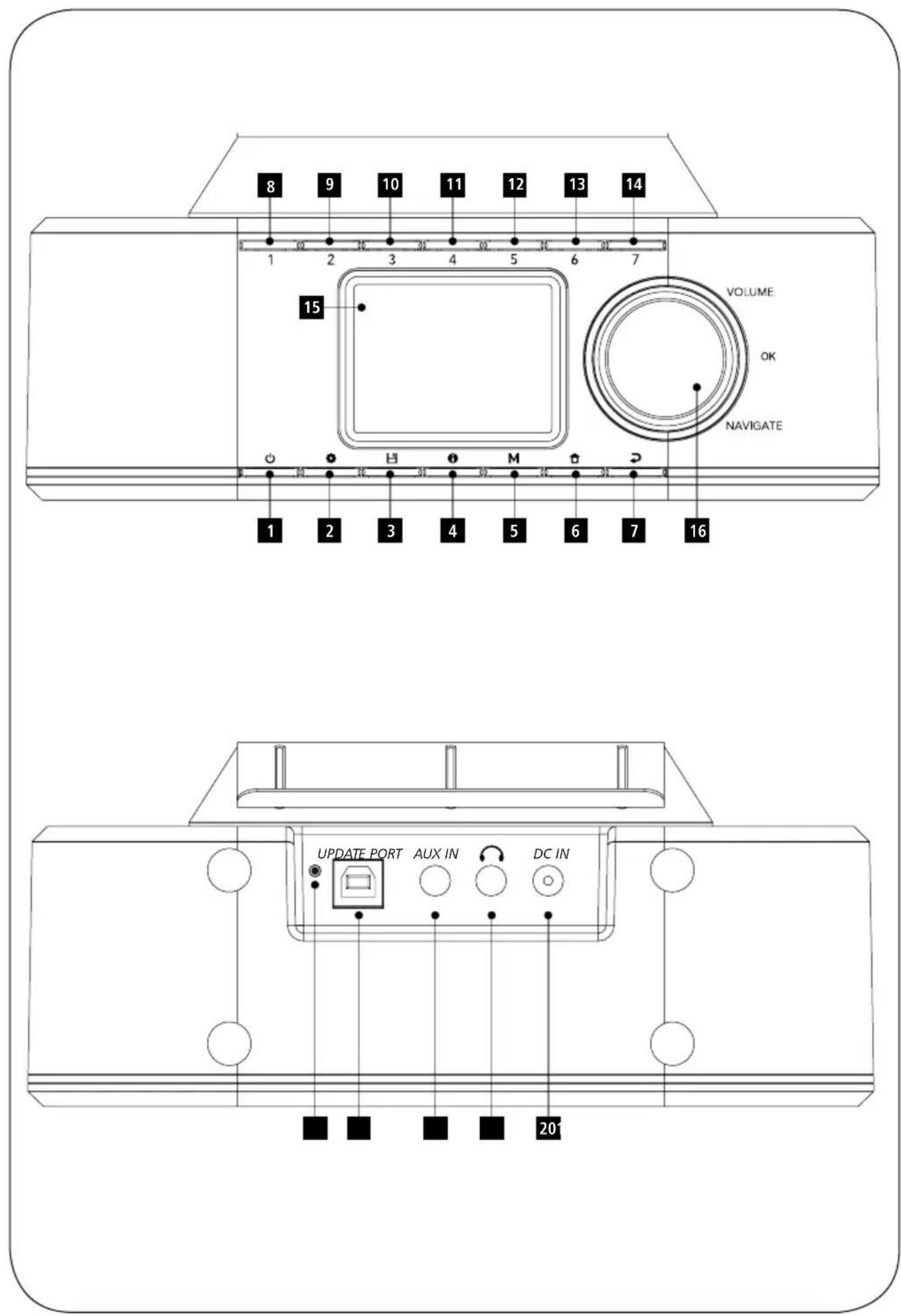
| B:Rear | ||
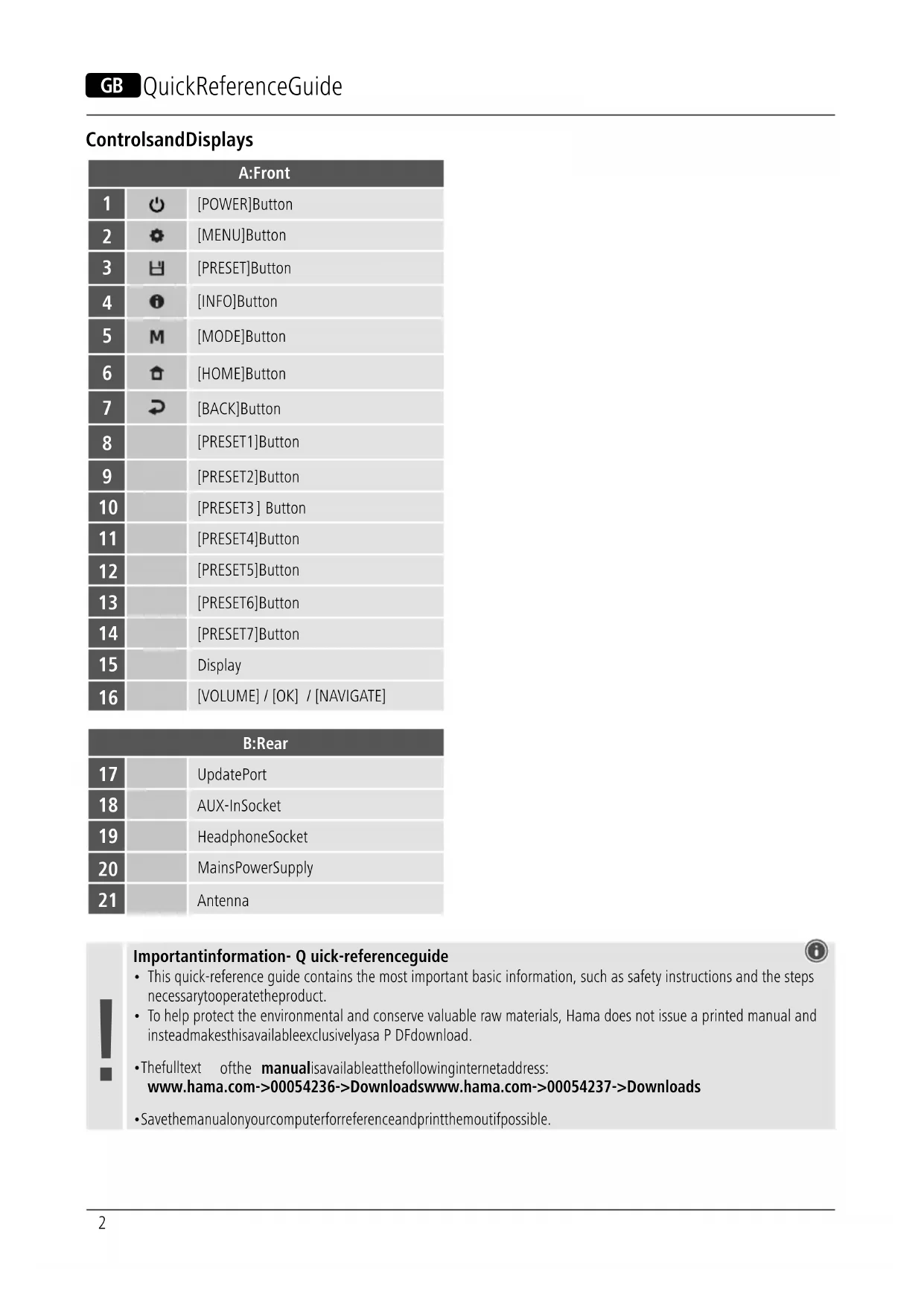
| 17 | UpdatePort | |
| 18 | AUX-InSocket | |
| 19 | HeadphoneSocket | |
| 20 | MainsPowerSupply | |
| 21 | Antenna | |

Importantinformation- Q quick-referenceguide

- This quick-reference guide contains the most important basic information, such as safety instructions and the steps necessary to operate the product.
- To help protect the environmental and conserve valuable raw materials, Hama does not issue a printed manual and insteadmakethisavailableexclusivelyasa P DFdownload.
- Thefulltext ofthe manualisavailableatthefollowinginternetaddress: www.hama.com->00054236->Downloadswww.hama.com->00054237->Downloads
- Savethemanualonyourcomputerforreferenceandprintthemoutifpossible.
1. ExplanationofWarningSymbolsandNotes
Riskofelectricshock

This symbol indicates a risk of electric shock from touching product parts carrying hazardous voltage.
Warning

This symbol is used to indicate safety instructions to draw your attention to specific hazards and risks.
Note

This symbol is used to indicate additional information or important notes.
2.PackageContents
- Hama "DIR355BT"
- Powersupplyunit
- QuickGuide
- Clipmount
- Screwmount
3. Safety Instructions
• The product is intended for private, non-commercial use only.
- Donotusetheproductinareasinwhichelectronic productsare notpermitted.
- Protect the product from dirt, moisture and overheating and use it indryroom only.
- Aswithallelectricalproducts, thisdevicesshouldbekept outofthereachofchildren.
- Donotdropheproductanddonotexposeittoany majorshocks.
- Donotoperatetheproductoutsidethepowerlimits specifiedinthetechnicaldata.
- Keep the packaging material out of there each of children duet other risk of suffocation.
- Disposeofpackagingmaterialimmediatelyin accordancewiththelocallyapplicableregulations.
- Do not modify the device in any way. Doing so voids the warranty.
- Usetheproductonlyfortheintendedpurpose.
- Donotusetheproductintheimmediatevicinityof heaters,otherheatsourcesorindirectsunlight.
- Do not use the product in a damp environment and avoidsplashingwater.
- Onlyusethearticleundermoderateclimaticconditions.
Riskofelectricshock

- Donotopenthedeviceorcontinuetooperateitifit becomesdamaged.
- Donotusetheproductifthe AC adapter, the adapter cable or the mains cable are damaged.
- Donotattempttoserviceorrepairtheproduct yourself. Leave any and all service work to qualified experts.
4.BeforeFirstUse
Note

A d etaileddescriptionofthe
UNDOKappandallofits
functionscanbefoundinour
UNDOKguideat:

www.hama.com->00054236,00054237->Downloads
Settingupa n etworkconnection
4.1WLAN(wirelessnetwork)
- Ensure that the router is switched on, is functioning correctly and that there is a connection to the internet.
- Activate the WLAN function of your router.
- Follow your router's operating instructions as regards the correctfunctioningoftheWLANconnection.
- Then proceed directly as described under section 5, Getting started'.
5. Getting Started
5.1 GeneralNotesonUse
5.1.1 SwitchOn/ Off/ Stand by
- Press [POWER] (1) to switch on the radio.
- Press [POWER] (1), to switch the radio off (Standby).
- Tocompletelyswitchoffthedevice, disconnectitfrom thepowersupply.
5.1.2 NavigationandControl
• After pressing a shortcut button, navigate through the menuitemsusing.
- Selecttheindividualmenuitemsbyturning[VOLUME/ENTER/NAVIGATE] (16).
- Confirm the selection by pressing [VOLUME/ENTER/NAVIGATE] (16).
5.1.3 Volume Adjustment
- Turnthevolumeup(right)ordown(left)byturning [VOLUME/ENTER/NAVIGATE] (16)accordingly.
5.2SwitchingON
Warning

- Only operate the product from a socket that has been approvedforthedevice. Thesocketmustbeinstalled closetotheproductandmustbeeasilyaccessible.
- Disconnect the product from the powersupply using the On/Offswitch— if this is not available, unplug the power cord from the socket.
- If using a multi-socket power strip, make sure that the totalpowerconsumptionofallconnecteddevicesdoes notexceedthepowerstrip'smaximumthroughput rating.
-
If you will not be using the product for a prolonged period, disconnectitfrommainspower.
-
Connectthepowersupplytothemainsconnection(1)on thebackoftheradio.
- Connect the network cable to a properly installed and easily accessiblenetworksocket.
- Waituntiltheradiohasinitialisedfully.
- Press [POWER] (1) to switch on the radio.
Note— s witchingonforthefirsttime

- The Setup Wizard starts up automatically when the radioisturnedonforthefirsttime.
- ThedefaultusedlanguageisEnglish.
- You can skip the Wizard and start it up again later in German.
5.3Language
The first time it is used, theradio's default language is English. To change radio's menulanguage, proceedings follows:
- Press[ ⚙] (7)toaccesstheSettingsmenu.
- Use [VOLUME/ENTER/NAVIGATE] (16) to navigate to the "Settings" menuitem.
- Confirm the selection by pressing [VOLUME/ENTER/NAVIGATE] (16).
- Use [VOLUME/ENTER/NAVIGATE] (16) to navigate to the "Language" menuitem. Confirm theselection by pressing [VOLUME/ENTER/NAVIGATE] (16).
- Use [VOLUME/ENTER/NAVIGATE] (16) to select your preferredsystemlanguage.
- Thelanguagesettingcurrentlyselectedismarkedwith anasterisk(*).
Note

- You can choose from the following languages: English, German, Danish, Dutch, Finnish, French, Italian, Norwegian, Polish, Portuguese, Spanish, Swedish, Turkish, Czech and Slovak.
6. Care and Maintenance
- Only clean this product with a slightly damp, lint-free clothanddonotuseaggressivecleaningagents.
- If you do not plan to use the product for a prolonged period, turnoffthedeviceanddisconnectitfromthe power supply. Store it in a clean, dry place away from directsunlight.
7.WarrantyDisclaimer
Hama GmbH & Co KG assumes no liability and provides no warrantyfordamageresultingfromimproperinstallation/mounting,improperuseoftheproductorfromfailuretoobservetheoperatinginstructionsand/orsafetynotes.
8. Service and Support
PleasecontactHamaProductConsultingifyouhaveany questionsaboutthisproduct. Hotline:+499091502-115(German/English)
Furthersupportinformationcanbefoundhere: www.hama.com
Thefulltextofthemanualisavailableatthefollowing internetaddress: www.hama.com->00054236->Downloads www.hama.com->00054237->Downloads
9. Recycling Information
Noteonenvironmentalprotection:
AftertheimplementationoftheEuropean Directives2012/19/EUand2006/66/EUinthe nationallegalsystem,thefollowingapplies: electricalandelectronicdevicesaswellasbatteries
mustnotbedisposedofwithhouseholdwaste. Consumers are o bligedbylawtoreturnelectricalandelectronic devicesaswellasbatteriestothedesignatedpublic collectionpointsortothepointofsaleattheendoftheir servicelives. Detailedinformationonthistopicisdefined inthenationallawsoftherespectivecountry. Thispresence oftheabovesymbolontheproduct,operatinginstructions orpackageindicatesthattheproductissubjecttothese regulations. By recycling, reusing the materials or other formsofutilisingolddevices/batteries,youare m akingan importantcontributiontoprotectingourenvironment.
10. Declaration of Conformity
CE HamaGmbH& Co K G h erebydeclaresthatthe radioequipmenttype[00054236,00054237]isin compliancewithDirective2014/53/EU. Thefull textoftheEUdeclarationofconformityisavailableatthe followinginternetaddress:
www.hama.com->00054236->Downloads
www.hama.com->00054237->Downloads
| Frequencyband(s) | Maximumradio-frequency powertransmitted |
| Bluetooth: 2.402 – 2.480 GHz | 6.5 dBm (EIRP) |
| WiFi:2.400– 2 .480GHz15.5dBm(EIRP) | |
| WiFi:5.150– 5 .350GHz16.5dBm(EIRP) | |
| WiFi:5.470– 5 .725GHz16.5dBm(EIRP) | |
RestrictionsorRequirementsin
Belgium, Bulgaria, Czech Republic, Denmark, Germany, Estonia, Ireland, Greece, Spain, France, Croatia, Italy, Cyprus, Latvia, Lithuania, Luxembourg, Hungary, Malta, the Netherlands, Austria, Poland, Portugal, Romania, Slovenia, Slovakia, Finland, Sweden, United Kingdom
Note

Ifchannels36-64(channelsoffrequency
5150 MHz - 5350 MHz) are used, the device may only be used in closedrooms.
To limit exposure to electromagnetic fields

This device is intended for use a distance of least 20cm from the body of the user or persons nearby. This device must not beworn nor carried on the body.
- Specifications in accordance with Regulation (EU) 2019/1782
| Manufacturer's nameortrademark,commercialregistrationnumberandaddress | Hama,HRA12159,DresdnerStr.9,86653Monheim |
| ModelidentifierBQ12E-1201000-G | |
| Inputvoltage100-240V | |
| InputACfrequency50/60Hz | |
| Outputvoltage/Outputcurrent/Outputpower | 12.0VDC/1.0A/24.0W |
| Averageactiveefficiency83.0% | |
| Efficiencyatlowload(10%) | 76.3% |
| No-loadpowerconsumption | 0.07W |
- Consumption information according to directive (EU) No. 801/2013 amending the directive (EC) No. 1275/2008
| Status | Durationof triggertime | Energy consumption |
| off-mode0/Imainsswitch(onlyondeviceswith0/Imainsswitch) | -≤0.50W | |
| manualstandbymode(Readystate(Standby)ondeviceswithoutinformationorstatusindicator(manual)*) | -≤0.50W | |
| manualstandbymode(Readystate(standby)on deviceswithininformation orstatusindicator (manual)*) | -≤1.00W | |
| automaticstandby(Standbyondevices withoutinformationor statusindicator**) | ≤20min≤0.50W | |
| informationorstatus display(Automaticreadystate (Standby)ondeviceswith informationorstatus indicator**) | ≤20min≤1.00W | |
| networkedstandby***≤20min≤2.00W | ||
* P ressthePowerbutton
** Not networked - "Maintain network connection - NO". NotavailableinFMmode,ifpresent.
*** Networked - "Maintain network connection - YES"
Pleasenotethattheactualpowerconsumptioncanbe dependentonmultiplefactors.Theseincludethepersonal settings,theoperatingmode,theambienttemperature andthefirmware versionoftheproductused.
The valuesetoutaboverepresentmaximumvalues.
Theactualreferencevaluescanbefoundat:
www.hama.com->00054236->Downloads->
Consumptioninformation
www.hama.com->00054237->Downloads->
Consumptioninformation
Restrictionsouexigencesen
86652 Monheim/Germany
www.hama.com
The Spotify software is subject to third party licenses found here: https://www.spotify.com/connect/third-party-licenses
All listed brands are trademarks of the corresponding companies. Errors and omissions excepted, and subject to technical changes. Our general terms of delivery and payment are applied.


- Importantinformation- Q quick-referenceguide
- ExplanationofWarningSymbolsandNotes
- Riskofelectricshock
- Warning
- Note
- 2.PackageContents
- Safety Instructions
- 4.BeforeFirstUse
- Settingupa n etworkconnection
- 4.1WLAN(wirelessnetwork)
- Getting Started
- GeneralNotesonUse
- SwitchOn/ Off/ Stand by
- NavigationandControl
- Volume Adjustment
- 5.2SwitchingON
- Note— s witchingonforthefirsttime
- 5.3Language
- Care and Maintenance
- 7.WarrantyDisclaimer
- Service and Support
- Recycling Information
- Noteonenvironmentalprotection:
- Declaration of Conformity
- RestrictionsorRequirementsin
- To limit exposure to electromagnetic fields
- Restrictionsouexigencesen
Brand : HAMA
Model : DIR355BT
Category : Radio