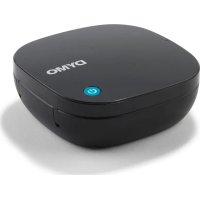
LetraTag 200B - Label printer DYMO - Free user manual and instructions
Find the device manual for free LetraTag 200B DYMO in PDF.


| Product type | Label printer |
| Brand | DYMO |
| Model | LetraTag 200B |
| Power supply | 4 AA alkaline batteries (1.5 V each) – 6 V DC |
| Connectivity | Bluetooth (range up to 10 m) |
| Label cassette type | DYMO LT cassettes (width 12 mm) |
| Main functions | Mobile printing via LetraTag Connect app (iOS/Android), manual cutting button, custom label creation |
| Maintenance and cleaning | Remove batteries during prolonged inactivity; clean exterior with a dry cloth |
| Safety | Do not mix new and used batteries, nor different battery types |
| Spare parts and repairability | Label cassettes available; repair by DYMO under warranty |
| General information | 2-year warranty (plus 1 additional year after registration) in Europe/Asia/Australia |
Frequently Asked Questions - LetraTag 200B DYMO
User questions about LetraTag 200B DYMO
0 question about this device. Answer the ones you know or ask your own.
Ask a new question about this device
Download the instructions for your Label printer in PDF format for free! Find your manual LetraTag 200B - DYMO and take your electronic device back in hand. On this page are published all the documents necessary for the use of your device. LetraTag 200B by DYMO.
USER MANUAL LetraTag 200B DYMO
© 2023 Sanford, L.P. All rights reserved.
No part of this document may be reproduced or transmitted in any form or by any means, or translated into another language without the prior written consent of Sanford, L.P.
Trademarks
DYMO and LetraTag are registered marks in the United States and other countries. All other trademarks are the property of their respective holders.
About Your New Label Maker
The DYMO LetraTag label maker uses DYMO LT 12 mm label cassettes. LT label cassettes are available in a variety of colors and materials.
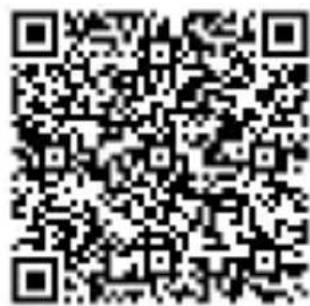
Download the full LetraTag 200B User Guide from support.dymo.com.
text_image
QR code image containing encoded data, no visible human-readable textDownload User Guide
Registering Your Label Maker
Visit www.dymo.com/register to register your label maker online. During the registration process, you will need the serial number, which is located on the bottom of the label maker.
Inserting the Batteries
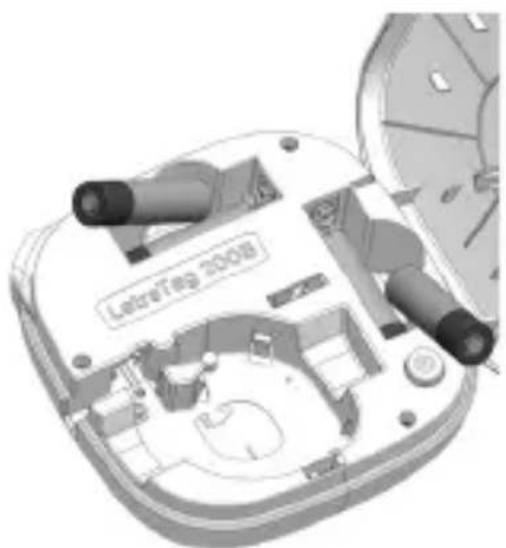
The label maker uses 4 high-capacity AA alkaline batteries to provide optimal print quality.
To insert the batteries
1 Lift to open the cover.
2 Insert the batteries following the polarity markings (+ and -).
3 Close the cover.
natural_image
3D technical illustration of a mechanical assembly with labeled components (no readable text or symbols)Safety Precautions
■ Do not mix old and new batteries.
■ Do not mix alkaline, standard (carbon-zinc), or rechargeable (ni-cad, ni-mh, etc.) batteries.
■ Remove the batteries if the printer will not be used for a long period of time.
Inserting the Label Cassette
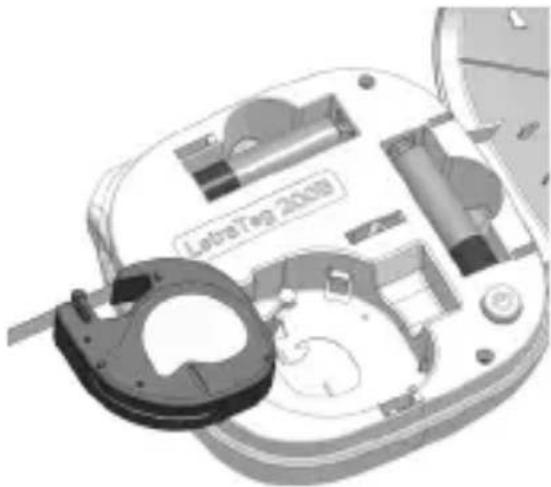
Your label maker uses DYMO LT label cassettes.
To insert the label cassette
1 Lift to open the cover.
2 Insert the cassette with the label positioned as shown.
3 Press firmly until cassette clicks into place.
4 Close the cover.
natural_image
3D mechanical assembly diagram showing internal components and a labeled part 'Letra Top 2008' (no readable text beyond label)Printing Labels
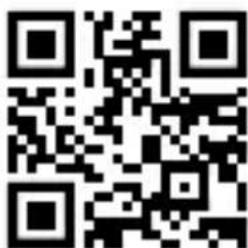
You print labels from a mobile device using the DYMO LetraTag Connect app available on the Apple® App store or the Google Play™ store.
To print labels
1 From your mobile device's app store, search for DYMO LetraTag Connect or use the QR code at the right to install the LetraTag Connect app.
2 On your mobile device, turn on the Bluetooth and Location Services settings and make sure you are within range (approximately 10 meters).
NOTE: Location services is required for Bluetooth to operate properly. DYMO does not track or store your location.
3 Press to turn on the label maker.
4 Open the LetraTag Connect app and select a template or tap + to design your label.
5 Tap to print the label.
6 Press the cutter button on the label maker to cut the label.
text_image
QR code image containing encoded data, no visible human-readable textDownload LetraTag Connect
7 Remove the paper backing from the label and apply! Refer to the Troubleshooting section of the LetraTag 200B User Guide if you have problems printing.
Declaration of Conformance
Hereby, Newell Brands Belgium BV declares that the radio equipment type LetraTag 200B is in compliance with EU Directive 2014/53/EU and UK Radio Equipment Regulations SI 2017 No. 1206.
The full text of the EU and UK declarations of conformity are available at the following Internet address:
http://download.dymo.com\dymo\user-guides\LetraTag\
LT200B\Declarations\LT200B_CE_UK_Declaration_Conformity.en.pdf
Electrical Ratings
Power 6V DC
The product is powered by 4 alkaline batteries, AA 1.5 V DC each (not included).
Frequency range 2400 - 2483.5 MHz
RF output power <10 dBm
Limited Warranty
Your electronic DYMO product is sold with a warranty from the date of purchase against defects in material and workmanship. To submit a warranty claim, you must reside in the region where your DYMO product was purchased. Your warranty will extend for a length of time specific to that region. See below for regional warranty periods:
Region of Residence and DYMO Purchase
Warranty Period
North and South America 1 year
Europe, Asia, Australia/New Zealand
2 years (+1 with product registration. See section below)
DYMO will repair or replace your product free of charge on the following conditions:
1 Products returned under this warranty must be accompanied by a description of the defect together with a copy of the product's proof of purchase and your full contact and delivery details: name, telephone, complete address – street, house number, postal code, city, country.
2 Products returned to DYMO must be adequately packaged. DYMO will accept no liability for goods lost or damaged in transit from the customer.
3 Products must have been used strictly in accordance with operating instructions supplied. DYMO will have no liability for defects caused by accident, misuse, alteration or neglect.
4 DYMO accepts no liability for any consequential loss, damage or expense of any kind resulting from the machines or accessories or the use thereof, save that liability for death or bodily injury caused by such products is not excluded.
5 DYMO label printers are designed for use only with DYMO-branded labels. This warranty does not cover any malfunction or damage caused by the use of third-party labels.
6 This warranty does not affect your statutory rights as a consumer.
Special Provisions for Australia
The following provisions shall apply in addition to the above warranty if the sale of the DYMO product occurred in Australia:
■ Our goods come with guarantees that cannot be excluded under the Australian Consumer Law.
■ You are entitled to a replacement or refund for major failure and compensation for any other reasonably foreseeable loss or damage.
■ You are also entitled to have the goods repaired or replaced if the goods fail to be of acceptable quality and the failure does not amount to a major failure.
■ Any repair or replacement will be at DYMO's expense and free of charge to you.
Refer to www.dymo.com to find your local service center contact information.
Register for 2 + 1 year warranty
Customers living in Europe, Asia, Australia or New Zealand only: Register your new DYMO product and get 1-year additional warranty.
As a registered user you also receive:
■ Technical support from experts
■ Helpful tips and tricks on the use of your product
■ Special offers and new product announcements
Go to www.dymo.com/register
What to do if your product is defective?
DYMO offers you the following service options:
■ DYMO Website: In most situations a visit to www.dymo.com will give you the right assistance. In the Customer Support area, you will find information about your DYMO product, such as Frequently Asked Questions and solutions to known problems. The User Guide also gives you additional information.
■ DYMO Help Desk: You can also contact the DYMO Help Desk where an associate will help you to determine the exact nature of the problem and advise you what to do next:
US/CAN 1 877-724-8324
UK 020 3564 8354
AUS 1 800 633 868
NZ 0800 396 669
Intl +44 203 564 8354
text_image
QR code image containing encoded data, no visible human-readable textnatural_image
3D technical diagram of a device interior with labeled components, showing internal structure and no readable text or symbols.natural_image
3D mechanical assembly diagram showing internal components and a labeled part 'LeoraTep 2009' (no readable text beyond label)text_image
QR code image containing encoded data, no visible human-readable textTélécharger LetraTag Connect
Garantie limitée
text_image
QR code image containing encoded data, no visible human-readable textnatural_image
3D mechanical assembly diagram showing internal components and parts, no readable text or symbols presentnatural_image
Exploded view of a device showing internal components and a labeled part (no readable text or symbols)text_image
QR code image containing encoded data, no visible human-readable textDescargue LetraTag Connect
text_image
QR code image containing encoded data, no visible human-readable textnatural_image
3D technical diagram of a device interior with labeled parts, showing internal components and no readable text or symbols.natural_image
Exploded view of a device showing internal components and a labeled part 'LetraTag 2008' (no readable text beyond label)text_image
QR code image containing encoded data, no visible human-readable textAcesse www.dymo.com/register
text_image
QR code image containing encoded data, no visible human-readable textnatural_image
3D mechanical assembly diagram showing internal components and parts, no readable text or symbols presentMesures de sécurité
natural_image
3D mechanical assembly diagram showing internal components and a labeled part 'LetroTag 2020' (no readable text beyond label)text_image
QR code image containing encoded data, no visible human-readable textTélécharger LetraTag Connect
natural_image
3D technical diagram of a mechanical assembly with labeled parts, showing internal components and no readable text or symbols.natural_image
3D mechanical assembly diagram showing internal components and a labeled part 'LaboTie 2008' (no readable text beyond label)text_image
QR code image containing encoded data, no visible human-readable textLetraTag Connect herunterladen
text_image
QR code image containing encoded data, no visible human-readable textnatural_image
3D technical illustration of a device casing with internal components and no visible text or symbolsnatural_image
3D mechanical assembly diagram showing internal components and a labeled part (no readable text or symbols)text_image
QR code image containing encoded data, no visible human-readable textDownload LetraTag Connect
text_image
QR code image containing encoded data, no visible human-readable textnatural_image
3D technical diagram of a device casing with internal components and no visible text or symbolsPrecauzioni
natural_image
3D mechanical assembly diagram showing internal components and a labeled part 'Lelek7ep 2019' (no readable text beyond label)Stampa di etichette
text_image
QR code image containing encoded data, no visible human-readable textScarica LetraTag Connect
LT200B\Declarations\LT200B_CE_Declaration_Conformity.it.pdf
text_image
QR code image containing encoded data, no visible human-readable textnatural_image
3D technical illustration of a mechanical device with internal components and no visible text or symbolsnatural_image
3D cutaway view of a device showing internal components and a labeled part 'LebreTag 2008' (no readable text beyond label)Imprimir etiquetas
text_image
QR code image containing encoded data, no visible human-readable textTransferir a app LetraTag Connect
text_image
QR code image containing encoded data, no visible human-readable textnatural_image
3D technical illustration of a mechanical assembly with labeled components (no readable text or symbols)natural_image
3D mechanical assembly diagram showing internal components and a labeled part 'LetroTag 2020' (no readable text beyond label)Imprimir etiquetas
text_image
QR code image containing encoded data, no visible human-readable textDescargar LetraTag Connect
LT200B\Declarations\LT200B_CE_Declaration_Conformity.es.pdf
Rangos de potencia
Alimentación 6 V CC
Visite www.dymo.com/register.
text_image
QR code image containing encoded data, no visible human-readable textnatural_image
3D technical diagram of a device casing with internal components and no visible text or symbolsGüvenlik Önlemleri
natural_image
3D mechanical assembly diagram showing internal components and a labeled part (no readable text or symbols)Etiket Yazdırma
text_image
QR code image containing encoded data, no visible human-readable textLetraTag Connect'i indirin
text_image
QR code image containing encoded data, no visible human-readable textnatural_image
3D mechanical assembly diagram showing internal components and parts (no readable text or symbols)natural_image
Exploded view of a mechanical device showing internal components and a labeled part (no readable text or symbols)Skriva ut etiketter
text_image
QR code image containing encoded data, no visible human-readable textLadda ned LetraTag Connect
text_image
QR code image containing encoded data, no visible human-readable textLast ned bruksanvisningen
Registrere merkemaskinen
natural_image
3D technical illustration of a mechanical device with labeled components, showing internal parts and no readable text or symbols.Forholdsregler
natural_image
3D mechanical assembly diagram showing internal components and a labeled part (no readable text or symbols)Skrive ut etiketter
text_image
QR code image containing encoded data, no visible human-readable textLaste ned LetraTag Connect
text_image
QR code image containing encoded data, no visible human-readable textnatural_image
3D mechanical assembly diagram showing internal components and a labeled part 'LeLaT8g 2008' (no readable text or symbols beyond label)natural_image
Exploded view of a device showing internal components and a labeled part (no readable text or symbols)text_image
QR code image containing encoded data, no visible human-readable textDownload LetraTag Connect
natural_image
3D technical diagram of a mechanical device with labeled components, showing internal layout and no readable text or symbols.Turvallisuusohjeita
natural_image
3D mechanical assembly diagram showing internal components and a labeled part (no readable text or symbols)text_image
QR code image containing encoded data, no visible human-readable textLataa LetraTag Connect
LT200B\Declarations\LT200B_CE_Declaration_Conformity.fi.pdf
Sähkötiedot
Virta 6V DC
text_image
QR code image containing encoded data, no visible human-readable textnatural_image
3D technical diagram of a mechanical assembly with labeled components (no readable text or symbols)Środki ostrożności
natural_image
3D mechanical assembly diagram showing internal components and a labeled part 'LeBr7ep 2028' (no readable text beyond label)Drukowanie etykiet
text_image
QR code image containing encoded data, no visible human-readable textLT200B\Declarations\LT200B_CE_Declaration_Conformity.pl.pdf
text_image
QR code image containing encoded data, no visible human-readable textnatural_image
3D technical diagram of a mechanical device with internal components and no visible text or symbolsnatural_image
3D mechanical assembly diagram showing internal components and a labeled part 'LeBr2780 2028' (no readable text beyond label)Címkenyomtatás
text_image
QR code image containing encoded data, no visible human-readable textTöltse le a LetraTag Connect
LT200B\Declarations\LT200B_CE_Declaration_Conformity.hu.pdf
Elektromos adatok
text_image
QR code image containing encoded data, no visible human-readable textnatural_image
3D technical diagram of a device casing with internal components and no visible text or symbolsnatural_image
3D mechanical assembly diagram showing internal components and a labeled part 'LelekTep 2009' (no readable text beyond label)
text_image
QR code image containing encoded data, no visible human-readable textLT200B\Declarations\LT200B_CE_Declaration_Conformity.cs.pdf
text_image
QR code image containing encoded data, no visible human-readable textnatural_image
3D technical diagram of a device casing with internal components and no visible text or symbolsnatural_image
Exploded view of a device showing internal components and a labeled part 'LetraTag 2008' (no readable text beyond label)Tlač štítkov
text_image
QR code image containing encoded data, no visible human-readable textStiahnut' LetraTag Connect
text_image
QR code image containing encoded data, no visible human-readable textnatural_image
3D technical diagram of a mechanical assembly with labeled components, no readable text or symbols presentOhutusabinõud
natural_image
3D mechanical assembly diagram showing internal components and a labeled part 'LeBr7ep 2028' (no readable text beyond label)Siltide primimine
text_image
QR code image containing encoded data, no visible human-readable textRakenduse LetraTag Connect allalaadimine
LT200B\Declarations\LT200B_CE_Declaration_Conformity.et.pdf
text_image
QR code image containing encoded data, no visible human-readable textnatural_image
3D technical diagram of a mechanical assembly with labeled components, no readable text or symbols presentnatural_image
3D cutaway view of a device showing internal components and a labeled part 'LebreTag 2008' (no readable text beyond label)text_image
QR code image containing encoded data, no visible human-readable textAtsisiusti „LetraTag Connect“
Eikite j www.dymo.com/register