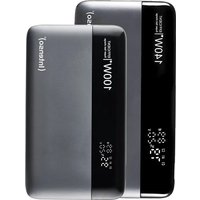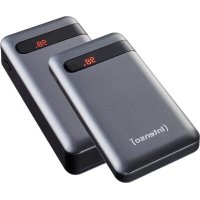
PD20000 - Power bank INTENSO - Free user manual and instructions
Find the device manual for free PD20000 INTENSO in PDF.



User questions about PD20000 INTENSO
0 question about this device. Answer the ones you know or ask your own.
Ask a new question about this device
Download the instructions for your Power bank in PDF format for free! Find your manual PD20000 - INTENSO and take your electronic device back in hand. On this page are published all the documents necessary for the use of your device. PD20000 by INTENSO.
USER MANUAL PD20000 INTENSO
natural_image
Simple line drawing of a mechanical component with a numbered label (2) at the bottom, no text or symbols present.Declaration of conformity 2
General 2
Use
3
Device overview
Operation 3
Safety instructions 5
Operating conditions 5
Technical data 6
Exclusion of liability 6
Disposal
7
Guarantee Conditions and complaints procedure 8
OVERVIEW
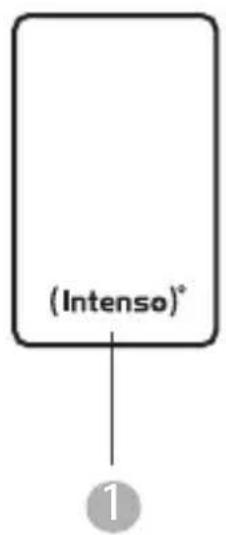
Delivery scope
text_image
(Intenso)* ①1 Intenso Powerbank PD20000
3 Instruction
natural_image
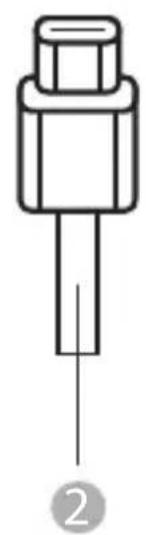
Simple line drawing of a mechanical component with a shaft and housing (no text or symbols)2 Type C to Type C charging cable (supports PD Standard)
Declaration of conformity

The CE marking says that this product meets the requirements of all EU Directives applicable for this product.
GENERAL
About these instructions
Read these instructions carefully and please observe and heed all references made in these instructions to guarantee a long life and reliable use of the device. Please keep these instructions ready to hand and pass them on to other users of the device.
Intended use
This Powerbank is intended exclusively for the power supply of devices with an operating voltage of 5V direct current (mobile phones, MP3-Player, etc.), as well as devices which support the Power Delivery Standard (PD) or the Qualcomm® Quick Charge™ Technology Standard. Any other use or extended use is considered to be use other than intended and can lead to damages or injuries. This product is not intended for commercial use or for medical and special applications, where the failure of the product can cause injuries, fatalities or considerable material damages. Claims of any type for damages resulting from use other than for the intended purpose or non-observance of the safety instructions are excluded.
USE
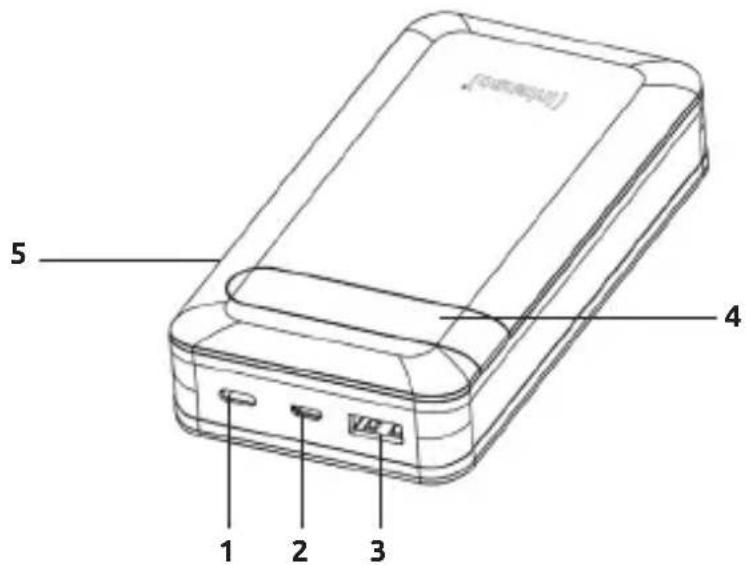
Device overview
text_image
(comagul) 5 4 1 2 31 - Type C PD In/Out
2 - microUSB In
3 - USB A QC Out
4 - Status LCD
5 - Function key (ON/OFF)
Operation
1. Function key (ON/OFF)
If the charging process does not start automatically, you can start it manually by briefly pressing the function key. You can stop the charging process and deactivate the Powerbank by briefly pressing the key twice.
2. LCD Display
The current charging status is displayed numerically on the LCD display during charging, resp. discharging the Powerbank as well as through brief pressing of the function key.
3. Commissioning / Charging the Powerbank / Charging connected devices
a) Charging the Powerbank
You can charge the Powerbank by the delivered type C to type C cable or by a microUSB cable (not included in the scope of supply). Connect the selected cable depending on the type with the Type C port (Type C PD In/Out) or the microUSB port (microUSB In) of the Powerbank and your USB power supply or computer.
Always use only one of the two charging options, the Type C port (Type C In/Out) or the microUSB port (microUSB In)!
While the Powerbank is being charged, it is not possible to charge another device via the Powerbank.
The required charging time for the Powerbank depends on the selected charging source and its output power.
Normal charging:
Use a standard USB power supply or USB port of a computer to charge the Powerbank via the microUSB In port (max. 5V 2.1A = max. 10.5 Watt) or Type C PD In/Out port (max. 5V 2.4A = max. 12 Watt).
Quick charging:
To charge the Powerbank with maximum power (18 Watt), please use a power supply and cable combination, which supports the Power Delivery Standard (PD) or the Quick Charge Technology. Quick charging is shown on the display by a green point above the percent sign. If this point does not show up, your power supply or the cable used is not compatible with the standards and the Powerbank is charged normally.
b) Charging devices with the Powerbank
- This Powerbank has a USB A port (USB A QC OUT) and a Type C port (Type C PD In/Out), both of which can be used to charge devices.
The USB A port supports the Qualcomm Quick Charge (QC) 3.0 Standard (Output normal: 5V 3A max.; Output QC: 5-6V 3A, 9V 2A, 12V 1.5A max. = max. 18 Watt).
The Type C port supports the Power Delivery (PD) Standard (Output normal: 5V 3A max.; Output PD: 5-6V 3A, 9V 2A, 12V 1.5A max. = max. 18 Watt).
- To charge your device with Type C port, simply use the supplied Type C to Type C cable. Of course you can also use your own USB charging cable to connect the Powerbank with your device. Please note, however, that for the Quick Charge Technology and the Power Delivery standard cables are required, which support this standard (if necessary ask the manufacturer of your USB cable).
- To charge your device, simply connect the supplied cable with the Type C port (Type C PD In/Out) of the Powerbank and the other end with the Type C port of the device to be charged. Alternatively, connect your own cable - depending on cable type - with the USB A port (USB A QC OUT) or the Type C port (Type C PD In/Out) of the Powerbank and the other end with the device to be charged. The charging process starts automatically and the devices determine the suitable charging current independently. If the Power Delivery Standard or the Quick Charge Technology are used, this is shown on the display by a green point above the percent sign.
- You can charge two devices simultaneously with the Powerbank. The Quick Charge Technology and the Power Delivery Standard are, however, only supported when just one device is charged. When charging 2 devices simultaneously, the ports share the maximum output of 5V 3A = 15Watt.
- If a device is charged with the Powerbank and the capacity of the Powerbank is almost exhausted, this is signalled by blinking of the last number from 5% residual capacity. Please recharge the Powerbank soon.
- Please note that while charging a device with a Powerbank, about 30% of the total capacity is used up just through the charging process. This is due, for example, through the loss of power from circuit warmth and voltage conversion.
- The Powerbank has to be used regularly for optimum performance. If this is not the case, charge the Powerbank fully at least every three months.
- Make sure that the warmth created through the charging process can be emitted from the device (ideally place the Powerbank on a firm and heat-resistant base while in use).
SAFETY INSTRUCTIONS
Dangers for children and persons with restricted physical, sensory or mental abilities:
Children often underestimate dangers or do not recognise them at all. This device is not intended to be used by persons (including children) with restricted sensory, physical or mental abilities or lack of experience and/or knowledge, unless they are supervised by a person responsible for their safety or received instructions from the person on how to use the device and they have understood the resultant dangers. Unsupervised children should not have access to the device. Make sure that children do not play with the device.
General
Do not use the device in extremely cold, hot, humid or dusty areas. Do not subject it to direct sunlight. Protect the product from open fire. There is danger of explosion!
Protect the device in every operating state against impact and falling.
This device is sensitive to electrostatic discharge. Therefore protect the device against every possible electrostatic discharge.
To avoid malfunctions, do not connect the USB output ports of the device with USB ports of computers or other devices. They are only intended for charging devices.
Do not disassemble to device into its component parts and do not try to repair it yourself. It does not contain any parts requiring maintenance and the guarantee expires in this case.
Do not insert any items, which are not intended for its use, into the openings of the product. This could lead to an electrical short-circuit and a resultant fire.
Do not operate this device with wet hands.
Please do not use water or chemical solutions to clean the device. Please use only a dry cloth for this purpose.
Do not try to repair the device yourself. The guarantee expires in this case.
The device develops warmth when in use, this is normal. Do not cover the device when this is in use.
Do not use the device when it shows visible damage or has become moist.
OPERATING CONDITIONS
Operate the device at 0 to 40 degrees Celsius at max. 90% relative humidity (for a short time). If you do not use the Powerbank for a longer period of time, store it at between -10 and 45 degrees Celsius at max. 90% relative humidity (for a short time) and charge this every three months to retain the full performance.
TECHNICHAL DATA
| Dimensions: 137 x 72 x 29 mm | ||
| Power consumption (Input) | microUSB In: 5V - 2.1A | |
| Type C In: Normal: | 5V -2.4APower Delivery:5V - 2.4A, 9V - 2A (max. 18 Watt) | |
| Charging current delivery (Output) | USB A Out: Normal: | 5V - 3AQuick Charge:5-6V - 3A, 9V - 2A, 12V - 1,5A (max. 18 Watt) |
| Type C Out: Normal: | 5V - 3APower Delivery:5-6V - 3A, 9V - 2A, 12V - 1,5A (max. 18 Watt) | |
| USB A + Type C Out: 5V - 3A shared | ||
| Internal battery: 20000 mAh / 3.7 V Lithium Polymer | battery | |
| Status display: Numerical LCD display | ||
| Integrated overcharge protection / discharge protection / overvoltage protection / short circuit fuse: | Yes | |
| Standby time: Up to 3 month | ||
EXCLUSION OF LIABILITY
The firmware and/or hardware may be changed at any time without prior notice. For this reason it is possible that parts of these instructions, technical data and images in this documentation differ slightly from the product in your possession. All points described in these instructions only serve the purpose of clarification and must not inevitably correspond to a certain situation. Legal claims cannot be made on the basis of these instructions.
DISPOSAL
 | Disposal of old batteries:The devices marked with this symbol are subject to the European Directive 2006/66/EC All old batteries must be disposed of separate from the municipal waste stream via designated collection facilities appointed by the government or the local authorities You avoid environmental damage with the proper disposal. |
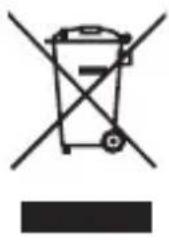 | Disposal of old electronic equipment:The devices marked with this symbol are subject to the European Directive 2012/19/EC. All electrical appliances and old electrical appliances must be disposed of separate from the municipal waste stream via designated collection facilities appointed by the government or the local authorities You avoid environmental damage with the proper disposal of old electrical equipment. |
 | Packaging:Packaging is raw material. The packaging material of this product is suitable for recycling and can be re-used. Please pay attention to the local recycling provisions when disposing of any materials. |
GUARANTEE CONDITIONS AND COMPLAINTS PROCEDURE
Guarantee conditions:
Intenso International GmbH grants a two-year guarantee for this product in addition to the statutory warranty. The guarantee applies only to material and production errors. Intenso International GmbH is not liable for the loss of data. The free-of-charge guarantee relates to the repair or exchange of faulty parts. You are responsible for the safe elimination of your data which is not carried out by us. The sales receipt must be retained for the determination of the guarantee period. Please understand that we cannot provide a guarantee service in the case of, e.g.:
• Non-observance of the Operating Instructions
• Abusive or improper treatment, installation or use
• Damages, scratches or wear
• Arbitrary modifications, opening the housing, interventions or repairs
• Damage through other devices, force majeur or transport
Complaints procedure:
In the case of a complaint, please proceed as follows:
- Only returns with sales receipt and full accessories will be accepted.
- Furthermore, an RMA number is absolute precondition for returns. You can request this RMA number via the homepage, by email or via the service hotline. It must be attached clearly visible on the parcel.
- Please pack the product including the sales receipt and complete accessories in a transport-proof manner. The parcel must have sufficient postage.
Please send the parcel to the following address:
INTENSO INTERNATIONAL GMBH
Service Center (your RMA-No.)
(0,39 € / min. from the German fixed network mobile phone prices may vary.)
MODE D'EMPLOI
Table des matières
Vue d'ensemble
Matériel fourni
natural_image
Simple line drawing of a mechanical component with a labeled point (2), no text or symbols present.1 Intenso Powerbank PD20000
Mode d'emploi
Email (assistance technique): support@intenso-international.de
natural_image
Simple line drawing of a mechanical component with a labeled point (2), no text or symbols present.natural_image
Simple line drawing of a mechanical component with a labeled point (2), no text or symbols present.1 Intenso Powerbank PD20000
natural_image
Simple line drawing of a mechanical component with a labeled point (2), no text or symbols present.1 Intenso Powerbank PD20000
2 Instrucciones
MANUAL DE INSTRUÇÕES
Índice
Visão geral
Material fornecido
natural_image
Simple line drawing of a mechanical component with a numbered label (2) at the bottom, no text or symbols present.1 Intenso Powerbank PD20000
3 Manual
natural_image
Simple line drawing of a mechanical component with a shaft and base, labeled with number 2 (no text or symbols on the object itself)Prohlášení o shodě

natural_image
Simple line drawing of a mechanical component with a labeled point (2), no text or symbols present.② Kabel za punjenje tip C na tip C (podržava PD standard)
Izjava o sukladnosti

natural_image
Simple line drawing of a mechanical component with a labeled point (2), no text or symbols present.1 Intenso Powerbank PD20000
3 Instrukcja
natural_image
Simple line drawing of a mechanical component with no text or symbols2