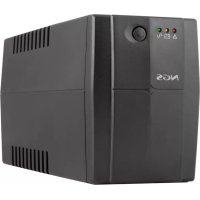
Fortress 900 V3 - Uninterruptible power supply NGS - Free user manual and instructions
Find the device manual for free Fortress 900 V3 NGS in PDF.



| Product Type | Uninterruptible Power Supply (UPS) |
| Brand | NGS |
| Model | Fortress 900 V3 |
| Input Voltage | 230 V AC |
| Input Frequency | 50 Hz |
| Output Voltage | 230 V AC |
| Output Frequency | 50/60 Hz (depending on mode) |
| Apparent Power | 900 VA |
| Active Power | 540 W (power factor 0.6) |
| Recommended Load Type | Computer, monitor |
| Typical Backup Time | 5 to 10 minutes (depending on load) |
| Transfer Time | 10 ms |
| Protection | Circuit breaker, short-circuit protection |
| Inverter Mode Efficiency | > 80 % |
| Battery | 12 V DC, sealed lead-acid |
| Initial Charge Time | 12 hours minimum |
| Battery Warranty | 6 months |
| Display | LED: AC, charging, inverter |
| Operating Temperature | 0 °C to 40 °C |
| Operating Humidity | 10% to 90% (non-condensing) |
| Emission Class | Class A (professional use) |
| Installation | Indoor, controlled atmosphere, free from contaminants |
| Maintenance | Recharge battery every 3 months if not in use |
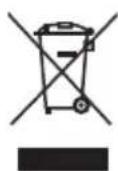
| Recycling | Do not dispose of with household waste. Take to a recycling center |
Frequently Asked Questions - Fortress 900 V3 NGS
User questions about Fortress 900 V3 NGS
0 question about this device. Answer the ones you know or ask your own.
Ask a new question about this device
Download the instructions for your Uninterruptible power supply in PDF format for free! Find your manual Fortress 900 V3 - NGS and take your electronic device back in hand. On this page are published all the documents necessary for the use of your device. Fortress 900 V3 by NGS.
USER MANUAL Fortress 900 V3 NGS
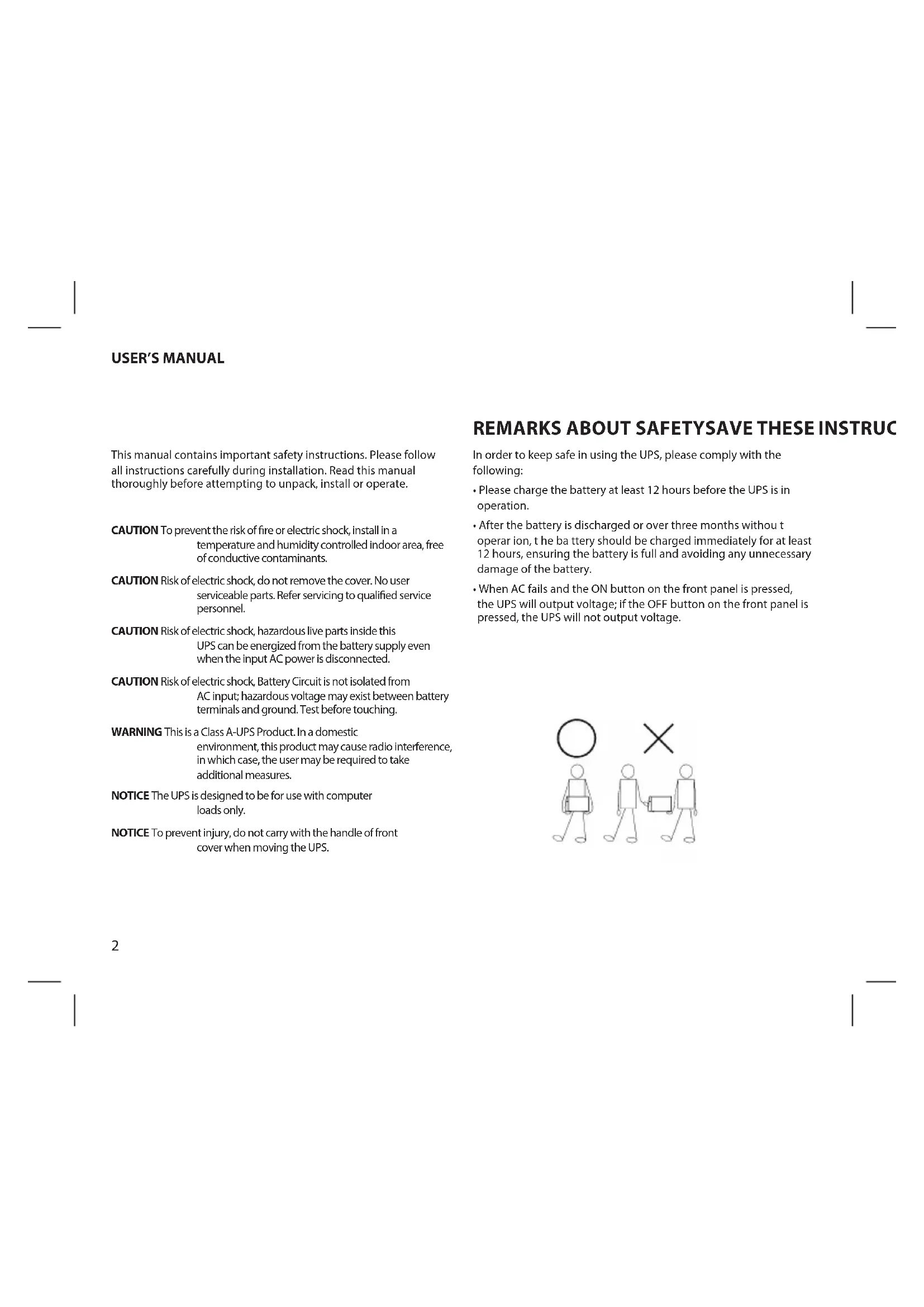
This manual contains important safety instructions. Please follow all instructions carefully during installation. Read this manual thoroughly before attempting to unpack, install or operate.
CAUTION To prevent the risk of fire or electric shock, install in a temperature and humidity controlled indoor area, free of conductive contaminants.
CAUTION Risk of electric shock, do not remove the cover. No user serviceable parts. Refer servicing to qualified service personnel.
CAUTION Risk of electric shock, hazardous live parts inside this UPS can be energized from the battery supply even when the input AC power is disconnected.
CAUTION Risk of electric shock, Battery Circuit is not isolated from AC input; hazardous voltage may exist between battery terminals and ground. Test before touching.
WARNING This is a Class A-UPS Product. In a domestic environment, this product may cause radio interference, in which case, the user may be required to take additional measures.
NOTICE The UPS is designed to be for use with computer loads only.
NOTICE To prevent injury, do not carry with the handle of front cover when moving the UPS.
REMARKS ABOUT SAFETYSAVE THESE INSTRUC
In order to keep safe in using the UPS, please comply with the following:
- Please charge the battery at least 12 hours before the UPS is in operation.
• After the battery is discharged or over three months without t operar ion, t he b attery should be charged immediately for at least 12 hours, ensuring the battery is full and avoiding any unnecessary damage of the battery.
- When AC fails and the ON button on the front panel is pressed, the UPS will output voltage; if the OFF button on the front panel is pressed, the UPS will not output voltage.

MODEL SPECIFICATIONS INTRODUCTION
FORTRESS 600 V2/V3 400VA / 240W Battery: 1x 12V/4.5Ah
FORTRESS 900 V2/V3 600VA / 360W Battery: 1x 12V/7Ah
FORTRESS 1200 V2/V3 800VA / 480W Battery: 1x12V/9Ah
MAIN SPECIFICATIONS
Model FORTRESS 600/900/1200 V2/V3
DC voltage of long backup 12VDC
Type of load Computer, displayer
Input voltage 230V
Input frequency 50Hz
Output voltage 230V
Output frequency 50/60Hz
Power factor PF=0.6 (when input range -35%
to -23%, PF=0.45)
Backup time 5-10 minutes (depends of the
load)
Transfer time
10ms
Short-circuit protection
Circuit breaker, limited output
currency in inverter mode
Efficiency of power
80% in inverter mode
Temperature
0°C 40°C
Humidity
10%\~90%
Display
LED display: AC, charging,
inverting
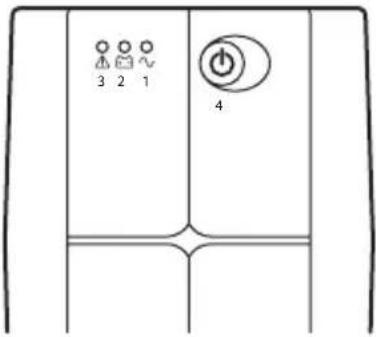
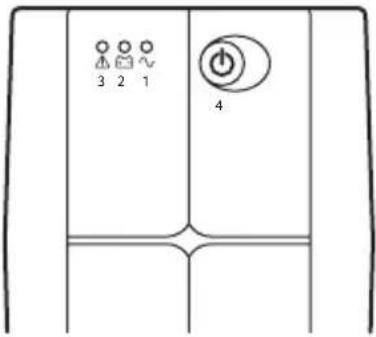
Off-line UPS LED
-
Battery charging Led: it lits when the UPS is plugged to the mains.
-
Power failure Led: it lits when the UPS detects a power cut.
-
Indicates overload in UPS. Also indicates that the UPS will shut down in less than thirty seconds when there is a power cut.
-
ON/OFF button: turns UPS on and off.
Press and release to turn on
Press and release to turn off
USER'S MANUAL
INSTALLATION AND OPERATION
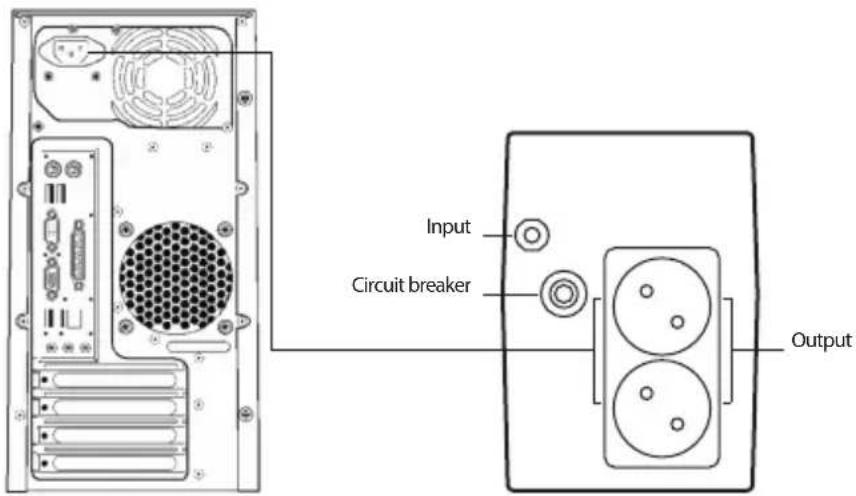
Installation for Standard UPS
- Shut down the load (for example PC), pull out power gird.
- Put UPS on the proper position (following the manual).
- Connect load (for example PC) to the UPS.
-
Put the plug to the AC power socket (make sure GND is connected well).
-
Connect to AC: press the panel switch turning on the UPS, the green LED and yellow LED light, then you can turn on your computer etc.
- Battery mode: press the panel switch turning on the UPS, the red LED lights, then you can turn on your computer etc.
- Normally turning UPS: press the panel switch turning on the UPS.
- Normally turning off UPS: press the panel switch turning off the UPS.
TROUBLE SHOOTING
| Symptom Possible cause Remedy | ||
| No LED display on the front panel. 1. Battery weak. 1. Charge battery up to 8 hours. | ||
| 2. Battery defect. 2. Replace with the same type of battery. | ||
| 3. Power switch is not pressed. 3. Press the power switch again. | ||
| Alarm buzzer beeps continuously when AC supply is normal. | Overload of the UPS. Verify that the load matches the UPS capability specified in the specs. | |
| When power failure, back-up time is shorten. | 1. Overload of the UPS. 1. Remove some non-critical load. | |
| 2. Battery voltage is too low. 2. Charge battery 8 hours or more. | ||
| 3. Battery defect due to high temperature operation environment, or improper operation to battery. | 3. Replace with the same type of battery. | |
| Mains normal but LED is flashing. Power cord is loose. Reconnect the power cord properly. | ||
If any abnormal situations occur that are not listed above, please call service people immediately.
Note:
The battery of the UPS is a consumable item with 6 month warranty from the purchase date.
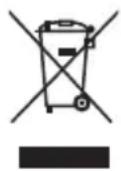
If at any time in the future you should need to dispose of this product please note that:
Waste electrical products should not be disposed of with household waste. Please recycle where facilities exist.
Check with your Local Authority or retailer for recycling advice.
(Waste Electrical and Electronic Equipment Directive)
MANUEL DE L'UTILISATEUR
NOTICES DE SÉCURITÉ IMPORTANTES
REMARQUES RELATIVES A LA SÉCURITÉ
SPECIFICATIONS DU MODÈLE INTRODUCTION
FORTRESS 600 V2/V3 400VA / 240W Batterie : 1x 12V/4,5Ah
FORTRESS 900 V2/V3 600VA / 360W Batterie : 1x 12V/7Ah
FORTRESS 1200 V2/V3 800VA / 480W Batterie : 1x12V/9Ah
SPECIFICATIONS PRINCIPALES
80% in modo inverter
Temperatura
0°C 40°C
Umidità
10%\~90%
Schermo
Schermo LED: CA, in modo carica e inverter
In order to keep safe in using the UPS, please comply with the following:
- Please charge the battery at least 12 hours before the UPS is in operation.
• After the battery is discharged or over three months without t operar ion, t he b attery should be charged immediately for at least 12 hours, ensuring the battery is full and avoiding any unnecessary damage of the battery.
- When AC fails and the ON button on the front panel is pressed, the UPS will output voltage; if the OFF button on the front panel is pressed, the UPS will not output voltage.

SPECYFIKACJA MODELU WPROWADZENIE
FORTRESS 600 V2/V3 400VA / 240W Bateria: 1x 12V/4,5Ah
FORTRESS 900 V2/V3 600VA / 360W Bateria: 1x 12V/7Ah
FORTRESS 1200 V2/V3 800VA / 480W Bateria: 1x12V/9Ah
SPECYFIKACJA PODSTAWOWA
Model FORTRESS 600/900/1200 V2/V3
INSTALACJA I DZIAŁANIE
MODELSPECIFICATIES INLEIDING
FORTRESS 600 V2/V3 400VA / 240W Batterij: 1x 12V/4.5Ah
FORTRESS 900 V2/V3 600VA / 360W Batterij: 1x 12V/7Ah
FORTRESS 1200 V2/V3 800VA / 480W Batterij: 1x12V/9Ah
BELANGRIJKSTE SPECIFICATIES
Model FORTRESS 600/900/1200 V2/V3
INSTALLATIE EN WERKING
PARAMETRY MODELU ÚVOD
FORTRESS 600 V2/V3 400VA / 240W Baterie: 1x 12V/4.5Ah
FORTRESS 900 V2/V3 600VA / 360W Baterie: 1x 12V/7Ah
FORTRESS 1200 V2/V3 800VA / 480W Baterie: 1x12V/9Ah
HLAVNÍ PARAMETRY
Model FORTRESS 600/900/1200 V2/V3
ŠPECIFIKÁCIE MODELU ÚVOD
FORTRESS 600 V2/V3 400VA / 240W Batéria: 1x 12V/4.5Ah
FORTRESS 900 V2/V3 600VA / 360W Batéria: 1x 12V/7Ah
FORTRESS 1200 V2/V3 800VA / 480W Batéria: 1x12V/9Ah
HLAVNÉ ŠPECIFIKÁCIE
Model FORTRESS 600/900/1200 V2/V3
The battery of the UPS is a consumable item with 6 month warranty from the purchase date.
MODELLEK SPECIFIKÁCIÓI BEVEZETÉS
FORTRESS 600 V2/V3 400VA / 240W Akkumulátor: 1x 12V/4.5Ah
FORTRESS 900 V2/V3 600VA / 360W Akkumulátor: 1x 12V/7Ah
FORTRESS 1200 V2/V3 800VA / 480W Akkumulátor: 1x12V/9Ah
FŐ SPECIFIKÁCIÓK
Modell FORTRESS 600/900/1200 V2/V3
MODELSKE SPECIFIKACIJE UVOD
FORTRESS 600 V2/V3 400VA / 240W Baterija: 1x 12V/4.5Ah
FORTRESS 900 V2/V3 600VA / 360W Baterija: 1x 12V/7Ah
FORTRESS 1200 V2/V3 800VA / 480W Baterija: 1x12V/9Ah
GLAVNE SPECIFIKACIJE
Model FORTRESS 600/900/1200V2/V3
Dolgotrajna rezerva DC napetost 12VDC
SRPSKI

NGS
SPECIFIKACIJE MODELA UVOD
FORTRESS 600 V2/V3 400VA / 240W Baterija: 1x 12V/4.5Ah
FORTRESS 900 V2/V3 600VA / 360W Baterija: 1x 12V/7Ah
FORTRESS 1200 V2/V3 800VA / 480W Baterija: 1x12V/9Ah
GLAVNE SPECIFIKACIJE
Model FORTRESS 600/900/1200 V2/V3
DC napon dugog trajanja 12VDC
MODELLSPESIFIKASJONER INTRODUKSJON
FORTRESS 600 V2/V3 400VA / 240W Batteri: 1x 12V/4.5Ah
FORTRESS 900 V2/V3 600VA / 360W Batteri: 1x 12V/7Ah
FORTRESS 1200 V2/V3 800VA / 480W Batteri: 1x12V/9Ah
HOVEDSPESIFIKASJONER
Modell FORTRESS 600/900/1200 V2/V3
Lang reservestrøm DC spenning 12VDC
Lasttype Datamaskin, skjerm
Inngangsspenning 230V
LED display: AC, lading, omformer
LED offline UPS
FEILS∅KING
MALLIN TEKNISET TIEDOT JOHDANTO
FORTRESS 600 V2/V3 400VA / 240W Akku: 1x 12V/4.5Ah
FORTRESS 900 V2/V3 600VA / 360W Akku: 1x 12V/7Ah
FORTRESS 1200 V2/V3 800VA / 480W Akku: 1x12V/9Ah
PÄÄTEKNISET TIEDOT
Malli FORTRESS 600/900/1200 V2/V3
MODELLSPECIFICATIONER INTRODUKTION
FORTRESS 600 V2/V3 400VA / 240W Batteri: 1x 12V/4.5Ah
FORTRESS 900 V2/V3 600VA / 360W Batteri: 1x 12V/7Ah
FORTRESS 1200 V2/V3 800VA / 480W Batteri: 1x12V/9Ah
HUVUDSPECIFICATIONER
Modell FORTRESS 600/900/1200 V2/V3
MODELSPECIFIKATIONER INTRODUKTION
FORTRESS 600 V2/V3 400VA / 240W Batteri: 1x 12V/4.5Ah
FORTRESS 900 V2/V3 600VA / 360W Batteri: 1x 12V/7Ah
FORTRESS 1200 V2/V3 800VA / 480W Batteri: 1x12V/9Ah
HOVEDSPECIFICATIONER
Model FORTRESS 600/900/1200 V2/V3
Installation for standard UPS
MODELIŲ SPECIFIKACIJOS IVADAS
FORTRESS 600 V2/V3 400VA / 240W Akumuliatorius: 1x 12V/4.5Ah FORTRESS 900 V2/V3 600VA / 360W Akumuliatorius: 1x 12V/7Ah FORTRESS 1200 V2/V3 800VA / 480W Akumuliatorius: 1x12V/9Ah
PAGRINDINĖS SPECIFIKACIJOS
Modelis FORTRESS 600/900/1200 V2/V3
EU DECLARATION OF CONFORMITY
DECLARACIÓN UE DE CONFORMIDAD DECLARATION "UE" DE CONFORMITÉ DECLARAÇÃO DE CONFORMIDADE DA UE DICHIARAZIONE DI CONFORMITÀ DELL'UE EU-KONFORMITÄTSERKLÄRUNG
The undersigned, on behalf of the manufacturer:

NGS.
LURBE GRUP, S.A.
Calle Portuetxe, 27
20018 - San Sebastián, Guipúzcoa (Spain)
Declares that the design and construction of the PRODUCT/
This declaration of conformity is issued the sole responsibility of the manufacturer.
Complies with the relevant Union harmonisation legislation / Cumple con la legislación de armonización de la Unión pertinente / Conforme à la législation d'harmonisation de l'Union applicable / Atende à legislação de harmonização da União pertinente / É conforme alla legislazione di armonizzazione dell'Unione pertinente / Entspricht der einschlägigen Unionsharmonisierungsgesetzgebung /
ELECTROMAGNETIC COMPATIBILITY DIRECTIVE (EMC) 2014/30/EU LOW VOLTAGE DIRECTIVE (LVD) 2014/35/EU ROHS DIRECTIVE 2011/65/EU & (EU) 2015/863
References to the relevant harmonised standards used or references to the other technical specifications / Referencias a las normas armonizadas pertinentes utilizadas o referencias a otras especificaciones técnicas / References aux normes harmonisées pertinentes utilisées ou références aux autres spécifications techniques / Referências às normas harmonizadas relevantes utilizadas ou referências a outras especificações técnicas / Riferimenti alle norme armonizzate pertinenti utilizzate o riferimenti ad altre specifiche tecniche / Verweise auf die relevanten harmonisierten Normen oder Verweise auf andere technische Spezifikationen /
EN IEC 62040-1:2019+A11:2021 EN IEC 62040-2:2018 EN IEC 61000-3-2:2019 EN 61000-3-3:2013+A1:2019
IEC 62321-3-1:2013
IEC 62321-5:2013
IEC 62321-4:2013+AMD1:2017
IEC 62321-7-2:2017
IEC 62321-7-1:2015
IEC 62321-6:2015
IEC 62321-8:2017
Date of issue of this declaration of conformity: 10/01/2023
SIGNATURE
RAÚL MARTÍN
PRODUCT MANAGER

NGS®
technical support: www.ngs.eu/support
www.ngs.eu

FR
- REMARKS ABOUT SAFETYSAVE THESE INSTRUC
- MODEL SPECIFICATIONS INTRODUCTION
- MAIN SPECIFICATIONS
- USER'S MANUAL
- INSTALLATION AND OPERATION
- NOTE
- MANUEL DE L'UTILISATEUR
- NOTICES DE SÉCURITÉ IMPORTANTES
- REMARQUES RELATIVES A LA SÉCURITÉ
- SPECIFICATIONS DU MODÈLE INTRODUCTION
- SPECIFICATIONS PRINCIPALES
- SPECYFIKACJA MODELU WPROWADZENIE
- SPECYFIKACJA PODSTAWOWA
- INSTALACJA I DZIAŁANIE
- MODELSPECIFICATIES INLEIDING
- BELANGRIJKSTE SPECIFICATIES
- INSTALLATIE EN WERKING
- PARAMETRY MODELU ÚVOD
- HLAVNÍ PARAMETRY
- ŠPECIFIKÁCIE MODELU ÚVOD
- HLAVNÉ ŠPECIFIKÁCIE
- MODELLEK SPECIFIKÁCIÓI BEVEZETÉS
- FŐ SPECIFIKÁCIÓK
- MODELSKE SPECIFIKACIJE UVOD
- GLAVNE SPECIFIKACIJE
- SPECIFIKACIJE MODELA UVOD
- MODELLSPESIFIKASJONER INTRODUKSJON
- HOVEDSPESIFIKASJONER
- MALLIN TEKNISET TIEDOT JOHDANTO
- PÄÄTEKNISET TIEDOT
- MODELLSPECIFICATIONER INTRODUKTION
- HUVUDSPECIFICATIONER
- MODELSPECIFIKATIONER INTRODUKTION
- HOVEDSPECIFICATIONER
- MODELIŲ SPECIFIKACIJOS IVADAS
- PAGRINDINĖS SPECIFIKACIJOS
- EU DECLARATION OF CONFORMITY
- NGS
- THIS DECLARATION OF CONFORMITY IS ISSUED THE SOLE RESPONSIBILITY OF THE MANUFACTURER
- NGS®
Brand : NGS
Model : Fortress 900 V3
Category : Uninterruptible power supply