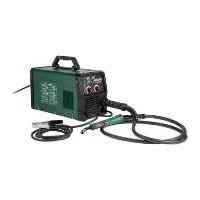
PMSG 200 A2 - Welding machine PARKSIDE - Free user manual and instructions
Find the device manual for free PMSG 200 A2 PARKSIDE in PDF.



| Brand | Parkside |
| Model | PMSG 200 A2 |
| Type | Multi-process welding machine (MIG/MMA/TIG) |
| Mains power supply | 230 V~ 50 Hz, 16 A |
| Power consumption | 4.5 kW |
| Weight | 7.7 kg |
| Protection rating | IP21S |
| Insulation class | H |
| MIG welding current (flux-cored wire) | 50–160 A |
| MMA welding current | 30–140 A |
| TIG welding current | 30–200 A |
| Open-circuit voltage MIG/MMA | 56 V |
| Open-circuit voltage TIG | 52 V |
| Welding wire diameter | 0.6–1.0 mm |
| Max. wire spool | approx. 5000 g |
| Welding processes | MIG, MMA, TIG, flux-cored wire, SYN mode |
| Included accessories | Welding helmet, electrode holder, ground cable, MIG torch, wires (aluminum and flux-cored), nozzles, slag hammer |
| Safety | Thermal protection (O.H.), overcurrent protection (O.C.) |
| Maintenance | Regular cleaning, maintenance by qualified electrician |
| Warranty | 3 years |
Frequently Asked Questions - PMSG 200 A2 PARKSIDE
User questions about PMSG 200 A2 PARKSIDE
0 question about this device. Answer the ones you know or ask your own.
Ask a new question about this device
Download the instructions for your Welding machine in PDF format for free! Find your manual PMSG 200 A2 - PARKSIDE and take your electronic device back in hand. On this page are published all the documents necessary for the use of your device. PMSG 200 A2 by PARKSIDE.
USER MANUAL PMSG 200 A2 PARKSIDE
MULTI-PROCESS WELDER PMSG 200 A2 MULTISCHWEISSGERÄT PMSG 200 A2 POSTE À SOUDER MULTI-PROCÉDÉ PMSG 200 A2
GB IE NI CY MT
MULTI-PROCESS WELDER
Operation and Safety Notes
Translation of the original instructions
FR BE CH
POSTE À SOUDER MULTI-PROCÉDÉ
Before reading, unfold the page containing the illustrations and familiarise yourself with all functions of the device.
DE AT CH
GB / IE/NI/CY/MT Operation and Safety Notes Page 5
natural_image
Mechanical assembly diagram showing a bracket with a directional arrow and numbered label '26' (no readable text or symbols beyond basic components)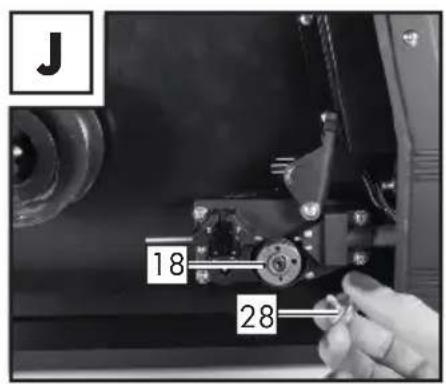
natural_image
Close-up of hands using a tool to adjust or install a mechanical component (no visible text or symbols)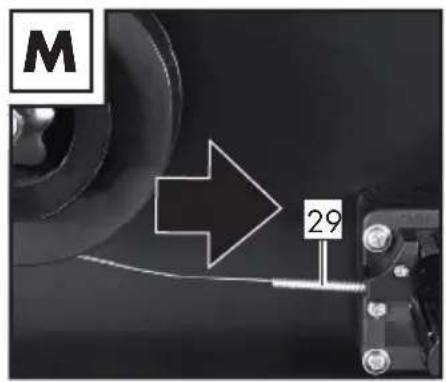
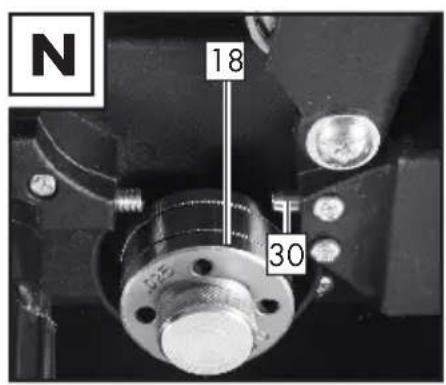
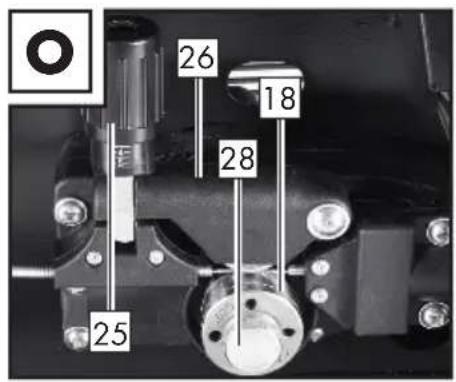
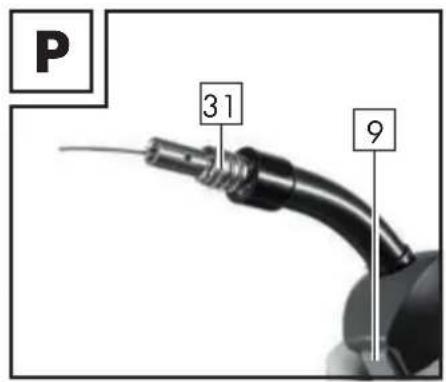
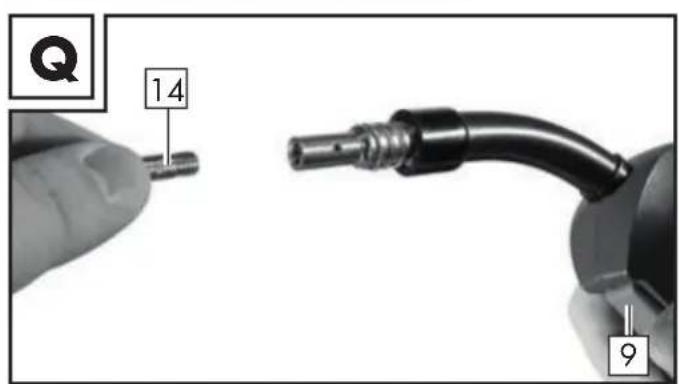
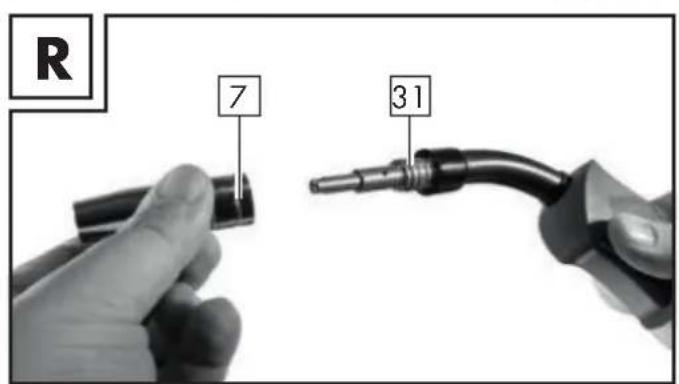
Table of pictograms used....Page 5
Introduction Page 6
Intended use Page 7
Package contents....Page 7
Parts description Page 8
Technical specifications ......Page 8
Safety instructions ......Page 9
Before using the device....Page 17
Assembly Page 17
Assembling the welding protection shield....Page 17
MIG welding......Page 17
Adaptation of device to solid welding wire with inert gas....Page 18
Adaptation of device to flux-cored welding wire without inert gas......Page 19
Inserting welding wire....Page 19
Using the device....Page 20
Switching the device on and off....Page 20
Selecting the welding method....Page 20
Welding Page 20
Creating a weld seam....Page 22
MMA welding......Page 24
TIG welding Page 26
Maintenance and cleaning......Page 26
Information about recycling and disposal......Page 27
EC Declaration of Conformity....Page 27
Warranty and service information......Page 28
Warranty conditions....Page 28
Warranty period and statutory claims for defects....Page 28
Extent of warranty....Page 28
Processing of warranty claims ......Page 29
Service......Page 29
| ● Table of pictograms used | |||
 | Attention! Read the operating instructions! | I_2 | Rated value of the welding current |
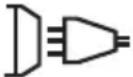 1~50 Hz 1~50 Hz | Mains input; number of phases and alternating current symbol and rated value of the frequency | I_1 eff | Effective value of the greatest mains current |
| U_0 | Rated value of the no-load voltage | ||
 | Il simbolo a lato, raffigurante un bidone dei rifiuti su ruote barrato, indica che il presente apparecchio è soggetto alla Direttiva 2012/19/UE. | U_1 | Rated value of the mains voltage |
 | Never use the device in the open air or when it's raining! | U_2 | Standardised operating voltage |
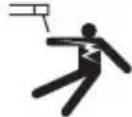 | Electric shock from the welding electrode can be fatal! | I_1 max | Greatest rated value of the mains current |
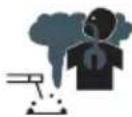 | Inhalation of welding fumes can endanger your health. | Caution!Risk of electric shock! | |
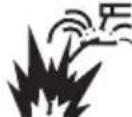 | Welding sparks can cause an explosion or fire. | Important note! | |
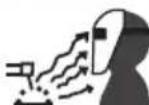 | Arc beams can damage your eyes and injure your skin. | Dispose of the device and packaging in an environmentally friendly manner! | |
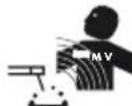 | Electromagnetic fields can disrupt the function of cardiac pacemakers. | WARNING! | Risk of serious injury or death. |
 | Attention: Potential hazards! | IP21S | Protection class |
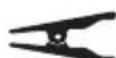 | Earth terminal | Single-phase static frequency converter-transformer-commutator | |
| H | Insulation class | Direct current | |
 | Made from recycled material. | Greatest rated value of the welding time in intermittent mode Σ_ON^t | |
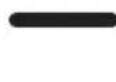 | Greatest rated value of the welding time in continuous mode t_ON(max) | Manual arc welding with encased rod electrodes | |
 | Metal inert and active gas welding including the use of flux-cored wire | Tungsten inert gas welding | |
Multi-Process Welder PMSG 200 A2
- Introduction
Congratulations! You have purchased one of our high-quality devices. Please familiarise yourself with the product before using it for the first time. To do so, please read through the following operating and safety instructions carefully. This tool must be set up or used only by people who have been trained to do so.
KEEP OUT OF THE REACH OF CHILDREN!
- Intended use
The device is designed for MIG welding (welding with welding wire and inert gas), MMA welding (welding with rod electrodes) and TIG welding (tungsten inert gas welding). When using solid wires which do not contain inert gas in solid form, then you must use inert gas in addition. When using aluminium solid wire, then you must use argon as the inert gas. When using self-shielding flux-cored wire, you do not need to use any additional gas. In this case, the inert gas is contained in the welding wire in powdered form and is therefore channelled straight into the arc. This means that the device is not susceptible to wind when working outdoors. Only suitable wire electrodes may be used for the device. This welding device is designed for manual arc welding (MMA welding) of steel, stainless steel, steel sheet and cast materials, using the appropriate coated electrodes. Refer to the information from the electrode manufacturer. Only suitable electrodes may be used for the device. For tungsten inert gas welding (TIG welding) it is essential that you observe the operating and safety instructions for the TIG torch you are using, in addition to the instructions and safety instructions in these operating instructions. If it is not handled properly the product can be dangerous for individuals, animals and property. The welding mask must only be used with protective welding glasses as well as prescription glasses which are marked appropriately, used properly and as a general rule, are only used for welding. The welding mask is not designed for laser welding! Use the product only as described and only for the specific applications as stated. Keep these instructions in a safe place. Ensure you hand over all documentation when passing the product on to anyone else. Any use that differs to the intended use as stated above is prohibited and potentially dangerous. Damage or injury caused by misuse or disregarding the above warning is not covered by the warranty or any liability on the part of the manufacturer. Commercial use will void the guarantee. Observing the safety instructions and assembly instructions and operating information in the instructions for use is also a component of the intended use. It is imperative to adhere to the applicable accident prevention regulations. The device must not be used:
■ in insufficiently ventilated rooms,
■ in explosive environments,
■ to defrost pipes,
■ in the vicinity of people with cardiac pacemakers and
■ in close proximity to easily flammable materials.
Residual risk
Even if you operate the device as intended, there will be residual risks. The following dangers may occur in connection with the build and design of this multi-process welder:
■ Eye injuries caused by glare, touching hot parts of the device or workpiece (burn injury),
In case of improper protection, risk of accident and fire through sparks and slag particles,
■ Harmful emissions from smoke and gases if there is a lack of air or if closed rooms are insufficiently extracted.

NOTE: Reduce the residual risk by carefully using the device as intended and observing alluctions.
- Package contents
1 Multi-Process Welder PMSG 200 A2
1 1.0 mm welding nozzle (pre-fitted, only for solid aluminium wire) labelling: 1.0 A
4 welding nozzles for steel/flux-cored wire (1x 0.6 mm; 1x 0.8 mm; 1x 0.9 mm; 1x 1.0 mm)
Labelling in accordance with the diameter: 0.6; 0.8; 0.9; 1.0
1 chipping hammer with wire brush
1 solid aluminium wire 200 g (pre-fitted, 1.0 mm ∅, type: ER5356
1 welding protection shield
1 MMA electrode holder
1 set of operating instructions
1 earth terminal with cable
1 MIG torch with welding cable
1 flux-cored wire 200 g 1.0 mm ∅, Type: E71T-GS
5 rod electrodes (2 x 1.6 mm; 2 x 2.0 mm; 1 x 2.5 mm)
- Parts description
| 1 | Cover of the wire feed unit | 20 | Dark welding lens |
| 2 | Handle | 21 | Handle |
| 3 | Mains plug | 22 | Welding protection shield after assembly |
| 4 | Earthing cable with earth terminal | 23 | Mounting clip |
| 5 | Main switch ON/OFF (incl. power indicator lamp) | 24 | Protective glass catch |
| 6 | Rotary switch for setting the welding current | 25 | Setting screw |
| 7 | Torch nozzle | 26 | Thrust roller unit |
| 8 | Torch | 27 | Roller holder |
| 9 | Torch button | 28 | Feed roll holder |
| 10 | Cable assembly with direct connection | 29 | Wire outlet |
| 11 | Welding nozzle (0.6 mm) | 30 | Cable assembly bracket |
| 12 | Welding nozzle (0.8 mm) | 31 | Torch neck |
| 13 | Welding nozzle (0.9 mm) | 32 | Plug |
| 14 | Welding nozzle (1.0 mm) | 33 | Gas connection |
| 15 | Solid welding wire spool (aluminium) ∅ 1 mm / 200 g (pre-fitted) | 34 | MMA electrode holder |
| 16 | Flux-cored welding wire spool (steel) ∅ 1 mm / 200 g | 35 | Welding mode selector key |
| 17 | Chipping hammer with wire brush | 36 | Rotary switch for setting the welding voltage |
| 18 | Feed roll | 37 | O.H. display |
| 19 | Shield body | 38 | Fixing ring |
• Technical specifications
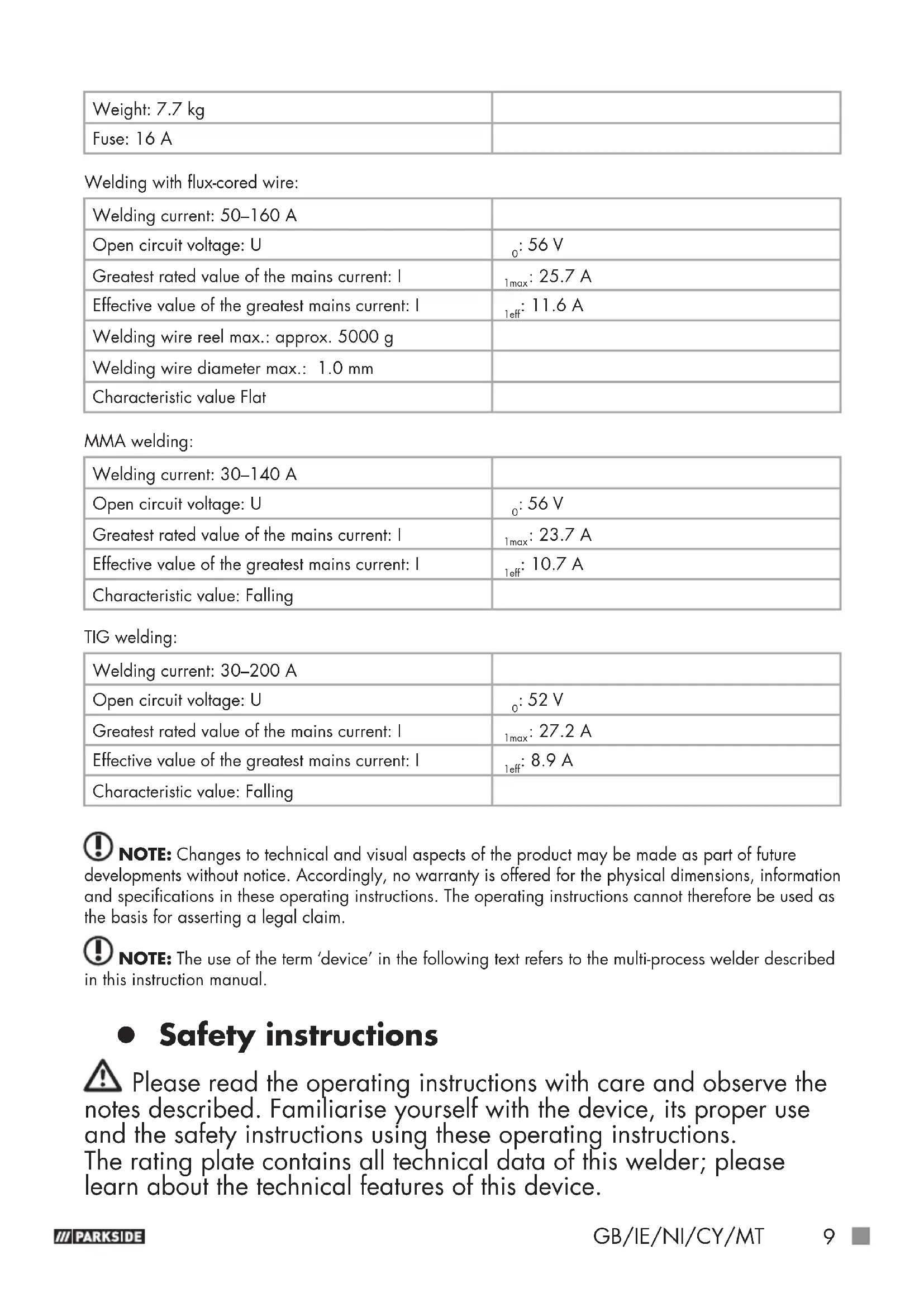
| Input power: 4.5 kW | |
| Mains connection: 230 V~ 50 Hz | |
| Weight: 7.7 kg | |
| Fuse: 16 A |
Welding with flux-cored wire:
| Welding current: 50–160 A | |
| Open circuit voltage: U | _0 : 56 V |
| Greatest rated value of the mains current: I | _1max : 25.7 A |
| Effective value of the greatest mains current: I | _1eff : 11.6 A |
| Welding wire reel max.: approx. 5000 g | |
| Welding wire diameter max.: 1.0 mm | |
| Characteristic value Flat |
MMA welding:
| Welding current: 30–140 A | |
| Open circuit voltage: U | _0 : 56 V |
| Greatest rated value of the mains current: I | _1max : 23.7 A |
| Effective value of the greatest mains current: I | _1eff : 10.7 A |
| Characteristic value: Falling |
TIG welding:
| Welding current: 30–200 A | |
| Open circuit voltage: U | _0 : 52 V |
| Greatest rated value of the mains current: I | _1max : 27.2 A |
| Effective value of the greatest mains current: I | _1eff : 8.9 A |
| Characteristic value: Falling |
NOTE: Changes to technical and visual aspects of the product may be made as part of future developments without notice. Accordingly, no warranty is offered for the physical dimensions, information and specifications in these operating instructions. The operating instructions cannot therefore be used as the basis for asserting a legal claim.
NOTE: The use of the term 'device' in the following text refers to the multi-process welder described in this instruction manual.
- Safety instructions
⚠️ Please read the operating instructions with care and observe the notes described. Familiarise yourself with the device, its proper use and the safety instructions using these operating instructions. The rating plate contains all technical data of this welder; please learn about the technical features of this device.
WARNING! Keep the packaging material away from small children. There is a risk of suffocation!
■ Repairs or/and maintenance work must only be carried out by qualified electricians.
This device may be used by children aged 16 years and older, and by persons with reduced physical, sensory or mental capacities, or a lack of experience and knowledge, if they are supervised or have been instructed in how to use the device safely and understand the dangers that may arise when using it. Do not allow children to play with the device. Cleaning and day-to-day maintenance must not be performed by children without supervision.
■ Repairs or/and maintenance work must only be carried out by qualified electricians.
■ Only use the welding cables provided in the scope of delivery.
■ During operation, the device should not be positioned directly against the wall, should not be covered or jammed between other devices so that sufficient air can always be absorbed through the ventilation slats. Make sure that the device is correctly connected to the mains voltage. Avoid any form of tensile stress of the power cable. Disconnect the plug from the socket prior to setting up the device in another location.
If the device is not in operation, always switch it off by pressing the ON/OFF switch. Place the electrode holder on an insulated surface and only remove the electrodes from the holder after allowing it to cool down for 15 minutes.
■ Pay attention to the condition of the welding cable, electrode holder and the earth terminals. Wear and tear of the insulation and the live parts can lead to hazards and reduce the quality of the welding work.
- Arc welding creates sparks, molten metal parts and smoke. Therefore ensure that: All flammable substances and/or materials are removed from the work station and its immediate surrounding.
■ Ensure the work station is ventilated.
- Do not weld on containers, vessels or tubes that contain or contained flammable liquids or gases.
A warning for of direct contact with the
welding current circuit. The no-load voltage between the electrode holder and earth terminal can be dangerous, there is a risk of electric shock.
- Do not store the device in a damp or wet environment or in the
rain. Protection rating IP21S is applicable in this case.
- Protect your eyes using the appropriate protective glasses (DIN level 9–10), which are fastened to the supplied welding mask. Wear gloves and dry protective clothing that are free of oil and grease to protect the skin from exposure to ultraviolet radiation of the arc.
WARNING! Do not use the welding power source to defrost pipes.
Please note:
■ The light radiation emitted by the arc can damage eyes and cause burns to the skin.
- Arc welding creates sparks and drops of melted metal.
The welded workpiece starts to glow and remains hot for a relatively long period of time. Therefore, do not touch the workpiece with bare hands.
- Arc welding can cause vapours to be released that may be hazardous to health. Be careful not to inhale these vapours.
■ Protect yourself from the harmful effects of the arc and keep people that are not involved in the work away from the arc, maintaining a distance of at least 2 m.
! ATTENTION!
■ During the operation of the welder, other consumers may experience problems with the voltage supply depending on the network conditions at the connection point. In case of doubt, please contact your energy supply company.
■ During the operation of the welder, other devices may malfunction, e.g. hearing aids, cardiac pacemakers, etc.
● Potential hazards during electric arc welding
There are a series of potential hazards that can occur during electric arc welding. It is therefore particularly important for the welder to observe the following rules to avoid endangering him/herself and others and to prevent damage to people and the device.
■ Work on the mains voltage side, e.g. on cables, plugs, sockets etc., may only be carried out by qualified electricians according to national and local regulations.
■ Work on the mains voltage side, e.g. on cables, plugs, sockets etc., may only be carried out by qualified electricians according to national and local regulations.
- In the event of accidents, disconnect the welder from the mains voltage immediately.
■ If electrical contact voltages occur, switch off the device immediately and have it checked by a qualified electrician.
■ Always ensure good electrical contacts on the welding current side.
■ Always wear insulating gloves on both hands during welding work. These provide protection from electrical shocks (no-load voltage of the welding current circuit), harmful radiations (heat and UV radiation) and incandescent metal and splashes of slag.
■ Wear sturdy, insulating shoes. The shoes should also insulate when exposed to moisture. Loafers are not suitable as falling incandescent metal droplets can cause burns.
■ Wear suitable protective clothing, no synthetic garments. - Do not look into the arc without eye protection; only use a welding mask with the prescribed protective glass as per DIN.
In addition to light and heat radiation, which can dazzle or cause burns, the arc also emits UV radiation. Without suitable protection the invisible ultraviolet radiation can cause very painful conjunctivitis which is not apparent until several hours later. Furthermore, UV radiation can cause burns with sunburn-like effects on unprotected parts of the body.
■ Any persons in the vicinity of the electric arc or helpers must also be informed of the dangers and be equipped with the necessary protective equipment. If necessary, set up protective walls.
■ Ensure an adequate supply of fresh air whilst welding, particularly in small spaces, as welding produces smoke and harmful gases.
■ No welding work may be carried out on containers that have been used
- for storing gases, fuels, mineral oils or similar – even if they have been
- empty for a long time – as possible residues may present a risk of explosion.
■ Special regulations apply in rooms where there is a risk of fire or explosion.
■ Welded joints that are subject to heavy stress loads and are required to comply with certain safety requirements may only be carried out by specially trained and certified welders. Examples of this are pressure vessels, running rails, tow bars, etc.
■ ⚠️ ATTENTION! Always connect the earth terminal as close as possible to the point of weld to provide the shortest possible path
for the welding current from the electrode to the earth terminal. Never connect the earth terminal to the housing of the welder! Never connect the earth terminal to earthed parts far away from the workpiece, e.g. a water pipe in another corner of the room. This could otherwise damage the protective bonding system of the room you are welding.
■ Do not use the welder in the rain.
■ Do not use the welder in a moist environment.
■ Only place the welder on a level surface.
■ The output is rated at an ambient temperature of 20 °C .
The welding time may be reduced in higher temperatures.

RISK OF ELECTRIC SHOCK:
■ Electric shock from a welding electrode can be fatal. Do not weld in rain or snow. Wear dry insulating gloves. Do not touch the electrodes with bare hands. Do not wear wet or damaged gloves. Protect yourself from electric shock with insulation against the workpiece. Do not open the device housing.
DANGER FROM WELDING FUMES:
■ Inhalation of welding fumes can endanger health. Do not keep your head in the fumes. Use the equipment in open areas. Use extractors to remove the fumes.
DANGER FROM WELDING SPARKS:
■ Welding sparks can cause an explosion or fire. Keep flammable substances away from the welding location. Do not weld near flammable materials. Welding sparks can cause fires. Keep a fire extinguisher close by and an observer should be present to be able to use it immediately. Do not weld on drums or any other closed containers.
DANGER FROM ARC BEAMS:
- Arc beams can damage your eyes and injure your skin. Wear a hat and safety goggles. Wear hearing protection and high, closed shirt collars. Wear welding safety helmets and make sure you use the appropriate filter settings. Wear complete body protection.
DANGER FROM ELECTROMAGNETIC FIELDS:
■ Welding current generates electromagnetic fields. Do not use if you have a medical implant. Never wrap the welding cable around your body. Guide welding cables together.
- Welding mask-specific safety instructions
■ With the help of a bright light source (e.g. lighter) always check the proper functioning of the welding mask prior to starting with
any welding work.
■ Weld spatters can damage the protective screen. Immediately replace damaged or scratched protective screens.
- Immediately replace damaged or highly contaminated or splattered components.
■ The device must only be operated by people aged 16 or over.
■ Please familiarise yourself with the welding safety instructions. Also refer to the safety instructions of your welder.
■ Always wear a welding mask while welding. If you do not do this, you could sustain severe lesions to the retina.
■ Always wear protective clothing during welding operations.
■ Never use the welding mask without the welding lens.
There is a risk of damage to the eyes!
■ Regularly replace the protective screen to ensure good visibility and fatigue-proof work.
- Environment with increased electrical hazard
When welding in environments with increased electrical hazard, the following safety instructions must be observed.
Environments with increased electrical hazard may be encountered, for example:
In workplaces where the space for movement is restricted, such that the welder is working in a forced posture (e.g.: kneeling, sitting, lying) and is touching electrically conductive parts;
In workplaces which are restricted completely or in part in terms of electrical conductivity and where there is a high risk through avoidable or accidental touching by the welder;
In wet, humid or hot workplaces where the air humidity or sweat significantly reduces the resistance of human skin and the insulating properties or effect of protective equipment.
■ Even a metal conductor or scaffolding can create an environment with increased electrical hazard.
In this type of environment, insulated mats and pads must be used. Furthermore gauntlet gloves and head protection made of leather or other insulating materials must be worn to insulate the body against Earth. The welding power source must be located outside the working area or electrically conductive surfaces and out of the welder's reach.
Additional protection against a shock from the mains current in the event of a fault can be provided by using a fault-circuit interrupter,
which is operated with a leakage current of no more than 30 mA and covers all mains-powered devices in close proximity.
The fault-circuit interrupter must be suitable for all types of current.
There must be means of rapid electrical isolation of the welding power source or the welding circuit (e.g. emergency stop device) which are easily accessible.
When using welders under electrically dangerous conditions, the output voltage of the welder must not be greater than 113 volt when idling (peak value). Based on the output voltage this welder may be used in these conditions.
• Welding in tight spaces
■ When welding in tight spaces this may pose a hazard through toxic gases (risk of suffocation).
In tight spaces you may only weld if there are trained individuals in the immediate vicinity who can intervene if necessary.
In this case, before starting the welding procedure, an expert must carry out an assessment in order to determine what steps are necessary, in order to guarantee safety at work and which precautionary measures should be taken during the actual welding procedure.
• Total of no-load voltages
- When more than one welding power source is operated at the same time, their no-load voltages may add up and lead to an increased electrical hazard. Welding power sources must be connected in such a way that the danger is minimised.
The individual welding power sources, with their individual control units and connections, must be clearly marked, in order to be able to identify which device belongs to which welding power circuit.
- Protective clothing
- At work, the welder must protect his/her whole body by using appropriate clothing and face protection against radiations and burns. The following steps must be observed:
- Wear protective clothing prior to welding work
- Wear gloves.
- Open windows or use fans to guarantee air supply.
- Wear safety goggles and face mask.
■ Gauntlet gloves made of a suitable material (leather) must be worn on both hands. They must be in perfect condition.
■ A suitable apron must be worn to protect clothing from flying sparks and burns. When specific work, e.g. overhead welding, is required, a protective suit must be worn and, if necessary, even head protection.
PROTECTION AGAINST RAYS AND BURNS
- Warn of the danger to the eyes by hanging up a sign saying "Caution! Do not look into flames!" in the work area.
The workplaces must be shielded so that the persons in the vicinity are protected. Unauthorised persons must be kept away from welding work.
■ The walls in the immediate vicinity of fixed workplaces should neither be bright coloured or shiny. Windows up to head height must be protected to prevent rays from penetrating or reflecting through them, e.g. by using suitable paint.
• EMC Device Classification
According to the standard IEC 60974-10, this is a welder in electromagnetic compatibility Class A. Class A devices are devices that are suitable for use in all other areas except living areas and areas that are directly connected to a low-voltage supply mains that (also) supplies residential buildings. Class A devices must adhere to the Class A limit values.
WARNING NOTICE: Class A devices are intended for use in an industrial environment. Due to the power-related as well as the radiated interference variables, difficulties might arise in ensuring electromagnetic compatibility in other environments.
Even if the device complies with the emission limit values in accordance with the standard, such devices can still cause electromagnetic interference in sensitive systems and devices. The user is responsible for faults caused by the arc while working, and the user must take suitable protective measures. In doing so, the user must consider the following:
- power cables, control, signal and telecommunication lines
- computer and other microprocessor controlled devices
- television, radio and other playback devices
- electronic and electrical safety equipment
- persons with cardiac pacemakers or hearing aids
-
measurement and calibration devices
-
noise immunity of other devices in the vicinity
- the time of day at which the work is being done.
The following is recommended to reduce possible interference radiation:
- fit a mains filter to the mains connection
– service the device regularly and keep it in good condition - welding cables should be completely unwound and installed parallel on the floor, if possible
- if possible, devices and systems at risk from interference radiation should be removed from the work area or shielded.
Note!
This device complies with IEC 61000-3-12, provided that the Ssc short circuit power is larger or equal to 4433.25 kW at the interface point between the operator's supply and the public supply. It is the responsibility of the installer or user of the device, after consultation with the distribution system operator if necessary, to make sure that the device is only connected to a supply with an Ssc short circuit power which is larger or equal to 4433.25 kW.
Note!
The device is only for use in areas which are supplied with a current load capacity of at least 100 A per phase.
- Before using the device
Take all parts from the packaging and check whether the flux-core wire multi-process welder or parts show any damage. If this is the case, do not use the multi-process welder. Contact the manufacturer via the indicated service address.
■ Remove all protective films and other transport packaging.
- Check that the delivery is complete.
- Assembly
- Assembling the welding protection shield
- Insert the dark welding lens with the writing facing up into the shield body 19 (see Fig. C). To do this, if necessary, press gently from the front against the disc, until it clicks into place The labelling on the dark welding lens 20 must now be visible from the front of the protective shield.
- Push the handle from the inside into the corresponding notch of the mask, until it snaps into place (see Fig. D).
- MIG welding

ATTENTION: Prevent the risk of an electric shock, injury or damage. To do this always unplug the plug from the socket prior to each maintenance task or preparatory work.

NOTE: Different welding wires will be needed depending on the application.
Welding wires with a diameter of 0.6–1.0 mm can be used with this device.
Feed roll, welding nozzle and wire cross-section must be compatible with one another. The device is suitable for wire reels weighing up to maximum 5000 g. Use aluminium wire to weld aluminium and steel wire to weld steel and iron.
● Adaptation of device to solid welding wire with inert gas
The correct connections for solid wire welding when using inert gas are shown in Fig. S. When using the aluminium solid wire delivered with the product, then you must use argon as the inert gas (not included with the delivery).
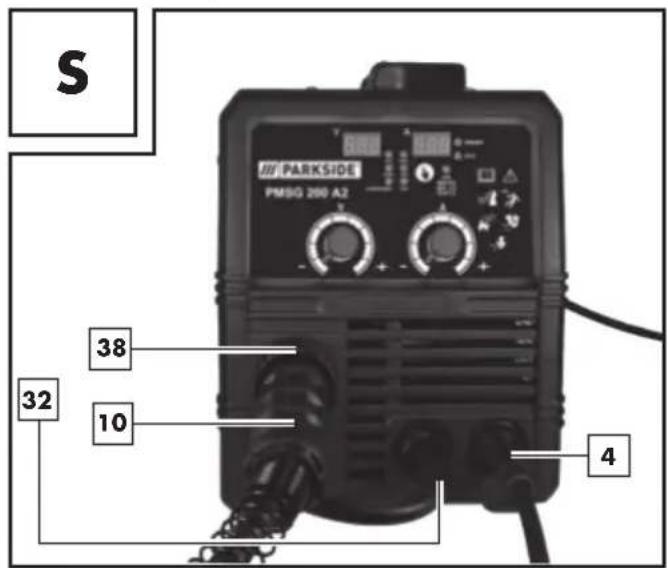
■ First connect the plug with the connector marked with the "+" (see Fig. S). To fix it in place, rotate in a clockwise direction. If you are in any doubt, then please contact a professional.
■ Now connect the cable assembly with direct connection into the appropriate connector (see Fig. S). Fix the connection in place by tightening the fixing ring 38 in a clockwise direction.
■ Then connect the earth cable with the corresponding connector, marked with the "-" (see Fig. S). To fix the connection in place, rotate in a clockwise direction.
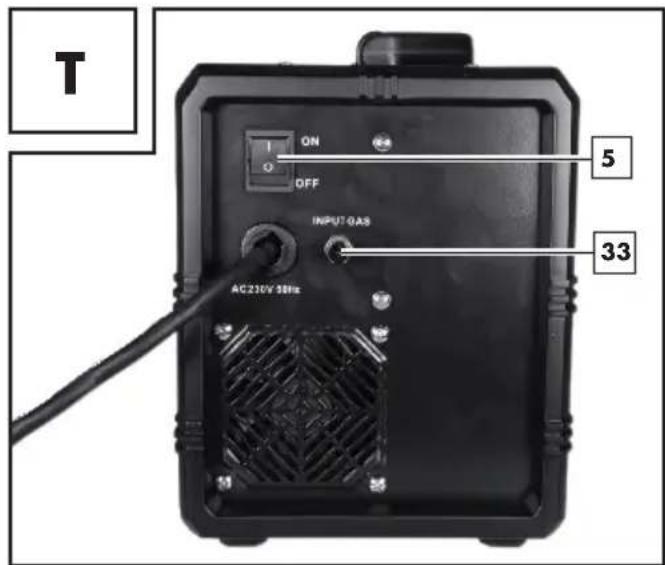
■ Pull the protective cap off the gas connection
Now connect the inert gas feed including the pressure reducer (not included with the delivery) to the gas connection 33 (see Fig. T). Inert gas is required if you are not using flux-cored wire with
integrated solid inert gas. If necessary, observe the notes for your pressure reducer (not included with the delivery). You can use the following formula as a guideline for adjusting the gas flow: Wire diameter in mm x 10 = gas flow in l/min For example, using 0.8 mm wire, will give a value of approx. 8 l/min.
- Adaptation of device to flux-cored welding wire without inert gas
If you are using flux-cored welding wire with integrated inert gas, then you do not have to have an external inert gas supply.
First connect the plug ^32 with the connector marked with the “-”. To fix it in place, rotate in a clockwise direction. If you are in any doubt, then please contact a professional. Connect the cable assembly with direct connection 10 to the appropriate connector. To fix the connection, tighten the fixing ring 38 in a clockwise direction.
- Then connect the earth cable ^4 with the corresponding connector, marked with the “+” and to fix the connection in place, rotate in a clockwise direction.
- Inserting welding wire
■ Unlock and open the cover of the wire feed unit 1, by pushing the release knob upwards.
■ Unlock the roller unit by turning the roller mount27 anti-clockwise (see Fig. F).
■ Pull the roller mount off the shaft (see Fig. F).

NOTE: Make sure that the end of the wire does not come loose and cause the roll to roll out on its. The end of the wire may not be released until during assembly.
- Completely unpack the welding wire reel ^15 , so that it can unrolled without difficulty. Do not release the wire end yet.
Place the wire reel on the shaft. Make sure that the roll unwinds on the side of the 29 wire feed guide (see Fig. G and M).
Place the roll mount back on and lock it by pressing and turning it clockwise (see Fig. G).
■ Undo the adjustment screw 25 and swing it downwards (see Fig. H).
■ Turn the thrust roller u to the side (see Fig. I).
■ Loosen the feed roll hold ^98 by turning it anti-clockwise and pull it forwards and off (see Fig. J).
On the top of the feed roll ^18 , check whether the appropriate wire thickness is indicated.
If necessary, the feed roll 18 has to be turned over or replaced (see Fig. N). The supplied welding wire (∅ 1.0 mm) must be used in the feed roll 18 with the specified wire thickness of ∅ 1.0 mm. The welding wire must be positioned in the upper groove!
■ Erect the feed roll hold again and screw clockwise direction.
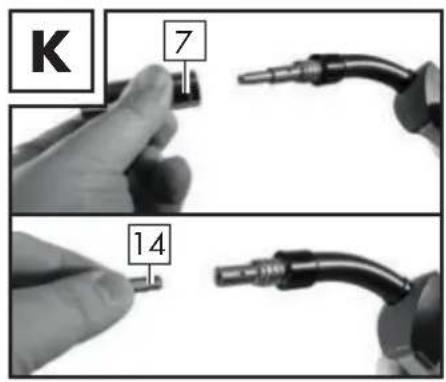
■ Remove the torch nozzle by pulling and turning it clockwise (see Fig. K).
■ Unscrew the welding nozzle (see Fig. K).
- Guide the cable assembly with direct connection 10 away from the welding device as straight as possible (place it on the floor).
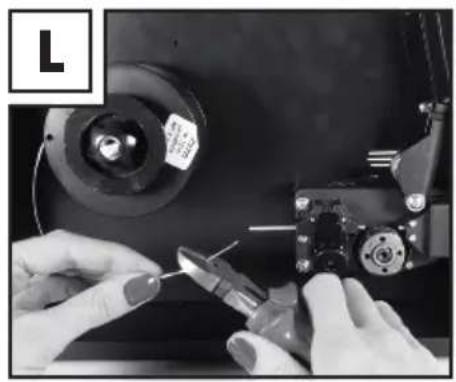
■ Take the wire end out of the edge of the spool (see Fig. L).
- Trim the wire end with wire scissors or a diagonal cutter in order to remove the damaged, bent ends of the wire (see Fig. L).

NOTE: The welding wire must be kept under tension the entire time in order to avoid a releasing a roll out! Therefore it is recommended to carry out the work with an additional person.
■ Push the welding wire through the wire feed guide 29 (see Fig. M).
■ Guide the welding wire along the feed roll 18 and push it into the cable assembly holder 30 (see Fig. N).
■ Swivel the thrust roller unit towards the feed roll 18 (see Fig. O).
■ Mount the adjustm25tscrew (see Fig. O).
- Set the counter pressure with the adjustment screw. The welding wire must be firmly positioned between the thrust roller and feed roll 18 in the upper guide without being crushed (see Fig. O).
■ Switch on the welding device on the main switch (see Fig. A).
■ Press the torch button
Now the wire feed system pushes the welding wire through the cable assembly and the torch 8.
As soon as 1–2 cm of the welding wire protrudes from the torch neck, release the torch button again (see Fig. P).
■ Switch off the welding device on the main switch.
Screw the welding nozzle back on. Make sure that the welding nozzle 14 matches the diameter of the welding wire used (see Fig. Q). With the welding wire delivered with the product, the welding nozzle 14 with the labelling 1.0 or 1.0 AL must be used when using solid aluminium wire.
■ Push the torch nozzle back on to the torch neck with a turn to the right 31 (see Fig. R).
WARNING!
Always unplug the mains plug from the socket prior to each maintenance task or preparatory work in order to prevent the risk of an electric shock, injury or damage.
- Using the device
- Switching the device on and off
Switch the welder on and off on the main 5 switch. If you do not intend to use the welder for an extended period, remove the plug from the power socket. This is the only way to completely de-energise the device.
- Selecting the welding method
First set the welding mode by pressing the welding mode selector key 35. You can choose between Al (aluminium welding), MIG, MAG and FLUX (flux-cored wire). You can then set the current and voltage using the 6 and 36 rotary switches. You can select the SYN mode for aluminium wire as well as 0.8 mm solid wire and 1.0 mm flux-cored wire. In this mode the voltage and current are already synchronised. This is particularly recommended for inexperienced users. In order to activate SYN, first select the required welding mode and then keep the welding mode selector key 35 pressed for approx. 2 seconds. In all cases, the optimum welding settings should be determined by welding on a sample workpiece.
- Welding
Overload protection
The welder is protected against overheating by means of an automatic protection device (thermostat with automatic restart). The protective device breaks the electrical circuit if overheating occurs.
The O.H. display 37 lights up.
Allow the device to cool down for the activation of the protection device. After approx.
15 minutes, the device is ready to be used again.
Overcurrent indicator
In the event of misuse, the output current may exceed the intended maximum value. In this case, the protective device breaks the welding current circuit and the "O.C" overcurrent indicator is shown on the display. If the overcurrent indicator is shown, switch the device off using the main switch 5.
After approx. 15 minutes, the device is ready to be used again and can be switched on using the main switch 5.
Welding mask
WARNING! HEALTH HAZARD!
If you do not use the welding protection shield, harmful UV radiation and heat emitted by the arc could damage your eyes. Always use the welding protection shield for welding work.
WARNING! RISK OF BURNS!
Welded workpieces are very hot and can cause burns. Always use pliers to move hot, welded workpieces.
! ATTENTION: With MIG welding, we recommend a material thickness of 2.0 mm to 3.0 mm when welding aluminium and a thickness of 0.8 mm – 3.0 mm when welding iron/steel.
Please proceed as follows once you have electrically connected the welding device:
Connect the earth cable to the workpiece that is to be welded using the earth terminal.
Please ensure good electrical conductivity.
The area to be welded on the workpiece must be free of rust and paint.
- Choose the desired welding current depending on the welding wire diameter, material thickness and desired penetration depth.
■ Guide the torch nozzle and hold the welding mask 22 in front of the face.
Press the torch button, in order to feed the welding wire. Once the electric arc is burning, the device feeds welding wire into the weld pool.
You can work out the ideal settings for the welding current by carrying out trial welds on a test piece. A properly set electric arc has a mild, uniform buzzing sound.
In case of a rough or hard rattle, switch to a higher power level (increase welding current).
If the welding lens is big enough, the to this slowly guided along the desired edge.
The distance between the torch nozzle and workpiece should be as small as possible (it must not be greater than 10 mm).
If necessary, oscillate a little to increase the size of the weld pool. For inexperienced welders, it is often difficult initially to create a decent electric arc. To do so, the welding current must be set correctly.
The penetration depth (corresponds to the depth of the welding seam in the material) should be as deep as possible without allowing the welding pool to fall through the workpiece.
If the welding current is too low, the welding wire will not melt properly.
Consequently, the welding wire repeatedly dips in the welding pool as far as the workpiece.
The slag can only be removed from the seam once it has cooled down.
To continue welding an interrupted seam:
■ First remove the slag at the starting point.
The arc is ignited in the weld groove, guided to the connection point, melted properly and finally the weld seam is continued.
Setting appropriate parameters for current and voltage for welding aluminium with aluminium wire.
For welding aluminium we recommend using lower voltages than you would use for welding iron/steel.
To set the appropriate voltage range, you can proceed as follows: prepare the device as described under "Adaptation of device to solid welding wire with inert gas". To weld aluminium wire select the setting "1.0/Al(5356)" by pressing the welding mode selector key 35. As guideline values, to weld 2 mm aluminium sheet you can set 14.5 Volt and a current of 91 Amps. In this case you can also use SYN mode, as described in the section about Selecting the welding mode. The optimum welding settings should be determined by welding on a sample workpiece.
CAUTION: Please note that the torch must always be placed on an insulated surface after welding.
■ Always switch off the welder after completing welding work and during breaks and pull the plug from the mains socket.
- Creating a weld seam
Forehand welding
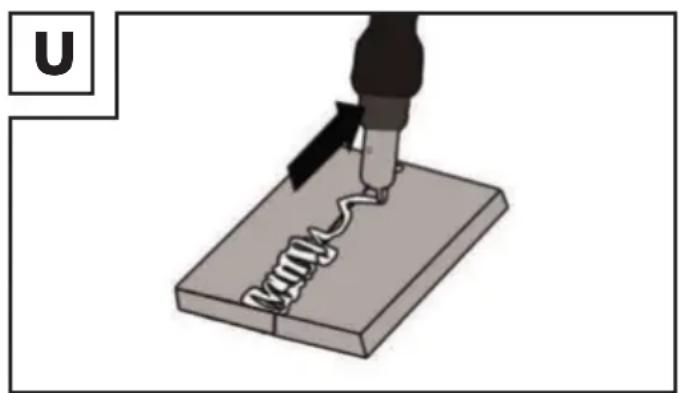
Push the torch forwards. Result: The penetration depth is lower, broader weld width, flatter weld bead (visible surface of the seam) and greater fusion error tolerance.
Backhand welding
The torch is dragged from the weld seam (Fig. U). Result: Greater penetration depth, narrower weld width, higher weld bead and lower fusion error tolerance.
Welded joints
There are two-basic types of joints in welding: Butt welds (outer edge) and angle welding (inner edge and overlapping).
Butt welds
With butt welds of up to 2 mm material thickness, the weld edges are completely brought together. For greater thicknesses, a gap of 0.5–4 mm must be selected. The ideal gap depends on the welded material (aluminium or steel), the material composition as well as the type of welding selected. This gap should be determined by welding on a sample workpiece.
Flat butt welds
Welds should be made without interruption and with a sufficient penetration depth.
Therefore, it is extremely important to be well prepared. The quality of the weld result is affected by: the amperage, the gap between weld edges, the inclination of the torch and the diameter of the welding wire. The steeper you hold the torch against the workpiece, the higher the penetration depth and vice versa.
natural_image
Illustration of a soldering iron being inserted into a circuit board (no text or symbols)To forestall or reduce deformations that can happen during the material hardening process, it is good to fix the workpiece with a device. Avoid stiffening the welded structure to prevent cracks in the weld. These problems can be avoided if there is a possibility of turning the workpiece so that the weld can be carried out in two passes running in opposite directions.
Welds on the outer edge
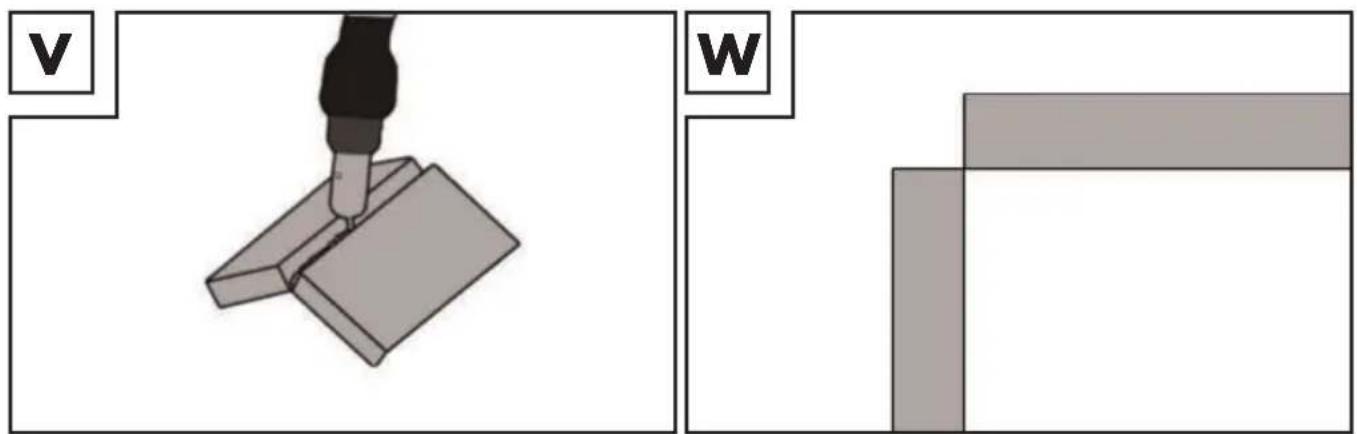
The preparation for this is very simple (Fig. V, W).
natural_image
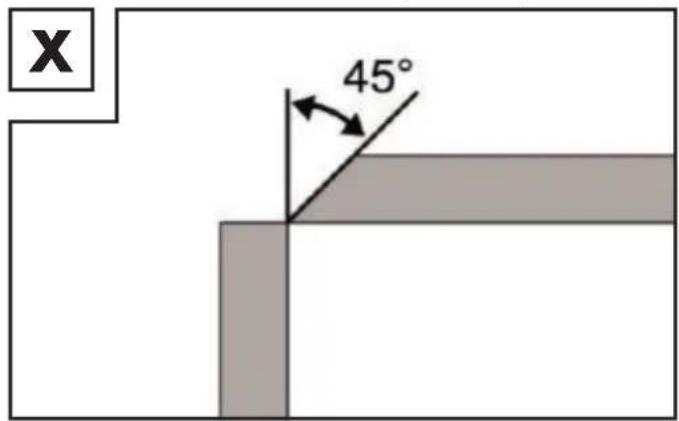
Two technical diagrams showing a tool interacting with a mechanical component, labeled 'V' and 'W' (no text or symbols on the diagram itself)However, it is no longer expedient for thicker materials. In this case, it is better to prepare a joint as shown below, in which the edge of the plate is angled (Fig. X).
Fillet weld connections
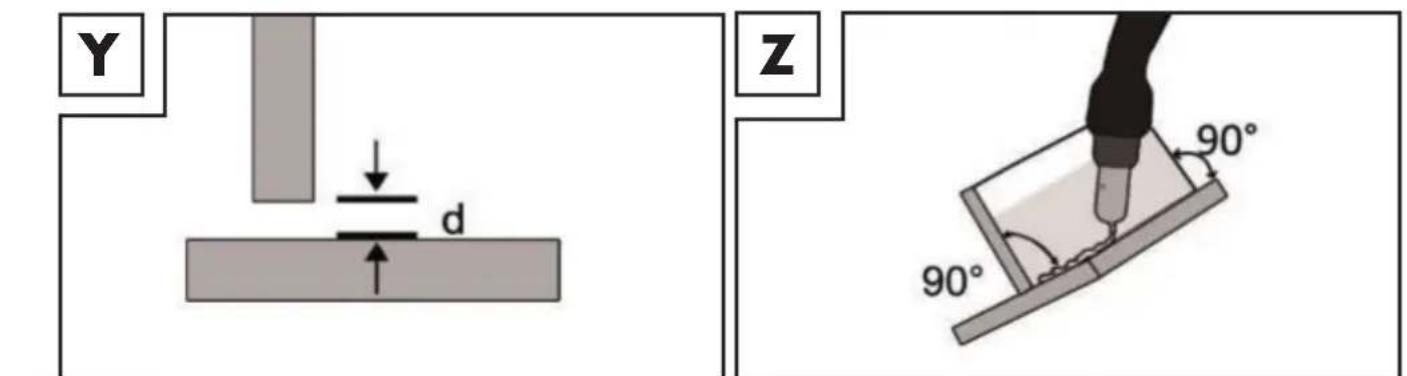
A fillet weld is created if the workpieces are perpendicular to each other. The weld should be shaped like a triangle with sides of equal length and a slight fillet. (Fig. Y, Z).
Welds on an inner edge
The preparation for this weld joint is very simple and is carried out for thicknesses of 5 mm. The dimension "d" needs to be reduced to a minimum and should always be less than 2 mm (Fig. Y).
However, it is no longer expedient for thicker materials. In this case, it is better to prepare a joint as shown in Figure X, in which the edge of the plate is angled.
Overlap welds
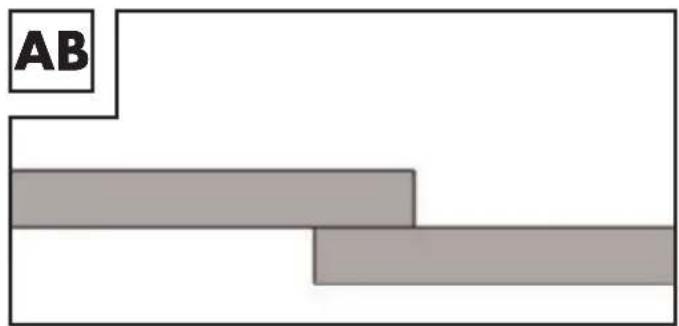
The most common preparation is that with the straight weld edges. The weld can be released using a standard angle weld seam. Both workpieces must be brought as close to each other as possible, as shown in Fig. AB.
- MMA welding
■ Make sure that the main switch is set to position "O" ("OFF") or that the power plug 3 is not plugged into the socket.
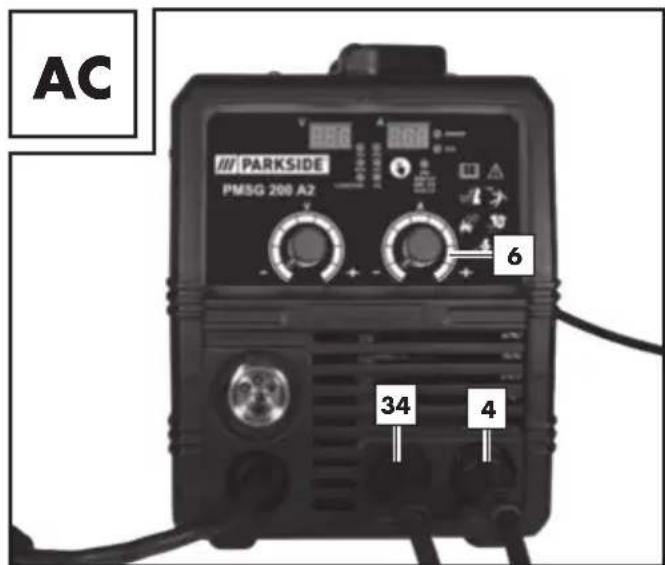
■ Connect the electrode holder and the earth terminal 4 to the welding device, as shown in Fig. AC). Also refer to the information from the electrode manufacturer.
- Put on appropriate protective clothing in accordance with the specifications and prepare your workspace.
■ Connect the earth terminal to the workpiece.
■ Clamp the electrode into the electrode holder
■ Switch the device on by setting the main switch to the "I" ("ON") position.
- Select "MMA" mode by pressing the selector switch for welding mode until the small indicator lamp next to "MMA" lights up.
■ Adjust the welding current using the rotary switch for welding current adjustment depending on the electrode you are using.
NOTE: Guideline values for the welding current to be used, depending on the electrode diameter can be taken from the following table.
| ∅ Electrode Welding current | |
| 1.6 mm 40–60 A | |
| 2.0 mm 60–80 A | |
| 2.5 mm 80–100 A | |
| 3.2 mm 100–140 A |
! ATTENTION: Do not bring the earth terminal 4 and the electrode holder 34/electrodes into direct contact with one another.
! ATTENTION: When welding with rod electrodes, the electrode holder 34 and the earth terminal 4 must be connected in accordance with the information from the electrode manufacturer.
- Hold the welding mask in front of your face and start the welding procedure.
■ To stop the procedure, set the main switch ON/OFF to "O" ("OFF") position.
! ATTENTION: When the thermal sensor is triggered, the O.H. display lights up. ^37 In this case, it will not be possible to continue welding. The device will continue to run so that the fan can cool the device. As soon as the device is ready for operation again, the O.H. display goes out. ^37 . The welding function can now be used again.
ATTENTION: Do not dab on the workpiece with the electrode. It could be damaged and make it more difficult to ignite the arc. As the soon as the arc is ignited, try to maintain a distance to the workpiece which corresponds to the diameter of the electrode being used. The gap should remain as constant as possible while you are welding. The inclination of the electrode in the direction of operation should be 20–30 degrees.
ATTENTION: Always use pliers to remove used electrodes or hot workpieces. Make sure that the electrode holder is always placed onto an insulated surface after welding. The slag can only be removed from the seam once it has cooled down. To continue welding an interrupted seam:
■ First remove the slag at the connection point.
The arc is ignited in the weld groove, guided to the connection point, melted properly and finally the weld seam is continued.
ATTENTION: Welding generates heat. Therefore the welding device must run idle for at least half an hour after use. Alternatively, you can leave the device to cool for an hour. The device can only be packed away and stored once the temperature of the device is normal again.
ATTENTION: A voltage which is 10% below the rated input voltage of the welder can have the following consequences:
■ The power to the device will reduce.
■ The arc stops or becomes unstable.

ATTENTION:
■ The arc radiation can lead to inflammation of the eyes and skin burns.
■ Casting and welding slag can cause eye injuries and burns.
■ Fit the welding mask as described below in the section "Fit welding mask".
It is essential that you only use the welding cable which is included with the delivery.
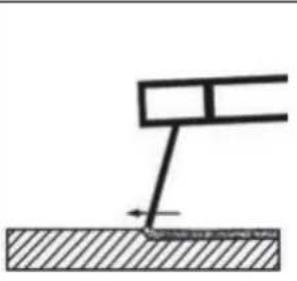
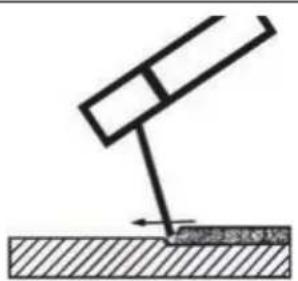
Choose between push and drag welding. The following section shows the impact of the direction of movement on the properties of the weld seam:
| Push welding Drag welding | ||
 |  | |
| Burn smaller larger | ||
| Weld seam width larger smaller | ||
| Weld bead flatter higher | ||
| Weld seam fault larger smaller |
NOTE: You decide for yourself which type of welding is most suitable, once you have welded a sample piece.
NOTE: Once it has worn down completely, the electrode must be replaced.
Welding mask
WARNING! HEALTH HAZARD!
If you do not use the welding protection shield, harmful UV radiation and heat emitted by the arc could damage your eyes. Always use the welding protection shield for welding work.
• TIG welding
For TIG welding please follow the instructions for your TIG torch. You can select TIG mode by pressing the welding mode selector key 35. To do this select the "TIG" position.
- Maintenance and cleaning
NOTE: The welding device must be regularly serviced and overhauled for proper function and for compliance with the safety requirements. Improper and wrong operation may cause failures and damage to the device. Repairs must only be carried out by qualified electricians.
- Switch off the main power supply and the main switch of the device off prior to performing any maintenance work on the welding device.
- Clean the welding device and accessories regularly using air, cotton waste or a brush.
In case of a defect or a necessary replacement of equipment parts, please contact the appropriate qualified personnel.
● Information about recycling and disposal
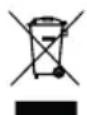


DO NOT DISPOSE OF ELECTRICAL TOOLS IN HOUSEHOLD WASTE! DON'T THROW AWAY - RECYCLE!
According to European Directive 2012/19/EU, used electrical devices must be collected separately for environmentally compatible recycling or recovery. The symbol of the crossed out dustbin means that this device must not be disposed of in household waste at the end of its service life. The device must be handed in at established collection points, recycling centres or waste management depots. The disposal of defective devices which you have sent in will be carried out free of charge. In addition, distributors of electrical and electronic equipment as well as food distributors are obliged to accept returned waste. Lidl provides you with return options directly in its branches and shops. Return and disposal is free of charge for you. When buying a new device you have the right to return an equivalent old device at no charge. In addition you have the option, regardless of whether you are buying a new device, to hand in (up to three) old devices at no charge, as long as the device is no larger than 25 cm in any dimension. Before returning the device please delete all personal information. Before returning, please remove batteries or rechargeable battery packs which are not enclosed by the old device, as well as bulbs, which can be removed without destroying the product and take these to a separate collection point.
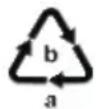
Please note the marking on the different packaging materials and separate them as necessary. The packaging materials are marked with abbreviations (a) and digits (b) with the following definitions: 1–7: Plastics, 20–22: Paper and cardboard, 80–98: Composite materials.
• EC Declaration of Conformity
We,
C. M. C. GmbH
Responsible for documentation:
Dr. Christian Weyler
Katharina-Loth-Str. 15
66386 St. Ingbert
GERMANY
hereby take sole responsibility for declaring that the product
Year of manufacture: 2023/18
Model: PMSG 200 A2
meets the basic safety requirements as specified in the European Directives
EC Guideline on Electromagnetic Compatibility:
2014/30/EU
Low Voltage Directive:
2014/35/EU
RoHS Directive:
2011/65/EU + 2015/863/EU
and the amendments to these Directives.
The object of the declaration described above meets the requirements of Directive 2011/65/EU of the European Parliament and of the Council of 8 June 2011 on the restriction of the use of certain hazardous substances in electrical and electronic equipment. This conformity assessment is based on the following harmonised standards:
EN 60974-6:2016
EN 60974-10:2014/A1:2015
St. Ingbert, 01 October 2022
Dr. Christian Weyler
- Quality Assurance -
- Warranty and service information
Warranty from Creative Marketing & Consulting GmbH
Dear Customer,
The warranty for this equipment is 3 years from the date of purchase. In the event of product defects, you have legal rights against the retailer of this product. Your statutory rights are not affected in any way by our warranty conditions, which are described below.
- Warranty conditions
The warranty period begins on the date of purchase. Please retain the original sales receipt. This document is required as your proof of purchase.
Should this product show any defect in materials or manufacture within 3 years from the date of purchase, we will repair or replace it – at our discretion – free of charge.
This warranty service requires that you retain proof of purchase (sales receipt) for the defective device for the three year period and that you briefly explain in writing what the fault entails and when it occurred. If the defect is covered by our warranty, we will repair and return your product or send you a replacement. The original warranty period is not extended when a device is repair or replaced.
- Warranty period and statutory claims for defects
The warranty period is not extended by the guarantee. This also applies to replaced and repaired parts. Any damages or defects detected at the time of purchase must be reported immediately after unpacking. Any incidental repairs after the warranty period are subject to a fee.
- Extent of warranty
This device has been manufactured according to strict quality guidelines and carefully inspected before delivery.
The warranty applies to material and manufacturing defects only. This warranty does not extend to
product parts, which are subject to normal wear and tear and can thus be regarded as consumable parts, or for damages to fragile parts, e.g. switches, rechargeable batteries or parts made from glass.
This warranty is voided if the product becomes damaged or is improperly used or maintained.
For proper use of the product, all of the instructions given in the operating instructions must be followed precisely. If the operating instructions advise you or warn you against certain uses or actions, these must be avoided in all circumstances.
The product is for consumer use only and is not intended for commercial or trade use.
The warranty becomes void in the event of misuse and improper use, use of force, and any work on the device that has not been carried out by our authorised service branch.
- Processing of warranty claims
To ensure prompt processing of your claim, please follow the instructions given below.
Please retain proof of purchase and the article number (e.g. IAN) for all inquiries.
The product number can be found on the type plate, an engraving, the cover page of your instructions (bottom left), or the sticker on the back or underside of the device.
In the event of malfunctions or other defects, please first contact our service department below by phone or email. If your product is found to be defective, you can then send your product with proof of purchase (till receipt) and a statement describing what the fault involves and when it occurred free of charge to the service address given.
NOTE: You can download this handbook and many more, as well as product videos and software at www.lidl-service.com.
With this QR code you can gain immediate access to the Lidl Service page (www.lidl-service.com) and you can open your operating instructions by entering the article number (IAN) 409153.
- Service
How to contact us:
GB, IE, NI, CY, MT
Name: C. M. C. GmbH
Website: www.cmc-creative.de
E-mail: service.gb@cmc-creative.de
Phone: 0044 (0) 8081890652
Registered office: Germany
IAN 409153\_2207
Please note that the following address is not a service address. Please first contact the service point given above.
C. M. C. GmbH
Katharina-Loth-Str. 15
66386 St. Ingbert
GERMANY
Ordering spare parts:
natural_image
Illustration of a soldering iron being inserted into a solder pad, with no text or symbols present.natural_image
Two technical diagrams showing a tool interacting with a mechanical component and a separate 3D block structure (no text or symbols)Dr. Christian Weyler
Katharina-Loth-Str. 15
DE-66386 St. Ingbert
DEUTSCHLAND
Dr. Christian Weyler
E-Mail: service.de@cmc-creative.de service.at@cmc-creative.de service.ch@cmc-creative.de
Telefon: +49 (0) 6894/ 9989750
natural_image
Illustration of a soldering iron being inserted into a circuit board (no text or symbols)natural_image
Two-panel diagram showing a tool interacting with a mechanical component, labeled 'v' and 'w', with no readable text or symbols.Dr. Christian Weyler
Katharina-Loth-Str. 15
DE-66386 St. Ingbert
ALLEMAGNE
Dr. Christian Weyler
Draaddiameter in mm x 10 = gasstroom in l/min
WAARSCHUWING RISICO VOOR DE GEZONDHEID!
WAARSCHUWING VERBRANDINGSGEVAAR!
natural_image
Illustration of a soldering iron being inserted into a circuit board (no text or symbols)natural_image
Two-panel diagram showing a tool interacting with a mechanical component, labeled 'V' and 'W', with no readable text or symbols.Overlappende lasverbindingen
WAARSCHUWING RISICO VOOR DE GEZONDHEID!
Dr. Christian Weyler
Katharina-Loth-Str. 15
D-66386 St. Ingbert
DUITSLAND
Dr. Christian Weyler
natural_image
Illustration of a soldering iron being inserted into a circuit board (no text or symbols)natural_image
Two-panel diagram showing a tool interacting with a mechanical component, labeled 'v' and 'w', with no readable text or symbols.Dr. Christian Weyler
Katharina-Loth-Str. 15
66386 St. Ingbert
NĚMECKO
Dr. Christian Weyler
natural_image
Illustration of a soldering iron being inserted into a circuit board (no text or symbols)natural_image
Two-panel diagram showing a tool interacting with a mechanical component, labeled 'v' and 'w', with no readable text or symbols.Dr. Christian Weyler
Katharina-Loth-Str. 15
DE-66386 St. Ingbert
NIEMCY
Dr. Christian Weyler
OHROZENIE ELEKTROMAGNETICKYMI POLIAMI:
natural_image
Illustration of a soldering iron being inserted into a circuit board using a coiled wire (no text or symbols)natural_image
Two-panel diagram showing a tool interacting with a mechanical component, labeled 'v' and 'w', with no readable text or symbols.Dr. Christian Weyler
Katharina-Loth-Str. 15
66386 St. Ingbert
NEMECKO
Dr. Christian Weyler
natural_image
Illustration of a soldering iron being inserted into a circuit board (no text or symbols)natural_image
Two technical diagrams showing a tool interacting with a mechanical component, labeled 'V' and 'W' (no text or symbols on the diagram itself)Dr. Christian Weyler
Katharina-Loth-Str., 15
66386 St. Ingbert
ALEMANIA
Dr. Christian Weyler
natural_image
Illustration of a soldering iron being inserted into a circuit board (no text or symbols)natural_image
Two-panel diagram showing a tool interacting with a mechanical component, labeled 'v' and 'w', with no readable text or symbols.Dr. Christian Weyler
Katharina-Loth-Str. 15
66386 St. Ingbert
TYSKLAND
natural_image
Illustration of a soldering iron being inserted into a circuit board (no text or symbols)natural_image
Two-panel diagram showing a tool interacting with a mechanical component, labeled 'v' and 'w', with no readable text or symbols.Dr. Christian Weyler
Katharina-Loth-Str. 15
66386 St. Ingbert
GERMANIA
Dr. Christian Weyler
Nome: Riku Service snc
Indirizzo Internet: www.riku-service.com
E-Mail: assistenzalidl@riku-service.com
Telefono: 0039 (0) 4711430103
Sede: Germania
IAN 409153\_2207
natural_image
Illustration of a soldering iron being inserted into a circuit board (no text or symbols)natural_image
Two-panel diagram showing a tool interacting with a mechanical component, labeled 'v' and 'w', with no readable text or symbols.Dr. Christian Weyler
Katharina-Loth-Str. 15
66386 St. Ingbert
NÉMETORSZÁG
Dr. Christian Weyler
natural_image
Illustration of a soldering iron being inserted into a circuit board (no text or symbols)natural_image
Two-panel diagram showing a tool interacting with a mechanical component, labeled 'v' and 'w', with no readable text or symbols.Dr. Christian Weyler
Katharina-Loth-Str. 15
66386 St. Ingbert
NEMČIJA,
(www.lidl-service.com),
z vnosom številke (IAN)
natural_image
Illustration of a soldering iron being inserted into a spring on a base, with no text or symbols present.natural_image
Two technical diagrams showing a tool interacting with a mechanical component, labeled 'V' and 'W' (no text or symbols on the diagram itself)Dr. Christian Weyler
Katharina-Loth-Str. 15
DE-66386 St. Ingbert
NJEMAČKA
Dr. Christian Weyler
- Osiguranje kvalitete -
- Napomene za jamstvo i odvijanje servisa
Jamstvo tvrtke Creative Marketing & Consulting GmbH
natural_image
Illustration of a soldering iron being inserted into a circuit board (no text or symbols)natural_image
Two technical diagrams showing a tool interacting with a mechanical component and a separate 3D block structure (no text or symbols)Dr. Christian Weyler
Katharina-Loth-Str. 15
DE-66386 St. Ingbert
GERMANIA
Dr. Christian Weyler
natural_image
Illustration of a soldering iron being inserted into a spring on a base, with no text or symbols present.natural_image
Two technical diagrams showing a tool interacting with a 3D block and a rectangular block, labeled V and W (no text or symbols on the blocks themselves)Dr. Christian Weyler
Katharina-Loth-Str. 15
DE-66386 St. Ingbert
ГЕРМАНИЯ
Dr. Christian Weyler
natural_image
Illustration of a soldering iron being inserted into a circuit board (no text or symbols)natural_image
Two technical diagrams showing a tool interacting with a mechanical component, labeled 'V' and 'W' (no text or symbols on the diagram itself)Dr. Christian Weyler
Katharina-Loth-Str. 15
DE-66386 St. Ingbert
ГЕРMANIA
Dr. Christian Weyler


- MULTI-PROCESS WELDER PMSG 200 A2 MULTISCHWEISSGERÄT PMSG 200 A2 POSTE À SOUDER MULTI-PROCÉDÉ PMSG 200 A2
- MULTI-PROCESS WELDER
- POSTE À SOUDER MULTI-PROCÉDÉ
- DE AT CH
- Multi-Process Welder PMSG 200 A2
- - Introduction
- KEEP OUT OF THE REACH OF CHILDREN!
- - Intended use
- Residual risk
- - Package contents
- - Safety instructions
- Please note:
- ! ATTENTION!
- RISK OF ELECTRIC SHOCK:
- DANGER FROM WELDING FUMES:
- DANGER FROM WELDING SPARKS:
- DANGER FROM ARC BEAMS:
- DANGER FROM ELECTROMAGNETIC FIELDS:
- - Environment with increased electrical hazard
- • Welding in tight spaces
- • Total of no-load voltages
- - Protective clothing
- PROTECTION AGAINST RAYS AND BURNS
- • EMC Device Classification
- Note!
- - Before using the device
- - Assembly
- - Assembling the welding protection shield
- - MIG welding
- ● Adaptation of device to solid welding wire with inert gas
- - Adaptation of device to flux-cored welding wire without inert gas
- - Inserting welding wire
- WARNING!
- Overload protection
- Overcurrent indicator
- Welding mask
- WARNING! HEALTH HAZARD!
- WARNING! RISK OF BURNS!
- Please proceed as follows once you have electrically connected the welding device:
- Setting appropriate parameters for current and voltage for welding aluminium with aluminium wire.
- Forehand welding
- Backhand welding
- Welded joints
- Butt welds
- Flat butt welds
- Welds on the outer edge
- Fillet weld connections
- Welds on an inner edge
- Overlap welds
- - MMA welding
- ATTENTION:
- • TIG welding
- - Maintenance and cleaning
- ● Information about recycling and disposal
- DO NOT DISPOSE OF ELECTRICAL TOOLS IN HOUSEHOLD WASTE! DON'T THROW AWAY - RECYCLE!
- • EC Declaration of Conformity
- EC Guideline on Electromagnetic Compatibility:
- - Warranty and service information
- Warranty from Creative Marketing & Consulting GmbH
- - Warranty conditions
- - Warranty period and statutory claims for defects
- - Extent of warranty
- - Processing of warranty claims
- IAN 409153\_2207
- M. C. GmbH
- Ordering spare parts:
- WAARSCHUWING RISICO VOOR DE GEZONDHEID!
- WAARSCHUWING VERBRANDINGSGEVAAR!
- Overlappende lasverbindingen
- OHROZENIE ELEKTROMAGNETICKYMI POLIAMI:
- - Napomene za jamstvo i odvijanje servisa
- Jamstvo tvrtke Creative Marketing & Consulting GmbH
Brand : PARKSIDE
Model : PMSG 200 A2
Category : Welding machine