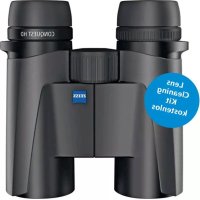
Conquest HD 8x32 - Binoculars ZEISS - Free user manual and instructions
Find the device manual for free Conquest HD 8x32 ZEISS in PDF.



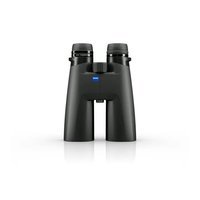
| Product type | Prismatic binoculars |
| Brand | ZEISS |
| Model | Conquest HD 8x32 |
| Magnification | 8x |
| Objective lens diameter | 32 mm |
| Exit pupil diameter | 4 mm |
| Twilight factor | 16.0 |
| Field of view | 140 m at 1000 m |
| Subjective viewing angle | 64° |
| Minimum focusing distance | 1.5 m |
| Diopter adjustment range | ±4 dpt |
| Eye relief | 16.5 mm |
| Interpupillary distance | 54–74 mm |
| Prism system | Schmidt-Pechan |
| Lens coating | LotuTec® / T* |
| Nitrogen filling | Yes (fog-proof) |
| Waterproof | 400 mbar (immersion up to 1 m) |
| Operating temperature | -20°C to +63°C |
| Length | 132 mm |
| Width (eyepiece distance 65 mm) | 115 mm |
| Weight | 620 g |
| Power supply | None (passive binoculars) |
| Main features | Central focusing, lockable diopter compensation, twist-up eyecups (4 positions), 1/4" tripod adapter |
| Package contents | Binoculars, eyepiece and objective covers, carrying strap, case, cleaning cloth, quick guide, safety instructions |
| Maintenance and cleaning | LotuTec coating: blow off large particles, then wipe with an optical cloth. Clean rubber with a damp cloth. |
| Safety | Follow the provided safety instructions; do not look directly at the sun. |
| Spare parts and repairability | Removable and replaceable eyecups; other parts via ZEISS service. |
Frequently Asked Questions - Conquest HD 8x32 ZEISS
User questions about Conquest HD 8x32 ZEISS
0 question about this device. Answer the ones you know or ask your own.
Ask a new question about this device
Download the instructions for your Binoculars in PDF format for free! Find your manual Conquest HD 8x32 - ZEISS and take your electronic device back in hand. On this page are published all the documents necessary for the use of your device. Conquest HD 8x32 by ZEISS.
USER MANUAL Conquest HD 8x32 ZEISS
www.zeiss.com/cop/safety

LIEFERUMFANG
www.zeiss.com/nature/binoculars/accessories
www.zeiss.com/nature/service
1050 Worldwide Blvd.
Hebron, KY 41048-8632, USA
Telefon +1-800-441-3005
E-Mail consumererservice.cop.us@zeiss.com
TECHNISCHE DATEN
- Eyepiece cap
- Eyecups
- Diopter compensation (lockable)
- Carrying strap eyelets
- Focusing wheel
- Interface for tripod adapter 1/4"
- Protective lens cap
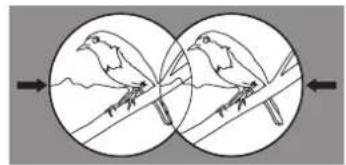
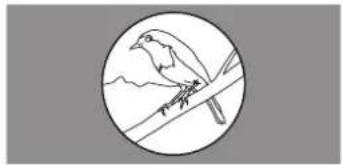
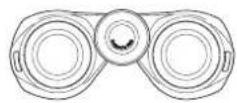
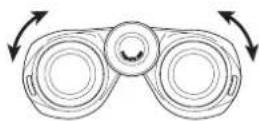
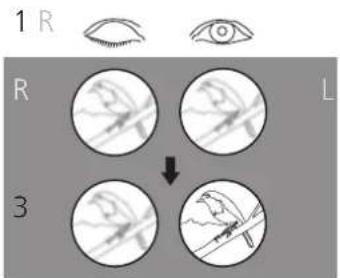
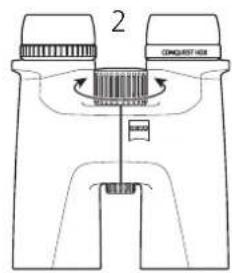
Fig. 3
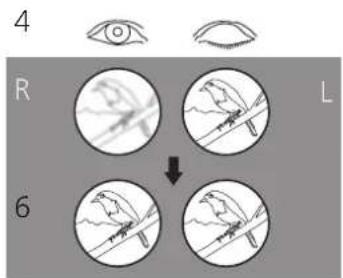
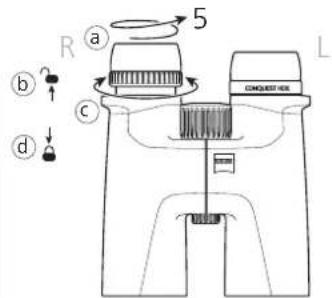
Fig. 4
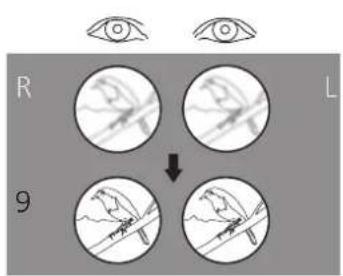
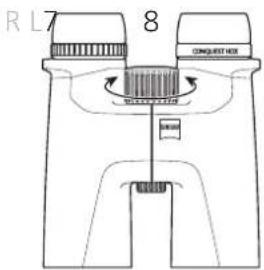
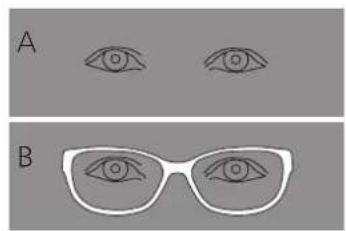
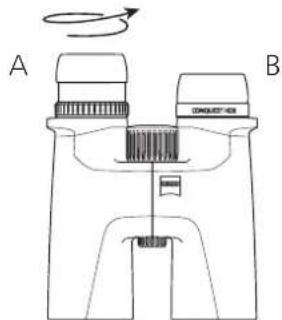
Fig. 6Fig. 5
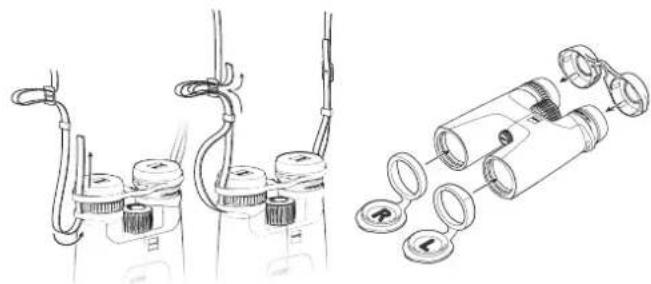
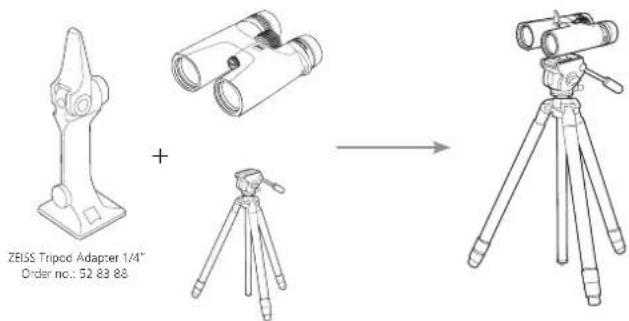
Fig.9Fig.8Fig.7
15x56 LRP
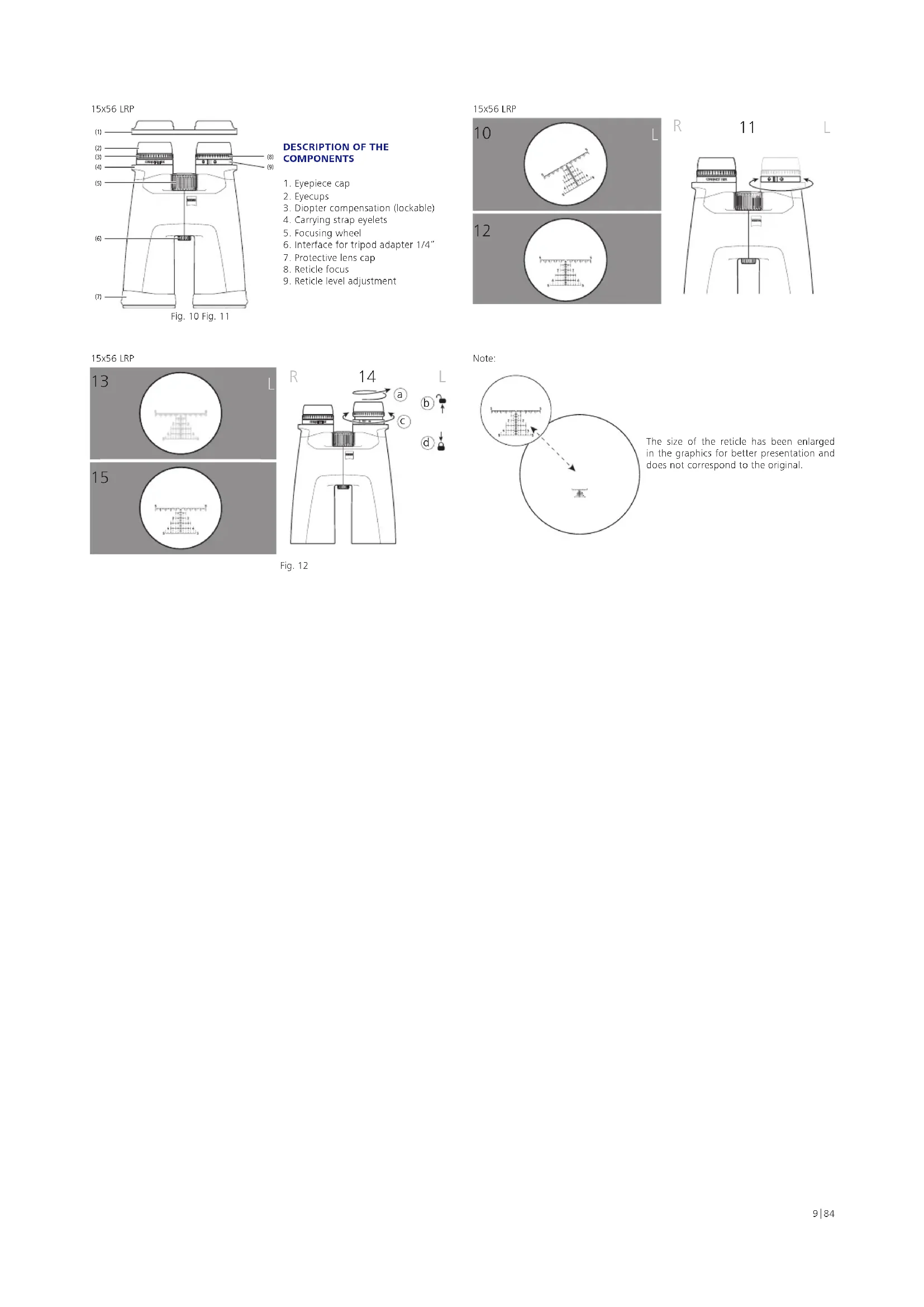
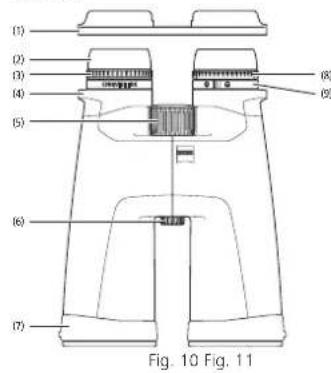
DESCRIPTION OF THE COMPONENTS
- Eyepiece cap
- Eyecups
- Diopter compensation (lockable)
- Carrying strap eyelets
- Focusing wheel
- Interface for tripod adapter 1/4"
- Protective lens cap
- Reticle locus
- Reticle level adjustment
15x56LRP

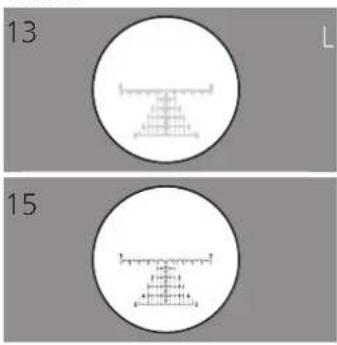
15x56LRP
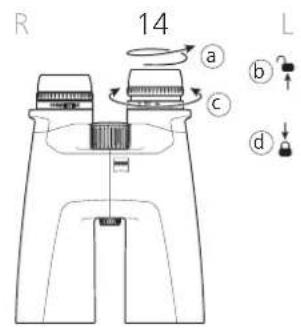
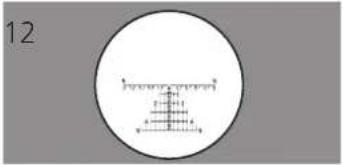
Fig. 12
Note:
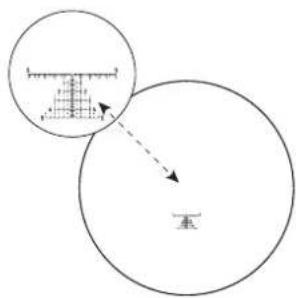
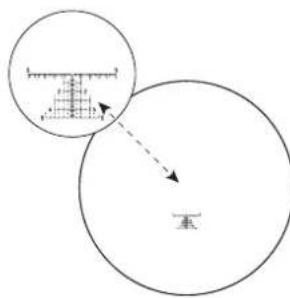
The size of the reticle has been enlarged in the graphics for better presentation and does not correspond to the original.
INSTRUCTIONS FOR USE
Congratulations on purchasing your new ZEISS CONQUEST HDX binoculars. Enjoy the memorable experience of realistic image reproduction, characterized by brilliance and high color fidelity.
ZEISS products are famous for outstanding optical performance, precision engineering and a long service life. Please observe the following instructions for use in order to obtain the best from your product and to ensure that they remain your constant companion for many years to come.

Please note the safety instructions, they can be found under:
www.zeiss.com/cop/safety

SCOPE OF SUPPLY
Product Order number Scope of Supply
| 8 x 32 52 32 14 Binoculars | |
| 10 x 32 52 32 15 | Eyepiece cap |
| Protective lens cap | |
| 8 x 42 52 42 14 | Carrying strap |
| Carrying case | |
| 10 x 42 52 42 15 | Lens cleaning cloth |
| 8 x 56 52 56 34 | Quick Guide |
| 10 x 56 52 56 35 | Safety instructions |
| Tripod adapter ¼" (only for 15 x 56 and LRP 15x56) | |
| 15 x 56 52 56 36 | |
| 15 x 56 LRP 52 56 36 -9901-000 | |
Adjusting the eye spacing (pupillary distance)
Bend the two barrels toward each other around the central axis, until the distance of the two eyepieces corresponds to the distance between your eyes. This will provide the optimum image for your eyes. The optimum eye spacing is achieved when one circular image is seen when viewing through the binoculars with both eyes (Fig. 2).
Focusing
The binoculars have a focusing wheel and a diopter adjustment wheel. To adjust, close your right eye and focus the image in the left barrel using the center focusing wheel (Fig. 3).
Then close your left eye and, if necessary, adjust the focus in the right barrel using the diopter adjustment wheel (Fig. 4). Details on this can be found in the next section. The diopter adjustment wheel features a scale with the signs "+" and "-" and has an index point as a reference point. Note your personal setting, then you can quickly set your own diopter setting on any binoculars.
For additional focusing at different distances, use only the focusing wheel (Fig. 5).
Note: Always use the same object to focus both images!
Diopter locking mechanism
The binoculars have a diopter locking mechanism to prevent unwanted adjustment of the diopter compensation (Fig. 4).
To adjust the diopters, first unscrew the eyecups (a). Then you can pull the diopter adjustment ring upwards to unlock it (b). Change the diopters as described above by turning the diopter adjustment ring (c). After the focus is correctly adjusted, press the diopter adjustment ring back down to lock it (d).
Aligning the eyecups, Viewing with and without glasses
If you do not wear glasses when viewing, use the binoculars with the eyecups extended. To do this, turn the eyecups counter-clockwise and upwards to the top click stop position (Fig. 6 - Illustration A).
The eyecups can be locked in four positions - at the bottom and top and in two intermediate positions. These adjustment options allow the distance of the eye from the exit pupil to be varied according to the specific requirements of each user.
When viewing with glasses, turn the eyecups down (clockwise) until it locks in the lowest click stop position (Fig. 6 - Illustration B).
Note: If the eyecups are turned further counter-clockwise when in the extended position, they can loosen. This is by design. For more information, see "Cleaning and replacing the eyecups".
Cleaning and replacing the eyecups
To replace the eyecups or for cleaning, they can be completely screwed off of the binoculars. Turn the eyecups out as shown in Fig. 6 to the top click-stop position and turn the thread in the same direction until the eyecups are completely screwed out.
After cleaning or replacing the eyecups, turn them completely clockwise on the eyepiece (also refer to the section "Aligning the eyecups, Viewing with and without glasses"). By slightly tugging clockwise, the thread of the eyecups engages in the lowest setting. Finally, you can again set your desired distance between the eye and eyepiece using the click stops.
Attaching the carrying strap and protective cap
The carrying strap, eyepiece cap and protective lens cap are included in the packaging. As shown in Fig. 7, the eyepiece cap and carrying strap are attached to the binoculars by means of the carrying strap eyelet.
The strap length can be set to the desired length by shortening or lengthening the strap. On the other side of the eyepiece cap follow the same sequence. The eyepiece cap can also be put on only one side, if preferred.
The lens caps are marked "L" for left and "R" for right and are attached to the left and right tubes respectively (Fig. 8).
Use of eyepiece and lens cap
The eyepiece cap can be attached to the eyecups (Fig. 8). You can maintain the desired high-eyepoint design. Remove the cover before using the binoculars.
The lens caps can remain permanently on the binoculars after they have been attached and only need to be opened before use.
Attachment of tripod adapters
Binoculars from the ZEISS CONQUEST HDX series can be mounted on any commercial camera tripod using the ZEISS tripod adapter 1/4" or the ZEISS Binofix universal tripod adapter (Fig. 9).
The order numbers for ZEISS tripods and tripod adapters and other accessories can be found in the "Accessories for ZEISS CONQUEST HDX" chapter.
Special adjustments for ZEISS Conquest HDX LRP 15x56 binoculars - with MRAD reticle
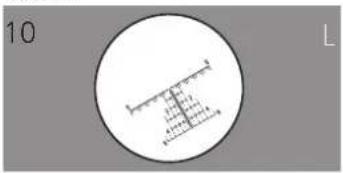
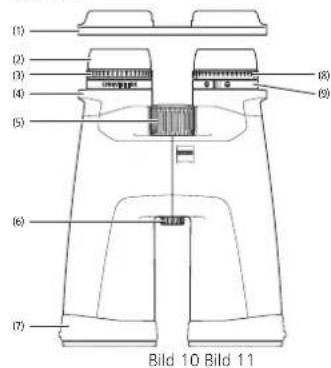
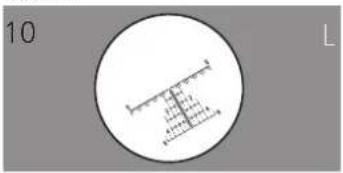
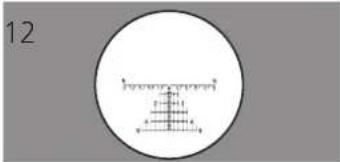
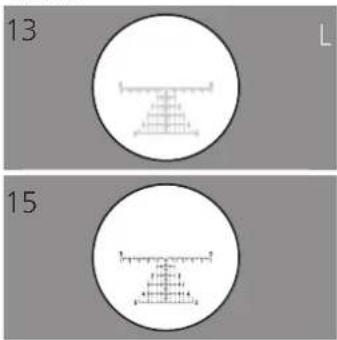
The ZEISS Conquest HDX LRP 15x56 model is specifically designed for competition sport shooting. It incorporates a reticle that can be adjusted for both 'leveling' and 'focusing' needs (Fig. 10).
Note: The reticle is located in the left channel. When using, the reticle appears on the overall image.
Angle/Leveling adjustment of the reticle - from the viewing position
1) As with all binoculars you must first set the interpupillary distance (IPD) to your preferred and comfortable width (see section adjusting the eye spacing).
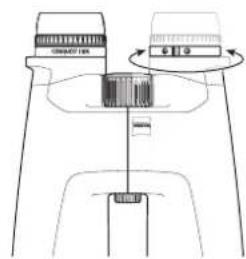
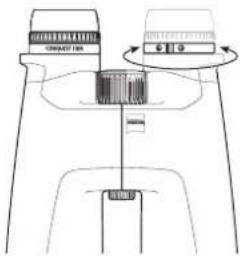
2) Once the IPD is set for your eyes, look through the binocular to check whether the reticle in the left barrel is leveled or not. If leveled, no further adjustment is needed. If not leveled, rotate the angle adjustment ring - the ring without rubber surface, located on the left side barrel, until the reticle is perfectly leveled (Fig. 11).
3) For assistance and confirmation of 'level' setting, you can use a trustworthy reference point such as a building.
Note: The angle adjustment ring is purposely stiff to rotate in order to prevent unintentional adjustment.
Focusing of the reticle
Once the reticle is leveled you will need to focus the reticle to obtain a clear and crisp view of the reticle (Fig. 12).
1) To focus the reticle, the eyecups must be adjusted outward to allow for unlocking of the reticle diopter adjustment (a).
2) Ensure the reticle diopter adjustment is in the unlocked position, by pulling out on the adjustment, away from the body of the binocular, until it unlocks (b).
3) While looking through the binoculars, close your right eye and rotate the reticle diopter adjustment left or right until the reticle is focused (c). After the reticle is focused, press the diopter adjustment ring back down to lock it (d).
Suggestions: For this adjustment, look through the binocular at a neutral background, e.g. a white or gray wall at a long distance. (Never look directly at the sun or any light source.)
Note: This final step of the reticle focus adjustment process should be accomplished in a short period of time, as your eye will want to 'auto-focus' the reticle for you after approx. 2 seconds. You may want to repeat this process a few times to confirm the setting is adjusted properly so that the reticle is 'in focus' immediately when you look at it. If the reticle is not 'in focus' the moment you look at it, this can cause unnecessary eye fatigue during extended observation sessions.
Care and maintenance
The binoculars feature the ZEISS LotuTec coating. The effective protective coating for the lens surfaces noticeably reduces contamination of the lenses through a special smooth surface and the strong beading effect connected with it. All types of contamination adhere less and can be quickly and easily removed, smear-free. The LotuTec coating is also durable and abrasion resistant.
Please do not wipe coarse particles from the lenses (e.g. sand), rather blow them away or use a fine brush to remove them. Over time, fingerprints can corrode the lens surface. Breathing on the lens and polishing with a clean optical cleaning cloth is the easiest method of cleaning the lens surface. Dry storage and keeping the outer lens surfaces well ventilated, especially in the tropics, helps to prevent a possible mold film forming on the optics. Your ZEISS CONQUEST HDX binoculars require no further special care.
Contamination on the rubber coating and the housing can usually be removed using warm water, a cotton cloth and light rubbing.
ACCESSIONS FOR ZEISS CONQUEST HDX
www.zeiss.com/nature/binoculars/accessories
Accessories are not included in the scope of supply.
CUSTOMER SERVICE, REPLACEMENT PARTS AND WARRANTY

For service or replacement part questions or obtaining the warranty
terms, please see our website:
www.zeiss.com/nature/service
For further questions, please feel free to contact:
ZEISS Customer Service
Carl Zeiss Sports Optics GmbH
Gloelstr.3-5,35576 Wetzlar, Germany
Phone +49 800 934 77 33
E-mail consumerproducts@zeiss.com
ZEISS Customer Service USA
Carl Zeiss SBE, LLC
Consumer Products
1050 Worldwide Blvd.
Hebron, KY 41048-8632, USA
Phone +1-800-441-3005
E-mail consumererservice.cop.us@zeiss.com
TECHNICAL DATA
| 8 × 32 10 × 32 8 × 42 10 | 42 8 × 56 10 × 56 15 × 56 15 | 56 LRP | ||||||
| Magnification 8 10 8 10 8 10 15 15 | ||||||||
| Objective lens diameter mm 32 32 42 42 56 56 56 56 | ||||||||
| Exit pupil diameter mm 4 3.2 5.25 4.2 7 5.6 3.7 | ||||||||
| Twilight factor | 16.0 17.9 | 18.3 20.5 | 21.2 23.7 | 29.0 29.0 | 29.0 29.0 | |||
| Field of view | m/1,000 m | 140 118 | 128 115 | 125 115 | 80 80 | |||
| (ft/1,000 yds) | (420) (354) | (384) (345) | (375) (345) | (240) (240) | ||||
| Subjective angle of view | ° | 64 68 | 59 66 | 57 66 | 69 69 | |||
| Close focusing distance | m (ft) | 1.5 (4.9) | 2 (6.6) | 3.5 (11.5) | ||||
| Diopler adjustment range | dpt | +4 | +4 | +4 | ||||
| Exit pupil distance | mm | 16.5 | 16.5 | 18 | ||||
| Interpupillary distance | mm | 54-74 | 54-74 | 56-74 | ||||
| Prism system | Schmidt-Pechan | Schmidt-Pechan | Abbe-König | |||||
| Coating | LotuTec® / T* | LotuTec® / T* | LotuTec® / T* | |||||
| Nitrogen purged | √ | √ | √ | |||||
| Waterightness | mbar | 400 | 400 | 400 | ||||
| Functional temperature range | °C (°F) | -20/+63 (-4/+145) | -20/+63 (-4/+145) | -20/+63 (-4/+145) | ||||
| Length | mm (in) | 132 (5.2) | 150 (5.9) | 210 (8.3) | ||||
| Width with an eye spacing of 65 mm | mm (in) | 115 (4.5) | 119 (4.7) | 145 (5.7) | ||||
| Weight | g (oz) | 620 (21.9) | 715 (25.2) | 1,235 (43.6) | 1,250 (44.1) | 1,265 (44.6) | 1,280 (45.2) | |
Subject to changes in design and scope of supply due to technical improvements.
ZEISS CONQUEST HDX
www.zeiss.com/cop/safety

CONTENU DE LIVRAISON
www.zeiss.com/nature/binoculars/accessories
www.zeiss.com/nature/service
1050 Worldwide Blvd.
Hebron, KY 41048-8632, Eta's-Unis
Telephone +1-800-441-3005
E-mail consumererservice.cop.us@zeiss.com
CHARACTERISTIQUES TECHNIQUES
www.zeiss.com/cop/safety

VOLUMEN DE ENTREGA
www.zeiss.com/nature/binoculars/accessories
www.zeiss.com/nature/service
1050 Worldwide Blvd.
Hebron, KY 41048-8632, FE. UU
Telefono +1-800-441-3005
E-Mail consumererservice.cop.us@zeiss.com
DATOS TECNICOS
| 8 × 32 10 × 32 8 × 42 10 × 42 8 × 56 10 × 56 15 × 56 15 × 56 LRP | ||||||||
| Aumento 8 10 8 10 8 10 15 15 | ||||||||
| Diámetro efectivo del objetivo mm 32 32 42 42 56 56 | mm | 4 | 3,2 | 5,25 | 4,2 | 7 | 5,6 | |
| Indice crepuscular | 16,0 | 17,9 | 18,3 | 20,5 | 21,2 | 23,7 | ||
| Campo visual | m/1.000 m(ft/1.000 yds) | 140 | 118 | 128 | 115 | 125 | 115 | 80 |
| (420) | (354) | (384) | (345) | (375) | (345) | (240) | ||
| Angulo visual subjeto | ° | 64 | 68 | 59 | 66 | 57 | 66 | 69 |
| Distancia minima de enfoque | m (ft) | 1,5 (4,9) | 2 (6,6) | 3,5 (11,5) | ||||
| Rango de ajuste de dioptrias | dpt | +4 | +4 | ±4 | ||||
| Distancia de puplas de salute | mm | 16,5 | 16,5 | 18 | ||||
| Distancia interpupilar | mm | 54-74 | 54-74 | 56-74 | ||||
| Sistema de prismas | Schmidt-Pechan | Schmidt-Pechan | Abbe-König | |||||
| Tratimiento antirrellejos | LotuTec® / T' LotuTec | \( ^\circ \)/T* | LotuTec® / T* | |||||
| Rellenzo de nitrogeno | √ | √ | √ | |||||
| Estanqueidad al agua | mbar | 400 | 400 | 400 | ||||
| Temperatura de service | °C (°F) | -20/+63 (-4/+145) | -20/+63 (-4/+145) | -20/+63 (-4/+145) | ||||
| Longitud | mm (in) | 132 (5,2) | 150 (5,9) | 210 (8,3) | ||||
| Anchura con una distancia interpupilar de 65 mm | mm (in) | 115 (4,5) | 119 (4,7) | 145 (5,7) | ||||
| Peso | g (oz) | 620 (21,9) | 715 (25,2) | 1.235 (43,6) | 1.250 (44,1) | 1.265 (44,6) | ||
| 1.280 (45,2) | ||||||||
www.zeiss.com/cop/safety

ELEMENTI COMPRESI NELLA FORNITURA
www.zeiss.com/nature/binoculars/accessories
www.zeiss.com/nature/service
Per altre domande, rivolgersi a:
ZEISS Customer Service
Carl Zeiss Sports Optics GmbH
Gloelstr. 3-5, 35576 Wetzlar, Germania
Telefono+498009347733
E-mail consumerproducts@zeiss.com
ZEISS Customer Service USA
Carl Zeiss SBE, LLC
Consumer Products
1050 Worldwide Blvd
Hebron, KY 41048-8632, USA
Telefon0 +1-800-441-3005
E-mail consumererservice.cop.us@zeiss.com
DATI TECHNICI
| 8 x 32 10 x 32 8 x 42 10 | 42 8 x 56 10 x 56 15 x 56 | 15 x 56 LRP | |||||||
| Ingrandimento 8 10 8 10 8 10 15 15 | |||||||||
| Diametro effettivo obietivo mm 32 32 42 42 56 56 56 56 | |||||||||
| Diametro pupilla d'uscita mm 4 3,2 5,25 4,2 7 5,6 3,7 3,7 | |||||||||
| Valore crepuscolare | 16,0 | 17,9 | 18,3 | 20,5 | 21,2 | 23,7 | 29,0 | 29,0 | |
| Campo visivo | m/1.000 m(ft/1.000 yds) | 140(420) | 118(354) | 128(384) | 115(345) | 125(375) | 115(345) | 80(240) | 80(240) |
| Angolo visuale soggettivo | ° | 64 | 68 | 59 | 66 | 57 | 66 | 69 | 69 |
| Limite primi piani | m (ft) | 1,5 (4,9) | 2 (6,6) | 3,5 (11,5) | |||||
| Intervallo di regolazione delle diottrile | dpt | ±4 | ±4 | ±4 | |||||
| Distanza pupilla d'uscita | mm | 16,5 | 16,5 | 18 | |||||
| Distanza interpupillare | mm | 54-74 | 54-74 | 56-74 | |||||
| Sistema prismatico | Schmidt-Pechan | Schmidt-Pechan | Abbe-König | ||||||
| Trattamento | LotuTec® / T* | LotuTec® / T* | LotuTec® / T* | ||||||
| Riempimento di azoto | √ | √ | √ | ||||||
| Impermeabilità | mbar | 400 | 400 | 400 | |||||
| Temperatura d'esercizio | °C (°F) | -20/+63 (-4/+145) | -20/+63 (-4/+145) | -20/+63 (-4/+145) | |||||
| Lunghezza | mm (in) | 132 (5,2) | 150 (5,9) | 210 (8,3) | |||||
| Larghezza con distance interpupillare di 65 mm | mm (in) | 115 (4,5) | 119 (4,7) | 145 (5,7) | |||||
| Peso | g (oz) | 620 (21,9) | 715 (25,2) | 1.235(43,6) | 1.250(44,1) | 1.265(44,6) | 1.280(45,2) | ||
www.zeiss.com/cop/safety

www.zeiss.com/nature/binoculars/accessories
www.zeiss.com/nature/service
1050 Worldwide Blvd.
Hebron, KY 41048-8632, USA
Telefoon +1-800-441-3005
E-mail consumererservice.cop.us@zeiss.com
TECHNISCHE GEGEVENS
| 8 × 32 10 × 32 8 × 42 10 × 42 8 × 56 10 × 56 15 × 56 15 × 56 LRP | |||||||||
| Vergrotting 8 10 8 10 8 10 15 15 | |||||||||
| Effectieve diameter objektief mm 32 32 42 42 56 56 | 66 56 | ||||||||
| Diameter uittredepupil | mm | 4 | 3,2 | 5,25 | 4,2 | 7 | 5,6 | 3,7 | 3,7 |
| Schemergotal | 16,0 | 17,9 | 18,3 | 20,5 | 21,2 | 23,7 | 29,0 | 29,0 | |
| Zichtveld | m/1.000 m(ft/1.000 yds) | 140(420) | 118(354) | 128(384) | 115(345) | 125(375) | 115(345) | 80(240) | 80(240) |
| Subjectieve beeldhoek | ° | 64 | 68 | 59 | 66 | 57 | 66 | 69 | 69 |
| Instellingsgrens damitbij | m (ft) | 1,5 (4,9) | 2 (6,6) | 3,5 (11,5) | |||||
| Verstellbereik dioptrie | dpt | +4 | +4 | ±4 | |||||
| Afstand uittredepupil | mm | 16,5 | 16,5 | 18 | |||||
| Pupilafrstand | mm | 54-74 | 54-74 | 56-74 | |||||
| Prismasysteme | Schmidl-Pechan | Schmidl-Pechan | Abbe-König | ||||||
| Coating | LotuTec® / T' LotuTec | ® / T* | LotuTec® / T* | ||||||
| Stikstofvilling | √ | √ | √ | ||||||
| Waterdichtheid | mbar | 400 | 400 | 400 | |||||
| Gebnuiktemperatuar | °C (°F) | -20/+63 (-4/+145) | -20/+63 (-4/+145) | -20/+63 (-4/+145) | |||||
| Lengte | mm (in) | 132 (5,2) | 150 (5,9) | 210 (8,3) | |||||
| Breedte bij afstand+tussen deogen van 65 mm | mm (in) | 115 (4,5) | 119 (4,7) | 145 (5,7) | |||||
| Gewicht | g (oz) | 620 (21,9) | 715 (25,2) | 1.235(43,6) | 1.250(44,1) | 1.265(44,6) | 1.280(45,2) | ||
www.zeiss.com/cop/safety

LEVERINGSOMFANG
www.zeiss.com/nature/binoculars/accessories
Tilbenar erike on gel al overingsomlang.
KUNDESERVICE, RESERVEDELE OG GARANTI

www.zeiss.com/nature/service
Ved sporgsmal bedes du kontakte;
ZEISS Customer Service
Carl Zeiss Sports Optics GmbH
Gloelstr.3-5D-35576Wetzlar,Tyskland
Telefon +49800 9347733
E-mail consumerproducts@zeiss.com
ZEISS Customer Service USA
Carl Zeiss SBE, LLC
Consumer Products
1050WorldwideBlyd
Hcbron, KY 41048-8632, USA
Telefon +1-800-441-3005
E-mail consumererservice.cop.us@zeiss.com
TEKNISKE DATA
| 8 × 32 10 × 32 8 × 42 10 × 42 8 × 56 10 × 56 15 × 56 15 × 56 LRP | ||||||||
| Forstörsele | 8 10 8 10 8 10 15 15 | |||||||
| Effektiv objektivdiameter mm | 32 32 42 42 56 56 56 56 | |||||||
| Udgangspulidiameter | mm | 4 | 3,2 | 5,25 | 4,2 | 7 | 5,6 | 3,7 |
| Dazirmingstal | 16,0 | 17,9 | 18,3 | 20,5 | 21,2 | 23,7 | 29,0 | |
| Synfelt | m/1.000 m | 140 | 118 | 128 | 115 | 125 | 115 | |
| (ft/1.000 yds) | (420) | (354) | (384) | (345) | (375) | (345) | (240) | |
| Subjektiv synsvinkel | ° | 64 | 68 | 59 | 66 | 57 | 66 | 69 |
| Nerindstellingsgrösse | m (ft) | 1,5 | (4,9) | 2 | (6,6) | 3,5 | (11,5) | |
| Dioptrijusteringsomräge | dpt | +4 | +4 | +4 | ||||
| Udgangspulilafstand | mm | 16,5 | 16,5 | 18 | ||||
| Pupilaufstand | mm | 54-74 | 54-74 | 56-74 | ||||
| Prismesystem | Schmidt-Pechan | Schmidt-Pechan | Abbe-König | |||||
| Beteignning | LotuTec® / T® LotuTec | ® / T® | LotuTec® / T® | |||||
| Kvaelstoffyldning | √ | √ √ | ||||||
| Vandetaethed | mbar | 400 | 400 | 400 | ||||
| Funktionstermperatur | °C (°F) | -20/+63 (-4/+145) | -20/+63 (-4/+145) | -20/+63 (-4/+145) | ||||
| Laengde | mm (in) | 132 | (5,2) | 150 | (5,9) | 210 | (8,3) | |
| Bredde ved øjenafstand 65 mm | mm (in) | 115 | (4,5) | 119 | (4,7) | 145 | (5,7) | |
| Vægl | g (oz) | 620 | (21,9) | 715 | (25,2) | 1.235 | 1.250 | 1.265 |
| (43,6) | (44,1) | (44,6) | ||||||
| (45,2) | ||||||||
www.zeiss.com/cop/safety

TOIMITUKSEN SISALTO
www.zeiss.com/nature/binoculars/accessories
www.zeiss.com/nature/service
Hebron, KY 41048-8632, USA
Punelin +1-800-441-3005
Sahkoposti consumerservice.cop.us@zeiss.com
TEKNISET TIEDOT
| 8 x 32 10 x 32 8 x 42 10 x 42 8 x 56 10 x 56 15 x 56 15 x 56 LRP | |||||||||
| Suurrennus 8 10 8 10 8 10 15 15 | |||||||||
| Tehokas objektivin halkaisja mm 32 32 42 42 56 56 56 56 | |||||||||
| Lahtöupillin halkaisja | mm | 4 | 3,2 | 5,25 | 4,2 | 7 | 5,6 | 3,7 | 3,7 |
| 16,0 | 17,9 | 18,3 | 20,5 | 21,2 | 23,7 | 29,0 | 29,0 | ||
| Hämäräluku | m/1 000 m(ft/1 000 yds) | 140(420) | 118(354) | 128(384) | 115(345) | 125(375) | 115(345) | 80(240) | 80(240) |
| Subjektivinen naktokulma ° | 64 68 | 59 66 57 66 69 69 | |||||||
| Lahietäisyden säätöraja | m (ft) | 1,5 (4,9) | 2 (6,6) | 3,5 (11,5) | |||||
| Dioplerin säätäolue | dpt | ±4 | ±4 | ±4 | |||||
| Lahtöupillin etäisyss | mm | 16,5 | 16,5 | 18 | |||||
| Pupilictäisyss | mm | 54-74 | 54-74 | 56-74 | |||||
| Prismajäristelmä | mm | Schmidl-Pechan | Schmidl-Pechan | Abbe-König | |||||
| Pinnoite | LotuTec® / T* | LotuTec® / T* | LotuTec® / T* | ||||||
| Typpiäytie | √† | √† | √† | ||||||
| Vestiviys | mbar | 400 | 400 | 400 | |||||
| Käytöllampotila | °C (°F) | -20/+63 (-4/+145) | -20/+63 (-4/+145) | -20/+63 (-4/+145) | |||||
| Pitusus | mm (in) | 132 (5,2) | 150 (5,9) | 210 (8,3) | |||||
| Leveys silmäetäisyden ollesa 65 mm | mm (in) | 115 (4,5) | 119 (4,7) | 145 (5,7) | |||||
| Paino | g (oz) | 620 (21,9) | 715 (25,2) | 1 235(43,6) | 1 250(44,1) | 1 265(44,6) | 1 280(45,2) | ||
www.zeiss.com/cop/safety

SZALLITASI TERJEDELEM
www.zeiss.com/nature/binoculars/accessories
www.zeiss.com/nature/service
1050 Worldwide Blvd.
Hebron, KY 41048-8632, USA
Telefon +1-800-441-3005
E-mail consumererservice.cop.us@zeiss.com
MUSZAKI ADATOK
www.zeiss.com/cop/safety
ZAKRES DOSTAWY
www.zeiss.com/nature/binoculars/accessories
1050 Worldwide Blvd.
Hebron, KY 41048-8632, USA
Telefon +1-800-441-3005
E-mail consumererservice.cop.us@zeiss.com
DANE TECHNICZNE
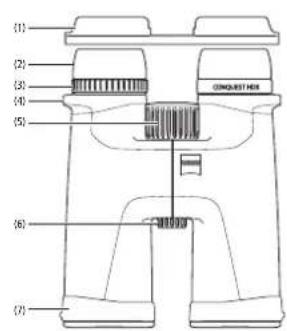
Fig.1 Fig.2
DELARNAS NAMN
- Okularskydd
2.Ogonmusslor - Dioptrijustering (ləsbar)
- Barremsoglor
- Fokuseringsvred
6.Utag for 1/4*stativganga - Linskydd
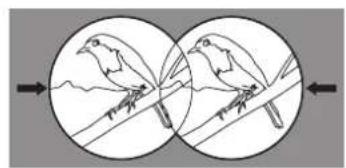
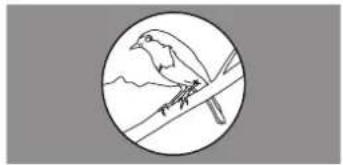
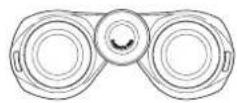
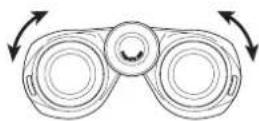
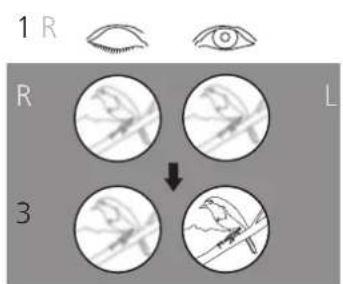
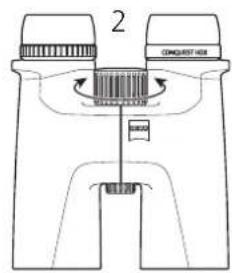
Fig. 3
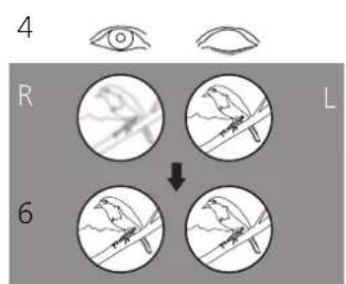
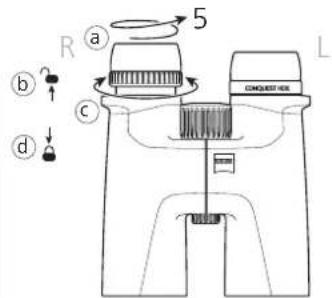
Fig. 4
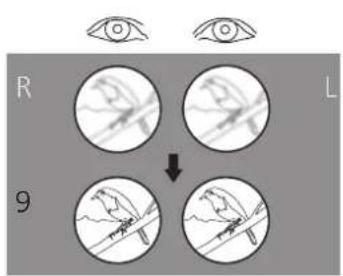
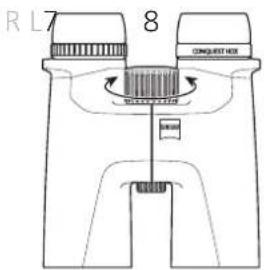
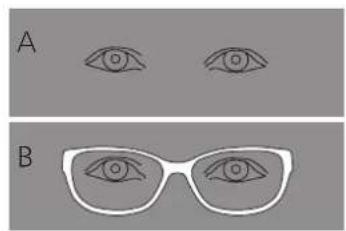
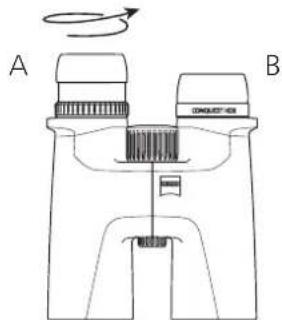
Fig.6Fig.5
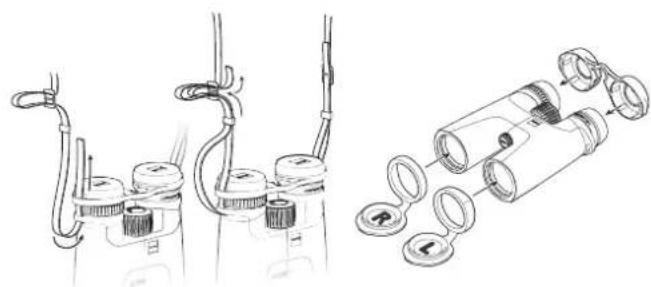
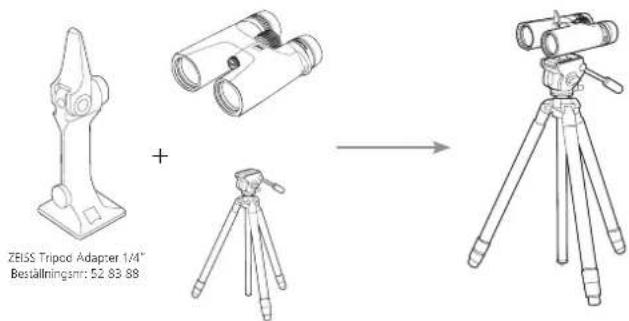
Fig.9Fig.8Fig.7
15x56 LRP
DELARNAS NAMN
- Okularskydd
2.Ogonmusslor - Dioptrjustering (ləsbar)
- Barremsoglor
- Fokuseringsvred
- Utag for 1 / 4^* -stativganga
7 Linsskyod - Fokusering sikte
- Nivinstalling sikte
15x56LRP


15x56LRP
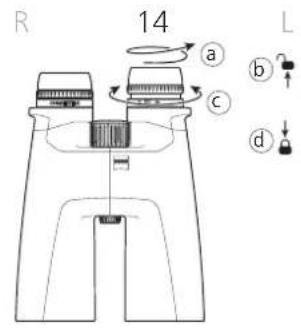
Bild 12
www.zeiss.com/cop/safety

LEVERANSOMFATTNING
www.zeiss.com/nature/binoculars/accessories
www.zeiss.com/nature/service
Omdu harytterligarefragor,kontakta:
ZEISS Customer Service
Carl Zeiss Sports Optics GmbH
Gloelstr.3-5,35576 Wetzlar,Tyskland
Telefon +49 800 934 77 33
Mail consumerproducts@zeiss.com
ZEISS Customer Service USA
Carl Zeiss SBE, LLC
Consumer Products
1050 Worldwide Blvd.
Hebron, KY 41048-8632, USA
Telefon +1-800-441-3005
Mail consumerservice.cop.us@zeiss.com
TEKNISKA DATA
| 8 × 32 10 × 32 8 × 42 10 | 42 8 × 56 10 × 56 15 | 56 LRP | ||||||
| Förstoring 8 10 8 10 8 10 15 15 | ||||||||
| Effektiv objektivdiameter mm 32 32 42 42 56 56 56 56 | ||||||||
| Utgångspulldiameter mm 4 3,2 5,25 4,2 7 5,6 3,7 | 3,7 | |||||||
| Skymningstal | 16,0 | 17,9 | 18,3 | 20,5 | 21,2 | 23,7 | 29,0 | |
| Synfalt | m/1 000 m(ft/1 000 yds) | 140(420) | 118(354) | 128(384) | 115(345) | 125(375) | 115(345) | 80(240) |
| Subjektiv synvinkel | ° | 64 | 68 | 59 | 66 | 57 | 66 | 69 |
| Närinstalningsgräns | m (ft) | 1,5 (4,9) | 2 (6,6) | 3,5 (11,5) | ||||
| Dioptrinställingsomräge | dpt | +4 | +4 | +4 | ||||
| Utgångspupillavstand | mm | 16,5 | 16,5 | 18 | ||||
| Pupillavstand | mm | 54-74 | 54-74 | 56-74 | ||||
| Prismasystem | Schmidt-Pechan | Schmidt-Pechan | Abbe-König | |||||
| Ytoehandelung | LotuTec® / T" | LotuTec® / T" | LotuTec® / T" | |||||
| Kvävelfining | ✓ | ✓ | ✓ | |||||
| Vattentäthet | mbar | 400 | 400 | 400 | ||||
| Funktionsterpmatur | °C (°F) | -20/+63 (-4/+145) | -20/+63 (-4/+145) | -20/+63 (-4/+145) | ||||
| Längd | mm (in) | 132 (5,2) | 150 (5,9) | 210 (8,3) | ||||
| Bredd vid en ögonviöd på 65 mm | mm (in) | 115 (4,5) | 119 (4,7) | 145 (5,7) | ||||
| Vikt | g (oz) | 620 (21,9) | 715 (25,2) | 1 235(43,6) | 1 250(44,1) | 1 265(44,6) | ||
| 1 280(45,2) | ||||||||
PpMueaHHe:
MaMep BNnPHoro nepeKpeTna yBnENeH Na 3o6paKeHN IaN pyuue BnyaunuaH He COOTBcTCTByET DeCTBNTbHOCTN.
PNC.12
YKA3AHNIO NIPMMEHENIO
No3ppaBnEM BAC pnpoepTeHnEM HOBOR 6MHOKN ZEISS CONQUEST HDX Bbl NOyUHTe HeaBbMaBEm BneAteHnO t cTeCTBeHHo NpeDaayI N3obpaKeHHN, BbckocPkOCTu ToCHOn UcTeTonepeAHn.
M3dJIa MapKZIeSS OITnuaTcBENIKOenHOn OHTNKo,TOHOn O6paOToKo n 60blmm cpoKOM cnyk6b. CoBIOJDATe PnBEDeHbHe NHXe yKa3aHn no OTmAbHOMy pIMMeHbNIO BVHOKn, IN OH CTaHEBaWM HAnEKNbIM CNYTHKOM HaNoTne RoDs.

OBpatITE BHIMAHue Ha YK3a3HnA NO TEXHike 6e0anacOCTn, KOptBle MOKHO HAITn No aepcy: www.zeiss.com/cop/safety

KOMNJIeKT NOCTABKN
H3dJIHe Homep dna 3aKa3a KomnIeK TocTaBKn
| 8x32523214bHHoklb |
| 3aunTHa Kpblska OkyIapOB 3aunTHa Kpblska oBckTnBa |
| Pemehb IJIpeCNOCK |
| CyMka c peHem IJIpeHocKn |
| CaIpfTeKd IJIceNCTKn ONTIKN |
| KpatXoe pykoIOCTBO |
| YkazHmII IO TExHKe BezONACOCTN |
| AdanTep UItaTHBa 1/4" (ToIbKO dIra N3dEJIa 15 x 56 n LRP 15x56) |
| 15 x 56 LRP 52 56 36 -9901-000 |
| 15 x 56 LRP 52 56 36 -9901-000 |
AanTaunKpacToHHIO Mekdy rna3amn (MeK3paKOBomy pacToHHIO)
CdHHbTe oBe nonOBHb6HOKnBOKpy CEHTpaHbHO OCNpyOTHOCTeJIbHO npyraTakmOBpazom,YTO6bI paccToHHe MEKdy DByMg OKyIpaMn COOTBCTBOBAIO paccToHNO MEXdy Tn3aAMN.3TO IO3BOJNT NOLyHTb 13o6paKeHne,ONTHMaBHO COOTBeTcByKUee NOXKeHNO BAHXn rA3. ONTHMaBHO paccToHne MEXdy n3aAMN DOCTnACTCB TOM Cnyae,ecnn npn Ha6NoJeHN HOBMMnRn3aAMN YpeE 6nHOKnN NoNyAetc Kpyrnoe N3OpaKeHne (Pnc.2).
PerynnpobKa pe3KocTn
BnHOKNb OcnaeKoJIeCM fOxCUPOBKn KONeCOM dONTPnHOH HAcTPOKn. DnA HAcTPOKn 3aKpOHTpePabN rNa3 N KOJIeCM fOxCUPOBKn HaeDInTe pe3KocTB nIObpaJEn B IeBOI NOOBnE 6hOKn (PNC.3). PnOce TTOrO 3aKpOHTne NEBnA3 np NeHo6XoMDoCTn OTpeYnnpType 3eKocTb npABOn NOOBnHb 6HOKn C NOMOuBIO NOnTPnHOH HAcTPOKn (PNC.4). 50one NDpO6Hn HfOpMaun PndctBaJIeBA B CnEDyOeM pasdene. DIOONTPnHAR HAcTPOKn IMeET uKany C CMMBOAMN 一 + 一 N 一 + 一 N yKa3aTeEN M KaeeCTBe opEHNTIPA. 3aONMTHE CBOH HAcTPOKN; 3TO IOBONIT b6tPo BbIOINb INHDMyANHy DOINTPnHYo HAcTPOKY No6oro 6hOKNJa.
IpynpOBKn pe3KoCTn Ha pa3HOM ydaJIeHNIO DocTaOnHO IVcNoJIb3OBA Tb KonecoΦokycnpOBKn (pnc.5).
IpIMeHHe, HcIOJIb3yIe IIN HABeEHHpe3KoCTN 06OxH3o6paXeHH OaHn TOT Xe O6Bekt!
ΦuKcTOp dNoontpui
BnHOKb Ochauen PkKcnpykuuM MExaH3MOM, IppeoTbpaaKUUM CAMonpOuaBONbHyKOIOIPTPNHky HAcTPOky (Pnc.4).
ДлгКорркпорвкДиОТПСЧАнССHМЛTe HARMa3HnK (a). 3aTeMNotHNTC KOLьо ДИОТПУНСHАТСРКВ ВБСРД NcRO pAOJ6OKNPOBk (b).OTperyIpyteДиОТПС,ΚΑΚΟΝСАнБВΙΙΑ,ΒυPsA ΜΚOLьоДИОТПУНСHАТСРК(C).PONe HAcTProKy HxKHOHpeKo3CtNIO6BaPaeKHeH CHOBaHAKMmTeHa KolьсоДИОТПУНСHАТСРКВ BnH3,чTOБыЗФKKCpOBOTaERO(d).
PerynpobKaHarna3HkoB,Ha6nOdeHne B OOKax N 6e3 OOKOB
PnHabIOeHN 63 O-KOB AIOIOB 3yIe PnObOP C BbIaBHybIMN HAIJIa3HKNAMM IДЯ TOrO bKpyTHe Harna3HKn pnoTHAocOy CTpeKIN BBEPx, npJxKeNaHIN -Yo npya (pnc.6, nO6paKaHneA)
HaHnHKn HnKnpyKcB. YeTbpex NIOXeHnX: HNkHem, BepxHem nDByx npomExkyoHbX. C NOMOuIbIO 3TOI NaCTpOKN MOXHO peYIpNOBaTB paccToHHe OT IaIO BbIXoHOrO 3paKa, To eCt b INdBiUyAJIbHO IOCTpAmBaTb NOD KaKdOrO NoIb3ObaTeNa.
PnHa6noJeHnBoukaxNoaepHHTeHaNa3HnKn(NO YacobOu CTeJKe) BHN3 no ynpa (pnc.6, n3o6paekhen B).
PnmeHHe, EcnI NOHCTBO BbDhBHyte HArHa3HNKIOOBaHbTaBdaNlpe npoTBAcOBoY cTePNKHOHmOryOTcoeAnHtCB.3To He IABnNETCAHnCpAHOCTBO CM.pa3dEgOChkA 3nMaehaRHa3NKBo
OuNTka 3aMeHa Hara3HKnOB
HaHnA3HnKMOxHO HOJNOCTbO HOKpyTbOT 6HOKyIaNAMeHbI NIN CHCTKn. IaToro noOpaoBnBe HaHaN3Ka, KaNok3aHO Ha puc.6,Bepxdo ynpa IaJeae B TomKe HAnpABneHn POpe3be DoNoHORo KpOyBAHn.
Iocne OChCTKN MIm 3aMeHbI Harnla3HKnOB NOHIOCTbIO HABHTNTe IN NO cAcBOO BcTpeKe HAOKyapcM. TaKke PaTeN «PeynnpoBKa Harnla3HKnOB, HbNIOHeHne B OCHkx N63 OChOBa). JERKIM NOBOPOTOM NO cAcBOO BcTpeKe 3aΦHKCpYnte pe3bBy Harnla3HKnOB B KOECHOM NHXHE NIOXeHN. Iocne 3TOFO paccToHIne MEKdy FN3OM N OKynpom MOXHO OTpeynpOBAb Tb o6bHbM o6pa3OM, UcNOb3yra noNoXeHnФKCaun.
KpenneHnpe mna nepeHoCKn 3aunTHbIX KpbIweK
B ynakoBc HxO,DTC PemChb I npePCHCKN, 3aunTHA Kpblka OKynpoBn U 3aunTHBcKpbIHKObEKTbKnB.3aunTHA Kpblka OKynpaK pKeTcNc PApeHNEPOCKN CcreuNaBbHb NpOuyHnx Ha B6HOKne,KAK NOKaHaHO pnc.7.
HnHy pemHMOXHOOTPERYNPOBAtbNyTeMeroIOITRAHNAHNNOCaIbENHA.
PiH NoeOxOoDMoCTN BblOnHNIte TYKoeNCePobATEbHOCHTdEINCTBI CDPYRO
CTOPOHb3AunHONKpBlkIKOxyrABo. IIO CBOEMyCMOTpeHNBO Bl MOKETe
3aekpnTb 3aunTHyo KpbUkOkyrABo TOBKOcOHDCHTOPOHS.
3aunTHbIe KpUuKo 063EeKTBOB 063HaeHeH CmBONAMn «] nR naeBn u R] npaBO CTOpOHbI COOTBeTCTByOUM O6pa3OM HaDeBaKTcRA Ha neBbI n npabB ty6c(puc.8).
IcnoB3oBAHHe 3aunTHbIX KpbIeK OkyIApOB n OBeKeTnBOB
3aunTHa KpbuHc OkyIpaOB HaeBaetra Ha HarnaHn (pnc. 8).Pnp ATOM MOxHO CoXpaHntb Bb6paHHe paccTOrHe MekJy BixoNDHMn 3paKaMn. Pepen NCIOB3OBAHmE BIXOHN CHMNTe KpbuKy.
Haede 3aunthbe KpbkN 6bextnoB, Bbl MoXeTe OCTABnH Ha GnHOKe n CHIMaTb TOnbKO nepe INCNONb3OBAHmE.
www.zeiss.com/nature/binoculars/accessories
PpHADIEKHOCTAEOXOATKOMIDKNTIOCTaKN
CEPBCHbI ΚEHTP, 3ANACHbIE YACTN I TAPAHTR

No Bcem Bonipocam 06 06ClyjynbaHmN 3aNaCHbX 7aCTNX mnn Heo6xoDnMoCTN 3aRpy3ntb YcNoBna rapaHTn NocetTe Haal Be6-cain:
www.zeiss.com/nature/service
PnHnHmDOnoHInTeIbHbIXBopocOBipocmO6paatbcnnoyka3aHHbIM HKe KOHTaKTHbIM DaHHbIM
ZEISS Customer Service
Can Zeiss Sports Optics GmbH
Gloeolr. 3-5, 35576 Wotziar, FedmAHAN
Tenebpod: +49 800 934 77 33
En. no.: consumerproducts@zeiss.com
ZEISS Customer Service USA
Carl Zeiss SBE, LLC
Consumer Products
1050 Worldwide Blvd.
Hebron, KY 41048-8632, USA (CLJA)
Teredo: +1-800-441-3005
On: no data; consumerservice.cop.us@zeiss
TEXHINHECKNEXAPAKTEPNUCTUKN
www.zeiss.com/nature/binoculars/accessories
「夕士一
力夕一巴一匕、交換用一和保証

一汇社及交用八一可開的云管间保证条件的
一卜云希望の方は、辟社上下伏卜云乾
www.zeiss.com/nature/service
乙不明点怎云之也使了,以下中间合和
ZEISS Customer Service
Carl Zeiss Sports Optics GmbH
Gloelstr.3-5,35576 Wetzlar, Germany
常記 +498009347733
x一儿 consumerproducts@zeiss.com
ZEISS Customer Service USA
Carl Zeiss SBE, LLC
Consumer Products
1050 Worldwide Blvd.
Hebron, KY 41048-8632 USA
电话+18004413005
一儿 consumerservice.cop.us@zeiss.com
技術仕樣
www.zeiss.com/cop/safety

供货范围
产品 订货号 供货范围
www.zeiss.com/nature/binoculars/accessories
配件不包括在供货范围内。
售后服务、备件和保修

www.zeiss.com/nature/service
如有其它疑问,请联系:
ZEISS Customer Service
Carl Zeiss Sports Optics GmbH
Hebron, KY 41048-8632, USA
电话+18004413005
电子邮箱 consumererservice.cop.us@zeiss.com
技术数据
| 8×32 10×32 8×42 10×42 8×56 10×56 15×56 15×56 LRP | |||||||||
| 放大倍率 | 8 10 8 10 8 10 15 15 | ||||||||
| 有效的物镜直径 | mm 32 32 42 42 56 56 56 | ||||||||
| 山瞳直径 | mm 4 3.2 5.25 4.2 7 5.6 3.7 3.7 | ||||||||
| 其音系数 | 16.0 17.9 18.3 20.5 21.2 23.7 29.0 29.0 | ||||||||
| 视野 | m/1,000 m(ft/1,000 yds) | 140 (420) | 118 (354) | 128 (384) | 115 (345) | 125 (375) | 115 (345) | 80 (240) | 80 (240) |
| 主观视角 | ° | 64 68 59 66 57 66 69 69 | |||||||
| 近距离调整范围 | m (ft) | 1.5 (4.9) | 2 (6.6) | 3.5 (11.5) | |||||
| 屈光度调节范围 | dpt | ±4 | ±4 | ±4 | |||||
| 出障距离 | mm | 16.5 | 16.5 | 18 | |||||
| 瞳距 | mm | 54-74 | 54-74 | 56-74 | |||||
| 棱镜系统 | Schmidt-Pechan | Schmidt-Pechan | Abbe-König | ||||||
| 镜像 | Lolutec® / T* | Lolutec® / T* | Lolutec® / T* | ||||||
| 充血处理 | √ | √ | √ | ||||||
| 防水 | mbar | 400 | 400 | 400 | |||||
| 工作温度 | °C (°F) | -20/+63 (-4/+145) | -20/+63 (-4/+145) | -20/+63 (-4/+145) | |||||
| 长度 | mm (in) | 132 (5.2) | 150 (5.9) | 210 (8.3) | |||||
| 眼距为65 mm时的密度 | mm (in) | 115 (4.5) | 119 (4.7) | 145 (5.7) | |||||
| 重量 | g (oz) | 620 (21.9) | 715 (25.2) | 1,235 (43.6) | 1,250 (44.1) | 1,265 (44.6) | 1,280 (45.2) | ||