RMWR1 - Remote trigger OLYMPUS - Free user manual and instructions
Find the device manual for free RMWR1 OLYMPUS in PDF.



| Product Type | Remote Trigger |
| Brand | Olympus |
| Model | RMWR1 |
| Dimensions (W x H x D) | 26.6 × 84.5 × 15.9 mm |
| Weight (with battery) | 29.3 g |
| Power Source | 1 CR2032 lithium battery |
| Battery Life | Approx. 1 year (internal tests) |
| Wireless Range | Approx. 5 m (without interference or obstacles) |
| Wireless Standard | Bluetooth 5.0 BLE |
| Main Functions | Photo / video trigger, lock for bulb mode, OFF / I / I / CONNECT modes |
| Wired Connection | Yes, via included CB RM1 cable |
| Splash Protection (wireless) | IPX7 |
| Splash Protection (wired) | IPX1 |
| Dust Resistance | IP5X (internal test) |
| Operating Temperature | -10 °C to 40 °C |
| Package Contents | Wireless remote control, CB RM1 cable, CR2032 battery |
| Maintenance and Cleaning | Avoid moisture on connectors, do not pull on the cover, check for foreign objects before closing the battery compartment |
| Safety | Do not swallow battery, keep out of reach of children, recycle used batteries, comply with local regulations |
| Spare Parts and Repairability | Contact Olympus support or an authorized dealer |
| General Information | FCC and CE compliant, Bluetooth® is a registered trademark |
Frequently Asked Questions - RMWR1 OLYMPUS
User questions about RMWR1 OLYMPUS
0 question about this device. Answer the ones you know or ask your own.
Ask a new question about this device
Download the instructions for your Remote trigger in PDF format for free! Find your manual RMWR1 - OLYMPUS and take your electronic device back in hand. On this page are published all the documents necessary for the use of your device. RMWR1 by OLYMPUS.
USER MANUAL RMWR1 OLYMPUS
date of issue 2021.06.
OMSYSTEM
OM Digital Solutions Corporation
https://om-digitalsolutions.com/
© 2021 OM Digital Solutions Corporation
Printed in Vietnam WD846201
OMSYSTEM
RM-WR1
Model No.:IMD28
04-取极説明書
08-INSTRUCTIONS
14-国MODEDEMPLOI
20-3INSTRUCCIONES
25-BEDIERUNNGSANLEITUNG
30-BEHCHPYKUN
35-CSNAVODKPOUZITI
39 - BETJENINGSVEJLEDNING
43.□OAHIE
48.31UHISED
52.国KAYTTOOHJ55T
56.四UDHTF
08-09
60- HAS2NALATTUMOTATO
65-ITISTRUZIONI
70-INSTRUKCIJA
74-NORADJUM
78. INSTRUCTIES
83. INSTRUKS.JONER
87-INSTRUKCJA
92 - INSTRUÇÖS
97 - RINSTRUCTIONUNI
102-UNHCTPYKUN
107 - SNAVOD NA POUZITIE
112-SINAVODILA
117 - SV BRUKSANVISING
121-TALMATLAB
125-使用說明
129-TH eunmnnn


取极説明書
之的当社士
已使用前本源的内首
安金工正以工二工日,之本根明是
100000000000000000000000000000000000000000000
-無線接通の電は电力表MVAの取締明書を
·力M的版报明的「安全必使的
本项日安
1.本协议自各方签字或盖章之日起生效。
1
各部の名称(图7)
1
4.1-2
CONNECT
()中
8.上トフリ段
电池の入む方
The following importer description applies to pruatauIs imported into
the EU directly by OM Digital Solutions GmbH only.
Manufactured by Chis Digital Solutions Corporation 193 Tekhymnoshni Ustahni, Tbilisi, Tbilisi 103-003
49310612457Ae11111111111111111111111111
The following importer description applies to products imported into the U.S.:
the UK directly by CM Digital Solutions GmbH -UK Branch only CM Digital Solutions GmbH -UK Branch
16 Upper Woburn Place, London WC1H 3
安全上ご注意(必すお読みくだい)
https://cs.olympus-imaging.jp/en/support/imsg/digicamera/download/notice/notice.cfm
主女仕樣
Thank you for your purchase.
To ensure your safety, please read this instruction manual before use, and keep it handy for future reference.
- For information on wireless connections, see the camera manual.
- Read "SAFETY PRECAUTIONS" in the camera manual.
- We accept no liability for violations of local regulations caused by use of this product in jurisdictions outside the country or region of sale.
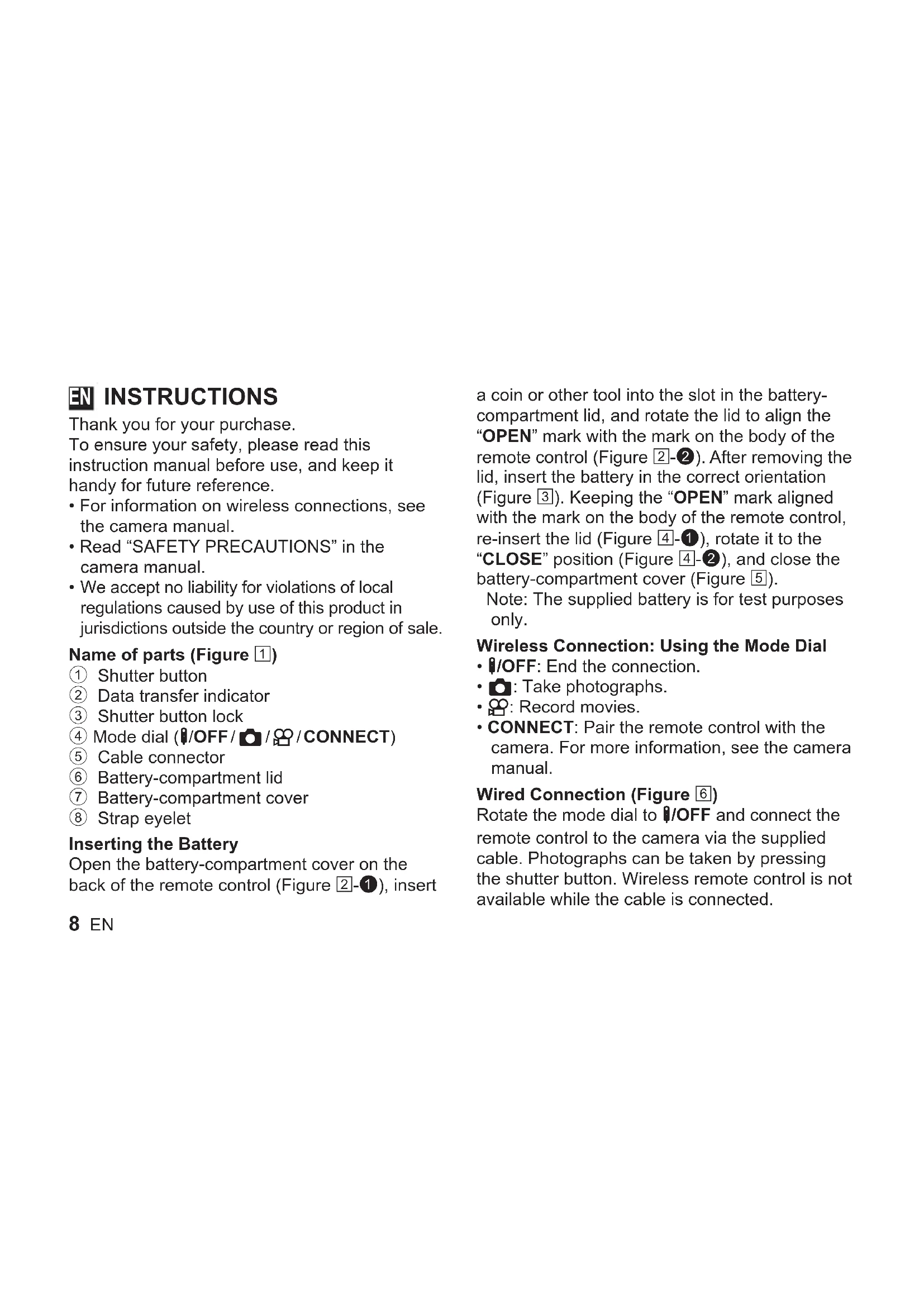
Name of parts (Figure 1)
① Shutter button
② Data transfer indicator
③ Shutter button lock
④ Mode dial (OFF/ CONNECT)
⑤ Cable connector
⑥ Battery-compartment lid
⑦ Battery-compartment cover
⑧ Strap eyelet
Inserting the Battery
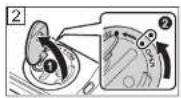
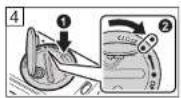
Open the battery-compartment cover on the back of the remote control (Figure 2-1), insert
a coin or other tool into the slot in the battery-compartment lid, and rotate the lid to align the "OPEN" mark with the mark on the body of the remote control (Figure 2-2). After removing the lid, insert the battery in the correct orientation (Figure 3). Keeping the "OPEN" mark aligned with the mark on the body of the remote control, re-insert the lid (Figure 4-1), rotate it to the "CLOSE" position (Figure 4-2), and close the battery-compartment cover (Figure 5).
Note: The supplied battery is for test purposes only.
Wireless Connection: Using the Mode Dial
- /OFF: End the connection.
: Take photographs.
Record movies. - CONNECT: Pair the remote control with the camera. For more information, see the camera manual.
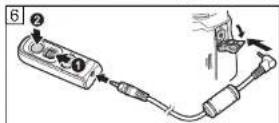
Wired Connection (Figure 6)
Rotate the mode dial to OFF and connect the remote control to the camera via the supplied cable. Photographs can be taken by pressing the shutter button. Wireless remote control is not available while the cable is connected.
The Shutter Button Lock (Figure 6)
For bulb photography or the like, slide the shutter button lock up and press the shutter button (12).
Safety Precautions (Be Sure to Read the Following)
- Do not use the product if the battery compartment cover can not be completely closed.
- Keep the product and battery out of reach of children.
- Observe all necessary precautions when handling batteries. Batteries may leak, overheat, or rupture if improperly handled. When inserting batteries, be sure they are in the correct orientation.
- Under no circumstances should you expose batteries to heat or to open flame or disassemble, short-circuit, or attempt to recharge batteries. These actions are extremely dangerous and could cause the batteries to overheat, catch fire, or rupture.
-
This product comes with a lithium button battery. Do not swallow the battery as there is a risk of injury due to chemical reaction. Swallowing batteries can in less than two hours cause severe, potentially lethal internal burns.
-
Consult a physician immediately should swallow or otherwise ingest a battery.
- Should you notice smoke or an unusual smell coming from the product, cease use immediately and contact our service center or one of our authorized distributors.
- There is a risk of explosion if the battery is replaced with the incorrect battery type.
- Please recycle batteries to help save our planet's resources. When you throw away dead batteries, be sure to cover their terminals and always observe local laws and regulations.
Precautions for Use
- Do not tug on the battery-compartment cover or use it to turn the battery-compartment lid.
- Do not pierce batteries with sharp objects.
- Do not drop or swing the remote control while holding the cable.
- Moisture on the cable or remote control connectors could interfere with wireless control and render wired connections unreliable.
- Confirm that the battery-compartment lid is free of foreign matter before closing it.
- Rotate the mode dial to 1/OFF before connecting or disconnecting cables.
Bluetooth®
- Observe all local regulations governing the use of Bluetooth®.
- We accept no liability for violations of local regulations caused by use of this product in jurisdictions outside the country or region of sale.
- Turn off the product in hospitals and other locations where medical equipment is present. The radio waves from the product may adversely affect medical equipment, causing a malfunction that results in an accident.
- Turn off the product when onboard aircraft.
- Using wireless devices onboard may hinder safe operation of the aircraft.
For customers in North and South America FCC Notice
- This equipment has been tested and found to comply with the limits for a Class B digital device, pursuant to Part 15 of the FCC Rules. These limits are designed to provide reasonable protection against harmful interference in a residential installation.
- This equipment generates, uses, and can radiate radio frequency energy and, if not installed and used in accordance with the instructions, may cause harmful interference to radio communications.
10 EN
However, there is no guarantee that interference will not occur in a particular installation. If this equipment does cause harmful interference to radio or television reception, which can be determined by turning the equipment off and on, the user is encouraged to try to correct the interference by one or more of the following measures:
-
Reorient or relocate the receiving antenna.
-
Increase the separation between the equipment and receiver.
-
Connect the equipment into an outlet on a circuit different from that to which the receiver is connected.
-
Consult the dealer or an experienced radio/ TV technician for help.
-
Use only the supplied cable or AC adapter when you connect the applicable equipment to an external device or a power outlet.
FCC CAUTION
Changes or modifications not expressly approved by the party responsible for compliance could void the user's authority to operate the equipment.
This transmitter must not be co-located or operated in conjunction with any other antenna or transmitter.
This equipment complies with FCC/ISED radiation exposure limits set forth for an uncontrolled environment and meets the FCC radio frequency (RF) Exposure Guidelines and RSS-102 of the ISED radio frequency (RF) Exposure rules as this equipment has very low levels of RF energy.
For customers in USA
Declaration of Conformity
Model Number:IM028
Trade Name: OM Digital Solutions Corporation
Responsible Party: OM Digital Solutions
Americas, Inc.
Address: 306 South new street, Suite 110
Bethlehem, PA 18015, USA
Telephone Number: 1-800-622-6372
Tested To Comply With FCC Standards FOR HOME OR OFFICE USE
This device complies with part 15 of FCC
Rules and Innovation, Science and Economic
Development Canada's licence-exempt RSS(s).
Operation is subject to the following two conditions:
(1) this device may not cause harmful interference, and
(2) this device must accept any interference received, including interference that may cause undesired operation.
This product uses a Lithium Battery which contains Perchlorate material - special handling may apply.
See www.dtsc.ca.gov/hazardouswaste/perchlorate/.
For customers in Europe (excluding England, Wales and Scotland)

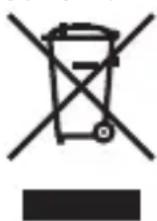
This symbol [crossed-out wheeled bin WEEE Annex IV] indicates separate collection of waste electrical and electronic equipment in the EU countries. Please do not throw the equipment into the domestic refuse. Please use the
return and collection systems available in your country for the disposal of this product.
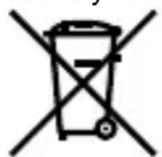
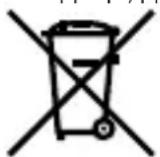
This symbol [crossed-out wheeled bin Directive 2006/66/EC Annex II] indicates separate collection of waste batteries in the EU countries. Please do not throw the batteries
into the domestic refuse. Please use the return and collection systems available in your country for the disposal of the waste batteries.
Hereby, OM Digital Solutions Corporation declares that the radio equipment type IM028 is in compliance with Directive 2014/53/EU. The full text of the EU declaration of conformity is available at the following internet address: https://om-digitalsolutions.com/
For customers in Europe including the UK
| Bluetooth® | |
| Compatible standard | Bluetooth Version 5.0 BLE 2402 - 2480 MHz 4 mW or less |
| Firmware Version | 1.0 or later |
For customers in Singapore
Complies with IMDA Standards DB104634
Trademarks
The Bluetooth® word mark and logos are registered trademarks owned by the Bluetooth SIG, Inc. and any use of such marks by OM Digital Solutions Corporation is under license. The software in this product may include third party software. Any third party software is subject to the terms and conditions, imposed by the owners or licensors of that software, under which software is provided to you. Those terms and other third party software notices, if any, may be found in the software notice PDF file stored at https://cs.olympus-imaging.jp/en/support/imgg/digicamera/download/notice/notice.cfm
Main Specifications
Power source: One (1) CR2032 lithium battery
Battery life: Approx. 1 year under in-house test conditions
Range: Approx. 5 m (16 ft) in all bands
Note: Range without interference or obstacles
between the remote control and camera.
Supported standards: Bluetooth Version 5.0 BLE
Dimensions: Approx. 26.6 (W) × 84.5 (H) ×
15.9 (D) mm (1.0 × 3.3 × 0.6 in.)
Weight: 29.3 g (1.0 oz.) (including battery)
Operating environment: -10^ - 40^
(14°F - 104°F)
Splash proof: IPX7 (wireless connection)
IPX1 (wired connection)
Dust resistance: IP5X (in-house testing)
Note: More information on water- and dust-resistance is available via our support website.
Package includes: Wireless remote control,
CB-RM1 cable, CR2032 lithium battery
Specifications are subject to change without
any notice or obligation on the part of the
manufacturer.
FR MODE D'EMPLOI
Partie responsible: OM Digital Solutions Americas, Inc.
Adresse: 306 South new street, Suite 110
Bethlehem, PA 18015, USA
Responsible: OM Digital Solutions Americas, Inc.
Bethlehem, PA 18015, USA
Número de téléphone: 1-800-622-6372
HaHMeHOBaHHa Ha YacHTne (FHyrpa 1)
① CnycbK
② INHdNkaTOp 3a npexXBpIYe Ha daHHN
③ 3aKnIOUbaHe Ha cnYcbKa
4 Nsck 3a n36op Ha pexim (1/OFF /O /O / CONNECT)
⑤ Ka6eJIeH cbeHNHTeI
⑥ Kanak Ha rHe3DoTo Ha 6aTepeyra
⑦ Kanak Ha OTdeJeHneTo 3a 6aTepeyra
⑧ Yxo 3a Kaunka
Noctabhe Ha 6aTepyTa
OTbopeTe kanaKa Ha oTdeHneTo 3a 6aTePnN
Ha Tbpa Ha DnCTaHcNoHHO ynpabHeHne (ФИура 2-1),noCTaBeTe MOHeTa IIN dpyr INHCTpymeHT B CNOTA B KAnaka Ha OTdeJIeHNeTO 3a 6aTePmN,I 3aBbPTeTe KaNaka,3aДЯ NOdpabHInTe MapKIpOBKaTAtOPEN"cMapKIpOBKaTaHa KOpnyca Ha DnCTaHcNoHHOTo ynpabHeHne (ФИура 2-2).CJIeД KaTO CBaJIte Ke Kanaka,noCTaBeTe 6aTePmraTBA npabHnHaTa OPHeNTaCn(ФИура 3).ПоДьрЖaIKn МарКИpoBKaTa"OPEN" IOdpaBHeHa C MapKIpOBKaTa Ha KOpNYca Ha DnCTaHcNoHHOTo ynpabHeHne,noCTaBeTe OTHOBO KAnaka (ФИура 4-1),3aBbPTeTe rO B NOJIOKeHne „CLOSE" (ФИура 4-2) n 3aTbOpTe KaNaka Ha OTdeJIeHHeTO 3a 6aTePmraTAt (ФИура 5). 3a6eJIeXka:БatePryTa OT KOMIIeKtA e cAmo 3a TeCTOBu ZeIi.
Mepkn 3a 6e30nacnoct (3aBbJXntenHno npooyTe cJeHOTO)
He n3no13BaIte npOdykTa, aKO KaNaKbT Ha OTdeneHneTo 3a 6aTepyTa He MoKe Da ce 3aTBOpN HAnbJnHO.
- Pana3e Te npoDyKta n 6aTepeYra daJeu ot o6cer a Ha deca.
CnataBaIte BCNUKHeo6xOdUMN ppeDna3Hm MepKn npi pa6oTa c 6aTePunTe. BatePunTe MoKe Da n3TeKaT, da nperey TnJn da ce chynr, aKO C TReCe 6opabn He npabuInHO. Ppi noCTaBnHe Ha 6aTePunTe, yBepete Ce, ye ca B npabuHaTa NocOKa.
-Прини Кбви obstotЯntcBa He n3naarTe 6aTepeHnTe Ha TOnnHa nIHa OTkPIT nIaMbK,
He ng pa3rno6BaHe, He ng Cbbp3BaIte Ha KbcO cBeDInHeHne H He ce ONITBaIte Da ng npesapexkdaTe. Te3n DeiCTBna ca n3KlIOHTeJHO onaCHN MOrat Da npuHnT ppeprBaHe, 3anaBaHe nn CuynBaHe Ha 6aTeepnte.
To3n npoDyKT ce DocTabc c nHTneBa 6aTepyr. He nOrIbuaTe 6aTepyra, TbN KaTO mHa onaCHOCT OT HapAHBaHe Nopadn XmMnHa peakzur. POrIbuaHTo Ha 6aTepyn MoKe 3a No-MaIKO OT Dba Yaca Da npuHHn TeKKn, NOteHuaHNo CMBpTOHOCHN BbTpeHn N3rapHn.
- KoHcyItnpaIte ce He3a6abHo c Jekap, aKo nOrbIhHeTe NIN NO dpyr Naunn Noemete 6aTepeYra.
Ako 3a6eJTe Dm Hn HeoNuaHa Mnp3Ma, nDa7a OT npOyKta, He3a6abH0 IpEkpate Te ynoTpe6ata N ce CbpxTe C hAnr cepBn3eH ueHTbp INC HAKOIOT HaUNTE OTOpN3npaHn TbproBcN.
CbuctByBa pnc OT ekcnlo3nA,ako 6aTepyTa e 3ameHeHa c HnpabuHn BnD 6aTepy.
MoljpeuKnpaTe 6aTeepnTe,3a da nOMorHeTe Da NecTm pecypCnTe Ha HauTa nnHaeta. Korato n3xBpIte ynotpe6eHn 6aTeepn, yBepTe ce, ye KneMeNTe mCa nOKpHTN BnHaRn Cna3BaIte MeCTHnTe 3aKOHn pa3npoe6n.
PpeDn3HmepKn npynynoTe6a
- He ДьрайтЕkanakaHaOTdeneHneTo3a6aTePmNnHe rO n3NoJ3BaIte,3a Da rO 3aBbptTNe.
- He npo6nbaiTe 6aTeepnnte c ocTpnpedMeTu.
- He n3nyckaIte n He IIOJIeTe DnCTaHcUNHOHOTO ynpabJIeHne,doKaTo DbPKeTe Ka6ena.
Blaarata Bbpxy ka6eJna nn cbeHnTeJIte 3a nCTaHcUNHO ynpabHeHne MoKe Da nonpeuHa 6e3XnHOTO ynpabJeHne n da HnpaBn XnHnTe Bpb3Kn HeHaDeKdHi. - YBepete ce, Ye KaNaKbT Ha OTDeJeHneTO 3a 6BaTePnHe CbDbPka UyXdN BeUeCTBa, PpeNi Da rO 3aTBOpNTe.
3aBbPTeTe DnCKa 3a n36op Ha peXmHa /OFF npEi nCBp3BaHe nn OTkaHaHe Ha Ka6eJnte.
Bluetooth®
CnataBaiTe BCnUkMecTHN pa3nope6n OTHoCHO ynoTpe6ata Ha Bluetooth.
Hne He HOCIM OTROBOPHOCT 3a HapuweHnHa MeCTHIne pa3nope6n, npuHNHeHn OTynotpe6bata Ha To3n IpOdyKT B DbpxkBaTa nnPernoHa Ha npoDax6a.
- N3KluOeTe npOyKta B 60JHnCn Ha dpyrn MeCTa, KbJeTO Ce H3NoJ3Ba MeduCnHcKO o6OpyDbaHe. PaINOBbHNte OT npOyKta Morat Da OKaxat He6JlaoPnITho Bb3DeiCTBVe Bbpxv
MeINuHcKTo o6OpyDbAHe, KaTo npuHnT HEn3npaBHOCT, KOrTO Da IOBeDe Do 3JIOJOnyka.
-ИЗклочete npodykta npи nbTyBaHe cbc caMOJeT. -Изпал�ано Ha 6e3Жину cToiCTBa no BpeMe Ha nOJET MOKe Da Bb3npenrTcTBA 6e3Onachata pa6Ota Ha caMOJeTa.
3a KIneHTn B Ebpona
To3n CmBOJ [3aIpaKaHa KoFa 3a 60Knyc K CoJeNa, npInOKeHne IV KbM DInpeKtNbA OEO] noka3Ba OTdEnHOTcB6npaHe Ha OTnaDbuNte OT eNEkTpnuecko N eJIeKTPoHHO 60pyDaBe H CtpaHnTe ot EC.He n3xBpNnTe ypeDa 3aeDnHO c 6bTOBnTe
OTnAdbu.3aN3xBbPnHToHaTO3n npOyKT
N3POI3BaIte CnCTeMaTa 3a BpBuaHe N Cb6paHe Ha
OTnAdbu, DeNCTBaUaBB BaWata CTpaHa.
To3n cIMBOJ [3auepkhata Ka 3a6oknyk cnopei DnpeKtNbata 3a OTnaDbYHOTo eJeKtpuYecko n eKeKtpoHHO obopydBahe 2006/66/EC, npIIOxHeHne II yka3Ba pa3deHHTO
c6bnpaHe Ha OTnabChn 6aTePNB CtpaHITe
OT EC.He n3xBpIyIe 6aTePnIte 3aeHNO C
6ntOBITE OTnAdbCn.3a n3XBpIYeTO Ha 6aTePN
n3No13BaIte CNCTeMaTa 3a BpUaHe N C6bnpaHe Ha
OTnAbu, DeiCTBaUa BA BB BaWata cTpaHa.
C NaCTOTo OM Digital Solutions Corporation deKnapupa, Ye paAnooBOpyDbaHeTo OT TnI IM028 e B CbOTBeTCTBne C DnpeKtNbA 2014/53/EC. ПьнгТ TeKCT Ha DeKnapaцЯТа 3a cBbTBeTCTBne Ha EC e Ha pa3NoJoxeHne Ha спeДнИ NHTepHET aDpec: https://om-digitalsolutions.com/
https://cs.olympus-imaging.jp/en/support/imgg/digicamera/download/notice/notice.cfm
OCHOBnTexHnueckn DaHHN
KINBOT Ha 6aTePnraTa: Pnp6n. 1 roDnHa npn BbTpEshn TecTOBn ycNoBn
06XbaT: Pn6JI.5 M BbB BCNUJ HeHTN
3a6eIeKka: O6XbaT 6e3 cmUeHn Inn npenrTCTBnMekdy nuctaHcNOHHOTO ynpabLeHne n fotoanapata.
IopdbpkaHn cTaNdapTu:Bluetooth Bepcn 5.0 BLE
Pa3mepn: Pnp6nn3. 26,6 (L) × 84,5 (B) × 15,9 (D) MM
Terno:29,3r(BkNIOHTeHNO6aTepeyraTa)
Pa60tHa cpea: -10^ - 40^
YcToHnBOcT OT npbckn: IPX7 (6e3xuHa Bpb3ka) IPX1 (Ka6eJHa Bpb3ka)
YcToHnBOCT Ha npax: IP5X (BbTpEshn TecTOBn ycNoBna)
3a6eIeKka: NObue HOpMaun 3a BOIO - n npaxOyCToUHBOCTTa MOKeTe Da HaMePnte Ha NaShra ye6caT 3a NOdRpBkKa.
https://cs.olympus-imaging.jp/en/support/imsg/digicamera/download/notice/notice.cfm
Tuotetiedot
https://cs.olympus-imaging.jp/en/support/imsg/digicamera/download/notice/notice.cfm
Muszaki adatok
https://cs.olympus-imaging.jp/en/support/imgg/digicamera/download/notice/notice.cfm
⑤ Conector cablu
⑥ Clapetacompartment accumulator
⑦ Capac compartment accumulator
Bucla pentru curelusa
Specifications principal
Sursa de alimentare: O (1) baterie litiu CR2032
He nCnoJb3yIte yCTpOInCTBO,ecnKpbIiKa aKKymJYTopHOro OTcEKA NOINHO He
3aKpbIbAeTcra.
XpaHnTe yCTpoNCTBO n 6aTapeKy B HeDOCTynHom dIra DeTei MeCte.
CobnOdaIte BCE Heo6xOIMbIe Mepbl npedocTopoxHOctn npn 3Kcnnyatauinn 6atapeek. HenpaBnIbHaN 3KcnNyatauinn 6atapeek MOKeT npNBecTn K IN BbITEKaHIO, nepereBy nnn NOBpeXdEHNIO. Ppr yCTaHOBKe 6atapeek y6eDntEcB, YTO BCTaBJIeTe INX B npabnIbHoOpneHTaUIN.
HnB KOem Cnyuae He NOBBepraIte 6aTapeKn BO3DeICTBNIIO BbICOKNX TeMnepaTyp NIN OTKpbItorO ORH, He pa3bnpaIte NX, He DONYCKaITe KOPOTKOIO 3AmbIKAHNn Hn PbITaNTEcB Ipe3apAIDNTb 6aTapeKn. TaKne DeIcTBNI OChb ONaCHb IN MOrYT pINBecTN K npeperpeBy, BO3ROPaHIIO NIN NOBpeXdEHNIo 6aTapeek.
-Данhoeи3делпnoCTabIЯETcCЛNTHEBOB 6atapeeKhoNoCHoro Tnna.He rIoTaTb 6atapeIO,Tak KaK cyUeCTByeT pNCK NOJUyeHnRA TpaMbBIpe3yNbTaTe XIMNUeCKO peAKuIN. IporIaTbIBaHne 6atapeM MoKeT npNBecTNI K TReKeJIbIM,NOTeHuaJIbHO JIeTaJIbHbIM BHyTpEHNM OXkOrAM B TeUeHne MeHee DByx YacOB.
- Ecni Bbl cnyaHNO nporIOTnIb6aTapeKy, HemeDneHNo oBpaTntecb K BpaU.
B cnyae o6hapxhenia dbima nHne0bIuHoro 3aPaxa, IcxOJaUeRo N3 N3DeJIyA, HEmeIeHHo IpeKpaTtB erO IcNoJb3OBaHHe n O6paTtBcR B HaW cepBnCHbI YeHTp IIN K ODNOMY N3 HaXnx yNOnHOMOeHHbIX DnCTpn6bIOTOpOB.
B cnlyae 3aMeHbI aKKMyJrTopa Ha aKKMyJrTOp HEnOxDxOJaIe rTo Tnna BO3HnKaET pNCK B3pblBa. - Yttnn3npyra akkyMnyTopbl, Bbl NOMaTe c6epeyh pecypcbi HaWei PnHaHeTbI. BblpaCbIBa OtpabotabuHne akKymyJrTopbl, He 3a6yDbTe 3aKpbITb IN KOHTaKTbIe BblBOdbl. Bcerda co6JIIOJaTe MeCTHbIe 3aKOHbl I npabnla.
MepbI npedoctopoxkHoctn npn 3Kcnnyataun
He TarytB 3a KpbIuKy baTapeHoro OTceKa n He IcNoJIb3OBA Tb ee dIy NOBOpTa KOJINaUka BaTapeHoro OTceKa.
He npoTbikatb 6aTapeu octpbIMn npedMeTaMn.
He poHЯТи He paKauNbaT nyIbT DnCTaHcUHOrO ynpaBNeHn BO BpeM ydePknBaHn ero 3a Ka6eNb.
- PonaadHne Bnarn B pa3bEmbl dny Ka6eJnI NyIbTa DnCTaHcIOHO r ynpabJIeHnMoXe T npBecTn K hapuWeHnO pa60tBi 6ecnpoBOdHorO ynpabJeHnR n npOBODhIX coedInHeHn.
- Ipeed 3akpbItnem Kollnauka 6aTapeHoro OTCeKa yBeiNbCra Ha IpeDMET OTCyTCTBnB HEM NOCTOPOHNX IpeDMTOB.
-Повернту ДИСК ВБИбopa ржимовВ пожене /OFF под соевнием ил OTсоевнием кабел.
Bluetooth®
Co6nIaTb BCE MeCTHbIe npaBnla, perynpyuOune nCNoJIb3OBAHne Bluetooth
MbI He Hecem OTBETCTBeHHOCTN 3a HapUWeHn MeCTHbIX HOpM, Bbl3BaHHbIe IcNoIb3OBaHnEm 3TOTO N3dJIINBAUPNCUNKUnx 3a npedeJAMN CTpaHbI INI peHOHa pOdaXn.
- Bыклюаite n3delleB 60lbHnuax n npynx Mectax, rpe npncytCTByeT MeDnCnHcKoe obopydoBaHne.
PaIIOBOHbI, n3JIyuaembIe n3dJeINEm, MOrYT OKa3bIBaTb HeRaTINBHOe BnIaHHe Ha MeDInuHcKoe O6OpyIDOBaHne I npINBOITb K HeNCnPabHbOCTaM, KOtOpbIe MOrYT CTaTb npUHHoH HeCuaCThIx CnyaEB.
- BbIKIouaIte n3dJIe Ha 6OpTy caMOIeTa. - IVcNoIb3OBAHHe 6ecIPOBOHbIX yCTpOINCTB Ha 6OpTy caMOIeTa MoXET MeUaTb 6e3OnaCHO 3KcNpyatauIN caMOIeTa.