FRWR - Remote trigger OLYMPUS - Free user manual and instructions
Find the device manual for free FRWR OLYMPUS in PDF.

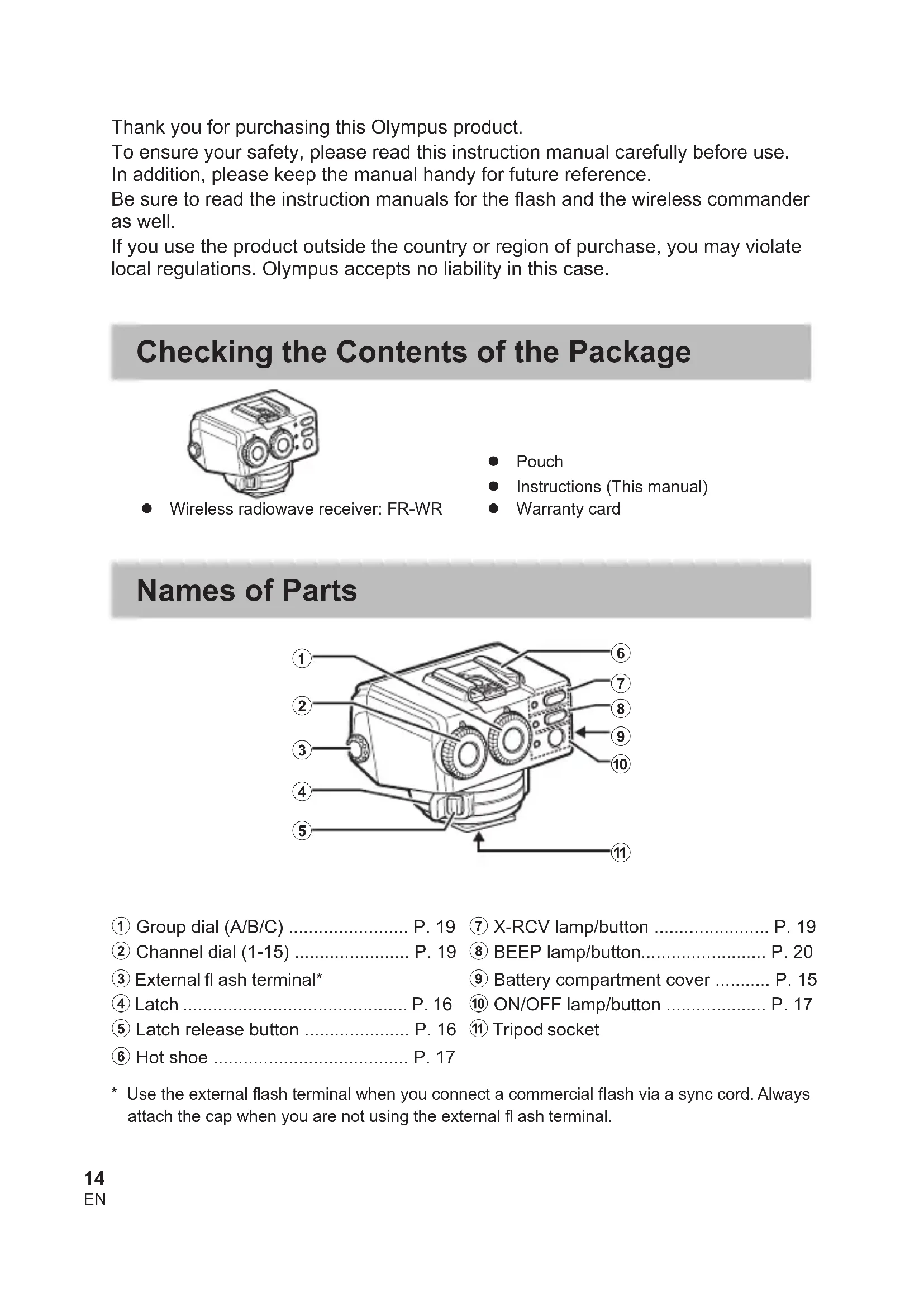


| Product type | Wireless radio receiver |
| Brand | Olympus |
| Model | FR-WR |
| Maximum communication distance | Approx. 30 m |
| Frequency | 2.4 GHz band (IEEE 802.15.4, 2405-2480 MHz) |
| Number of channels | 15 |
| Number of groups | 3 (A/B/C) |
| Control modes | RCV (flash control by shutter release), X-RCV (control by connected flash) |
| Power supply | 2 AAA batteries (alkaline or NiMH) |
| Operating duration | Approx. 6.4 h (AAA alkaline batteries) |
| Dimensions | Approx. 59.1 x 46.1 x 51.0 mm (without protruding parts) |
| Weight | 75 g (without batteries) |
| Charge completion indicator | Audible signal (adjustable) |
| External jack | Sync terminal (output) |
| Mounting | Flash shoe, tripod socket |
| Operating temperature | -10 to 40 °C |
| Operating humidity | 30 to 90% |
| Splash-proof protection | Class 1 (IPX1) |
| Auto power off | After approx. 60 min of inactivity |
| Package contents | FR-WR receiver, pouch, instructions, warranty card |
Frequently Asked Questions - FRWR OLYMPUS
User questions about FRWR OLYMPUS
0 question about this device. Answer the ones you know or ask your own.
Ask a new question about this device
Download the instructions for your Remote trigger in PDF format for free! Find your manual FRWR - OLYMPUS and take your electronic device back in hand. On this page are published all the documents necessary for the use of your device. FRWR by OLYMPUS.
USER MANUAL FRWR OLYMPUS
Thank you for purchasing this Olympus product.
To ensure your safety, please read this instruction manual carefully before use.
In addition, please keep the manual handy for future reference.
Be sure to read the instruction manuals for the flash and the wireless commander as well.
If you use the product outside the country or region of purchase, you may violate local regulations. Olympus accepts no liability in this case.
Checking the Contents of the Package
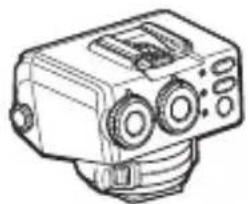
- Wireless radiowave receiver: FR-WR
- Pouch
- Instructions (This manual)
Warranty card
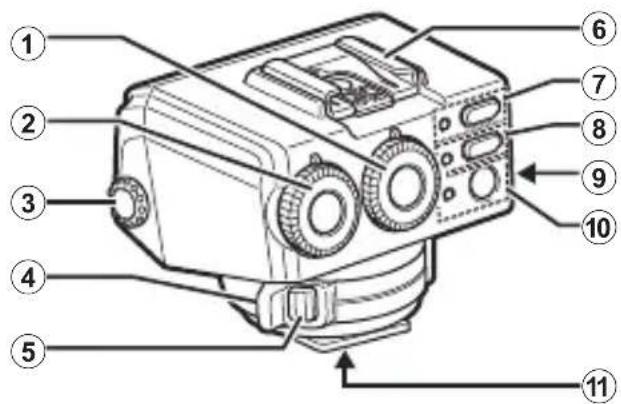
Names of Parts
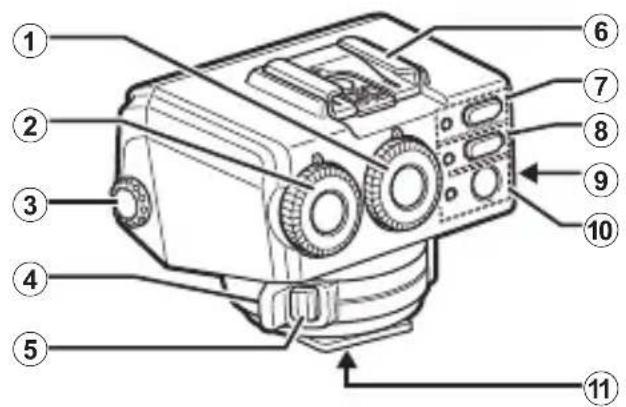
① Group dial (A/B/C) P. 19
② Channel dial (1-15) P. 19
③ External flash terminal*
④ Latch P.16
⑤ Latch release button . P. 16
⑥ Hot shoe P. 17
⑦ X-RCV lamp/bution P.19
BEEP lamp/bution. P. 20
9 Battery compartment cover .P.15
⑩ ON/OFF lamp/button P. 17
⑪ Tripod socket
- Use the external flash terminal when you connect a commercial flash via a sync cord. Always attach the cap when you are not using the external flash terminal.
You connect an older type of commercial flash with a voltage of approx. 350V or higher, the wireless receiver will malfunction.
You connect a flash with a communication terminal that does not meet the Olympus standard, the wireless receiver may malfunction.
Preparing the Receiver
Inserting the batteries (solo
Batteries to use
Choose from the following batteries.
- AAA NiMH batteries (x 2)
- AAA alkaline dry-cell batteries (x 2)
A manganese batteries are not usable.
Inserting the batteries
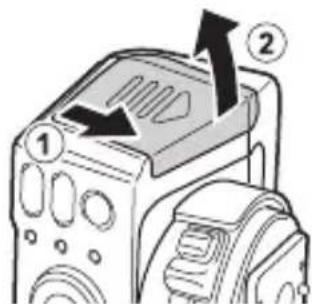
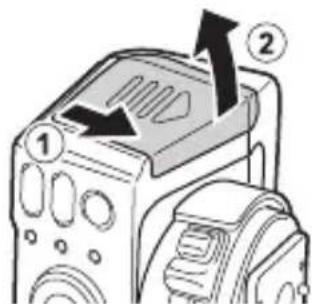
1 Open the battery compartment cover.
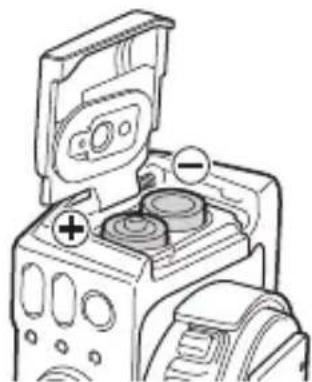
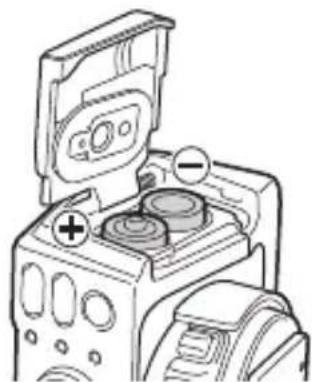
2 Insert the batteries.
- Make sure that the polarity ( / ) is correct.
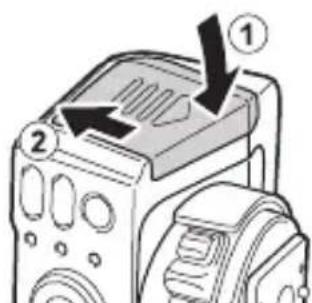
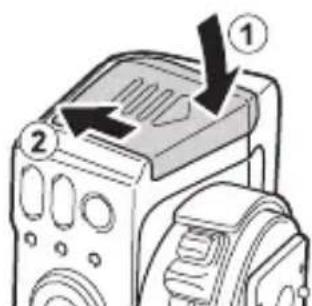
3 Close the battery compartment cover.
This procedure describes how to attach the wireless receiver to a separate flash stand (FLST-1).
If you are attaching the wireless receiver to a commercial shoe adapter, refer to the instruction manual for the shoe adapter.
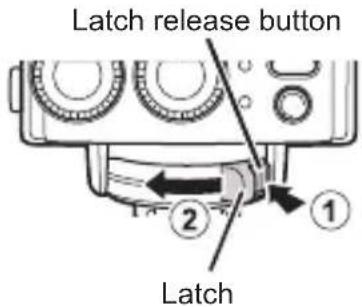
1 Hold down the latch release button (①), and slide the latch in the direction of the arrow (②).
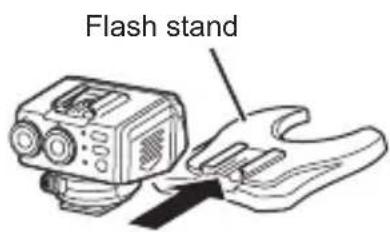
2 Insert the receiver all the way into the flash stand.
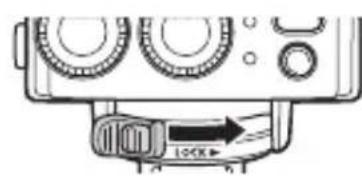
3 Slide the latch in the direction of the arrow.
Removing the receiver
Perform Step 1 of the above procedure and remove the receiver from the flash stand.
Attaching the flash to the wireless receiver
If you are attaching a commercial flash to the wireless receiver, refer to the instruction manual for the flash.
ke sure that both the receiver and the flash are turned off.
or moisture on the electrical contacts may cause a malfunction. Wipe off any dirt or moisture before you attach the flash to the receiver.
Insert the flash all the way into the hot shoe of the receiver.
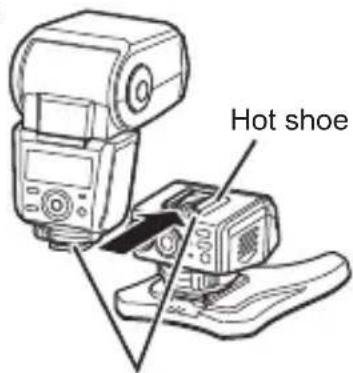
Electrical contacts
Turning on the Power
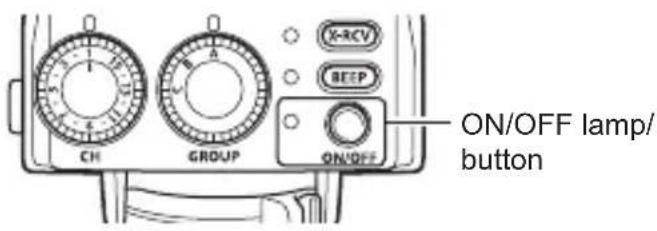
1 Press the ON/OFF button.
One ON/OFF lamp flashes, the batteries are running very low. Replace the batteries as soon as possible.
Turning off the power
Press the ON/OFF button.
Automatic power off
If approximately 60 minutes elapse with no operations, the power will turn off automatically. Press the ON/OFF button when you want to use the receiver again.
Radio Wireless Shooting
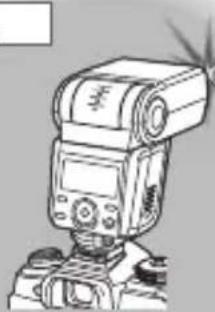
You can attach a commander to the camera and use the commander as well as a flash that supports the radio wireless function to control this wireless receiver through radio communications. This function only works with Olympus products that support the radio wireless function.
Refer to the Olympus website for information on products that support the radio wireless function.
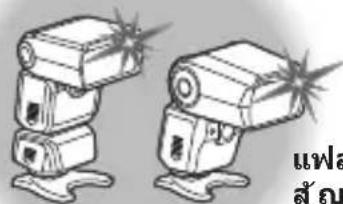
Group control
You can control up to three groups of receivers. Within each group, the flashes will fire with the same settings. This function allows you to use an Olympus flash that does not support radio communications as part of a radio communication system.
Group B
Flash (sold separately)
+
Wireless receiver
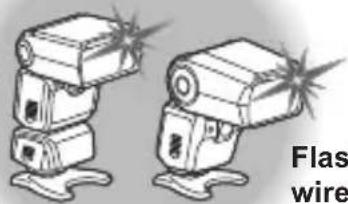
Flash with radio wireless function (sold separately)
Group A
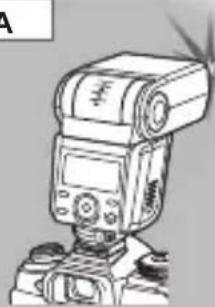
Flash with radio wireless function (sold separately) /
Wireless commander (sold separately)
Group C
Flash with radio wireless function
(sold separately)
Communication distance
The maximum distance for radio wireless communications with this wireless receiver is approx. 30 meters (98.4 ft.) (under Olympus measurement conditions).
- This distance assumes that there are no obstacles, shielding materials, or radio interference from other devices.
- The communication distance may be shorter depending on the positions of the devices, the surrounding environment, weather conditions, and other factors.
This product uses the 2.4 GHz band for wireless communications. However, other wireless devices may use the same frequency.
Setup

1 Turn on the flash.
Refer to the flash manual for details.
2 Press the ON/OFF button to turn on the wireless receiver.
The ON/OFF lamp will light up.
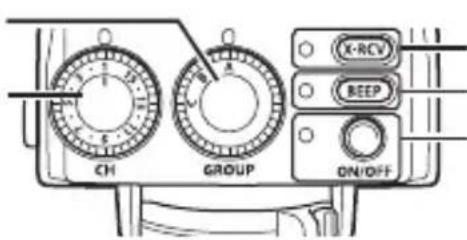
3 Hold down the X-RCV button to select an operating mode.
-
The X-RCV lamp is off: RCV mode (You set the flash control mode and flash intensity on the wireless commander. This wireless receiver receives the setting information and fi ring signal from the wireless commander. Then, the flash that is connected to this wireless receiver fires a flash.)
-
The X-RCV lamp is on: X-RCV mode (You set the flash control mode and flash intensity on the flash that is connected to this wireless receiver. This wireless receiver receives a fi ring signal from the wireless commander. Then, the flash that is connected to this wireless receiver fires a fl ash with this wireless receiver's settings.)
4 Turn the group dial to select a communication group.
5 Set the flash control mode and flash intensity.
-
RCV mode: Set the flash control mode and flash intensity on the wireless commander.
-
X-RCV mode: Set the flash control mode and flash intensity on the flash that is connected to this wireless receiver.
6 Turn the channel dial to select a communication channel.
- Select the same channel that you set on the wireless commander.
Setting a beeping sound to indicate that the flash is ready to fire
Hold down the BEEP button until the BEEP lamp lights up.
- To disable the beeping sound, hold down the BEEP button until the BEEP lamp turns off.
Safety Precautions
Read WARNINGS and CAUTIONS thoroughly to ensure safe usage. These safety precautions protect the users and others and prevent property damage.

WARNING
Failure to observe the precautions indicated by this symbol may result in injury or death.
- Do not use flash in places where it may be exposed to flammable or explosive gas. Otherwise, fire ignition or explosion may result.
- Do not directly solder the product or modify, remodel, or disassemble.
- Do not cover the light emitting area of the flash with your hand, and do not touch the light emitting area after continuous firing. It may burn your skin.
- Water and foreign matter inside of the device may cause fire or electric shock. If the device is immersed in or exposed to water or foreign matter is found inside of the device, turn off the power immediately and remove batteries with care. Contact your dealer or consult an Olympus Authorized Service Station.
- To prevent a traffic accident, do not direct the flash at a person operating a motor vehicle.
- Do not use the flash or AF illuminator in close proximity to others (especially infants). Keep the flash out of reach of children. Light from the flash can cause visual impairment.
- To prevent a short circuit, do not use batteries with a damaged external seal (insulation coating).
- Do not mix old and new batteries, or batteries made by different manufacturers.
- Do not connect substances such as metal to the (+) or (-) of batteries.

CAUTION
Failure to observe the precautions indicated by this symbol may result in injury or property damage.
- If you notice any abnormalities such as odor, noise, or smoke, stop using this device. Otherwise a fire or burn may result. Remove the batteries carefully to avoid burning yourself, and contact your dealer or consult an Olympus Authorized Service Station.
- There is a risk of explosion if the battery is replaced with the incorrect battery type.
- Do not operate with wet hands. This may cause malfunction or electric shock.
- Do not use or store batteries in areas exposed to extremely high temperatures, such as in direct sunlight, in an enclosed vehicle on a sunny day, or near a heater.
- Continuous repeated fi ring could lead to adverse health effects.
- Dirt or moisture on the contacts with the hot shoe may cause a malfunction. Wipe off any dirt or moisture before you attach the receiver to the flash.
Using the radio wireless function
- When you use the radio wireless communication function, comply with all local laws and regulations.
- If you use the product outside the region of purchase, you may violate local regulations for radio waves. Olympus accepts no liability in this case.
- Turn off the product in hospitals and other locations where medical equipment is present.
The radio waves from the product may adversely affect medical equipment, causing a malfunction that results in an accident.
- Turn off the product when onboard aircraft.
Using wireless devices onboard may hinder safe operation of the aircraft.
FCC Caution
Changes or modifications not expressly approved by the party responsible for compliance could void the user's authority to operate the equipment.
FCC Notice
This equipment has been tested and found to comply with the limits for a Class B digital device, pursuant to part 15 of the FCC Rules. These limits are designed to provide reasonable protection against harmful interference in a residential installation. This equipment generates, uses and can radiate radio frequency energy and, if not installed and used in accordance with the instructions, may cause harmful interference to radio communications. However, there is no guarantee that interference will not occur in a particular installation. If this equipment does cause harmful interference to radio or television reception, which can be determined by turning the equipment off and on, the user is encouraged to try to correct the interference by one or more of the following measures:
- Reorient or relocate the receiving antenna.
- Increase the separation between the equipment and receiver.
- Connect the equipment into an outlet on a circuit different from that to which the receiver is connected.
- Consult the dealer or an experienced radio/TV technician for help.
Declaration of Conformity
Model Number : IM013
Trade Name : OLYMPUS
Responsible Party : OLYMPUS AMERICA INC.
Address : 3500 Corporate Parkway, P. O. Box 610, Center PA 18034-0610, USA
Telephone Number : 484-896-5000
Tested To Comply With FCC Standards
FOR HOME OR OFFICE USE
This device complies with part 15 of the FCC Rules. Operation is subject to the following two conditions: (1) This device may not cause harmful interference, and (2) this device must accept any interference received, including interference that may cause undesired operation.
Simple Declaration of Conformity
Hereby, OLYMPUS CORPORATION declares that the radio equipment type IM013 is in compliance with Directive 2014/53/EU.
The full text of the EU declaration of conformity is available at the following internet address:
http://www.olympus-europa.com/
This symbol [crossed-out wheeled bin WEEE Annex IV] indicates separate collection of waste electrical and electronic equipment in the EU countries.
Please do not throw the equipment into the domestic refuse.
Please use the return and collection systems available in your country for the disposal of this product.
| Radio wireless communication function | |
| Compatible standard | IEEE 802.15.4 2405 - 2480 MHz |
| Firmware Version 1.0 or later | |
Complies with IMDA Standards DB104634
Specifications
| Product type Wireless | radiowave receiver |
| Maximum communication distance*1 | Approx. 30 m (98.4 ft.) |
| Frequency 2.4 GHz band | |
| Number of channels 15 | |
| Number of groups 3 | |
| Control modes | RCV (commander flash control), X-RCV (connected flash control) |
| Charging completion indication | Beeping sound |
| External terminal Sync | terminal (output) |
| Power supply AAA alkaline dry-cell batteries x 2 / AAA NiMH batteries x 2 | |
| Splash-proof function (Type) | Class 1 (IPX1) |
| Operable duration*1 | Approx. 6.4 hours (when using AAA alkaline dry-cell batteries) |
| Operable temperature/humidity*2 | From -10 to 40°C (14 to 104°F) / From 30 to 90% |
| Storage warranty temperature/humidity | From -20 to 60°C (-4 to 140°F) / From 10 to 90% |
| Dimensions Approx. 59.1 (W) x 46.1 (H) x 51.0 (D) mm (2.3 x 1.8 x 2.0 in.) [excluding the projecting parts] | |
| Weight 75 g (2.6 oz.) [excluding the batteries] | |
Specific cations are subject to change without notice.
1 Values are based on Olympus testing conditions and may vary according to the shooting conditions. The values assume the use of new batteries or fully charged rechargeable batteries.
2 At low temperatures, warm the batteries before use. For example, place the batteries in your pocket.
Technical Support (U.S.A. / Canada)
24/7 online automated help: http://www.olympusamerica.com/support
Phone customer support: Tel.1-800-260-1625 (Toll-free)
Our phone customer support is available from 9 am to 9 pm (Monday to Friday) ET
E-Mail: distec@olympus.com
European Technical Customer Support
Please visit our homepage
http://www.olympus-europa.com
or call: Tel. 00800 - 67 10 83 00 (Toll-free)
+49 40 - 237 73 899 (Charged)
i 2.4GHz d#h#n#. hJtJ iJiJiJiJiJiJiJiJiJiJiJiJiJiJiJiJiJiJiJiJiJiJiJiJiJiJiJiJiJiJiJiJiJiJiJiJiJiJiJiJiJiJiJiJiJi
世长
上
朝日
X-RCV パルフ/バーニ
BEEP(神歌) パル/デン
ON/OFF(クカ)/卫) リル/トは
1 語賴日,
- 车载的内用是普拉时,终明街到中主合信
an anten h s uong whe h g o and wu of t f h e r i.

#
i
吉杰的通信:Wireless radiowave receiver
MO13
L
人中
制正:
OLYMPUS CORPORATION
OLYMPUS CORPORATION
#
nnaananaananaananaananaananaananaananaanana
nunnnnnnnnnnnnnnnnnnnnnnnnnnnnnnnnnnnnnnnnnnnnnnnnnnnnnnnnnnnnnnnnnnnnnnnnnnnnnnnnnnnnnnnnnnnnnnnnnnnnnnnnnnnnnnnnnnnnnnnnnnnnnnnnnnnnnnnnnnnnnnnnnnnnnnnnnnnnn
Olympus 775u "yuaenwnnnaeauwunnnnueuuu
n
nnaananaananaananaananaananaananaananaananaananaananaananaananaananaananaananaananaananaananaananaananaananaananaananaananaananaananaananaananaananaananaananaananaananaananaananaananaananaananaananaananaananaananaananaananaananaananaananaananaananaananaan ana anannnnnnaaannnnnnaaannnnnnaaannnnnnaaannnnnnaaannnnnnaaannnnnnaaannnnnnaaannnnnnaaannnnnnaaannnnnnaaannnnnnaaannnnnnaaannnnnnaaannnnnnaaannnnnnaaannnnnnaaannnnnnaaannnnnnaaannnnnnaaannnnnna aannnnnnaaannnnnnaaannnnnnaaannnnnnaaannnnnnaaannnnnnaaannnnnnaaannnnnnaaannnnnnaaannnnnnaaannnnnnaaannnnnnaaannnnnnaaannnnnnaaannnnnnaaannnnnnaaannnnnnaaannnnnnaaannnnnnaaannnnnnaaa ann nnnnnnne aennnnnne aennnnne aennnnne aennnnne aennnnne aennnnne aennnnne aennnnne aennnnne aennnnne aennnnne aennnnne aennnnne aennnnne aennnnne aennnnne aennnnne aennnnne aennnnne aennnnne aennnnne aennnnne aennnnne aennnnne aennnnne aennnnne aenn
B
wau (uunnuu) +
wauuwwu u
nauA
Dau thu song radio khong day: FR-WR
Tui dung
HU'ONG DAN (Tai lieuu nay)
- Phieu bao hanh
Tên cac bó phân
① Dia Ienh nhom (A/B/C) P.93
② Dia lenh kenh (1-15) P.93
③ Congden flashngoai*
④ Chôt P. 90
⑤ Nutnhachot P.90
⑥ Ngam P.91
⑦ Den/nut X-RCV P.93
8 Den/nut BEEP. P. 94
⑨ NapDaykhoanggan pin. P.89
10 Den/nut ON/OFF P.91
① Hocgia ba chan
Ong the s dung pin mangan AAA.
Lap pin
1 Mo nap day khoang gan pin.
2 Lap pin vao.
- Dàmbao lap pin chinh xac theo cyc ( /)
3 Dongnapdaykhoanggan pin.
Chup bang song radio khong day
Bàn có thegàn bó dièu khien vào may anh va sù dung bó dièu khien nhur den flash hô tro chuc nang radio khong day de dièu khien dαu thu khong day nay thong qua két não vô tuyén. Chuc nang nay chi hoat dong vovi cac san pham Olympus có hô tro chuc nang radio khong day.
Tham khāo tranq web Olympus dé biét thong tin vè sàn phám có hô troy chuc näng radio khôngDay.
Dieu khièn theo nhǒm
Ban co the dieu khien toi da ba nhom dau thu. Trong moi nhom, cac den flash se sang voi cung cac cai dat. Chuc nang nay cho phep ban su dung den flash Olympus khi khong co h trok et nao vo tuyen nu mot phan cua he thong kut nao vo tuyen.
Nhómb
The following importer description applies to products imported into the EU directly by OLYMPUS EUROPA SE & Co. KG only.
OLYMPUS EUROPA SE & Co. KG
Wendenstrasse 14-18, 20097 Hamburg, Germany
Manufactured by OLYMPUS CORPORATION
2951 Ishikawa-machi, Hachioji-shi, Tokyo 192-8507, Japan