USER MANUAL EWM 2 Premium Kärcher
Deutsch 6
English 13
Français 20
Italiano 28
Nederlands 36
Español 44
Português 52
Dansk 60
Norsk 67
Svenska 74
Suomi 81
Ελληνικά 88
Türkçe 96
Русский 103
Magyar 111
Czech 118
Slovenian 125
Polish 132
Romanian 140
Slovak 147
Croatian 154
Serbian 161
Bulgarian 168
Estonian 176
Latvian 183
Lithuanian 190
Ukrainian 197
Kazakh 205
Indonesian 213
Chinese 220
Thai 228
Vietnamese 238
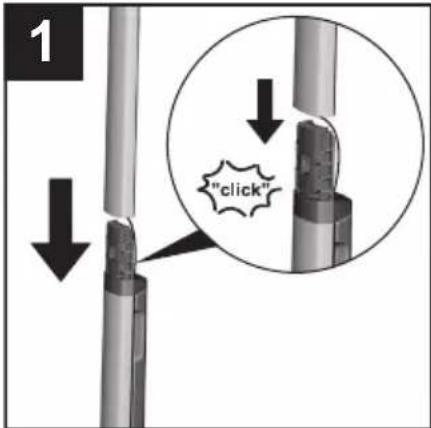
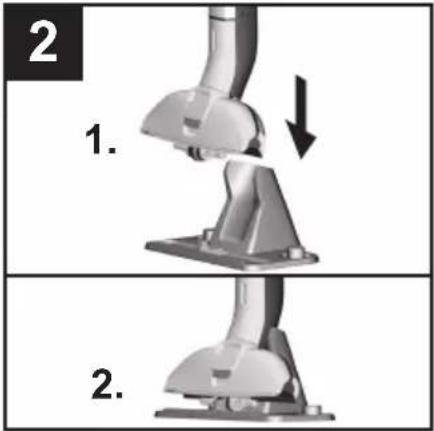
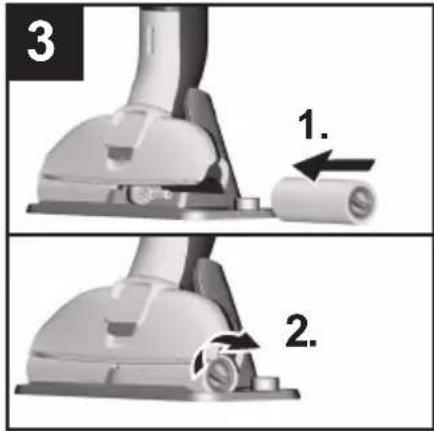
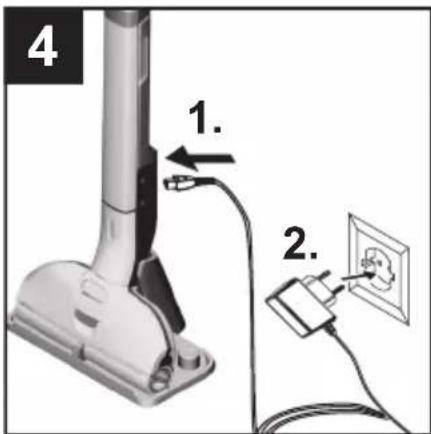
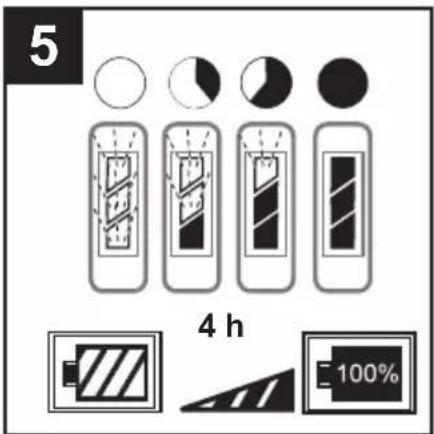
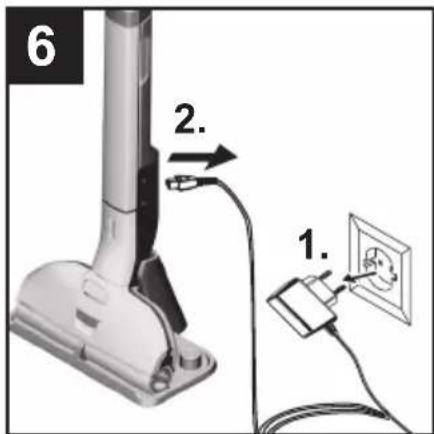
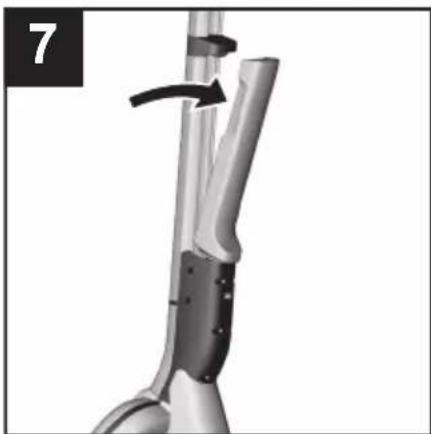
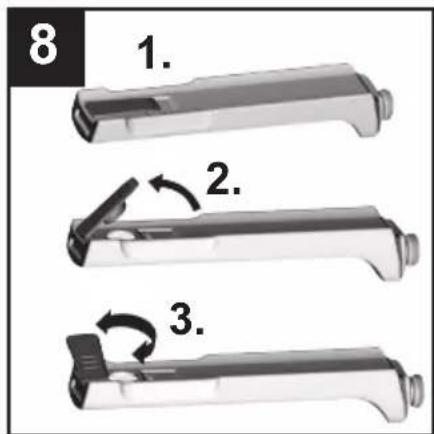
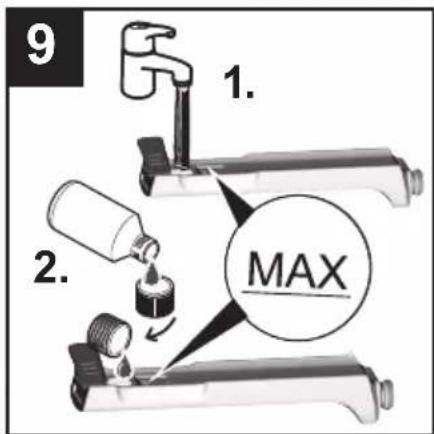
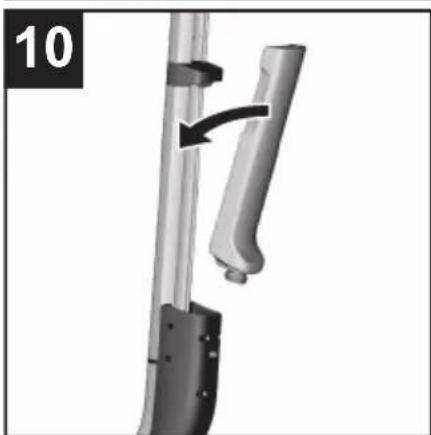
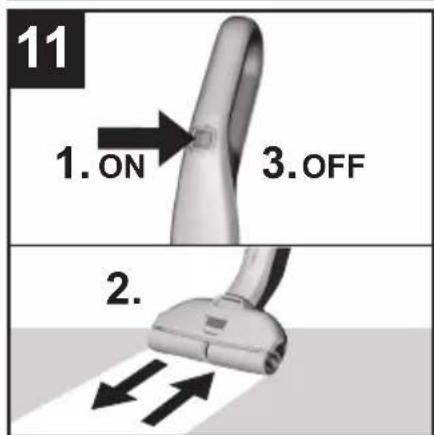
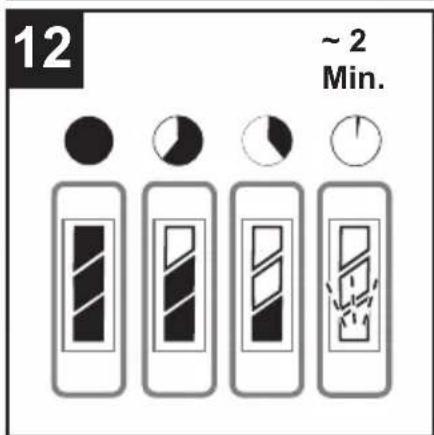
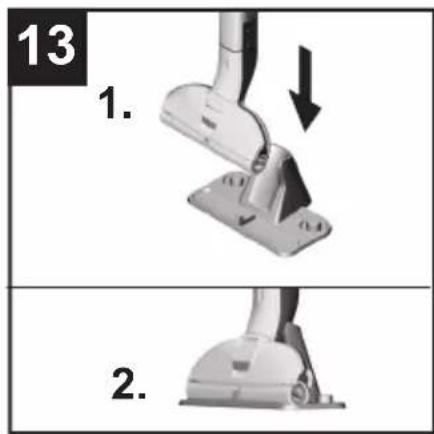
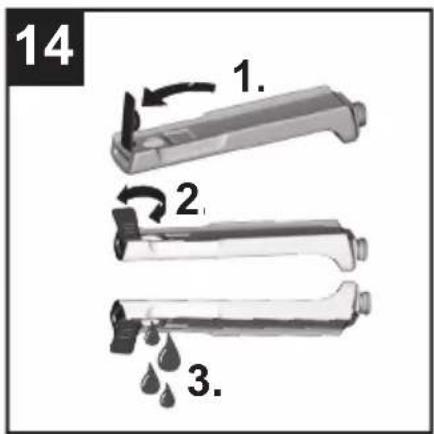
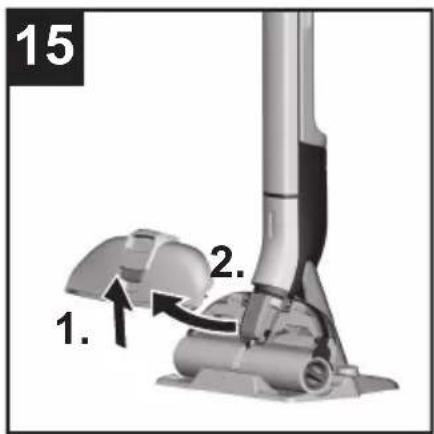
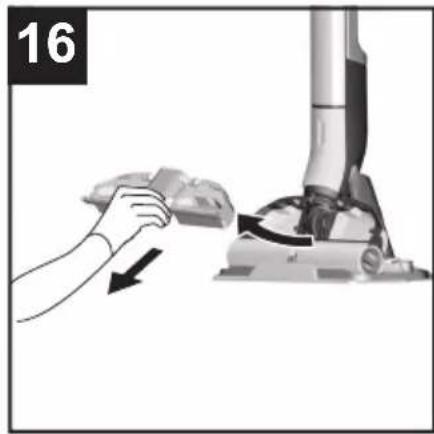
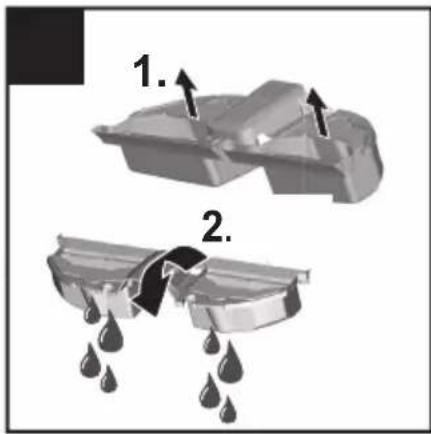
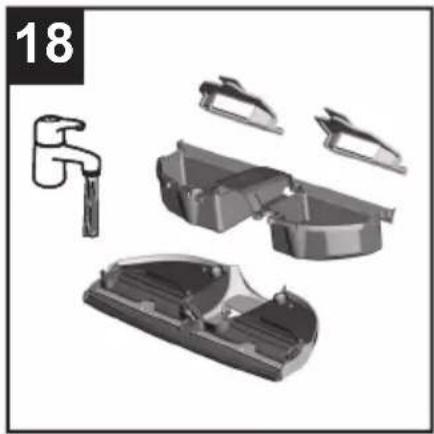
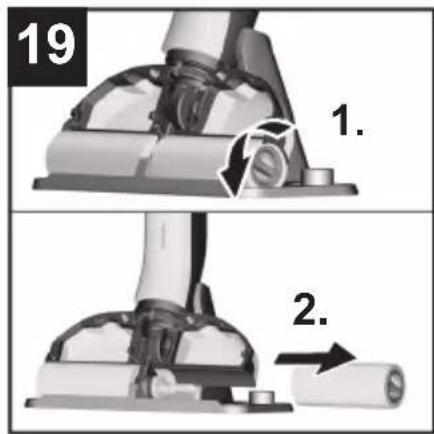
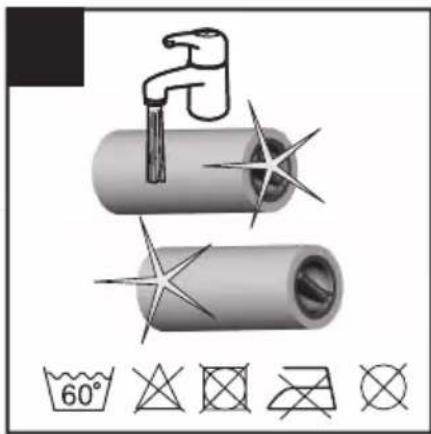
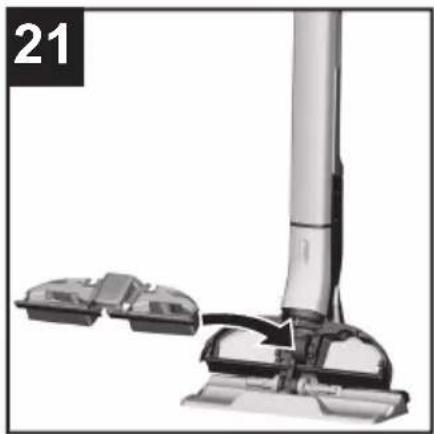
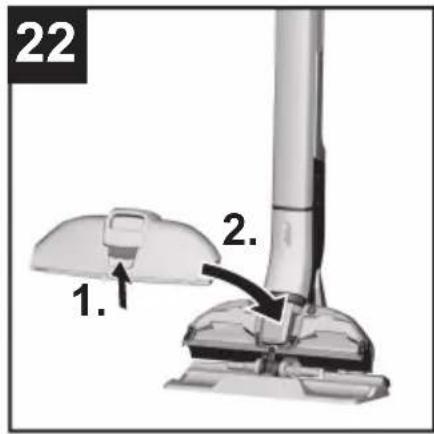
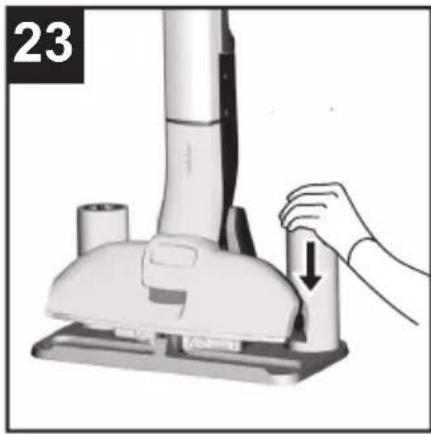

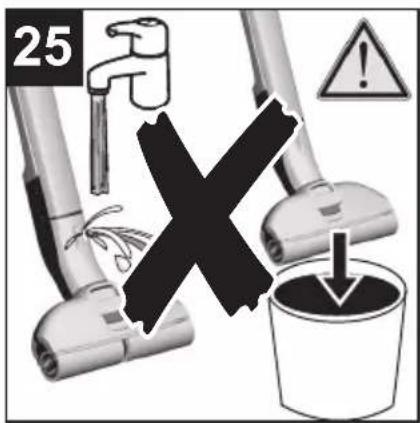
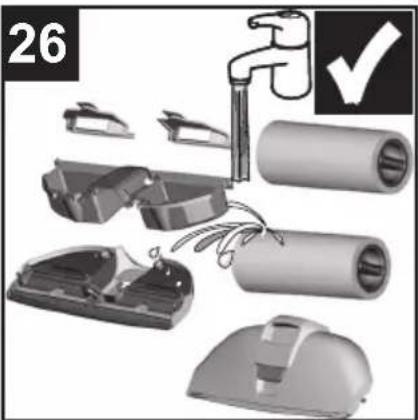
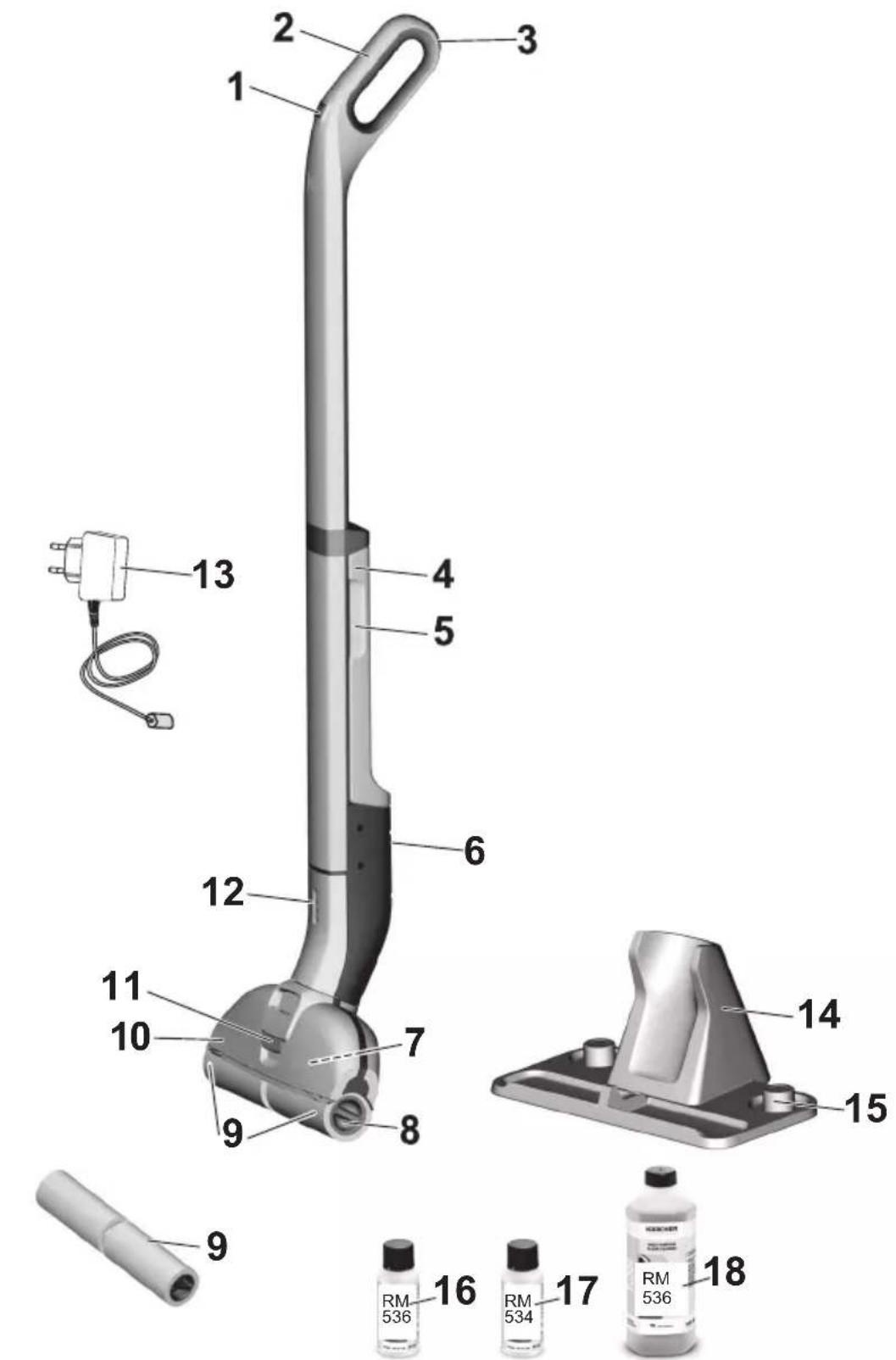
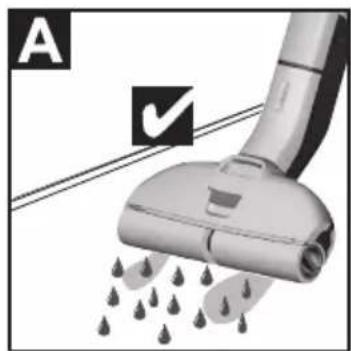
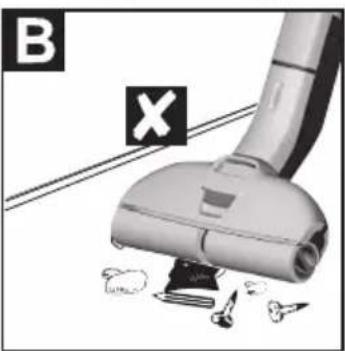
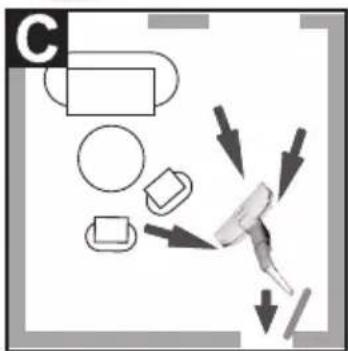
Table of Contents
⚠️ DANGER
Description of the Appliance EN 8
Assembly EN 8
Commissioning EN 8
Operation EN 9
Care and maintenance EN 10
Troubleshooting EN 11
Technical specifications EN 12

Before using your appliance for the first time, read these original operating instructions, act in compliance with them, and keep them for later use or for subsequent owners.
Proper use
Use the floor cleaner exclusively for cleaning hard floors in your private household and only on waterproof hard floors.
Do not clean water-sensitive floor coverings such as untreated cork floors (the moisture could penetrate and damage the floor).
The device is suitable for cleaning PVC, linoleum, tiled, stone, oiled and waxed parquet, laminate and all water-resistant floor coverings.
Environmental protection

The packaging material can be recycled. Please do not place the packaging into the ordinary refuse for disposal, but arrange for the proper re-
cycling.
Old appliance contain valuable recyclable materials and substances that must not be released into the environment. Thus, the appliance and the accumulator contained must not be dis-
posed of via the domestic waste. The disposal can take place via locally available return and collection systems free of charge.
Notes about the ingredients (REACH)
You will find current information about the ingredients at:
www.kaercher.com/REACH
Scope of delivery
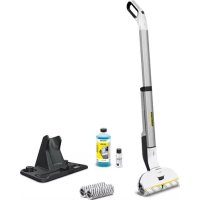
The scope of delivery of your appliance is illustrated on the packaging. Check the contents of the appliance for completeness when unpacking.
In the event of missing accessories or any transport damage, please contact your dealer.
Spare parts
Only use original accessories and spare parts, they ensure the safe and trouble-free operation of the device. For information about accessories and spare parts, please visit www.kaercher.com.
Warranty
The warranty terms published by the relevant sales company are applicable in each country. We will repair potential failures of your appliance within the warranty period free of charge, provided that such failure is caused by faulty material or defects in manufacturing. In the event of a warranty claim please contact your dealer or the nearest authorized Customer Service center. Please submit the proof of purchase.
(See address on the reverse)
Safety instructions
– Apart from the notes contained herein the general safety provisions and rules for the prevention of accidents of the legislator must be observed.
- Warnings and notes that are attached on the appliance provide important notes for the safe operation.
Symbols on the machine
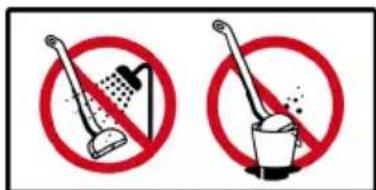
⚠️ DANGER
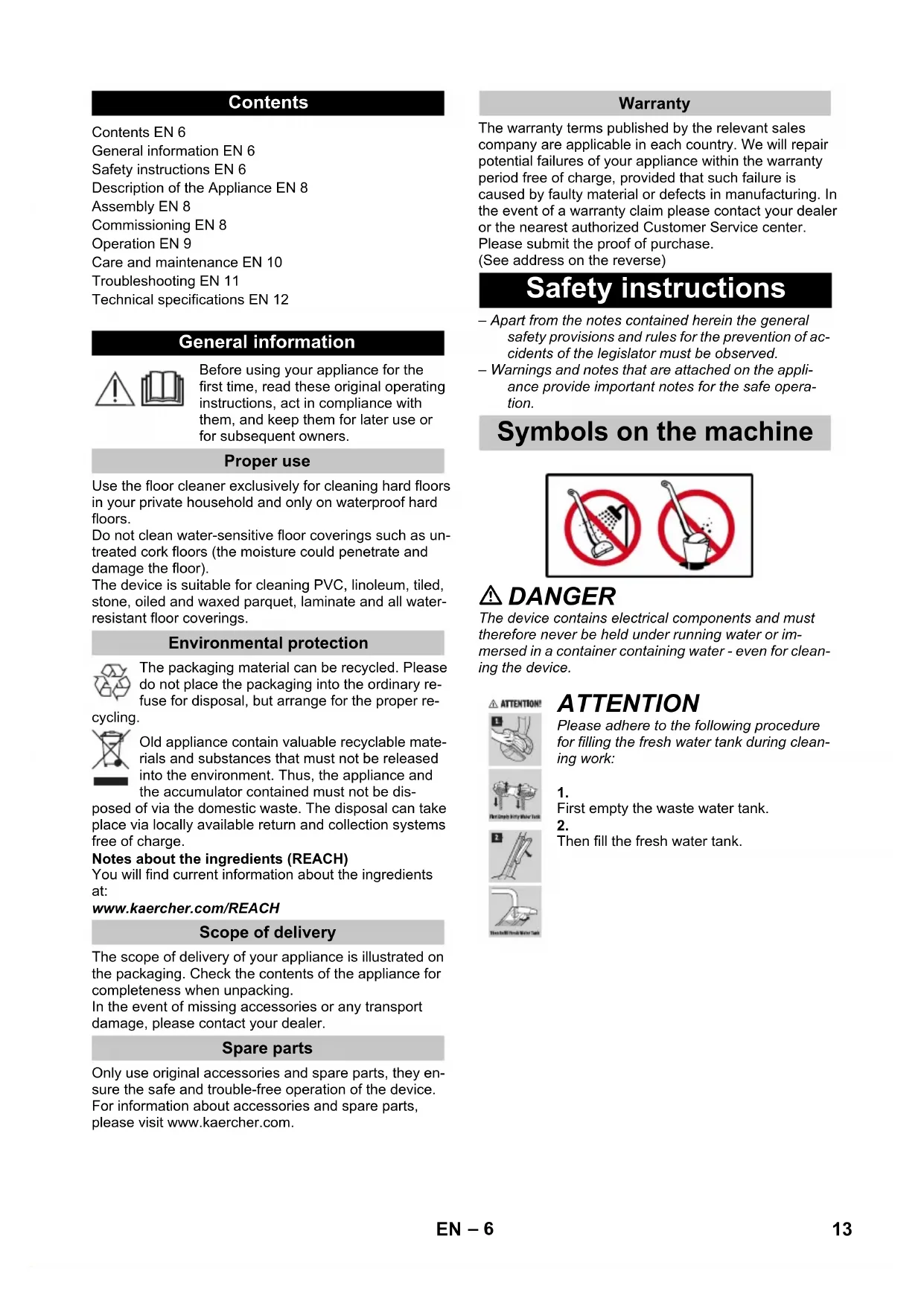
The device contains electrical components and must therefore never be held under running water or immersed in a container containing water - even for cleaning the device.
ATTENTION!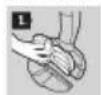


ATTENTION
Please adhere to the following procedure for filling the fresh water tank during cleaning work:
1.
First empty the waste water tank.
2.
Then fill the fresh water tank.
Hazard levels
⚠️ DANGER
Indicates an immediate danger that will lead to severe injuries or death.
⚠ WARNING
Indicates a potentially dangerous situation that could lead to severe injuries or death.
⚠ CAUTION
Indicates a potentially dangerous situation that could lead to minor injuries.
ATTENTION
Indicates a potentially dangerous situation that could lead to property damage.
Electric components
⚠️ DANGER
■ Do not immerse the device in water. ■ Check the appliance and accessories for proper condition before use. Otherwise, do not use the appliance. ■ Immediately replace the charger with the charging cable if visible damage is present. ■ Turn off the appliance and unplug it before any care or maintenance. ■ Repairs may only be performed by authorized customer service. ■ The appliance contains electrical components – do not clean under running water. ■ Do not insert conductive objects (such as screwdrivers or similar) into the charging socket. ■ Do not touch contacts or wires. ■ The voltage indicated on the type plate must match the supply voltage. ■ Do not drag the power cord over sharp edges and ensure it is not pinched.
⚠ WARNING
■ The appliance may only be connected to an electrical supply installed by an electrician in accordance with IEC 60364. ■ The appliance may only be connected to alternating current. The voltage must match the type plate of the appliance. For safety reasons, we recommend operating the appliance only via a residual current circuit breaker (max. 30 mA).
Charger
DANGER
Risk of electric shock.
Never touch the mains plug and the socket with wet hands. Do not use the charger if dirty or wet. Do not operate the charger in explosive environment. Do not carry the charger by holding the mains cable. Store and use the charger in dry rooms only. Protect the mains cable against heat, sharp edges, oil and moving parts of the machine.
Avoid using extension wires with multiple sockets and simultaneous operation of multiple devices. Do not pull the plug from the socket by pulling the mains cable. Do not cover the charger and keep the air vents of the charger open. Do not open the charger. Get repairs done only by authorised experts. Use the charger only to charge approved battery packs. Immediately replace the charger with the charging cable in case of visible damage.
Battery
DANGER
Risk of electric shock.
Do not expose the battery to direct sunlight, heat or fire.
WARNING
Charge the battery with the enclosed original charger or a charger approved by KÄRCHER only. Use the following adaptor:
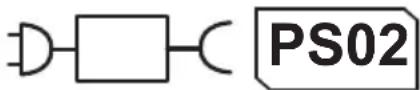
Do not open the battery, as there is a risk of an electrical shock; also, irritating or caustic vapors can escape. This device contains non-replaceable batteries.
Safe handling
DANGER
The user must use the appliance as intended. The person must consider the local conditions and must pay attention to other persons in the vicinity when working with the appliance. The appliance may not be operated in explosive atmospheres. If the appliance is used in hazardous areas the corresponding safety provisions must be observed. Do not use the appliance if it fell down, is visibly damaged or leaking. Keep packaging films away from children, there is a risk of suffocation!
WARNING
■ The appliance must not be operated by children or persons who have not been instructed accordingly. This appliance is not intended for use by persons with limited physical, sensory or mental capacities or lacking experience and/or skills, unless such persons are accompanied and supervised by a person in charge of their safety or they have received precise instructions on the use of this appliance and have understood the resulting risks. ■ Children must not play with this appliance. ■ Supervise children to prevent them from playing with the appliance. - Keep appliance out of reach of children as long as it is switched on or hasn't cooled down. ■ Cleaning and user maintenance must not be performed by children without supervision. ■ Operate or store the appliance only in accordance with the description or illustration!
⚠CAUTION
■ Create stability for the appliance prior to any work on or with the appliance to prevent accidents or damage. ■ Never fill solvents, solvent-containing liquids or undiluted acids (e.g. detergents, petrol, paint thinner, and acetone) into the water reservoir as these substances corrode the materials used in the appliance. ■ Never leave the appliance unattended as long as it is in operation. - Keep parts of the body (e.g. hair, fingers) away from the rotating cleaning rollers. ■ Protect your hands when cleaning the floor head due to a danger of injury from sharp objects (e.g. splinters). - Keep connection cable away from heat, sharp edges, oil and moving parts.
ATTENTION
■ Only switch on the appliance when the fresh water tank and waste water tank are fitted. ■ The device may not be used for vacuuming sharp objects or large objects (e.g. glass shards, gravel, toy parts). ■ Do not fill the fresh water container with vinegar, decalcification agents, essential oils or similar substances. Also take care to ensure that these substances are not vacuumed. ■ Only use this appliance on hard floors with waterproof coatings (e. g. varnished parquet, enamelled tiles, Linoleum). ■ Do not use the appliance for cleaning of carpets or carpeted floors. ■ Do not use the appliance over the floor grilles of convector heaters. The appliance is not able to take in the water discharged when used above grilles. In case of longer breaks in operation and after use, switch off the device at the main switch / device switch and pull the charger's mains plug. ■ Do not operate the appliance at temperatures below 0 °C. ■ Protect the unit from rain. Do not store outside.
Description of the Appliance
1 ON/OFF switch 2 Handle 3 Wall anti-slip handle 4 Fresh water tank 5 Fresh water tank recessed grip 6 Charging socket 7 Waste water tank 8 Recessed grip cleaning roller 9 Cleaning rollers 10 Floor head cover 11 Floor head cover lock 12 Battery indicator 13 Charger with charging cable 14 Parking station 15 Roller storage 16 * Detergent RM 536 30 ml
17 ** Detergent RM 534 30 ml 18 ** Detergent RM 536 500 ml 9 ** Cleaning rollers 2x * EWM 2 ** EWM 2 Premium
Assembly
ATTENTION
Take care to ensure that the power cable lies fully in the guide rail before fitting the handle bar.
Illustration 1
→ Insert handle into the basic unit as far as it goes until it engages audibly.
The handle must sit snugly into the appliance.
Commissioning
Illustration 2
→ Place the device in the parking station for safe storage.
Installing the rollers
Illustration 3
→ Screw the cleaning rollers onto the threaded rod up to the mechanical stop. → Pay attention to the colour-codes on the inside of the roller and roller holder on the appliance (e.g. blue should match up with blue). → After the installation, check to ensure that the cleaning rollers sit snugly.
Charging process
Illustration 4
→ Plug the charging cable of the charger into the charging socket on the device. → Plug the mains plug of the charger into a power outlet.
Illustration 5
■ The LED indicator lights display the battery's current charging state. ■ All 3 LED indicator lights flash from bottom to top when charging a completely empty battery. ■ The lowermost LED lights up continuously when the battery is 1/3 charged, the two upper LEDs continue to flash. ■ When the battery is 2/3 charged, the two lower LEDs light up continuously, the uppermost LED continues to flash. ■ After the battery has been fully charged, the 3 LED indicator lights will continue to light constantly for 60 minutes. After this time, the LED indicator lights go out.
Illustration 6
→ Once the battery is charged, pull the mains plug out of the socket and the charging cable out of the charging socket.
Fill fresh water reservoir
Illustration 2
→ Place the device in the parking station.
Illustration 7
→ Grasp the fresh water tank by the recessed grip and remove it from the device.
Illustration 8
→ Open the tank cap and turn it to the side.
Illustration 9
→ Fill the fresh water tank with cold or lukewarm tap water.
→ KÄRCHER detergents/care agents can also be added to the fresh water tank as required.* → Do not exceed the "MAX" marking when filling. → Close tank lock.
Illustration 10
→ Insert the fresh water container into the appliance. → The fresh water tank must sit snugly into the appliance.
ATTENTION
*Follow the recommended dosage instructions on the detergent/care agent.
Operation
ATTENTION
Illustration A
The device can only vacuum dried dirt and liquids (max. 140 ml).
Illustration B
Brush or vacuum the floor before starting work. This removes dirt and loose particles from the floor before the wet cleaning commences.
Before use, check the floor for water consistency at suspect areas. Do not clean water-sensitive coatings, such as untreated cork floors (moisture ingress is possible which may damage the floor).
Notes
■ To avoid striped patterns, test the device on an inconspicuous area before using on sensitive surfaces, e.g. wood or fine stone. ■ Don't stay in one place, keep moving. ■ Follow the instructions of the floor covering manufacturer.
Illustration C
To avoid fresh footprints on the freshly-wiped floor, work backwards towards the door.
→ Clean the floor by moving the appliance back and forth at a similar speed as if you were vacuum cleaning. → If the floor is especially dirty, let the appliance glide slowly across the floor.
Pressure does not need to be exerted on the device. → For scope of delivery of the roller pads in grey and yellow: Both roller pads have the same functionality, they can be used for different areas of application (colour distinction, e.g. for kitchen and bathroom).
Start working
ATTENTION
After switching on the appliance, the cleaning rollers will begin to rotate. Hold the handle tight to prevent the appliance from moving forwards by itself.
Make sure the fresh water tank is filled with water and the waste water tank is fitted in the appliance.
Illustration 11
To switch on the appliance, press the on/off switch. Move the unit back and forth several times until the rollers are sufficiently moistened.
Battery service life
Illustration 12
- 3 LEDs illuminated - 3/3 battery run time (full run time).
- 2 LEDs illuminated - 2/3 battery run time.
- 1 LED illuminated - 1/3 battery run time.
The lowermost LED starts to flash approx. 2 minutes before the battery has to be charged. The last LED flashes quicker for 60 seconds when the battery is empty and the device has switched off.
Refill detergent
ATTENTION
Before filling the fresh water tank, please empty the waste water tank. In this way you can avoid overflowing of the waste water tank.
See chapter "Filling the fresh water tank".
See Chapter "Emptying the waste water tank".
Emptying the waste water tank
Illustration 2
Place the device in the parking station.
Illustration 15
Actuate the floor head cover latch. Remove the floor head cover.
Illustration 16
Remove the waste water tank from the floor head.
Illustration 17
Fold the flaps over the two waste water tank chambers. Empty the waste water tank.
Illustration 18
Clean the floor head cover and waste water tank with tap water, depending on the degree of soiling. The flaps of the two waste water tank chambers can be removed and cleaned separately. Re-insert and close the flaps of the two waste water tank chambers.
Illustration 21
Insert the waste water tank into the floor head.
Illustration 22
→ Actuate the latch on the floor head cover, fit the cover onto the floor head and then release the latch. → The waste water tank and floor head cover must sit firmly in and on the device.
Interrupting operation
ATTENTION
To prevent damage to sensitive floors through wet rollers, we recommend placing the device in the parking station during longer work breaks.
Illustration 11
→ Switch off the appliance; press the on/off button to do so.
Illustration 2
→ Place the device in the parking station.
Turning Off the Appliance
Illustration 11
→ Switch off the appliance; press the on/off button to do so.
Illustration 2
→ Place the device in the parking station.
ATTENTION
Clean the device after completing the work.
Illustration 14
→ Drain any water remaining in the fresh water tank.
Figure 15 24
→ Clean the waste water tank, floor head cover and cleaning rollers.
See chapter "Cleaning the waste water tank".
See chapter "Cleaning the floor head".
See chapter "Cleaning the rollers".
Storing the Appliance
ATTENTION
To prevent odours developing, the fresh water and waste water tank must be completely emptied prior to storing the appliance.
Allow wet rollers to dry in the air (e.g. on the parking station), do not place wet rollers in closed cupboards to dry.
Illustration 2
→ Place the device in the parking station.
Illustration 24
→ Place the wet rollers on the parking station to dry.
→ Store the appliance in a dry room.
Care and maintenance
△DANGER
Illustration 25
The device contains electrical components and must therefore never be held under running water or immersed in a container containing water - even for cleaning the device.
ATTENTION
Illustration 26
To clean the device, remove the individual components (floor head cover, fresh water tank, waste water tank and rollers) and clean them separately. Wipe down the rest of the device with a moist cloth.
Clean the waste water tank
ATTENTION
The waste water tank must be cleaned regularly to ensure that dirt does not accumulate in the tank.
ATTENTION
Do not clean the floor head cover in a dishwasher: The basic function of the device can be impaired if the floor head cover is distorted by the dishwasher and the wiper edge no longer presses correctly onto the rollers. This will produce a worse cleaning result.
Illustration 11
→ Switch off the appliance; press the on/off button to do so.
Illustration 2
→ Place the device in the parking station.
Figure 15 18
→ Remove the waste water tank from the appliance. See Chapter "Emptying the waste water tank".
→ Clean the floor head cover, waste water tank and waste water tank flaps with tap water.
→ The flaps of the two waste water tank chambers can be removed and cleaned separately.
→ Alternatively, the waste water tank and waste water tank flaps can be cleaned in a dishwasher.
Note
The rubber inlays of the waste water tank flaps can become sticky when washed in a dishwasher. This does not affect their sealing ability.
Figure 19 20
→ Also clean the rollers if the device is not going to be used further.
See chapter "Cleaning the rollers".
Figure 20 22
→ After cleaning, fit the waste water tank with flaps and floor head cover back into the device.
Cleaning the floor head
ATTENTION
Clean the floor head if dirty.
ATTENTION
Do not clean the floor head cover in a dishwasher: The basic function of the device can be impaired if the floor head cover is distorted by the dishwasher and the wiper edge no longer presses correctly onto the rollers. This will produce a worse cleaning result.
Illustration 11
→ Switch off the appliance; press the on/off button to do so.
Illustration 2
→ Place the device in the parking station.
Illustration 15
→ Actuate the floor head cover latch.
→ Remove the floor head cover.
Illustration 18
→ Rinse off the floor head cover under running water.
→ Clean the waste water tank and rollers.
See chapter "Cleaning the waste water tank".
See chapter "Cleaning the rollers".
→ Clean the roller drive with a moist cloth.
Illustration 22
Insert the floor head cover into the floor head.
Cleaning the rollers
ATTENTION
The rollers should be washed under a tap or cleaned in a washing machine after each use to prevent accumulation of detergent residues in the rollers that can lead to the formation of foam over time.
The fresh water tank and waste water tank must be emptied if the device is laid on the floor in order to remove the rollers. This prevents liquids from escaping from the tanks while the device is lying on the floor.
Illustration 11
Switch off the appliance; press the on/off button to do so.
Illustration 2
Place the device in the parking station.
Illustration 19
Twist out the cleaning rollers from the recessed grip.
Illustration 20
Clean the cleaning rollers under running water.
or
Wash the cleaning rollers in the washing machine up to 60°C.
ATTENTION
Do not use any soft detergents when cleaning in the washing machine. This avoids causing damage to the microfibres. It also preserves the high performance levels of the cleaning rollers.
The cleaning rollers are not suitable for the tumble dryer.
ATTENTION
To avoid damaging the washing machine, we recommend placing the rollers in a laundry net and loading the washing machine with additional laundry.
→ Once cleaned, place the rollers on the cleaning station storage and leave them to air dry. → Drying time can be minimized by wringing out the rollers beforehand. → Also clean the floor head cover and waste water tank if the device is not going to be used further. → Clean the roller drive with a moist cloth.
Detergents and care products
ATTENTION
The use of unsuitable cleaning and disinfecting agents can damage the appliance and will void the warranty.
Note
Add cleaning or disinfecting agent as required.
→ When dosing the detergent and care product, follow the manufacturer's dosage instructions. → To prevent foaming, first fill the fresh water tank with water then cleaning or disinfecting agent. To avoid exceeding the "MAX" fill level on the fresh water tank, leave room for the cleaning or disinfecting agent when filling with water.
Troubleshooting
Often, failures have simple causes and you can do the troubleshooting yourself using the following overview. If you are in doubt or if the failure is not listed here please contact the authorized customer service.
Battery is not charging
■ Charging plug/mains plug not correctly connected. → Connect charging plug/mains plug correctly.
The device cannot be switched on
■ Battery is empty. → Charge the device. - Check whether the charging cable is still plugged into the device. → Take out charging cable, operation is not possible while charging cable is plugged in.
LED fault display
Lowermost LED flashes when the device is switched on and does not start.
■ Battery is empty. → Charge the device.
All LEDs flash quickly simultaneously.
■ The device has a motor blockage (e.g. due to excessive pressure on the rollers or through movement into a wall/corner). → Switch on/off the appliance again.
or
■ Use of wrong or defective mains plug. → Use original mains plug/replace defective mains plug.
The three LEDs light up sequentially in a 1-second cycle.
■ Device too hot during use (e.g. when operating in high ambient temperatures). → Take a break and let the device cool down. ■ If the device also switches off: → Take a break and let the device cool down. → The device can only be switched on again once it has cooled down enough.
Rollers are too dry
Rollers are not being sufficiently moistened. → Moisten the rollers by moving back and forth over the same position.
The filter under the fresh water tank is incorrectly fitted or not fitted at all.
→ Ensure that the filter under the fresh water tank is correctly fitted in the device. The foam with the yellow pin in the middle must point upwards.
Note
If the filter is not present, it can be ordered as a spare part.
For information about accessories and spare parts, please visit www.kaercher.com.
Appliance is not sucking up dirt
No water in the fresh water tank.
→ Refill water. Fresh water tank does not fit properly in the device. → Insert the fresh water tank so that it sits snugly in the appliance. Cleaning rollers missing or not fitted correctly. → Fit the cleaning rollers or turn them onto the roller holder up to the mechanical stop.
Cleaning rollers are contaminated or worn.
→ Clean the cleaning rollers. or → Replace the cleaning rollers.
The detergent has been forgotten, an incorrect dosage is being used or the incorrect detergent is being used
→ Use only KÄRCHER detergent and be sure to use the correct dosage.
Floor head cover not installed correctly
→ Check that the floor head cover is correctly seated. For this, remove the cover and then fit it back in place.
Note
Slight foam formation in the floor head during operation is normal and does not impair functionality. Further measures are only necessary when there is excessive foam formation (e.g. streaks of foam on the floor).
Incorrect detergent or incorrect dosage.
→ Use only KÄRCHER detergent and be sure to use the correct dosage.
Device operation is based on the cleaning rollers removing dirt. Dirt and detergent residues from floor coverings collect in the waste water tank. This can lead to foam formation under some circumstances.
→ Clean the waste water tank, floor head cover and cleaning rollers.
Poor cleaning result
The rollers are dirty.
→ Clean the rollers. Rollers are not being sufficiently moistened. → Moisten the rollers by moving back and forth over the same position. Incorrect detergent or incorrect dosage. → Use only KÄRCHER detergent and be sure to use the correct dosage. Foreign detergents are present on the floor. → Remove all detergent residues from the rollers using water. → Clean the floor several times using the device and clean rollers, without using detergent. This removes detergent residues from the floor
Rollers do not turn
Rollers are blocked.
→ Remove rollers and check if an object has become stuck in the rollers. → Check that the rollers are screwed in as far as they will go onto the roller holder. → Check that the floor head cover is correctly seated. For this, remove the cover and then fit it back in place.
Water vacuuming not optimum
Floor head cover not installed correctly
→ Check that the floor head cover is correctly seated. For this, remove the cover and then fit it back in place.
The rollers are worn out.
→ Replace the rollers.
Appliance is leaking waste water.
Waste water tank is overfilled.
→ Empty the waste water tank right away. Waste water tank does not fit properly in the appliance. → Check that the floor head cover is firmly seated on the waste water tank. → Check that the waste water tank flaps are correctly closed.
Removing the handle from the basic unit
ATTENTION
Do not remove the handle from the basic unit once it has been assembled.
The handle may only be removed from the basic unit if the unit is sent out for service purposes.
Illustration 27
See illustration at the end of the operating instructions
→ Insert screwdriver at a 90 degree angle in the small opening at the rear side of the handle and remove handle.
ATTENTION
Please ensure that the connection cable between the basic unit and the handle are not damaged.
Pull carefully to avoid damaging the device.
Technical specifications
Electrical connection
| Voltage 100-240 V | 1~50-60 Hz |
Protection class IPX4
| Device | III |
| Protective class | |
Charger protection class II
| Rated power of appliance 40 W |
Nominal battery voltage 7.2-7.4 V
Operating time with full charge 20 min
| Charging time for empty battery 4 h |
Charger initial voltage: 9.5 V
| Output current, charger 0,6 A |
Performance data
| Roller revolutions per minute 500 rpm |
Filling quantity
| Fresh water tank 360 ml |
| waste water tank | 140 ml |
Dimensions
| Weight (without accessories and cleaning fluids) | 2,4 kg |
Subject to technical modifications!
Contents
Contents FR 6
www.kaercher.com/REACH
⚠️DANGER
First Empty Kitty Water Tank

Tianhelli Fresh Water Tank
ATTENTION
www.kaercher.com/REACH
Supply
⚠ DANGER
⚠ DANGER
First Empty Kitty Water Tank

Hankbell River Water Tank
NOTE
Dirty water tank is too full.
→ Empty the dirty water tank immediately.
www.kaercher.com/REACH
www.kaercher.com/REACH
⚠️ DANGER
Scope of delivery
⚠️DANGER
Scope of delivery
The scope of delivery for the device is shown on the packaging. Check that the contents of the package are complete when unpacking.
⚠️DANGER


NOTE
⚠️DANGER
Delivery
⚠️DANGER
Packaging
⚠️ DANGER
www.kaercher.com/REACH
Scope of delivery
First Empty Kitty Water Tank


CAUTION
www.kaercher.com/REACH
Scope of delivery
⚠️ DANGER
www.kaercher.com/REACH
Scope of delivery
⚠ DANGER
First Empty Kitty Water Tank


CAUTION
www.kaercher.com/REACH
Scope of delivery
⚠DANGER
www.kaercher.com/REACH
Scope of delivery
The scope of delivery of your device is shown on the packaging. When unpacking the machine, check that the contents are complete.
⚠️DANGER
First Empty Kitty Water Tank

Hankbell River Water Tank
CAUTION
www.kaercher.com/REACH
Scope of delivery
⚠️ DANGER
www.kaercher.com/REACH
Items supplied
⚠ DANGER
The English Little Water Table

Brennstell River Water Tank
ATTENTION
www.kaercher.com/REACH
Scope of delivery
⚠DANGER
www.kaercher.com/REACH
Scope of delivery
⚠ DANGER
www.kaercher.com/REACH
Scope of delivery
The contents of your device's delivery are shown on the packaging. Before removing the device from the packaging, check that the contents are complete.
If accessories are missing or have been damaged during transport, please inform your dealer.
Spare parts
⚠ DANGER
www.kaercher.com/REACH
Delivery contents
⚠️ DANGER
www.kaercher.com/REACH
Accessory kit
⚠️ DANGER
Mounting the roller
Figure 3
www.kaercher.com/REACH
Delivery contents
⚠️ DANGER
www.kaercher.com/REACH
Delivery contents
⚠ DANGER


DÉMESIO
www.kaercher.com/REACH
Scope of delivery
First Empty Kitty Water Tank

Hankbell Fresh Water Tank
WARNING
www.kaercher.com/REACH
⚠️DANGER
www.kaercher.com/REACH
⚠DANGER
www.kaercher.com/REACH
Scope of delivery
⚠ DANGER
⚠ DANGER
⚠️DANGER
THANK YOU!
MERCI! DANKE! iGRACIAS!

Register your product and benefit from many advantages.
www.kaercher.com/welcome


Rate your product and tell us your opinion.
www.kaercher.com/dealersearch
Alfred Kärcher SE & Co. KG
Alfred-Kärcher-Str. 28-40
71364 Winnenden (Germany)
Tel.: +49 7195 14-0
Fax: +49 7195 14-2212