DR7USB - Radio HAMA - Free user manual and instructions
Find the device manual for free DR7USB HAMA in PDF.



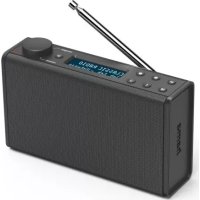
| Product type | Portable DAB+/FM digital radio |
| Brand | Hama |
| Model | DR7USB |
| Power supply | 4 AA (Mignon) batteries or micro USB (power adapter not included) |
| Dimensions (approx.) | 200 x 120 x 80 mm |
| Weight (approx.) | 500 g (without batteries) |
| Reception | DAB+ and FM, with telescopic antenna |
| Speakers | Not specified (estimated: 2 x 3 W RMS) |
| Display | LCD with backlight |
| Controls | MODE, PRESET, SETTINGS, INFO, BACK buttons, navigation/OK/volume wheel |
| Headphone jack | Yes, 3.5 mm jack |
| Presets | Yes, via PRESET buttons |
| Menu languages | English, German, Danish, Dutch, Finnish, French, Italian, Norwegian, Polish, Portuguese, Spanish, Swedish, Turkish, Czech, Slovak |
| Standby | Yes, long press on wheel |
| Package contents | Radio, 4 AA batteries, instruction manual |
| Maintenance | Soft dry cloth, without harsh detergent |
| Safety | Use indoors in dry place, avoid moisture and heat, do not open, observe battery polarity |
| Recycling | Compliant with WEEE and used battery directives |
Frequently Asked Questions - DR7USB HAMA
User questions about DR7USB HAMA
0 question about this device. Answer the ones you know or ask your own.
Ask a new question about this device
Download the instructions for your Radio in PDF format for free! Find your manual DR7USB - HAMA and take your electronic device back in hand. On this page are published all the documents necessary for the use of your device. DR7USB by HAMA.
USER MANUAL DR7USB HAMA
natural_image
Line drawing of a portable electronic device with a lid and buttons, labeled 'fama' on the front panel (no other text or symbols)OperatingInstructions
Bedienungsanleitung
Moded'emploi
Instruccionesdeuso
Gebruiksaanwijzing
Istruzioniperl'uso
Instrukcjaobstugi
Használatiútmutató
Manualdeutilizare
Návodk p oužití
Návodnapoužitie
Manualdeinstruções
Bruksanvisning
| AudioConnectorsAudioAnschlüsse | |
| OutputsHeadphone3.5mm | |
| SourcesQuellen | Presets Favoriten | |
| DAB/DAB+(174.928- 2 39.2MHz) | √ | 30 |
| FM(87.5- 1 08MHz) | √ | 30 |
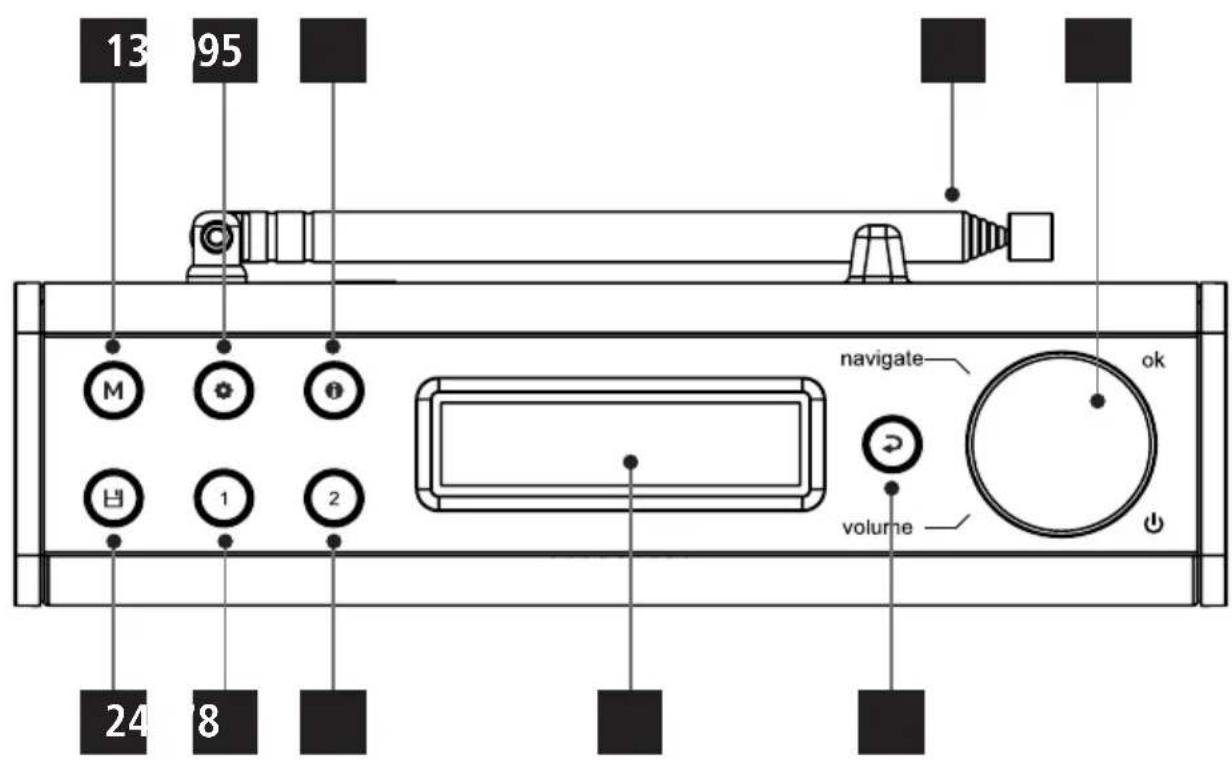

Controlsanddisplays
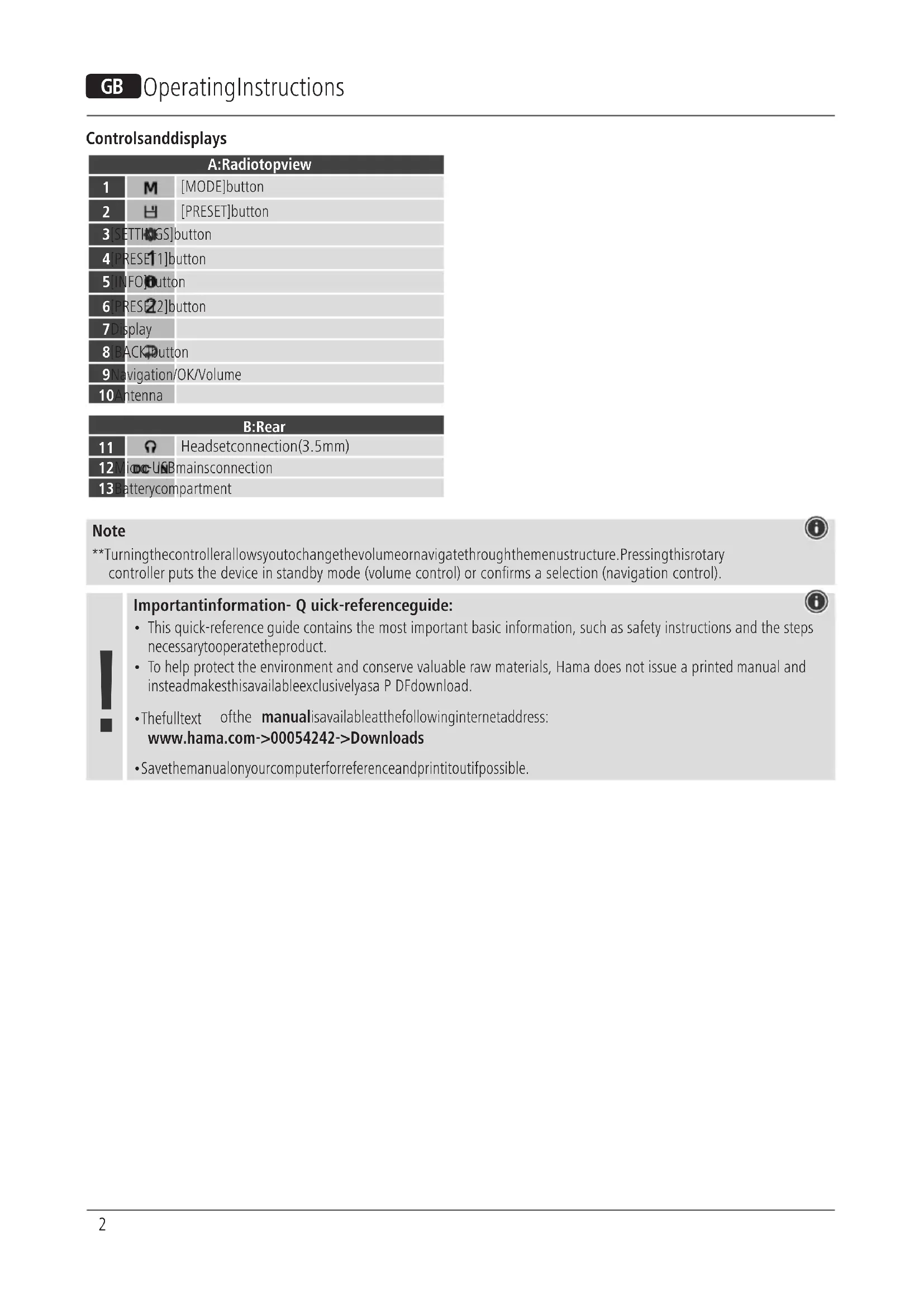
| A:Radiotopview | ||
| 1 | M | [MODE]button |
| 2 | H | [PRESET]button |
| 3 | [SETTHIGS]button | |
| 4 | [PRESE11]button | |
| 5 | [INFO]Button | |
| 6 | [PRESE22]button | |
| 7 | Display | |
| 8 | [BACK]Button | |
| 9 | Navigation/OK/Volume | |
| 10 | Antenna | |
| B:Rear | ||
| 11 | Ω | Headsetconnection(3.5mm) |
| 12 | Micro-USBmainsconnection | |
| 13 | Batterycompartment | |
Note

**Turningthecontrollerallowsyoutochangethevolumeornavigatethroughthemenustructure. Pressingthisrotary controller puts the device in standby mode (volume control) or confirms a selection (navigation control).


Importantinformation- Q quick-referenceguide:
- This quick-reference guide contains the most important basic information, such as safety instructions and the steps necessary to operate the product.
- To help protect the environment and conserve valuable raw materials, Hama does not issue a printed manual and instead make this available exclusively as a PDF download.
- Thefulltext ofthe manualisavailableatthefollowinginternetaddress: www.hama.com->00054242->Downloads
- Savethemanualonyourcomputerforreferenceandprintitoutifpossible.
1. Explanationofwarningsymbolsandnotes
Riskofelectricshock

This symbol indicates a risk of electric shock from touching product parts carrying hazardous voltage.
Warning

This symbol is used to indicate safety instructions to draw your attention to specific hazards and risks.
Note

This symbol is used to indicate additional information or important notes.
2.Packagecontents
- DR7USB, DigitalRadio
- 4xAA(Mignon)batteries
• Theseoperatinginstructions
3. Safetyinstructions
• The product is intended for private, non-commercial use only.
- Donotusetheproductinareasinwhichelectronic productsare notpermitted.
- Protect the product from dirt, moisture and overheating and use it indryroom only.
- Aswithallelectricalproducts, thisdevicesshouldbekept outofthereachofchildren.
- Donotdroptheproductanddonotexposeittoany majorshocks.
- Donotoperatetheproductoutsidethepowerlimits specifiedinthetechnicaldata.
- Keep the packaging material out of thereachofchildren duetotheriskofsuffocation.
- Disposeofpackagingmaterialimmediatelyinaccordance withthelocallyapplicableregulations.
- Do not modify the device in any way. Doing so voids the warranty.
- Usetheproductonlyfortheintendedpurpose.
- Donotusetheproductintheimmediatevicinityof heaters,otherheatsourcesorindirectsunlight.
- Do not use the product in a damp environment and avoid splashingwater.
- Onlyusethearticleundermoderateclimaticconditions.
Riskofelectricshock

- Donotopenthedeviceorcontinuetooperateitifit becomesdamaged.
- Donotattempttoserviceorrepairtheproductyourself. Leaveanyandallserviceworktoqualifiedexperts.
Warning-Batteries

- Wheninsertingbatteries, notethecorrectpolarity(+ and-m arkings)andinsertthebatteriesaccordingly. Failure to do so could result in the batteries leaking or exploding.
- Onlyusebatteries(orrechargeablebatteries)that matchthespecifiedtype.
- Before you insert the batteries, clean the battery contactsandthepolaritycontacts.
- Donotallowchildrentochangebatterieswithout supervision.
- Donotmixoldandnewbatteries,orbatteriesof differenttypesorfromdifferentmanufacturers.
- Remove the batteries from products that are not being usedforanextendedperiod(unlessthesare be i n g keptreadyforanemergency).
- Donotshort-circuitbatteries.
- Donotchargebatteries.
- Donotburnbatteries.
- Keepbatteriesoutofthereachofchildren.
- Neveropen, damageorswallowbatteriesorallow themtoentertheenvironment. Theycancontaintoxic, environmentallyharmfulheavymetals.
- Removespentbatteriesfromtheproductanddispose ofthemwithoutdelay.
- Avoidstoring, charging and using in extreme temperatures and at extremely low atmospheric pressures (such as at high altitudes).
4. Gettingstarted

Note- o ptimisingreception
Pleasenote:
• Alwayspulltheantennaoutcompletely.
- Were recommend you adjust the antenna vertically to ensure optimal reception.
Note— P ownersupply

Withbatteriesinserted,theradioisalwayssuppliedwith powerfromthebatteries.Therefore,tooperatetheradio off a USB power supply, you should remove the batteries fromthebatterycompartmentfirst.
Batteryoperation
- Open the battery compartment cover, which is located on therearoftheradio.
- Todothis, slidethebatterycompartmentcoverinthe directionshown.
- Insertthebatteriespayingattentiontomatchthe polaritiescorrectly. Thecorrectpolarityisindicatedbythe plusandminussymbolsinthebatterycompartment.
- Thenclosethebatterycompartmentcover.
4.1 Switchingon
Warning- m ainsoperation

- Disconnect the product from the powersupply using the On/Offswitch— if this is not available, unplug the power cord from the socket.
- If you will not be using the product for a prolonged period, disconnectitfrommainspower.
- Connect a suitable USB power pack to the rear of the radio using a Micro USB cable (12).
- Connect the power pack to a properly installed and easily accessiblemainssocket.
- Waituntiltheradiohasinitialisedfully.
- Press [NAVIGATION/OK/VOLUME] (9) to switch on the radio.
4.2 General notesonuse
4.2.1 SwitchOn/ 0 ff/ S t a n d b y
- Press [NAVIGATION/OK/VOLUME] (9) to switch on the radio.
- Press and hold [NAVIGATION/OK/VOLUME] (9) for approx.3 secondstoswitchtheradiooff(standby).
- Tocompletelyswitchoffthedevice, disconnectitfromthe powersupply.
4.2.2 Navigation and control
- After pressing a shortcut button, navigate through the menuitemsusing.
- Selectindividualmenuitemsbyturning[NAVIGATION/OK/VOLUME] (9).
- Confirm the selection by pressing [NAVIGATION/OK/VOLUME] (9).
4.2.3 Volume adjustment
- You can turn the volume up (right) or down (left) by turning [NAVIGATION/OK/VOLUME] (9) accordingly.
4.3Language
The first time it is used, theradio's default language is English. To change radio's menulanguage, proceedings follows:
- Press[ ⚙] (3)toaccesstheSettingsmenu.
- Use [POWER/VOLUME/ENTER/NAVIGATE] (5) to navigate the "Language" menu item. Confirm the selection bypassing [POWER/VOLUME/ENTER/NAVIGATE] (5).
- Use [POWER/VOLUME/ENTER/NAVIGATE] (5) to select yourpreferredsystemlanguage.
Note

• The following languages are a vailable: Czech, English, Danish, Dutch, German, Finnish, French, Italian, Norwegian, Polish, Portuguese, Slovak, Spanish, Swedish and Turkish
5. Careandmaintenance
- Only clean this product with a slightly damp, lint-free clothanddonotuseaggressivecleaningagents.
- If you do not plan to use the product for a prolonged period, turnoffthedeviceanddisconnectitfromthe power supply. Store it in a clean, dry place away from directsunlight.
6.Warrantydisclaimer
Hama GmbH & Co KG assumes no liability and provides no warrantyfordamageresultingfromimproperinstallation/mounting,improperuseoftheproductorfromfailuretoobservetheoperatinginstructionsand/orsafetynotes.
8. Recycling information
Noteonenvironmentalprotection:
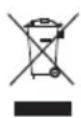
AftertheimplementationoftheEuropean Directives2012/19/EUand2006/66/EUinthe nationallegalsystem,thefollowingapplies: Electricalandelectronicdevicesaswellas batteriesmustnotbedisposedofwithhouseholdwaste. Consumersare o bligedbylawtoreturnelectricaland electronicdevicesaswellasbatteriestothedesignated publiccollectionpointsortothepointofsaleattheend oftheirservicelives.Detailedinformationonthistopicis definedinthenationallawsoftherespectivecountry. This presenceoftheabovesymbolontheproduct,operating instructionsorpackageindicatesthattheproductis subjecttotheseregulations.Byrecycling,reusingthe materialsorotherformsofutilisingolddevices/batteries, youare m akinganimportantcontributiontoprotecting ourenvironment.
9. Declaration of Conformity

HamaGmbH& Co KG h erebydeclaresthatthe radioequipmenttype[00054242]isincompliance withDirective2014/53/EU. ThefulltextoftheEU
declarationofconformityisavailableatthefollowing Internetaddress: www.hama.com->00054242->Downloads.
To limit exposure to electromagnetic fields

This device is intended for use a distance of least 20cm from the body of the user or persons nearby. This device must not beworn nor carried on the body.
Wskazówka— z as il anie

8. Pokynyk likvidaci
86652 Monheim/Germany
www.hama.com
Service& Support

www.hama.com

+499091502-0

The Spotify software is subject to third party licenses found here: https://www.spotify.com/connect/third-party-licenses
TheBluetooth ^® word mark and logos are registered trademarks owned by Bluetooth SIG, Inc. and any use of such marks by Hama GmbH & Co KG is under license. Other trademarks and trade names are t hoseoftheirrespectiveowners.
All listed brands are trademarks of the corresponding companies. Errors and omissions excepted, and subject to technical changes. Our general terms of delivery and payment are applied.

- Controlsanddisplays
- Note
- Importantinformation- Q quick-referenceguide:
- Explanationofwarningsymbolsandnotes
- Riskofelectricshock
- Warning
- 2.Packagecontents
- Safetyinstructions
- Warning-Batteries
- Gettingstarted
- Note- o ptimisingreception
- Note— P ownersupply
- Batteryoperation
- Switchingon
- Warning- m ainsoperation
- General notesonuse
- SwitchOn/ 0 ff/ S t a n d b y
- Navigation and control
- Volume adjustment
- 4.3Language
- Careandmaintenance
- 6.Warrantydisclaimer
- Recycling information
- Noteonenvironmentalprotection:
- Declaration of Conformity
- To limit exposure to electromagnetic fields
- Wskazówka— z as il anie
- Pokynyk likvidaci
- Service& Support
- The Spotify software is subject to third party licenses found here: https://www.spotify.com/connect/third-party-licenses
Brand : HAMA
Model : DR7USB
Category : Radio