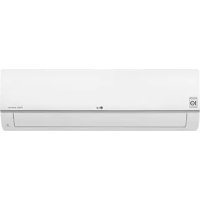
USER MANUAL PM05SP LG
Read this owner's manual thoroughly before operating the appliance and keep it handy for reference at all times.
This manual is the simplified version of original manual. You can obtain the original manual from www.lg.com.
TYPE: WALL MOUNTED
Original instruction
[Representative] LG Electronics Inc. EU Representative :
LG Electronics European Shared Service Center B.V.
Krijgsman 1, 1186 DM Amstelveen, The Netherlands
[Manufacturer] LG Electronics Tianjin Appliances Co.,Ltd.No.09,JinWei Road,
BeiChen District, Tianjin, China
TABLE OF CONTENTS
This manual is produced for a group of products and may contain images or content different from the model you purchased.
This manual is subject to revision by the manufacturer.
SAFETYINSTRUCTIONS 3
IMPORTANT SAFETY INSTRUCTIONS 4
OPERATION 9
Notes for Operation 9
Parts and Functions 9
Wireless Remote Control. 10
SAFETY INSTRUCTIONS
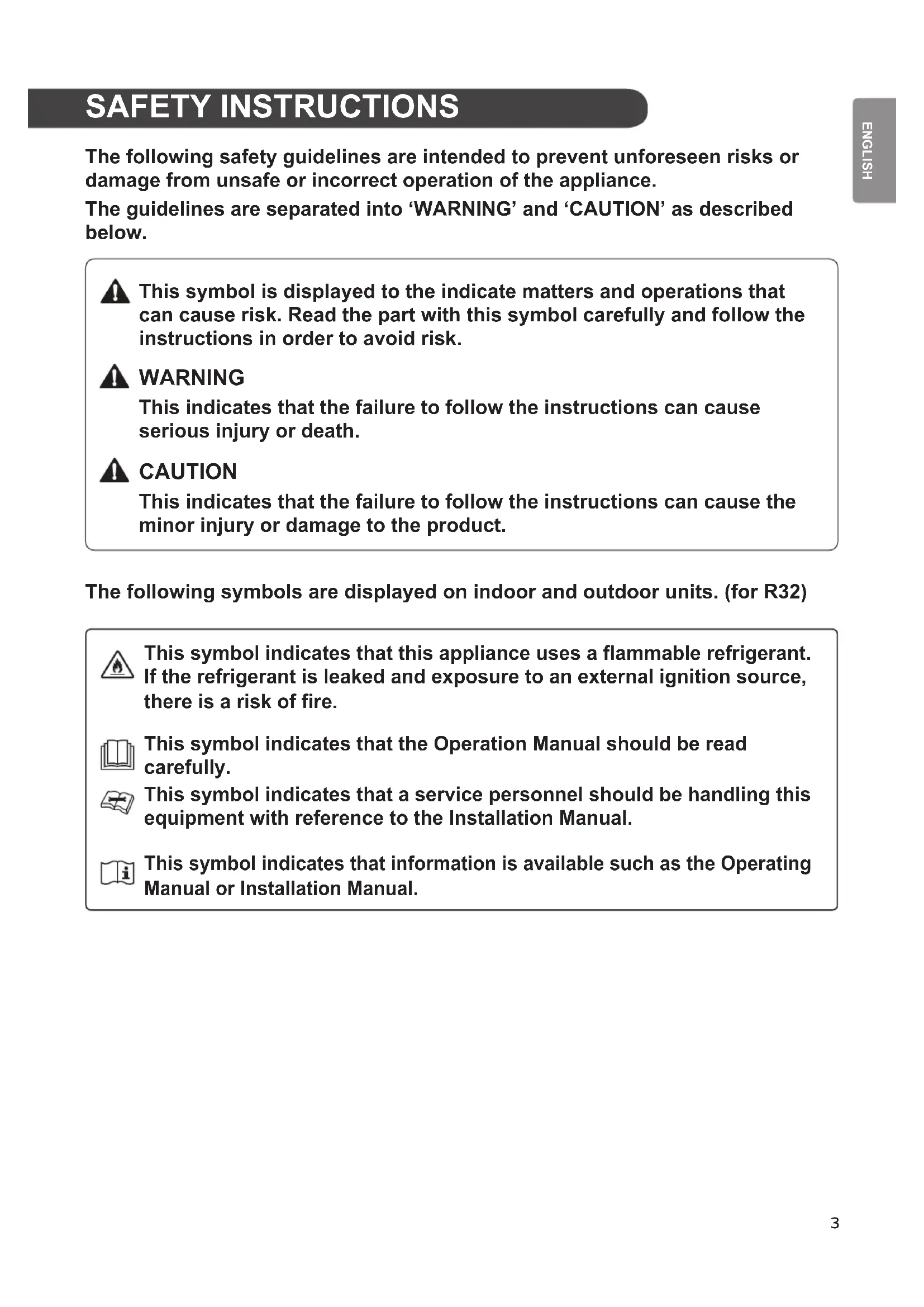
The following safety guidelines are intended to prevent unforeseen risks or damage from unsafe or incorrect operation of the appliance.
The guidelines are separated into 'WARNING' and 'CAUTION' as described below.

This symbol is displayed to the indicate matters and operations that can cause risk. Read the part with this symbol carefully and follow the instructions in order to avoid risk.

WARNING
This indicates that the failure to follow the instructions can cause serious injury or death.

CAUTION
This indicates that the failure to follow the instructions can cause the minor injury or damage to the product.
The following symbols are displayed on indoor and outdoor units. (for R32)

This symbol indicates that this appliance uses a flammable refrigerant. If the refrigerant is leaked and exposure to an external ignition source, there is a risk of fire.

This symbol indicates that the Operation Manual should be read carefully.

This symbol indicates that a service personnel should be handling this equipment with reference to the Installation Manual.

This symbol indicates that information is available such as the Operating Manual or Installation Manual.

WARNING
To reduce the risk of explosion, fire, death, electric shock, injury or scalding to persons when using this product, follow basic precautions, including the following:
Children in the Household
This appliance is not intended for use by persons (including children) with reduced physical, sensory or mental capabilities, or lack of experience and knowledge, unless they have been given supervision or instruction concerning use of the appliance by a person responsible for their safety. Children should be supervised to ensure that they do not play with the appliance.
For use in Europe:
This appliance can be used by children aged from 8 years and above and persons with reduced physical, sensory or mental capabilities or lack of experience and knowledge if they have been given supervision or instruction concerning use of the appliance in a safe way and understand the hazards involved. Children shall not play with the appliance. Cleaning and user maintenance shall not be made by children without supervision.
Installation
- Do not install the air conditioner on an unstable surface or in a place where there is danger of it falling.
- Contact an authorized service center when installing or relocating the air conditioner.
Install the panel and the cover of the control box safely.
Do not install the air conditioner in a place where flammable liquids or gases such as gasoline, propane, paint thinner, etc., are stored.
- Make sure that the pipe and the power cable connecting the indoor and outdoor units are not pulled too tight when installing the air conditioner.
- Use standard circuit breaker and fuse that conform to the rating of the air conditioner.
Do refrigerant or gas into the system except with the specific
Use non-flammable gas (nitrogen) to check for leak and to purge air; using compressed air or flammable gas may cause fire or explosion.
- The indoor/outdoor wiring connections must be secured tightly, and the cable should be routed properly so that there is no force pulling the cable from the connection terminals. Improper or loose connections can cause heat generation or fire.
- Install dedicated electric outlet and circuit breaker before using the air conditioner.
- Do not connect the ground wire to a gas pipe, a lightning rod, or a telephone ground wire.
- Keep any required ventilation openings clear of obstruction.
Operation
- Be sure to use only those parts listed in the service parts list. Never attempt to modify the equipment.
Make sure that children do not climb on or hit the outdoor unit.
- Dispose of the batteries in a place where there is no danger of fire.
- Use only the refrigerant specified on the air conditioner label.
- Cut off the power supply if there is any noise, smell, or smoke coming from the air conditioner.
Do thinne flammable substances such as gasoline, benzene, or the air conditioner.
- Contact an authorized service center when the air conditioner is submerged by flood waters.
- Do not use the air conditioner for an extended period time in a small place without proper ventilation.
- In the event of a gas leak (such as Freon, propane gas, gas, etc.) ventilate sufficiently before using the air conditioner again.
- To clean the interior, contact an authorized service center or dealer. Using harsh detergents may cause corrosion or damage to the unit.
Be sure to ventilate sufficiently when the air conditioner and a heating appliance such as a heater are used simultaneously.
Do not block the inlet or outlet of air flow.
- Do not insert hands or other objects through the air inlet or outlet while the air conditioner is operating.
Make sure that the power cable is neither dirty, loose, nor broken.
- Never touch, operate, or repair the air conditioner with wet hands.
- Do not place any objects on the power cable.
- Do not place a heater or other heating appliances near the power cable.
- Do not modify or extend the power cable. Scratches or peeling insulation on the power cables may result in fire or electric shock, and should be replaced.
- Cut off the power supply immediately in the event of a blackout or a thunderstorm.
- Take care to ensure that power cable could not be pulled out or damaged during operation.
- Do not touch refrigerant pipe, water pipe and any internal parts while the unit is operating or immediately after operation.
Maintenance
- Do not clean the appliance by spraying water directly onto the product.
- Before cleaning or performing maintenance, disconnect the power supply and wait until the fan stops.
Technical Safety
- Installation or repairs made by unauthorized persons can pose hazards to you and others.
- Any person who is involved with working on or breaking into a refrigerant circuit should hold a current valid certificate from an industry-accredited assessment authority, which authorizes their competence to handle refrigerants safely in accordance with an industry recognized assessment specification. (for R32)
Servicing shall only be performed as recommended by the equipment manufacturer. Maintenance and repair requiring the assistance of other skilled personnel shall be carried out under the supervision of the person competent in the use of flammable refrigerants. (for R32).
-
The information contained in the manual is intended for use by qualified service technician who is familiar with the safety procedures and equipped with the proper tools and test instruments.
-
Failure to read and follow all instructions in this manual can result in equipment malfunction, property damage, personal injury and/or death.
- The appliance shall be installed in accordance with national wiring regulations.
- When the power cord is to be replaced, the replacement work shall be performed by authorized personnel using only genuine replacement parts.
-
This appliance must be properly grounded to minimize risk of electric shock.
-
Do not cut or remove the grounding prong from the power plug.
-
Attaching the adapter ground terminal to the wall receptacle cover screw does not ground the appliance unless the cover screw is metal, uninsulated, and the wall receptacle is grounded through house wiring.
-
If you have any doubt whether the air conditioner is properly grounded, have the wall receptacle and circuit checked by a qualified electrician.
- The refrigerant and insulation blowing gas used in the appliance require special disposal procedures. Consult a service agent or a similarly qualified person before disposing of them.
- If the supply cord is damaged, it must be replaced by the manufacturer or its service agents or similarly qualified person in order to avoid a hazard.
- The appliance shall be stored in a well-ventilated area where the room size corresponds to the room area as specified for operation. (for R32)
- The appliance shall be stored in a room without continuously operating open flames (for example an operating gas appliance) and ignition sources (for example an operating electric heater).
- The appliance shall be stored so as to prevent mechanical damage from occurring.

CAUTION
To reduce the risk of minor injury to persons, malfunction, or damage to the product or property when using this product, follow basic precautions, including the following:
Installation
- Do not install the air conditioner in an area where it is directly exposed to sea wind(salt spray).
- Install the drain hose properly for the smooth drainage of water condensation.
Exercise caution when unpacking or installing the air conditioner.
- Do not touch the leaking refrigerant during installation or repair.
- Transport the air conditioner with two or more people or use a forklift.
- Install the outdoor unit such that it is protected from direct sunlight. Do not place the indoor unit in a place where it is directly exposed to sunlight via the windows.
- Safely dispose of packing materials such as screws, nails or batteries using proper packaging after installation or repair.
- Install the air conditioner in a place where the noise from the outdoor unit or the exhaust fumes will not inconvenience the neighbors. Failure to do so may result in conflict with the neighbors.
-
If anyone other than a licensed Professional installs, repairs, or alters LG Electronics Air Conditioning Products, the warranty is voided.
-
All costs associated with repair are then the full responsibility of the owner.
-
Do not install the unit in potentially explosive atmospheres.
Operation
- Remove the batteries if the remote control is not to be used for an extended period of time.
Make sure that the filter is installed before operating the air conditioner.
-
Be sure to check if there is a refrigerant leak after installing or repairing the air conditioner.
-
Do not place any object on the air conditioner.
-
Never mix different types of batteries, or old and new batteries for the remote control.
-
Do not let the air conditioner run for a long time when humidity is very high or when a door or a window has been left open.
Stoperyirlg ybarrelotbescontrol if there is a fluid leak in the ba or skin are exposed to the leaking battery fluid, wash off with clean water.
- Do not expose people, animals, or plants to the cold or hot wind from the air conditioner for extended periods of time.
If the leaking battery fluid has been swallowed, wash off the inside of the mouth thoroughly and consult a doctor.
-
Do not drink the water drained from the air conditioner.
-
Do not use the product for special purposes, such as preserving foods, works of art, and etc. It is an air conditioner for consumer purposes, not a precision refrigeration system. There is risk of damage or loss of property.
-
Do not recharge or disassemble the batteries.
Maintenance
-
Never touch the metal parts of the air conditioner when removethe air filter.
-
Use a sturdy stool or ladder when cleaning, maintaining, or repairing the air conditioner at a height.
-
Never use strong cleaning agents or solvents when cleaning the air conditioner or spray water. Use a smooth cloth.
OPERATION
Notes for Operation
Suggestion for Energy Saving
- Do not cool excessively indoors. This may be harmful for your health and may consume more electricity.
- Block sunlight with blinds or curtains while you are operating the air conditioner.
- Keep doors or windows closed tightly while you are operating the air conditioner.
Adjust the direction of the air flow vertically or horizontally to circulate indoor air.
- Speed up the fan to cool or warm indoor air quickly, within a short period of time.
- Open windows regularly for ventilation. The indoor air quality may deteriorate if the air conditioner is used for long durations.
Clean the air filter once every 2 weeks. Dust and impurities collected in the air filter may block the air flow or reduce the unit performance.
Parts and Functions
Indoor Unit Outdoor Unit
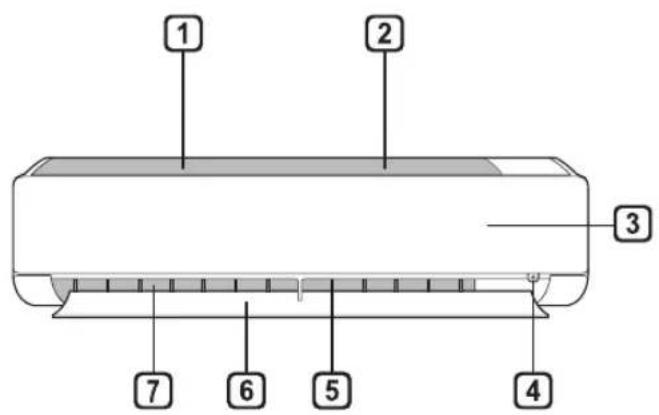
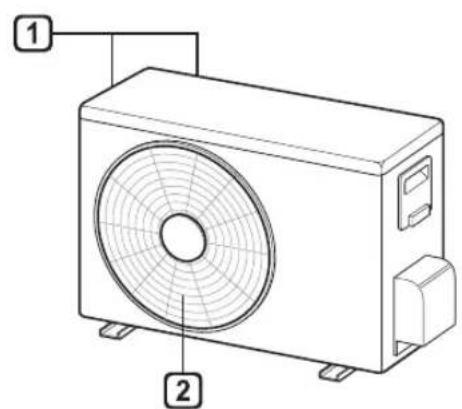
Air Filter
Air Intake
3 Front Cover
4 On/Off Button
5 Air Deflector (Vertical louver)
6 Air Deflector (Horizontal vane)
Air Outlet
Air Intake Vents
Air Outlet Vents
NOTE
- The number and location of operation lamps may vary according to the model of the air conditioner.
The feature may be changed according to the type of model.
Wireless Remote Control
Inserting Batteries
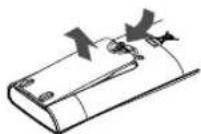
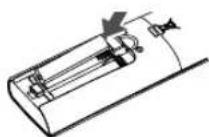
If the display screen of the remote control begins to fade, replace the batteries. Insert AAA (1.5 V) batteries before using the remote control.
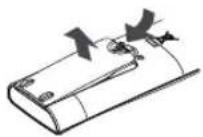
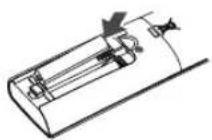
1 Remove the battery cover.
2 Insert the new batteries and make sure that the + and - terminals of the batteries are installed correctly.
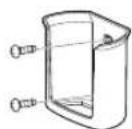
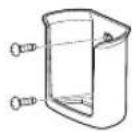
Installing the Remote Control Holder
To protect the remote control, install the holder where there is no direct sunlight.
1 Choose a safe and easily accessible location.
Fix the holder by fastening 2 screws firmly with a screwdriver.
Operating method
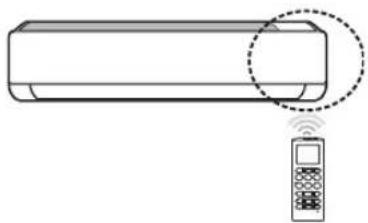
Point the remote control towards the signal receiver at the right side of the air conditioner to operate it.

NOTE
- The remote control may operate other electronic devices if it is directed towards them. Make sure to point the remote control towards the air conditioner signal receiver.
- For proper operation, use a soft cloth to clean the signal transmitter and receiver.
- In case of a function not provided in the product, no buzzer sound occurs from the product when a button for such function on the remote control is pressed except for Air Flow Direction (SWING), Energy Display (WDS), Air Purification function (P)
Setting the Current Time
1 Insert batteries.
- The icon below blinks at the bottom of the display screen.

2 Press or button to select the minutes.
3 Press SET/CANCEL button to finish.
NOTE
- The On/Off Timer is available after setting the current time.
Using the ° C / °F Conversion Function(Optional)
This function changes unit between ° C and ° F .
Press and hold button about 5 seconds.
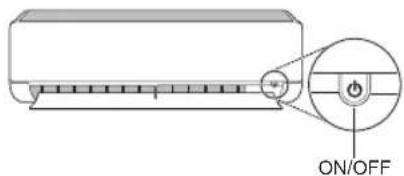
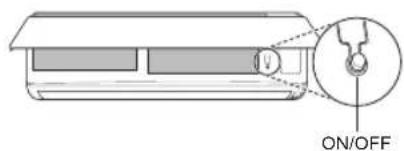
Operating the Air Conditioner Without the Remote Control
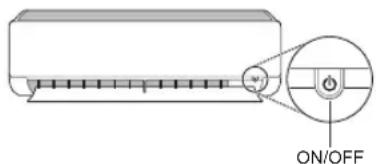
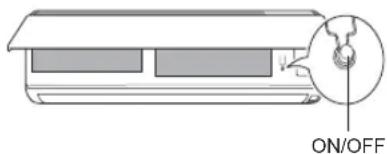
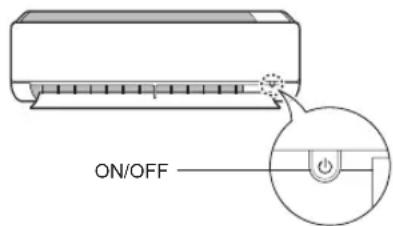
You can use the ON/OFF button of the indoor unit to operate the air conditioner when the remote control is unavailable.
1 Open the front cover (Type1) or horizontal vane(Type2).
2 Press the ON/OFF button.
Type1
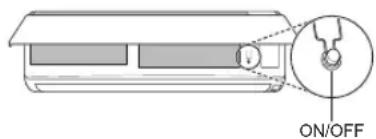
Type2
NOTE
- The stepping motor may be broken, if the horizontal vane opens rapidly.
The fan speed is set to high.
- The feature may be changed according to the type of model.
- The temperature cannot be altered when using this emergency On/Off button.
- For cooling & heating models, the temperature is set from 22°C to 24°C .
Using Wireless Remote Control
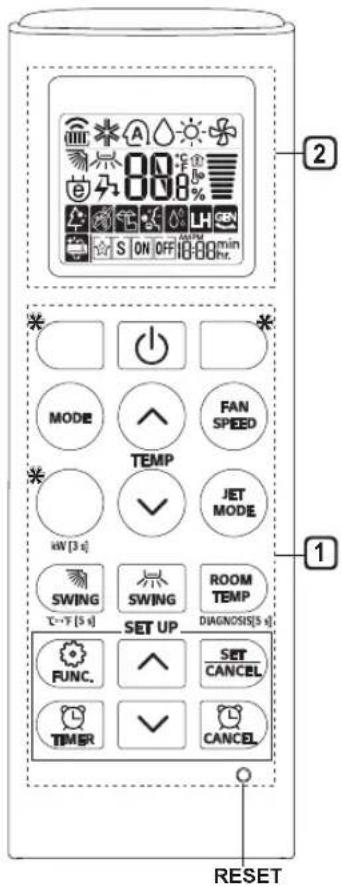
You can operate the air conditioner more conveniently with the remote control.
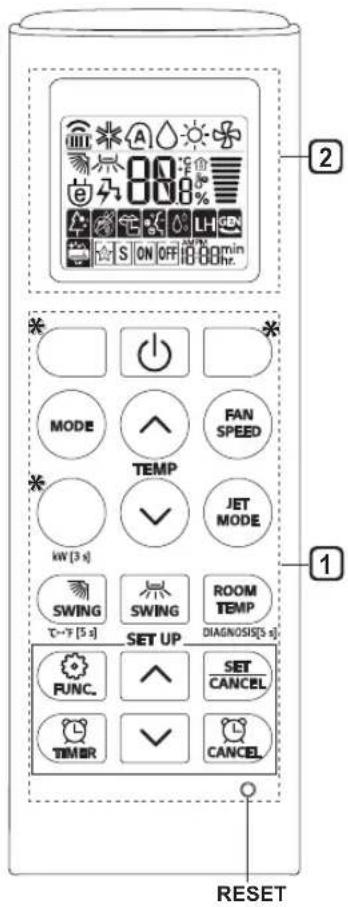
| 1 Button | 2 Display Screen | Description | Available Function |
| Single Split | Multi |
| - | To turn on/off the air conditioner. | ○ | ○ |
| TEMP | 88°C | To adjust the desired room temperature in cooling, heating or auto changeover mode. | ○ | ○ |
| MODE | ※ | To select the cooling mode.○ | ○ | |
| ○ | To select the heating mode.○ | ○ | |
| △ | To select the dehumidification mode. | ○ | ○ |
| ※ | To select the fan mode.○○ | | |
| A | To select the auto changeover/auto operation mode. | ○ | ○ |
| JET MODE | Po | To change room temperature quickly. | ○ | ○ |
| FAN SPEED | | To adjust the fan speed.○○ | | |
| SWING SWING | | To adjust the air flow direction vertically or horizontally. | ○ | ○ |
NOTE
-
- buttons may be changed according to the type of model.
- When connected to the Multi Outdoor unit, the Energy Display, Energy Control, Silent and Smart Diagnosis function may not be supported.
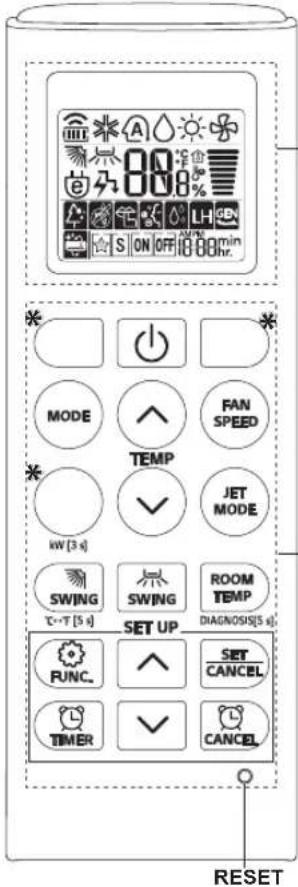
2
| 1 Button | 2 Display Screen | Description | Available Function |
| Single Split | Multi |
| | To turn on/off air conditioner automatically at desired time. | ○ | ○ |
| SET/CANCEL | | To set/cancel the special functions and timer. | ○ | ○ |
| - To cancel the timer settings. ○○ | | | |
| - To adjust time. ○○ | | | |
| *LIGHT OFF | | To set the brightness of the display on the indoor unit. | ○ | ○ |
| ROOM TEMP | | To display the room temperature. | ○ | ○ |
| °C←°F[5 s] | °C F | To change unit between °C and °F. | ○ | ○ |
| *COMFORT AIR | | To adjust the air flow to deflect wind. | ○ | ○ |
| kW[3 s] - | | To set whether or not to display information regarding energy. | ○× | |
| *ENERGY CTRL | 88% | To bring the effect of the power saving. | ○× | |
| DIAGNOSIS [5 s] | | To conveniently check maintenance information of a product. | ○× | |
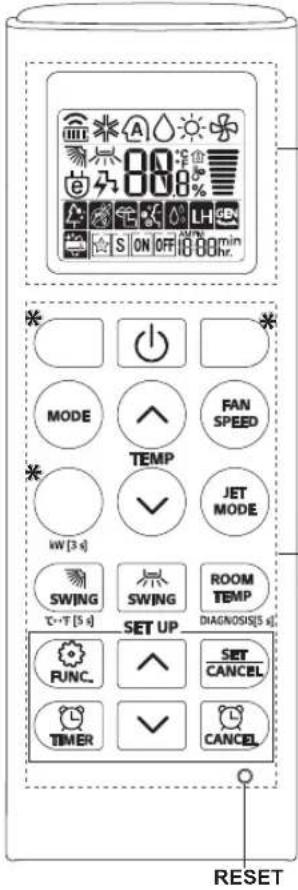
2
| Button | 2 Display Screen | Description | Available Function |
| Single Split | Multi |
| FUNC. | | To purify the air by removing particles that enters the indoor unit. | ○ (Optional) | ○ (Optional) |
| To reduce noise from outdoor units. | ○ × | |
| To remove moisture generated inside the indoor unit. | ○ | ○ |
| RESET - | | To Initialize the remote control settings. | ○ | ○ |
NOTE
- Some functions may not be supported, depending on the model.
-
- buttons may be changed according to the type of model.
- Press the SET/CANCEL button to operate the selected FUNC.
Restarting the Air Conditioner Automatically
When the air conditioner is turned on again after a power failure, this function restores the previous settings.
Disabling Auto Restart
1 Open the front cover (Type2) or horizontal vane (Type1).
2 Press the ON/OFF button and hold it for 6 seconds, then the unit will beep twice and the lamp will blink twice 4 times.
To re-enable the function, press the ON/OFF button and hold it for 6 seconds. The unit will beep twice and the lamp will blink 4 times.
Type1
Type2
NOTE
The feature may be changed according to the type of model.
- If you press and hold the ON/OFF button for 3 - 5 seconds, instead of 6 seconds, the unit will switch to the test operation. In the test operation, the unit blows out strong cooling air for 18 minutes and then returns to factory default settings.
Using the Mode Function
This function allows you to select the desired function.
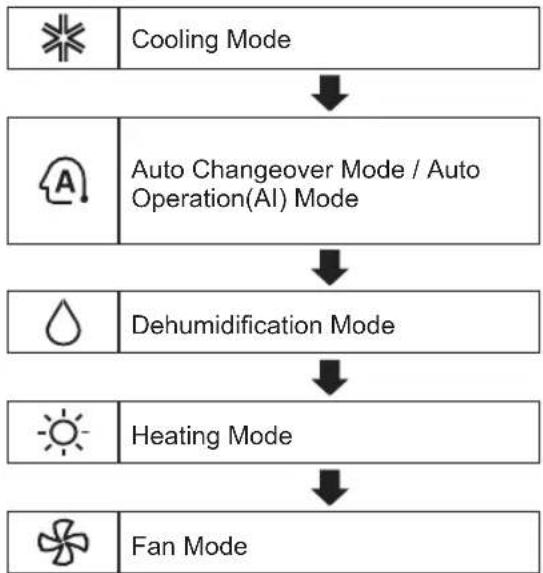
Cooling Mode
1 Turn the appliance on.
2 Press MODE button repeatedly to select the Cooling Mode.
is displayed on the display screen.
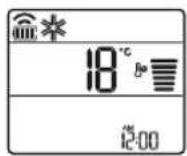
3 Press or button to set the desired temperature.
Auto Operation (Artificial Intelligence)
Multi Model
In this operation mode, the system is automatically operated by the electronic controls.
1 Turn the appliance on.
2 Press MODE button repeatedly to select the Auto Operation.
A is displayed on the display screen.
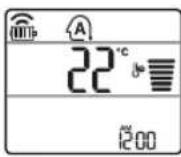
3 Press or button to set the desired temperature.
4 Press FAN SPEED button to adjust the fan speed.
Auto Changeover Mode
Single Split Model
This mode changes the mode automatically to maintain the set temperature at ± 2°C
1 Turn the appliance on.
2 Press MODE button repeatedly to select the Auto Changeover Mode.
A is displayed on the display screen.
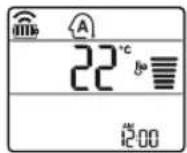
3 Press or button to set the desired temperature.
4 Press FAN SPEED button to adjust the fan speed.
Dehumidification Mode
This mode removes excess moisture from a highly humid environment or during the rainy season, in order to prevent mildew from setting in. This mode adjusts the room temperature and the fan speed automatically to maintain the optimal level of humidity.
1 Turn the appliance on.
2 Press MODE button repeatedly to select the Dehumidification Mode.
is displayed on the display screen.
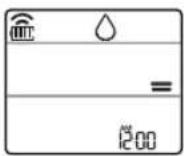
NOTE
- In this mode you cannot adjust the room temperature, it is adjusted automatically.
- The room temperature is not displayed on the display screen.
- In the dehumidification mode, compressor and indoor fan may not operate when the room temperature is below 24°C
Heating Mode
1 Turn the appliance on.
2 Press MODE button repeatedly to select the Heating Mode.
is displayed on the display screen.
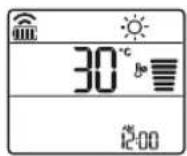
3 Press or button to set the desired temperature.
NOTE
will be displayed on the indoor unit when defrosting is operating.
- Furthermore, this indication will be displayed on the indoor unit:
- When preheating is operating.
- When the room temperature has been reached to the set temperature.
Fan Mode
This mode only circulates the indoor air without changing the room temperature.
1 Turn the appliance on.
2 Press MODE button repeatedly to select the Fan Mode.
is displayed on the display screen.
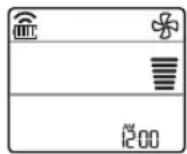
3 Press FAN SPEED button to adjust the fan speed.
Using the Jet Mode Function
Changing Room Temperature Quickly
This function allows you to cool indoor air quickly during the summer or warm it quickly during winter.
- The Jet Mode function is available with Cooling, Heating and Dehumidification Mode.
1 Turn the appliance on.
2 Press MODE button repeatedly to select the desired mode.
3 Press JET MODE button.
0 is displayed on the display screen.
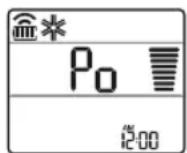
NOTE
- Jet Heating Mode is not available on some models.
In Jet Cooling Mode, strong air blows out for 30 minutes.
After 30 minutes later, setting temperature is maintaining 18°C
If you want to change the temperature, Press
or button to set the desired temperature.
- In Jet Heating Mode, strong air blows out for 30 minutes.
After 30 minutes later, setting temperature is maintaining 30°C
If you want to change the temperature, Press
or button to set the desired temperature.
- This function may operate differently from the remote control display.
Using the Fan Speed Function
Adjusting the Fan Speed
- Press FAN SPEED button repeatedly to adjust the fan speed.
| Display Screen Speed |
| High |
| Medium - High |
| Medium |
| Medium - Low |
| Low |
| - Natural Wind |
NOTE
- The fan speed of Natural Wind adjusts automatically.
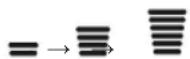
- The fan speed icons are displayed on some indoor units.

- Indoor unit display is displayed only 5 seconds and return to the setting temperature on some models.
Using the Air Flow Direction Function
This function adjusts the direction of the air flow vertically (horizontally).
NOTE
- Adjusting the air flow direction horizontally may not be supported, depending on the model.
- Adjusting the air deflector arbitrarily may cause product failure.
- If you restart the air conditioner, it starts to operate with the previously set direction of air flow, so the air deflector may not match the icon displayed on the remote control. When this occurs, press SWING or SWING button to adjust the direction of the air flow again.
- This function may operate differently from the remote control display.
Setting the On/Off Timer
This function sets the air conditioner to turn on/ off automatically at desired time.
On/Off Timer can be set together.
Setting the On Timer
1 Press button repeatedly.
- The icon below blinks at the bottom of the display screen.
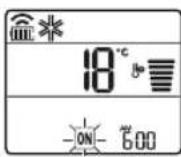
2 Press button to select the minutes.
3 Press SET/CANCEL button to finish.
After setting the timer, current time and ON icon are displayed on the display screen indicating that the desired time is set.
Canceling the On Timer
1 Press button repeatedly.
- The icon below blinks at the bottom of the display screen.
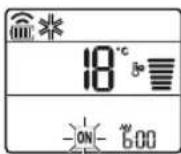
2 Press SET/CANCEL button to cancel the setting.
Setting the Off Timer
1 Press button repeatedly.
- The icon below blinks at the bottom of the display screen.
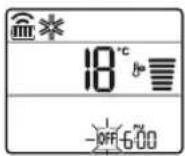
2 Press button to select the minutes.
3 Press SET/CANCEL button to finish.
After setting the timer, current time and OFF icon are displayed on the display screen indicating that the desired time is set.
NOTE
- This function is disabled when you set Simple Timer.
Canceling the Off Timer
1 Press TmTER button repeatedly.
- The icon below blinks at the bottom of the display screen.
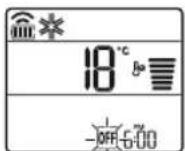
2 Press SET/CANCEL button to cancel the setting.
Canceling the Timer Setting
- Press button to cancel all timer settings.
Using the Sleep Function (Optional)
This function turns off the air conditioner automatically when you go to sleep.
1 Turn the appliance on.
2 Press button repeatedly.
- The icon below blinks at the bottom of the display screen.
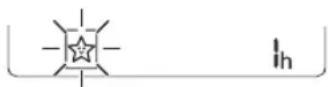
3 Press or button to select the hour (up to 7 hours).
4 Press SET/CANCEL button to finish.
is displayed on the display screen.
NOTE
is displayed on some indoor units.
- Indoor unit display is displayed from 1H to 7H which is displayed only 5 seconds and then return to the setting temperature.
- In the Cooling and Dehumidification Mode, the temperature increases by 1°C after 30 minutes and additional 1°C after another 30 minutes for a more comfortable sleep.
- The temperature increases up to 2°C from the preset temperature.
- Although the remark for fan speed on the display screen may be changed, the fan speed is adjusted automatically.
Using the Simple Timer Function (Optional)
This function turns off the air conditioner automatically when you go to sleep.
1 Turn the appliance on.
2 Press button repeatedly.
- The icon below blinks at the bottom of the display screen.
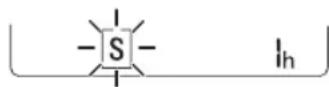
3 Press or button to select the hour (up to 7 hours).
4 Press SET/CANCEL button to finish.
is displayed on the display screen.
NOTE
- This function is disabled when you set Off Timer.
Using the Energy Display Function (Optional)
This function displays the amount of electricity generated on the indoor display as the product operates.
Display the Current Energy Usage
1 Turn the appliance on.
2 Press button and hold it about 3 seconds.
The instantaneous power consumption (88) is displayed for a while on some indoor units.
NOTE
It is not displayed on the wireless remote control.
The unit of the displayed value is kW.
If it is more than 99kW which is the range of expression, maintain it as 99kW .
- Display wattage under 10kW with 0.1kW unit, and display one over 10kW with 1kW unit.
- The actual power may differ from the power displayed.
- When connected to the Multi Outdoor unit, this function may not be supported.
Using the Light Off Function (Optional)
Display Screen Brightness
You can set the brightness of the indoor unit display screen.
NOTE
- Turn on/off the Display screen.
Using the Comfort Air Function (Optional)
Comfort Vane Operation
This function conveniently sets the vane to a preset position to deflect the supply air away from blowing directly onto the occupants in the room.
1 Turn the appliance on.
2 Press COMFORT AIR button repeatedly and select the desired direction.
or is displayed on the display screen.
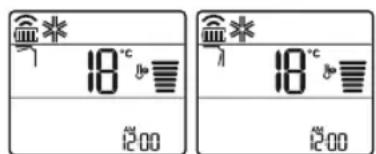
NOTE
or lis displayed on some indoor units.
This function is disabled when you press MODE or JET MODE button.
This function is disabled and auto swing of vertical direction is set up when you press button.
- When this function is off, the horizontal vane operates automatically depending on the set mode.
Using the Energy Control Function (Optional)
1 Turn the appliance on.
2 Press ENERGY CTRL button.
- Press ENERGY CTRL button repeatedly to select each step.
| 1 step 2 step | 3 step | |
| 80 % | 60 % | 40 % |
| 200 | 200 | 200 |
NOTE
- 1 step: The power input is decreased by 20% compared to rated power input.
80 is displayed on the display screen.
- 2 step : The power Input is decreased by 40% compared to rated power input.
60 is displayed on the display screen.
- 3 step (Optional): The power Input is decreased by 60% compared to rated power input.
40 is displayed on the display screen.
(1 step), (2 step), (3 step) is displayed on some indoor units.
(1 step), (2 step) is displayed on some indoor units.)
- This function is available with Cooling Mode.
- Capacity may decrease when Energy Control mode is selected.
- Desired temperature is displayed about 5 seconds if you press FAN SPEED, or button.
- Room temperature is displayed about 5 seconds if you press ROOM TEMP button.
- When connected to the Multi Outdoor unit, this function may not be supported.
Using Special Functions
1 Turn the appliance on.
2 Press FUNC button repeatedly to select the desired function.
3 Press SET/CANCEL button to finish.
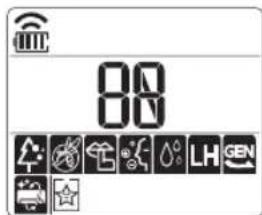
| Display Screen | Description |
| The Ion generator uses millions of ions to help improve indoor air quality. |
| To reduce noise from outdoor units. |
| To remove moisture generated inside the indoor unit. |
NOTE
- Some functions may not be supported, depending on the model.
- Some functions may operate differently from the remote control display.
SMART FUNCTIONS
LG ThinQ Application
This feature is only available on models with the or ThinQ logo.
The LG ThinQ application allows you to communicate with the appliance using a smartphone.
LG ThinQ Application Features
Communicate with the appliance from a smartphone using the convenient smart features.
Smart Diagnosis
- If you experience a problem while using the appliance, this smart diagnosis feature will help you diagnose the problem.
Settings
- Allows you to set various options on the appliance and in the application.
NOTE
- If you change your wireless router, internet service provider, or password, delete the registered appliance from the LG ThinQ application and register it again.
- The application is subject to change for appliance improvement purposes without notice to users.
- Functions may vary by model.
Before Using LG ThinQ Application
1 Check the distance between the appliance and the wireless router (Wi-Fi network).
- If the distance between the appliance and the wireless router is too far, the signal strength becomes weak. It may take a long time to register or installation may fail.
2 Turn off the Mobile data or Cellular Data on your smartphone.

3 Connect your smartphone to the wireless router.
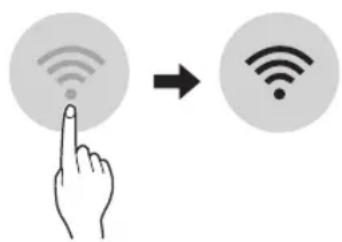
NOTE
To verify the Wi-Fi connection, check that icon on the control panel is lit.
- The appliance supports 2.4 GHz Wi-Fi networks only. To check your network frequency, contact your Internet service provider or refer to your wireless router manual.
LG ThinQ is not responsible for any network connection problems or any faults, malfunctions, or errors caused by network connection.
- If the appliance is having trouble connecting the Wi-Fi network, it may be too far from the router. Purchase a Wi-Fi repeater (range extender) to improve the Wi-Fi signal strength.
- The Wi-Fi connection may not connect or may be interrupted because of the home network environment.
- The network connection may not work properly depending on the Internet service provider.
-
The surrounding wireless environment can make the wireless network service run slowly.
-
The appliance cannot be registered due to problems with the wireless signal transmission. Unplug the appliance and wait about a minute before trying again.
- If the firewall on your wireless router is enabled, disable the firewall or add an exception to it.
- The wireless network name (SSID) should be a combination of English letters and numbers. (Do not use special characters.)
- Smartphone user interface (UI) may vary depending on the mobile operating system (OS) and the manufacturer.
- If the security protocol of the router is set to WEP, you may fail to set up the network. Please change it to other security protocols (WPA2 is recommended) and register the product again.
Installing the LG ThinQ Application
Search for the LG ThinQ application from the Google Play Store or Apple App Store on a smartphone. Follow instructions to download and install the application.
To obtain the source code under GPL, LGPL, MPL, and other open source licenses, that is contained in this product, please visit http:// opensource.lge.com.
In addition to the source code, all referred license terms, warranty disclaimers and copyright notices are available for download.
LG Electronics will also provide open source code to you on CD-ROM for a charge covering the cost of performing such distribution (such as the cost of media, shipping, and handling) upon email request to opensource@lge.com. This offer is valid for a period of three years after our last shipment of this product. This offer is valid to anyone in receipt of this information.
Smart Diagnosis
This feature is only available on models with the or go.
Use this feature to help you diagnose and solve problems with your appliance.
NOTE
-
For reasons not attributable to LGE's negligence, the service may not operate due to external factors such as, but not limited to, Wi-Fi unavailability, Wi-Fi disconnection, local app store policy, or app unavailability.
-
The feature may be subject to change without prior notice and may have a different form depending on where you are located.
Using LG ThinQ to Diagnose Issues
If you experience a problem with your Wi-Fi equipped appliance, it can transmit troubleshooting data to a smartphone using the LG ThinQ application.
- Launch the LG ThinQ application and select the Smart Diagnosis feature in the menu. Follow the instructions provided in the LG ThinQ application.
Using Audible Diagnosis to Diagnose Issues
Follow the instructions below to use the audible diagnosis method.
- Launch the LG ThinQ application and select the Smart Diagnosis feature in the menu. Follow the instructions for audible diagnosis provided in the LG ThinQ application.
Plug the power plug in the outlet properly.
2 Place the mouthpiece of your smartphone close to the logit
3 Press and hold the DIAGNOSIS [5 s] button for 5 seconds or longer while holding the smartphone mouthpiece to the logo until the data transfer is complete.
- Keep the smartphone in place until the data transfer has finished. Time remaining for data transfer is displayed.
4 After the data transfer is complete, the diagnosis will be displayed in the application.
NOTE
- For best results, do not move the phone while the tones are being transmitted.
- Be sure to keep ambient noise to a minimum or the phone may not correctly receive the buzzer beeps from the indoor unit.
MAINTENANCE
WARNING
- Before cleaning or performing maintenance, disconnect the power supply and wait until the fan stops.
If the air conditioner will not be used for an extended period of time, dry the air conditioner to maintain it in best condition. Clean the product regularly to maintain optimal performance and to prevent possible breakdown.
- Dry the air conditioner in Fan mode for 3 to 4 hours and disconnect the power. There may be internal damage if moisture is left in its components.
- Before using the air conditioner again, dry the inner components of the air conditioner in Fan mode for 3 to 4 hours. This will help to remove the odor generated from moisture.
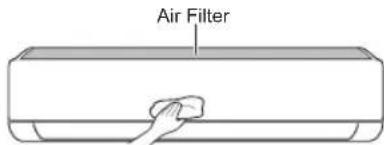
The feature may be changed according to the type of model.
| Type Description | Option Interval | |
| Air filter Clean with a vacuum or hand wash. 2 weeks | |
| Ionizer (Optional) | Use dry cotton bud to remove any dust. Every 6 months | |
| Indoor unit | Clean the Indoor unit surface by using a soft, dry cloth. Regularly Have a professional clean the condensate drain pan. Once a year Have a professional clean the condensate drain pipe. Every 4 months Replace the remote control batteries. Once a year | |
| Outdoor unit | Have a professional clean the heat exchanger coils and the panel vents. (Consult with technician.) Have a professional clean the fan. Once a year Have a professional clean the condensate drain pan. Once a year Have a professional verify that all the fan assembly is firmly tightened. Clean the electric components with air. Once a year | Once a year |
| year |
| Once a year |
NOTE
- Never use water that is higher than 40°C when you clean the filters. It may cause deformation or discoloration.
- Never use volatile substances when you clean the filters. They may damage the surface of the product.
Clean the Air Filter
Clean the air filters once every 2 weeks, or more, if necessary.
NOTE
The air filter can be broken when it is bent.
- When the air filter is not assembled correctly, dust and other substances can enter into the indoor unit.
Type1
If you look at the indoor unit from above it, can assemble the top filter easily.
1 Turn off the power to the unit.
2 Hold the knobs of the air filter, lift it up slightly.
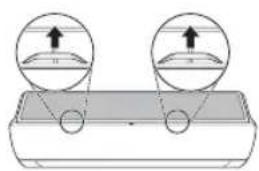
3 Remove it from the indoor unit.
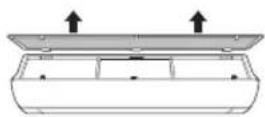
4 Clean the filter with a vacuum cleaner or with lukewarm water with neutral detergent.
5 Dry the filter in the shade.
6 Insert the hooks of the air filter into the front cover.
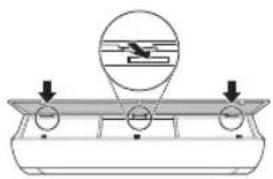
7 Push down hooks to assemble the air filter.
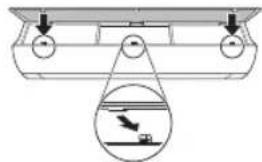
8 Check the side of the front cover for correct assembly of the air filter.
Type2
1 Turn off the power to the unit.
2 Open the front cover.
- Lift up both sides of the cover slightly.
3 Hold the knobs of the air filters, pull them down slightly and remove them from the indoor unit.
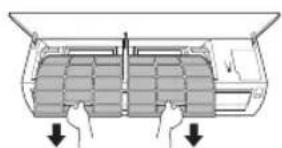
4 Clean the filters with a vacuum cleaner or with lukewarm water with neutral detergent.
5 Dry the filters in the shade.
6 Insert the hooks of the air filters into the front cover.
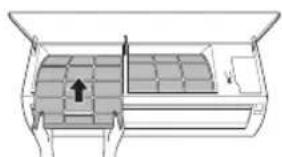
7 Check the side of the front cover for correct assembly of the air filters.
TROUBLESHOOTING
Self-diagnosis Function
This product has a built-in self-diagnosis function. If an error occurs, the lamp of the indoor unit will blink in 2 second intervals. If this occurs, contact your local dealer or service center.
Before Calling for Service
Please check the following before you contact the service center. If the problem persists, contact your local service center.
| Symptoms Possible Causes & Solution |
| The air conditioner does not work normally. | Burning smell and strange sounds are coming from the unit.
·Turn off the air conditioner, switch OFF, or disconnect the power supply, and contact the service center. |
| Water leaks from the indoor unit even when the humidity level is low.
·Turn off the air conditioner, switch OFF, or disconnect the power supply, and contact the service center. |
| The power cable is damaged or it is generating excessive heat.
·Turn off the air conditioner, switch OFF, or disconnect the power supply, and contact the service center. |
| A switch, a circuit breaker (safety, ground), or a fuse is not operated properly.
·Turn off the air conditioner, switch OFF, or disconnect the power supply, and contact the service center. |
| The unit generates an error code from its self-diagnosis.
·Turn off the air conditioner, switch OFF, or disconnect the power supply, and contact the service center. |
| The air conditioner does not work. | The air conditioner is unplugged.
·Check whether the power cord is plugged into the outlet dthe power isolators are switched on. |
| A fuse exploded, or the power supply is blocked.
·Replace the fuse or check if the circuit breaker has tripped. |
| A power failure has occurred.
·Turn off the air conditioner when a power failure occurs.
·When the power is restored, wait 3 minutes, and then turn on the air conditioner. |
| The voltage is too high or too low.
·Check if the circuit breaker has tripped. |
| The air conditioner was turned off automatically at a preset time.
·Turn the air conditioner on. |
| The battery setting in the remote controller is incorrect.
·Make sure that the batteries are inserted correctly in your remote controller.
·If the batteries are placed correctly, but the air conditioner still does not operate, replace the batteries and try again. |
| The air conditioner does not emit cool air. | Air is not circulating properly.
·Make sure that there are no curtains, blinds, or pieces of furniture blocking the front of the air conditioner. |
| The air filter is dirty.
·Clean the air filter once every 2 weeks.
·See “Clean the Air Filter” for more information. |
| The room temperature is too high.
·In summer, cooling the indoor air fully may take some time. In this case, select the Jet Mode to cool the indoor air quickly. |
| Cold air is escaping from the room.
·Make sure that no cold air is escaping through the ventilation points in the room. |
| The desired temperature is higher than the current temperature.
·Set the desired temperature to a level lower than the current temperature. |
| There is a heating source nearby.
·Avoid using heat generators like electric ovens or gas burners while the air conditioner is in operation. |
| Fan Mode is selected.
·During Fan Mode, air blows from the air conditioner without cooling or heating the indoor air.
·Switch the operation mode to cooling operation. |
| Outside temperature is too high.
·The cooling effect may not be sufficient. |
| The fan speed cannot be adjusted. | The Jet Mode, or Auto Operation Mode is selected.
·In some operation modes, you cannot adjust the fan speed. Select an operation mode in which you can adjust the fan speed. |
| The temperature cannot be adjusted. | The Fan Mode or Jet Mode is selected.
·In some operation modes, you cannot adjust the temperature. Select an operation mode in which you can adjust the temperature. |
| The air conditioner stops during operation. | The air conditioner is suddenly turned off.
·The Timer Function may have timed out, which turns the unit off. Check the timer settings. |
| A power failure has occurred during operation.
·Wait for the power to come back. If you have the Auto Restart function enabled, your unit will resume its last operation several minutes after power is restored. |
| The indoor unit is still operating even when the unit has been turned off. The air outlet on the indoor unit is discharging mist. |
| Water leaks from the outdoor unit. |
| There is noise or vibration. |
| The indoor unit gives off an odor. |
| The air conditioner does not emit warm air. |
|
|
|
|
|
|
|
|
|
|
|
|
|
|
|
|
|
|
|
|
|
|
|
|
|
|
|
|
|
|
|
|
|
|
|
|
|
|
|
|
|
|
|
|
|
|
|
|
|
|
|
|
|
|
|
|
|
|
|
|
|
|
|
|
|
|
|
|
|
|
|
|
|
|
|
|
|
|
|
|
|
|
|
|
|
|
|
|
|
|
|
|
|
|
|
|
|
|
|
|
|
|
|
|
|
|
|
|
|
|
|
|
|
|
|
|
|
|
|
| Symptoms Possible Causes & Solution |
| Your home appliance and smartphone is not connected to the Wi-Fi network. | The password for the Wi-Fi that you are trying to connect to is incorrect.
• Find the Wi-Fi network connected to your smartphone and remove it, then register your appliance on LG ThinQ. |
| Mobile data for your smartphone is turned on.
• Turn off the Mobile data of your smartphone and register the appliance using the Wi-Fi network. |
| The wireless network name (SSID) is set incorrectly.
• The wireless network name (SSID) should be a combination of English letters and numbers. (Do not use special characters.) |
| The router frequency is not 2.4 GHz.
• Only a 2.4 GHz router frequency is supported. Set the wireless router to 2.4 GHz and connect the appliance to the wireless router. To check the router frequency, check with your Internet service provider or the router manufacturer. |
| The distance between the appliance and the router is too far.
• If the distance between the appliance and the router is too far, the signal may be weak and the connection may not be configured correctly. Move the location of the router so that it is closer to the appliance. |
NOTE
- Some functions may not be supported, depending on the model.

Telecomando wireless. 10
ISTRUZIONI PER LA SICUREZZA
PpeBOHaOpnHnHaHTo pkoBOCTBO
ToBa pBkoBoCTBO e npedHa3NayeHo 3a rpyna OT npOyKTH mOKeJa cBbPka N3o6paKeHnIu TkCT, pa3NCHN OT Te3n 3a3kyneHnOT Bac Moen.
PbKOBOcTBOTO NOIeKn Ha peaKuŋoT npOn3BOiNTeJI.
NHCTPYKcUN 3A BE3OpACHOCT 3
BaxkHn HcTpyKuMn 3a 6e3oNaChocr 4
EKCPILOATAU 9
Benejkn no ekcnnoataaeta 9
Uactn nФункuzn 9
Бezишно дstahnoHno 10
MHCTPYKUN 3A BE3OПАСHOCT
Hacokte 3a 6e3oNacHocT NO-DoIy IMaT 3a ueI da npedeOTbpaTAY HepeBndeHn pNCKOBe IIn yBpeKdaHe nopadn ONaChA IIn HnepaBnHa ynotpe6a Ha npOdykTa.
Hacoknte ca pa3deJeHn B rpaΦn ,IPEyIpeXJEHNE" n ,BHUMAHNE", KaKTo e onncHo NO-dOny.

To3n cMBoJ e n3noJ3BaH 3a nocOuBaHe Ha fakTopn ynoTpe6n, KOnto Morat da Hocr PtNCK. IpOoyTe TE BHNMaTeJHo YacCTTa, Obo3HaueHa C To3n cMBoJ, n CneDbaIe NHCtpyKcUInTe, 3a Da n36erHeTe pNCKOBe.

ПЕДУПЕЖDEHNE
ToBa noka3Ba, Ye HeCna3BaHeTo Ha HnHCTpyKcNITe MoKe Da npuHH cepno3HN HapaHЯBaHnI NJI CmbpT.

BHIMAHNE
ToBa noka3Ba, Ye HeCnA3BaHeTo Ha HNCTpyKcUInTe MoKe Da npuHnIeKn HapaHЯBaHnI NJI Da HaHece NOBpeDa npOdyKtTa.
CneHnTe CnMBoNc a noka3aHn Ha BbTppeHnTe N BbHnTe Ta. (3a R32)

To3n cnMBoJ noka3Ba, ye ypeIbT n3noJ3Ba 3aapanm XnaJInJeH areHT. Ako Ima TeU Ha xJaIINHnA areHT n TOi 6bDe n3IOXeH Ha BbHweH n3TOuHNK Ha 3aNaJBAHe, cBSeCTByBa pNCK OT NOxap.

To3n cHMBOJ noka3Ba, Ye pBkoBOdCTBOTO 3a ekCnIooataunr Tp86Ba Da 6bJe npoyeTeHO BHNMaTeJIHo.

To3n cHMBOJ noka3Ba, ye c TOBa o6OpyDbaHe Tp86Ba da pa6OTN cepBn3eH nepcoHaJ no OTHOseHne Ha pBkoBOdCTBOTO 3a INHCTaJaun.

To3n cIMBOJ noka3Ba, ye e haJIuHa HhΦopMaζη, HanpImep pBkoBoDCTBO 3a ekCnIooataζη nII npBkoBoDCTBO 3a INHcTanaζη.

PPEdYnPEXKeHne
3a da HamaJInte pIcKa OT noXap, eJIeKTpUeCKn yIap nIIHapaHЯBaHnHa Xopa npu yNoTpe6a Ha npOyKtA, Tp8Ba Da ce cna3BaT OCHOBHInTe npEpa3HN MepKn, BKNIOHTeJHO I CJeDNHe.
ДeцаВДOMaKINHCTBOTO
To3n ypei He e npedHa3HaueH 3a n3noJ3BaHe OT Xopa (BkIIOHTeJIHO deca) C OrpaHnueHn cH3nueckn, cTeHBn nIIN yMCTBeHn cNoC6HOCTn IIN JInca Ha ONIT nO3HaHn, oCBen aKO He ca HabIoDaBAHN nIIN INCTpyKTIpaHn OTHOCHO yNtpe6bata Ha ypeDa OT IINIe, OTROBOPHO 3a TExHaTa 6e3oNaChocT. DeCaTa Tp8Ba Da ce HabIoDaBat, 3a Da Ce rapaHTnpa, Ye He CN irpaTc ypeDa.
3a ynoTpe6a B Ebpona:
To3n ypeM moKe da ce n3noJ3Ba OT deca Ha Bb3pacT ha8 roDHHN IINCa C HamaJIeHn fIn3NUeCKn, ceH3OpHN IIN yMCTBeHn cNoC6HOCTN IIN IINca Ha ONIT N 3HaHnra, CTnra Da ca NOd hAbIOHeHne IIN Da IOnyuaBAt IHCTpyKcN N OTHOCHO ynotpe6bata Ha ypeDa no 6e3OanCeH NaunH, pa3bnpaIKN Bb3MOxHNTe ONaCHOCTN. DeuHa He 6nBa Da cn IrpaT C ypeDa. IOnucTBaHeTo N IOdPbXkata He 6nBa Da ce IN3BbPbWBat OT deca 6e3 HaAD3Op.
Mоntиранe
He MoHTnpaIte KInMaTnKa Bbpxy HeCTa6nHa NOBbpxHOCT Nn Ha MxCTO, OTKbTeTO MOKe Da NaHHe.
-
CBbpxeTe ce c OToPn3npaH cepBn3, KOrato MoHTnpaTe nI npemecTbaTe KInMaTuKa.
-
MoNTnpaIte 6e3oNaCHO naHeJa n KaNaKa Ha KOHTpOJHaTa KyTna.
He MoHTnpaTe KJIIMMaTnKa Ha MAcTo, KbDeTo Ce CbXpaHЯBAt 3aIaIIMn TeuHOCTn IIN Ra3OBe KaTO 6eH3nH, npOnaH, pa3peDnteN 3a 6oN iDpyrN.
-
YBepete ce, Ye Bb3dUxOBOdT N 3axpaHbAunr Ka6eN, Cbbp3BaUnn BbTpewHOTO IN BbHshHOT TAno, He ca ONbHaT N TBbpDe MHOro, KOrato MOHTnpaTe KINMaTnKa.
-
I3noJ3BaIte cTaHdApTeH npeKbCBAu Ha BepnraT a N ppeJna3nteN, KOnTO OTROBAPrT Ha KNaCa Ha KInMaTuKa.
He BkapBaIte Bb3dyx IIN ra3 B CnCTeMaTa, OCBeh Cbc CneuaHOTO OxJaDaIoo BeIecTBO.
- I3noJ3BaIte He3aIaIIM ra3 (a3OT) 3a npOBepka 3a n3TnUaHe i npeUncTbaHe Ha Bb3dYxa, Tb' KaTO n3NoJ3BaHeTo Ha CbCTeH Bb3dYx IIN 3aIaIIM ra3 MoKe Da npuHH NOXap IIN EKcNIO3n.
CbeHnHTeHNrTe BbTpeuHn/BbHsHn eJeKtpueckn npOBoHnI Tp6Ba da ce oBe30aaceHn nTHO, a Ka6eJbT Tp6Ba da e npokapan npabnHIO, 3a Da HMa npHynteHNO n3DbpNBAHe Ha Ka6eJa OT CbeHnHTeHNrTe KJIeMn. HenpaBnHnTe nn Xla6abn Bpb3Kn MoKe da npuHnT reHepnpaHe Ha TOnnHa nn Nocap.
- MoHTnpaIte OTdJIeH eNEKTpUeCKN KOHTaKT I npeKbCBAu Ha Beprata npedn EKCnloaTaunra Ta Ha KInMaTnka.
He cBb3BaIte 3a3eMaBau npoBOdHc r3oBa Tpb6a, rpbMOOTbOd nHn 3a3eMaBaU npOBdHk Ha TelefoHHa IHHra.
-NoDlbpxaIte BENTINaCIOHnTe OTBOPN CBO6OHNOT 3anyWBaHnJ.
Eknpnoataza
-
I3noJ3BaIte cMo YactHTe, KOnTO ca BkIIOyeHN B CnncbKa C pe3epBHN YacTn. Hnkora He ce OINTBaIte da MoINΦuNpuTe obOpyDbaHeTo.
He no3B0JaBaIte Ha decaTa da ce KaTepT no nIa ydpT BbHsHOTo TJINo.
-
I3xBbpyIe 6aTepeHte Ha MrcTo, KbdeTo Hma OnaCHOCT OT noXap.
- Изполизавайто само охлajдац�о ВешистBO, уka3ано Вьрху etнкета на Климатиka.
-ИЗкlioуete 3axpaHbaHeTO B clyuaH Na UyM, Мризma Илдм OT KINMaTika.
He octabraye 3anaIIMN BeIecTBA KaTO 6eH3nH, 6eH30I IN pa3peIte 6JIN3O Do KInMaTnKa.
- CbpxTe ce c OTOpN3npaH cepBn3eH ueHTbp, aKO KJIIMMaTnKbTe 3aJyH C BODa npi HaBOdHeHne.
He n3noJ3BaIte npOdbJxHtEnHO KJIIMaTnKa B MaIKo NOMEeHne 6e NOxODAIO npOBetpeHne.
B cnyuahn Hn3TuHHe Ha ra3 (kaTo Hanpnmep fpeOH, npOnaH, BHeH nTePoneH ra3 nDpyu) npOBetpeTe do6pe, npEdu n3no13BaTe OTHOBO KInMaTnKa.
3a nouchtbahe OTbTpce Ce CbpxeTe C OTOpn3npaH cepBn3eh ueHTbp nIIN TbproBeu. 13noJ3BaHeTo Ha CNIIH NOUcTbaun npenapatm MoKe Da npuHH Kopo3na NNIOBpeDa Ha TJIOTO.
- Пюоветаяпдобpe ри有很大овременно ИЗПОЛЗВан На Климату OTONЛТелен урет кATO Neчka.
He 6nokupaTe BxOda nnn n3XoDa Ha Bb3dyuHnna NOTOK.
He nxbaIte npbCTn nn npedMeTn BbB Bb3dyuHnBxOd nn n3XoD,doKAT KInMaTuKbT pa6OTn.
- YBepete ce, ye 3axpaHbauT KaBeJ He e MpbceH, Xnaab nn npeKbchat.
- Hukora He DoKocBaIte, He N3NoJ3BaIte I He NonpaBryTe KInMaTnKa C MPH pIe.
He nocTaBraIte npedMeTn Bbpy 3axpaHbaunia Ka6eJ.
He noctabraye neyka nn npyn otponntenny ypein 6n3o do 3axpaHbaunkabel.
He moiФицрайт e n He yIbIgKabaiTe 3axpaHbaaia Ka6e.IpackotnH n OTlenya ce n3Olaaia Ha 3axpaHbaaia Ka6e MoKe da npuHnT noXap nI IN TOKOB yIap, B KOITo cIyaua 3axpaHbaaia Ta6e Tpr6Ba Da ce nOdmEH.
- I3knioye He3a6abH0 3axpaHbHeTo B cIyuaH Na BpeMeHHo npeKbcBaHe Ha eJIeKTPnueCTBOTO NII rpbMOTeBuHa 6ypra.
- YBepete ce, ye 3axpaHbauT ka6e Ie moKe da 6bIe n3dbpnaH nn nobpeDeH no BpeMe Ha pa6ota.
-HeDOKOBAIte Tpb6ata 3a XnaIINHnA areHT nIITp6ata 3a BODa, IINI KOATO I da 6bno BbTpeuHa YacT, DOKaTO ypeBbT pa6OTn IINI HENOCpeDCTBeHO cIeI pa6ota.
PoaepbXka
He nouicTbaIte ypea qe3 npbckane Ha BOda dIapeKTHO Bbpxu npoodykTa.
- Празд поочьане ил n3Bpшване на пдрьжka n3KЛочete 3axpaHbaHeTo
n n3чakayTe BeHTnilaTopbT Да спpe.
TexHnuecka 6e3oNaChocT
- MoHTaXbT INIIN peMOHTbT OT HeOTOpN3npaHIn JNuCA MOKe Da N3JIOxN BAc IN dpyrN Xopa Ha OnaCHOCT.
BcraKo Inue, Koeto pa6OTn C XnaIINHaTc CnCTema, Tp6Ba Da npITexKaBa BaIIneH TeKyUc septuKAT OT akpeiHTnpaHa 3a CbOTBeHTa Oblact OceHbAua HNCTNTyUaNo 3aIaJIIMn XnaIINH aEHTn, NotBbPjDaBaUk KomTeHTHOCTTa My 3a 6e3ONaCha pa6Ota C XnaIINH aEHTN B CbOTBeCTBHe C MeToDn 3a OueHka, Pn3HaTN B CpepaTa Ha DeHocTTa. (3a R32)
6cnyxbaHTo Tp6Ba Da Ce N3BbPbBa eINHCTBeHO B CbOTBETCTBHe C npenOpbKITE Ha npOn3BOJNTeHa O6OpyDbaHTo. PndpbXkKaTaN pEmoHTbT, N3NCKBaUH HameCaTa Ha dpYr ONHTeH NepcoHa, Tp6Ba Da Ce N3BbPbBaT NOd HAd3Opa Ha IInCe, KBaIuΦnUpaHO BynoTe6bata Ha 3anaJIIMM XlaadNJHn areHTn. (3a R32)
HΦopMaζηraT B HAcToI ΜOTo pBkoBOdCTBO e IpeiHa3HaueHa 3a I3NoJ3BaHe OT KBAInΦnucipan CepBn3eH TexHnk, KOITo e 3aNo3HaT C IpoUeDypnte 3a 6e3OnacHOCT pa3NoJara c Heo6XoDMITE IHCTpymEHTN INHCTpymEHTN 3a TectBaHe.
- Ппспсрьанeto Ha npoHTaHTo N n3nJIHHeHneTo Ha BCnUKN nHCTpyKcnn Mоже Да дове до HenpaBnHa pa6Ota Ha obOpyDbaHeto, MaTePnaJHn UeTn, ΦиЗчecко habaHЯBaHe N/нлс mblpT.
-
YpeIbT ce MOHTnpa B CbOTBeTCTBnE C NaUHOHaHnTe pa3npeIbN 3a eJIeKTpIuYeCKn MOHTaK.
Ako e Heo6xOIMa NOmHa Ha 3axpaHbAsnKa6eI, Ta Ce n3BbPbBa OT OToPn3InpAn NepcoHaI, KaTO Ce n3NoJ3BaT cAmO opnHaJIHn pe3epBn YactN. YpeIbT Tp6Ba Da ce 3a3emn npaBnHIO, 3a Da ce HamaII pncKbT OT TOKOB yIap. He npepra3BaIte I He OTCTpaHbAaTe 3a3emBaunu ZnΦT Ha 3axpaHbAsn UenCeI.
3aKpeBbHeTo Ha 3a3eMBAaTa KaMeHa aAnTepa KbM BnHToBaTa pe36a Ha KaNaYeTo Ha 7eNcEHNHaTa KyTna Ha CteHata He 3a3eMBA yPeDa, OCBen aKO BnHToBaTa pe36a Ha KaNaYeTo He e MeTaJHa HEn3OJnPaHa N 7eNcEHNHaTa KyTna Ha CteHata He e 3a3eMeHa Ype3 eJekTpueckata INHCTaJaun Ha CrpaDAta.
-
AKO He cTe cnryphN daJI N KInMaTnKbTe 3a3eMeH npaBnJHo, OsbpHeTe ce KbM KBaIIINΦnIupan eNEkTpOExhNk, KOITo Da npOBepN UeNCEJHaTa KyTna Ha CTehata n PpeKbcBaay Ha Beprata.
- OxnaJdaIto BeIeCTBO n I3OlaIauHnIyBaIra3, I3NoI3BaHn B ypeJa, I3NCKBaT CneIaJIHn IpoUeDpyr 3a I3XBbPJIHe. CbByKeTe ce cbc CePBIn3eH IpeIcTaBNTeI INI IIn IInCe C noIO6Ha KBaIIuKkaIaIy, IpeIN da Tn I3XBbPJIte.
- Ak0 3axpaHbauT Ka6e nOBpeDeH, Toi Tp8Ba Da 6bJe NODMeHe OH TPOUN3BOUInTeJI, OT HeROBtE CepBn3Hn aReHTN IIN OT TEXHNK C NOO6Ha KBaIIΦnKaUH, 3a Da ce n36BerHe OnaCHOCT.
- UpeiBt TpIbBa Da 6bJe NocTaBeH B DoIpe IpoBETPReMo NOMEeHne, ChIto pa3Mep OTROBApra Ha NOCOeHnra 3a pa6oTa B CneuΦnKaunTe. (3a R32) UpeiBt TpIbBa Da 6bJe NocTaBeH B NOMEeHne 6e3 HEnpeKbChato DeIcTBaUn OTKpHTN PIIaMbUn (HaNPmEp pa6oTeU Ha ra3 ypeI) n N3ToUHNu Ha 3anaIbAHe (HaNPmEp pa6oTeU eIekTpUeCKn HarpeBaTeI).
- YpeIbT TpI6Ba Da 6bIe NocTaBeH TaKa, Ye Da Ce I36ErHe Bb3HNKBaHTo Ha MExaHnUH yBpeJdAHH.

BHHMAHNE
3a HamaJIyBaHe Ha pIcKa OT He3HaUHTeJIHO HapaHЯBaHe Ha IInca, HenpaBnJIHa pa6Ota NII IN NobpeDa Ha npOdyKTA IIN MaTePnaJIHH UeTn Cna3BaIte OCHOBHIne IpeDna3HN MepKN, BKJIIOuHTeJIHO:
Mоntиранe
He MoHTnpaIte KInMaTnKa Ha MAcTo, KbDeTo e N3IOXeH DnpeKTHo HAcPCKN 6pn3 (coJIeHn npbckn).
- MoNTpaIte npaBnHIO mApKyuHa 3a OTTnUaHe Ha KOHdEHN3npaJa BODa.
-БьдeTe BнIMaTeJIHn npu pa3ONaKOBaHeTo n MOHTaJa Ha KJIIMaTnka.
He doKocBaIte n3TnuaaTO oxJaXdaIO BeueCTBO npN MOHTaX IIN peMOHT.
- TpaHcnpTnpaIte KInMaTnka C DbAma Nn NOBuee dUuN Nn N3NoJ3BaHT BNCOKO Nobrau.
- MoHTnpaIte BbHsHOTo TAgToTaka, Ye Da e 3aUHTeHO OT npraKa CbHueB CBETnHa. He NoCTabRyTe BbTpEshOTo TAgNo Ha MAcTo, KbDeTo e N3IOXeHO Ha npRA Ka CbHueBa CBETnHa npe3 PpO3OpuTe.
- 13xbpIte 6e30nacHO yIbTHHTeHn MaTePnaJI N KATO BnHTOBeIOHn IIN 6aTePNB NOxOJaUa OnakOBKa Cne MoTaj NII peMOHT.
- MoHTnpaIte KJIIMMaTnKa Ha MrcTO, KbTeTo WymbT OT BbHsHOTo TJIIN n3ropeJIte ra3OBe Hma Da npuHraBt Heydo6CTBO Ha cbceIte. B npOTnbEN clyaM MoKe CTnHHeTe Do KOHcJINKrT CbC cbCeIte.
Ekcnnoataun
- Изва对接е бастение от достацноют, посяда се Изплзва за пордьжшенин лримдг Ррим.
- Ppei eKcnpnoataaeta Ha KInMaTnKa ce yBepTe, ye fntbpbTe nocTaBeH.
3aIbJxHtEnHO npOBepTe 3a n3TuHaHe Ha OxJaDaUO BeueCTBO Cnei MOHTaKa IIN pEmoHTa Ha KInMaTnKa.
He nocTaBraIte npedMeTn Bbpxu KImMaTnka.
- Hikora He smecBaIte pa3nHn BIDObe 6aTePN INN CTapN IN HOBn 6aTePN 3a INCTaHcNOHHOTO.
He octabraye KInmatika da pa6OTn npoDbJxKHTeHNO, aKO HbOTO Ha BnaXHOCT e MHOROBUCOKO ININ BpaTaNpO3Opeue OCTaBeH OTBOpEH.
Cnpete da n3non3BaTe dncTaHcnoHHOTo B clyaH ha n3TnuaHe Ha TeuHOCT B 6aTepeyra. Ako dpexnte nn Koxata BN ca n3JIOxehn Ha n3TnuaOa OT 6aTepeyta TeuHOCT, n3pepeTe nn n3MmTE C uNCTa BOda.
-
He n3laarate npoBjxntelno Xopa, KINBOTN INn paCTeHna Ha cTydeHaTa INn TOnnata Bb3dyuHa CTpya OT KInMaTuKa.
-
Прп польшане на ИЗтуашио.Tбатерият TeчноТИПЛakнete OБинhoустна Кухини и се консулtnupaiteс Лекap.
He nIte BODaTa, n3TOyeHa OT KInMaTnKa.
He n3noJ3BaIe npOdykTa 3a CneuHaHn ceIi KaTO 3ana3BaHe Ha XpaH, npOn3BeDeHna Ha n3KycTBOTo I dpyr. KInMaTnKbTe npEJa3HaueH 3a Notpe6nteJcKn cEJI, a He e npEuaHa OxJaDaUa cNCTema. Ima pNCK OT MaTePnAHa 3aY6a.
He npesapexdaaTe n He pa3rno6BaTe 6atepuinte.
Poaepbxxka
- Hnkora He DoKocBaIte MeTaJIHInTe Yactn Ha KInMaTnKa, KOrato OTCTpaHraBate Bb3dUshnA qntTp.
- I3noI3BaIte cTa6nHa onopa nIi nCTbI6a npn nouNCTBaHe, NOdpbXka nn peMOHT Ha KInMaTnKa, aKO e MOHTnpaH Ha BnCOKO MAcTo.
- HnKora He n3noJ3BaIte CnHn noUcTbau npenapaTu nn pa3TBOpNTeN nn npbckaHe Ha BOda npu noUcTbaHe Ha KInMaTuKa. N3noJ3BaIte Meko naphe nIaT.
- IkoHaTaNo-dOny MraB DoHaTaaCT Ha DnCnpe.

2 HataHcTe 6yToHa ,3aHa napeTe MInHyTnTe.
3 HaTnCHeTe 6yToHa SET/CANCEL, 3a Da 3aBbPunTe HAcTpOuBaHTo.
3ABEJIEXKA
TaimepbT 3a BKNIOUbaHe/U3KIOUBAHe e HAnuHcNcIHaCTPOBBAHETo Ha TEkyunyac.
N3noJ3BaHe Ha yHKnIyTa 3a KOHBeptnpeHa °C / °F (no n36op)
Ta3nФyHKUKNOHBepTnpaCTOHOCTNOTNB°Cn°F.
HaTnchTe n 3aDpBxTe 6byToHg 3a okono 5 cekyHn.
YnpaBHeHne Ha KInMaTnKa 6e3 INCTaHcNoHHOTO
Moxete da n3no3BaTe 6yToHa ON/OFF Ha BbTpeshoto TaIIO 3a ynpabJIeHHe Na KINMaTnKa, KOrato NcCTaHNoHHOT He e HAnuHo.
1 OToBopeTe npedHnra Kanak (Tun1) nnxopn3oHTaHHTO Kpuno (Tun2).
2 HaTnucHeTe 6yToHa ON/OFF.
Tnn1
Tnn2
3A6EJIEXKA
- БьрзоTO OТВаряне Ha XOpиЗОHTaПНОТо КрИЛо мОже д
повpeДи CTБПКOBИМOTOP.
3aandaehata ckopocHa BeHTnataTopa e TBbpde Bncoka.
-Функцятаможда ce pa3JIчавВЗвсIMOCT OT TUNaHa MOneJa.
- TemnepaTypaHa He Moke Da ce peryunpa npu n3non3BaHe Ha To3n 6byToH On/Off (6byToh 3a BkIouBaHe/n3KlnOuBaHe) 3a n3BbHpeDn CnTyauu.
3a moDeni, KOIto ca npedHa3NaueHn 3a oxlaXdaHe n OToJIeHne, TempepaTypaTa ce HacTpoBa MeKdy 22°C n 24°C
N3noJI3BaHe Ha 6e3XnHOTo DnCTaHcNoHNO
Moxete da ynpabnbaTe KINMaTnka C nctaHNoHHoTo 3a No-rotmaO ydo6CTBO.
Olulised ohutusjuhised 4
KASUTAMINE 9
Remote Control Bla Wajer
Jekk l-iskrin tal-wiri tar-remote control jibda jiccara, ibdel il-batteriji. Dahhal batteriji AAA (1.5 V) qabel ma tuza r-remote control.
1 Nehhi I-ghatu tal-batteriji.
2 Dahhal il-batteriji l-godda u aghmel cert li t-terminals ^+ u - tal-batteriji huma installati tajbeb.
Installazzjoni tal-Holder tar-Remote Control
Biex tipprotegi r-remote control, installa I-holder fejn ma hemmx dawl tax-xemx dirett.
1 Aghzel post sigur u fejn tilhqu facilment.
2 Wahhal il-holder permezz ta'zewg viti mwahhlasew b'tornavit.
Metodu ta' hidma
Ipponta r-remote control lejn ir-ricevitur tas-sinjal fuq in-naha leminija tal-kundizzjonatur tal-arja sabiex thaddmu.
NOTA
- Ir-remote control jista' jhaddem apparti elettronici ohrajn jekk ikun IPPuntat lejhom. Aghmel cert li qed tipponta r-remote control lejn ir-ricevitur tas-sinjal tal-kundizzjonatur tal-arja.
Ghal thaddim tajeb, uza carruta ratba biex tnaddaf it-trazmettitur ur-ricevitur tas-sinjal.
Cas as an cumhacht ma ta aon torann, boladh no deatach ag teacht as an aerchoiritheoir.
- Eco design requirement
The information for Eco design is available on the followi website.
https://www/lg.com/global/support/cedoc/cedoc