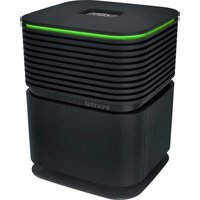
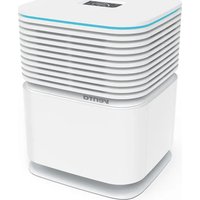
AP902 Professional - Air purifier Venta - Free user manual and instructions
Find the device manual for free AP902 Professional Venta in PDF.



| Product Type | Air Purifier |
| Brand | Venta |
| Model | AP902 Professional |
| Dimensions (W × D × H) | 61 × 30 × 52 cm |
| Weight | Approximately 13 kg |
| Power Supply | 220-240 V ~ 50/60 Hz |
| Power Consumption | 7 to 60 W depending on ventilation level |
| Ventilation Levels | 5 levels + Automatic + Turbo Boost |
| Noise Level | 19 to 51 dB(A) (levels 1-5), Turbo Boost 60 dB(A) |
| Recommended Room Size | Up to 75 m² (low pollution), 50 m² (moderate), 25 m² (high) |
| Filtration | Double coarse particle filter and double HEPA filter |
| Sensors | Air quality (PM2.5), humidity, temperature |
| Display | Interactive touchscreen, tiltable |
| Connectivity | WiFi 2.4 GHz, Venta app |
| Special Features | Night mode, delayed shut-off (up to 9 h), child lock, remote control |
| Maintenance | Clean pre-filters every 1 to 2 months; replace HEPA filters approximately every year |
| Safety | Child lock, automatic shut-off in case of overheating, strict safety instructions |
| Spare Parts | HEPA filters and pre-filters available, remote control included |
| Warranty | 2 years (according to Venta's general terms) |
| Included Accessories | Remote control, instruction manual |
Frequently Asked Questions - AP902 Professional Venta
User questions about AP902 Professional Venta
0 question about this device. Answer the ones you know or ask your own.
Ask a new question about this device
Download the instructions for your Air purifier in PDF format for free! Find your manual AP902 Professional - Venta and take your electronic device back in hand. On this page are published all the documents necessary for the use of your device. AP902 Professional by Venta.
USER MANUAL AP902 Professional Venta
SIMPLIFIED EU DECLARATION OF CONFORMITY
Herewith, Venta-Luftwäscher GmbH declares that the radio equipment AP902 complies with Directive 2014/53/EU. The full text of the EU Declaration of Conformity is available at the Internet address: www.venta-air.com/en_de/service/manuals/
VIELEN DANK!
WIFI-AUTHORISATION INCOMING WIFI REQUEST.
YES NO

We are convinced that the Venta Air Purifier will exceed your expectations and we hope you enjoy our product.
Please register your Venta appliance here:
www.venta-air.com/en_de/Service/Product-registration/
Please read this operating manual completely, keep it for later use, and follow the safety instructions.
You can find the latest version of the operating manual on our website www.venta-air.com
DEAR CUSTOMER,
The high-performing AP902 Air Purifier comes with four filters - two coarse dust filters and two HEPA filters. That ensures it delivers excellent results, filtering viruses, particles and fine dust out of indoor air. It creates natural feel-good zones in your home, especially if you suffer from allergies or are susceptible to breathing difficulties.
TABLE OF CONTENTS
Safety Instructions 18
Scope of delivery 20
Symbols 20
Intended Use 20
Technical Data 21
Overview 22
Putting into Operation 22
Functions, Settings & Displays 24
WiFi Configuration 26
Venta App 27
Cleaning & Maintenance 27
Accessories 29
Recycling & Disposal 29
Guarantee 29
Privacy Policy 29
Venta Service Team 30
What to do if ... 30
SAFETYINSTRUCTIONS
- This appliance is suitable for use by children over the age of 8 years and people with restricted physical, sensory, or mental capacities or lack of experience and knowledge, providing they are supervised or have received instructions on the safe use of the appliance and understand the existing hazards.
- Read the operating instructions completely before putting the appliance into operation and keep them for later reference.
- The appliance is not a toy for children.
- Cleaning and user maintenance may not be performed by children under the age of 8 years or without supervision.
- Keep the appliance and its power cable out of the reach of children under the age of 8 years.
- Improper use can damage the appliance and cause physical injuries.
- Plug the appliance into suitable power outlets only - the mains voltage must correspond to the nameplate data on the appliance.
- Only use the appliance with the following power cable: low-heat device socket with IEC 320 C5 cloverleaf connector.
- Never use the appliance if it has a damaged power cable.
- Disconnect the power plug before every cleaning or maintenance operation and before transportation of the appliance.
- Never use the appliance if it has been dropped or damaged in any other way.
- Electrical appliances should only be repaired by professional specialists. Amateur repairs could result in considerable danger to the user.
- Do not sit on the appliance and do not place any objects on it.
- Do not put any foreign objects into the appliance.
- Never immerse the appliance in water or any other liquid.
- Never disconnect the power plug by pulling on the cable or with wet hands.
- The appliance should only be operated when it is completely assembled.
- Place the appliance on a stable surface which is flat and dry.
-
Set up the appliance so that it cannot be knocked over, and so that no one can trip over it or the cable.
-
Leave at least the following distances from other objects and walls:
-
At the front and above: 50 cm
- At the left and right: 20 cm
- At the back: 5 cm
Maximum installation altitude: 2000 meters
- Never cover or block the vents to prevent overheating/damage to the appliance.
- Disconnect the power plug from the power supply when the appliance is not in use.
- Danger of chemical burns and swallowing. Keep new and used batteries out of the reach of children. This product contains button batteries. Swallowing button batteries can cause severe internal chemical burns and lead to death within 2 hours. Therefore, always keep the battery compartment securely closed. If the battery compartment does not close securely, do not use the product any more, remove the batteries and keep them out of the reach of children. If you suspect that batteries have been swallowed or have otherwise got into the body, get medical help immediately.
SCOPE OF DELIVERY
1 Venta Air Purifier AP902
2 HEPA filters (integrated in the appliance)
2 Coarse dust filters (pre-installed)
1 remote control
1 operating manual
If any parts are missing or damaged, please contact
DE service@venta-air.com
CH service-ch@venta-air.com
AT office@venta.at
SYMBOLS

Please read the Safety Instructions carefully. Follow the instructions to prevent injuries or damage to property.

Additional information

Helpful tips
INTENDED USE
The Venta Air Purifier is a domestic appliance for purifying air in homes, offices and leisure facilities. The appliance is not suitable for outdoor areas.
Any other use or modification of the appliance is considered to be improper use. Venta is not liable for damage or injuries resulting from improper use.
Using the appliance for something other than the intended purpose can endanger health and lives. This includes use under the following conditions:
- in rooms or locations where there is risk of explosion and/or where there is an aggressive atmosphere.
- in rooms where there is a high concentration of solvents.
- in the vicinity of swimming pools or other wet areas.
TECHNICAL DATA
| Model Venta AP902 | |
| Colours grey | |
| For room sizes* ≤ 75 m² | |
| Interactive touch display Standard | |
| App control Standard WiFi | |
| Measuring sensors Air quality + humidity + temperature | |
| Coarse dust filter Standard, double | |
| HEPA filter Standard, double | |
| Power levels 5 + Automatic + Turbo Boost | |
| Noise emission (speeds 1-5) 19/ 29/ 40/ 46/ 51 dB(A) | |
| Power consumption (speeds 1-5) | approx. 7/ 8/ 14/ 21/ 33 W |
| Turbo boost | 60 dB(A) & 60 W |
| Mains voltage | 220-240 V 50 / 60 Hz |
| Dimensions (L x W x H) | 61 × 30 × 52 cm |
| Weight | approx. 13 kg |
| WLAN frequency range | 2.4 GHz |
| WLAN transmission power | maximum 19 dBm |
- based on a max. ceiling height of 2.5 m,
Suitable room size depending on room air contamination: - Low contamination: room sizes up to approx. 75m2 (>AQL0-100)
- Medium contamination: room sizes up to approx. 50m2 (> AQI 101 - 200)
- High contamination: room sizes up to approx. 25m2 (>AQL 201 - 500)
Subject to modifications and errors
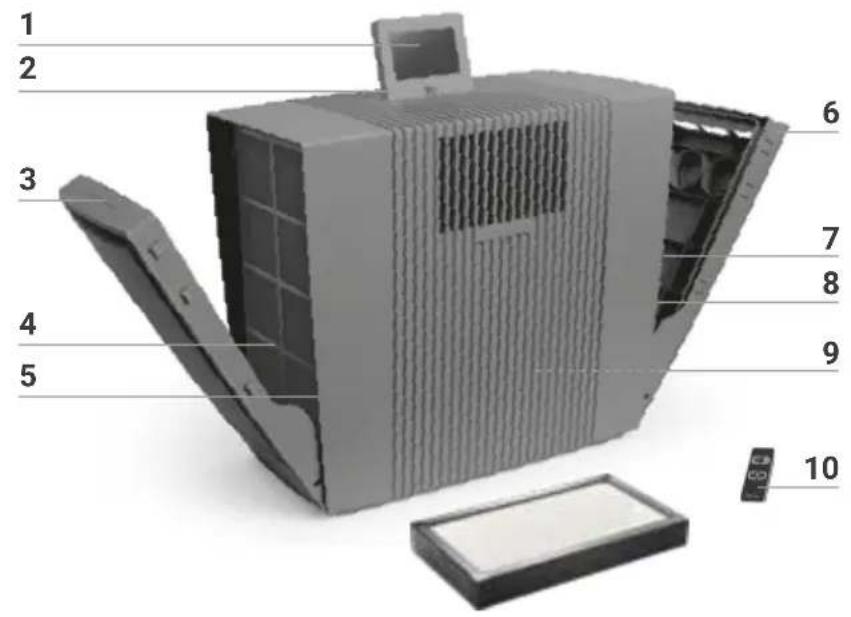
OVERVIEW
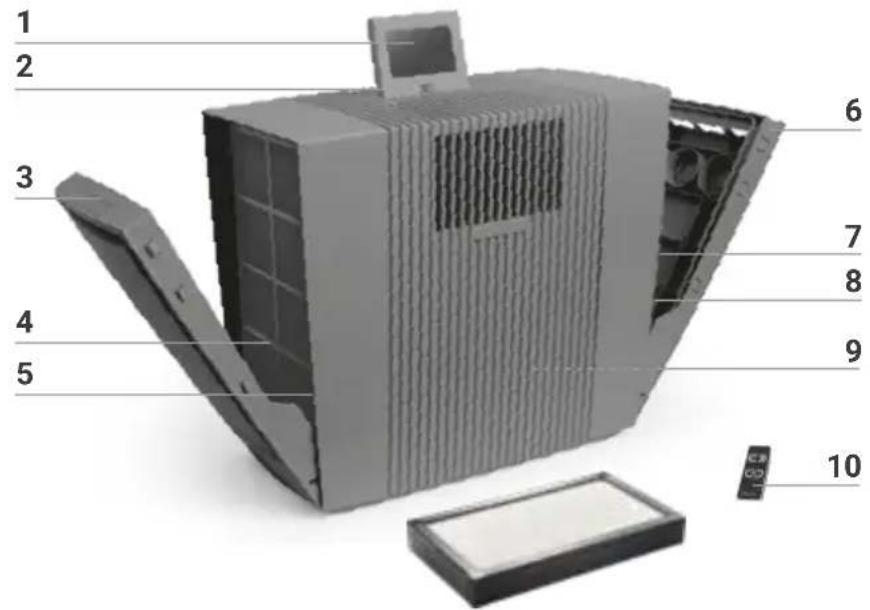
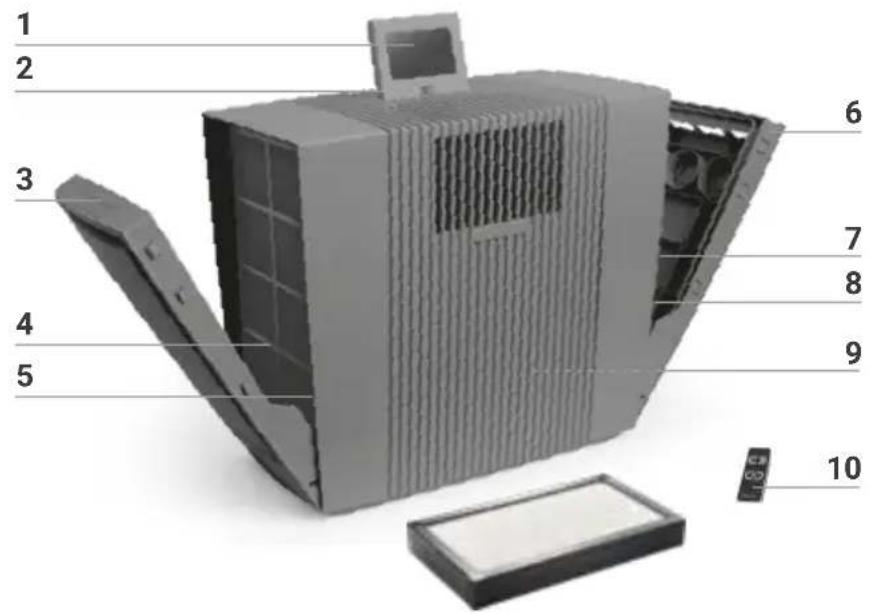
AP902
1 Display
2 On/off switch
3 Filter compartment
4 Coarse dust filter
5 HEPA filter
6 Filter compartment
7 Coarse dust filter
8 HEPA filter
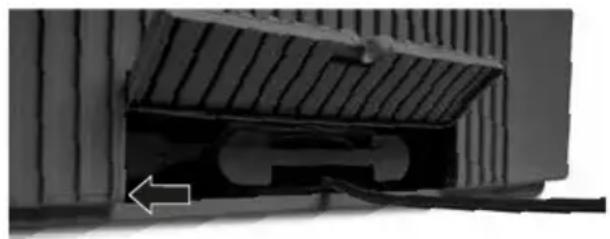
9 Cable compartment
10 Remote control
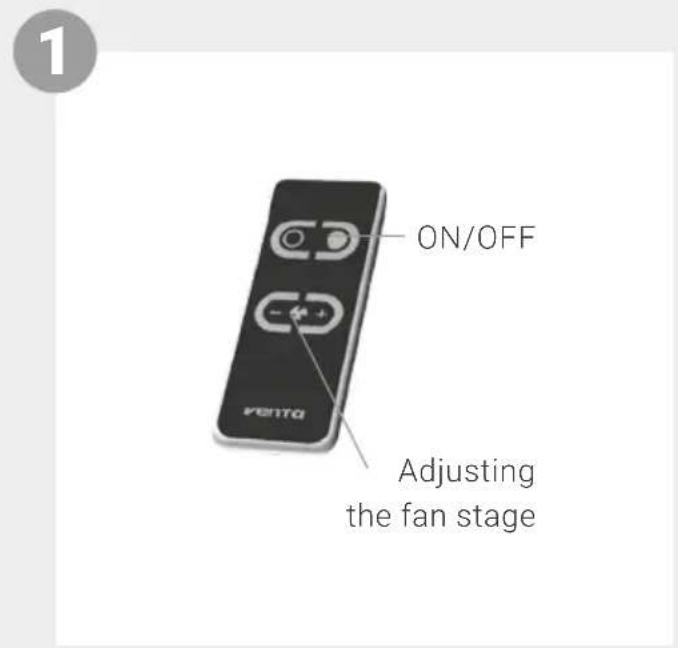
Attention! Ensure that the device is switched off during all actions and the switching power supply is disconnected from the outlet!
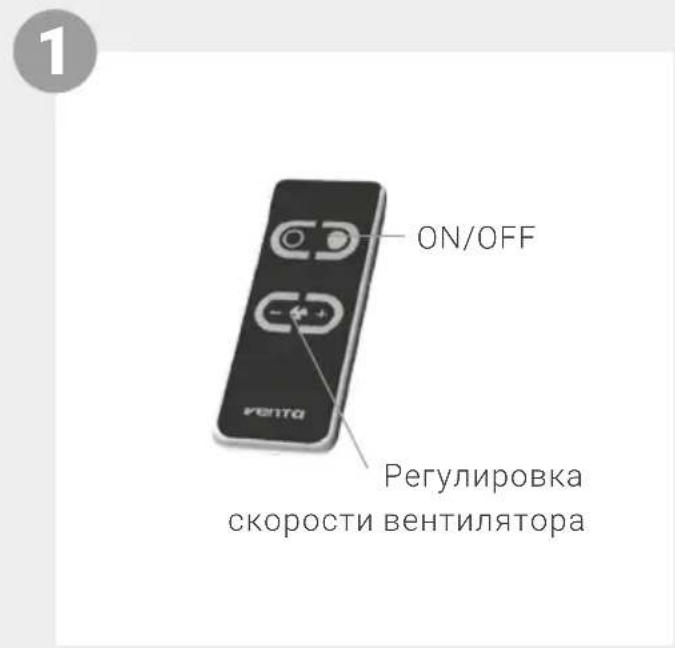
1 Unpack and set up the appliance. Remove battery protection and protective foil from remote control 10.
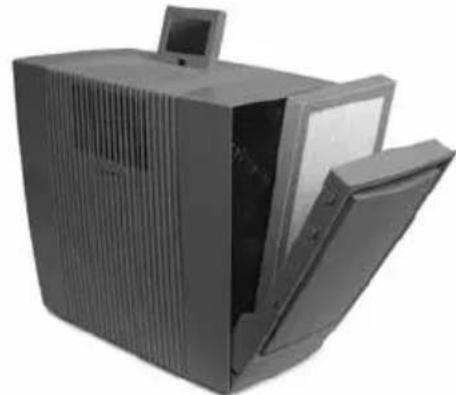
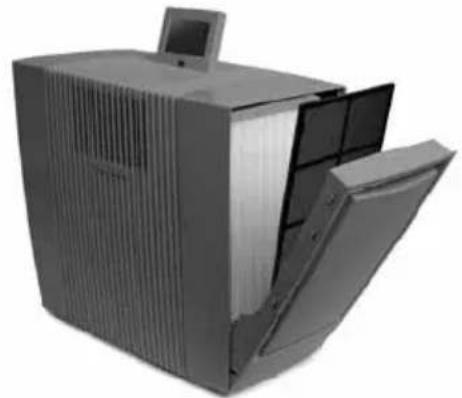
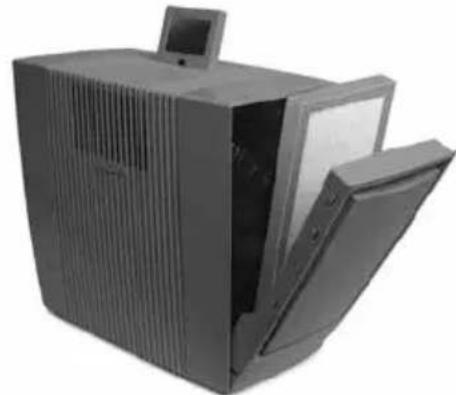
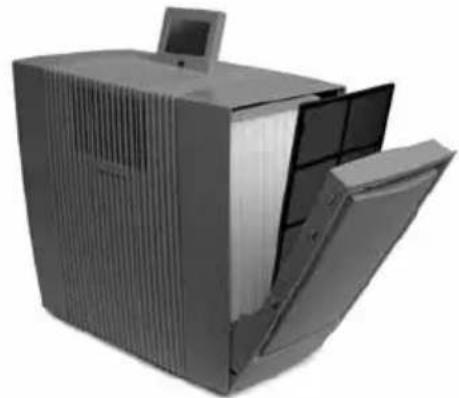
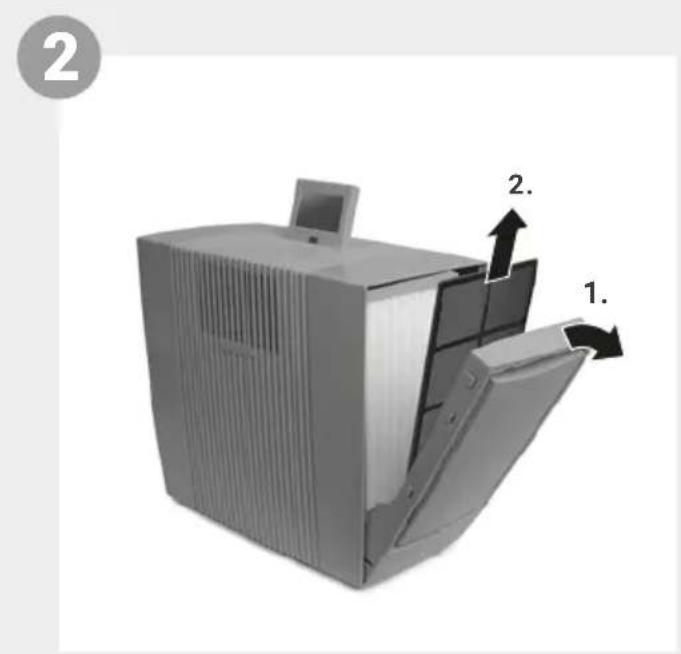
2 Open filter compartments 3 + 6 and remove coarse dust filters 4 + 7 .
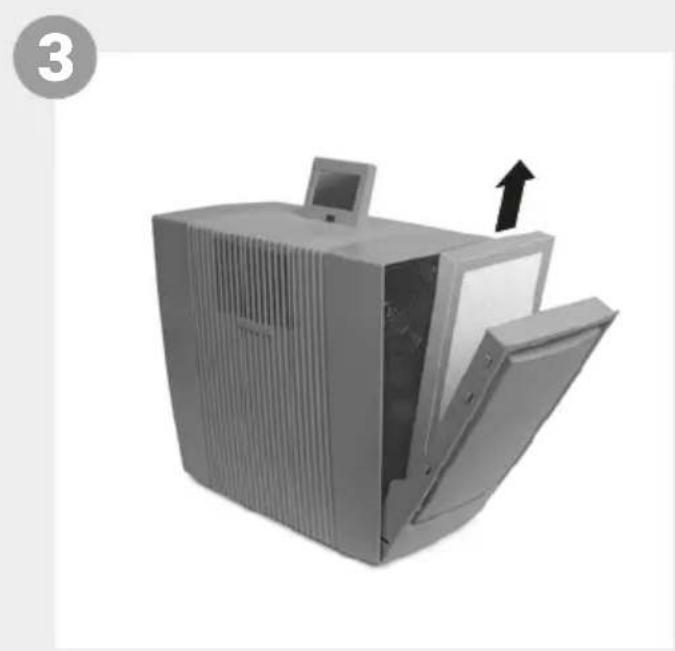
3 Remove HEPA filters 5 + 8 and open them.
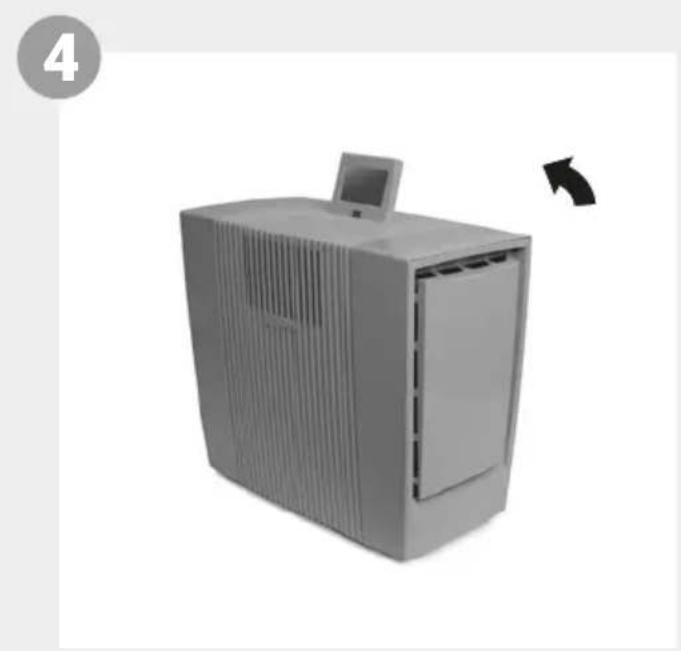
4 Re-insert opened HEPA filters 5 + 8 and coarse dust filters 4 + 7 and close filter compartments 3 + 6 .
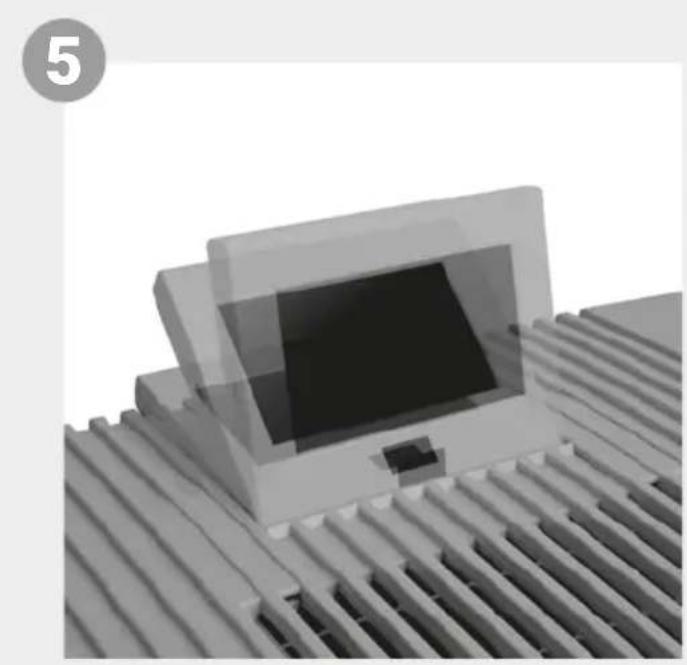
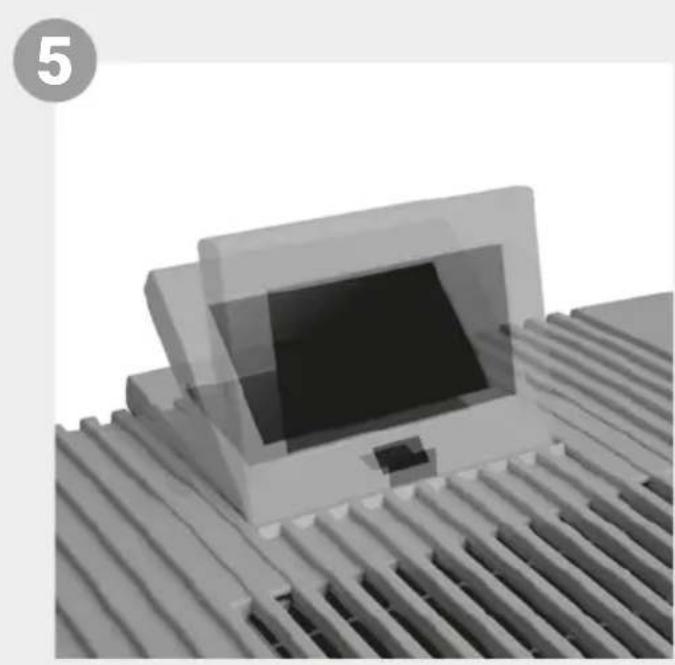
5 Adjust display 1 to the position you want (3 positions possible).
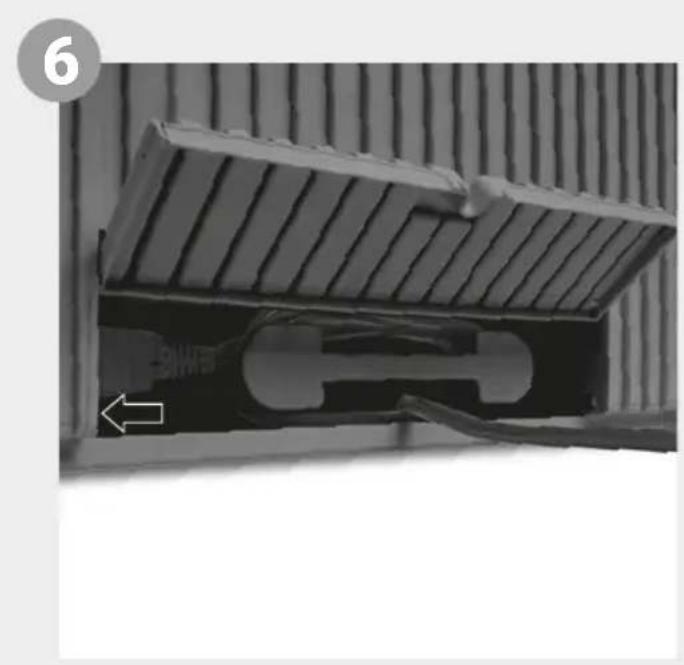
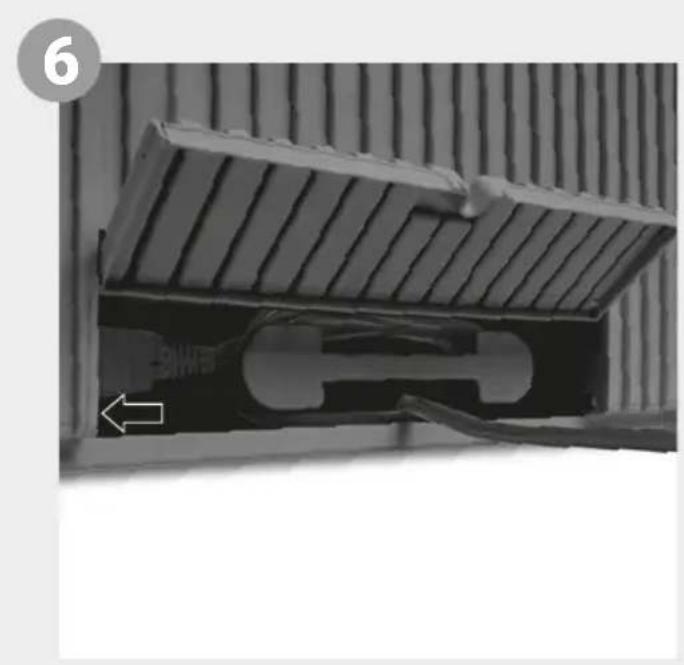
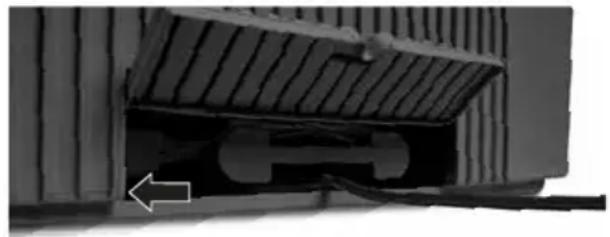
6 Adjust cable connector to the length you want by winding/unwinding in cable compartment 9. Note: Make sure the cable connector is firmly fitted into the appliance!
Connect power plug to mains and switch appliance on using on/off switch 2 or remote control 10.
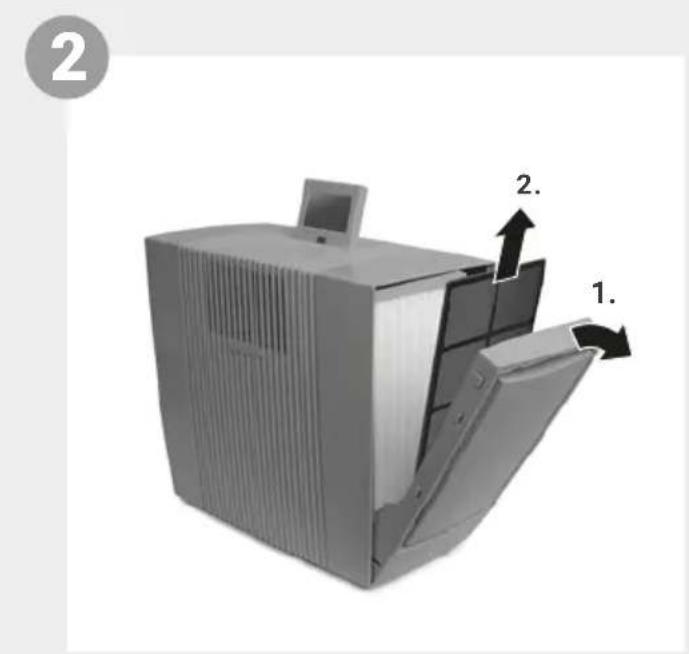
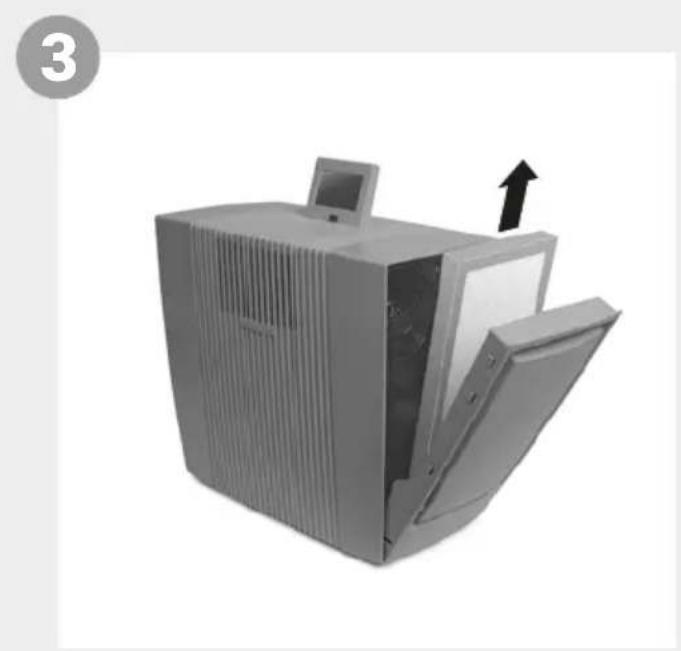
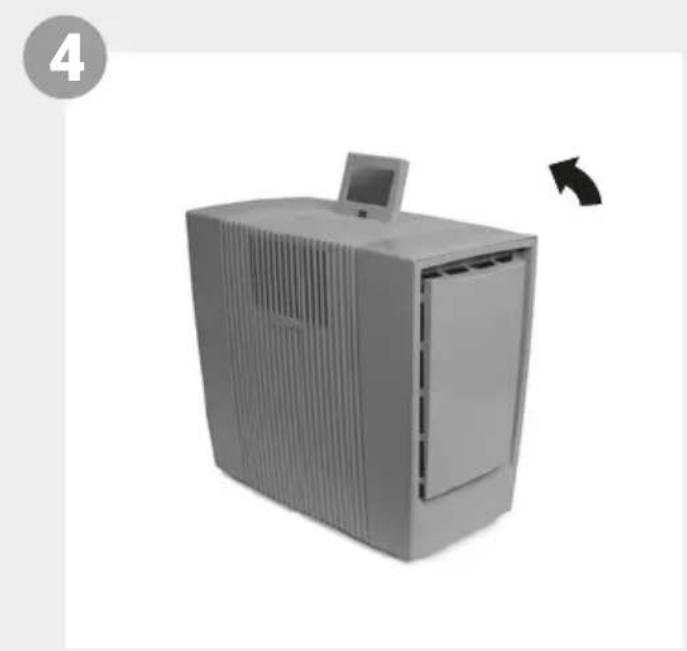
FUNCTIONS, SETTINGS & DISPLAYS
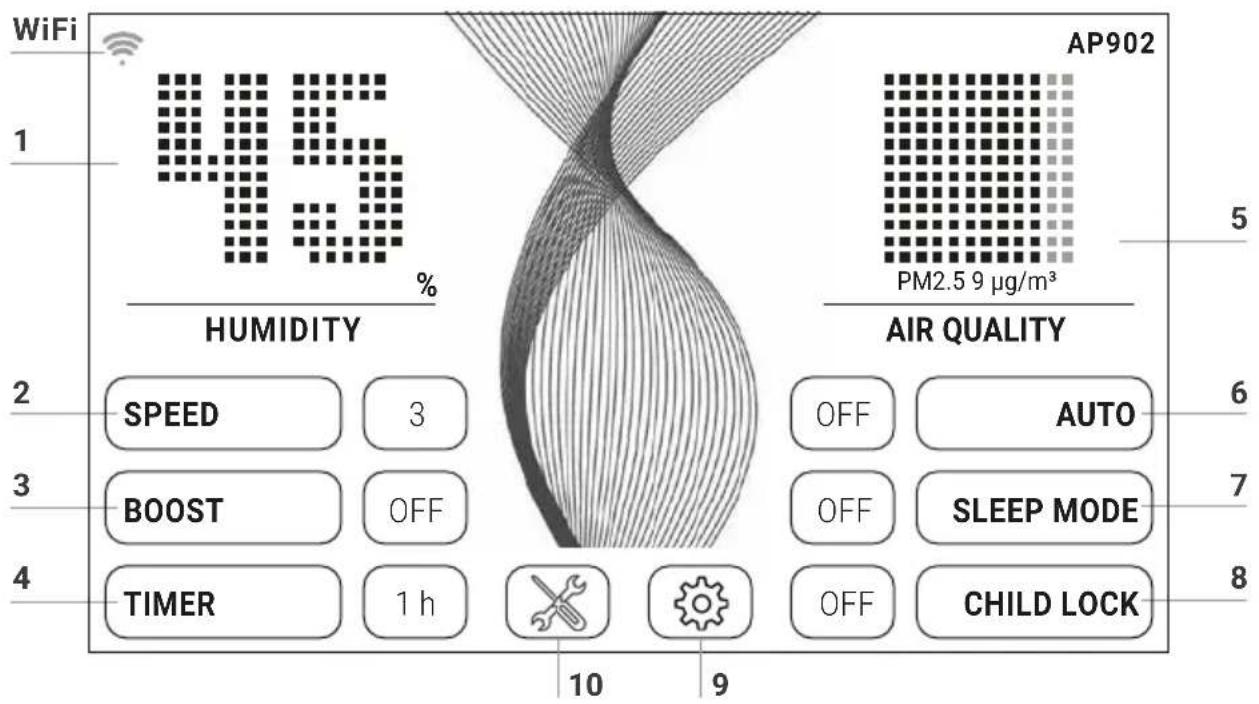
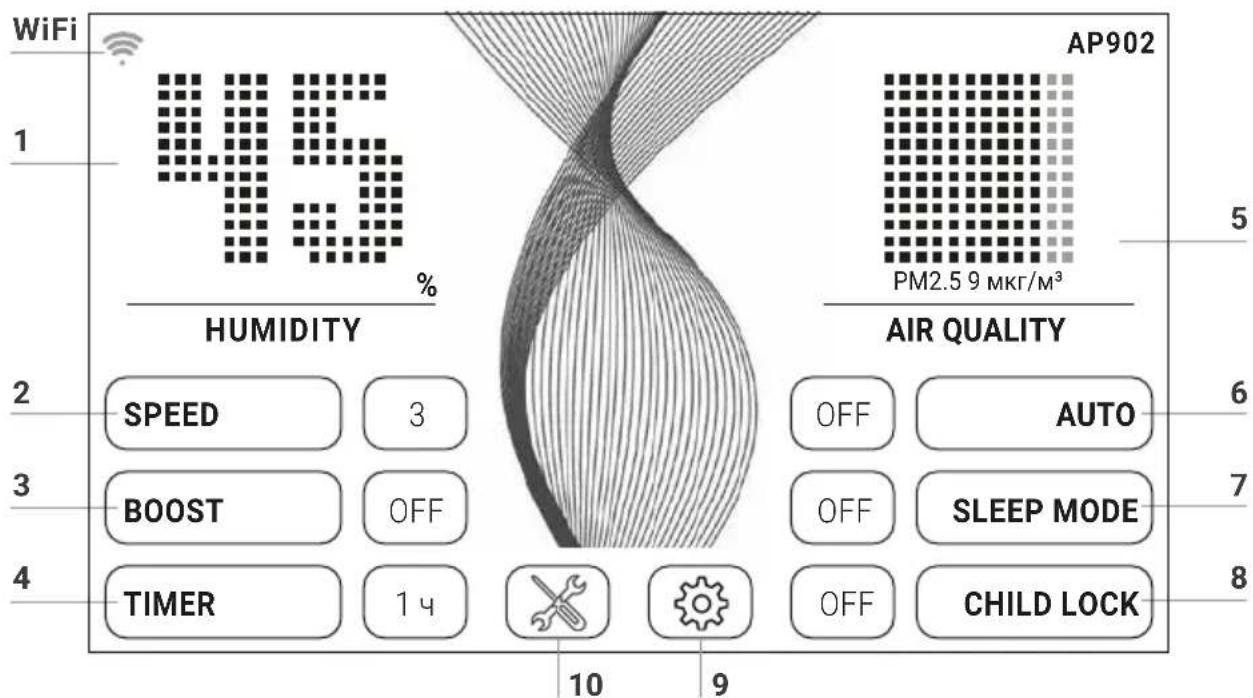
Select or change the setting by tapping the function.
Function Setting
| 1 Humidity/ temperature | Display humidity or temperature. | |||
| Hold for 3 sec. to switch back and forth between °C and °F. | ||||
| 2 Speed | Fan stage 1 (low) - 5 (high). | |||
| 3 Boost | OFF / ON For max. purifying performance | |||
| 4 Timer | OFF / 1 / 3 / 5 / 7 / 9 h (hours). The appliance shuts off automatically after the preset hours have expired. | |||
| 5 Air quality (EPA) PM2.5 | μg/m3 AQI US | |||
| 0-12 | 0-50 | Good | Green | |
| 13-35 | 51-100 | Moderate | Yellow | |
| 36-55 | 101-150 | Unhealthy for sensitive people | Orange | |
| 56-150 | 151-200 | Unhealthy | Red | |
| 151-250 | 201-300 | Very unhealthy | Violet | |
| 251-500 | 301-500 | Dangerous | Brown | |
| 6 | Auto | OFF Appliance operates at preset fan stage 1 - 5. ON The appliance automatically regulates the fan stages 1 - 5 depending on the air quality in the room (Boost is not activated). |
| 7 | Sleep mode | OFF / ON The appliance reduces the fan stage to 1 and dims the display. You can change the air flow rate manually in sleep mode at any time. The air quality is not displayed. |
| 8 | Child lock | OFF / ON Hold for 3 sec. to activate/deactivate the key lock. |
| 9 | Language | Tap the national flag to select language. |
| Display | Tap the button to select black or white display background colour. | |
| WiFi | Display WiFi connection. Enable or disable WiFi by tapping the button. grey: WiFi disabled. blue: WiFi connection to Venta server enabled (full access). green: WiFi connection to the local network established (local access). red: No WiFi connection. | |
| Setup | Set up the WiFi function. For a precise description, see sections “Configure WiFi” and “Venta App”. | |
| 10 | × | Tap the button for instructions and maintenance information. white: No instruction. red: Observe instruction. For a precise description, see section “Cleaning & Maintenance”. |
WIFI CONFIGURATION
To access WiFi configuration, first tap button 9, then the SETUP button.
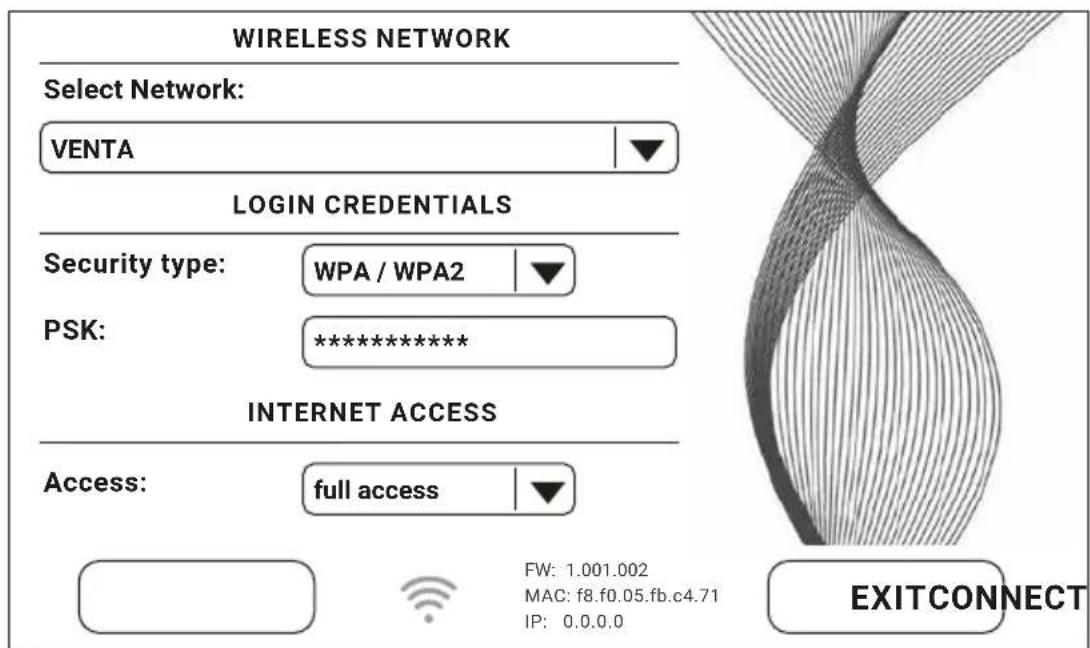
Select "Select network", then your network in the dropdown list. The "Security type" is automatically set as soon as you select the network. In the "PSK" box, please enter your WLAN password/key (ASCII entry mode) and confirm with ENTER. If your password contains special characters or umlauts which are not shown on the keypad, you can generate your full password as a HEX code on our website: www.venta-air.com. Now enter your generated HEX code into the "PSK" box (HEX entry mode) and confirm with ENTER. Under "Access", select the internet access type you require.
full access: access to all the comfort features of the app.
local access: local access to use the app.
Tap CONNECT to create the WiFi connection.
WiFi symbol green: WiFi connection established (local access).
WiFi symbol blue: WiFi connection established (full access).
WiFi symbol red: No WiFi connection. Check your network and WLAN password.
WiFi symbol grey:WiFi disabled.

If problems occur during the setup process, read the information in the section "What to do if WiFi connection is not possible?"
Tap the EXIT button to return to the previous menu.
VENTA APP
You can use the Venta app to expand and control the appliance functions. The app is available for smartphones and tablets. Please download the Venta app at: www.venta-air.com, or use the QR code.




Please log in to the menu or register as soon as you have downloaded and opened the Venta app.

You must register so that you can control and check your Venta appliance when you're on the go.
You can use the search function + to automatically find all local Venta appliances. Please select your appliance.
The appliance emits an audio signal while the app is connecting to it. Please confirm connection to your smartphone/tablet on the appliance.
WIFI AUTHORIZATION INCOMING WIFI REQUEST.
YES NO

If WiFi connection is disabled, the appliance does not connect to the Venta app.
CLEANING & MAINTENANCE
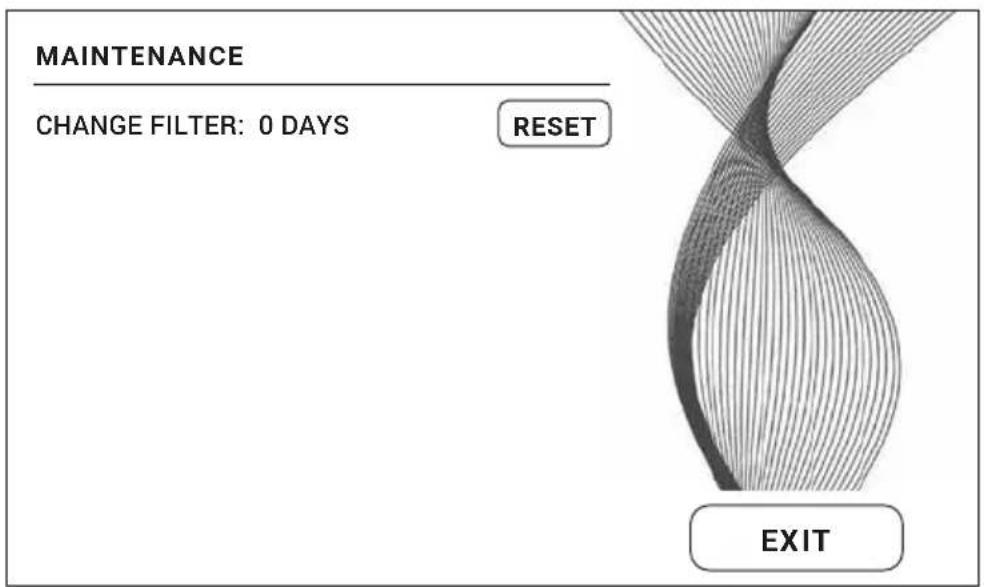
Tap button 10 on the display to see information about maintenance. Red light indicates that this type of maintenance is due.

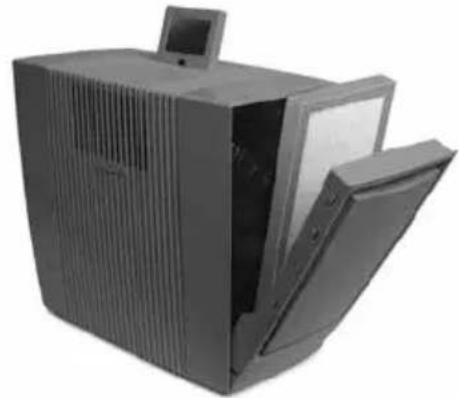

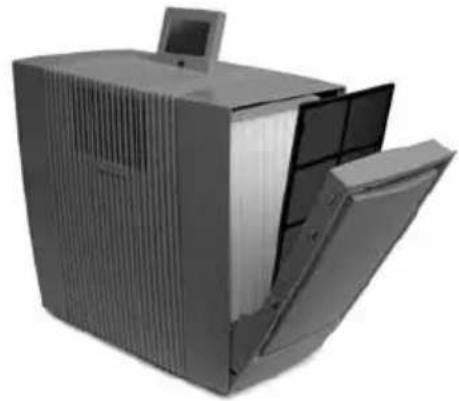

Attention! Ensure that the device is switched off during all actions and the power plug is disconnected from the power supply!
Reminder/Interval Actions
A CHANGE FILTER
When changing the HEPA filter, use suitable protective equipment (e.g. mask and gloves). Place used HEPA filters in a bag and dispose of them in household waste.
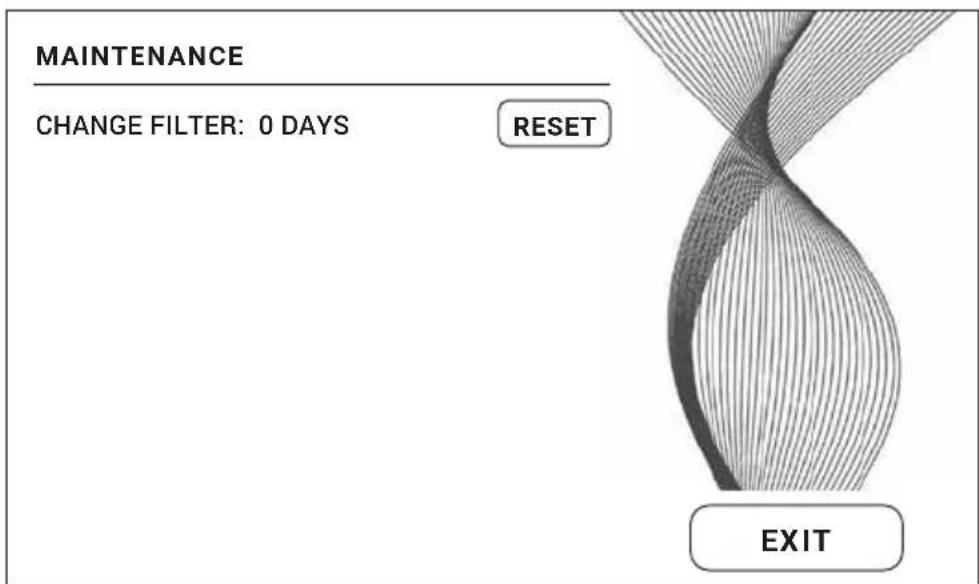
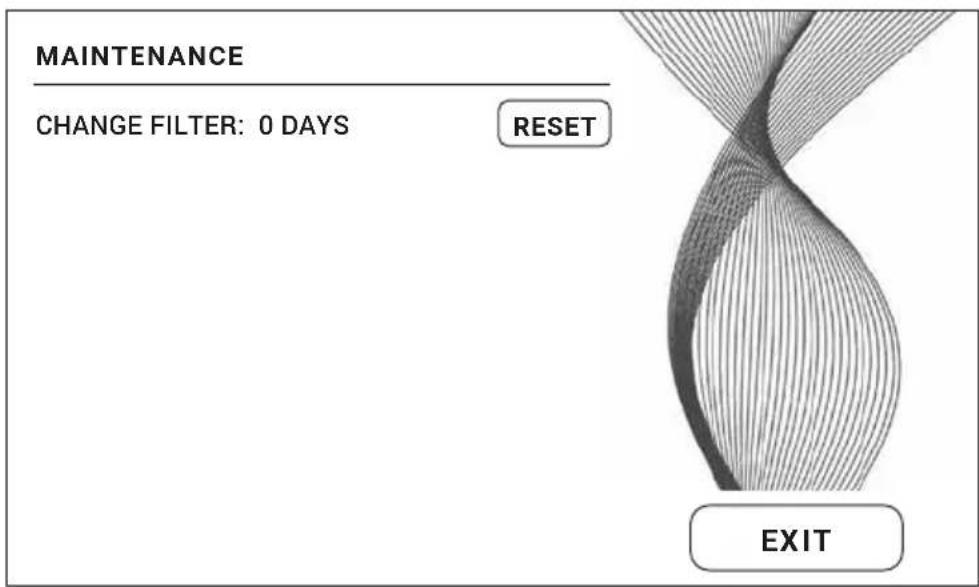
Open filter compartment, remove coarse dust filter. Remove and replace HEPA filter. Re-assemble the appliance and switch it on. Tap × button on the display to access the maintenance menu. Then tap the RESET button and hold for 3 seconds until the time is reset.

After one year, the maintenance button fights up in red and indicates that this action is necessary.
The filter service life is approx. 1 year (of continuous 24-hour operation). The lifetime of the filter depends on the hours of operation and the air quality in the room.
You can carry out this maintenance step if required, even if the SERVICE message is not shown. When you are finished, simply tap the relevant RESET button in the maintenance menu and hold for 3 seconds until the time is reset. The next filter-change reminder will appear after one year.
B Recommended every 1-2 months or as required
Open filter compartment, remove coarse dust filter and vacuum or rinse it off. Please note: The coarse dust filter must be completely dry before you install it. Re-assemble the device.
ACCESSIONS
You can order accessories by phone or online at www.venta-air.com.
RECYCLING & DISPOSAL

The packaging material is recyclable. Please dispose of the packaging in an eco-friendly way using the recycling scheme at your location.
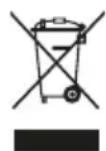
The "crossed-out bin" symbol indicates that you must dispose of waste electrical and electronic equipment (WEEE) and waste batteries separately. Such equipment may contain dangerous and environmentally hazardous substances. These products should be disposed of at an appropriate
collecting point for recycling electrical and electronic equipment and may not be disposed of in unsorted household waste. Do not dispose of used batteries in household waste. Hand them in to collection points or retailers. This way you can help to protect resources and the environment. For more information, please contact your local authorities.
Children must not be allowed to play with plastic bags and packaging material as there is a danger of injury or suffocation. Store such materials safely or dispose of them in an environmentally friendly way. Please put used HEPA filters in a bag and dispose of them in household waste.
GUARANTEE
Due to the high quality of our products, Venta-Luftwäscher GmbH guarantees that this product will remain defect-free for two years as from the purchase date, provided it is used correctly. If a material or processing error should occur anyway, please contact the Venta Service Team or your dealer. Venta's general guarantee conditions also apply: www.venta-air.com/en_de/Service/Warranty/
PRIVACY POLICY
Venta Luftwäscher GmbH treats your data confidentially. You can find more information about data protection in our Privacy Policy at www.venta-air.com
VENTA SERVICE TEAM
Do you need additional information about your Venta appliance, do you want advice or to order accessories? Our Service Team is there for you! Call us directly, or visit the Venta website: www.venta-air.com.
DE
+49751500888
AT
+43 5572 202 539
CH
+41 41 781 15 15
WHAT TO DO IF ...

Attention! Before carrying out any of these actions, ensure that the appliance is switched off and disconnected from the power supply!
... the appliance won't switch on?
Please check whether the appliance is plugged in to the mains.
... the appliance won't switch on even though it is plugged in to the mains?

Action: Please check whether the mains power cable is correctly plugged into the appliance. Then switch the appliance on again.
... WiFi connection is not possible
Please check that:
- you are using a 2.4-GHz or a combined 2.4/5-GHz network. This is important because the WiFi/WLAN module in the appliance does not support 5-GHz networks.
- your router supports 802.11b/g/n.
- iOS version 11.0 or higher or Android version 8.0 or higher is installed in your phone or tablet.

If necessary, update the operating system of your phone or tablet.
MERCI BEAUCOUP!
WIFI-AUTHORISATION INCOMING WIFI REQUEST.
YES NO

Venta-serviceteam 100
WIFI-AUTHORISATION INCOMING WIFI REQUEST.
YES NO

HVAD SKAL JEG GØRE, HVIS...?

RECYKLING I UTYLIZACJA

RECYKLACE &LIKVIDACE

WIFI-AUTHORISATION INCOMING WIFI REQUEST.
YES NO

Ked' je pripojenie WiFi deakti-vované, spotrebic sa nespoji s aplikaciou Venta.
ČISTENIE A OŠETROVANIE
Tuknutim na klaves 10 na displeoji sa zobrazia informacia o udrzbe. Červene svetlo upozornuje na to,Že sa ma vykonat toto opatrenie na osetrovanie.



WIFI-AUTHORISATION INCOMING WIFI REQUEST.
YES NO

Daca estedezactivata conexiuneaWiFi,aparatul nu se connecteazla aplicatia Venta.
CURÂTARE ŞİNGRIJIRE
WIFI-AUTHORISATION INCOMING WIFI REQUEST.
YES NO

Ja WiFi savienojums ir deaktivizes, ierice automatiski nesavienojas ar VENTA lietotni.
TIRISHANA UN KOPŠANA
Uz tsu brdi pieskaroties taustiam 10 × displejā, tiek paradita informacija par apkopi. Sarkans izgaismojums norada uz veicamo ierices kopsanas darbibu.



TekyuToBercnIOHnctpyKuINNo3KcnpyaTaucnBbIHaJeTeHa
Haem INTepHeT-caTe www.venta-air.com
YBAXAEMbI KJIneHT,
BbICOKo3ΦΦeKTHBbI OuncTeIb BO3dyxa AP902, oChaueHbI cpa3y ueTbipbMЯФnIbTpamN - DBYMa FInIbTpamN rpy6o8 OuncTKn I DByMa HEPA FInIbTpamN -do6nBaETc8 OTnUHbIX pe3yIbTaTOB n FInIbTpyeT n3 BO3dyxa BnomeueHIN BnpycbI, YactuCbI N MeLKOncnepcHyIO nbIb. OH CO3daet B JxnlbIX NOMeueHnx ECTeCTBeHHbIe 3OHbI KOMΦOpTa, OCO6eHHO dJa aAnleprNKOB n actMaTikOB.
CоДЕРЖAHNE
Yka3aHnI NO TexHnKe
6e3oNaChocTn 228
KoMnJIeKT noCTaBKn 230
IcnoJIb3yeMbIe cMBOJbI 230
PpaBnIbHoe nCnoJIb3OBaHne 230
TexHnueckne xapaKTepeNCTnKn 231
063op 232
BBoD BəKcπnyaTaunio 232
TEXHINUÇECKNE XAPAKTEPNCNUKNI
Bo3MOxHbI n3MeHeHHn I OeTuKn
0630P
AP902
1 Dnncnn
2 BkIIOuataTeJIb/ BbIKIOUaTeJIb
3OTceKΦnJIbTpα
4 Φиьтгрубов OYNCTKI
5HEPAΦnltp
6 OtceK nIbTpa
7 Φиьтгрубов Oчистки
8HEPAΦnIbTp
9OTceKdJaKa6eJra
10ДиctaHNoHHoe ynpabHeHne
BBOДВэКСПЛУATAЦИО

BnmaHne! Y6eInTeCb, YTO npN BCex Oepaunx npi6Op BbIKIOueH n ceTeBOI aIantep BbHyT n3 po3eTKI!
1 PacnakyTe n yctaHOBnTe np6Op. BbInbTe 3aunTHyo noLoCKy n3 6aTaapeHoro OTceKa n cHmnte 3aunTHyo PJIeHKy C nyIbTa dNCTaHcnoHHoro ynpabBHeHn 10.
2 OTKpoIeOTceKnΦnIbTpOB3+6N BblHbTeΦnIbTpblrpy6oOuNCTk4+7.
3 BbIbTe n COOTBeTCTBeHHO OTKpOnTe HEPA φ nIbTpbl 5+8.
4 Choba BCTaBbTe OTKpbItbIe HEPA φ nIbTpbl 5+8, a TaKke φ nIbTpbl rpy6oO uNCTKN 4+7 n 3akpoTe OTcekn φ nIbTpOB 3+6.
5 YcTaHOBInTe DnCnIe 1 ByD06Hoe NpIoXeHne (Bo3MoXHbI 3 nIoXeHna).
6 YctaHOBNTe HxKHyO dInHy ceTeBOrKa6eJ, HaMaTbIBa NIN CMaTbIBa ero n3 OTceKa dJa Ka6eJ9. Yka3aHHe: MyfTa ceTeBOrKa6eJdoJXHa 6bITb PIOTHO BCTaBNeHa B npi6Op!
BcTaBbTe ceTeByIO BnIky Bpo3eTKy IN BKIoUHTe np6Op C NOMOu BO BKIoUaTeJIy/BblKlIoUaTeJIa 2 nII nIyIbTa DnCTaHcNOnHOro ynpabLeHHa 10.
ФУнКЦИN, HACTPOйКи ИНДИКАЦЯ
HyXHyIO HAcTpoIky MoXHO Bbl6paTb NII N3MeHnTb KpaTKOBpeMeHHbIM npNKoCHOBeHNem K COOTBcTCTByIOUeI φ yHKcN.
Функцн HabtpoKa
... npn6op He ydaeTcBKnIouHTb?
Iopkaanynta, npOBepbTe, He BbInyTa nn CeTeBaBnKa n3 po3eTKN.
... npn6op He ydaetcBKnIOuHTb, XOTa CeTeBa BnIka BCTaBNeHa B po3eTky?

DcTBn: PoxaIyIcTa, npoBepTe, npaBnIbHo IIN BCTaBHeHa MyfTa ceTeBOrO Ka6eJI B npi6Op. NocIe 3TOrO cHOba BBeIITe np6Op B pa6OtY.
... He ydaetc8 co3daTb WiFi-coeHHeHne?
Ponkayncta, npOBepbTe, yTO
- BblncnoIb3yeTe cetb 2,4 ΓTc nll CmeaHnyo cetb 2,4 / 5 ΓTc, TaK kaK MoyJb WiFi/WLANByctpoiCtBe He noDaepeXnBaET cetb 5 ΓTc.
- Bāw poyep noДepeKиBaet 802.11b/g/n.
-Ввашемсмартфонeилпалшeteустоновлеса OCiOSверси 11.0илпстаршелбоAndroidверси8.0илnstapшe.

B clyuae Heo6xOIMOCn 6HOBnte OepaunOHHyo CnCTemy Ha BaWeM cMapTfoHe nn nIaanHweTe.
GAMBARAN KESELURUHAN
AP902
1 Paparan
2 Suis hidup / mati
3 Ruang penapis
4 Penapis habuk kasar
5 Penapis HEPA
6 Ruang penapis
7 Penapis habuk kasar
8 Penapis HEPA
9 Ruang kabel
10 Unit kawalan jarak jauh
PERMULAAN

KITAR SEMULA & PELUPUSAN

United States of America
Tel. +1-888-333-8218
Fax+1-224-567-8349
info-us@venta-air.com
www.venta-air.com
AUSTRIA
Stromayer Elektro
Service GmbH
Strohmayergasse 8
1060 Wien
Österreich
Tel.: +431 5961706
office@stromayer.at
CHILE
Venta Air Technologies Inc.
US Headquarters
300 North Elizabeth Street
Suite 220 B
Chicago, IL 60607
United States of America
service-hu@venta-air.com
www.letmerepair.com
ITALY
LetMeRepair GmbH
Fichtestrasse 1a
02625 Bautzen
service-it@venta-air.com
www.letmerepair.com
JAPAN
Address Service Co., Ltd.
17-9, Shinoda, Togane-shi
Chiba, 283-0013 Japan
Tel.: 0120-407-554
venta_support@adservice.
co.jp
LATVIA / LITHUANIA
SIA、BALTIJAS
TIRDZNIECIBAS
UZNEMUMS
Darzauguiela1-201
Riga LV-1012, Latvia
Tel: +371 67790720
info@btu.lv
MALAYSIA / SINGAPORE /
PHILLIPINES / VIETNAM
GA MAKMUR SDN BHD
No.27, Jalan PP 11/4
Alam Perdana Indust-
Rial Park, Taman Putra
Perdana, 47130 Puchong
Selangor, Malaysia
Tel. +603-8322 6628
Fax:+603-83226066
info@gasales.com.my
MONGOLIA
AERISLLC
SUITE 316, Barilga Archi
teecture Building, Chinggis
Avenue, Oron Suuts Street,
2nd horoo, Khan-Uul
district, Ulaanbaatar,
Mongolia 17032
Tel.: +976-99101185
+976-99096696
sales@aeris.mn
www.aeris.mn
PORTUGAL
LetMeRepair GmbH
Fichtestrasse 1a
02625 Bautzen
service-pt@venta-air.com
www.letmerepair.com
RUSSIA
Venta Russia TSK IMPORT
Kelvin South Business
Park, East Kilbride, G75
OYB, Scotland, UK
Tel.: +44 (0) 1355 241 222
service-uk@venta-air.com
Fax+441355246575
SLOVAKIA
LetMeRepair GmbH
Fichtestrasse 1a
02625 Bautzen
service-sk@venta-air.com
www.letmerepair.com
SPAIN
LetMeRepair GmbH
Fichtestrasse 1a
02625 Bautzen
service-es@venta-air.com
www.letmerepair.com
SOUTH AFRICA
EUROCARE Wellness
5 Star Business Park,
Unit 2, Persimmon Close
Honeydew, Johannesburg
Südafrika
Tel.: +27 11 888 3255
Fax: +27 11 888 9874
info@eurocarewellness.
CO.Za
SOUTH KOREA
VENTAKOREA CO.,LTD.
3/F., Seojin Bldg., 754
Seolleung-ro, Gangnam
Gu, Seoul 135-948, Korea
Tel.: +82 22 03 40 114
Fax: +82 22 03 40 119
UKRAINE
Venta-Centre Ukraine
Schlichtera, 11
Kharkov, Ukraine
Tel. +38 057 752 72 72
Fax: +38 057 768 01 57
venta@venta.com.ua
SERVICE AND SUPPORT
www.venta-air.com/Service/Service-Support/
VENTA WORLD WIDE
www.venta-air.com/en_de/Venta-worldwide/
EAC C E


- SIMPLIFIED EU DECLARATION OF CONFORMITY
- VIELEN DANK
- PLEASE REGISTER YOUR VENTA APPLIANCE HERE
- DEAR CUSTOMER
- TABLE OF CONTENTS
- SAFETYINSTRUCTIONS
- SCOPE OF DELIVERY
- SYMBOLS
- INTENDED USE
- TECHNICAL DATA
- OVERVIEW
- FUNCTIONS, SETTINGS & DISPLAYS
- WIFI CONFIGURATION
- VENTA APP
- CLEANING & MAINTENANCE
- REMINDER/INTERVAL ACTIONS
- ACCESSIONS
- RECYCLING & DISPOSAL
- GUARANTEE
- PRIVACY POLICY
- VENTA SERVICE TEAM
- WHAT TO DO IF
- THE APPLIANCE WON'T SWITCH ON
- WIFI CONNECTION IS NOT POSSIBLE
- MERCI BEAUCOUP
- HVAD SKAL JEG GØRE, HVIS
- RECYKLING I UTYLIZACJA
- RECYKLACE &LIKVIDACE
- ČISTENIE A OŠETROVANIE
- CURÂTARE ŞİNGRIJIRE
- TIRISHANA UN KOPŠANA
- YBAXAEMBI KJINEHT
- CОДЕРЖAHNE
- TEXHINUÇECKNE XAPAKTEPNCNUKNI
- 0630P
- BBOДВЭКСПЛУATAЦИО
- ФУНКЦИN, HACTPOЙКИ ИНДИКАЦЯ
- NPN6OP HE YDAETCBKNIOUHTB
- NPN6OP HE YDAETCBKNIOUHTB, XOTA CETEBA BNIKA BCTABNEHA B PO3ETKY
- HE YDAETC8 CO3DATB WIFI-COEHHEHNE
- GAMBARAN KESELURUHAN
- PERMULAAN
- KITAR SEMULA & PELUPUSAN
- AUSTRIA
- CHILE
- ITALY
- JAPAN
- LATVIA / LITHUANIA
- MALAYSIA / SINGAPORE
- PHILLIPINES / VIETNAM
- MONGOLIA
- PORTUGAL
- RUSSIA
- SLOVAKIA
- SPAIN
- SOUTH AFRICA
- SOUTH KOREA
- UKRAINE
- SERVICE AND SUPPORT
- VENTA WORLD WIDE
Brand : Venta
Model : AP902 Professional
Category : Air purifier