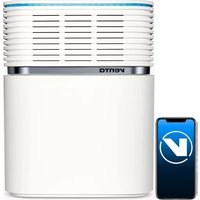
AW902 Professional - Humidifier Venta - Free user manual and instructions
Find the device manual for free AW902 Professional Venta in PDF.



| Product Type | Air Humidifier (Airwasher) |
| Brand | Venta |
| Model | AW902 Professional |
| Dimensions (L × W × H) | 61 × 30 × 52 cm |
| Weight | Approx. 13 kg |
| Power Supply | 220-240 V, 50/60 Hz |
| Power Consumption | 6 W (level 1) to 46 W (max) |
| Noise Level | 22 to 52 dB(A) depending on level |
| Total Water Capacity | 12 L (tank 8 L + tray 4 L) |
| Recommended Room Size | Up to 120 m² (ceiling height 2.5 m) |
| Humidification Technology | Cold evaporation with VentWave™ discs |
| UV-C Lamp | Integrated, lifespan 3 years |
| Control | Interactive touch screen + remote control |
| Connectivity | WiFi 2.4 GHz, Venta app (iOS/Android) |
| Functions | 5 fan speeds + Auto, night mode, timer, child lock |
| Sensors | Relative humidity and room temperature |
| Display | Humidity, temperature, comfort zone, maintenance |
| Routine Maintenance | Cleaning of tray and discs, replacement of hygiene disc every 3 months |
| Included Accessories | VentWave™ disc stack, hygiene disc, UV-C lamp, remote control, manual |
| Warranty | 2 years |
Frequently Asked Questions - AW902 Professional Venta
User questions about AW902 Professional Venta
0 question about this device. Answer the ones you know or ask your own.
Ask a new question about this device
Download the instructions for your Humidifier in PDF format for free! Find your manual AW902 Professional - Venta and take your electronic device back in hand. On this page are published all the documents necessary for the use of your device. AW902 Professional by Venta.
USER MANUAL AW902 Professional Venta
natural_image
Exterior view of a modern stainless steel refrigerator with ventilation slots and a digital display (no visible text or symbols)SIMPLIFIED EU DECLARATION OF CONFORMITY
Herewith, Venta-Luftwäscher GmbH declares that the radio equipment AW902 complies with Directive 2014/53/EU. The full text of the EU Declaration of Conformity is available at the Internet address: www.venta-air.com/en_de/service/manuals/
VIELEN DANK!
natural_image
3D diagram of a mechanical device with labeled parts (1 and 2), showing internal components without any readable text or symbols.3
natural_image
Diagram showing a water tank component being processed with arrows indicating flow direction (no text or symbols present)4
natural_image
Stacked plastic containers with a black arrow indicating rotation (no text or symbols)5
natural_image
3D diagram of a computer case with labeled components (no text or symbols present)6
natural_image
3D rendering of a wall-mounted electronic device with a black screen, placed on a grid-patterned surface (no text or symbols visible)7
natural_image
Close-up of a mechanical component with a sloped top and internal cutaway view, no visible text or symbolsFUNKTIONEN,
text_image
SELECT YOUR LANGUAGE WIFI DISPLAY SETUP EXITSprache
text_image
WIRELESS NETWORK Select Network: VENTA LOGIN CREDENTIALS Security type: WPA / WPA2 PSK: ********** INTERNET ACCESS Access: full access FW: 1.001.002 MAC: f8.f0.05.fb.c4.71 IP: 0.0.0.0 EXITCONNECTWIFI-AUTHORISATION INCOMING WIFI REQUEST.
YES NO

natural_image
Exterior view of a modern office building (no signage)
natural_image
Close-up of a mechanical component with a circular base and gear-like top, showing a black arrow pointing upward (no text or symbols)natural_image
Close-up of a mechanical component with a white arrow pointing to a feature, no visible text or symbols.We are convinced that the Venta Airwasher will exceed your expectations, and we hope you enjoy it.
Please register your Venta appliance here:
www.venta-air.com/en_de/Service/Product-registration/
Please read this operating manual completely, keep it for later use, and follow the safety instructions.
You can find the latest version of the operating manual
on our website www.venta-air.com
DEAR CUSTOMER,
The high-performing AW902 Airwasher with patented humidification and hygiene technology ensures efficient humidification. The integrated UVC lamp stops viruses and bacteria in their tracks. It is ideal for modern homes and offices with ventilation systems.
CONTENT
Safety Instructions 20
Scope of Delivery 22
Symbols
Intended Use 22
Technical Data 23
Overview
Putting into Operation 24
Functions, Settings & Displays 26
WiFi Configuration 28
Venta App 29
Cleaning & Maintenance 30
22 Accessories 32
Privacy Policy 32
Recycling & Disposal 32
24 Guarantee 33
Venta Service Team 33
What to do if ... 33

SAFETY INSTRUCTIONS
- This appliance is suitable for use by children over the age of 8 years and people with restricted physical, sensory, or mental capacities or lack of experience and knowledge, providing they are supervised or have received instructions on the safe use of the appliance and understand the existing hazards.
- Read the operating instructions completely before putting the appliance into operation and keep them for later reference.
• The appliance is not a toy for children. - Cleaning and user maintenance may not be performed by children under the age of 8 years or without supervision.
- Keep the appliance and its power cable out of the reach of children under the age of 8 years.
- Improper use can damage the appliance and cause physical injuries.
- Plug the appliance into suitable power outlets only – the mains voltage must correspond to the nameplate data on the appliance.
- Only use the appliance with the following power cable: low-heat device socket with IEC 320 C5 cloverleaf connector.
- Never use the appliance if it has a damaged power cable.
- Disconnect the power plug before every cleaning or maintenance operation and before transportation of the appliance.
- Never use the appliance if it has been dropped or damaged in any other way.
- Electrical appliances should only be repaired by professional specialists. Amateur repairs could result in considerable danger to the user.
- Do not sit on the appliance and do not place any objects on it.
- Do not put any foreign objects into the appliance.
- Never immerse the appliance in water or any other liquid.
- Never overfill the appliance.
- Never transport or tilt the appliance when the tank is full.
- Never disconnect the power plug by pulling on the cable or with wet hands.
- The appliance should only be operated when it is completely assembled.
- Place the appliance on a stable surface which is flat and dry.
- Set up the appliance so that it cannot be knocked over, and so that no one can trip over it or the cable.
- Leave at least the following distances from other objects and walls:
- At the front and above: 50 cm
- At the left and right: 20 cm
- At the back: 5 cm
• Maximum installation altitude: 2000 meters
- Never cover or block the vents to prevent overheating/damage to the appliance.
- A persistent relative ambient humidity of more than 60% , especially in winter, can enable the formation of biological organisms.
- The design of the appliance and the cold evaporation technology make it impossible for water to leak directly from it in the form of droplets, vapour, mist or lime deposits, providing you use it correctly.
- Do not look directly at the UVC light.
- Warning: UV radiation is dangerous to the eyes and skin. Do not operate the UVC lamp outside the unit.
- Do not manipulate the UVC unit in any way.
- Unintended use of the device or damage to the housing can lead to the escape of dangerous UVC radiation.
- UVC radiation, even at low doses, can cause damage to the eyes and skin.
- Never operate the device in case of a damaged UVC light.
- Only operate the appliance with original Venta accessories designed for the purpose. Do not use aromatic oils or other additives. Venta-Luftwäscher GmbH accepts no liability for damage due to aromatic oils or other unsuitable additives.
- If you do not use the appliance for several days or put it into storage for a longer period, empty the water tray completely, clean it and dry thoroughly to prevent odours or biological organisms from developing in standing water or water residues.
- Disconnect the power plug from the power supply when the appliance is not in use.
- Do not permit the area around the humidifier to become damp or wet. If dampness occurs, turn the output of the humidifier down. If the humidifier output volume cannot be turned down, use the humidifier intermittently. Do not allow absorbent materials, such as carpeting, curtains, drapes, or tablecloths, to become damp.
- Danger of chemical burns and swallowing. Keep new and used batteries out of the reach of children. This product contains button batteries. Swallowing button batteries can cause severe internal chemical burns and lead to death within 2 hours. Therefore, always keep the battery compartment securely closed. If the battery compartment does not close securely, do not use the product any more, remove the batteries and keep them out of the reach of children. If you suspect that batteries have been swallowed or have otherwise got into the body, get medical help immediately.
SCOPE OF DELIVERY
1 Venta Airwasher AW902
1 VentWave™ disk stack with hygiene disk (pre-installed)
1 UVC lamp (pre-installed)
1 remote control
1 set of operating instructions
If any parts are missing or damaged, please contact
DE service@venta-air.com
CH service-ch@venta-air.com
AT office@venta.at
SYMBOLS

Please read the Safety Instructions carefully. Follow the instructions to prevent injuries or damage to property.

Additional information

Helpful tips
INTENDED USE
This Venta appliance is a domestic appliance for improving indoor air quality in homes, offices and leisure facilities. The appliance is not suitable for outdoor areas. Any other use or modification of the appliance is considered to be improper use. Venta is not liable for damage or injuries resulting from improper use.
Using the appliance for something other than the intended purpose can endanger health and lives. This includes use under the following conditions:
- in rooms or locations where there is risk of explosion and/or where there is an aggressive atmosphere.
- in rooms where there is a high concentration of solvents.
• in the vicinity of swimming pools or other wet areas.
TECHNICAL DATA
| Model AW902 | |
| Colours grey | |
| For room sizes* ≤ 120 m2 | |
| Interactive touch display Standard | |
| App control Standard WiFi | |
| Measuring sensors Humidity + temperature | |
| Water hygiene Standard | |
| Speeds 5 + Automatic | |
| Noise emission (stages 1-5) 22/ 32/ 42/ 47/ 52 dB(A) | |
| Power consumption (stages 1-5) | approx. 6/ 9/ 16/ 25/ 38 W, maximum 46 W |
| Mains voltage 220-240 V 50 / 60 Hz | |
| Water capacity Total 12 l | water tank 8 l + water tray 4 l |
| Dimensions (L x W x H) | 61 x 30 x 52 cm |
| Weight | approx. 13 kg |
| WLAN frequency range | 2.4 GHz |
| WLAN transmission power | maximum 19 dBm |
* based on a ceiling height at a max of 2.5 m
Subject to modifications and errors
OVERVIEW
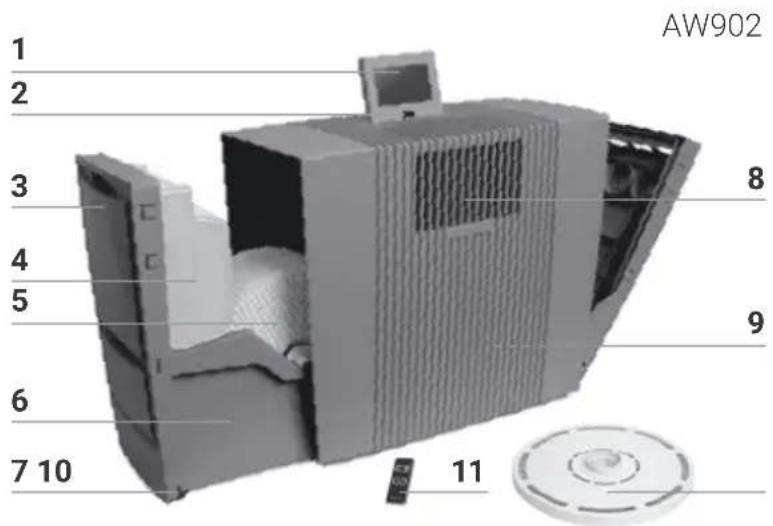
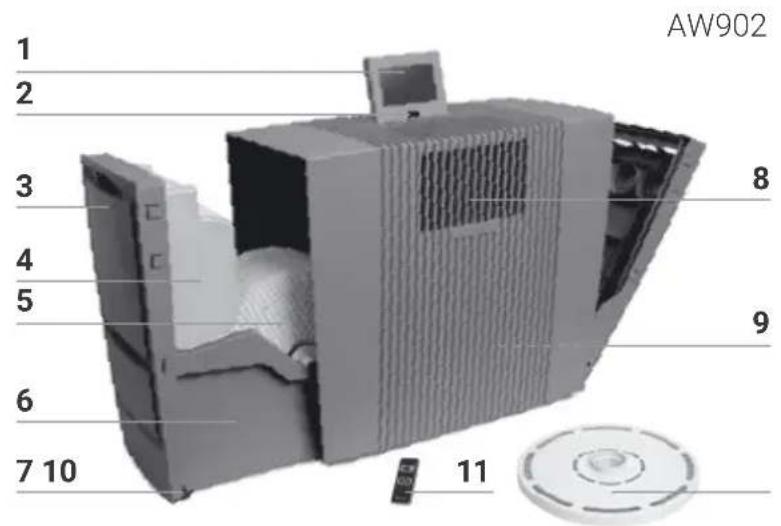
1 Display
2 On/off switch
3 Evaporator compartment
4 Water tank
5 VentWave disk stack
6 Water tray
7 Transport castors
8 UVC lamp (pre-installed)
9 Cable compartment
10 Hygiene disk (pre-installed)
11 Remote control
text_image
AW902 1 2 3 4 5 6 7 10 8 9 11Attention! Ensure that the device is switched off during all actions and the switching power supply is disconnected from the outlet!
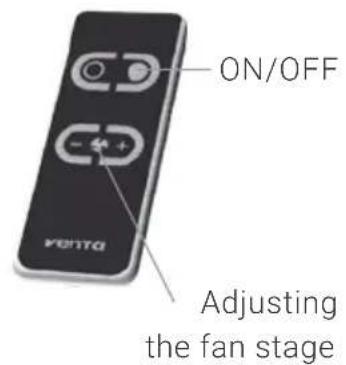
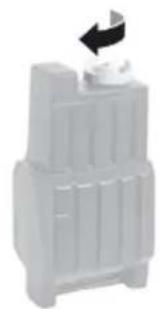
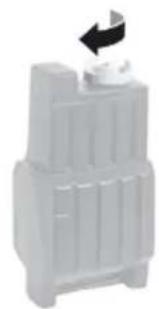
1 Unpack the appliance, set it up and use the transport castors 7 to move it to the place you want. To do this, lift slightly on the right-hand side. Remove battery protection and protective foil from remote control 11.
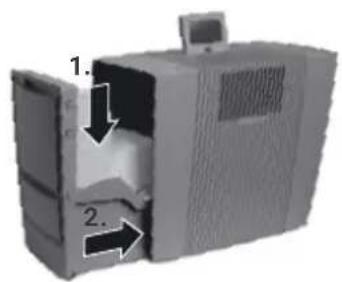
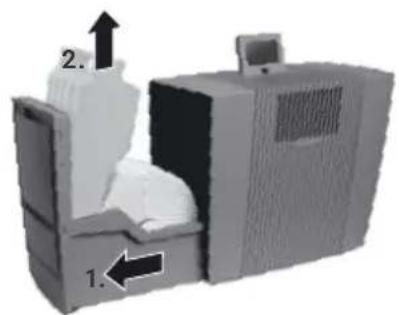
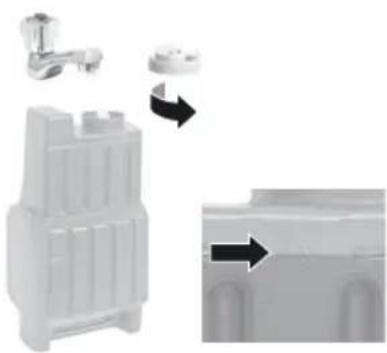
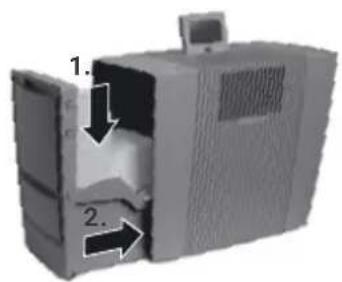
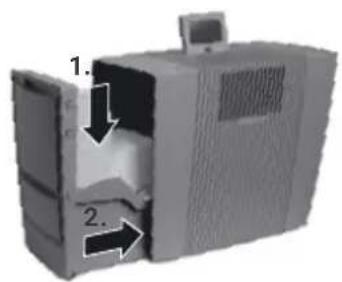
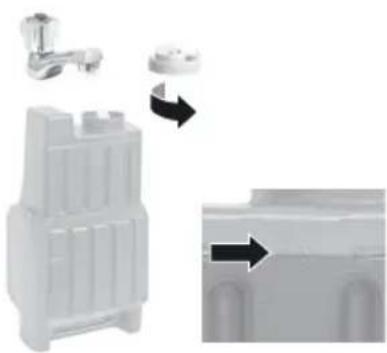
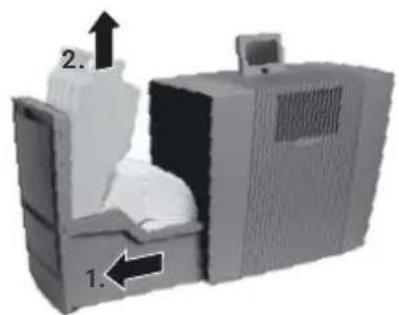
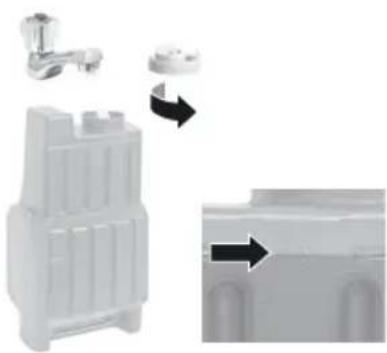
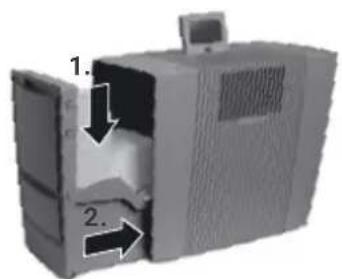
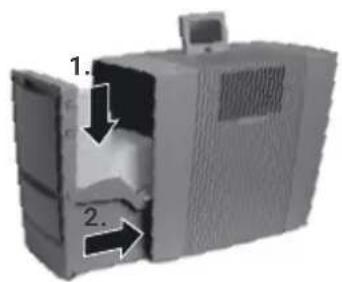
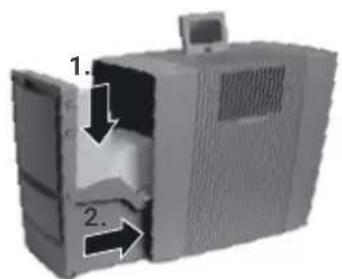
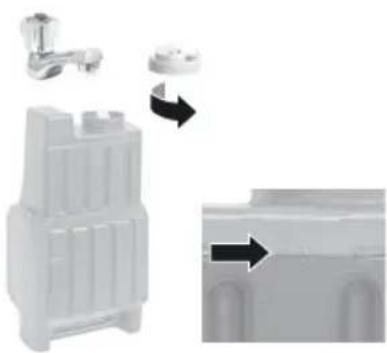
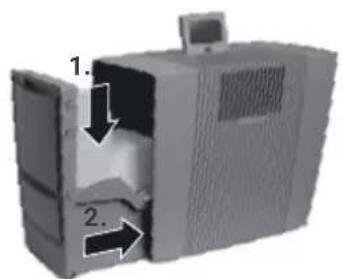
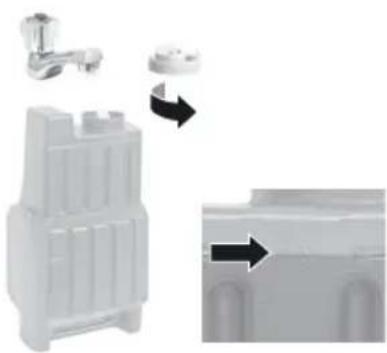
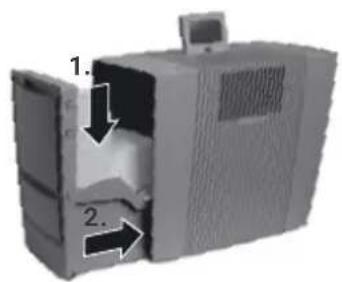
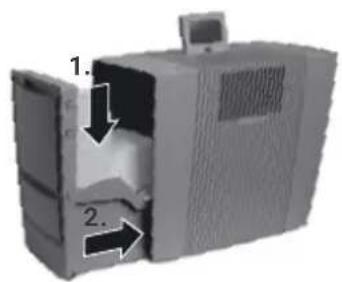
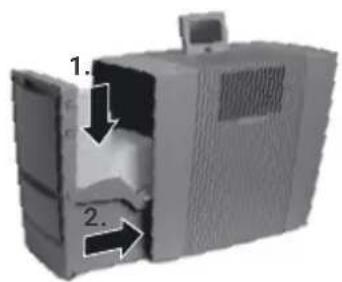
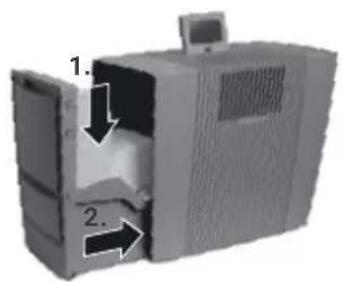
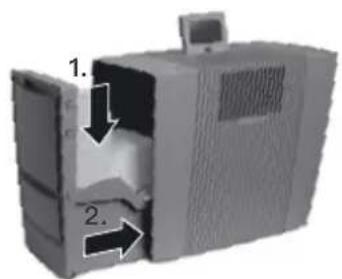
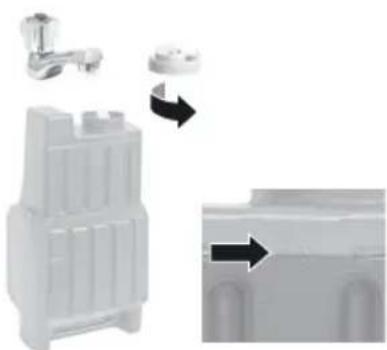
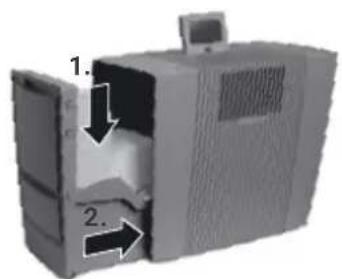
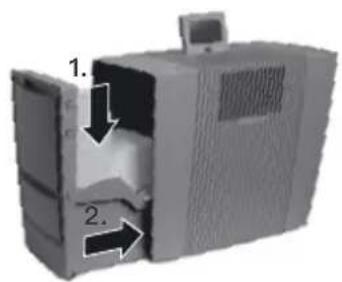
2 Open evaporator compartment 3 and remove water tank 4.
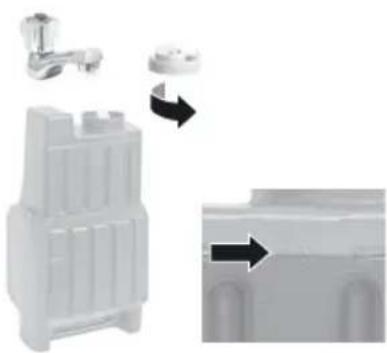
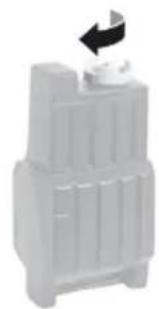
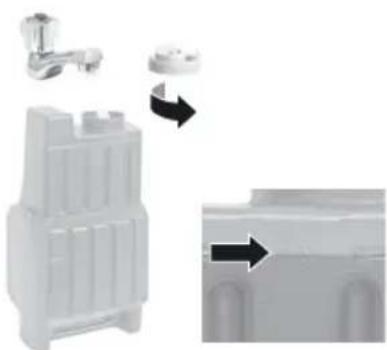
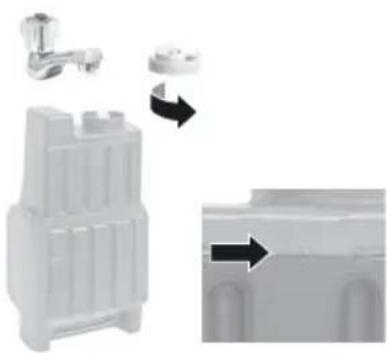
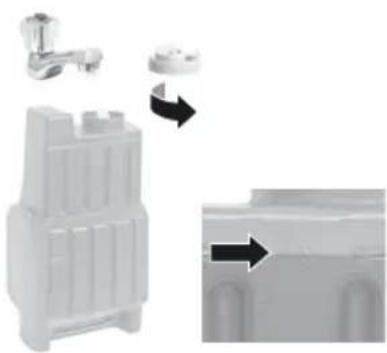
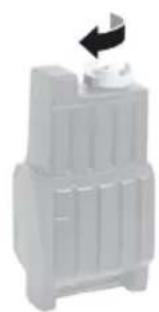
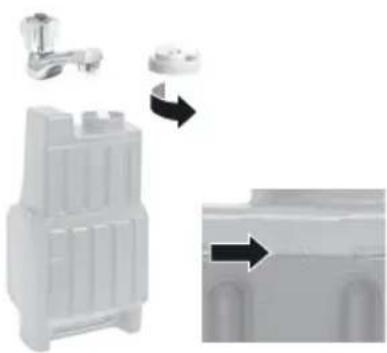
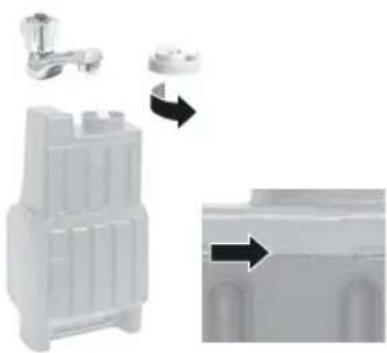
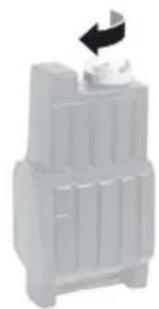
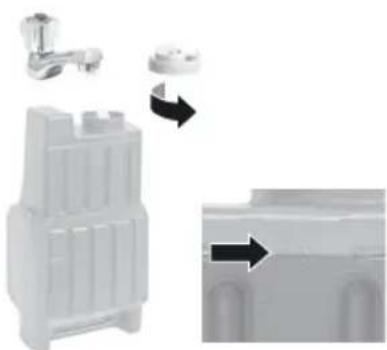
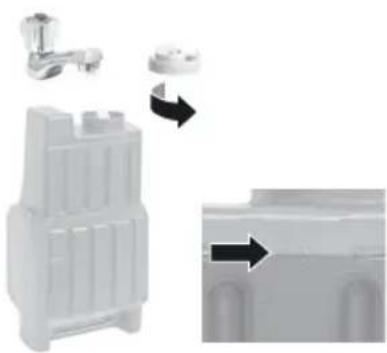
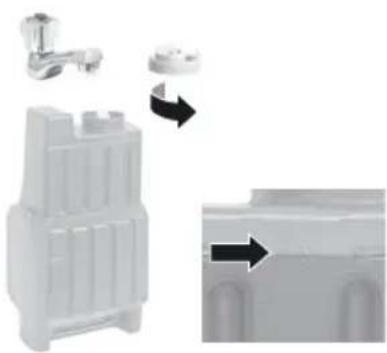
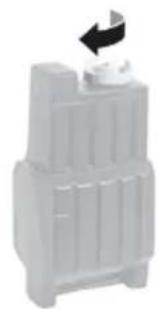
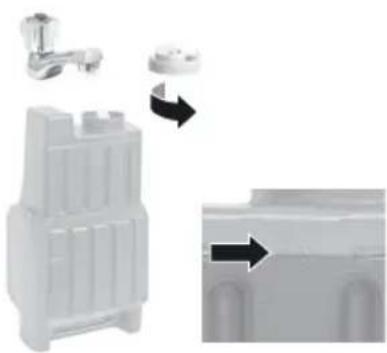
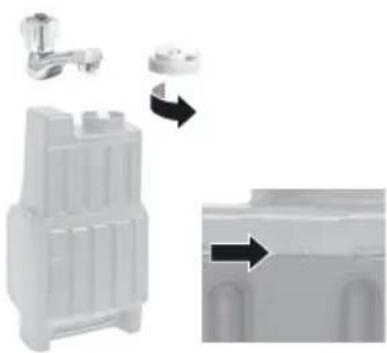
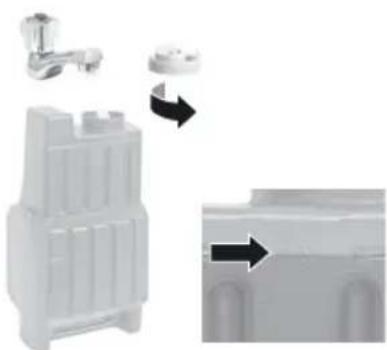
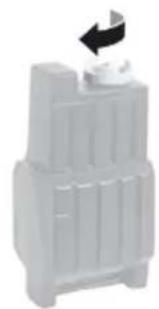
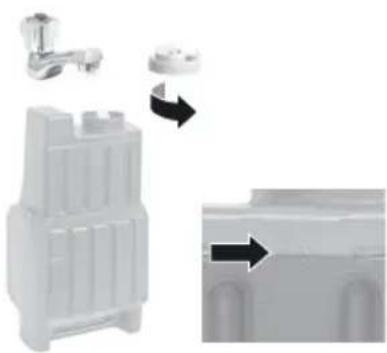
3 Open water tank 4 and fill up to the MAX marker with cold water.
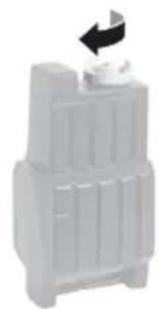
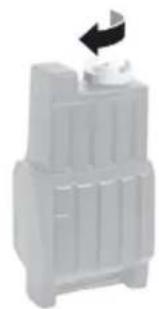
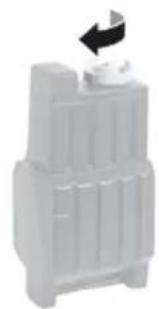
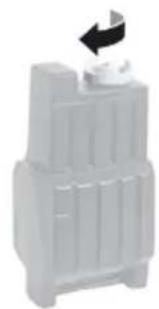
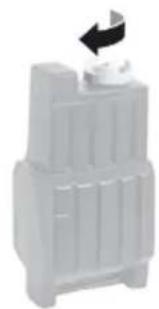
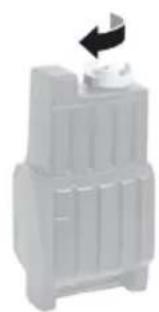
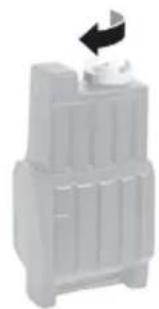
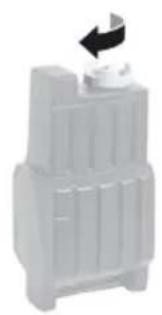
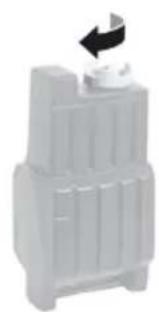
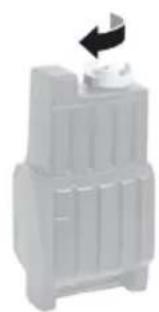
4 Close the water tank 4 securely.
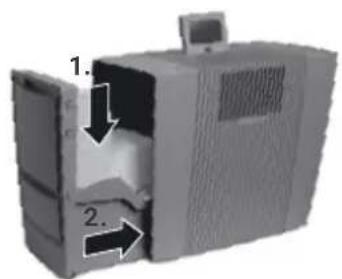
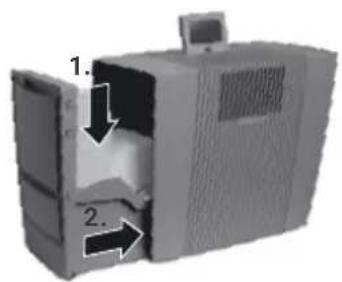
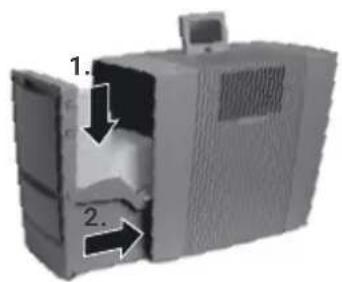
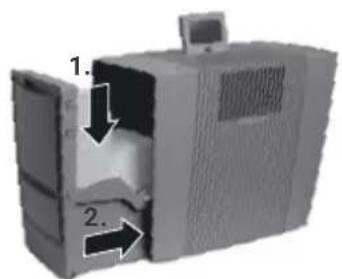
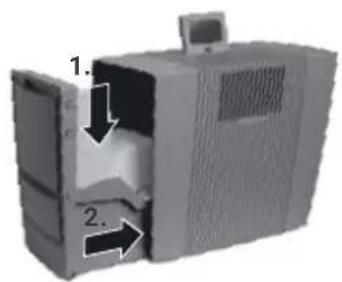
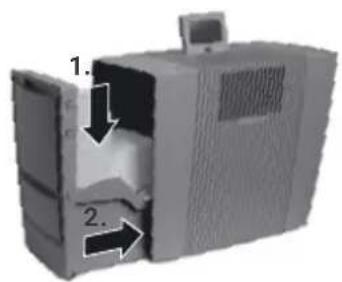
5 Insert the water tank 4 into the water basin 6 and close the evaporator compartment 3.
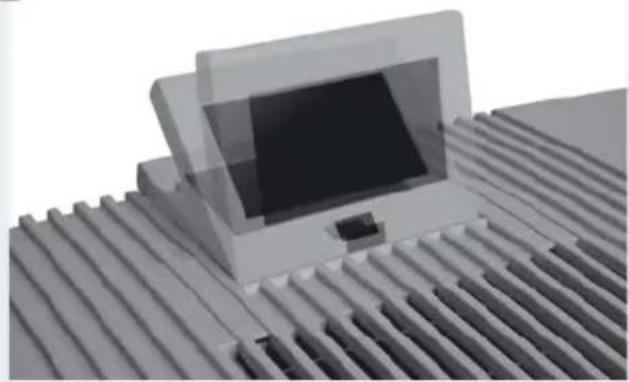
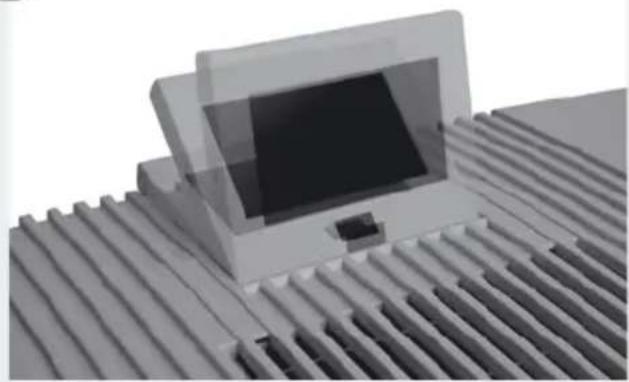
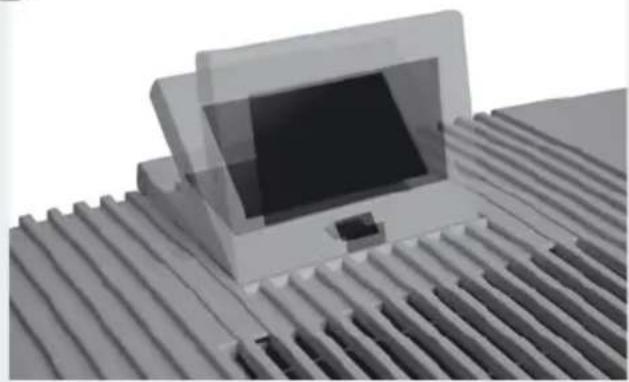
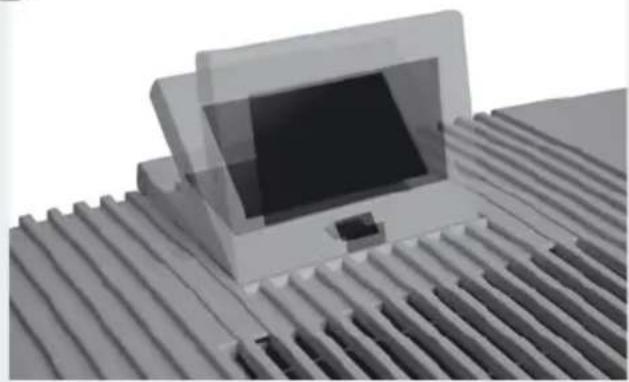
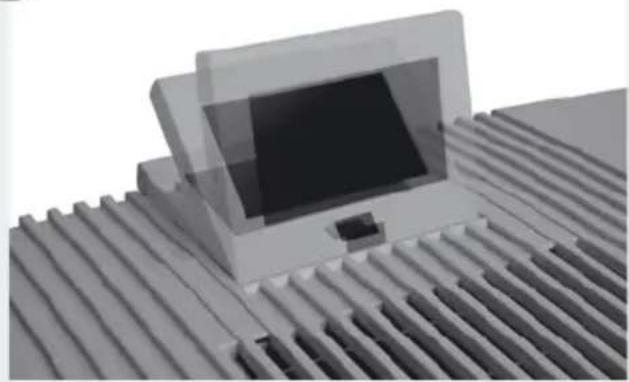
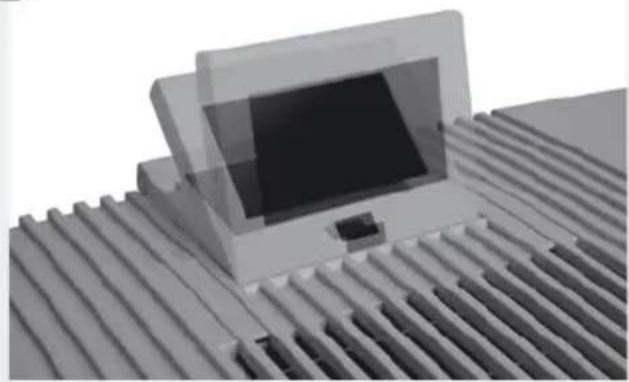
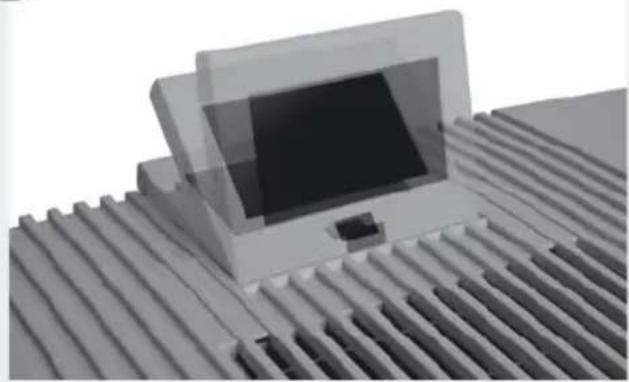
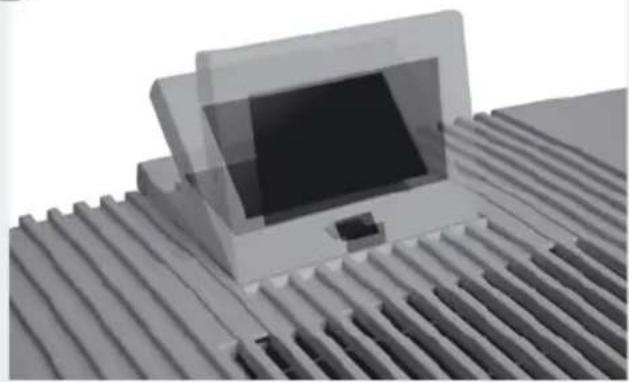
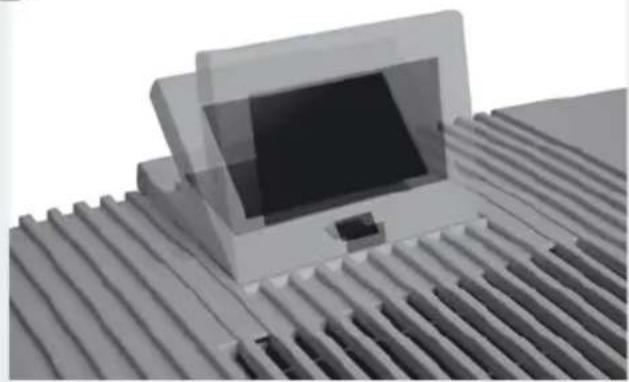
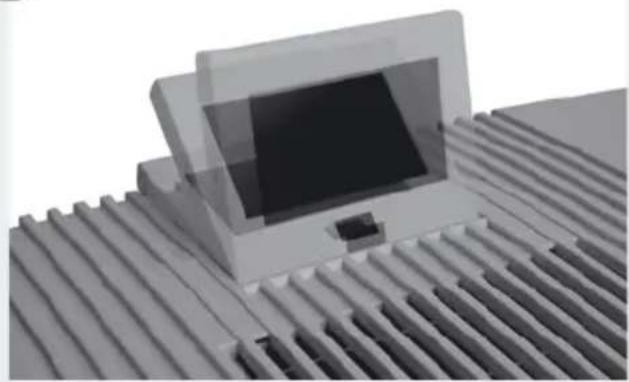
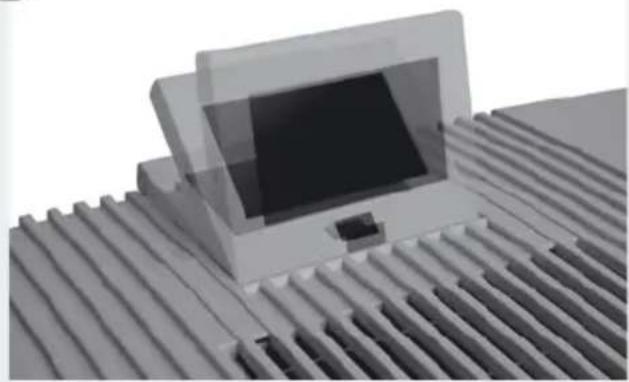
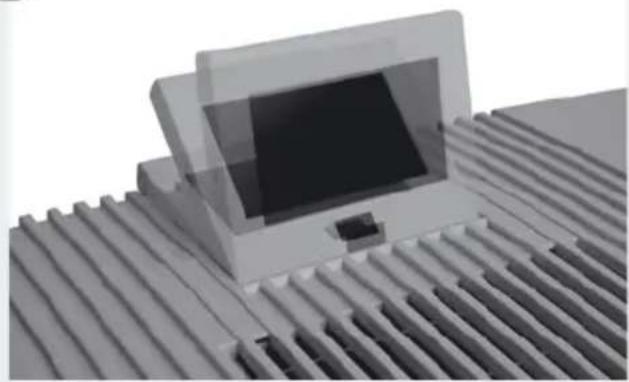
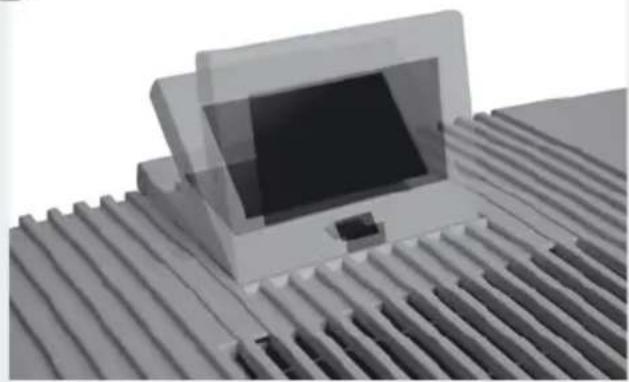
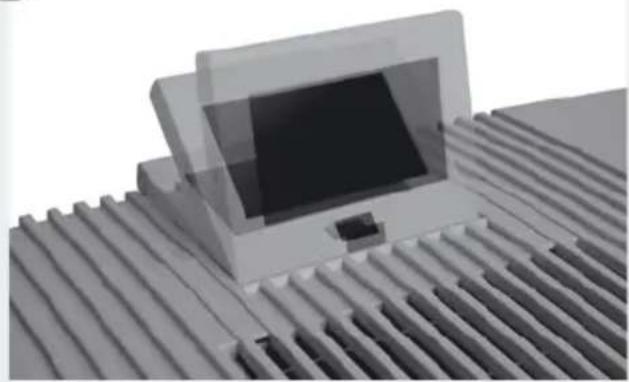
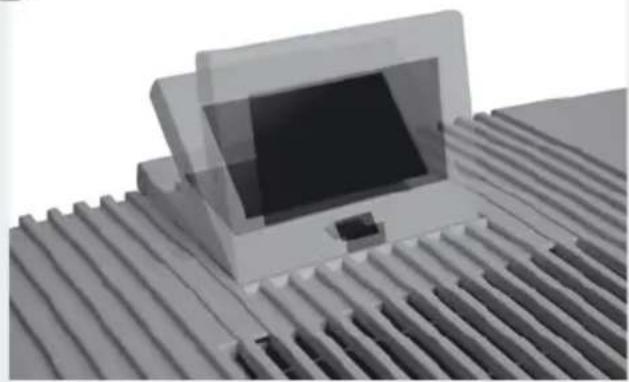
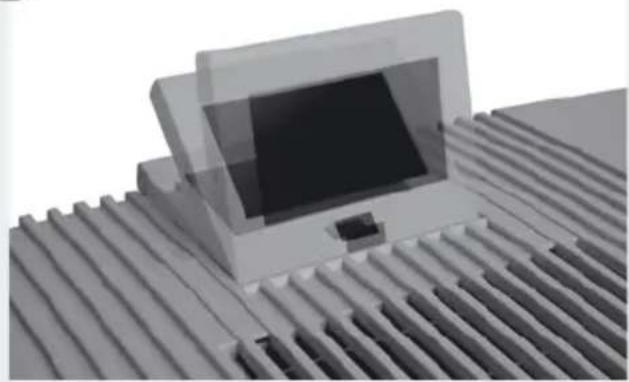
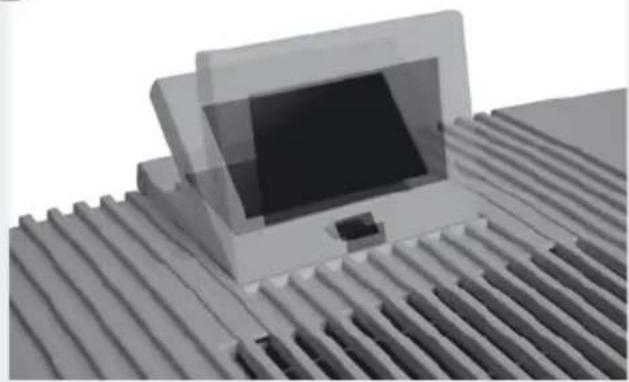
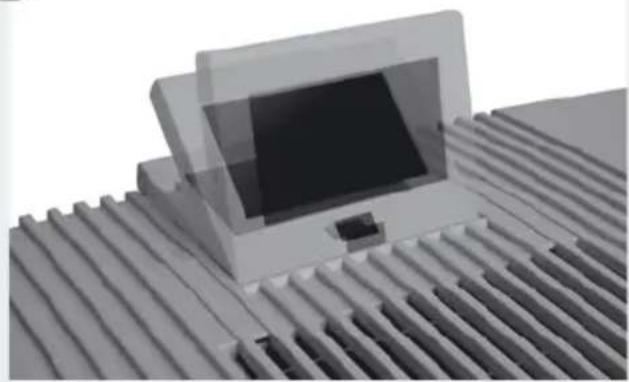
6 Adjust display 1 to the position you want (3 positions possible).
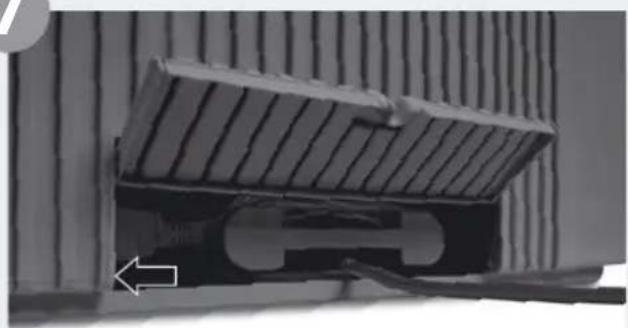
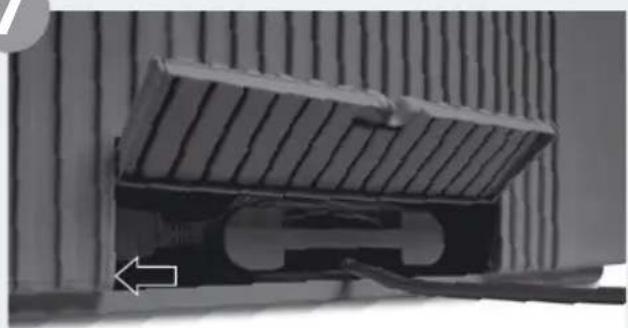
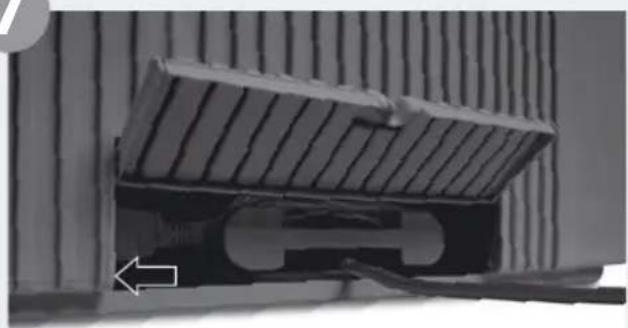
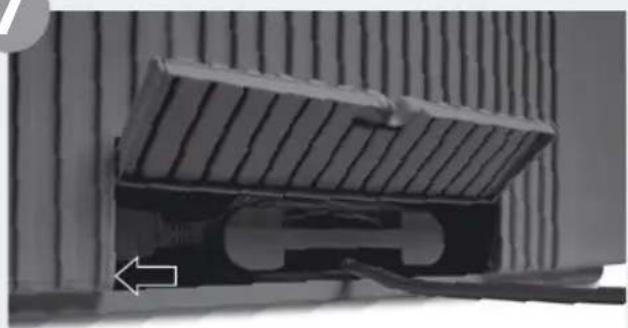
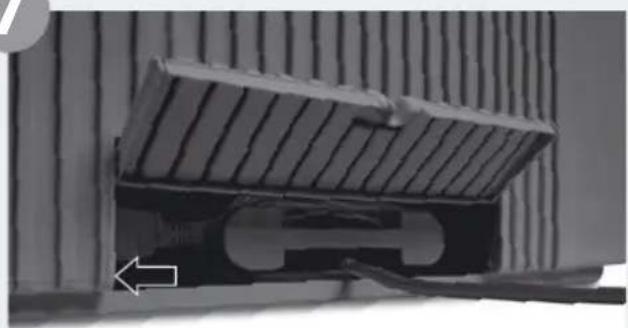
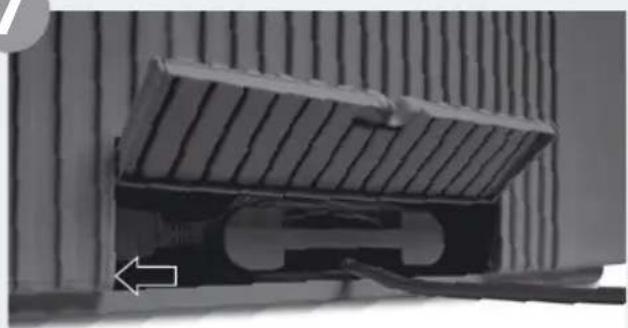
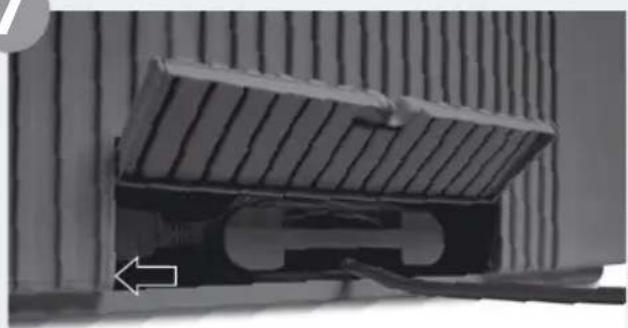
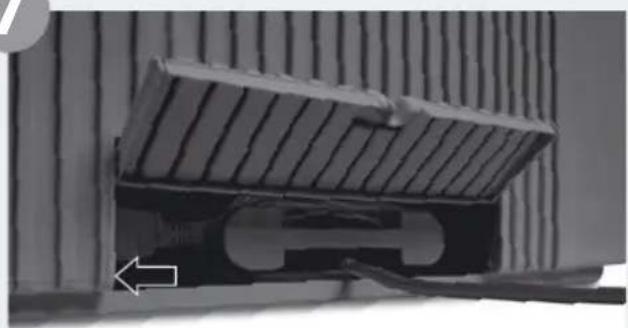
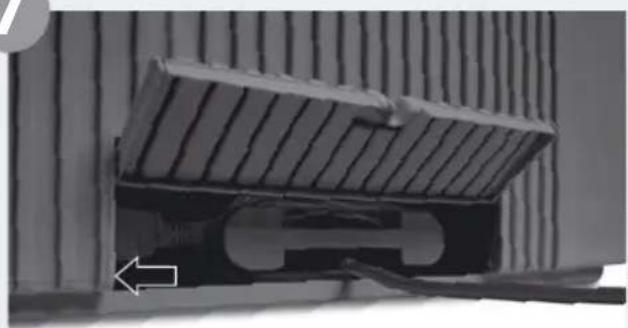
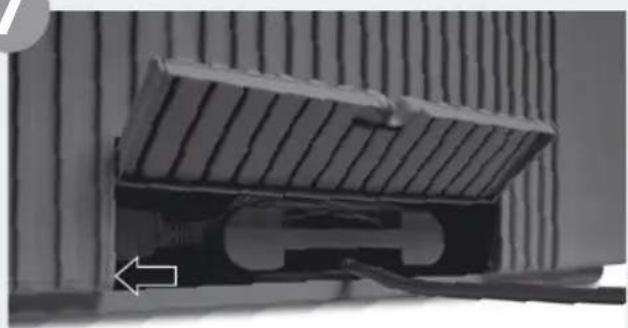
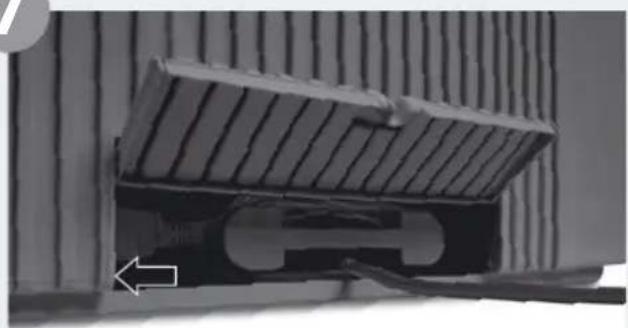
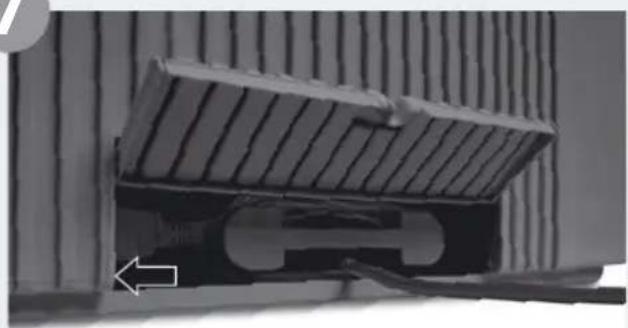
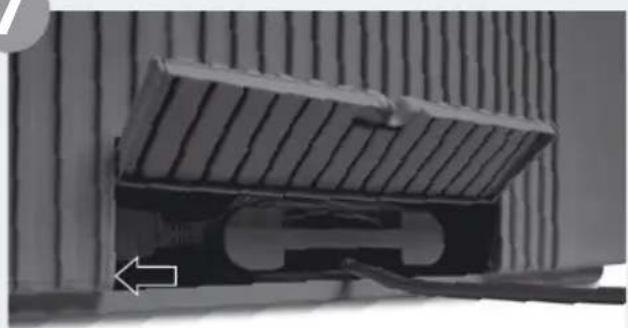
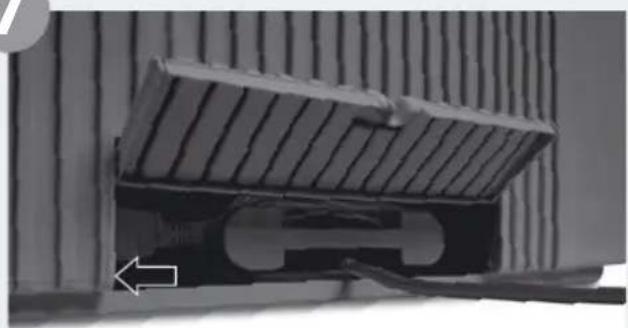
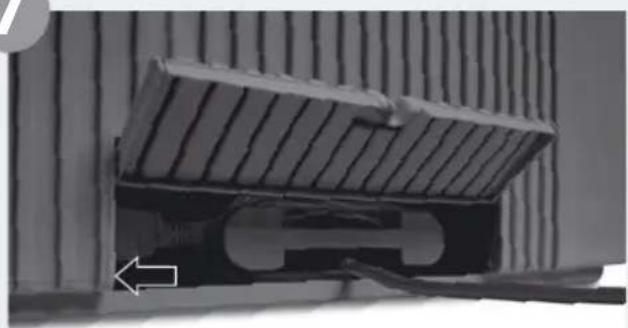
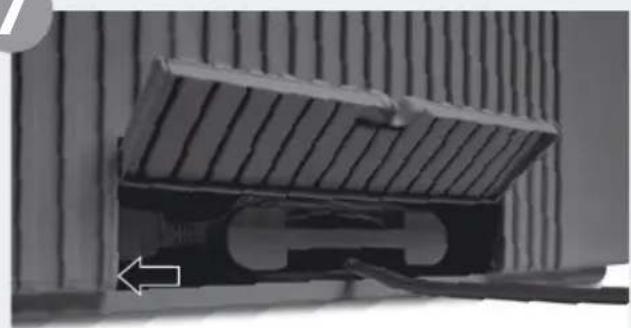
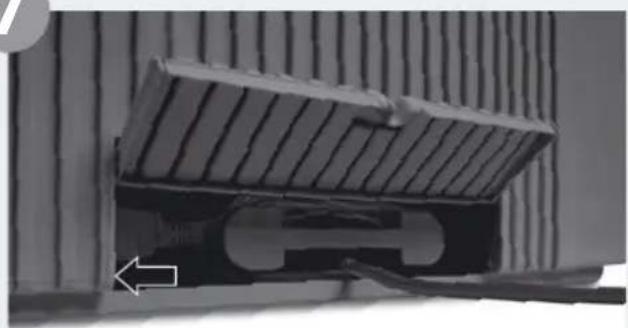
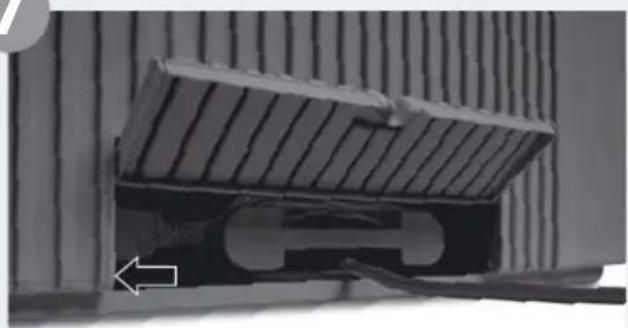
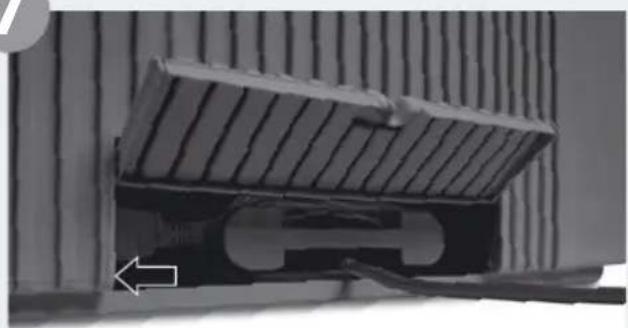
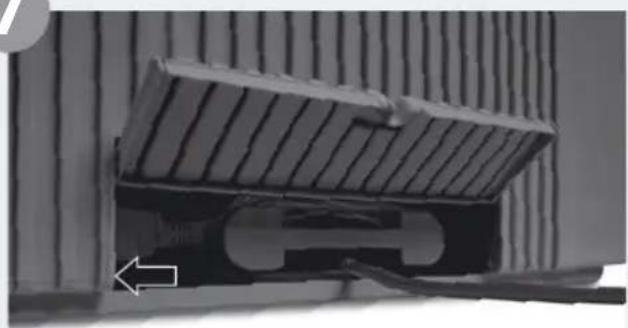
7 Adjust cable connector to the length you want by winding/unwinding in cable compartment 9. Note: Make sure the cable connector is firmly fitted into the appliance!
Connect power plug to mains and switch appliance on using on/off switch 2 or remote control 11.
It can take approx. 60 seconds for the appliance to start up and the red light on the display to go out. You will be able to hear a noise (gurgling), which is not a quality defect.
1
text_image
ON/OFF Adjusting the fan stage2
natural_image
3D diagram of a mechanical device with labeled parts (1 and 2), showing internal components without any readable text or symbols.3
natural_image
Diagram showing a water tank component being processed with arrows indicating flow or movement (no text or symbols present)4

natural_image
Stacked plastic waste bins with a black arrow indicating upward motion (no text or symbols)5
natural_image
3D diagram of a computer case with labeled components (no text or symbols present)6
natural_image
3D rendering of a wall-mounted electronic device with a black screen, placed on a corrugated metal surface (no text or symbols visible)7
natural_image
Close-up of a mechanical component with a sloped top and internal cutaway view, no visible text or symbolsFUNCTIONS, SETTINGS & DISPLAYS
text_image
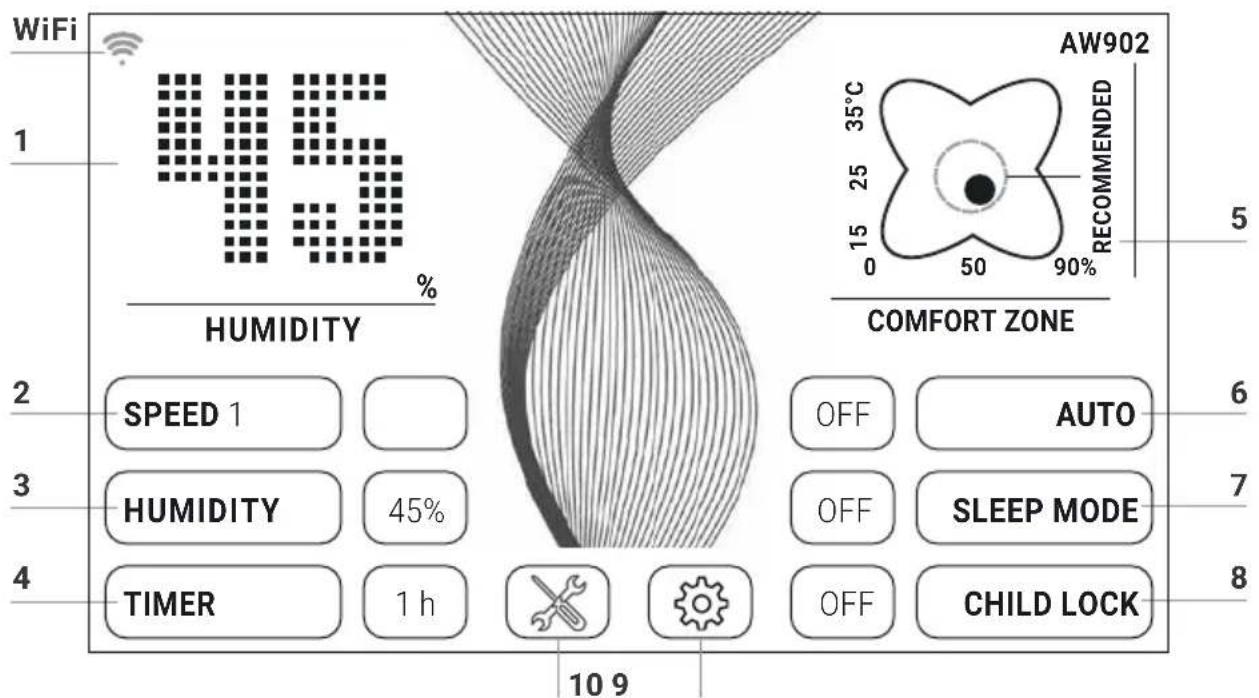
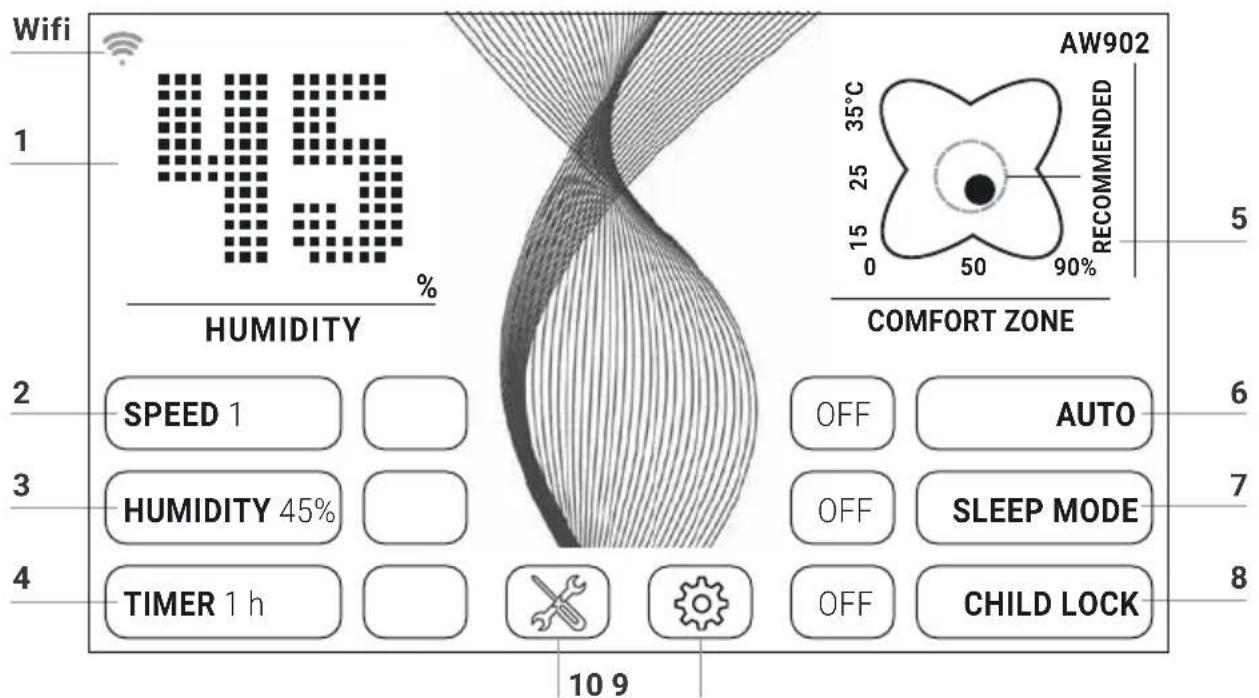
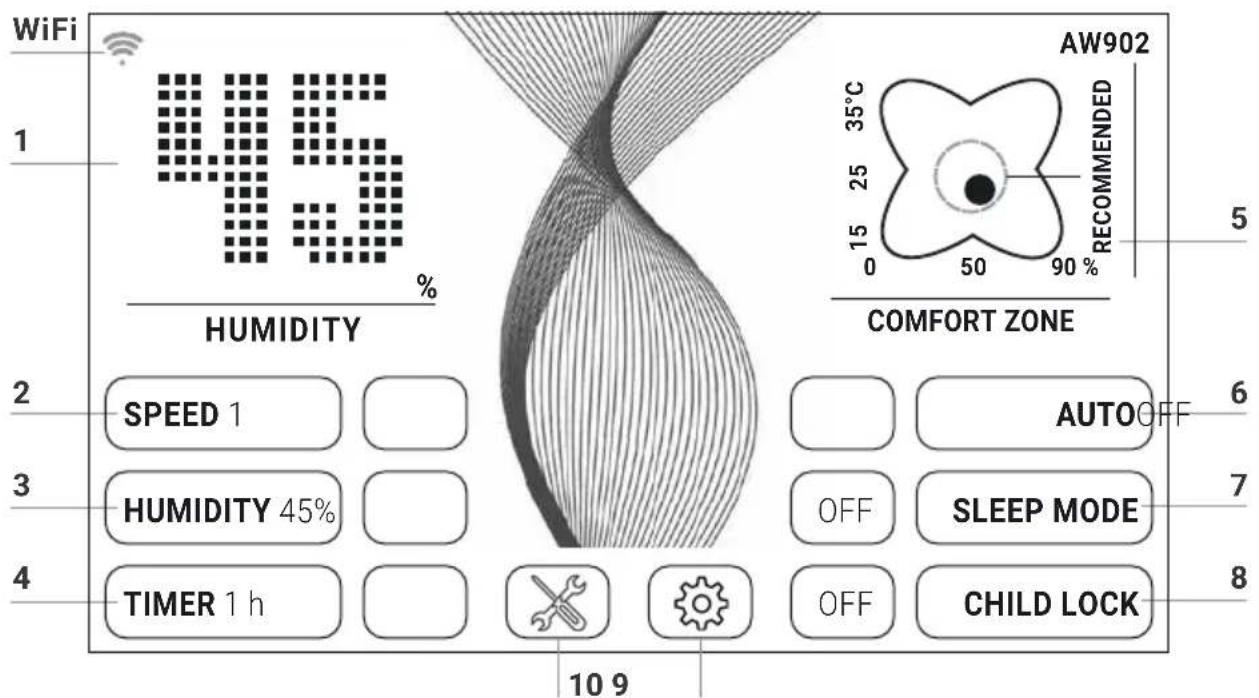
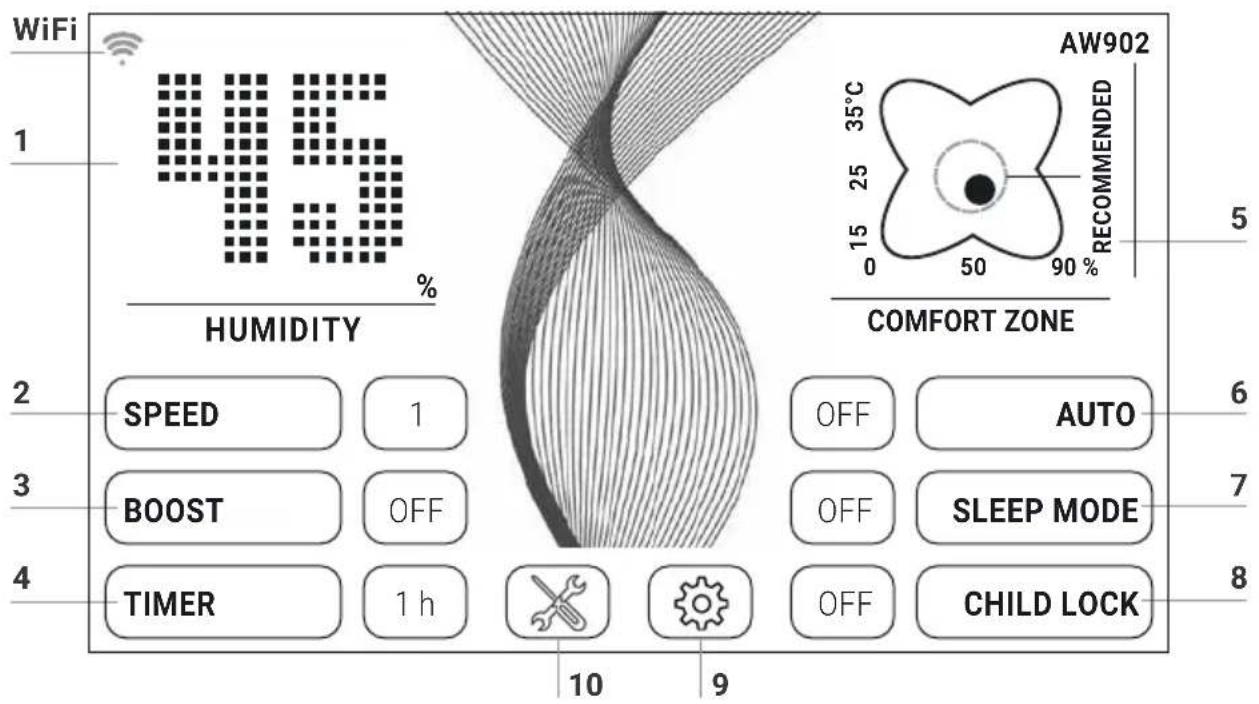
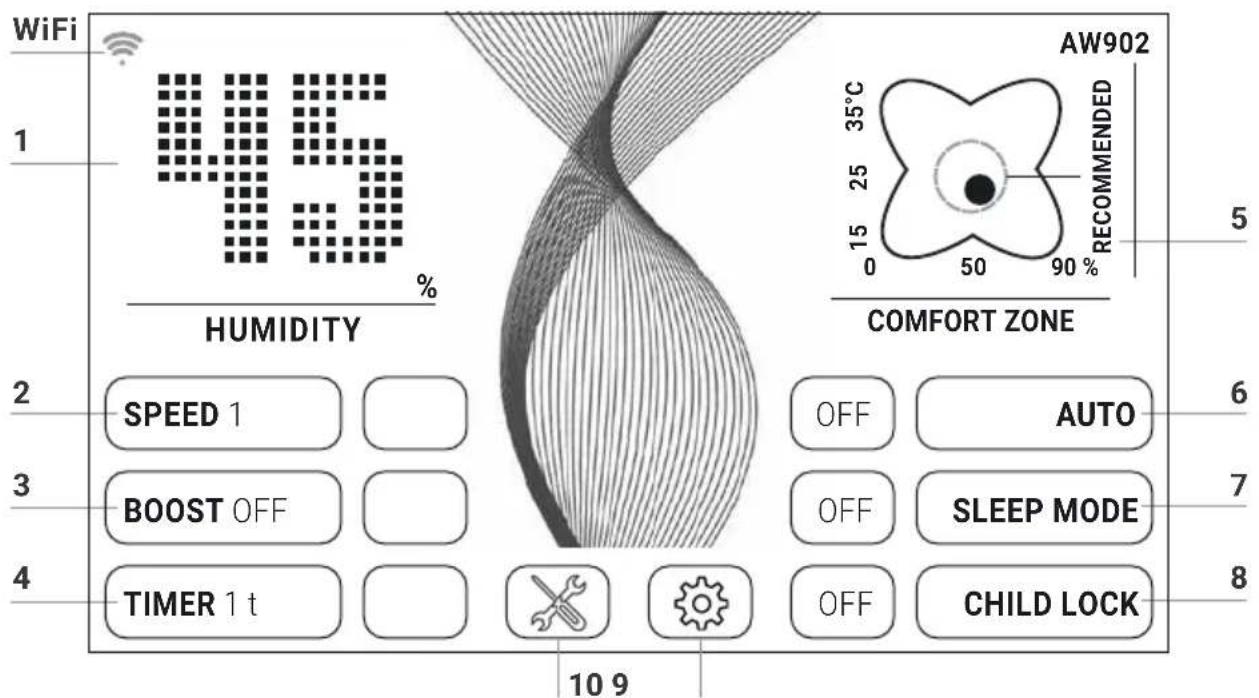
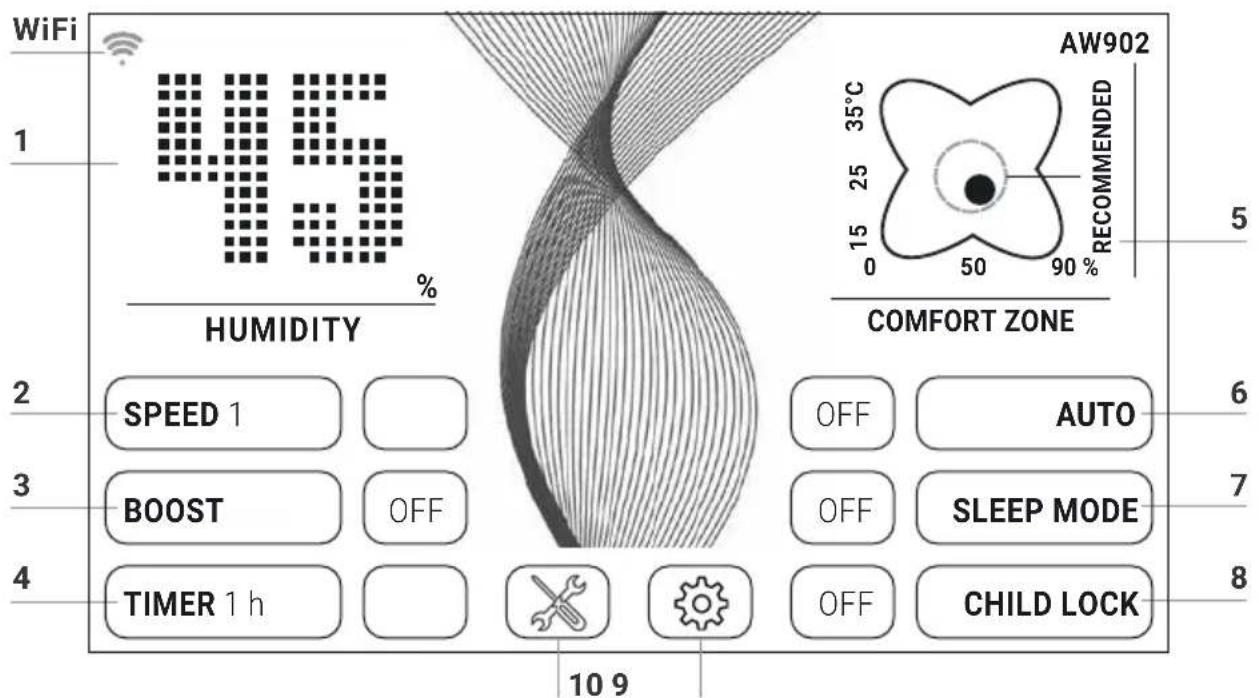
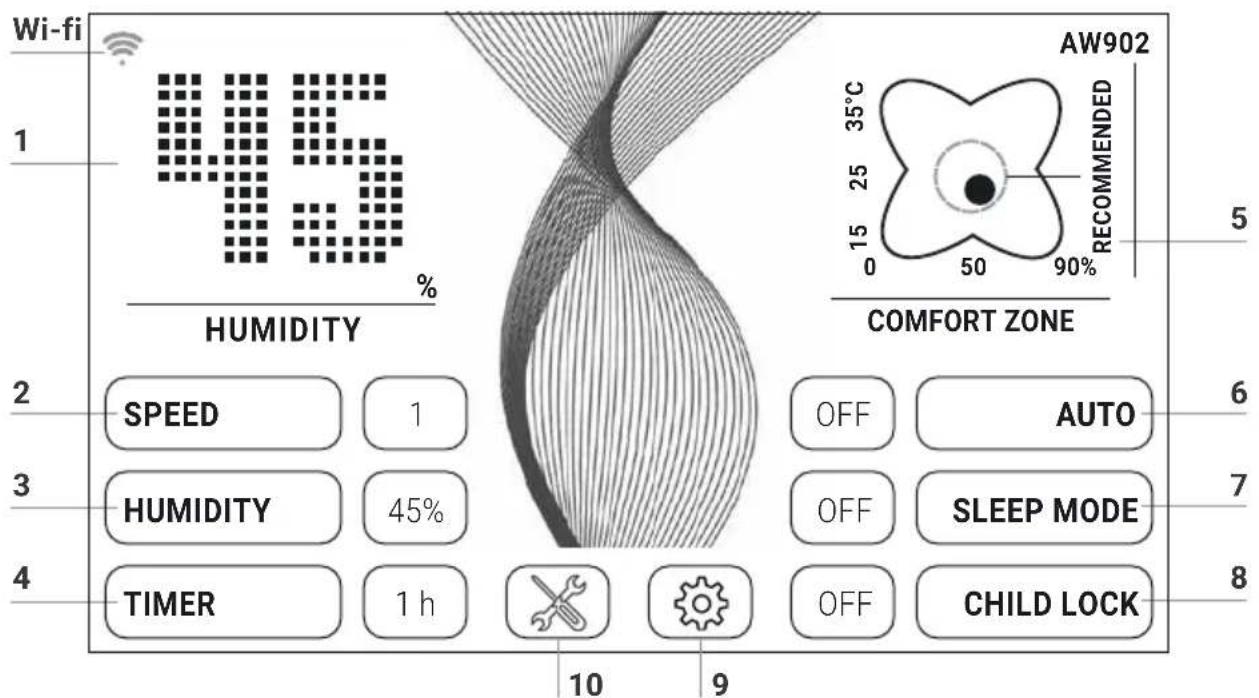
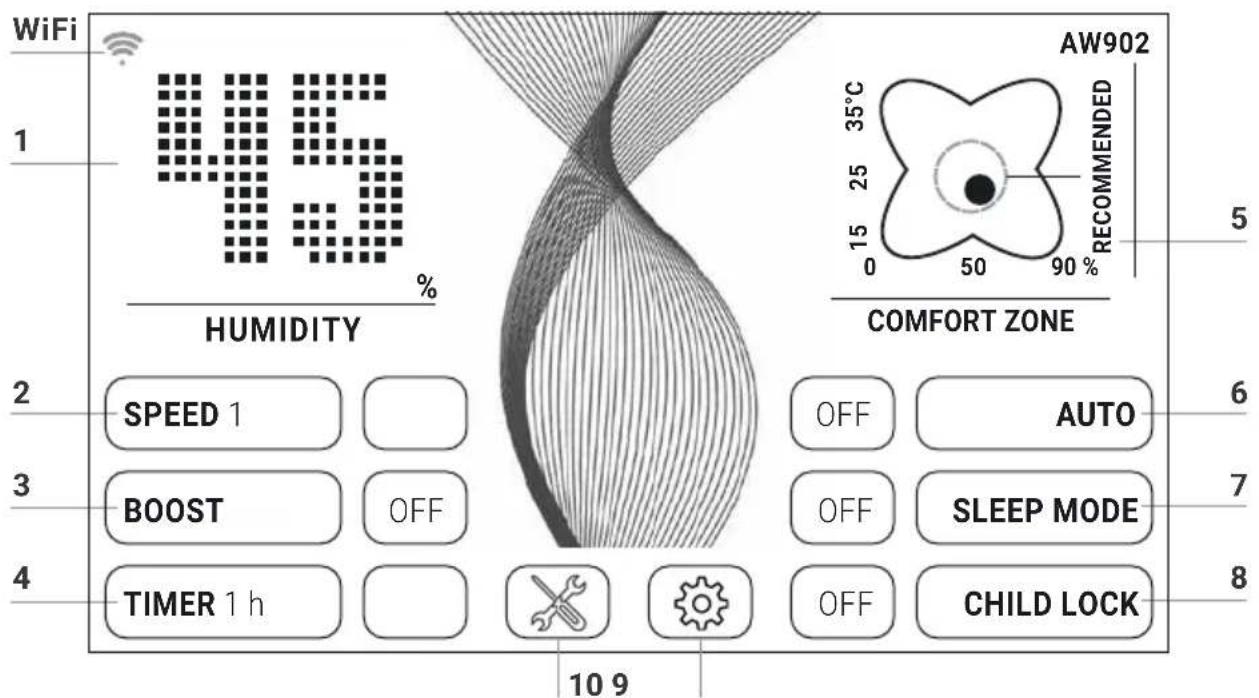
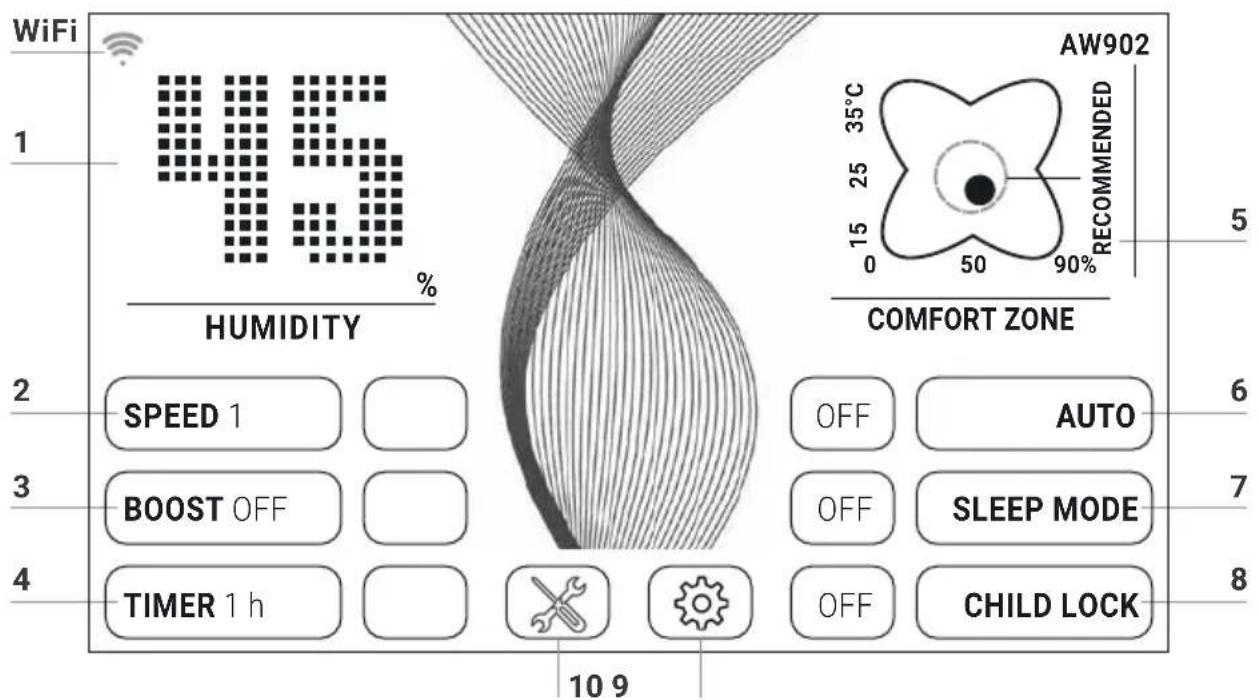
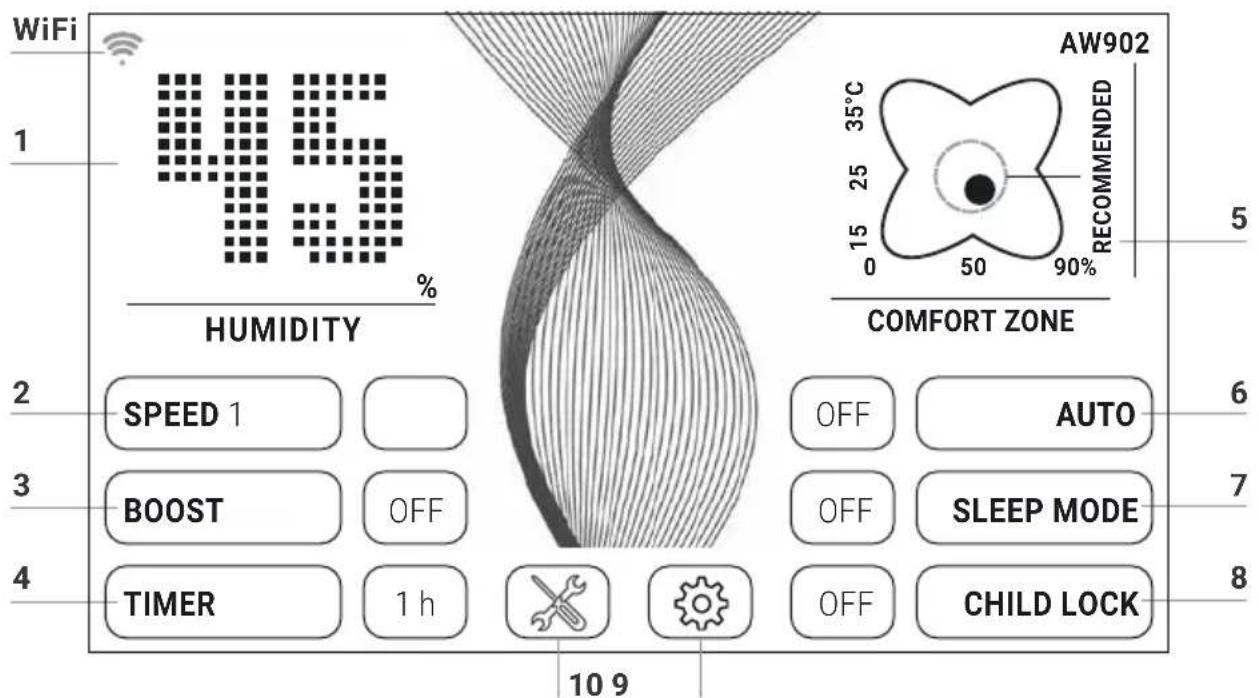
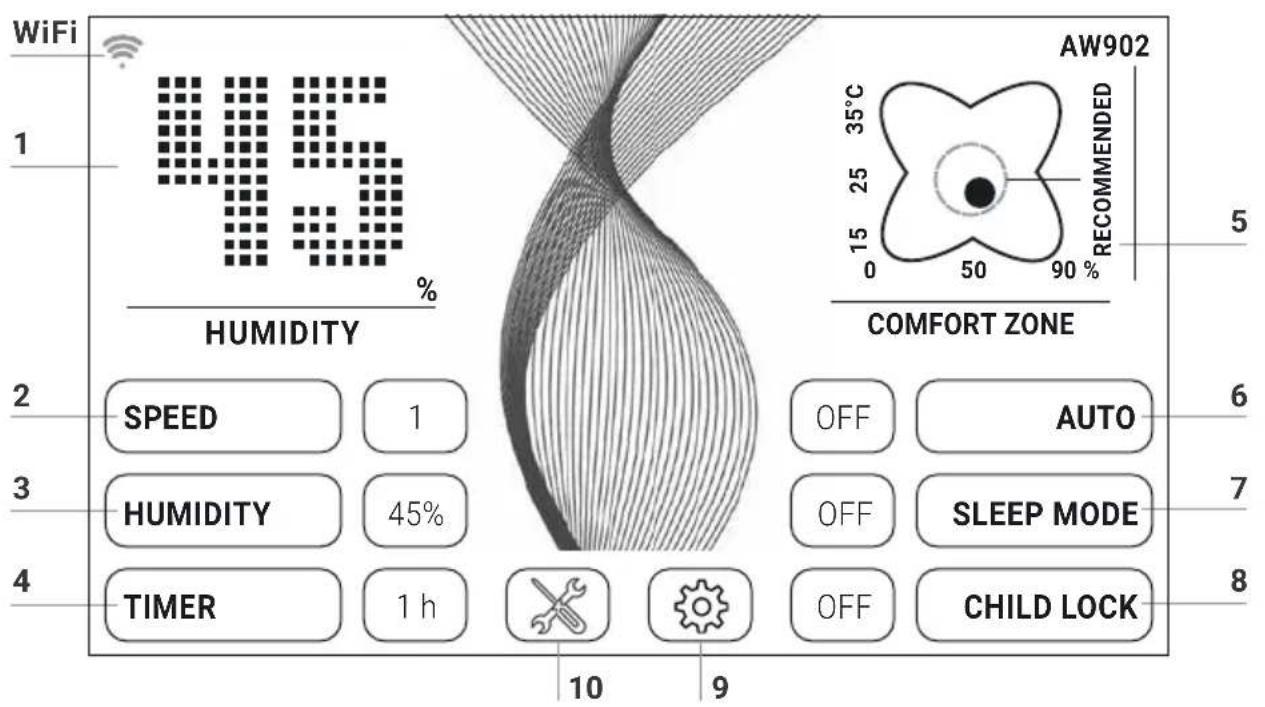
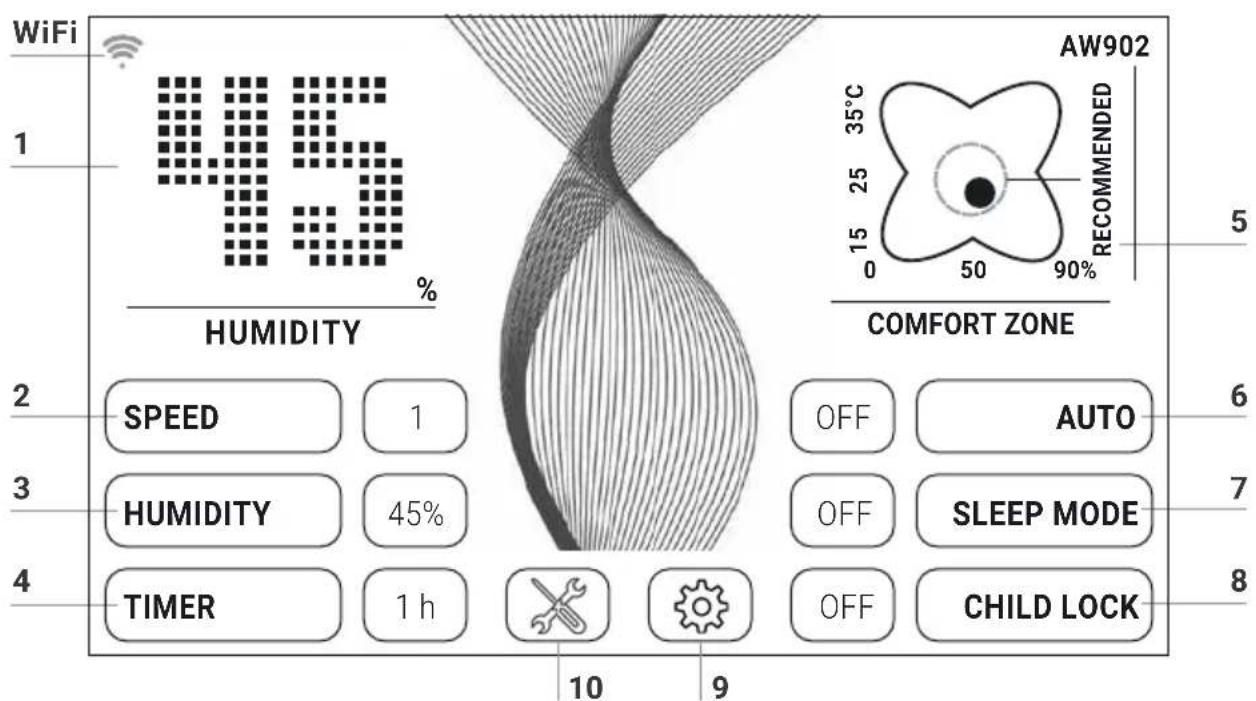
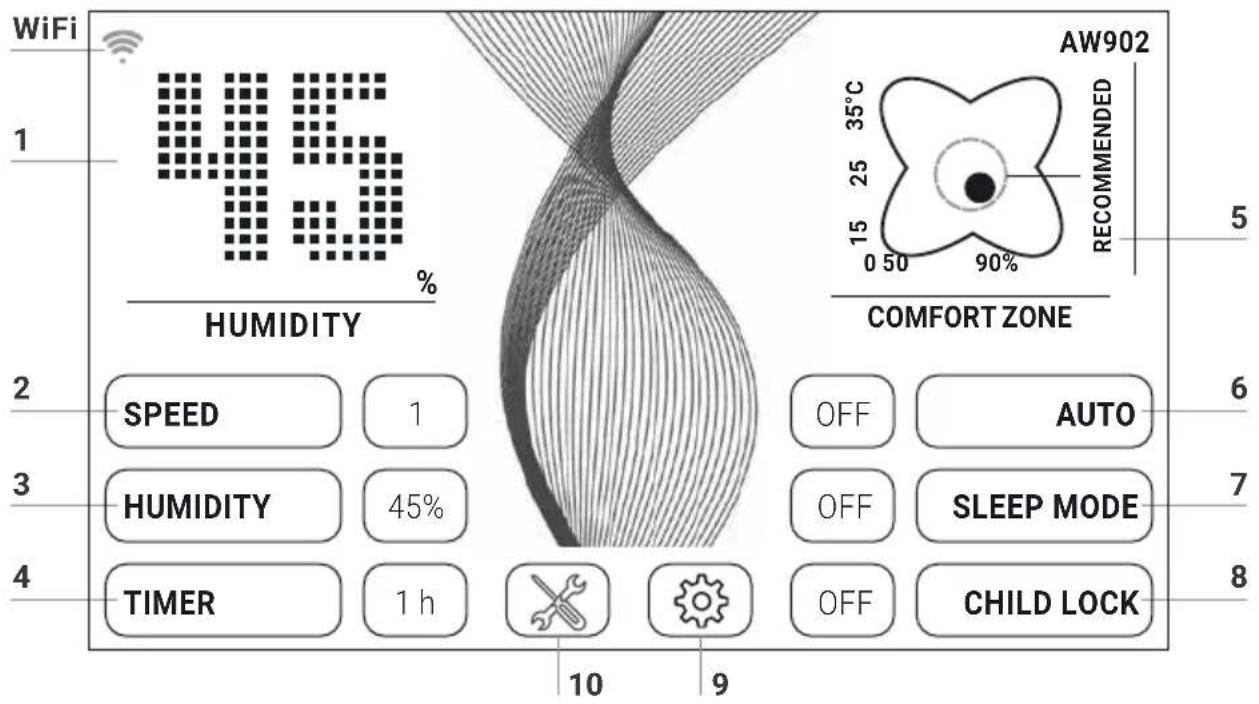
WiFi 1 45 % HUMIDITY AW902 RECOMMENDED 35°C 0 15 25 35°C 50 90% COMFORT ZONE 2 SPEED 1 45% HUMIDITY 45% TIME 1 h OFF AUTO OFF SLEEP MODE OFF CHILD LOCK 10 9Select or change the setting by tapping the function.
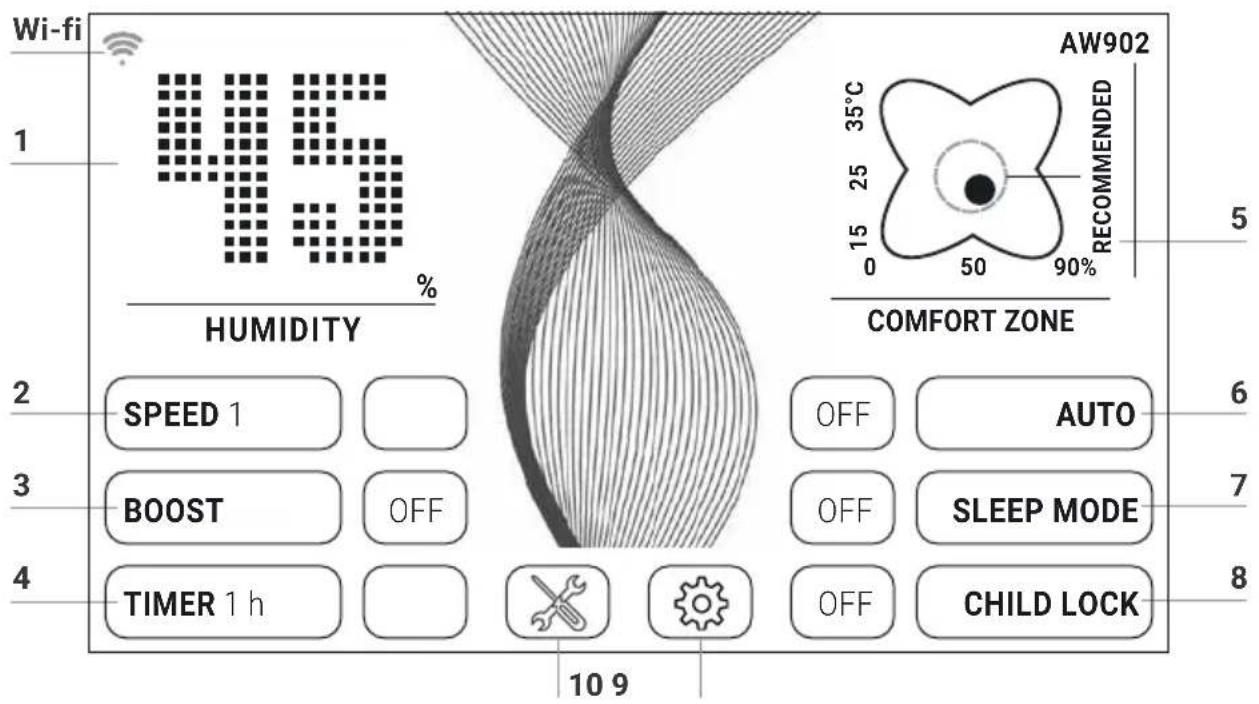
Function Setting
| 1 | Humidity | Display humidity. |
| 2 | Speed | Fan stage 1 (low) – 5 (high). |
| 3 | Humidity | 30 – 70 % (in 5 % increments). When the set humidity is reached, the disk stack stops rotating. |
| 4 | Timer | OFF / 1 / 3 / 5 / 7 / 9 h (hours)The appliance shuts off automatically after the preset hours have expired. |
| 5 | Temperature / comfort zone | Temperature: Hold for 3 sec. to switch back and forth between °C and °F.Comfort zone: If the black dot is inside the green circle, the relative humidity and room temperature are in the comfort zone |
| 6 | Auto | OFF Appliance operates at preset fan stage 1 – 5.ON The appliance automatically regulates the fan stages depending on the humidity in the room. |
7 Sleep mode OFF / ON
The appliance reduces the fan stage to 1 and dims the display. You can change the air flow rate manually in sleep mode at any time.
8 Child lock OFF / ON
Hold for 3 sec. to activate/deactivate the key lock.
9

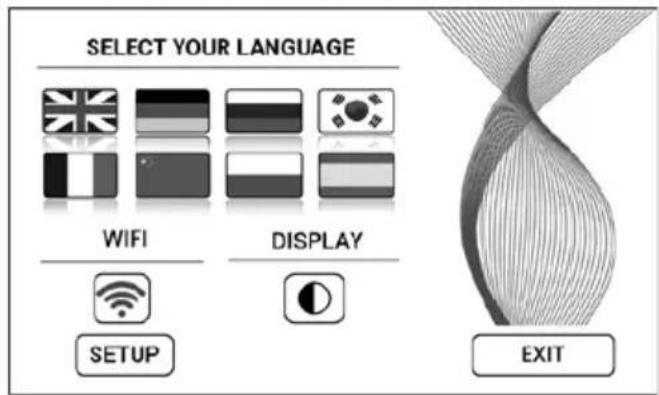
Tap the ⚙. button to open the Settings menu.
text_image
SELECT YOUR LANGUAGE WIFI DISPLAY SETUP EXITLanguage
Tap the national flag to select language.
Display
Tap the ⬤ button to select black or white display background colour.
Display WiFi connection.
WIFI
Enable or disable WiFi by tapping the 📤 button.
grey: WiFi disabled.
blue: WiFi connection to Venta server enabled (full access).
green: WiFi connection to the local network established (local access).
red: No WiFi connection. Set up the WiFi function. For a precise description, see sections "Configure WiFi" and "Venta App".
SETUP
10

Tap the ✗ button for instructions and maintenance information.
white: No instruction.
red: Observe instruction.
For a precise description, see section "Cleaning & Maintenance".
WIFI CONFIGURATION
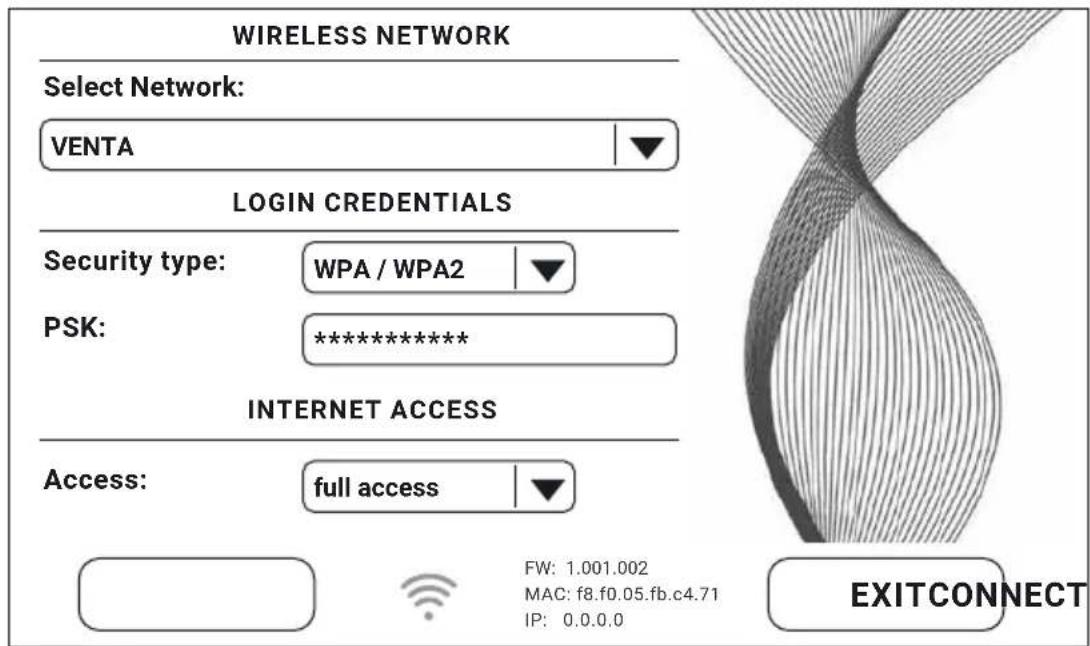
To access WiFi configuration, first tap button 9, ✉ then the SETUP button. Select "Select network", then your network in the dropdown list. The "Security type"
text_image
WIRELESS NETWORK Select Network: VENTA LOGIN CREDENTIALS Security type: WPA / WPA2 PSK: ********** INTERNET ACCESS Access: full access FW: 1.001.002 MAC: f8.f0.05.fb.c4.71 IP: 0.0.0.0 EXITCONNECTis automatically set as soon as you select the network. In the "PSK" box, please enter your WLAN password/key (ASCII entry mode) and confirm with ENTER. If your password contains special characters or umlauts which are not shown on the keypad, you can generate your full password as a HEX code on our website: www.venta-air.com. Now enter your generated HEX code into the "PSK" box (HEX entry mode) and confirm with ENTER. Under "Access", select the internet access type you require.
full access: access to all the comfort features of the app.
local access: local access to use the app.
Tap CONNECT to create the WiFi connection.
WiFi symbol green: WiFi connection established (local access).
WiFi symbol blue: WiFi connection established (full access).
WiFi symbol red: No WiFi connection. Check your network and WLAN password.
WiFi symbol grey: WiFi disabled.

If problems occur during the setup process, read the information in the section "What to do if WiFi connection is not possible?"
Tap the EXIT button to return to the previous menu.
VENTA APP
You can use the Venta app to expand and control the appliance functions. The app is available for smartphones and tablets. Please download the Venta app at: www.venta-air.com, or use the QR code.
Please log in to the ≡ menu or register as soon as you have downloaded and opened the Venta app.

You must register so that you can control and check your Venta appliance when you're on the go.
You can use the search function + to automatically find all local Venta appliances. Please select your appliance.
The appliance emits an audio signal while the app is connecting to it. Please confirm
connection to your smartphone/tablet on the appliance.

If WiFi connection is disabled, the appliance does not connect to the Venta app.
WIFI AUTHORISATION INCOMING WIFI REQUEST.
YES NO
CLEANING & MAINTENANCE
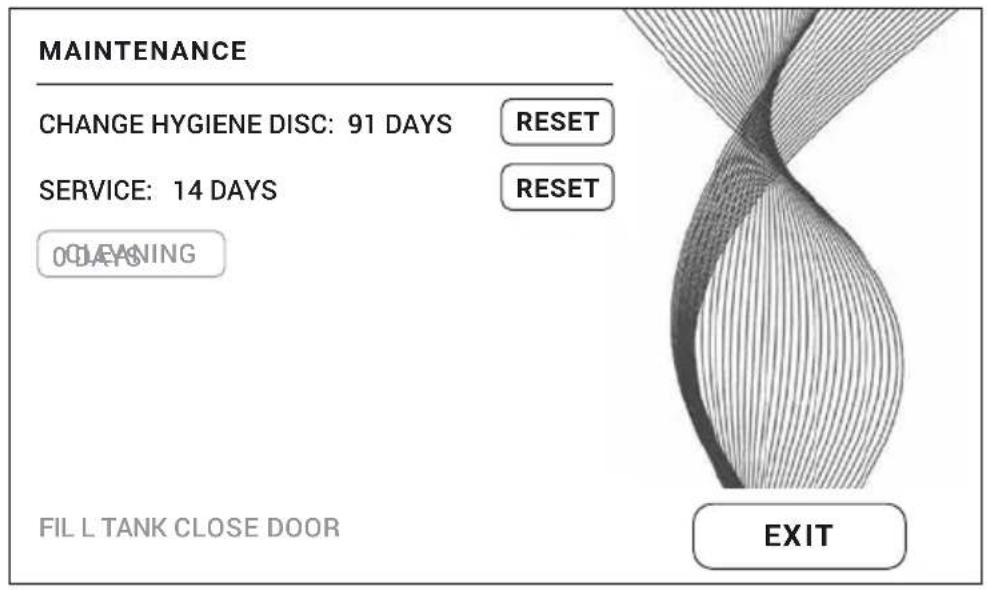
Tap button 10 ✗ on the display to see information about maintenance. Red light indicates that this type of maintenance is due.
text_image
MAINTENANCE CHANGE HYGIENE DISC: 91 DAYS RESET SERVICE: 14 DAYS RESET 0 DEANING FIL L TANK CLOSE DOOR EXITReminder/Interval Actions
A FILL TANK Water tank empty, fill with fresh water.
Yellow: Humidification is still taking place.
Red: No humidification is taking place.
CLEANING For the cleaning process, you need a (250 ml) bottle of Venta appliance cleaner. Start the cleaning program by tapping the CLEANING button on the display, then follow the instructions. Cleaning takes approx. 4 h.
i After 6 months (of continuous 24-hour operation), the maintenance button lights up in red and indicates that this action is necessary.

natural_image
Exterior view of a modern office building (no signage)
natural_image
Close-up of a mechanical component with a circular base and gear-like top, showing a black arrow pointing to the top-right corner (no text or symbols visible)
Attention! Ensure that the device is switched off during the following actions and the power plug is disconnected from the power supply!
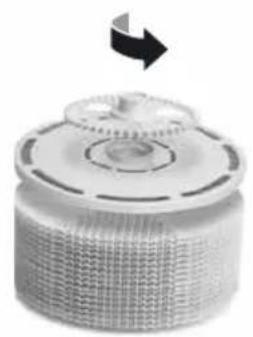
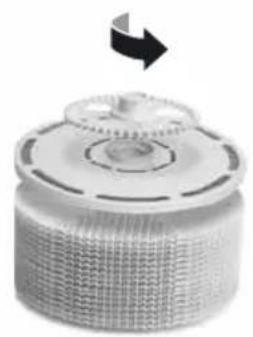
B CHANGE HYGIENE DISC
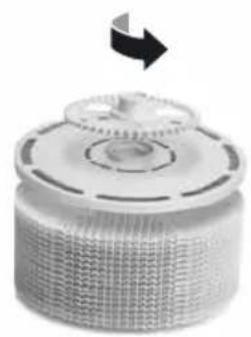
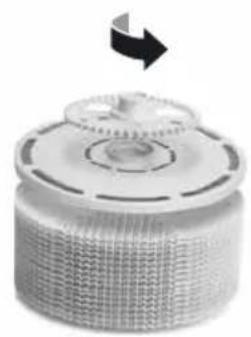
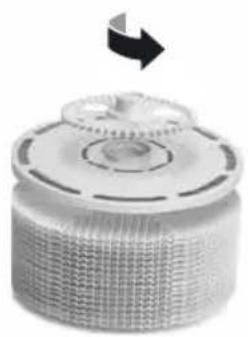
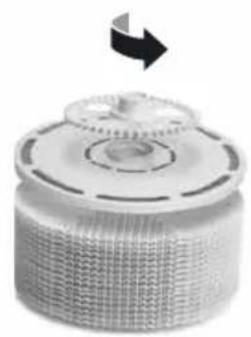
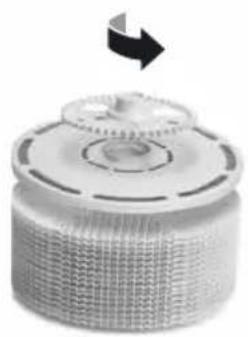
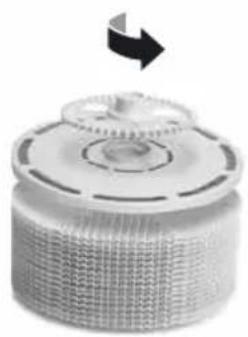
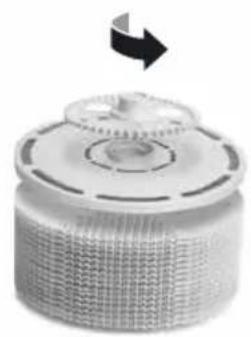
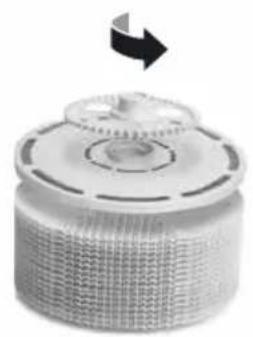
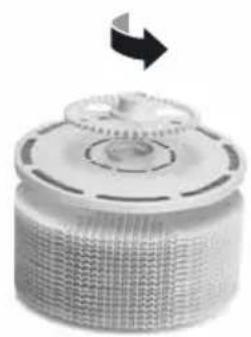
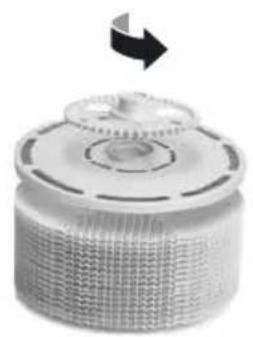
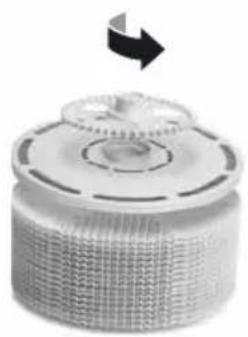
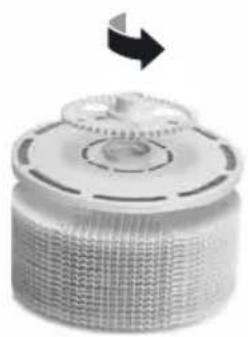
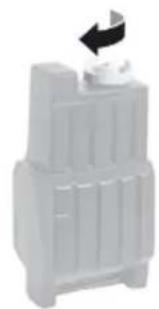
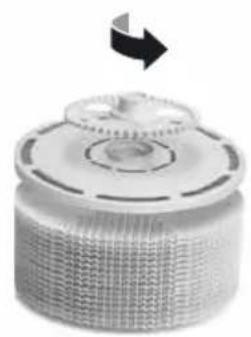
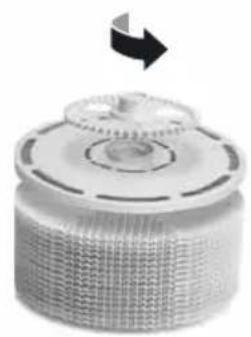
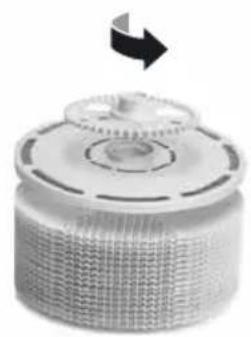
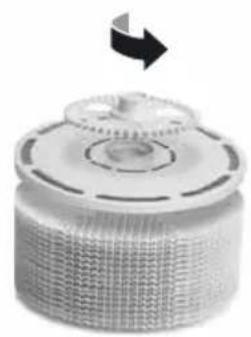
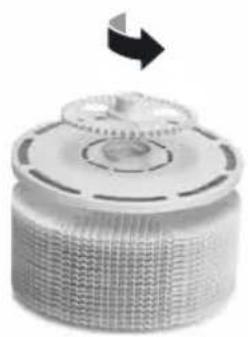
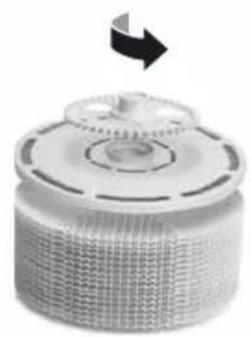
Open evaporator compartment. Remove VentWave™ disk stack and unlock the drive wheel. Remove hygiene disk and replace it. Re-assemble the appliance and switch it on. Tap ✗ button on the display to access the maintenance menu. Then tap RESET next to CHANGE HYGIENE DISC and hold for 3 seconds until the time is reset.

After 3 months, the maintenance button lights up in red and indicates that this action is necessary.
The service life of a hygiene disk is approx. 3 months (at continuous 24-hour operation) and depends on the water hardness, water quality, daily evaporation performance and number of operating hours.

You can use the Venta ReNew recycling program to return the hygiene disk to us (see RECYCLING & DISPOSAL).
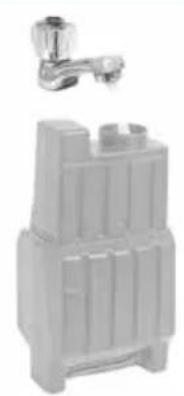
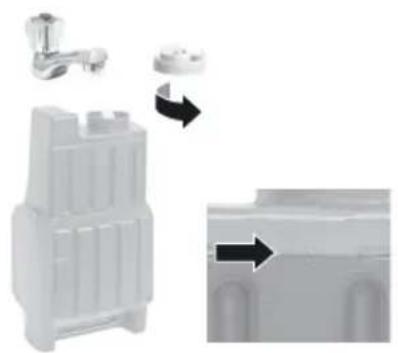
SERVICE Empty the residual water out of the water tank and water tray.
Clean the water tray, VentWave™ disk stack and water tank under running water. Fill the water tank up to the MAX marker with fresh water. Re-assemble the appliance and switch it on. Tap button on the display to access the maintenance menu. Then tap the RESET button next to SERVICE and hold for 3 seconds until the time is reset.

After 14 days, the maintenance button ✗ lights up in red and indicates that this action is necessary.
Recommendation every 3 years
To ensure the full performance of the UVC lamp, you should change the bulb every 3 years.
Note: UVC lamp is on for 4 h per day or 1 h in timer mode.
You can carry out the maintenance steps CHANGE HYGIENE DISC, SERVICE and CLEANING whenever necessary. When you are finished, simply tap the relevant RESET button in the maintenance menu ✗ and hold for 3 seconds until the time is reset. The next reminders for the actions performed will be indicated at the normal intervals.
Any residues in the water tray and on the VentWave™ disk stack (white, green-yellow or brown deposits or discolorations) do NOT impair the function of the device.
ACCESSORIES
You can order accessories by phone or online at www.venta-air.com.
PRIVACY POLICY
Venta Luftwäscher GmbH treats your data confidentially. You can find more information about data protection in our Privacy Policy at www.venta-air.com
RECYCLING & DISPOSAL
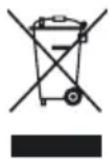
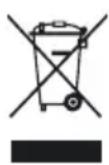
The “crossed-out bin” symbol indicates that you must dispose of waste electrical and electronic equipment (WEEE) and waste batteries separately. Such equipment may contain dangerous and environmentally hazardous substances. These products should be disposed of at an appropriate collecting point for recycling electrical and electronic equipment and may not be disposed of in unsorted household waste. Do not dispose of used batteries in household waste. Hand them in to collection points or retailers. This way you can help to protect resources and the environment. For more information, please contact your local authorities.
Children must not be allowed to play with plastic bags and packaging material as there is a danger of injury or suffocation. Store such materials safely or dispose of them in an environmentally friendly way.
FREE Venta hygiene disk recycling program helps the environment
The Venta ReNew recycling programme means original Venta hygiene disks can be recycled to a degree of 100 %. By returning used Venta hygiene disks to us, you help conserve our planet's resources. You also receive your personal Venta ReNew eco-bonus which you can redeem with your next order for hygiene disks from Venta Luftwäscher GmbH. Our Service Team will be happy to give you more information.
NOTE: The Venta ReNew recycling programme is limited to sales and shipping within Germany. Our Venta companies in other countries will be happy to give you information about their local/national programmes. If no ReNew recycling programme is available in your country, simply dispose of the hygiene disk in household waste.
GUARANTEE
Due to the high quality of our products, Venta-Luftwäscher GmbH guarantees that this product will remain defect-free for two years as from the purchase date, provided it is used correctly. If a material or processing error should occur anyway, please contact the Venta Service Team or your dealer. Venta's general guarantee conditions also apply: www.venta-air.com/en_de/Service/Warranty/
VENTA SERVICE TEAM
Do you need additional information about your Venta appliance, do you want advice or to order accessories? Our Service Team is there for you! Call us directly, or visit the Venta website: www.venta-air.com.
DE +49 751 5008 88
AT +43 5572 202 539
CH +41 41 781 15 15
WHAT TO DO IF ...

Attention! Before carrying out any of these actions, ensure that the appliance is switched off and disconnected from the power supply!
... the appliance won't switch on?
Please check whether the appliance is plugged in to the mains.
... the appliance won't switch on even though it is plugged in to the mains?

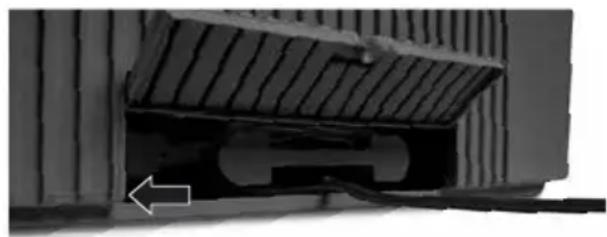
Action: Please check whether the mains power cable is correctly
plugged into the appliance. Then switch the appliance on again.
natural_image
Close-up of a mechanical component with a sloped top and internal structure, showing no visible text or symbols.... WiFi connection is not possible
Please check that:
- you are using a 2.4-GHz or a combined 2.4/5-GHz network. This is important because the WiFi/WLAN module in the appliance does not support 5-GHz networks.
- your router supports 802.11b/g/n.
- iOS version 11.0 or higher or Android version 8.0 or higher is installed in your phone or tablet.

If necessary, update the operating system of your phone or tablet.
MERCI BEAUCOUP!
natural_image
3D diagram of a mechanical device with labeled parts (1 and 2), showing internal components without any readable text or symbols.3
natural_image
Diagram showing a water tank component being processed with arrows indicating flow direction (no text or symbols)4
natural_image
Stacked plastic waste bins with a black arrow indicating upward motion (no text or symbols)5
natural_image
3D diagram of a computer case with labeled components (no text or symbols present)6

natural_image
3D rendering of a wall-mounted electronic device with a black screen, placed on a corrugated metal surface (no text or symbols visible)7
natural_image
Close-up of a mechanical component with a sloped top and internal cutaway view, no visible text or symbolsFONCTIONS,
RÉGLAGES & AFFICHAGES

text_image
WiFi 1 45 % HUMIDITY AW902 15 35°C 0 50 90 % RECOMMENDED 5 COMFORT ZONE 2 SPEED 1 3 HUMIDTY 45% 4 TIMER 1 h 10 9 OFF AUTO OFF SLEEP MODE OFF CHILD LOCK 8text_image
SELECT YOUR LANGUAGE WIFI DISPLAY SETUP EXITtext_image
WIRELESS NETWORK Select Network: VENTA LOGIN CREDENTIALS Security type: WPA / WPA2 PSK: ********** INTERNET ACCESS Access: full access FW: 1.001.002 MAC: f8.f0.05.fb.c4.71 IP: 0.0.0.0 EXITCONNECTWIFI-AUTHORISATION INCOMING WIFI REQUEST.
YES NO

natural_image
Exterior view of a modern office building (no signage)
natural_image
Close-up of a textured cylindrical object with a circular top and arrow indicating rotation (no text or symbols)
natural_image
Close-up of a mechanical component with a sloped top and internal cutaway view, showing no visible text or symbols.Venta-serviceteam 63
natural_image
3D diagram of a mechanical device with labeled parts (1 and 2), showing internal components without any readable text or symbols.3
natural_image
Diagram showing a water tank component being processed with arrows indicating flow direction (no text or symbols)4

natural_image
Stacked plastic containers with a black arrow indicating rotation (no text or symbols)5
natural_image
3D diagram of a computer case with labeled components (no text or symbols present)6
natural_image
3D rendering of a wall-mounted electronic device with a black screen, placed on a grid-patterned surface (no text or symbols visible)7
natural_image
Close-up of a mechanical component with a sloped top and internal cutaway view, no visible text or symbolsFUNCTIES, INSTELLINGEN EN WEERGAVES
text_image
Wifi 1 45 % HUMIDITY AW902 RECOMMENDED 35°C 0 15 25 35°C 50 90% COMFORT ZONE 2 SPEED 1 3 HUMIDITY 45% 4 TIMER 1 h 10 9 OFF AUTO OFF SLEEP MODE OFF CHILD LOCKtext_image
WIRELESS NETWORK Select Network: VENTA LOGIN CREDENTIALS Security type: WPA / WPA2 PSK: ********** INTERNET ACCESS Access: full access FW: 1.001.002 MAC: f8.f0.05.fb.c4.71 IP: 0.0.0.0 EXITCONNECTWIFI-AUTHORISATION INCOMING WIFI REQUEST.
YES NO
REINIGING EN ONDERHOUD
natural_image
Exterior view of a modern office building (no signage)
natural_image
Close-up of a cylindrical mechanical component with a circular top and textured base, no visible text or symbols.
natural_image
Close-up of a mechanical component with a white arrow pointing to a feature, no visible text or symbols.Controleer of
natural_image
3D diagram of a mechanical device with labeled parts (1 and 2), showing internal components without any readable text or symbols.3
natural_image
Diagram showing a water tank component being processed with arrows indicating flow direction (no text or symbols)4
natural_image
Stacked plastic storage unit with a black arrow indicating upward movement (no text or symbols)5
natural_image
3D diagram of a computer case with labeled components (no text or symbols present)6
natural_image
3D rendering of a laptop mounted on a grid-patterned surface (no text or symbols visible)7
natural_image
Close-up of a mechanical component with a sloped top and internal cutaway view, no visible text or symbolstext_image
SELECT YOUR LANGUAGE WIFI DISPLAY SETUP EXITtext_image
WIRELESS NETWORK Select Network: VENTA LOGIN CREDENTIALS Security type: WPA / WPA2 PSK: ********** INTERNET ACCESS Access: full access FW: 1.001.002 MAC: f8.f0.05.fb.c4.71 IP: 0.0.0.0 EXITCONNECTWIFI-AUTHORISATION INCOMING WIFI REQUEST.
YES NO
PULIZIA E CURA
natural_image
Exterior view of a modern office building (no signage)
natural_image
Close-up of a mechanical component with a circular top and textured base, no visible text or symbols.
natural_image
Close-up of a mechanical component with a hatched upper section and a white arrow pointing to a feature (no visible text or symbols)natural_image
3D diagram of a mechanical device with labeled parts (1 and 2), showing internal components without any readable text or symbols.3
natural_image
Diagram showing a water tank component being processed with arrows indicating flow direction (no text or symbols)4
natural_image
Stacked plastic waste bins with a black arrow indicating upward motion (no text or symbols)5
natural_image
3D diagram of a computer case with two labeled arrows indicating internal components (no text or symbols present)6
natural_image
3D rendering of a wall-mounted electronic device with a black screen, placed on a corrugated metal surface (no text or symbols visible)7
natural_image
Close-up of a mechanical component with a sloped top and internal cutaway view, no visible text or symbolsFUNCIONES, AJUSTES E INDICACIONES
text_image
WiFi 1 45 % HUMIDITY AW902 RECOMMENDED 35°C 0 15 25 35°C 50 90 % 0 90% 50% 90% COMFORT ZONE 2 SPEED 1 3 HUMIDITY 45% 4 TIMER 1 h AUTO OFF OFF SLEEP MODE OFF CHILD LOCK 10 9text_image
WIRELESS NETWORK Select Network: VENTA LOGIN CREDENTIALS Security type: WPA / WPA2 PSK: ********** INTERNET ACCESS Access: full access FW: 1.001.002 MAC: f8.f0.05.fb.c4.71 IP: 0.0.0.0 EXITCONNECTWIFI-AUTHORISATION INCOMING WIFI REQUEST.
YES NO

natural_image
Exterior view of a modern office building (no signage)
natural_image
Close-up of a textured cylindrical object with a circular top and arrow indicating rotation (no text or symbols)
natural_image
Close-up of a mechanical component with a white arrow pointing to a feature, no visible text or symbols.1 × uvc-lampe (formonteret)
1 × fjernbetjening
1 × brugsanvisning
natural_image
3D diagram of a mechanical device with labeled parts (1 and 2), showing internal components without any readable text or symbols.3
natural_image
Diagram showing a water tank component being processed with arrows indicating flow direction (no text or symbols)4
natural_image
Stacked plastic waste bins with a black arrow indicating upward motion (no text or symbols)5
natural_image
3D diagram of a computer case with labeled components (no text or symbols present)6
natural_image
3D rendering of a wall-mounted electronic device with a black screen, placed on a corrugated metal surface (no text or symbols visible)7
natural_image
Close-up of a mechanical component with a sloped top and internal cutaway view, no visible text or symbolsFUNKTIONER, INDSTILLINGER OG VISNINGER
text_image
Wi-fi 1 45 % HUMIDITY AW902 RECOMMENDED 35°C 0 15 25 35°C 50 90% 15 25 35°C 0 15 25 35°C 50 90% COMFORT ZONE 2 SPEED 1 OFF AUTO 3 BOOST OFF SLEEP MODE 4 TIMER 1 h OFF CHILD LOCK 10 9text_image
SELECT YOUR LANGUAGE WIFI DISPLAY SETUP EXITSprog
text_image
WIRELESS NETWORK Select Network: VENTA LOGIN CREDENTIALS Security type: WPA / WPA2 PSK: ********** INTERNET ACCESS Access: full access FW: 1.001.002 MAC: f8.f0.05.fb.c4.71 IP: 0.0.0.0 EXITCONNECTWIFI-AUTHORISATION INCOMING WIFI REQUEST.
YES NO

natural_image
Exterior view of a modern office building (no signage)
natural_image
Close-up of a mechanical component with a circular base and gear-like top, showing a black arrow pointing upward (no text or symbols)Henvisning / interval Foranstaltninger
HVAD SKAL JEG G∅RE, HVIS...?

natural_image
Close-up of a mechanical component with a sloped top and internal cutaway view, showing no visible text or symbols.natural_image
3D diagram of a mechanical device with labeled parts (1 and 2), showing internal components without any readable text or symbols.3
natural_image
Diagram showing a water tank component being processed with arrows indicating flow direction (no text or symbols)4
natural_image
Stacked plastic waste bins with a black arrow indicating upward motion (no text or symbols)5
natural_image
3D diagram of a computer case with labeled components (no text or symbols present)6
natural_image
3D rendering of a wall-mounted electronic device with a black screen, placed on a corrugated metal surface (no text or symbols visible)7
natural_image
Close-up of a mechanical component with a sloped top and internal cutaway view, no visible text or symbolsTOIMINNOT, ASETUKSET JA NÄYTÖT
text_image
WiFi 1 45 % HUMIDITY AW902 RECOMMENDED 35°C 0 15 25 35°C 50 90 % 0 15 25 35°C 50 90 % COMFORT ZONE 2 SPEED 1 OFF AUTO 6 3 BOOST OFF SLEEP MODE 7 4 TIMER 1 h OFF CHILD LOCK 8 10 9text_image
SELECT YOUR LANGUAGE WIFI DISPLAY SETUP EXITKieli
text_image
WIRELESS NETWORK Select Network: VENTA LOGIN CREDENTIALS Security type: WPA / WPA2 PSK: ********** INTERNET ACCESS Access: full access FW: 1.001.002 MAC: f8.f0.05.fb.c4.71 IP: 0.0.0.0 EXITCONNECTWIFI-AUTHORISATION INCOMING WIFI REQUEST.
YES NO

natural_image
Exterior view of a modern office building (no signage)
natural_image
Close-up of a mechanical component with a circular top and textured base, featuring a black arrow pointing to the top-right corner (no text or symbols visible)
natural_image
Close-up of a mechanical component with a white arrow pointing to a feature, no visible text or symbols.text_image
ON/OFF Stille inn ventilatortrinn2
natural_image
3D diagram of a mechanical device with labeled parts (1 and 2), showing internal components without any readable text or symbols.3
natural_image
Diagram showing a water tank component being processed with arrows indicating flow direction (no text or symbols present)4
natural_image
Stacked plastic waste bins with a black arrow indicating upward motion (no text or symbols)5
natural_image
3D diagram of a computer case with two labeled arrows indicating internal components (no text or symbols present)6
natural_image
3D rendering of a laptop mounted on a corrugated metal surface (no text or symbols visible)7
natural_image
Close-up of a mechanical component with a sloped top and internal cutaway view, no visible text or symbolsFUNKSJONER, INNSTILLINGER OG VISNINGER
text_image
WiFi 1 45 % HUMIDITY AW902 RECOMMENDED 35°C 0 15 25 35°C 50 90 % COMFORT ZONE 2 SPEED 1 3 BOOST OFF 4 TIMER 1 t 10 9 OFF AUTO OFF SLEEP MODE OFF CHILD LOCK 6 7 8text_image
SELECT YOUR LANGUAGE WIFI DISPLAY SETUP EXITSpråk
Display
WIFI
SETUP
text_image
WIRELESS NETWORK Select Network: VENTA LOGIN CREDENTIALS Security type: WPA / WPA2 PSK: ********** INTERNET ACCESS Access: full access FW: 1.001.002 MAC: f8.f0.05.fb.c4.71 IP: 0.0.0.0 EXITCONNECTI «Select network» velger du ditt nettverk i nedtrekkslisten. «Security Type» stilles automatisk inn når du har valgt nettverk. I feltet «PSK» (inntastingsmodus ASCII) legger du inn WLAN-passordet/WLAN-nøkkelen og bekrefter med ENTER-tasten. Inneholder passordet ditt spesialtegn eller omlydstegn som ikke er avbildet på tasta-turet, kan du opprette hele passordet ditt til en hekskode: www.venta-air.com. I feltet «PSK» (inntastingsmodus HEX) legger du inn din genererte hekskode og bekrefter med ENTER-tasten. Under «Access» velger du den internett-tilgangsberettigelsen du ønsker.
WIFI-AUTHORISATION INCOMING WIFI REQUEST.
YES NO

natural_image
Exterior view of a modern office building (no signage)
natural_image
Close-up of a mechanical gear or cam component with a black arrow indicating direction (no text or symbols visible)natural_image
Close-up of a mechanical component with a highlighted section and arrow indicating direction (no visible text or symbols)Kontroller at
natural_image
3D diagram of a mechanical device with labeled parts (1 and 2), showing internal components without any readable text or symbols.3
natural_image
Diagram showing a water tank component being processed with arrows indicating flow direction (no text or symbols)4
natural_image
Stacked plastic containers with a black arrow indicating rotation (no text or symbols)5
natural_image
3D diagram of a computer case with labeled components (no text or symbols present)6
natural_image
3D rendering of a laptop mounted on a corrugated metal surface (no text or symbols visible)7
natural_image
Close-up of a mechanical component with a sloped top and internal cutaway view, no visible text or symbolsFUNKTIONER, INSTÄLLNINGAR OCH INDIKERINGAR
text_image
WiFi 1 45 % HUMIDITY AW902 RECOMMENDED 35°C 0 15 25 35°C 50 90 % COMFORT ZONE 2 SPEED 1 3 BOOST OFF 4 TIMER 1 h 10 9 OFF AUTO OFF SLEEP MODE OFF CHILD LOCK 6 7 8text_image
SELECT YOUR LANGUAGE WIFI DISPLAY SETUP EXITSpråk
text_image
WIRELESS NETWORK Select Network: VENTA LOGIN CREDENTIALS Security type: WPA / WPA2 PSK: ********** INTERNET ACCESS Access: full access FW: 1.001.002 MAC: f8.f0.05.fb.c4.71 IP: 0.0.0.0 EXITCONNECTWIFI-AUTHORISATION INCOMING WIFI REQUEST.
YES NO

natural_image
Two metallic plumbing fixtures: a faucet and a storage unit (no text or symbols visible)
natural_image
Close-up of a mechanical component with a circular top and gear-like structure, no visible text or symbols.natural_image
Close-up of a mechanical component with a highlighted section and an arrow indicating direction (no visible text or symbols)Kontrollera att
natural_image
3D diagram of a mechanical device with labeled parts (1 and 2), showing internal components without any readable text or symbols.3
natural_image
Diagram showing a water tank component being processed with arrows indicating flow direction (no text or symbols present)4
natural_image
Stacked plastic waste bins with a black arrow indicating upward motion (no text or symbols)5
natural_image
3D diagram of a computer case with two labeled arrows indicating internal components (no text or symbols present)6
natural_image
3D rendering of a laptop mounted on a corrugated metal surface (no text or symbols visible)7
natural_image
Close-up of a mechanical component with a sloped top and internal cutaway view, no visible text or symbolsFUNKCJE, USTAWIENIA I WSKAZANIA WYŚWIETLACZA
text_image
Wi-fi 1 45 % HUMIDITY AW902 RECOMMENDED 35°C 0 15 25 35°C 50 90% COMFORT ZONE 2 SPEED 1 3 HUMIDITY 45% 4 TIMER 1 h OFF AUTO OFF SLEEP MODE OFF CHILD LOCK 10 9text_image
WIRELESS NETWORK Select Network: VENTA LOGIN CREDENTIALS Security type: WPA / WPA2 PSK: ********** INTERNET ACCESS Access: full access FW: 1.001.002 MAC: f8.f0.05.fb.c4.71 IP: 0.0.0.0 EXITCONNECTWIFI-AUTHORISATION INCOMING WIFI REQUEST.
YES NO
CZYSZCZENIE I KONSERWACJA
natural_image
Exterior view of a modern office building (no signage)
natural_image
Close-up of a cylindrical mechanical component with a circular top and textured base, featuring a black arrow pointing upward (no text or symbols visible)RECYKLING I UTYLIZACJA
natural_image
Close-up of a mechanical component with a sloped top and internal structure, showing no visible text or symbols.natural_image
3D diagram of a mechanical device with labeled parts (1 and 2), showing internal components without any readable text or symbols.3
natural_image
Diagram showing a water tank component being processed with arrows indicating flow direction (no text or symbols present)4
natural_image
Stacked plastic storage unit with a black arrow indicating upward movement (no text or symbols)5
natural_image
3D diagram of a computer case with labeled components (no text or symbols present)6
natural_image
3D rendering of a laptop mounted on a corrugated metal surface (no text or symbols visible)7
natural_image
Close-up of a mechanical component with a sloped top and internal cutaway view, no visible text or symbolstext_image
SELECT YOUR LANGUAGE WIFI DISPLAY SETUP EXITJazyk
text_image
WIRELESS NETWORK Select Network: VENTA LOGIN CREDENTIALS Security type: WPA / WPA2 PSK: ********** INTERNET ACCESS Access: full access FW: 1.001.002 MAC: f8.f0.05.fb.c4.71 IP: 0.0.0.0 EXITCONNECTWIFI-AUTHORISATION INCOMING WIFI REQUEST.
YES NO

natural_image
Exterior view of a modern office building (no signage)
natural_image
Close-up of a textured cylindrical object with a circular top and arrow indicating rotation (no text or symbols)
natural_image
Close-up of a mechanical component with a white arrow pointing to a feature, no visible text or symbols.natural_image
3D diagram of a mechanical device with labeled parts (1 and 2), showing internal components without any readable text or symbols.3
natural_image
Diagram showing a water tank component being processed with arrows indicating flow direction (no text or symbols present)4
natural_image
Stacked plastic containers with a black arrow indicating rotation (no text or symbols)5
natural_image
3D diagram of a computer case with labeled components (no text or symbols present)6
natural_image
Exterior view of a modern office building (no signage)7
natural_image
Close-up of a mechanical component with a sloped top and internal cutaway view, no visible text or symbolsFUNKCIE, NASTAVENIA A INDIKÁCIE
text_image
WiFi 1 45 % HUMIDITY AW902 RECOMMENDED 35°C 0 15 25 35°C 50 90 % 0 15 25 35°C 50 90 % COMFORT ZONE 2 SPEED 1 3 BOOST OFF 4 TIMER 1 h 10 9 OFF AUTO OFF SLEEP MODE OFF CHILD LOCK 6 7 8text_image
SELECT YOUR LANGUAGE WIFI DISPLAY SETUP EXITJazyk
text_image
WIRELESS NETWORK Select Network: VENTA LOGIN CREDENTIALS Security type: WPA / WPA2 PSK: ********** INTERNET ACCESS Access: full access FW: 1.001.002 MAC: f8.f0.05.fb.c4.71 IP: 0.0.0.0 EXITCONNECTWIFI-AUTHORISATION INCOMING WIFI REQUEST.
YES NO

natural_image
Exterior view of a modern office building (no signage)
natural_image
Close-up of a cylindrical mechanical component with a circular top and textured base, no visible text or symbols.
natural_image
Close-up of a mechanical component with a white arrow pointing to a feature, no visible text or symbols.... nie je možné vytvorit' pripojenie WiFi?
Skontrolujte, či
natural_image
3D diagram of a mechanical device with labeled parts (1 and 2), showing internal components without any readable text or symbols.3
natural_image
Diagram showing a water tank component being processed with arrows indicating flow direction (no text or symbols)4
natural_image
Stacked plastic waste bins with a black arrow indicating upward motion (no text or symbols)5
natural_image
3D diagram of a computer case with labeled components (no text or symbols present)6
natural_image
3D rendering of a wall-mounted electronic device with a black screen, placed on a grid-patterned surface (no text or symbols visible)7
natural_image
Close-up of a mechanical component with a sloped top and internal cutaway view, no visible text or symbolstext_image
WIRELESS NETWORK Select Network: VENTA LOGIN CREDENTIALS Security type: WPA / WPA2 PSK: ********** INTERNET ACCESS Access: full access FW: 1.001.002 MAC: f8.f0.05.fb.c4.71 IP: 0.0.0.0 EXITCONNECTWIFI-AUTHORISATION INCOMING WIFI REQUEST.
YES NO

natural_image
Exterior view of a modern office building (no signage)
natural_image
Close-up of a mechanical component with a circular top and textured base, no visible text or symbols.natural_image
Close-up of a mechanical component with a hatched upper section and a white arrow pointing to a feature (no visible text or symbols)- Nu priviti direct spre lumina UVC.
natural_image
3D diagram of a mechanical device with labeled parts (1 and 2), showing internal components without any readable text or symbols.3
natural_image
Diagram showing a water tank component being processed with arrows indicating flow direction (no text or symbols present)4
natural_image
Stacked plastic waste bins with a black arrow indicating upward motion (no text or symbols)5
natural_image
3D diagram of a computer case with two labeled arrows indicating internal components (no text or symbols present)6

natural_image
3D rendering of a wall-mounted electronic device with a black screen, placed on a corrugated metal surface (no text or symbols visible)7
natural_image
Close-up of a mechanical component with a sloped top and internal cutaway view, no visible text or symbolsFUNCTII, SETĂRI ȘI AFIȘAJE
text_image
WiFi 1 45 % HUMIDITY AW902 RECOMMENDED 35°C 0 15 25 35°C 50 90% COMFORT ZONE 2 SPEED 1 OFF AUTO 3 BOOST OFF OFF SLEEP MODE 4 TIMER 1 h OFF CHILD LOCK 10 9text_image
WIRELESS NETWORK Select Network: VENTA LOGIN CREDENTIALS Security type: WPA / WPA2 PSK: ********** INTERNET ACCESS Access: full access FW: 1.001.002 MAC: f8.f0.05.fb.c4.71 IP: 0.0.0.0 EXITCONNECTWIFI-AUTHORISATION INCOMING WIFI REQUEST.
YES NO

natural_image
Exterior view of a modern office building (no signage)
natural_image
Close-up of a mechanical component with a circular top and textured base, no visible text or symbols.
natural_image
Close-up of a mechanical component with a sloped top and internal cutaway view, showing no visible text or symbols.text_image
ON/OFF VENTOnatural_image
3D diagram of a mechanical device with labeled parts (1 and 2), showing internal components without any readable text or symbols.3
natural_image
Diagram showing a water tank with faucet and valve, alongside a close-up view of the internal structure (no text or symbols)4
natural_image
Stacked plastic storage unit with a black arrow indicating rotation (no text or symbols)5
text_image
1. 2.6
natural_image
3D rendering of a wall-mounted electronic device with a black screen, placed on a corrugated metal surface (no text or symbols visible)7
natural_image
Close-up of a mechanical component with a sloped top and internal cutaway view, no visible text or symbolsFUNKCIJAS, IESTATĪJUMI UN RĀDĪJUMI
text_image
WiFi 1 45 % HUMIDITY AW902 RECOMMENDED 35°C 0 15 25 35°C 50 90% COMFORT ZONE 2 SPEED 1 3 BOOST OFF 4 TIMER 1 h 10 9 OFF AUTO OFF SLEEP MODE OFF CHILD LOCK 6 7 8text_image
WIRELESS NETWORK Select Network: VENTA LOGIN CREDENTIALS Security type: WPA / WPA2 PSK: ********** INTERNET ACCESS Access: full access FW: 1.001.002 MAC: f8.f0.05.fb.c4.71 IP: 0.0.0.0 EXITCONNECTWIFI-AUTHORISATION INCOMING WIFI REQUEST.
YES NO

natural_image
Exterior view of a modern office building (no signage)
natural_image
Close-up of a mechanical component with a circular base and gear-like top, showing a black arrow pointing to the top-right corner (no text or symbols visible)
natural_image
Close-up of a mechanical component with a white arrow pointing to a feature, no visible text or symbols.natural_image
3D diagram of a mechanical device with labeled parts (1 and 2), showing internal components without any readable text or symbols.3
natural_image
Diagram showing a water tank component being processed with arrows indicating flow direction (no text or symbols present)4
natural_image
Stacked plastic storage unit with a black arrow indicating upward movement (no text or symbols)5
natural_image
3D diagram of a computer case with labeled components (no text or symbols present)6
natural_image
3D rendering of a wall-mounted electronic device with a black screen, placed on a corrugated metal surface (no text or symbols visible)7
natural_image
Close-up of a mechanical component with a sloped top and internal cutaway view, no visible text or symbolstext_image
WIRELESS NETWORK Select Network: VENTA LOGIN CREDENTIALS Security type: WPA / WPA2 PSK: ********** INTERNET ACCESS Access: full access FW: 1.001.002 MAC: f8.f0.05.fb.c4.71 IP: 0.0.0.0 EXITCONNECTWIFI-AUTHORISATION INCOMING WIFI REQUEST.
YES NO

natural_image
Exterior view of a modern office building (no signage)
natural_image
Close-up of a mechanical component with a circular top and textured base, no visible text or symbols.
natural_image
Close-up of a mechanical component with a white arrow pointing to a detail (no visible text or symbols)natural_image
3D diagram of a mechanical device with labeled parts (1 and 2), showing internal components without any readable text or symbols.3
natural_image
Diagram showing a water tank component being processed with arrows indicating flow direction (no text or symbols)4
natural_image
Stacked plastic storage unit with a black arrow indicating upward movement (no text or symbols)5
natural_image
3D diagram of a computer case with labeled components (no text or symbols present)6
natural_image
Exterior view of a modern office building (no signage)7
natural_image
Close-up of a mechanical component with a sloped top and internal cutaway view, showing no visible text or symbols.機能、設定および表示
text_image
WiFi 1 45 % HUMIDITY AW902 RECOMMENDED 35°C 0 15 25 35°C 50 90 % 0 15 25 35°C 50 90 % COMFORT ZONE 2 SPEED 1 3 HUMIDITY 45% 4 TIMER 1 h OFF AUTO OFF SLEEP MODE OFF CHILD LOCK 10 9text_image
SELECT YOUR LANGUAGE WIFI DISPLAY SETUP EXITtext_image
WIRELESS NETWORK Select Network: VENTA LOGIN CREDENTIALS Security type: WPA / WPA2 PSK: ********** INTERNET ACCESS Access: full access CONNECT FW: 1.001.002 MAC: f8.f0.05.fb.c4.71 IP: 0.0.0.0 EXITnatural_image
Exterior view of a modern office building (no signage)
natural_image
Close-up of a mechanical component with a circular top and textured base, no visible text or symbols.
natural_image
Close-up of a mechanical component with a highlighted section and an arrow indicating direction (no visible text or symbols)...WiFiが接続できない場合には?
以下のことを確認してください:
GAMBARAN KESELURUHAN
1 Paparan
2 Suis hidup / mati
3 Ruang penyejat
4 Tangki air
5 Paket plat VentWave
6 Penadah air
7 Penggelek penghantaran
8 Lampu UVC (prapasang)
9 Ruang kabel
10 Cakera kebersihan (prapasang)
11 Unit kawalan jarak jauh
text_image
AW902 1 2 3 4 5 6 7 10 8 9 11PERMULAAN

natural_image
3D diagram of a mechanical device with labeled parts (1 and 2), showing internal components without any readable text or symbols.3
natural_image
Diagram showing a water tank component being processed with arrows indicating flow direction (no text or symbols)4
natural_image
Stacked plastic waste bins with a black arrow indicating upward motion (no text or symbols)5
natural_image
3D diagram of a computer case with labeled components (no text or symbols present)6
natural_image
3D rendering of a wall-mounted electronic device with a black screen, placed on a corrugated metal surface (no text or symbols visible)7
natural_image
Close-up of a mechanical component with a sloped top and internal cutaway view, no visible text or symbolsFUNGSI, TETAPAN & PAPARAN
text_image
WiFi 1 45 % HUMIDITY AW902 RECOMMENDED 35°C 0 15 25 35°C 50 90% 5 COMFORT ZONE 2 SPEED 1 3 HUMIDITY 45% 4 TIMER 1 h OFF AUTO OFF SLEEP MODE OFF CHILD LOCK 10 9text_image
WIRELESS NETWORK Select Network: VENTA LOGIN CREDENTIALS Security type: WPA / WPA2 PSK: ********** INTERNET ACCESS Access: full access FW: 1.001.002 MAC: f8.f0.05.fb.c4.71 IP: 0.0.0.0 EXITCONNECTWIFI-AUTHORISATION INCOMING WIFI REQUEST.
YES NO

natural_image
Exterior view of a modern office building (no signage)
natural_image
Close-up of a mechanical component with a circular top and textured base, no visible text or symbols.KITAR SEMULA & PELUPUSAN

natural_image
Close-up of a mechanical component with a hatched upper section and a white arrow pointing to a feature (no visible text or symbols)natural_image
3D diagram of a mechanical device with labeled parts (1 and 2), showing internal components without any readable text or symbols.3
natural_image
Diagram showing a water tank component being processed with arrows indicating flow direction (no text or symbols)4
natural_image
Stacked plastic containers with a black arrow indicating rotation (no text or symbols)5
natural_image
3D diagram of a computer case with two labeled arrows indicating internal components (no text or symbols present)6
natural_image
3D rendering of a wall-mounted electronic device with a black screen, placed on a grid-patterned surface (no text or symbols visible)7
natural_image
Close-up of a mechanical component with a sloped top and internal cutaway view, no visible text or symbols功能、设置和显示
text_image
WiFi 1 45 % HUMIDITY AW902 RECOMMENDED 35°C 15 25 35°C 0 50 90% 5 COMFORT ZONE 2 SPEED 1 3 HUMIDITY 45% 4 TIMER 1 h OFF AUTO OFF SLEEP MODE OFF CHILD LOCK 10 9text_image
SELECT YOUR LANGUAGE WIFI DISPLAY SETUP EXIT语言
短暂触摸相应国旗即可完成语言选择。
text_image
WIRELESS NETWORK Select Network: VENTA LOGIN CREDENTIALS Security type: WPA / WPA2 PSK: ********** INTERNET ACCESS Access: full access CONNECT FW: 1.001.002 MAC: f8.f0.05.fb.c4.71 IP: 0.0.0.0 EXITnatural_image
Exterior view of a modern office building (no signage)
natural_image
Close-up of a textured cylindrical object with a circular top and arrow indicating rotation (no text or symbols)
natural_image
Close-up of a mechanical component with a sloped top and internal structure, showing no visible text or symbols.United States of America
service-hu@venta-air.com
www.letmerepair.com
ITALY
LetMeRepair GmbH
Fichtestrasse 1a
02625 Bautzen
service-it@venta-air.com
www.letmerepair.com
JAPAN
Address Service Co., Ltd.
17-9, Shinoda, Togane-shi,
Chiba, 283-0013 Japan
Tel.: 0120-407-554
venta_support@adservice.
co.jp
CHILE
Venta Air Technologies Inc.
US Headquarters
300 North Elizabeth Street
Suite 220 B
Chicago, Il 60607
United States of America
No. 27, Jalan PP 11/4,
Alam Perdana Indust-
rial Park, Taman Putra
Perdana, 47130 Puchong,
Selangor, Malaysia
Tel.: +603-8322 6628
Fax: +603-8322 6066
info@gasales.com.my
MONGOLIA
AERIS LLC
SUITE 316, Barilga Archi-
tecture Building, Chinggis
Avenue, Oron Suuts Street,
2nd horoo, Khan-Uul
district, Ulaanbaatar,
Mongolia 17032
Tel.: +976-99101185,
+976-99096696
sales@aeris.mn
www.aeris.mn
PORTUGAL
LetMeRepair GmbH
Fichtestrasse 1a
02625 Bautzen
service-pt@venta-air.com
www.letmerepair.com
RUSSIA
Venta Russia TSK IMPORT
Kelvin South Business
Park, East Kilbride, G75
OYB, Scotland, UK
Tel.: +44 (0) 1355 241 222
service-uk@venta-air.com
Fax+441355246575
SLOVAKIA
LetMeRepair GmbH
Fichtestrasse 1a
02625 Bautzen
service-sk@venta-air.com
www.letmerepair.com
SPAIN
LetMeRepair GmbH
Fichtestrasse 1a
02625 Bautzen
service-es@venta-air.com
www.letmerepair.com
SOUTH AFRICA
EUROCARE Wellness
5 Star Business Park,
Unit 2, Persimmon Close,
Honeydew, Johannesburg
Südafrika
Tel.: +27 11 888 3255
Fax: +27 11 888 9874
info@eurocarewellness.
co.za
SOUTH KOREA
VENTA KOREA CO., LTD.
3/F., Seojin Bldg., 754
Seolleung-ro, Gangnam-
Gu, Seoul 135-948, Korea
Tel.: +82 22 03 40 114
Fax: +82 22 03 40 119
UKRAINE
Venta-Centre Ukrein
Schlichtera, 11
Kharkov, Ukraine
Tel.: +38 057 752 72 72
Fax: +38 057 768 01 57
venta@venta.com.ua
SERVICE AND SUPPORT
www.venta-air.com/Service/Service-Support/
VENTA WORLD WIDE
www.venta-air.com/en_de/Venta-worldwide/
EAC CE