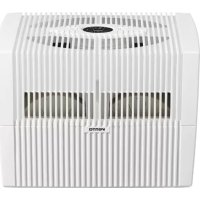
AH550 - Humidifier Venta - Free user manual and instructions
Find the device manual for free AH550 Venta in PDF.


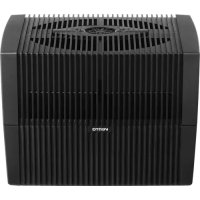
| Product type | Cold evaporation air humidifier |
| Brand | Venta |
| Model | AH550 |
| Dimensions (L × W × H) | 45 × 30 × 33 cm |
| Weight | Approximately 5.2 kg |
| Power supply | 100-240 V, 50/60 Hz, AC adapter model BI13-240050-Cd / FJSW1982400500 |
| Power consumption (levels 1-3) | 3 / 5 / 8 W |
| Sound level (levels 1-3) | 24 / 35 / 45 dB(A) |
| Recommended room area | Up to 60 m² (max. height 2.5 m) |
| Water tank capacity | 10 liters (max.) |
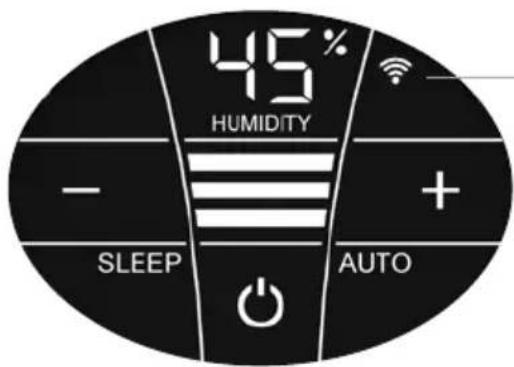
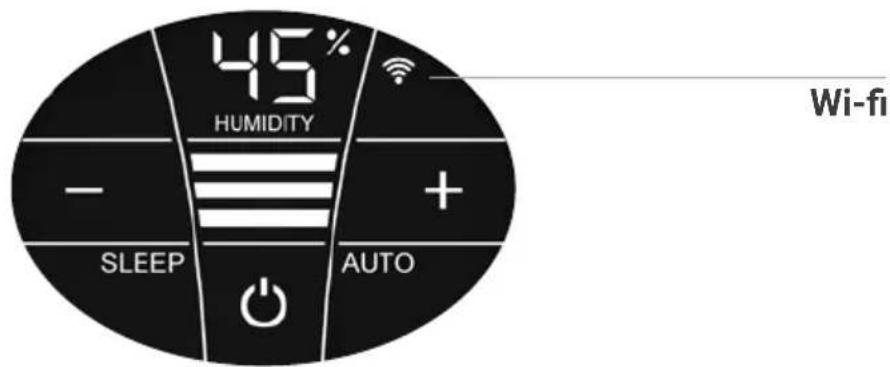
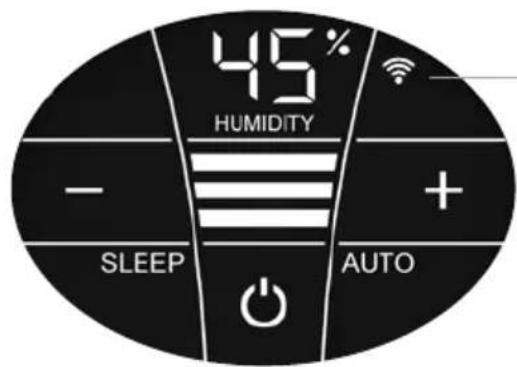
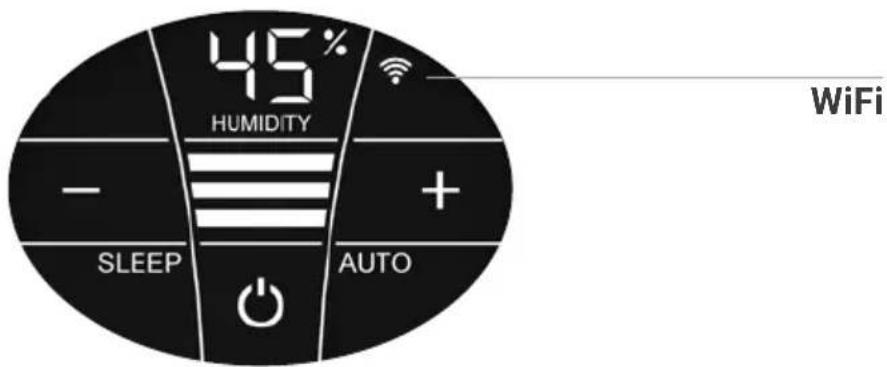
| Display | Interactive touch screen |
| Main functions | 3 power levels, automatic mode, night mode (SLEEP), automatic shutdown in case of water shortage, humidity display |
| Connectivity | WiFi 2.4 GHz (control via Venta Home app) |
| Operating principle | Cold evaporation with rotating disc stacks; natural air purification |
| Maintenance and cleaning | Drain and clean tank every 14 days; add Venta hygiene agent; semi-annual cleaning with Venta cleaner |
| Safety | Automatic shutdown in case of water shortage; locking of upper part; overheating protection |
| Included accessories | 1 bottle of hygiene agent 50 ml, instruction manual |
| Warranty | 2 years from date of purchase |
| Country of origin | Germany (brand Venta-Luftwäscher GmbH) |
Frequently Asked Questions - AH550 Venta
User questions about AH550 Venta
0 question about this device. Answer the ones you know or ask your own.
Ask a new question about this device
Download the instructions for your Humidifier in PDF format for free! Find your manual AH550 - Venta and take your electronic device back in hand. On this page are published all the documents necessary for the use of your device. AH550 by Venta.
USER MANUAL AH550 Venta
SIMPLIFIED EU DECLARATION OF CONFORMITY
Herewith, Venta-Luftwäscher GmbH declares that the radio equipments
AW510 / AW515 / AW530 / AW535 / AW550 / AW555
comply with Directive 2014/53/EU. The full text of the EU Declaration of
Conformity is available at the Internet address:
We are confident that this Venta model will exceed your expectations and hope that you enjoy it.
Please register your Venta appliance here:
www.venta-air.com

Please read this operating manual in its entirety, keep it for later reference and note all safety instructions as well as instructions for the proper use of the appliance. You can find the latest version of the operating manual on our website www.venta-air.com
DEAR CUSTOMER,
With the Original Connect series, you have purchased a high-performance humidifier, which gives you even more convenient operation with the addition of a touch display and Venta AirConnect compatibility.
The Venta Home app allows you to operate your appliances remotely as well as to access information. The Original Connect supports healthy humidity and the natural reduction of pollutants in the air.
Here's how the Venta principle works
A fan directs the ambient air into the water-filled humidifier, where it flows through specially arrayed disk stacks. Hygienically clean air evaporates from their surfaces into the room. Simultaneously, the disks trap harmful substances such as dust or pollen, which are then washed off in the water and collected in the humidifier.
TABLE OF CONTENTS
Safety Instructions 22
Scope of delivery 24
Symbols
Intended use 24
Improper use 24
Overview
Before the first use 25
Putting into operation 26
Displays, functions & settings 27
Wifi / hotspot 29
Configuration & Venta app 30
Cleaning & maintenance 31
Cleaning of 33
the upper housing 33
Technical data 34
Accessories 35
Privacy Policy 35
Guarantee 35
Recycling and disposal 35
What to do if ... 36
Venta Service Team 37
SAFETYINSTRUCTIONS
- This appliance is suitable for use by children over the age of 8 years and people with restricted physical, sensory, or mental capacities or lack of experience and knowledge, providing they are supervised or have received instructions on the safe use of the appliance and understand the existing hazards.
- Read the operating instructions completely before putting the appliance into operation and keep them for later reference.
- The appliance is not a toy for children.
- Cleaning and user maintenance may not be performed by children under the age of 8 years or without supervision.
- Keep the appliance and its switching power supply out of the reach of children under the age of 8 years.
- Improper use can damage the appliance and cause physical injuries.
- Plug the appliance into suitable power outlets only - the mains voltage must correspond to the nameplate data on the appliance.
- This appliance can only be operated with the "Model No. BI13-240050-Cd / FJSW1982400500" switching power supply.
- Never use the appliance if it has a damaged switching power supply plug or cable, or after it has malfunctioned or if it has been dropped or damaged in any other way.
- Disconnect the power plug before every cleaning or maintenance operation or transportation of the appliance.
- Never use the appliance if it has been dropped or damaged in any other way.
- Electrical appliances should only be repaired by professional specialists. Amateur repairs could result in considerable danger to the user.
- Do not sit on the appliance and do not place any objects on it.
- Do not put any foreign objects into the appliance.
- Do not immerse the upper housing in water or any other liquid.
- Never overfill the appliance.
- Never transport or tilt the appliance when the tank is full.
- Never unplug the appliance by pulling on the cable or pulling the switching power supply out with wet hands.
-
The appliance should only be operated when it is completely assembled.
-
Place the appliance on a stable surface which is flat and dry.
- Set up the appliance so that it cannot be knocked over, and so that no one can trip over it or its cable.
- Ensure the appliance is at least 50 cm from any objects such as furniture or walls.
Maximum installation altitude: 2000 metres - Never cover or block the vents to prevent overheating/damage to the appliance.
- A persistent relative ambient humidity of more than 60% , especially in winter, can enable the formation of biological organisms.
- The design of the appliance and the cold evaporation technology make it impossible for water to leak directly from it in the form of droplets, vapour, mist or lime deposits, providing you use it correctly.
- Only operate the appliance with original Venta accessories designed for the purpose. Venta Luftwäscher GmbH does not accept any liability for damage caused by the use of third-party accessories.
- If you do not use the appliance for several days or put it into storage for a longer period, empty the water tray completely, clean it and dry thoroughly to prevent odours or biological organisms from developing in standing water or water residues.
- Unplug the appliance when it is not in use.
- Ensure the area surrounding the appliance does not become damp or wet. If moisture leaks out, switch to a lower setting. If it is not possible to switch to a lower setting, use the appliance with interruptions. Make sure no absorbent material such as carpets, curtains, net curtains or tablecloths get damp.
SCOPE OF DELIVERY
1 Venta appliance
1 bottle of hygiene additive 50ml
1 quick-start guide
1 safety instruction sheet
If any parts are missing or damaged, please contact the Venta Service Team or your local dealer.
SYMBOLS

Please read the Safety Instructions carefully. Follow the instructions to prevent injuries or damage to property.

Additional information

Helpful tips
INTENDED USE
This Venta appliance is a domestic appliance for humidifying the air in interior rooms. The appliance is not suitable for outdoor areas. Any other use or modification of the appliance is considered to be improper use. Venta is not liable for damage or injuries resulting from improper use.
IMPROPER USE
Using the appliance for something other than the intended purpose can endanger health and lives. This includes use under the following conditions:
- in rooms or locations where there is risk of explosion and/or where there is an aggressive atmosphere
· in rooms where there is a high concentration of solvents
· in the vicinity of swimming pools or other wet areas
·outdoors
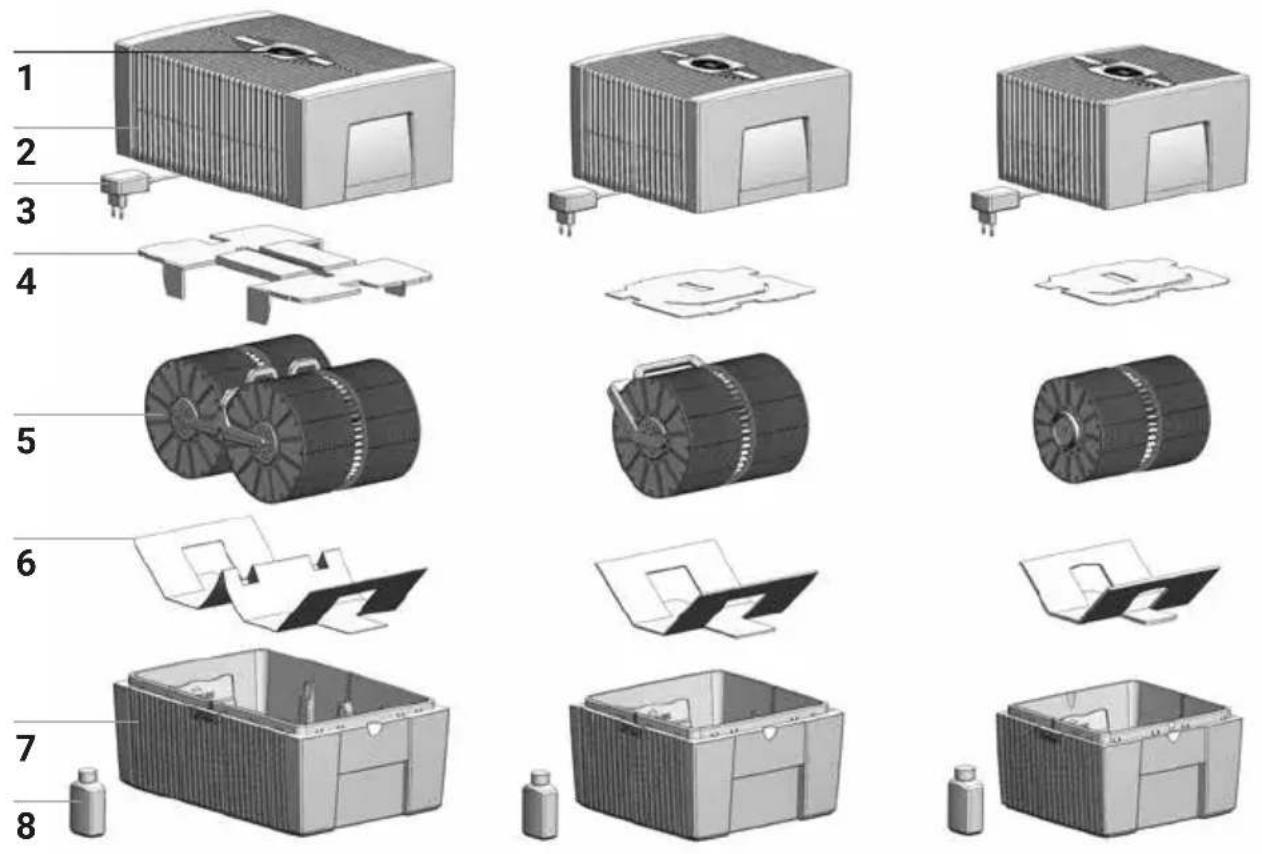
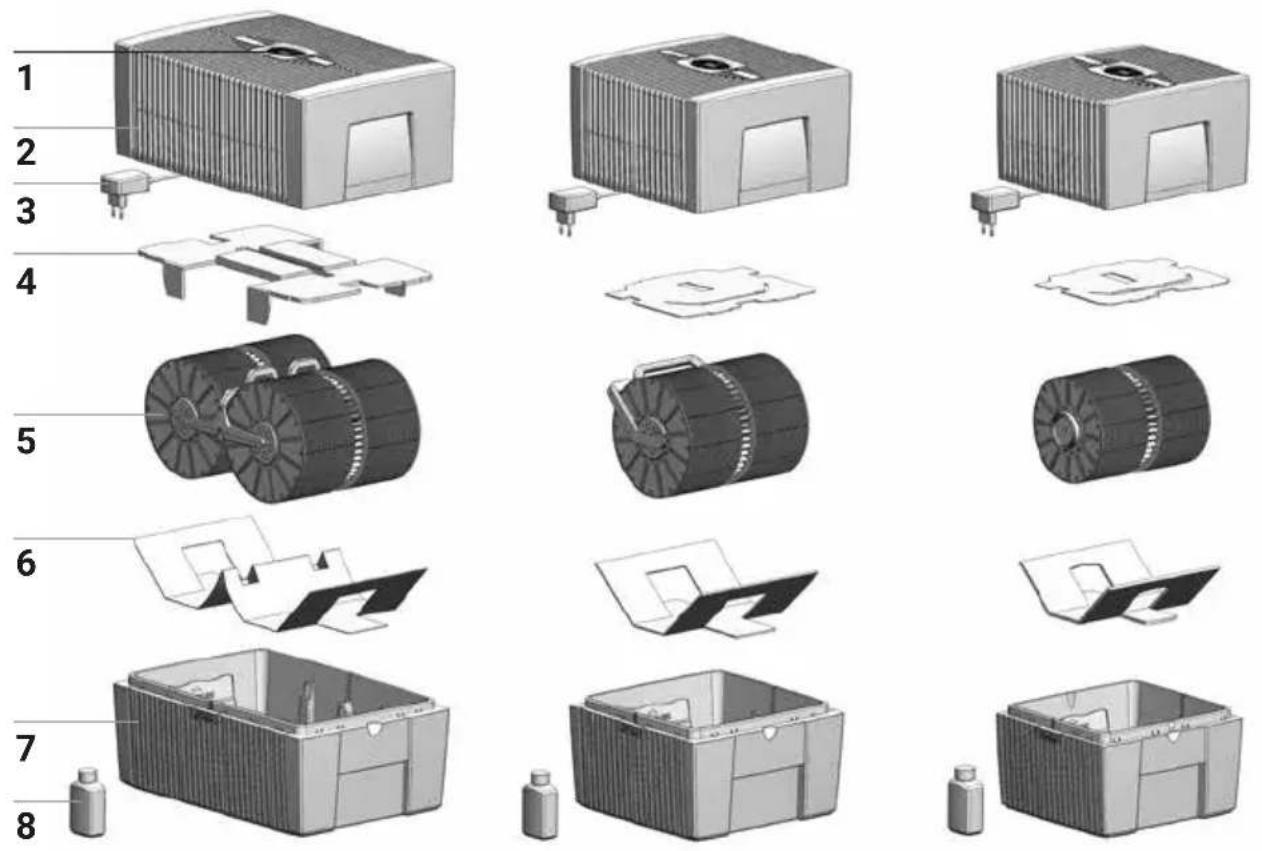
OVERVIEW
1 Display
2 Upper housing
3 Switching power supply (assembled)
4 Transport protection
5 Disk stack
6 Transport protection
7 Lower housing
8 Bottle of hygiene additive 50 ml
BEFORE THE FIRST USE
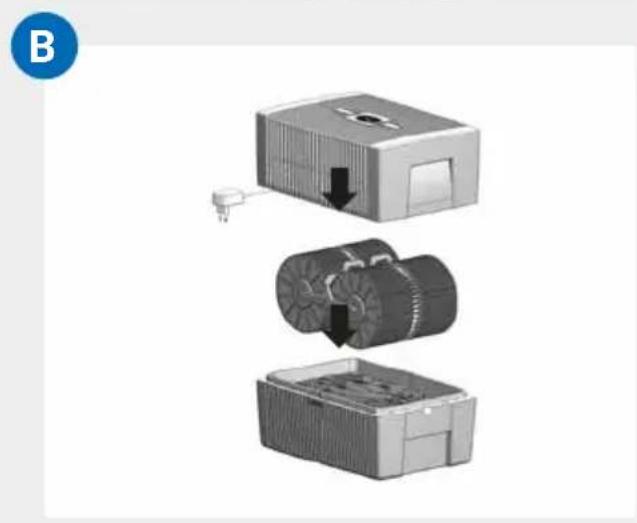
Unpack and set up the appliance. Remove the 50 ml bottle of hygiene additive 8 from the carton. Remove upper housing 2. Remove transport protection 4 from upper housing 2. Remove disk stack 5 from lower housing 7 and remove transport protection 6.
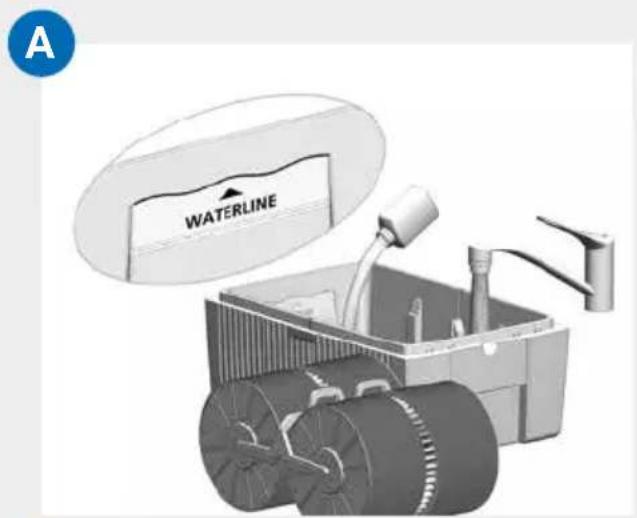
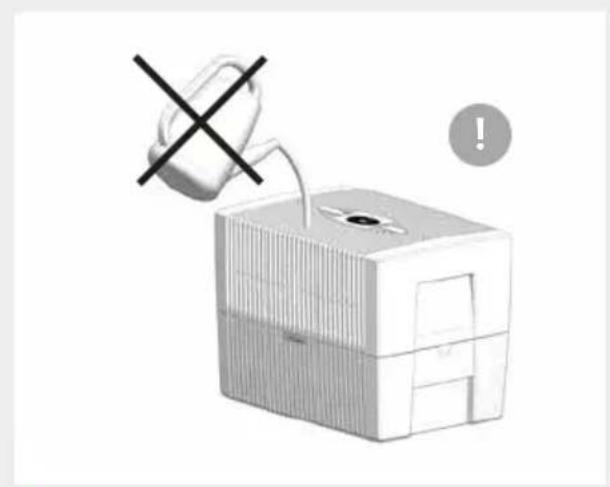
A Fill lower housing 7 with tap water up to maximum WATERLINE marking and add 50 ml hygiene additive 8 (complete content of bottle).
! Never fill the appliance before taking off the upper housing!
i Adding the hygiene additive is very important, because this optimally humidifies the air.
B Insert disk stack 5 into lower housing 7 and place upper housing 2 onto lower housing 7.
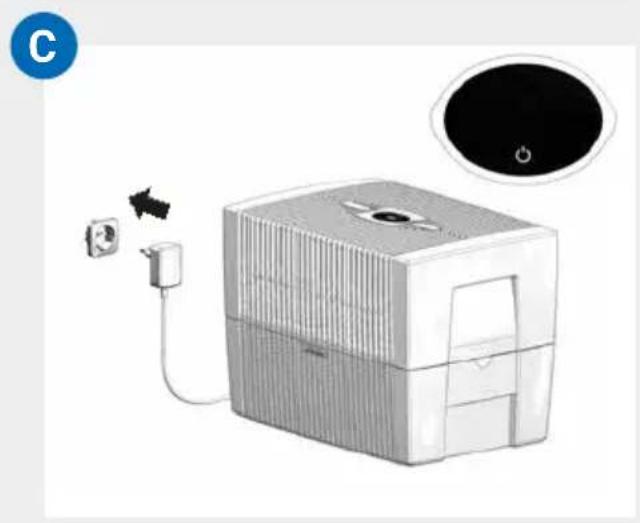
C Connect the switching power supply 3 to the mains and switch on the appliance by tapping the power button in the display 1.
Only once the appliance is connected to the mains will the power button light up to switch the appliance on and off.
DISPLAYS, FUNCTIONS & SETTINGS
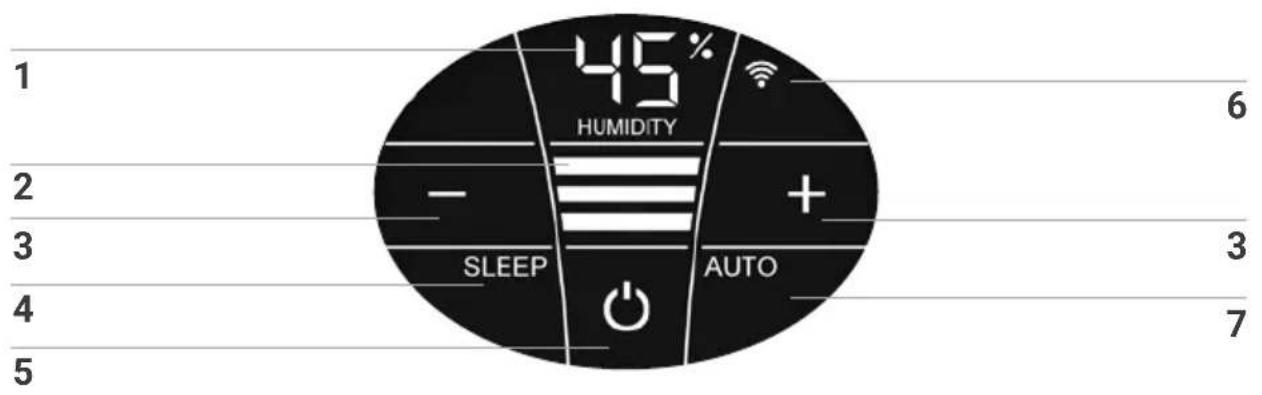
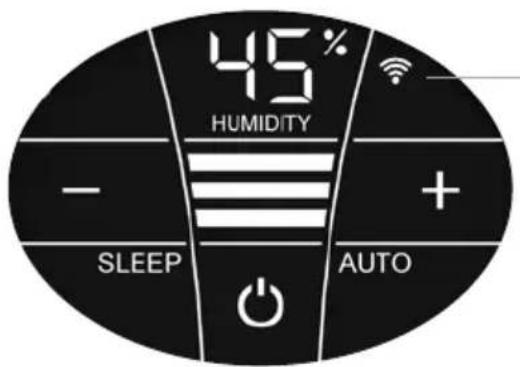
Display Function
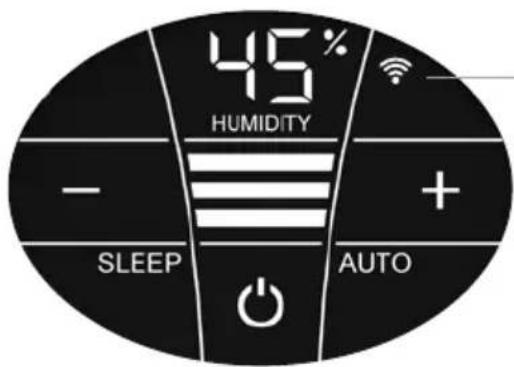
| 1 | Humidity | Display the humidity in the room (0 - 99%). |
| 2 | Power level | Display speeds 1 - 2 - 3. |
| 3 | - and + | Set the power level by tapping: - reduces and + increases the speed. |
| 4 | SLEEP | Tap to turn the sleep mode on or off. ON: The appliance dims the display lighting and reduces the power level to 1. Power level 2 can be changed manually with the + or - button 3. Automatic mode 7 is not possible. Set the display brightness you want for sleep mode: press the SLEEP button for 3 sec. until the readings HUMIDITY 1 and SLEEP 4 flash. Set the brightness of the display between 0 and 10 with the - or + button 3, which is indicated by flashing in HUMIDITY 1. Press the SLEEP button again for 3 sec. until the readings HUMIDITY 1 and SLEEP 4 are continuously illuminated and the humidity reading for the room is displayed again in HUMIDITY 1. OFF: Bright display illumination and appliance runs in power levels 1 - 3. |
| 5 | O | Switch the appliance on or off by tapping the power button. |
Display Function
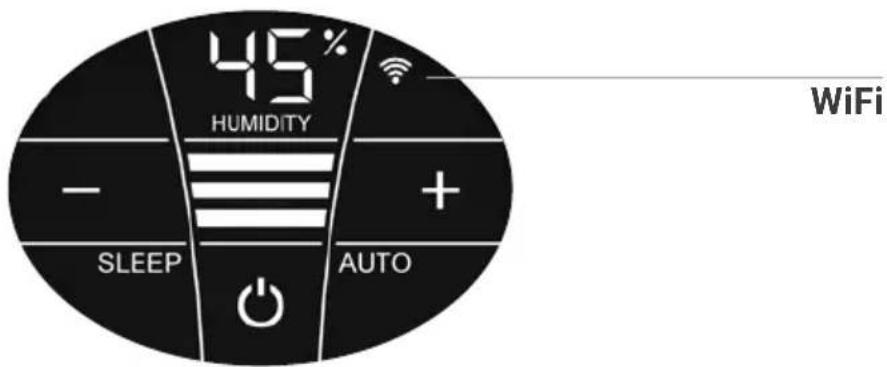
| 6 WIFI | Switch the WiFi connection on and off by tapping Activate the HOTSPOT mode by touching and holding for 3 sec. You will find a detailed description in the section "WiFi / hotspot". |
| 7AUTO | Switch Automatic mode on or off by tapping the AUTO button.ON: In the display, AUTO flashes continuously and the ap- plance automatically regulates the power level according to the humidity in the room.When switching on AUTO, the desired humidity (50% pre-set) flashes twice and then the measured humidity in the room is shown in the HUMIDITY display 1.When the preset humidity is exceeded by more than 5%, the fan shuts off after approx. 60 sec. and no power level appears in the speed reading 2. No humidifi- cation occurs.OFF: AUTO in the display is continuously illuminated and the appliance operates with the power level set at 1 - 3.Set desired humidity 30 - 70%Hold AUTO button for 3 seconds. The HUMIDITY 1 display flashes continuously. Set the desired humidity (in 5% increments) using the - or + buttons 3. Hold AUTO button for 3 seconds again until the flashing in display HUMIDITY 1 stops and the humidity measured in the room is shown again. Please make sure that automatic mode is switched on: AUTO flashes continuously in the display! |
WIFI / HOTSPOT
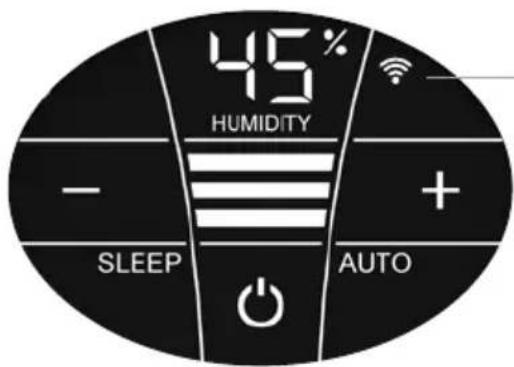
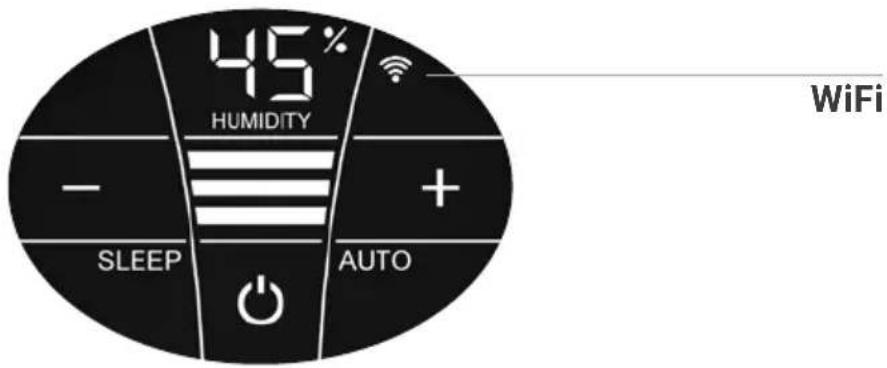
WiFi
Display Functions & settings
| Switch the WiFi connection on and off or (de)activate it by tapping the WiFi symbol. | |
| WiFi connection ON or activated. | |
| Illuminated | WiFi connection to the Venta server established. |
| Flashes slowly | WiFi connection to the local network established. |
| Flashes rapidly | WiFi connection disabled or waiting for WiFi connection. |
| Illuminated | The WiFi connection is OFF or deactivated. |
| The WiFi module does not send or receive any data and is not connected to any network or appliance. | |
| The Venta appliance is in hotspot mode and is ready for the configuration or network setup. | |
| The four individual segments of the WiFi symbol consecutively light up from the bottom to the top. | |
| The hotspot mode can be activated at any time during device operation by touching the WiFi symbol and holding it for 3 sec. |
CONFIGURATION & VENTA APP
1. Activate the hotspot mode on the Venta appliance
To do this, the four individual segments of the WiFi symbol in the appliance display must light up consecutively from bottom to top.

This mode is automatically activated the first time the appliance is operated.

The hotspot mode can be activated any time by touching and holding the WiFi symbol for 3 sec.
2. Activate WLAN on smartphone or tablet
Make sure that your smartphone or tablet is connected to your WLAN home network.
3. Download the VENTA app or install and open it
You can easily operate your Venta appliance remotely plus use and monitor extra appliance functions with the free Venta app.




4. Set up the WiFi function using the VENTA app
Now please follow the instructions on the screen of your smartphone or tablet.

If problems occur during the WiFi setup, please read the section, "What happens if a WiFi connection can't be established?".
Further information at www.venta-air.com/en_gb/Service/Venta-Home-App/
CLEANING & MAINTENANCE

Caution! Ensure the appliance is switched off during all actions and the switching power supply is disconnected from the power outlet!
Display Actions
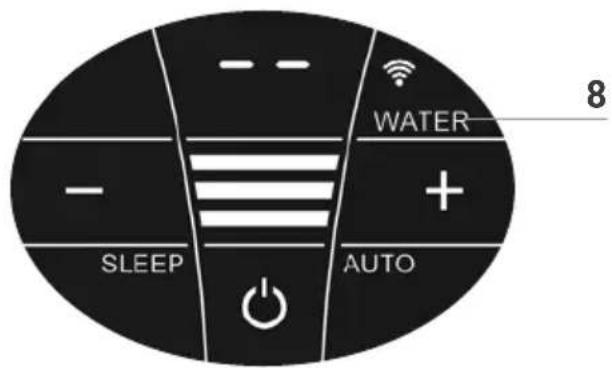
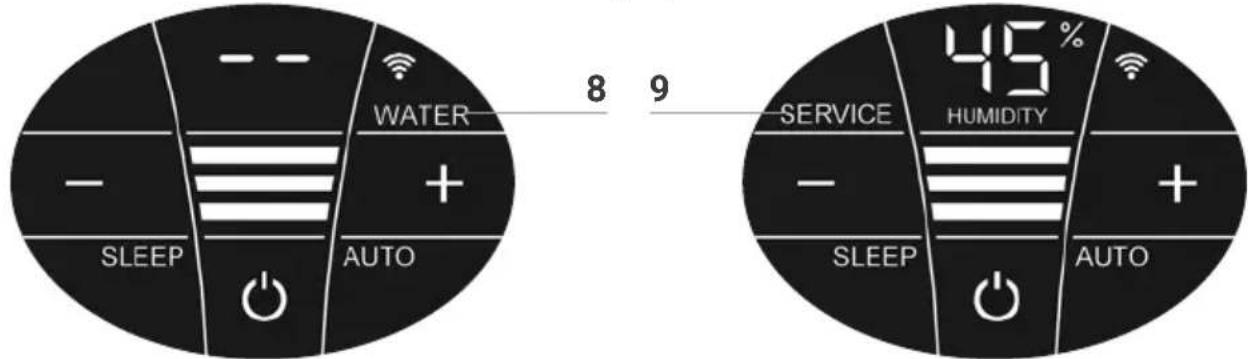
8 WATER
Remove upper housing. Fill lower housing with tap water to the WATERLINE marking. Place upper housing on lower housing and put appliance in operation again.
As soon as there is not enough water in the lower housing, the appliance is switched off automatically and the WATER display appears. In the HUMIDITY display 1, two lines will flash and the humidity in the room is not shown.

To humidify and clean the indoor air continuously, we recommend refilling the water in a timely manner.
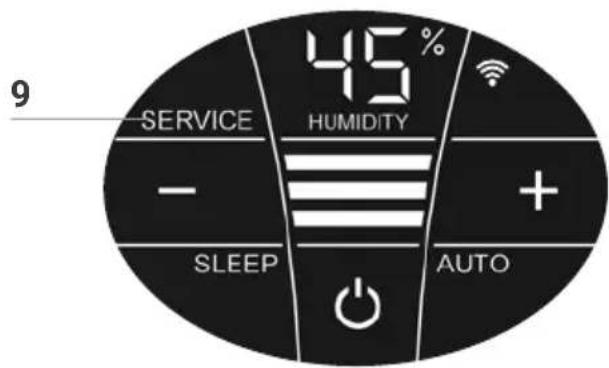
9 SERVICE
Remove upper housing. Drain residual water from lower housing. Rinse lower housing and disk stack. Fill lower housing with tap water up to the WATERLINE marking maximum and add the Venta hygiene additive (for dosage see scale on rear of bottle). Re-assemble the appliance. Touch the SERVICE indicator 9 on the display and hold for 3 sec. until it switches off.

For flawlessly hygienic continuous operation, the SERVICE display indicates a reminder every 14 days that this action needs carried out.

This action can be carried out if required, even if the SERVICE message is not shown. When it is completed, simply touch the VICE indicator 9 and hold for 3 sec. The next reminder will now nown again in 14 days with the SERVICE message
Any remaining liquid in the water tray and on the disk stack (white, green-yellow or brown deposits or discolorations) do NOT impair the function of the appliance. For the six-monthly cleaning, we recommend the Venta Cleaner. Please note the instruction manual included with the Venta Cleaner.
1
2
3
4
5
6
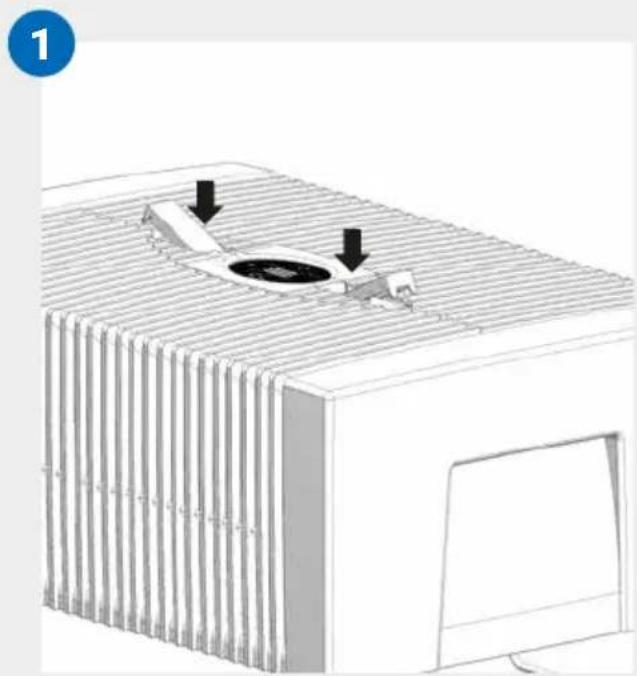
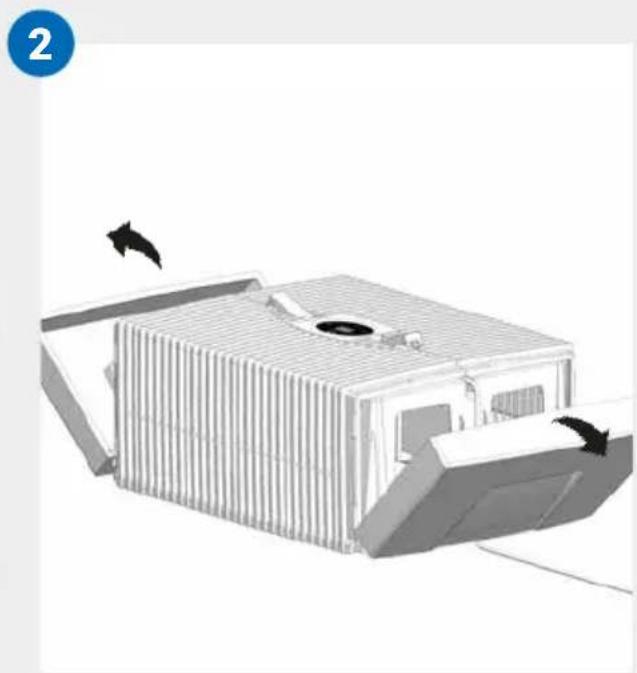
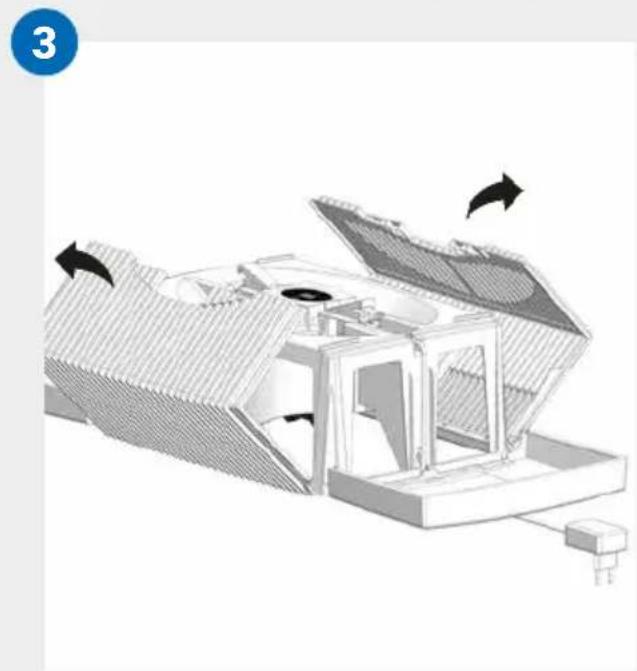
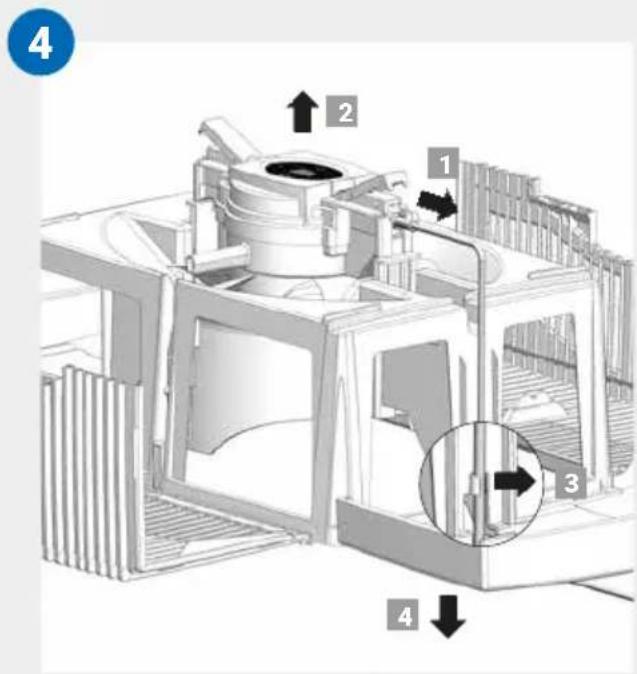
CLEANING OF
THE UPPER HOUSING

Caution! Ensure the appliance is switched off during all actions and the switching power supply is disconnected from the power outlet!
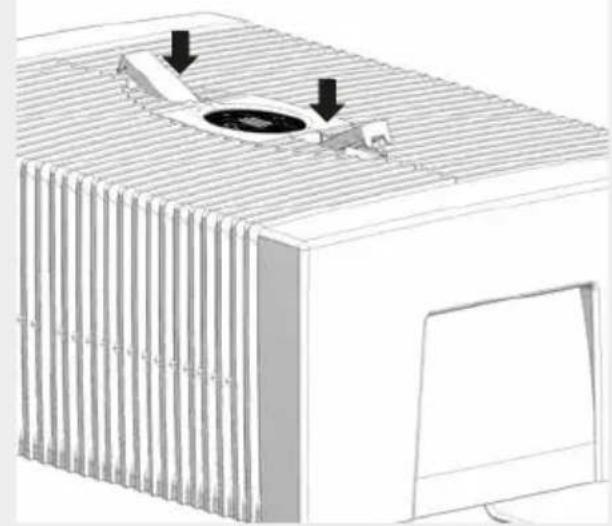
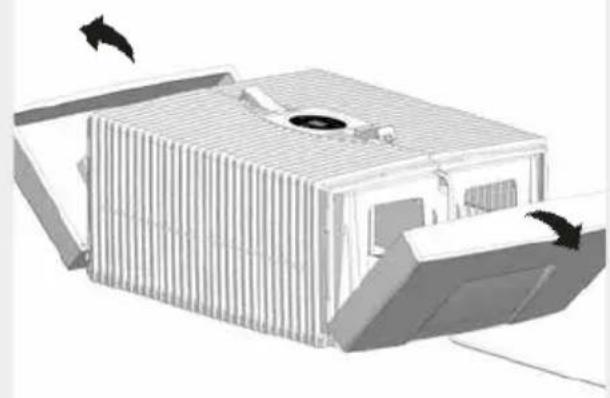
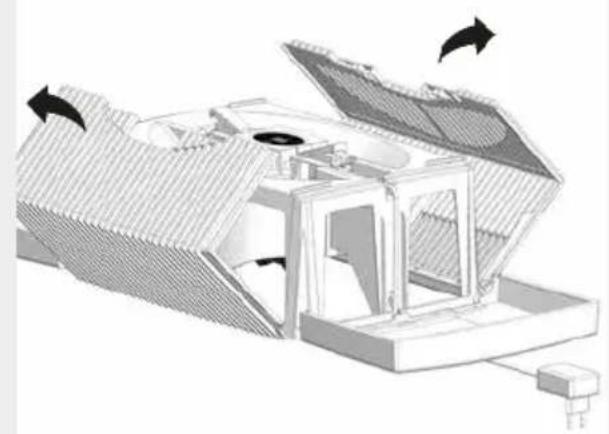
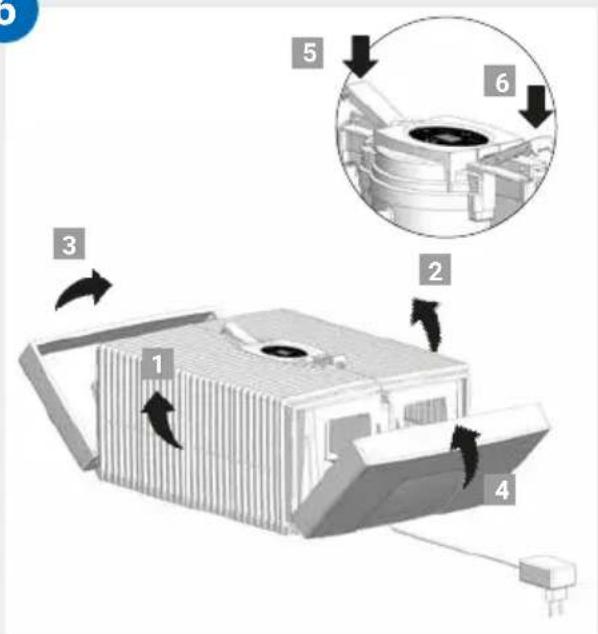
01 Detach upper housing from lower housing. Press locking buttons so that the ends stand up.
02 Fold side parts out of the way.
03 Fold ribbed wings out of the way.
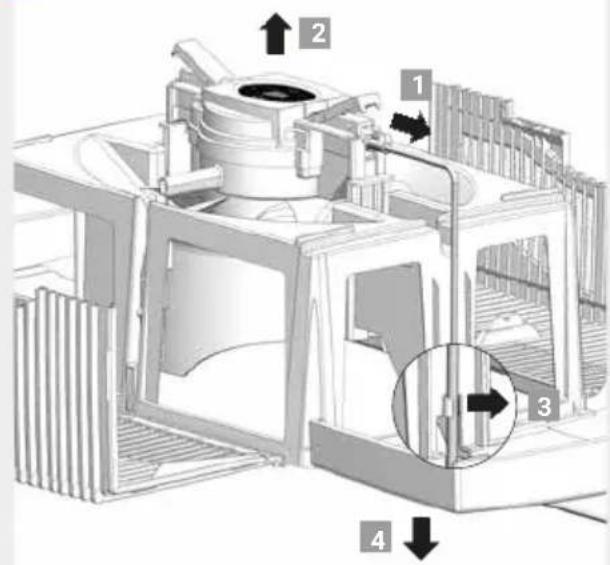
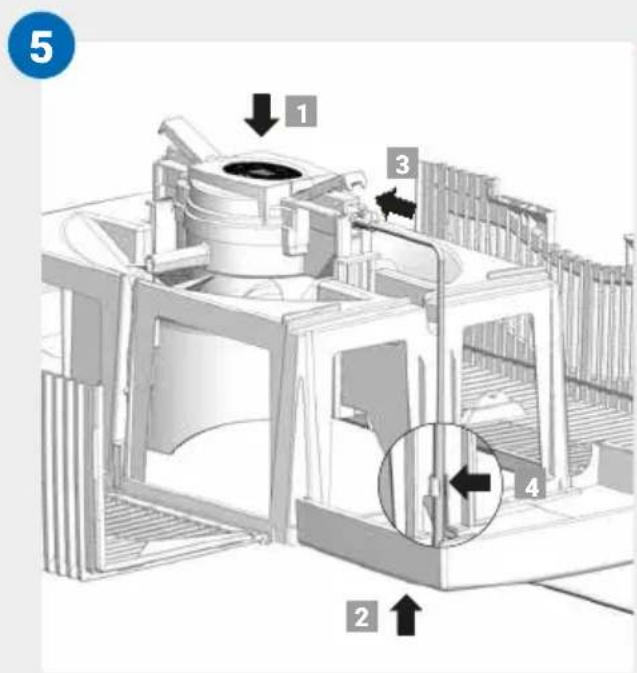
04 Unplug the switching power supply from the drive unit 1. Lift the drive unit upwards and out 2. Disconnect the switching power supply cable by releasing the bracket 3 and pull downward and out through the opening of the upper housing 4.

-
Do not disassemble the drive unit and the switching power supply, immerse them in water or bring them into contact with liquids!
-
Only clean the drive unit with fan blades and gear with a dry cloth!
- The disassembled upper housing can be cleaned under running water!
- The disassembled upper housing must be absolutely dry before assembly!
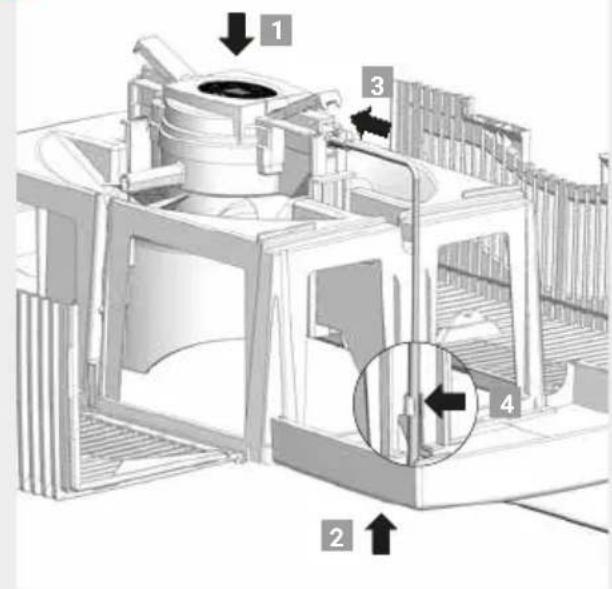
05 Insert the drive unit into the upper housing from the correct side 1. Pull the switching power supply from the bottom upwards and through the opening of the upper housing 2 and plug it into the drive unit until it clicks into place 3. Affix the cable with the bracket 4.
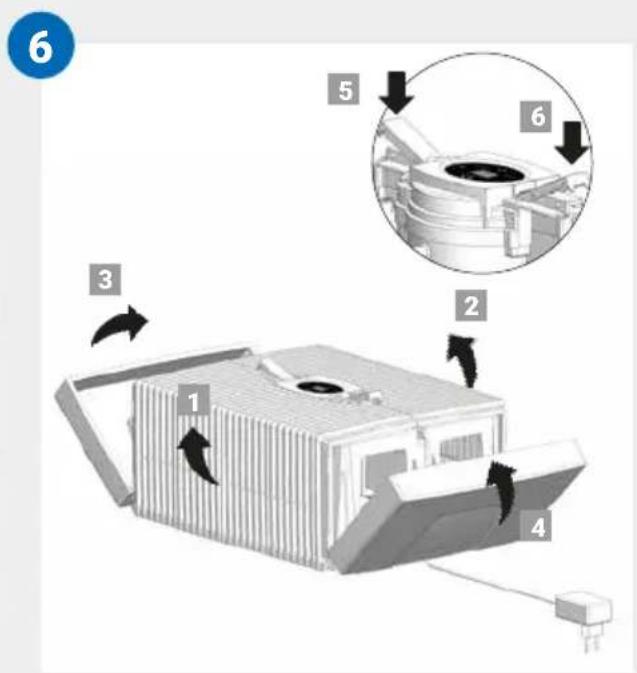
06 The outer ends of the locking buttons must be standing up. Fold the ribbed side wings 1 and 2 upwards, then the side elements 3 nd 4. Close the upper housing correctly by pressing down on the outer ends of the locking latches 5 and 6.
TECHNICAL DATA
| Model AH510 / AH515 AH530 / AH535 AH550 / AH555 | |||
| For room sizes* ≤ 35 m² ≤ 45 m² ≤ 60 m² | |||
| Interactive touch display | Standard | ||
| App control Standard WiFi | |||
| Colours brilliant white / brilliant black | |||
| Power levels 3 + Automatic | |||
| Noise emission (spaces 1-3) | 24/34/44 dB(A) | 24/34/44 dB(A) | 24/35/45 dB(A) |
| Power consumption (spaces 1-3) | 3/5/8 watts | ||
| Mains voltage 100-240 V, 50 / 60 Hz | |||
| Water capacity (max.) | 5 litres | 7 litres | 10 litres |
| Dimensions (L x W x H) | 26x28x31 cm | 30x30x33 cm | 45x30x33 cm |
| Weight | approx. 3 kg | approx. 3.5 kg | approx. 5.2 kg |
| WLAN frequency range | 2.4 GHz | ||
| WLAN transmission power | Maximum 20 dBm | ||
* based on a ceiling height of max. 2.5 metres
May be subject to modifications and errors
ACCESSIONS
You can order accessories by phone or online at www.venta-air.com.
PRIVACY POLICY
Venta Luftwäscher GmbH treats your data confidentially. You can find more information about data protection in our Privacy Policy at www.venta-air.com
GUARANTEE
Due to the high quality of our products, Venta-Luftwäscher GmbH guarantees that this product will remain defect-free for two years as from the purchase date, provided it is used correctly. If a material or processing error should occur anyway, please contact the Venta Service Team or your dealer. Venta's general guarantee conditions also apply: www.venta-air.com
RECYCLING AND DISPOSAL

The packaging material is recyclable. Please dispose of the packaging in an eco-friendly way using the recycling scheme at your location.
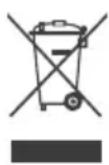
The "crossed-out bin" symbol indicates that you must dispose of waste electrical and electronic equipment (WEEE) separately. Such equipment may contain dangerous and environmentally hazardous substances. These products should be disposed of at an appropriate collecting point
for recycling electrical and electronic equipment and may not be disposed of in unsorted household waste. This way you can help to protect resources and the environment. For more information, please contact your local authorities.
Children must not be allowed to play with plastic bags and packaging material as there is a danger of injury or suffocation. Store such materials safely or dispose of them in an environmentally friendly way.
WHAT TO DO IF …

Ensure the appliance is switched off during all actions and the switching power supply is disconnected from the power outlet!
... E1 is shown in the display?
The appliance has switched off automatically because the locking latches on the upper housing are not closed properly.

Close upper housing properly again by pushing on the outer ends of the locking latches. Switch appliance off and on with the power button .
... E2 is shown in the display?
The appliance has switched off automatically, because the motor is overstrained (e.g. through the intrusion of foreign objects or similar).

Action: Remove upper housing. Check whether the disk stack in the lower housing as well as fan blades in the upper housing are freely movable. Then switch the appliance on again.
... white spots appear in the background when you touch the display?
In dry rooms, electrostatic charging can cause white areas to appear in the background on the display. These do not affect the functioning or ability to control the appliance and do not constitute a defect.
... the power button to switch on the appliance does not appear in the display?
Please check whether the switching power supply is connected to the mains.
... the power button to switch on the appliance does not appear in the display, even though the switching power supply is connected to the mains?

Please check whether the switching power supply is firmly plugged into the drive unit.
Action: Remove upper housing. Check for correct positioning (see cleaning instructions for the upper housing). Then switch the appliance on again.
... WATER is shown in the display, even though there is water in the lower housing?
Please check whether there is sufficient water in the lower housing and/or whether the upper housing is placed correctly on the lower housing.

Action: Remove upper housing. Fill lower housing with tap water to the WATERLINE mark. Place upper housing correctly on lower housing.
Make sure that the switching power supply cable is not trapped between the upper and lower housings. Then switch the appliance on again.
... WiFi connection is not possible
Please check that:
- you are using a 2.4-GHz or a combined 2.4/5-GHz network. This is important because the WiFi/WLAN module in the appliance does not support 5-GHz networks.
- your router supports 802.11b/g/n.
- iOS version 13.0 or higher or Android version 8.0 or higher is installed in your phone or tablet.

If necessary, update the operating system of your phone or tablet.
VENTA SERVICE TEAM
Do you need additional information about your Venta appliance, do you want advice or to order accessories? Our Service Team is there for you! Call us directly, or visit the Venta website: www.venta-air.com
DE +49751 500888
MERCI BEAUCOUP!
Configuration & application Venta 47
Nettoyage & entretien 48
WIFI / POINT D'ACCès
WiFi
Venta-serviceteam 88
VEILIGHEIDSINSTRUCTIES
YKA3AHnia NO TEXHnke 6E30PACHOCTN
-Данньи рпбор может Испльзоватбя DeТьМИ CTарше 8 leт и Лицамс орранчehньими ФизneyecKMIM, ceHCOPHBIMN Илу YMCTВeHHbIMN CnOCO6-HocTЯМЛибО HeIoCTaTOUHbIMN OПыTOM И 3HaHЯМN NOД ппсмOTpOMЛибО пи уСIOВИ,ЧТо AТи Лица NOCTaBJIeHbI B IN3BecTHOCTb O пpaBUNax 6e3ОпаСНOrO прIMeHENЯ рпбора И OCO3HaJOT CBЯЗHьИ C HIM pNCK.
- Пера вовом в зацию рочтite BCIO INHCTpyKciNo NO ekplyaatau n coxpanite ee Дя дальнix спраВOK.
- Пибор Heяваятсдетскоингрушков.
- Ynctka n TexHnueckn yXoI He dOJIkHbI OcyIeCTBJIaTbCra DeTbMn MlaIaIe 8 let 6e3 npncMoTa.
XpaHnTe np6op n erO 6Iok nITaHnB MeCTe, HeIOCTyHOM dJIa DeTeB Bo3pacta do 8 JeT.
- Исторынец He по Назашию может пиьец К поломке пибoga и Травим.
- Покльецни посяваши К сети питаня должно осушесов Только чере з розту с наразоженem, COOTBeTCTByUOsm Textнчecknm napametрам, уkaЗаHHbIM Ha Фирменов Таблоче посяра.
- ΘTOT npi6op MoKeT pa6oTaTb TOnbKO co CJIeDyUOuIMN NOdkIIOuaEmbIMN 6Iokam nITaHnra: "Modelb N° BI13-240050-Cd / FJSW1982400500".
- Hukorda He nCnoIb3yIte npI6Op, ecn shHyp nITaHna nn Bnka 6NoKa nITaHna NOBpeKdEhbl.
- Bынмайт e 6лok ппаня n3 розетк nеpeд Лобим paботам nо тхнчесkomу o6слжьаню nл peMOHTy, a taKxe прп epemeшени nлл ТраHCПОТИРOBКЕ ппбopa.
- Hnkorgda He pa6oTaIe c np6opom, ecn OH ypaI nn 6bIIN nobpeKdEn KaKIM-nn6O INbIM O6pa30M.
- Pemont npnbopa doJxKeH npOn3BODntbCra TOnbKO KBaIuΦnUPOBaHHbl-MN cneuaJIncTAmn. HenpoΦeCCNoHaJIbHaЯ noUHka MoXeT npNBecTu K cepBe3HOJ onaChOCTn Дяnotpe6nteJIa.
- Hn B koem cnyuae He caintecb Ha npnbop n He KlaaTe Ha Hero HnKaKnx npedMeTOB.
He BCTaBnTBeB np6Op noCtOpOHnE npEdMeTbI.
- Hnkorda He norgykaTe BepxHIOU qactb npnbopa B Bodu nn npyrue XnIDKoCTN.
- He nepenonHЯ Te npibop.
- He tpaHcnpTpyuIte Hn He onpOKnDbIbaiTe npN6Op c NOJhbIM 6aKOM.
- Hukorda He BbHmMaTe aadanTep NtAHn 3p03eTKn 3a shHyp NtAHn nn MOKpbIMn pyKaMn.
- Пибор может 6ыть ВBEденВэКслуаТAUTOЛьКОВ полноctью CO-6paHHOM COCTOЯн.
- UctaHaBnBaIte np6Op TOnbko Ha pOBHyO cyxHy IOBepxHOCTb.
- UctaHabnBaIe np6Op TaK, UTo6bI erO HeIb3a 6blIO OnpOKnHyTb I UTo6bl HNKTO He CNOTKHJcR O np6Op nn Ka6elb.
Co6IoudaIte MInHMaJIbHOe pacCTOaHne B 50 cm OT npEaMeTOB n CTeH. - MaKcImaJIbHaY BbICota yCTaHOBKn: 2000 MeTpOB HaI yPoBHeM MOpJ
-Bo n36eXaHne nepeRpeBa/NoBpeXdEHHn np6opa cIeIte 3a TeM, yTo6bI BeHTnlaOHHoe OTBepCTne He OKa3aJIoCb 3aKpbIto IInn 6IoKIpOBaHO. - Постонная OTHOCINTEьная Влжноctь BO3dya B NOMEseHn 60lee 60% ,oco6eHNo 3IMo, MoKeT cnoCo6CTBOBaTb pa3MHOJKeHnO 6NOLOrn-uecknx opraHn3MOB.
- Пп правильnom Использовани празмая утейka Воры n3 ппбopa в Вида Каль, па, Тума на ил n3ВecTKOBbIX OTLOжень HeBO3MOЖн a3-3a ee ппрдь n TexHOLOrn xOLOdHORo nCnapeHry.
- Прибор разршается зауатиpoВаТь Только С оригинальним КOMпл ekтуюшIMN Venta, пedingизанчehнblIMДя Hero. Venta-Luftwäscher GmbH He HeceT OTBeTCTBENHOCTN 3a yupe6, прииненьй KOMпл ekтуюшIMN CTOPOHNX npON3BOdnteNei.
- Ecni np6op He nCnoIb3yeTcB TeueHne HeckoIbKx DHei, BblKnIoueH nn XpaHntcB TeueHne IInTeIbHOrO nepNoa BpeMeHi, 6ak IJRA BOdbI Heo6XoIMo NOLHOCTbIO ONOpOXHITb, OChNTb OT OCTaTKOB rpa3n IN IpocuHTb, YTO6bl IpeDoTbPaTb IOBLeHne 3anaxOB nn pa3BVtne 6NolOnrHuCeCKNX OPraHN3MOB BCToayeB BoJe nn OCTaTKax BOdbI.
- BbHmMaIte aIaITepe nITaHn I3 po3eTK, KOrda He noJb3yeTec np6opom.
Cneinte 3a Tem, TTo6bl npoctpanctBO BOKpyr np60pa He ctaHOJIIOCBBIAJHbIM IIN MOKpbIM. B Cnyae NOBHeNBAIg YMeHbIte MOUHOCTBnp60pa.EcIn BbIXOHyIO MOHOCTB np60pa He BO3MOXHO YMeHbIITb,NCIOJIb3yIte np60p C nepepbIbAMn.CneInte 3a Tem, TTo6bl He hAmokaln TaKne BVNTbIBaHOJIne MaTePnaJIbI, KaK KOBPbl, 3aHaBeCKN IIN cKaTePTN.
KOMПLEKT NOCTABKN
1 x npn6op Venta
1×ФлakOH rHnHeHnueckoro cpeIcTba 50 M
1xKpaTkaynHCTpyKuia
1xyaHnnoTexHke6e3onacHOCTN
Ecnn deTann OTCyTCTByOT nnn noBpeJdeHbI, o6paTNTecb B cepBnCHyO cnjx6y Venta nn K MeCTHomy dInlepy.
CNMBOJIbI

Uka3aHnI NO TexHnke 6e30NaChOCTN: BHIMaTeIbHo npoTuTte N CO6JIHOJaIte Ix, UTO6bl N36ExKaTb TpaBM INOBpeJdeHnI MMyIecTba.

Дононтульнаинфорmaцnia

Pone3HbIE COBeTbI
ИСПОЛьЗOBAHNE ПО HA3HAЧЕHNIO
Данныnpибop Venta -эTO 6bITOBО npi6Op ДЯ yBnaJxHnRA BO3dYxaВnomeшen.прибор He npincnocoblenДЯ ekcnlyaatauHa OTKpbITOMBO3dYxe.Любoe npугоЕ nCNoIb3OBAHne ИлmoNФИКaцяnpi6opa CHTa-etcЯ nCNoIb3OBAHnem He NO Ha3NaueHIO.ИЗROTOВITeJIb He HeceT OTBeTCTBeHHocTN 3a MaTePnAJIbHbI yUep6 IJI N TpaBMbl, BO3HnKShne BCJeDCTBnEHe npaBnIbHOrO nCNoIb3OBAHnIA.
ИСПОЛьЗOBAHNE HE ПОHA3HAЧЕHNIO
IcnoIb3OBaHne npnbopa He no Ha3NaueHIO MOKeT co3daTb yrpo3y 3dopoBbU O JxN3HN. K aTOMy OTHocNTc IcNoIb3OBaHne B cIeNyUOuX ycNOBnAx:
B nomeeHnX c notehnnaIbHO B3pbIBOONaCHO n/nn aRpeccNBHO aTMocΦepo
·Вnomeunex C BbICOKO KoHcHTpaCneJ pactBOpnteJe
·Bo3JIe 6accEiHOB nIIN BIIaXHbIX 3OH
·HaOTKpbITOM BO3IyXe
0630P
1 Ducnnne
2BepxHyaactb np6opa
3IopKIOUaembIb6LOKNTaHnY (yCTaHOBneHHbI)
4 TpaHcnpTnpoBOuHbI ΦNKcaTop
5Пл actинчытbi6apa6aH
6 TpaHcnpTnpoBOuHbI ΦNKcaTop
7 HxKhyaactb np6opa
8ФлakOH rHnneHnueckOro cpeIcTba 50 mJ
Hne KOpOTKnIM npNKoCHOBHeHnEM K KhoNke AUTO.
BKN:Ha niscnlee He nppepbIBHO Mmraet AUTO n npnbop aBTOMaTnueckn peryInpyeT ypoBeHb MOuHocTn B 3aBNCIMOCTN OT BlaJXHOCTN BO3dyxa B NOMEeHN.
IπpivBkIIOUeHn AUTO Ha HndkaTope HUMIDITY 1C DBOHbIM MURaHHeM BbIBOAnTCa Tpe6yema BnaJxHOCTb BO3dyxa (npeducTahOBJeHo 50 %), a 3atem CHOBA n3MepeHHa BnaXHOCTb BO3dyxa B NOMEueHn.
Pn npeBbIeHnn npedyctaHOBHeHHoro 3NaueHnBlaJXHOCTN BO3dyxa 60JeE yem Ha 5 % BeHTnJIaTOpBbIKIOUaETc npimepHo uepe3 60 cekyH, nHaINdNKaTope cKOpocTn 2 He oTO6paKaetc ypoBeNbMOuHOCTN. YbIaxHeHne BO3dyxa He npON3BOoNTcra.
BbIKI:Ha dncnlee noctoHno ropnt AUTO np60p pa6otaet cyctaHOBHeHHbIM ypoBhem MoUHocTn 1-3.
UcTaHOBtE Tpe6yEmyIO BnaXHocTb BO3dyxa 30-70%: YdePknBaIe KhoNky AUTO B TeueHne 3 cekyn. HnDnKatOp HUMIDITY 1 nocToaHNO Miraet. C nomOuBo -nn+KnOKN 3 yCTaHOBtE Tpe6yeMyo BnaXHoCTb BO3dyxa (waamn no 5 % ). ChOBa ydepXnBaIe KhoNky AUTO B TeueHne 3 cekyn, noka He nOracHe T mraO- uHnDnKatOp HUMIDITY 1 n cHOBa He oTo6pa3ntC8 n3MepenHa BnaXHoCTb BO3dyxa B NOMEuEHn. Y6eINTecb, yTO aBTOMaTnueckn peXm BKlIoueH: Ha DnCnlee NoctOHNo Miraet AUTO!
WIFI / AKTINBHAR TOUKA
WiFi
HdNKaTOP FyHKcnn HacTpoKn
| BkIIOUaIte N BbIKIIOUaIte IIN (Ie)akTINBUPYIte WiFi-coeIINHeHne KOpOTKIM PrNKOCHOBeHnEM K cIMBOJy WiFi. WiFi-coeIINHeHne BKJI IIN aKTINBIPOBAHO. Было уstановлено WiFi-coeIINHeHne c ИNTepHer-cepBepOM Venta. Было уstановлено WiFi-coeIINHeHne c lokaIbHNo ceTBIO. WiFi-coeIINHeHne pa3OpBaHO IIN OXIIaHne WiFi-coeIINHeHny. | |
| CBeITcIg | Было уstановлено WiFi-coeIINHeHne c ИNTepHer-cepBepOM Venta. |
| MedIeHNO MIRaEТ | Было уstановлено WiFi-coeIINHeHne c lokaIbHNo ceTBIO. WiFi-coeIINHeHne pa3OpBaHO IIN OXIIaHne WiFi-coeIINHeHny. |
| СВETITсЯ | WiFi-coeIINHeHne BblKЛ IIN DeaKTKBIPOBAHO. WiFi-MODyIb He OTnpaBIAJeT IIN He PrinHmAeT dAnHbIX IIN CBZ3aH C CeTBIO IIN PrN6OpOM. |
| ... | Прибop Venta haxoIITcR B peXHMe aKTINBHOJ TOnKN I rotOB ДЯ KOHФIguraцIn IIN HacTPOIa KN CetN. i ChTbIpe OTdIbHbIX ceRMenta CNMBoJa WiFi 3aIogpAOITcR dpyr 3a dpyrom CHN3y BVEpx. PexKIM aKTINBHOJ TOnKN MoxHNo aKTINBIPOBAtB I InIOboJ MомeHT pa6Obl prN6Opa, NaXaB I yIepKJIBaR CNMBOJ WiFi в тeчЕнe 3 ceKuHd. |
KOHФИГYPALIGNI INIПИLOЖЕHNE VENTA
1. AKTINBaCnpeXIMMa aKTINBHOToKHa npnbope Venta
ДяэТOrOуETbipeOTdJIbHbIXcerMeHTaCnMbOJaWiFidoJxHbI3arOpetbcr OINH3aIpyrIMCHN3yBBepxHaIncPlee np6opa

3TOT peXIM aBtOMaTnueckn aKTbBnpyetc npi nepBOM 3anyske npi-6opa.

Pexn m aKTHBHO TOnk MoXHo aKTHBnPoBaTb B JIO6oM OMeHT, HaxaB n ydepXnBaA cIMBOJ WiFi b TeueHne 3 cekyHd.
2. AkTbauZna Wlan Ha cMapToHe nn nlaHwTe
Y6eIITecb, YTO BaW cMapTfoH nII nn PnAHeT NOkNoyeH K DoMaUHeN CeTI WLAN.
3. 3arpy3ka nnn yctaHOBKa n 3aynck npnloxheny Venta
C nomoubH 6ecnlaTHoro npIIOxehnVenta Bbl MoXeTe Ierko ynpaBnTb CBOIM np6opom Venta ydaJIeHHo, a TaKxe NcNoB3OBaTb N ynpaBnTb paCShpeHHbIMn FyHKu-ymn np6opa.




4. Hactpoika WiFi n3 npiloxeHnA Venta
CneyuTe HnCTpyKzmaH Ha 3KpaHe BaWeRo cMaprfoHa nn nnHweta.

Ecn y Bac Bo3nKnn npo6nembl BO BpeMa HacTpoNn WiFi, npouTntepa3dien "HTo delaatb, ecn n He mory yctahOBnTB coeDHeHne WiFi?"
Дононтульна Информацья дocунha no cсынke www.venta-air.com/Service/Venta-Home-App/
ЧИСТКА И YXОД

BnMaHne! Y6eIntecb, yTo npN BCex Oepaunx np6Op BbIKJouyen CeTeBOJ aadantep BbHyT n3 po3etkn!
HdkaTop DeiCTBna
8 WATER
CHIMTE BepxHIOU qactb. 3aOpHnTe HxHIOU qactb BOO- npoBHOBn BOoI Do OTMeTKn WATERLINE. HaJeHbTe BepxHIOU qactb Ha HxKHOU IN CHOBA BkIOuHTe npio6op.
Kak Tolsko ypoBeH BODbIB HnXHeN qactnyynaTeT DO MNHMyma, np6op aBtOMaTuYeCKN BbIKNoUaTeCn I NOBnAeTcra INdkaZna WATER. Ha nHdkaTope HUMIDITY 1 Muraot DBe cepTockn, a BlaxKHOCTb BO3dyxa B NOMeHn He OTo6paKaTeCn.

Дя NOCTOHHOrO yBlaJxHHeHЯ N OChCTKn BO3dYxa B NOME- uHn peKOMeHnyem CBOeBpeMeHNo DOJIINBaTb BODy.
9 SERVICE CHIMITE BepxHIOU qactb. CneIte ocTabSyOcB Ody n3 HnKHeJ qactn. IpomOnTe HxHHIOU qactb i nnactuHaTbI bapa6aH. 3anolHnte HxHHIOU qactb BOOpOBoHO BDOJ MaKcMym Do oTMeTKN WATERLINE I doabBte rHnueHnueckoe cpeCTBO Venta (do3npOBky cm. Ha shkaJe Ha 3aDHei CTOpOHe fJaKaHa). Choba co6epnte np6op. KocHTecb INdikatopa SERVICE 9 Ha dinCnlee n ydepXkBaIte B TeueHne 3 ceKyND, noka OH He noracHet.
i Dnra o6ecneueHna 6e30ka3HOI rHnEHHoH HepepbIBHO pa60tbI INdkatop SERVICE kackbIe 14 dHe HApOMHaet Bam O Heo6xOdIMOCtN BblONHrTb 3Ty Mepy.
Ipn Heo6xOIMOCn 3Tu Mepy Bcerda MoXHO npOBecn, DaJek
ecn SERVICE He otobpaKaetc. 3aTeM npocTo npKocHntecb
K INdkaTopy SERVICE 9 n ydepkBaIte ero B TeueHne 3 ceKynd.
CleyuOuee HanOMHaHne BHOBb NOBtca Upe3 14 dHeB vBunde
HNdkaTopa SERVICE.
Bce ocTaKn B pe3epByape IJIy BoIy Hn Ha IIaCTInHuaTom 6apabae (6eIbIe, XeJIToBaTO-3eJIeHbIe IIN KOpUHeBbIe OTIOXKeHn IIN OBeCuBeeuBaHne) HE BIIraHT Ha pa6Otu np6Opa. Mbl peKOMeHdyem OuncTeJIb Venta IJIa OuncTkn KaJDbIe NOLrOda. Co6JIoJaTe INHcTpYkCnN NO EKCnLyatauN, npilaaraemblE K OOnCTnteJIIO Venta.
TEXHINUÇECKNE XAPAKTEPNCNUKNI
He pa36npaIte npBODHO 6IOK n 6IOK nHTaHn, He norpykaTe Hx B Body n He donyckaTe KOHTaTc XnDkoCTaMn!
OuHuaTe npBODHO6LOK c IOnactaMn BeHTnIaTopa n peDyKTop TOnbKO cyXoN TKaHbIO!
Pa3o6paHHyIO BepXHIOU qactb MOxHO MbITb NOI npoToHOBdoi!
- Парасбогкои pa3o6paHнь ВерхнячacTbdoJxHa 6blTb abcoIOTHO cyXon!
05 BcTaBbTe npINBOHOn 6Iok B BepxHIO Yo c npaBoi CTOPOHbl 1 .PpOTHnte WTEkep CbeMHoro 6Ioka NITAHn BBePxYepe3 OTBepCTne B BepxHeJ Yactn 2 IN BcTaBbTe erO B npINBOHOn 6Iok Do IeJIyKa 3.3aKpeNITE Ka6eIb B DepeXaTeJe 4.
06 BheHnHe KOHbI fHKcnpyUOuX KHOON KoJxHbIBbICTyNaTb BBepx. CnoKHTe BBePpe6pncTbe 6OKOBie KpbIbIa12,3aTeM 6OKOBie NaHeII 3 n4.HaKaB Ha HapxHbIE KOHbI fHKcnpyUOuX KHOON 5 n6 CHOBa npabInbHo 3akpoTte BepxHIOu YacTb.
KOMПLEKTYЮULEN3ДЕЛЯ
KoMnJIeKToUOuIe N3dEJIy MoXHo 3aKa3aTb NO TeNeΦOHy IIN Ha INHTep-HeT-caIte www.venta-air.com.
3AùNTAДAHHBIX
Venta-Luftwäscher GmbH KOHΦnndeHcnaJIbHO o6pa6aTbIbAeT BaIIN daHHbIe. IOnoHNHTeJIbHyIO INΦopMaciH O 3aIITe DaHHbIX MOxHO HaITN B HaIIx npaBnIax 3aIITbl DaHHbIX Ha caIte www.venta-air.com
ГAPAHТИЯ
B CBa3n C BbICOKIM KaueCTBOM Venta-LuftwAscher GmbH rapaHTnpyeT, yTo B TeueHne DByx Iet C DaTbI NOKyPkN 3OT npOdyKT He 6yDeT NMeTb DeΦeKTOB pRn PpaBnIbHOM NcNoIb3OBAHn. EcIn Bbl BCE Jxe O6hApJXnte DeΦeKT MaTePnAHa Nll No6pa6oTKn, O6paTntEcB B cepBnCHyO cnyk6y Venta Nll K CBoEmy DInIepy. Kpome TOrO DeiCtByIoT o6uine ycNoBnra rapaHTtn Venta: www.venta-air.com
ВТОРИЧАЯ ПЕPEРABOTKA ИУТПЛЗАЦnea

UnaKOBouHbIM MaTePnAIN NOJLeXHT BToPnUHOI nepepa6oTke. IoxaJIyIcTa, yTnIIN3npyIe yNaKOBky 3KOJIoRnueCKN 6e3OpaChbIM cNooc6om n CdaIte ee Ha BToPnHyIO nepepa6oTKy.
3HaK,pepeepkHytbI MycOpHbI KOHTeHep" yKa3bIBaet Ha Heo6XODIMOCtB OTdEhHOyTnIN3aCUN CTapbIX 3JeKtpnueckNX N 3JeK-TPoHHbIX np6opOB (DnpEKTnBa EC o6 yTnIN3aCUN 3JeKtpnueckOro n 3JeKtpoHHoro 6OpuydoBAHNA). POnO6HbI pIn6Opbl MOrTy coDep
KaTb Opanchblie N ekolonrueckn BpeHbIe BeuEcTBa. 3Tu npOdykTbI DoJXHbI 6bITb yTnIn3npOBaHbI Ha CneuaJIbHbIX NyHKtax npHeMa 3JeKtpnuecknx I 3JeKTPoHHbIX np6OpOB, yTnIn3auny Upe3 6bITOB0Mycop 3anpeuneHa.
3TINMBbIBHeceTe CBOB BknaB 3aunTy pecypcoB n OkpykaHoue cpebl. C daJIbHeiShIMN BOpocAMn O6 yTInn3aunn o6paanTeCb B MeCTHbIe aMnHNCTpaTINBHbIe cnJx6bl.
Пл actikobie nakeb i nyakoboyh b matern H n B Koem cnyae He dojHbI nCnoJb3OBaTbC aTeBm I nI rIp, TaK KaK OHN ppeCTabJIOT ONaCHOCTb TpaBM N yduysh. XpaHnTe nOdo6HbI e MaTePnaJIb I B HeNoctuHOM dJa deTeMeCTe nIyTuN3npyuTe nx He HaHOcAunM yUep6a OkpykaUoJe CpeDe CnOCO6om.
TU, ECIN ...?

Y6eIntecb, YTO npn Bcex Oepaunx np6op BbIKIOueH n CeTeBOJ aanTep BbInyT n3 po3eTKn!
...Ha dncnnee BbIONDTC8 E1?
Ipn6op BbIKIOUHINcA BtOMaTnueCKn 3-3a He npabNlBHOY yCTaHOBKn cKcnpyUOxN KHOJOK B BepXHeJ qactn.

IpaBnIbHo 3aKpOte ΦNKcnpUoUne KHOpKn, HαKab Ha HapyXhIe KOHcbl. BbIKlIOuHTe np6op n CHOba BKJIouHTe ero KHOpKO BkJIouYeHNJ.
...Ha nucnnee BbIONDTCra E2?
Прибор abTomatnueckи BblkIouHnIc n3-3a nepeRpy3kn DBnraTeJIa (Ha npn-Mep, n3-3a nonadHnI NOCTOpOHnX ppeMeTob n T. n.).

Дeистпe: ChIMITE BepxHIO uactb. ПрOBepbTe, CBO6OJHO JI npeme- ь eTcR pIaCTnHuaTbI bapabAH B HIXHeu cactn I Ionactn BeHTnJIrTOp aВ BepxHne uactn. ПocNe 3TORO cHObA BBeDInTe npnbop B pa60ty.
... npn npNKoCHOBENK DncnleIO BnHbI,6eIbe NoJra" Ha 3aDHeM nlaHe?
B cyxix nomeeennx 6bIbe nolmoryT bItb BnHbHa 3aHem pnaHe din- PJIe I3-3a 3JIeKTPoCTaTnueeCKNX 3apJIOB, KOtOpbie He BnIaHT Ha pa6Otu IIN pa6Otococ6hOCTb np6opaN He YBaIOTc HEnCnpaBHOCTbIO.
...Ha ducnlee He noBraetcKhoNka BkLIOueHna 1Iy BkLIOueHna np6opa?
Y6eIntecb, yTO 6nOK nITaHn IOnKJIHOueH K cTeN.
...Ha dncnnee He noBnaTcKhONKa BkNoueHn ①ДЯ BkNoueHn np6opa, xOra 6IOK nITaHn NOdKnIOueH K 3JeKTPocetn?

PpOBepeTe, pIoTHo IIN BCTaBneH 6Jok nITaHnB INpNbOДHoi 6Jok.
ДeиctBnE: CHIMITE BepxHIO UacTb. Y6eIITecb, yTO OH npaBnIbHO yCTaHOBJIen (cM. IN- cTpyKcII no OuncTke BepxHeJ uactn npnbopa). Iocne 3ToR o Choba BBeINTe npnbop B pa6Otu.
...Ha dncnlee oTo6paKaetcra WATER, xotra HnXkHeu cactb Boda?
IoxaIyucTa, npOBepbTe, 0ctaTOUHO IIN BOdbIB HnXHeu qactn n/nn npabNbHO IIN BepxHra YcTaHOBneHa Ha HnXHeu qactn.

... He ydaetc co3daTb WiFi-coeHHeHne?
Ponkayncta, npOBepbTe, yTO
- BblncnoIb3yeTe ceTb 2,4 ΓUc nlln cmeaHnyo ceTb 2,4 / 5 ΓUc, TaK kaK moynb WiFi/WLAN bucrpoiCtBe He noDnepxNBAe t ceTb 5 ΓUc.
Baaw poyep noidepKnBaet 802.11b/g/n.
B Bawaem cMapTfoHe nIi nnAnSeTe yctaHOBLeHa OC iOS Bercn 13.0 nIi Ctapse Ii6o Android Bercn 8.0 nIi Ctapse.

B cnyuae Heo6xOIMOCn O6HOBNTe ONEpaCNOHHyO CnCTeMy BaSeero cMapTfoHa nn nnHseTa.
CEPBИСHAЯ СЛУЖБА VENTA
WI-FI / PUNKT DOSTEPOWY
Wi-fi
KONFIGURACJA I APLIKACJA
VENTA
RECYKLING I UTYLIZACJA

KONFIGURACE & APLIKACE
VENTA
Wi-Fi
3. HentSAMt installer
VENTA-appen, og abn den
RENGØRING AF APPARATETS OVERDEL

HVAD SKAL JEG GØRE, HVIS...?

Venta serviceteam 258
GAMBARAN KESELURUHAN
1 Paparan
2 Bahagian之作 peranti
3 Bekalan kuasa (dipasang)
4 Kunci pengangkutan
5 Paket plat
6 Kunci pengangkutan
7 Bahagian bawah peranti
8 Botolejen kebersihan 50ml
SEBELUM PENGGUNAAN KALI PERTAMA
| WiFi gihoe를 썸개 키지어 WiFi ends on the day before the day before the day before the day before the day before the day before the day before the day before the day before the day before the day before the day before the day before the day before the day before the day before the day before the day before the day before the day before the day before the day before the day before the day before the day before the day before the day before the day before the day before the day before the day before the day before the day before the day before then WiFi end ON on the day before the day before the day before the day before the day before the day before the day before the day before the day before the day before the day before the day before the day before the day before the day before the day before the day before the day before the day before the day before the day before the day before the day before the day before the day before the day before the day before the day before the day before the day before the day before the day before the daybefore the day before the day before the day before the day before the day before the day before the day before the day before the day before the day before the day before the day before the day before the day before the day before the day before the day before the day before the day before the day before the day before the day before the day before the day before the day before the day before the day before the day before the day before the day before the day before the day before the day before WiFi end ON on the day before the day before the day before the day before the day before the day before the day before the day before the day before the day before the day before the day before the day before the day before the day before the day before the day before the day before the day before the day before the day before the day before the day before the day before the day before the day before the day before the day before the day before the day before the day before the WiFi end ON on the day before the day before the day before the day before the day before the day before the day before the day before the day before the day before the day before the day before the day before the day before the day before the day before the day before the day before the day before the day before the day before the day before the day before the day before the day before the day before the day before the day before the day before the day before the day before the |
FGENTVENTA
1. Venta 售売所屬店舗の状態を分析
IeWtHJiHi 4

首当同日马豆之自通或

| 모닝 AH510 / AH515 AH530 / AH535 AH550 / AH555 | |||||
| 공IGN크기 Properphors* ≤ 35m² ≤ 45m² ≤ 60m² | |||||
| 상호 친通過터지다斯几乎所有phonetic | |||||
| APEKTRON TO EYES | |||||
| Alexa | |||||
| Alexa | |||||
| Alexa | |||||
| Alexa | |||||
| Alexa | |||||
| Alexa | |||||
| Alexa | |||||
| Alexa | |||||
| Alexa | |||||
| Alexa | |||||
| Alexa | |||||
| Alexa | |||||
| Alexa | |||||
| Alexa | |||||
| Alexa | |||||
| Alexa | |||||
| Alexa | |||||
| Alexa | |||||
| Alexa | |||||
| Alexa | |||||
| Alexa | |||||
| Alexa | |||||
| Alexa | |||||
| Alexa | |||||
| Alexa | |||||
| ALSO | |||||
| ALSO | |||||
| ALSO | |||||
| ALSO | |||||
| ALSO | |||||
| ALSO | |||||
| ALSO | |||||
| ALSO | |||||
| ALSO | |||||
| ALSO | |||||
| ALSO | |||||
| ALSO | |||||
| ALSO | |||||
| ALSO | |||||
| ALSO | |||||
| ALSO | |||||
| ALSO | |||||
| ALSO | |||||
| ALSO | |||||
| ALSO | |||||
| ALSO | |||||
| ALSO | |||||
| ALSO | |||||
| ALSO | |||||
| ALSO | |||||
| Alexa | |||||
| Alexa | |||||
| Alexa | |||||
| Alexa | |||||
| Alexa | |||||
| Alexa | |||||
| Alexa | |||||
| Alexa | |||||
| Alexa | |||||
| Alexa | |||||
| Alexa | |||||
| Alexa | |||||
| Alexa | |||||
| Alexa | |||||
| Alexa | |||||
| Alexa | |||||
| Alexa | |||||
| Alexa | |||||
| Alexa | |||||
| Alexa | |||||
| Alexa | |||||
| Alexa | |||||
| Alexa | |||||
| Alexa | |||||
| Alexa | |||||
| Alexa | |||||
| Alexa | |||||
| Alexa | |||||
| Alexa | |||||
| Alexa | |||||
| Alexa | |||||
| Alexa | |||||
| Alexa | |||||
| Alexa | |||||
| Alexa | |||||
| Alexa | |||||
| Alexa | |||||
| Alexa | |||||
| Alexa | |||||
| Alexa | |||||
| Alexa | |||||
| Alexa | |||||
| Alexa | |||||
| Alexa | |||||
| Alexa | |||||
| Alexa | |||||
| Alexa | |||||
| Alexa | |||||
| Alexa | |||||
| Alexa | |||||
| Alexa | |||||
- 公差尺寸 2.5m 套筒
専造及自
常見の状態を分析一下。

service-hu@venta-air.com
www.letmerepair.com
ITALY
LetMeRepair GmbH
Fichtestrasse 1a
02625 Bautzen
service-it@venta-air.com
www.letmerepair.com
JAPAN
Address Service Co., Ltd.
17-9, Shinoda, Togane-shi
Chiba, 283-0013 Japan
Tel.: 0120-407-654
venta_support@adservice.
co.jp
LATVIA / LITHUANIA
SIA.BALTIJAS
TIRDZNIECIBAS
UZNEMUMS
Darzauguiela1-201
Riga LV-1012, Latvia
Tel.: +371 67790720
info@btu.lv
MALAYSIA / SINGAPORE /
PHILLIPINES / VIETNAM
GA MAKMUR SDN BHD
No.27, Jalan PP 11/4
Alam Perdana Indust-
rial Park, Taman Putra
Perdana, 47130 Puchong
Selangor, Malaysia
Tel. +603-8322 6628
Fax:+603-83226066
info@gasales.com.my
MONGOLIA
AERIS LLC
SUITE 316, Barilga Archi
tecture Building, Chinggis
Avenue, Oron Suuts Street,
2nd horoo, Khan-Uul
district, Ulaanbaatar,
Mongolia 17032
Tel.: +976-99101185
+976-99096696
sales@aeris.mn
www.aeris.mn
PORTUGAL
LetMeRepair GmbH
Fichtestrasse 1a
02625 Bautzen
service-pt@venta-air.com
www.letmerepair.com
RUSSIA
Venta Russia TSK IMPORT
Kelvin South Business
Park, East Kilbride, G75
OYB, Scotland, UK
Tel. +44 (0) 1355 241 222
service-uk@venta-air.com
Fax+441355246575
SLOVAKIA
LetMeRepair GmbH
Fichtestrasse 1a
02625 Bautzen
service-sk@venta-air.com
www.letmerepair.com
SPAIN
LetMeRepair GmbH
Fichtestrasse 1a
02625 Bautzen
service-es@venta-air.com
www.letmerepair.com
SOUTH AFRICA
EUROCARE Wellness
5 Star Business Park,
Unit 2, Persimmon Close
Honeydew, Johannesburg
Südafrika
Tel.: +27 11 888 3255
Fax: +27 11 888 9874
info@eurocarewellness.
CO.Za
SOUTH KOREA
VENTAKOREA CO.,LTD.
3/F., Seojin Bldg., 754
Seolleung-ro, Gangnam
Gu, Seoul 135-948, Korea
Tel. +82 22 03 40 114
Fax: +82 22 03 40 119
UKRAINE
Venta-Centre Ukraine
Schlichtera, 11
Kharkov, Ukraine
Tel. +38 057 752 72 72
Fax: +38 057 768 01 57
venta@venta.com.ua
SERVICE AND SUPPORT
www.venta-air.com/Service/Service-Support/
VENTA WORLD WIDE
www.venta-air.com/en_de/Venta-worldwide/
EAC C E
- SIMPLIFIED EU DECLARATION OF CONFORMITY
- DEAR CUSTOMER
- HERE'S HOW THE VENTA PRINCIPLE WORKS
- TABLE OF CONTENTS
- SAFETYINSTRUCTIONS
- SCOPE OF DELIVERY
- SYMBOLS
- INTENDED USE
- IMPROPER USE
- OVERVIEW
- BEFORE THE FIRST USE
- DISPLAYS, FUNCTIONS & SETTINGS
- DISPLAY FUNCTION
- WIFI / HOTSPOT
- DISPLAY FUNCTIONS & SETTINGS
- CONFIGURATION & VENTA APP
- ACTIVATE THE HOTSPOT MODE ON THE VENTA APPLIANCE
- ACTIVATE WLAN ON SMARTPHONE OR TABLET
- DOWNLOAD THE VENTA APP OR INSTALL AND OPEN IT
- SET UP THE WIFI FUNCTION USING THE VENTA APP
- CLEANING & MAINTENANCE
- DISPLAY ACTIONS
- 8 WATER
- 9 SERVICE
- CLEANING OF
- THE UPPER HOUSING
- TECHNICAL DATA
- ACCESSIONS
- PRIVACY POLICY
- GUARANTEE
- RECYCLING AND DISPOSAL
- WHAT TO DO IF
- ENSURE THE APPLIANCE IS SWITCHED OFF DURING ALL ACTIONS AND THE SWITCHING POWER SUPPLY IS DISCONNECTED FROM THE POWER OUTLET
- E1 IS SHOWN IN THE DISPLAY
- E2 IS SHOWN IN THE DISPLAY
- WHITE SPOTS APPEAR IN THE BACKGROUND WHEN YOU TOUCH THE DISPLAY
- THE POWER BUTTON TO SWITCH ON THE APPLIANCE DOES NOT APPEAR IN THE DISPLAY
- THE POWER BUTTON TO SWITCH ON THE APPLIANCE DOES NOT APPEAR IN THE DISPLAY, EVEN THOUGH THE SWITCHING POWER SUPPLY IS CONNECTED TO THE MAINS
- WATER IS SHOWN IN THE DISPLAY, EVEN THOUGH THERE IS WATER IN THE LOWER HOUSING
- WIFI CONNECTION IS NOT POSSIBLE
- VENTA SERVICE TEAM
- MERCI BEAUCOUP
- WIFI / POINT D'ACCÈS
- VEILIGHEIDSINSTRUCTIES
- YKA3AHNIA NO TEXHNKE 6E30PACHOCTN
- KOMПLEKT NOCTABKN
- CNMBOJIBI
- ИСПОЛЬЗOBAHNE ПО HA3HAЧЕHNIO
- ИСПОЛЬЗOBAHNE HE ПОHA3HAЧЕHNIO
- 0630P
- WIFI / AKTINBHAR TOUKA
- HDNKATOP FYHKCNN HACTPOKN
- KOHФИГYPALIGNI INIПИLOЖЕHNE VENTA
- AKTINBACNPEXIMMA AKTINBHOTOKHA NPNBOPE VENTA
- AKTBAUZNA WLAN HA CMAPTOHE NN NLAHWTE
- 3ARPY3KA NNN YCTAHOBKA N 3AYNCK NPNLOXHENY VENTA
- HACTPOIKA WIFI N3 NPILOXEHNA VENTA
- ЧИСТКА И YXОД
- HDKATOP DEICTBNA
- TEXHINUÇECKNE XAPAKTEPNCNUKNI
- KOMПLEKTYЮULEN3ДЕЛЯ
- 3AÙNTAДAHHBIX
- ГAPAHТИЯ
- ВТОРИЧАЯ ПЕPEРABOTKA ИУТПЛЗАЦNEA
- TU, ECIN
- Y6EINTECB, YTO NPN BCEX OEPAUNX NP6OP BBIKIOUEH N CETEBOJ AANTEP BBINYT N3 PO3ETKN
- HA DNCNNEE BBIONDTC8 E1
- HA NUCNNEE BBIONDTCRA E2
- NPN NPNKOCHOBENK DNCNLEIO BNHBI,6EIBE NOJRA" HA 3ADHEM NLAHE
- HA DUCNLEE HE NOBRAETCKHONKA BKLIOUEHNA 1IY BKLIOUEHNA NP6OPA
- HA DNCNNEE HE NOBNATCKHONKA BKNOUEHN ①ДЯ BKNOUEHN NP6OPA, XORA 6IOK NITAHN NODKNIOUEH K 3JEKTPOCETN
- HA DNCNLEE OTO6PAKAETCRA WATER, XOTRA HNXKHEU CACTB BODA
- CEPBИСHAЯ СЛУЖБА VENTA
- WI-FI / PUNKT DOSTEPOWY
- KONFIGURACJA I APLIKACJA
- VENTA
- RECYKLING I UTYLIZACJA
- KONFIGURACE & APLIKACE
- HENTSAMT INSTALLER
- VENTA-APPEN, OG ABN DEN
- RENGØRING AF APPARATETS OVERDEL
- HVAD SKAL JEG GØRE, HVIS
- GAMBARAN KESELURUHAN
- SEBELUM PENGGUNAAN KALI PERTAMA
- FGENTVENTA
- VENTA 售売所屬店舗の状態を分析
- 常見の状態を分析一下。
- ITALY
- JAPAN
- LATVIA / LITHUANIA
- MALAYSIA / SINGAPORE
- PHILLIPINES / VIETNAM
- MONGOLIA
- PORTUGAL
- RUSSIA
- SLOVAKIA
- SPAIN
- SOUTH AFRICA
- SOUTH KOREA
- UKRAINE
- SERVICE AND SUPPORT
- VENTA WORLD WIDE
Brand : Venta
Model : AH550
Category : Humidifier