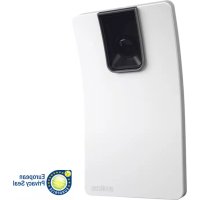
HPD2 - Motion detector STEINEL - Free user manual and instructions
Find the device manual for free HPD2 STEINEL in PDF.


| Product type | KNX Human Presence Detector |
| Brand | Steinel |
| Model | HPD2 |
| Dimensions (H × W × D) | 156 × 86 × 52 mm |
| KNX bus supply voltage | 21-30 V DC, 10 mA |
| Additional voltage | 18-57 V DC, 4 W |
| Detector type | Camera |
| Area of use | Indoor |
| Mounting | Vertical wall |
| Installation height | 2.3 to 6 m |
| Detection angle | 110° |
| Detection zones | Max. 5 zones |
| Range | 10 m |
| Operating temperature range | 0 to 40 °C |
| Protection class | IP20 |
| Measurable brightness range | 2 to 2000 lx |
| Temperature measurement accuracy | ±1 °C |
| Measurable relative humidity range | 20-90 % ±5 % |
| Main functions | People detection and counting, brightness measurement, temperature, humidity |
| Connection | KNX bus, micro USB port for configuration |
| Configuration | Web interface via browser |
| Delivery contents | Wall mounts (surface, flush, angle/45°), screws, USB cable |
| Maintenance | Clean the lens with a damp cloth without detergent |
| Manufacturer warranty | 5 years (detectors) |
| Safety | Installation by professional according to VDE 0829, NF-C 15100 standards |
Frequently Asked Questions - HPD2 STEINEL
User questions about HPD2 STEINEL
0 question about this device. Answer the ones you know or ask your own.
Ask a new question about this device
Download the instructions for your Motion detector in PDF format for free! Find your manual HPD2 - STEINEL and take your electronic device back in hand. On this page are published all the documents necessary for the use of your device. HPD2 by STEINEL.
USER MANUAL HPD2 STEINEL
Realtek RTL8152 based 10/100M Micro USB Ethernet Adapter
Realtek RTL8153 based USB 3.0 Gigabit Ethernet Adapter10/100/1000M Microchip
- LAN78XX Based USB Ethernet Adapter
- ASIX AX88xxx Based USB 2.0 Ethernet Adapter
- ASIX AX88179 USB 3.0 to Gigabit Ethernet Adapter
- Please read carefully and keep in a safe place.
- Undercopyright. Reproduction either in whole or in part only with our consent.
- Subject to change in the interest of technical progress.
Symbols

Reference to other information in the document.
2. General safety precautions

Disconnect the power supply before attempting any work on the sensor.
- This product must only be installed by a qualified electrician in accordance with national wiring regulations as defined in VDE 08 29 (DIN EN 5000 90).
- Installed improperly, low-voltage products can cause extremely serious personal injury or damage to property.
- This product must never be connected to the mains supply voltage (230 V AC), because it is intended for connection to a safety extra-low voltage power supply (SELV).v
3. Connection
- Wiring diagram (Fig. 6.1)
- Connection with KNX bus (21 - 30 V DC) and additional voltage (18 - 57 V DC)
Electrical installation / automatic mode
The wiring leads selected for installation must comply with the wiring regulations laid down in VDE 08 29 (DIN EN 5000 90) - (safety precautions).
4. HPD2 KNX
Proper use
Human presence detector for installing on vertical indoor walls
Function
Human presence detector, analysing the image directly in the sensor
- Detects persons and counts them, whether sitting, standing, moving or still
- Only responds to persons - therefore no inadvertent triggering due to animals in the detection zone
- Settings made using the configuration interface via web browser
The following values are transmitted to the KNX bus:
- Number of persons for 5 zones
- Light levels for 5 zones
- Presence detection
- Temperature indication
-Humidity - Values cumulated for all zones (persons, light levels)
Note: The camera compares images with the "human being" model. The images cannot be exported for reasons of data privacy.
System components
Package contents (Fig. 4.1)
Product dimensions (Fig. 4.2)
Product components (Fig. 4.1 + 4.3)
A Wall mount, surface-mounted
B Wall mount, corner / 45^
C Wall mount, concealed
D Sensor lens
E Sensor housing
F Infrared LED
G Status LED
H KNX terminal
I Reset button
J Micro USB port
K Locking screw
L Retaining screws
5. Mounting
- Check all components for damage.
- Do not use the product if it is damaged.
- The sensor is suitable for installing on vertical walls at a height of at least 2.3m .
- Select an appropriate mounting location, giving consideration to sensor reach and mounting height (Fig. 5.1)
Note: Please note that no detection takes place in the camera's blind spot. The site of installation must be glare-free.
-
Mark any necessary drill holes and insert wall plugs
Make sure the sensor is aligned correctly (Fig. 5.2) -
Concealed mounting (Fig. 5.3)
- Surface mounting (Fig. 5.4)
- Corner mounting (Fig. 5.5, 5.6, 5.7)
- Wall mounting 45^ (Fig. 5.8, 5.9)
Note: When using the corner / 45^ wall mount (B), the surface wall mount (A) or concealed wall mount (C) must always be mounted for fitting the sensor housing. (Fig. 5.8, 5.9)
The mounting tab can be removed when installing with the corner / 45^ wall mount. (Fig. 5.7)
-
Connect KNX cable to the sensor. (Fig. 5.10)
-
Fit sensor housing onto the wall mount. (Fig. 5.10)
- Secure wall mount and sensor housing using the locking screw (K).
(Fig. 5.10)
6. Operation / configuration
Connection examples (Fig. 6.1)
Remove the USB cover and connect the sensor to a laptop using a USB cable (Fig. 6.2)
- Start the web browser
- Set up LAN access to the sensor
- Connect USB cable to a laptop (factory-set IP address 10.88.0.2)
Note: To do this, please install the RNDIS driver on your laptop
OR:
- Connect USB to a laptop via Ethernet adapter (factory-set IP address 192.168.1.200)
Note: The adapter must support one of the following chipsets:
Realtek RTL8150 USB 10/100 Fast Ethernet adapter
Realtek RTL8152 based 10/100M Micro USB Ethernet adapter
Realtek RTL8153 based USB 3.0 Gigabit Ethernet adapter 10/100/1000M Microchip
- LAN78XX-based USB Ethernet adapter
- ASIX AX88xxx-based USB 2.0 Ethernet adapter
- ASIX AX88179 USB 3.0 to gigabit Ethernet adapter
The computer must be set to the same sub-network (192.168.1.0/24) and the default sensor IP in the web browser. A customised IP set in a DHCP client can be set up via the web interface.
Code for basic mode: updwd123
Code for professional mode: adm123
Note: You will find an application description at knx.steinel.de.
- Issue physical address and generate application program in the ETS.
- Load the physical address and application program into the human presence detector. If you are prompted to do so, activate the programming mode under settings.
Note: The HPD2 has a learning-in time of approx. 30 minutes. Do not enter the room during this period as the HPD2 is learning the room's characteristics.
Windows or other panes of glass should be identified as non-detection zones as miscounts may otherwise occur.
Further information is available under "Help" in the HPD2 web interface.
Function Reset Button
- Press and hold < 5 s (blinking period 400 ms): turn off KNX programing mode
- Press and hold 5s - 10s (blinking period 200 ms): turn on KNX programing mode
- Press and hold 10 s–15 s (blinking period 120 ms): restart
- Press and hold >15 s (blinking stops): reset to factory defaults
7. Troubleshooting
Persons identified
-
Persons within the detection zone or the defined detection footprint
-
Check detection zone
- Reduce sensor sensitivity (web browser)
Persons not being identified
- Persons cannot be identified by the sensor
-
Persons only partially identifiable (leg, shoulder, head)
-
Ensure unobstructed sensor vision
- Make sure that persons are not concealed by plants etc.
- Increase sensor sensitivity (web browser)
8. Maintenance / care
- No maintenance possible.
- The detector lens may be cleaned with a damp cloth if it becomes dirty (do not use cleaning agents).
9. Disposal
Electrical and electronic equipment, accessories and packaging must be recycled in an environmentally compatible manner.
Do not dispose of electrical and electronic equipment as domestic waste.
EU countries only:
Under the current European Directive on Waste Electrical and Electronic Equipment and its implementation in national law, electrical and electronic equipment no longer suitable for use must be collected separately and recycled in an environmentally compatible manner.
10. Manufacturer's warranty
Manufacturer's warranty of STEINEL
All STEINEL products meet the highest quality standards. For this reason, we, the manufacturer, are pleased to provide you, the customer, with a warranty under the following terms and conditions: The warranty covers the absence of deficiencies which are proven to be the result of a material defect or fault in manufacturing and which are reported to us immediately after detection and within the warranty period. The warranty shall cover all STEINEL Professional products sold and used in Germany.
Our warranty cover for consumers
The provisions below apply to consumers.
A consumer is any natural person who, on entering into the purchase transaction, neither acts in exercising their commercial nor their self-employed activity.
You can opt for warranty cover in the form of repair or replacement which will be provided free of charge (if applicable, in the form of a successor model of the same or higher quality) or in the form of a credit note.
In the case of sensors, floodlights, outdoor and indoor lights, the warranty period for the STEINEL Professional product you have purchased is:
5 years
for hot-air and hot-melt gluing products:
1 year
in each case from the date on which the product was purchased.
We shall bear the shipping costs but not the transport risks involved in return shipment.
Our warranty cover for entrepreneurs
The provisions below apply to entrepreneurs. Entrepreneur is a natural or legal person or partnership with legal personality who or which, on entering into the purchase transaction, acts in exercising their or its commercial or self-employed activity.
We have the option of providing warranty cover by rectifying deficiencies free of charge, replacing a product free of charge (if applicable, in the form of a successor model of the same or higher quality) or by issuing a credit note. In the case of sensors, floodlights, outdoor and indoor lights, the warranty period for the STEINEL Professional product you have purchased is:
5 years
for hot-air and hot-melt gluing products:
1 year
in each case from the date on which the product was purchased.
Within the scope of warranty cover, we shall not bear your expenses accruing from subsequent fulfillment nor shall we bear your expenses for removing the defective product and installing a replacement product.
Statutory rights accruing from defects, gratuitousness
The warranty cover described here shall be applicable in addition to the statutory rights of warranty - including special consumer protection provisions - and shall not restrict or replace them. Exercising your statutory rights in the event of defects is gratuitous.
Exemptions from the warranty
All replaceable lamps are expressly excluded from this warranty.
In addition to this, the warranty shall not cover:
- any wear resulting from use or any other natural wear of product parts or any deficiencies in the STEINEL Professional product that are attributable to wear caused by use or other natural wear,
- any improper or non-intended use of the product or any failure to observe the operating instructions,
- any unauthorised additions, alterations or other modifications to the product or any deficiencies attributable to the use of accessory,
-supplementary or replacement parts which are not genuine STEINEL parts, - any maintenance or care of products that is not carried out in accordance with the operating instructions,
- any attachment or installation that is not in accordance with STEINEL's installation instructions,
-any damage or loss occurring in transit.
Application of German law
The warranty shall be governed by German law excluding the United Nations Convention concerning the International Sale of Goods (CISG).
Making claims
If you wish to make a warranty claim, please send your product complete and carriage paid with the original receipt of purchase, which must show the date of purchase and product designation, either to your retailer or directly to us at STEINEL (UK) Ltd. - 25 Manasty Road, Axis Park, Orton Southgate, GB- Peterborough Cambs PE2 6UP United Kingdom. For this reason, we recommend that you keep your receipt of
purchase in a safe place until the warranty period expires.
| 11. Technical specifications | |
| Dimensions (H × W × D) 156 × 86 × 52 mm | |
| Power supply KNX bus 21-30 V DC, 10 mA | |
| Additional voltage 18-57 V DC, 4 W | |
| Sensor type Camera | |
| Application Indoors | |
| Mounting Vertical wall | |
| Mounting height 2.3-max. 6 m | |
| Angle of coverage 110° | |
| Detection limitation Max. 5 detection zones / Max. 3 non-detection zones | |
| Reach 10 m | |
| Temperature range 0 °C to 40 °C | |
| IP rating IP20 | |
| Light value 2-2,000 lux | |
| Value range for temperature sensor 0 °C-40 °C +/-1 °C | |
| Value range for humidity sensor 20 %-90 % +/-5 % |
FR
Realtek RTL8150 USB 10/100 Fast Ethernet Adapter
Realtek RTL8152 based 10/100M Micro USB Ethernet Adapter
Realtek RTL8153 based USB 3.0 Gigabit Ethernet Adapter10/100/1000M Microchip
- LAN78XX Based USB Ethernet Adapter
- ASIX AX88xxx Based USB 2.0 Ethernet Adapter
- ASIX AX88179 USB 3.0 to Gigabit Ethernet Adapter
Realtek RTL8150 USB 10/100
Fast Ethernet adaptor
Realtek RTL8152 based 10/100M
Micro USB Ethernet adaptor
Realtek RTL8153 based USB 3.0
Gigabit Ethernet adaptor 10/100/1000M mikrochip
- LAN78XX Based USB Ethernet adapter
- ASIX AX88xxx Based USB 2.0 Ethernet adaptor
- ASIX AX88179 USB 3.0 to Gigabit Ethernet adaptor
Pocitac musi byt nastaven na stejnou subsit' (192.168.1.0/24) a prednastaveny
Gigabit Ethernet Adapter
10/100/1000M Microchip
- LAN78XX Based USB Ethernet Adapter
- ASIX AX88xxx Based USB 2.0
Ethernet Adapter
- ASIX AX88179 USB 3.0 to Gigabit Ethernet Adapter
Računalo mora biti poděseno na istu podmrežu (192.168.1.0/24) i prethodno poděsen senzor IP u web pretraživaču. Pojedinačni IP ili DHCP clientmöze se podesiti preko web sučelja. Lozinka za osnovni modus: updwd123 Lozinka za profi modus: adm123
Napomena: opis applikacije naci cete na knx.steinel.de
- Dodijeliti fizičku adresu i izraditi aplikacijiški program u ETS.
- Učitati fizicku adresu i aplikacijski program u senzor osoba. Ako se to zahtijeva, pod postavkama aktivirajte modus programiranja.
Napomena:
HPD2 ima vrijeme učenja od oko 30 minuta. U tom vremenu ne ulazite u prostoriju jer HPD2 uči okolnosti koje Vladaju u prostoriji.
Prozore i ostale staklene povrsine trebalo bi identificirati kao zone koje ne treba detektirati jer u suprotnom moze doci do pogresnog brojanja.
Ostale napomene naci cete u poglavlju "Pomoc" na web sučelju senzora HPD 2.
Realtek RTL8153 based USB 3.0
Gigabit Ethernet adapter
10/100/1000M Microchip
-
LAN78XX Based USB Ethernet adapteriga
-
ASIX AX88xxx Based USB 2.0
Ethernet adapteriga
- ASIX AX88179 USB 3.0 Gigabit
Ethernet adapteriga
- ASIX AX88179 USB 3.0 to Gigabit
Ethernet Adapter
- ASIX AX88179 USB 3.0 to Gigabit
Ethernet Adapter
Datoram interneta pārlukprogramma
Realtek RTL8152 based 10/100M Micro USB Ethernet Adapter
Realtek RTL8153 based USB 3.0 Gigabit Ethernet
Adapter10/100/1000M Microchip
- LAN78XX Based USB Ethernet Adapter
- ASIX AX88xxx Based USB 2.0
Ethernet Adapter
- ASIX AX88179 USB 3.0 to Gigabit Ethernet Adapter
Bye6-6pay3bpa KOMNIOThbPbT Tp8Ba da e HacIpoeH B cblaTa cy6-MpeJka (192.168.1.0/24) n npedBapntelno n36paHTo IP Ha ceH3opa. INdINbUdyaJIHo IP nn DHCP-Client mOrat da 6bdaT HacIpoEHn ppe3 ye6-nHTeppeJca.
Yka3aHne: yHTbIBaTb, YTO B MePTBOM yIy KaMepbI He npOxCxOJIT peNCTpaLNI.
MeCTO MOHTaKa IOnXHo 6bITb 6e3 6JIKNOB.
-
EcIn Heo6xOIMO, HAMETNTb IN pOcBepJIHTb OTBepCTnI N BCTaBNTb IIO6eIN.
-
Co6JIHOJaTb KoppeKTHoe BblpaBnBa-Hne ceHCopa (pnc. 5.2)
-
MoHTaJCKpbIToN npoBODKoN (pnc. 5.3)
- MoHTaK OTKpbIToN npOBoIDKO (pnc. 5.4)
- MoHTaX B yrOJI (pnc. 5.5, 5.6, 5.7)
- HacTeHHbIM MOHTaX 45° (pnc. 5.8, 5.9)
Yka3aHne: pR MoHTaXe KPOHHTeHHa-yrOJIbHnKa / 45° (B)ДЯ NaIeBaHnKOpnyCa ceHCopa cIeIyET BceIaYCTaHaBnIBaTb KPOHHTeH OTKpbIToN PpOBODKOi (A) IIN CKpbIToN PpOBODKOi (C). (pnc. 5.8, 5.9)