
ED270R - Monitor ACER - Free user manual and instructions
Find the device manual for free ED270R ACER in PDF.
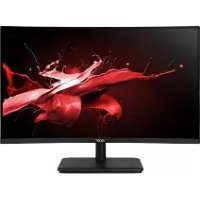


| Brand | Acer |
| Model | ED270R |
| Product Type | LCD Monitor |
| Screen Size | 27 inches (69 cm) |
| Maximum Resolution | 1920 × 1080 at 165 Hz (DP) / 144 Hz (HDMI) |
| Panel Type | VA |
| Brightness | 250 cd/m² (typical) |
| Contrast Ratio | 4000:1 (typical) |
| Response Time | 5 ms |
| Viewing Angle | 178° horizontal / 178° vertical |
| Refresh Rate | 48 – 165 Hz |
| Connectors | 2 × HDMI, 1 × DP |
| Dimensions (W × D × H) | 610.5 × 446.3 × 195.9 mm |
| Net Weight | 3.9 kg |
| Power Supply | 100 – 240 V, 50/60 Hz |
| Power Consumption (on) | 30 W (typical) |
| Power Consumption (standby) | 0.5 W (typical) |
| Energy Class | A |
| Operating Temperature | 0 °C to 40 °C |
| Storage Temperature | -20 °C to 60 °C |
| Stand Attachment | Removable, tilt -5° to +20° |
| OSD Functions | Brightness, contrast, color temperature, FreeSync, image modes, etc. |
| Cleaning | Soft cloth, solvent-free solution; do not spray directly |
| Safety | Do not open the housing, do not expose to moisture, disconnect if damaged |
| Repairability | Service by qualified technician; unspecified parts |
Frequently Asked Questions - ED270R ACER
User questions about ED270R ACER
0 question about this device. Answer the ones you know or ask your own.
Ask a new question about this device
Download the instructions for your Monitor in PDF format for free! Find your manual ED270R - ACER and take your electronic device back in hand. On this page are published all the documents necessary for the use of your device. ED270R by ACER.
USER MANUAL ED270R ACER
LCD Monitor NITRO EDO series - ED270R
USER GUIDE
Acer LCD Monitor Quick Start Guide (QSG)
Important Safety Instructions
Please read the following instructions carefully.
- Cleaning the LCD display screen: first, ensure that the power adapter you are using matches electrical standards for your region.
- Turn off the LCD monitor and unplug the power adapter.
- Spray a solvent-free cleaning solution onto your rag and gently wipe the screen.
- Never spill any liquid directly onto or into the screen or its case.
- Do not use any ammonia- or alcohol-based cleaners on the LCD monitor screen or case.
- Acer will not be liable for damage resulting from use of any ammonia or alcohol-based cleaners.
- Do not place the LCD display near a window. Exposure to rain, moisture, or direct sunlight can cause serious damage to the device.
- Do not press on the LCD screen. Excessively forceful pressing can cause permanent damage to the display.
- Do not remove the case or attempt to repair the machine by yourself. All maintenance tasks should be performed by an authorized technician.
- Store the LCD display in a room with a temperature between -20°C and 60°C (-4°F to 140°F). Permanent damage may result if the LCD display is stored outside of this range.
- Unplug the monitor's power adapter immediately and contact an authorized technician if:
- The signal cable between the monitor and the computer is worn or damaged.
- Liquid spills onto the LCD display or the display is exposed to rain.
- The LCD monitor or case is damaged.
Attaching the monitor base
- Unpack the monitor base and place the base on a smooth work surface.
- Unpack the monitor.
- Attach the monitor stand arm to the base.
- Make sure the base snaps into the monitor stand arm. (Selected models only)
- Use a screwdriver to turn the black screw to secure the arm to the display. (Selected models only)
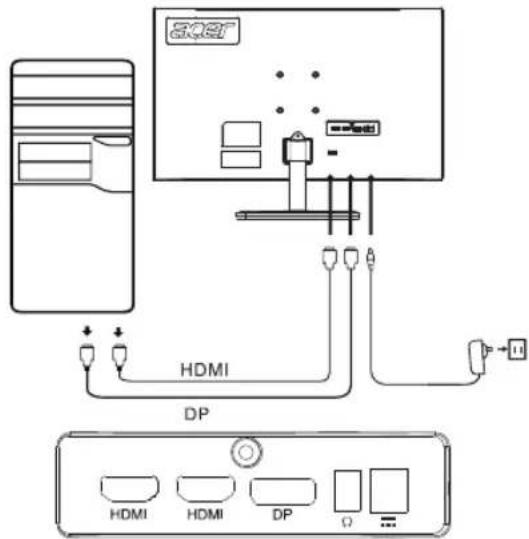
Connect the monitor to your computer
- Turn off your computer and unplug the power cord.
- Connect digital cable (only Dual input model) a. Make sure the monitor and computer are powered off. b. Connect one end of the HDMI/DP cable to the back of the monitor and the other end to the HDMI/DP port on your computer.
Note: The maximum display refresh rate for HDMI cables is 144Hz. The maximum display refresh rate for DP cables is 165Hz.
- Connect the audio cable (audio input models only) (optional)
- Plug the monitor power adapter into the power port on the back of the monitor.
- Plug the computer power cable and monitor power adapter into the nearby power outlet.
External control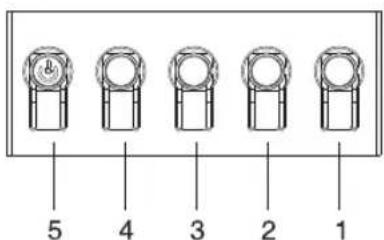
Number Picture Description
| 1 Go to the main menu. |
| 2 Enter the source mode. |
| 3 Enter the volume control menu. |
| 4 Enter brightness adjustment. |
| 5 In the powered-off state, pressing the button powers on the device; in the powered-on state, pressing the button normally enters the mode switching menu, and long-pressing for 3 seconds powers off the device. |
Regulatory and safety statements
FCC statement
This equipment has been tested and found to comply with the limits for a Class B digital device, pursuant to Part 15 of the FCC Rules. These limits are designed to provide reasonable protection against harmful interference when the equipment is installed in a residential area. This equipment generates, uses, and can radiate radio frequency energy, and if not installed and used in accordance with the instructions, may cause interference to radio communications.
However, there is no guarantee that interference will not occur in a specific installation. If the device does cause interference to radio or television reception (which can be determined by turning the equipment off and on), the user is encouraged to try to correct the interference by one or more of the following measures:
- Reorient or relocate the receiving antenna.
- Increase the separation between the equipment and receiver.
- Connect the equipment into an outlet on a circuit different from that to which the receiver is connected.
- Consult the dealer or an experienced radio/TV technician for help.
Note
To prevent damage to the monitor, do not lift the monitor using the stand.
Note: shielded cable
All connections to other computing devices must be through shielded cables to comply with EMC regulations.
Note: peripherals
Only certified peripherals (input/output devices, terminals, printers, etc.) that meet Class B limits should be connected to the device. Using uncertified peripherals may cause interference to radio and television reception.
Note
Any changes or modifications not expressly approved by the manufacturer could void the user's authority to operate this product.
Operating conditions
This device complies with Part 15 of the FCC Rules. Operation is subject to the following two conditions: (1) this device may not cause harmful interference, and (2) this device must be able to accept any interference received, including interference that may cause undesired operation.
Note: Canadian users
This Class B digital device complies with Canadian ICES-003 specifications.
Explanatory note on "Regulations on the Management of Waste Electrical and Electronic Products Recycling and Disposal"
To better care for and protect our planet, when the user no longer needs this product or the product end of life, please comply with national laws and regulations on the recycling of electrical and electronic product waste, and recycle it through local manufacturers with nationally recognized recycling qualifications.
Abandonment of waste equipment for EU household users
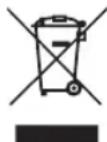
This symbol on the product or on its packaging indicates that the product must not be disposed of with other household waste. When disposing of used devices, it is your responsibility to bring it to a collection point that recycles used electrical and electronic equipment. The separate collection and recycling of used devices at the time of disposal helps to conserve natural resources and ensures that they are recycled in a manner that protects human health and the environment. For more information about recycling points for used devices, please contact your local city office, household waste disposal service, or the shop where you purchased the product.
CE declaration of conformity
Hereby, Acer Inc., declares that this LCD monitor is in compliance with the essential requirements and other relevant provisions of EMC Directive 2014/30/EU, Low Voltage Directive 2014/35/EU, and RoHS Directive 2011/65/EU and Directive 2009/125/EC with regard to establishing a framework for the setting of ecodesign requirements for energy-related product.
Acer monitor is purposed for video and visual display of information obtained from electronic devices.
SPECIFICATION
| LCD Panel | Driving System TFT Color LCD | |
| Size 27"W (69 cm) | ||
| Pixel Pitch 0.1038 mm (H) x 0.3114 mm (V) | ||
| Brightness 250 cd/m | 2 (Typical) | |
| Contrast 4000:1 (Typical) | ||
| Viewable Angle 178° (H) | 178° (V) (CR=10) | |
| Response Time 5 ms | ||
| Panel Type VA | ||
| H-Frequency 53.93 - 183.15 KHz | ||
| V-Frequency 48 - 165 Hz | ||
| Display Colors 16.7M Colors | ||
| Dot Clock | HDMI: 340 MHzDP: 360 MHz | |
| Maximum Resolution | HDMI: 1920×1080 @ 144HzDP: 1920×1080 @ 165Hz | |
| Plug & Play VESA DDCCI/DDC2B | ||
| Energy Efficiency Class A | ||
| *Annual Energy Consumption 44 (kWh) (for HDMI-Input Model) | ||
| Power Consumption(at 200 nits) | On Mode | 30 W (Typical) |
| Off Mode (Stand By) | 0.5 W (Typical) | |
| Input Connector | DPHDMI ×2 | |
| Input Video Signal | DPHDMI (Only HDMI-Input Model) (Optional) | |
| Maximum Screen Size | Horizontal: 608.89 mmVertical: 348.34 mm | |
| Power Source | INPUT: 100-240 V~ 50/60 Hz | |
| Environmental Considerations | Operating Temp: 0° to 40°CStorage Temp: -20° to 60°COperating Humidity: 20% to 90% | |
| Dimensions | 610.5 (W) x 446.3 (H) x 195.9 (D) mm | |
| Weight (N. W.) 3.9 kg (net) | ||
| Mechanism Specifications | Tilt: -5° to +20°Swivel: NoHeight adjustment: NoPivot: NoDetachable foot stand: Yes | |
| External Controls | Switch/Buttons | Power Button Hotkey 3Hotkey 1 Hotkey 4Hotkey 2 |
| Functions | Brightness TransparencyContrast Refresh Rate NumBlue Light OSD LockBlack Boost InputACM Auto SourceGamma Hot Key AssignmentColor Temp. Wide ModeModes DDC/CIsRGB Mode HDMI Black LevelGrayscale Mode Quick Start Mode6-axis Hue Information6-axis Saturate Reset All SettingsVolume MuteOver DriveFreeSyncAim PointLanguage OSD Timeout | |
| All specifications are subject to change without notice. | ||
Find manuals and other documents for your Acer product on the official Acer support website. *Annual energy consumption is calculated using the typical power consumption 4 hours per day, 365 days per year.
Important safety instructions
Acer LCD Monitor Quick Start Guide
Important safety instructions
Regulatory Compliance





Declaration of Conformity
We,
Acer Incorporated
8F, 88, Sec. 1, Xintai 5th Rd., Xizhi, New Taipei City 221, Taiwan
And,
Acer Italy s.r.l.
Via Lepetit, 40, 20020 Lainate (MI) Italy
Tel: +39-02-939-921, Fax: +39-02 9399-2913
www.acer.it
Product:
LCD Monitor
Trade Name:
ACER
Model Number:
ED270R
SKU Number:
ED270R XXXXXX
("x" = 0~9, a~z, A~Z, or blank)
We, Acer Incorporated, hereby declare under our sole responsibility that the product described above is in conformity with the relevant Union harmonization legislations as below Directive and following harmonized standards and/or other relevant standards have been applied:
EMC Directive: 2014/30/EU
EN55032:2012/AC:2013 Class B
EN 55024:2010
EN55032:2015/AC:2016 Class B
EN61000-3-3:2013
EN61000-3-2:2014 Class D
LVD Directive: 2014/35/EU
EN 60950-1:2006/A11:2009/A1:2010/A12:2011/A2:2013
RoHS Directive: 2011/65/EU
EN 50581:2012
☒ ErP Directive: 2009/125/EC
☒ Regulation (EC) No. 1275/2008; EN 50564:2011
Year to begin affixing CE marking: 2020.
NuJum
RU Jan / Sr. Manager
Acer Incorporated (Taipei, Taiwan)
Jan.15,2020
Date

Federal Communications Commission Declaration of Conformity
This device complies with Part 15 of the FCC Rules. Operation is subject to the following two conditions: (1) this device may not cause harmful interference, and (2) this device must accept any interference received, including interference that may cause undesired operation.
The following local Manufacturer /Importer is responsible for this declaration:
| Product: | LCD Monitor |
| Model Number: | ED270R |
| SKU Number: | ED270R xxxxxx(? = 0~9, a ~ z, or A ~ Z) |
| Name of Responsible Party: | Acer America Corporation333 West San Carlos St. Suite 1500San Jose, CA 95110U. S. A. |
| Address of Responsible Party: | |
| Contact Person: | Acer Representative |
| Phone No.: | 254-298-4000 |
| Fax No.: | 254-298-4147 |

- USER GUIDE
- ACER LCD MONITOR QUICK START GUIDE (QSG)
- IMPORTANT SAFETY INSTRUCTIONS
- ATTACHING THE MONITOR BASE
- CONNECT THE MONITOR TO YOUR COMPUTER
- REGULATORY AND SAFETY STATEMENTS
- FCC STATEMENT
- NOTE
- NOTE: SHIELDED CABLE
- NOTE: PERIPHERALS
- OPERATING CONDITIONS
- NOTE: CANADIAN USERS
- EXPLANATORY NOTE ON "REGULATIONS ON THE MANAGEMENT OF WASTE ELECTRICAL AND ELECTRONIC PRODUCTS RECYCLING AND DISPOSAL
- ABANDONMENT OF WASTE EQUIPMENT FOR EU HOUSEHOLD USERS
- CE DECLARATION OF CONFORMITY
- ACER LCD MONITOR QUICK START GUIDE
- DECLARATION OF CONFORMITY
- ACER INCORPORATED
- ACER ITALY S.R.L
- FEDERAL COMMUNICATIONS COMMISSION DECLARATION OF CONFORMITY
Brand : ACER
Model : ED270R
Category : Monitor